Web-Based Group Decision Support System: an Economic Application
Ion ISTUDOR, Lumini
ţ
a DU
ŢĂ
Valahia University, Targoviste, Romania,
[email protected], [email protected]
Decision Support Systems (DSS) form a specific class of computerized information systems
that support business and managerial decision-making activities. Making the right decision in
business primarily depends on the quality of data. It also depends on the ability to analyze the
data with a view to identifying trends that can suggest solutions and strategies. A
“cooperative” decision support system means the data are collected, analyzed and then
provided to a human agent who can help the system to revise or refine the data. It means that
both a human component and computer component work together to come up with the best
solution. This paper describes the usage of a software product (Vanguard System
)
to a
specific economic application (evaluating the financial risk assuming that the rate of the
economic profitability can be under the value of the interest rate)
Keywords: Decision Script, Decision Support Systems (DSS), Leverage Effect, Software Tool,
Web Support
Introduction
A DSS is an interactive software-based system meant to help decision-makers to compile useful information from raw data, documents, personal knowledge, and/or business models and artificial intelligence–based tools to identify, model, and solve decision problems [1], [2]. DSS belong to an environment with multidisciplinary foundations, including database research, modeling simulation and optimization methods, artificial intelligence, human computer interaction, web-technologies, software engineering and so on.
Typical intelligence activities that a DSS supports include accessing all information assets, including legacy and relational data sources, comparative data figures, projected figures based on new data or assumptions, consequences of different decision alternatives, given past experience in a specific context.
This article aims at presenting an application for group decisions in economic analysis. The remaining part of this paper is organized as it follows. First, the characteristic features of the Group DSS are reviewed. Then a practical DSS tool which can be found on the market is described and an application example is presented.
2 Characteristics of Group Decision Support Systems
To support a set of decision-makers working together as a group, DSSs need a typical combination of hardware, software, people, and
procedures. Each member of the group have a personal computer linked to the personal computers of the other members of the group and to one or more large public viewing screens, so that each member can see the inputs of other members or let other members to see their work.. Computer based information systems which are meant to support group (multi-participant) activities have been known under various names such as group decision support systems (GDSS), computer- supported cooperative work (CSCW), group support systems (GSS), collaboration support systems (CSS), and electronic meeting systems (EMS) [1] [4]
The Group DSS (GDSS) is an interactive, communication and computer based system, utilized to facilitate the solution of unstructured problems by a set of co-operating decision-makers. It consists of most of the DSS elements, plus a specific software to support group decisions. GDSS is a particular subclass of the more general class of computerized collaborative work systems. Special design, flexibility, ease of use, decision-making support, anonymous input, reduction of negative group behavior, parallel communications are typical characteristic features of GDSS [2]. A GDSS supports more than one person which works on a shared task. Several people work together to come up with a set of decisions to implement a solution or strategy. Most communication-driven DSS aim to support the work of internal teams, which may include external partners as well. The most intensively utilized technologies for deploying
1
the GDSS are web-based technologies and client-server technologies. Also, groupware, bulletin boards, audio and video conferencing are utilized for communication-driven decision support. A general architecture of a GDSS includes: a) The hardware element, which is the conference facility which includes the decision room, computers, internet access, and other means of communications,
b) Software tools, which are web-based applications, e-questionnaires, e-brainstorming, idea organizers, group dictionaries, questionnaire tools, policy formation tools and
c) People, who include the decision-makers themselves and, in many cases, a trained facilitator and, possibly, the support staff [4].
3 Vanguard System Software
Vanguard System (former Decision Pro) of Vanguard Software Corporation as described in [5] is a powerful tool for decision-support analysis and business modeling. It is designed for helping the decision-maker to take management
decisions that are most likely to lead to favorable results by providing a quite rich set of techniques such as risk analysis, planning contingent actions, and comparing alternatives of which the future outcomes are uncertain. The tool combines all of the basic quantitative methods which are utilized in management applications with the features of spreadsheets and AI (artificial intelligence) for producing an advanced business modeling system. In contrast with the spreadsheet add-ons and special-purpose utilities, the analytic capabilities of Vanguard System have been placed into the very “core product” so as to allow the decision-maker to combine a variety of quantitative methods to produce quite advanced business models. Moreover, any model which is built in Vanguard System can be published as an online application on the Internet or in the corporate Intranet. Consequently, no special piece of software other than a standard Web browser is needed. This enables the development of web-based GDSS applications.
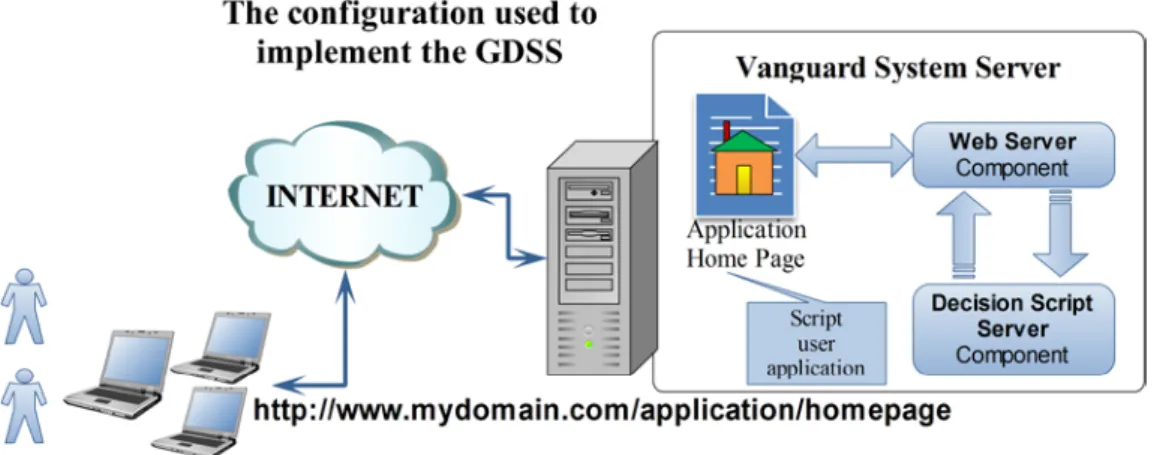
Fig. 1. Web-based hardware architecture The hardware configuration used to implement
the GDSS is presented in Figure 1. The computer on which Vanguard System server runs can be viewed both as an application server and as a web server. When decision-makers visit the site (the home page of the WEB-Based GDS application, which is posted on the computer running Vanguard System server), they click on a hyperlink to run a script (or an application) on the computer where is running an Internet browser. They are automatically transferred to the Web server component of the Vanguard System and then to the DecisionScript Server, the component for running the script. When the script is
complete, visitors are automatically transferred back to the launch page on the Vanguard System server, the primary server of the WEB-Based GDSS [5].
DecisionScript Server was a distinct application until 2006. Since then it was integrated into the new product Vanguard System. Thus Vanguard Software has incorporated all the functionalities of DecisionScript Server improving the group collaboration and analysis capabilities. Applications developed with Decision Script Server are 100% compatible with the Vanguard System, operating without alteration.
4 An Application Example
One of the most common financial objectives expected to be achieved by an enterprise during its financial exercise is the performance. From an economical and financial perspective, obtaining performance means achieving economic profitability and economic growth. Those performance indicators give information about economic profitability and treasury cash flows generated by the exploitation of the organization’s resources. Therefore, the financial risk has a significant impact on the enterprise performance. A balanced enterprise funding policy (regarding loans and core equity) is essential to minimize the financial risk.
To achieve their objectives, the managers of the enterprise use the core equity and the loan capital. The positive result (the profit) obtained by loan financing is perceived as a prize to the assumed risk by capital borrowing. This is happening in the case of economic profitability rise over the value of the loan interest rate. The problem is to evaluate the financial risk assuming
that the rate of the economic profitability can be under the value of the interest rate.
One begins by calculating the leverage effect of indebtedness with following formulas [6]:
E=Rf-Re (1)
Rf = Re+(Re-d)*L (2) d = ChDob/DAT (3)
Re= REx/ AE = (CA/AE) * (REx/CA) = VrAE * Rc (4) Rc = REx/CA (5) VrAE = CA/AE (6) Ei=Rfi – Rei (7) Rfi=(1-t)*Rf (8) Rei=(1-t)*Re (9)
The significance of the variables of equations (1) – (9) can be found in Table 1 bellow.
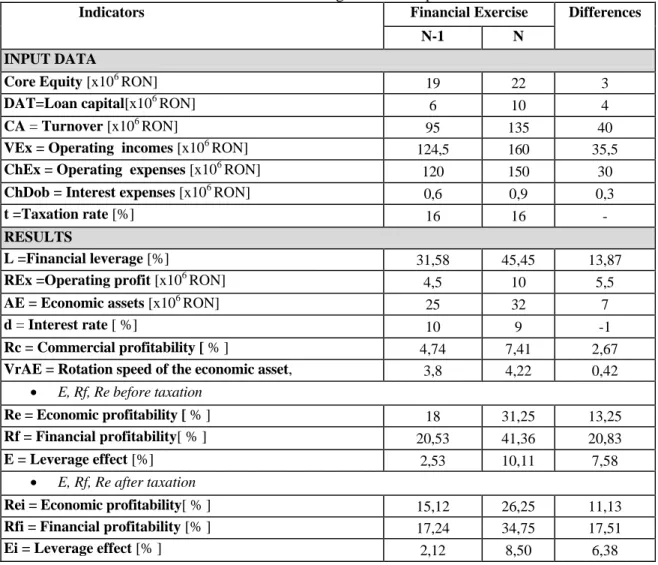
To estimate the influence of the indebted degree of the enterprise and its economic profitability, input data of the Table 1 was used to apply the method of leverage effect.
In the table below, input data and results
differences for two financial exercises (N-1) and N are given.
Table 1. Data for leverage effect computation
Indicators Financial Exercise Differences
N-1 N
INPUT DATA
Core Equity [x106 RON] 19 22 3
DAT=Loan capital[x106 RON] 6 10 4
CA = Turnover [x106 RON] 95 135 40
VEx = Operating incomes [x106 RON] 124,5 160 35,5
ChEx = Operating expenses [x106 RON] 120 150 30
ChDob = Interest expenses [x106 RON] 0,6 0,9 0,3
t =Taxation rate [%] 16 16 -
RESULTS
L =Financial leverage [%] 31,58 45,45 13,87
REx =Operating profit [x106 RON] 4,5 10 5,5
AE = Economic assets [x106 RON] 25 32 7
d = Interest rate [ %] 10 9 -1
Rc = Commercial profitability [ % ] 4,74 7,41 2,67
VrAE = Rotation speed of the economic asset, 3,8 4,22 0,42
• E, Rf, Re before taxation
Re = Economic profitability [ % ] 18 31,25 13,25
Rf = Financial profitability[ % ] 20,53 41,36 20,83
E = Leverage effect [%] 2,53 10,11 7,58
• E, Rf, Re after taxation
Rei = Economic profitability[ % ] 15,12 26,25 11,13
Rfi = Financial profitability [% ] 17,24 34,75 17,51
Decision Pro module of Vanguard System was utilized to implement the computerized version
of the model described by equations (1) through (9).
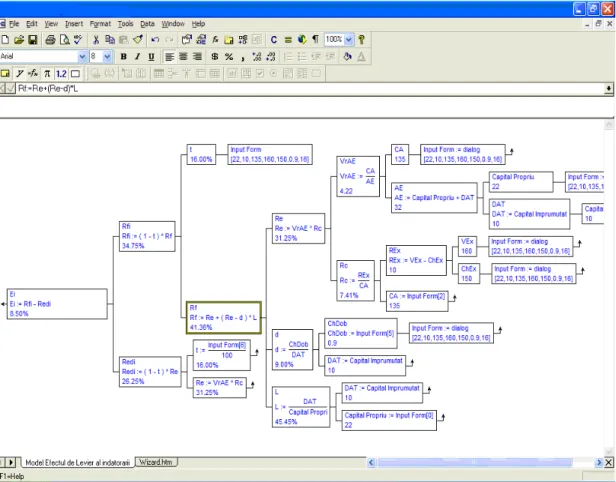
Fig. 2. Model representation in Vanguard System The computerized model is characterized by a
tree-like structure. Vanguard System is a powerful software tool which enables the collaborative usage of web technology for implementing the computerized models. Any implementation starts with model development. First, a result node is defined. Then the procedure continues backwards until the input nodes are specified. The users who are familiar with spreadsheet usage (for example, Microsoft Excel) may feel very comfortable when trying to use the system. The specification of formulae for the tree which is associated with the model, editing formulae and other procedures are quite similar. However, in Vanguard System the model is represented in a tree-like graphical manner and it is automatically constructed when the user input the model equations (figure 2). To facilitate the process, Vanguard system provides with a framework for the systematic decomposition of complex systems of equations in tree-like hierarchies.
To transform the generated model into a web
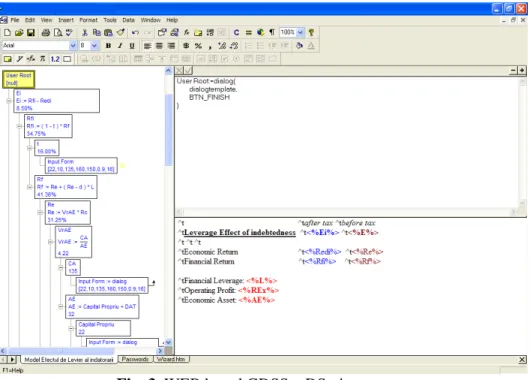
application, Vanguard System provides adequate tools such as DecisionScript (DSCript). Figure 3 contains a segment of the script which was generated for our application. One can easily notice the tree-like structure which was used in the modeling the problem,
In the window from the North-Eastern corner of the figure, a segment of the code (“DSCript”) for initiating the dialogue with the user (for data input, processing and results presentation) can be noticed. In the South-Eastern corner the code for data formatting can be viewed.
Note that figure 3 and figure 4 show only the simple codes which were utilized for defining the user interface of the application example, namely the data input screen and the results presentation one. For more complex applications, other types of scripts (for example setting of new functions for modeling the problem or defining new variables or data structures) can be developed.
Fig. 3. WEB based GDSS – DScript content
Fig. 4. Data input script
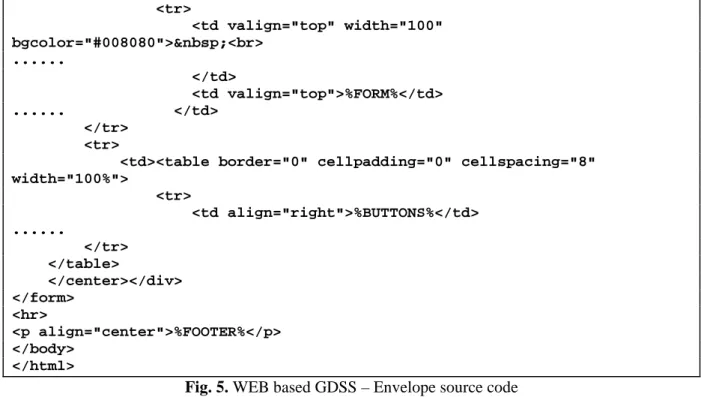
Having performed the operations described above, Vanguard System can start generating the web pages of the application. A page envelope is defined to be combined with the script elements which will generate the final form of the application. The envelope can be chosen from a previously defined set or can be created by the user her/himself. This is a HTML document which contains, besides the HTML code, some specific script elements such as %FORM% and %BUTTONS% (Figure 5).
<html> <head> ...
<meta name="GENERATOR" content="Vanguard DecisionScript"> <title>%TITLE%</title>
%EXHEAD% </head>
<body bgcolor="#FFFFFF" text="#000000" ... vlink="#0000FF"> <p align="center">%HEADER%</p>
<form action="dscript" method="post">
<div align="center"><center><table border="4" cellpadding="0" cellspacing="0" width="500" bgcolor="#C0C0C0">
<tr> <td bgcolor="#000080"><font color="#FFFFFF"> <b> %TITLE%</b></font> </td> </tr> <tr>
<td><table width="100%", border="0" cellpadding="0" cellspacing="8">
<tr> <td valign="top" width="100" bgcolor="#008080"> <br> ... </td> <td valign="top">%FORM%</td> ... </td> </tr> <tr>
<td><table border="0" cellpadding="0" cellspacing="8" width="100%"> <tr> <td align="right">%BUTTONS%</td> ... </tr> </table> </center></div> </form> <hr> <p align="center">%FOOTER%</p> </body> </html>
Fig. 5. WEB based GDSS – Envelope source code An envelope file should contain at least next components:
<html><head><title>%TITLE%</title></head><body><for m action="dscript" method="POST"> <p>%FORM%</p> <p>%BUTTONS%</p></form></body></html>
It also may contain next DScript [7] codes as it is shown in Table 2.
Table 2. DScript codes that can be placed in an envelope
Fill Code Description Source
%HEADER% Header text Script Options dialog box
%FOOTER% Footer text Script Options dialog box
%TITLE% Form Title Title argument supplied with the
dialog function or default value supplied in the Script Options dialog box
%FORM% All input fields and form text Dialog function
%BUTTONS% All required submit buttons Button text is set using the Script Options dialog box. Which buttons are displayed is dependent on the buttons argument supplied with the dialog function.
%BACK% Back submit button Same as above
%NEXT% Next submit button Same as above
%OK% OK submit button Same as above
%FINISH% Finish submit button Same as above
%YES% Yes submit button Same as above
%NO% No submit button Same as above
%CANCEL% Cancel submit button Same as above
%DONE% Done submit button Same as above
%SESSIONID% Unique session ID Server
%PCT% Percent symbol (%) NA
<% command %> Server-side DecisionScript command
DecisionScript executes command and replaces the fill code with the command result converted to text.
Envelope modification can be performed by modifying execution options of the script (figure 6).
Fig. 6. Script Options
Each user has her/his own authentication account. The authentication elements (user and password) are kept in a sheet which contains a two-columns table (figure 7).
User Name Password
1 2 3 4 guest duta istudor user user luminita ion user Fig. 7. User login data
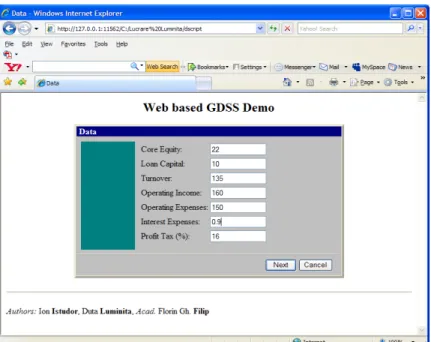
The start page of the application, in which the user introduces his data, is given in figure 8. Figure 9 represents the interface for the problem data input and figure 10 shows the results obtained after the leverage effect calculus.
Fig. 9. Input Data The web-based GDSS allows decision makers to
apply the leverage effect of indebtedness method to their own set of data in view of taking the best
decision in respect of the indebted degree of their enterprise.
Fig. 10. Results For a better interface, some more modifications
can be made:
1. redefining the results node of the application model from
User Root := dialog(dialogtemplate, BTN_FINISH)
to :
User Root := dialogroot(dialog( dialogtemplate, BTN_FINISH))
2. changing the application template (including supplimentary graphical elements)
3. modifying the execution options of the application (Script options – see figure 6.) so as to allow the record new features:
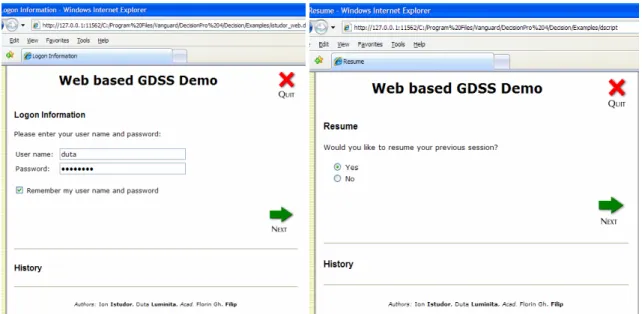
- user authentification session and recovering the old session (figure 11)
- saving the session history and resume it (figure 12)
Fig. 11. Authentication session with an option for recovering the user name and password and the option for resuming previous session
Fig. 12. Input data with option for saving session history and displayed results
5 Conclusions
Through maintaining an optimum ratio between the core equity and the loan capital, the decision-maker, as a manager or a component of management group of the organization, avoids the financial risk. The economic profitability must be higher than the equity and, consequently, by an efficient management of the assets, the performance has to be over the interest rate. Having analyzed the results of the two financial exercises (N-1 and N) of table 1, one can conclude that:
The operating profit has grown in the new financial exercise , N, with 5.5 x10⁶ unities);
Economic profitability has grown with 13.25% (11.13% after taxation);
Financial profitability has had a grow of 20.83% (17.51% after taxation);
Leverage effect grew with 7.58% (6.38% after taxation);
The turnover grew with 40 x106 unities and the commercial profitability with 2.67%;
Rotation speed of the economic asset arose fromv 3.8 to 4.22;
So the financial exercise N is more profitable than the previous financial exercise N-1. The entire analysis was based on using the Web based GDSS.
Vanguard System is an example of the powerful tools which can be found on the market to provide web-support for the decision analysis and group decision problems. Thus it adequately enables implementing the concept of "co-operative" work. The developer of such a web-based GDSS application can easily build by herself/himself complex web pages that allow dynamic interaction with decision-makers.
References
[1] F. G. Filip, Sisteme Suport pentru Decizii (Decision Support Systems , 1st edition, in Romanian), Editura Tehnica, Bucharest, 2004.
[2] F. G.Filip, “Decision support and control for large-scale complex systems,” Annual Reviews in Control, Vol. 32, No. 1, pp. 61-70, 2008.
[3] L. Duta, A. Bituleanu, F. G. Filip and I. Istudor, “Computer-based decision support
for railroad transportation systems: an investment case study,” Informatica Economica, Vol. 13, No. 2, pp. 103-109, 2009.
[4] D. J. Power, Decision Support Systems: Concepts and Resources for Managers, Westport, Conn., Quorum Books, 2002. [5] Vanguard Software Corporation, Vanguard
System, consulted on 27.01.2010, Available at:
http://www.vanguardsw.com/
http://www.vanguardsw.com/products/vangu ard-system/[6] V. Burja, “Influenţa structurii financiare asupra performanţei economice (The influence of the financial structure on the economic performance, in Romanian),” Annales Universitatis Apulensis, Series Economica, Vol. 3, No. 8, 2006.
[7] Vanguard Software Corporation, DecisionScript – user manual & help product.