Kassahun, A., Beulens, A. & Hartog, R. (2006). Providing Author-Defined State Data Storage to Learning Objects, Educational Technology & Society 9 (2), 19-32.
19 ISSN 1436-4522 (online) and 1176-3647 (print). © International Forum of Educational Technology & Society (IFETS). The authors and the forum jointly retain the
copyright of the articles. Permission to make digital or hard copies of part or all of this work for personal or classroom use is granted without fee provided that copies are not made or distributed for profit or commercial advantage and that copies bear the full citation on the first page. Copyrights for components of this work owned by others than IFETS must be honoured. Abstracting with credit is permitted. To copy otherwise, to republish, to post on servers, or to redistribute to lists, requires prior
Providing Author-Defined State Data Storage to Learning Objects
Ayalew Kassahun
Wageningen Multimedia Research Center, Wageningen University Dreijenplein 2, 6703 HB Wageningen. The Netherlands
Tel. +31 317 484723 Fax: +31 317 483158 [email protected]
Adrie Beulens
Information Technology Group, Wageningen University Dreijenplein 2, 6703 HB Wageningen. The Netherlands
Tel. +31 317 488460 Fax: +31 317 483158 [email protected]
Rob Hartog
Wageningen Multimedia Research Center, Wageningen University Dreijenplein 2, 6703 HB Wageningen. The Netherlands.
Tel. +31 317 483408 Fax: +31 317 483158 [email protected]
ABSTRACT
Two major trends in eLearning are the shift from presentational towards activating learning objects and the shift from proprietary towards SCORM conformant delivery systems. In a large program on the design, development and use of digital learning material for food and biotechnology in higher education, a large amount of experience has been gained with regard to the possibilities of learning objects that induce students to be active. These learning objects are highly appreciated by both students and instructors. An important requirement for these learning objects is the need to support the storage, retrieval and sharing of state and history information that is defined by the author of the learning object. However, neither the current learning management systems nor the current SCORM standard provides adequate support for storing author-defined data. In this article, we discuss some of the problems related to the current learning management systems and the SCORM standard in supporting activating learning objects, and we propose a data model and a simple HTTP-based communication protocol as a solution to these problems. This article describes DBLink, a plugin that implements the proposed extensions.
Keywords
Learning Management System, Author-defined Data, State Information, SCORM, Activating Learning Objects.
Introduction
Currently, most institutions of higher education operate a learning management system (LMS). Learning management systems are used to control access to digital learning objects, to support communication between students and their peers as well as between students and their teachers and to support assessments. With respect to learning objects, there is a trend in eLearning not only from presentational learning material towards learning material that induces the student into actions and activities but also from proprietary to standards based authoring tools and delivery platforms.
The use of learning objects that strongly induce students to perform actions is based on the general belief that learning, understanding and retention benefit from opportunities to become active with and to elaborate on presented information (Merriënboer, 1997; Biggs, 1999; Anderson, 2000). We call interactive learning objects that enable and induce actions and activities activating learning objects.
Over the years, the Food and Biotechnology (FBT) program of Wageningen University has produced a number of activating learning objects, which have usually been implemented as Flash movies or Java applets. Moreover, these learning objects are often based on client-server architecture in which the learning objects rely on dedicated servers to store data in any format and structure. Most of these learning objects are also large learning objects that store the state of student’s interaction and even provide internal navigation. Both the required level of user interaction as well as the data requirements make it difficult to break up these large learning objects into
smaller ones. In this article, we will deal with such learning objects and restrict the term activating learning object to those activating learning objects that are based on client-server architecture.
Author-defined data storage (Sessink et al., 2003) is the ability of the learning object (LO) to store and retrieve data that are defined by the author and are stored in some data store that is not a part of nor managed by means of the learning management system. Usually, the author of the learning object has defined the data structure of the data source and the instructor who uses the learning object in his course has to manage the data source. We call this type of data source external data store.
Within the FBT program, we have developed activatingLOs for activities such as interactive exercises in Food Chemistry (Diederen et al., 2002, Aegerter-Wilmsen et al., 2003, Diederen et al., 2003), experimental design (Aegerter-Wilmsen et al., 2003) and design of downstream processing (Schaaf et al., 2003). These interactive exercises and design teaching aids are large activating LOs of simulations or virtual laboratories in which students take part in a simulation or in an experiment. State information – the state of a student’s interaction with an LO – is stored so that students can do experiments that take longer than a single session. Stored state information also allows the instructor to monitor the progress of students in an instructor-led training.
The ability to store and retrieve author-defined data enables content authors and instructors to support activating pedagogical models that need functionalities such as adaptivity, collaborative learning and retrieval of state and shared data (Sessink et al. 2003). Adaptivity refers to a learning model that takes into account the learner’s competence, goals, and preferences. State information refers to the ‘state’ of the learning experience at a given time and is essentially based on tracking of a student’s progress. By shared data, we mean data that can be accessed by more than one learning object or by more than one student. Shared data are especially important in collaborative learning. In the Hygienic design LO (see section 4), for instance, the learning object stores state history and the highest scores of all students. Students can compare their current results with their results from previous attempts. A number of high scores from all students taking the LO are flagged as shared data so that students can compare their results with the highest scores and be encouraged to perform better on the next trial. Due to the lack of standards for supporting author-defined data in the current learning management systems, different ad hoc methods have been used for storing data in external data stores. One of the widely used methods to incorporate a large activating learning object in a learning management system is to host the actual learning object on a separate server and use a proxy learning object that is managed by the LMS. The proxy learning object contains a hyperlink to the actual learning object and when the student launches such a learning object, the proxy learning object forwards him to an external site. To actually use the learning object, the student is then either asked to authenticate himself using password authentication or he is automatically logged in using single sign on. However, the data source on which the actual learning object is based on can only allow or deny access to data based on the validity of the user and not the context in which the user interacts with the LMS. Another method to incorporate an activating learning object is to host the learning object partially in the LMS and store the data on a separate server. However, the same problem that was mentioned above still remains to be solved. These configurations do not enable LO authors to benefit from the facilities of LMSs in managing access to LOs. This shortcoming is unlikely to change in the near future since the recent Sharable Content Object Reference Model (SCORM) (ADL, 2004) does not have sufficient support for author-defined data storage.
In this article, we discuss the problems related to the current learning management systems and the SCORM standard in supporting activating learning objects. We propose a number of data model elements as an extension to the SCORM 2004 data model. We describe how LOs can access data from an external data source through LMSs based on DBLink, an abstract plugin. A prototype implementation of DBLink has been built for the Blackboard LMS. For supporting non-SCORM LMSs, we define an HTTP based communication protocol to be used instead of the SCORM run-time API. However, we strongly suggest that the SCORM run-time API should be used over other non-standard methods.
Some of the other issues related to the SCORM standard are lack of support for sharing data across learning objects, learners and LMSs; difficulty in migrating large learning objects to SCORM LMSs; scalability issues related to data size restrictions; and lack of support for instructor-led training. Although the scope of this article is restricted to the issue of supporting activating learning objects, some of these other issues are discussed in relation to activating learning objects.
The rest of the article is organised into four sections. The next section, section two, discusses the requirements for DBLink for both SCORM as well as non-SCORM learning management systems. Section three covers design considerations for DBLink and explains the DBLink data model as an extension to the SCORM data
model; it also defines a communication protocol based on HTTP. Section four presents a use case. In the last section, section 5, concluding remarks are made.
Requirements for DBLink
The main requirement for DBLink is to support author-defined data storage so that authors of learning objects will be able to support activating learning objects. This requirement has a number of consequences for LMSs, LOs and for the role instructors and LMS administrators play in deploying learning objects.
Learning objects that are student activating rely on the ability of storing and retrieving state and history information. Support for data storage for learning objects is very limited or non-existent in most of the current learning management systems. Some of the most widely used LMSs do provide application programming interfaces (API’s) that enable users to provide the necessary functionalities by extending the learning management system. However, without a common data model to support student activation, authors of activating LOs need to develop their own plugins for each LMS on which they plan to deploy their LOs. By providing a standard data model and communication protocol, DBLink should avoid the need for developing plugins by individual authors.
In the case of SCORM 2004 conformant LMSs, the SCORM data model provides elements such as cmi.launch_data and cmi.suspend_data, for storing state information, but the use of these elements is very limited for a number of reasons. Among the most important reasons for these limitations are that data cannot be shared among LOs or among students, and the size of data that can be stored is severely limited. The IMS Shareable State Persistence specification (SSP) is proposed to solve these problems; however, it still relies on the LMS for data storage (IMS, 2004). The applicability of SSP is also limited to those LMSs that are SCORM conformant. DBLink should be a lightweight component that does not require conformance to the SCORM standard. However, we suggest that the SCORM run-time API should be used when both the LO and the LMS are already SCORM conformant.
Activating LOs can generate large amounts of data; therefore, it is highly desirable to setup a separate server for data storage and to access it through the LMS. In addition, many existing activating LOs are mostly web-based applications and have their own data storage. The new approach should not require a substantial reengineering of already existing LOs. As a result, the way the LOs communicate with the server needs to be supported by DBLink and data storage requirements should not be restricted. DBLink should also support LOs that are SCORM conformant and use the SCORM Runtime API. In addition, because some activating LOs are meant for instructor-led training (ILT), DBLink needs to support ILT by providing data model elements for the most common instructoractivities.
The requirement that data needs to be stored externally affects the task of the LMS administrator or the instructor in the case of ILT. In addition to deploying learning objects, the instructor or LMS administrator also need to set up data sources. They do this by setting up a data source for each individual activating learning object or by setting up data source at a higher level of aggregation such as a module or course. In many cases, it is sufficient to setup the location of the data source and some access credentials. DBLink should provide data model elements for this purpose.
DBLink tries to solve the above problems by providing an extension to the SCORM data model and HTTP based communication protocol. The purpose of this article is to propose a method for supporting accessing and persisting author-defined data that may be considered in future standards.
Design and implementation
The following sequence of events clarifies the essence of the approach that is widely used at present to host the activating LOs in current LMSs.
1. The student starts an activating learning object.
2. The learning object locates the address of the data source that is included in the learning object. 3. The student authenticates to the data source using either password authentication or single sign-on. 4. The student begins interacting with the learning object.
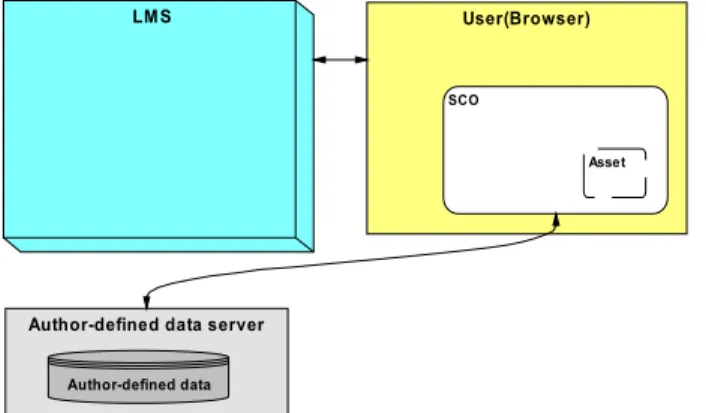
The data source is an external database or a web server that is usually specifically set up to serve one or more activating learning objects. Due to a lack of support for author-defined data by most of the current LMSs, authors and instructors devise workarounds to host their activating LOs that use external data along the lines of the approach outlined above. Figure 1 shows the schematic representation of the approach. For ease of clarity in this and subsequent figures, terms from the SCORM standard such as SCO and assets are used whether the LMS depicted is SCORM-based or not.
There are a few problems associated with this scenario. First, over the years, institutions have made large investments and created several activating learning objects that are generally not designed for modern LMSs. These learning objects are usually large, student activating LOs based on a client-server model. Workarounds for hosting these learning objects in current LMSs can be implemented as outlined above. However, a student who accesses these learning objects via a LMS may still need to authenticate on the external data source. Moreover, in the absence of a standard data model to access data and a standard communication protocol or runtime API, instructional designers should implement custom made solutions.
Author-defined data server
LM S User(Browser)
SCO
Author-defined data
Asset
Figure 1. In the present LMSs, activating LOs access author-defined data directly instead of through the LMS. Students should usually authenticate themselves on the data server
.
The DBLink plugin
The following is the essence of the approach proposed in this article. 1. The student starts an activating learning object.
2. The learning object interacts with the LMS requesting the address of DBLink. 3. The student begins interacting with the learning object.
4. The learning object requests data from DBLink. DBLink seamlessly interacts with the LMS to determine the student access rights and accesses data source on behalf of the student.
We propose an extension to the SCORM data model that should be implemented in DBLink. In LOs for SCORM conformant LMSs, the values of the data model elements can be set and get using the SCORM runtime API. In LOs for non-SCORM LMSs, the data model elements will still be used. Since non-SCORM LMSs do not have a (standard) runtime API, we propose a simple HTTP based protocol to access the values of the data model elements. Activating learning objects built for both SCORM-based and non-SCORM LMSs should first try to use SCORM API. Only upon failure to use SCORM runtime API should the learning object revert to the DBLink communication protocol. By adopting HTTP based communication for non-SCORM systems as a means of communication between the learning object and DBLink, we not only use the most common communication protocol of accessing data over the web but also avoid a substantial reengineering of legacy activating learning objects. Most legacy student activating learning objects are web-based and use HTTP protocol.
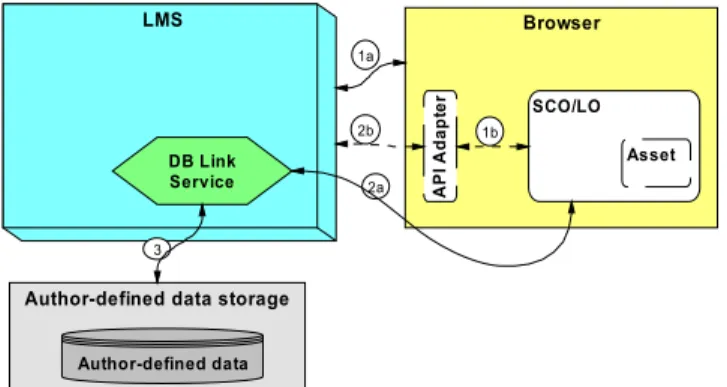
Figure 2 shows a LMS that uses DBLink to access author-defined data. The solid lines (lines 1a, 2a) represent how activating LOs communicate with the LMS server in a non-SCORM LMS. The dotted lines (lines 1b, 2b) representhow an SCO uses the facilities of DBLink. Line 3 shows how DBLink accesses the data source, which is the same in both SCORM and non-SCORM LMSs.
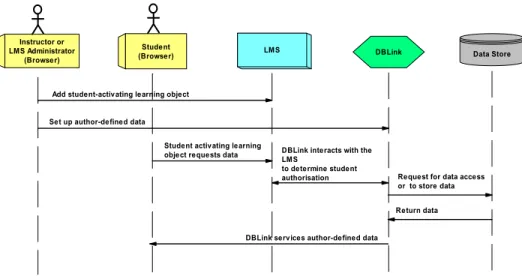
Figure 3 depicts the second approach as a UML sequence diagram (not to be confused with IMS sequencing). The figure shows how the data source for an activating learning object is configured and how the learning object ultimately uses DBLink. First, the instructor or the LMS administrator deploys a course or a specific learning object. In many cases, instructors are responsible for preparing their learning material, but the actual deployment can be done either by the instructor himself or by the LMS administrator. Data source connection parameters are then configured. Data source configuration involves mainly specifying the location of data source and authentication credentials. The authentication credentials are used by DBLink to connect to the data source. Students do not need to authenticate on the data source separately since access to data is controlled by DBLink based on the student’s access rights as specified in the LMS. Once the data source configuration has been set up, the data source is accessible to students who are authorised for the specific learning material for which the data source is configured. The learning material can be the learning object, the whole course or any other aggregation level used by the LMS. When the student interacts with the learning object, the learning object requests data from DBLink (through the LMS), DBLink checks with the LMS if the student is authorised to use the learning object and subsequently serves the requested data. How DBLink and the LMS work together to authenticate the student for accessing data is dependent on the implementation of the specific DBLink and LMS and thus cannot be specified here.
To implement the DBLink plugin, the LMS needs to make an API available to access learners’ information, to access LOs information, and to check if the user is authorised to use the specific learning object. The LMS should have an instructor user type so that instructor type users can manage the external data. In cases where this is not possible, the LMS administrator user type can be associated with DBLink instructor user type.
The data model
The data model elements provided fall into two groups: data elements for the purpose of accessing data and data elements for data source configuration. Data elements to read and modify data are used by both students and LMS Administrators. In the case of ILT, instructors have the same data access rights as LMS administrators. However, instructors can only access those learning materials for which they are responsible, while LMS administrators can access all learning materials. Data source configuration and the associated data elements are required because the data is stored on a separate server and the location of the data source and access credentials are unknown before deployment of the learning object. Therefore, the data source has to be configured by the instructor or the administrator after the learning objects that make use of the data source have been deployed. DBLink defines a very limited set of data types that provide a basic functionality sufficient for most purposes. These data elements are not dependent on other SCORM data elements and there are no requirements on the type of data fields of the data source. In order to demonstrate our approach, we chose data sources to be SQL database applications (in contrast to an arbitrary type of application). Furthermore, we assumed that the parameterised SQL statements (in contrast to more general methods such as web-services) are, for the most part, sufficient as a way of accessing data – thus, the name DBLink (Database Link).
Author-defined data storage
LMS Browser DB Link Service SCO/LO Author-defined data Asset API A d apt e r 1a 2a 3 2b 1b
Figure 2. Proposed way of providing access to author-defined data. DBLink seamlessly communicates with the learning management system to determine the student access rights and retrieve data on the student’s behalf
.
The elements of the data model shown in Table 1 and Table 2 resemble, in format, the data model elements of SCORM; therefore, we will explain only those elements that are new and will not discuss items such as _count or id.
Table 1 Data model elements for commands
Dot-Notation Binding Details
dblink.author_defined_data.
commands._count Number of commands Student and LMS administrators/instructors can get this value dblink.author_defined_data.
commands.n.id Id of the n
th command
LMS administrators/instructors can get and set this value Student can get this value
dblink.author_defined_data.
commands.n.command The command string (SQL statement) of the n
th command
LMS administrators/instructors can get and set this value dblink.author_defined_data.
commands.n.value The result of executing the n
th command.
Student and LMS administrators/instructors can get this value dblink.author_defined_data.
commands.n.parameters._count
Number of parameters for the nth command
Student and LMS administrators/instructors can get this value dblink.author_defined_data.
commands.n.parameters.n.id Id of the n
th parameter.
Student and LMS administrators/instructors can get this value dblink.author_defined_data.
commands.n.parameters.n.value The value of the n
th parameter.
Student and LMS administrators/instructors can get and set this value
Table 1 shows the data elements required to execute commands for the purpose of accessing data. The dblink.author_defined_data.commands.n.command data model element refers to the command used to access data from a database. In DBLink access to data is restricted to SQL databases; thus, the commands are expressed as SQL statements. Since some of the values used in SQL statements can only be determined at runtime, unknown values at the time of LO creation are represented as parameters. We call these SQL statements parameterised SQL statements. At runtime, the parameter values are substituted by the values supplied by the student or the LMS. The dblink.author_defined_data.commands.n.value data model element represents the results of executing the command represented by dblink.author_defined_data.commands.n.command.
The dblink.author_defined_data.commands.n.command.n.parameters.n.value data model element defines the value of the nth parameter. The values are set by the learning object before executing the corresponding command.
Student (Browser)
DBLink services author-defined data
LMS DBLink
Set up author-defined data Add student-activating learning object Instructor or
LMS Administrator (Browser)
DBLink interacts with the LMS
to determine student
authorisation Request for data access or to store data Student activating learning
object requests data
Data Store
Return data
Figure 3. A UML sequence diagram showing the interactions among the LMS, the activating learning object (student), DBLink and the instructor. Data source configuration can be done either by the LMS administrator
In the parameterized SQL statement shown in Figure 4 the parameters (shown in italics) are preceded by a question mark. At runtime, the parameters (in the example the parameters are colParam and keyParam) are substituted by actual values supplied by the student or the LMS. In non-SCORM LMS, The learning object supplies the values to these parameters as HTTP parameter-value pairs using either the GET or POST method. In SCORM conformant LMS, all parameters should be set by the learning object before a getValue method call on dblink.author_defined_data.commands.n.value.
Data source configuration
The method we propose assumes that the data source, which henceforth will be known as database, is not necessarily one central database for the LMS that stores data for all LOs. Therefore, instructors or LMS administrators should be able to set-up the database connection information either for the LMS as a whole, for each course or for each learning object independently. Database configuration consists of specifying the address of the database server and any required credentials for authentication on the database.
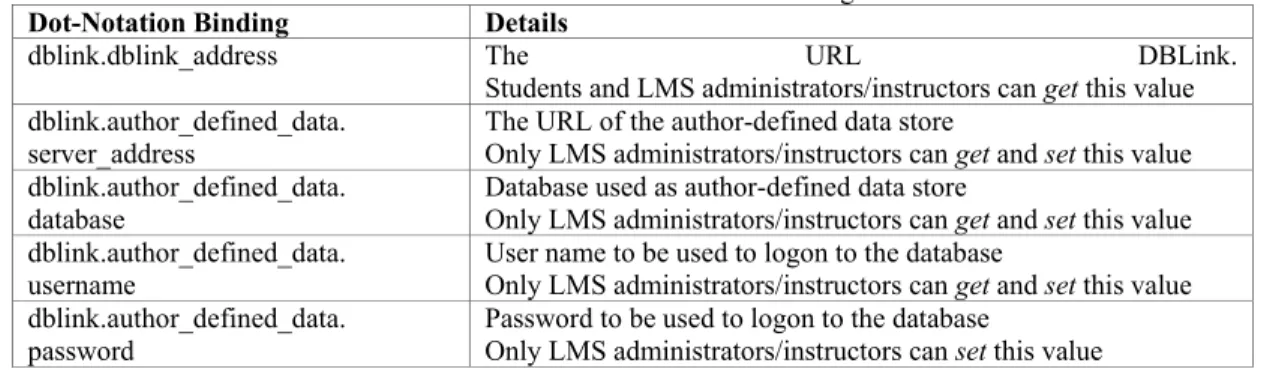
Table 2 shows the data elements defined for data source configuration. The address (URL and port number) of the database server, the username, the password and optionally a database instance name are usually sufficient to specify database connection information. We, therefore, limit the data elements for configuration to these four elements.
Table 2. Data elements for database configuration
Dot-Notation Binding Details
dblink.dblink_address The URL DBLink.
Students and LMS administrators/instructors can get this value dblink.author_defined_data.
server_address The URL of the author-defined data store Only LMS administrators/instructors can get and set this value dblink.author_defined_data.
database
Database used as author-defined data store
Only LMS administrators/instructors can get and set this value dblink.author_defined_data.
username User name to be used to logon to the database Only LMS administrators/instructors can get and set this value dblink.author_defined_data.
password Password to be used to logon to the database Only LMS administrators/instructors can set this value
Communication protocol
The learning object may interact with DBLink using HTTP protocol. DBLink depends on the LMS to forward commands that are destined for DBLink. For instance, if the learning management system is running on
http://www.the-lms.com/, then all calls to http://www.the-lms.com/<dblink> will be
forwarded to DBLink. Here <dblink> refers to the relative path to which all calls are forwarded to DBLink by the LMS.
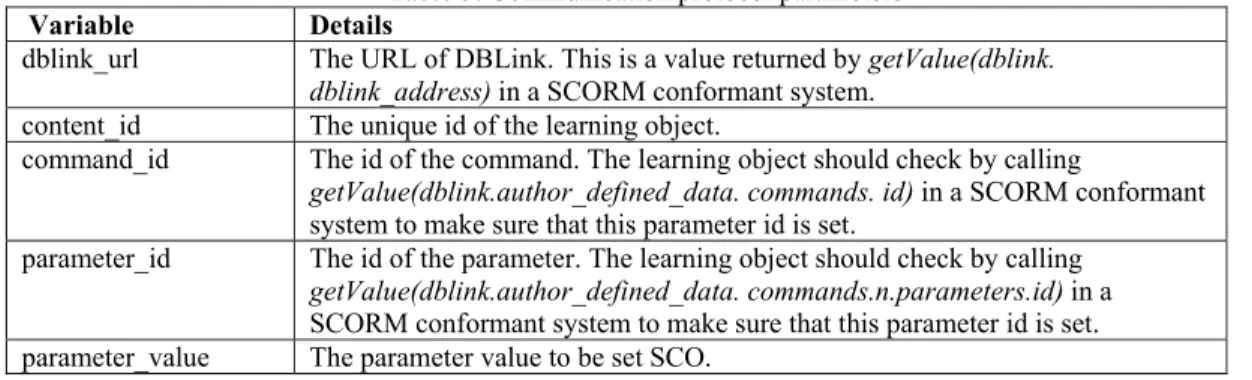
Figure 5 shows the protocol used in DB Link. In this figure, variables are shown in italics and need to be substituted with actual values. The URL of the DBLink is the value of dblink_base_url. The command handler in DBLink that processes the HTTP request is represented by command_handler. One of the command handlers is executesql. This handler processes SQL data storage and retrieval from databases. Another command handler is getuserdata, which retrieves user information. The value of content_id is the id of the LO or course for which the database is configured. The values of parameter_id and parameter_value are the optional ID and value of the parameters. Table 3 gives a full description of the protocol elements.
Figure 4. A parameterized SQL Command.
Figure 5. Communication protocol between learning objects and DBLink
.
Table 3. Communication protocol parametersVariable Details
dblink_url The URL of DBLink. This is a value returned by getValue(dblink. dblink_address) in a SCORM conformant system.
content_id The unique id of the learning object.
command_id The id of the command. The learning object should check by calling
getValue(dblink.author_defined_data. commands. id) in a SCORM conformant system to make sure that this parameter id is set.
parameter_id The id of the parameter. The learning object should check by calling getValue(dblink.author_defined_data. commands.n.parameters.id) in a SCORM conformant system to make sure that this parameter id is set. parameter_value The parameter value to be set SCO.
A use case
Three different implementations of DBLink are satisfactorily in use: one for the Blackboard LMS (Blackboard, 2006); one for the Moodle LMS (Moodle, 2006); and one for the TopShare knowledge management system (TopShare, 2006). In this section, we present a use case based on a LO for a virtual ice-cream factory and DBLink implementation for the Blackboard LMS. The learning object is used in the course Hygienic Design at Wageningen University.
A learning object for a virtual ice-cream factory
During MSc courses in Food Technology and Food Safety, students learn about hygienic design. For this course, a learning object depicting a virtual factory for the production of ice cream has been built (
Figure 6). In this virtual production facility, the student, who plays the role of a quality manager, enters the factory and has to scrutinise production and storage facilities with respect to hygienic design criteria.
Upon entering the virtual factory, the student is personally greeted by and introduced to a virtual employee of the factory. Next the overview of the factory is displayed, which the student can walk through asking critical
questions (
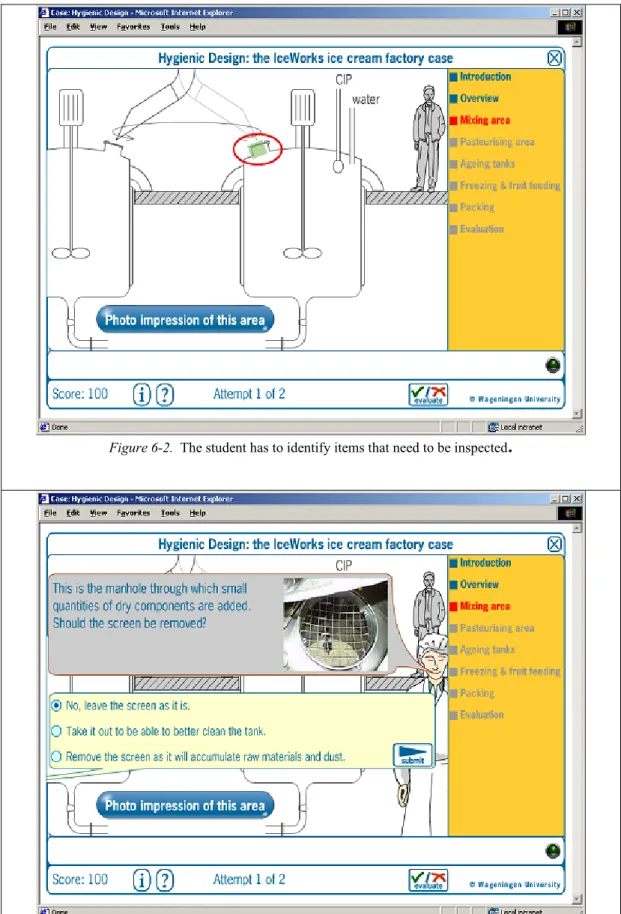
Figure 6-1). To proceed through the factory, the student has to click on the individual factory sections and identify items that need to be inspected with respect to hygienic risks (Figure 6-2 and Figure 6-3).
When the student interacts with the learning object, such as entering the virtual factory or identifying an item for inspection, the learning object executes a command and provides the necessary variables and variable values. A typical command and the corresponding SQL statement are shown in Table 4. This command gets the location of the student in the learning object. The learning object launches the command, and DBlink translates the command into a SQL statement. Note that in the example shown in Table 4, the values of content_id and
user_id have either been previously obtained or have been specified using special place holder variables
which DBLink can expand at run time.
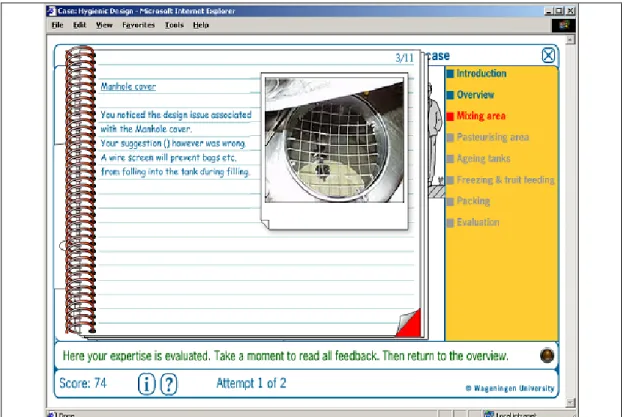
After the student has answered a number of questions about a specific component of the production facility, he receives feedback on all the questions he answered (Figure 6-4). When the student has finally completed the walk through of the factory, he is presented with his score and the five top scores of all participants in the exercise. In this way, he can compare his own score with those of other students (Figure 6-5).
The described functionalities require the learning object to retrieve student information, store selections made by the student, and retrieve the history of student selections to proceed to the next step or to compute the score. To
dblink_base_url/[command_handler]?
[content_id=content_id]
[command_id=command_id]
retrieve student user information, which is used throughout the learning object, the learning object uses
getuserdata command. In subsequent steps, i.e.
Figure 6-1 through Figure 6-5, the learning object launches executesql command to retrieve or store data in a database. Table 5 shows a list of commands used by the ice cream virtual production facility.
Table 4. An example of parameterized SQL statement and the corresponding DBLink command. SQL (ID=10) SELECT attempt, allowed_attempts, location FROM
HD_Sate_Table case WHERE UserID=?userId
command http://<dblink_address>/executesql?content_id=1000&
command=10&userId=james
Table 5. DBLink URL’s for retrieving student and state information and to store state information
.
Retrieve student information http://<dblink_address>/getuserdataRetrieve state information http://<dblink_address>/executesql?content_id= <content_id>&command=<command_id>
Store state information http://<dblink_address>/executesql?content_id= <content_id>&command=<command_id>?[<parameter_id>= <parameter_value>]
Figure 6-1. The student who plays the role of Quality Manager is presented with an overview of the virtual ice cream factory. The student clicks on a section of the factory to perform quality inspection.
Figure 6-2. The student has to identify items that need to be inspected
.
Figure 6-3. If the student identifies an item that needs inspection, the LO presents a predefined question about the item
.
Figure 6-4. Once the student completes the inspection of a section of the facility, he receives feedback on his performance.
Figure 6-5. Upon completion of the exercise, the student’s score and the five top scores in the exercise are presented to the student
.
DBLink plugin for Blackboard
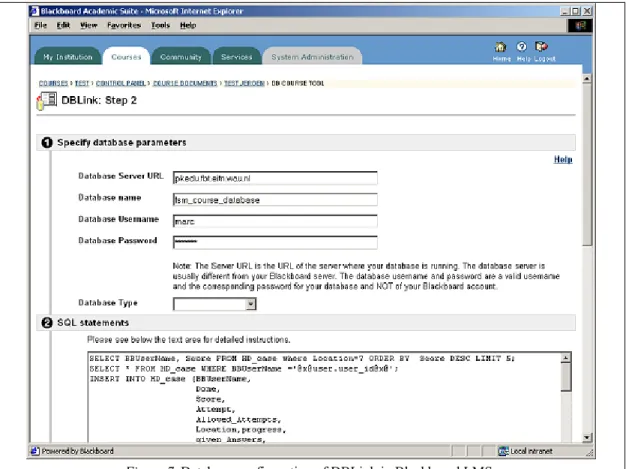
Blackboard is one of the most widely used LMS that manages content and learning processes (Blackboard, 2006). Blackboard is SCORM conformant. It also supports integration of external software tools through its extended “building block” API. We used the building block API to develop a DBLink prototype for the Blackboard LMS (Figure 7). The SCORM component in Blackboard is implemented as a building block and its functionalities are not accessible through the building block API. We therefore use the DBLink HTTP based communication protocol to access the data model elements.
DBLink for the Blackboard LMS is built as a course tool. Instructors have access to a configuration interface, provided by DBLink in the course control panel. Through the configuration interface, instructors can specify the values of database connection and command data model elements. To use DBLink, the instructor uploads the learning object and subsequently uploads or configures the database connection parameters and commands. These values can also be set at course or at LMS level in which case there will be no need for the instructor to enter the values of the data model elements for individual LOs.
Figure 7. Database configuration of DBLink in Blackboard LMS
.
Conclusion
This article is concerned with providing a way of hosting student activating learning objects in current and future (SCORM-based) learning management systems. An important requirement for activating learning objects is the ability to read and write data to and from an external data source. Using an external data source makes it possible to store arbitrary data types with virtually no size limitation. However, both the current learning management systems and the SCORM standard (ADL, 2004) do not provide functionalities or specifications that enable us to achieve our goals.
We proposed an abstract plugin that enables us to access data from an external data source and an extension to the SCORM data model to be used by this abstract plugin. To access data for LMSs that are not based on SCORM, we proposed a communication protocol that the learning object can use to communicate with the
plugin based on HTTP. Our method works irrespective of the LMS and implementation of the plugin as long as the DBLink data elements can be set and get with SCORM runtime API. The same applies to non-SCORM LMS; however, in this case, the HTTP protocol we proposed is used instead of SCORM API. We have implemented DBLink for Blackboard, Moodle and TopShare.
The data model has two parts: data model elements for accessing external data, which are usually used by students, and data model elements for configuring the data source. Data model elements for data source configuration allow the instructor, or the LMS administrator, to setup the data source and specify the data access commands and parameters. To fully exploit the possibilities of data sharing provided by DBLink, an extended set of metadata about the data stored is required. Developing such a metadata specification is a large task in itself and does not fit in the scope of this article.
We described the functionality and the interface based on a plugin called DBLink for accessing database tables that is implemented for the Blackboard learning management system. The purpose of DBLink is, on the one hand, to bring a standardized solution for hosting a number of disparate learning objects developed in the FBT program of Wageningen University (FBT, 2006) and the European Nutrigenomics Organisation (Nugo, 2006). On the other hand, DBLink also shows how the abstract plugin can be implemented. Therefore, DBLink is limited to accessing data from databases using parameterised SQL statements and does not implement all the requirements stated in section 2.
Another consideration in the design and implementation of DBLink is to support a step-by-step migration of legacy activating learning objects that are not made to be hosted in any LMS or are made to be hosted only for a specific proprietary LMS. We support that by providing a HTTP based communication protocol, besides the SCORM runtime API, since most learning objects already use HTTP to access data over the web. We believe the communication protocol can easily be extended to support learning objects that rely on web services protocol. We present the method provided in this article as a concept for consideration in future updates of SCORM.
Acknowledgements
The ice cream factory was developed under the auspices of the European Chair in Food Safety Microbiology by Esther van Asselt, Marc Boncz, Martine Reij, and Leon Gorris, Laboratory of Food Microbiology, Wageningen University.
References
Aegerter-Wilmsen, T., Hartog, R., & Bisseling, T. (2003). Web Based Learning Support for Experimental Design in Molecular Biology: a Top-Down Approach. Journal of Interactive Learning Research, 14 (3), 301-314.
ADL (2004), Sharable Content Object Reference Model (SCORM) version 1.3, retrieved March, 21 2006 from http://www.adlnet.org.
Anderson, J. R. (2000). Cognitive Psychology and Its Implications, USA: Worth Publishers. Biggs, J. B. (1999). Teaching for quality learning at university, Buckingham: Open University Press.
Blackboard. (2006). Blackboard learning management system, retrieved March, 21 2006 from http://www.blackboard.com.
Diederen, J.; Gruppen, H.; Hartog, R.; Moerland, G., & Voragen A. G. J. (2003). Design of activating digital learning material for food chemistry education. Chemistry Education: Research and Practice, 4 (3), 353-371. Diederen, J., Gruppen, H., Voragen, A. G. J., Hartog, R., Mulder, M., & Biemans, H. (2002). Design guidelines for digital learning material for food chemistry education. In Barker, P. & Rebelsky, S. (Eds.), Proceedings Ed-Media 2002, Denver, Colorado, USA: AACE, 402-407.
IMS. (2004). IMS Shareable State Persistence Information Model. Version 1.0 Final Specification, retrieved March, 21, 2006 from http://www.imsglobal.org.
Merriënboer, J. J. G. (1997). Training Complex Cognitive Skills: A four-component instructional design model for technical training, Englewood Cliffs, NJ, USA: Educational Technology Publications.
Moodle (2006). Moodle course management system (CMS), retrieved March 21, 2006 from http://moodle.org/. NuGO (2006). The European Nutrigenomics Organisation, retrieved March 21, 2006 from http://www.nugo.org. Sessink, O., Beeftink, R., Tramper, J. & Hartog, R. 2003. Author-Defined Storage in the Next Generation Learning Management Systems. In V. Devedzic, J. M. Spector, D. G. Sampson & Kinshuk (Eds.), The 3rd IEEE
International Conference on Advanced Learning Technologies Conference Proceedings, Los Alamitos, USA: IEEE Computer Society, 57-61.
Schaaf, H. V. D., Vermue, M. Tramper, J., & Hartog, R. (2003). A design environment for downstream processes for bioprocess-engineering students. European Journal of Engineering Education, 28 (4), 507-521. TopShare (2006). TopShare Knowledge Management Solution, retrieved March 21, 2006 from http://www.topshare.com.