Aggie Digital Collections and Scholarship
Aggie Digital Collections and Scholarship
Theses Electronic Theses and Dissertations
2014
Secure Android Code Helper (Sach): A Tool For Assisting Secure
Secure Android Code Helper (Sach): A Tool For Assisting Secure
Android Application Development
Android Application Development
Edward B. HillNorth Carolina Agricultural and Technical State University
Follow this and additional works at: https://digital.library.ncat.edu/theses
Recommended Citation Recommended Citation
Hill, Edward B., "Secure Android Code Helper (Sach): A Tool For Assisting Secure Android Application Development" (2014). Theses. 347.
https://digital.library.ncat.edu/theses/347
This Thesis is brought to you for free and open access by the Electronic Theses and Dissertations at Aggie Digital Collections and Scholarship. It has been accepted for inclusion in Theses by an authorized administrator of Aggie Digital Collections and Scholarship. For more information, please contact [email protected].
Development
Edward Hill
North Carolina A&T State University
A thesis submitted to the graduate faculty
in partial fulfillment of the requirements for the degree of
MASTER OF SCIENCE
Department: Computer Science
Major: Computer Science
Major Professor: Dr. Xiaohong Yuan
Greensboro, North Carolina
The Graduate School
North Carolina Agricultural and Technical State University
This is to certify that the Master’s Thesis of
Edward Hill
has met the thesis requirements of
North Carolina Agricultural and Technical State University
Greensboro, North Carolina 2014 Approved by: Dr. Xiaohong Yuan Major Professor Dr. Kelvin Bryant Committee Member Dr. Huiming Yu Committee Member Dr. Sanjiv Sarin
Dean, The Graduate School
Dr. Gerry Dozier Department Chair
© Copyright by
Edward Hill
Biographical Sketch
Edward Hill has lived most of his life in Rockdale County, a very small town Southeast
of Atlanta, Georgia. He obtained his Bachelor of Science Computer Science degree from North
Carolina A & T State University, Greensboro, United States. While pursuing his education he
also played four years of football for the university as a scholar athlete.
In August 2013, he enrolled at the North Carolina A & T State University, Greensboro,
United States, to pursue his Master of Science Computer Science degree. Mobile security,
Dedication
This work is dedicated to my parents Janice Morris, Tolbert Morris, Edward Hill Sr. and Betty
Acknowledgements
First acknowledgement goes to God.
I am grateful for the prayers and encouragement from my parents. I would like to
acknowledge every effort you all have made to provide me with tools I needed to succeed.
Further, I would like to acknowledge Dr. Gerry Dozier, Dr. Mohd Anwar, Prof.
Edmundson Effort and Cody Cannon for the inspiration and encouragement to pursue my
Master’s in Computer Science.
In addition, I am very appreciative towards my advisor Dr. Xiaohong Yuan for her
guidance, advice, financial support and constructive criticism throughout my completion of
graduate school.
I would also like to express my gratitude to my committee members; Dr. Kelvin Bryant
and Dr. Huiming Yu whose efforts have help me bring this thesis to a completion.
My appreciation also goes to the other professor who shared their wealth of knowledge
with me and gave me wise advice.
Lastly, I would like acknowledge Sabrina Edmonds, Nate Isles, Adrian Burke and again
Cody Cannon for being a great friends and keeping me uplifted throughout my wonderful college
Table of Contents
List of Figures ... ix
Abstract ... 1
CHAPTER 1 Introduction ... 2
CHAPTER 2 Literature Review ... 4
2.1 Top Ten Vulnerabilities ... 4
2.2 Causes of Data Leakage ... 5
2.3 Access Control Mechanism in Android ... 6
2.4 The CERT Oracle Secure Coding Rules for Android ... 7
2.5 Static Analysis ... 8
CHAPTER 3 SACH - A Tool for Assisting Secure Android Application Development... 11
3.1 An Overview of SACH ... 11
3.2.1 Limit the accessibility of an application’s sensitive content provider ... 12
3.2.2 Do not broadcast sensitive data ... 14
3.2.3 Do not allow webview to access sensitive local resource through file scheme .... 17
3.2.4 Do not log sensitive information ... 21
3.2.5 Restrict access to activities ... 25
3.2.6 Do not release apps as debuggable ... 28
CHAPTER 4 Prototype implementation of SACH ... 30
4.1 Implementation ... 30
CHAPTER 5 Conclusion and Future Work... 33
References ... 35
Appendix A ... 39
List of Figures
Figure 1. This figure is an overview of SACH………...….……….…….…….11 Figure 2. This is an algorithm for limiting the accessibility of content provider….…………...14
Figure 3. This is an algorithm to detect if there is data leakage via broadcast intent………16
Figure 4. This is an algorithm looking at the state attributes for plugin, allow file access
and Java script………...……...21 Figure 5. This is an algorithm to detect the use of a log file………..23
Figure 6. This is an algorithm to parse FlowDroid output for data leakage to the log file……... 25
Figure 7. This is an algorithm to detect if an Android activity is public……….…...27 Figure 8. This algorithm is designed to detect if the Android application is debuggable…….… 29 Figure 9. Example output of SACH………...32
Abstract
Mobile devices now store a lot of sensitive data. With many users adapting to the
technical advancement of mobile devices, security of the user's sensitive data becomes
imperative. Security vulnerabilities in the mobile apps will lead to leakage of user’s sensitive
data. The goal of this research is to propose a tool to help programmers create secure Android
applications. The tool will warn developers about specific classes or methods that include
security vulnerabilities such as data leakage and access control vulnerabilities. The tool analyzes
Android source code using two approaches: 1) Parse the source code and XML to report
vulnerabilities based on CERT secure coding rules for Android application development and 2)
Run FlowDroid on source code, parse the output of FlowDroid and look for device ID, GPS
location data being leaked to a log file or through implicit intent. The results from these
approaches are combined into reports that inform developers of security vulnerabilities. The
proof of concept of the tool has been implemented and tested. Future work includes completing
implementation of the tool and running tests on a large number of source codes to evaluate its
1 CHAPTER 1 Introduction
Open operating systems are no longer common to desktops and mainframes but are now
working their way to mobile devices. This new generation of mobile devices aids in connection
with already existing on-line services (Enck, 2009). Mobile devices have become warehouses,
storing a lot of sensitive data. While PC shipments have been significantly declining according to
a report by the International Data Center (IDC, 2013 b), mobile device shipments have been
significantly increasing. This could imply users are transitioning to the new generation of mobile
devices. With many users adapting to the new technical advancement of mobile devices, security
of the user's sensitive data is imperative.
The top software platform contenders are Blackberry, IOS, Windows Phone and Android.
Android accounts for 81.0% of smart phones (IDC, 2013 a). The Android operating system is
designed with security in mind, and uses Linux as its kernel to isolate an application from other
applications within the environment by using permissions (Clark, 2010). Although Android has a
solid foundation to protect the applications from other application within the environment, bad
design practices in the application themselves can lead to sensitive data being leaked. There is a
need to develop tools that can statically analyze developers’ applications before they are publicly
available.
Existing tools have been developed to analyze android applications. COPES (Bartel, 2012) is
a static analysis tool to address the issue of applications being given more permission than they
need to functionally perform. A related tool named Brox (Siyuan, 2013) uses static taint analysis
static taint analysis tool used to detect if an application leaks sensitive information. FlowDroid
also analyze applications statically using taint analysis to detect sensitive data leakage (Artz,
2012).
This research proposes SACH (Secure Android Coding Helper), a tool that combines
statically analyzing developers’ code with static taint analysis to detect flow that can result into
unexpected data leakage. A combined report with both methods will give developers a better
understanding if their application is vulnerable to data leakage or susceptible to manipulation
from other applications. Unlike the previously mentioned tools, SACH analyzes vulnerabilities
by directly parsing the developer’s source code. Also SACH detects if the DevecidID or GPS
information is sent using a broadcast intent utilizing Android's inter process communication. The
algorithms designed for SACH are described. A prototype is implemented and tested on 73
programs.
The rest of the thesis is organized as follows: Chapter 2 provides a literature review of
vulnerabilities in the Android applications, cause of data leakage, access control, secure coding
practices and static analysis. Chapter 3 describes the overall design of SACH and the algorithms
used to detect vulnerabilities related to data leakage and access control. Chapter 4 describes the
2 CHAPTER 2 Literature Review
This chapter provides literature review in the areas of vulnerabilities in the android
environment, data leakages, access control mechanisms in Android, secure coding practices and
static analysis.
2.1 Top Ten Vulnerabilities
OWASP describes the top ten vulnerabilities in mobile applications (OWASP, 2013). These
vulnerabilities are briefly described below:
• Weak Server Side Controls - Weak server side controls refers to mobile applications having access to APIs provided by organizations such as Send Grid. The APIs can be abused by the user, malware or a vulnerable application on the device.
• Insecure Data Storage - Insecure data being stored in SQLite databases, logs, xml or manifest files, SD cards and cookies. Best practices are often to encrypt sensitive information with AES 128, do not set the mode of shared preferences to world readable unless needed, avoid hard coded encryption and decryption keys, use the “setEncryption” API to encrypt local data and add an addition level of encryption.
• Insufficient Transport Layer Protection- Data on mobile devices are also susceptible to insufficient transport layer protection due to threat agents such as malware, monitored network and malware. The threat agents can take advantage in weak SSL
implementation.
• Unintended Data Leakage - Sensitive data can be leaked via malware, modified versions of legitimate applications or if an unauthorized user has access to the device. Sensitive data can be breached by using free forensic tools or by using API to access the vulnerable data.
• Poor Authorization and Authentication - Authorization and authentication controls can be bypassed by submitting automated input to the server. Server side authentication and authorization must be enforced to prevent this type of attack. If the application requires offline access, mechanisms should be put in place so the client mobile application can check the integrity within the code for medications.
• Broken Cryptography - Encrypting data without proper protocols can result in broken cryptography. Threat agents to encrypted data include a user gaining access to the device or mobile malware representing the user. Vulnerable encryption is due to poor key management, using custom algorithms and the use of insecure or deprecated algorithms.
• Client Side Injection - Applications are also vulnerable to client side attacks such as SQL injection, JavaScript injection, local file inclusion and intent injection; This can happen when untrusted data is sent via internal user, external users, the applications itself or malware on the device.
• Security Decisions Via Untrusted Inputs - It refers to how applications can be vulnerable to untrusted inputs via Inter Process Communication (IPC). Applications should restrict incoming IPC communications and not send sensitive data using IPC.
• Improper Session Handling - The outcome of poor authentication can result in improper session handling. This typically involves using insecure tokens, cookies that have not been reset after authentication state changes and lack of timeout protection.
• Lack of Binary Protection - Lack of protection from reverse engineering is also an issue. Applications need the ability to detect if it has been modified; Or if it is robust enough against static analysis.
2.2 Causes of Data Leakage
Data leakage happens when data are vulnerable to access outside the scope of an application
resulting in the breach of mobile users’ confidentiality. Methods of data leakage include URL
caching, keyboard press caching, copy/paste buffer caching, application back grounding,
logging, HTML5 data storage, browser cookie objects, and analytic data sent to 3rd parties
(OWASP, 2013).
• URL Caching - The responses and requests used by an application to access a network can be stored to increase processing speed.
• Keyboard Press Caching - A user keyboard presses can be stored in memory for future use.
• Copy/Paste Buffer Caching- When data is copied, it is stored into a buffer that can be stored in the buffer can be used later to paste the data.
• Application Backgrounding- Components of an Android application can execute code that runs in the background with an interface. For example data can be exchanged between applications by using IPC to send intents. The intents can be manipulated to breach the privacy of data.
• Logging- Data can be stored by writing information to a log file. The log file can be read by other applications with the proper permission prior to Android version 4.0. The log file can also be read if the device is connected to a computer.
• HTML5 Data Storage- Web pages can store data locally within an application for future use. HTML5 web storages are similar to cookies but designed with better security and performance and can store more data.
• Browser Cookie Objects- Cookies are small data that are stored in text files for servers to remember information about the user.
• Analytic data- Data can also be leaked by applications that collect information about the user to sell or give the information to third parties.
2.3 Access Control Mechanism in Android
Unlike traditional systems where applications inherit permissions from the account used to
run the application, each application in the android operating system runs as its own user
account. This feature of the Android operating system allows applications to isolate their data
from other applications but they can still access other applications data if their requested
permission is granted. Android also uses an install-time permission model, where the user must
review a list of permissions an application is requesting. The permissions an application requests
during installation must be granted by the user in order to continue installation. This feature
allows the user to be notified of what an application could do if granted particular permissions
allowing users to make informed decisions. Another benefit that the permission model provides
is to limit what a legitimate application could access if it was compromised.
Permissions are defined in the extensible markup language (xml) file of the application.
• Label - The label provides a very short summary of the permission while the description attribute provides more detail.
• Icon – Is the icon used to represent the permission.
• Name – The name attribute is used to refer to the permission for example “com.example.project.General_Action”.
• Description – The description attribute provides and in depth description of the permission that will be prompted to the user.
• Protection Level – The protection level attribute allows the permission to be defined as normal, dangerous, signature or “signatureorSystem”. The normal permission informs the user that the permission does not pose as a threat to the user. The dangerous permission informs the user that the permission can pose as a threat to the user’s sensitive data. A requesting application with the same digital certificate as the application that declared the permission can be granted permissions if the declared permission is a signature
permission. The “signatureorSystem” permission is similar to the signature permission except it grants permission to the Android system image.
• Permission Group - Allows the Android package installer to prompt the user of requested permissions when they are presented to the user upon install
2.4 The CERT Oracle Secure Coding Rules for Android
Researchers from Carnegie Melon University published some rules that can be applied to
android specific applications to promote secure coding (Seacord, 2014). Twenty three topics are
covered but not all of them are complete. This section will cover the topics that are complete and
can be used to implement the algorithms for SACH.
• (DRD01-J) Limit the accessibility of an app's sensitive content provider. Application can share data with other applications using content providers. To prevent unauthorized access to sensitive data, the export attribute in the AndroidManifest.xml should be set to “false”, making the content provider private. Before API level 16, the content provider is set to public by default unless the export value specified “false”.
• (DRD02-J) Do not allow WebView to access sensitive local resource through file scheme. Malware can also manipulate web view to open malicious code (ex. maliciously crafted HTML) that is stored on the device. This can be done through
• (DRD03-J) Do not broadcast sensitive information using an implicit intent Another high security risk is when developers send sensitive data implicitly throughout the system. When data is sent implicitly, any application including malware can read the data.
• (DRD04-J) Do not log sensitive information Applications that log sensitive information leave the data vulnerable to be read. Other applications may have access to the logs (before Android 4.0) or the logs can be read if plugged into a pc. It is better not to write sensitive information to logs or to implement a custom log class so output is not
automatically displayed.
• (DRD09-J) Restrict access to sensitive activities - Restriction to the application needs to be considered when developing applications. Other applications can activate an activity for unintended use if the developer’s application is accessible due to the exports value being set to true.
• (DRD10-J) Do not release apps that are debuggable - Android applications can also be vulnerable to be debugged, even without the source code. The debuggable attribute need to be set to false to avoid the application being understood by users.
2.5 Static Analysis
Some research has been conducted on applying static analysis methods on mobile application
source code. Using static analysis, different methods of taint analysis has been researched to
trace identified variables within the Android OS to function calls. This section will provide a
review of related literature.
The developers of Brox (Siyuan, 2013) analyzed android application using taint analysis to
detect if an application requested location, device or contact information from the device to be
sent via network or SMS. Location information is managed by the LocationManager in the
android architecture for an application to acquire the device GPS location. The device
information is referring to the unique identifier such as Inetnational Mobile Station Equipment
Identity (IMEI) and International Mobile Subscriber Identity (IMSI) which are managed by the
controls contact information such as addresses and phone numbers. Information can leave the
device by using the smsManager or the internet by using the socket class.
Similar to Brox, developers of LeakMiner (ZheMin, 2012) analyzed applications using static
taint analysis to determine same flows (a flow is the call path from a data stored in the device to
sink where that data is sent) as Brox but looked for information from the calendar or sms. The
developers identified any flows between the sensitive information they declared to the log files.
After android version 4.1, applications cannot read log files even with the READ_LOG
permission. Log files can still be read if the device is connected to a computer (Seacord, 2014).
LeakMiner analyzed 1750 applications and found 145 true leakages. Based on their results,
device ID was the sensitive information leaked the most.
EC Spride developed a static analysis tool named FlowDroid (Artz, 2014). FlowDroid
constructs the Android’s lifecycle to be able to handle callbacks invoked within the Android
framework. To minimize false positives that many static analysis tools produce the author
introduced context, flow, field and object sensitivity into FlowDroid. There is also a suite of
mobile applications named DroidBench. DroidBench is designed to test the accuracy and
effectiveness of other static analysis tools built to analyze Android applications. FlowDroid
statically outperformed commercial tools such as Fortify and IBM Security AppScan Source
statistically. FlowDroid scored a 93% recall and an 83% precision score.
In related research, researchers developed dynamic taint analysis tools. TaintDroid is an
extension of the Android framework that monitors data flows produced by third party
applications (Enck, 2014). TaintDroid assumes that third party applications are not trusted.
system with the assistance of third party applications. TaintDroid provides real time feedback so
that the user can decipher whether or not an application is doing something malicious. The
authors evaluated the accuracy of TaintDroid by randomly selecting 30 popular applications that
use the phone’s location, camera and microphone data. TaintDroid identified 105 instances
where tainted data (sources) left the system; 37 were determined to be legitimate instances of
3 CHAPTER 3
SACH - A Tool for Assisting Secure Android Application Development
This chapter provides will discuss the overview implementation of SACH and algorithms
designed for SACH.
3.1 An Overview of SACH
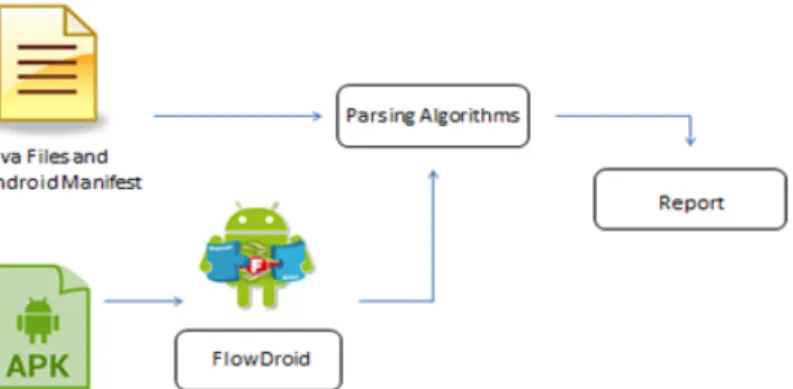
SACH uses two approaches to detect vulnerabilities in Android applications. One component
of SACH parses Android source code according to CERT (Seacord, 2014). The second
component of SACH uses FlowDroid (Artz, 2014) to analyze data leakage by using static taint
analysis. The results of both components are combined into one report. FlowDroid provides the
functionality to analyze the developers’ code statically and detect if data are vulnerable to data
leakage. Unlike the first component of SACH, FlowDroid added the ability to map
vulnerabilities even if the vulnerability is in a different class where the data is being leaked.
Figure 1. This figure is an overview of SACH.
3.2 Algorithm Design for SACH
Six algorithms were designed for SACH. The algorithms parse java and the android manifest
(Seacord, 2014). The following algorithms of SACH, FlowDroid describes the results are also
utilized in the implementation of these rules.
3.2.1 Limit the accessibility of an application’s sensitive content provider
This algorithm is based on the rule DRD01-J in CERT rules. A content provider is a
component of an application that can manage and share data with other applications on the
device. To prevent unauthorized access to content providers, a developer can restrict access by
specifying the export attribute to false. Before Android API 8, the content provider is accessible
even if the export attribute be set false. Also before API 16, the export value must be set to false
so that the content provider is not accessible by other applications. The following algorithm
(Figure 2) searches whether the program export value is set to true and it is before API 16. If this
vulnerability is detected, a warning message will be generated and logged.
input: project.properties Androidmanifest.xml algorithm: variable api variable automatic_private_api=17 variable regardless_available_api=8;
store api version in variable api
variable exported_value
array content_provider_info
variable content_provider_name
variable public_contentprovider= ““android:exported="true"”
variable private_contentprovider= “android:exported="false" ”
parse file for “<provider” to “/>”
store text into array content_provider_info
parse each array in content_provider_info for “android:exported="false"” and “android:name =x
if export_value == public_contentprovider
write to text file, “WARNING: Found content provider: ”+content_provider_name+ “set as
public. If a content provider is to be made public, the data stored in a provider may be accessed
from other applications. Therefore, it should be designed to handle only non-sensitive
information.”
else if export_value == private_contentprovider && api > regardless_available_api
do nothing
do nothing
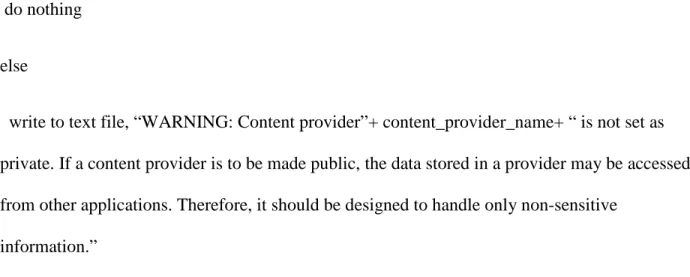
else
write to text file, “WARNING: Content provider”+ content_provider_name+ “ is not set as
private. If a content provider is to be made public, the data stored in a provider may be accessed
from other applications. Therefore, it should be designed to handle only non-sensitive
information.”
Figure 2. This is an algorithm for limiting the accessibility of content provider.
3.2.2 Do not broadcast sensitive data
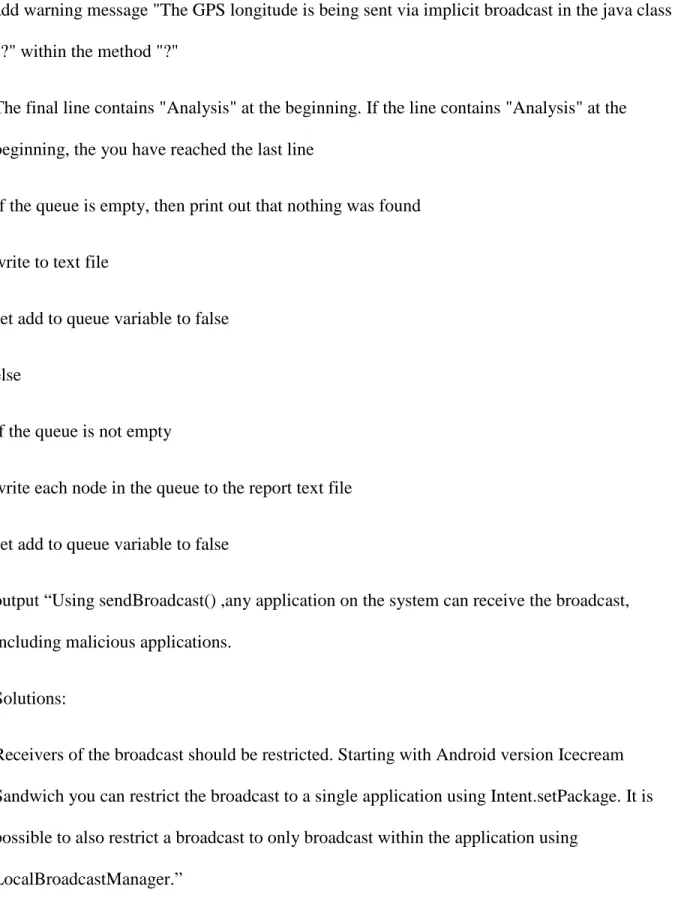
This algorithm is based on rule DRD03-J in CERT rules. Applications can share data
implicitly that is sent throughout the whole system. Implicit intents are used when actions are not
specified to a specific android component. Since any application with the proper receiver is able
to access the data, it is important to search the application for implicit intents. This algorithm
uses FlowDroid to detect if the DeviceId or GPS data is being sent using a broadcast intent. A
warning will be generated if the implicit intent is not bounded to only the application itself.
Input:
FlowDroid output file
Algorithm:
Variable add_to_queue
create a queue linked list
read in each line
Evaluate if the line is a detection of a flow and if it is a send broadcast sink
if the line is a detection of a flow not pertaining to send broadcast, set the variable to
add_to_queue to false
determine if the line is a detection of a send broadcast flow
if the line is a send broadcast flow, set the variable to add to the queue to true
Evaluate if the line contains DeviceID as a source and if the add to queue variable is set to true
extractthe class name and method from the line and store them in variables
add warning message "The deviceID is being sent via implicit broadcast in the java class "?"
within the method "?"
Evaluate if the line contains getLatitude as a source and if the add to queue variable is set to true
Extract the class name and method from the line and store them in variable
add warning message "The GPS latitude is being sent via implicit broadcast in the java class "?"
within the method "?"
Evaluate if the line contains getLongitude as a source and if the add to queue variable is set to
true
add warning message "The GPS longitude is being sent via implicit broadcast in the java class
"?" within the method "?"
The final line contains "Analysis" at the beginning. If the line contains "Analysis" at the
beginning, the you have reached the last line
If the queue is empty, then print out that nothing was found
write to text file
set add to queue variable to false
else
if the queue is not empty
write each node in the queue to the report text file
set add to queue variable to false
output “Using sendBroadcast() ,any application on the system can receive the broadcast,
including malicious applications.
Solutions:
Receivers of the broadcast should be restricted. Starting with Android version Icecream
Sandwich you can restrict the broadcast to a single application using Intent.setPackage. It is
possible to also restrict a broadcast to only broadcast within the application using
LocalBroadcastManager.”
3.2.3 Do not allow webview to access sensitive local resource through file scheme
This algorithm is based on rule DRD02-J in CERT rules. The webview class allows web
pages to be displayed within an activity. The webview is vulnerable to be manipulated to access
local resources on the file system by a third party requesting the webview to handle an action.
This algorithm looks at three state attributes which are the plugin, allow file access and Java
script state. A warning message will be generated if the plugin, allow file access or Java script
state is set to true.
input:
project.properties
variable api
parse project.properties for api version
store api version in variable api
variable line_number = 0
array line_numbers
variable Java_Script_State
variable Allow_File_Access_State
parse each line for setJavaScriptEnabled( x )
increment line_number +1
if x exist
store x in Java_Script_State
if Java_Script_State == “true”
store line_number into line_numbers[x]
else if Java_Script_State == “false”
do nothing
else
store line_number into line_numbers[x]
if line_numbers is empty
do nothing
else
Print line_numbers
Print “When the target activity (webView object) sets JavaScript enabled, it can be abused to
access the target application’s resources”
parse each line for Plugin_State( x)
increment line_number +1
if * exist
store * in Plugin_State
if Plugin_State == “ON”
store line_number into line_numbers[x]
else if Plugin_State == “OFF”
do nothing
else if Plugin_State == “ON_DEMAND”
store line_number into line_numbers[x]
else
store line_number into line_numbers[x]
do nothing
else
Print “WARNING: Pugin state is not set to OFF on line(s) ”
Print line_numbers
Print “The setPluginState() method tells the WebView to enable or disable the plugin”
parse each line for Allow_File_Access_State( x )
increment line_number +1
if * exist
store * in Allow_File_Access_State
if Allow_File Access_State == “TRUE”
store line_number into line_numbers[x]
else if Allow_File_Access_State == “FALSE”
do nothing
else
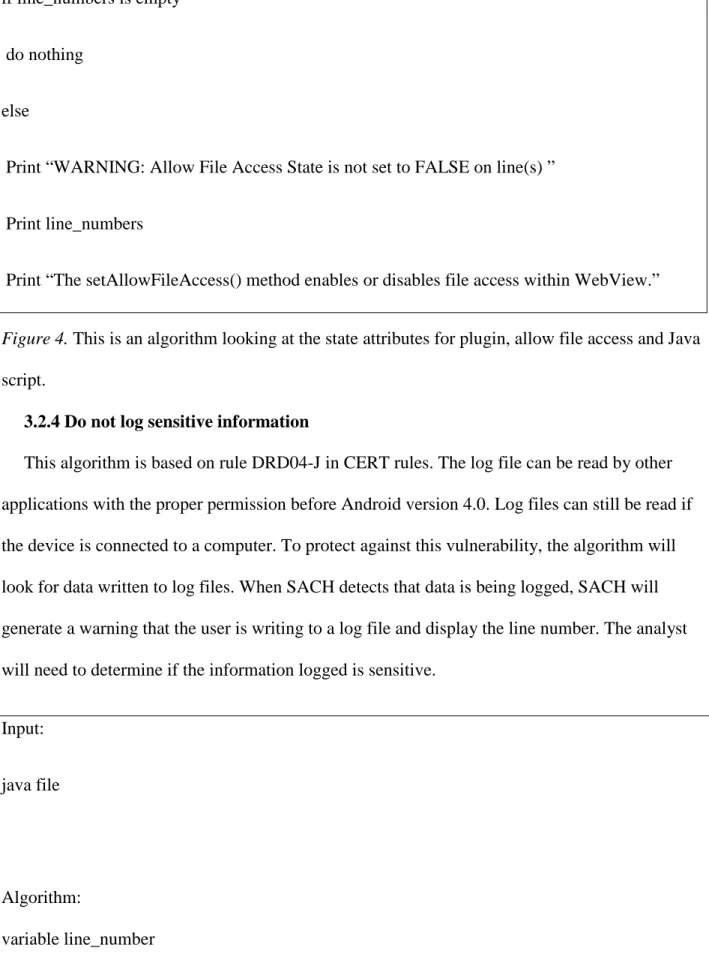
if line_numbers is empty
do nothing
else
Print “WARNING: Allow File Access State is not set to FALSE on line(s) ”
Print line_numbers
Print “The setAllowFileAccess() method enables or disables file access within WebView.”
Figure 4. This is an algorithm looking at the state attributes for plugin, allow file access and Java
script.
3.2.4 Do not log sensitive information
This algorithm is based on rule DRD04-J in CERT rules. The log file can be read by other
applications with the proper permission before Android version 4.0. Log files can still be read if
the device is connected to a computer. To protect against this vulnerability, the algorithm will
look for data written to log files. When SACH detects that data is being logged, SACH will
generate a warning that the user is writing to a log file and display the line number. The analyst
will need to determine if the information logged is sensitive.
Input:
java file
Algorithm:
array lines
parse each line for “Log.d(” x “) or Log.v(” x “) or Log.e(” x “) or Log.i(” x “) or Log.w(” x“) ”
increment line_number
if found store line_number in array lines
if lines is empty
output “Did not find any logs ”
if line_number exist
output “WARNING: potential security vulnerability in line(s):”
foreach lines
output line_number
Output :
Prior to Android 4.0, any application with READ_LOGS permission could obtain all the other
been changed. Even applications with READ_LOGS permission cannot obtain log output from
other applications.
However, by connecting an Android device to a PC, log output from other applications can be
obtained.
Therefore, it is important that applications do not send sensitive information to log output in
plain text.
Figure 5. This is an algorithm to detect the use of a log file.
SACH also searches if particular sensitive information such as the DeviceId and GPS
information is being logged using the output of FlowDroid (Figure 6).
Input:
Read in FlowDroid output
Algorithm:
Variable add to queue
store line number in a string
create a queue linked list
read in each line
Evaluate if the line is a detections of a flow and if it is a log sink
if the line is a flow pertaining to send logs, set the variable to add to the queue to true
Evaluate if the line contains getDeviceID as a source and if the add to queue variable is set to
true
extract the class name and method from the line and store them in variable and store warning
message into queue
Evaluate if the line contains getLatitude as a source and if the add to queue variable is set to true
extract the class name and method from the line and store them in variable
add warning message "The GPS latitude is being sent via implicit broadcast in the java class "?"
within the method "?"
Evaluate if the line contains getLongitude as a source and if the add to queue variable is set to
true
extract the class name and method from the line and store them in variable and store warning
message into queue
add warning message "The GPS longitude is being sent via implicit broadcast in the java class
"?" within the method "?"
The final line contains "Analysis" at the beginning. If the line contains "Analysis" at the
beginning, the you have reached the last line
else, if the queue is not empty
write each node in the queue to the report text file
set add to queue variable to false
Output:
Prior to Android 4.0, any application with READ_LOGS permission could obtain all the other
applications' log output. After Android 4.1, the specification of READ_LOGS permission has
been changed. Even applications with READ_LOGS permission cannot obtain log output from
other applications.
However, by connecting an Android device to a PC, log output from other applications can be
obtained.
Therefore, it is important that applications do not send sensitive information to log output in
plain text.
Figure 6. This is an algorithm to parse FlowDroid output for data leakage to the log file.
3.2.5 Restrict access to activities
This algorithm is based on rule DRD09-J in CERT rules. To prevent unauthorized access to
an activity, a developer can restrict access by specifying the export attribute be set to false. This
algorithm detects if the export attribute is not set to false, and will generate a warning message.
input:
project.properties
algorithm:
variable api
variable automatic_private_api=17
variable regardless_available_api=8;
parse project.properties for api version
store api version in variable api
variable exported_value
array activity_info
variable activity_name
variable public_activity= ““android:exported="true"”
variable private_activity= “android:exported="false" ”
parse file for “<provider” to “/>”
parse each array in content_provider_info for “android:exported="false"” and
“android:name=”+*+” “”
if export_value == public_activity
write to text file, “WARNING: Found activity: ”+activity_name+ “set as public. If the activity is
intended solely for the internal use of the app and an intent filter is declared then any other apps,
including malware, can activate the activity for unintended use.”
else if export_value == private_activity && api > regardless_available_api
do nothing
else if export_value==null && api >= variable automatic_private_api
do nothing
else
write to text file, “WARNING: Found activity: ”+activity_name+ “set as public. If the activity
is intended solely for the internal use of the app and an intent filter is declared then any other
apps, including malware, can activate the activity for unintended use.”
3.2.6 Do not release apps as debuggable
This algorithm is based on the rule DRD10-J in CERT rules. If the application is released as
debuggable; this means, an user does not need the source code to debug the application. This
algorithm checks to ensure the debuggable attribute is set to false. If the debuggable attribute is
not set to false, then a warning message will be generated.
input:
Project.properties
Androidmanifest.xml
algorithm:
variable debuggable_value
variable debuggable_activity= “android:debuggable="true"”
variable non_debuggable_activity= “android:debuggable="false"”
parse file for android:debuggable= x
store text into variable debuggable
if debuggable_value == non_debuggable_activity
write to text file, “The debug able attribute is set to false”
else
write to text file, “WARNING: Found activity: ”+activity_name+ “set as public. If the activity
is intended solely for the internal use of the app and an intent filter is declared than any other
apps, including malware, can activate the activity for unintended use.”
4 CHAPTER 4
Prototype implementation of SACH
This chapter will present the implementation of SACH, the methodology of testing and the
results of SACH.
4.1 Implementation
SACH is a Java application developed using Netbeans IDE 8.0. SACH is made up of a main
class and a class named algorithms where all of the vulnerability checks are implemented. First
the apk is loaded into FlowDroid to produce a result text file. The path of the Android manifest
file, root directory of source java code and the text output from FlowDroid are input into SACH.
4 algorithms have been implemented.. Each vulnerability method is initiated as an object from
the algorithm class allowing the developer to skip any particular vulnerability search.
4.2 Testing and Results
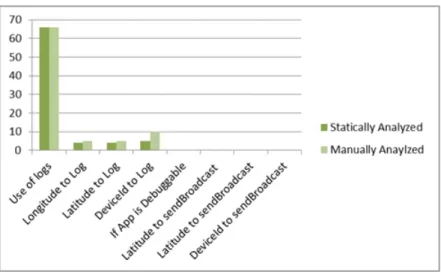
The system used for testing is an i7 processor using Windows7 with 16 gb of RAM. 73
applications have been analyzed from Droidbench developed by EC Spride. The 73 programs
were also manually analyzed to validate the result73 application SACH scored a 100 percent
score detecting instances where logs was used. SACH was also scored an 80 percent when
identifying if the longitude or latitude is written to a log and scored a 50 percent when detecting
if the DeviceId was written to a log. None of the 73 applications has the vulnerability of writing
the DeviceId or GPS locations to a broadcast intent. Also none of the 73 applications was
released as debuggable. Figure 8 shows an example output of FlowDroid and Figure 9 shows the
results of SACH.
The deviceID is being logged in the java class
com.javacodegeeks.android.broadcastreceiverstest.MainActivity within the method void
broadcastCustomIntent(android.view.View)
WARNING: potential security vulnerability in
A:\Documents\Droidbench\DroidBench-
master\eclipse-project\BroadcastReceiversTest\src\com\javacodegeeks\android\broadcastreceiverstest\MainActi
vity.java on line(s):
57
Prior to Android 4.0, any application with READ_LOGS permission could obtain all the other
applications' log output. After Android 4.1, the specification of READ_LOGS permission has
been changed. Even applications with READ_LOGS permission cannot obtain log output from
other applications.
However, by connecting an Android device to a PC, log output from other applications can be
obtained.
Therefore, it is important that applications do not send sensitive information to log output
******************************************************************************
*******************************
******************************************************************************
Did not find dubuggable vulnerability
WARNING: Found sensitive information being sent via Broadcast intent
The deviceID is being sent via implicit broadcast in the java class
com.javacodegeeks.android.broadcastreceiverstest.MainActivity within the method void
broadcastCustomIntent(android.view.View)
******************************************************************************
*******************************
Figure 9. Example output of SACH
5 CHAPTER 5
Conclusion and Future Work
As the new generation of mobile devices continue to grow and connect users to existing
online services, it is imperative for mobile application developers to implement secure code to
handle user’s sensitive data. With Android dominating the market by 81%, this means that many
users are using this operating system and the applications built for it. The issue this research
attempt to answer is how to help Android developer implement secure code before it is released
on the open market for download. Static analysis is a technique to analyze source code without
running the application on a device. Designing a statically analysis tool may be able to assist
novice mobile application developers or developers who do not have an in depth knowledge of
programming secure Android programs.
This research proposes SACH, a tool to identify security vulnerabilities based on CERT
Oracle Secure Coding Rules for Android. It utilizes FlowDroid to detect data leakage. A
prototype has been implemented which detects whether the application leaks information
through implicit broadcast intent and through log files, use of logs by looking at the java source
code and if the application is defined as debuggable in the Android manifest file. Seventy three
applications have been tested from DroidBench (Artz, 2014) .SACH scored 100 percent in
detecting instances where logs was used and scored 80 percent in identifying if the longitude or
latitude is written to a log. SACH scored 50 percent in detecting if the DeviceId was written to a
log. None of the 73 applications presented the vulnerability of writing the DeviceId or GPS
locations to a broadcast intent. Also none of the 73 applications were released as debuggable.
SACH provides a proof of concept of being able to analyze the source code to identify data
Future work will seek to implement more algorithms based on CERT Oracle of Secure
Coding Rules for Android and identify other data leakages that can result in sensitive data being
obtain by a 3rd party. The performance of SACH will be further tested with larger number of
Android applications. Also due to the limitation of static analysis in producing false positives
and false negative, finding methods to improve the static analysis accuracy will also be our
References
Arzt, S., Rasthofer, S., Fritz, C., Bodden, E., Bartel, A., Klein, J., ... & McDaniel, P. (2014,
June). Flowdroid: Precise context, flow, field, object-sensitive and lifecycle-aware taint
analysis for android apps. In Proceedings of the 35th ACM SIGPLAN Conference on
Programming Language Design and Implementation (p. 29). ACM.
Bajracharya, S., Sahlu, Z., & Andronic, A. (2013, April 25). Summary of Top 10 existing
Android mobile attacks and Vulnerabilities(2010 -2013) and A demonstration Android
security threats and Defense. Retrieved May 31, 2014, from
https://drive.google.com/viewerng/viewer?a=v&pid=sites&srcid=ZGVmYXVsdGRvbW
Fpbnxtb2JpbGVzZWN1cml0eWxhYndhcmV8Z3g6NzZiYzcwOGU3NTA0ZmFhZA
Bartel, A., Klein, J., Le Traon, Y., & Monperrus, M. (2012, September). Automatically securing
permission-based software by reducing the attack surface: an application to android. In
Proceedings of the 27th IEEE/ACM International Conference on Automated Software Engineering (pp. 274-277). ACM.
Clark, C., Dwivedi, H., & Thiel, C. (2010). Mobile Application Security (pp. 1-432). N.p.:
McGraw-Hill Osborne Media.
Enck, W., Ongtang, M., & McDaniel, P. D. (2009). Understanding Android Security. IEEE
Enck, W., Gilbert, P., Chun, B. G., Cox, L. P., Jung, J., McDaniel, P., & Sheth, A. N. (2014).
TaintDroid: an information flow tracking system for real-time privacy monitoring on
smartphones. Communications of the ACM, 57(3), 99-106.
Google. (2014) Toasts (n.d.). In Google . Retrieved May 31, 2014, from
http://developer.android.com/guide/topics/ui/notifiers/toasts.html
Balduzzi, M., Egele, M., Kirda, E., Balzarotti, D., & Kruegel, C. (2010, April). A solution for the
automated detection of clickjacking attacks. In Proceedings of the 5th ACM Symposium
on Information, Computer and Communications Security (pp. 135-144). ACM.
IDC. (2013). Android Pushes Past 80% Market Share While Windows Phone Shipments Leap
156.0% Year Over Year in the Third Quarter, According to IDC (2013, November 12).
Retrieved May 31, 2014, from http://m.idc.com//pressRelease/prUS24442013
IDG. (2013) PC Shipments Post the Steepest Decline Ever in a Single Quarter, According to
IDC. Retrieved May 14, 2014, from
http://www.idg.com/www/pr.nsf/ByID/MBEN-96VKBA?opendocument&utm_source=pr_rss&utm_medium=rss&utm_campaign=pr_rs
s
Kai, Q., Prabir, B., Minzhe, G. & et al. (2014). SMART: Real World Relevant Security Labware
for Mobile Threat Analysis and Protection Experience . In Mobile Security Labware.
Niemietz, M., & Schwenk, J. UI Redressing Attacks on Android Devices. Retrieved May 31,
2014 from
https://media.blackhat.com/ad-12/Niemietz/bh-ad-12-androidmarcus_niemietz-WP.pdf
McGraw, G. (2006). Software Security: Building Security in (pp. 1-448). N.p.: Addison-Wesley
Professional.
OWASP. (2014). Projects/OWASP Mobile Security Project - Top Ten Mobile Risks. In
OWASP. Retrieved July 6, 2014, from
https://www.owasp.org/index.php/Projects/OWASP_Mobile_Security_Project_-_Top_Ten_Mobile_Risks
iSECPartners. ( 2014). Intent Fuzzer . Retrieved May 31, 2014, from
https://www.isecpartners.com/tools/mobile-security/intent-fuzzer.aspx
Seacord, R. (2013). Android (DRD). Retrieved July 6, 2014, from
https://www.securecoding.cert.org/confluence/pages/viewpage.action?pageId=11150953
5
Six, J. (2011). Application Security for the Android Platform (pp. 1-114). N.p.: O'Reilly Media.
Ma, S., Tang, Z., Xiao, Q., Liu, J., Duong, T. T., Lin, X., & Zhu, H. Detecting GPS Information
Yang, Z., & Yang, M. (2012, November). Leakminer: Detect information leakage on android
with static taint analysis. In Software Engineering (WCSE), 2012 Third World Congress
Appendix A
Table A-1
The results of scanning 73 programs using SACH
Use of logs Longit ude to log Latit ude to Log Devic eId to Log If app is debugg able Latitude to sendBroadc ast Latitude to sendBroad cast DeviceId to sendBroa dcast AndroidSpecific_Dir ectLeak1 0 0 0 0 0 0 0 0 AndroidSpecific_Ina ctiveActivity 1 0 0 0 0 0 0 0 AndroidSpecific_Lib rary2 0 0 0 0 0 0 0 0 AndroidSpecific_Lo gNoLeak 1 0 0 0 0 0 0 0 AndroidSpecific_Ob fuscation1 0 0 0 0 0 0 0 0 AndroidSpecific_Pri vateDataLeak1 2 0 0 0 0 0 0 0 AndroidSpecific_Pri vateDataLeak2 1 0 0 0 0 0 0 0 AndroidSpecific_Pri vateDataLeak3 0 0 0 0 0 0 0 0 ArraysAndLists_Arr 0 0 0 0 0 0 0 0
ayAccess1 ArraysAndLists_Arr ayAccess2 0 0 0 0 0 0 0 0 ArraysAndLists_Has hMapAccess1 0 0 0 0 0 0 0 0 ArraysAndLists_List Access1 0 0 0 0 0 0 0 0 Callbacks_Anonymo usClass1 1 1 1 0 0 0 0 0 Callbacks_Button1 0 0 0 0 0 0 0 0 Callbacks_Button2 3 0 0 3 0 0 0 0 Callbacks_Button3 2 0 0 0 0 0 0 0 Callbacks_Button4 0 0 0 0 0 0 0 0 Callbacks_Location Leak1 2 1 1 0 0 0 0 0 Callbacks_Location Leak2 2 1 1 0 0 0 0 0 Callbacks_Location Leak3 1 1 1 0 0 0 0 0 Callbacks_MethodO verride1 1 0 0 1 0 0 0 0 Callbacks_MultiHan dlers1 2 0 0 0 0 0 0 0 Callbacks_Ordering1 2 0 0 0 0 0 0 0 Callbacks_RegisterG 9 0 0 0 0 0 0 0
lobal1 Callbacks_RegisterG lobal2 0 0 0 0 0 0 0 0 Callbacks_Unregiste r1 0 0 0 1 0 0 0 0 FieldAndObjectSens itivity_FieldSensitivi ty2 0 0 0 0 0 0 0 0 FieldAndObjectSens itivity_FieldSensitivi ty3 0 0 0 0 0 0 0 0 FieldAndObjectSens itivity_FieldSensitivi ty4 0 0 0 0 0 0 0 0 FieldAndObjectSens itivity_InheritedObje cts1 0 0 0 0 0 0 0 0 FieldAndObjectSens itivity_ObjectSensiti vity1 0 0 0 0 0 0 0 0 FieldAndObjectSens itivity_ObjectSensiti vity2 0 0 0 0 0 0 0 0 GeneralJava_Excepti ons1 0 0 0 0 0 0 0 0
GeneralJava_Excepti ons2 0 0 0 0 0 0 0 0 GeneralJava_Excepti ons3 0 0 0 0 0 0 0 0 GeneralJava_Excepti ons4 0 0 0 0 0 0 0 0 GeneralJava_Loop1 0 0 0 0 0 0 0 0 GeneralJava_Loop2 0 0 0 0 0 0 0 0 GeneralJava_Source CodeSpecific1 0 0 0 0 0 0 0 0 GeneralJava_StaticIn itialization1 0 0 0 0 0 0 0 0 GeneralJava_StaticIn itialization2 0 0 0 0 0 0 0 0 GeneralJava_Unreac hableCode 1 0 0 0 0 0 0 0 GeneralJava_Virtual Dispatch1 2 0 0 0 0 0 0 0 ImplicitFlows_Impli citFlow1 1 0 0 0 0 0 0 0 ImplicitFlows_Impli citFlow2 2 0 0 0 0 0 0 0 ImplicitFlows_Impli citFlow3 7 0 0 0 0 0 0 0 ImplicitFlows_Impli 5 0 0 0 0 0 0 0
citFlow4 GeneralJava_Source CodeSpecific1 0 0 0 0 0 0 0 0 GeneralJava_StaticIn itialization1 0 0 0 0 0 0 0 0 GeneralJava_StaticIn itialization2 0 0 0 0 0 0 0 0 GeneralJava_Unreac hableCode 1 0 0 0 0 0 0 0 GeneralJava_Virtual Dispatch1 2 0 0 0 0 0 0 0 ImplicitFlows_Impli citFlow1 1 0 0 0 0 0 0 0 ImplicitFlows_Impli citFlow2 2 0 0 0 0 0 0 0 ImplicitFlows_Impli citFlow3 7 0 0 0 0 0 0 0 ImplicitFlows_Impli citFlow4 5 0 0 0 0 0 0 0 InterAppCommunica tion_ActivityCommu nication1 0 0 0 0 0 0 0 0 InterAppCommunica tion_IntentSink1 0 0 0 0 0 0 0 0 InterAppCommunica 0 0 0 0 0 0 0 0
tion_IntentSink2 Lifecycle_ActivityLi fecycle1 0 0 0 0 0 0 0 0 Lifecycle_ActivityLi fecycle2 0 0 0 0 0 0 0 0 Lifecycle_ActivityLi fecycle3 0 0 0 0 0 0 0 0 Lifecycle_ActivityLi fecycle4 0 0 0 0 0 0 0 0 Lifecycle_Applicatio nLifecycle1 0 0 0 0 0 0 0 0 Lifecycle_Applicatio nLifecycle2 0 0 0 0 0 0 0 0 Lifecycle_Applicatio nLifecycle3 0 0 0 0 0 0 0 0 Lifecycle_Broadcast ReceiverLifecycle1 0 0 0 0 0 0 0 0 Lifecycle_Fragment Lifecycle1 0 0 0 0 0 0 0 0 Lifecycle_ServiceLif ecycle1 0 0 0 0 0 0 0 0 Reflection_Reflectio n1 0 0 0 0 0 0 0 0 Reflection_Reflectio n2 0 0 0 0 0 0 0 0
Reflection_Reflectio n3 0 0 0 0 0 0 0 0 Reflection_Reflectio n4 0 0 0 0 0 0 0 0 Found 66 4 4 5 0 0 0 0 Total vulnerabilities 66 5 5 10 0 0 0 0
Appendix B
Source Code for SACH B-1
Main Class of SACH
public class SACH {
/**
* @param args the command line arguments
*/
public static void TranverseDirectory(String filePath) {//This method transverses the root
directory of the java source
Algorithms algorithm = new Algorithms();
File folder = new File(filePath);
File[] listOfFiles = folder.listFiles();
for (File listOfFile : listOfFiles) {
//detects if it is a file algorithm.DetectLogs(listOfFile.getAbsolutePath()); } else if (listOfFile.isDirectory()) { // detects a directory TranverseDirectory(listOfFile.getAbsolutePath()); } } }
public static void main(String[] args) throws IOException {
//To run FlowDroid
//java -cp
soot-trunk.jar;soot-infoflow.jar;soot-infoflow-android.jar;slf4j-api-1.7.5.jar;slf4j-simple-1.7.5.jar;axml-2.0.jar soot.jimple.infoflow.android.TestApps.Test
"C:\Users\Omega\Desktop\FlowDroid\AndroidSpecific_PrivateDataLeak3.apk"
C:\adt-bundle-windows-x86_64-20140702\sdk\platforms
try {
PrintWriter out = new PrintWriter(outFile);// writing to text file
out.close();
} catch (IOException ex) {
System.out.println("ERROR");
}//catch IOException error
Scanner user_input = new Scanner(System.in);
System.out.println("Enter the name of the application");
String nameOfApp = user_input.next();
String FlowDroidResultPath = "C:\\Users\\Omega\\Desktop\\FlowDroid\\results1.txt";
String xmlPath = "A:\\Documents\\Droidbench\\DroidBench-master\\eclipse-project\\" +
nameOfApp + "\\AndroidManifest.xml";
String rootOfSourceCode =
"A:\\Documents\\Droidbench\\DroidBench-master\\eclipse-project\\" + nameOfApp + "\\src\\";
Algorithms algorithm = new Algorithms();
algorithm.FindFlowsToLogs(FlowDroidResultPath);
TranverseDirectory(rootOfSourceCode);//Detects logs in source code
algorithm.DetectIfAppIsDebuggable(xmlPath);
}
Source Code for SACH B-2
Algorithm Class
public class Algorithms {
Boolean addToQueue = false;//boolean variable to determine if information needs to be added
to queue, intialize it to false so nothing can be added to the queue
void DetectLogs(String filePath) {
int counter = 0;
Queue queue = new LinkedList();// create a queue linked list
try {
LineNumberReader lineReader = new LineNumberReader(new
FileReader(filePath));//read in text file
String lineText = null;//store line in a string
while ((lineText = lineReader.readLine()) != null) {// read in each line
if
(lineText.matches(".*Log.d(.*).*|.*Log.i(.*).*|.*Log.v(.*).*|.*Log.e(.*).*|.*Log.i(.*).*|.*Log.w(.
*).*")) {// Evaluate if the line is a detections of a flow and if it is a send broadcast sink
queue.add(counter); } } if (queue.isEmpty()) { } else { try {
FileWriter outFile = new FileWriter("SACH_Results.txt", true);
PrintWriter out = new PrintWriter(outFile);// writing to text file
out.println("WARNING: potential security vulnerability in " + filePath + " on
line(s):");
out.close();
} catch (IOException ex) {
System.out.println("ERROR");
while (queue.size() != 0) {
//pop the queue
try {
FileWriter outFile = new FileWriter("SACH_Results.txt", true);
PrintWriter out = new PrintWriter(outFile);// writing to text file
out.println(queue.remove());
out.close();
} catch (IOException ex) {
System.out.println("ERROR");
}//catch IOException error
}
try {
FileWriter outFile = new FileWriter("SACH_Results.txt", true);
PrintWriter out = new PrintWriter(outFile);// writing to text file
out.println("Prior to Android 4.0, any application with READ_LOGS permission
READ_LOGS permission has been changed. Even applications with READ_LOGS permission
cannot obtain log output from other applications.\n"
+ "However, by connecting an Android device to a PC, log output from other
applications can be obtained.\n"
+ "Therefore, it is important that applications do not send sensitive information
to log
output\n\n*********************************************************************
****************************************\n************************************
*************************************************************************\n");
out.close();
} catch (IOException ex) {
System.out.println("ERROR");
}//catch IOException error
}
} catch (IOException ex) {
System.out.println("ERROR");
}
void DetectIfAppIsDebuggable(String filePath) {
boolean openBraceForApplication = false;
boolean closeBraceForApplication = false;
boolean isDebuggable = false;
try {
LineNumberReader lineReader = new LineNumberReader(new
FileReader(filePath));//read in text file
String lineText = null;//store line in a string
while ((lineText = lineReader.readLine()) != null) {// read in each line
if (lineText.matches(".*<application.*")) {// Evaluate if the line is a detections of a
flow and if it is a send broadcast sink
openBraceForApplication = true;
if (lineText.matches(".*android:debuggable.*=.*\".*true.*\".*")) {// Evaluate if the line
is a detections of a flow and if it is a send broadcast sink
isDebuggable = true;
}
if (lineText.matches(".*</application>.*")) {// Evaluate if the line is a detections of a
flow and if it is a send broadcast sink
closeBraceForApplication = true;
if (openBraceForApplication == true && isDebuggable == true &&
closeBraceForApplication == true) {
try {
FileWriter outFile = new FileWriter("SACH_Results.txt", true);
PrintWriter out = new PrintWriter(outFile);// writing to text file
out.println("WARNING: The application is debugabble attribute in the
AndroidManifest.xml is not set to true. The application could be debugged without the need of
the source code resulting in leakage of
data\n\n***********************************************************************
**************************************\n**************************************
out.close();
} catch (IOException ex) {
System.out.println("ERROR");
}//catch IOException error
} else {
try {
FileWriter outFile = new FileWriter("SACH_Results.txt", true);
PrintWriter out = new PrintWriter(outFile);// writing to text file
out.println("Did not find dubuggable vulnerability");
out.close();
} catch (IOException ex) {
System.out.println("ERROR");
}//catch IOException error
}
}
} catch (IOException ex) {
System.out.println("ERROR");
}//catch IOException error
}
void FindFlowsToSendBroadcast(String filePath) {// method to find flows via send broadcast
try {
LineNumberReader lineReader = new LineNumberReader(new
FileReader(filePath));//read in text file
String lineText = null;//store line in a string
Queue queue = new LinkedList();// create a queue linked list
while ((lineText = lineReader.readLine()) != null) {// read in each line
if (lineText.matches("Found a flow.*") != lineText.matches("Found a
flow.*sendBroadcast.*")) {// Evaluate if the line is a detections of a flow and if it is a send
addToQueue = false;// if thee line is detection of a flow not pertaining to send
broadcast, set the variable to add to the queue to false
}
if (lineText.matches("Found a flow.*sendBroadcast.*")) {// determine if the line is a
detection of a send broadcast flow
addToQueue = true;// if the line is a send broadcast flow, set the variable to add to
the queue to true
queue.add("WARNING: Found sensitive information being sent via Broadcast
intent");// add warning message "WARNING: Found sensitive information being sent via
Broadcast intent" to queue
}
if (addToQueue == true && lineText.matches(".*- virtualinvoke .*getDeviceId().*"))
{// Evaluate if the line contains DeviceID as a source and if the add to queue variable is set to
true
Pattern pat = Pattern.compile(".*- virtualinvoke .*getDeviceId.*in
<(.*):(.*)>.*");//extractthe class name and method from the line and store them in variables
Matcher matcher = pat.matcher(lineText);
queue.add(" The deviceID is being sent via implicit broadcast in the java class "
+ matcher.group(1) + " within the method " + matcher.group(2)); //add warning message "The
deviceID is being sent via implicit broadcast in the java class "?" within the method "?"
}
}
if (addToQueue == true && lineText.matches(".*- virtualinvoke .*getLatitude.*")) {//
Evaluate if the line contains getLatitude as a source and if the add to queue variable is set to true
Pattern pat = Pattern.compile(".*- virtualinvoke .*getLatitude.*in <(.*):(.*)>.*");
//extractthe class name and method from the line and store them in variable
Matcher matcher = pat.matcher(lineText);
if (matcher.matches()) {
queue.add(" The GPS Latitude is being sent via implicit broadcast in the java
class " + matcher.group(1) + " within the method " + matcher.group(2));//add warning message
"The GPS latitude is being sent via implicit broadcast in the java class "?" within the method "?"
}
}
if (addToQueue == true && lineText.matches(".*- virtualinvoke .*getLongitude.*"))
{// Evaluate if the line contains getLongitude as a source and if the add to queue variable is set to
Pattern pat = Pattern.compile(".*- virtualinvoke .*getLongitude.*in
<(.*):(.*)>.*");//extractthe class name and method from the line and store them in variable
Matcher matcher = pat.matcher(lineText);
if (matcher.matches()) {
queue.add(" The GPS Longitude is being sent via implicit broadcast in the java
class " + matcher.group(1) + " within the method " + matcher.group(2));//add warning message
"The GPS longitude is being sent via implicit broadcast in the java class "?" within the method
"?"
}
}
if (lineText.matches("Analysis.*")) {//The final line contains "Analysis" at the
beginning. If the line contains "Analysis" at the beginning, the you have reached the last line
if (queue.isEmpty()) {// If the queue is empty, then print out that nothing was found
try {
FileWriter outFile = new FileWriter("SACH_Results.txt", true);
PrintWriter out = new PrintWriter(outFile);// writing to text file
out.println("Did not find flows to sendBroadcast sink");
} catch (IOException ex) {
System.out.println("ERROR");
}//catch IOException error
addToQueue = false;// set add to queue variable to false
} else {
try {
FileWriter outFile = new FileWriter("SACH_Results.txt", true);
PrintWriter out = new PrintWriter(outFile);// writing to text file
while (queue.size() != 0) {// else, if the queue is not empty
out.println(queue.remove());//write each node in the queue to the report text
file
}
out.println("\n");
out.println("Using sendBroadcast() ,any application on the system can receive the broadcast,
including malicious applications.\n"
+ "Solutions:\n"
+ "Receivers of the broadcast should be restricted. Starting with Android version Icecream
possible to also restrict a broadcast to only broadcast within the application using LocalBroadcastManager.”"); out.println("\n\n***************************************************************** ********************************************\n******************************** *****************************************************************************\ n"); out.close();
} catch (IOException ex) {
System.out.println("ERROR");
}//catch IOException error
addToQueue = false;// set add to queue variable to false
}
}
}
} catch (IOException ex) {// the exception if error
System.err.println(ex);