The Google File System
Definition -DFS
DFS
: multiple users, multiple sites, and (possibly)
distributed storage of files.
Benefits
– File sharing
– Uniform view of system from different clients – Centralized administration
Goals of a distributed file system
– Network Transparency (access transparency)
Architectures
Client-Server
– Traditional; e.g. Sun Microsystems Network File System (NFS) – Cluster-Based Client-Server; e.g., Google File System (GFS)
Symmetric
Client-Server Architecture
One or more machines (file servers) manage the file system.
Files are stored on disks at the servers
Requests for file operations are made from clients to the servers.
Communication Network cache
cache
cache
cache
Server Server
Server Disks
client client
Sun’s Network File System
Sun’s NFS for many years was the most widely used distributed file system.
– NFSv3: version three, used for many years – NFSv4: introduced in 2003
Overview
NFS goals:
– Each file server presents a standard view of its local file system – transparent access to remote files
– compatibility with multiple operating systems and platforms. – easy crash recovery at server
Originally UNIX based; now available for most operating systems.
NFS Implements Remote Access
Client Server Client Server
Requests from client to access remote file (with server responses)
File stays at server
File is moved to client
Client accesses file
File is returned to the server
Access Models
Most distributed file systems use the remote access model
– Client-side caching may be used to save time and network traffic – Access is transparent to user; the interface resembles the
interface to the local file system
NFS as a
Stateless
Server
NFS servers historically did not retain any information about past requests.
Consequence: crashes weren’t too painful
– If server crashed, it had no tables to rebuild – just reboot and go
Disadvantage: client has to maintain all state information; messages are longer than they would be otherwise.
Advantages/Disadvantages
Stateless Servers
– Fault tolerant– No open/close RPC required – No need for server to waste
time or space maintaining tables of state information – Quick recovery from server
crashes
Stateful Servers
– Messages to server are
shorter (no need to transmit state information)
– Supports file locking
File System Model
NFS implements a file system model that is almost identical to a UNIX system.
– Files are structured as a sequence of bytes – File system is hierarchically structured
– Supports hard links and symbolic links
Cluster-based or Clustered File System
A distributed file system that consists of several servers that share the responsibilities of the system, as opposed to a single server (possibly replicated).
Cluster-Based DFS
Some cluster-based systems organize the clusters in an application specific manner
For file systems used primarily for parallel applications, the data in a file might be striped across several servers so it can be read in parallel.
Or, it might make more sense to partition the file system itself – some portion of the total number of files are stored on each server.
For systems that process huge numbers of requests; e.g., large data centers, reliability and management issues take precedence.
Google File System (GFS)
Concepts(Assumptions)
GFS uses a cluster-based approach implemented on ordinary commodity Linux boxes (not high-end servers).
Component failures are the norm rather than the exception.
o File System consists of hundreds or even thousands of storage
machines built from inexpensive commodity parts.
Files are Huge. Multi-GB Files are common.
o Each file typically contains many application objects such as web documents.
Append, Append, Append.
o Most files are mutated by appending new data rather than
overwriting existing data.
Co-Designing
The Google File System
GFS stores a huge number of files, totaling many terabytes of data
Individual file characteristics
– Very large, multiple gigabytes per file
– Files are updated by appending new entries to the end (faster than overwriting existing data)
– Files are virtually never modified (other than by appends) and virtually never deleted.
Architecture
A GFS cluster consists of Single master & multiple chunkservers.
Files divided into fixed-size chunks (64MB).
– Immutable and globally unique 64 bit chunk handle assigned at creation – Chunks stored by chunkservers on local disks as Linux files
– R or W chunk data specified by chunk handle and byte range – Each chunk replicated on multiple chunkservers – default is 3
The master knows (more or less) where chunks are stored
– Maintains a mapping from file name to chunks & chunks to chunk servers
Architecture
• Master maintains all file system metadata
– Namespace, access control info, mapping from files to chunks, location of chunks
– Controls garbage collection of chunks
– Communicates with each chunkserver through HeartBeat messages – Clients interact with master for metadata, chunksevers do the rest, e.g.
R/W on behalf of applications
• Periodically the master polls all its chunk servers to find out which chunks each one stores
– This means the master doesn’t need to know each time a new server comes on board, when servers crash, etc.
GFS client Master
Chunk server
Linux FS
Chunk Server
Linux FS
Chunk Server
Linux FS
File name, chunk index
Contact address
Instructions Chunk-server state Chunk ID, range
Chunk data
The organization of a Google cluster of servers
Master
Single Master –
– Simplifies design
– Placement, replication decisions made with global knowledge – Doesn’t R/W, so not a bottleneck
Client
• Client translate file name/offset into chunk index within file • Send master request with file name/chunk index
Operation Log
• Historical record of critical metadata changes
• Log replicated on remote machines
• Log kept small – checkpoint when > size
• New checkpoint built without delaying mutations (takes about 1 min for 2 M files)
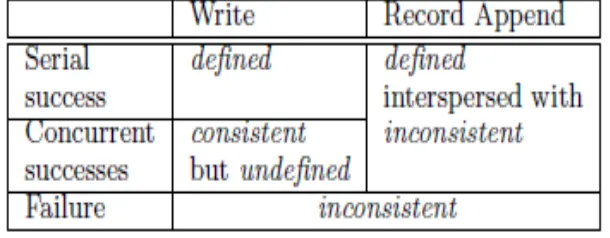
Consistency Model
Table 1: File Region State After Mutation
• File namespace mutations are atomic
• Relatively simple, since just a single master.
• Data mutations may be writes or record appends • Various file region states after mutations:
• Consistent - All clients see the same data, regardless of replicas • Defined – Clients see what mutation writes in entirety
• Inconsistent – Different clients see different data
Leases and Mutation Order
A mutation is an operation that changes the contents or metadata of a chunk such as a write or an append operation. Each mutation is performed at all the chunk’s replicas.
We use leases to maintain a consistent mutation order across
replicas.
The master grants a chunklease to one of the replicas, which
we call the primary. The primary picks a serial order for all mutations to the chunk.
1. Client asks master for all replicas.
2. Master replies with primary and secondary. Client caches.
3. Client pushes the data to all replicas.
4. After all replicas acknowledge, client sends write request to primary.
5. Primary forwards write request to all replicas.
6. Secondaries reply to primary indicating operation completion.
7. Primary replies to client. Errors handled by retrying.
Data Flow
Fully utilize each machine’s network bandwidth
– Data pushed along chain chunkservers
Avoid bottlenecks and high-latency
– Machine forwards to closest machine in topology
Minimize latency
Atomic Record Appends
Client pushes data to all replicas of last chunk of the file
Sends request to primary
Primary checks if will exceed 64MB, if so send message to retry on next chunk, else primary appends, tells
2ndary to write, send reply to client
If append fails, retries
– Replicas of same chunk may contain different data, including duplication of same record in part or whole
– Does not guarantee all replicas bytewise identical
– Guarantees data written at least once as atomic unit
Replica Placement
GFS cluster distributed across many machine racks
Need communication across several network switches
Challenge to distribute data
Chunk replica
– Maximize data reliability
– Maximize network bandwidth utilization
Replicas created for three reasons:
1. Creation
– Balance disk utilization – Balance creation events
After a creation, lots of traffic
– Spread replicas across racks
2. Re-replication
– Occurs when number of replicas falls below a watermark. Replica corrupted, chunkserver down, watermark increased.
– Replicate based on priority (fewest replicas)
3. Rebalancing
– Periodically moves replicas for better disk space and load balancing – Gradually fills up new chunkserver
Garbage Collection
Storage reclaimed lazily by GC.
File first renamed to a hidden name.
Hidden files removes if more than three days old.
When hidden file removed, in-memory metadata is removed.
Regularly scans chunk namespace, identifying orphaned chunks.
These are removed.
Fault Tolerance
Fast Recovery
– Master/chunkservers restore state and start in seconds regardless of how terminated
Abnormal or normal
Shadow Master
Master Replication
– Replicated for reliability
– One master remains in charge of all mutations and background activities
– If fails, start instantly
– If machine or disk mails, monitor outside GFS starts new master with replicated log
Shadow Master
Shadow Master
– Read-only access to file systems even when primary master down
– Not mirrors, so may lag primary slightly (fractions of second)
– Enhance read availability for files not actively mutated or if stale OK, e.g. metadata, access control info ???
– Shadow master read replica of operation log, applies same sequence of changes to data structures as the primary does