IMPROVING ATM SECURITY CHECKS USING FINGER
RECOGNITION
1
IGWE , AGU FELIX,
2ENE ,I.I
1COMPUTER ENGINEERING DEPT.
ABIA STATE POLYTECHNIC, ABA, ABIA STATE, NIGERIA
2
ELECTRICAL/ELECTRONICS ENGINEERING DEPT. ENUGU STATE UNIVERSITY OF SCIENCE & TECH
ENUGU, NIGERIA
1. INTRODUCTION
Security, as it relates to ATMs and credit card, has several dimensions. ATMs also provide a practical demonstration of a number of security systems and concepts operating together and how various security concerns are dealt with.
There have also been a number of incidents of fraud by Man-in-the-middle attacks, where criminals have attached fake keypads or card readers to existing machines. These have then been used to record customers' Pins and bank card information in order to gain unauthorized access to their accounts. Various ATM manufacturers have put in place counter measures to protect the equipment they manufacture from these threats.
Alternate methods to verify cardholder identities have been tested and deployed in some countries, such as finger and palm vein patterns iris, and facial recognition technologies. However, recently, cheaper mass production equipment has been developed and is being installed in machines globally that detect the presence of foreign objects on the front of ATMs, current tests have shown 99% detection success for all types of skimming devices. ATMs that are exposed to the outside must be vandal and weather resistant openings on the customer-side of ATMs are often covered by mechanical shutters to prevent tampering with the mechanisms when they are not in use. Alarm sensors are placed inside the ATM and in ATM servicing areas to alert their operators when doors have been opened by unauthorized personnel.
1.1 Fingerprint Recognition
Fingerprint recognition or fingerprint authentication refers to the automated method of verifying a match between two human fingerprints. Fingerprints are one of many forms of biometrics used to identify individuals and verify their identity.
The analysis of fingerprints for matching purposes generally requires the comparison of several features of the print pattern. These include patterns, which are aggregate characteristics of ridges, and minutia points, which are unique features found within the patterns.[1] It is also necessary to know the structure and properties of human skin in order to successfully employ some of the imaging technologies
.
1.2 Patterns
ABSTRACT:
This paper x-rays how ATM security can be checked and improved by using fingerRecognition.This was achieved by sending fingerprints to finger sensor which converts
patterns and signals from analogue to digital form through an analogue-to-digital converter(ADC).In this paper,a programming language known as VisualDsp++ was used to enable fingerprint sensor to generate data.The data gotten from an individual is stored in the database of the system, if a customer of a particular bank comes to withdraw money from the ATM machine,it crosschecks whether the owner’s data stored in the database matches with the data of the person that wants to make withdrawal,if it matches with the one in the database,access is granted to the preson,if it does not match, access is denied from the person who wants to make withdrawal.
The three basic patterns of fingerprint ridges are the arch, loop, and whorl:
arch: The ridges enter from one side of the finger, rise in the center forming an arc, and then exit the other side of the finger.
loop: The ridges enter from one side of a finger, form a curve, and then exit on that same side.
whorl: Ridges form circularly around a central point on the finger.
Scientists have found that family members often share the same general
fingerprint patterns, leading to the belief that these patterns are inherited.[2]
The arch pattern.
The loop pattern.
The whorl pattern.
2. MINUTIA FEATURES
The major minutia features of fingerprint ridges are ridge ending, bifurcation, and short ridge (or dot). The ridge ending is the point at which a ridge terminates. Bifurcations are points at which a single ridge splits into two ridges. Short ridges (or dots) are ridges which are significantly shorter than the average ridge length on the fingerprint. Minutiae and patterns are very important in the analysis of fingerprints since no two fingers have been shown to be identical.[3]
Ridge ending. Bifurcation. Short ridge (dot).
2.1 Fingerprint sensors
A fingerprint sensor is an electronic device used to capture a digital image of the fingerprint pattern. The captured image is called a live scan. This live scan is digitally processed to create a biometric template (a collection of extracted features) which is stored and used for matching. This is an overview of some of the more
commonly used fingerprint sensor technologies
.
Optical fingerprint imaging involves capturing a digital image of the print using visible light. This type of sensor is, in essence, a specialized digital camera. The top layer of the sensor, where the finger is placed, is known as the touch surface. Beneath this layer is a light-emitting phosphor layer which illuminates the surface of the finger. The light reflected from the finger passes through the phosphor layer to an array of solid state pixels (a charge-coupled device) which captures a visual image of the fingerprint. A scratched or dirty touch surface can cause a bad image of the fingerprint. A disadvantage of this type of sensor is the fact that the imaging capabilities are affected by the quality of skin on the finger. For instance, a dirty or marked finger is difficult to image properly. Also, it is possible for an individual to erode the outer layer of skin on the fingertips to the point where the fingerprint is no longer visible. It can also be easily fooled by an image of a fingerprint if not coupled with a "live finger" detector. However, unlike capacitive sensors, this sensor technology is not susceptible to electrostatic discharge damage.[4]
2.3 Ultrasonic
Ultrasonic sensors make use of the principles of medical ultrasonography in order to create visual images of the fingerprint. Unlike optical imaging, ultrasonic sensors use very high frequency sound waves to penetrate the epidermal layer of skin. The sound waves are generated using piezoelectric transducers and reflected energy is also measured using piezoelectric materials. Since the dermal skin layer exhibits the same characteristic pattern of the fingerprint, the reflected wave measurements can be used to form an image of the fingerprint. This eliminates the need for clean, undamaged epidermal skin and a clean sensing surface.[5]
2.4 Capacitance
Capacitance sensors use principles associated with capacitance in order to form fingerprint images. In this method of imaging, the sensor array pixels each act as one plate of a parallel-plate capacitor, the dermal layer (which is electrically conductive) acts as the other plate, and the non-conductive epidermal layer acts as a dielectric
.
2.5 Passive capacitance
A passive capacitance sensor use the principle outlined above to form an image of the fingerprint patterns on the dermal layer of skin. Each sensor pixel is used to measure the capacitance at that point of the array. The capacitance varies between the ridges and valleys of the fingerprint due to the fact that the volume between the dermal layer and sensing element in valleys contains an air gap. The dielectric constant of the epidermis and the area of the sensing element are known values. The measured capacitance values are then used to distinguish between fingerprint ridges and valleys.[6]
2.6 Active capacitance
Active capacitance sensors use a charging cycle to apply a voltage to the skin before measurement takes place. The application of voltage charges the effective capacitor. The electric field between the finger and sensor follows the pattern of the ridges in the dermal skin layer. On the discharge cycle, the voltage across the dermal layer and sensing element is compared against a reference voltage in order to calculate the capacitance. The distance values are then calculated mathematically, and used to form an image of the fingerprint.[7] Active capacitance sensors measure the ridge patterns of the dermal layer like the ultrasonic method. Again, this eliminates the need for clean, undamaged epidermal skin and a clean sensing surface.[7]
2.7 Algorithms
Matching algorithms are used to compare previously stored templates of fingerprints against candidate fingerprints for authentication purposes. In order to do this either the original image must be directly compared with the candidate image or certain features must be compared.[8]
2.8 Pattern-based (or image-based) algorithms
Pattern based algorithms compare the basic fingerprint patterns (arch, whorl, and loop) between a previously stored template and a candidate fingerprint. This requires that the images can be aligned in the same orientation. To do this, the algorithm finds a central point in the fingerprint image and centers on that. In a pattern-based algorithm, the template contains the type, size, and orientation of patterns within the aligned fingerprint image. The candidate fingerprint image is graphically compared with the template to determine the degree to which they match.[9]
Their images, formed of multiple curve segments, comprise high areas called ridges and low areas called valleys. Minutiae, the local discontinuities in the ridge flow pattern, are used as discriminating features. Fingerprint sensors “read” the finger surface and convert the analog reading into digital form through an analog-to-digital converter (ADC). Fingerprint sensors can be broadly classified as optical, ultrasound, or solid state— which includes capacitive, RF, thermal, and piezoelectric devices.
Because a finger’s outermost dry, dead skin cells have low electrical conductivity, an RF sensor acquires fingerprint data from the skin’s moist and electrically conductive boundary region where the live cells begin turning into keratinized skin. This live subsurface layer is the source of the fingerprint pattern, and it is rarely affected by damage or wear to the finger surface.
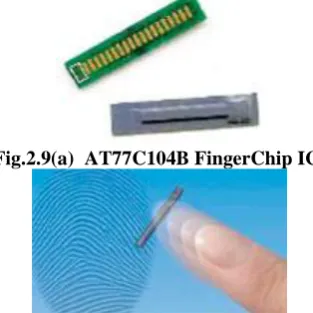
Piezoelectric materials generate a voltage based on temperature differentials. When a finger is in contact with a warmed sensor’s surface, the fingerprint ridges—which are closer to the sensor surface—retain a higher temperature than the valleys, which are farther from the sensor surface. The Atmel AT77C104B FingerChip sensor captures fingerprints using this type of thermal imaging. A linear sensor, it combines detection and data conversion circuitry in a single CMOS IC. Fingerprint images are captured by sweeping the finger over a sensing area. An image is produced when contact first occurs, but because it soon disappears as thermal equilibrium is reached, a sweeping method is necessary to acquire a stable fingerprint image.
The sensor, shown in Figure 2.9, captures the image of a fingerprint as the finger is swept vertically over the sensor window, as shown in Figure 2. The finger sweep technology ensures that the sensor surface stays clean. Unlike touch-based sensors, latent fingerprints do not remain once the finger has been removed. The sensor requires no external heat, light, or radio source. On-chip temperature stabilization identifies a temperature difference between the finger and the sensor, and increases the difference for higher image contrast. The discussion here will focus on a fingerprint recognition system based on this type of thermal sensor.
Fig.2.9(a) AT77C104B FingerChip IC.
Figure 2.9(b) Typical fingerprint—and finger being swept over a sensor.
The main parameters that characterize fingerprint sensors include resolution, area, dynamic range, and number of pixels. Resolution is measured in dots (or pixels) per inch (dpi). Higher resolution allows better definition between ridges and valleys, and finer isolation of minutiae points—which play a primary role in fingerprint matching, since most algorithms rely on the coincidence of minutiae to determine if two fingerprint impressions are of the same finger. Larger sensing areas generally provide a more distinctive fingerprint, but sweeping the finger over a smaller sensor, and acquiring and processing the data rapidly, allows a small, low-cost sensor to achieve comparable definition to larger, more expensive sensors. Dynamic range, or depth, denotes the number of bits used to encode the intensity of each pixel. The number of pixels in the fingerprint image in a particular frame can be derived from the resolution and area.
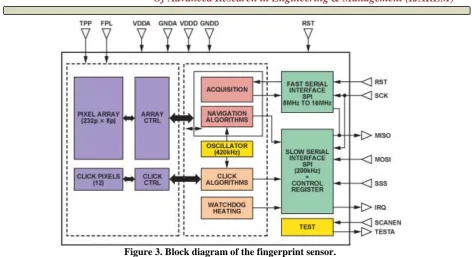
Figure 3. Block diagram of the fingerprint sensor.
3. MODES OF OPERATION OF FINGERPRINT SENSOR
The sensor implements six modes of operation: Sleep mode: A very low-power-consumption mode, in which the internal clocks are disabled and the registers are initialized.
Standby mode: A low-power-consumption mode, waiting for action from the host. The slow serial port
interface (SSPI) and control blocks are activated; the oscillator remains active.
Click mode: Waiting for a finger on the sensor. The SSPI and control blocks remain active; the local
oscillator, click array, and click block are activated.
Navigation mode: Calculating x- and y movements as the finger crosses the sensor. The SSPI and control blocks are still activated; the local oscillator, navigation array, and navigation block are also activated.
Acquisition mode: Slices are sent to the host for fingerprint reconstruction and identification. The SSPI and control blocks are still activated; the fast serial port interface block (FSPI) and the acquisition array are activated. The local oscillator is activated when a watchdog timer is required.
Test mode: This mode is reserved for factory testing.
3.1 Fingerprint Reconstruction and Recognition
If the fingertip is swept across the sensor window at a reasonable rate, the overlap between successive frames enables an image of the entire fingerprint to be reconstructed using software supplied by Atmel. The reconstructed image is typically 25 mm × 14 mm, or 500 pixels × 280 pixels, with 8-bit resolution due to resolution enhancement. Each image thus requires 140 kB of storage. Larger or smaller images can be derived from this using standard image-processing techniques. Once the frames have been joined to obtain a complete fingerprint image, recognition algorithms can match the sample with a template.
Trust but Verify
Fingerprint processing has three primary functions: enroll, search, and verify. Enrollment acquires a fingerprint image from the sensor and saves it in SRAM. The image is processed, enhanced, and compressed to create a fingerprint template. Various filters clean up the image and convert it to a mathematical representation, making it impossible to steal a template and directly recreate a fingerprint image.
Verification validates a user’s identity by comparing a raw candidate image to a previously enrolled template via real-time, closed-loop pattern-matching algorithms. A score is returned indicating the similarity of the candidate and template to generate a yes/no match decision
3.2 Interfacing the Fingerprint Sensor to the Blackfin Processor’s Serial Peripheral Interface
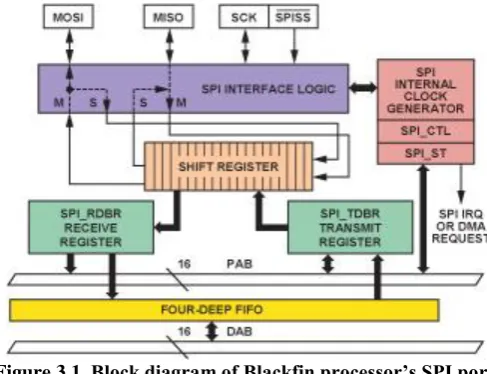
The Blackfin ADSP-BF533 low-cost, high-performance processor is chosen for this application because it combines the functions of a fast signal processor and a powerful microcontroller. Its 4-wire, full-duplex synchronous serial peripheral interface (SPI) has two data pins (MOSI and MISO), a device-select pin (/SPISS), and a gated clock pin (SCK). See Figure 4. The SPI supports master modes, slave modes, and multimaster environments. The SPI-compatible peripheral implementation also supports programmable baud rate and clock phase/polarities.
Figure 3.1 Block diagram of Blackfin processor’s SPI port.
The interface is essentially a shift register that serially transmits and receives data bits—one bit at a time, at the SCK rate—to and from other SPI devices. The shift register enables the simultaneous transmission and reception of serial data. The SCK synchronizes the shifting and sampling of the data on the two serial data pins. The SPI port can be configured as master (generates SCK and /SPISS signals) or slave (receives SCK and slave select signals externally). When the SPI port is configured as master, it drives data on the MOSI pin and receives data on the MISO pin. It drives the slave select signals for SPI slave devices and provides the serial bit clock (SCK). The Blackfin processor’s SPI supports four functional modes by using combinations provided by the clock polarity (CPOL) and clock phase (CPHA) bits. For detailed information on the Blackfin SPI port, refer
to the ADSP-BF533 Blackfin Processor Hardware Reference Manual
.
3.3 Hardware Interface
Fig. 3.2. Interface between ADSP-BF533 processor and AT77104B FingerChip sensor.
Application Software
The application code performs tasks such as controlling the sensor, acquiring fingerprint data, and rearranging the data to display the received fingerprint image using the VisualDSP++ development tool’s Image Viewer plug-in.
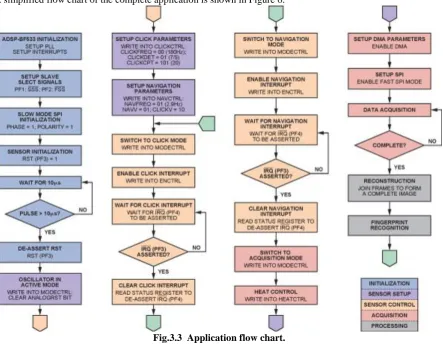
When the sensor detects a click (i.e., a signal indicating the presence of a finger), it generates an interrupt. The Blackfin processor receives this interrupt, and generates an interrupt on a falling edge. The STATUS register indicates the event that caused the interrupt. This process is used for navigation, read error, and other interrupts. A simplified flow chart of the complete application is shown in Figure 6.
Fig.3.3 Application flow chart. 3.4 Data Acquisition
Sensor heating is enabled in acquisition mode. The watchdog timer is also enabled, ensuring that heating remains controlled. Thus, when heating is requested, the sensor is heated for “n” seconds.
descriptors. The first descriptor, a dummy, is used to receive the first five bytes because 40 dummy clock cycles must be sent by the sensor before the first data arrives in order to initialize the chip pipeline. Thus, the first synchronization sequences appear after 40 clock cycles. Data then arrives at every clock cycle for all following array readings.
The sensor sends data in the form of frames. The start of each frame is marked by the dummy column, which
contains a synchronization word. The pixel array is read top to bottom, column by column, from the top left to the bottom right.
3.5 Data Rearrangement
The data must be rearranged to display the acquired fingerprint image. The rearranged data is stored and can be viewed using the VisualDSP++ Image Viewer utility. The acquired image and settings are shown in Figure 3.4. The following functions are performed:
Nibble-swapping: The sensor sends data in a nibble-swapped format. A routine swaps the odd-even pixels for the entire frame.
4-bit to 8-bit conversion: Each sensor pixel is 4 bits wide, but the Image Viewer displays images with 8-pixel minimum width. Four bits of zero-padding converts each pixel to 8 bits.
Level adjustment: Each pixel in the received data has an intensity of 0 to 15, but the display range is 0 to 255. Level translation of each pixel produces a good display.
Array transpose: The data from the sensor is sent column-wise, but the 2-dimensional DMA receives
data row-wise, so it must be transposed in order to display the frames continuously. A 3-dimensional array is used to get a continuous display of frames.
Figure 3.4. VisualDSP++ screen shot for image capture.
3.6 Data Generated From The Experiment
Table 3.5:Data generated with the aid of VisualDsp++
S/N Ridge(p) Valley(m) x=Sin(p) y=cos(m)
1. 2.3 3.4 0.7457 -0.9668
2. 2.7 3.6 0.4274 -0.8968
3. 2.9 3.8 0.2392 -0.7910
4. 3.1 4.1 0.04151 -0.5748
5. 3.3 4.4 -0.1577 -0.3073
Fig.3.5:The graph of the data that are stored in the database
Table 3.6:Data of bank’s customer that intends to withdraw money
S/N Ridge(p) Valley(m) x=Sin(p) y=cos(m)
1. 2.5 3.7 0.5985 -0.8481
2. 2.9 3.9 0.2392 -0.7259
3. 3.2 4.1 -0.05837 -0.5748
4. 3.5 4.4 -0.3508 -0.3073
5. 3.8 4.8 -0.6119 0.08750
Fig.3.6: graph of bank’s customer who intends to withdraw money
-1 -0.8 -0.6 -0.4 -0.2 0 0.2 0.4 0.6 0.8
1 2 3 4 5
x
y
-1 -0.8 -0.6 -0.4 -0.2 0 0.2 0.4 0.6 0.8
1 2 3 4 5
x
3.7 Analysis Of Data
The valley decreases as the ridge increases as in fig.3.5 and fig.3.6,the system compares the two graphs to ascertain whether the customer is a rightful owner of the account or not. The features of the customer are almost the same thing with the one in the database. The truth is that there is slight difference, because of this slight difference ,the customer will be denied access.
4.0 Conclusion
Since Fingerprint templates are created,,it will be difficult to manipulate customer’s account. 5.0 Recommendation
1. It should be adopted by all banks in order to forestall crime.
2. It can also be adopted by government ministries to check ghost workers
5.0
References
[1] Jain, L.C. et al. (Eds.). 1999. Intelligent Biometric Techniques in Fingerprint and Face Recognition. Boca
Raton, FL: CRC Press.pp 45-50
[2] ^ Langenburg, Glenn, 2005.. "Are one's fingerprints similar to those of his or her parents in any discernable^ way?". Scientific American. Retrieved 28 August 2010 .pp 76-80
[3] ^ Thornton, John 2000. .Latent Fingerprints, Setting Standards In The Comparison and Identification. 84th
Annual Training Conference of the California State Division of IAI. Retrieved 30 August 2010. pp 23-25 [4] ^ Diaz, Raul (2007). "Biometrics: Security Vs Convenience". SecurityWorld Magazine. Retrieved 30
August 2010.
[5] ^ Setlak, Dale. "Advances in Biometric Fingerprint Technology are Driving Rapid Adoption in Consumer Marketplace". AuthenTec. Retrieved 4 November 2010. pp 6-9
[6] Mazumdar, Subhra; Dhulipala, Venkata 2008. "Biometric Security Using Finger Print Recognition" (PDF). University of California, San Diego. p. 3. Retrieved 30 August 2010.