Learning WML & WMLScript
Martin Frost
First Edition, October 2000
ISBN: 1-56592-947-0, 200 pages
The next generation of mobile communicators is here, and delivering content will mean programming in WML and WMLScript.
Learning WML & WMLScript gets developers up to speed quickly on these technologies, mapping out in detail the Wireless Application Development (WAE), and its two major components:
Wireless Markup Language (WML), and WMLScript.
Preface 1 The WAP Stack
From Server to Client This Book
Conventions Used in This Book Comments and Questions Acknowledgments
1 Introduction to WML 6
1.1 A Complete Example 1.2 Cards
1.3 Empty-Element Tags 1.4 Elements
1.5 Attributes 1.6 Entities 1.7 Comments
2 WML Variables and Contexts 12
2.1 Variable Substitution 2.2 Setting Variables 2.3 Browser Contexts
3 WML Tasks and Events 17
3.1 Tasks 3.2 Events
4 WML User Interaction 24
4.1 Problems with Web Interaction 4.2 Interaction in WAP
4.3 The <input> Element 4.4 The <select> Element 4.5 The <option> Element 4.6 The <optgroup> Element 4.7 The <do> Element 4.8 The <anchor> Element 4.9 The <a> Element 4.10 The tabindex Attribute
5 WML Timers 36
5.1 Using Timers with WML 5.2 The <timer> Element
6 WML Decks, Templates, and Cards 40
6.1 The <wml> Element 6.2 The <head> Element 6.3 The <access> Element 6.4 The <meta> Element 6.5 The <card> Element 6.6 The <template> Element
7 WML Text and Text Formatting 45
7.1 The <p> Element 7.2 The <br> Element 7.3 Character Formatting 7.4 Tables
8 WML Images 52
8.1 The <img> Element 8.2 The WBMP Image Format
9 Introduction to WMLScript 54
11 WMLScript Operators and Expressions 63 11.1 Operand Conversions
11.2 Assignment Operators 11.3 Arithmetic Operators 11.4 Bitwise Operators 11.5 Shift Operators 11.6 Logical Operators
11.7 Increment and Decrement Operators 11.8 Comparison Operators
11.9 Type Operators
11.10 The Conditional Operator 11.11 The Comma Operator 11.12 Precedence and Associativity
12 WMLScript Statements 74
12.1 Expressions as Statements 12.2 Blocks of Statements 12.3 Conditions
12.4 Loops
12.5 Returning from a Function 12.6 Other Statements
13 WMLScript Functions 78
13.1 Function Declarations 13.2 Function Calls
13.3 Calls to Other Script Units 13.4 Calling WMLScript from WML 13.5 Standard Libraries
14 WMLScript Pragmas 83
14.1 The access Pragma 14.2 The meta Pragma
15 The Lang Library 85
abort abs characterSet exit float isFloat isInt max maxInt min minInt parseFloat parseInt random seed
16 The Float Library 95
17 The String Library 102 charAt compare elementAt elements find format insertAt isEmpty length removeAt replace replaceAt squeeze subString toString trim
18 The URL Library 119
escapeString getBase getFragment getHost getParameters getPath getPort getQuery getReferer getScheme isValid loadString resolve unescapeString
19 The WMLBrowser Library 128
getCurrentCard getVar go newContext prev refresh setVar
20 The Dialogs Library 132
alert confirm prompt
21 Complete Examples 134
21.1 Calculator 21.2 Battleships
A Absolute and Relative URLs 142
A.1 Parts of a URL
A.2 Resolving Relative URLs
B WAP Gateways and WSP 145
B.1 WSP Headers
B.2 Browser Support for Caching
C Summary of WMLScript Operators 146
D Serving WAP Content from a Standard Web Server 148
Learning WML & WMLScript
The next generation of mobile communicators is here, and delivering content to them will mean programming in WML (Wireless Markup Language) and WMLScript, the languages of the Wireless Application Environment (WAE). The WAE allows information in almost all applications to be formatted for display on mobile devices, such as cell phones, and enables the user to interact with the information.
Why learn yet another technology? According to some estimates, 75 percent of web document viewing by the year 2002 will be through non-desktop devices, many using wireless technologies. Clearly, the future is wireless. For web developers who want to get up to speed quickly in these languages, Learning WML & WMLScript maps out in detail the WAE and its two major components, WML and WMLScript.
Fortunately, the WAE provides a World Wide Web-like model for writing applications, incorporating several key features of the Web to ease the transition for developers. Almost all wireless applications can be written with WML, which replaces HTML in the wireless environment, and WMLScript, which replaces JavaScript. With this book, web developers with some knowledge of programming and C, Java, or JavaScript syntax can easily master both languages.
Chapter by chapter, Learning WML & WMLScript takes readers through the following WML topics:
•
Decks, templates and cards•
User Interaction•
Variables and contexts•
Tasks, events, and timers•
Text and text formatting•
ImagesWMLScript topics include:
•
Data types, conversions and variables•
Operators and expressions•
Statements•
Functions•
Standard librariesPreface
The Wireless Application Protocol (WAP) is an industry-wide specification for applications that operate over wireless networks, with particular emphasis on applications for mobile devices, especially mobile phones. The standards are published by the WAP Forum, a body formed in June 1997 by Ericsson, Nokia, Motorola, and Unwired Planet, which has since been joined by over a hundred other companies, including IBM, Hewlett-Packard, Visa, and Microsoft. According to the WAP Forum's official statistics, WAP Forum members represent over 90% of cellular-phone manufacturers worldwide.
WAP will be supported by many kinds of devices, from simple cell phones similar to those available today to a new generation of "smart" phones with large touch screens and many applications of their own. That's before we even look at the range of personal digital assistants (PDAs) available, from palmtops to full miniaturized computers complete with keyboards. All will eventually get WAP capabilities, either directly from the
manufacturer or as some sort of third-party upgrade. Each device has a different kind of display and different methods for user input. The job of the WAP specification is to sort out this mess and provide a common framework to allow applications to run across all these different platforms.
Since WAP works in a mobile environment, it also has to contend with the particular problems of wireless networks: low bandwidth (9600 bps or less is commonplace), high latency (round-trip times of the order of seconds are not uncommon), and unreliability (someone may be using her WAP phone when the train goes into a tunnel or when she walks past a tall building). Everyone with a mobile phone knows about the reliability problems.
These problems are why WAP is necessary. Some people may ask why they can't just have normal web pages delivered over normal TCP/IP connections, the only difference from their PCs at home being the wireless link. The trouble with the normal web technologies is that they are aimed at high bandwidth and big screens. WAP keeps the Internet model but optimizes each component for a mobile environment. It keeps track of the state of a session in case the connection is lost, provides compressed formats for the transferred data, and handles displaying of applications regardless of the input and output available.
The WAP Stack
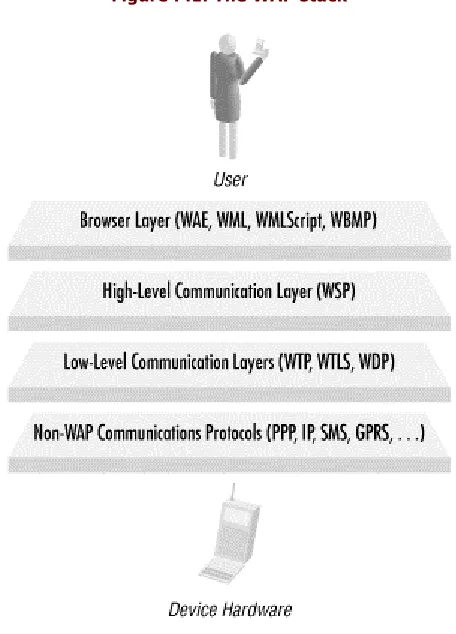
The term that refers to all the different parts of the WAP specifications is the WAP stack. This is because the components can conceptually be thought of as layers in a stack. The user interacts with the top of the stack, and the communications hardware sits below the lowest level. This concept is illustrated in Figure P.1, together with the names of the various specifications involved.
Going from bottom to top, the lowest layer in the figure contains various protocols (the so-called bearer protocols), which aren't actually part of WAP but which provide the link between WAP and the actual communications hardware:
•
IP (Internet Protocol) and PPP (Point to Point Protocol) are the two lowest-level protocols in normal dialup Internet access. (Many first-generation WAP devices work by making a normal dialup call and sending the WAP data across a modem link. IP and PPP are used in such a case.)•
SMS (Short Message Service) is a feature provided by most digital mobile phone systems that allows short messages to be sent and received across the wireless link. (Users see this as the ability to send short text messages - a bit like email.) It can also transmit binary data and be used for WAP.•
GPRS (General Packet Radio System) is a next-generation mobile phone system that will bring higherFigure P.1. The WAP stack
The next layer up includes various low-level WAP communications protocols: WTP (Wireless Transaction Protocol), WTLS (Wireless Transaction Layer Security), and WDP (Wireless Datagram Protocol). WTP and WDP provide low-level glue between the upper levels and the really low-level communications. WTLS provides security services (encryption and authentication). These protocols aren't relevant to normal application programmers: unless you're designing a browser, you don't need to know about them.
The second highest level in the stack is the high-level communications protocol, called WSP (Wireless Session Protocol). This provides a complete replacement for HTTP (HyperText Transfer Protocol), which is the protocol used between web servers and web browsers. Although you don't need to know how this layer works, there are one or two features that may be directly useful: these are described in Appendix B.
The highest stack level is the WAE (Wireless Application Environment), which is the part that the user actually sees and with which she interacts. The WAE aims to provide a World Wide Web-like model for writing
applications, allowing existing web developers to ease the transition to producing content and applications for mobile devices.
To achieve this, the WAE incorporates several key features of the Web that you'll be familiar with, including URLs (like http://www.wap.net) and MIME content types (such as text/html and image/gif. Additionally, it
From Server to Client
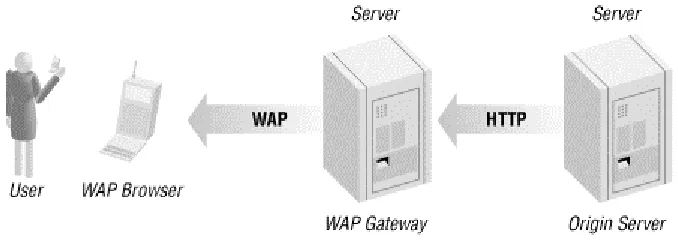
[image:9.595.128.467.147.268.2]The complete chain of processing that occurs to WAP content on its journey to the user is illustrated in Figure P.2. (This figure omits the details of the communications, since they're not very important, and they change depending on the precise low-level bearer protocol in use.)
Figure P.2. WAP chain of processing
The WAP browser in the figure can run on any supported device, from a cell phone to a PDA. Generally, cell phones need to be designed to support WAP, but most modern PDAs can be upgraded to support WAP simply by purchasing the browser software and installing it. PDAs need to be used with a cell phone to provide the connectivity.
The origin server (on the far right of the figure) stores or generates the content itself. In nearly all cases, the protocol used to communicate with the origin server is standard HTTP, so this can be a standard web server. It's usually necessary to make a couple of minor modifications1 to the server's configuration, so it can serve WAP content. All the most popular web-server software can perform this task. An interesting solution is to use a technology such as XSLT (XML Stylesheet Language Transformations), which allows both HTML and WML to be automatically generated from the same raw data.
Not included in the picture but quite likely to be present is some sort of backend database server. The origin server uses standard web technologies (such as CGI scripts or Java servlets, for instance) to generate any required dynamic content. These scripts probably need to communicate with a database to get the raw data to output. (This is going beyond the scope of this book, however. All standard techniques for generating web content on a server will also work for WAP, so you should read a book on one of those.)
The WAP Gateway
The WAP gateway box in Figure P.2 is the more interesting. The job of the WAP gateway is to convert between the browser's WAP communication protocols (WSP, WTP, and so on) and the standard HTTP and TCP/IP protocols required by the origin server. It's also responsible for converting the content output by the origin server (formatted as text) into the compressed binary formats of WML and WMLScript as required by the browser.
The gateway consists of some software to do this conversion, usually running on some sort of standard hardware. (Most proper gateways run on heavy-duty Unix servers, but there is low-end gateway software available that even runs on a Windows-based PC.) The gateway's owner must also handle the connection to the bearer network. For a dialup-based bearer, this process is achieved through a standard access server (the same pieces of hardware people use to dial in to the Internet), but for such bearers as SMS and GPRS, the connection will probably involve a leased line to a carrier.
This Book
This book doesn't aim to cover the low-level details of either the communication protocols (from your perspective, they behave just like HTTP) or the compressed file formats (it doesn't matter to you how your application gets to the device; all that matters is that it does). I also don't go into the details of how security and encryption are handled (these are just other parts of the communication process). Most web developers don't bother to learn how HTTP or TCP/IP work, as they can get by just fine without, and it only distracts them from their real job of writing web pages. If you want to know these details, you can download the latest versions of the specifications from the WAP Forum's web site (http://www.wapforum.org).
Conventions Used in This Book
This book uses the following font conventions:
Italic
Indicates operating-system pathnames; filenames; program names; Internet addresses, such as domain names and URLs; and new terms where they are defined.
Boldface
Indicates names of GUI items: window names, buttons, menu choices, etc.
Constantwidth
Indicates code, command lines, and options that should be typed verbatim; names and keywords in WML and WMLScript programs, including function names and variable names; and XML element tags.
Italic constant width
Indicates items in code where the user or programmer must supply a name or value.
The owl icon designates a note, which is an important aside to the nearby text.
Comments and Questions
The information in this book has been tested and verified, but you may find that features have changed (or you may even find mistakes!). You can send any errors you find, as well as suggestions for future editions, to:
O'Reilly & Associates, Inc. 101 Morris Street Sebastopol, CA 95472 (800) 998-9938 (in the United States or Canada) (707) 829-0515 (international/local) (707) 829-0104 (fax)
To ask technical questions or comment on the book, send email to:
There is a web site for the book, where examples, errata, and any plans for future editions are listed. The site also includes a link to a forum where you can discuss the book with the author and other readers. You can access this site at:
http://www.oreilly.com/catalog/learnwml
For more information about our books, conferences, software, Resource Centers, and the O'Reilly Network, see our web site at:
http://www.oreilly.com
Acknowledgments
As ever, this book involves the work of many people besides myself.
I am deeply grateful to my editor, John Posner, for his continual constructive criticism and innumerable helpful comments. Without them, this book would be vastly inferior. I really can't emphasize enough how great a help he was. Thanks to Christien Shangraw and Katie Gardner for finding and supplying me with the StarOffice template and for responding patiently to my queries. Thanks are also due to O'Reilly in general, for allowing me the opportunity to write this book.
Thanks and apologies must go to my friends, who put up with me cancelling plans weekend after weekend so that I could get some writing done. Thanks especially to all the people who offered to read through the book before I sent it off: sorry that I never got any of it finished early enough to take you up on your offers!
A small and select group of people have been particularly understanding in the face of almost complete abandonment to The Book. You know who you are.
Thanks to my employer, for allowing me to write the book in the first place and for allowing me time off at short notice when deadlines were approaching.
Chapter 1. Introduction to WML
The heart of WAP from the point of view of you, the content developer, is a new markup language called the Wireless Markup Language ( WML). If you have worked with the HyperText Markup Language (HTML), much of WML will look familiar but be warned that there are several differences that can easily catch you out. Some of these differences come from WML's simplicity compared to HTML: many features that are found in HTML are simply not present in WML.
To use a common example, HTML gives you great control over the appearance of text within a document: you can change its size, specify the typeface to be used, add styling such as boldface or underlining, and have a fine degree of control over its color.
The only controls WML gives you over the text are a few simple styles (emphasis, strong emphasis, boldface, italics, and underlining) and the ability to specify text that is larger or smaller than normal. A further surprise is that most WAP browsers to date don't even support most of these.
Losing this control over appearance that HTML provides forces you to think in a different way about the pages you write, concentrating on content rather than appearance (substance over style, if you like). If you've ever designed a web page to be usable under a really old browser (or a text-only browser) as well as the latest version of a major browser, you'll already have a good idea of the sort of things you need to bear in mind. Not all browsers even know about recent HTML such features as tables, frames, or stylesheets, and if you want to support people with those browsers, you have three choices: avoid the new feature altogether, write your pages to work even if the feature isn't present, or provide multiple versions of your pages and allow the user to select his favorite combination of features. In the same way, not all WAP browsers support images, tables, or text style changes,2 and if you rely on them, you reduce the potential audience for your pages dramatically.
It's not all bad, though. While WML does drop many of the features of HTML, it adds some powerful new ones, and because it was designed from the start for interactive applications many of the headaches of the web world simply disappear. It also has the advantage of having been designed in one go, rather than having features haphazardly added by different people without any proper overall coordination, which is the case with many of the new features of HTML.
1.1 A Complete Example
Before we discuss WML any further, Example 1.1 displays the time-honored "Hello World." The code for this example, as well as all the other substantial examples, is available on the book's web page
(http://www.oreilly.com/catalog/learnwml).
Example 1.1. A Simple WML Example
<?xml version="1.0"?>
<!DOCTYPE wml PUBLIC
"-//WAPFORUM//DTD WML 1.1//EN"
"http://www.wapforum.org/DTD/wml_1.1.xml">
<wml>
<card title="First WML Example"> <p>Hello, World!</p>
</card> </wml>
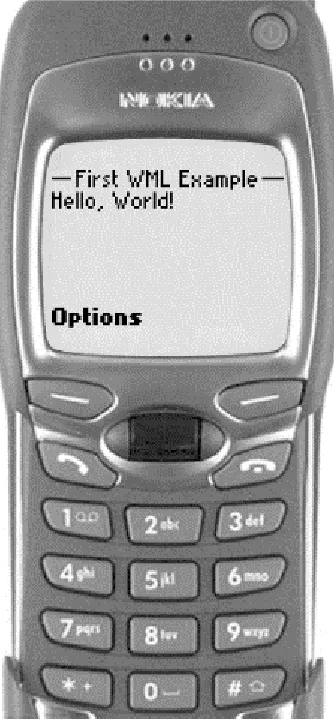
Depending on the browser in use, this may look something like Figure 1.1.
Figure 1.1. Example 1.1 displayed in a WAP browser
The second thing to note is that all tag names are in lowercase (tags are inside angle brackets). This is important: unlike HTML, where <HTML>, <html>, <Html>, and <hTMl> all refer to the same thing, in WML, tag
names are case-sensitive. All current WML tag names are lowercase, so you must enter them that way in your pages.
If you've seen some HTML, the rest of the WML syntax should look vaguely familiar, although the first tag is
<wml>, not <HTML>, and there's that mysterious-looking <card> tag. The <p> tag simply starts a paragraph of text (in this simple case, there is only the one).
1.2 Cards
The reason for the <card> tag is that WML structures its content differently from HTML. Instead of a file being a
long stream of content, a file of WML represents a deck of cards. Only one card is displayed at a time, but you can link from one card to another and store several in a deck in the same file. Each individual card does in fact behave very much like an HTML page, so you can think of a WML deck as being similar to a number of HTML pages all grouped together. It's good WML style to use decks of cards to group together related information or user interactions. Cards in a deck are all downloaded at the same time, so the user has to wait only once, and the others can be accessed almost instantly.
1.3 Empty-Element Tags
Now, just to worry all the HTML users some more, check out Example 1.2.
Example 1.2. An Interesting Tag
<?xml version="1.0"?>
<!DOCTYPE wml PUBLIC
"-//WAPFORUM//DTD WML 1.1//EN"
"http://www.wapforum.org/DTD/wml_1.1.xml">
<wml>
<card title="Another WML Example">
<p><img src="img/pic.wbmp" alt="Image"/></p> </card>
</wml>
You should recognize most of the structure from Example 1.1, and the <img> tag may be familiar from HTML, but look more closely at the end of the tag: note the extra slash. This is required in WML whenever a tag has no matching end-tag. (An end-tag has a slash after the first angle bracket, like </end>.) These so-called
empty-element tags are quite common in both WML and HTML, but HTML doesn't decorate them in any special way, so they look just like start-tags. This makes some unnecessary work for the browser and any other program that has to read the file, so WML makes the structure more consistent.4
1.4 Elements
An alternative way of thinking about these extra slashes is to think in terms of elements.5 An element takes one of two forms: either a start-tag and an end-tag (whose types must match):
<tag> . . . </tag>
or a single empty-element tag (complete with extra slash):
<tag/>
Note that there is exactly one slash per element.
An element can contain other elements (either matched pairs or empty-element tags), possibly mixed up with flow text. Looking at Example 1.2 this way, there is a single <wml> element (as a matched pair <wml></wml>),
containing a single <card> element (as a matched pair <card></card>), containing a single <p> element (also
as a matched pair, <p></p>), which in turn contains a single <img> element (as the empty-element tag
<img/>).
It's important to ensure the tags match properly. Mismatching tags such as:
<x>...<y>...</x>...</y>
is an error and will prevent the page from being displayed. This should have been written as:
1.5 Attributes
Start-tags and empty-element tags (but not end-tags) may also have attributes. (In Example 1.2, the title on the <card> tag and the src on the <img> tag are both attributes.) Attributes affect the behavior of the whole
element, which is why they can't appear on end-tags (the only purpose of the end-tag is to mark the end of the element). The effects of attributes vary between different elements: the title attribute on the <card> element
sets an optional title to be displayed with the card, while the src attribute on the <img> element gives the URL
at which the image can be found. You can also add an align="center" attribute to the <p> element, which centers that paragraph of text (if the browser supports the feature).
A further slight difference between WML and HTML is in the quoting of attribute values. In HTML, attribute values may appear in single quotes (attr='value'), in double quotes (attr="value"), and most web browsers
also allow them to be unquoted altogether (attr=value), although this isn't strictly valid. WML doesn't allow
unquoted attribute values: all values must appear within either single or double quotes.6
1.5.1 Notation for Attributes
Within this book, whenever an attribute is described, a brief summary of the type of value it takes is given in parentheses after its name. The following terms are used in these descriptions:
string
The value can be any string.
url
The value should be a valid URL. Unless noted otherwise in the description of the attribute, relative URLs (where only part of the URL is given) are OK; these are resolved relative to the current document's URL. Resolving is the process of taking an incomplete (relative) URL and turning it into a complete (absolute) URL. It is described in detail in Appendix A.
number
The value should be a nonnegative integer.
length
The value represents a length on the browser's display. It can be specified either as a whole number of pixels or as a percentage (which represents a percentage of the width or height of the screen). In either case, the value must not be negative (but may be zero).
boolean
The value should be one of the strings true or false. Case is important!
name
The value should be a string containing only letters, digits, dots, colons, hyphens, and underscores. It is better, however, to avoid the dots, colons, and hyphens, and use only letters, digits, and underscores.
variable
The value may contain embedded variable references (see Chapter 2, for more information on variables).
optional
required
The attribute must be present for the element to be processed correctly. Many browsers will refuse to process a deck if required attributes are missing.
default
The default value for the attribute. This value is used if the attribute isn't specified on the tag. Only optional attributes can have defaults.
1.6 Entities
The final bit of WML syntax you need before starting on the range of different elements is the entity. You may recognize entities if you've ever had to put certain special symbols (quotes, greater than and less than signs, and several others) into an HTML page. Their purpose is to represent symbols that either can't easily be typed in (you may not have a British pound sign on your keyboard) or that have a special meaning in WML. (For example, if you put a < character into your text normally, the browser thinks it's the start of a tag; the browser
then complains when it can't find the matching > character to end the tag.)
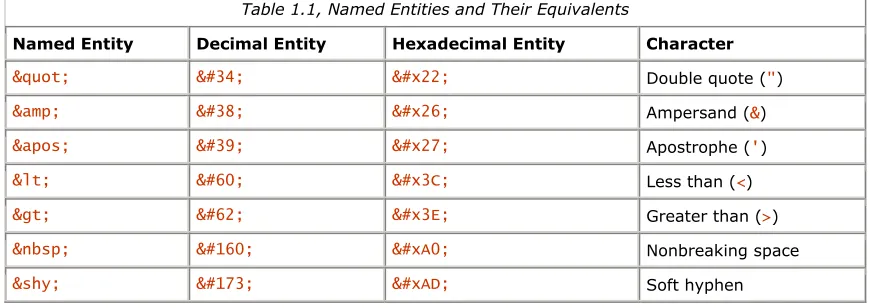
Table 1.1 displays the three forms of entities in WML. Named entities are something you may be familiar with from HTML: they look like & or <, and they represent a single named character via a mnemonic name. Entities can also be entered in one of two numeric forms (decimal or hexadecimal), allowing you to enter any Unicode character into your WML. (This doesn't guarantee that the browser can display it, but at least you can try.) Decimal numeric entities look like ! (Unicode exclamation mark) or £ (Unicode pound sign). Hexadecimal numeric entities look like ! or £ for the same two characters (note that 33 decimal is
[image:16.595.80.515.378.532.2]21 hexadecimal, and 163 decimal is A3 hexadecimal).
Table 1.1, Named Entities and Their Equivalents
Named Entity Decimal Entity Hexadecimal Entity Character
" " " Double quote (")
& & & Ampersand (&)
' ' ' Apostrophe (')
< < < Less than (<)
> > > Greater than (>)
    Nonbreaking space
­ ­ ­ Soft hyphen
Note that all entities start with an ampersand ( &) and end with a semicolon ( ;). This semicolon is very important: some web pages forget this and cause problems for browsers that want correct HTML (most web browsers are forgiving about slightly incorrect HTML syntax, so many common errors slip through). WAP browsers are likely to be stricter about errors like these.
The last two entities in the table may require some explanation. When the browser needs to break a long line of text in order to fit it onto the screen, it looks for a suitable point at which to break, such as the gap between two words. Normally, this means that lines are broken at spaces.
1.7 Comments
Sometimes you may find that you want to leave a remark in your WML file to remind you how it works at some later date, or you may want to temporarily remove part of a file while you are testing something else.
Comments are the answer.
A comment starts with the four characters <!-- and ends with the three characters --> . Everything that
appears between these two markers, including tags, body text, entities, and line breaks, is ignored. Here are some examples:
<!-- A simple comment. -->
<!--This is
a comment that
spans several lines.-->
You can't nest comments. The following doesn't work:
<!-- A simple <!-- EMBEDDED COMMENT, NOT! --> comment. -->
Moreover, the two characters -- can't appear within the body of a comment, only at the end, as part of the -->
terminator.
If for some reason you want the sequence <!-- in your body text, write it with an entity (which you would have
to do for the < anyway):
<!--
Chapter 2. WML Variables and Contexts
A significant difference between WML and HTML is that WML supports variables. WML variables contain strings, and these strings can be inserted into the body text of the WML document or into the values of certain attributes. The values of variables can be changed under the control of the WML itself and also from within WMLScript functions (more on these later).
The names of WML variables can consist of any combination of letters, digits, and underscores, except that the first character must not be a digit. Like most things in WML, variable names are case-sensitive. The following are all examples of legal variable names:
a foo
__name_with_underscores__ _
ThisVariableNameIsImpracticalBecauseItIsTooLong xy17
The following are examples of invalid variable names:
17xy
(starts with a digit)
name with spaces
(space is not a letter, digit, or underscore)
Although WML doesn't impose a limit on the length of variable names, remember that the full name needs to be transmitted over a low-bandwidth link and then stored in the (possibly limited) memory on the device running the browser. As a result, it's a good idea to keep your variable names short.
2.1 Variable Substitution
Variables can be inserted (or substituted) into the body text or an attribute value in one of three ways:
$name $(name)
$(name:conversion)
If the first form is used, the variable name must be followed by some character that's illegal in variable names (any character other than a letter, digit, or underscore).
Because of this, it is unwise to use the first form: not only is it less clear than the second, it can also be dangerous, as a minor change to the file (such as removing a space) can change what the browser believes the variable name to be. In addition, some current browsers don't support this form properly.
The conversion specified with the third form can take one of three values, each of which can also be abbreviated to its first letter. Unusually for WML, these conversion specifiers are case-insensitive:
escape or e
The variable's value undergoes URL escaping before it is substituted. This process replaces certain characters in the value with an escape sequence, consisting of a % followed by two hexadecimal digits. In
addition, each space character in the value is replaced by a +.
unesc or u
The variable's value undergoes the inverse of URL escaping, known as URL unescaping. This process reverses the steps involved in URL escaping: it replaces sequences of a % and two hexadecimal digits
with single characters and each + with a space.
For example, if the value of the variable NickNamesE is Buz%2C+Rocket, then $(NickNamesE:u) is
replaced by Buz,Rocket. (Note that this has exactly reversed the previous example.)
noesc or n
The value is substituted directly. No conversion is done.
If there is no conversion specified ($name or $(name) forms), the browser performs a default conversion. This default depends on the context of the reference. If the variable is being substituted into an attribute of type
onenterforward, onenterbackward, href, or src, then the conversion defaults to escape, because all these
attribute values specify URLs to various things (you'll learn about these in later chapters). In all other contexts (including all substitutions into the body text), the default is noesc.
A point to bear in mind (after you've read Chapter 3, and Chapter 7) is that attributes of types onclick and ontimer default to noesc, although you might expect them to
default to escape like onenterforward and onenterbackward do. Because of these inconsistencies, wise WAP developers always specify a conversion explicitly (even if the conversion is noesc) when substituting variables into attribute values, particularly
when those values store URLs.
To illustrate these conversions, suppose the variable user contains the value fred, and greeting contains
Hello, world!. Then the attribute:
title="Welcome, $(user)! $(greeting)"
becomes:
title="Welcome, fred! Hello, world!"
Similarly, the attribute:
href="/cgi-bin/login?u=$(user)&g=$(greeting)"
is equivalent (because the default conversion of variables within an href attribute is escape) to:
href="/cgi-bin/login?u=$(user:e)&g=$(greeting:e)"
which then becomes:
href="/cgi-bin/login?u=fred&g=Hello%2C+world%21"
once variables are substituted. Note that this last example would have been better written using its more explicit form (using :e), rather than relying on the browser to perform default conversion.
Note also the use of & to include a & in the URL value. A common mistake (and one that even experienced developers make from time to time) is to write just & and then spend hours trying to figure out why it doesn't
2.1.1 Empty Variables
You may wonder what happens if you try to substitute a variable that has not been defined: does it cause an error? Does anything happen at all?
The simple answer is that any undefined variable is equivalent to the empty string, so:
foo$(undefined)bar
becomes:
foobar
after variable substitution. In addition, assigning the empty string to a variable removes it from the browser context (see Section 2.3 later in this chapter).
2.1.2 Caveats of Variable Substitution
You may be wondering how, if a $ starts a variable, you can put a literal $ into the page or an attribute value. For example, you may want to display the string:
Price: $17.00
You may think that entities are the answer: maybe you could just put in $ to make it work. Unfortunately,
it doesn't, due to the way WML browsers handle variable substitution.
What happens is that the browser goes through the document replacing all the entities with the characters they represent, before it even starts to look for variable references. While $ does indeed represent a $, the browser then interprets this $ as the start of a variable reference, which is exactly what you don't want to
happen! (See WML Variables and XML for a further discussion.)
WML Variables and XML
The reason you can't work around WML variables with entities lies with the relationship between WML and XML.
WML is designed so that a generic XML parser can process the page. The parser takes the source file and make a single pass over it, turning all the elements into a tree structure, with the body text interspersed. Entities are expanded in the same single pass, so that the body text in the tree doesn't contain any special XML syntax: it is just simple text.
XML doesn't treat WML variables specially; at this point the sequence $(foo) is just a six-character string.
Only after this XML-level parsing is complete does the WML parser get to see the page and handle WML variables. By this time, all $ entities have become simple $ characters, which the WML parser
considers to be the start of a variable reference.
Fortunately, there is a way out. The sequence $$ always represents a single $ when it appears in body text or
attribute values. Thus the correct way to display the string Price: $17.00 is:
Price: $$17.00
This also means that the sequence $$(foo) represents the six characters $(foo) and not any sort of variable
reference. The sequence $$$(foo) represents the character $ followed by the contents of variable foo with the default conversion. A single $ by itself (not followed by another $, a (, or the start of a variable name) is illegal.
It's necessary to write a single $ as $$ even in attribute values that don't allow variables. This is because the browser checks all attribute values for variables, even if there shouldn't be any variables there, and will probably complain if it finds any in the wrong place.
Another thing to watch out for is that you can't change the actual structure of the page using variables. You can change text in between tags, and you can change some attribute values, but you can't add any new tags or attributes.
If the variable img contains the value <img src="img.wbmp"/>, then the text:
some text$(img)some more text
is simply equivalent to the string:
some text<img src="img.wbmp"/>some more text
and not to two separate strings with an image in between.
The following tags are both illegal no matter what the value of the foo variable is:
<$(foo) href="img.wbmp"/>
<img $(foo)="img.wbmp"/>
If you really need to make changes to the structure of the page like that, you have to do it on the server.
2.2 Setting Variables
You now know just about everything there is to know about actually using WML variables, but one thing you don't yet know is how to put useful values into the variables in the first place!
Actually, there are three ways. The most common is through the use of the various user interface elements, which are described in Chapter 4. Variables can also be set from WMLScript, as explained in Chapter 19. The third way is with the <setvar> element.
2.2.1 The <setvar> Element
This element must be placed within a task element (described in Chapter 3). Its purpose is to represent an assignment to a WML variable. This assignment takes place when the task is executed.
2.2.1.1 Attributes of the <setvar> element
name (required; variable string)
For example, the element:
<setvar name="var" value="foo"/>
creates a variable called var, containing the string foo. If a variable called var already exists, this changes its value to the string foo.
2.2.2 Order of Operations in Setting Variables
Before executing one or more <setvar> elements within a task, the browser first expands all variables in all the name and value attributes. Note that this makes the order of the <setvar> elements within a task unimportant.
To illustrate this behavior, imagine that the variable x contains the value one, y contains two, and z contains
three. Now suppose a task contains these three <setvar> elements:
<setvar name="x" value="$(y)"/> <setvar name="y" value="$(z)"/> <setvar name="z" value="$(x)"/>
The browser first substitutes all the variables:
<setvar name="x" value="two"/> <setvar name="y" value="three"/> <setvar name="z" value="one"/>
Finally, the browser assigns the new values to the three variables.
Note that this principle of substituting variables first extends to both the name and value attributes of the
<setvar> element. For example, if the variable category has the value color, and variable choice has the value green, then:
<setvar name="$(category)" value="$(choice)"/>
becomes:
<setvar name="color" value="green"/>
This form (with variables in the name) isn't used often, but it's worth knowing that it exists.
2.3 Browser Contexts
The browser context in WML is the set of all variables currently set, together with the history stack (the list of all the cards the user has recently visited).
The context is emptied (all variables are unset, and the stack is emptied) when a card is displayed with the
newcontext attribute set to true. See Chapter 6, for more on cards and their attributes.
In addition, whenever the user sends the browser to a new location that wasn't referenced in the current card (for example, by selecting a bookmark, entering a new URL, or viewing an initial home card), a new context is created. Some browsers support multiple contexts, in which case it may be possible to get back to the previous context somehow. But many support only one, meaning that this is equivalent to emptying the context
Chapter 3. WML Tasks and Events
In the last chapter, you learned about variables in WML, something not found in HTML. This chapter covers two further parts of WML - tasks and events - that have no real equivalent in HTML. (In some cases you can use JavaScript to achieve similar effects.)
3.1 Tasks
A WML task is an element that specifies an action to be performed by the browser, rather than something to be displayed. For example, the action of changing to a new card is represented by a <go> task element, and the
action of returning to the previous card visited is represented by a <prev> task element. Task elements encapsulate all the information required to perform the action.
Tasks are used in many places in WML. Events (discussed later in this chapter) are tied closely with tasks, and many of the user interface elements (see Chapter 4) use tasks to perform actions.
To see how tasks are used in context, consider the element <do>, which represents some sort of control that the
user can activate, such as a softkey, a menu item on a cell phone, or maybe even an onscreen button if the device has a touchscreen. A <do> element isn't itself a task element. Rather, it contains a task subelement that
specifies the action to perform when the user activates the control.
A <do> element that, on activation, simply assigns the value wibble to the variable test can be written as:
<do type="accept">
<refresh>
<setvar name="test" value="wibble"/> </refresh>
</do>
To have the same <do> element instead send the browser to a card called card2 in the current deck, you could
write:
<do type="accept">
<go href="#card2"/> </do>
Note that the <do> element is exactly the same for these two examples. The only difference is the task element
(the <refresh> or the <go>). This added consistency (or orthogonality to use the technical term) is an important benefit of using tasks.
The <do> element is explained more fully in Chapter 4.
3.1.1 Tasks and Variables
All tasks can change variables in the browser's context using the <setvar> element, as described in Chapter 2.
The new variable bindings don't affect the task itself but rather take effect when the task completes. For example, suppose the variable page contains the value login. The task:
<go href="$(page).wml">
<setvar name="page" value="bad"/> </go>
goes to login.wml, not bad.wml, because the browser substitutes the original value of the page variable into the href attribute before it assigns the new value to the variable.
3.1.2 The <go> Task
3.1.2.1 Attributes of the <go> task
href (required variable url)
Gives the URL of the new card. Relative URLs are resolved relative to the current card (the one containing this <go>).
method (optional string; default get )
Specifies the method that should be used to fetch the deck. This must be one of the values get or post,
corresponding to the GET and POST methods of HTTP.
sendreferer (optional boolean; default false )
If set to true, the browser sends the URL of the current deck along with the request. This URL is sent as a relative URL if possible. The purpose of this is to allow servers to perform simple access control on decks, based on which decks are linking to them. For example, using HTTP, this attribute is sent in the HTTP Referer header.
accept-charset (optional string; default unknown )
Specifies a comma- or space-separated list of character sets that can encode data sent to the server in a POST request. The browser selects one to use when sending the data. If this is set to the value unknown
(the default), the browser uses the same character set that sent this document to the browser. (Note that this attribute is an advanced feature and is rarely used.)
3.1.2.2 The method attribute: GET and POST
One of the more interesting options available on the <go> task is the method attribute. This specifies whether the request should be sent as a GET or as a POST. This option is used only when sending information for processing on the server: it's not used when simply fetching static pages of WML.
If you know HTML, you may recognize similarities with the METHOD="GET" and METHOD="POST" attributes that
can be put on an HTML <FORM> element. WML puts this attribute on the <go> task instead, but it has essentially
the same effect.
GET is the normal method used in HTTP. All the information sent to the server is encoded in the URL, and the server uses this URL to find some resource and return it to the browser.
The main advantage of GET is that it's simple. Any information is simply added to the query part of the URL (more on the parts of URLs in Appendix A). You can even put the query information directly into the URL using variables.
The main disadvantage of GET is that it can be used only for a limited amount of data. Web servers and other programs that process URLs impose certain limits on the length of a URL they are prepared to handle. This limits the size of the request that can be sent using GET.
A subtler problem with GET relates to the fact that all the information you send becomes part of the URL. Many browsers display the URL of the current deck somewhere on the screen (even if only briefly), and most web servers store the entire URL in their log files, complete with the extra data from the GET. If this information is of a sensitive nature (a password, for example), it's displayed on the screen and then saved for posterity in the web server's logs!
3.1.2.3 The <postfield> element
In modern versions of WML, information to be posted with the POST method is specified in <postfield>
elements within the <go> element. This information takes the form of a list of name/value pairs. Each <postfield> element specifies a single pair. The element is very simple, having only two attributes:
name (required variable string)
The name of this field
value (required variable string)
The value of this field
WML allows <postfield> elements to be used even with the GET method. In this case, the fields are added to the end of the query part of the URL. For example, consider the task:
<go href="wibble" method="get"> <postfield name="x" value="17"/> <postfield name="y" value="42"/> </go>
This has the same effect as:
<go href="wibble?x=17&y=42" method="get"/>
Using the <postfield> element in this way can make your WML much clearer and also makes your life much easier if you have to change the WML to use POST at some point in the future.
You can even mix the two styles. Here's another way to write exactly the same <go> task as the last two examples:
<go href="wibble?x=17" method="get"> <postfield name="y" value="42"/>
</go>
3.1.2.4 Shorthand forms of <go> tasks
One form of task is more common than any other: a <go> task that has no attributes other than href and doesn't contain any <postfield> or <setvar> elements. Because this form is so common, WML provides a
shorthand form you can use in many situations.
Instead of including the task as a complete <go> element, the value that would be put into the href attribute of
the <go> element is simply included as an attribute on a different element. For example, it is possible to bind a task to an option in a selection list, so that the task is performed when the option is selected. The normal way of doing this looks like this:
<option>
<onevent type="onpick"> <go href="foo.wml"/> </onevent>
Option text <option>
Using the shorthand form, this can be written as:
<option onpick="foo.wml">
Option text </option>
3.1.3 The <prev> Task
The <prev> task represents the action of returning to the previously visited card on the history stack. When this action is performed, the top entry is removed from the history stack, and that card is displayed again, after any
<setvar> variable assignments in the <prev> task have taken effect.
The <prev> task takes no attributes.
Most uses of the <prev> task are very simple. Usually no variables are involved, and so most <prev> tasks are
simply:
<prev/>
A <prev> task is most commonly used in connection with a <do> element (described in Chapter 4). Some
browsers don't provide a back button unless one is specified in the WML, and so a great deal of WML contains the construct:
<do type="prev"><prev/></do>
This simply provides a button or some other user-interface construct, which when activated, sends the browser to the previous card.
One situation where it can be useful to include variables in a <prev> task is a login page, which prompts for a
username and password. In some situations, you may want to clear out the password field when returning to the login card, forcing the user to reenter it. This can be done with a construct such as:
<prev>
<setvar name="password" value=""/> </prev>
3.1.4 The <refresh> Task
The <refresh> task is the simplest task that actually does something. Its effect is simply to perform the variable assignments specified by its <setvar> elements, then redisplay the current card with the new values.
The <go> and <prev> tasks perform the same action just before displaying the new card.
The <refresh> task doesn't take any attributes.
The <refresh> task is most often used to perform some sort of "reset" action on the card. Example 3.1 shows how this could be done. The <input> elements prompt the user to enter strings and then store the strings into
the variables specified in their name attributes (see Chapter 4 for more information). There is also a <go> task
using the POST method to submit the login and password information to a server for processing.
Example 3.1. A Reset Button
<?xml version="1.0"?> <!DOCTYPE wml PUBLIC
"-//WAPFORUM//DTD WML 1.1//EN"
"http://www.wapforum.org/DTD/wml_1.1.xml">
<wml>
<card title="Reset button example">
<!-- Read login and password from user. --> <p>Login: <input name="login"/></p> <p>Password: <input name="password"/></p>
<!-- Submit button sends data to server. --> <do type="accept" label="Submit">
<go href="login.cgi" method="post">
3.1.5 The <noop> Task
The purpose of the <noop> task is to do nothing (no operation). This may seem particularly useless: why would anyone want a task that doesn't do anything?
The only real use for this task is in connection with templates (discussed in more detail in Chapter 6). However, it can also be specified anywhere a task is required.
The <noop> task is the only exception to the rule that tasks can set variables. It can't set variables and can't
even contain any <setvar> elements. If you want a task to just set variables and not change the current card, use the <refresh> task.
The <noop> task doesn't take any attributes.
Because the <noop> task takes no attributes and can't even contain any <setvar> elements, it always looks the
same in use:
<noop/>
3.2 Events
An event in WML is simply something that can happen to some element from time to time. For example, entering a <card> element triggers an event on the <card>, and selecting an <option> from a selection list
triggers an event on the <option>.
You can harness these events by binding them to a task. The usual way of doing this is with the <onevent>
element. As mentioned earlier in this chapter, for simple <go> tasks you can usually make use of a simpler
form: this will be mentioned when when we discuss the elements in question.
For example, the <option> element (detailed in Chapter 4) declares an item in a list of selections. When this
item is selected, it triggers an onpick event on the <option> element. Suppose the element were declared without an event handler, like this:
<option> Purple </option>
In this case, the onpick event is ignored, since there is no handler. If, on the other hand, the option is declared
as:
<option>
<onevent type="onpick"> <go href="#purple"/> </onevent>
Purple </option>
the onpick event is handled by executing the <go> task, sending the browser to a new card.
3.2.1 The <onevent> Element
The <onevent> element declares an event binding. It can't contain anything except a single task element that is
performed when the event occurs. It may be present inside either an <option> element (see Chapter 4) or a <card> element (see Chapter 6). In either case, the <onevent> element (or elements) must be the first elements declared inside their enclosing element.
The <onevent> element takes only one attribute:
3.2.2 Card Events
Sometimes, you may want to do something special when the user enters a particular card. For example, you may want to initialize the values of variables so that the display looks correct. Another thing you may want to do is to clear out some variables when the user returns to a particular card in the history stack.
To make this possible, WML defines two events, onenterforward and onenterbackward, which happen on a <card> element when the user enters it. Which event occurs depends on how the card was entered.
3.2.2.1 The onenterforward event
The onenterforward event occurs when a card is entered in the forward direction. Entering as a result of a <go> task, selecting a bookmark, or entering a URL directly are all in the forward direction. The most common use of this event is to initialize things that must be set up before the card is displayed, often by using a
<refresh> task or by using a <go> task to run some WMLScript (see Section 13.4 in Chapter 13).
Example 3.2 shows how this can be used. When the first card is entered forwards, the <refresh> task is performed, which initializes the state variable. This variable can then be updated by other WML pages and is
passed through to the server by the <go> task.
Example 3.2. Initialization on Entry
<?xml version="1.0"?> <!DOCTYPE wml PUBLIC
"-//WAPFORUM//DTD WML 1.1//EN"
"http://www.wapforum.org/DTD/wml_1.1.xml">
<wml>
<card title="onenterforward example">
<!-- Initialize state to zero on first entry. --> <onevent type="onenterforward">
<refresh>
<setvar name="state" value="0"/> </refresh>
</onevent>
<!-- Collect some information from the user. --> <p><input name="text"/></p>
<!-- Send the text and the state to the server. --> <do type="accept">
<go href="submit.cgi">
<postfield name="s" value="$(state)"/> <postfield name="t" value="$(text)"/> </go>
</do> </card> </wml>
If the task bound to the onenterforward event is a simple <go> task without <setvar> or <postfield>
elements, you can use the shorthand form introduced earlier in this chapter: just add an onenterforward
attribute to the <card> element. The value of this attribute is the destination URL.
For example, the event binding:
<card title="example">
<onevent type="onenterforward"> <go href="#card2"/>
<onevent>
<!-- rest of card --> </card>
Be warned that not all tasks you can bind to the onenterforward event actually make
sense. For example, the event binding:
<onevent type="onenterforward"> <prev/> </onevent>
makes it impossible for the user to enter the card at all: as soon as she went to the card, the browser would immediately return to the previous one!
To make matters worse, the event binding:
<card id="card1"
onenterforward="#card1">
means that as soon as the browser entered the card, it would be immediately redirected to the same card, which would cause an immediate redirect to the same card, and again, and again…. Well-written browsers may notice this and signal an error, but not all browsers are well-written: many simply lock up or even crash.
3.2.2.2 The onenterbackward event
The onenterbackward event is the companion of the onenterforward event for the backward direction. This
event is triggered when the card is returned to as the result of a <prev> task or some other action that
navigates backwards in the history stack.
The most common use for the onenterbackward event is to reset state back to some initial value when
returning to the beginning. Example 3.3 alters Example 3.1 to illustrate this: instead of an explicit reset button, the login and password are cleared when the user returns to this card via the history stack.
Example 3.3. Reset on Reentry
<?xml version="1.0"?> <!DOCTYPE wml PUBLIC
"-//WAPFORUM//DTD WML 1.1//EN"
"http://www.wapforum.org/DTD/wml_1.1.xml"> <wml>
<card title="Reset on reentry example">
<!-- Reset fields when entered backwards. --> <onevent type="onenterbackward">
<refresh>
<setvar name="login" value=""/> <setvar name="password" value=""/> </refresh>
</onevent>
<!-- Read login and password from user. --> <p>Login: <input name="login"/></p> <p>Password: <input name="password"/></p>
<!-- Submit button sends data to server. --> <do type="accept" label="Submit">
<go href="login.cgi" method="post">
<postfield name="l" value="$(login)"/> <postfield name="p" value="$(password)"/> </go>
</do> </card> </wml>
Just as with the onenterforward event, onenterbackward also has a shorthand form in the case where the task is a simple form of <go>, meaning that the event binding:
<card title="example">
<onevent type="onenterbackward"> <go href="foo.wml"/>
</onevent>
Chapter 4. WML User Interaction
The previous two chapters described some of the features found in WML that don't exist in HTML. This chapter covers the features that WML provides to receive input from the user, and most of these are much more powerful than their equivalents in HTML.
The main reason for this extra power is that WML has variables. In HTML, you can have controls such as pulldown menus or text input fields, but you can use these in only limited ways: in an HTML form, which allows you to collect a number of controls and send their results to a server for processing, or with Java or JavaScript, which are complete programming languages built into the web browser.
4.1 Problems with Web Interaction
Using HTML forms for this purpose suffers from one major problem: the processing has to be done on the server. The client displays the controls, collects their results, packages them, and sends them to the server, but that's it. Apart from some simple constraints such as the maximum length of the text in an input box, you can't even check the input for validity before sending it off. This results in a lot of extra network connections, slowing things down a lot, even on a fast Internet link. Imagine how slow all those extra network connections are on a much slower link, as WAP has to contend with.
Using Java or JavaScript to collect the input does allow local processing, but they come complete with their own sets of problems. For a start, they both require a lot more from the browser: most older browsers have either no support for these or very limited or buggy support, which makes it harder to write pages that work across all browsers. Most text-only browsers don't support these at all. (Yes, some people do still use text-only browsers.)
Another, subtler problem with the Web's way of doing these things is that there are multiple ways to declare the controls. Suppose you want to display a text input box. Using a form, you can use something like:
<INPUT TYPE="TEXT" NAME="wibble">
Using JavaScript with the HTML, possibly:
<INPUT TYPE="TEXT" NAME="wibble" ONCHANGE="wibble_chg( );">
If using Java applets, something like:8
TextField wibble = new TextField ( );
add (wibble);
4.2 Interaction in WAP
For comparison, here is how the same text input box is described in WML, where its result is sent directly to the server:
<input name="wibble"/>
Here, its result is passed to some WMLScript to check it for validity before passing it to the server:
<input name="wibble"/>
Here, it's displayed to the user in another card for confirmation purposes, without any server transactions involved:
<input name="wibble"/>
These three examples are identical because the same control is always written in the same way in WML. Doing it this way works because none of the controls ever perform any direct action. They are instead linked to the lower-level layers of WML, such as variables and tasks.
For example, in the previous <input> element, the only effect of the user entering some text into the box is
that the variable wibble is set to a new value. The browser doesn't directly send the text to the server or call any scripts: it's up to you to use the value of this variable at some point.
4.3 The <input> Element
Let's start our exploration of WML's mechanisms for user interaction with the <input> element, since we've just
seen it in action.
This element is used whenever the user needs to enter a string or some other piece of text. Usually, this should be kept as short as possible, since many WAP users use cell phone keypads to enter these. Entering the letter S
on a computer keyboard is easy, but this requires four keypresses on most cell phones. Symbols are even worse: with the exception of a few, such as . and +, symbols are very time-consuming to enter.
The <input> element can also be used to enter passwords or other sensitive information. In these cases, the element can be configured to not display the text as it's being entered. (In the case of cell phones, most display each character for a short time but then replace it with a * or other symbol.)
This element is also used for entering numbers. In cases like this, where the range of characters is restricted, it's possible to set a format for the string, which may speed up input. To do so, set the format to allow only digits; a cell phone knows that the keys don't need to cycle through all the letters before offering a digit (the digits are accessed with a single keypress instead of four or more).
This element (as with all user interaction elements) may be put anywhere in normal paragraph text (namely, inside a <p> element). It takes nine9 attributes, most of which are optional.
4.3.1 Attributes of the <input> Element
name (required name)
Gives the name of the variable that gets the text from this element. When the element is displayed, it's initialized to the contents of this variable if it's set. If it isn't, the element is initialized to the value of the
value attribute if present; otherwise it's initially empty.
type (optional string; default text )
If omitted or set to text, indicates that this element doesn't receive sensitive data, and that the text should be displayed as normal. If set to password, specifies that the text should be obscured in some
way. This is normally done by replacing all the characters with some fixed character when displaying the contents. Any other value is illegal.
value (optional variable string; default empty)
Gives an optional initial value for the text in the element. This default is used only when the variable given by the name attribute isn't set. If that variable contains a value, its value initializes the element
instead.
format (optional string; default *M )
Gives an optional format for the value. This format can display static text in the input area and can restrict the range of characters that may be entered. A smart browser uses this attribute to speed user input. A format attribute containing illegal codes is ignored. The legal codes are:
A
Any uppercase letter or symbol (not a digit).
a
Any lowercase letter or symbol (not a digit).
N
Any numeric character (digit or decimal points).
X
Any uppercase character.
x
Any lowercase character.
M
Any character: uppercase characters may be offered first, but anything is permitted.
m
Any character: lowercase characters may be offered first, but anything is permitted.