MAINSAIL
*
Tutorial, Part I:
A Beginner's Guide to the MAINSAIL Language
Copyright (c) 1984. 1985. 1986, 1987, 1989, by XIDAK. Inc .• Menlo Park, California.
The software described herein is the property of XIDAK. Inc .• with all rights reserved, and is a confidential trade secret of XIDAK. The software described herein may be used only under license from XIDAK.
MAINSAIL is a registered trademark ofXIDAK, Inc. MAINDEBUG, MAINEDIT, MAINMEDIA. MAlNPM, Structure Blaster, IDB, and SQUf are trademarks of XIDAK, Inc.
CONCEN1RIX is a trademark of Alliant Computer Systems Cotporation.
Amdahl, Universal Time-Sharing System, and UTS are trademarks of Amdahl Cotporation.
Aegis, Apollo, DOMAIN, GMR, and GPR are trademarks of Apollo Computer Inc.
UNIX and UNIX System V are trademarks of AT&T.
DASHER, DG/UX, ECllPSE, ECLIPSE MV/4000, ECUPSE MV/8000, ECLIPSE MV/l0000, and ECLIPSE MV 120000 are trademarks of Data General Corporation.
DEC,PDP, TOPS-lO, TOPS-20, VAX-ll, VAX,MicroVAX, MicroVMS, ULTRIX-32, and VAXNMS are trademarks of Digital Equipment Cotporation.
EMBOS and ELXSI System 6400 are trademarks of ELXSI, Inc.
The KERMIT File Transfer Protocol was named after the star of THE MUPPET SHOW television series. The name is used by pennission of Henson Associates, Inc.
HP-UX and Vectra are trademarks of Hewlett-Packard Company.
Intel is a trademark of Intel Corporation.
CLIPPER, CLIX, Intergraph, InterPro 32, and InterPro 32C are trademarks of Intergraph Corporation.
System!370, VM/SP CMS, and CMS are trademarks of International Business Machines Corporation.
MC68000, M68000, MC68020, and MC68881 are trademarks of Motorola Semiconductor Products Inc.
ROS and Ridge 32 are trademarks of Ridge Computers.
SP ARC, Sun Microsystems, Sun Workstation, and the combination of Sun with a numeric suffix are trademarks of Sun Microsystems, Inc.
WINrrcp
is a trademark of The Wollongong Group, Inc.WY -50, WY -60, WY-7S, and WY-IOO are trademarks of Wyse Technology.
Table of Contents
1. Introduction . . . . 1.1. Relevant Documentation. .
1.2. Tutorial Overview . . .
1.3. Conventions Used in This Document.
2. Writing and Running a Simple Program 2.1. Getting Started . . . . 2.2. Invoking a MAINSAIL Module. . .
2.3. Compiling and Executing a Simple Source Module . 2.4. Errors and the "Error Response:" Prompt .
2.5. An Analysis of the Module SIMPLE. 2.6. Errors in a Source File
2.7. Exercises. . . .
3. Data Types, Variables, Constants, and Expressions: Strings and Integers . 3.1. Strings. . . .
3.2. String Constants and String Constant Macros 3.3. String Variables . . . .
3.4. Declarations . . . . 3.5. Integer Constants, Variables, and Expressions . . . . 3.6. Strong Typing.
3.7. Exercises. . . .
4. Iterative, Assignment, Begin, and If Statements, and the Boolean Data Type. . . 4.1. Statements . . . .
4.2. Iterative Statements with FOR-Clauses. 4.3. The Assignment Statement.
4.4. The Begin Statement . . . . 4.5. The Boolean Data Type . . . 4.6. The If Statement. . . . 4.7. Contracted and Abbreviated Forms 4.8. Comments . . . . 4.9. Other Forms of the Iterative Statement 4.10. Exercises . . . .
..
".5. Introduction to Procedures; the Procedure and Return Statements
5.1.
5.2. 5.3. 5.4.
Some Sample Procedures . . . . Procedure Deciarations, Calls, Parameters, and Arguments How a Procedure Call Works. . . .
Typed Procedures and the Return Statement.
6. More on Procedures, Characters, and Strings 6.1. Characters . . . . 6.2. Repeatable and Optional Parameters . 6.3. System Procedures . .
6.3.1. eRead . . . . 6.3 .2. cves . . . . 6.3.3. cvl and cvu. . . . . 6.3.4. cWrite . . . .
6.3.5. first . . . . .
6.3.6. last . . . . .
6.3.7. length . . . .
6.3.8. rcRead. . . . . .
6.3.9. rcWrite. . . .
6.3.10.
isUpperCase, isLowerCase, and isAlpha . 6.3.11. String Processing Example . . . . . 6.4. Scopes. . . .6.5. When to Use Outer Variables.
6.6.
Exercises. . . .7 . . Even More on Procedures; the Done and Continue Statements
7.1. The Done, Continue, and Untyped Return Statements . . . . 7.1.1. The Done Statement. . . .
7.1.2. The Continue Statement . . . . 7.1.3. The Untyped Return Statement . . 7.2. Recursion and Forward Procedures 7.2.1. A Procedure That Calls Itself . . .
7.2.2. Mutual Recursion and the "FORWARD" Qualifier. 7.3. Source Libraries . . . . 7.4. Own Variables . .
7.5.
Generic Procedures. 7.6. Exercises. . . .8. More Data Types, Variables, Constants, and Expressions: Long Integer, Real, Long Real, Bits, and Long Bits
8.1. More Data Types . . . . 8.1.1. Long Integers . . .
8.1.2. Reals and Long Rea1s . 8.1.3. Bits and Long Bits .
8.2. The Zero Value of a Data Type . .
8:3. Conversion Procedures . . . . . . .
8.4.
Reading Numeric Values from cmdFile.8.5.
Tables of Operations . . . . . 8.6. Exercises. . . .9.2. Text Files and Data Files . . . . 9.3. Opening, Closing, Reading, and Writing Files . . . 9.4. File Names, Logical Names, and I/O Redirection . . 9.4.1. Logical Names. . . . 9.4.2. Redirection of cmdFile and logFile. . . .
9.5. The File "TIY" and the System Procedures ttyRead, ttyWrite, and ttycWrite .
9.6. alterOK . . . . .
9.7. Exercises. . . .
10. More on Expressions and Strings; the Expression, Case, and Empty Statements; Random Access to Files . . . . .
Procedure "BEGIN" and "END" The If Expression. . . . . The Assignment Expression . Short-Circuit Evaluation . Substrings. . . . . 10.1. 10.2. 10.3. 10.4. 10.5. 10.6. 10.7. 10.8. 10.9. 10.10. 10.11. 10.12. 10.13. 10.14.
String Comparison . . . . The Procedure" scan" .
The Expression Statement. The Case Statement . . . The Empty Statement . . Random File Access PDFI/O . . . . Restrictions on Files Exercises . . . .
11. Records and Pointers . . . . . . . .
11.1. Records, Classes, and Pointers. . . . 11.2. Allocation of Records . . . . 11.3. Using Pointers to Maintain a List. . . . .
11.4. Assignment Compatibility, Prefix Classes, and Unclassified Pointers. . 11.5. Using Pointers to Construct a Binary Tree . . . . . 11.6. Exercises . . . .
12. Arrays; the System Procedure cmdMatch 12.1. Lists and Arrays . . . . 12.2. Sample Program with Arrays and Pointers . 12.3. The Init Statement. . . . 12.4. The System Procedure cmdMatch
12.5. V ariable-Bounded Arrays.
12.6. Multidimensional Arrays. . . . 12.7. newUpperBound .
12.8. Long Arrays . 12.9. Exercises . . . .
13. Macros; Conditional Compilation; Comparison Chains.
13.2. Bracketed Text (Textual Substitution). . . . 13.3. Macros with Parameters ' . . . .
13.4. Comparison Chains . . . .
13.5. Conditional Compilation . . . . 13.6. Interactive Macro Equates and the "MESSAGE" Compiler Directive. . 13.7. Compiletime Equivalents of Iterative and Case Statements.. : . . . 13.8. Concatenation of Macros. . . .
13.9. Repeatable Macro Parameters, $numArgs, $arg, and $sArg 13.10. Common Macro Errors .
13.11. Exercises. . . .
14.
Indirect Access to Modules; Bound Data Sections. . . . . . .14.1. The Role of Modules . . . . 14.2. Binding a Module Explicitly. . . . 14.3. Bound Modules. and How Example 14.2-3 Works . . . . . 14.4. Module Swapping. . . . 14.5. When Explicit Binding Is Necessary . . . . . . . . . . 14.6. Declarations Shared by Several Modules and the "SOURCEFILE" Compiler
Directive . . . . . . .
14.7. Exercises . . . . 15. Direct Access to Modules; Nonbound Data Sections . .
15.1. The Nonbound Data Section. . . . . . . . 15.2. HSHMOD Example of Nonbound Data Sections . . 15.3. Prefix Classes and Explicit Class Specifications . 15.4. Explanation of Example 15.2-4 . . . . . . 15.5. Dungeon Game Example . . . . 15.6. String Forms of "bind" and "new" . . . . 15.7. thisDataSection and Unclassified Pointers 15.8. Exercises . . . . . . . . . . 16. More on Modules. . . . .
16.1. Toy Editor Example . 16.2. Module Search Rules 16.3. $useProgramInterface
16.4. The MAINSAIL Display Modules
17.
Exceptions . . . . Rationale behind Exceptions. The Handle Statement . . . . . 17.1. 17.2. 17.3. 17.4. 17.5. 17.6. 17.7.Exceptions Raised Automaticaliy and Predefined Exceptions . Multiple Handlers and Multiple Exceptions. .
Information about the Current Exception. . . . . errMsg and Exceptions. . . . Exceptions and Coroutines
18. Low-Level Data Types; Memory Management . 18.1. Organization of Memory . . . . 18.1.1. Storage Units and Character Units. . . . 18.1.2. Loading, Storing, Reading, and Writing 18.1.3. Address Constants. . . . 18.1.4. Loading and Storing Examples . 18.1.5. Copy and Clear . . .
18.1.6. Alignment of Addresses.. . . . . 18.1.7. Pages. . . . . . . . . . . 18.2. dispose. . . .
18.3. High-Volume I/O . . . 18.4. Control of Garbage Collection. . . 18.5. $getInArea and newString . .
18.6. Runtime Construction of Classes. . . . .
19. Coroutines . . . . 19.1. Rationale behind Coroutines . . . 19.2. Diagrammatic Example of Co routines . 19.3. Primitive Scheduler Example . . 19.4. Ecological Simulation Example 19.5. Coroutines and Exceptions . . . . 19.6. Exercises . . . .
20. Bootstraps, Libraries, and Intmods
20.1. Bootstraps. . . . 20.1.1. Bootstrap Caveats . . . .
20.2. Objmod Libraries. . . . . 20.3. Intmods and Intmod Libraries 20.4. Foreign Language Modules . . 20.4.1. Special FLI Considerations 20.5. Bootstrap and Library Example
List of Examples
1.3-1. How User Input Is Distinguished . . . . 1.3-2. How Comments Are Separated from the Main Part of a Figure. . 1.3-3. S~tax of a Mailing Address . . . .
2.2-2. Running the Utility Module CONCHK . . . . 2.2-3. Ending a MAINEX Session. . . . 2.3-2. Compiling "simple.msl" with the MAINSAIL Compiler . . . . 2.3-3. Executing the Compiled Module SIMPLE . . . . 2.4-1. An Error Message and Response. . . .
2.5-2. These Identifiers Are Not the Same. . . . 2.6-2. Compilation Dialogue for a Source File Containing Errors . . . . 3.2-1. A Module That Writes Strings to 10gFile . . . . . . . . . 3.2-2. Executing WRITER. . . . 3.2-3. Some Valid String Constants . . . . 3.2-4. The Use of "&" to Concatenate Strings . . . . 3.2-5. A Simplified Version of WRITER . .
3.2-6. WRITER with String Macros . . . . 3.3-1. A Module Containing a String Variable . . 3.3-2. Execution of the Module READER . .
3.4-1. Error Message Issued for Undeclared Identifier. .
3.5-1. Some Valid Integer Constants. . . . 3.5-2. Some Valid Integer Expressions. . . . 3.5-3. A Program Using Integer Variables . . . ... . . . 3.6-1. Legal and Illegal Expressions. . . . 4.2-2. Execution of the Module SQUARE . . . . 4.2-1. A Program Using an Iterative Statement with a FOR-Clause. 4.3-1. A Module Using the Assignment Statement . . . . . 4.3-2. The Assignment Statement with Strings. . . . 4.4-1. The Use of the Begin Statement. . . . . . . . . . 4.6-2. Execution of IFFY . . . . 4.6-1. The Use of the If Statement. . . . 4.6-3. Boolean Variables and the If Statement . . . .
4.7-1. Nested If Statements and Abbreviated Forms. 4.9-1. Finding an Integer Square Root
4.9-2. Adding Up Some Numbers. . . . 4.10-1. A Sample Triangle . . . . 5.1-1. A Program with Only an Initial Procedure. . 5.1-2. A Program with Two Procedures
5.1-3. The Use of a Procedure . . . . 5.1-4. More Procedures. . . .
5.3-1. A Procedure Declaration and Call . . . . . 5.3-2. Before the Procedure Call . . . .
5.3-3. At the Time of the Procedure Call . 5.3-4. Upon Entry to "proc" . . . 5.3-5. At the End of "proc" . . . .
5.3-6. After Return from "proc". . . . 5 .4-1. An Untyped Procedure and a Variable 5.4-2. Typed Procedures . . . .
5.5-1. Order of Evaluation Ambiguities. . . . 6.1-1. Character Constants.. . . . . 6.2-1. Optional Parameters. . . .
6.2-2.
Repeatable Parameters. . . . 6.2-3. A Repeatable Optional Parameter . 6.2-4. Output from REPTST .6.4-2. Execution of RPN . . . . 7.1.1-1. The Done Statement. . . . 7.1.2-1. Use of the Continue Statement. . . . . . 7.2.1-1. A Recursive Procedure to Perfonn Multiplication . 7.2.1-2. Invocation #1 of "mul" on Entry to the Procedure 7.2.1-3. Invocation #2 of "mul" on Entry to the Procedure
7.2.1-4. Invocation #3 of "mul" on Entry to the Procedure . . . . 7.2.1-5. Invocation #2 of "mul" upon Return from #3
7.2.1-6. Invocation #1 of "mul" upon Return from #2 . 7.2.2-1. The Grammar of CALC Commands. . . . . 7.2.2-2. Mutual Recursion. . . .
7.2.2-3. Sample Execution of CALC. . . . 7.4-1. An Own Variable Used to Keep Track of Recursion Depth 7.5-1. Instance Procedure Headers for "write" . . .
7.5-2. Selection of Instance Procedures for "write" . . . . 7.5-3. User-Defined Generic Procedures . . . . 8.1.1-1. Long Integers to Calculate Tetrahedral Numbers. . 8.1.1-2. The Execution of TElRA . .
8.1.2-1. Calculation of Sines. . . . 8.1.3-1. Bits Constants . . . .
8.2-2. Using a String as the Controlling Expression of a WHILE-Clause. 8.4-1. The Wrong Way to Read an Integer from cmdFile. . .
8.5-3. Correspondence Between Bits and Boolean Operations. 8.5-4. Execution of BANDB. . . . . . . .
9.3-2. Copying a Text File to 10gFile.- . . . . 9.3-3. The Use of Data Files . . . .
9.3-4. Sample Input and Output Files for NUMS. . . . . 9.4.1-2. Program Fragment That Uses Logical Names. 9.4.1-3. Execution ofPROG . . . .
9.4.1-4. A Module to Set Up Logical Name Correspondences. . 9.4.1-5. Execution ofPROG with Automatic Logical Name Substitution 9.4.1-6. Use of the MAINEX "ENTER" Subcommand . . . . 9.4.1-7. A Logical Name Substitution for MAINEDIT's "eparms" File . 9.4.2-1. A Sample Command File. . . . 9.4.2-2. Use of the "CMDFILE" and ttLOGFILE" Subcommands 9.4.2-3. A Redirected 10gFile. . . .
9.5-1. Use of COPIER and the File "TIY" . . . . 9 .6-1. Use of the alterOK Open Bit . . . . 10.2-1. An If Expression inside a Return S tatefllent .
10.3-1. Chain Assignments Using the Assignment Expression. . .
10.3-2. Precedence of the Assignment Operator in Expressions and Statements . 10.4-1. The Use of Short-Circuit Evaluation. . . .
10.5-1. A Common Use of Substrings . . . . . . 10.6-1. The Procedure "compare" and the Comparison Operators 10.7-3. The Use of ttscan" . . . . . .
10.9-1. A Case Statement for String Comparison. . . . .
10.10-1. The Use of an Empty Statement. . • . 10.11-4. The Use of a Random-Access Data File. . 11.1-1. A Pointer p Pointing to a Record r. . 11.1-2. A Sample Class Declaration . . . . 11.1-3. A Record of Class c . . . . 11.1-4. A Pointer Declared to Be of Class c . 11.1-5. Some Declarations and a Data Structure . 11.2-1. Building the Structure of Example 11.1-5 . . 11.3-1. Use of Pointers to Maintain a List of Records . 11.5-1. A Binary Tree of Strings . . . . 11.5-2. Use of Pointers to Construct a Binary Tree .
12.1-1. Sample Array Declarations . . . .
12.1-2. Newing Some Arrays. . . . . . . . . . . . . . 12.1-3. Subscripted Variables . . . . . . . . . .
12.1-4. Array Assignment. . . . 12.2-1. Use of an Array as a Hash Table . . . . . . . . 12.3-1. An Init Statement and Equivalent Assignment Statements .
12.4-2. The Use of cmdMatch . . . . 12.5-1. Allocation of a Variable-Bounded Array . . . .
12.6-1. Matrix Multiplication Using Variable-Bounded Two-Dimensional Arrays. . 12.9-1. A Sample Maze Input File. . . . 12.9-2. Sample Output from the Maze Solver Program . . . . 13.1-1. A Macro Definition Containing Several Macro Equates . . . . .
13.2-1. Bracketed Text Macros. . . .
13.2-2. Macro Bodies Containing Macro Calls. . . . 13.3-1. The Use of Macro Parameters . . .
13.3-2. A Macro to Define a Series of Values . . 13.3-3. A Macro Used Instead of a Procedure . 13.6-1. Interactive Macro Equates and "MESSAGE" 13.6-2. Compilation of the File of Example 13.6-1 .
13.6-3. Use of Recursive Macros and Interactive Definition. . . . ;
13.6-4. Use of Interactive Definition to Determine Whether Debugging Tests Are to Be Performed. . . . . . . . .
13.7-1. Use of Compiletime Iteration . . . . 13.8-1. Macros That Create New Identifiers. . . . 13.8-2. Concatenation of Bracketed Text and String Constants 13.10-2. Corrected Definitions of Macros. . .
13.10-1. Expansion-Context-Dependent Macros .
13.11-1. Expansion of "strDec1s(4)" . . . . 14.1-1. Two Modules in the Same Source File .
14.1-2. Compilation of the File of Example 14.1-1 . 14.2-1. The Module ITFI . .
14.2-2. The Module ITF2 . . . .
14.2-3. Execution of ITF1. . . . 14.3-1. Before Execution of ITFI or ITF2.
14.3-4. 14.3-5. 14.4-1. 14.6-1. 14.6-2. 14.6-3. 15.2-2.
After MAINEX Has Disposed ITFI. . . . After the Second Execution of ITFI Binds ITF2 . . . . Execution of ITFI with the "SW APINFO" MAINEX Subcommand ITFI with the "SOURCEFILE" Directive.. . . . .
ITF2 with the "SOURCEFILE" Directive. . . . The Sourcefiled File "decls" . . . .
Partial Declaration of HSHMOD and Associated Classes in the MAINSAIL System Source Library . . . . 15.2-3. Partial Source Text for the MAINSAIL Utility Module HSHMOD . 15.2-4. A Module That Uses HSHMOD . . . . 15.4-1. The Three Separate HSHMOD Data Sections . . . . . . 15.5-1. The Sourcefiled Declaration File "dngn.dcl" . . . . . . 15.5-2. The Dungeon Top-Level Module DNGN. . . . 15.5-3. The Modules in the Dungeon Other Than DNGN. .
15.5-4. An Execution of DNGN with the "SW APINFO" MAINEX Subcommand. 15.7-2. An Unclassified Pointer Variable . .
16.4-1. Toy Editor Program . . . . . . . . . 16.4-2. A Module That Uses TOYED . . . .
17 .1-1. Recursive-Descent Parsing without Exceptions 17.1-2. Recursive-Descent Parsing with Exceptions. . .
17.2-1. Propagating an Exception with $raise . . . . 17.2-2. Resuming a Suspended Handled Statement with $miseReturn . 17.2-3. Falling Out of a Handler . . . . 17.3-1. Cleaning Up by Handling $abortProcedureExcpt .
17.4-1. Simultaneously Active Handle Statements . . . . 17.4-2. Two Simultaneously Active Handle Statements . 17.4-4. Output from Example 17.4-3. . . . 17.4-3. Nested Handlers and Exceptions . . . . 17.4-5. Explanation of Example 17.4-3 with Stack Diagrams .
17.6-1. errMsg and $systemExcpt. . . . 18.1.4-1. Using Addresses and Charadrs for a Fast String Scan
18.2-1. Binary Tree Program Modified to Clean Up after Itself 18.3-1. Use of $storageUnitRead . . . .
19.1-1. A Program without Coroutines. . 19.1-2. A Program with Coroutines . 19.2-1. Three Coroutines . . . .
19.2-2. Output from Example 19.2-1. . . . . .
19.2-3. Explanation of Example 19.2-1 with S tack Diagrams 19.3-2. ADDNUM Scheduler Application
19.3-1. Primitive Scheduler Module. . . . 19.3-3. BKWRD2 Scheduler Application . . 19.3-4. SMSQRT Scheduler Application . . 19.3-5. Sample Execution of SCHED . . . 19.4-1. CRTHDR, Ecological Simulation Intmod.
19.4-2. DARWIN, Ecological Simulation Executive Module
20.3-1. A Module Compiled to Produce an Intmod . 20.5-1. Compiling Modules into a Library . . . 20.5·2. Building a ModuleLibrary . . . 0 • • •
20.5-3. Compiling the FLI Module MUSFLI . . 20.5-4. Making the Bootstrap for the Music Program 20.5-5. Linking and Running the Bootstrap . . . .
List of Exercises
List of Figures
2.2-1. The MAINEX Banner and Prompt. . . .
2.3-1. A Simple MAINSAIL Source File: ttsimple.msltt . . . . .
2.5-1. Parts of the Module SIMPLE . . . .
2.6-1. A Version of ttsimple.msl" Containing an Error. . . . . .
3.7-1. Replace ttxxxtt to Finish the Module . . . .
3.7-2. Which Are Legal Expressions? . . . . . .
5.6-1. Sample Code Fragments. . . . . . . . . . .
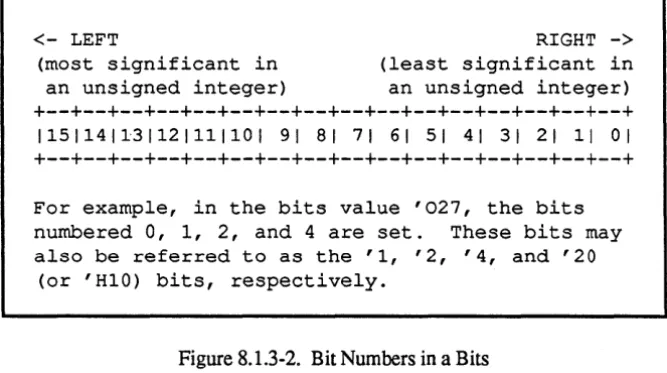
8.1.3-2. Bit Numbers in a Bits . . . .
9.3-1. The Declarations of ttopentt and "close" . . . .
9.4.1-1. Declarations of enterLogicalName and lookupLogicalName .
9.5-2. Declarations of ttyRead, ttycWrite, and ttyWrite . . . .
10.7-1. Declaration of the Procedure "scan". . . .
10.7-2. Named Control Bits for "scan" . . . . . .
10.11-3. The Fonnat of Hash Lists and Records Used by SYMTAB
12.4-1. Declaration of cmdMatch . . . .
12.7-1. Declaration of new Upper Bound . . . . . . .
15.2-1. Code to Pick Up HSHMOD Declaration . . . . • .
15.7-1. Declaration of thisDataSection . . . . .
List of Tables
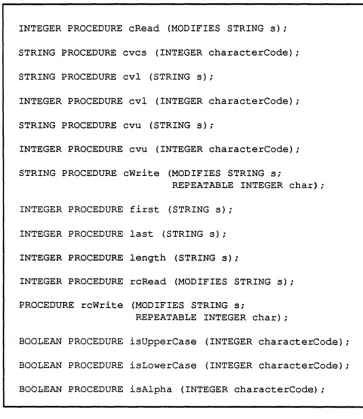
6.3-1. Some System Procedures for String and Character Manipulation . . . .
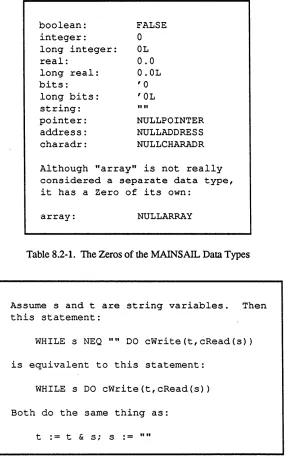
8.2-1.
The Zeros of theMAINSAIL
Data Types . . . . . . . . .8.3-1. Names of Conversion Procedures . . . .
8.5-1. Unary Operators . . . .
8.5-2. Binary Operators. . . .
9.7-1. Interpretation of Data File Commands
10.8-1. Operators That May Be Dotted. . .
10.11-1. Names of the MAINSAIL Type Codes .
10.11-2. Declarations of setPos, relPos, and getPos .
16.2-1. Default Objmod File Names. . . . . . . .
1. Introduction
This document is designed to teach the MAINSAIL programming language and the use of some of the utilities in the MAINSAIL environment to someone with computer experience. It is assumed that you have at least taken an introductory computer programming course in some other language. This tutorial makes no attempt to explain the overall philosophy behind computers and computer software, but rather concentrates on the specifics of writing programs in MAINSAIL.
1.1. Relevant Documentation
If you have not already done so, you should consult the "MAINSAIL Documentation User's Guide and Master Index" to see what documents are available on MAINSAIL and the
MAINSAIL environment. Before beginning this tutorial, you should read (or at least skim) the "MAINSAIL Overview" and the operating-system-specific MAINSATI... user's guide for your operating system.
If you wish to use MAINEDIT, the MAINSAIL text editor, while working through the examples and exercises in this tutorial, you will need to read the "MAINEDIT User's Guide". After reading the first several chapters of the tutorial, you should read the "MAINDEBUG User's Guide" for instructions on the use of the MAINSAIL debugger. You will find MAINDEBUG extremely useful as you write MAINSAIL programs of progressively greater size and complexity.
1.2. Tutorial Overview
Chapters 2 through 20 constitute an introductory self-taught course in MAINSAIL
programming. If you have some experience with other ALGOL-style programming languages (e.g., ALGOL, Pascal, Ada), you may want to skim or skip the first few chapters of the tutorial, and any other material that seems familiar. Otherwise, it is strongly recommended that you follow the directions by logging in, entering, compiling, executing, and modifying the sample programs as directed while you read the text
C programmers will want to read the comparison between MAINSAIL and C in Appendix B of part II of the "MAINSAIL Tutorial't.
MAINSAIL runtime system may be unable to find files produced by the compiler and left on other directories. A discussion of search rules for these files appears in Chapter 16.
Chapter 1 of part II of the "MAINSAIL Tutorial" and subsequent chapters contain suggestions for the more advanced MAINSAIL programmer. They tell how to make your programs more efficient and more portable, and how to take advantage of all the features of the MAINSAIL environment. Programmers who already know MAINSAIL well may prefer to go directly to this part of the tutorial.
Every chapter has an introductory paragraph or two describing its contents. You may find these introductions useful if you are searching for topics of interest
Answers to most exercises may be found in Appendix A of part II of the "MAINSAIL Tutorial",
1.3. Conventions Used in This Document
Throughout the examples in this document, characters typed by the user (that's you) are underlined. "<eol>" symbolizes the end-of-line key on a terminal keyboard; this key is marked "RETURN" or "ENTER" on most keyboards. In Example 1.3-1, "Prompt:" is written by the computer; the user types "response" and then presses the end-of-line key. "Prompt:" is an example of a "prompt", i.e., something typed by a program to indicate how the user is to respond.
Prompt: response<eol>
Example 1.3-1. How User Input Is Distinguished
Some figures in this tutorial contain comments separated from the rest of the figure by a line of vertical bars ("I"). Such comments are not entered as part of sample files and do not appear in sample dialogues when programs are actually run; they are present only as an explanation of the main part of the figure. See Example 1.3-2.
This is the main part of the figure.
This is a comment on the right-hand side of the
figure.
Example 1.3-2. How Comments Are Separated from the Main Part of a Figure
<name of addressee>
<street number> <street name>
<town or city name>, <state abbreviation> <zip code>
2. Writing and Running a Simple Program
This chapter uses some simple examples to show the steps involved in writing and executing a simple MAINSAIL program.
2.1. Getting Started
It is assumed that you know how to log into your computer, and that an account has been set up for you. The operating-system-specmc user's guide for your operating system tells how to run MAINSAIL on your system. The instructions in the guide may be inaccurate if your
MAINSAIL system was installed in a non-standard way; if necessary, consult the person in charge of MAINSAIL on your system for details.
It is also assumed that you know how to create a text file (a file is sometimes also called a "data set") on your system. Creating a text file is usually done by means of a program called a "text editor" (or just an "editor"). A text editor called MAINEDIT is part of the MAINSAIL programming environment, and some examples of its use are given in this document. If MAINEDIT is available on your system, you may wish to learn how to use it by reading the "MAINEDIT User's Guide", which assumes no knowledge of programming in general or of MAINSAIL in particular.
2.2. Invoking a MAINSAIL Module
Log in now and invoke MAINSAIL. You should see a banner and an asterisk ("*") prompt as shown in Figure 2.2-1 (the number following the word "Version" may be different on your system). The banner and prompt are written by a MAINSAIL utility called MAINEX, which is described in detail in the "MAINSAIL Utilities User's Guide".
MAINSAIL (R) version 12.10 (7 for help)
Copyright (c) 1984, 1985, 1986, 1987, 1988, and 1989 by XIDAK, Inc., Menlo Park, California, USA.
*
Figure 2.2-1. The MAINEX Banner and Prompt
utility module CONCHK is shipped with every standard MAINSAIL system; type "CONCHK" (in upper or lower case) to the asterisk prompt now. The result should look as in Example 2.2-2. Don't worry about exactly what CONCHK does right at the moment; the important thing is that you have just invoked CONCHK, it has printed the message "No inconsistencies detected.", and then it has finished executing.
MAINSAIL (R) version 12.10 (? for help)
Copyright (c) 1984, 1985, 1986, 1987, 1988, and 1989 by XIDAK, Inc., Menlo Park, California, USA.
*conchk<eol>
No inconsistencies detected.
*
Example 2.2-2. Running the Utility Module CONCHK
Note the second asterisk prompt in Example 2.2-2. When a module finishes executing, control ordinarily returns to MAINEX, which prints an asterisk prompt to allow you to run another module. If you wish to return to the operating system prompt, respond to the MAINEX asterisk prompt by typing the end-of-line key, as shown in Example 2.2-3.
*<eo1>
(the operating system command
processor prints its own prompt here)
Example 2.2-3. Ending a MAINEX Session
In MAINSAIL, unlike many other languages, it is not necessary to return to the operating system prompt after each program is executed (provided each program executed is a
MAINSAIL program). Any number of MAINSAIL programs may be run in a fOW by typing
the name of each module to be run to the MAINEX asterisk prompt.
2.3. Compiling and Executing a Simple Source Module
This section describes how to run a small program; the next section analyzes why the program
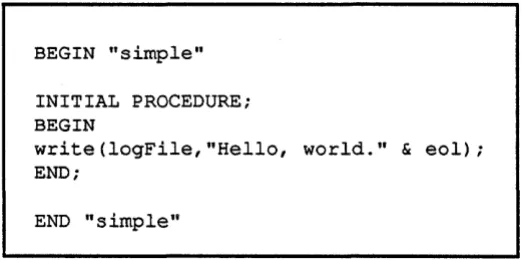
Create a text file called "simple.msl" with the contents shown in Figure 2.3-1. A text file with human-readable program code in it is called a "source file". MAINSAIL source file names customarily end in ".msl"; you may use a different name if you prefer, since the MAINSAIL system makes no assumption about the names of MAINSAIL source files.
BEGIN "simple"
INITIAL PROCEDURE; BEGIN
write (logFile, "Hello, world." & eol);
END;
END "simple"
Figure 2.3-1. A Simple MAINSAIL Source File: "simple.msl"
The source file "simple.msl" contains the source (also called "source code"), or textual fonn, of an entire MAINSAIL module. The source code for a module may be referred to as a "source module", or just as a "module", in which case context must distinguish it from an "object module", which is described below. It is possible for a source file to contain more than one module, or to contain only part of a module, but the case in which a source module is composed of exactly one file is common for small modules.
In order to execute a MAINSAIL module that exists in source form, it must first be "compiled", i.e., translated into a "machine language" form readable by the computer (but not by human beings). Some programming languages (e.g., certain forms of BASIC) do not require a compilation step, but rather execute source code directly (or nearly directly). Such languages are called "interpreted languages"; MAINSAIL is called a "compiled language" because the compilation step is required. A MAINSAIL compilation translates the source module into a machine language file (the object module, usually called an "objmod") of which the name is deri ved from the name of the source module. When you type the name of a module to the MAINEX asterisk prompt, you are really telling MAINE X to search for the objmod with the file name corresponding to the module name you have just typed (actually, some modules are not contained in individual files, and there are ways of changing the default correspondence between source and object module names, but these are discussed later).
*compil<eol>
MAINSAIL (R) Compiler
COMPIL is the module to run.
Copyright (c) 1984, 1985, 1986, 1987, 1988, and 1989 by XIDAK, Inc., Menlo Park, California, USA.
compile (7 for help): simple.msl<eol> Opening intmod for $SYS ...
simple.msl 1
Objmod for SIMPLE on simple-xyz.obj Intmod for SIMPLE not stored
compile (7 for help): <eol>
*
"simple.msl"
(containing source module SIMPLE) is the first file to compilee
"xyz" will be replaced by a different string on your operating system.
Example 2.3-2. Compiling "simple.msl" with the MAINSAIL Compiler
Whenever it compiles, the compiler issues the "opening intmod for $SYS ... " message; this means it is looking up the standard symbols built into MAINSAIL. It then prints the names and page numbers of all the source files it uses to produce the compiled version of the module, the object module. Since the module SIMPLE is contained entirely within the file "simple.msl", which has only one page, the MAINSAIL compiler prints "simple.msl 1". When it has finished producing the object file, it writes a line showing the name of the module compiled
("SIMPLE") and the name of the objmod file ("simple-xyz.obj" is shown in Example 2.3-2; in real life, the "xyz" part is replaced with some characters that vary from operating system to operating system). If an intmod (another kind of file produced by the compiler) was not requested (see Section 20.3 for a discussion of intmods), the compiler prints that the intmod was not stored. The compiler then returns to the compiler prompt, to which you may enter another source file name. Typing the end-of-line key to the compiler prompt tenninates the execution of COMPIL.
To execute (or "run" or "invoke") the resulting object module, you need only type its name to the MAINEX asterisk prompt Unlike many programming languages, MAINSAIL does not require an explicit "link" or "bind" step following compilation. SIMPLE writes the line "Hello, world.", then exits. See Example 2.3-3.
*simple<eol> Hello, world.
*
Example 2.3-3. Executing the Compiled Module SIMPLE
modules that constitute entire programs in and of themselves and those that are viewed as fragments of programs. Indeed, the same module may sometimes be used in a fashion the programmer views as "independent", or "program-like", and sometimes in a "dependent" fashion. This is more fully explained in Chapter 16. Since SIMPLE by itself performs a relatively well-defined task, it may be thought of as a program.
2.4. Errors and the" Error Response:
ttPrompt
If you mistyped the contents of the file "simple.msl" when you created it, you may have gotten an error message from the compiler. Such an error message ends with the prompt "Error response:". Such error messages are commonly given by the MAINSAIL runtime system and by MAINSAIL utility programs. The correct thing to do when such an error occurs is usually to hit the <eoI> key (unless you know of something more appropriate to do, which may be the case in some circumstances, particularly if the ~rror message itself instructs you to do
something different). In this case, the MAINSAIL program that issued the error message usually continues, patching up the error as best it can.
You can cause MAINSAIL to issue an error message by trying to compile a file that is not a valid MAINSAIL program. Try compiling a file named "xxx.msI" that contains just the line "xxx". The result should look like Example 2.4-1.
2.5. An Analysis of the Module SIMPLE
*compil<eol>
MAINSAIL (R) Compiler
Copyright (c) 1984, 1985, 1986, 1987, 1988, and 1989 by XIDAK, Inc., Menlo Park, California, USA.
compile (7 for help): xxx.msl Opening intmod for $SYS ... xxx.msl 1
ERROR: file xxx.msl page 1 line 1 at ##
xxxii
Expected BEGIN
Error Response: ~
ERROR: file xxx.msl page 1 line 1 at ##
xxx##
Module END expected here Error Response: <eol> Objmod not generated Intmod not stored
compile (7 for help): <eol>
*
Example 2.4-1. An Error Message and Response
The line labeled "Initial "BEGIN'''' is the first line of SIMPLE. Every source module begins with the word "BEGIN" followed by the module name in double quotes. The word "BEGIN" is a "keyword" or "reserved word"; Le., it plays a special role in the structure of MAINSAIL source code. The words "INITIAL", "PROCEDURE", and "END" in Figure 2.5-1 are also keywords. MAINSAIL has a number of keywords, which will be introduced in this tutorial as they are encounted. Keywords are customarily written entirely in upper case, but may be written in lower or mixed case.
BEGIN "simple" INITIAL PROCEDURE; BEGIN
write (logFile,
"Hello, world." & eol); END;
END "simple"
Initial "BEGIN"
Initial procedure header Initial procedure body
Final "END"
Figure 2.5-1. Parts of the Module SIMPLE
which are all identifiers, could be written as "Simple", "WRITE", and "logfile", respectively,
without changing the meaning of the module SIMPLE. Non-keyword identifiers are
customarily written in lower case, or in a mixture of upper and lower case so as to
beeasier to
read (e.g., "logFile" is written as it is because it is composed of the words "log" and "file").
Certain predefined identifiers (which will be encountered later) begin with a dollar sign
("$")character. You must never create such an identifier in your own programs.
A module name
isrequired to
beno longer than six characters. This is a restriction not placed
on most identifiers; most identifiers created by the programmer may
beas long as the
programmer desires, provided that no line of source code exceeds 32,766 characters. Some
programming languages ignore trailing characters in identifiers exceeding a certain length, but
in MAINSAIL every character in an identifier is significant. For example, the identifiers in
Example 2.5-2 are considered to be different identifiers by the MAINSAIL compiler.
this IsAVeryVeryLongIdentifierItIsLongIdentifierNumberl this IsAVeryVeryLongIdentifierItIsLongIdentifierNumber2
Example 2.5-2. These Identifiers Are Not the Same
The "Initial procedure body" is what SIMPLE executes when it is run. The body begins with the keyword "BEGIN" and ends with the keyword "END", followed by a semicolon. Between the "BEGIN" and the "END" is a call to the procedure "write"; the word "write" is followed by a pair of parentheses in which is enclosed
a
description of what to write and where to write it "logFile" is where to write what is written; "Hello, world.", followed by an end-of-line ("&eol"), is what is written. "logFile" is usually your terminal; i.e., things written to 10gFile appear on your terminal screen. Much more will be explained about "write" in subsequent chapters; for now, just accept that you may cause a program to print something to your terminal by surrounding it with double quotes, preceding it with "write(logFile,", and following it with ");".
An
end-of-line may be added to something in double quotes by means of "& eol".The line labeled "Final "END'fII in Figure 2.5-1 terminates the source module. The module name in quotes after the keyword "END" must be the same identifier as the module name after the initial "BEGIN" . Every source module must have a final "END".
2.6. Errors in a Source File
When the MAINSAll... compiler compiles a module, it checks to make sure that the module conforms to the rules for MAINSAIL text. If the module does not conform, the compiler prints
an
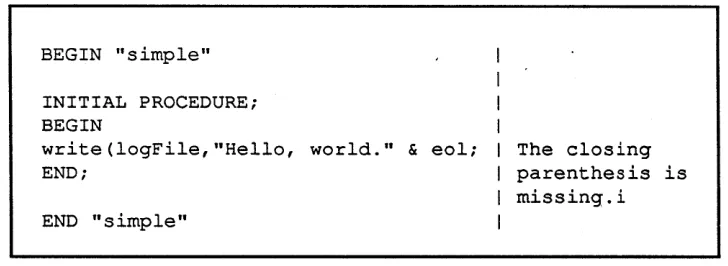
error message to 10gFile, and waits for you to type a command indicating how to deal with the error. A common response to the compiler error prompt is <eol>, which means to continue the compilation as well as the compiler can. The compiler does not produce an objmod if it encounters errors in the source text. A source file construct containing errors is said to be "illegal".As an example. alter "simple.msl" to look like the version shown in Figure 2.6-1. The closing parenthesis following "write" has been removed.
BEGIN "simple" INITIAL PROCEDURE; BEGIN
write (logFile, "Hello, world." & eol; END;
END "simple"
The closing parenthesis is missing.i
Figure 2.6-1. A Version of "simple.ms}" Containing an Error
informs you of the page and line numbers in the source file where the error is. Compiler error messages try to be as informative as possible, although the compiler may sometimes
misconstrue your intent Also, an error may confuse the compiler and cause it to issue error messages beyond the point of the original error in source code that you feel is correct. It is sometimes necessary to take compiler error messages with a grain of salt. In this case, the compiler seems to have done pretty well; it says it was expecting to see a ")" in the file, and that is just what is missing.
*compil<eol>
MAINSAIL (R) Compiler
Copyright (c) 1984, 1985, 1986, 1987, 1988, and 1989 by XIDAK, Inc., Menlo Park, California, USA.
compile (7 for help): simple.msl<eol> Opening intmod for $SYS ...
simple.msl 1
ERROR: file simple.msl page 1 line 5 at ## write (logFile, "Hello, world." & eol;## Expected )
Error Response: <eol>
Objmod for SIMPLE not generated Intmod for SIMPLE not stored compile (7 for help): <eol>
*
Example 2.6-2. Compilation Dialogue for a Source File Containing Errors
2.7. Exercises
Exercise 2·1.
Is "ABCDEFG" a legal module name? A legal identifier? How about "IX"? "A_B_C"? "abc"?
Exercise 2·2.
Change the name of SIMPLE to be "byeBye", and have it print out "Bye, folks!" instead of "Hello, world.".
Exercise 2·3.
3. Data Types, Variables, Constants, and Expressions:
Strings and Integers
This chapter introduces constants and variables, which are used to represent and record values in a program. Values of the two data types "string" and "integer" are used as examples. It is shown how variables and constants may be used to construct more complex expressions by means of operators. The declaration of symbolic constants is also covered.
3.1. Strings
A character is represented in a computer as an integral number. The numbers that represent valid characters are constrained by the operating system to fall within a certain range; the most common range is 0 through 255 (which is the range of values assumed by MAINSAIL). The character represented by each number may be discovered by transmitting the number to a terminal or a printer; when the terminal or printer receives the number, it writes the
corresponding character. Some characters do not cause a terminal or printer to write anything; such characters are called "non-printing". The range of valid character numbers and the characters these numbers represent are referred to as the operating system's "character set" . MAINSAIL runs only on operating systems on which the character set includes representations for the upper- and lowercase letters, digits, spaces, tabs, ends of lines, and certain common punctuation characters. For an exact list of the guaranteed characters, consult the "MAINSAIL Language Manual".
A MAINSAIL string is a series of up to 32,766 characters. The characters may be any character in the valid range, printing or non-printing (there is no rule, as in C and some other programming languages, that a string is terminated by the character represented by the number 0). A string may contain no characters at all, in which case it is called the "null string".
-3.2.
String Constants. and String Constant Macros
The program WRI1ER of Example 3.2-1 writes five strings to 10gFile. The first four strings are all enclosed in pairs of double quotes. The fifth string is represented by the identifier "eol", which is predefined by MAINSAIL to be the string that represents an end-of-line. When eol is written to a terminal, the terminal ends the current line and starts a new line.
BEGIN "writer" INITIAL PROCEDURE; BEGIN
write(logFile,"This If);
write(logFile,"is"); write(logFile," a");
write(logFile,"sentence."); write(logFile,eol);
END;
END "writer"
Example 3.2-1. A Module That Writes Strings to logFile
*writer<eol> ..
This is a sentence.
*
Example 3.2-2. Executing WRITER
Each of the five strings of Example 3.2-1 is a "string constant". A string constant may be represented in a source file by the characters in the string enclosed in double quotes, or by an identifier, as in the case of eol. If a string constant contains double quotes, the quotes inside the string must be written twice. Example 3.2-3 shows some valid string constants. "tab" is predefined by MAINSAIL to represent the character usually associated with the "TAB" key on a terminal; "eop" is the character used to separate pages in a text file (it is this sort of page that the MAINSAIL compiler counts when it prints page numbers during a compilation).
Strings may be joined ("concatenated") by placing an ampersand (" & ") between them. The text of the first string followed by the text of the second string is the result of the concatenation; for example:
"Hello, " & "there" "xxx" & "."
"" & "ABC" "Def" & ""
"Hello, there" "xxx."
n""Good morning,"" said Eva." "abc"
"This is a sentence." eol
tab eep
""
If written to logFile, the first string would appear as:
"Good morning," said Eva.
This is the null string.
Example 3.2-3. Some Valid String Constants
(concatenating the null string with another string doesn't add any characters to the result). The modules of both Example 3.2-4 and Example 3.2-5 write the same thing to logFile as the module of Example 3.2-1. Two strings concatenated with the ampersand operator constitute a "string expression"; a string expression is itself a string, and any string counts as a string expression. If both of the strings in a concatenation are constants, the expression is a "string constant expression".
BEGIN "write2" INITIAL PROCEDURE; BEGIN
write(logFile,"This " & "is" & " a " & "sentence." & eel); END;
END "write2"
Example 3.2-4. The Use of "&" to Concatenate Strings
The user may define identifiers that represent string constants, just as eol, eop, and tab are predefined by MAINSAIL. Such identifiers are called "macros". The user creates a string constant macro by means of the keyword "DEFINE". A sample use of "DEFINE" is shown in the module of Example 3.2-6, which does the same thing as the module WRITER of Example 3.2-1.
BEGIN "write3" INITIAL PROCEDURE; BEGIN
write(logFile,"This is a sentence." & eol); END;
END "write3"
Example 3.2-5. A Simplified Version of WRI1ER
BEGIN "write4" INITIAL PROCEDURE; BEGIN
DEFINE stringToWrite = "This is a sentence." & eol; write (logFile,stringToWrite) ;
END;
END "write4"
Example 3.2-6. WRITER with String Macros
string constant expression, and a semicolon. Other forms of macro definition will be discussed as they are encountered.
3.3. String Variables
Create, compile, and execute the module READER shown in Example 3.3-1. The execution should look something like Example 3.3-2.
BEGIN "reader" INITIAL PROCEDURE; BEGIN
STRING s;
write (logFile,
"Type something, end with <eol>: "); read(cmdFile,s);
write (logFile,
END;
"The string you typed was
&
s& """ " &
e6l);END "reader"
"""
Initial "BEGIN"
String variable declaration
cmdFile is terminal input Note doubled double quotes
Final "END"
Example 3.3-1. A Module Containing a String Variable
*reader<eol>
Type something, end with <eol>: haute cuisine<eol> The string you typed was "haute cuisine".
*
Example 3.3-2. Execution of the Module READER
"compiletime". Like the identifier "eol", the identifier "s" represents a string; unlike eol, however, s may take on a different value from execution to execution.
"STRING" is a keyword indicating the "data type" of the identifier that follows it MAINSAIL permits operations on a number of different data types; it is not convenient to represent all data as text strings.
3.4. Declarations
The lines reading:
STRING s; in Example 3.3-1 and:
DEFINE stringToWrite
=
"This is a sentence." & eol; in Example 3.2-6 are examples of "declarations". Every identifier (with an exception noted in Chapter 11) in a MAINSAIL module must be declared before it is used. Each declaration has a "scope", or part of the source text over which the identifier declared may be used; in the case of a procedure. a declaration occurring immediately after the initial "BEGIN" has a scopeextending up to the final "END" of the procedure. Scopes are discussed in detail in Section 6.4.
If you remove the line reading "STRING s;" from Example 3.3-1. and try to compile the resulting file (assume it is called "reader.mst"), you will get a compiler error message saying that the identifier s has not been declared. The dialogue looks as shown in Example 3.4-1. Note that an error message may be issued for each occurrence of the undeclared identifier.
3.5. Integer Constants, Variables, and Expressions
MAINSAIL has an "integer" data type, which may be used to represent whole numbers in the range -32,767 to +32,767 (on some machines the range may actually be larger; ·32,767 to +32,767 is tfle "guaranteed range"). Like strings. integers may be constants or variables. An integer constant is represented by a series of digits (the characters in the set ("a", "1", "2", "3", "4", "5", "6", "7", "8", "9"}) optionally preceded by a minus sign ("-"). Commas are not permitted in integer constants (so "32767" is legal, but "32,767" is not). Some valid integer constants are shown in Example 3.5-1.
Integer expressions may include (among others) the standard arithmetic operators "+", "-". "*"
*cornpil<eol>
MAINSAIL (R) Compiler
Copyright (c) 1984, 1985, 1986, 1987, 1988, and 1989 by XIDAK, Inc., Menlo Park, California, USA.
compile (1 for help): reader.msl<eol> Opening intmod for $SYS ...
reader.msl 1
ERROR: filereader.msl page 1 line 8 at ## read(cmdFile,s##);
Undeclared or ambiguous variable S Error Response: <eol>
ERROR: file reader.msl page 1 line 12 at ##
& s## & """." & eol); Undeclared or ambiguous variable S Error Response: <eol>
Objmod for READER not generated Intmod for READER not stored compile (7 for help): <eol>
*
Example 3.4-1. Error Message Issued for Undeclared Identifier
22 -179
o
32767 -10000parentheses if you have any doubt about the order of evaluation of an expression, or if you feel that the expression is difficult to read without parentheses.
Examples of integer expressions appear in Example 3.5-2.
Suppose a, b, and c are integer macro constants, and xy and z are integer variables. Then all of the following are integer expressions:
1
(1)
1
+
xy1
+
a + zz
*
2 + a DIV c z*
« 2 + a) D IV c)Same as 1
Sum of the three integers Same as (z
*
2)+
(a DIV c)Not the same as previous expression Note that xy is a single integer variable, not a product.
Example 3.5-2. Some Valid Integer Expressions
"write" may include integer expressions in the list of things to be written, and "read" may include integer variables in the list of of things to be read. "read" may also use a string (instead of cmdFile) as its source, in which case the characters read are removed from the front of the string. Enter, compile, and execute the program shown in Example 3.5-3.
Note that the first "read(cmdFile,s)" sets the value of s; the following "read(s,i)" changes the value of s by removing the part of s that represents an integer. The changed value of s is not used before the value of s is set again by another "read(cmdFile,s)" and changed again by another "read(s,i)".
3.6. Strong Typing
MAINSAIL does not permit an integer operation to be performed on strings or vice versa. The operator II & II is strictly a string operator; both of its operands must be strings, and its result is a
BEGIN "iVars" INITIAL PROCEDURE; BEGIN
INTEGER i , j ; STRING s;
write(logFile,"Type the first number: n); read(cmdFile,s); read(s,i);
write(logFile,"Type the second number: If);
read(cmdFile,s); read(s,j);
write(logFile,"The sum of the two numbers is ",i
+
j, eol & "The quotient of the two numbers is ",i DIV j, eol);END;
END "iVars"
Example 3.5-3. A Program Using Integer Variables
Assume a, b, and c are integer variables or constants, and that s, t, and u are string variables or constants. Then the following are legal integer expressions:
1
1 + (a
*
c)(-4)
*
(-5)The following are legal string expressions: "Time"
("Time" )
"Time "
&
(s&
u) "Time " & s & uThe following are illega,l because the types of the operands and/or operators don't match:
"Five " + 4
"5"
*
b22 & 6
("S" & t ) & c
3.7. Exercises
Exercise 3·1.
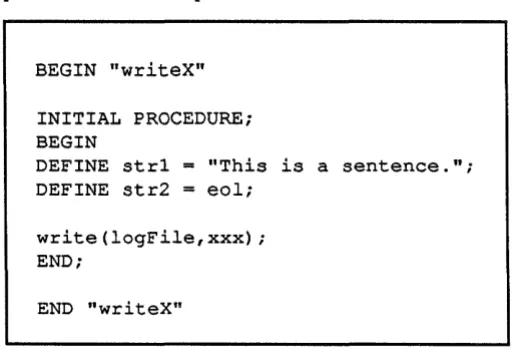
Replace "XXX" in Figure 3.7-1 with a string constant expression so that the module writes the same thing to 10gFile as the module WRlTE4 of Example 3.2-6. Do not use string quotes in the text that replaces "XXX".
BEGIN "writeX" INITIAL PROCEDURE; BEGIN
DEFINE strl DEFINE str2
"This is a sentence."; eol;
write(logFile,xxx); END;
END "writeX"
Figure 3.7-1. Replace "xxx" to Finish the Module
Exercise 3·2.
Write a program that reads in three integers, then writes out the first one minus two, the second times the third, and the third minus the first.
Exercise 3·3.
«(5)))
*
62"Time" & " is " & " money." eol
+
4tab & eop & eop
4. Iterative, Assignment, Begin, and If Statements, and the
Boolean Data Type
This chapter introduces statements, which are the smallest units of action in a MAINSAIL program. A third data type, boolean, is also introduced. The boolean data type is used in a variety of statements to direct the flow of control (sequence of actions) within a program.
4.1. Statennents
The actions of a program are prescribed by "statements". In each example module so far, the text of the initial procedure following the declarations up to the terminating "END" of the procedure has consisted entirely of statements. The statements are separated from each other by semicolons.
The only statements encountered so far have been calls to the procedures "read" and "write"; these are instances of a-kind of statement called the "Procedure Statement", MAINSAIL provides a variety of statement forms, of which the Procedure Statement is only one.
4.2. Iterative Statennents with FOR-Clauses
An Iterative Statement allows another statement to be executed repeatedly until some condition is satisfied. One form of Iterative Statement is used in the program SQUARE of Example 4.2-1; enter, compile, and execute this program. The execution may look something like Example 4.2-2.
*~Q;!J.g;r;;:~<~Ql>
How many squares do you want? 5<~Ql>
The square of 1 is 1. The square of 2 is 4.
The square of 3
is
9.The square of 4 is 16. The square of 5 is 25. *
BEGIN "square" INITIAL PROCEDURE; BEGIN
INTEGER i , j ; STRING s;
write (logFile, "How many squares do you want? n); read(cmdFile,s); read(s,i);
FOR j := 1 UPTO i DO
END;
write(logFile,"The square of ",j," is ",j
*
j," " & eol);
END "square"
Example 4.2-1. A Program Using an Iterative Statement with a FOR-Clause
The Iterative Statement with a FOR-clause of Example 4.2-1 causes the call to "write" to be executed i times, where i is the number typed at execution time. On each execution of the loop body, the "iterative variable" j is incremented by one; it starts at one, and the Iterative
Statement terminates when j becomes as large as i. The general format of an Iterative Statement with a FOR-clause is:
FOR <integer iterative variable>
.=
<lower limit> UPTO <upper limit> DO <statement to be repeated>or, if the integer variable is to be decremented by one instead of incremented by one on each execution:
FOR <integer iterative variable>
.=
<upper limit> DOWNTO <lower limit> DO <statement to be repeated>The statement to be repeated (also called the "iterated statement") is executed the number of times given by:
«upper limit> - <lower limit» + 1
unless the upper limit is less than the lower limit, in which case the iterated statement is skipped entirely.
4.3. The Assignment Statement
Until now the only means encountered to assign a value to a variable is to call the system procedure "read" or to use the variable as an iteration variable in a FOR-clause. The value of a variable may be set directly to the value of an expression by means of the Assignment
Statement. The form of an Assignment Statement is:
<variable>
:=
<expression>The variable's value is changed to be the value of the expression. The variable and the expression must be of the same data type; e.g., a string expression may be assigned only to a string variable, an integer expression only to an integer variable. Example 4.3-1 shows the use of the Assignment Statement. Enter, compile, and execute this module, which computes triangular numbers (the Nth triangular number is the sum of the integers 1 through N).
BEGIN "triang" INITIAL PROCEDURE; BEGIN
INTEGER i,count,sum; STRING s;
write(logFile,"Which triangular number do you want'? n); read(cmdFile,s); read(s,count);
sum
:=
0;FOR i := 1 UPTO count DO sum := sum + i;
write(logFile,"The ",count,"th triangular number is ",
sum,eol); END;
END "triang"
Example 4.3-1. A Module Using the Assignment Statement
BEGIN "bigStr" INITIAL PROCEDURE; BEGIN
INTEGER i,count; STRING s;
write(logFile,"N
=
If); read(cmdFile,s); read(s,count);s := "x";
FOR i := 1 UPTO count DO s := s & s; write(logFile,s,eol);
END;
END "bigStr"
Example 4.3-2. The Assignment Statement with Strings
4.4. The Begin Statement
The Begin Statement allows several statements to be grouped together and treated as a single statement. This is useful in places where the rules of MAINSAIL syntax require a single statement, but you wish to perform a series of actions. The Begin Statement consists of the keyword "BEGIN" followed by a series of statements separated by semicolons followed by the keyword "END".
For example, the keyword "DO" in an Iterative Statement must be followed by a single statement (the iterated statement). The program of Example 4.4-1 uses Begin Statements as iterated statements to cause a series of statements to be executed repeatedly. Before you enter, compile, and execute this program, take a look at it. What does it do?
BEGIN "delta" INITIAL PROCEDUREi BEGIN
INTEGER i,j,counti STRING Si
write (logFile, "Height: "); read(cmdFile,s); read(s,count); FOR i := 1 UPTO count DO
BEGIN
FOR j := 1 UPTO i DO write(logFile,"**"); write(logFile,eol);
END;
FOR i := count - 1 DOWNTO 1 DO BEGIN
END;
FOR j := 1 UPTO i DO write(logFile,"**"); write (logFile,eol) ;
END;
END "delta"
Example 4.4-1. The Use of the Begin Statement
String constants may also follow the initial "BEGIN" and final "END" of a procedure, in which case they must match (except for case); see Example 4.6-1. Certain other statement forms may be named; the rules may be found in the "MAINSAIL Language Manual".
Unlike some other languages derived from ALGOL, MAINSAIL does not allow declarations in a Begin Statement.
4.5. The Boolean Data Type
The MAINSAIL data type boolean is designated by the keyword "BOOLEAN". It has only two different values, true and false. The constants of the data type boolean are the keywords "TRUE" and "FALSE".
A variety of operators produce boolean values. One of the most common is the equals sign
<expression one>
=
<expression two>Expression one must be of the same data type as expression two. If expression one has the same value as expression two, the result is "TRUE"; otherwise, the result is "FALSE". Other comparison operators are "NEQ" (not equal), "<" (less than), ">" (greater than), "LEQ" (less than or equal), and "GEQ" (greater than or equal).
The operators "AND" and "OR" may each take two boolean operands (or sometimes operands of other data types, as described in Section 8.5), and produce a boolean result. The result of an "AND" operation is true if and only if both of its operands are true; the result of an "OR" operation is true if either one of its operands is true. "NOT" takes a single boolean operand; its result is false if its operand is true, and true if its operand is false.
Boolean expressions are frequently used in the If Statement and in certain forms of the Iterative Statement. Examples of the boolean data type appear throughout the remainder of this tutorial.
4.6.
The If
St~tementThe simpler form of an If Statement is:
IF <expression> THEN <statement>
The expression is frequently of the data type boolean; other data types are possible, as
explained in Section 8.2. For the moment only If Statements governed by boolean expressions will be considered. If the boolean expression is true, the statement is executed; if it is false, the statement is skipped. Example 4.6-1 shows the use of this form of If Statement. The execution of the module shown looks like Example 4.6-2. What happens if you answer something other than "yes" or "no"?
*iffy<eol>
Say hello (yes or no)? yes<eol> Hello.
*iffy<eol>
Say hello (yes or no)? no<eol>
*
Example 4.6-2. Execution of IFFY
BEGIN "iffy" INITIAL PROCEDURE;
BEGIN "If Statement example" STRING s;
write (logFile,"Say hello (yes or no)? "); read(cmdFile,s); IF s
=
"yes" OR s=
"YES" THENwrite(logFile,"Hello." & eol); END "If Statement example";
END "iffy"
Example 4.6-1. The Use of the If Statement
IF <expression> THEN <statement one> ELSE <statement two>
If the expression is true, statement one is executed and statement two skipped; if it is false, statement two is executed and statement one skipped.
Example 4.6-3 asks for the values of two boolean variables, then computes the values of some logical expressions containing the variables. Note the positioning of the parentheses in the statements that assign values to the variables a and b. In this example, the parentheses are redundant (they are present to make the expressions easier to understand). The precedence of the operators ":=", "=", and "OR" is described in the "MAINSAIL Language Manual", and also discussed in Sections 8.5 and 10.3.
4.7. Contracted and Abbreviated Forms
If Statements may be nested; i.e., an If Statement may follow the "THEN" or "ELSE" of another If Statement. An "ELSE" is matched with the innermost unmatched "IF"; for example, a statement of the form:
IF a THEN IF b THEN c ELSE d is equivalent to:
IF a THEN
BEGIN "logic" INITIAL PROCEDURE: BEGIN
BOOLEAN a,b,bo; STRING s;
write(logFile,"A (T or F): "); read(cmdFile,s);
a
:=
(s=
"T" OR s=
"t");write(logFile,"B (T or F): "); read(cmdFile,s);
b
:=
(s=
"T" OR s=
"t");bo := a ORb;
write (logFile,"A OR B is "); IF be THEN
write (logFile, "TRUE") ELSE write(logFile,"FALSE"); write (logFile,eol) ;
be := NOT bo;
write (logFile,"A NOR B is "); IF bo THEN
write (logFile, "TRUE") ELSE write(logFile,"FALSE"); write (logFile,eol) ;
A becomes TRUE if "T" or "t" was typed;
B likewise.
Another example of boolean assignment
1 This could also be 1 1 1 1 1 I I 1 1 1 1 -I
written "IF bo THEN bo := FALSE ELSE bo :
=
TRUE", but the form shown is simplerThis line could be
written (redundantly) as "IF bo
=
TRUE THEN"write (logFile, "NOT A is "); IF NOT a THEN
write (logFile,"TRUE") ELSE write(logFile,"FALSE"); write(logFile,eol);
END;
END "logic"
Example 4.6-3. Boolean Variables and the If Statement (end)
rather than to:
IF a THEN
BEGIN IF b THEN c END ELSE d
If Statements following an "ELSE" may be used to process a series of choices. Since the sequence "ELSE IF" is common in MAINSAIL programs, MAINSAIL provides the
abbreviation "EF". Other abbreviations are "THENB" for "THEN BEGIN", "EL" for "ELSE", "EB" for "ELSE BEGIN", and "DOB" for "DO BEGIN". The abbreviations are completely equivalent to their longer forms. The use of some abbreviations is shown in Example 4.7-1. Note the use of the integer macro constants "red", "yellow", and "blue".
4.8. Comments
It is frequently important that programs be readable to people other than the original yrogrammer. Aside from using names for constants, variables, and procedures that are suggestive of the functions they perform, the most important means of making program text readable is the use of comments.
MAINSAIL comments begin with the character "#" and are terminated by the end of a line. A comment may appear anywhere except within string quotes, where the character "#" is treated as a part of the string. The MAINSAIL compiler ignores the text in a comment; comments are intended for the human reader only.
BEGIN "colors" INITIAL PROCEDURE; BEGIN
DEFINE red
=
1; DEFINE yellow 2; DEFINE blue=
4;INTEGER color1,color2,totalColor; STRING s;
write(logFile,"First paint color: "); read(cmdFile,s);
IF
s "red" THEN colorl:=
redEF s
=
"yellow" THEN colorl := yellow EF s=
"blue" THEN colorl:=
blueEB write(logFile,s,": unknown color, red assumed" & eol); colorl := red END;
write (logFile, "Second paint color: "); read(cmdFile,s); IF s "red" THEN color2 := red
EF s
=
"yellow" THEN color2:=
yellow EF s=
"blue" THEN color2:=
blueEB write(logFile,s,": unknown color, red assumed" & eol); color2 := red END;
totalColor := color1
+
color2;write (logFile, "By mixing the two you get ");
IF totalColor red + red THEN write (logFile, "red")
EF totalColor
=
red + yellow THEN write (logFile, "orange") EF totalColor=
yellow+
yellow THENwrite{logFile,"yellow")
EF totalColor red + blue THEN write (logFile, "purple") EF totalColor
=
yellow + blue THEN write (logFile, "green")· EF totalColor=
blue + blue THEN write(logFile,"blue"); write (logFile,eol) ;END;
END "colors"
4.9. Other Forms of the Iterative Statement
The only form of the Iterative Statement encountered so far is the form with a FOR-clause. The FOR-clause is actually one of three types of optional clauses that may accompany an Iterative Statement. The other two clauses are the WlllLE-clause and the UNTIL-clause; each uses an expression, usually of type boolean (rather than an integer counter like the FOR-clause), to govern execution of the iterated statement.
The three clauses may all be present in the same Iterative Statement, or all three may be absent. The form of an Iterative Statement with all three clauses is:
FOR <integer variable> := <integer expression one> UPTO/DOWNTO <integer expression two>
WHILE <expression three> DO <statement>
UNTIL <expression four>
The order is important; first the FOR-clause, then the WHILE-clause, then the keyword "DO", the iterated statement, and finally the UNTIL-clause.
The simplest form of the Iterative Statement (with no clauses) is: DO <statement>
This form of the Iterative Statement repeatedly executes the iterated statement until something in the statement causes it to terminate, usually a Done Statement, Return Statement, or an exception (all of which are described later).
The WHll..E-clause tests a condition (usually a boolean expression; other types of expressions are possible and are explained in Section 8.2) before each execution of the iterated statement.
If the condition is true, the statement is executed; otherwise, the Iterated Statement terminates. The UNTIL-clause tests a condition after each execution of the iterated statement; if the condition is true, the Iterated Statement terminates. If it is false, the FOR-clause and WHILE-clause tests, if they are present, are performed to determine whether another repetition of the Iterated Statement is to be made.
An Iterative S