© 2001, Tone Commander Systems, Inc. All rights reserved.
Printed in USA
Tone Commander is a registered trademark of Tone Commander Systems, Inc.
Changes in this revision –
Contents
Introduction. . . 4
Ordering Equipment. . . 5
Ordering Lines . . . 6
Site Preparation . . . 7
Configuration Sheet Preparation . . . 8
Installation . . . 12
Contents of Shipping Boxes. . . 12
CPU Installation . . . 13
Console Cable Installation . . . 19
Console Installation . . . 21
Preliminary Testing. . . 21
CPU Option Switches . . . 23
Optional Equipment Installation . . . 24
Configuration Programming . . . 26
Using Configuration Programming Mode. . . 27
Programming System-Wide Features . . . 29
Special Feature Key Assignment . . . 35
Programming Features Selectable Per Line . . . 36
DSS/Autodial Number Programming . . . 38
Pickup Key Programming. . . 39
Name Display Programming . . . 40
Ring Delay Programming . . . 41
Time of Day Clock . . . 42
System Description . . . 43
Consoles . . . 43
Central Processing Unit (CPU) . . . 44
System Features . . . 44
Console Features. . . 45
Telco/PABX Requirements . . . 47
Compatibility With Other Products . . . 48
524 Specifications . . . 49
Maintenance. . . 52
Service . . . 53
Warranty. . . 53
FCC Requirements. . . 54
Industry Canada Requirements . . . 55
Introduction
The Tone Commander 524 is a call processing console for use in receptionist or departmental attendant positions, with Centrex or PABX systems. Five line keys are provided for LDN (listed directory number) terminations or call processing loops. Up to 24 stations may be monitored for status. Autodialing is available for each station. Autodialing is normally used to dial the station number associated with the DSS (Direct Station Select) key, but spare DSS keys may optionally dial outside lines or special access codes. Features include hold and transfer, single button call answer, line privacy, delayed ringing, station status display, station name display, music on hold, and a digital clock. Console parameters may be programmed by the installer for different system configurations.
A configuration programming mode is used by the installer to set console parameters as required by the telephone system. The attendant may program name displays, autodial numbers, ring delays, and the time-of-day clock. Switches can be set to prevent accidental programming changes.
The system includes a CPU (Central Processing Unit) in the equipment room. Two consoles may be connected to a single CPU.
Please refer to the System Description section for detailed descriptions of all 524 features.
Tone Commander consoles are easy to install and configure. The step-by-step instructions in this manual guide the installer through the installation, preliminary testing, programming, and operational testing of the 524.
Installation consists of the following steps:
1. Ordering equipment (page 5) 2. Ordering lines (page 6) 3. Site preparation (page 7)
4. Configuration Sheet preparation (page 8) 5. Mounting equipment and blocks
6. Connecting lines to CPUs
7. Installing consoles and console cables 8. Preliminary testing
9. Installing optional equipment (paging, etc.)
10. Configuration programming – includes central office/PABX compatibility parameters, and several customer-preference items. The system's default values will be adequate for many installations. 11. DSS/Autodial number programming
12. Name display programming 13. Ring delay programming
1. Ordering Equipment
Order the optional PA-24 Paging/Chime Module and related equipment as required. Allow adequate time to ensure equipment availability at cutover.
Required for each 524 system
q (1) 524 Central Processing Unit (equipped for 5 attendant lines, 24 stations, 2 consoles)
q (1) 524 console for each attendant position (2 max.)
Required to provide Paging service
q (1) PA-24 Paging/Chime module
q (1) Paging Amplifier and speakers
Additional required equipment
q (1) 66M1-50 split block + (1) male-terminated 25 pair cable
q (1) 66M1-50 split block + (2) female-terminated 25 pair cables
q (2) 3 pair cables from the CPU to each console (500 ft. maximum length)
q (2) 6 position, 6 contact modular jacks per console
q (1) 117 VAC, 60 Hz grounded power outlet per CPU in the equipment room
q Sufficient space on a plywood sheet in the equipment room for mounting CPU, blocks, and ancillary equipment
2. Ordering Lines
Please refer to the System Description section for further information regarding line requirements.
Common requirements for all attendant and station lines
q Standard Centrex loop start lines
q Disconnect Supervision
q Call Pickup Terminate
q Must originate from the same Centrex Common Block
Requirements for all attendant lines
q Tone dialing
q Station Call Transfer
q Directed Call PickupwithoutBarge-In (non-Barge-In)
q Do notconfigure with Call Transfer-Attendant
Optional attendant line features
q Order (1) nonhunting Centrex line per 10 attendant lines per console (recommended for retrieving unanswered station calls). Refer to the Answer Use line feature described on page 36.
Requirements for all station lines
q Must be assigned to a Call Pickup Group
q Do notconfigure with Call Forward-No Answer to the attendant
Optional station/line features
Additional features may be optioned as required.
3. Site Preparation
Central Processing Unit (CPU)
The CPU should be installed in a clean,dryarea which is secure but also accessible by maintenance personnel. This unit is designed for wall mounting only. Allow adequate wall space for ventilation, the necessary mounting blocks, and related equipment.
Ambient Environmental Requirements
1. Between 60° and 80° F (recommended). 2. Free of toxic fumes or static electricity (copiers).
3. At least 50 feet away from electromagnetic sources (arc welders). 4. Free from transient electrical load switching equipment (elevator rooms). 5. Between 5% and 95% noncondensing relative humidity.
Power Requirements
A dedicated, 15 amp, 117 VAC, 60 Hz circuit must be provided for the exclusive use of the CPU. IMPORTANT– Ancillary or unrelated equipment should never draw power from the same circuit that
powers the CPU.
The ground (3rd prong) on the power plug provides a safety ground to the chassis of the CPU, and is required for EMI shielding. It must be plugged into a grounded outlet.
Transient Surge and Spike Protection
While Tone Commander products comply to FCC rules part 68.306, Hazard Voltage Limitations, in those areas of high lightning activity, the use of external protection devices on all telephone lines and the power source is recommended.
Reference Grounding
Reference grounding of the 524 system is necessary for proper operation. This ground should be referenced to within 3 volts of telco ground.
Attendant Consoles
The consoles should be installed in a clear work space and away from plants that require frequent watering or counters that tempt the placement of beverages.
Ambient Environmental Requirements
4. Configuration Sheet Preparation
Prior to installation of this system, the Configuration Sheets attached to the back of this manual should be completed with the information listed below. Please leave the Configuration Sheets on site.
System Programmable Features
Factory programmed values have been chosen to accommodate standard central office or PABX operating parameters and generally accepted customer requirements. These values may be adjusted to specific needs.
A space is provided on the Configuration Sheet for the Directed Call Pickup code required by the telephone system.
Station and Line Programmable Features
1. Phone number and name identification for each line. Refer to the DSS/Autodial Number Programming section.
2. Programmable features for each line (Privacy, Answer Use).
3. Station number and user name identification for each station. Include any additional functions to be dialed with the DSS number, such as anFDprefix.
4. Autodial numbers for spare DSS keys.
524 Configuration Sheet
System Programmable Features
STATION
KEY FEATURE DIAL PADKEYS AVAILABLEVALUES DEFAULTVALUE ACTUAL VALUE
A ‘ABANDON’Ring Time 2 - 9, 0 2 - 9 sec,10 sec 5
5
B ‘RECALL’Rings 1 - 9, 0 1 - 9 rings,no recall 3
3
C ‘DCP DIAL’Sequence 0, 1 first, last first(0)
first
D ‘DIAL SPEED’ 6, 0 slow (6 digits/sec),fast (10 digits/sec) fast(0)
fast
E ‘PAUSE’ Time 2 - 9 200 - 900 msec 700
700
F ‘FLASH’ Time 5 - 9, 0 500 - 900 msec,1 sec 600
500
G ‘DETECT’Dial Tone Time
1 - 9,
0 1, 1.2, 1.5, 1.8, 2 sec500, 600, 700 msec, 700
600
H Recall Time‘HOLD’ 3 - 6, 9,1, 2, 0 2, 3 min, no recall30 - 60, 90 sec, 90
60
I ‘RELEASE’Hold
Time 1 - 8
45, 80, 200, 400, 600, 800 msec
1, 2 sec 600
600
K ‘PRIORITY’Queue 1 - 4
stations only, stations > lines, lines > stations, lines + stations (FIFO)
FIFO
(4)
FIFO
L ‘ALERT TYPE’ 1, 2, 0 distinctive ringing, bothnormal ringing, both(0)
both
M ‘RNG TYPE’ 1, 0 long, short short(0)
short
524 Configuration Sheet
Line Programmable Features
(Default settings for all lines are shown in BOLD ITALICS.)LINE KEY NO.
LINE NAME I.D. or PAGE KEY PRIV. WHEN BUSY MUSIC ON HOLD ANS. USE RING DELAY (NO RINGING, NO DELAY, 1-9 RINGS) TELEPHONE NUMBERS O F F O N O F F O N O F F O N
1
local 1
X
X
X
no
delay
555-1990
2
local 2
X
X
X
no
delay
555-1991
3
local 3
X
X
X
no
delay
555-1992
4
WATS
X
X
X
no
delay
280-2339
5
Page key
X
X
X
no
524 Configuration Sheet
DSS Keys
DSS keys are numbered vertically on the console.
DSS
KEY NUMBERSTATION USER NAME DSSKEY NUMBERSTATION USER NAME
1
FD4710
John F
13FD4737
Phillip R
2
FD4719
Bill Jones
14FD4736
Mary S
3
FD4729
Jill K
15FD4723
Steven E
4
FD4711
Jane W
16FD4713
Karen G
5
FD4712
Ronnie Y
17FD4714
Robert T
6
FD4715
Kim L
18FD4724
Jim W
7
FD4720
Jack S
19FD4725
Pat K
8
FD4716
William F
20FD4726
Randy A
9
FD4717
Sarah S
21FD4727
Kirk B
10
FD4718
Robin R
22FD4728
Cliff M
11
FD4721
John L
23FD4730
Paul C
Installation
Contents of Shipping Boxes
The Tone Commander 524 system is shipped in two boxes: one for the console, and one for the central processing unit (CPU). Please compare the contents of these boxes with the lists below. Contact your distributor if any items are missing or damaged.
Console Box:
(1) console (2) 7´ line cords (1) handset with cord (1) handset cradle
(2) cradle mounting screws (1) Attendant’s Guide (1) Quick Reference Card (1) bag of clear keycaps (1) sheet of keycap labels
CPU Box:
(1) 524 CPU
(1) Installation Instructions (1) mounting template (3) cable retainers
(1) bag for storing instructions and miscellaneous items
Important Safety Instructions
1. Never install telephone wiring during a lightning storm.
2. Never install telephone jacks in wet locations unless the jack is
specifically designed for wet locations.
CPU Installation
Mounting CPU and Blocks
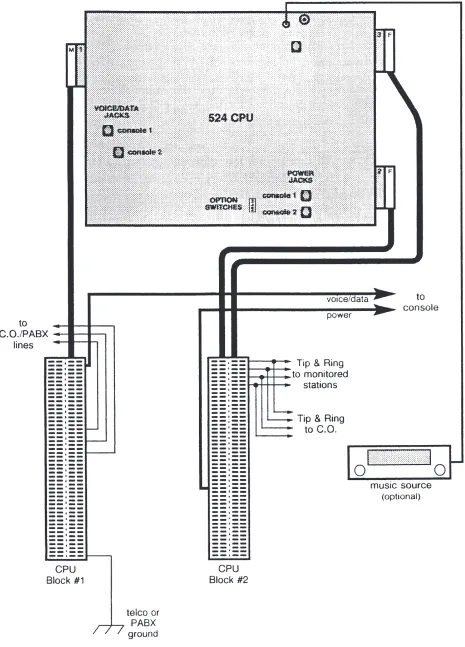
Refer to Figure 5.
1. Fasten a plywood sheet to the wall with hardware suitable for the wall material.
2. Using the supplied mounting template, mark and pre-drill the mounting holes for the CPU.
Make sure that the CPU mounting location is within 5 feet of a standard 117 VAC, 60 Hz grounded power outlet.
Allow at least one foot of free space above and below the CPU for ventilation.
3. Drive in four suitable fasteners (such as #10×¾" pan head tapping screws), leaving the heads out ¼". 4. Remove the two cover screws, turn each CPU cover fastener so that the slots are horizontal, then
remove the cover.
When installation and testing are completed, replace the cover, turn each cover fastener so that the slots are vertical, then lock it in place with the cover screws to assure compliance with UL requirements.If the cover screws need to be replaced, use 6-32×¼" pan head machine screws. 5. Hang the CPU on the four mounting screws and tighten the screws.
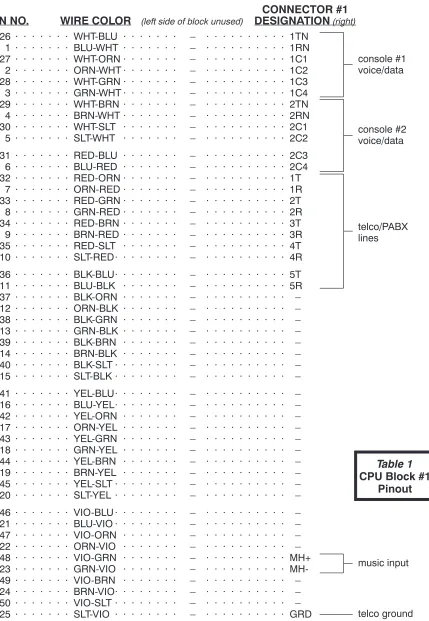
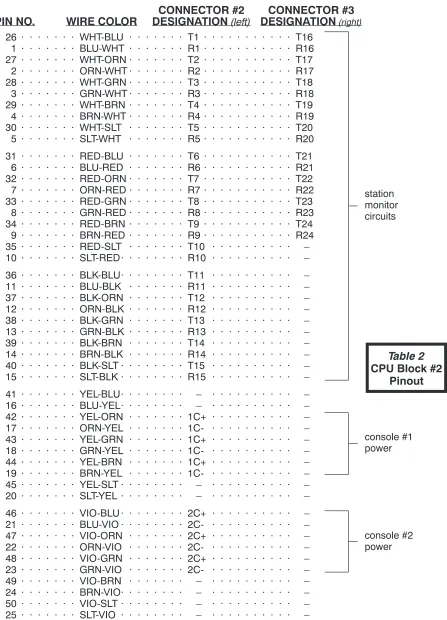
6. Label each side of the split terminal blocks as shown in the Designation columns of Tables 1 and 2. 7. Mount the blocks to the plywood sheet below the CPU, using suitable fasteners.
Cabling to Blocks
Refer to Figure 5.
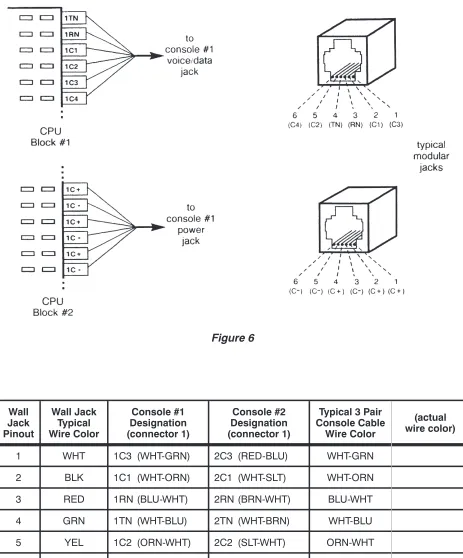
1. Punch down the cables to the blocks as shown in the Wire Color columns of Tables 1 and 2. The cable with the male connector should be punched down to the right side of block #1.
2. Plug the 25 pair cable from block #1 into the connector on the left side of the CPU circuit board. 3. Plug the cable from the left side of block #2 into the connector on the lower right side of the CPU circuit
board.
4. Plug the cable from the right side of block #2 into the connector on the upper right side of the CPU circuit board.
Reference Grounding
CPU Chassis Grounding
This ground connection is required for safety and EMI shielding. It is usually provided by the 3rd wire on the CPU power cord. If the integrity of the power outlet ground is questionable, use the ground connection shown below for the 524 CPU.
1. Connect a solid copper #10 or #12 AWG wire to the ground terminal on the CPU. The wire should be tightly clamped between the ground screw and the cup washer.
2. Connect the wire to an approved ground, such as MGN (multi-grounded neutral) from the power lines, building ground, a metallic cold water pipe, or a grounding rod.
Figure 2
Figure 1
Connect telco or PABX ground to the GRD pin on the bottom right of CPU block #1.
DO NOT connect this reference ground to the CPU's metal housing!
Connections to Telco/PABX Lines
Line Testing
Connect a test telephone to each line; verify the presence of dial tone, and break dial tone by dialing a number.
The 524 allows DTMF tone dialing only – refer to the Telco/PABX Requirements section.
Test any additional features ordered with the lines. Open circuit voltage must be approximately 48 volts.
Station Connections
Station Monitoring
1. Connect Tip and Ring of each line to the associated TandRpair on the right side of CPU block #1. If the 524 is used with a key system, connect to the C.O. side of the line cards.
2. If this installation has stations paralleled with console lines, the stations should be connected to Tip and Ring at the telco/PABX block.
Figure 3
Figure 4
CONNECTOR #1
PIN NO.
WIRE COLOR
(left side of block unused)DESIGNATION
(right)26 · · · WHT-BLU · · · – · · · 1TN 1 · · · BLU-WHT · · · – · · · 1RN 27 · · · WHT-ORN · · · – · · · 1C1 2 · · · ORN-WHT · · · – · · · 1C2 28 · · · WHT-GRN · · · – · · · 1C3 3 · · · GRN-WHT · · · – · · · 1C4 29 · · · WHT-BRN · · · – · · · 2TN 4 · · · BRN-WHT · · · – · · · 2RN 30 · · · WHT-SLT · · · – · · · 2C1 5 · · · SLT-WHT · · · – · · · 2C2 31 · · · RED-BLU · · · – · · · 2C3 6 · · · BLU-RED · · · – · · · 2C4 32 · · · RED-ORN · · · – · · · 1T
7 · · · ORN-RED · · · – · · · 1R 33 · · · RED-GRN · · · – · · · 2T 8 · · · GRN-RED · · · – · · · 2R 34 · · · RED-BRN · · · – · · · 3T 9 · · · BRN-RED · · · – · · · 3R 35 · · · RED-SLT · · · – · · · 4T 10 · · · SLT-RED· · · – · · · 4R 36 · · · BLK-BLU· · · – · · · 5T 11 · · · BLU-BLK · · · – · · · 5R 37 · · · BLK-ORN · · · – · · · – 12 · · · ORN-BLK · · · – · · · – 38 · · · BLK-GRN · · · – · · · – 13 · · · GRN-BLK · · · – · · · – 39 · · · BLK-BRN · · · – · · · – 14 · · · BRN-BLK · · · – · · · – 40 · · · BLK-SLT · · · – · · · – 15 · · · SLT-BLK · · · – · · · – 41 · · · YEL-BLU· · · – · · · – 16 · · · BLU-YEL· · · – · · · – 42 · · · YEL-ORN · · · – · · · – 17 · · · ORN-YEL · · · – · · · – 43 · · · YEL-GRN · · · – · · · – 18 · · · GRN-YEL · · · – · · · – 44 · · · YEL-BRN · · · – · · · – 19 · · · BRN-YEL · · · – · · · – 45 · · · YEL-SLT · · · – · · · – 20 · · · SLT-YEL · · · – · · · – 46 · · · VIO-BLU· · · – · · · – 21 · · · BLU-VIO · · · – · · · – 47 · · · VIO-ORN · · · – · · · – 22 · · · ORN-VIO · · · – · · · – 48 · · · VIO-GRN · · · – · · · MH+ 23 · · · GRN-VIO · · · – · · · MH-49 · · · VIO-BRN · · · – · · · – 24 · · · BRN-VIO· · · – · · · – 50 · · · VIO-SLT · · · – · · · – 25 · · · SLT-VIO · · · – · · · GRD
console #1 voice/data console #2 voice/data telco/PABX lines music input telco ground
Table 1
CONNECTOR #2
CONNECTOR #3
PIN NO.
WIRE COLOR
DESIGNATION
(left)DESIGNATION
(right)26 · · · WHT-BLU · · · T1 · · · T16 1 · · · BLU-WHT · · · R1 · · · R16 27 · · · WHT-ORN · · · T2 · · · T17 2 · · · ORN-WHT · · · R2 · · · R17 28 · · · WHT-GRN · · · T3 · · · T18 3 · · · GRN-WHT · · · R3 · · · R18 29 · · · WHT-BRN · · · T4 · · · T19 4 · · · BRN-WHT · · · R4 · · · R19 30 · · · WHT-SLT · · · T5 · · · T20 5 · · · SLT-WHT · · · R5 · · · R20 31 · · · RED-BLU · · · T6 · · · T21 6 · · · BLU-RED · · · R6 · · · R21 32 · · · RED-ORN · · · T7 · · · T22 7 · · · ORN-RED · · · R7 · · · R22 33 · · · RED-GRN · · · T8 · · · T23 8 · · · GRN-RED · · · R8 · · · R23 34 · · · RED-BRN · · · T9 · · · T24 9 · · · BRN-RED · · · R9 · · · R24 35 · · · RED-SLT · · · T10 · · · – 10 · · · SLT-RED· · · R10 · · · – 36 · · · BLK-BLU· · · T11 · · · – 11 · · · BLU-BLK · · · R11 · · · – 37 · · · BLK-ORN · · · T12 · · · – 12 · · · ORN-BLK · · · R12 · · · – 38 · · · BLK-GRN · · · T13 · · · – 13 · · · GRN-BLK · · · R13 · · · – 39 · · · BLK-BRN · · · T14 · · · – 14 · · · BRN-BLK · · · R14 · · · – 40 · · · BLK-SLT · · · T15 · · · – 15 · · · SLT-BLK · · · R15 · · · – 41 · · · YEL-BLU· · · – · · · – 16 · · · BLU-YEL· · · – · · · – 42 · · · YEL-ORN · · · 1C+ · · · – 17 · · · ORN-YEL · · · 1C- · · · – 43 · · · YEL-GRN · · · 1C+ · · · – 18 · · · GRN-YEL · · · 1C- · · · – 44 · · · YEL-BRN · · · 1C+ · · · – 19 · · · BRN-YEL · · · 1C- · · · – 45 · · · YEL-SLT · · · – · · · – 20 · · · SLT-YEL · · · – · · · – 46 · · · VIO-BLU· · · 2C+ · · · – 21 · · · BLU-VIO · · · 2C- · · · – 47 · · · VIO-ORN · · · 2C+ · · · – 22 · · · ORN-VIO · · · 2C- · · · – 48 · · · VIO-GRN · · · 2C+ · · · – 23 · · · GRN-VIO · · · 2C- · · · – 49 · · · VIO-BRN · · · – · · · – 24 · · · BRN-VIO· · · – · · · – 50 · · · VIO-SLT · · · – · · · – 25 · · · SLT-VIO · · · – · · · –
console #1 power console #2 power station monitor circuits
Table 2
Console Cable Installation
Wall Jack Pinout
Wall Jack Typical Wire Color
Console #1 Designation (connector 1)
Console #2 Designation (connector 1)
Typical 3 Pair Console Cable
Wire Color
(actual wire color)
1 WHT 1C3 (WHT-GRN) 2C3 (RED-BLU) WHT-GRN
2 BLK 1C1 (WHT-ORN) 2C1 (WHT-SLT) WHT-ORN
3 RED 1RN (BLU-WHT) 2RN (BRN-WHT) BLU-WHT
4 GRN 1TN (WHT-BLU) 2TN (WHT-BRN) WHT-BLU
5 YEL 1C2 (ORN-WHT) 2C2 (SLT-WHT) ORN-WHT
6 BLU 1C4 (GRN-WHT) 2C4 (BLU-RED) GRN-WHT
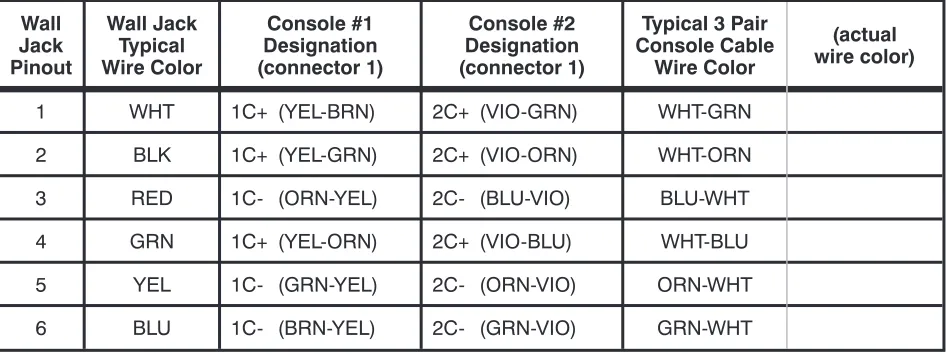
Wall Jack Pinout
Wall Jack Typical Wire Color
Console #1 Designation (connector 1)
Console #2 Designation (connector 1)
Typical 3 Pair Console Cable
Wire Color
(actual wire color)
1 WHT 1C+ (YEL-BRN) 2C+ (VIO-GRN) WHT-GRN
2 BLK 1C+ (YEL-GRN) 2C+ (VIO-ORN) WHT-ORN
3 RED 1C- (ORN-YEL) 2C- (BLU-VIO) BLU-WHT
4 GRN 1C+ (YEL-ORN) 2C+ (VIO-BLU) WHT-BLU
5 YEL 1C- (GRN-YEL) 2C- (ORN-VIO) ORN-WHT
6 BLU 1C- (BRN-YEL) 2C- (GRN-VIO) GRN-WHT
Table 4 – Console “Power” Jack Pinout
The total console cable length, including line cord and equipment room cross connects, must not exceed 500 feet.
1. Install two 6 position, 6 contact modular telephone jacks within 6 feet of the console. 2. Label the jacks "524 voice/data" and "524 power".
3. Connect a 3 pair cable to each jack and run them to the equipment room.
IMPORTANT– Whenever nonkey adapters are used in conjunction with existing multipair cable, verify that the adapters conform to Tables 3 and 4 above.
4. Only if the colors of your cables differ from the typical colors:fill out Tables 3 and 4 with the actual wire colors of the cables for each connection.
5. Punch down the "voice/data" cable on the right side of CPU block #1, to the pins listed in the Console #1 Designation column in Table 3.
6. Punch down the "power" cable on the left side of CPU block #2, to the pins listed in the Console #1 Designation column in Table 4.
Console Installation
Preliminary Testing
At this time, you should have completed the following: · Mounted the CPU and blocks
· Installed the cables from the CPU to the blocks · Connected Tip and Ring from each line to the block
· Connected Tip and Ring from each monitored station to the block · Installed the console cables and jacks
· Assembled and connected the console(s)
It is a good idea to briefly test the operation of the 524 before proceeding with installation or programming. 1. Plug the CPU into a power outlet.
A. The "heartbeat" indicator at the bottom of the CPU main circuit board should flash.
If no "heartbeat" is present, check that the power outlet is "live". A blown fuse on the circuit
Figure 7
1. Install the handset cradle on the console using the screws provided. The cradle may be installed on either side of the console. 2. Plug the handset's cable into the jack
beneath the front left edge of the console. 3. Plug one end of each supplied 6 conductor
modular line cord into the "voice/data" and "power" jacks at the back of the console. If either line cord must be replaced, be sure to use one with 6 conductors. Many line cords with 6 position plugs have only 4 conductors.
4. Plug the cables into their associated wall jacks, or into the test jacks located on the CPU main circuit board (refer to Figure 5). CAUTION– Do not interchange these two
cables! The cable nearest the handset jack must connect to the "voice/data" wall jack or CPU jack.
5. Fill out the keycap labels with line numbers, station names or numbers, and autodial numbers (refer to the configuration sheets). Place the labels beneath the clear plastic key caps, then snap the keycaps onto the DSS and line keys.
B.The console should emit two triple beeps, then briefly display "524 OK".
If these indications are not observed, check both voice/data and power cabling. 2. Repeat step 1 at attendant position #2, if the system is so equipped.
C.O. Line Testing
Perform the following tests on each telco/PABX line. Repeat at attendant position #2, if the system is so equipped.
Line Access and Imbalance Testing
1. Press the key representing the line to be tested.
The associated line lamp (telephone symbol) should flicker while the line is accessed. NOTE– Open circuit voltage must be approximately 48 volts.
2. Listen for audible hum or excessive noise. PASS – Such noise or hum is not present. FAILURE – Such noise or hum is present. 3. Listen for dial tone.
PASS – Dial tone is heard. FAILURE – Dial tone is not heard. 4. Break dial tone by dialing a digit.
PASS - Dial tone is broken and no audible hum or excessive noise is heard. FAILURE - Dial tone cannot be broken; audible hum or excessive noise is heard. 5. Press the RELEASE key.
IMPORTANT– Upon the detection of any failure during the foregoing testing, disconnect the affected equipment from the telephone line to determine if such equipment is the cause of failure. Any equipment determined to be malfunctioning must remain disconnected, and use discontinued until the malfunction has been corrected.
Hold and Autohold Testing
1. Access the line to be tested and establish call to another station. 2. Place the call on hold by depressing the red HOLD key.
The associated H indicator will wink slowly. 3. Reseize the call by depressing the line key.
The associated H indicator goes out.
The line lamp flickers while the line is accessed.
4. Place the call on autohold by depressing another idle line key. The line accessed draws dial tone.
The line under test goes to autohold.
Ring Trip and Imbalance Testing
1. Dial the number of the line to be tested from another station. The associated line lamp will flash slowly.
or
The associated line lamp will flash quickly, if the line has been optioned for ring delay. 2. Press the line key to answer the call.
The line lamp changes from flashing to flickering. 3. Listen for audible hum or excessive noise.
PASS – Such noise or hum is not present. FAILURE – Such noise or hum is present.
IMPORTANT– Upon detection of audible hum or excessive noise, disconnect the affected equipment, to determine if such equipment is the cause of failure. Any equipment determined to be malfunctioning must remain disconnected, and use discontinued until the malfunction has been corrected.
4. Press the RELEASE key.
CPU Option Switches
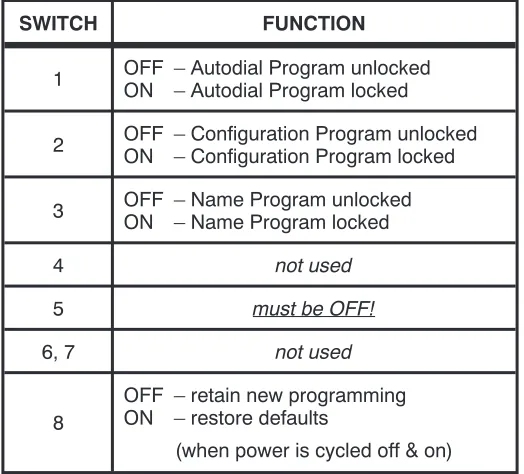
Switches on the CPU control system programming options. The switches are ON when set towards the right side of the CPU. When a programming option is "locked", programming changes are not allowed. The switch location is shown in the figure below and on page 16.
SWITCH FUNCTION
1 OFF – Autodial Program unlockedON – Autodial Program locked
2 OFF – Configuration Program unlockedON – Configuration Program locked
3 OFF – Name Program unlockedON – Name Program locked
4 not used
5 must be OFF!
6, 7 not used
8
OFF – retain new programming ON – restore defaults
(when power is cycled off & on)
Table 5 – CPU Option Switches
Optional Equipment Installation
The following options require system programming for proper operation. Refer to the Configuration Programming section.
Music On Hold
An external music source is required for Music On Hold. It will be assigned to the lines during configuration programming. The music input may be connected to any type of compatible music source (refer to the Specifications section).
The music source can be connected to the jack provided on the CPU, or punched down to the block.
Jack Connections
1. Connect an RCA-type phono plug to one end of a single conductor shielded cable, or obtain a cable with a plug attached. The center conductor connects to the pin of the plug.
2. Plug the cable into the music input jack at the top of the CPU.
3. Connect the other end of the cable to the output of the music source. A plug to fit the music source may be required.
Block Connections
Paging
Tone Commander's PA-24 Paging/Chime module interfaces the 524 console to a paging system. The module includes a night ringing chime, and switching for background music control. Power is derived from the 524 CPU.
Paging can be connected to any spare line key on the 524. Refer to the PA-24 Paging/Chime Module Installation Instructions, doc. #13-102595.
1. Connect a twisted wire pair toMH+and MH-on the right side of CPU block #1.
2. Connect the other end of the wire pair to the output of the music source. A plug to fit the music source may be required.
Configuration Programming
Various network interface and operation parameters are programmable by the installer, allowing compatibility with a wide variety of central offices and PABXs. The system is pre-programmed at the factory; many installations will require few changes to these values. Programming is retained in the CPU's memory when power is disconnected.
Systems with two attendant positions require programming at both consoles for recall rings and line privacy. The programming procedures for ring delays, the time of day clock, autodial numbers, and station names are described in their respective sections.
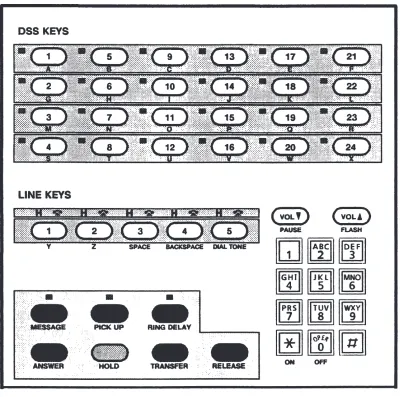
The following features may be set from configuration programming mode by pressing the appropriate DSS key. The letters are printed on the console front panel beneath the DSS keys. Key numbers in parentheses represent the station ports assigned to the keys.
System Programmable Features
DSS Key Feature
A (1) Abandoned Ring Time B (5) Recall Rings
C (9) Pickup Code Sequence D (13) Dialing Speed
E (17) Pause Time F (21) Hookflash Time G (2) Dial Tone Detect Time H (6) Hold Recall Time I (10) Hold Release Time * K (18) Queue Priority
L (22) Alert Type * M (3) Ringing Type
R (23) Assign Page Key
Line Programmable Features
* O (11) Line Privacy * P (15) Answer Use
Q (19) Assign Music On Hold to lines
Using Configuration Programming Mode
The configuration programming mode must be entered prior to attempting any of the following
programming procedures.Enter this mode only when the console is idle, i.e., no calls are in progress or on hold and the time of day is displayed.
The Configuration Program Lock Switch (switch #2) inside the CPU must beOFF(unlocked) before proceeding (see page 23).
To enter configuration programming mode: · Press HOLD.
· Press TRANSFER. · Press RELEASE. · Press dial pad key C (2).
The display will indicate that configuration programming mode has been entered.
To exit configuration programming mode and store all programming: · Press RELEASE.
or
The mode will be exited automatically 1 minute after the last keypress.
When completed, set the Configuration Program Lock Switch inside the CPU toON(locked) to prevent inadvertent changes to the programmed settings.
DSS keys on the console are used to select the feature to be programmed – letters identifying the keys are
printed beneath the keys on the console's front panel.
Default Settings
The default settings, as shipped from the factory, are listed with each feature on the following pages. Default settings may be recalled by setting CPU option switch #8 toON, then cycling the CPU power off and on (pull out the power plug for a few seconds). Set this switch back to OFF to prevent losing your programming during a power outage.
The switch location is shown on page 23.
Confirmation and Error Tones
The speaker in the console signals correct or incorrect actions during programming. The console's volume control adjusts the level of the tones – use the VOL keys above the dial pad.
Programming System-Wide Features
Timing Parameters
· Press HOLD, then TRANSFER, then RELEASE, then C (2) on the dial pad to enter configuration programming mode.
"CONFIGURE PROG" will be displayed.
· Press a DSS key to select the feature to be programmed. The display will show the item name and the current value. The station status lamp will light steadily.
· Press a key on the dial pad if you want to change the value. The new value will be shown in the display.
· Press a DSS key to select another feature. or
Press RELEASE to exit configuration programming mode (the mode will be exited automatically 1 minute after the last keypress).
NOTE– Systems with two consoles (two attendant positions) have separate Queue Priority and Ringing Type settings for each console. They must be programmed individually at each console position.
For example, to set Hold Recall Time to 50 seconds:
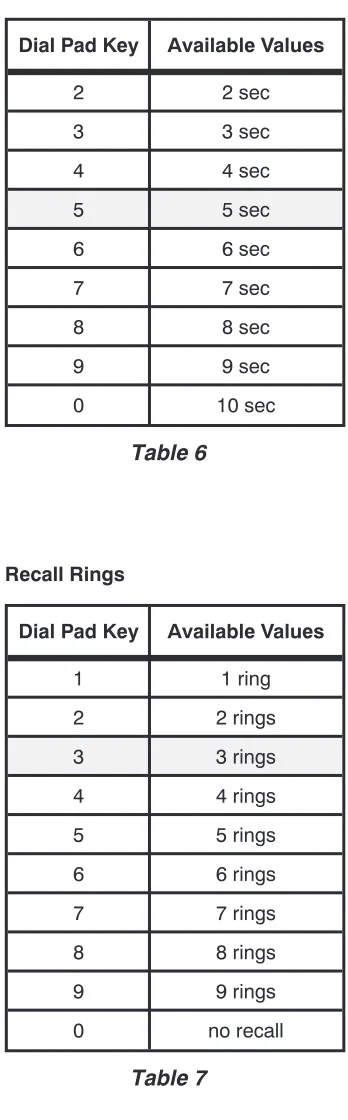
Timing values listed in the following tables are nominal, and may differ slightly from the actual values. Shaded values are factory defaults.
Abandoned Ring Time
Dial Pad Key Available Values
2 2 sec
3 3 sec
4 4 sec
5 5 sec
6 6 sec
7 7 sec
8 8 sec
9 9 sec
0 10 sec
Table 6
Recall Rings
Dial Pad Key Available Values
1 1 ring
2 2 rings
3 3 rings
4 4 rings
5 5 rings
6 6 rings
7 7 rings
8 8 rings
9 9 rings
0 no recall
Table 7
DSS key to select feature: A Default value: 5 sec
This parameter determines the timing for discontinuing ringing of unanswered incoming calls that were abandoned by the caller. It should be set to the next time value longer than the silent interval between ringing bursts.
if too short– each ring burst may be seen as a new call. This can cause erratic line lamp rates and loss of ringing delays. if too long– abandoned calls will continue to ring for the duration of this timing value.
DSS key to select feature: B Default value: 3 rings
This sets the number of rings before a call transferred to an idle station recalls the console.
Pickup Code Sequence
Dial Pad Key Available Values
0 (before station #)first
1 (after station #)last
Table 8
Dialing Speed
Dial Pad Key Available Values
6 (6 digits/sec)slow
0 (10 digits/sec)fast
Table 9
Pause Time
Dial Pad Key Available Values
2 200 ms
3 300 ms
4 400 ms
5 500 ms
6 600 ms
7 700 ms
8 800 ms
9 900 ms
DSS key to select feature: C Default value: first
This parameter determines when the console inserts the Directed Call Pickup code during a station call pickup dialing sequence, as required by the telephone system.
Almost all installations require the pickup code to befirst.
DSS key to select feature: D Default value: fast
The tone autodialing speed (via DSS key) is set with this parameter.
Use the dialing speed compatible with the central office or PABX. If misdialing occurs with the fast speed, switch to slow speed.
Manual dialing speed is also affected. Whenfastspeed is selected, manually dialed digits follow dial pad keystrokes. With slowspeed selected, digits are buffered and sent with a tone on period of 80 ms, and 80 ms between digits. This guarantees minimum tone periods for slow central offices.
DSS key to select feature: E Default value: 700 ms
Hookflash Time
Dial Pad Key Available Values
5 500 ms
6 600 ms
7 700 ms
8 800 ms
9 900 ms
0 1 sec
Table 11
Dial Tone Detect Time
Dial Pad Key Available Values
1 500 ms
2 600 ms
3 700 ms
4 1 sec
5 1.2 sec
6 1.5 sec
7 1.8 sec
8 2 sec
Table 12
DSS key to select feature: F Default value: 600 ms
This parameter sets the length of a timed hookflash generated during call transfer and autodial operations. The default value is adequate for most systems.
if too short– receipt of second dial tone may be intermittent during call transfer operations.
if too long– the calling party may be disconnected during call transfer operations.
DSS key to select feature: G Default value: 700 ms
This sets the time steady dial tone must be present before station digits are autodialed.
Hold Recall Time
Dial Pad Key Available Values
3 30 sec
4 40 sec
5 50 sec
6 60 sec
9 90 sec
1 2 min
2 3 min
0 no recall
Table 13
Hold Release Time
Dial Pad Key Available Values
1 40 ms
2 80 ms
3 200 ms
4 400 ms
5 600 ms
6 800 ms
7 1 sec
8 2 sec
Table 14
DSS key to select feature: H Default value: 90 sec
Calls on console hold longer than the Hold Recall Time will recall the console.
Set this parameter according to customer preference. NOTE– Calls on hold at the telephone system (initiated by a
hookflash) will not recall the console.
DSS key to select feature: I Default value: 600 ms
A central office disconnect supervision signal (i.e., brief battery removal) on any line must exceed this value. When such a signal from a line on hold is detected, the line will be automatically released.
Set this parameter to a value slightly less than the length of a disconnect signal from the central office.
if too short– may cause calls on hold to be inadvertently disconnected.
Queue Priority
Dial Pad Key Available Values
1 stations only 2 stations, then lines 3 lines, then stations
4 FIFO
Table 15
Alert Type
Dial Pad Key Available Values
1 normal ringing 2 distinctive ringing
0 both
Table 16
Ringing Type
Dial Pad Key Available Values
1 long
0 short
Table 17
DSS key to select feature: K (per console) Default value: FIFO
Calls are queued for attendant processing in the order received. The first call in queue is shown in the display.
Queue Priority determines which type of calls have priority in the queue:
(1) stations only
(2) lines+stations, stations have priority (3) lines+stations, lines have priority (4) lines+stations, first calls have priority
(FIFO, First In - First Out)
Set this parameter according to customer preference.FIFOis recommended for most installations.
NOTE– The call queue is cleared whenever Queue Priority is changed.
DSS key to select feature: L Default value: both
To ignore station-to-station calls, equip the station lines with distinctive ringing from the C.O. Set the Alert Type todistinctive if distinctive ringing is provided for outside calls, or tonormalif distinctive ringing is provided for station-to-station calls.
DSS key to select feature: M (per console) Default value: short
This parameter determines the type of audible ringing: short (1 beep), or long (3 beeps), when unanswered station calls are showing in the display.
Special Feature Key Assignment
Spare line keys may be programmed to activate special features. Such usage precludes the connection of lines to these positions. Be sure to identify the keys with the supplied key cap labels.
· Press HOLD, then TRANSFER, then RELEASE, then C (2) on the dial pad to enter configuration programming mode.
"CONFIGURE PROG" will be displayed.
· Press the DSS key to select the feature to be programmed:
R – Page key
· Press dial pad key
*
to display the key that is set to activate the desired feature.The line lamp (phone symbol) above a line key will be on if the key has the feature assigned to it. · Press the line key that will be assigned the feature.
The line lamp above the selected key will light steadily. Any feature assignment for the key will be overwritten.
The previously assigned key will be cleared (reassigned as a standard line key); its line lamp will turn off.
or
Press the currently assigned key to clear its programming and reassign it as a standard line key, if no keys are to be assigned the selected feature.
The line lamp above the selected key will turn off.
NOTE– Perform a line test (at both consoles, if applicable) if a key has been reassigned as a standard line key – refer to the Preliminary Testing section in this document.
· Press dial pad key 0 to store the new setting and return to feature selection. · Press a DSS key to select another feature.
or
Programming Features Selectable Per Line
The following programmable features do not apply to line keys that have been programmed for Page. · Press HOLD, then TRANSFER, then RELEASE, then C (2) on the dial pad to enter configuration
programming mode.
"CONFIGURE PROG" will be displayed.
· Press a DSS key to select the feature to be programmed. The display will show the item name.
The station status lamp will light steadily.
· Press the line key to be programmed with the selected feature.
The display will show the line number and the current value (OFF or ON). The line lamp (phone symbol) will light steadily.
· Press ON (
*
) or OFF (0) on the dial pad if you want to change the value.The new value will be shown in the display.
· Press another line key to be programmed with the selected feature. or
Press RELEASE to exit configuration programming mode (the mode will be exited automatically 1 minute after last keypress).
NOTE– Systems with two consoles (two attendant positions) have separate Line Privacy and Answer Use settings for each console. They must be programmed individually at each console position.
Line Privacy
DSS key to select feature: O (per console) Default Value for each line: off
A line with the privacy option on cannot be accessed by the console when its line lamp indicates a "busy" condition.
Answer Use
DSS key to select feature: P (per console) Default Value for each line: off
Idle lines in this group will automatically be seized in descending order whenever the ANSWER key is used to pick up station calls.
CAUTION– Lines assigned to this group must be optioned for Directed Call Pickup, NonBarge-In.
Music On Hold
DSS key to select feature: Q Default Value for each line: on
DSS
/
Autodial Number Programming
Each DSS key may be programmed to autodial up to 24 digits or functions, including 0-9,
*
, #, dial tonedetect, a hookflash (transfer signal), and a pause. The PICK UP key autodials the call pickup code; it must be also programmed with the required digits.
Digits are entered with the dial pad. The VOL keys and DSS key #5 are used to enter the pause, flash, and dial tone detect functions – these functions are printed below the keys on the console front panel.
DIAL TONE delays dialing until steady dial tone is present.If the telephone system does not send dial tone after receiving a flash, use two PAUSEs in place of DIAL TONE detect.
FLASH is used to transfer calls or access special features of the telephone system. PAUSE is used if a delay is required during dialing, for example to access a voice mailbox.
Pause, flash, and dial tone detect times can be changed from the 524 configuration programming mode. IMPORTANT– The first entry of a dialing routine for any key to be used for DSS operation must be a
FLASH (F). This entry will determine whether associated features with DSS operation will apply (Station Recall or Ring Delays).
Example:FD4710
Dialing routines, where the first entry is not a FLASH, will operate as Autodialing keys. Example:D9D5551982
Programming Procedure
Set the Autodial Program Lock Switch (switch #1) inside the CPU toOFF(unlocked) before proceeding – see page 23.
· Press HOLD, then TRANSFER, then RELEASE, then P (7) on the dial pad to enter autodial programming mode.
"PROGRAM AUTODIAL" will be displayed. · Press the DSS key to be programmed.
The station status lamp will light.
The display will show the number currently programmed, or "NOT PROGRAMMED".
· If you do not wish to change the currently programmed number, press HOLD, then select another DSS key.
· Using the dial pad and the PAUSE, FLASH, and DIAL TONE keys, enter the sequence to be dialed. The display will show the number being entered.
· Press HOLD to store the number, then select another DSS key to be programmed. or
Press RELEASE to store the number and exit autodial programming mode (the mode will be exited automatically 1 minute after the last keypress,withoutstoring the number).
When completed, set the Autodial Program Lock Switch inside the CPU toON(locked) to prevent inadvertent changes to autodial programming.
Pick Up Key Programming
The PICK UP key programming procedure is similar to that for DSS keys. Press PICK UP instead of selecting a DSS key, then proceed as illustrated below. Consult the telco for the required pickup code. IMPORTANT– A DIAL TONE detect must be entered before the Directed Call Pickup code to ensure that
steady dial tone is received before dialing begins. This may not apply to the few telephone systems which require the Directed Call Pickup code to be dialedafterthe station number. DO NOT precede the pickup code with a FLASH.
For example, to program the PICK UP key with the code
*
7:Figure 13
Name Display Programming
Any DSS/Autodial key to be programmed with a name display must already be programmed for autodialing; autodial programming may be changed without reprogramming the DSS name display. This restriction does not apply to line keys, since they cannot be programmed for autodialing.
Set the Name Program Lock Switch (switch #3) inside the CPU toOFF(unlocked) before proceeding – see page 23.
· Press HOLD, then TRANSFER, then RELEASE, then N (6) on the dial pad to enter name programming mode.
"NAME ASSIGN" will be displayed, followed by a help display. · Press the DSS or line key to be programmed.
The lamp next to the selected key will light steadily.
The name will be displayed if the selected key is currently programmed. Press CLEAR to allow reprogramming, or use BACKSPACE to edit the currently programmed name.
· If you do not wish to change the currently programmed name, press HOLD, then select another DSS or line key.
· Enter the name using the DSS and line keys. Letters are printed on the console front panel beneath the keys. Do not exceed 14 characters, including spaces. BKSPACE will delete the last character entered.
· Press HOLD to store the new name.
· Select another DSS or line key to be programmed. or
Press RELEASE to exit name identification programming mode (the mode will be exited automatically 1 minute after the last keypress).
When completed, set the Name Program Lock Switch inside the CPU toON(locked) to prevent inadvertent changes to name programming.
For example, to program the name "Smith" to be displayed when station #4 is ringing:
Ring Delay Programming
Checking Ring Delays
· Press RING DELAY twice.
The lamp above the key will flash, and "RING DELAY CHECK" will be displayed. · Press the DSS or line keys to be checked.
The display will show the ring delay setting for each DSS or line key pressed.
· To exit ring delay check mode, press RING DELAY again (the mode will be exited automatically 5 seconds after the last keypress).
Setting Ring Delays
Dial Pad Key Available Values
1 1 ring
2 2 rings
3 stations default3 rings
4 4 rings
5 5 rings
6 6 rings
7 7 rings
8 8 rings
9 9 rings
0 no delay (off)lines default
*
no ringing (on)Table 18
NOTE– Systems with two consoles (two attendant positions) have separate Ring Delay settings for each console. They must be programmed individually at each console.
Time of Day Clock
The 12-hour time of day clock may be set at either console in a two-position system. The setting affects both consoles.
· When the console is idle, press HOLD, then TRANSFER, then RELEASE, then T (8) on the dial pad. "SET TIME" and the current time will be displayed.
· Press RELEASE now if you do not wish to change the time setting.
· Enter the time using the dial pad (hour values less than 10 must be preceded by a "0" digit). For example, to set the time to 9:38, enter 0 9 3 8.
The display will show the time entered.
· The time set mode will be exited automatically after the new time setting is entered. · Press RING DELAY once.
The lamp above the key will light steadily, and “RING DELAY PROG” will be displayed.
· Using the dial pad, enter the number of rings to delay before ringing at the console begins (1-9 rings, 0 for no delay, or
*
for no ringing at the console).The display will show the selected ring delay value. NOTE – The ring delay setting does not affect station
ringing, only the delay before the console starts ringing in addition to the station.
· Press the DSS or line keys to be set to the chosen ring delay value.
To set all stations (not lines) to the same value, press # on the dial pad instead of a DSS key.
The display will show the number of each DSS or line key that is pressed (or “ALL DELAY” if # is pressed), and the ring delay value.
System Description
Consoles
The 524consoles house a 20-character fluorescent display, line status indicators, line and call processing keys, a common audible transducer, an electronic voice network, and a microcomputer to control their operation. The factory-provided hearing aid compatible handset utilizes an electret (carbon clone) element. Tone Commander consoles are designed to provide superior operating capabilities in any working
environment.
· The vacuum fluorescent display is adjustable, can be seen from almost any angle, and is immune to overhead lighting glare. This allows displayed information to be viewed from greater distances than with nonfluorescent versions.
· Whenever possible, call processing routines are accomplished with single keystrokes. · Multiple indicators are used to improve status recognition.
Following is a description of the keys, indicators, and connectors on the console:
· Display – 20 character alphanumeric display gives information about calls ringing at the console, and
is used during console programming. A time of day clock is displayed when the console is idle. · Line Keys – when a line key is pressed, the console network is connected to the selected line. If a
second line key is pressed, the first line is automatically put on hold and the second line is accessed (Auto Hold). Spare line keys may be used to access paging systems.
· Hold Lamps (H symbol) – indicate hold and hold recall states of the lines.
· Line Lamps (telephone symbol) – indicate busy and ringing states of the lines.
· DSS Keys – when the console is in normal mode, the 24 DSS keys automatically dial programmable
sequences when pressed. These keys are also used during programming to enter name displays. They are normally used to autodial the station associated with the key.
· Station Status Lamps – indicate busy and ringing states for the stations.
· HOLD Key – when the console is on an active line and the hold key is pressed, a hold bridge is
placed across the selected line and the console network is released from the connection. · TRANSFER Key – when the transfer key is pressed, a hookflash (momentary open loop) is
generated on the selected line. This allows the attendant to transfer calls or access special features of the telephone system.
· RELEASE Key – when the console is on a line and the release key is pressed, the console network
is released from the connection, the line becomes idle, and its lamp will turn off. · ANSWER Key – automatically seizes a call appearing in the alphanumeric display.
· RING DELAY Key – used to enter/exit ring delay check mode or ring delay programming mode.
· PICK UP Key – used to answer a ringing station not appearing in the alphanumeric display.
· VOL Keys – used to adjust the console ringer volume.
· Dial Pad – generates DTMF signaling on a selected line. Dial pad keys are also used to enter
console programming values.
Central Processing Unit (CPU)
The Central Processing Unit is a wall mounted device which contains the power supply,
microprocessor-based control logic, 5 line circuits, 24 station circuits, dial tone detect circuits, two console data link circuits, two DTMF dialer circuits, and a Music On Hold input circuit. System memory is retained during power failure.
External connections to the Central Processing Unit are made by using 50 pin Amphenol connectors. Music on hold may be optionally connected to an RCA-type audio jack on the CPU. Modular console jacks on the main circuit board are provided for testing and programming.
System Features
Dual Console Capability
The CPU can support two console positions. Line and station appearances are identical at each console (square line configuration). Holding status is indicated at both console positions. Special line key options (paging access) appear at both console positions when programmed. Certain operating features such as Queue Priority, Ringing Type, Line Privacy, and Answer Use may be programmed on per console basis.
Skinny Wire Console Connection
Six pair cabling is required between each console and the CPU. Three pair are used for data and voice, and three pair are used for power. Two 6 conductor modular jacks are located at the rear of the console, one for voice/data and one for power.
Installer/User Programmability
Both installer and user can program the system from the front panel of the console. The installer programs system configuration options, line programmable features, and special feature key assignments. The user can program customized features such as ring delays, Direct Station Selection (DSS) dialing, autodialing numbers, line/station name identification, Hold Recall Time, Queue Priority, etc.
Ringing Queue
Calls to be answered by a console are placed in queue. The nature of the queue (i.e. station calls only, stations before lines, lines before station, or first in-first out "FIFO") is selectable on a per console basis.
Distinctive Ringing Detection
Used in conjunction with the Distinctive Ringing capability provided by the serving Centrex C.O. or PABX, unanswered station calls can be displayed alphanumerically or ignored, depending on the type of ringing.
Paging Interface
Music On Hold Interface
Each line can be set to provide audio programming while in a holding state. Access is via block terminals or phono jack. An input gain control is provided to adjust programming to the desired level.
Console Test Jacks
Six pin modular jacks for both voice/data and power are provided for two console positions. These jacks are intended to provide a quick means to verify console-to-CPU operating integrity.
Console Features
Distinctive Audible Signaling
The system recognizes normal or distinctive ringing from the serving central office/PABX and responds with differentiated audible signaling. The console also signals the attendant when held lines are recalling, calls to stations have gone unanswered for a predetermined period of time, confirming programming
entries/storage, or when errors have been made involving operation or programming. Incoming call audible signaling is abbreviated whenever the attendant is active on a line.
Ring Delay
Each line and station appearing on a console can be individually programmed to ring at the console immediately, after a predetermined number of ringing cycles, or never ring at the console. The Ring Delay feature does not affect ringing at the station.
Alphanumeric Display
Calls to be answered are displayed with a three character prefix which indicates the nature of the call (i.e. INC, RCL, HLD, CMP, etc.), followed by the line or station number, then the number of calls in queue. Line or station numbers can be replaced with 14 character names as desired. The display is also used to view programming options and confirm all entries.
Single-key Answering
Calls to lines or stations that are to be answered by the attendant are alphanumerically displayed according to the selected ringing queue. Depressing the Answer key seizes the call displayed.
Dial Pad DTMF Dialing
The 524 console is equipped with a standard 12 button dial pad. The various tones will persist as long as the desired key is pressed iffastdialing speed (10 digits/sec.) has been selected during configuration programming. Ifslowspeed (6 digits/sec.) has been selected, digits are buffered and sent with a tone on period of 80 ms, and 80ms between digits to guarantee minimum tone periods for slow central offices.
Time of Day
The alphanumeric display shows the time of day whenever the console is idle.
Variable Ringer Volume
Handset Jack Connection
A four pin modular jack is located on the left side of the console.
Handset
A K-type, hearing aid compatible handset with electret transmitter is provided with the console.
Direct Line Access
Each line is accessible via a dedicated key for answering, holding, transferring and originating calls.
I-Use Indication
A fluttering line status lamp identifies the particular line to which the handset or headset is connected.
Line Privacy
Individual lines may be programmed to exclude third party access to ongoing calls by the attendant.
Line Hold
Each line can be placed in a "Hard Hold" condition at the console. Music on Hold, if optioned and a source provided, is connected to the line. A line on "Hard Hold" can be released from the console when bridged by either a telephone set or another console. A valid loop interruption from the central office will also release the line.
Line Hold Indication
A flashing Line Hold lamp H indicates a line placed on hold by the attendant. A steady H indication identifies a line placed on hold at the companion console.
Automatic Line Hold
Active lines may automatically be placed on "Hard Hold" by either depressing another line key or the Answer key while a call is being displayed.
Hold Recall
A call placed on Hold for longer than a predetermined time period is identified with a unique audible ringing. The H indication for the affected line is also unique.
Line Transfer
Calls originating or answered at the console can be placed in a "Soft Hold" or Consultation Hold condition at the serving Centrex Central Office/PABX by "hookflashing" (pressing the transfer key), then dialing the desired station number.
Page Key (optional)
Any line key can be programmed to be a Page key. When this is done, the selected key position is automatically assigned line privacy, answer use exclusion, and automatic line hold exclusion.
Autodialing
Any spare DSS key can be used for autodialing while on an active line.
Busy Lamp Field (BLF)
Each station connected to the "console system" has a dedicated lamp that indicates its status (i.e. idle, off-hook, or ringing).
Direct Station Selection (DSS)
DSS keys provide quick and efficient transfer of all calls. Each key position must be programmed with the appropriate dialing instructions - typically a Flash, Dial Tone Detect, then the station digits.The DSS feature is available only for stations that are monitored by the 524.
Station Recalls
Calls transferred by a DSS key to idle stations which go unanswered for a predetermined period, re-ring and are displayed at the console.
Station Call Pickup
Unanswered calls that are indicated in the busy lamp field but not in the alphanumeric display can be answered at any time by depressing the Pickup key, then the desired DSS key.
Telco/PABX Requirements
Certain signaling protocols and features of the telco/PABX host are required for proper operation.
Required System Configuration
The C.O. and station lines must originate from either the same Centrex Common Block or the same PABX tenant partition.
Required Signaling Protocols
1. -42.5 to -56.5 VDC C.O. battery
2. 40 to 130 Vrms @ 20 or 30 Hz Ring Generator 3. Loop start
4. Disconnect Supervision for Abandoned Calls
The central office opens Tip and Ring (removes the source of DC voltage) for a brief interval whenever the calling party disconnects prior to the called party. This protocol is required to support automatic hold release.
Required Attendant Line Features
1. Touch Tone Dialing – all manual or auto dialing from the 524 console is DTMF.
attendant position. This feature is often referred to as Call Transfer-Attendant and is not compatible with Tone Commander console operation.
3. Directed Call Pickup, NonBarge-In – to retrieve unanswered station calls showing in the alphanumeric display.
Optional Line Features
Dedicated nonhunting attendant lines – used to retrieve unanswered station calls. It is recommended
that (1) nonhunting line per console be provided for this purpose. This will allow dedicated access, unaffected by inbound traffic, and prevent call collisions (glare). Refer to the Answer Use line feature described on page 36.
Required Station Feature
Call Pickup – all station lines monitored by the 524 must be assigned to a Call Pickup Group.
IMPORTANT– Call Forward - No Answer is not recommended because it conflicts with, and may defeat, the operation of the 524 Ring Delay and Name Display features.
Optional Station/Line Features
Additional features may be optioned as required.
IMPORTANT– Whenever the Call Waiting feature is invoked on a busy station, such a call will not recall to the console. Ring Delay and Recall Ring parameters do not apply because the station in question is in a busy rather than a ringing state.
Compatibility With Other Products
Music On Hold
The Music On Hold input on the 524 CPU is compatible with telco feed, low impedance, balanced
subscriber background music services such as Muzak. Always terminate such a line with a resistor equal to the characteristic impedance of the line, usually 600 ohms. AM/FM tuner and tape player outputs are typically unbalanced high impedance music sources which require shielded cable. Characteristic impedances vary from 600 to 50K ohms.
Paging Access
The 524 is compatible with any paging system that provides a Tip/Ring talk battery feed circuit. Such circuits can be cross connected to any spare line position on the console.
Tone Commander's PA-24 Paging/Chime Module interfaces any paging amplifier to the 524, and derives power from the 524 CPU.
Voice Mail
524 Specifications
All values listed in this section are nominal, and may differ from the actual values.
Central Office Interface
Line Capacity . . . 5 lines Local Telco Ground and
CPU Ground Differential . . . . ±3 V max. C.O. Battery Range . . . -42.5 V to -56.5 V
C.O. Ringing Range . . . 40 to 130 V rms @ 20 or 30 Hz, superimposed on C.O. battery Off-hook/On-hook
Detection Point . . . 26 V across Tip and Ring Loop Resistance to C.O.,
Including C.O. Battery Feed . . 400 to 2000 ohms
FCC
Registration Number . . . AHIUSA-60815-CF-T Ringer Equivalence . . . 0.0A
Console Interface (CPU to Console)
Consoles . . . one or two
Max. Distance to Console. . . . 500 feet, using 24 AWG wire
Station Interface
Station Capacity . . . 24 stations
Max. Distance to Stations. . . . 2000 feet, using 24 AWG wire
Dialer
Dialing Type. . . DTMF Tone only Autodialing Speed . . . 6 or 10 digits/sec
Manual Dialing Speed . . . follows dial pad keystrokes when autodialing speed is set to 10 digits/sec; digits are buffered and sent with a tone on period of 80 ms, and 80 ms between digits when autodialing speed is set to 6 digits/sec