Volume 2, No. 6, Nov-Dec 2011
International Journal of Advanced Research in Computer Science
RESEARCH PAPER
Available Online at www.ijarcs.info
A Model for Making NTFS Permissions Setting More Usable
Mina Izadi Firouz-Abadi*
Sheikh-Bahaei University Computer and IT Faculty, Esfahan, Iran.
Nasser Ghassem-Aghaei
Sheikh-Bahaei University Computer and IT Faculty, Esfahan, Iran.
Abstract:Previous Studies have shown that computer users are always struggling with access control settings. On one hand, home users are generally inexperienced and are not patient enough with complicated interfaces and even with training in this area. On the other hand, NTFS permission setting of Windows XP is error prone and very hard.
Typically usability means ease of use. This paper, for the purpose of making NTFS permission setting more usable for users, has proposed a rule-based expert system which uses fuzzy concepts and certainty factors. The system, called FACSA gets information about file/folder and username/group name which user wants to set permissions for. Then assert them to its knowledgebase and shows the result to the user followed by a percentage of certainty. The highest percentage will be advised to the user. If the user agrees with it, this access right will be set automatically. In this way, the probability of the users' faults is decreased and decision making for specifying access rights becomes easier for users.
Two systems were evaluated in a user study: file permission setting of Windows and FACSA. The latter was found to be more usable; the mean of usability measured for FACSA is 2.2 more than that of Windows, and also the mean of time users spent on completion of tasks in FACSA is 2.25 minutes less than that of Windows. Moreover, whereas only 66.7 percent of users were able to complete their task with Windows, 100 percent of them completed it successfully using FACSA.
Keywords:security; usability; NTFS permissions; rule-based expert system; access control; fuzzy concepts; certainty factor.
I. INTRODUCTION
Usability is a measure that shows how easy using a product for doing specified tasks is [3]. Security and usability are inversely related [4]. Because whenever the security characteristics of a system increase, working with it becomes more difficult and vice versa.
Usable security is the new branch of research with lots of unsolved problems [5]. As we know security is divided in to three branches: Confidentiality, Integrity and Availability. This paper is focused on the confidentiality branch of security and the technical (logical) controls of it. Access controls are a kind of logical controls.
There are lots of works for the purpose of making access control setting more usable, for example, DocuShare [6] and WebDAV standard [7]. Some other works have been done on Unix access control system properties [6, 8]. But as 88 percent of computer users in this research selected Windows as their favorite operating system, this paper is focused on the NTFS permissions of Windows. Another reason for choosing Windows is that working with it is hard for users specially for novices. One of the problems of it is that not all the NTFS permissions are visible in the main Windows file permission window. For example we can see Delete permission two screens away. When such permissions are not visible in the main window, some users may never be aware that such permissions exist ever. Another problem is that the window for showing the effective permissions is again two screens away and a novice user which is not expert can hardly find it [1].
In section 2 we present a concise overview of related work on security and usability, and provide a brief primer on personal variables. In section 3 we explain our proposed model and discuss the implementation and evaluation of that model in
section 4. Section 5 discusses the results and section 6 includes conclusions and future work.
II. RELATEDWORK
In this section, we discuss related work focused on usability and security and a brief explaining of personal variables.
A. Usability and Security:
Increasing usability of access control systems is a long procedure of attempts by several contributors which starts with the work of Zurko et al. [6]. Some primary researches proposed that when user sets permissions for someone, he/she should see the effective permissions graphically as result of his/her action. But this solution is not applicable always [6]. As technology can't provide all the solutions for the problems of security and confidentiality, it is better to focus on human factors. It means that the developers who work on security and confidentiality should know that how users interact with their systems [5]. Knowing that users use which properties and how they are using or not using it, gives us an opportunity to design new features and interfaces which are synchronized with users' needs [6].
In [9] two approaches are indicated for the purpose of making security usable. The first approach was to train the users, but it was not successful because training doesn't mean that users will change their behaviors and habits. So it has focused on the second approach which is designing a usable system and indicated that user-center design is vital for the security of the systems [9].
stated in [7] is conceptual usability of system and the goal is how to set the access rules which user wants to be set. For this purpose, Intentional Access Management (IAM) system is proposed which gets the user's requirements and translates them by an access mediator and shows the appropriate feedback to the user. This paper has developed a prototype of intentional access management for WebDAV and has compared the user study of this system and the traditional access management like access control lists editors. This paper has stated that the big gap between the permission which is in user's mind and the effective permissions that is set in the system cause the faults which lots of users are faced to them [7].
Reference [6] has studied the users' behavior for defining access control groups and permission settings and is concluded that users hardly change the access policies. It means they mostly use the system default settings. But if one day they want to change them, they use very complicated policies. But it has been proposed using simpler access control patterns to decrease this complexity. Because complex access control lists are hard to evaluate and can be more prone to errors. So there should be a tradeoff between control and complexity. When users want to manage access controls, mostly create a lot of different groups, but administrators do not do like this [6].
Reference [1] introduced a system named Salmon, which is developed a new interface for making Windows XP access control system more usable. 12 users participated in evaluation testing of Salmon and 12 users in testing Windows XP access control system. The paper has compared these two groups of participants which worked with both systems [1].
B. Personal Variables:
Humans are the main reason of security faults. Automatic components don't get tired and also are more accurate than humans. Programs can make security decisions e.g. new anti viruses by default and automatically repair or quarantine the viruses they find. But older anti viruses were asking from user what to do with the found viruses again and again. When software can make a better security decision than humans, the role of human in making security decision should be omitted. But in some cases the knowledge of human is required and it is not possible to put all the tasks on the computer and also sometimes a completely automatic system may be expensive, slow or very hard to use [10]. Reference [10] has designed a framework to understand the behavior of people whom we expect to do security tasks. This framework is base on the simple model of communication-processing.
In this framework, there is a part called personal variables that includes demographics and personal characteristics and also knowledge and experience. Personal characteristics include age, gender, culture, education, occupation and disabilities. When a security system is designing, it is important to know which people with which personal characteristics will use it. Also, we should know how much education and experience they have. So for this matter, we should pay attention to education level, occupation and prior experience of them [10].
III. THE PROPOSED MODEL
We call the proposed model FACSA which stands for Fuzzy Access Control Setting Advisor.
For determining access right for a user/group on a file/folder, we should have at least a little knowledge about that user/group. That is why personal variables discussed above, can help us in this matter.
In this paper we used the age factor from the demographic and personal characteristics and for determining knowledge and experience of people, education, occupation and prior experience of them in working with computers are used.
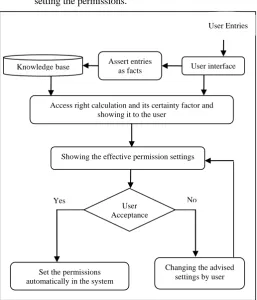
The user enters this information through the graphical user interface of the system. This model is shown in Fig. 1. Other entries to the system are:
a. Name and path of the selected file/folder.
[image:2.612.322.580.253.554.2]b. The importance of that file/folder for the user who is setting the permissions.
Figure 1. The proposed model named FACSA for making access control settings more usable.
As shown in Fig. 1, system asserts the information entered by user to its knowledge base as facts and through its inference engine, fires the rules which are matched with these asserted facts. After that, the system shows the access rights with their certainty factors to the user.
In this model, as user may not be sure enough about his/her answers to the questions of system, he/she can enter the certainty of his/her answers. So uncertainty will play a role in the decision making process and the advising access right will be more accurate. If the user agrees with what the system advised, that permission will be set to his/her system automatically.
User interface
Access right calculation and its certainty factor and showing it to the user
Showing the effective permission settings Knowledge base Assert entries as facts
User Acceptance
Changing the advised settings by user Set the permissions
automatically in the system
No Yes
IV. IMPLEMENTATIONANDEVALUATION
This paper for making NTFS permission settings more usable and easier for users has developed a rule-based expert system on the basis of the model discussed in the prior section. This expert system supports fuzzy concepts and certainty factors and has two parts. The first part is the main core of the system and is made with Fuzzy Clips shell and the second part is the interface between the first part and the user which is programmed with Visual Studio .NET.
The important part of the production of an expert system is knowledge acquisition. For producing the rules of the knowledge base of the system, we used a standard questionnaire with 96 closed questions. The questions were asking from participants to define the access rights for different groups of ages (child, teenager, young, middle-aged and old), different levels of education or English knowledge (a little or enough), prior experience of working with computer (a little or enough), and occupation related to computer science or not. As the age, education level and prior experience are linguistic variables, we have used fuzzy concepts for implementing the FACSA model.
The questionnaire was given to 28 experts in computer science and according to the number of experts who chose a kind of access right for a question; each access right advisement is followed by a certainty factor.
According to the answers of participants 465 rules produced for the FACSA system. Fig. 2 shows a sample of these rules.
Figure 2. A rule in the FACSA knowledge base produced from the answers of 28 experts to the questionnaire explained above.
In the rule above we can see that for an important file/folder, if the user which we want to set permissions for, is young and has enough education or English knowledge but doesn’t have enough experience in working with computer and his/her occupation is not related to computer science, it will be better to have no access to that file/folder with certainty of 0.57.
The system will advise the access right with highest certainty and will show it graphically to the user.
The pseudo code of the process taking place in FACSA is shown in Fig. 3.
In Fig. 3 we can see the inputs and outputs of the system. The system gets the inputs for each selected file/folder and for each username/group name which we want to set permissions for.
As we mentioned earlier, user can enter his/her certainty about his/her answers.
This information will be asserted to the knowledge base of the system and the results will be shown has two parts. One
part is the NTFS permission and another part is the certainty of this setting.
If the certainty of no access will be less than the certainty of read only permission, so the read only permission will be advised to the user.
[image:3.612.43.250.392.484.2]The read only permission includes all the read NTFS permissions in Windows (e.g. List folder/read data, read attributes, read extended attributes and so on).
Figure 3.The pseudo code of FACSA.
For evaluating the system by users, we used the standard IBM questionnaire which is used for evaluating the usability of the computer systems. This questionnaire can be accessed here: http://oldwww.acm.org/perlman/question.cgi?form=CSUQ
We also made a scenario according to the features of FACSA and then asked participants in evaluation test to answer the questionnaire after doing the scenario with both systems Windows and FACSA.
The scenario is stated below:
Assume that you have a folder named Test which its importance is medium for you. A young guest who has enough education in foreign languages has come to your house and has decided to work with your personal computer. As his job is not related to computer sciences, he has little experience in working with computer. In your idea if he has access to your Test folder, can he make problem for you? How much access is it better to assign to this person? Make a username named Test for him and set the permissions for it.
As we know, for evaluating usability of a system 5 persons are enough. Because 5 persons can show 85 percent of the problems our system has. But for comparing two systems 10-12 persons should participate in the evaluation test.
12 persons participated in this study. 6 males and 6 females which just 4 out of them claimed having some experience setting file permissions on Windows. The education level of them was from diploma to doctorate but just 3 out of 12 had education in computer science.
The evaluator had made a folder named Test with some files and folders in it and also had created the username Test in the system.
Evaluator asked the participants to read the scenario and do the task on Windows access control system at first.
Pseudocode of FACSA
input: personal variables, File/Folder name & path, File/Folder importance
output: NTFS permissions
foreach selected File/Folder of the system do get name & path of the File/Folder; get importance of it;
for each selected user or group of the system do get personal variables include:
-demographics and personal characteristics -knowledge and experience;
get the certainty of above information;
assert above information as facts in to knowledgebase; firing the rules that match asserted facts;
showing the results include: -NTFS permissions;
-certainty factor of each permission;
defrule r42 declare (CF 0.57
f-importance high
age young
eng-edu enough
prior-expr no-lil-expr
occupation(computer-related no
=>
Since most of users didn’t know about the existence of the access control setting feature in Windows and didn’t know how to open the related window of it, the evaluator showed them the security tab page of Test folder to them. When the participant started to think and work with system, evaluator started the timer and after that participant claimed that his/her work has finished, evaluator stopped the timer. Evaluator asked from participants to think aloud and noted the things participants were saying. After that the usability questionnaire was given to them to answer the questions about Windows access control system.
Then participants were asked to do the same scenario with FASCA system. The evaluator opened the FACSA system and showed the main form to the users and waited for their operation. After noting the start time and the end time of the work, participants were asked again to fill the evaluation questionnaire and answer the questions according to FACSA system this time.
V. RESULTANDDISCUSSION
[image:4.612.41.283.355.426.2]Table 1 shows the number and percentage of participants who succeeded to complete the scenario accurately on the Windows access control system and FACSA system.
Table 1: successfulness in doing the scenario with Windows and FACSA systems.
Windows access control system
FACSA system Number of successful
users in doing the scenario (from 12)
8 12
Percentage of successful
users in doing the scenario 66.7% 100%
As it is shown in table 1, all the participants succeeded in completing the scenario with FACSA system whereas just 66.7% of them were successful to do the same with Windows access control system.
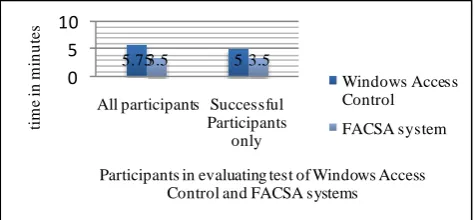
Fig. 4 illustrates the average task completion times for each of the systems. Darker bars show the average time of the work with Windows access control system and lighter ones show that with FACSA system. Two left hand side bars show the mean time of work with both systems for all participants, whether they succeeded or failed in the task while the two right hand side bars shows the average time only for users who succeeded to complete the scenario with both systems.
5.753.5 53.5
0 5 10
All participants Successful Participants
only
tim
e
in
m
in
u
te
s
Participants in evaluating test of Windows Access Control and FACSA systems
Windows Access Control
[image:4.612.40.278.585.695.2]FACSA system
Figure 4. Average time for completing scenario in both systems Windows and FACSA- the left hand side is showing all the participants whether succeeded or
failed and the right hand side is showing only the successful participants.
As it is shown in Fig. 4, average time of doing the scenario for Windows has been 5.75 minutes and 3.5 minutes for FACSA system. Average time of successfully completing the scenario is 5 minutes for Windows and 3.5 minutes for FACSA.
These results are of interest, because they show that the success of FACSA users was not due to having spent more time on task. In fact, those who completed the scenario took less time using the FACSA system.
Evaluating the questionnaire results statistically gives us the results below:
a. System Usability: A paired t-test was done for evaluating the usability measuring of two systems: Windows access control and FACSA. A null hypothesis was posited: the mean of usability of FACSA system is less than or equal to the mean of usability of Windows access control system. The alternative hypothesis is that the mean of usability of FACSA is greater. Regarding to the values (t=6.02, df=11, p=0.000) the null hypothesis can be strongly rejected and due to the mean of usability of two systems we can see that usability of FACSA with average of 5.7 is more than usability of Windows access control with average of 3.5.
b. System Speed: A paired t-test was done for evaluating the speed measuring of two systems: Windows access control and FACSA. A null hypothesis was posited: the mean of time spent for completing task with FACSA is more or equal to the Windows access control system. The alternative hypothesis is that the mean of time spent for completing task with FACSA is less than Windows access control system. Regarding to the values (t=3, df=11, p=0.005) the null hypothesis can be strongly rejected and due to the mean spent times with two systems we can see that the time for completing task with FACSA is 3.5 while it is 5.75 with Windows access control system.
VI. CONCLUSION
It seems that usability and security are mutually exclusive. But this paper has presented a model for advising access rights to user to make access control settings easier for novice and inexperienced users and speed up their tasks. This model is based on rule-based expert system.
FACSA based on file/folder importance and also 4 personal variables (age, education or English knowledge, prior experience in working with computer and occupation) makes decision for access levels to be set. But we know that these factors are not enough. Other factors like personality, culture and etc can be added. In the future we can use these other factors in our system to make more accurate decisions.
VII.ACKNOWLEDGMENT
VIII.REFERENCES
[1] R.A.Maxion and R.W.Reeder, " Improving User-Interface Dependability through Mitigation of Human Error",Department of Computer Science, Carnegie Mellon University, Pittsburg, April 2005.
[2] S.Govindavajhala and A.W. Appel, “Windows Access Control Demystified” , Princeton university , 2006.
[3] Microsoft Corporation , “Usability in Software Design” , Available: http://msdn.microsoft.com/en-us/library/ms997577. aspx , [Accessed Sep. 20, 2010] , 2000.
[4] Wikipeida , Human-Computer Interaction (Security) , Available:
http://en.wikipedia.org/wiki/Human-computer_interaction_(security), [Accessed Nov. 11, 2009].
[5] I.Ion, “Usable Security and Privacy for Spontaneous Interactions and Data Sharing Systems” , 2009.
[6] D.K. Smetters, and Nathan Good, “How Users Use Access Control”, Symposium on Usable Privacy and Security (SOUPS) , 2009.
[7] X.Kao and L.Iverson, “ Intentional Access Management: Making Access Control Usable for End-Users” , Symposium On Usable Privacy and Security (SOUPS) 2006, July 12-14, 2006.
[8] S.Govindavajhala and A.W. Appel, “Windows Access Control Demystified” , Princeton university , 2006.
[9] C.Koranda , “Usable Privacy and Security “ , Feb 2006.
[10] L.F. Cranor,” A framework for Reasoning About the Human in the Loop”,In UPSEC'08: Proceedings of the 1st