© 2014, IJCSMC All Rights Reserved
380
Available Online atwww.ijcsmc.com
International Journal of Computer Science and Mobile Computing
A Monthly Journal of Computer Science and Information Technology
ISSN 2320–088X
IJCSMC, Vol. 3, Issue. 6, June 2014, pg.380 – 387
RESEARCH ARTICLE
Measuring Height of an Object
using Accelerometer and Camera
in iOS and Android Devices
Anmole Dewan
1, Abhijeet Sharma
2, Tanupriya Choudhary
3, Vasudha Vashisht
41,2Undergraduate in Computer Science and Engineering from Lingaya’s University, India
3,4Assistant Professor in School of Computer Science from Lingaya’s University, India
1 [email protected]; 2 [email protected]; 3 [email protected]; 4 [email protected]
Abstract— The height of object can be determined by using inch tapes, angles of elevation and
basic trigonometry. Everything listed can be replaced by using standard smart phones having
accelerometer, GPS receiver, network connectivity and camera. The research deals with calculation
of height of an object by converting data received from the sensors.
Keywords— iOS, Android, accelerometer, height of object, geometry
I. INTRODUCTION
Google's Android and Apple's iOS are operating systems used primarily in mobile technology, such as smart phones and tablets. Android, which is Linux-based and partly open source, is more PC-like than iOS, in that its interface and basic features are generally more customizable from top to bottom. However, iOS' uniform design elements are sometimes seen as being more user-friendly.
TABLEI
DIFFERENCE BETWEEN ANDROID AND IOS DEVICES [1]
Android iOS
Company/Developer Google Apple Inc
OS family Linux OS X, UNIX
© 2014, IJCSMC All Rights Reserved
381
Programmed in C, C++, java C, C++, Objective-C
Source model Open source Closed, with open source
components
Latest stable release (May 2014)
Android 4.4 Kitkat (October, 2013)
7.1 (March 10, 2014)
A. iOS
iOS, previously iPhone OS is a mobile operating system developed by Apple Inc. and distributed exclusively for Apple hardware. powering iPhone, iPad, iPod Touch, and Apple TV. It’s UI is based on the concept of direct manipulation, using multi-touch gestures such as swipe tap, pinch and reverse pinch. It is a closed source software and is only available in select apple devices.[2]
B. Android
Android is an Operating System which is based on Linux kernel. It’s UI is based on direct manipulation using touch inputs like pinching, swiping and tapping. Applications are able to send notifications to the user to inform them about relevant information, such as emails and text messages. Android's source code is available under open source licenses. In terms of security and privacy applications in android run in a sandbox, which is an isolated area of the system that does not have access to the rest of the system's resources. Permissions are explicitly granted by the user when an application is installed. While installing an application, Play Store displays all permissions required by application to work. The sandboxing and permissions system reduces the impact of vulnerabilities and bugs present in applications, but developer confusion and limited documentation has resulted in applications routinely requesting unnecessary permissions, reducing its effectiveness. [3]
C. Accelerometer
The accelerometer measures acceleration i.e. acceleration due to movement and acceleration due to gravity. When the device is stable, the accelerometer returns just accelerometer due to gravity. Accelerometers in different kinds of smart phones return different values. For example in iPhone, it returns g values, 1 g means 1*9.81 m/s2 and in android phones, it returns values with SI units m/s2.
D. iPhone
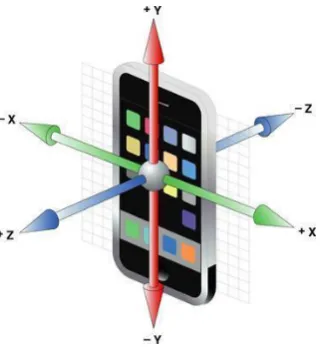
Each acceleration event includes simultaneous acceleration readings along the three axes of the device, as shown in Figure 1. Referenced from [4],[5]
© 2014, IJCSMC All Rights Reserved
382
The device accelerometer reports values for each axis in units of g-force, where a value of 1.0 represents acceleration of about +1 g along a given axis. When a device is laying still with its back on a horizontal surface, each acceleration event has approximately the following values:
E. Android Phones
The axes are as same as iPhone accelerometer axes
Fig. 2 Orientation of the Android device axes
Sensor.TYPE_ACCELEROMETER:[6] All values are in SI units (m/s^2)
The sensor measures resultant acceleration (A) which is acceleration due to gravity and acceleration due to movement. Conceptually, it does so by measuring forces applied to the sensor itself (Fs) using the relation:
A = -g - ∑F / mass
When the device is kept on a table the accelerometer reads a magnitude of g = 9.81 m/s^2. Referenced from [6],[7][8]
F. Camera
Camera is used to pin point the foot and the top of the object, the foot being at the ground level. A small cross is placed at the centre of the screen with respect to the camera such that it is relationally at the centre of the camera. It is done so that the angle of view of camera is 0 degrees. so that the line of sight is perpendicular to Z axis of mobile device.
In photography, angle of view describes the angular range that is imaged by a camera. It is used interchangeably with "field of view".
Fig. 3 A camera's angle of view can be measured horizontally, vertically, or diagonally.[9] x: 0
y: 0
© 2014, IJCSMC All Rights Reserved
383
II. PROPOSED SOLUTION
● The phone is always kept in portrait mode.
● For android phones the accelerometer readings has to be divided by 9.81 for angle calculations.
● Unit of angle used in calculation is degrees
A. Finding height H of device
Height is entered as height of user and then, H is calculated by subtracting 4 to 5 inches as this is the height of device a normal user hold the device.
B. Finding distance between device and the object.
H=Height entered - 4 inches...(1)
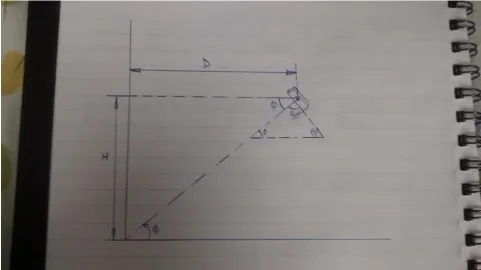
1) Device Alignment: Through the camera, the user aligns the device's angle to the point at which the object touches the ground level.
Note: The ground level is the level at which the user is standing.
The accelerometer gives the values which is converted into angles for further calculations.
2) Calculations:
θ=|sin-1(value of accelerometer w.r.t. Y axis)| ... (2)
φ=90°-θ=|sin-1(value of accelerometer w.r.t. Z axis)| ... (3)
H/D=tan φ
Therefore, D=H cot φ ... (4)
© 2014, IJCSMC All Rights Reserved
384
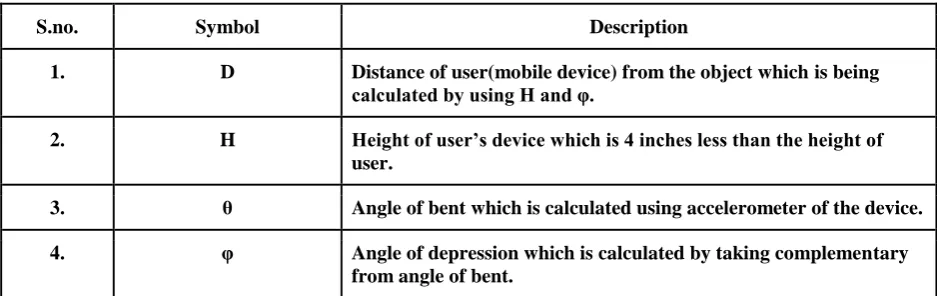
TABLEII DESCRIPTION OF SYMBOLS USED ABOVE S.no. Symbol Description 1. D Distance of user(mobile device) from the object which is being calculated by using H and φ. 2. H Height of user’s device which is 4 inches less than the height of user. 3. θ Angle of bent which is calculated using accelerometer of the device. 4. φ Angle of depression which is calculated by taking complementary from angle of bent. C. Finding height of object ● Aim at the top of the object by looking in from the camera ● There are 2 cases out of which 1 may arise 1) Case : When object's height is less than height at which device is held ● Distance D has been calculated θ1=sin-1|(value of accelerometer w.r.t. Y axis)| ... (5)
φ1=|90°-θ1|=sin-1|(value of accelerometer w.r.t. Z axis)| ... (6)
h1/D=tan φ1 ... (7)
h1=D tan φ1 ... (8)
Therefore h2=H - h1 ... (9)
© 2014, IJCSMC All Rights Reserved
385
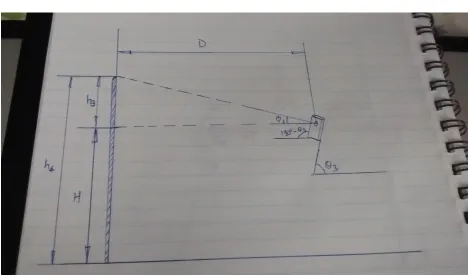
TABLEIII DESCRIPTION OF SYMBOLS USED ABOVE S.no. Symbol Description 1. D Distance of user(mobile device) from the object which has been calculated 2. H Height of user’s device which is 4 inches less than the height of user. 3. θ1 Angle of bent which is calculated using accelerometer of the device. 4. φ1 Angle of depression which is calculated by taking complementary from angle of bent. 5. h1 Height calculated from the top of the object to the height of the mobile device using distance D and angle φ1 6. h2 Height of the object(required) calculated by subtracting h1 from H 2)Case : When object's height is greater than height at which device is held ● Distance D has been calculated θ3=sin-1|(value of accelerometer w.r.t. Y axis)|... (10)
90°+φ3=180°-θ3 φ3=90°-θ3=sin-1|(value of accelerometer w.r.t. Z axis)| ... (11)
h3/D=tan φ3 ... (12)
h3=D tan φ3 ... (13)
Therefore h4=H + h3 ... (14)
Fig. 6 Calculating height of object when it is greater than that of device
© 2014, IJCSMC All Rights Reserved
386
TABLEIVDESCRIPTION OF SYMBOLS USED ABOVE
S.no. Symbol Description
1. D Distance of user(mobile device) from the object which has been
calculated
2. H Height of user’s device which is 4 inches less than the height of
user.
3. θ3 Angle of bent which is calculated using accelerometer of the device.
4. φ3 Angle of elevation which is calculated by taking supplementary
from angle of bent.
5. h3 Height calculated from the height of device to the top of the object
using distance D and angle φ3
6. h4 Height of the object(required) calculated by adding h3 and H
Explanation and reasoning to proposed solution
● The phone is always kept in portrait mode for simplicity in the solution; the axis changes when the phone’s mode is changed from portrait to landscape mode.
● For android phones the accelerometer readings has to be divided by 9.81 for angle calculations as android phones give readings in m/s2 and the needed value should lie from -1 to 1 so as to take the sine inverse for angle calculations.
● Unit of angle used in calculation is degrees just for easier explanations.
.
REFERENCES [1] http://www.diffen.com/difference/Android_vs_iOS [2] http://en.wikipedia.org/wiki/IOS
[3] http://en.wikipedia.org/wiki/Android_(operating_system)
[4] https://developer.apple.com/library/ios/documentation/coremotion/reference/cmmotionmanager_class/Refe rence/Reference.html
[5] https://developer.apple.com/library/ios/documentation/uikit/reference/UIAcceleration_Class/Reference/UI Acceleration.html
[6] http://developer.android.com/guide/topics/sensors/sensors_overview.html
[7] http://developer.android.com/reference/android/hardware/Sensor.html#TYPE_ACCELEROMETER [8] http://developer.android.com/reference/android/hardware/SensorEvent.html
[9] http://en.wikipedia.org/wiki/Angle_of_view
AUTHORS’ PROFILE
Anmole Dewan is currently pursuing his Bachelor’s degree in Computer Science from Lingaya’s University, Haryana, India. He is Technical Lead at Google Developers Group, Lingaya’s University and a Member of Computer Society of India. He is an iOS Developer with live application on the AppStore. His areas of interests include Mobile Application Development, Cloud Computing, Operating System, Arduino, Augmented Reality.
© 2014, IJCSMC All Rights Reserved
387
Tanupriya Choudhury received his bachelor’s degree in CSE from West Bengal University of Technology, Kolkata, India, master’s Degree in CSE from Dr. M.G.R University, Chennai, India and currently pursuing his Doctoral Degree. He has two year experience in teaching. Currently he is working as Asst. Professor in dept. of CSE at Lingaya’s University, Faridabad, India. His areas of interests include Cloud Computing, Network Security, Data mining and Warehousing, Image processing etc.
![Fig. 3 A camera's angle of view can be measured horizontally, vertically, or diagonally.[9]](https://thumb-us.123doks.com/thumbv2/123dok_us/1982111.1261944/3.595.224.386.148.350/fig-camera-angle-view-measured-horizontally-vertically-diagonally.webp)