Comparative Study on Mobile Platforms
Raghavendra Rao B G 1, Vasantha S 2
Assistant Professor, Department of Master of Computer Applications, Sir MVIT, Bengaluru, Karnataka, India1 Assistant Professor, Department of Master of Computer Applications, Sir MVIT, Bengaluru, Karnataka, India2
ABSTRACT: Developers can take advantage of native functionality across mobile devices. More than a smaller, web like interface, an Android, BlackBerry, WP7, or iOS device can make phone calls as well as record and transmit contextual information like geolocation.
KEYWORDS:Android, BlackBerry, WP7 and ios
I. INTRODUCTION
Currently Android holds the top spot in mobile device market share. Android development should be at the forefront of your mobile app strategy. This paper discusses what it takes to get started developing apps on the Android platform. From start to finish, it provides all the resources for a developer who has never developed on the Android platform to deploy an app. iPhones and iPads have become the devices that many people compare other mobile devices to. Apple devices helped launch the mobile trend, but many developers are hesitant to start developing for iOS because of the tools that Apple provides. This paper will help alleviate your worries, and provide clear examples of what it takes to develop an iOS app from start to finish and deploy to iTunes.
Windows Phone 7 is considered the new kid on the block when it comes to mobile platforms. Even though the market share is low, it is climbing fast, and is important to include within your mobile app strategy. This paper covers everything you need to create a Windows Phone 7 app from start to finish and deploy to the market. Even though BlackBerry has lost market share in recent years, it’s still important to understand where BlackBerry fits within your mobile strategy.
II. COSTOFDEVELOPMENT
There are many costs associated with mobile application development. Each developer will need hardware and software to develop the applications on. The team will need devices to test the software on. And if you want to deploy your application to any public market, then your company will need accounts on the various markets (these often renew annually).
Hardware
To develop good mobile apps, you’ll need an Intel-based Mac because, simply put, you won’t be able to physically build the iOS implementation of your application without one. The nice thing about the Intel versions of Mac is that you can run Windows on them either virtually (using something like Parallels, or VMWare Fusion) or on the bare metal (using Apple’s BootCamp). Expect to spend between $800 (for a refurbished machine) and $1600 (for a brand-new machine).
➤ BlackBerry (6 or 7): BlackBerry Bold 9900
➤ Android 3.0 Tablet: Samsung Galaxy Tablet
Software
When developing mobile applications there are few overlaps when it comes to software. To develop for iOS you need a Mac, to develop for BlackBerry you need Windows, for Java-based frameworks use Eclipse. Building HTML for PhoneGap can be done in your text editor of choice.
Table 1: Software Needed for Development
Table 1 show to develop Window Phone 7 applications we required windows phone SDK, Visual Studio Express and Expression Blend Software. For IOS applications development required software are xCode 4, IOS SDK. For Android applications required software are Eclipse, Android SDK. For BlackBerry applications required software’s are Eclipse, BlackBerry plug-in, and simulator.
Licenses and Developer Accounts
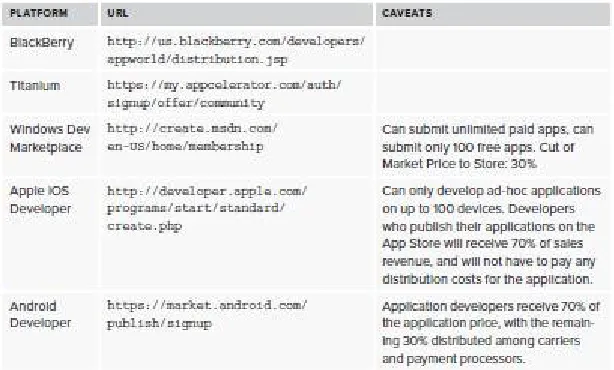
The following table contains information regarding all of the various accounts necessary to develop for each platform and costs associated with such. In most cases you can expect to pay roughly $100 per platform annually for developer accounts
Table 2: Licenses and Developer Accounts
Table 2 shows Licenses and Developer Accounts for
http://create.msdn.com/en-Android Developer in https://market.android.com/publish/signup.
III. INTERFACESANDARCHITECTURE
Get started on Android application design with these hints:
➤ Android convention is to place view-control tabs across the top, and not the bottom, of the screen.
➤ Use the main application icon for temporal, hierarchical navigation, instead of a “back” button and main icon link to the home screen.
➤ Don’t mimic user interface elements or recycle icons from other platforms. For instance, list items should not use carets to indicate deeper content.
➤ Parallax scrolling is common in Android applications.
➤ Android development can extend to home-screen “widget” tools.
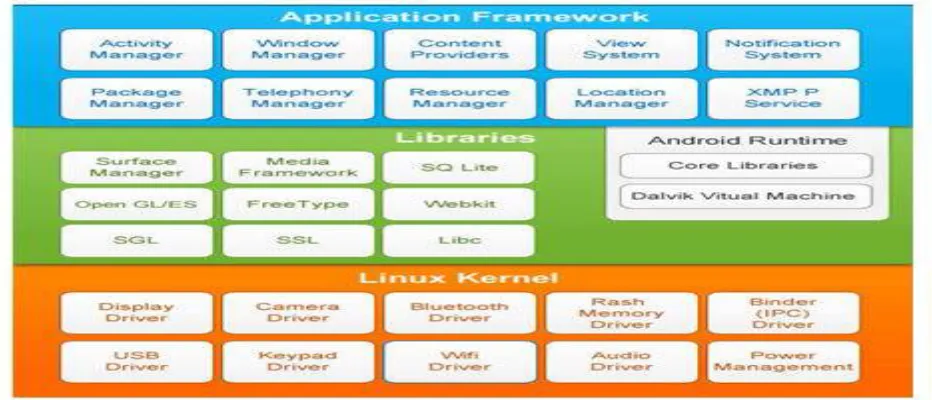
Figure 1: Google’s Android OS Architecture
Figure 1 shows the Android platform contains the following layers:
i. Linux Kernel: Android relies on Linux for core system services such as security, memory management, process management and so on.
ii. Android Runtime: it provides a set of core libraries which supports most of the functionality in the core libraries of Java. The Android Virtual Machine known as Dalvik VM relies on the Linux kernel for some underlying functionality.
iii. Libraries: Android includes a set of C/C++ libraries. These libraries are exposed to developers through the Android application framework. They include media libraries, system C libraries, surface manager, 3D libraries, SQLite and so on.
Apple can reject an application from the official App Store because of design problems. Follow the current guidelines closely, starting with these tips:
Windows Phone 7 interfaces are minimalist, using empty space to lend clarity to the application.
➤ WP7 uses movement over gradients for on-screen elements to immerse users in the application experience.
➤ Users will enter a WP7 application from a “tile,” which can display dynamic and real-time information. Tile images should be in the PNG format, 173 pixels _ 173 pixels at 256 dpi.
➤ Do not use a “back” button to navigate back the page stack. All WP7 devices have a dedicated hardware button that should always be used instead.
➤ Give users a distinctly WP7 experience. Panorama controls slide horizontally through panes, and pivot controls list panes users can visit. Uniform Page Shuffle presents nonhierarchical information users can shuffle through; “leaf-blowing turn” flips content area into focus, scattering and tilting tiles leaving focus.
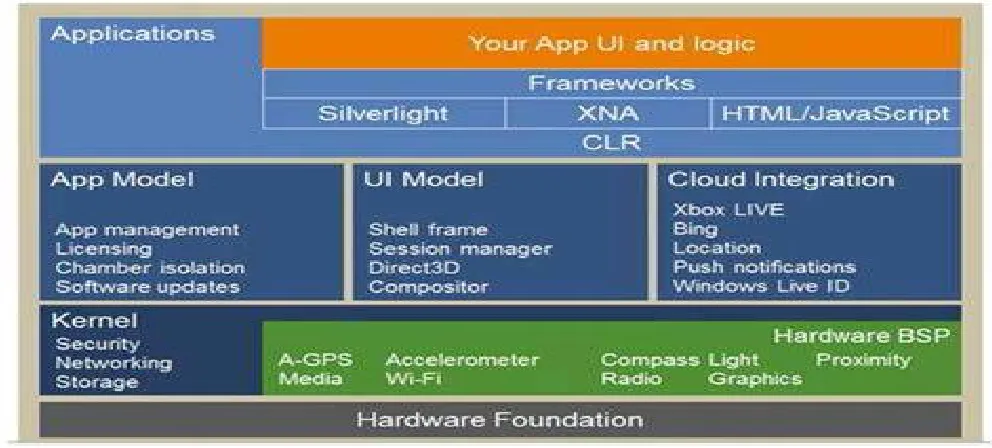
Figure 2: Microsoft’s Windows Phone Architecture
When designing a BlackBerry mobile application, keep these standards in mind:
➤ Use standard interaction behaviors for an intuitive experience.
➤ Link common tasks to the BlackBerry track pad according to standard actions:
➤ Press the track pad:Default option, like revealing the menu
➤ Press and hold track pad:Activate available pop-up box
➤ Press track pad and select Shift:Highlight content
➤ Press track pad and select Alt:Zoom
➤ Move finger along track pad:Cursor or mouse will move accordingly
IV. ACCESSIBILITY
Google provides guidelines and recommendations, such as testing with the often-preinstalled and always-free TalkBack. Accessibility design guidelines are listed on the Android Developer website (http://developer.android.com/guide/topics/ui/accessibility/index.html), and further discussed by the Google “Eyes Free” project (http://eyes-free.googlecode.com/svn/trunk/ documentation/android_access/index.html)
See Apple’s Accessibility Programming Guide
(http://developer.apple.com/library/ios/#documentation/UserExperience/Conceptual/iPhoneAccessibility/Accessibility_ on_iPhone/Accessibility_on_iPhone.html) for detailed guidelines on VoiceControl, Speech Synthesis, and VoiceOver. Accessible touch and gestural controls are available on the iPad and latergeneration iPhones; screen magnifi cation and color contrast adjustments are also available.
BlackBerry mobile devices include text-based push-delivery messages, closed captions on multimedia content, and hearing-aid compatibility for hearing accessibility issues. Low-vision users can use the Clarity theme and other screen adjustments, and benefit from tactile keyboards. Predictive text and AutoText aid users with mobility and cognitive issues. Best practices and device capabilities are maintained online at
http://docs.blackberry.com/en/developers/deliverables/17965/Accessibility_825872_11.jsp.
WP7 devices include many standard accessibility features, such as color and contrast adjustment to themes for low-vision users. Many, but not all, devices are compatible with TTY, TDD, and hearing aids.
Learn more about the basics of WP7 accessibility at
http://www.microsoft.com/windowsphone/en-us/howto/wp7/basics/ease-of-access-on-my-phone.aspx.
The full Accessibility and Ergonomic Guidelines for Windows Phone 6.5 are a good in-depth start, and are available at
http://msdn.microsoft.com/en-us/library/bb158589.aspx.
V. CONCLUSION
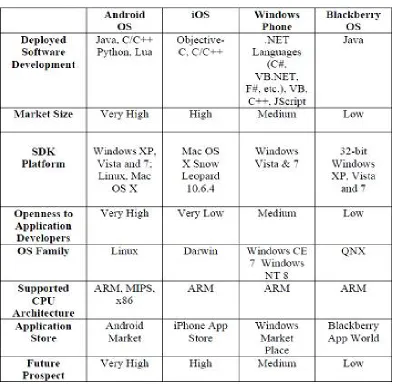
An analysis of the various mobile operating systems reviewed with their corresponding business models and the deployed software development platform is depicted in Table 3 below.
Table 3: Comparison of Major Mobile Operating Systems
REFERENCES
[1] Renner T. (2014): “Mobile OS - Features, Concepts and Challenges for Enterprise
[2] Li X., Wang Y., Wu J., Jiang K. and Liu B., (2012): “Mobile OS Architecture Trends” Intel Technology Journal, volume 16, issue 4, pp 178-198.
[3] Fitzek F. and Reichert F. (2007): “Mobile Phone Programming and its Application to Wireless Networking” available at http://www.springerlink.com/content/978-1-4020-5968-1
[4] Koh, D., (2010): “Q&A: Microsoft on Windows Phone 7” CNET Asia, CBS Interactive.
[5] Lunden, I. (2011): “Symbian Now Officially No Longer under the Wing of Nokia,” Available at www.moconews.net.
[6] Mahapatra, L. (2013): “Android Vs. iOS: What’s the Most Popular Mobile Operating System in Your Country?” available at http://www.ibtimes.com/android-vs-ios-whats-most-popular-mobile-operating-system-your-country-1464892
[7] Okediran O. O., Omidiora E. O., Olabiyisi S. O. and Ganiyu R. A. (2013): “ An M-voting System Framework for Electronic Voting”,
Proceedings of the Second International Conference on Engineering and Technology Research.
[9] Gartner (2010): “Gartner Says Worldwide Mobile Phone Sales Grew 35 Percent in Third Quarter 2010; Smartphone Sales Increased 96 Percent” Gartner, Inc. available at http://www.gartner.com/it/page.jsp?id=1466313
[10] Palm, (2014): “Overview of webOS - Palm webOS Architecture” available at https://developer.palm.com
/content/resources/develop/overview_of_webos/overview_of_ webos_palm_webos_architecture.html
[11] PHONEARENA, (2014): “Android's Google Play beats App Store with over 1 million apps, now officially largest” available at http://www.phonearena.com/news/Androids-Google-Play-beats-App-Store-with-over-1-million-apps-now-officially-largest_id45680 [12] CMER, (2014): “Mobile Operating System” Centre for Mobile Education and Research
[13] HP, (2010): “HP Confirms Discussions with Autonomy Corporation plc Regarding Possible Business Combination; Makes Other Announcements.” Available at http://www.hp.com/ hpinfo/newsroom/press/2011/110818b.html?mtxs=rss-corp-news.
[14] Java, (2014): “Java 2 Platform, Micro Edition” Java 2 Platform, Micro Edition Datasheet. Available at www.sun.com/software
[15] Microsoft, (2014): “Silverlight 5 System Requirements - Compatible Operating Systems and Browsers”. Available at http://www.microsoft.com/getsilverlight/locale/en-us/html/ installation-win-SL5.html.