CSEIT1833512 | Received : 01 April 2018 | Accepted : 10 April 2018 | March-April-2018 [ (3 ) 3 : 1438-1447 ]
© 2018 IJSRCSEIT | Volume 3 | Issue 3 | ISSN : 2456-3307
1438
Selection of Optimal Cloud Service Provider for Data Storage
Applications with minimum Cost
K. Reddemma*1, G. Mohammad Rafi2
Department of CSE, SSITS, JNTUA, Anantapur, Andhra Pradesh, India
ABSTRACT
In Today’s IT Industry, Cloud Computing has emerged as a popular paradigm to host customer, enterprise data and many other distributed applications. Cloud Service Providers (CSPs) store huge amounts of data and numerous distributed applications with different cost. For example, Amazon provides storage services at a fraction of TB/month and each CSP having different Service Level Agreements with different storage offers. Customers are interested in reliable SLAs and it increases the cost since the number of replicas are more. The CSPs are attracting the users for initial storage/put operations and get operations from the cloud becomes hurdle and subsequently increases the cost. CSPs provides these services by maintaining multiple datacenters at multiple locations throughout the world. These datacenters provide distinctive get/put latencies and unit costs for resource reservation and utilization. The way of choosing distinctive CSPs data centers, becomes tricky for cloud users those who are using the distributed application globally i.e. online social networks. In has mainly two challenges. Firstly, allocating the data to different datacenters to satisfy the SLO including the latency. Secondly, how one can reserve the remote resource i.e. memory with less cost. In this paper, we have derived a new model to minimize the cost by satisfying the SLOs with integer programming. Additionally, we proposed an algorithm to store the data in a data center by minimizing the cost among different data centers and the computation of cost for put/get latencies. Our simulation works shows that the cost is minimized for resource reservation and utilization among different datacenters.
Keywords: Cloud Computing, CSPs, Optimal Selection, Service Level Objectives.
I.
INTRODUCTIONIn the cloud computing system, each user can access their data from remote server by making use of the internet instead of using their personal computer storage. Cloud computing is differentiated into three different categories such as Infrastructure-as-a-Service (IaaS), Platform-as-a-Infrastructure-as-a-Service (PaaS), and Software- as-a-Service (SaaS). In IaaS model, it always allows the user to use their server and storage as per their requirement. In PaaS model, it always allows the user to develop their application over the service provider framework (i.e. Google Apps).In SaaS model; it always allows the user to use an
Cloud service providers (CSP) are organizations that offers the services such as IaaS, PaaS, and SaaS to numerous business applications. The services or data is stored in a datacenter and can be accessed by the organizations through a net connection. The main advantage of using CSPs are instead of purchasing own infrastructure for temporary purpose it is better to use to support their applications using the CSPs by considering the economies of scale and those organizations provides the services on a shared basis. The divisions, however, are not always clear-cut; as many providers may offer multiple flavors of cloud
services, include traditional web
or application hosting providers [2, 3]. For example, you might go to a cloud provider, such as Rackspace, who started as a web hosting company and buy either PAAS or IAAS services. Many cloud providers are focusing on specific verticals, such as hosting healthcare applications in a secure IAAS environment [12]. Several large cloud initiatives helped draw attention to the CSP in the mid-to-late 2000s. Amazon helped popularize the idea of cloud services with Amazon Web Services (AWS), which provides its IAAS service for web hosting and applications to millions of customer.
The focus of the customers in view of cloud services is the ease of use and outsourced management of such an approach is appealing. An IT manager, for example, can give employees instant access to business applications they may need in the cloud, simply by signing them up. The economies of scale have also decreased the cost of services such as email (in many cases free) or Web hosting. Because the CSP also hosts data storage and applications, customers must be assure that their data will be secure and that the data center where the applications or services are hosted meet certain requirements. Some of the certifications for data centers include SSAE16 and ISO certification, which minimum levels of security, availability, safety, and reliability [4]. As CSPs have grown rapidly and required new levels of scalability and management,
they have had a large effect on computing, storage, and networking technology. The CSP boom to a large extend has driven demand for virtualization, in which different customers using software techniques can segment hardware for access. The growth of the CSPs over the last ten years has also driven some of the fastest growth in technology segments ranging from servers to switches and business applications [5].
II.
RELATED WORKIn this section, we just described few fundamentals related to the Cloud and datacenters along with security and the cost in the current IT Industry.
Cloud vs. Datacenter
Initially, there are two interchangeable terms cloud" and "data center" refers to the same infrastructure, but the two computing systems have less in common than the fact that they both store data. Cloud is an off-premise form of computing which stores the data in the internet, whereas a data center refers to on center is to store the data as a physical entity and in datacenter; the servers and other related equipment’s are used. For organizations the typical question arises is that whether to proceed with cloud or build their own data center in house. The decision will be based on three factors such as business needs, data security and the cost to store the data.
Cloud security vs. data center security
connected to a local network, which makes it easier to ensure that only those with company-approved credentials and equipment can access stored apps and information [13]. The cloud, however, is accessible by anyone with the proper credentials anywhere that there is an Internet connection. This opens a wide array of entry and exit points, all of which need to be protected to make sure that data transmitted to and from these points are secure.
Cloud vs. data center costs
For most small businesses, the cloud is a more cost-effective option than a data center. Because you will be building an infrastructure from the ground up and will be responsible for your own maintenance and administration, a data center takes much longer to get started and can cost businesses around $30 million per year. Unlike a data center, cloud computing does not require time or capital to get up and running. Instead, most cloud providers offer a range of affordable subscription plans to meet your budget and scale the service to your performance needs. Whereas data centers take time to build, depending on your provider, cloud services are available for use almost immediately after registration [7].
Single vs Multi Computing Model
The use of cloud computing have increased in several organizations. It provides many benefits in terms of cost and availability. The Cloud computing is also known as pay per use model. One of the prominent service offer by cloud computing is cloud data storage, in which customers do not want to store their data on their own server, instead of that there data stored in CSP. This service don’t provide only flexibility and scalability for data storage but it also provide the customer with the benefit of only for the amount of data they need to store for the particular period of time. In addition to these benefits customer can access their data from anywhere as long as they are connected to internet. Since the cloud service provider is the different market entities, data
integrity and privacy are the most common issues that need to be address in cloud computing [4]. Even though the cloud service provider have standard regulation and power infrastructure to ensure the customer data privacy and provide a better availability. The challenging issue in this mechanism is the availability of the data.
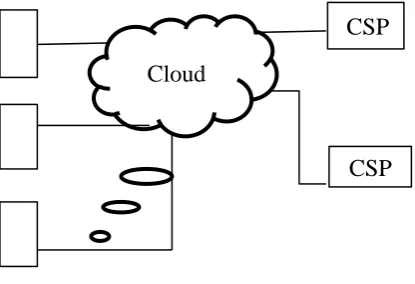
Figure 1. Single Computing Model
In this scheme, we can observe that single trusted service provider for his out sourcing data is not very promising and the availability of the data cannot be guaranteed. For example, the CSP goes down due to any technical reason, then no one will access the data from worldwide this means high availability violated and is shown in Figure 1. Later the new server as shown in Figure 2.
Figure 2. Multi Computing Model
Features of various CSPs
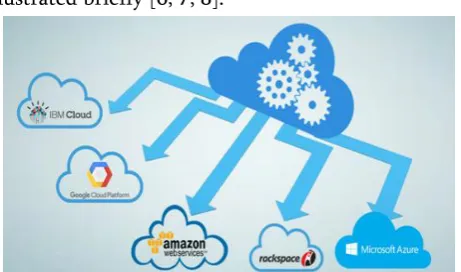
The study on Cloud Spectator has done a study on the largest European Cloud Service Providers (CSPs) to measure price-performance value in the industry. These studies was done by considering various factors. We have listed few of the CSPs in Figure 3 and the features of AWS and Microsoft Azure is illustrated briefly [6, 7, 8].
Figure 3: Popular Cloud Service Providers
1. Amazon Web Services (AWS)
Amazon Web Services are highly scalable, complete cloud platform services, which are made for cost-effective cloud tools for business operations. It includes the following features.
Computing
Elastic Cloud Computing (EC2) : Amazon EC2 presents a virtual computing environment, Permitting clients to utilize web service interfaces to launch instances with a variety of operating systems, load them with custom application environment, manage network access permissions, and run images using as many or as few systems as needed.
Elastic Beanstalk : AWS Elastic Beanstalk is a service for deploying and scaling web applications and services developed with Java, .NET, PHP, Node.js, Python, Ruby, Go, and Docker on servers such as Apache, Nginx, Passenger, and IIS. Users can simply upload code and Elastic Beanstalk automatically handles the details of capacity provisioning, load balancing, scaling, and application health monitoring [14].
Storage
Amazon Simple Storage Service (Amazon S3): Amazon S3 is a storage for the Internet. You can use Amazon S3 to store and retrieve any amount of data at any time, from anywhere on the web. You can accomplish these tasks using the simple and intuitive web interface of the AWS Management Console.
Amazon Glacier: Amazon Glacier is an extremely low-cost storage service that provides durable storage with security features for data archiving and backup. With Amazon Glacier, customers can store their data cost effectively for months, years, or even decades. Amazon Glacier enables customers to offload the administrative burdens of operating and scaling storage to AWS, so they do not have to worry about capacity planning, hardware provisioning, data replication, hardware failure detection and recovery, or time-consuming hardware migrations.
Networking
Amazon Virtual Private Cloud (VPC): Amazon VPC enables you to launch AWS resources into a virtual network that you have defined. This virtual network closely resembles a traditional network that you would operate in your own Direct Connect, users can establish private connectivity between AWS and datacenter, office, or colocation environment, which in some cases may reduce network costs, increase bandwidth throughput, and provide a more consistent network experience than Internet-based connections.
Amazon Cloud Watch: Amazon Cloud Watch is a monitoring service for AWS cloud resources and the applications that run on AWS. Users can use Amazon Cloud Watch to collect and track metrics, collect and monitor log files, set alarms, and automatically react to changes in your AWS resources. Amazon Cloud Watch can monitor
AWS Cloud Formation: AWS Cloud Formation simplifies provisioning and management on AWS. You can create templates for the service or application architectures you want and have AWS Cloud Formation use those templates for quick and reliable provisioning of the services or applications (called ―stacks‖). You can also easily update or replicate the stacks as needed.
2. Microsoft Azure
Microsoft Azure is a IaaS and PaaS computing for development, deployment, and management which is made for enterprise clients familiar with Microsoft products, robust development and deployment [15].
Computing
Virtual Machines: Azure Virtual Machines lets users deploy a wide range of computing solutions. Users can deploy a virtual machine nearly instantly, and pay by the minute. With support for Microsoft Windows, Linux, Microsoft SQL Server, Oracle, IBM, SAP, and Azure BizTalk Services, users can deploy any workload and any language on nearly any operating system.
Cloud Services: Develop, package, and deploy powerful applications and services to the cloud with Azure Cloud Services and the click of a button. It allows users to Scale from 1 to 1000 in minutes. Once your application is deployed azure automatically handles provisioning, load-balancing and monitoring. Your application is
backed by an industry-leading 99.95% monthly SLA.
Storage
Azure Storage: Azure Storage provides users with the ability to scalable, durable, and highly available storage for their data. Azure storage provides Blob storage, Table storage, Queue storage, and File storage Services. Blob Storage stores unstructured object data. Table Storage stores structured datasets. Queue Storage provides reliable messaging for workflow processing and for communication between components of cloud services. File Storage offers shared storage for legacy applications using the standard SMB protocol.
Azure Backup: Azure Backup can protect your critical applications, including SharePoint, Exchange and SQL Server; files and folders; Windows servers and clients; and Azure infrastructure-as-a-service (IaaS) virtual machines. Azure Backup provides a compelling alternative to tape with significant cost savings, shorter recovery times and up to 99 years of retention. The backup data is stored in geo-replicated storage, which maintains 6 copies of your data across two Azure datacenters.
Networking
Virtual Network: Azure Virtual Network provides an isolated and secure environment to run virtual machines and applications. You can fully control the IP address blocks, DNS settings, security policies, and route tables within this network. Additionally, you can connect the virtual network to your on-premises network using one of the connectivity options available in Azure.
ExpressRoute offer more reliability, faster speeds, lower latencies, and higher security than typical Internet connections.
Management
Operational Insights: Operational Insights, part of Microsoft Operations Management Suite, is a software-as-a-service (SaaS) solution tailored for IT operations teams. Microsoft Operations Management Suite (OMS) is Microsoft’s cloud-based IT management solution that helps you manage and protect your on-premises and cloud infrastructure. Operational Insights uses Azure to collect, store, analyse log data from any datacenter or cloud, and turn it into real-time operational intelligence.
Scheduler : Azure Scheduler lets you create jobs in the cloud that reliably invoke services inside and outside of Azure – such as calling HTTP/S endpoints or posting messages to Azure Storage queues, Azure Service Bus queues, or Azure Service Bus topics. You can choose to run jobs right away, on a recurring schedule, or at some point in the future.
Selection Criteria
Once you have decided to store and process data using cloud computing, the next step is to select the CSP.
It is vital to assess the reliability and capability of a service provider that you plan to entrust with your organization’s applications and data. The things to consider are Business health and processes, Administration support, Technical capabilities and processes and Security practices [9, 10].
Business health and processes: Financial health, Organization, governance, planning and risk management, Trust, Business knowledge, Compliance audit.
Figure 4. Business health and Processes Administration support includes Service Level Agreements (SLAs), Performance reporting, Resource monitoring and configuration management, Billing and accounting.
Figure 5. Administrative Support
Technical capabilities and processes such as Ease of deployment, management and upgrade, Standard interfaces, Event management, Change management, Hybrid capability.
Security practices includes Security infrastructure, Security policies, Identity management, Data backup and retention, physical security etc.
Figure 7. Security Practices
III.
PROPOSED WORK
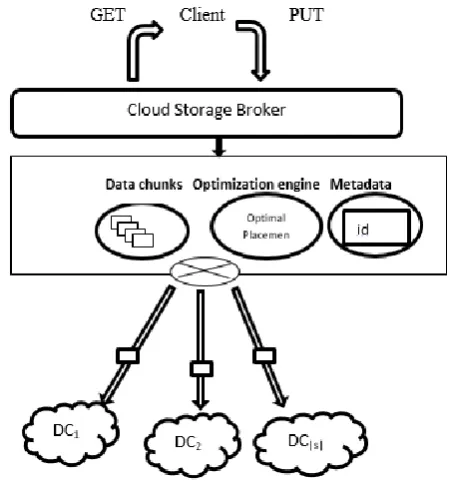
In this paper, we present a resource allocation mechanism for service provisioning in distributed clouds where computation resources are made available much closer to users, possibly within routers themselves. Will be a need for cloud resource allocation algorithms that operate on resource-constrained computational units that serve localized subsets of customers. To handle the above-stated two challenges, we propose a geo-distributed cloud storage system for Data storage; request Allocation and resource Reservation across multiple CSPs (DAR). It transparently helps customers to minimize their payment cost while guaranteeing their SLOs. Building a geo-distributed cloud storage across multiple CSPs can avoid the vendor lock-in problem since a customer will not be constrained to an obsolete provider and can always choose the optimal CSPs for the cloud storage service. We summarize our contributions below:
Figure 8: Overview of DAR’s Structure
First, we have modelled the cost minimization problem under multiple constraints using the integer programming and Second, we introduce a heuristic solution including:
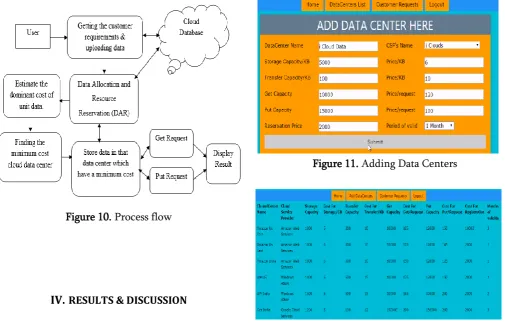
(1) A dominant-cost based data allocation algorithm, which finds the dominant cost (Storage, Get or Put) of each data item and allocates it to the datacenter with the minimum unit price of this dominant cost to reduce cost in the pay-as-you-go manner. (2) An optimal resource reservation algorithm, which maximizes the saved payment cost by reservation from the pay-as-you-go payment while avoiding over reservation. The system architecture is shown in Figure 8, the get/put requests are shown in Figure 9 and the process of our work is shown in Figure 10.
Figure 9. Get/Put requests
Figure 10. Process flow
IV.
RESULTS & DISCUSSION
In this paper, we proposed a work to select the optimal data center from the multiple data centers located at heterogeneous places. At one end, the organization can establish new data centers at different places. Other end, the customers can select the optimal data center. There are various factors comes in to the account to get the data center with less cost. For example based on the reservation time and the size of the data that is to be stored in the cloud etc.
We have added few screens of our results in this paper. Our simulated work is done using Java Programming Language and Java Server Pages used for designing web pages and the data is stored in Sequel Server. Adding data centers with the required fields and the list of data centers available are shown in Figure 11 and Figure 12.
Figure 11. Adding Data Centers
Figure 12. List of available Data centers
V.
CONCLUSIONreallocation, multicast-primarily based information moving and request redirection-based congestion manipulate.
VI.
REFERENCES
[1]. Jens-Matthias Bohli, Nils Gruschka, Meiko Jensen, Member, IEEE, Luigi Lo Iacono, And Ninja Marnau, IEEE Paper on Security And Privacy Enhancing Multi cloud Architectures, , IEEE Transactions On Dependable And Secure Computing, Vol. 10, No. 4, July/August 2013. [2]. Fan Zhang, Se- Nior Member, Ieee, Kai
Hwang, Life Fellow, IEEE, Samee U. Khan, Senior Member, IEEE, And Qutaibah M. Malluhi IEEE Paper on Skyline Discovery And Composition Of Multi-Cloud Mashup Services , , Ieee Transactions On Services Com- Puting, Vol. 9, No. 1, January/February 2016.
[3]. Dr. K. Subramanian1, F. Leo John, Data Security In Single And Multi-Cloud Storage, ISSN(Online): 2320-9801, Vol. 4, Issue 11, November 2016
[4]. Assistant Professor, Department of MCA, Visvesvaraya Technological University Post Graduate Centre, Multi-Cloud Data Storing Strategy with Cost Efficiency and High Availability, , ISSN (Online): 2319-7064 Index Copernicus Value (2013): 6.14 — Impact Factor (2015): 6.391 Kalaburagi, Paper ID: ART20161263 , Volume 5 Issue 8, August 2016. [5]. Prof. J. M. Patil , Ms. B. S. Sonune "Data Security Using Multi Cloud Architecture ,international Journal on Recent and Innovation Trends in Computing and Communication, Volume: 3 Issue: 5 Ijritcc — May 2015. Experiments: Lessons Learned, accessed on Jul. 2015. OnlineAvailable: http://exp-platform. com/Documents/IEEEComputer2007OnlineEx periments.pdf
[10]. B. F. Cooper et al., "PNUTS: Yahoo!’s hosted data serving platform," Proc. VLDB Endowment, vol. 1, no. 2, pp. 1277–1288, Aug. 2008.
[11]. A. Hussam, P. Lonnie, and W. Hakim, "RACS: A case for cloud storage diversity," in Proc. Cost-effective geo-replicated storage spanning multiple cloud services," in Proc. SOSP, Nov. 2013, pp. 292–308.
[14]. G. A. Alvarez et al., "Minerva: An automated resource provisioning tool for large-scale storage systems," ACM Trans. Comput. Syst., vol. 19, no. 4, pp. 483–518, Nov. 2001.
[15]. E. Anderson et al., "Hippodrome: Running circles around storage administration," in Proc. FAST, Jan. 2002, pp. 175–188.
Author’s Profile
K.Reddemma is a PG scholar in the school of Computer science and Engineering in SSITS, JNTUA. She received her Bachelor’s degree in 2016 from JNTUA University in the stream of Computer Science and Engineering. Her research interests include Cloud Computing and Big data analytics.