© 2018 IJSRCSEIT | Volume 3 | Issue 5 | ISSN : 2456-3307
Augmented Reality Aided Virtual Teaching Classroom
J.Sreedevi*, Dr M Rama Bai, Mulukuri Ravi Sankar
Computer Science and Engineering, MGIT, Hyderabad, Telangana, India
ABSTRACT
Augmented Reality (AR) as a real-time direct or indirect view of a physical real-world environment that has been enhanced/augmented by adding virtual computer-generated information to it. AR is both interactive and registered in 3D as well as combines real and virtual objects. In this paper we build an augmented reality environment for educational system. Here, the user virtually selects the video to be played and the video overlays on the scene. The proposed system enhances the class room learning to a great extent.
Keywords : Augmented reality, real and virtual objects, educational system
I. INTRODUCTION
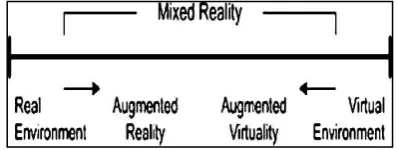
We define Augmented Reality (AR) as a real-time direct or indirect view of a physical real-world environment that has been enhanced/augmented by adding virtual computer-generated information to it [1]. AR is both interactive and registered in 3D as well as combines real and virtual objects. Milgram‟s Reality-Virtuality Continuum is defined by Paul Milgram and Fumio Kishino as a continuum that spans between the real environment and the virtual environment comprise Augmented Reality and Augmented Virtuality (AV) in between, where AR is closer to the real world and AV is closer to a pure virtual environment, as seen in Fig.1 [2].
Augmented Reality aims at simplifying the user‟s life by bringing virtual information not only to his immediate surroundings, but also to any indirect view of the real-world environment, such as live-video stream. AR enhances the user‟s perception of and interaction with the real world. While Virtual Reality ( VR ) technology or Virtual Environment as called by Milgram, completely immerses users in a synthetic world without seeing the real world, AR
technology augments the sense of reality by superimposing virtual objects and cues upon the real world in real time. Note that, as Azuma et al. [3], we do not consider AR to be restricted to a particular type of display technologies such as Head-Mounted Display ( HMD), nor do we consider it to be limited to the sense of sight. AR can potentially apply to all senses, augmenting smell, touch and hearing as well. AR can also be used to augment or substitute users‟ missing senses by sensory substitution, such as augmenting the sight of blind users or users with poor vision by the use of audio cues, or augmenting hearing for deaf users by the use of visual cues.
Fig. 1 Augmented reality system
which are more commonly called mediated or diminished reality, in addition to adding virtual objects. Indeed, removing objects from the real world corresponds to covering the object with virtual information that matches the background in order to give the user the impression that the object is not taken by tracking cameras. Augmented reality image registration uses different method of computer vision mostly related to video tracking. These methods usually consist of two stages: tracking and reconstructing/recognizing. First, fiducial markers, optical images, or interest points are detected in the camera images. Tracking can make use of feature detection, edge detection, or other image processing methods to interpret the camera images. In computer vision, most of the available tracking techniques can be separated in two classes: feature-based and model-based [5]. Feature-model-based methods consist of discovering the connection between 2D image features and their 3D world frame coordinates [6]. Model-based methods make use of model of the tracked objects‟ features such as CAD models or 2D templates of the item based on distinguishable features [7]. Once a connection is made between the 2D image and 3D world frame, it is possible to find the camera pose by projecting the 3D coordinates of the feature into the observed 2D image coordinates and by minimizing the distance to their corresponding 2D features. The constraints for camera pose estimation are most often determined using point features. The reconstructing/recognizing stage uses the data obtained from the first stage to reconstruct a real world coordinate system.
Some methods assume the presence of fiducial markers in the environment or object with known 3D geometry, and make use of those data. Others have the scene 3D structure pre-calculated
beforehand,such as Huang et al.‟s device AR-View [8] ; however, the device will have to be stationary and its position known. If the entire scene is not known beforehand, Simultaneous Localization And Mapping ( SLAM ) technique is used for mapping
before displaying it while in an optical-see-through application, the view of the real world cannot be delayed, so the time lag introduced in the system by the graphics and image processing is perceived by the user. This results in image that may not appear “attached” with the real objects they are supposed to correspond to, they appear to be unstable, jittering, or swimming around.
B. Proposed System
The proposed system displays a good example of augmented reality and its applications. The model takes the live video feed and superimposes the options on the top. The user can select various options one at a time and display the content present in the videos. The play pause options allows the user to control the content while explaining the class.
Background Subtraction
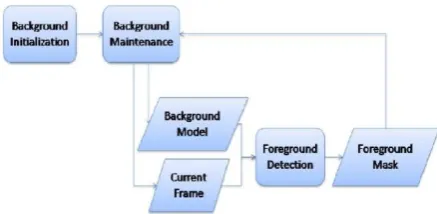
Background subtraction is a widely used for detecting moving objects. The ultimate goal is to “subtract” the background pixels in a scene leaving only the foreground objects of interest. If one has a model of how the background pixels behave the “subtraction” process is very simple. Of course, in real world scenes, the situation will be more challenging. Background subtraction usually consists of three attributes besides the basic structure of the background model: background initialization (construction of the initial background model), background maintenance (updating the background model to account for temporal changes in subsequent frames), and foreground/background pixel classification. The process is shown in Figure 2.
Fig. 2 Background subtraction
Background Model Initialization
In order to avoid the assumption of a sequence starting in the absence of foreground objects, simple temporal frame differencing is used for the initial phase of background model initialization until the background pixels are “stable” (which will be defined later in this section). The temporal frame difference FDt(x, y) at time t is defined as:
FDt(x, y) = |It(x, y) − It−1(x, y)|
where It(x, y) is the intensity of pixel (x, y) in the frame at time t.
A pixel is considered as a “stable” background pixel if there is no significant motion detected (i.e. FDt(x, y) < T1) for a certain number of frames (denoted by Tfr). Consider a frame count Cfr that is incremented by 1 each time FDt(x, y) < T1, when this frame count Cfr > Tfr (the consecutive background frame count Tfr is empirically determined and set to be 100), we can use this pixel in the current frame to construct the background model:
The background difference frame (or image) is defined as follows:
The foreground binary mask is determined by comparing the background difference frame to a threshold T2:
The threshold T2 is empirically determined and set to be 50 in our experiments. This background model initialization method assumes every pixel of the background will be uncovered at some time.
IV.Results
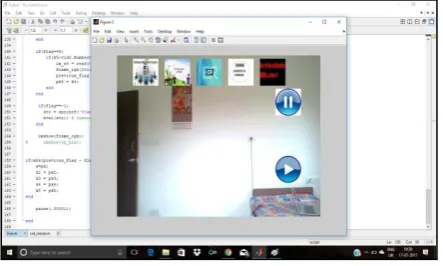
The following images depict the output screens of the proposed method. The program starts by depicting the screen with the options overlaid on it.
Fig. 3 Video output with overlaid options
When the user touches the options virtually displayed, the corresponding video content is played on top of the existing live video feed.
Fig.4 Virtual option selection
While the selected videos are playing, the user can interactively explain the content present in the videos.
Fig. 5 Video stream with selected option
The proposed systems carters for play pause options by which the selected videos can be played according to the will of the user. Multiple videos can also be played simultaneously.
V. Conclusion and Future Enhancement
Conclusion
Thus , one can give a pictorial representation during his lecture so that the students can have a greater understanding.
Future Enhancement
AR is still in infancy stage, and as such, future possible applications are infinite. Advanced research in AR includes use of head-mounted displays and virtual retinal displays for visualization purposes, and construction of controlled environments containing any number of sensors and actuators.
VI.References
[1]. Gerhard Reitmayr, Dieter Schmalstieg, “Location based Applications for Mobile Augmented Reality”, AUIC2003, 2003.
[2]. Daniel Wagner and Dieter Schmalstieg, “Handheld Augmented Reality Displays”, Graz University of Technology, Austria.
[3]. Oliver Bimber, Ramesh Raskar, Masahiko Inami, “Spatial Augmented Reality”, SIGGRAPH 2007 Course 17 Notes, 2007. [4]. Pranav Mistry, Pattie Maes, Liyan Chang,
“WUW – Wear Ur World – A Wearable Gestural Interface”, ACM, CHI 2009, Boston, April 4–9, 2009.
[5]. Marco Sacco, Stefano Mottura, Luca Greci, Giampaolo Vigan, Insitute of Industrial
Technologies and Automation, National
Research Council, Italy.
[6]. Assaf Feldman, Emmanuel Munguia Tapia, Sajid Sadi, Pattie Maes, Chris Schmandt, “ReachMedia: On-the-move interaction with everyday objects”, iswc, pp.52–59, Ninth IEEE
International Symposium on Wearable
Computers (ISWC‟05), 2005.
[7]. Jae-Young Lee; Seok-Han Lee; Hyung-Min Park; Sang-Keun Lee; Jong-Soo Choi; Jun-Sik Kwon; “Design and implementation of a wearable AR annotation system using gaze
2010 Digest of Technical Papers International Conference on, vol., no., pp.185–186, 9–13 Jan. 2010