Natural Language Generation of Museum Object Descriptions
based on User Model
Hsiao Wei Chen, Mary Grace Lim, Patricia Bea Perez, Joanna Patricia Reyes, and Nathalie Rose Lim
De La Salle University- Manila
{hsiao_wei_chen, mary_graces, lil_nawty_gurl13, snowdrop_106}@yahoo.com, and [email protected]
Abstract. Natural Language Generation (NLG) techniques can be applied in generating virtual documents dynamically using information from a database (Dale et al, 1999). One of the applications of NLG techniques to generate documents dynamically is the web-based interactive virtual museum, VIGAN. NLG is used to generate the descriptions of the objects in a virtual museum dynamically based on the profile and interests of the visitor. The focus of the research is on incorporating user’s interest, age group, and visit history in the generation of museum object descriptions. The descriptions do not vary only on user’s profile but also in lexicalization. Facts are not only in describing the objects, but also in describing Ilocano personalities. User Acceptance Testing proved that object descriptions do vary based on age groups, category of interest, and lexicalization. They commented that the descriptions are easy to understand, the user interface is user friendly and the suggested objects are appropriate.
Keywords: Natural Language Generation, Dynamic User Modeling, Knowledge Representation, Virtual Museums
1.
Introduction
With the emergence of the Internet, lack of information is no longer a major problem most users face. The vast amount of information available is overwhelming and it is important to hide information that is irrelevant to the users. One example that provides vast information to the people is museums. A museum is an institution providing services—acquiring, conserving, researching, communicating, and exhibiting objects for education and enjoyment (ICOM, 2001). Some museums are made available online through virtual museums so that more people can have access to the information provided by the museum.In order to improve the services that virtual museums provide, they should be able to determine which information is most relevant to a particular user and object information should be presented in such a way that the user can understand (Bandelli, 1999).
past. Thus, improving the encounter with a museum through a web-based interactive virtual museum that generates descriptions based on user profile is the motivation for this research.
The next section introduces the virtual museum we have created. Section 3 expounds more on the components of the virtual museum. In Section 4, we discuss how we modeled the user preference and how these are updated. Section 5 presents the rules created to generate the different types of description. Samples of generated descriptions based on user profile is also discussed in this section. In Section 6, we discuss the testing done for the system. Lastly, we give our conclusion and indicate some future work in Section 7.
2.
Our Virtual Museum
We have chosen to create a virtual museum for three (3) well-known musuems in Vigan, Philippines, namely: Padre Jose Burgos Museum, Crisologo Museum and Syquia Museum. These musuems are quite small, but contain a substantial collection of objects that represent the culture of the Southern Ilocos Region. We call this interactive virtual museum VIGAN.
As VIGAN controls the amount of information generated depending on age group, the user is first asked to register upon first use of the virtual museum. Refer to Section 3 for a more detailed discussion on the information requested in the registration page. On succeeding sessions, the user is tasked to log in his user name and to choose which of the three-mentioned museums he wants to visit first. Once the user has chosen a particular museum, he has to choose a room from a list that is provided to him. After selecting a room, a 2D panoramic image of the actual museum is displayed. Hotspots in green represent another room to enter, while those in red represent objects. Clicking on the green hotspot will introduce the user to the next room with another 2D panoramic view consisting of one or more objects. On the other hand, clicking on the red hotspots indicates that the user wants to view the description for that particular object. Aside from generating the description of that object, each click on objects updates the user model. Updates in the user model involve increasing the weight of preference for that particular type of object, as well as storing the information that was already produced. Storing the information would allow the program to determine which new information can be given to the user, should he request for it. Moreover, storing the actual statements used will provide consistency in the generated text should the user choose to revisit the same object. The preference weight and the items that were visited is also used in producing a list of related objects that the user might be interested in viewing.
• basicMsg(<noun>basic_name,<noun>basic_what-is, <adjective>basic_description)
The basicMsg includes the name of the object, what the object is and the description of the object. It is applicable to all object categories and subcategories.
• purposeMsg(<verb>purpose_action,<noun>purpose_object)
The purposeMsg includes the name of the object, what the object is and the description of the object. It is applicable to all object categories and subcategories.
• make-upMsg(<noun>make-up,<adjective>make-up_description, <noun>make-up_location,<noun>make-up_alternative-make-up)
The make-upMsg includes what the object is made up of, the description of the makeup of the object, where the makeup of the object is found, and alternative makeup of the object. It is applicable to the household item and economic item category. It is applicable to the some subcategories.
• people-involvedMsg(<noun>people-involved_relation,<noun>people-involved)
The people-involvedMsg includes the people involved with the object and the relation of the people involved with the object. It is applicable to all categories and subcategories. For example, for the object bolo, the involvedMsg will be people-involvedMsg(<noun>owner, <noun>Elpidio Quirino).
• akaMsg(<noun>aka)
The akaMsg includes what the object is also known as. It is applicable to all categories and subcategories.
• used-inMsg(<noun>used-in)
The used-inMsg includes where the object is used in. It is applicable to household item, customs and economic item categories. It is also applicable to some subcategories.
• consist-of(<noun>consist-of)
The consist-ofMsg includes what the object consists of, because some objects are made up of more than one parts. It is applicable to household item, customs and economic item categories. It is applicable to some subcategories:
• personMsg(<noun>person_name,<noun>person_bdate,<noun>person_bplace ,<noun>person_ddate,<noun>person_gender)
The personMsg includes the name of the person, his/her birth date birth place, death date and gender. It is applicable to the history category and the personality subcategory.
• paintingMsg(<noun>painting_name,<noun>painting_theme,<adjective> painting_description, <noun>painting_age)
The paintingMsg includes the name, the theme, description and age of the painting. It is applicable to the household item category and art subcategory.
• parentsMsg(<noun>parents_fathersName,<noun>parents_mothersName) The parentsMsg includes the father’s name and the mother’s name. It is applicable to the history category and personality subcategory.
• educationMsg(<noun>education_degree,<noun>education_year, <noun>education_school)
• siblingMsg(<noun>sibling_siblingsName)
The siblingMsg includes the sibling’s name. It is applicable to the history category and personality subcategory.
• original-paintingMsg(<adjective>original-painting_description,
<noun>original-painting_artist,<noun>original-painting_location) The original-paintingMsg includes the description, artist and location of the original painting. It is applicable to the household item category and art subcategory.
• sizeMsg(<noun>size_unit-of-measure, <noun>size_height, <noun>size_ width)
The sizeMsg includes the unit of measure, height and width of the object. It is applicable to all categories and all subcategories.
• award(<noun>award_ prize,<noun>award_ sponsor,<noun>award_ year) The awardMsg includes the prize, sponsor and year of the award. It is applicable to the household item category and art and personality subcategory.
3.
VIGAN’s Architectural Design
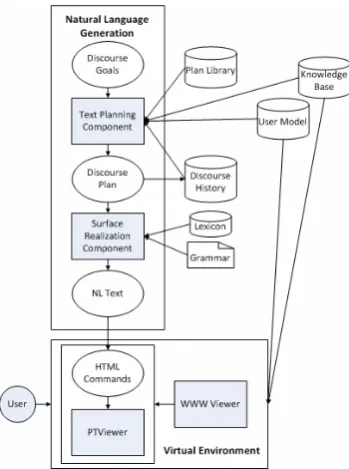
The architecture of VIGAN can be seen in Figure 1. There are basically two (2) main processes in VIGAN: the Natural Language Generator (NLG) and the Virtual Environment (VE). These components access and update data from the databases User Model, Plan Library, Knowledge Base, Discourse History, Lexicon, and the text file Grammar.
Figure 1: The Architecture of the VIGAN System
The user chooses an object from the 2D panoramic view of the museum in the Virtual Environment. The chosen object’s identification number is then passed on to the NLG component where the object description will be generated.
component will get the User Model (UM), which is used to tailor the description according to the user, Discourse History, a database that contains the facts about the objects that have been presented to the user, a message (1), which is a pre-configuration of domain elements grouped
basicMsg(name, what-is, description) (1)
in categories and arranged according to level of importance, from the Plan Library, and facts about the object stored in the database. The Text Planning component will decide based on the age group of the user (as obtained from the UM) how much information will be included. The UM is also used to make suggestion of objects more appropriate to the user. UM is a database which contains non-decision and decision properties. Non-decision properties about the user which includes username, password, name and gender are gathered from the user explicitly during registration. The user model is dynamic or always changing because new information about the user is gathered each time the user visits an object in the museum. The new information gathered as the session progresses are decision properties that will aid the system in generating descriptions for the objects in the museum. In VIGAN, decision properties are interest rating on each category of objects, importance rating on each available fact and age, because the amount of facts to be presented to the user for each description will depend on it.
The Text Planning component will fill in messages with information stored in the Knowledge Base, such as that message in (1) will be (2).
basicMsg(burnay, Ilocano earthen jar, null) (2)
Once the messages have been filled, it will include it in the Discourse Plan, which is an ordered and structured set of messages that will be included in the generated text. The Discourse Plan is passed to the Surface Realization component, and the facts used in the Discourse Plan are stored in the user’s Discourse History so that the system will know which information has already been presented to the user to avoid redundancy for future presentation of object description.
VIGAN uses SimpleNLG (Reiter, 2007), a Java class library developed by the University of Aberdeen, which performs NLG lexicalisation and realisation, as its Surface Realization component. The Surface Realization component makes use of the Grammar and Lexicon to produce Natural Language expressions based on the Discourse Plan. For the Grammar, VIGAN uses a set of grammar rules used to form English sentences (see Example below).
Example of grammar rules for English language:
<Simple Sentence> = <Declarative Sentence> <Declarative Sentence> = <subject> <predicate> <subject> = <simple subject> | <compound subject>
<simple subject> = <noun phrase> | <nominative personal pronoun> <noun phrase> = "the" <specific proper noun>
| <proper noun>
| <non-personal pronoun>
| <article> [<adverb>* <adjective>] <noun> | [<adverb>* <adjective>] <noun-plural> <noun> = <noun> [<prep phr>*]
VIGAN uses WordNet 2.0 (Miller, 2005) as its Lexicon, along with Java WordNet Library (JWNL), a Java API that is used to access WordNet. It will be used to map the messages in the Discourse Plan into words and phrases. Words and phrases that are used frequently in the sentence generation are stored in a Word Bank along with its senses, will be replaced with different lexicalizations, including incorporating synonyms, based on the senses automatically. The building of the Word Bank is done manually before runtime.
Natural Language (NL) Text will be the output of the Surface Realization component. The NL Text will be the description of the museum object selected by the user. The NL text will be passed to the WWW Viewer.
The WWW Viewer is the website which also links the user to the VE. It is in the VE that user can explore the virtual museum, select objects from the rooms in the virtual museum, and view descriptions of an object. Every time the user selects a uniqueobject, the user model is updated by increasing the interest rating of the user based on which category the object belongs to, refer to Section 4 for a more detailed discussion. For example, the user selects burnay which belongs to Household Items category, therefore the system will increase the percentage of the user’s interest on household items. While exploring the virtual museum, WWW Viewer also suggest objects that might be of interest to the user by determining which category the user is most interested with and getting random objects with that category from the database.
4.
User Modeling
User’s preferences are modeled in the UM. Each user will have a rating of interest per category of object and rating of importance per facts. Interest rating is the rate of how interested the user is to each category of object (i.e., history, economic life, customs, household items). Interest rating of each category of object will initially be 0.0. During the sign-up phase, the users will be asked to select the categories of object that they are interested in. The rating of the categories is computed using (3). So when the user selects Household Items and Customs as his interests, then his initial interest rating will be 50.0/50.0/0.0/0.0 where the rating corresponds to Household Items, Customs, History, and Economics, respectively.
100/number_of_selected_category (3)
UM will also be updated whenever the user clicks on a new object and whenever the user clicks on “more information”. The interest rating of each category will be updated using (4)
(number_of_clicks_per_category/total_clicks) x 100 (4)
where total_clicks is non-unique because it represent the total number of objects that the user clicks to view.
Importance rating per fact is the assumed rate of how important for the user to know the facts of objects. Facts of objects are the properties of objectives like description of the object, creator of the object, and the like. The text planning component will decide the information that will be included in the generated description through the rate of importance. The rating will be from 1 (lowest) to 5 (highest). The rating of a description will depend on the age group of the user where in a child is 6-16 years old and an adult is 17 years old and above. The facts that have higher rating will be presented to the user. For example, it is assumed that a twelve-year old user is not so interested in the creator of the painting therefore the fact creator will have a lower rating compared to other facts so that the generated description will not include the creator of the painting.
Ocampo, A. (2007, April 13). Looking back museums. Philippine Daily Inquirer. Retrieved June 20, 2007, from http://opinion.inquirer.net/inquireropinion/columns/ view_article.php?article_id=60116.