DOI : https://doi.org/10.32628/CSEIT195457
The Performance Comparison of Software as a Service
for the First Step Cloud Computing Adoption Processes
Dimas Sasongko, Setiya Nugroho
Department of Informatics Engineering, Universitas Muhammadiyah Magelang, Magelang, Central Java, Indonesia
ABSTRACT
The initial stage of the adoption process for the implementation of cloud computing technology in an institution is evaluating to select the cloud provider. This research will discuss the comparison of the performance of Software as a Service (SaaS) owned by each cloud provider. In this research, cloud providers were selected based on the previous research about the ready-to-use SaaS services for users, namely Microsoft Office 365 and Google Apps. Testing the comparison of SaaS performance is needed to provide solutions to institutions in determining the use of SaaS applications. The benchmarking method is used to find the performance comparison between SaaS application. This research conducted with four main phases; they are choosing a cloud provider and SaaS, selecting attributes for testing SaaS performance, selecting a SaaS performance testing scenario, and performing performance testing based on the testing scenario. From the results, we infer that Gmail, Google Drive, and Google has responsive web page performance and can be loaded correctly on devices with limited memory. Keywords : Cloud Computing, Cloud Computing Adoption, SaaS, Office 365, Google Apps
I. INTRODUCTION
Information Technology (IT) advances, such as the internet and wireless communication technology, make organizations throughout the world continue to develop IT-based solutions to improve the ease and quality of communication. In the last few years, one of the technologies highly promoted, concerning improving the quality of communication, is cloud computing. Cloud computing technology can provide services to organizations in governing and managing IT resources through the internet to increase flexibility and accessibility [1].
In addition to cloud computing technology, the development of the Bring Your Own Device (BYOD) trend or students using their own devices to carry out learning activities is a development of technological trends that can provide a model of learning change. In
its application in learning, cloud computing collaboration with BYOD trends is an exciting scenario implemented in the collaborative system [2]. The collaborative system allows many users to install shared documents on the Internet. Such systems are attractive to many organizations and users because they can increase productivity, reduce costs, and increase comfort. The collaborative system allows users to collaborate on different geographical conditions, for example between team members working from home, or on their way. The main challenge for collaborative systems is that it allows users to manage local files and synchronize with other users in shared documents [3].
computing resources (for example, networks, servers, storage, applications, and services). Cloud computing can be quickly operated and launched, with minimal management efforts that can be interpreted that users need minimal interaction with service providers [4].
Cloud computing services are divided into three types, namely (i) Infrastructure as a Service (IaaS) for example Amazon EC2, (ii) Platform as a Services (PaaS) for example Microsoft Windows Azure, and (iii) Software as a Service (SaaS) for example Google Docs and Outlook Email. SaaS is the ability provided to users to use service providers' applications that work on cloud infrastructure. These applications accessed from a variety of devices owned by users through a web browser or application program [4].
The type of SaaS service provides the opportunity for users to use applications owned by the cloud provider without spending money to access existing features. Users usually can access more features if they pay additional fees. They do not need to set up cloud infrastructure, including networks, servers, operating systems, and storage.
Figure 1. Cloud Computing Adoption Factors and Processes [5]
The process of adopting the application of cloud computing technology to an institution (example: Higher Education) requires several processes, which consist of: (i) evaluation, (ii) proof of concept, (iii) adoption decision, (iv) implementation and integration, (v) IT governance, and (vi) confirmation, as seen in Figure 1 [5]. The initial stage of the adoption process of cloud computing technology initiated by evaluating the cloud provider. The development of cloud computing services demonstrated by more and more technology companies offering solutions for users and institutions that need cloud computing services. This research will discuss the comparison of the performance of Software as a Service (SaaS) owned by each cloud provider. Testing the comparison of SaaS performance is needed to provide solutions to institutions in determining the use of SaaS applications. Some researchers have researched evaluating and comparing SaaS performance. In the previous research, researchers recognized OneDrive has responsive cloud performance rather than Google Drive [6]. Also, the other researchers evaluated SaaS Google Docs based on user perceptions and recognized users have doubts regarding data security when using Google Docs [7]. However, the selection of SaaS applications can not only be determined from the user's perception and the need for SaaS applications for collaboration is not limited to SaaS cloud storage applications. The purpose of this study is to measure the performance of several public SaaS applications to assess the potential of public SaaS applications in the process of adopting cloud computing.
II. METHODS AND MATERIAL
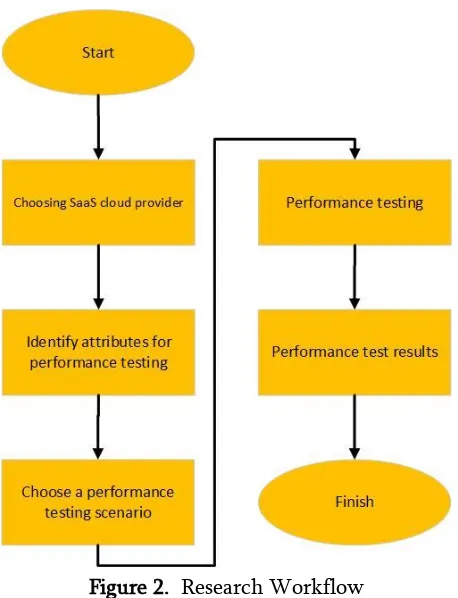
Figure 2. Research Workflow
In achieving the objectives of the research based on the research question in chapter 2, the benchmarking method was applied. By answering the research questions, institutions that have plans to implement cloud technology in their daily activities can use the results as an essential consideration for choosing Software as a Service (SaaS) owned by the cloud provider. This research conducted with four main phases; they are choosing a cloud provider and SaaS, selecting attributes for testing SaaS performance, selecting a SaaS performance testing scenario, and performing performance testing based on the testing scenario. The research flow in this research shown in Figure 2.
2.1 Choosing Cloud Provider and Software as a Service
There are several cloud providers and SaaS brands on the market. In this research, cloud providers were selected based on the previous research about the ready-to-use SaaS services for users, namely Microsoft
Office 365 [8] and Google Apps [9]. The two SaaS services have several similar applications that can be used by users such as email, document collaboration, cloud storage, class/group management, and instant messaging applications. In this research, two cloud providers have several SaaS products, namely:
1) Microsoft Office 365 has several SaaS applications including Outlook E-mail, OneDrive cloud storage, Outlook Calendar, cloud-based office suites Office 365 (Word, Excel, Powerpoint), Microsoft Teams, and Microsoft Skype [8]
2) Apps has several SaaS applications including Gmail E-mail, Google Drive cloud storage, Google Calendar, cloud-based office suites Google Docs (Doc, Spreadsheet, Slide), Google Classroom and Google Hangouts [10,11]
Based on subsection 2.1, each cloud provider has a SaaS application similar to each feature. Tests were carried out between SaaS applications that have the same function with the same test conditions to obtain 'apple to apple' comparison data. Benchmarking testing will be carried out on SaaS, which can be used to send or collaborate files between users, namely Email, Cloud Storage, and Cloud Office suites.
2.2 Performance Testing Attribute
The SaaS application performance test was carried out on the website platform. Therefore the performance testing attribute uses several attributes usually used to measure website performance, namely client-side scripts, CPU utilization, memory peak usage (max), and time to complete [6].
1) Client-side script. It is measured based on the number of scripts needed to complete the task. The performance evaluation parameter is a slightly better client-side script.
evaluation parameter is that the low consumption of CPU utilization is better.
3) Memory Peak Usage (max). Measured based on the highest memory consumption (in Megabyte) required during task completion. The performance evaluation parameter is that lower memory consumption is better.
4) Time to complete. Measured based on time length (in seconds) to complete the task. The performance appraisal parameter is that completing a task requires a little better time.
2.3 Performance Testing Scenario
Performance testing was performed on a website-based platform, therefore using the Developer Toolbar tool already available in every web browser. Performance testing used an internet network that has 2 Mbps downstream and 9 Mbps upstream measured using http://speedtest.net. Then, the test time was carried out at 09.00-15.00 GMT+7 from Monday to Thursday. This research was carried out using computer hardware Processor Intel Celeron 1.50 GHz Memory 4 GB and software using Operating System Windows 10 64 bit, Google Chrome Version 73 64 bit. The testing scenario consists of testing the performance of the uploading and downloading of SaaS cloud storage applications [6], the performance of email delivery with attachments, and the performance of opening document files on the SaaS cloud office suites application. Testing was done five times in each scenario. The testing of upload and download performances of SaaS cloud storage applications and the performance of email delivery with attachments using four different files of JPG image file (100 KB), MP4 video file (1500 KB), Microsoft word Docx files (100 KB), and PDF document files (150 KB). The total of the four files is 1830 KB. The testing of open the document on cloud office suites using Docx, PPT, and PDF files, each file has a size 500 KB. The five different types of files were selected based on common files used as e-learning content [10].
III. RESULTS AND DISCUSSION
The main result of this research is to compare the performance of SaaS applications that can be used to provide solutions to institutions in determining the use of SaaS applications. The results and discussion obtained data based on several tests, as shown in this chapter.
3.1 Email Performance Testing
Table I shows the performance comparison of email delivery performance between Microsoft Outlook and Gmail. Based on the experiment shown in Table 1, Gmail requires lower CPU utilization and less memory consumption compared to Microsoft Outlook. These results indicate that Gmail has responsive web page performance and can be loaded correctly on devices with limited memory.
TABLE I. AVERAGE EMAIL PERFORMANCE TESTING RESULTS
Sent Email
Attribute Outlook Gmail Performance Sign
Client-side script
0 0 Lower is Better CPU
utilization
48% 47% Lower is Better Memory
Peak Usage
337 MB 227 MB
Lower is Better
Time to Complete
30 s 37 s Lower is Better
3.2 Cloud Storage Performance Testing
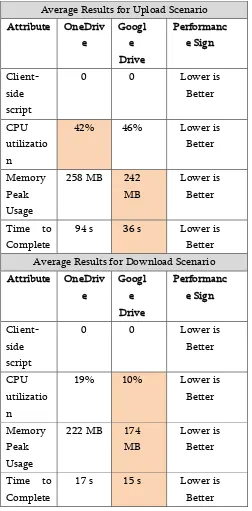
With less memory consumption required by Google Drive in completing upload and download testing scenarios, it can load properly on devices with limited memory.
TABLE II. AVERAGE CLOUD STORAGE PERFORMANCE TESTING RESULTS
Average Results for Upload Scenario Attribute OneDriv Average Results for Download Scenario Attribute OneDriv
3.3 Cloud Office Suites Performance Testing
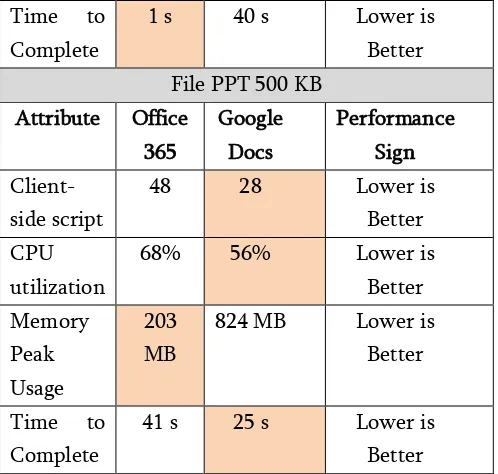
Based on the experiment shown in Table 9, it explains the results of the performance comparison of scenario testing to open DOCX, PPT, and PDF documents
between the Microsoft Office 365 and Google Docs cloud office suites. Google Docs has superior performance than Office 365, especially when opening document files with DOCX and PPT types. The testing results show that Google Docs has fewer scripts and lower CPU utilization, which indicates that Google Docs is faster to load and more responsive. The opposite condition occurs in testing scenarios for opening PDF document files. Microsoft Office 365 outperforms Google Docs in this scenario. Based on the testing results, Microsoft Office 365 has fewer scripts, lower CPU utilization, and less memory consumption compared to Google Docs. Interesting findings obtained from the testing of opening document files is that Google Docs requires more memory consumption than Office 365.
Time to Table I to Table III, a key conclusion can be drawn to provide recommendations for determining the use of SaaS applications. The results of the recommendations for using the SaaS application, as seen in Table IV are dominated by SaaS applications that are owned by Google Apps. Gmail, Google Drive, and Google Docs has responsive web page performance and can be loaded correctly on devices with limited memory.
Completing the previous research that only discusses cloud storage services [6] and user perceptions in Google Docs [7], then the results of this research are testing the performance comparison of Office 365 and Google Apps web-based SaaS applications consisting of cloud storage SaaS applications (upload and download), cloud office suites (opening document files), and email (attachment delivery). The research findings can provide recommendations on the adoption process for the application of cloud computing technology to an institution, especially in determining the choice of using SaaS applications.
TABLE IV. SAAS APPLICATION RECOMMENDATION institution/organization. The research results can be a solution for organizations to choose cloud computing providers and applications. It can be concluded that: 1) The SaaS cloud provider brands that can be used for
personal and business purposes are Google Apps and Microsoft Office 365.
3) Based on the results of the "head to head" performance testing by the testing the attributes, the SaaS applications of Google Apps are superior to those of Microsoft Office 365. The details of the results of performance testing are discussed in Table I to Table III. Then, the SaaS application brands recommended for use are discussed in Table IV.
The research that has been done is the first step to implementing cloud computing technology in institutions/organizations. Institutions can use the research results as estimates in choosing a SaaS application. After obtaining the results of the SaaS application, the next step that can be done is finding out internal readiness, costs and advantages, and impact to users and works when adopting cloud computing technology. These matters can be discussed more in the future research.
V. REFERENCES
[1]. M. Armbrust et al., “A View of Cloud
Computing," Commun. ACM, vol. 53, no. 4, pp. 50-58, Apr. 2010.
[2]. W. Luna and J. L. C. Sequera, “Collaboration in
the cloud for online learning environments: an experience applied to laboratories," Creative Education, vol. 6, no. 13, p. 1435, 2015.
[3]. V. Patel and T. Bhatt, “Survey on Cloud based
Collaboration System," International Journal of Scientific Research in Computer Science, Engineering and Information Technology, vol. 2, no. 6, 2017.
[4]. P. Mell and T. Grance, “The NIST definition of
cloud computing" 2011.
[5]. R. F. El-Gazzar, “A literature review on cloud
computing adoption issues in enterprises," presented at the International Working Conference on Transfer and Diffusion of IT, 2014, pp. 214-242.
[6]. R. Ferdiana, “The comparison of consumer cloud
storage for a storage extension on the e-learning," in Engineering Seminar (InAES), International Annual, 2016, pp. 182-186. [7]. R. Bernsteiner and R. Pecina, “Cloud Based
Office Suites-Users' Attitudes Towards Productivity, Usability, and Security," in International Conference on Knowledge Management in Organizations, 2015, pp. 389-403.
[8]. B. G. Lyons and T. Parker, “Office 365: tips to
avoid turbulence while moving faculty and staff to the cloud," presented at the Proceedings of the 41st annual ACM SIGUCCS conference on User services, 2013, pp. 131-136.
[9]. Y. Wang and B. Jin, “The application of SaaS
model in network education-take google apps, for example," presented at the 2010 2nd International Conference on Education Technology and Computer, 2010, vol. 4, pp. V4-191.
[10]. M. A. Embi, “e-Learning in Malaysian higher education institutions: Status, trends, & challenges," Department of Higher Education Ministry of Higher Education, 2011.
[11]. G. Laura, O. Bogdan, C. Aurelia, and M. Serban,
“University Learning Management System based
on Office 365," presented at the 2018 17th International Conference on Information Technology Based Higher Education and Training (ITHET), 2018, pp. 1-6.
Cite this article as :
Dimas Sasongko, Setiya Nugroho, "The Performance Comparison of Software as a Service for the First Step Cloud Computing Adoption Processes ", International Journal of Scientific Research in Computer Science, Engineering and Information Technology (IJSRCSEIT), ISSN : 2456-3307, Volume 5 Issue 5, pp. 85-91, September-October 2019. Available at doi : https://doi.org/10.32628/CSEIT195457
![Figure 1. Cloud Computing Adoption Factors and Processes [5]](https://thumb-us.123doks.com/thumbv2/123dok_us/1049857.1131323/2.595.40.287.486.694/figure-cloud-computing-adoption-factors-processes.webp)