View-Based User Interfaces for Information Retrieval
on the Semantic Web
Eetu M¨akel¨a, Eero Hyv¨onen, and Teemu Sidoroff
Helsinki Institute for Information Technology (HIIT),
Helsinki University of Technology, Media Technology, and University of Helsinki
[email protected], http://www.cs.helsinki.fi/group/seco/
Abstract. This paper1argues for using the multi-facet search paradigm as a ba-sis in information retrieval on the Semantic Web. To support the argument, two user interfaces for extant semantic web portals based on the concept of view-hierarchies are presented. The interfaces described reveal and contrast how the view-based paradigm can be applied to support both browsing and searching strategies in information retrieval in applications using different domain and an-notation ontologies. New semantics-based user interface elements complement-ing the basic paradigm are also discussed.
1
Introduction
Hierarchies provide a natural and useful way of categorizing information. They are ubiquitously used in libraries, catalogs, web portals, etc. to structure repository con-tents of various kinds. The categorized items are not restricted to a single classification, but can be annotated into multiple categories at the same time. The various classifica-tions can then be used both to constrain searches as well as to organize search results. The idea of multi-facet classification was proposed already in the 1930’s by S. R. Ran-ganathan. However, most directory services on the web, such as Yahoo! and the Open Directory Project2are still mostly based of the single-facet classification paradigm. In the 1980’s and 1990’s the idea of multi-facet search was employed by the information retrieval research community [1] and found its way to the web [2] and was integrated with the idea of ontologies, reasoning, and the semantic web [3, 4].
On the semantic web, ontologies are used to describe information items. Ontologies typically contain hierarchical structures, most often defined with explicit relations, such as ’part-of’ and ’subclass-of’. The most obvious explicit way to form a view hierarchy from an ontology is to project (transform) classes and therdfs:subClass relations between them into a tree or an acyclic graph. The same ontology can be projected into several view hierarchies. For example, in [4], the geographical part-of ontology is projected into the views Place of usage and Place of manufacture providing two distinct views into a repository of museum collection objects. In general, ontological hierarchies provide a rich base for the projection of usable view hierarchies to be used in user interaction.
1This work was mainly supported by the National Technology Agency Tekes. 2http://dmow.org
This paper argues for using the multi-facet search paradigm, with appropriate user interfaces, as a basis in information retrieval on the Semantic Web. To support the argu-ment, two complete user interfaces for extant semantic web portals based on the concept of view-hierarchies are presented. The systems were created with the ONTOVIEWS[5] toolkit. A major design principle underlying this tool was to separate the semantics of the view-based search paradigm and user interface from the underlying domain ontolo-gies and annotation schemas by a layer of logic rules [3]. This idea holds the promise that the same view-based search and browsing engine can be easily adapted to different applications. A major goal of our work has been to test feasibility of this idea in practice by applying the tool to domains and interfaces of different kinds.
In the following, a general idea of view-hierarchy based querying and result set formation is presented. Then, different user interfaces supporting both browsing and searching information retrieval strategies [6] are presented, acknowledging that in ac-tual use the two strategies most often intertwine [7]. In conclusion, related work is discussed.
2
View-Based Information Retrieval
Figure 1 shows a conceptual overview and an example of view-based quering and result formation in ONTOVIEWS. The left of the picture shows the organization of data in the application. The data consists of a number of hierarchical category trees, as well as data items that are annotated according to these categories. There may also be other indexing information related to the data items, such as keywords.
Fig. 1. View Hierarchy Based Querying and Result Organisation
Query constraining works as follows: When the user selects a category c in a facet f , the system constrains the search by leaving in the result set only such objects that are annotated in facet f with some sub-category of c or c itself. When an additional selection of category c2from another facet g is made the result set of the selection is
also be integrated in a similar manner. In figure 1, for example, the user has selected a combination constraint of a keyword and the category 2.1. The result set contains data items B, C and D, but not A.
After the result set is calculated, it can be organized again according to the view hierarchies for visualization. In the example, the category tree beginning from 1 has been selected for result grouping, even though it was not used as a search constraint. The grouping hierarchy is cut on the first sub-level. This configuration results in the grouping depicted on the right of figure 1. Item C is bumped up to its parent category, and item D, which has not been annotated anywhere within the grouping hierarchy, is shown within the dynamically created “ungrouped” category U .
3
A View-Based User Interface for Browsing
When a user’s information need is not articulated, either because formulating that need is difficult or because the exact goal is not well defined even in the user’s mind, col-lection browsing is a useful way of mapping the content of available data sources. The MUSEUMFINLAND3[4] portal presents a collection of museum items that are described by a set of 7 RDF(S) ontologies, from which 9 different view hierarchies are projected. Being a virtual exhibition, the portal focuses very much on the browsing aspect of in-formation retrieval.
The user interface of MUSEUMFINLANDowes much to the user interface studies conducted on the Flamenco system [8]. Figure 2 shows the main search interface of MUSEUMFINLAND. The nine facets are shown on the left (in Finnish), such as Artifact type (“Esinetyyppi”) and Material (“Materiaali”). For each facet, the next level of sub-categories is shown as a set of links. A category is added to the constraints by clicking on its name. Only categories whose selection will not lead to an empty set are presented for selection. Also, each facet are accompanied with the number of items in the result set that would result if the user was to select that category as a query constraint. The idea is to indicate proactively the user the query result set sizes the selectable categories. Currently effective constraints are show on the top right of the view (’Hakuehdot’), from where they can also be dismissed.
The current result set of items matching the constraints is seen on the right grouped by the direct sub-categories of the last selection. Hits in different categories are sepa-rated by horizontal bars and can be viewed page by page independently in each category. The system also supports grouping along arbitrary views by clicking on the ’(ryhmittele kohteet)’ (group targets) link next to each facet. Items in the result set that do not belong in any of the groups are gathered in an “Other hits” group.
Because at each step only the choices in the next level of sub-categories are shown, the query gets refined iteratively, with each step providing a manageable set of choices to choose from. In addition, at each level a result set of possibly interesting items is shown. This interaction strategy is especially suited for cases in which the user does not explicitly know what he is searching for, as it quickly gives the user an impression for what is contained in the portal collection. For example, looking at the main page 3The portal is operational at http://www.museosuomi.fi/ and includes an English online tutorial.
Fig. 2. The search interface of MUSEUMFINLAND.
of MUSEUMFINLAND, the user, not really looking for anything particular, may decide that he’ll start with looking at items used in Europe. In the results, he then sees several chairs he likes, and decides to constrain his search to furnishing items used in Europe, and so on.
The user interface of MUSEUMFINLANDalso provides an alternate view to the ma-terial and the facets of the application. Clicking the link Whole facet (“koko luokittelu”) on any facet brings up a tree-view of the whole facet, along with the number of items in each category according to current constraints. This gives the user an overview of the distribution of items over a desired dimension. By graying out categories with no hits, it is also easy to see in what categories the collections are lacking artifacts. This may be a useful piece of information for, e.g., the collection manager.
To facilitate quick searching when the user knows what he is looking for MUSE
-UMFINLANDincludes semantic keyword-searching functionality. This functionality is seamlessly integrated with view-based search in the following way: First, the search keywords are matched against category names in the facets in addition to text fields in the meta-data. A new dynamic facet is created in the user interface. This facet con-tains all facet categories whose name (or other property values) matches the keyword. Intuitively these facet categories tell the different interpretations of the keyword, and by selecting one of them a semantically disambiguated choice can be made. This also solves the search problem of finding relevant categories in facets that contain thou-sands of categories. A result set of object hits is also shown. This result set contains all objects contained in any of the categories matched in addition to all objects whose
meta-data directly contains the keyword. The hits are grouped by the categories found. The view in figure 2 includes a keyword search facet for the word “nokia”. Matched are, for example, the categories Nokia (the telephone company), Nokia (the place) and Nokia-Mobira (an earlier incarnation of the telephone company).
4
A View-Based User Interface for Searching
Searching, most often currently realized through keyword searching, provides the user with a fast way to reach their goal, provided that he knows what he is looking for, and additionally knows how to describe it in the terms that the search engine requires. Yellow pages directories is a domain where one can often expect users to know what they are looking for. There are no guarantees however, that the user can formulate their queries accordingly. In the Intelligent Web Services (IWebS) project4, the yellow pages service portal Veturi was created to address this search problem. The portal contains some 220,000 real-world services from both the public and private sectors, annotated semantically with a SUMO [9]-based service ontology.
The user interface of Veturi is based on on-the-fly semantic autocompletion of key-words into categories, made possible by the use of AJAX5techniques. This user inter-action pattern tighly integrates keyword searching with the spesificity, semantic disam-biguation and context visualisation capabilities of the view facets, as described in the following.
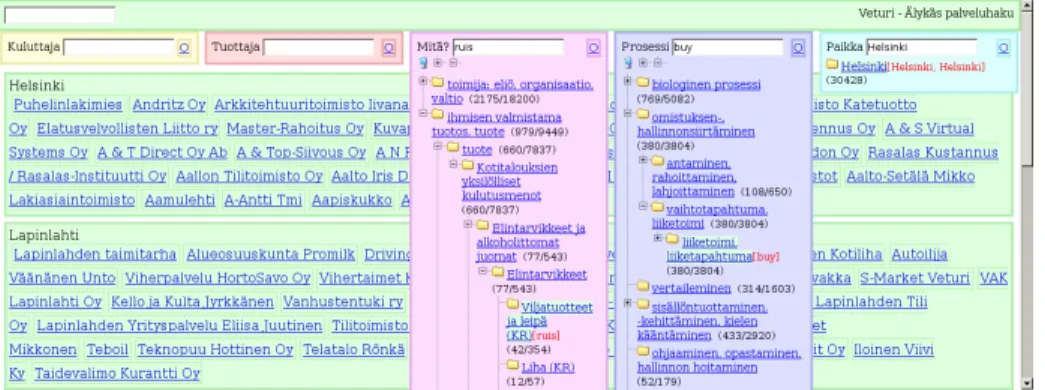
Figure 3 depicts the search interface of the Veturi portal. The five view-facets used in the portal (Consumer, Producer, Target, Process, and Location of the Service provided) are located at the top, initially marked only by their name and an empty keyword box. Typing search terms in the boxes immediately opens the corresponding facet to show matching categories. The results view below the facets also dynamically updates to show relevant hits, defined by the current search constraints in other facets and a union of all the categories in the current facet matched by the keyword. If there is a need for more specificity or an alternate selection, a single category can be selected from the facet. After such a selection, the facet again closes, showing only the newly selected constraint, with the results view updating accordingly.
The user is guided in formulating his query by focusing the views on clearly iden-tifiable distinct variables of the service. For users more familiar with the portal and its service description model, a globally effective keyword search box is provided in the upper left corner of the interface for quick, undifferentiated searches. Because in the service model used the contents of the views seldom overlap, most queries can be adequately and precisely replied to simply by typing the service need in plain text in the global keyword box, e.g. “car repair helsinki”, with possible disambiguations done through selections in the facets.
The example search depicted in figure 3 shows a user trying to find out where he can buy rye bread in Helsinki. He has already selected Helsinki as the locale for the
4http://www.cs.helsinki.fi/group/iwebs/
5Asynchronous JavaScript and the XMLHttpRequest -object, which allow for
mak-ing HTTP calls to the server in the background while viewmak-ing a page. See e.g. http://en.wikipedia.org/wiki/AJAX.
Fig. 3. The Veturi user interface.
services he requires. Now, he is in the process of describing the actual service. In the view ’Mit¨a?’ (service target), the user has typed in the word ’ruis’ (rye). While the annotation ontology used does not contain different grains, the concept ’Viljatuotteet ja Leip¨a (KR)’ (grain products and bread) contains a textual reference to rye, resulting in a category match. In this way, existing textual material can be used to augment incomplete ontologies to at least return some hits for concepts that have not yet been added to the ontology.
In the figure, the matched categories are shown directly in their hierarchical con-texts. This allows for quick evaluation of the relevance of the hits, as well as reveals close misses, where for example the keyword matches a sub-category of a more appro-priate one, as in when the common-language word ’vitamin’ has been given when actu-ally the whole category of dietary supplements was meant. As a side effect of viewing the trees, the user is also guided on the content of the collection and how it is indexed in the system. The trees can also be opened and navigated freely without using keywords for an alternate form of navigation and familiarization with the indexing concepts and facets.
The search query entered in the view ’Prosessi’ (Process) divulges an additional feature of the portal: multilanguage support. Typing in the word ’buy’ matches the ap-propriate ’liiketoimi, liiketapahtuma’ (business transaction), even though the word for ’buy’ in Finnish would be ’ostaa’. The implementation also supports the T9-type am-biguous numerical queries [10, 11] common in mobile phone text input environments. These extensions were implemented to demonstrate how the core semantic autocomple-tion interface can easily be combined with other advances in predictive text autocom-pletion, because the ontological navigation happens separately after string matching, similarly to what is described in [12].
5
Complementing User Interface Elements
In addition to the basic view-based interfaces depicted above, ONTOVIEWSportals can
features deal with what happens after an interesting data item is located, providing additional browsing options from the viewpoint of that item.
The data items that make up the content of ONTOVIEWSportals can be joined to create compound items. These are collections of items that are then displayed on a single web page in a suitable manner. By using compound items it is possible to collect together complexly interrelated information from different sources and present it in a clear way as a single unit. The compound items can be created manually by the portal maintainers, or through logic rules operating on the ontology level.
The compound item can be visualized in different ways, depending on the nature of the collection. In the e-government SW-Suomi.fi -portal [13], a simple list was deemed sufficient. Here, for example, a compound item of traveling abroad contains information about acquiring a passport, possible vaccinations needed and so forth.
Another possible visualization format are graphs. This has been experimented with in prototypes of CultureSampo, the successor to MUSEUMFINLAND, where the idea is to use process descriptions as the central glue joining together a wide variety of cultural content. For example, finding a process of farming that interests him, a user can go through a graph visualization of it, at each step seeing all the material relating to that particular step of the process, e.g. videos on sowing wheat, museum implements used in the clearing the field or a poem about plowing.
The ONTOVIEWS system also supports direct horizontal navigation between the items via semantic links so users can browse through the portal content without having to return back to the category level.
These semantic links are generated automatically by a set of domain specific cat-egory rules. The rules act as shortcuts between two items in the knowledge base. A rule fires when the two items are connected through an RDF path defined in the rule and creates a direct hyper-link between the items. A labeling system is used to provide context for the link, containing both the meaning of the rule and the details of the actual link, e.g. ’Common theme: Christmas’ for two related museum items, or ’Nearby Taxi Companies: Espoo’ related to the details-page of a car repair shop.
6
Discussion and Related Work
We argued for using multi-facet search as a basis for searching and browsing on the se-mantic web, and presented different user interfaces to support the argument. The inter-faces respond to different use case requirements, but are sufficiently similar to maintain familiarity. In both cases, the facet hierarchies give the user an overview of what kind of information there is in the data repository in terms of hierarchical vocabularies, and guide the user in formulating the query in terms of appropriate concepts. According to user tests [8], the semantic firmness and specificity of the categories are desirable qualities when doing more complex searches.
Many ideas for the interfaces presented are similar to [1] and [8], but ONTOVIEWS
extends these frameworks and systems in many ways. For example, a view hierarchy projection mechanism and a semantic linking facility based of ontologies and logic recommendation rules are provided, as well as semantic autocompletion. Multi-facet search has more recently been exploited, e.g., in Longwell, in the RDF Browser by the
Simile project6, and in the SWED [14] directory of environmental organizations and projects. First commercial implementations for multi-facet search exist.
References
1. Pollitt, A.S.: The key role of classification and indexing in view-based searching. Technical report, University of Huddersfield, UK (1998) http://www.ifla.org/IV/ifla63/63polst.pdf. 2. Hearst, M., Elliott, A., English, J., Sinha, R., Swearingen, K., Lee, K.P.: Finding the flow in
web site search. CACM 45 (2002) 42–49
3. Hyv¨onen, E., Saarela, S., Viljanen, K.: Application of ontology-based techniques to view-based semantic search and browsing. In: Proceedings of the First European Semantic Web Symposium, May 10-12, Heraklion, Greece, Springer–Verlag, Berlin (2004)
4. Hyv¨onen, E., Junnila, M., Kettula, S., M¨akel¨a, E., Saarela, S., Salminen, M., Syreeni, A., Valo, A., Viljanen, K.: Finnish Museums on the Semantic Web. User’s perspective on MuseumFinland. In: Proceedings of Museums and the Web 2004 (MW2004), Seleted Papers, Arlington, Virginia, USA. (2004) http://www.archimuse.com/mw2004/papers/hyvonen/hyvonen.html.
5. M¨akel¨a, E., Hyv¨onen, E., Saarela, S., Viljanen, K.: OntoViews - A Tool for Creating Se-mantic Web Portals. In: Proceedings of the Third Internation SeSe-mantic Web Conference (ISWC2004), Hiroshima, Japan, Springer Verlag (2004)
6. Sellen, A., Murphy, R., Shaw, K.L.: How Knowledge Workers Use the Web. In: Proceedings of the SIGCHI conference on Human factors in computing systems, CHI Letters 4(1), ACM (2002)
7. Teevan, J., Alvarado, C., Ackerman, M.S., Karger, D.R.: The Perfect Search Engine is not Enough: A Study of Orienteering Behavior in Directed Search. In: Proceedings of the 2004 conference on Human factors in computing s ystems, ACM Press (2004)
8. Lee, K.P., Swearingen, K., Li, K., Hearst, M.: Faceted metadata for image search and brows-ing. In: Proceedings of CHI 2003, April 5-10, Fort Lauderdale, USA, Association for Com-puting Machinery (ACM), USA (2003)
9. Niles, I., Pease, A.: Towards a standard upper ontology. In: FOIS ’01: Proceedings of the international conference on Formal Ontology in Information Systems, New York, NY, USA, ACM Press (2001) 2–9
10. Dunlop, M.D., Crossan, A.: Predictive text entry methods for mobile phones. Personal Technologies 4 (2000)
11. Hasselgren, J., Montnemery, E., Nugues, P., Svensson, M.: Hms: A predictive text entry method using bigrams. In: Proceedings of the Workshop on Language Modeling for Text Entry Methods, 10th Conference of the European Chapter of the Association of Compu-tational Linguistics, Budapest, Hungary, Association for CompuCompu-tational Linguistics (2003) 43–49
12. Legrand, S., Tyrv¨ainen, P., Saarikoski, H.: Bridging the word disambiguation gap with the help of owl and semantic web ontologies. In: Proceedings of the Workshop on Ontologies and Information Extraction, Eurolan 2003. (2003) 29–35
13. Sidoroff, T.: Semantic web portals (in Finnish, Semanttiset portaalit). Mas-ter’s thesis, University of Helsinki, Dept. of Computer Science (2005) http://www.cs.helsinki.fi/group/seco/publications.
14. Reynolds, D., Shabajee, P., Cayzer, S.: Semantic Information Portals. In: Proceedings of the 13th International World Wide Web Conference on Alternate track papers & posters, ACM Press (2004)