MobiDesk: Mobile Virtual Desktop Computing
Ricardo Baratto Shaya Potter Gong Su Jason Nieh
Department of Computer Science
Columbia University
{ricardo, spotter, gongsu, nieh}@cs.columbia.edu
Columbia University Technical Report CUCS-014-04, March 2004
Abstract
We present MobiDesk, a mobile virtual desktop comput-ing hostcomput-ing infrastructure that leverages continued improve-ments in network speed, cost, and ubiquity to address the complexity, cost, and mobility limitations of today’s per-sonal computing infrastructure. MobiDesk transparently virtualizes a user’s computing session by abstracting under-lying system resources in three key areas: display, oper-ating system and network. MobiDesk provides a thin vir-tualization layer that decouples a user’s computing session from any particular end user device and moves all applica-tion logic from end user devices to hosting providers. Mo-biDesk virtualization decouples a user’s computing session from the underlying operating system and server instance, enabling high availability service by transparently migrat-ing sessions from one server to another durmigrat-ing server main-tenance or upgrades. We have implemented a MobiDesk prototype in Linux that works with existing unmodified ap-plications and operating system kernels. Our experimental results demonstrate that MobiDesk has very low virtualiza-tion overhead, can provide a full-featured desktop experi-ence including full-motion video support, and is able to mi-grate users’ sessions efficiently and reliably for high avail-ability, while maintaining existing network connections.
1
Introduction
Continuing advances in hardware technology have enabled the proliferation of faster, cheaper, and more portable per-sonal computers to support increasingly mobile users. As personal computers become more ubiquitous in large cor-porate and academic organizations, the total cost of owning and maintaining them is becoming unmanageable. These computers are increasingly networked, which only compli-cates the management problem with the need to constantly upgrade and patch to protect them and their data against a myriad of viruses and other attacks propagated through the network. Furthermore, as mobile users transport their portable computers from one place to another, it is not
un-common for these machines to be damaged or stolen, result-ing in the loss of any important data stored on those ma-chines. Even in the best case when such data can be re-covered from backup, the time consuming process of recon-stituting the state of the lost machine on another device re-sults in a huge disruption in critical computing service for the user.
We introduce MobiDesk, a mobile virtual desktop com-puting hosting infrastructure that leverages rapid improve-ments in network bandwidth, cost, and ubiquity to ad-dress the limitations of the current personal computing model. With wire-speed network technologies scaling at faster Moore’s exponents than silicon, MobiDesk leverages the network to decouple a user’s desktop computing session from the end user device by moving all application logic from end user devices to hosting providers. End user de-vices are simply used for sending user input to the hosting provider and displaying output from the hosting provider, allowing them to be simple stateless clients. Input and out-put associated with a comout-puting session can be easily redi-rected to any end user device. MobiDesk also decouples a user’s desktop computing session from the underlying op-erating system and server instance, allowing a user’s entire computing environment to be migrated transparently from one server to another. This enables a server to be brought down for maintenance and upgraded in a timely manner with minimal impact on the availability of a user’s computing services. Once the original machine has been updated, the user’s computing session can be migrated back and continue to execute even though the underlying operating system may have changed. MobiDesk ensures that any network connec-tions associated with the user’s computing session are main-tained even as the session is migrated from one machine to another. MobiDesk provides these benefits without modify-ing, recompilmodify-ing, or relinking applications or operating sys-tem kernels. MobiDesk requires no changes to clients other than being able to execute a simple user-space application to process and display input and output.
MobiDesk provides a mobile virtual desktop computing environment by introducing a thin virtualization layer be-tween a user’s computing environment and the underlying
system. MobiDesk focuses on virtualizing three key system resources, display, operating system, and network resources. MobiDesk virtualizes display resources by providing a vir-tual display driver interface and framebuffer that efficiently encodes and redirects display updates from the server to an end user device. MobiDesk virtualizes operating system re-sources by providing a virtual private namespace for each desktop computing session that offers a host-independent virtualized view of an operating system, enabling the ses-sion to be transparently migrated from one server to an-other. MobiDesk virtualizes network resources by providing virtual address identifiers for connections and a transport-independent proxy mechanism to preserve all network con-nections associated with a user’s computing session even it if is migrated from one server to another inside the MobiDesk server infrastructure.
The MobiDesk hosted desktop computing approach pro-vides a number of important benefits over current computing approaches:
• Independence from desktop failures: Because
applica-tion state and user computing environments are main-tained by MobiDesk in a hosting provider, users are isolated from local desktop failures. There is no lo-calized computing state that needs to be recovered. Furthermore, such devices can be inexpensive stateless machines that never need to be backed up or restored.
• Transparent user mobility: Because all persistent user
state is maintained on the servers, users are able to move freely among any client access devices and pick up right where they left off.
• Global computing access: As a result of the widespread
proliferation of Internet-connected devices, MobiDesk users can access their desktop computing environments from around the world on whatever computing infras-tructure happens to be available.
• High availability application services in the presence of server downtime and upgrades: Because
applica-tions are decoupled from the server hardware and un-derlying operating system instance, applications can be moved anywhere and in particular migrated off faulty hosts, and before host maintenance and upgrades, so applications continue to run with minimal downtime. Today, maintaining and upgrading a server can result in long periods of service downtime, whereas MobiDesk enables hardware and operating systems to be upgraded in a timely manner with minimal impact on application service availability – by migrating applications to an-other machine that has already been updated. With Mo-biDesk, system administrators no longer need to sched-ule downtime in advance and in cooperation with all the users, thereby closing the vulnerability window of un-repaired systems. Once the original machine has been
updated, applications can be migrated back, if appro-priate.
• Reliable computing for legacy applications and com-modity systems: Because MobiDesk is designed to
work with unmodified legacy applications and com-modity operating systems, it offers the potential to bring about more reliable computing without giving up the large investments already made in the existing soft-ware base.
• Persistence and continuity of business logic: By
mov-ing away from the current model of simply backmov-ing up file data to secure remote locations, and instead protect-ing entire computprotect-ing environments by runnprotect-ing hostprotect-ing providers in secure remote locations, MobiDesk can enable academic, business, and government institutions to function much more effectively in times of crisis. Restoring an organization’s local computing infrastruc-ture from backup consequent to a crisis is an extremely slow, time-consuming process that is increasingly in-effective given the scale of IT infrastructure being de-ployed today. MobiDesk offers a different, improved model of continuous uptime, especially during a crisis, when infrastructure availability is most crucial.
• On-demand access to scalable computational re-sources beyond the desktop: By multiplexing a large
pool of shared computational resources among many users, an individual can gain access to substantially more resources than can be afforded on one’s local desktop computer, analogous to “grid computing” but in a technologically simpler fashion for the average user to exploit. The resources given to a user can be scaled up or down as necessary. Instead of having to throw away their existing local desktop machines ev-ery time they need more compute power, users just ask their service provider to scale up their resource alloca-tion. More importantly, such scalable computing power is available on demand and can be allocated immedi-ately even in times of crisis when computing resources may be most needed.
• Makes available a wider range of application services:
Given the cost of computer software, many users often cannot afford more than a few, heavily used applica-tions on their desktops. MobiDesk can provide a wider range of affordable application services on multiple op-erating system platforms by amortizing the costs of ap-plications over a large number of users. Since not all applications will be in use by all users at one time, sta-tistical multiplexing can serve a larger number of users with fewer software licenses. Just as MP3 download services have enabled less-known musicians to dis-tribute their music, MobiDesk enables a greater diver-sity of software developers to provide innovative
soft-ware and distribute it to users via the computing service provider – potentially leading to new business models that benefit software developer, service provider and consumer alike.
• Support for secure, low-cost client access devices:
Client access devices just need to be able to connect to the Internet. They do not need to provide com-plex computing functionality, making it unnecessary to continuously upgrade to more powerful desktop ma-chines. Simpler, lower cost, possibly longer battery-life client access devices can be made more readily avail-able for such a service. These devices may come in many shapes and sizes, from desktop machines with megapixel displays to handheld devices with pocket-sized screens. Furthermore, MobiDesk provides a model that can more easily secure low-cost client de-vices since they do not store persistent, sensitive data.
• Bridging the information gap: Contrasting with the
current society of information climate “haves” and “have-nots,” MobiDesk can be accessed by low-cost client devices to deliver secure service on a subscrip-tion basis offering a societally better way of providing access to computing as widely as possible. Remote computing and storage services can be paid for us-ing a subscription-based or use-based economic model that follows current Internet access or telephone pric-ing policies. A MobiDesk provider could supply basic computing, including a complete suite of desktop pro-ductivity tools, for just a few dollars a month. Video-on-demand service, online gaming, and other multi-media services could be obtained from the same or other providers for additional small fees. Furthermore, the more centralized service and management model provides lower total cost of ownership across all ap-plications, making computing more widely affordable. More importantly, MobiDesk enables client devices to be easier to manage and use by removing the local sys-tem complexity associated with current software up-grade cycles, making computing more accessible to a wider population of users.
This paper presents the design and implementation of MobiDesk. Section 2 briefly presents the overall MobiDesk system architecture and usage model. Section 3 describes the MobiDesk display virtualization mechanism. Section 4 describes the MobiDesk operating system virtualization mechanism. Section 5 describes the MobiDesk network vir-tualization mechanism. Section 6 presents experimental re-sults measuring MobiDesk system performance and associ-ated overhead in the context of real desktop computing ap-plications. Section 7 discusses related work. Finally, we present some concluding remarks.
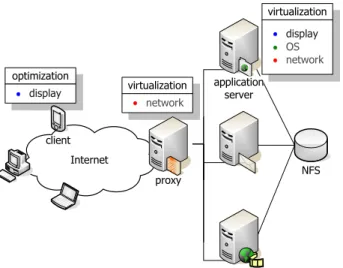
Figure 1: MobiDesk architecture
2
Overview of System Architecture
MobiDesk is architected as a proxy-based server cluster sys-tem, comparable to systems deployed today by application service providers. The overall architecture of the system is depicted in Figure 1. MobiDesk is composed of a proxy, a group of backend session servers connected in a LAN, a storage server infrastructure, and a number of external, het-erogeneous clients through which users access the system.
The proxy acts as a front-end that admits service requests from clients across the Internet, and dispatches the requests to the appropriate backend application servers. The proxy exposes a single entry point to the clients, operates at layer 7, and employs suitable admission and service dispatching policies. The backend compute servers host completely vir-tualized environments within which the computing sessions of MobiDesk’s users run. The network storage server in-frastructure is used for all persistent file storage. The clients are merely inputing and outputing devices connected to the servers across the Internet.
Users interact with their MobiDesk sessions through a thin-client style session viewer, a simple device or applica-tion that relays the user’s input and the session’s output be-tween the client and the server through a secure encrypted channel. Each user in the system is assigned a username and password. When a user first logs into MobiDesk, the proxy performs appropriate authentication, and connects her to a MobiDesk session server. The server creates a virtual and private environment, that is populated with a complete set of operating system resources and desktop applications. To the user, the session appears no different than to logging into a private computer. When the client disconnects, the session continues to run on the MobiDesk server, unless the user ex-plicitly logs out. On future connections, the session will be in the same state it was when the user last disconnected from
MobiDesk.
By providing a virtual, private environment for each user, MobiDesk is able to dynamically relocate sessions to meet load balancing, system maintenance and/or quality of ser-vice requirements. Sessions can be checkpointed and mi-grated transparently at any point in time. To keep track of the sessions as migration occurs, MobiDesk implements a
session cookie mechanism. As new sessions are created, the
proxy generates a unique cookie that is passed to the host-ing servers and associated with the new session. Whenever a session is migrated, the destination server uses the cookie to inform the proxy of the new location. Finally, the next time the user logs in, the proxy will use the cookie to identify the server where the user’s session is being hosted.
To provide a private, mobile environment for user ses-sions, MobiDesk virtualizes three key resources: display, operating system, and network. MobiDesk virtualization is designed to work with existing unmodified applications, op-erating system kernels, and network infrastructure and pro-tocols. The three components work in concert to create a completely virtualized environment for client computing sessions.
MobiDesk virtualizes the server display by providing a virtual display driver that intercepts drawing commands from user’s applications, and translates the commands into a display protocol between the client and the server. Mo-biDesk display virtualization focuses on the importance of latency-sensitive design for interactive computing and antic-ipates the kind of high-bandwidth network access that is be-coming increasingly cost-effective and accessible in WAN environments [2]. For example, South Korea is building a nationwide Internet access infrastructure to make speeds up to 100 Mbps available to the home by 2010 [17].
MobiDesk operating system virtualization provides a vir-tual, private namespace for each hosted client computing session. For example, each computing session has its own host-independent view of a complete set of OS resources such as PID/GID, IPC, memory, file system, and devices, etc. MobiDesk virtualization operates at a finer granularity than virtual machine approaches such as VMware [39] by virtualizing individual computing sessions instead of com-plete operating system environments. As a result, comput-ing sessions can be decoupled from the underlycomput-ing operatcomput-ing system and migrated to other servers to maintain high avail-ability even in the presence of server hardware and operating system maintenance and upgrades.
MobiDesk network virtualization provides persistent net-work connections for client computing sessions even as they move among servers in a MobiDesk cluster. All connec-tions operate through the MobiDesk proxy. Similar to oper-ating system virtualization, MobiDesk virtualizes network connections by a virtual and private namespace for transport connection identifiers, such as IP address and port number, on both the proxy and the servers. These virtual identifiers
remain constant and are simply translated to the underly-ing physical network identifiers as a session moves amongst servers at different physical network locations. MobiDesk network virtualization provides persistent connections from mobile client computing sessions to outside hosts without running any software on the outside hosts and without any changes to the existing network infrastructure.
3
Display Virtualization
To make MobiDesk a viable replacement to the traditional desktop computing model, MobiDesk needs to be able to deliver the complete set of unmodified desktop applications to end users with good performance. MobiDesk must work within the framework of existing display systems, intercept-ing display commands from unmodified applications and redirecting these commands to remote clients. To provide good WAN performance, MobiDesk must intercept display commands at an appropriate abstraction layer to provide sufficient information to optimize the processing of display commands in a latency-sensitive manner. Furthermore, to support transparent user mobility and eliminate client ad-ministration complexity, MobiDesk should support the use of thin, stateless clients by ensuring that all persistent dis-play state is stored in the MobiDesk server infrastructure.
Given that traditional display systems are structured in multiple abstraction layers, there are a number of possible ways in which MobiDesk can interact with existing display systems. We can loosely categorize display system struc-ture into three layers: application, middle-ware, and hard-ware. The application layer is the top display system layer with which applications interact. It presents a high-level model of the overall characteristics of the display system and includes descriptions of the operation and management of windows, input mechanisms, and display capabilities of the system. These capabilities may range from basic 2D dis-play, to complex operations involving transparency, blends, 3D transformations and the display of multimedia content. The middle-ware layer sits between the high-level applica-tion display layer and the low-level video hardware layer. Its responsibility is to create a hardware-independent ab-straction of the display hardware to meet the requirements of the display system and its applications. To maintain con-sistency across hardware with differing abilities, it is provi-sioned with fallback mechanisms and software routines that can implement missing hardware features. The video hard-ware layer is a a low-level, hardhard-ware-dependent layer that exposes the video hardware to the display system. It is im-plemented as a set of device drivers responsible for translat-ing between the middle-ware’s abstract display operations and the commands understood by the display hardware.
MobiDesk rules out using the application and middle-ware layers for intercepting display commands for the
fol-lowing important reasons. MobiDesk does not intercept at the application layer because that requires a significant amount of application logic and computational power on the client for translating high-level commands. This would limit the range of MobiDesk’s target client architectures. Inter-cepting at the application layer also results in direct syn-chronization between applications and the client, which can reduce display performance in higher latency WAN environ-ments. MobiDesk also does not intercept at the middle-ware layer because that would require MobiDesk to reimplement substantial display system functionality instead of leverag-ing continuleverag-ing advances in existleverag-ing middle-ware implemen-tations such as XFree86.
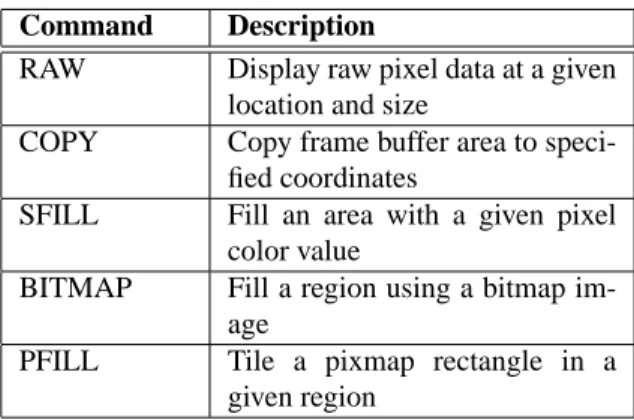
MobiDesk display virtualization is instead designed as a virtual video device driver that intercepts display commands at the video hardware layer. MobiDesk provides a sepa-rate virtual video device for each computing session. Rather than sending display commands to local display hardware, MobiDesk’s virtual video driver packages up display com-mands associated with a user’s computing session and sends them over the network to a remote client. For this purpose, MobiDesk implements a simple, low-level, minimum over-head protocol, as described in Table 1. The protocol mimics the operations most commonly found in display hardware, allowing clients to do little more than forward protocol com-mands to their local video hardware, reducing the latency of display processing. To provide security, all protocol traf-fic is encrypted using the standard RC4 [33] stream-cipher algorithm. MobiDesk’s video hardware layer approach al-lows it to take full advantage of existing infrastructure and hardware interfaces, while maximizing client resources and requiring minimal computation on the client. Furthermore, new video hardware features can be supported with at most the same amount of work necessary for supporting them in traditional desktop display drivers. While there is some loss of semantic display information at the low level video de-vice driver interface, our experiments with desktop applica-tions such as web browsers indicate that the vast majority of application display commands issued can map directly to standard video hardware primitives. Furthermore, we show in Section 6 that the simpler display virtualization used by MobiDesk can provide superior display performance com-pared to other approaches.
To deliver good performance in WAN environments, the MobiDesk display virtualization architecture couples its virtual video device driver approach with other latency-sensitive display mechanisms. In particular, MobiDesk ex-ports client display hardware resources to the server and leverages such resources to reduce the latency of display processing. For example, MobiDesk provides direct video support by leveraging alternative YUV video formats na-tively supported by almost all off-the-shelf video card avail-able today. Video data can be simply transferred from server to client video hardware, which automatically does
Command Description
RAW Display raw pixel data at a given location and size
COPY Copy frame buffer area to speci-fied coordinates
SFILL Fill an area with a given pixel color value
BITMAP Fill a region using a bitmap im-age
PFILL Tile a pixmap rectangle in a given region
Table 1: MobiDesk Protocol Display Commands
inexpensive, high-speed, color-space conversion and scal-ing. As another example, MobiDesk leverages cursor draw-ing support available with almost every video card in use today. MobiDesk uses local cursor drawing in response to mouse movements and maintains local cursor state at the client. Cursor changes still come from the server, but Mo-biDesk improves system response time by avoiding network latency with any cursor drawing that does not result in cur-sor changes.
MobiDesk provides two important server-side mecha-nisms for improving performance in WAN environments. One MobiDesk mechanism is the use of a server-push model for sending display updates to the client. As soon as display updates are generated on the server, they are delivered to the client. MobiDesk does not require clients to explicitly re-quest display updates, which add additional network latency to command processing. Another MobiDesk mechanism is the use of display command scheduling to improve the re-sponsiveness of the system. MobiDesk display virtualiza-tion employs a Shortest-Remaining-Size-First (SRSF) pre-emptive command scheduler, that is analogous to Shortest-Remaining-Processing-Time (SRPT). SRPT is known to be optimal for minimizing mean response time [5], a primary goal for an interactive system. In display applications, short jobs are normally associated with text and general GUI lay-out components, which are critical to the usability of the system. On the other hand, large jobs are normally lower priority “beautifying” GUI elements, such as image decora-tions, desktop backgrounds and web page banners.
Finally, MobiDesk supports thin, stateless display clients by storing at all times, all session state at the respective Mo-biDesk server. Although the MoMo-biDesk takes advantage of client resources when available, all client state used by Mo-biDesk is considered temporary and destroyed upon client disconnect. When a remote client connects to the MobiDesk infrastructure, the server running the user’s computing ses-sion transfers the current sesses-sion state to the client. For the duration of the connection, the client forwards input events
to the server, which in turn forwards display updates back to the client. The client at no point has an intermediate session state differing from the server. When the client eventually disconnects, it leaves no state behind in the local computer.
4
Operating System Virtualization
To enable users’ computing sessions to freely migrate from one MobiDesk server to another, MobiDesk encapsulates each session with a host-independent virtualized view of the operating system. MobiDesk operating system virtualiza-tion provides the same applicavirtualiza-tion interface as the underly-ing operatunderly-ing system so that legacy applications can execute in the context of a session without any modification. Pro-cesses within a session can make use of all available oper-ating system services, just like processes executing in a tra-ditional operating system environment. Unlike a tratra-ditional operating system, each virtualized session provides a self-contained unit that can be isolated from the system, check-pointed to secondary storage, migrated to another machine, and transparently restarted. This is made possible because each computing session has its own private, virtual names-pace. All operating system resources are only accessible to processes running in a session through the session’s private, virtual namespace.
A session namespace is private in that only processes within the session can see the namespace. It is private in that it masks out resources that are not contained within the session, including processes outside of the session. Pro-cesses inside a session appear to one another as normal pro-cesses that can communicate using traditional IPC mecha-nisms. Other processes outside a session do not appear in the namespace and are therefore not able to interact with processes inside a session using IPC mechanisms such as shared memory and signals. Instead, processes outside the session can only interact with processes inside the session using normal RPC mechanism that support process commu-nication across machines.
A session’s namespace is virtual in that all operating sys-tem resources including processes, user information, files, and devices are accessed through virtual identifiers within a session. These virtual identifiers are distinct from host-dependent resource identifiers used by the operating sys-tem. The session’s virtual namespace provides a host-independent view of the system by using virtual identifiers that remain consistent throughout the life of a process in the session, regardless of whether the session moves from one system to another. Since the session’s namespace is sepa-rate from the underlying operating system namespace, the session’s namespace can preserve this naming consistency for its processes even if the underlying operating system namespace changes, as may be the case in migrating pro-cesses from one machine to another.
The session’s private, virtual namespace enables pro-cesses running in a session to migrate together as a group. Processes in a session have a consistent, host-independent view of the underlying operating system. Operating system resource identifiers such as process IDs (PIDs) must remain constant throughout the life of a process to ensure its cor-rect operation. However, when a process is moved from one operating system to another, there is no guarantee that the underlying operating system will provide the same identi-fiers to a migrated process; those identiidenti-fiers may in fact al-ready be used by other processes in the system. The ses-sion’s namespace addresses these issues by providing con-sistent, virtual resource names in place of host-dependent resource names such as PIDs. Names within a session are trivially assigned in a unique manner in the same way that traditional operating systems assign names, but such names are localized to the session. Since the namespace is private to a given session, there are no resource naming conflicts for processes in different sessions. There is no need for the ses-sion’s namespace to change when the session is migrated, which allows sessions to ensure that identifiers remain con-stant throughout the life of the process, as required by legacy applications that use such identifiers. Similarly, the private virtual namespace enables sessions to be securely isolated from each other by providing complete mediation to all op-erating system resources. Since the only resources within each session are the ones that are accessible to a particular user, including his files and processes, if another user’s ses-sion would get exploited, it would be unable to harm any other user’s session.
4.1
Session Virtualization
Sessions are supported using virtualization mechanisms that translate between the session’s virtual resource identifiers and operating system resource identifiers. Every resource that a process in a session accesses is through a virtual name which corresponds to an operating system resource identi-fied by a physical name. When an operating system resource is created for a process in a session, such as with process or IPC key creation, instead of returning the correspond-ing physical name to the process, the session’s virtualization layer catches the physical name value, and returns a private virtual name to the process. Similarly, any time a process passes a virtual name to the operating system, the virtual-ization layer catches it and replaces it with the appropriate physical name. The key virtualization mechanisms used are a system call interposition mechanism and thechroot util-ity with file system stacking for file system resources.
Session virtualization employs system call interposition to wrap existing system calls to check and replace argu-ments that take virtual names with the corresponding phys-ical names before calling the underlying original system call. Similarly, the wrapper is used to capture physical name
identifiers that the original system calls return and return corresponding virtual names to the calling process running inside the session. Session virtual names are maintained consistently as a session migrates from one machine to an-other and are remapped appropriately to underlying physical names that may change as a result of migration. Session sys-tem call interposition also masks out processes inside of a session from processes outside of the session to remove any interprocess host dependencies across the session boundary. System call interposition is used to virtualize operating sys-tem resources including process identifiers, keys and identi-fiers for IPC mechanisms such as semaphores, shared mem-ory, and message queues, and network addresses.
Session virtualization employs the chroot utility and file systems stacking to provide each session with its own file system namespace that can be separate from the regu-lar host file system. The session file system can be com-posed from loopback mounts from the host for sessions that are only checkpointed and restarted on the same machine. Similarly, one can make use of a portable hard drive that one moves between the different hosts one wants to migrate within. More commonly, the session’s file system is com-posed from remote mounts via a network file system such as NFS so that the same files can be made consistently avail-able as a session is migrated from one machine to another. More specifically, when a session is created or moved to a host, a private directory named according to the session identifier is created on the host to serve as a staging area for the session’s virtual file system. Within this directory, the various network-accessible directories that the session is configured to access will be mounted from a network file server. For example, from a Unix-centric viewpoint, this set of directories could include/etc,/lib,/bin,/usr, and/tmp. Thechrootsystem call is then used to set the staging area as the root directory for the session, thereby achieving file system virtualization with negligible perfor-mance overhead. This method of file system virtualization provides an easy way to restrict access to files and devices from within a session. This can be done by simply not in-cluding file hierarchies and devices within the session’s file system namespace. If files and devices are not mounted within the session’s virtual file system, they are not accessi-ble to the session’s processes.
Because commodity operating systems are not built to support multiple namespaces, a security issue that session virtualization must address is that there are many ways to break out of a standard chrooted environment, especially if one allows thechrootsystem call to be used by processes in a session. The session’s file system virtualization enforces the chrooted environment and ensures that the session’s file system is only accessible to processes within the given ses-sion by using a simple form of file system stacking to im-plement a barrier. This barrier directory prevents processes within the session from traversing it. Since the processes
can’t traverse the directory, they can’t access files outside of the session’s file system namespace.
In order for a session to fully replace a regular com-puter, the session has to allow processes to run as the priv-ileged root user. For instance, programs such aspingand traceroutethat need to create raw sockets andpasswd that is used to change system resources need to run with privilege. Because the root’s UID 0 is treated specially by the operating system kernel, session virtualization also treats UID 0 processes inside of a session in a special way to pre-vent them from breaking the session abstraction, accessing resources outside of the session, and causing harm to the host system. While a session can be configured for admin-istrative reasons to allow full privileged access to the under-lying system, we focus on the case of sessions for running application services which do not need to be used in this manner. Session do not disallow UID 0 processes, which would limit the range of application and services that could be run inside a session. Instead, sessions provide restrictions on such processes to ensure that they function correctly in-side of a session.
While a process is running in user space, the UID it runs as doesn’t have any effect. Its UID only matters when it tries to access the underlying kernel via one of the kernel entry points, namely devices and system calls. Since a session already provides a virtual file system that includes a virtual /devwith a limited set of secure devices, the device entry point is already secured. The only system calls of concern are those that could allow a root process to break the session abstraction. Only a small number of system calls can be used for this purpose. Session virtualization classifies these system calls into three classes that need to be protected.
The first class of system calls are those that only affect the host system and serve no purpose within a session. Ex-amples of these system calls include those that load and un-load kernel modules or that reboot the host system. Since these system calls only affect the host, they would break the session security abstraction by allowing processes within it to make system administrative changes to the host. System calls that are part of this class are therefore made inaccessi-ble by default to processes running within a session.
The second class of system calls are those that are forced to run unprivileged. Just like NFS, by default, squashes root on a client machine to act as user nobody, session virtu-alization forces privileged processes to act as thenobody user when it wants to make use of some system calls. Ex-amples of these system calls include those that set resource limits and ioctl system calls. Since system calls such as setrlimitandnicecan allow a privileged process to increase its resource limits beyond predefined limits im-posed on session processes, privileged processes are by de-fault treated as unprivileged when executing these system calls within a session. Similarly, the ioctl system call is a system call multiplexer that allows any driver on the
host to effectively install its own set of system calls. Since the ability to audit the large set of possible system calls is impossible given that sessions may be deployed on a wide range of machine configurations, session virtualization con-servatively treats access to this system call as unprivileged by default.
The final class of system calls are calls that are required for regular applications to run, but have options that will give the processes access to underlying host resources, breaking the session abstraction. Since these system calls are required by applications, the session checks all their options to ensure that they are limited to resources that the session has access to, making sure they aren’t used in a manner that breaks the session abstraction. For example, themknodsystem call can be used by privileged processes to make named pipes or files in certain application services. It is therefore desirable to make it available for use within a session. However, it can also be used to create device nodes that provide access to the underlying host resources. To limit how the system call is used, the session system call interposition mechanism checks the options of the system call and only allows it to continue if it’s not trying to create a device.
4.2
Session Migration
To maintain user computing session availability even in the presence of server downtime due to hardware and operating system upgrades, MobiDesk provide a checkpoint-restart mechanism that allows sessions to be migrated across ma-chines running different operating system kernels. Upon completion of the upgrade process, the respective MobiDesk session and its applications can be restored on the origi-nal machine now with an upgraded operating system. We assume here that the systems have not been compromised and that any kernel security holes on the unpatched system have not yet been exploited on the system; migrating across kernels that have already been compromised is beyond the scope of this paper.
We also limit our focus to migrating between machines with a common CPU architecture with kernel differences that are limited to maintenance and security patches. These patches often correspond to changes in the minor version number of the kernel. For example, the Linux 2.4 kernel has more than twenty minor versions. Even within minor version changes, there can be significant changes in kernel code. For example, comparing across different Linux 2.4 kernel versions, all of the files for the VM subsystem were changed at some point since extensive modifications were made to implement a completely new page replacement mechanism in Linux. Many of the Linux kernel patches contain security vulnerability fixes, which are typically not separated out from other maintenance patches. We similarly limit our focus to scenarios where the application’s execu-tion semantics, such as how threads are implemented and
how dynamic linking is done, do not change. On the Linux kernels this is not an issue as all these semantics are en-forced by user-space libraries. Whether one uses kernel or user threads, or one how libraries are dynamically linked into a process is all determined by the respective libraries on the file system. Since the session has access to the same file system on whatever machine it is running on, these seman-tics stay the same.
To support migration across different kernels, MobiDesk use a checkpoint-restart mechanism that employs an inter-mediate format to represent the state that needs to be saved on checkpoint. On checkpoint, the intermediate format rep-resentation is saved and digitally signed to enable the restart process to verify the integrity of the image. Although the in-ternal state that the kernel maintains on behalf of processes can be different across different kernels, the high-level prop-erties of the process are much less likely to change. We cap-ture the state of a process in terms of higher-level seman-tic information specified in the intermediate format rather than kernel specific data in native format to keep the format portable across different kernels. For example, the state as-sociated with a Unix socket connection consists of the direc-tory entry of the Unix socket file, its superblock information, a hash key, and so on. It may be possible to save all of this state in this form and successfully restore on a different ma-chine running the same kernel. But this representation of a Unix socket connection state is of limited portability across different kernels. A different high-level representation con-sisting of a four tuple, virtual source pid, source fd, virtual destination pid, destination fd is highly portable. This is be-cause the semantics of a process identifier and a file descrip-tor is typically standard across different kernels, especially across minor version differences.
The intermediate representation format used by Mo-biDesk for migration is chosen such that it offers the de-gree of portability needed for migrating between different kernel minor versions. If the representation of state is too high-level, the checkpoint-restart mechanism could become complicated and impose additional overhead. For example, the MobiDesk system saves the address space of a process in terms of discrete memory regions called VM areas. As an alternative, it may be possible to save the contents of a process’s address space and denote the characteristics of various portions of it in more abstract terms. However, this would call for an unnecessarily complicated interpretation scheme and make the implementation inefficient. The VM area abstraction is standard across major Linux kernel revi-sions. MobiDesk view the VM area abstraction as offering sufficient portability in part because the organization of a process’s address space in this manner has been standard across all Linux kernels and has never been changed since its inception.
MobiDesk further support migration across different ker-nels by leveraging higher-level native kernel services to
transform intermediate representation of the checkpointed image into an internal representation suitable for the target kernel. Continuing with the previous example, MobiDesk restore a Unix socket connection using high-level kernel functions as follows. First, two new processes are created with virtual PIDs as specified in the four tuple. Then, each one creates a Unix socket with the specified file descriptor and one socket is made to connect to the other. This proce-dure effectively recreates the original Unix socket connec-tion without depending on many kernel internal details.
This use of high-level functions helps in general portabil-ity of using MobiDesk for migration. Securportabil-ity patches and minor version kernel revisions commonly involve modify-ing the internal details of the kernel while high-level primi-tives remain unchanged. As such services are usually made available to kernel modules through exported kernel symbol interface, the MobiDesk system is able to perform cross-kernel migration without requiring modifications to the ker-nel code.
The MobiDesk checkpoint-restart mechanism is also structured in such a way to perform its operations when pro-cesses are in a state that checkpointing can avoid depending on many low-level kernel details. For example, semaphores typically have two kinds of state associated with each of them: the value of the semaphore and the wait queue of pro-cesses waiting to acquire the corresponding semaphore lock. In general, both of these pieces of information have to be saved and restored to accurately reconstruct the semaphore state. Semaphore values can be easily obtained and re-stored through GETALL and SETALL parameters of the semctl system call. But saving and restoring the wait queues involves manipulating kernel internals directly. The MobiDesk mechanism avoids having to save the wait queue information by requiring that all the processes be stopped before taking the checkpoint. When a process waiting on a semaphore receives a stop signal, the kernel immediately re-leases the process from the wait queue and returns EINTR. This ensures that the semaphore wait queues are always empty at the time of checkpoint so that they do not have to be saved.
To provide proper support for MobiDesk virtualization when migrating across different kernels, we must ensure that that any changes in the system call interfaces are prop-erly accounted for. As MobiDesk has a virtualization layer using system call interposition mechanism for maintaining namespace consistency, a change in the semantics for any system call intercepted by MobiDesk’s session abstraction could be an issue in migrating across different kernel ver-sions. But such changes usually do not occur as it would require that the libraries be rewritten. In other words, Mo-biDesk virtualization is protected from such changes in a similar way as legacy applications are protected. However, new system calls could be added from time to time. Such system calls could have implications to the pea
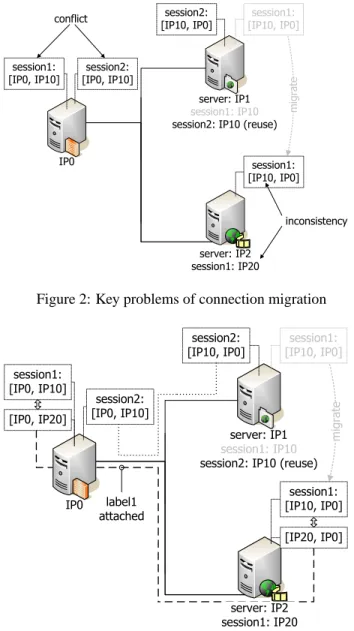
encapsu-Figure 2: Key problems of connection migration
Figure 3: Mobidesk network virtualization mechanism
lation mechanism. For instance, across all Linux 2.4 ker-nels, there were two new system calls,gettidandtkill for querying the thread identifier and for sending a signal to a particularly thread in a thread group, respectively, which needed to be accounted for to properly virtualize MobiDesk across kernel versions. As these system calls take identifier arguments, they were simply intercepted and virtualized
5
Network Virtualization
Networking support for MobiDesk sessions must address two issues:
• Multiple sessions on the same MobiDesk server may run the same service, e.g., two session may both run the
apache server. However, only one of them can listen on port 80.
• Ongoing network connections of a session must be pre-served when the session is migrated from one Mo-biDesk server to another.
When all MobiDesk servers are in the same subnet, the two issues can be addressed relatively easily using exist-ing technologies with minor enhancements from MobiDesk. Each MobiDesk session is assigned a unique IP address from a pool maintained by a DHCP server when it’s first created. From example, the MobiDesk servers may occupy IP address range 192.168.1.2 - 192.168.1.50, and the rest of 192.168.1.5 - 192.168.1.254 may be assigned to MobiDesk sessions. The IP address assigned to a session is created as an alias of the hosting server’s primary IP address. Mul-tiple aliases, each corresponding to a different MobiDesk session, can be created on a MobiDesk server. MobiDesk privatizes the aliases such that a session only sees its own alias and therefore cannot interfere traffic of other sessions on the same server.
Since each session has its own IP address, two sessions on the same server can both listen to port 80, bound to their in-dividual private IP address. When a session is migrated from one server to another, the private IP address of the session remains unchanged; it is simply (re)created as an alias of the new hosting server’s primary IP address. ARP resolves the MAC address change at the link layer and the migration is transparent to network layer and above. Ongoing network connections of the session therefore stay intact.
While it is possible to have the entire private network be-hind the proxy to be in a single subnet regardless of its size, it is often desirable to have separate subnets for scalability and management reasons. In this case, when a session is migrated across subnets, its private IP address can longer persist since it cannot be simply created as an alias of the new hosting server’s primary IP address, which is on a dif-ferent subnet. As a result, two types of problems can occur, as we illustrate in Figure 2. Note that we omit port numbers for simplicity.
We see that when the session1 with IP10 migrates from server IP1 to IP2, its transport connection [IP10, IP0] must persist but its IP address IP10 cannot since IP2 is on a differ-ent subnet; therefore creating an inconsistency. In addition, after session1 with IP10 migrates to server IP2, another ses-sion2 may reuse IP10 on server IP1 (or another server) and creates another connection [IP10, IP0]; therefore creating a conflict since the proxy will see two identical connections [IP0, IP10].
To address the inconsistency problem on the MobiDesk server, MobiDesk associates each session with two IP ad-dresses, one is a virtual address exposed to transport and above layers and the other is a physical address seen only at network and below layers. The virtual address stays constant
for the lifetime of the session while the physical address changes whenever the session migrates. The physical ad-dress is obtain from a DHCP server as in the case of a single subnet but must change when the session is migrated across subnets. There are two ways to assign the virtual address. By default, the virtual address is equal to the initial physi-cal address when the session is created and stays unchanged thereafter. Alternatively, the virtual address can be a prede-fined value that is constant across all sessions. MobiDesk translates the virtual address to the current physical address (and vice versa) when the session migrates. For example, in Figure 3, after migration, session1’s virtual address IP10 is unchanged while its physical address is assigned by the DHCP server to be IP20 and created as an alias on server IP2. The proxy translates [IP0, IP10] into [IP0, IP20] while the server IP2 translates [IP20, IP0] into [IP10, IP0]. Since the virtual address never changes, the migration is transpar-ent to transport and above layers.
One potential solution to the conflict problem on the Mo-biDesk proxy is to require that a physical address, once as-signed to a session, is never reused until the session fin-ishes even after the session has migrated to another subnet. This however results in undesirable dependency of a session on a trail of addresses if it’s migrated many times and new connections are open between each migration. MobiDesk’s solution is to privatize virtual addresses, i.e., to associate virtual addresses with separate private virtual network in-terfaces which provide per-connection address namespace. Instead of having all connections share the same physical interface, each connection is assigned its own private virtual network interface card (VNIC). A VNIC is simply a soft-ware emulation of a NIC at the link layer that appears ex-actly the same as a NIC to network and above layers. As a result, two connections using the same virtual IP address due to address reuse can peacefully coexist on the same server; since they are bound to their own private VNIC.
To support per-connection address space, MobiDesk aug-ments the traditional connection tuple with connection la-bels to identify the VNIC to which a connection is bound. A connection has two labels, independently and uniquely chosen by the MobiDesk proxy and the server at the time when the connection is setup. The two sides also exchange their labels at connection setup time. Before a session is mi-grated, the labels are not used since the tuple along is enough to identify the connections of the session. After a session is migrated, both sides will attach its peer’s label learned at connection setup time for all connection between them. The labels allow the connections to be uniquely identified even when a session’s previous physical address is reused. We illustrate these ideas using the example in Figure 3.
In Figure 3, when the connection [IP0, IP10] was setup for session1 while it was on server IP1, the proxy creates a VNIC for the connection and sends its label1 for the con-nection. to server IP1; similarly, session1 on server IP1
also sends its label for the connection to the proxy (the ac-tual label exchange is not shown). Before session1 was migrated, its virtual address, which equals its physical ad-dress IP10, cannot be reused by other sessions ; therefore virtual address alone is enough to identify the connection [IP0, IP10] and labels are not used in the absence of mi-gration. After session1 is migrated to server IP2, however, all packets from session1 to the proxy will have the label1 attached to them and allows the proxy to uniquely identify the connection [IP0, IP10] that belongs to session1, instead of anther session2 that reuses address IP10. For example, when session2 reuses address IP10 and creates a connection [IP10, IP0] between server IP1 and the proxy after session1 is migrated, the proxy will now have no problem letting both connections coexist peacefully; since even though they have exactly the same tuple [IP0, IP10] (at transport layer), they each are bound to a different VNIC (with the same address IP0), therefore no conflict occurs in the transport layer. Remember that when session2 creates its connection [IP0, IP10], connection labels will be exchanged between server IP1 and the proxy (not shown). But since session2 hasn’t been migrated, the labels are not used and the con-nection is solely identified by the tuple [IP0, IP10]. In other words, packets belonging to session2’s connection will not have label attached while packets belonging to session1’s connection will have label1 attached. This allows the proxy to correctly identify both connections and perform virtual-physical translation as needed, e.g., session1’s connection is mapped to [IP0, IP20] while no mapping is necessary for session2’s connection.
6
Experimental Results
We have implemented a prototype MobiDesk system in Linux. Our prototype consists of a Linux virtual display driver that works with XFree86 and a loadable kernel mod-ule for operating system and network virtualization. Our prototype demonstrates that MobiDesk can be implemented with no changes to the Linux kernel. We present some ex-perimental results using our Linux MobiDesk prototype to quantify its overhead and demonstrate its performance on various desktop computing applications.
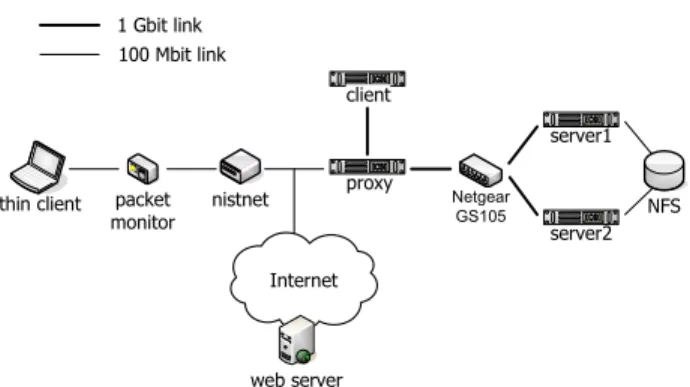
Figure 4 shows the isolated network test-bed we used for our experiments. The test-bed consists of eight IBM Netfin-ity 4500R machines and a Micron desktop PC. The NetfinNetfin-ity machines each had a 933Mhz Intel Pentium-III CPU and 512MB RAM, and all of them were connected via giga-bit Ethernet. The Micron desktop PC had a 450Mhz Intel Pentium-II CPU and 128MB RAM, and was used as the Mo-biDesk client. Four of the machines served as a MoMo-biDesk server infrastructure consisting of one NFS file server, one proxy server running a delegate 8.9.2 general-purpose appli-cation level proxy, and two computing session servers. One
Figure 4: Experimental testbed
machine was connected on the client-side of the MobiDesk proxy and was used as a NISTNet 2.0.12 WAN emulator which could adjust the network characteristics seen by the client. Four machines were connected to the client-side of the WAN emulator, one Micron PC used as a MobiDesk client, a second used as an external web server, a third used as a packet monitor running Ethereal Network Ana-lyzer 0.9.13 for measurement purposes, and the last used as a client for network virtualization overhead measurements. All of the machines ran Debian Linux, with the two comput-ing session servers runncomput-ing Debian Stable with a Linux 2.4.5 kernel and Debian Unstable with a Linux 2.4.18 kernel, re-spectively. The MobiDesk client machine was installed with a dual-boot configuration and also ran Microsoft Windows XP Professional.
6.1
MobiDesk Virtualization Overhead
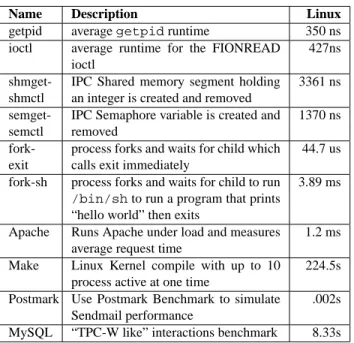
To measure the cost of MobiDesk’s operating system vir-tualization, we used a range of micro benchmarks and real application workloads and measured their performance on our Linux MobiDesk prototype and a vanilla Linux system. Table 2 shows the seven micro-benchmarks and four appli-cation benchmarks we used to quantify MobiDesk’s operat-ing system virtualization overhead as well as the results for a vanilla Linux system. To obtain accurate measurements, we rebooted the system between measurements. Additionally, the system call micro-benchmarks directly used the TSC register available Pentium CPUs to record timestamps at the significant measurement events. Each timestamp’s average cost was 58 ns. The files for the benchmarks were stored on the NFS server. All of these benchmarks were performed in a chrooted environment on the NFS client machine run-ning Debian Unstable with a Linux 2.4.18 kernel. Figure 5 shows the results of running the benchmarks under both configurations, with the vanilla Linux configuration normal-ized to one. Since all benchmarks measure the time to run the benchmark, a small number is better for all benchmarks results.
Name Description Linux
getpid averagegetpidruntime 350 ns
ioctl average runtime for the FIONREAD ioctl
427ns
shmget-shmctl
IPC Shared memory segment holding an integer is created and removed
3361 ns
semget-semctl
IPC Semaphore variable is created and removed
1370 ns
fork-exit
process forks and waits for child which calls exit immediately
44.7 us fork-sh process forks and waits for child to run
/bin/shto run a program that prints
“hello world” then exits
3.89 ms
Apache Runs Apache under load and measures average request time
1.2 ms Make Linux Kernel compile with up to 10
process active at one time
224.5s Postmark Use Postmark Benchmark to simulate
Sendmail performance
.002s MySQL “TPC-W like” interactions benchmark 8.33s
Table 2: Application Benchmarks
virtualization overhead is small. MobiDesk incur less than 10% overhead for most of the micro-benchmarks and less than 4% overhead for the application workloads. The over-head for the simple system callgetpidbenchmark is only 7% compared to vanilla Linux, reflecting the fact that vir-tualization for these kinds of system calls only requires an extra procedure call and a hash table lookup. The most expensive benchmarks for MobiDesk issemget+semctl which took 51% longer than vanilla Linux. The cost re-flects the fact that our untuned MobiDesk prototype needs to allocate memory and do a number of namespace transla-tions. Theioctlbenchmark also has high overhead, be-cause of the 12 separate assignments it does to protect the call against malicious root processes. This is large com-pared to the simple FIONREADioctlthat just performs a simple dereference. However, since theioctlis simple, we see that it only adds 200 ns of overhead over anyioctl. For real applications, the most overhead was only four per-cent which was for the Apache workload, where we used the http load benchmark [25] to place a parallel fetch load on the server with 30 clients fetching at the same time. Similarly, we tested MySQL as part of a web-commerce sce-nario outlined by TPC-W with a bookstore servlet running on top of Tomcat with a MySQL back-end. The MobiDesk overhead for this scenario was less than 2% versus vanilla Linux.
To measure the cost of MobiDesk’s network virtualiza-tion, we used netperf 2.2pl4 to measure MobiDesk network I/O overhead versus vanilla Linux in terms of throughput, latency, CPU utilization, and connection setup. We ran the netperf client on the Netfinity client and the netperf server on one of the MobiDesk compute servers. We used the Netfin-ity client for these experiments instead of the MobiDesk
0 0.5 1 1.5 2 forkexec forkexit
forksh getpid ioctl semget shmget
PostMark Apache Make MySQL Normalized performance Plain Linux 0 0.5 1 1.5 2 forkexec forkexit
forksh getpid ioctl semget shmget
PostMark Apache
Make
MySQL
Normalized performance
MobiDesk
Figure 5: Operating System Virtualization Overhead
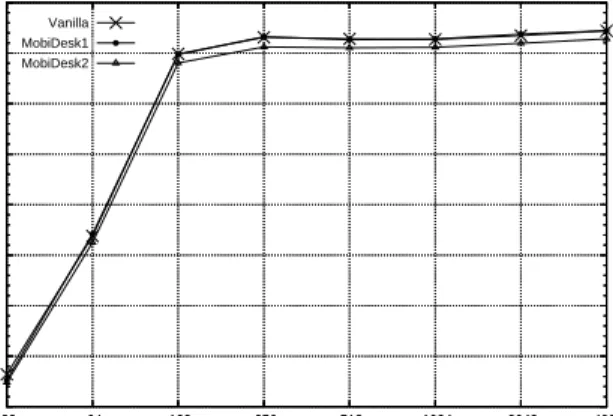
client to so that all machines used for the network virtual-ization measurements were connected via gigabit Ethernet. To ensure that we were accurately measuring the perfor-mance overheads of our systems as opposed to raw network link performance, we used gigabit Ethernet for our experi-ments so that the network link capacity could not be satu-rated easily. All connections from the netperf client to the netperf server were made through the delegate proxy. We compared the performance of three different system config-urations: Vanilla, MobiDesk1, and MobiDesk2. The Vanilla system is a stock Linux system without MobiDesk loaded into the kernel. The MobiDesk1 and MobiDesk2 are sys-tems with MobiDesk loaded. On MobiDesk1, no connec-tions are migrated and hence only connection virtualiza-tion is performed; on MobiDesk2, all connecvirtualiza-tions are mi-grated and hence both connection virtualization and virtual-physical mapping are performed.
Figures 6 to 8 show the results for running the net-perf throughput experiment, latency experiment, and con-nection setup experiment. CPU utilization measurements are omitted here since they show similar overhead results. The throughput experiment simply measures the throughput achieved when sending messages of varying sizes as fast as possible from the client to the server. Figure 6 shows the throughput overhead for the three systems we tested. We can see that MobiDesk1 performs very close to Vanilla, with an overhead of about 1.4Mbits/second. MobiDesk2 shows the throughput overhead due to the virtual-physical mapping, which is around 10Mbits/second.
The latency experiment measures the inverse of the trans-action rate, where a transtrans-action is the exchange of a request message of size 128 bytes and a reply message of varying sizes between the client and the server over a single con-nection. Figure 7 shows the latency overhead for the three systems we tested. The results bear the same
100 150 200 250 300 350 400 450 500 32 64 128 256 512 1024 2048 4096 Throughtput (Mbits/s)
Message Size (bytes) MobiDesk Throughput Overhead Vanilla 100 150 200 250 300 350 400 450 500 32 64 128 256 512 1024 2048 4096 Throughtput (Mbits/s)
Message Size (bytes) MobiDesk Throughput Overhead MobiDesk1 100 150 200 250 300 350 400 450 500 32 64 128 256 512 1024 2048 4096 Throughtput (Mbits/s)
Message Size (bytes) MobiDesk Throughput Overhead
MobiDesk2
Figure 6: Virtualization Throughput Overhead
200 300 400 500 600 700 800 900 1000 32 64 128 256 512 1024 2048 4096
Round Trip Time (us)
Message Size (bytes) MobiDesk Latency Overhead MobiDesk2 200 300 400 500 600 700 800 900 1000 32 64 128 256 512 1024 2048 4096
Round Trip Time (us)
Message Size (bytes) MobiDesk Latency Overhead MobiDesk1 200 300 400 500 600 700 800 900 1000 32 64 128 256 512 1024 2048 4096
Round Trip Time (us)
Message Size (bytes) MobiDesk Latency Overhead
Vanila
Figure 7: Virtualization Latency Overhead
tic as that for the throughput overhead. Performance differ-ence between Vanilla and MobiDesk1 is about 9.4 microsec-onds; while latency due to the virtual-physical mapping in MobiDesk2 can be observed to be around 40 microseconds. Note that there is a strange increase of latency at message size 128 bytes. The cause of this behavior is not clear to us. Interestingly, a strange drop of transaction rate is also observed in our connection setup measurement we will be presenting in the next section. We conjecture that it might have something to do with how the delegate proxy manages its buffers.
The TCP connection setup experiment is the same as the latency experiment except that a new connection is used for every request/response transaction. This experiment simu-lates the interaction between a client and server in which many short-lived connections are opened and closed. Figure 8 shows the TCP connection setup overhead for Vanilla and MobiDesk1. Note that since connection setup occurs before migration, there is no virtual-physical mapping overhead as-sociated with connection setup, therefore this measurement
350 400 450 500 550 600 650 700 32 64 128 256 512 1024 2048 4096
Connection Setup (transactions/s)
Message Size (bytes)
MobiDesk Connection Setup Overhead Vanilla 350 400 450 500 550 600 650 700 32 64 128 256 512 1024 2048 4096
Connection Setup (transactions/s)
Message Size (bytes)
MobiDesk Connection Setup Overhead MobiDesk1
Figure 8: TCP Connection Setup Overhead
0.00 0.20 0.40 0.60 0.80 1.00 1.20 1.40
CITRIX VNC SunRay MobiDesk PC
Latency (s)
Platform
100Mb-0ms 100Mb-33ms
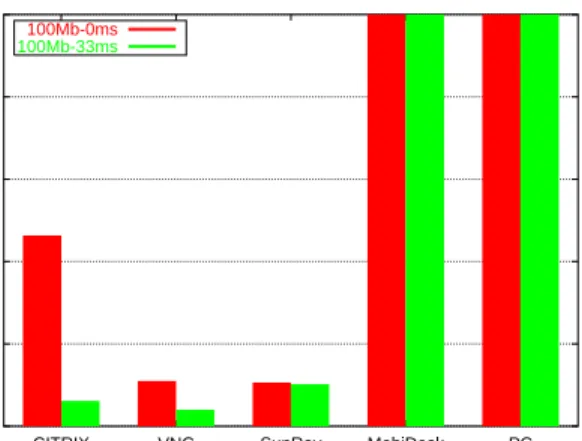
Figure 9: Web benchmark: Average per page latency
is not applicable to MobiDesk2. From the figure we can see that the overhead is fewer than 10 transactions per second.
6.2
MobiDesk Application Performance
To evaluate MobiDesk performance on real desktop applica-tions, we conducted experiments to measure the display per-formance of MobiDesk for web and multimedia applications and the migration performance of MobiDesk in moving a user’s desktop computing session from one server to an-other. To measure display performance, we compared Mo-biDesk against running applications on a local PC. We also compared MobiDesk running with XFree86 4.3.0 against other popular commercial thin-client systems, including Cit-rix MetaFrame XP for Windows [1], VNC 3.3.7 for Linux [29], and Sun’s SunRay 2.0 [37]. All of the thin-client sys-tems except SunRay, used the Micron PC as the client and a Netfinity server as the server. SunRay used a SunRay I hard-ware thin client and a Solaris 9 v210 server since it does not run with the common hardware/software configuration used
1.00 10.00 100.00 1000.00 10000.00
CITRIX VNC SunRay MobiDesk PC
Data Size (KB)
Platform
100Mb-0ms 100Mb-33ms
Figure 10: Web benchmark: Average per page data transfer
by the other systems.
We evaluated display performance using two popular desktop application scenarios, web browsing and video playback. Web browsing performance was measured using a Mozilla 1.4 browser to run a benchmark based on the Web Text Page Load test from the Ziff-Davis i-Bench benchmark suite [43]. The benchmark consists of a sequence of 54 web pages containing a mix of text and graphics. The browser window was set to 1024x768 for all platforms measured. Video playback performance was measured using a video player to play a 34.75 s video clip of original size 352x240 pixels displayed at 1024x768 full screen resolution. We used the packet monitor in our testbed to measure benchmark performance on the thin-client systems using slow-motion benchmarking [20], which allows us to quantify system per-formance in a non-invasive manner by capturing network traffic. The primary measure of web browsing performance was the average page download latency. The primary mea-sure of video playback performance was video quality [20], which accounts for both playback delays and frame drops that degrade playback quality. For example, 100 percent video quality means that all video frames were displayed at real-time speed. On the other hand, 50 percent video quality could mean that half the video frames were dropped when displayed at real-time speed or that the clip took twice as long to play even though all of the video frames were dis-played.
For both benchmarks, we measured all systems in two representative network scenarios: LAN, with an available bandwidth of 100Mbps and no introduced latency (100Mb-0ms), and WAN, with 100 Mbps available bandwidth and 33 ms added latency (100Mb-33ms), for a 66 ms round trip time. Our WAN network environment mimics the network characteristics of high bandwidth wide area networks, such as the Internet2. For the WAN tests we increased the default TCP window size for both server and client for the platforms that used TCP. SunRay was unaffected by this since it uses
0% 20% 40% 60% 80% 100%
CITRIX VNC SunRay MobiDesk PC
Video Quality
Platform
100Mb-0ms 100Mb-33ms
Figure 11: Video benchmark: Video Quality
UDP.
Figures 9 and 10 show the web browsing performance results in terms of the perceived latency, and average per page data transfer, respectively. Figures 11 and 12 show the video playback performance results in terms of the video quality and total data transferred, respectively. Figure 10 shows that the local PC is the most bandwidth efficient plat-form for web browsing, but Figure 9 shows that MobiDesk provides the smallest web page download latencies. Mo-biDesk outperforms the local PC in part because it leverages the faster server provided by the MobiDesk infrastructure to process web pages more quickly than the local PC running the web browser on its slower client. The results show that MobiDesk’s latency-sensitive design provides faster perfor-mance than any of the other platforms. The worst web browsing platform is Citrix MetaFrame, which adopts a more high-level display approach that results in poor WAN performance because of the tight coupling required between the application running on the server and the Citrix viewer running on the client. VNC has the second worst WAN web browsing performance in part because it relies on a client pull model for sending display updates as opposed to Mo-biDesk’s server push model, which avoids round trip laten-cies providing better interactive response time. In addition, as a response to the limited WAN network conditions VNC adaptively uses more efficient compression algorithms, thus reducing its data transfer, but increasing its latency, and worsening its overall web browsing performance.
Figure 12 shows that the local PC is also the most band-width efficient platform for video playback, but Figure 11 shows that MobiDesk provides perfect video quality in the same manner as the local PC. Figure 11 also shows that all of the other platforms deliver very poor video quality. They suffer from their inability to distinguish video data from nor-mal display updates and apply ineffective compression algo-rithms on the video data, which are unable to keep up with the stream of updates being generated. In contrast, the