1 Executive Overview
3Research & Development (R&D) 3 Marketing 3
Production 4 Finance 4
Company Success 5
2 The Sensor Industry
5Sensor Customers 5 Segment Buying Criteria 5
Positioning 6
Price, Age and Reliability (MTBF) 7 Criteria By Segment 7
3 The Capstone® Courier
8Front Page, Stock & Bond Summaries, Financial Statements And Production Analysis 8 Segment Analyses 8
Accessibility, Market Share And Top Products In Segment 9
Awareness And Customer Survey 9
Market Share Report And Perceptual Map 10 HR/TQM/Sustainability Report 10
4 Proformas & Annual Reports
10 Balance Sheet 11Cash Flow Statement 11 Income Statement 11
5 The Purchase Decision
12The Rough Cut 12
Positioning In The Rough Cut 12 Price In The Rough Cut 12 Reliability In The Rough Cut 12 The Fine Cut 12
Positioning In The Fine Cut 13 Price In The Fine Cut 13 Reliability In The Fine Cut 14 Age In The Fine Cut 14
Marketing Factors 14 Awareness 15 Accessibility 15 Seller’s Market 15
Market Sizes And Growth 15 Market Size By Unit 15 Market Size By Dollar 16
6 Operations
16Research & Development (R&D) 16 Changing Performance, Size And MTBF 16 Product Invention 17
Project Management 17 A Product’s Age 18 Marketing 18
Pricing Products 18
Promo And Sales Budgets 18 Sales Forecasting 19 Production 20 Capacity 20 Discontinuing A Product 20 Automation 20 Changing Automation 21 Finance 21 Current Debt 21 Bonds 22 Stock 22 Emergency Loans 23 Credit Policy 23
7 Additional Modules
24 Human Resources 24 TQM/Sustainability 24 Labor Negotiations 25 Advanced Marketing 258 Situation Analysis
26 Perceptual Map 26Segment Centers and Segment Drift 27 Ideal Spots 27
Industry Demand Analysis 29 Capacity Analysis 29 Margin Analysis 30
Margin Potential 31 Consumer Report 32
9 Forecasting
32Basic Forecasting Method 32 Qualitative Assessment 33
December Customer Survey 33
Forecasts, Proformas And The December 31 Cash Position 34
Worst Case / Best Case 34
10 Six Basic Strategies
34Cost Leader With Product Lifecycle Focus 35 Differentiation With Product Lifecycle Focus 35 Broad Cost Leader 35
Broad Differentiation 35
Niche Cost Leader (Low Technology) 35 Niche Differentiator (High Technology) 35
11 Balanced Scorecard
36Guiding Your Company 36
Index
371.1 Research & Development (R&D)
1 EXECUTIVE OVERVIEW
Congratulations, you are now in charge of an electronic sensor manufacturing company. Your company was formed when a former monopoly was broken up into identical competitors. Although its financial results are respectable, your company markets an aging product line. To become a market leader, you must improve your products, increase productivity and remain profitable despite downward price pressure.
Your company needs you to coordinate strategy and tactics across all functional areas of your company: • Research & Development or R&D
• Marketing • Production • Finance
Tip: Many simulations use additional modules: Human Resources, TQM (Total Quality Management)/Sustainability, Labor Negotiation and Advanced Marketing.
1.1 R
ESEARCH& D
EVELOPMENT(R&D)
The Research & Development Department controls the company’s product line. The line currently has five sensor models and can grow to as many as eight.
Your customers are concerned with four product characteristics:
• Size: How much the sensor weighs and the amount of space it takes; • Performance: How fast the sensor measures and reports physical conditions; • Reliability: How long the sensor lasts before it fails;
• Age: The amount of time since the sensor was invented or revised.
As time goes by, customers want smaller, more powerful sensors. Keeping customer requirements in mind, the department updates existing sensor designs. R&D also invents new products by assigning a name (the first letter must be the same as the first letter of the company name), performance, size and reliability.
Tip: The Production Department must purchase capacity and automation for all new products one year prior to release. The length of time required to revise a sensor varies. Slight revisions can complete in three or four months; more
comprehensive projects, the better part of a year. Inventing a sensor always takes more than a year. The longer the project, the greater the cost: a six month project costs $500,000; a 12 month project costs $1,000,000. Products with production lines that have higher automation require more time to revise than products with lower automation.
1.2
M
ARKETINGThe Marketing Department controls each sensor’s:
• Price: Customers want sensors priced within expected price ranges;
• Promotion Budget: The department sets a promotion budget for each sensor, which creates awareness– 100% awareness means every customer knows about your sensor;
• Sales Budget: The department sets a sales budget for each sensor, which builds accessibility via salespeople and distribution systems– 100% accessibility means every customer can locate your product.
In the next eight years, the sensor market will see a more than 200% increase in unit demand. Growth rates vary among the sub-markets, otherwise known as market segments.
Your customers manufacture a variety of products that need sensors to measure physical conditions such as speed, temperature and pressure.
1.3 Production
Promotion and sales budgets for each sensor affect sales. In general, higher budgets increase demand. However, the department can choose to hold the line on these budgets and increase demand with lower prices.
Each sensor product is intended for a primary group of customers, also known as market segments. Demand and growth rates for each segment vary. For each product, Marketing needs to determine a sales forecast by assessing:
• Last year’s sales
• The intended segment’s growth rate
• The relative merits of other products competing in the segment
1.3 P
RODUCTIONEach product has its own manufacturing line. For each product, the Production Department:
• Schedules production runs to supply enough units for sale based on the Marketing Department’s forecast minus inventory;
• Purchases or sells capacity based on demand and growth rates of the intended segment; • Determines automation levels for each product.
Each line has a first shift capacity. The capacity reflects the number of sensors that can be produced each year with an eight hour shift. The company can schedule a second eight hour shift, which allows the company to manufacture up to twice first shift capacity, however second shift labor costs are 50% higher than first shift.
Each line has an automation rating. Labor costs for lines with higher ratings are less than those with lower ratings, however: • Increasing automation is expensive, as machines must be purchased to replace workers;
• R&D projects for products with higher automation take longer relative to products with lower automation– this is because lines with higher automation have more machines to re-engineer.
Increases in capacity and changes in automation take a full year to implement. Sales of capacity are immediate. Selling all of an assembly line’s capacity discontinues the associated sensor– it is no longer available for sale.
1.4
F
INANCER&D, Marketing and Production decisions require money. The Finance Department must ensure all company activities are funded. While it is possible to fund activities entirely from cash flow, it is unlikely to happen in the early years. The company will need to turn to the capital markets. The company has three outside sources of money:
1. Stock: New stock issues are limited to 20% of the company’s outstanding shares.
2. Current Debt: These are one year bank notes. The company can borrow year after year, but interest rates fluctuate. Banks are willing to lend amounts up to 75% of the company’s account receivable, plus 50% of its inventory. 3. Bonds (Long Term Debt): These are 10 year notes. While bonds carry an interest rate 1.4% higher than the current
debt rate in the year they are issued, the rate is locked in– it will not fluctuate. Bondholders are willing to lend amounts up to 80% of the value of the company’s assembly lines.
Other Finance Department activities include:
• Dividend: The company can choose to issue dividends, which tend to (but do not always) increase the price per share; • Retire Stock: The company can buy back stock to reduce shares outstanding;
1.5 Company Success • Retire Bonds: The company can choose to retire bonds before they come due.
If the company runs out of money during the year, emergency loans are issued by a lender of last resort, affectionately known as Big Al. Big Al will automatically keep the company afloat with a loan for whatever amount needed. Big Al charges a 7.5% penalty in addition to the company’s current debt rate. Emergency loans convert to current debt at the beginning of the following year. Emergency loans have an adverse effect on stock price.
Accounts receivable and accounts payable finance decisions are made on the Marketing spreadsheet.
1.5 C
OMPANYS
UCCESSYour company selected you and your fellow managers because of your strategic vision and tactical skills. During the next few years the company expects you to make it a market leader. Successful companies will:
• Create a strategy;
• Coordinate company activities;
• Analyze the market and its competing products.
Careful study of the rest of this booklet will help greatly with these efforts. Best of luck with running your company!
2 THE SENSOR INDUSTRY
Your company manufactures electronic sensors. Last year, global demand for sensors surged more than 13%. Unprecedented opportunities exist for companies that adopt a leadership role in the market, either through a superior product offering or aggressive pricing.
2.1 S
ENSORC
USTOMERSYour customers are Original Equipment Manufacturers. They put your sensors into a range of products, from bio hazard neutralization to security systems to manufacturing controls to consumer products. The sensor industry is growing and evolving fast. Even the oldest designs are less than eight years old.
Sensor customers fall into five groups called market segments: • Traditional
• Low End • High End • Performance • Size
2.2 S
EGMENTB
UYINGC
RITERIACustomers within each market segment employ different standards as they evaluate the following sensor characteristics: • Positioning (performance and size)
• Reliability • Age • Price
2.2 Segment Buying Criteria
2.2.1 P
OSITIONINGSensors vary in their dimensions (size) and the speed with which they respond to changes in physical conditions (performance). Combining size and performance creates a product attribute called positioning.
THE PERCEPTUAL MAP
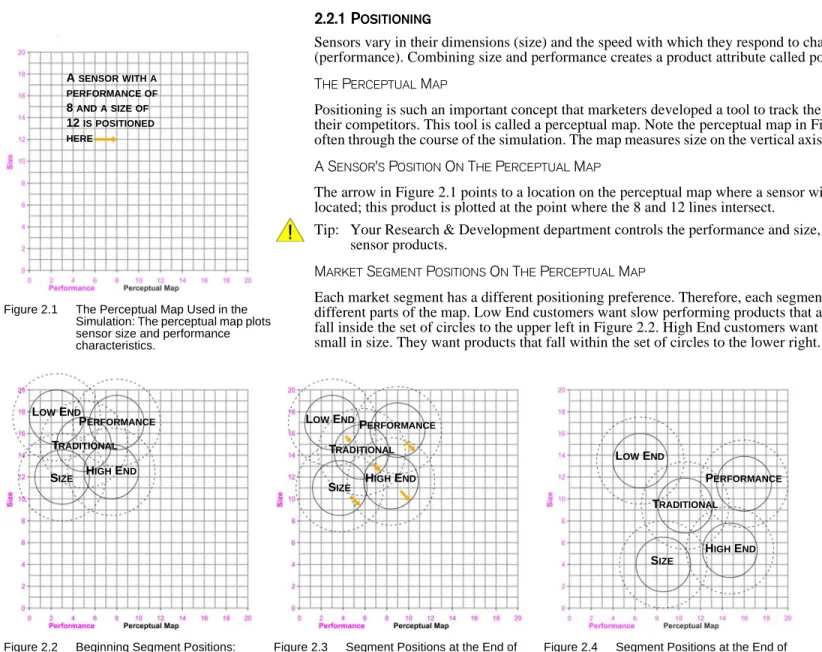
Positioning is such an important concept that marketers developed a tool to track the position of their products and those of their competitors. This tool is called a perceptual map. Note the perceptual map in Figure 2.1. You will see this map quite often through the course of the simulation. The map measures size on the vertical axis and performance on the horizontal axis.
A SENSOR’S POSITION ON THE PERCEPTUAL MAP
The arrow in Figure 2.1 points to a location on the perceptual map where a sensor with a performance of 8 and a size of 12 is located; this product is plotted at the point where the 8 and 12 lines intersect.
Tip: Your Research & Development department controls the performance and size, and therefore the positioning of your sensor products.
MARKET SEGMENT POSITIONS ON THE PERCEPTUAL MAP
Each market segment has a different positioning preference. Therefore, each segment demands sensors that are positioned in different parts of the map. Low End customers want slow performing products that are large in size. They want products that fall inside the set of circles to the upper left in Figure 2.2. High End customers want products that are fast performing and small in size. They want products that fall within the set of circles to the lower right.
Over time, customers want products that are smaller and faster. This causes the segments to move or drift a little each month. As the years progress, the drift becomes significant. Figure 2.3 shows the location of the market segments at the end of the first year; Figure 2.4, at the end of the eighth.
High End, Performance and Size customers demand greater product improvement than Traditional and Low End customers. Therefore, the High End, Performance and Size market segments drift at a faster rate. As time goes on, the overlap between the segments decreases. Market segments will not move faster to catch up with a product that exceeds their expectations. For example, High End customers will refuse to buy a product to the lower right of the circles. Remember, customers are only interested in products that fall within the circles on the perceptual map! A SENSORWITHA PERFORMANCEOF 8 ANDASIZEOF 12 ISPOSITIONED HERE
Figure 2.1 The Perceptual Map Used in the Simulation: The perceptual map plots sensor size and performance characteristics. LOW END SIZE PERFORMANCE TRADITIONAL HIGH END
Figure 2.2 Beginning Segment Positions: As the years progress, the segments will move or drift apart at different speeds toward the lower right.
Figure 2.3 Segment Positions at the End of Year 1 and the Beginning of Year 2: The segments move each month. The arrow lengths indicate the distance each segment has drifted over a 12 month period. LOW END
SIZE
PERFORMANCE TRADITIONAL
HIGH END
Figure 2.4 Segment Positions at the End of Year 8: Very little overlap remains. LOW END
SIZE
PERFORMANCE
TRADITIONAL
2.2 Segment Buying Criteria Tip: There are zero customers interested in products positioned outside of the dashed circles.
You and your management team must ensure that your product line keeps up with changing customer demand. To do this, products must be repositioned to stay within the moving segment circles. Products must be redesigned so that they are smaller in size and faster in performance. See 6.1 Research & Development (R&D) on page 16 for more information.
2.2.2 P
RICE, A
GEANDR
ELIABILITY(MTBF)
In addition to position, each segment has different criteria for: • Price: The cost of the sensor;
• Age: The length of time since the sensor was invented or revised;
• Reliability or MTBF (Mean Time Between Failure): The number of hours the sensor is expected to operate.
2.2.3 C
RITERIAB
YS
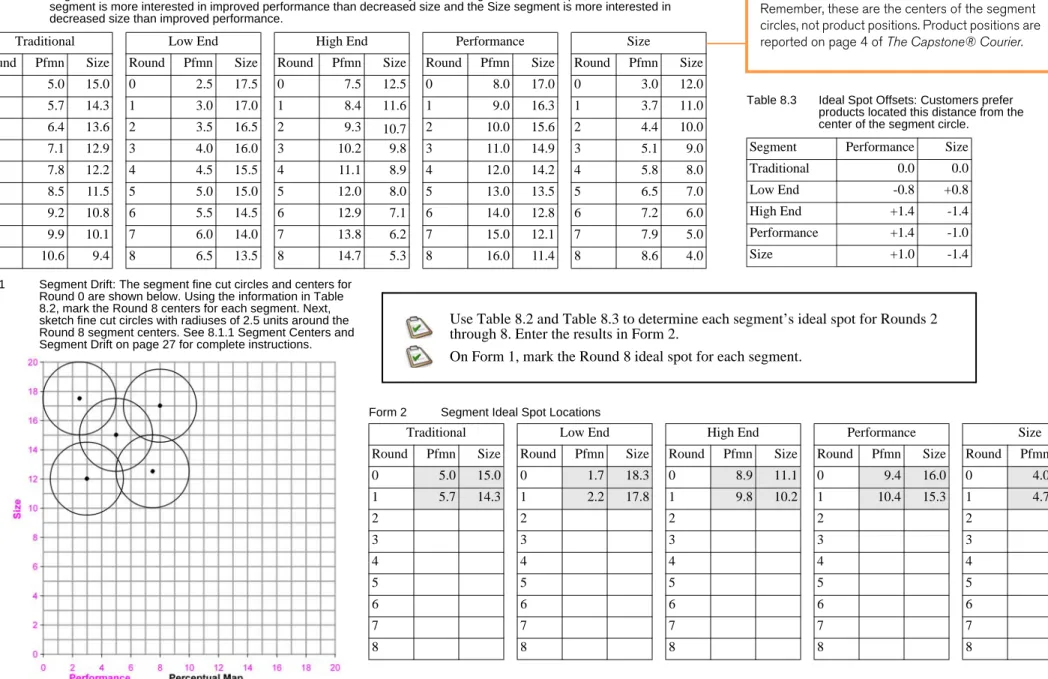
EGMENTThe criteria from the year prior to Round 1 (Round 0) display below. Price ranges in all segments drop $0.50 per year. For example, in Round 1 the Traditional price range will be $19.50-$29.50, in Round 2 it will be $19.00-$29.00. Positioning criteria also change each year (see 8.1 Perceptual Map on page 26). Age and reliability (MTBF) criteria remain the same year after year.
Beyond the simulation, perceptual maps can be used to plot almost any two product characteris-tics. Here’s an example: Most new car dealers sell extended warranties. The arrow in the figure below points to a location on the perceptual map where a standard 36 month, 36,000 mile war-ranty ends. The green area indicates the loca-tions where customers have the strongest interest in added month/mile combinations. Few customers want 12 month 100,000 mile war-ranties (not many people drive 100,000 miles in 12 months) or 60 month 15,000 mile warranties (most people drive farther than 15,000 miles over a five year period).
A REAL-WORLD PERCEPTUAL MAP
A 36 MONTH, 36,000 MILE WARRANTYIS POSITIONED HERE
Each market segment expects different: • Positioning
• Age range • Price range • Levels of reliability
(Measured in hours as Mean Time Between Failure, or MTBF.)
TRADITIONAL SEGMENT BUYING CRITERIA
Traditional customers seek proven products using current technology.
• Age, 2 years– 47% of decision • Price, $20.00-$30.00– 23% of decision
• Ideal Position, performance 5.0 size 15.0– 21% of decision
• MTBF, 14,000-19,000– 9% of decision
LOW END SEGMENT BUYING CRITERIA
Low End customers seek proven products, are indifferent to technological sophistication and are price motivated.
• Price, $15.00-$25.00– 53% of decision • Age, 7 years– 24% of decision
• Ideal Position, performance 1.7 size 18.3– 16% of decision
• MTBF, 12,000-17,000– 7% of decision
HIGH END SEGMENT BUYING CRITERIA
High End customers seek cutting-edge technology in both size and performance.
• Ideal Position, performance 8.9 size 11.1– 43% of decision
• Age, 0 years– 29% of decision
• MTBF, 20,000-25,000– 19% of decision • Price, $30.00-$40.00– 9% of decision
Performance Segment Buying Criteria
Performance customers seek high reliability and cutting edge performance technology.
• MTBF, 22,000-27,000– 43% of decision • Ideal Position, performance 9.4 size 16.0–
29% of decision
• Price, $25.00-$35.00– 19% of decision • Age, 1 year– 9% of decision
SIZE SEGMENT BUYING CRITERIA
Size customers seek cutting edge size technology. • Ideal Position, performance 4.0 size 10.6–
43% of decision
• Age, 1.5 years– 29% of decision • MTBF, 16,000-21,000– 19% of decision • Price, $25.00-$35.00– 9% of decision
3.1 Front Page, Stock & Bond Summaries, Financial Statements And Production Analysis
3 THE CAPSTONE® COURIER
Customer purchases and sensor company financial results are reported in an industry newsletter called The Capstone® Courier. The Courier is available from two locations:
• On the website, login to your simulation then click the Reports link; • From Capstone.xls, click Courier in the menu bar.
Tip: The Courier displays “Last Year’s Results,” for example, the Courier available at the start of Round 2 will display the results for Round 1. The Courier available at the start of Round 1 displays Last Year’s Results for Round 0, when all companies have equal standing.
Successful companies will study the Courier to understand the marketplace and find opportunities. As the simulation progresses and strategies are implemented, company results will begin to vary.
3.1 F
RONTP
AGE, S
TOCK& B
ONDS
UMMARIES, F
INANCIALS
TATEMENTSA
NDP
RODUCTIONA
NALYSISUse the Front Page of the Courier to see a snapshot of last year’s results (Figure 3.1). Be sure to compare your company’s sales, profits and cumulative profits with the competitions’. Page 2, Stock and Bond Summaries, reports stock prices and bond ratings for all companies.
Page 3, Financial Statements, surveys each company’s cash flow, balance sheet and income statements. This will give you an idea of your competitors’ financial health.
Page 4, The Production Analysis, reports detailed information about each product in the market, including sales and inventory levels, price, material cost and labor cost. Are you or your competitors building excess inventory? Excess inventory puts pressure on profits (see 9 Forecasting on page 32).
The Production Analysis also reports product revision dates. Does a competitor have a product with a revision date in the year after the year of the report? This indicates a long repositioning project that will possibly put that product into another segment. Tip: If a revision date has yet to conclude, the Courier will report the product’s current performance, size and MTBF. The
new coordinates and MTBF will not be revealed until after the completion of the project.
Check your competitors’ automation, capacity and plant utilization. Increases in automation reduce labor costs and this could indicate competitors might drop prices for those products. Did a competitor reduce capacity? Selling capacity reduces assets; running the remaining capacity at 150% to 200% can improve Return on Assets (ROA).
Tip: The Production Analysis will report the release date (but not the coordinates) of a new product if:
• Production capacity is purchased; • A promotion budget is entered; • A sales budget is entered.
3.2 S
EGMENTA
NALYSESThe Market Segment Analyses, pages 5 - 9 of the Courier (Figure 3.2), review each market segment in detail.
Figure 3.1 Front Page of the Courier: Includes Selected Financial Statistics.
Figure 3.2 Traditional Market Segment Analysis: Segment Statistics and Buying Criteria display in the upper-left corner of each segment analysis.
Are your competitors investing in capacity and automation?
• The Financial Statements Survey reports the cost of plant improvements for all companies; • The Production Analysis reports capacity and automation ratings for the upcoming round.
3.2 Segment Analyses The Statistics table in the upper-left corner reports Total Industry Unit Demand, Actual Industry Unit Sales, Segment % of Total Industry and the segment’s Growth Rate. The Customer Buying Criteria table ranks the customer criteria within each segment (these are the criteria listed in 2.2.3 Criteria By Segment on page 7):
• Ideal Position: The preferred product location as of December 31 of the previous year (the preferred location is also called the ideal spot– ideal spots drift with the segments, moving a little each month);
• Price: Every year on January 1, price ranges drop by $0.50; • Age: Age preferences stay the same year after year;
• Reliability: MTBF requirements stay the same year after year. Are your products meeting your buyers expectations?
The perceptual map shows the position of each product in the segment as of December 31 of the previous year.
3.2.1 A
CCESSIBILITY, M
ARKETS
HAREA
NDT
OPP
RODUCTSI
NS
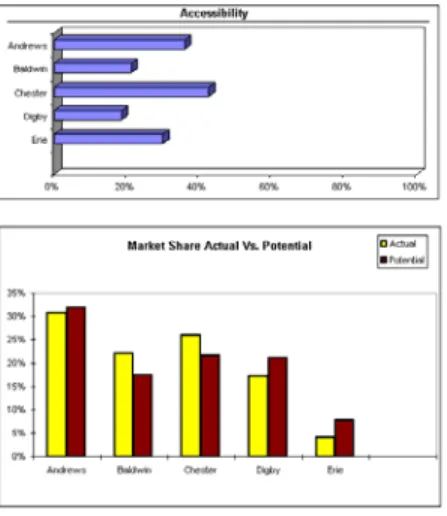
EGMENTThe Accessibility Chart (Figure 3.3) rates each company’s level of accessibility. Accessibility is determined by the Marketing Department’s sales budget– the higher the budget, the higher the accessibility. Accessibility is measured by percentage. 100% means every customer could locate your product.
The Market Share Actual vs. Potential Chart (Figure 3.3) displays two bars per company. The actual bar reports the market percentage each company attained in the segment. The potential bar indicates what the company deserved to sell in the segment. If the potential bar is higher than the actual, the company under produced and missed sales opportunities. If the potential is lower than the actual, the company picked up sales because other companies under produced and stocked out. Top Products in Segment lists the products selling in the segment and reports:
• Market Share
• Units Sold to Segment • Revision Date
• Stock Out (Whether the product ran out of inventory.) • Performance and Size coordinates
• Price • MTBF
• The product’s Age on Dec. 31 • Promotion and Sales Budgets
• Awareness and Customer Survey (See below.)
3.2.2 A
WARENESSA
NDC
USTOMERS
URVEYCustomer Awareness (Figure 3.4) is determined by the Marketing Department’s promotion budget– the higher the budget, the higher the awareness. Awareness is measured by percentage. 100% means every customer knew about your product.
The December Customer Survey (Figure 3.4) indicates how customers perceived the products in the segment. The survey evaluates the product against the buying criteria. Zero indicates the product met none of the criteria. A perfect score of 100 would result when the product:
• Was priced at the bottom of the expected range;
• Was perfectly positioned (because the segment moves each month, this can occur only once each year); Figure 3.3 Segment Analysis
Accessibility and Market Share Actual vs. Potential Charts
Figure 3.4 Customer Awareness and December Customer Survey: Customer Awareness reports the percentage of customers who knew about your product. The December Customer Survey reports what customers thought about your product; the higher the score, the better they liked it.
3.3 Market Share Report And Perceptual Map
• Had an MTBF specification at the top of the expected range;
• Had the ideal age for that segment (because the product ages each month, it can only have the ideal age once each year); • Had 100% Awareness;
• Had 100% Accessibility.
Ages and distances from the ideal spots change throughout the year, therefore scores change month to month. If a repositioning project concludes late in the year, the survey score for December could be significantly higher than the scores for the previous months.
Tip: Use the Customer Survey as a quick comparison tool when conducting a competitive analysis.
3.3 M
ARKETS
HARER
EPORTA
NDP
ERCEPTUALM
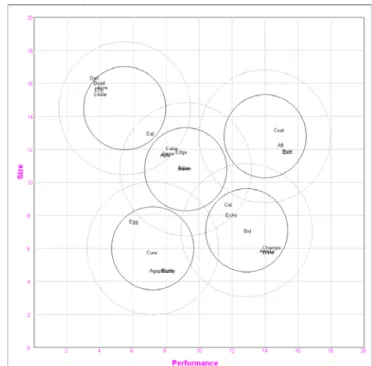
AP The Market Share Report details sales volume in all segments, reporting each product’s actual and potential sales. Did your company under produce? If the actual percentage for your products is less than the potential, you missed sales opportunities. If your actual is greater than your potential, your competitors under produced and you picked up sales that otherwise would have gone to them. The Perceptual Map (Figure 3.5) displays all five segments and every product in the industry. Are your products competitively positioned?3.4 HR/TQM/S
USTAINABILITYR
EPORTThe HR/TQM/Sustainability Report displays investments and results when the optional TQM/Sustainability, Human Resources and/or Labor Negotiation modules are activated (see 7 Additional Modules on page 24).
4 PROFORMAS & ANNUAL REPORTS
Proformas and annual reports include: • Balance Sheet
• Cash Flow Statement • Income Statement
What’s the difference between proformas and annual reports? Proformas are projections of results for the upcoming year, annual reports are the results from the previous year. The proformas allow you to assess the projected financial outcomes of the company decisions entered in Capstone.xls.
Figure 3.5 Perceptual Map: The Perceptual Map displays the positioning of all the products in every segment. Accounts Receivable
pol-icy and, if the module is enabled, TQM/Sustain-ability initiatives can also affect the survey score. Perfect scores are almost impossible. Scores of 50 or above are considered good.
The proforma reports are only as accurate as the marketing sales forecasts. If you enter a forecast that is unrealistically high, the profor-mas will take that forecast and project unreal-istic revenue. See 9 Forecasting on page 32 for more information.
4.1 Balance Sheet Tip: To access proformas, click the Proformas menu in Capstone.xls; to access the annual reports, click the Courier menu in
Capstone.xls or, on the website, login to your simulation then click the Reports link.
4.1 B
ALANCES
HEETThe balance sheet lists the dollar value of what the company owns (assets), what it owes to creditors (liabilities), and the amount contributed by investors (equity). Assets always equal liabilities and equity.
Assets = Liabilities + Equity
Assets are divided into two categories, current and fixed. Current assets are those that can be quickly converted, generally in less than a year. These include inventory, accounts receivable and cash. Fixed assets are those that cannot be easily converted. In the simulation, fixed assets are limited to the value of the plant and equipment, (called capacity and automation, see page 20).
Liabilities include accounts payable, current debt and long term debt. In the simulation, current debt is comprised of one year bank notes; long term debt is comprised of 10 year bond issues. Equity is divided into common stock and retained earnings. Common stock represents the money received from the sale of shares; retained earnings is the portion of the profits that was not distributed back to shareholders as dividends, but instead reinvested in the company.
Tip: The retained earnings value is not an asset; it is a liability owed to your shareholders.
4.2 C
ASHF
LOWS
TATEMENTThe cash flow statement indicates the movement of cash through the organization, including operating, investing and financing activities. The annual report’s cash flow statement shows the change in the amount of cash from the previous year. The proforma cash flow statement indicates the expected change at the end of the upcoming year.
4.3 I
NCOMES
TATEMENTYour company can use the income statement to diagnose problems on a product by product basis.
Sales for each product are reported in dollars (not the number of products). Subtracting variable costs from sales determines the contribution margin. Inventory carrying costs are driven by the number of products in the warehouse. If your company has $0 inventory carrying costs, you stocked out of the product and most likely missed sales opportunities. If your company has excessive inventory, your carrying costs will be high. Sound sales forecasts matched to reasonable production schedules will result in a modest inventory carrying costs (see 9 Forecasting on page 32).
Period costs are depreciation added to Sales, General and Administration (SG&A) costs, which include R&D, Promotion, Sales and Admin expenses. Period costs are subtracted from the contribution margin to determine the net margin.
The net margin for all products is totaled then subtracted from other expenses, which in the simulation include fees, write-offs and, if it is enabled, TQM/Sustainability costs. This determines earnings before interest and taxes, or EBIT. Finally, interest, taxes and profit sharing costs are subtracted to determine net profit.
Tip: After finalizing your decisions, use the printer icon in the spreadsheet to print your proforma income statement. When the simulation advances to the next year, compare the proforma income statement to the results in the annual report income statement.
Figure 4.1 Proforma Balance Sheet: Projects the results for the upcoming round based upon the company’s decisions.
Depreciation is an accounting principle that allows companies to reduce the value of their fixed assets. Each year some of the value is “used up.” Depreciation decreases the firm’s tax liability by reducing net profits while provid-ing a more accurate picture of the company’s plant and equipment value. Depreciation is expensed, product by product, on the income statement.
Total depreciation for the period is reflected as a gain on the cash flow statement. On the balance sheet, accumulated depreciation is subtracted from the value of the plant & equipment.
Capstone® uses a straight line depreciation method calculated over fifteen years.
DEPRECIATION
The proforma menu also links to projected financial ratios and, if your instructor has enabled it, a projected Balanced Scorecard (see 11 Balanced Scorecard on page 36).
5.1 The Rough Cut
5 THE PURCHASE DECISION
Customers go through two stages as they make their purchase decisions:
• The rough cut, which eliminates all sensors that will not fit the customer’s needs; and • The fine cut, which carefully weighs the relative merits of the remaining products.
5.1 T
HER
OUGHC
UTIn the rough cut, each segment sets its own standards for a sensor’s:
• Positioning: The sensors size and performance coordinates must fall within the segment’s circles on the perceptual map; • Price: The sensor must be priced within the segment range;
• Reliability: The Mean Time Between Failure (MTBF) must meet the minimum requirements for the segment. A product’s age does not play a role in the rough cut.
5.1.1 P
OSITIONINGI
NT
HER
OUGHC
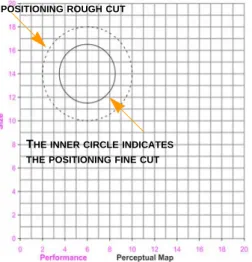
UTOn the perceptual map, the circles represent the market segments (groups of customers with similar purchasing concerns). Products that plot within 4.0 units from the center of the segment circle are inside of the dashed lines (Figure 5.1). These products survive the positioning rough cut for that segment.
Products placed more than 4.0 units away from the center of the segment are outside of the dashed lines. These products fail the segment’s rough cut and are not considered for purchase.
Tip: The location of each segment’s rough cut circle as of December 31 of the previous year appears on page 11 of the
Courier.
5.1.2 P
RICEI
NT
HER
OUGHC
UTEach segment sets price guidelines. For example, Low End customers will not pay High End prices. Segment price
expectations correlate loosely with the segment’s position on the perceptual map. Segments that demand higher performance levels and smaller sizes are willing to pay higher prices.
Sensors priced $5.00 above or below the segment guidelines will not be considered for purchase.
5.1.3 R
ELIABILITYI
NT
HER
OUGHC
UTEach segment sets guidelines for Mean Time Between Failure (MTBF), the number of hours a sensor is expected to operate before it malfunctions.
Sensors with MTBFs 5,000 hours or more beneath the segment’s guidelines will not be considered for purchase. Tip: The price criteria for the previous year and reliability criteria are listed in the Courier’s segment analyses.
5.2 T
HEF
INEC
UTIn the fine cut, a product’s success is based on how appealing it is to the intended segment’s customers. A product’s appeal is driven by its monthly Customer Survey Score (the December survey score is published in the Courier’s segment analyses). Each month, segment sales are determined by product survey scores. If a product is not available in sufficient numbers, other
THEOUTERCIRCLEINDICATESTHE POSITIONINGROUGHCUT
THEINNERCIRCLEINDICATES THEPOSITIONINGFINECUT
Figure 5.1 Positioning Rough Cut / Fine Cut Circles: The outer rough cut circle has a radius of 4 units. The inner fine cut circle has a radius of 2.5 units.
5.2 The Fine Cut products with lower scores may outsell it. A product’s survey score starts with how well it satisfies the segment’s buying criteria: Positioning, Price, MTBF and Age.
5.2.1 P
OSITIONINGI
NT
HEF
INEC
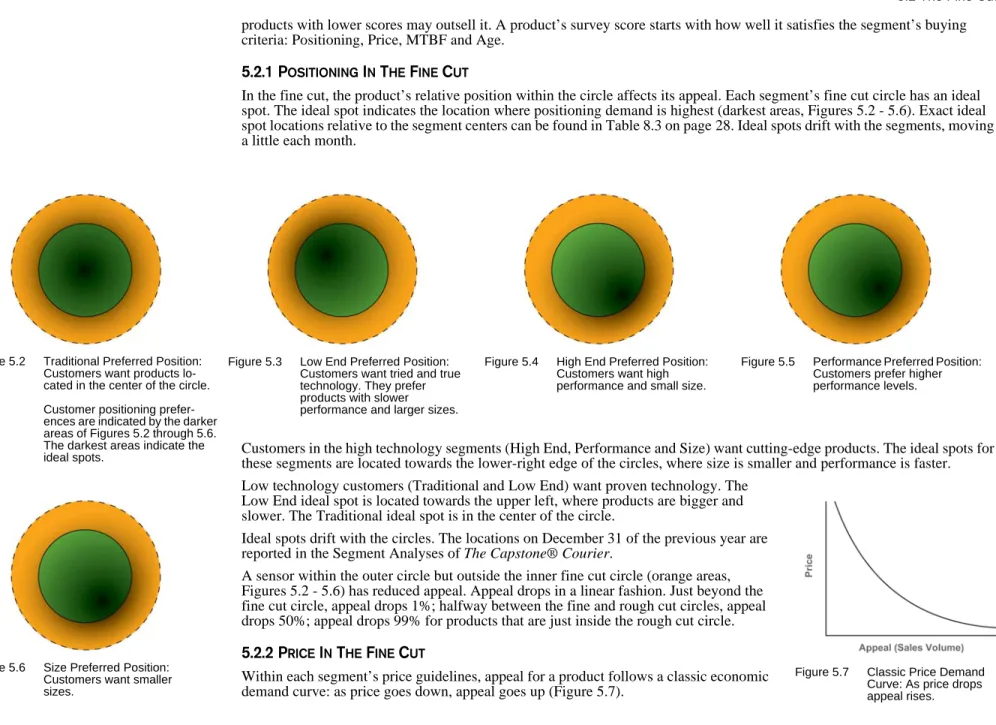
UTIn the fine cut, the product’s relative position within the circle affects its appeal. Each segment’s fine cut circle has an ideal spot. The ideal spot indicates the location where positioning demand is highest (darkest areas, Figures 5.2 - 5.6). Exact ideal spot locations relative to the segment centers can be found in Table 8.3 on page 28. Ideal spots drift with the segments, moving a little each month.
Customers in the high technology segments (High End, Performance and Size) want cutting-edge products. The ideal spots for these segments are located towards the lower-right edge of the circles, where size is smaller and performance is faster. Low technology customers (Traditional and Low End) want proven technology. The
Low End ideal spot is located towards the upper left, where products are bigger and slower. The Traditional ideal spot is in the center of the circle.
Ideal spots drift with the circles. The locations on December 31 of the previous year are reported in the Segment Analyses of The Capstone® Courier.
A sensor within the outer circle but outside the inner fine cut circle (orange areas, Figures 5.2 - 5.6) has reduced appeal. Appeal drops in a linear fashion. Just beyond the fine cut circle, appeal drops 1%; halfway between the fine and rough cut circles, appeal drops 50%; appeal drops 99% for products that are just inside the rough cut circle.
5.2.2 P
RICEI
NT
HEF
INEC
UTWithin each segment’s price guidelines, appeal for a product follows a classic economic demand curve: as price goes down, appeal goes up (Figure 5.7).
Figure 5.2 Traditional Preferred Position: Customers want products lo- cated in the center of the circle. Customer positioning prefer-ences are indicated by the darker areas of Figures 5.2 through 5.6. The darkest areas indicate the ideal spots.
Figure 5.3 Low End Preferred Position: Customers want tried and true technology. They prefer products with slower performance and larger sizes.
Figure 5.4 High End Preferred Position: Customers want high performance and small size.
Figure 5.5 Performance Preferred Position: Customers prefer higher performance levels.
Figure 5.6 Size Preferred Position: Customers want smaller sizes.
Figure 5.7 Classic Price Demand Curve: As price drops appeal rises.
5.3 Marketing Factors
Sensors priced $1.00 above or below the segment guideline lose about 20% of their appeal to customers. Products continue to lose approximately 20% of their appeal for each dollar above or below the guideline, on up to $5.00, at which point they lose all appeal.
5.2.3 R
ELIABILITYI
NT
HEF
INEC
UTCustomers prefer high MTBF ratings to low ones. However, if a product’s MTBF is beyond the expected range, customers ignore the additional reliability.
Sensors with an MTBF 1,000 hours below the segment guideline lose about 20% of their appeal. Products continue to lose approximately 20% of their appeal for every 1,000 hours below the guideline, on up to 5,000 hours, at which point they lose all appeal to customers.
5.2.4 A
GEI
NT
HEF
INEC
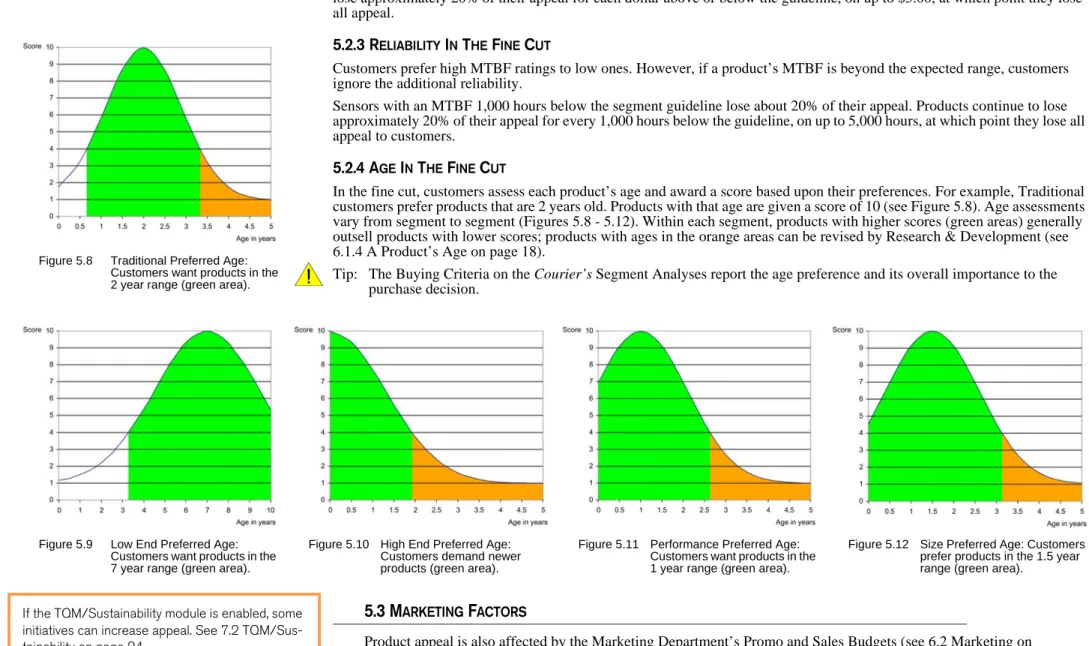
UTIn the fine cut, customers assess each product’s age and award a score based upon their preferences. For example, Traditional customers prefer products that are 2 years old. Products with that age are given a score of 10 (see Figure 5.8). Age assessments vary from segment to segment (Figures 5.8 - 5.12). Within each segment, products with higher scores (green areas) generally outsell products with lower scores; products with ages in the orange areas can be revised by Research & Development (see 6.1.4 A Product’s Age on page 18).
Tip: The Buying Criteria on the Courier’s Segment Analyses report the age preference and its overall importance to the purchase decision.
5.3 M
ARKETINGF
ACTORSProduct appeal is also affected by the Marketing Department’s Promo and Sales Budgets (see 6.2 Marketing on page 18 for more information).
Figure 5.8 Traditional Preferred Age: Customers want products in the 2 year range (green area).
Figure 5.9 Low End Preferred Age: Customers want products in the 7 year range (green area).
Figure 5.10 High End Preferred Age: Customers demand newer products (green area).
Figure 5.11 Performance Preferred Age: Customers want products in the 1 year range (green area).
Figure 5.12 Size Preferred Age: Customers prefer products in the 1.5 year range (green area).
If the TQM/Sustainability module is enabled, some initiatives can increase appeal. See 7.2 TQM/Sus-tainability on page 24.
5.4 Seller’s Market
5.3.1 A
WARENESSAwareness is determined by each product’s promotion budget. Promotion budgets are put towards advertising and public relations campaigns. Customers who are aware of a product always consider it. Of the customers who are not aware of a product, half discover it through their own research, and half miss it. A perfect product (with 100% accessibility) starts with a survey score of 100. If its awareness were 60%, then 40% of the customers do not know about it. Of those, half (20%) discover it. As a result, the survey score falls by 20%, from 100 to 80, reflecting the group of customers who do not know about the product and do not discover it through their own research.
5.3.2 A
CCESSIBILITYAccessibility is determined by each product’s sales budget. Sales budgets are put towards salespeople and distribution systems. An accessibility of 60% means that only 60% of customers have an easy time finding a product, talking to a salesperson and taking delivery. Of the customers who cannot easily locate the product, half will seek it out. A perfect product (with 100% awareness) starts with a survey score of 100. If its accessibility were 60%, then 40% of the customers do not have easy access to it. Of those, half (20%) would make an extra effort to acquire it through their own means. As a result, the survey score falls by 20%, from 100 to 80, reflecting the group of customers who do not have easy access to the product and are unwilling to make an extra effort to acquire it.
5.4 S
ELLER’
SM
ARKETUsually a product with very low appeal makes few sales. However, when all the “good” products stock out, what is known as a Seller’s Market is created. In a Seller’s Market, customers will accept marginal products as long as they fall within the rough cut limits. For example, desperate customers with no better alternatives will buy:
• A product positioned just inside the rough cut circle on the perceptual map– outside the circle they say “no” to the product;
• A product priced $4.99 above the price range– however, at $5.00 customers reach their tolerance limit and refuse to buy the product;
• A product with MTBF 4,999 hours below the range– at 5,000 hours below the range customers refuse to buy the product.
5.5 M
ARKETS
IZESA
NDG
ROWTH5.5.1 M
ARKETS
IZEB
YU
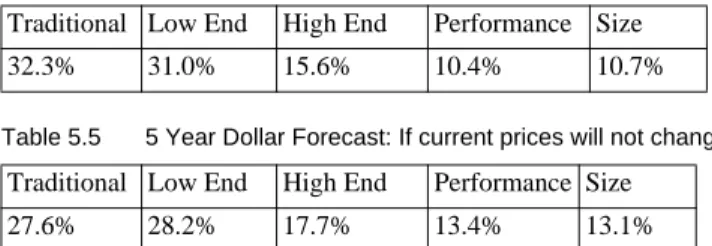
NITThe low technology segments (Traditional and Low End) dominated the beginning (Round 0) sensor market in units sold (Table 5.1). However, the Traditional and Low End growth rates trail the growth rates for High End, Performance and Size (Table 5.2). By year five, High End, Performance and Size will command a greater percentage of the overall market (Table 5.3). How can a company be sure of a seller’s
market? It can’t unless it concludes that industry capacity, including a second shift, cannot meet demand for the seg-ment. In that case even very poor prod-ucts will stock out as customers search for anything that can meet their needs. See 8.2 Industry Demand Analysis and 8.3 Capacity Analysis on page 29 to learn more about demand and capacity.
Table 5.3 5 Year Unit Sales Percentages
Traditional Low End High End Performance Size 27.5% 37.3% 12.9% 11.3% 11.0% Table 5.2 Segment Growth Rates
Traditional Low End High End Performance Size 9.2% 11.7% 16.2% 19.8% 18.3% Table 5.1 Last Year’s Unit Sales Percentage
Traditional Low End High End Performance Size 32.4% 39.3% 11.2% 8.4% 8.7%
6.1 Research & Development (R&D)
5.5.2 M
ARKETS
IZEB
YD
OLLARThe low technology segments (Traditional and Low End) dominated the Round 0 sensor market in dollars (Table 5.4). Unlike unit demand, the five-year dollar value for each segment is impossible to predict due to downward price pressure. Table 5.5 uses the beginning (Round 0) price data to display the dollar percentage for each segment in five years if prices are not adjusted.
6 OPERATIONS
Each company starts the simulation with five products. Your company has one product for each segment. You have one assembly line per product. Products can be terminated or added. Your company must have at least one product and cannot have more than eight. You and your fellow managers make business decisions on January 1 of each year. They are then executed by your employees. Industry results are published in The Capstone® Courier, which can be viewed from the website and from the Courier menu in Capstone.xls.
6.1 R
ESEARCH& D
EVELOPMENT(R&D)
The Research & Development (R&D) Department invents new products and changes specifications for existing products. Changing size and/or performance repositions a product on the perceptual map (see Figure 2.1 on page 6). Improving performance and shrinking size moves the product toward the lower right on the map.
Tip: Improving positioning and reliability will make a product more appealing to customers but doing so increases material cost. See 8.4.1 Margin Potential on page 31.
All R&D projects begin on January 1. If a product does not have a project already underway, you can launch a new project for that product. However, if a project begun in a previous year has not finished by December 31 of last year, you will not be able to launch a new project for that product (the decision entry cells on the R&D spreadsheet in Capstone.xls will be locked).
6.1.1 C
HANGINGP
ERFORMANCE, S
IZEA
NDMTBF
A repositioning project moves an existing product from one location on the perceptual map to a new location, generally (but not always) down and to the right. Repositioning requires a new size attribute and/or a new performance attribute. To keep up with segment drift, products must be made smaller (that is, decrease its size) and better performing (that is, increase its performance).
Positioning affects material costs (Figure 6.1). The higher the technology, the higher the cost. At the beginning of the simulation, the trailing edge of the Low End fine cut has the lowest cost, at $1.00; the leading edge of the High End fine cut has the highest cost, at $10.00.
Figure 6.1 Material Positioning Costs: Material Positioning costs vary depending on the product’s relative location on the perceptual map. Products placed at the trailing edge of the Low End segment have a positioning component cost of $1.00; products placed at the leading edge of the High End segment have a positioning component cost of $10.00. Positioning component cost locations for a Traditional product ($5.50) and a Size Product ($7.30) are also illustrated. Your R&D decisions are
fundamen-tal to your marketing and production plans. In marketing, R&D addresses:
• The positioning of each product inside a market segment on the perceptual map
• The number of products in each segment
• The age of your products • The reliability of each product
(its MTBF rating) In production, R&D affects or is affected by:
• The cost of material
• The purchase of new facilities to build new products • Levels of automation for a
product
Table 5.5 5 Year Dollar Forecast: If current prices will not change. Traditional Low End High End Performance Size
27.6% 28.2% 17.7% 13.4% 13.1% Table 5.4 Last Year’s Dollar Percentages
Traditional Low End High End Performance Size 32.3% 31.0% 15.6% 10.4% 10.7%
6.1 Research & Development (R&D) The reliability rating, or MTBF, for existing products can
be adjusted up or down. Each hour of reliability (MTBF) adds $0.0003 to the material cost. A product with 20,000 hours reliability includes $6.00 in reliability costs ($0.0003 X 20,000 = $6.00).
Tip: Material costs displayed in the spreadsheet and reports are the combined positioning and MTBF costs.
Tip: Unsold products built prior to the completion of an R&D project are reworked free of charge to match the new specifications.
Tip: Products will continue to produce and sell at the old performance, size and MTBF specifications up until the revision date.
6.1.2 P
RODUCTI
NVENTIONNew products are assigned a name (click in the first cell that reads NA in the name column), performance, size and MTBF. Of course, these specifications should conform to the criteria of the intended market segment. The name of all new products must have the same first letter of the company name. All new products require a production line. The Production Department must order equipment one year in advance. Invention projects take at least one year to complete.
Tip: When products are created or moved close to existing products, R&D completion times diminish. This is because your R&D Department can take advantage of existing technology. If the module is
active, TQM/Sustainability investments can also decrease R&D times.
Tip: If you don’t buy the production line the year prior to its introduction, you cannot manufacture your new product! See 6.3.1 Capacity on page 20.
6.1.3 P
ROJECTM
ANAGEMENTSegment circles on the perceptual map move at speeds ranging from 0.7 to 1.3 units each year. You must plan to move your products (or retire them) as the simulation progresses.Generally, the longer the move on the perceptual map, the longer it takes the R&D Department to complete the project.
Project lengths can be as short as three months, or as long as three years. R&D project lengths will increase when the company puts two or more products into R&D at the same time– when this happens each R&D project takes longer. Production line automation levels also affect project lengths (see Figure 6.3 on page 20). R&D project costs are driven by the amount of time they take. A six-month project costs $500,000; a one-year project costs $1,000,000.
If the project length takes more than a year, the revision date will be reported in the next Capstone® Courier. However the new perfor-mance, size and MTBF will not appear; old product attributes are reported prior to project completion. All new products require
capacity and automation, which should be purchased the year before the product’s revision (release) date. It is not possible to produce products prior to the revision date– a new prod-uct with a revision date of July 1 will be produced in the sec-ond half of the year. The capac-ity and automation will stand idle for the first half of the year.
Login to Capstone.xls and click the Decisions menu. Select Research & Devel-opment. To change a product’s performance, enter a number in the New Pfmn cell; to change its size, enter a number in the New Size cell. To change the reli-ability rating, enter a number in the MTBF cell. The example above illustrates an increase in performance from 5.5 to 5.9, a decrease in size from 14.5 to 14.1 and a decrease in MTBF from 17,500 to 15,000. The project will complete on May 28, 2007, the product’s age on that date will become 1.8 years (see 6.1.4 A Product’s Age on page 18) and the project will cost $410,000.
After the changes are entered, the sensor displays twice on the perceptual map. The name in black indicates the original location (5.5 and 14.5). The name in magenta, indi-cates the position it will have after May 28, (5.9 and 14.1). The sensor will sell at the original position prior to the revi-sion date and at the new position after the revirevi-sion date.
Round 1 of the Rehearsal Simulation covers R&D decisions. See the website’s Downloads section for complete information about Capstone.xls and the Rehearsal Simulation.
6.1.4
R&D DECISION ENTRIES BEFORE R&D ENTRIES6.2 Marketing
It is important to verify completion dates after all decisions have been entered. Usually you want repositioning projects to finish in less than a year. For example, consider breaking an 18 month project into two separate projects, with the first stage ending just before the end of the current year and the second ending halfway through the following year.
6.1.4 A P
RODUCT’
SA
GEIt is possible for a product to go from an age of 4 years to 2 years. How can that be? When a product is moved on the perceptual map, customers do not perceive the modified product to be new, but they do not perceive the product to be the same age as it was prior to modification. As a compromise, customers mentally cut the age in half.
Age criteria vary from segment to segment. For example, Traditional customers prefer an age of 2 years. This accounts for 47% of the Traditional customers’ purchase decision. If a Traditional product’s age approaches 3 years, customers will begin to turn away (see Figure 5.8 on page 14). Repositioning the product drops the age from 3 to 1.5 years and customers become interested again.
6.2 M
ARKETINGMarketing is concerned with pricing and promoting your products. The department is also responsible for sales forecasts.
6.2.1 P
RICINGP
RODUCTSPrice was discussed in 5.2.2 Price In The Fine Cut on page 13. To review, appeal falls to zero when prices go $5.00 above or below the expected price range. Price drives the product’s contribution to profit margin. Dropping the price increases appeal but reduces profit per unit. Segment price ranges fall at a rate of $0.50 per year. For example, in Round 0 Traditional
customers expected a price between $20.00 and $30.00. In Round 1, the Traditional price range will be $19.50-$29.50; Round 2, $19.00-$29.00, etc. This puts pressure on companies to improve their cost structures.
6.2.2 P
ROMOA
NDS
ALESB
UDGETSPromotion and Sales Budgets affect product appeal. See 5.3 Marketing Factors on page 14 for more information. Tip: The Courier’s Segment Analyses report accessibility and awareness. See 3.2 Segment Analyses on page 8.
PROMOTION
Each product’s Promo Budget determines its level of awareness. A product’s awareness percentage reflects the number of customers who know about the product. 50% awareness indicates half of the potential customers know it exists. From one year to the next, a third of those who knew about a product forget about it.
Last Year’s Awareness - (33% X Last Year’s Awareness) = Starting Awareness
If a product ended last year with an awareness of 50%, this year it will start with an awareness of approximately 33%. This year’s promotion budget would build from a starting awareness of 33%.
Starting Awareness + Additional Awareness From Figure 6.2 = New Awareness
Figure 6.2 indicates a $1,500,000 promotion budget would add 36% to the starting awareness, for a total awareness of 69% (33% + 36% = 69%).
Figure 6.2 indicates a $3,000,000 budget would add 50% to the starting awareness, only 14% more than the $1,500,000 expenditure (33% + 50% = 83%). This is because further expenditures tend to reach customers who already know about the Figure 6.2 Promotion Budget: Increases in
Promotion Budget have diminishing returns. The first $1,500,000 buys 36% awareness; Spending another $1,500,000 (for a total of $3,000,000) buys approximately 50%. The second $1,500,000 buys only 14% more awareness.
6.2 Marketing product. Once your product achieves 100% awareness, you can scale back the product’s promotion budget to around
$1,400,000. This will maintain 100% awareness year after year.
New products are newsworthy events. The public relations buzz creates 25% awareness that is added to the additional awareness you create with your promotion budget.
Tip: The Segment Analyses report awareness. See Figure 3.4 on page 9.
SALES
Each product’s Sales Budget contributes to segment accessibility. A segment’s accessibility percentage is
proportional to the number of customers who can easily purchase your products. Like awareness, if your sales budgets drop to zero, you lose one third of your accessibility each year. Unlike awareness, accessibility applies to the segment, not the product. If your product exits a segment, it leaves the old accessibility behind. When it enters a different segment, it inherits that segment’s accessibility.
If you have two or more products that meet a segment’s fine cut criteria, the sales budget for each product contributes to that segment’s accessibility percentage. This has two important implications:
1. The more products you have in the segment’s fine cut, the stronger your distribution channels, support systems, etc. This is because each product’s sales budget
contributes to the segment’s accessibility.
2. Achieving 100% accessibility is difficult. Companies must have at least two products in the segment’s fine cut. Each product experiences diminishing returns at a sales budget of $3,000,000. Diminishing returns for the overall segment is not reached until the budgets total $4,500,000 (for example, two products with sales budgets of $2,250,000 each). Once 100% accessibility is reached, you can scale back to around $3,300,000 to maintain 100%.
Tip: Products with prices, MTBFs or positioning in the segment’s rough cut do not contribute to the segment’s accessibility.
Tip: The Segment Analyses report accessibility. See Figure 3.3 on page 9.
6.2.3 S
ALESF
ORECASTINGAccurate sales forecasting is a key element to company success. Manufacturing too many units results in extra time/material costs Accessibility and
Aware-ness numbers change if the Advanced Marketing module is active (see 7.4 Advanced Marketing on page 25.
Think of awareness and acces-sibility as “before” and “after” the sale. The promo budget drives awareness, which per-suades the customer to look at your product. The sales budget drives accessibility, which gov-erns everything during and after the sale. The promo bud-get is spent on advertising and public relations. The sales bud-get is spent on distribution, order entry, sales budgets, cus-tomer service, etc. Awareness and accessibility go hand and hand in making the sale. The former is about encouraging the customer to choose your product, the latter about closing the deal via your salespeople and distribution channels.
BEFORE AND AFTER
THE SALE
Login to Capstone.xls and click the Decisions menu. Select Marketing. Use this area to determine each product’s Price, Promo Budget, Sales Budget and Sales Forecast.
What’s the difference between the Computer Prediction and Your Sales Forecast? The Computer Prediction (in yellow) assumes your competition will not update their product line– not a good assumption. The Computer Prediction however will adjust as you revise your prod-ucts in R&D, change prices and determine your Accounts Receivable policy. The adjustment, up or down, will give you an idea of the relative effect your decisions will have on product appeal.
The Your Sales Forecast column allows you to enter qualitative sales projections (see 9 Forecasting on page 32).
The remaining cells display the financial impacts of your decisions: • Gross Revenue Forecast– Price multiplied by either the
Computer Prediction or, if entered, Your Sales Forecast • Variable Costs– Labor, Material and Inventory Carrying costs
subtracted from the Gross Revenue Forecast
• Contribution Margin Forecast– Gross Revenue minus variable costs
• Less Promo & Sales– Contribution Margin Forecast minus the product’s Promo Budget and Sales Budget
Customer and supplier credit policies are set in the Marketing area. See 6.4.5 Credit Policy on page 23.
Round 2 of the Rehearsal Simulation covers Marketing decisions. See the website’s Downloads section for complete information about Capstone.xls and the Rehearsal Simulation.
6.3 Production
and inventory carrying costs. Manufacturing too few units means stock outs and lost sales opportunities, which can cost even more. See 9 Forecasting on page 32.
6.3 P
RODUCTIONThe Production Department schedules manufacturing runs for each sensor product. At the start of the simulation, your production plant has five lines with room for three more. Each assembly line is unique to the product it manufactures. You cannot move a product from one assembly line to another because automation levels vary and each product requires special tooling. Production schedules for each product should reflect Marketing’s forecasts, less any inventory left over from the previous year.
6.3.1 C
APACITYFirst shift capacity is defined as the number of products that can be produced on an assembly line (that is, without a second shift) in a single year. Assembly lines can produce up to twice their first shift
capacity with a second shift. An assembly line with a capacity of 2,000,000 units per year could produce 4,000,000 units with a second shift. However, second shift wages are 50% higher than the first shift.
Each new unit of capacity costs $6 for the floor space plus $4 times the automation rating. The Production spreadsheet in Capstone.xls displays the exact cost. Increases in capacity require a full year to take effect– increase it this year, use it next year.
Capacity can be sold at the beginning of the year for $0.65 on the dollar value of the original investment. You can replace the capacity in later years, but you have to pay full price. If you sell capacity for less than its depreciated value, you lose money, which is reflected as a write-off on your income statement. If you sell capacity for more than its depreciated value, you make a gain on the sale. This will be reflected as a negative write-off on the income statement (see 4.3 Income Statement on page 11).
6.3.2 D
ISCONTINUINGA P
RODUCTIf you sell all the capacity on a production line, Capstone® interprets this as a liquidation instruction and will sell your remaining inventory for half the average cost of production. Capstone® writes off the loss on your income statement. If you sell all but one unit of capacity, your inventory will not be liquidated and it can be sold for full price.
6.3.3 A
UTOMATIONAutomation levels are given a scale of 1.0 to 10.0. 1.0 is the lowest automation, 10.0 the highest. At the start of the simulation, all assembly lines have an automation level between 3.0 and 5.0. As automation levels increase, the number of labor hours required to produce each unit falls.
Login to Capstone.xls and click the Decisions menu. Select Production. Use this area to enter for each product:
• A production schedule
• Increases in first shift capacity (Put a positive number in Buy/Sell Capacity.)
• Decreases in first shift capacity (Put a negative number in Buy/Sell Capacity.)
• Changes in automation level (Enter a number in New Autom. Rating.) Round 3 of the Rehearsal Simulation covers Production decisions. See the website’s Downloads section for complete information about Capstone.xls and the Rehearsal Simulation.
6.3.5
PRODUCTION DECISION ENTRIESFigure 6.3 Time Required to Move a Product on the Perceptual Map at Automation Levels 1 Through 10: Note that at all automation levels, less time is required to move a product 0.25 units (dark blue line) than to move a product 1.0 units (light blue line). These times will increase when two or more R&D projects are underway.
Products in the High End, Performance and Size segments, where positioning is an important criteria, can be repositioned more quickly with lower automation.
The dollar value limit of capacity and automation purchases is largely deter-mined by the maximum amount that can be raised through stock and bond issues minus the total amount of stock divi-dends to be paid in the current year. See 6.4 Finance on page 21.
6.4 Finance At an automation rating of 1.0, labor costs are highest. At a rating of 10.0, labor costs fall
about 90%. Each additional point of automation decreases labor costs approximately 10%. Despite its attractiveness, two factors should be considered before raising automation:
• Automation is expensive: At $4 per point of automation, raising automation from 1.0 to 10.0 costs $36 per unit of capacity;
• As you raise automation, it becomes increasingly difficult for R&D to reposition products on the Perceptual Map because more machines must be redesigned (see Figure 6.3 on page 20). This does not apply to long moves. You can move a product a long distance at any automation level, but the project will take between 2.5 and 3.0 years.
6.3.4 C
HANGINGA
UTOMATIONFor each point of change, up or down, the company is charged $4 per unit of capacity. For example, if a line has a capacity of 1,000,000 units, the cost of changing the automation level from 5.0 to 6.0 would be $4,000,000. Reducing automation does not have the same effect as selling capacity. You will not receive cash for lowering your automation, but will be billed instead. Changes in automation require a full year to take effect– change it this year, use it next year.
6.4 F
INANCEYour Finance Department is primarily concerned with five issues:
1. Acquiring the capital needed for company activities. Capital can be acquired through: • Current Debt
• Stock Issues
• Bond Issues (Long Term Debt) • Profits
2. Establishing a dividend policy that maximizes the return to shareholders.
3. Setting accounts payable and accounts receivable policies (which are entered on the Marketing spreadsheet). 4. Driving the financial structure of the firm, its relationship between debt and equity.
5. Selecting and monitoring performance measures that support your strategy.
Tip: Finance decisions should be made after the other departments have entered their decisions. When the management team decides what the company needs to be successful, the Finance Department can decide how to pay for it.
Tip: One of the Finance Department’s fiduciary duties is to verify that sales forecasts and product prices are realistic. If prices and forecasts are too high, the cash flow they predict might not materialize. The department should challenge Marketing to defend their forecasts and pricing decisions.
6.4.1 C
URRENTD
EBTYour bank issues current debt in one year notes. The Finance spreadsheet in Capstone.xls displays the amount of current debt due from the previous year. The company can “roll” that debt by simply borrowing the same amount again. There are no brokerage fees for current debt. Interest rates are a function of your debt level. The more debt you have relative to your assets, the more risk you present to debt holders and the higher the current debt rates.
If you reduce automation, you will incur a retooling cost. The net result is you will be paying money to make your plant less
efficient. While reduced auto-mation will speed R&D rede-signs, by and large it is not wise to reduce an automation level.
The dollar value limit of capacity and automation purchases is largely determined by the maximum amount that can be raised through stock and bond issues minus the total amount of stock dividends to be paid in the current year. See 6.4 Finance on this page.
Labor costs increase each year because of the Annual Raise in labor’s contract. Optional Labor Negotiations, TQM/Sus-tainability and Human Resources modules can also affect labor costs.
As a general rule, companies fund short term assets like accounts receivable and inventory with cur-rent debt offered by banks.
6.4 Finance
Bankers will loan current debt up to about 75% of your accounts receivable (found on last year’s balance sheet) and 50% of this year’s inventory. They estimate your inventory for the upcoming year by examining last year’s income statement. Bankers assume your worst case will leave a three to four month inventory, and they will loan you up to 50% of that amount. This works out to be about 15% of the combined value of last year’s total direct labor and total direct material, which display on the income statement. Because they know your industry is growing, as a final step bankers increase your borrowing limit by 20% to provide you with room for expansion in inventory and accounts receivable.
6.4.2 B
ONDSAll bonds are ten year notes. Your company pays a 5% brokerage fee for issuing bonds. The first three digits of the bond, the series number, reflect the interest rate. The last four digits indicate the year in which the bond is due. The numbers are separated by the letter S which stands for “series.” For example, a bond with the number 12.6S2009 has an interest rate of 12.6% and is due December 31, 2009.
Bondholders will lend total amounts up to 80% of the value of your plant and equipment (the Production Department’s capacity and automation). Each bond issue pays a coupon, the annual interest payment, to investors. If the face amount or principal of bond 12.6S2009 were $1,000,000, then the holder of the bond would receive a payment of $126,000 every year for ten years. The holder would also receive the $1,000,000 principal at the end of the tenth year. Each year your company is given a credit rating that ranges from AAA (best) to D (worst). In Capstone®, ratings are evaluated by comparing current debt interest rates with the prime rate.
When issuing new bonds, the interest rate will be 1.4% over the current debt interest rates. If your current debt interest rate were 12.1%, then the bond rate would be 13.5%. You can buy back outstanding bonds before their due date. A 1.5% brokerage fee applies. These bonds are repurchased at their market value or street price on January 1 of the current year. The street price is determined by the amount of interest the bond pays and your credit worthiness. It is therefore different from the face amount of the bond. If you buy back bonds with a street price that is less than its face amount, you make a gain on the repurchase. This will be reflected as a negative write-off on the income statement (see 4.3 Income Statement on page 11).
Bonds are retired in the order they were issued, the oldest bonds retire first. There are no brokerage fees for bonds that are allowed to mature to their due date.
If a bond remains on December 31 of the year it becomes due, your banker lends you current debt to pay off the bond principal. This, in effect, converts the bond to current debt. This amount is combined with any other current debt due at the beginning of the next year.
6.4.3 S
TOCKStock issue transactions take place at the current market price. Your company pays a 5% brokerage fee for issuing stock. New stock issues are limited to 20% of your company’s outstanding shares in that year.
Stock price is a function of: If the face amount of bond
12.6S2009 were $1,000,000, the $1,000,000 repayment is acknowl-edged in your reports and spread-sheets in the following manner: Your annual reports from December 31, 2009 would reflect an increase in current debt of $1,000,000 offset by a decrease in long term debt of $1,000,000.
The 2009 spreadsheet will list the bond because you are making deci-sions on January 1, 2009, when the bond still exists. Your 2010 spread-sheet would show a $1,000,000 increase in current debt and the bond no longer appears.
WHEN BONDS COME DUE As a general rule, bond issues are used to fund long term investments in capacity and automation.
If your company has no debt at all, your company is awarded a AAA bond rat-ing. As your debt-to-assets ratio increases, your current debt interest rates increase. Your bond rating slips one category for each additional 0.5% in current debt interest. For example, if the prime rate is 10%, and your cur-rent debt interest rate is 10.5%, then you would be given a AA bond rating instead of a AAA.
BOND RATINGS
A bond with a face amount
$10,000,000 could cost $11,000,000 to repurchase early because of fluctu-ations in interest rates and your credit worthiness. A 1.5% brokerage fee applies. The difference between the face value and the repurchase price will reflect as a gain or loss in the Income Statement’s Fees and Write-offs.
WHEN BONDS ARE RETIRED EARLY
As a general rule, stock issues are used to fund long term investments in capacity and automation.