Calhoun: The NPS Institutional Archive
Theses and Dissertations Thesis Collection
2015-12
Methods to secure databases against vulnerabilities
Sloan, Jonathan P.
Monterey, California: Naval Postgraduate School
NAVAL
POSTGRADUATE
SCHOOL
MONTEREY, CALIFORNIA
THESIS
Approved for public release; distribution is unlimited METHODS TO SECURE DATABASES AGAINST
VULNERABILITIES
by
Jonathan P. Sloan December 2015
Thesis Advisor: Thomas Otani
REPORT DOCUMENTATION PAGE Form Approved OMB No. 0704–0188
Public reporting burden for this collection of information is estimated to average 1 hour per response, including the time for reviewing instruction, searching existing data sources, gathering and maintaining the data needed, and completing and reviewing the collection of information. Send comments regarding this burden estimate or any other aspect of this collection of information, including suggestions for reducing this burden, to Washington headquarters Services, Directorate for Information Operations and Reports, 1215 Jefferson Davis Highway, Suite 1204, Arlington, VA 22202-4302, and to the Office of Management and Budget, Paperwork Reduction Project (0704-0188) Washington, DC 20503.
1. AGENCY USE ONLY (Leave blank) 2. REPORT DATE
December 2015
3. REPORT TYPE AND DATES COVERED
Master’s thesis
4. TITLE AND SUBTITLE
METHODS TO SECURE DATABASES AGAINST VULNERABILITIES
5. FUNDING NUMBERS
6. AUTHOR(S) Jonathan P. Sloan
7. PERFORMING ORGANIZATION NAME(S) AND ADDRESS(ES)
Naval Postgraduate School Monterey, CA 93943-5000
8. PERFORMING ORGANIZATION REPORT NUMBER
9. SPONSORING /MONITORING AGENCY NAME(S) AND ADDRESS(ES)
N/A
10. SPONSORING/MONITORING AGENCY REPORT NUMBER
11. SUPPLEMENTARY NOTES The views expressed in this thesis are those of the author and do not reflect the official policy or position of the Department of Defense or the U.S. Government. IRB Protocol number ____N/A____.
12a. DISTRIBUTION / AVAILABILITY STATEMENT Approved for public release; distribution is unlimited
12b. DISTRIBUTION CODE
13. ABSTRACT (maximum 200 words)
Many commercial and government organizations utilize some form of proprietary or open source database management system. Recent history shows security incidents involving database management system vulnerabilities resulting in the compromise of personal information for millions of people. This thesis identifies common vulnerabilities affecting database management systems: injection, misconfigured databases, HTTP interfaces, encryption, and authentication and authorization. This thesis also examines three open source database management systems: MySQL, MongoDB, and Cassandra. We test each against the aforementioned vulnerabilities and provide recommendations to mitigate the vulnerabilities.
14. SUBJECT TERMS
database, security, injection, encryption, authentication, authorization, MySQL, MongoDB, Cassandra
15. NUMBER OF PAGES 89 16. PRICE CODE 17. SECURITY CLASSIFICATION OF REPORT Unclassified 18. SECURITY CLASSIFICATION OF THIS PAGE Unclassified 19. SECURITY CLASSIFICATION OF ABSTRACT Unclassified 20. LIMITATION OF ABSTRACT UU
NSN 7540–01-280-5500 Standard Form 298 (Rev. 2–89)
Approved for public release; distribution is unlimited
METHODS TO SECURE DATABASES AGAINST VULNERABILITIES
Jonathan P. Sloan
Lieutenant Colonel, United States Army B.S., United States Military Academy, 1997
Submitted in partial fulfillment of the requirements for the degree of
MASTER OF SCIENCE IN COMPUTER SCIENCE
from the
NAVAL POSTGRADUATE SCHOOL December 2015
Author: Jonathan P. Sloan
Approved by: Thomas Otani, Ph.D.
Thesis Advisor
Mark Gondree, Ph.D. Second Reader
Peter Denning, Ph.D.
ABSTRACT
Many commercial and government organizations utilize some form of proprietary or open source database management system. Recent history shows security incidents involving database management system vulnerabilities resulting in the compromise of personal information for millions of people. This thesis identifies common vulnerabilities affecting database management systems: injection, misconfigured databases, HTTP interfaces, encryption, and authentication and authorization. This thesis also examines three open source database management systems: MySQL, MongoDB, and Cassandra. We test each against the aforementioned vulnerabilities and provide recommendations to mitigate the vulnerabilities.
TABLE OF CONTENTS
I. INTRODUCTION...1
A. MOTIVATION ...1
B. DATABASE VULNERABILITIES AND BREACHES ...2
C. THESIS ORGANIZATION ...3
II. BACKGROUND ...5
A. DATABASE MODELS ...5
1. Relational Database Model ...5
2. NoSQL Document Database Model ...6
3. NoSQL Column-Family Database Model ...7
B. MYSQL ...8
1. MySQL Overview ...8
2. Installation and Configuration Defaults ...9
3. Accounts ...10
4. Security ...10
a. Authentication and Authorization ...10
b. Encryption ...11
c. Other ...11
5. Query Language ...12
a. Database and Table Altering Commands ...12
b. SELECT Statement ...12
6. Stored Procedures and Triggers ...14
C. MONGODB ...14
1. MongoDB Overview...14
2. Data Modeling ...15
3. Installation and Configuration Defaults ...17
4. Security ...17 a. Authentication ...17 b. Authorization ...18 c. Encryption ...18 d. Other ...18 5. Query Language ...19 D. CASSANDRA ...20 1. Cassandra Overview ...20 2. Data Modeling ...21
3. Installation and Configuration Defaults ...22
4. Security ...22
a. Authentication / Authorization ...22
b. Encryption ...23
c. Other ...23
5. Query Language ...23
A. OVERVIEW OF DATABASE VULNERABILITIES ...25
1. Injection ...25
2. Misconfigured Databases ...25
3. HTTP Interface ...26
4. Encryption ...26
5. Authentication and Authorization...26
B. METHODOLOGY ...26
IV. INJECTION ...31
A. SEVERITY AND SCOPE OF INJECTION VULNERABILITY ...31
B. DEFINITION OF INJECTION...31
1. Injection Attack Sources ...32
2. Injection Intention ...33
3. Categories of Injections ...33
a. Tautologies ...33
b. Illegal or Logically Incorrect Queries ...34
c. Union Queries ...34
d. Piggy-back Queries ...35
C. SUGGESTED PREVENTION METHODS IN LITERATURE ...35
1. Use Good Coding Practices ...35
2. Combine Static and Dynamic Analysis ...36
3. Parse Trees ...37
4. Instruction Set Randomization ...37
5. Tainting ...38
6. Replace String Concatenation with Parameterization ...38
D. TESTING RESULTS AND MITIGATIONS ...39
1. Tautologies ...39
a. MySQL ...39
b. MongoDB ...40
c. Cassandra ...40
2. Illegal or Logically Incorrect Queries ...40
a. MySQL ...40
b. MongoDB ...41
c. Cassandra ...41
3. Union Queries ...42
a. MySQL ...42
b. MongoDB and Cassandra ...42
4. Piggy-back Queries ...43
a. MySQL ...43
b. MongoDB ...43
c. Cassandra ...44
V. MISCONFIGURED DATABASES ...45
A. DEFINITION OF MISCONFIGURED DATABASES ...45
B. VULNERABILITIES AND MITIGATIONS ...45
1. MySQL ...46
3. Cassandra ...47
VI. HTTP INTERFACE ...49
A. DEFINITION OF HTTP INTERFACE ...49
B. VULNERABILITIES AND MITIGATIONS ...50
1. MySQL ...50
2. MongoDB ...50
3. Cassandra ...52
VII. ENCRYPTION ...55
A. DEFINITION OF ENCRYPTION ...55
B. VULNERABILITIES AND MITIGATIONS ...55
1. MySQL ...56
2. MongoDB ...56
3. Cassandra ...56
VIII. AUTHENTICATION AND AUTHORIZATION ...59
A. DEFINITION OF AUTHENTICATION AND AUTHORIZATION ...59
B. VULNERABILITIES AND MITIGATIONS ...60
1. MySQL ...60
2. MongoDB ...61
3. Cassandra ...62
IX. CONCLUSION ...63
LIST OF REFERENCES ...65
LIST OF FIGURES
Figure 1. SELECT statement syntax, from [16]. ...13
Figure 2. Database entity-relationship diagram. ...27
Figure 3. Information available through MongoDB HTTP Interface. ...51
Figure 4. Employee collection displayed through MongoDB HTTP Interface. ...51
Figure 5. Employee table CQL information available through OpsCenter. ...53
LIST OF TABLES
LIST OF ACRONYMS AND ABBREVIATIONS
ACID Atomicity, Consistency, Isolation, Durability
ANSI American National Standards Institute
API Application Programming Interface
BSON Binary JSON
CQL Cassandra Query Language
CWE Common Weakness Enumeration
DOD Department of Defense
GUI Graphic User Interface
ISO International Organization for Standardization
JSON Java Script Object Notation
NoSQL Not Only SQL
NCDBMS NoSQL Column-Family Database Management System
NDDBMS NoSQL Document Database Management System
OWASP Open Web Application Security Project
RDBMS Relational Database Management System
ACKNOWLEDGMENTS
I would like to thank Professor Thomas Otani for all the guidance, and support that he provided to me in completing this thesis. He enabled me to focus on clearly identifying the scope of the thesis, and he provided valuable insight on scholarly writing.
I would also like to thank Professor Mark Gondree for his invaluable assistance as second reader.
Finally, I would like to thank my lovely wife, Denise, for all her support throughout my time at the Naval Postgraduate School. Without her understanding, I would not have been able to dedicate the amount of time required to complete this thesis and maximize this learning experience.
I.
INTRODUCTION
Databases have been in existence for over 40 years. Many organizations operate one or more databases that contain customer information, sales numbers, weapons inventory, or even intelligence documents. The data is normally kept for storage and retrieval, and analysis [1]. Currently, there are two broad categories of database models, relational and NoSQL.
A relational database consists of tables where each table defines an entity with each column specifying an attribute of that entity [1]. Each row is an instance of the entity, and while these instances are separate, they are all similar in they are all defined by the same attributes. Not surprisingly, relational databases work best with data that has a similar structure [1].
The NoSQL model (or Not Only SQL), on the other hand, is not built upon a collection of related tables. It is designed more for data that is not easily represented by the relational model [2]. The NoSQL model also serves large-scale datasets that can be distributed across multiple nodes with parallel data processing [2]. This thesis is concerned with identifying the security vulnerabilities present in both database systems, and how to mitigate them.
A. MOTIVATION
Most U.S. government organizations use some type of database. The National Security Agency created a NoSQL database called Accumulo that it uses for data analysis, which is now an open source database [3]. The U.S. Department of Veterans Affairs uses the open source relational database MySQL to store and manage data [4]. The Department of Defense (DOD) Office of the Inspector General also uses a MySQL database to organize and store reports, and provides a web interface where users can query the database and receive information [5].
These are just three government-agency examples. One commonality among these three is that each database system is open source as opposed to proprietary. In the past, the DOD mainly used proprietary systems across myriad technologies. However, the
DOD has been moving toward open source systems in order to lower costs, acquire and repair capabilities, and share information [6]. While there are many benefits to using open source technology, one security drawback is the code is available to everyone. An attacker does not need to expend resources to acquire the code in order to study and test it for vulnerabilities. It is also more advantageous for an attacker to have the source code than having only a binary. An attacker who has access to a binary only must commit time to dumping the binary and unravelling the assembly instructions. An attacker with the source code can use this as a guide when analyzing the binary to determine potential avenues for exploitation.
B. DATABASE VULNERABILITIES AND BREACHES
The Open Web Application Security Project (OWASP) first released its Top 10 Project list in 2003, identifying the most critical application security risks. It updated the list in 2007, 2010, and most recently, in 2013. Three of the risks in the 2013 OWASP Top 10 can be found in database systems: “injection” at number 1, “security misconfiguration” at number 5, and “sensitive data exposure” at number 6 [7].
The Common Weakness Enumeration (CWE)/SANS Institute publishes a top 25 list of security vulnerabilities with its most recent version in 2011. Five of the vulnerabilities in its list are also found in database systems: “Improper neutralization of special elements used in a SQL command” at number 1, “Missing authentication for critical function” at number 5, “Missing authorization” at number 6, “Missing encryption of sensitive data” at number 8, and “Reliance on untrusted inputs in a security decision at number 10 [8]. These vulnerabilities are discussed in this thesis.
Underscoring these vulnerabilities are the numerous breaches into government and company databases leading to large losses of data. The following are just a few organizations that suffered database breaches over the past five years. In 2011, the email marketing giant Epsilon suffered a data breach, and customer emails from 50 major clients (such as Kroger and U.S. Bank) were stolen [9]. Also in 2011, Sony PlayStation Network suffered a data breach that affected 70 million users [10]. A breach of JP Morgan Chase in 2014 resulted in the theft of data from 76 million households and 7
million businesses [11]. Also in 2014, it was revealed that 22.8 million personal records of New York residents were stolen over eight years during 5000 separate incidents [12]. In 2014, Sony suffered another data breach resulting in the theft of intellectual property, emails, and information on 15,000 employees [13]. This year, Anthem, Inc., the second largest health insurer in the United States, experienced a data breach that affected tens of millions customers [14]. In addition, this year, the Office of Personnel Management suffered a data breach resulting in the theft of 21.5 million federal employees’ records [15].
C. THESIS ORGANIZATION
Chapter II focuses on the background of three database applications that are representative of the relational database model, the NoSQL document model, and the NoSQL column family model. The chapter covers the design and query language of MySQL (relational), MongoDB (NoSQL document), and Cassandra (NoSQL column family). Chapter III provides a brief overview of security vulnerabilities (injection, misconfigured databases, HTTP interface, encryption, authentication and authorization) in databases, and then describes the methodology we used to examine each database system against these vulnerabilities. Chapter IV, V, VI, VII, and VIII describe in more detail the security vulnerabilities, show whether the applications are affected by the vulnerabilities, and detail the mitigations against these vulnerabilities. Chapter IX covers the thesis conclusion.
II.
BACKGROUND
This chapter first briefly reviews three database models: relational, NoSQL document, and NoSQL column-family. Then we examine in depth three database management systems fitting these models: MySQL, MongoDB, and Cassandra respectively. These three database management systems will run on many different operating systems, but for this thesis, we only consider the Microsoft Windows family of operating systems.
A. DATABASE MODELS
This section provides a brief overview of three database models: relational, NoSQL document, and NoSQL column-family.
1. Relational Database Model
The core element of a relational database is a table [1]. A relational database table models some entity, for example, an employee. The columns of the table describe common attributes that all employees share, for example name, address, and salary [1]. There could be more or less attributes, but the important characteristic is that all employees share these attributes. One of the attributes is chosen as the primary key. This important attribute uniquely identifies a specific instance of the entity, which is a row in the table [1]. In this example, the primary key may be the employee’s identification number.
As the name implies, entities in the relational database model can have relationships with each other [1]. For example, an employee, which is one entity, can work for a department, which is another entity. These relationships may also be represented by tables, and again each column would represent an attribute that all relationships have in common [1]. Therefore, in this database model, all data is very structured.
These relationships could be one-to-many (a department has many employees), one-to-one (an employee may have one cubicle), or many-to-many (one employee can
talk to many customers and one customer can talk to many employees). These relationship cardinalities and additional rules governing the relationships are what the database management system uses to enforce consistency within the database [16].
Consistency is a key component of ACID (Atomicity, Consistency, Isolation, and Durability), which is what Relational Database Management Systems (RDBMS) provide to those who choose to use the relational database model [16]. Atomicity means that a RDBMS will complete all elements of a transaction or will complete no elements of the transaction in the event of an error [16]. In this case, the RDBMS will try again to complete the entire transaction. Consistency means that a RDBMS will ensure that after every write to the database, any subsequent read to the database will reflect the new data and not the old data [16]. Isolation means the RDBMS will ensure that individual transactions will not interfere with other transactions [16]. Durability means the RDBMS will ensure that any changes to the database are persistent [16]. A write to the database will not suddenly roll back to a previous state. Examples of RDBMS are MySQL, Microsoft Access, and Microsoft SQL Server.
2. NoSQL Document Database Model
The core element of a NoSQL document database model is a document [1]. Documents are then grouped in collections [1]. Documents and collections are loosely analogous to a rows and tables in the relational database model. In this model, however, individual documents within a collection need not share common attributes with other documents [1]. Continuing the example from above, a collection may describe employees. In this case, one document can represent an employee who has three attributes, and another document can represent an employee who has nine attributes.
Javascript Object Notation (JSON) and Binary JSON (BSON) are two standardized formats that a NoSQL Document Database Management System (NDDBMS) may use to represent documents [2]. JSON and BSON are used to form the internal elements of a document. A document is comprised of one or more key/value pairs where the key and value are separated by a colon [2]. Key/value pairs are further separated by commas and documents are surrounded by brackets [2]. An example would
be {name:”John,” age:33}. A value can be a variety of datatypes to include strings, integers, arrays, and even other documents [2]. An example would be {name:{first:”John,” last:”Doe”}, age:33, dogs: [“fido,” “rover”]} where the first value is a document, the second value is an integer, and the third value is an array of strings.
A document may contain unstructured, semi-structured, or structured data [2]. An example of semi-structured data is one where many employees share some common attributes, but also may have some attributes that other employees do not have. A relational database model would require a table for employees where many columns represent every single attribute that all employees have whether or not they are shared. The RDBMS would then store null bytes in rows where employees do not have an attribute [2]. In the NoSQL document database model, however, an employee with three attributes would have three key/values pairs and an employee with nine attributes would have nine key/value pairs. This is referred to as sparse data [2]. Examples or NDDBMS are MongoDB and CouchDB.
3. NoSQL Column-Family Database Model
The core element of a NoSQL column-family database model is a table [1]. The tables in this model differ from the tables in the relationship database model, however. In this model, a table is a mixture of a NoSQL document database collection and a relational database table [1]. Tables represent entities and columns represent the attributes of those entities. Like the relational database model, the total number of columns in a table would equal the total number of distinct attributes that each instance of the entity has. Rows represent specific instances of an entity. In the relational database model where rows have uniformed fixed sizes, a null byte is required in a column where an entity instance does not have the attribute represented by the column [2].
In the NoSQL column-family database model, however, there is no requirement that rows are a uniformed fixed size [1]. A NoSQL column-family database management system (NCDBMS) would not store a null byte to represent that an entity instance does not have the attribute represented by the column [2]. The row would only consist of those values that the entity instance actually has. This characteristic of a row in a NoSQL
column-family database models is more akin to how a document looks in a NoSQL document database model [2].
This model further differentiates itself from the relational database model in that the value in a row need not be a single value [2]. For example, a table in this model may represent the employee entity. One of the columns may be “phone numbers.” In this model, one row may have an array of three phone numbers, another row may have an array of one phone number, and yet another row may not have a phone number at all. This aspect of the NoSQL column-family database model is similar to the NoSQL document database model [2]. Examples of NCDBMS are Cassandra and BigTable.
B. MYSQL
This section examines the RDBMS MySQL in depth. The organization of this section is MySQL overview, installation and configuration defaults, accounts, security, query language, and stored procedures.
1. MySQL Overview
MySQL is an open source RDBMS written in C and C++ and made available by Oracle Corporation [16]. Open source means that any organization may use the software free of charge and modify the software to fit the needs of the organization as long as the modifications do not violate the General Public License [16]. MySQL will run on several operating systems to include Microsoft Windows, Macintosh OSX, and Linux [16].
MySQL is designed to work in a client/server configuration [16]. The server portion of MySQL will work on both desktop and laptop computers [16]. Additionally, it can exist on only one machine or a network of clustered machines all running MySQL [16]. Communication with the server can take the form of a MySQL provided client shell, the GUI MySQL Workbench, or a third party program employing application programing interfaces (API) for several languages such as C, C++, PHP, Java and Python [16].
MySQL will work well with very large databases. The documentation references anecdotal evidence of MySQL supporting databases with 50 million records, 200,000 tables, and 5,000,000,000 rows [16]. It also supports a variety of datatypes. Users can
employ signed and unsigned integers, floats, doubles, characters, strings, binary, text, binary large objects, and various date and time representations [16].
2. Installation and Configuration Defaults
MySQL provides an installer that allows the user to choose the setup. The recommended setup is Developer, which will install MySQL server, MySQL Workbench, and some other tools [16]. This setup will also provide an option to create a Windows service for MySQL server so that it will start up automatically when the computer restarts [16].
The installer gives the user the option of creating accounts that have permissions such as administrator and designer. It also gives the option of creating a user MysqlSys that would run the MySQL server with limited privileges [16]. None of these is mandatory. The only mandatory action regarding users is creating a root account and assigning a password for the root user [16]. This is an improvement over previous versions of MySQL where a password was not required when creating the root account [16].
Several defaults can be changed during the configuration process that the user should be aware of. One default is that TCP/IP networking is enabled [16]. This allows remote systems to connect to the database. Disabling this feature will allow only localhost connections to the database [16]. Another consequence of the default setting is that the default IPv4 bind address is 0.0.0.0. This means that the MySQL server will attempt to bind to all network interfaces. The result of this setting could be an increase in the number of entry points into the database.
MySQL maintains a table called mysql.user, which now has a column called “password_expired” [16]. The default value of this column entry is “N,” but can be changed to “Y” for individual users [16]. This allows the database administrator to require users to change passwords regularly. Another relevant security issue is that by default there is no requirement for encrypted connections [16].
3. Accounts
As discussed above, MySQL installation requires the creation of a root account with a password. MySQL will actually require two root accounts if the user selects the default option of TCP/IP connections [16]. One root account will handle localhost connections and the other root account will handle remote connections [16]. This initial password requirement, however, does not prevent a root user from changing the root password to the empty string later. Since these accounts are superusers, great care must be taken to ensure these accounts have very good passwords.
The root user or another user with equivalent privileges can create additional users and grant specific privileges to each user [16]. Again, great care should be shown in granting privileges to users. An attacker who compromises a user account will have all privileges that have been granted to that user. One other special account is “anonymous.” The installer can optionally create anonymous accounts. These allow connection to the database with no username or password [16]. Database administrators should remove these accounts if they are not necessary.
4. Security
This subsection examines security aspects of MySQL including authentication and authorization, encryption, and other issues.
a. Authentication and Authorization
Authentication is a security term that deals with allowing a specific user to login with some piece of information that confirms the identity of the user. Authorization refers to the privileges that have been granted to a specific user. MySQL uses authentication and authorization by default [16]. MySQL has commands for both creating users (and requiring passwords) and granting specific privileges to users [16]. By default, newly created users have no privileges at all [16]. Such users may still be able to access databases that provide generic privileges to any user (such as the “test” database) [16].
An administrator can assign to users privileges to execute specific commands [16]. These commands include, but are not limited to, SELECT, INSERT, UPDATE, and
DELETE [16]. The administrator can grant these privileges to users for specific databases or to all databases [16]. Additionally, the administrator, or anyone with the GRANT privilege for a specific database, can assign to users privileges for specific database objects like tables, views, and stored procedures [16]. One caveat is that a user who has the privilege to create or drop tables in a specific database will also have the privilege to create or drop the database itself. MySQL does not allow separation of these two privileges [16].
There are many special administrative databases that MySQL provides, but two databases of note are the “information_schema” and “performance_schema” databases. Every user has access to the “information_schema” database but will see only information in the tables of this database that corresponds to database objects that the user has privileges to see [16]. If a user has the SELECT privilege for every database and the user’s account is compromised by an attacker, the attacker will be able to learn every database name, all table names, and all column names. The “performance_schema” database by default is only accessible by the root account, but the root user can grant to a user access to this database [16]. A user with access to this database can learn user names and account names. Since user names and account names are typically repeated for other network services, it is important that access to this database is not granted lightly.
b. Encryption
MySQL does not enable encryption of communications between the client and server by default [16]. However, MySQL does support SSL connections for client-server communications [16]. MySQL does protect passwords for storage by default using SHA-256 [16]. MySQL also offers built-in functions for encrypting data for storage in the database.
c. Other
MySQL allows the administrator to change content of error messages [16]. It is important to minimize the information that a database system provides by way of error messages. Attackers may intentionally try to induce an error in order to receive an error message that reveals information about the database.
MySQL does not appear to offer any built-in system stored procedures. System stored procedures can be an avenue that an attacker may use to remotely take over a computer through an attack on the database system. Chris Anley [17] showed how an attacker could execute arbitrary command lines using the xp_cmdshell stored procedure in Microsoft SQL Server 2000 by way of SQL injection.
5. Query Language
Like any other relational database, MySQL uses the Structured Query Language (SQL) for accessing the database [16]. Unlike the various query languages used by NoSQL database systems, there are ANSI/ISO standards for SQL [16]. ANSI/ISO have updated the standard over the years so several versions exist [16]. MySQL incorporates several different versions of SQL into the query language used for its product [16]. The user manual explicitly refers to the standard version (i.e. SQL-92, SQL:1999, etc.) when describing the use of a particular statement [16]. This section provides a brief overview of database and table-altering commands, and then examines the SELECT statement.
a. Database and Table Altering Commands
MySQL provides several different SQL commands for altering the database and tables within databases [16]. These commands are CREATE, DROP, and ALTER [16]. The database administrator can grant privileges for each command for each database [16]. CREATE allows a user to create databases, tables, and other database objects [16]. The DROP command allows a user to delete a database, table and other database objects [16]. This is a very dangerous command as there are not any warnings attached to its use (i.e. “do you really want to drop the database?”). Administrators should be judicious in granting the privilege for this command. If an attacker compromises an account that has this privilege, the attacker can cause grave damage. The ALTER command allows a user to change a database, table, or other database object [16].
b. SELECT Statement
The SELECT statement is the primary command used to query the database for information [16]. Figure 1 depicts the syntax of the SELECT statement.
Figure 1. SELECT statement syntax, from [16].
One can use the SELECT statement to fetch rows from one table or multiple tables [16]. Selecting from multiple tables is also known as a join and is unique to relational databases [16]. The “select_expr” in Figure 1 is used to narrow down the columns that the SELECT statement will return [16]. A user can select one table, multiple tables, or “*” for all tables [16]. The “table_references” in Figure 1 indicates the tables the user wants to query [16]. A user can query both tables in the current database and tables in other existing databases in one SELECT statement [16]. SELECT and FROM are the only mandatory portions of the SELECT statement [16].
A user can refine the SELECT statement by employing the WHERE clause to stipulate criteria that rows must possess in order to be returned by the SELECT statement [16]. The user provides the optional “where_condition” that is then evaluated row by row in the tables indicated in the FROM clause. Rows that evaluate to true are included in the return set [16].
Unions and subqueries are used in conjunction with the SELECT statement [16]. A user can employ the UNION statement in order to merge the results from two or more
SELECT statements [16]. The column names in the first SELECT statement will be used as the column names for the merged returned result [16]. A subquery on the other hand is a complete SELECT statement that is nested within a SELECT statement [16].
6. Stored Procedures and Triggers
Stored procedures and triggers are both database objects that are written in SQL [16]. A user creates a stored procedure to perform a function or query that occurs frequently. For example, a user may wish to query the number of employees in a department. Instead of repeatedly typing the SELECT statement, the user can type the SELECT statement once when creating the stored procedure and then call the stored procedure to process the query. A stored procedure can take zero, one, or more arguments [16]. An important security note regarding stored procedures is that it executes with the privileges of the user who defined it [16]. An attacker who compromises a stored procedure defined by the root account may be able to perform actions with root privileges. Triggers are used to perform some action once some event occurs, typically an insert or update [16]. These can be used to enforce some rule defined in the entity-relationship diagram that models the database.
C. MONGODB
This section examines the NDDBMS MongoDB in depth. The organization of this section is MongoDB overview, data modeling, installation and configuration defaults, security, and query language.
1. MongoDB Overview
MongoDB is an open source NDDBMS that was developed by the company 10gen, now referred to as MongoDB, Inc. [18]. MongoDB maintains databases made up of collections [19]. A collection is similar to a table in MySQL, but collections do not require a defined schema [20]. Collections are made up of documents that are analogous to the rows in a MySQL table [20]. Documents are made up of one or more BSON key and value pairs [21].
The key (or field) name in the BSON key and value pair is a string [21]. There will always be at least one key and value pair [21]. If the user does not create the “_id” key, then MongoDB will create this key and assign a unique value to it [21]. This key will always be the first key in the document and is somewhat analogous to the primary key in a relational database table [21]. The value for the “_id” field must be unique in the collection. If the user chooses to provide the value for the “_id” field, then the user may select any BSON data type except for an array [21]. The BSON data types available in MongoDB are double, string, object (other documents), array, binary data, ObjectID, Boolean, date, null, regular expression, JavaScript, and integer (32-bit and 64-bit) [21].
Like many NoSQL databases, MongoDB provides both replication and sharding. Replication is reproducing the same data on different servers in order to ensure redundancy and provide greater availability of data [21]. This is done through the use of replica sets [21]. Since there are multiple copies of the same data, consistency can become an issue when reading directly after a write because the write may not have replicated to all the replica sets yet [21]. MongoDB provides eventual consistency in favor of greater availability [21]. Sharding is the partitioning of documents from one collection on multiple machines, and is useful in growing a database beyond the size limitations of one machine [21].
MongoDB provides a command line client for communicating with the server [21]. However, there are also several APIs that a user may employ to author their own client programs. APIs are available for several languages such as C, C++, Java, Python, and PHP [21].
2. Data Modeling
MongoDB does not require a rigid schema like MySQL [21]. A user can create a collection and insert a document without defining any attributes for the collection. It is important to define some structure for a collection to aid in querying the collection, but the non-rigid schema allows some documents to have more or less attributes than other documents in the collection.
MongoDB provides for two methods to model relationships between entities. The first is references, and the second is embedded documents [21]. Using references is referred to as a normalized data model [21]. One document in a collection will refer to a document in another collection by including a key and value pair where the value is the “_id” for the first document [21]. For example, one document in the employee collection may refer to a document in the department collection in order to depict that an employee works in a certain department. The key would be “DepartmentID” and the value would be the “_id” for the department document. In this model the document in the department collection only needs to be created once and then all employees who work for that department will have a key and value pair referencing the document in the department collection. While this does save space, two queries are required to discover the name of the department where the employee works: one query of the employee collection to retrieve the referenced key and value pair, and one query of the department collection to retrieve the name of the department. The reason for this is MongoDB does not support joins [21]. Additionally, MongoDB only supports atomicity at the single document level [21]. Updating both employee information and department information at the same time will not be an atomic operation.
Using embedded documents is referred to as a denormalized data model [21]. Using the same example as above, a document in the employee collection will have a key and value pair where the key is “department” and the value is an embedded document containing all the department information. In this model, there is only one query required to discover the name of the department where the employee works. Additionally, updating both the employee information and department information at the same time will be an atomic operation since the department information is embedded in the employee document [21]. However, the department information is duplicated for every employee who works in the department. Updating the name of the department will require updating the document for every employee who works for that department. The database designer may use one or both models to model various relationships.
3. Installation and Configuration Defaults
Installation is very simple, but there is no graphical user interface as with the MySQL installation. MongoDB will not start as a Windows service by default [21]. The user documentation explains how to start MongoDB as a Windows service [21]. Installation provides the server programs for both single node (mongod.exe) and sharded nodes (mongos.exe), and the client shell for communicating with the server (mongo.exe) [21].
The MongoDB server by default will attempt to bind to all available network connections (0.0.0.0) [21]. By default, MongoDB does not require authentication or authorization [21]. This means that anyone could connect to a newly installed MongoDB database simply by knowing the IP address of the server. There is also no encryption of client to server communication by default [21]. MongoDB provides a HTTP interface, but it is disabled by default [21]. If enabled, this interface is read-only by default [21].
4. Security
This subsection examines security aspects of MongoDB including authentication, authorization, encryption, and other issues.
a. Authentication
Authentication is not enabled in MongoDB by default, but can be enabled in the configuration file [21]. MongoDB offers three different ways to authenticate clients. The first is a challenge and response protocol using SCRAM-SHA-1 [21]. This is the default when authentication is enabled [21]. The remaining authentication mechanisms are via x.509 certificates, LDAP proxy authentication, and Kerberos authentication [21]. The database administrator has two options to enable authentication. The first is to startup MongoDB without authentication, create an administrator account and password, shutdown MongoDB, enable authentication in the configuration file, and then restart MongoDB [21]. The second is to enable authentication before startup with localhost exception [21]. This will enable the administrator to establish a connection to the database from the localhost and create an administrator account and password [21]. The
exception only applies when no users have been created yet, and the only action the administrator can take is to create the first account [21]. The administrator would then log out, reconnect and authenticate with the newly created administrator account, and then create other user accounts [21].
MongoDB also provides an option for requiring a machine to authenticate into a replica set or sharded cluster [21]. This option is disabled by default [21].
b. Authorization
Authorization is not enabled in MongoDB by default, but can be enabled in the configuration file [21]. Enabling authorization will by default also enable authentication [21]. Authorization enables MongoDB to control what a user can access through the roles that the administrator assigns to the user [21]. This is referred to as Role-Based Assess Control [21]. A role in this instance is defined as a set of privileges and privilege is defined as a set of actions and resources where the user is allowed to take the actions upon the resources [21].
c. Encryption
Encryption of client-to-server communications and vice versa is not enabled in MongoDB by default [21]. The database administrator has the option of using TLS/SSL to encrypt the client and server communications [21]. There does not appear to be any built-in functions in MongoDB for encrypting data for storage. A user who wishes to encrypt data prior to storage will need to encrypt the data with a separate application and then insert the data into the database.
d. Other
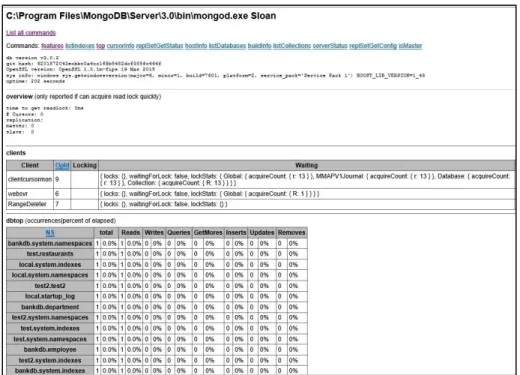
MongoDB has a web interface that is not enabled by default [21]. This interface provides diagnostic and monitoring information [21]. When enabled the interface only provides this information by default, but the administrator has the option of allowing built-in queries through the interface [21]. By default, the port is 1000 greater than the port upon which the server accepts connections [21]. This cannot be changed in the configuration file. It is important to note that the web interface does not support
authentication [21]. If enabled and the default bind address (0.0.0.0) is used, then anyone would be able to access the web interface.
5. Query Language
Unlike SQL in RDBMS, there are no standard query languages for the various NoSQL database types (i.e., document, column-family, etc.). MongoDB provides its own query language that is distinct from other NDDBMS [21]. The MongoDB’s language provides commands to perform many actions that are similar to tasks available in SQL. MongoDB supports the creation and deletion of collections, insertion and deletion of documents, etc. [21]. This thesis focuses on the command used to search for information.
MongoDB uses the db.collection.find() method to search for information where “collection” is the name of the collection the user would like to query [21]. In this section, we consider a collection named “employee.” If a user wants all the documents in the employee collection, then the user would provide no argument to the method resulting in db.employee.find(). A user can optionally provide an argument to the find method that
must be in BSON format [21]. An example would be
db.employee.find({name:{first:”john,” last:”doe”}}).
A user can specify an argument that supports an equality match. The argument would be a document of the form {<key>:<value>} where <value> is the data the user wants to match [21]. An example would be {name:”john”}. The example in the preceding paragraph uses an embedded document for the key “name.” MongoDB allows dot notation in order to use only one portion of the embedded document in the query [21]. An example would be db.employee.find({“name.last”:”doe”}) where the user only wants to search by last name. MongoDB also supports non-equality matches such as greater than,
less than, and not equal [21]. A “greater than” example would be
db.employee.find({age:{$gt:40}}) to find all employees who are older than 40. The <value> could also be an array of values. A user can specify in the search for the entire array to be present, one element to be present, an element to be present in a specific position, or that an element meets a specific condition (i.e., less than 10) [21].
A successful query returns all the documents that meet the condition of the query [21]. All the keys will be included in the document by default to include the “_id” key [21]. The user can specify keys by including a projection with the find method, which is also in BSON format [21]. An example would be db.employee.find({age:40}, {name:1, _id:0}) to return all employees who are 40 where the only key displayed is name. Unlike MySQL, MongoDB does not support joins, therefore a user can only query one collection per query with the find method.
D. CASSANDRA
This section examines the NCDBMS Cassandra in depth. The organization of this section is Cassandra overview, data modeling, installation and configuration defaults, security, and query language.
1. Cassandra Overview
Cassandra is an open source NCDBMS that was originally designed by Facebook, Inc. to support user searches of their Inbox [19]. Cassandra was able to support the millions of users using Facebook’s Inbox search application at any one moment [19]. Much like MongoDB, Cassandra enables the distribution and replication of data amongst a large number of servers so that data is highly available [19].
Cassandra maintains keyspaces, which are analogous to databases in MySQL and MongoDB [22]. Keyspaces contain tables, and tables are made up of partitioned rows [22]. A table is loosely similar to a table in MySQL where a table represents an entity, and rows represent instances of that entity. Each row has a primary key and zero or more clustering keys [22]. Cassandra, however does not require a rigid schema [23]. Entity instances may share attributes, but this is not required. Furthermore, entity instances may have more or less attributes than another entity instance. The rows of a table are not required to exist on the same machine, but rather can be partitioned amongst several nodes using the primary key [23]. Cassandra’s partitioning and replication allows databases to scale linearly much like MongoDB [23].
Users who wish to deploy a Cassandra server can get the software package from Apache for use on Linux operating systems [24]. Apache also provides the source code [24]. Users can get software packages from Datastax for use on Linux, Microsoft Windows, and Macintosh OSX, but does not provide the source code [24]. Both Apache and Datastax provide a Cassandra Query Language (CQL) shell for client communication with the server [24]. Datastax also provides C#, Java, and Python drivers so that users can create their own client programs for accessing the server [25].
Cassandra also provides replication and sharding like MongoDB [22]. Users that wish to use the replication capability would attach nodes to a Cassandra ring and customize the amount of replication they would like [22]. Users can add nodes to scale their databases horizontally [22]. Cassandra is also able to automatically distribute data across the nodes in the Cassandra ring to shard the database [22]. Clients who wish to read or write from the database contact any node in the ring, and the node coordinates the request operation with the nodes in the ring that contain the data [22].
2. Data Modeling
Cassandra models entities as tables of partitioned rows with each row representing an instance of the entity [25]. Each row has either a simple primary key (the first column in the table) or a compound primary key (the first two or more columns in the table) [25]. The first column is also known as the partitioning key as it determines upon which node Cassandra will store the row’s data [25]. The remaining columns (known as clustering columns) in a compound primary key determine how the rows are sorted on a node [25].
Cassandra’s data model is based on denormalization [25]. Relationship between entities are not represented as additional tables as in MySQL, but within the entity tables themselves as collections. Collections in Cassandra consist of three datatypes: set (collection of unique values), list (collection of ordered values), and map (collection of name and value pairs) [25]. For example, an employee table may have a column called department that is of datatype map. The name and value pairs could be {“name”:”human relations”}. This data would then be repeated amongst all employees in the human
relations department, and there may even be a table called human relations that provides information about the department.
3. Installation and Configuration Defaults
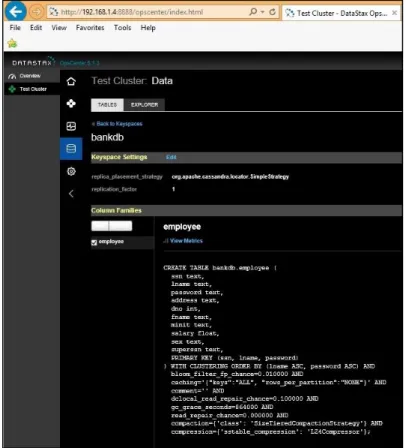
Cassandra is available in Linux, Microsoft Windows, and Macintosh OSX. The Windows version is only available through Datastax and is titled Datastax Community [22]. This software contains the Cassandra server and other tools such as the CQL shell and OpsCenter, a web based access tool for diagnostics and administrative information [22]. The installer provides a wizard that allows the user to decide whether or not to set up Windows services for the Cassandra server and OpsCenter.
Cassandra has a configuration file called “cassandra.yaml” for establishing any desired settings. By default, Cassandra will only bind to the localhost (127.0.0.1) and use ports 9042 for CQL and 9160 for the Thrift service [22]. Both CQL and Thrift are enabled by default [22]. There is no authentication or authorization by default, nor is there any encryption by default for client-to-server communications [22]. There is also no authentication or encryption by default for internode communication [22]. There is a separate configuration file for the OpsCenter called “opscenterd.conf.” By default, the OpsCenter binds to all available network connections (0.0.0.0) and listens to port 8888 [26].
4. Security
This subsection examines security aspects of Cassandra including authentication and authorization, encryption, and other issues.
a. Authentication / Authorization
Both authentication and authorization are disabled in Cassandra by default [22]. Both of these can be enabled through the configuration file. After enabling authentication the default userid and password is cassandra/cassandra [22]. The user cassandra is a superuser, so the administrator should either create a new superuser account and delete the cassandra account, or change the password for the cassandra account. Database administrators can then create users and Cassandra will manage user access to any of the
nodes through users authenticating with their userid and password [22]. Administrators can also grant privileges to users to limit the access that a user has within the database [22]. Newly created non-superusers only have read access to a few tables in the “system” keyspace [22]. There is nothing in the Cassandra documentation about the capability or requirement for nodes to authenticate each other during internode communication.
b. Encryption
By default, there is no encryption of client-to-server communication or internode communication [22]. The database administrator can enable both of these through the configuration file to require SSL encryption for both. There do not appear to be any built-in functions built-in Cassandra for encryptbuilt-ing data for storage, so a user who wants data encrypted at rest in Cassandra must encrypt this data with another application before inserting the data into Cassandra.
c. Other
OpsCenter is a web based tool for accessing diagnostic and administrative information relating to the Cassandra database [26]. OpsCenter by defaults binds to all available network connections (0.0.0.0) on port 8888 [26]. By default, there is no authentication associated with the OpsCenter, but this can be enabled [26]. Using the default settings will allow anyone to connect to the OpsCenter who is aware of the IP address of the machine upon which OpsCenter is running.
5. Query Language
Communication with the Cassandra database is accomplished through CQL [22]. Users can employ either the CQL shell or another client program using the appropriate drivers. CQL is similar syntactically to SQL as both support the notion of a table consisting of columns and rows [25]. Creating keyspaces and tables in CQL is nearly identical to creating databases and tables in SQL [25]. This subsection examines the key differences between CQL and SQL.
One of the main differences is that CQL does not allow joins or subqueries since Cassandra is not a relational database [22]. Therefore, in the SELECT statement only one
table is allowed in the FROM clause. Another difference revolves around the use of the WHERE clause. In SQL, a client can use any of the columns in a table for selecting rows from the table. In CQL, a client can only use columns that are part of the primary key for selecting rows from the table [25]. Even when the requested columns are part of the primary key, there are still restrictions on what columns can be used in the WHERE clause [25]. Consider the primary key {id, name, password}. A client will not be able to use only the column “password” in the WHERE clause. The client must also include at least the column “name” in the WHERE clause. Since data is stored on potentially many nodes and in sorted order, this restriction is necessary for efficient query operations. Therefore, it is incumbent on the database designer to wisely consider what queries are necessary when creating a table.
III.
VULNERABILITY OVERVIEW AND METHODOLOGY
This chapter first briefly introduces the database vulnerabilities explored in this thesis: injection, misconfigured databases, HTTP interface, encryption, authentication and authorization. Then we explain the methodology used to examine each database management system (MySQL, MongoDB, and Cassandra) against each vulnerability. We conclude with a table summarizing the vulnerabilities in each database management system and introduce the remaining chapters that will examine each vulnerability more in depth and offer mitigations for these vulnerabilities.
A. OVERVIEW OF DATABASE VULNERABILITIES
This section introduces the vulnerabilities that we will later examine in depth in this thesis.
1. Injection
Injection is number one on the 2013 OWASP Top 10 list, which ranks the most critical security risks in web applications [7]. The 2011 CWE/SANS Top 25 list contains two vulnerabilities related to injection: “improper neutralization of special elements used in a SQL command” at number one and “reliance on untrusted inputs in a security decision” at number 10 [8]. Injection includes both SQL injection and NoSQL injection. Injection occurs when a user provides input for a SQL or NoSQL query that changes the intended meaning of the query [27]. The root cause of injection attacks is a failure to properly validate user input [27].
2. Misconfigured Databases
Security misconfiguration ranks at number five on the 2013 OWASP Top 10 list [7]. This vulnerability refers to the failure to change the default settings of a database management system (default accounts, network connection settings, and security settings) and the failure to properly apply patches [17].
3. HTTP Interface
This vulnerability refers to any interface that the database management system offers that allows someone to glean any data concerning the database. This could include administrative information, schema definitions, and the actual stored data.
4. Encryption
Sensitive data exposure, which can result from lack of encryption, ranks at number six on the 2013 OWASP Top 10 list [7]. “Missing encryption of sensitive data” ranks at number eight on the 2011 CWE/SANS Top 25 list [8]. This vulnerability includes both the encryption of data transmitting between two entities (e.g., client/server, node/node, etc.) and the encryption of data that is stored in the database [28].
5. Authentication and Authorization
“Missing authentication for critical function” and “missing authorization” rank numbers five and six respectively on the 2011 CWE/SANS Top 25 list [8]. These two vulnerabilities are related, but distinct from one another with authentication concerning itself with verifying a user’s identity and authorization concerning itself with verifying a user’s privileges or granting privileges to a user [21].
B. METHODOLOGY
We conducted our tests on one machine, an ASUS laptop running Microsoft Windows 8.1. The version of MySQL that we examined is MySQL 5.6 and MySQL Workbench 6.2. MongoDB’s client and server is all contained in MongoDB 3.0.2. For Cassandra we used Datastax Community Edition 2.1.9 which includes Cassandra 2.1.6, CQL 3.2.0, and OpsCenter 5.1.3. We used Eclipse IDE Kepler Service Release 2 in order to build the front ends to connect to the three different database management systems.
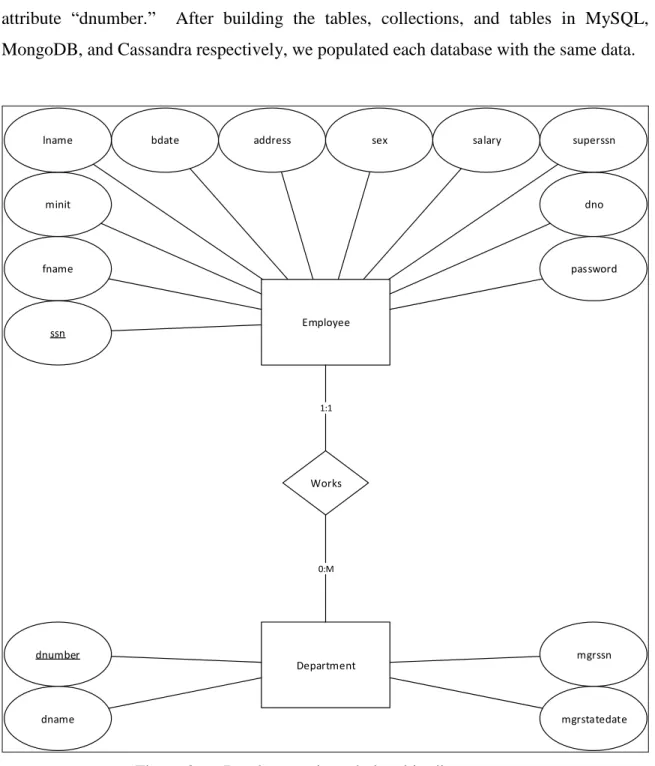
We designed a simple entity-relationship diagram involving employees working in department at a company and then translated that model into schemas for each database management system. The diagram is depicted in Figure 2. Since this is an entity-relationship diagram, it translates very well to a MySQL schema. In MySQL the
employee attribute “dno” is a foreign key reference to the department primary key “dnumber.” We use denormalized models to translate the Figure 2 diagram to MongoDB and Cassandra schemas with the employee attribute “dno” pointing to the department attribute “dnumber.” After building the tables, collections, and tables in MySQL, MongoDB, and Cassandra respectively, we populated each database with the same data.
Employee fname
minit
ssn
bdate address sex salary
dno password superssn Department dnumber dname mgrssn mgrstatedate Works 1:1 0:M lname
A complete database system is normally made up of multiple tiers. The tiers are the data tier, the presentation tier, and an optional middle tier in between the data tier and the presentation tier [29]. The data tier is the database management system, and the presentation tier, also known as the front end, is what the user interfaces with to interact with the database management system [29]. We used a two tier model for our database system and built two different front ends for each database management system using the programming languages Python and Java. We wrote the programs using Eclipse and connected to each database management system using Python and Java drivers provided by MySQL, MongoDB, and Datastax (for Cassandra).
We then examined each database management system against the database vulnerabilities introduced in section IIIA. For the injection vulnerability we tested different injection techniques against different front end coding styles. To examine the misconfigured databases vulnerability we looked at the behavior of the database management system with default settings and then observed the behavior after changing settings. We looked at any HTTP interface offered by the database management system and assessed any security issues resulting from the interface. For the encryption, authentication, and authorization vulnerabilities, we examined the default behavior of each database management system and looked at what capabilities each system offers regarding each area. The chapters on each vulnerability cover our approach in more detail.
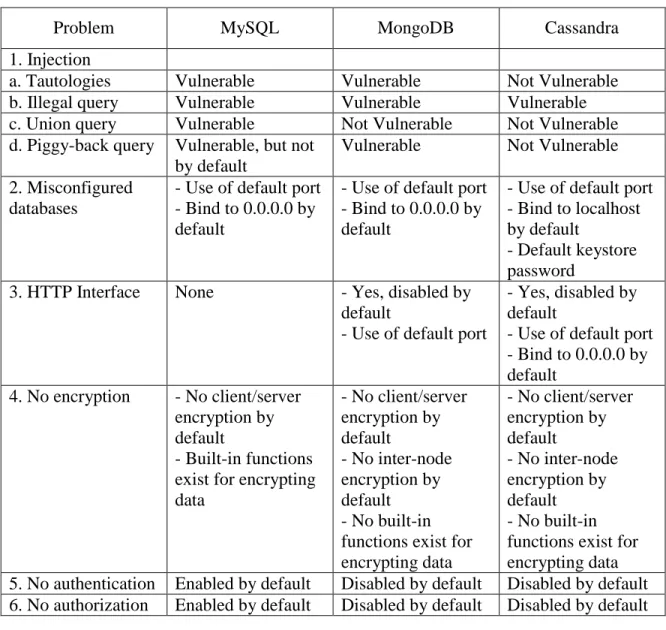
Table 1 summarizes the database vulnerabilities for each database management system. Chapters IV through VIII cover in more detail how we examined each database management system against the vulnerability, discuss our findings, and present mitigations against the vulnerability. Chapters IV, V, VI, VII, and VIII cover injection, misconfigured databases, HTTP interface, encryption, and authentication and authorization respectively.
Table 1. Database vulnerabilities. Presentation tiers in Python and Java.
Problem MySQL MongoDB Cassandra
1. Injection
a. Tautologies Vulnerable Vulnerable Not Vulnerable
b. Illegal query Vulnerable Vulnerable Vulnerable
c. Union query Vulnerable Not Vulnerable Not Vulnerable
d. Piggy-back query Vulnerable, but not by default
Vulnerable Not Vulnerable
2. Misconfigured databases
- Use of default port - Bind to 0.0.0.0 by default
- Use of default port - Bind to 0.0.0.0 by default
- Use of default port - Bind to localhost by default
- Default keystore password
3. HTTP Interface None - Yes, disabled by
default
- Use of default port
- Yes, disabled by default
- Use of default port - Bind to 0.0.0.0 by default 4. No encryption - No client/server encryption by default - Built-in functions exist for encrypting data - No client/server encryption by default - No inter-node encryption by default - No built-in functions exist for encrypting data - No client/server encryption by default - No inter-node encryption by default - No built-in functions exist for encrypting data
5. No authentication Enabled by default Disabled by default Disabled by default
![Figure 1. SELECT statement syntax, from [16].](https://thumb-us.123doks.com/thumbv2/123dok_us/10225688.2926409/34.918.210.710.110.488/figure-select-statement-syntax-from.webp)