Salesforce Spring ’15 Release
Notes
CONTENTS
SALESFORCE SPRING ’15 RELEASE NOTES
. . . 1How to Use the Release Notes. . . 2
Feature Impact. . . 13 General Enhancements. . . 37 Analytics . . . 51 Mobile . . . 82 Communities . . . 121 Sales . . . 145 Work.com . . . 166 Data.com . . . 170 Service . . . 170 Chatter . . . 197 Salesforce1 Reporting . . . 208 Force.com Customization . . . 211 Force.com Development . . . 258 Doc Content . . . 339
SALESFORCE SPRING ’15 RELEASE NOTES
In the Spring ’15 release, Salesforce delivers powerful new business intelligence capabilities, more ways to collaborate on deals and projects, and even greater control over your data.
IN THIS SECTION:
How to Use the Release Notes
The release notes give you brief, high-level descriptions of new Salesforce features and enhancements to existing features. You also get setup information, implementation tips to help you get started, and best practices to ensure your continued success.
How and When Do Features Become Available?
Some features in Spring ’15 affect all users immediately after the release goes live. You may want to communicate these changes to your users beforehand so they are prepared. Other features require direct action by an administrator before users can benefit from the new functionality.
Salesforce Overall: Better Search, Duplicate Management, and More
Spring ’15 improves your overall Salesforce experience with better searching, more ways to handle duplicate records, more detailed person accounts, and tighter email security. The release notes are easier to use too.
Analytics: Introducing Wave, the Analytics Cloud
The Salesforce Analytics Cloud is designed for everyone. Whether you’re a business user, analyst, or developer, Analytics Cloud enables you to access any data, get answers to any questions, and act immediately. Now anyone can access powerful insights and let the data tell a story. Finally, business intelligence for the rest of us!
Mobile: Do More On the Go with Salesforce1
Spring ’15 improves life for sales reps in the field. Streamline workflow with instant task creation from feed posts. Drive quicker decisions with dashboard filters and easier access to reports. Improve sales productivity with the latest news about important accounts and a visual assistant that coaches reps through your sales process. And that’s just scratching the surface.
Communities: Easier Setup and Branding, Question-to-Case
Simplified community setup, improvements to the Community Management design, additional Community Builder functionality, and more features in the Napili self-service community template are the highlights of the Communities enhancements in Spring ’15.
Sales: Duplicate Management, Sales Path, and More
Spring ’15 makes it easier to manage duplicate records and guide reps through the sales process. And there’s more. The newly christened Enterprise Territory Management includes key enhancements for tracking territories across companion objects, and with Collaborative Forecasts, sales reps can now make their own adjustments. Email Connect, Salesforce for Outlook, and Activities also offer exciting new capabilities.
Work.com: Free Features, Single Add-On
Spring ’15 enables you to use Thanks and Skills features for free, customize your coaching experience, and use more features in the Goals pilot.
Data.com
Data.com is the solution for delivering leading business data inside Salesforce. The Data.com product suite includes Data.com Prospector and Data.com Clean, as well as relatedData.comfeatures: Social Key, Data.com Reports, and Data.com Data Assessments.
Service: Turn Posts Into Cases, Manage Support Expectations
Spring ’15 includes ways to quickly turn emails and social media posts into cases. You can also track the support contracts your customers have and the products they own, offer more Knowledge articles, and help your agents out with a new Console tab. Chatter: Reporting, Question-to-Case, Records in Groups
Spring ’15 enables you to report on Chatter activity in your organization, add records to groups, and create cases from Chatter Questions. There are also several improvements to files, feeds, and unlisted groups functionality.
Salesforce1 Reporting: Report Notifications
Reporting enhancements give you even more ways to keep tabs on key metrics. Force.com Customization: Adapt Salesforce with Clicks and Code
Customization features enable you to expand your organization by enhancing your objects, data, and fields, customizing your organization’s look and feel, augmenting your business processes, creating websites, and creating apps—all by using point-and-click tools and maybe some code. Customization features also include tools to administer and secure your organization.
Force.com Development: Create Your Own Salesforce App
Force.com helps you develop new applications and integrations to help your organization or for resale to other organizations. Help and Training
We’re introducing walkthroughs, a whole new way to learn to use Salesforce features. We’ve also updated many help videos and some of our compliance and trust documentation.
Other Salesforce Products
How to Use the Release Notes
The release notes give you brief, high-level descriptions of new Salesforce features and enhancements to existing features. You also get setup information, implementation tips to help you get started, and best practices to ensure your continued success.
You can choose from PDF and HTML versions.
Known Issues
These release notes are about new and modified features, not known issues. For information about known issues, check out the Salesforce Known Issues Site.
Updates Via Twitter
When you follow @salesforcedocs on Twitter, you’ll receive notices whenever we publish new documentation or make significant updates to existing documentation.
Your Feedback Matters
We know how important our documentation is to your company’s success. We want to know what works for you and what doesn’t. • Feedback forms: As you’re working with our documentation—whether it’s in the Salesforce Help, release notes, or developer
guides at Salesforce Developers—look for the feedback form and vote up or down. Add comments if you have them. • Twitter: Tweet us at @salesforcedocs.
How to Use the Release Notes Salesforce Spring ’15 Release Notes
Before the Release
Some links to the Salesforce Help, implementation guides, tip sheets, and developer guides won’t work until the Salesforce release itself is available in your sandbox or production organization.
IN THIS SECTION:
You Asked for It!
Many of the features in this Salesforce release are here because you asked for them on IdeaExchange. Other Resources
In addition to these release notes, we provide other resources to get you up to speed quickly. Release Notes Changes
Read about changes to the release notes.
You Asked for It!
Many of the features in this Salesforce release are here because you asked for them on IdeaExchange.
Idea delivered
IdeaExchange
See Full-Featured List Views (Tablets Only) (partially delivered) And
Salesforce1 Should Show All List Views in the Salesforce1 App
See More List Views (Phones Only) (partially delivered) Convert Leads to Contacts (Beta)
Salesforce1 - Need ability to convert leads
Use Filters in Dashboards Dashboard filters also on mobile devices
Access Recent Reports from the Navigation Menu Report in salesforce1
Duplicate Management (Generally Available) Dupe Alerts
Duplicate detection on records from external sources
DKIM Signing Outbound Email Signing outbound emails with DomainKeys (DKIM)
See Full-Featured List Views (Tablets Only) Show All List Views in the Salesforce1 App
Let All Forecast Users Adjust Their Own Forecasts with Flexible Forecast Adjustments
Non-Forecasts Managers Can Adjust Their Own Forecasts
Sync Users’ Contacts and Events in the Cloud Better Contact Syncing with MS Exchange
Add Emails to Multiple Salesforce Records That Accept Tasks Add Emails to Multiple Opportunities
Attach Emails to Multiple Accounts Add Emails to Multiple Cases Add Emails to Multiple Cases at Once Support Single Email to Multiple Accounts
Multiple Opportunities and Contacts in Reference to Tasks and Events
You Asked for It! Salesforce Spring ’15 Release Notes
Idea delivered
IdeaExchange
Add Email to More Than One Object from the Side Panel Add Same Email to Multiple Cases
Assigning Emails to Multiple Accounts Send an Email to Multiple Opportunities Sync with Multiple Opportunities and Accounts Relate Email to Multiple Custom Objects
Connect for Outlook: Add an email via Outlook to Multiple Records
Increase Your Teams’ Chances of Seeing Relevant Contacts and Leads in the Side Panel
Multiple Email Address Recognition Multiple Email Addresses
Salesforce for Outlook Search Custom Email Fields
Associating Multiple Email Addresses with Person Accounts Associate with Custom Email Fields
Enable Salesforce for Outlook to Search All Email Fields Salesforce for Outlook Improvement
Sending Emails to Non-primary Email Addresses
Customize Coaching to Fit Your Organization Private to Me Visibility on Coaching Notes
Do More with Enhanced Goals (Pilot) Reduce Auto-Posts in Chatter for Goals
Reword ‘Goal Settings’ on Work.com Settings Create Goal for a Group
Add WYSIWYG Editor to Comment/Task Boxes
Ability to Set a Default Visibility When Creating a New Objective Add a Group to a Goal
Delegate Access for Objective Creation Copy Objectives
Labeling Objectives
Sorting the Key Results by Priority No Private Goals
HPD Goal Text Boxes Unlock Goals
List of Team Goals, All Goals Assign Goals
“View All Goals” in Work.com View Goals by Quarter
You Asked for It! Salesforce Spring ’15 Release Notes
Idea delivered
IdeaExchange
Work.com - Disable Feed Update on Metric Fields Defaulting Private Goals within Work.com
Option to Have Validation Rules for Work.com Objects Goal Folders for Work.com
Transfer Goal Ownership and Sharing Rules for Goals Goal Default Setting as Private in Work.com
Delegated Administrators Can Manage Public Groups Delegate Administration of Public Groups
Create or Edit Records Owned by Inactive Users Allow Salesforce Administrators to update records owned by
Inactive Users
Limitations Changed for Geolocation Fields (Generally Available) Add geolocation fields to the Address data type fields on standard
objects
Visually Automate Your Business Processes (Generally Available) Cross Object Workflow
Workflow Actions from Parent to Child Objects Mass Submit for Approval
Conditional Workflow Action
Support for Advanced Workflow Processes Creation of Any Object via Workflow Rule Create Workflow Actions Natively
Submit for Approval Through Workflow Rules Sequential Workflows or Workflow Actions Workflow to Create New Records
Recurring Workflow Rules
Workflow Field Update - Related Object Access Need More than 50 Workflow Rules
Apex Called by Workflow
Add Last Activity and Last Modified Date to Workflow Criteria Options
Allow Changes in Formula Field Value to Trigger Workflow Graphical View of Workflow Rules and Tasks
Create a Case from Workflow Workflow for Chatter Workflow Visualizer
Workflow to Create a New Record
Workflows to be Able to Trigger other Workflows Workflow Field Update to Related Record
You Asked for It! Salesforce Spring ’15 Release Notes
Idea delivered
IdeaExchange
Ability to Define Workflow on Secondary Objects Lookup Field, Field Update
Expose Opportunity Last Activity Field Use Owner’s Manager for Workflow Purposes Cross Object Workflow
Increase Workflow Rule Limit Trigger Visual Flows from a Workflow
Ability to Invoke Submit for Approval Automatically Automatic Approval Process Triggered by a Workflow Workflow Field Updates for Parent Objects
Manager Groups Available in All Organizations Single Boss Sharing Hierarchy
Assets Object Redesigned as a Standard Object Asset Tab
History Tracking for Assets Record Types on Assets
Linked Cases Related List on Articles Case Related List in Knowledge Article
View What Cases Have Been Associated With Knowledge Articles Displaying Related Cases From the Article Interface
Canceling an Unsaved Draft of a Published Article No Longer Saves the Draft
Edit a Published Article and Cancel Should Revert Back to the Original Situation
Cancel (Delete) Article if User Does Not Want Draft Article Draft Knowledge Article to be Created Only Once a Save Action is Performed
Updated Article Preview Page for Internal Users Add ability to Show Properties on Article by Default
Articles and Article Management in Salesforce1 Mobile App
Create and Manage Processes More Efficiently Multipicklist Workflow Field Updates
Allow Multi-Select Picklists to be Modified by Workflow
Process Builder: List Views and Object Info when Viewing Process List
Process Builder: Back to Salesforce Button
Process Builder: Allow Selection of Multiple Multi-Select Picklist Values
Customize the Condition Logic in Process Builder Process Builder: Ability to Use AND/OR Logic for Criteria
You Asked for It! Salesforce Spring ’15 Release Notes
Idea delivered
IdeaExchange
Develop Deployable Custom Metadata Types (Pilot) Custom Metadata Types
Promote Business Continuity with Organization Sync (Generally Available)
Eliminate Planned Downtime During Application Upgrades
Products Now Have Field History Tracking Product Field History Tracking Upgrades
Submit More Batch Jobs with Apex Flex Queue (Generally Available) And
Implement an "Apex Queue" for Async Processing
Chain More Jobs with Queueable Apex
Submit More Batch Jobs with Apex Flex Queue (Generally Available) Batch Apex Queue/Serialize
Limits Resource for REST API Access the API Request Limit through the API
Provide a Webservice API Call that Tells End User the API Usage Access Storage Used Information through API
SEE ALSO:
How and When Do Features Become Available?
Other Resources
In addition to these release notes, we provide other resources to get you up to speed quickly. • Release Readiness community. Join a community of Salesforce experts.
• Release demos. Get quick video overviews of what’s coming this release.
• Spring ’15 Training. Take online training to check out Spring ’15 features and enhancements and to prepare for certification release exams.
• Training Release Notes. Learn about online and instructor-led training changes and additions. Published every four months, the training release notes make it easy for you and your customers to keep up with the latest training innovations.
Release Notes Changes
Read about changes to the release notes.May 21, 2015
Salesforce1 Enhancements in This Release
Announcing the release of the Salesforce1 downloadable app for Android devices, version 7.2. The app is now available for download from Google Play.
This is what’s new in version 7.2:
• Access to centralized approval items and paused flow interviews from the Salesforce1 navigation menu
• Support for URL schemes, which allow users to access specific pages in the Salesforce1 app from external applications • Performance improvements and bug fixes
Other Resources Salesforce Spring ’15 Release Notes
May 6, 2015
Get Faster and More Relevant Search Results (Generally Available)
Revised example of tokenization for a record name that includes letters, numbers, and punctuation.
April 29, 2015
Code Coverage Bug Fixes
Added release note about code coverage bug fixes. Create a Dataset With the Wave Connector
Announcing new app that makes it easy to import Excel data to Analytics Cloud. Updated Article Preview Page for Internal Users
Existing organizations no longer need to contact Salesforce to enable the new article preview interface.
April 1, 2015
See News about Accounts
Noted that Account News is available only in English, and only to users in the United States.
March 25, 2015
Predictable Iteration Order for Unordered Collections
Added information about a critical update for the iteration order in unordered Apex collections. Other Changes in the Sales Cloud
Added a section about the retirement of the contract-specific approval functionality. New and Changed Apex Classes
Added information about Interview.start(), which now supports user provisioning flows. Get Faster and More Relevant Search Results (Generally Available)
Added an example of tokenization for a record name that includes letters, numbers, and punctuation.
March 18, 2015
Salesforce1 Enhancements in This Release
Announcing the release of the Salesforce1 downloadable app for iOS devices, version 7.1. The app is now available for download from the App Store.
In addition to supporting the Spring ’15 mobile features, this is what’s new in version 7.1: • Access recent reports from the navigation menu
• Performance improvements and bug fixes Load External CSS or JavaScript Libraries
Added details for the new <ltng:require> tag.
March 11, 2015
Change in Activation Date for “Serve Static Resources from the Visualforce Domain” Critical Update
Release Notes Changes Salesforce Spring ’15 Release Notes
Inactive Latvian Currency Removed
As of January 1, 2014, the official currency of Latvia is the Euro (EUR) rather than the Latvian Lats (LVL). LVL is no longer a currency option in Salesforce.
Salesforce1 Enhancements in This Release
We’ve re-enabled Salesforce Adoption Manager for the Spring ’15 release.
March 4, 2015
Salesforce1 Enhancements in This Release
Announcing the release of the Salesforce1 downloadable app for Android devices, version 7.1. The app will be gradually rolled out to users over the course of several days. Once it’s available, users can download the update from Google Play.
What’s new in version 7.1:
• Access recent reports and canvas apps from the navigation menu
• Create contacts more quickly with auto-populated data when using Call History • Performance improvements and bug fixes
See More List Views (Phones Only)
Updated this release note to clarify that the More List Views option works differently in the downloadable app for iOS devices and the mobile browser app, and that the downloadable app only displays list views that were recently accessed in the full Salesforce site.
Add or Remove Topics for Feed Posts
Updated this release note to clarify that editing lists of topics is available only when using the Salesforce1 mobile browser app on a smartphone. This option isn’t supported in the downloadable apps.
Turn Posts into Tasks
Updated this release note to clarify that creating tasks from a feed post is available in the Salesforce1 mobile browser app only. Change Sandbox Type When Refreshing
Added release note about changing sandbox type upon refresh. Make Long-Running Callouts from a Visualforce Page
Added a note to emphasize that asynchronous callouts are currently supported only when invoked through Visualforce pages.
February 25, 2015
Access Recent Reports from the Navigation Menu
Clarified that the Reports item in the Salesforce1 navigation menu is currently supported in the mobile browser app only. The Reports item displays in the downloadable apps but doesn’t work correctly. This will be fixed in the 7.1 version, which will be available later this spring.
Changes to Salesforce1 Custom Branding
Expanded this release note to explain that the header of popup, overlay, and dialog windows is now white and no longer changes to show your custom Brand Color setting.
Dashboard Wizard and API Create Correct Relative URLs
The dashboard wizard and API no longer cause errors when you enter Drill Down to locations other than absolute URLs. Give Flows Access to Apex Classes More Easily
Clarified the data types that are supported with the @InvocableMethod annotation. Added links to the Force.com Apex Code Developer’s Guide for reference.
Release Notes Changes Salesforce Spring ’15 Release Notes
Promote Business Continuity with Organization Sync (Generally Available) Removed incorrect Organization Sync pricing information.
February 18, 2015
Add the Assets Tab to the Home Page
Removed Professional Edition from the list of supported editions. You can’t add the Assets tab via user profiles in the Professional Edition.
Salesforce App for Outlook (Beta)
Added details about our new, cloud-based feature that brings in Salesforce content to Microsoft ® Outlook Web App and Outlook® 2013.
Change in Activation Date for “Enable governor limits on all executed flows” Critical Update
Added release note about the new activation date for the “Enable governor limits on all executed flows” critical update. Walkthroughs
Added links to a series of new interactive walkthroughs that guide users and administrators through popular Salesforce features. Focus on the Right Information with Release Note Filters (Beta)
Added a link to this survey, which requests your feedback on the filters that we added to the HTML release notes. Email IP Ranges Updated
Updated IP ranges for email whitelisting and relay. Email Size Limits Corrected
Corrected email range size for body and attachments. New and Changed Apex Classes
Added new exceptions in Auth.SessionManagement.validateTotpTokenForKey().
Bulk API
Added information about a new header, Batch Retry.
February 11, 2015
Refresh Dashboards More Easily
Pull-to-refresh on a dashboard no longer works, dashboards and their corresponding source reports can be rerun from the action bar, dashboards show data from the most recently run source reports when opened.
See Fewer Report Rows for Better Performance on the Go (iPhone 6 Plus Only)
Added information about a new limit on the maximum number of rows displayed in reports when using Salesforce1 on an iPhone 6 Plus.
Clickjack Protection Enabled for Salesforce1 Reporting Added an editions table.
General Administration
The Create or Edit Records Owned by Inactive Users feature is available by request. Enhance the Feed with a New Task Action
Added information to clarify that administrators need to enable Actions in the Publisher and feed tracking for tasks. Set Up Sales Path
Added the permissions table for enabling and setting up a sales path.
Release Notes Changes Salesforce Spring ’15 Release Notes
Visual Enhancements to the HTML Release Notes
Added a release note about the HTML release notes’ new look-and-feel and the ability to change language.
February 4, 2015
You Asked for It!
Added more IdeaExchange links for various features. Salesforce1 Enhancements in This Release
We’ve removed Salesforce Adoption Manager from the Spring ’15 release. It’s no longer possible to enable this feature. See Full-Featured List Views (Tablets Only)
To improve performance of the Salesforce1 mobile browser app when used on a tablet, list item actions have been removed from list views.
See More Details in Search Results (Tablets Only)
To improve performance of the Salesforce1 mobile browser app when used on a tablet, list item actions have been removed from search results.
View All Paused Flow Interviews in One Location
Corrected the release note to show that the Salesforce1 mobile browser app menu item for working with paused flows is called Paused Flow Interviews instead of Flow Interviews.
Use Thanks and Skills for Free
Added information to clarify that Chatter is required, and moved information about sharing to a relevant Knowledge article. Emoticons Added in the Feed
Corrected the release note to clarify that administrators must enable emoticons in the Chatter Settings to make the emoticons available for users.
Enhance the Feed with a New Task Action
Added information to clarify that administrators can change the field layout of the Create New Task action. New OS Support in Salesforce Files Sync
Removed increased limit on number of synced files.
January 28, 2015
Move Users Off Older iOS Mobile Devices that Are No Longer Supported
To ensure the best experience using Salesforce1, we have removed support for a number of older, slower iOS mobile devices. Visualize List View Details with Charts (Tablets Only)
Added a note to clarify that newly-created charts and out-of-the-box charts can’t be deleted in this release. Other Changes in the Process Builder on page 227
Added a new release note about support for change sets, packages, and the Metadata API. Add or Remove Topics for Feed Posts
Added information clarifying that this feature is available only when using Salesforce1 on a smartphone; the option doesn’t appear when using a tablet.
Differentiate between Similar Quick Results
Corrected the release note to indicate that this enhancement is available in the Salesforce1 mobile browser app only. Retirement of Support for the Salesforce CTI Toolkit
Changed the date from Summer ‘15 to Spring ‘15.
Release Notes Changes Salesforce Spring ’15 Release Notes
New Events
Removed ui:validationError because it doesn't apply to developers. Change in Attribute Defaults for <apex:page> When in Salesforce1
Added a new release note about this change.
URLs Returned by the URLFOR Function Optimized for Attachments Added a new release note about this change.
View a Link and a File Attachment on the Same Post
Updated the release note to clarify that only the first link users add to a post shows up as an attachment. Other Changes in Communities
Added a new release note about the removal of usernames from the Forgot Password and Changed Password emails. How do I update community membership using the API?
Added steps on how to add community members using the API. Availability of Compound Fields in Formula Functions Changed
Clarified the definition of “compound fields.” Added information on how this change affects formulas.
January 21, 2015
Access All Work.com Features with the Consolidated Add-On Added more details about the feature add-on.
SOQL Queries of External Objects Can Include the COUNT() Aggregate Function Added support for the COUNT() aggregate function in SOQL queries of external objects. Find More Files with New Salesforce Files Filters
Added a note about disabling the Safari Block Pop-ups setting to access external files on iOS devices. Distribute a Managed Version of Salesforce Files Sync (Pilot)
Added a new release note about this pilot program.
Streamline Community Creation with the Enhanced Wizard
Clarified that there are five options to choose from when creating a community, and that Community Builder is for designing communities that are based on a responsive self-service template.
January 14, 2015
Mobile: Do More On the Go with Salesforce1
Added content that describes all of the Spring ’15 enhancements to the Salesforce1 mobile app. Change in Activation Date for “Serve Static Resources from the Visualforce Domain” Critical Update
Corrected the original activation date to 12/10/2014, instead of 2015. There’s no functional change, just a change to the release note text.
Customize Coaching to Fit Your Organization
Removed the limitation about private notes because it doesn’t apply to most users. Retirement of Support for the Salesforce CTI Toolkit
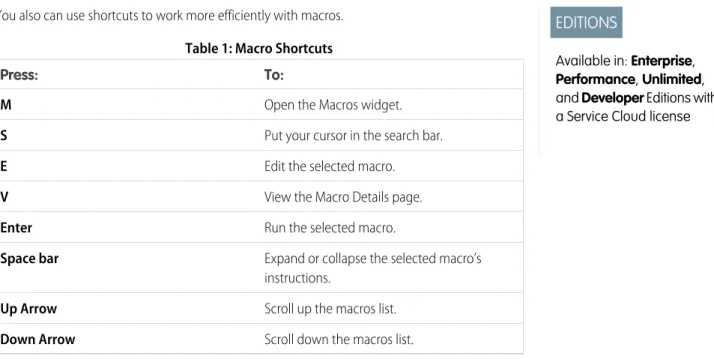
Added the retirement of support notice for the Salesforce CTI Toolkit. Use Macros in Case Feed to Work More Efficiently
Corrected edition information to clarify that macros are available only with a Service Cloud license.
Release Notes Changes Salesforce Spring ’15 Release Notes
January 7, 2015
Custom Invocable ActionsClarified that describe and invoke for an Apex action respect the profile access for the Apex class. New and Changed Apex Classes
Added information about new methods in the System.Test class and the new System.Continuation class. You Asked for It!
Added IdeaExchange links for two ideas that were delivered in Apex. Emoticons Added in the Feed
Correction for enabling emoticons. Salesforce administrators have to enable emoticons in the Chatter Settings to make them available to users.
Find Information Faster
Added release note about the restructured release notes.
December 22, 2014
Share Macros
Added information about sharing macros to the release notes.
How and When Do Features Become Available?
Some features in Spring ’15 affect all users immediately after the release goes live. You may want to communicate these changes to your users beforehand so they are prepared. Other features require direct action by an administrator before users can benefit from the new functionality.
When will you start seeing Spring ’15 changes on your instance? The best way to find out is to check the Major Release Schedule section of the Salesforce trust site at trust.salesforce.com/trust/maintenance/.
This series of tables summarizes the Spring ’15 features and their impact on users. Review the feature details for the applicable Salesforce editions.
IN THIS SECTION:
How and When General Enhancements Become Available
Spring ’15 improves your overall Salesforce experience with better searching, more ways to handle duplicate records, more detailed person accounts, and tighter email security. The release notes are easier to use too.
How and When Analytics Cloud Features Become Available
The Salesforce Analytics Cloud is designed for everyone. Whether you’re a business user, analyst, or developer, Analytics Cloud enables you to access any data, get answers to any questions, and act immediately. Now anyone can access powerful insights and let the data tell a story. Finally, business intelligence for the rest of us!
How and When Mobile Features Become Available
Spring ’15 improves life for sales reps in the field. Streamline workflow with instant task creation from feed posts. Drive quicker decisions with dashboard filters and easier access to reports. Improve sales productivity with the latest news about important accounts and a visual assistant that coaches reps through your sales process. And that’s just scratching the surface.
How and When Chatter Features Become Available
Spring ’15 enables you to report on Chatter activity in your organization, add records to groups, and create cases from Chatter Questions. There are also several improvements to files, feeds, and unlisted groups functionality.
How and When Do Features Become Available? Salesforce Spring ’15 Release Notes
How and When Communities Features Become Available
Simplified community setup, improvements to the Community Management design, additional Community Builder functionality, and more features in the Napili self-service community template are the highlights of the Communities enhancements in Spring ’15.
How and When Sales Features Become Available
Spring ’15 makes it easier to manage duplicate records and guide reps through the sales process. And there’s more. The newly christened Enterprise Territory Management includes key enhancements for tracking territories across companion objects, and with Collaborative Forecasts, sales reps can now make their own adjustments. Email Connect, Salesforce for Outlook, and Activities also offer exciting new capabilities.
How and When Work.com Features Become Available
Spring ’15 enables you to use Thanks and Skills features for free, customize your coaching experience, and use more features in the Goals pilot.
How and When Data.com Features Become Available
Data.com is the solution for delivering leading business data inside Salesforce. The Data.com product suite includes Data.com Prospector and Data.com Clean, as well as relatedData.comfeatures: Social Key, Data.com Reports, and Data.com Data Assessments. How and When Service Features Become Available
Spring ’15 includes ways to quickly turn emails and social media posts into cases. You can also track the support contracts your customers have and the products they own, offer more Knowledge articles, and help your agents out with a new Console tab. How and When Salesforce1 Reporting Features Become Available
Reporting enhancements give you even more ways to keep tabs on key metrics. How and When Force.com Customization Features Become Available
Customization features enable you to expand your organization by enhancing your objects, data, and fields, customizing your organization’s look and feel, augmenting your business processes, creating websites, and creating apps—all by using point-and-click tools and maybe some code. Customization features also include tools to administer and secure your organization.
How and When Force.com Development Features Become Available
Force.com helps you develop new applications and integrations to help your organization or for resale to other organizations.
How and When General Enhancements Become Available
Spring ’15 improves your overall Salesforce experience with better searching, more ways to handle duplicate records, more detailed person accounts, and tighter email security. The release notes are easier to use too.
Contact Salesforce to enable Requires administrator setup Enabled for administrators/ developers Enabled for users
Feature
Get Faster and More Relevant Search Results (Generally Available) (available on a rolling basis during the Spring ’15 release) Duplicate Alerts and Blocking (Generally Available)
Import Accounts and Contacts with Ease Middle Name and Suffix Fields for Person
How and When General Enhancements Become Available Salesforce Spring ’15 Release Notes
Contact Salesforce to enable Requires administrator setup Enabled for administrators/ developers Enabled for users
Feature
DKIM Signing Outbound Email (available within 24 hours after the Spring ’15 release) Improve Security with Changes to Image Support in the Rich Text Editor
How and When Analytics Cloud Features Become Available
The Salesforce Analytics Cloud is designed for everyone. Whether you’re a business user, analyst, or developer, Analytics Cloud enables you to access any data, get answers to any questions, and act immediately. Now anyone can access powerful insights and let the data tell a story. Finally, business intelligence for the rest of us!
Contact Salesforce to enable Requires administrator setup Enabled for administrators/ developers Enabled for users
Feature
Analytics: Introducing Wave, the Analytics Cloud
New in Spring `15 Plus
How and When Mobile Features Become Available
Spring ’15 improves life for sales reps in the field. Streamline workflow with instant task creation from feed posts. Drive quicker decisions with dashboard filters and easier access to reports. Improve sales productivity with the latest news about important accounts and a visual assistant that coaches reps through your sales process. And that’s just scratching the surface.
Contact Salesforce to enable Requires administrator setup Enabled for administrators/ developers Enabled for users
Feature
Salesforce1
Educate Users with Salesforce Adoption Manager
See More Record Details on Object Home Pages (Tablets Only)
See Full-Featured List Views (Tablets Only) Visualize List View Details with Charts (Tablets Only)
See More List Views (Phones Only) Use Actions and the Action Bar in More Places
How and When Analytics Cloud Features Become Available Salesforce Spring ’15 Release Notes
Contact Salesforce to enable Requires administrator setup Enabled for administrators/ developers Enabled for users
Feature
Customize Recommendations in Community Feeds (Beta)
Add Attachments Directly from the New Post Page
See Multiple Record Updates Bundled into One Post
Create Cases for Unanswered Questions in Chatter (Generally Available)
Add Records to Chatter Groups (available within 24 hours after the Spring ’15 release) Post Announcements in Chatter Groups View, Upload, and Delete Group Photos in Chatter Groups
Find More Files with New Salesforce Files Filters
Browse and Share External Files
Differentiate between Similar Quick Results See More Details in Search Results (Tablets Only)
Sort Search Results to Find the Right Records Faster
Prevent Duplicate Records (Generally Available)
See Google Map Images in Standard Address Fields (available within 24 hours after the Spring ’15 release)
Use Address Auto-Completion in Standard Address Fields
See News about Accounts Configure Access to Account News Turn Importing Contacts from Mobile Contact Lists On or Off
Increase Close Rates with the Sales Path
How and When Mobile Features Become Available Salesforce Spring ’15 Release Notes
Contact Salesforce to enable Requires administrator setup Enabled for administrators/ developers Enabled for users
Feature
Convert Leads to Contacts (Beta)
Whisk through a Task List Even Faster on a Tablet
Turn Posts into Tasks
Manage the Day Better with Even More Key Information in Salesforce Today
Use Filters in Dashboards
Specify the Running User on Dynamic Dashboards
Refresh Dashboards More Easily
View All Columns of Your Dashboard at the Same Time (Tablets Only)
Quickly Access Report Charts (Tablets Only) Access Recent Reports from the Navigation Menu
See Fewer Report Rows for Better Performance on the Go (iPhone 6 Plus Only) See Promoted Terms and Highlights and Snippets in Salesforce Knowledge Search Results
View All Pending Approval Requests in One Location
View All Paused Flow Interviews in One Location
Receive In-App Notifications about Reports (Generally Available)
Use Salesforce1 Offline Caching for Better Online Performance
Changes to Salesforce1 Custom Branding Other Changes in Salesforce1
Get Salesforce1 Notifications on the Apple Watch
Use the Salesforce1 Mobile Browser App on Windows 8.1 Tablets
How and When Mobile Features Become Available Salesforce Spring ’15 Release Notes
Contact Salesforce to enable Requires administrator setup Enabled for administrators/ developers Enabled for users
Feature
Move Users Off Older iOS Mobile Devices that Are No Longer Supported
See a Different Arrangment of Items in the Default Salesforce1 Navigation Menu Access Canvas Apps from the Navigation Menu in the Downloadable App for Android Devices
Open Most Salesforce URLs Directly in a Salesforce1 Downloadable App View Comments Faster on Tablets Add or Remove Topics for Feed Posts Control Visibility of Profile Pictures See Groups Ordered by Activity in Group List Views
See Member Profile Photos on Group Member Lists
Join or Ask to Join Groups from the Group Highlights Area
See More Relevant Search Results for People and Groups
Search Group Feeds
Create Contacts More Quickly with Auto-Populated Data from Call History Access More Coaching Features Get Updated Information in Today as Needed
Do More Actions from Today
See Today Cards in Two Columns (Tablet Only)
Weather Information No Longer Displayed in Today
Additional Salesforce1 Information Access the Salesforce1 App
How and When Mobile Features Become Available Salesforce Spring ’15 Release Notes
Contact Salesforce to enable Requires administrator setup Enabled for administrators/ developers Enabled for users
Feature
Salesforce1 Differences from the Full Salesforce Site
Salesforce1 App Development Overview
How and When Chatter Features Become Available
Spring ’15 enables you to report on Chatter activity in your organization, add records to groups, and create cases from Chatter Questions. There are also several improvements to files, feeds, and unlisted groups functionality.
Contact Salesforce to enable Requires administrator setup Enabled for administrators/ developers Enabled for users
Feature
Reporting
Report on Chatter Usage with the Salesforce Chatter Dashboards Package
Groups
Allow Users to Add Records to Chatter Groups
Group Posts Via Email Now Support Non-Unique Email Addresses Unlisted Group Enhancements Files
New Salesforce Files Setup Node for Files and Content
Files Support Record Types and Page Layouts
New OS Support in Salesforce Files Sync Sync Shared Files
Managed Version Pilot for Salesforce Files Sync
Connect to Content in OneDrive for Business Secure Agent Enhancements
Feeds
Manage Questions in Chatter with Question-to-Case (Generally Available)
How and When Chatter Features Become Available Salesforce Spring ’15 Release Notes
Contact Salesforce to enable Requires administrator setup Enabled for administrators/ developers Enabled for users
Feature
Enhance the Feed with a New Task Action Use Action Links to Take Action from Posts (Generally Available)
Emoticons Added in the Feed Other Chatter Changes
Moderate Chatter Private Messages with Apex Triggers
More Preview Links
View Multiple Attachments on a Post API Enhancements
Chatter REST API
ConnectApi (Chatter in Apex)
How and When Communities Features Become Available
Simplified community setup, improvements to the Community Management design, additional Community Builder functionality, and more features in the Napili self-service community template are the highlights of the Communities enhancements in Spring ’15.
Contact Salesforce to enable Requires administrator setup Enabled for administrators/ developers Enabled for users
Feature
Community Management
Administration Settings Moved from Setup to Community Management
Updating Community Administration Settings Requires Community Membership Dynamic Navigation in Community Management Displays Only Relevant Community Settings
Change Your Community Template Directly in Community Management
Moderate Flagged Files Directly in Community Management
How and When Communities Features Become Available Salesforce Spring ’15 Release Notes
Contact Salesforce to enable Requires administrator setup Enabled for administrators/ developers Enabled for users
Feature
Enable Community Members to Manage Their Own Authentication Settings for External Systems
Manage Topics in Communities Translate Topic Names in Communities (Beta)
Simplified Login and Self-Registration Options
Create Person Accounts for Self-Registering Users
Community Builder
Streamline Community Creation with the Enhanced Wizard
Edit Your Pages in Community Builder Preview Design Changes with Pop-Out Preview
Navigate to Any Page within Your Community
Match Your Colors and Styles Precisely with Enhanced Branding
Update Your Template from Community Builder
Community Templates
Prevent Spammers from Creating Cases User Settings View Added in the Napili Template
Napili Profile View Enhanced Attach Files to Questions in Napili Communities
Highlight Active Members on the Napili Reputation Leaderboard
More Topics Functionality in the Napili Template
Analytics
How and When Communities Features Become Available Salesforce Spring ’15 Release Notes
Contact Salesforce to enable Requires administrator setup Enabled for administrators/ developers Enabled for users
Feature
Dashboard Updates for External Users with Super User Access
Other Communities Changes Get Questions Answered Quickly with Question-to-Case (Generally Available) Enable Community Members to Manage Their Own Authentication Settings for External Systems
Campaign Tab Support Added for Partner Users
Community Welcome Email No Longer Appends Usernames in the Footer Add or Remove Topics from Posts Accessibility Improvements Added for the Koa, Kokua, and Napili Templates
How and When Sales Features Become Available
Spring ’15 makes it easier to manage duplicate records and guide reps through the sales process. And there’s more. The newly christened Enterprise Territory Management includes key enhancements for tracking territories across companion objects, and with Collaborative Forecasts, sales reps can now make their own adjustments. Email Connect, Salesforce for Outlook, and Activities also offer exciting new capabilities. Contact Salesforce to enable Requires administrator setup Enabled for administrators/ developers Enabled for users
Feature
Data.com Duplicate Management Manage Duplicate Records
Prevent Users from Saving Duplicates Define the Logic Used to Identify Duplicates Create Custom Report Types for Duplicate Record Reports
Leads
Avoid Duplicate Contacts and Accounts when Converting Leads
How and When Sales Features Become Available Salesforce Spring ’15 Release Notes
Contact Salesforce to enable Requires administrator setup Enabled for administrators/ developers Enabled for users
Feature
Sales Reps Can Close Sales Faster with Sales Path
Enterprise Territory Management View Custom Territory Management Fields in List Views and on Object Pages Identify Users in Territories Assigned to an Account
Manually Assign a Territory to an Opportunity
Show Additional Territory Information on Select Account Reports
Show Territory Information on Opportunity Reports and List Views
Opportunities and Collaborative Forecasts Adjust Your Own Forecast Amounts
Products
Products Now Have Field History Tracking Email Connect
Sync Users’ Contacts and Events in the Cloud (available within 24 hours after the Spring ‘15 release)
Complement Exchange Sync Features with the Salesforce Side Panel (available within 24 hours after the Spring ‘15 release) Salesforce App for Outlook (Beta) Salesforce for Outlook
Sync Recurring Salesforce Tasks to Microsoft® Outlook®
Increase Your Teams’ Chances of Seeing Relevant Contacts and Leads in the Side Panel
Sales Teams Can Add Emails to Person Accounts Based on the Teams’ Preferences
How and When Sales Features Become Available Salesforce Spring ’15 Release Notes
Contact Salesforce to enable Requires administrator setup Enabled for administrators/ developers Enabled for users
Feature
Add Emails to Multiple Salesforce Records That Accept Tasks
Activities
Self assigned tasks don't generate a notification
Reassign Recurring Task Owner for a Single Task
Salesforce to Salesforce New Email Templates and Tone for Salesforce to Salesforce
Salesforce Console for Sales Salesforce Console Enhancements
How and When Work.com Features Become Available
Spring ’15 enables you to use Thanks and Skills features for free, customize your coaching experience, and use more features in the Goals pilot. Contact Salesforce to enable Requires administrator setup Enabled for administrators/ developers Enabled for users
Feature
Use Thanks and Skills for Free (available within 24 hours after the Spring ’15 release) Access All Work.com Features with the Consolidated Add-On
Customize Coaching to Fit Your Organization
Do More with Enhanced Goals (Pilot) Other Changes in Work.com Receive Detailed Error Messages for Performance Cycle Deployments
Customize Page Layouts for Thanks Objects Get More Out of Salesforce1
How and When Work.com Features Become Available Salesforce Spring ’15 Release Notes
How and When Data.com Features Become Available
Data.com is the solution for delivering leading business data inside Salesforce. The Data.com product suite includes Data.com Prospector and Data.com Clean, as well as relatedData.comfeatures: Social Key, Data.com Reports, and Data.com Data Assessments.
Contact Salesforce to enable Requires administrator setup Enabled for administrators/ developers Enabled for users
Feature
Data.com API
How and When Service Features Become Available
Spring ’15 includes ways to quickly turn emails and social media posts into cases. You can also track the support contracts your customers have and the products they own, offer more Knowledge articles, and help your agents out with a new Console tab.
Contact Salesforce to enable Requires administrator setup Enabled for administrators/ developers Enabled for users
Feature
Case Feed
Set Default Email Action Defaults with Apex Use Macros in Case Feed to Work More Efficiently
Use Shortcuts with Macros View and Run Macros
Create and Edit Macros on page 174 Share Macros on page 175
Delete Macros on page 176 Entitlement Management
Milestone Countdown Timer Redesigned Assets Object
Assets Object Redesigned as a Standard Object
Add the Assets Tab to the Home Page Sharing Rules Added to Assets Object Asset Owner Field Added to Asset Records Field History Tracking Supported on Asset Records
Record Types Added to Asset Records
How and When Data.com Features Become Available Salesforce Spring ’15 Release Notes
Contact Salesforce to enable Requires administrator setup Enabled for administrators/ developers Enabled for users
Feature
Knowledge
Linked Cases Related List on Articles Updated Article Preview Page for Internal Users
Canceling an Unsaved Draft of a Published Article No Longer Saves the Draft
Send Article Content via Email (Beta) Other Changes for Salesforce Knowledge Salesforce CTI Toolkit
Retirement of Support for the Salesforce CTI Toolkit
Open CTI New Methods Salesforce Console
New Methods for the Console Integration Toolkit
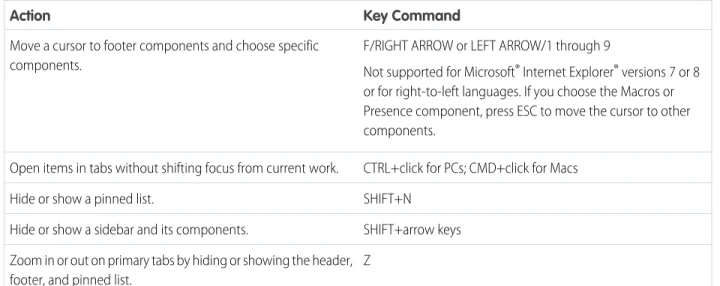
Users Can Increase Productivity with New Keyboard Shortcuts
Users Can Boost Console Performance by Adopting New System Recommendations Clone Console Apps
Users Can Access Several Console Features Automatically (available within 24 hours after the Spring ‘15 release)
Assign an Automatic Height and Width to Stacked Components
Users Can Rearrange Console Tabs Let Users Customize Navigation Tabs Other Changes in the Salesforce Console—for a Smart & Simple Console Console Tab
Console Tab Removed from New
How and When Service Features Become Available Salesforce Spring ’15 Release Notes
Contact Salesforce to enable Requires administrator setup Enabled for administrators/ developers Enabled for users
Feature
Service Communities
Create Cases from Questions in Chatter with Question-to-Case (Generally Available) Social Customer Service
Social Customer Service Starter Pack Improved Administration
Interact with Social Posts with New Case Feed Actions
Respond to Leads in the Lead Feed with the Social Action
Broad Listening Content from Blogs Forums and Sites
Google+ Social Customer Service (Pilot) Sina Weibo Social Customer Service (Pilot) Business Continuity
Promote Business Continuity with Organization Sync (Generally Available)
How and When Salesforce1 Reporting Features Become Available
Reporting enhancements give you even more ways to keep tabs on key metrics.Contact Salesforce to enable Requires administrator setup Enabled for administrators/ developers Enabled for users
Feature
Subscribe to Receive Report Notifications (Generally Available)
Increase the Session Security Level Required to Export and Print Reports
The Reports and Dashboard Tabs Are Protected from Clickjacking
Dashboard Wizard and API Create Correct Relative URLs
How and When Salesforce1 Reporting Features Become Available Salesforce Spring ’15 Release Notes
How and When Force.com Customization Features Become Available
Customization features enable you to expand your organization by enhancing your objects, data, and fields, customizing your organization’s look and feel, augmenting your business processes, creating websites, and creating apps—all by using point-and-click tools and maybe some code. Customization features also include tools to administer and secure your organization.IN THIS SECTION:
General Administration Data
Business Logic and Process Automation Security and Identity
Sharing Globalization Critical Updates Additional Customization
General Administration
Contact Salesforce to enable Requires administrator setup Enabled for administrators/ developers Visible to users FeatureActions Terminology Changed Delegated Administrators Can Manage Public Groups
Permission for Managing Custom Permissions Changed
Create or Edit Records Owned by Inactive Users
Search for Additional Items in Setup (Beta) Availability of Compound Fields in Formula Functions Changed
Standard Address Fields Show Google Maps Limitations Changed for Geolocation Fields (Generally Available)
Indexed Column Added to Lists of Fields in Setup
How and When Force.com Customization Features Become Available Salesforce Spring ’15 Release Notes
Data
Contact Salesforce to enable Requires administrator setup Enabled for administrators/ developers Visible to users FeatureEnable Users to Manage Their Own Authentication Settings for External Systems Terminology Changed for Authentication Settings for External Systems
Compress Requests to and Responses from External Data Sources of Type “Lightning Connect: OData 2.0”
SOQL Queries of External Objects Can Include the COUNT() Aggregate Function Rename Tabs and Labels for External Objects
Text Clarified for External Data Sources Retain Field History with Field Audit Trail (Generally Available)
Manage Customer Data with Data Pipelines (Pilot)
Business Logic and Process Automation
Contact Salesforce to enable Requires administrator setup Enabled for administrators/ developers Feature Process Builder
Visually Automate Your Business Processes (Generally Available)
Create Versions of a Process Call an Apex Method from a Process Trigger a Process Multiple Times in a Single Transaction
Determine Whether Specific Fields Changed Customize the Condition Logic in Process Builder Create and Manage Processes More Efficiently
How and When Force.com Customization Features Become Available Salesforce Spring ’15 Release Notes
Contact Salesforce to enable Requires administrator setup Enabled for administrators/ developers Feature
Spaces No Longer Required in Formula Functions Create More Actions
Deploy Processes
Namespaced Organizations Supported Navigate More Easily with Field Tooltips Visual Workflow
Let Users Pause Flow Interviews Control Which Users Can Pause Flows Debug Paused and Resumed Interviews Customize the Condition Logic in Flows Create a Dynamic Label for Flow Interviews Give Flows Access to Apex Classes More Easily Trigger-Ready Flows Renamed to Autolaunched Flows
Identify a Flow’s Type
Get More Information about Waiting Interviews Reference the ID of a Chatter Post That a Flow Created
Reference Information from an Approval Request That a Flow Submitted
Assign an Event’s Outputs to Flow Variables Change in Activation Date for “Enable governor limits on all executed flows” Critical Update
Add Decision and Wait Elements to Flows without Configuring Default Connectors
Debug Flow Elements That Were Deferred at Runtime Use Date/Time Fields on Additional Objects to Create a Time-Based Flow
Monitor a Flow’s Type Instead of Run Restrictions
How and When Force.com Customization Features Become Available Salesforce Spring ’15 Release Notes
Security and Identity
Contact Salesforce to enable Requires administrator setup Enabled for administrators/ developers Visible to users Feature AuthenticationConfigure a Google Authentication Provider Set Up an Authentication Provider Using Salesforce-Managed Values
Customize SAML Just-in-Time User Provisioning with an Apex Class
Use Multiple Callback URLs for Connected Apps
Improve Security with Session Domain Locking
Edit Authorize, Token, and User Info Endpoints for Facebook Auth. Provider Get Authentication Configuration Settings for a Custom Domain or Community from a URL
Create Named Credentials to Define Callout Endpoints and Their Authentication Settings Track Login History by ID with Session Context
Track Data Loader Logins with Login History Sign SAML Single Sign-On Requests with RSA-SHA256
Choose the Logout Page for Social Sign-On Users
Provide Code Challenge and Verifier Values for OAuth 2.0 Web Server Flow
OAuth 2.0 Username-Password Flow Error Messages Changed
Identity
Provision Users in Third-Party Applications Using Connected Apps (Beta)
Administration
How and When Force.com Customization Features Become Available Salesforce Spring ’15 Release Notes
Contact Salesforce to enable Requires administrator setup Enabled for administrators/ developers Visible to users Feature
Monitor Up to 180 Days of Identity Provider Events in Log
Control Individual API Client Access to Your Salesforce Organization
Monitor Your Users’ Login and Logout Activity (Generally Available)
Legitimize User Activity using Login Forensics (PILOT)
Clickjack Protection Enabled for Salesforce1 Reporting
Clickjack Label Changed in Session Settings
Sharing
Contact Salesforce to enable Requires administrator setup Enabled for administrators/ developers Visible to users FeatureManager Groups Available in All Organizations
Asynchronous Deletion of Obsolete Shares (Pilot)
Globalization
Contact Salesforce to enable Requires administrator setup Enabled for administrators/ developers Visible to users FeatureSupported Languages Changed and Added
Critical Updates
Contact Salesforce to enable Requires administrator setup Enabled for administrators/ developers Visible to users FeatureHow and When Force.com Customization Features Become Available Salesforce Spring ’15 Release Notes
Contact Salesforce to enable Requires administrator setup Enabled for administrators/ developers Visible to users Feature
String Methods Fixed for Escaping Additional Characters
Predictable Iteration Order for Unordered Collections
Change in Activation Date for “Serve Static Resources from the Visualforce Domain” Critical Update
Additional Customization
Contact Salesforce to enable Requires administrator setup Enabled for administrators/ developers Visible to users FeatureFlexible Pages Renamed as Lightning Pages Cross-Object References Increased for Quick Action Predefined Field Values
Label for Some Quick Actions Changed Inactive Latvian Currency Removed
How and When Force.com Development Features Become Available
Force.com helps you develop new applications and integrations to help your organization or for resale to other organizations.IN THIS SECTION:
Change Sets and Deployment Visualforce
Apex Code
Lightning Components API
ISVForce
Other Changes in Force.com Development
How and When Force.com Development Features Become Available Salesforce Spring ’15 Release Notes
Change Sets and Deployment
Contact Salesforce to enable Requires administrator setup Enabled for administrators/ developers Visible to users FeatureNew Components Available for Change Sets Deploy Your Components in Less Time (Generally Available)
Deploy and Retrieve More Components Delete Components before and after Component Updates
Change Sandbox Type When Refreshing
Visualforce
Contact Salesforce to enable Requires administrator setup Enabled for administrators/ developers Visible to users Feature Visualforce DevelopmentUse Visualforce Map Components to Show Location Data More Clearly
Other Changes in Visualforce New Attributes for <flow:interview> Change in Parameter Values for sforce.one.navigateToRelatedList() Change in Attribute Defaults for <apex:page> When in Salesforce1 URLs Returned by the URLFOR Function Optimized for Attachments
Change in Activation Date for “Serve Static Resources from the Visualforce Domain” Critical Update
How and When Force.com Development Features Become Available Salesforce Spring ’15 Release Notes
Apex Code
Contact Salesforce to enable Requires administrator setup Enabled for administrators/ developers Visible to users FeatureSubmit More Batch Jobs with Apex Flex Queue (Generally Available)
Make Long-Running Callouts from a Visualforce Page
Set Up Test Data for an Entire Test Class Chain More Jobs with Queueable Apex Access Address and Geolocation Compound Fields Using Apex
Make Apex Callouts with More Data List Apex Classes and Triggers With a Tooling API Endpoint
Simplify Authenticated Apex Callouts by Specifying Named Credentials as Endpoints Check Data Isolation Mode for Executed Tests in the Apex SOAP API
String Methods Fixed for Escaping Additional Characters
Predictable Iteration Order for Unordered Collections
New and Changed Apex Classes ConnectApi (Chatter in Apex)
Lightning Components
Contact Salesforce to enable Requires administrator setup Enabled for administrators/ developers Visible to users FeatureLightning Components Development New Components
New Events
Other Changes in Lightning Components Case Sensitivity
How and When Force.com Development Features Become Available Salesforce Spring ’15 Release Notes
Contact Salesforce to enable Requires administrator setup Enabled for administrators/ developers Visible to users Feature
Authoring Support Added in More Editions Namespace Requirement Removed Support Added for Default Namespace Extend Lightning Components and Apps Referential Integrity Validation Added Support for Lightning Components in the Lightning App Builder and Lightning Pages Load External CSS or JavaScript Libraries
API
Contact Salesforce to enable Requires administrator setup Enabled for administrators/ developers Visible to users Feature New Objects Changed Objects APIs REST API SOAP API Chatter REST API Data.com API Publisher.js API Streaming API Bulk API Tooling API Metadata APISalesforce Console API (Integration Toolkit) Open CTI API
Invocable Actions
How and When Force.com Development Features Become Available Salesforce Spring ’15 Release Notes
ISVForce
Contact Salesforce to enable Requires administrator setup Enabled for administrators/ developers Visible to users FeatureSave Time with Default SSO When Connecting an Organization to the Environment Hub
Keep Track of Member Organizations with Descriptions in Environment Hub Streamline Managed Packages by Deleting Unused Components
Package Named Credentials
Other Changes in Force.com Development
Contact Salesforce to enable this feature. Not automatically visible. Feature is available but requires some setup. Automatically visible to all administrators. No setup required. Automatically visible to all users. No setup required. Feature
Develop Deployable Custom Metadata Types (Pilot)
Salesforce Overall: Better Search, Duplicate Management, and More
Spring ’15 improves your overall Salesforce experience with better searching, more ways to handle duplicate records, more detailed person accounts, and tighter email security. The release notes are easier to use too.IN THIS SECTION:
Release Notes Usability Improvements
We’ve also added filters to the release notes so you can focus on just the news you need. But that’s not all! We’ve reorganized things to help you find information faster and given the HTML release notes a face-lift.
Supported Browsers
Learn about the browsers we support for the full Salesforce site. Get Faster and More Relevant Search Results (Generally Available)
We’ve updated the search engine, bringing you faster, smarter search and more relevant results throughout Salesforce, including global search, sidebar search, and advanced search in the full Salesforce site, Salesforce1, and your custom search implementations that use the SOSL search API.
Salesforce Overall: Better Search, Duplicate Management, and More Salesforce Spring ’15 Release Notes
Duplicate Alerts and Blocking (Generally Available)
Now you can maintain clean and accurate data with Data.com Duplicate Management. Control whether and when you allow users to create duplicate records inside Salesforce, customize the logic that’s used to identify duplicates, and create reports on the duplicates you do allow users to save.
Import Accounts and Contacts with Ease
Available to new and trial organizations deployed on and after December 17, 2014 and coming soon to all other organizations, choose from popular data sources to quickly and easily get your accounts and contacts into Salesforce.
Middle Name and Suffix Fields for Person Objects (Generally Available)
Better represent the name of a person associated with a record by adding Middle Name and Suffix fields in person objects. Using these fields also helps to avoid confusion when two records have the same first and last names.
DKIM Signing Outbound Email
Use the DomainKeys Identified Mail (DKIM) key feature to enable Salesforce to sign outbound emails sent on your organization’s behalf. A valid signature provides recipients confidence that the email was handled by a third party such as Salesforce in a way authorized by your organization.
Email IP Ranges Updated
The IP ranges that Salesforce uses to send email have changed. If your organization blocks any of the IP addresses, users may not receive all email sent from Salesforce. Update your whitelisted IP addresses.
Email Size Limits Corrected
The maximum size for an email, including body and attachments, has increased to 25 MB. Improve Security with Changes to Image Support in the Rich Text Editor
From now on, the rich text editor only accepts image URLs that use the http://, https://, or data:// protocols. This change enhances the security of the rich text editor.
SEE ALSO:
How and When General Enhancements Become Available
Release Notes Usability Improvements
We’ve also added filters to the release notes so you can focus on just the news you need. But that’s not all! We’ve reorganized things to help you find information faster and given the HTML release notes a face-lift.
IN THIS SECTION:
Focus on the Right Information with Release Note Filters (Beta)
Filters help you zero in on the news that matters most. Instead of scrolling through screen after screen, now you can get right to the release notes that affect you. These filters narrow down the list of release notes on the right side of your screen, never the content on the left. If you’re more a fan of search than browsing, use these filters to further narrow down your search results.
Find Information Faster
The release notes’ new format balances the big picture with the specific changes that affect your organization, so it’s easier to find the news you need with fewer clicks.
Visual Enhancements to the HTML Release Notes
We’ve made a few changes to the HTML release notes. Among those changes are an updated look-and-feel and the ability to change the language that you’re reading in.
Release Notes Usability Improvements Salesforce Spring ’15 Release Notes