Introducing the
.NET Framework
M
icrosoft has a time-honored reputation for creating innovative technologies andwrapping them in buzzwords that confuse everyone. Now that developers are finally sorting out ActiveX, COM (Component Object Model), and Windows DNA (Distributed interNet Architecture), Microsoft has a whole new technology called .NET, with a whole new set of technical jargon. So, exactly what does it all mean?
This chapter examines the technologies that underlie .NET. First, you’ll take a quick look at the history of web development and learn why the .NET Framework was created. Next, you’ll get a high-level overview of the different parts of .NET and see how ASP.NET fits into the wider world of development. Finally, you’ll see what new frills and features ASP.NET adds to the programmer’s toolkit with version 2.0.
The Evolution of Web Development
The Internet began in the late 1960s as an experiment. Its goal was to create a truly resilient information network—one that could withstand the loss of several computers without preventing the others from communicating. Driven by potential disaster scenarios (such as nuclear attack), the U.S. Department of Defense provided the initial funding.
The early Internet was mostly limited to educational institutions and defense contrac-tors. It flourished as a tool for academic collaboration, allowing researchers across the globe to share information. In the early 1990s, modems were created that could work over existing phone lines, and the Internet began to open up to commercial users. In 1993, the first HTML browser was created, and the Internet revolution began.
3
HTML and HTML Forms
It would be difficult to describe early websites as web applications. Instead, the first generation of websites often looked more like brochures, consisting mostly of fixed HTML pages that needed to be updated by hand.
A basic HTML page is a little like a word-processing document—it contains formatted
content that can be displayed on your computer, but it doesn’t actually doanything. The
following example shows HTML at its simplest, with a document that contains a heading and single line of text:
<html> <head>
<title>Sample Web Page</title> </head>
<body>
<h1>Sample Web Page Heading</h1> <p>This is a sample web page.</p> </body>
</html>
An HTML document has two types of content: the text and the tags that tell the browser how to format it. The tags are easily recognizable, because they occur inside angled brackets (< >). HTML defines tags for different levels of headings, paragraphs, hyperlinks, italic and bold formatting, horizontal lines, and so on. For example, <h1>Some Text</h1> tells the
browser to display Some Textin the Heading 1 style, which uses a large, bold font. Figure 1-1
shows the simple HTML page in a browser.
■
Tip
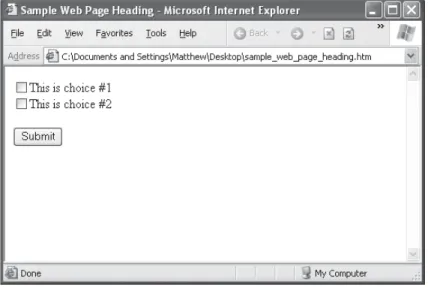
You don’t need to master HTML to program ASP.NET web pages, although it’s often useful. For a quick introduction to HTML, refer to one of the excellent HTML tutorials on the Internet, such as http://www.w3schools.com/html.HTML 2.0 introduced the first seed of web programming with a technology called HTML forms. HTML forms expand HTML so that it includes not only formatting tags but also tags for graphical widgets, or controls. These controls include common ingredients such as drop-down lists, text boxes, and buttons. Here’s a sample web page created with HTML form controls:
<html> <body>
<form>
<input type="checkbox">This is choice #1<br> <input type="checkbox">This is choice #2<br><br> <input type="submit" value="Submit">
</form> </body> </html>
In an HTML form, all controls are placed between the <form> and </form> tags. The preceding example includes two check boxes (represented by the <input type="checkbox"> tags) and a button (represented by the <input type="submit"> tag). In a browser, this page looks like Figure 1-2.
HTML forms allow web application developers to design standard input pages. When the user clicks the Submit button on the page shown in Figure 1-2, all the data in the input controls (in this case, the two check boxes) is patched together into one long string and sent to the web server. On the server side, a custom application receives and processes the data. Amazingly enough, the controls that were created for HTML forms more than ten years ago are still the basic foundation that you’ll use to build dynamic ASP.NET pages! The difference is the type of application that runs on the server side. In the past, when the user clicked a button on a form page, the information might have been e-mailed to a set account or sent to an application on the server that used the challenging CGI (Common Gateway Interface) standard. Today, you’ll work with the much more capable and elegant ASP.NET platform.
Server-Side Programming
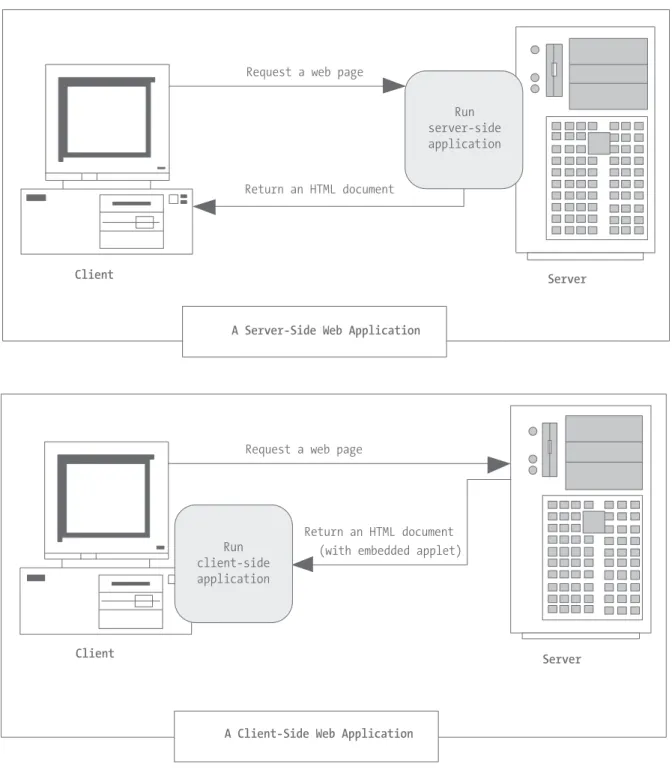
To understand why ASP.NET was created, it helps to understand the problems of other web development technologies. With the original CGI standard, for example, the web server must launch a completely separate instance of the application for each web request. If the website is popular, the web server must struggle under the weight of hundreds of separate copies of the application, eventually becoming a victim of its own success.
To counter this problem, Microsoft developed ISAPI (Internet Server Application Programming Interface), a higher-level programming model. ISAPI solved the performance problem but at the cost of significant complexity. Even after ISAPI developers master the tricky C++ programming language, they still lie awake at night worrying about confounding issues such as multithreading. ISAPI programming is definitely not for the fainthearted.
ISAPI never really went away. Instead, Microsoft used it to build higher-level devel-opment platforms, such as ASP and ASP.NET. Both of these technologies allow developers to program dynamic web pages without worrying about the low-level implementation details. For that reason, both platforms have become incredibly successful. The original ASP platform garnered a huge audience of nearly one million developers. When ASP.NET was first released, it generated even more interest as the centerpiece of the .NET Framework. In fact, ASP.NET 1.0 was enthusiastically put to work in dozens of large-scale commercial websites even when it was only in late beta.
■
Tip
Don’t let the version numbers confuse you. ASP.NET 1.xand ASP.NET 2.0 share the same underlying plumbing and use essentially the same technology. Although they run on different versions of the .NET Framework, the changes are evolutionary, not revolutionary. This similarity doesn’t hold for classic ASP, which is based on older Microsoft technologies such as COM.Client-Side Programming
At the same time that server-side web development was moving through an alphabet soup of technologies, a new type of programming was gaining popularity. Developers began to experiment with the different ways they could enhance web pages by embed-ding multimedia and miniature applets built with JavaScript, DHTML (Dynamic HTML), and Java code. These client-side technologies don’t involve any server processing. Instead, the complete application is downloaded to the client browser, which executes it locally.
The greatest problem with client-side technologies is that they aren’t supported equally by all browsers and operating systems. One of the reasons that web development is so popular in the first place is because web applications don’t require setup CDs, down-loads, and other tedious (and error-prone) deployment steps. Instead, a web application can be used on any computer that has Internet access. But when developers use client-side technologies, they encounter a few familiar headaches. Suddenly, cross-browser compat-ibility becomes a problem. Developers are forced to test their websites with different operating systems and browsers, and they might even need to distribute browser updates to their clients. In other words, the client-side model sacrifices some of the most impor-tant benefits of web development.
These are some other reasons for avoiding client-side programming:
Security: End users can view client-side code. And once malicious users understand how an application works, they can often tamper with it.
Thin clients: As the Internet continues to evolve, web-enabled devices such as mobile phones, palmtop computers, and PDAs (personal digital assistants) are appearing. These devices can communicate with web servers, but they don’t support all the fea-tures of a traditional browser. Thin clients can use server-based web applications, but they won’t support client-side features such as JavaScript.
In some cases, ASP.NET allows you to combine the best of client-side programming with server-side programming. For example, the best ASP.NET controls can intelligently detect the features of the client browser. If the browser supports JavaScript, these controls will return a web page that incorporates JavaScript for a richer, more responsive user
interface. However, no matter what the capabilities of the browser, yourcode is always
executed on the server.
The Problems with ASP
The original ASP became more popular than even Microsoft anticipated, and it wasn’t long before it was being wedged into all sorts of unusual places, including mission-critical business applications and highly trafficked e-commerce sites. Because ASP hadn’t been designed with these uses in mind, a number of problems began to appear. What began as a simple solution for creating interactive web pages became a complicated discipline that required knowledge in several fields as well as some painful experience.
If you’ve programmed with ASP before, you may already be familiar with some or all of these problems:
Scripting limitations: ASP applications rely on the VBScript language, which suffers from a number of limitations, including poor performance. To overcome these prob-lems, developers usually need to add separately developed components, which add a new layer of complexity. In ASP.NET, web pages are designed in a modern .NET lan-guage, not a scripting language.
No application structure: ASP code is inserted directly into a web page along with the HTML markup. The resulting tangle of code and HTML has nothing in common with today’s modern, object-oriented languages. As a result, web form code can rarely be reused or modified without hours of effort.
State limitations: To ensure optimum performance, the Web is built on statelessprotocols, which means as soon as a page is sent to a user, the connection is closed and any user-specific information is discarded. ASP includes a session state feature that allows programmers to work around this problem. Using session state, a web application can retain temporary information about each client in server memory. However, session state is useless in scenarios where a website is hosted by several separate web servers. In this scenario, a client might access server B while its session information is trapped on server A and essentially abandoned. ASP.NET corrects this problem by allowing state to be stored in a central repository, such as a separate process or a database that all servers can access.
ASP.NET deals with these problems (and many more) by introducing a completely new model for web pages. This model is based on a remarkable piece of technology called the .NET Framework.
The .NET Framework
You should understand that the .NET Framework is really a cluster of several technologies:
The .NET languages: These include Visual Basic (VB) 2005, C#, JScript .NET (a server-side version of JavaScript), J# (a Java clone), and C++ with Managed Extensions.
The CLR (Common Language Runtime): This is the engine that executes all .NET programs and provides automatic services for these applications, such as security checking, memory management, and optimization.
The .NET Framework class library: The class library collects thousands of pieces of prebuilt functionality that you can “snap in” to your applications. These features are sometimes organized into technology sets, such as ADO.NET (the technology for creating database applications) and Windows Forms (the technology for creating desktop user interfaces).
ASP.NET: This is the engine that hosts web applications and web services, with almost any feature from the .NET class library. ASP.NET also includes a set of web-specific services.
Visual Studio: This optional development tool contains a rich set of productivity and debugging features. The Visual Studio setup CDs (or DVD) include the complete .NET Framework, so you won’t need to download it separately.
Figure 1-4 shows the .NET class library and CLR—the two fundamental parts of .NET.
VB 2005, C#, and the .NET Languages
This book uses VB 2005, the object-oriented and modernized successor to the traditional Visual Basic language. Somewhat schizophrenically, Microsoft renamed VB twice, calling it VB .NET when .NET 1.0 hit the scene and renaming it as VB 2005 in .NET 2.0. These name changes can’t hide that the .NET versions of VB are dramatically different from the lan-guage that classic VB 6 developers know. In fact, the .NET version of Visual Basic is really a redesigned language that improves on traditional VB 6 and breaks compatibility with existing VB 6 applications. Migrating to .NET is a stretch and a process of discovery for the most seasoned classic VB developer.
Interestingly, VB 2005 and C# are actually quite similar. They’re far more similar than VB 6 is to VB 2005. Though the syntax is different, both VB 2005 and C# use the .NET class library and are supported by the CLR. In fact, almost any block of C# code can be translated, line by line, into an equivalent block of VB 2005 code. An occasional language difference pops up (for example, VB 2005 supports a language feature called optional parameters, while C# doesn’t), but for the most part, a developer who has learned one .NET language can move quickly and efficiently to another.
In short, both VB 2005 and C# are elegant, modern languages that are ideal for creating the next generation of web applications.
■
Note
.NET 1.0 introduced completely new languages. However, the changes in the .NET 2.0 languages are much more subtle. Both VB 2005 and C# add a few new features, but most parts of these languages remain unchanged. As a result, any code written with VB .NET 1.x will work identically with VB 2005. In chapters 2 and 3, you’ll sort through the syntax of VB 2005 and learn the basics of object-oriented program-ming. By learning the fundamentals before you start creating simple web pages, you’ll face less confusion and move more rapidly to advanced topics such as database access and web services. For the rest of this chapter, we’ll refer to VB 2005 simply as VB.The Intermediate Language
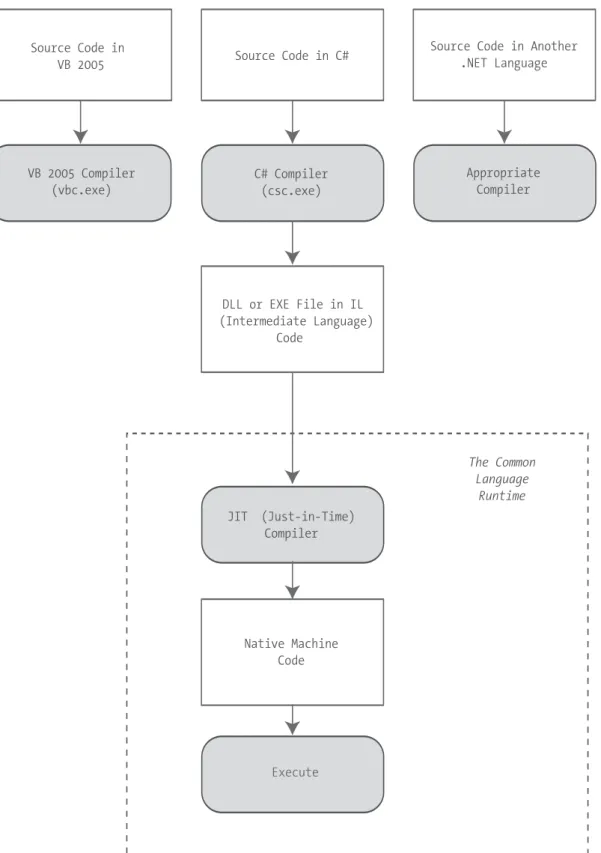
All the .NET languages are compiled into another lower-level language before the code is executed. This lower-level language is the MSIL (Microsoft Intermediate Language), or just IL. The CLR, the engine of .NET, uses only IL code. Because all .NET languages are designed based on IL, they all have profound similarities. This is the reason that the VB and C# languages provide essentially the same features and performance. In fact, the lan-guages are so compatible that a web page written with C# can use a VB component in the same way it uses a C# component, and vice versa.
such as classes, methods, events, and quite a bit more. For the most part, .NET developers don’t need to think about how the CLS works, even though they rely on it every day.
Figure 1-5 shows how the .NET languages are compiled to IL. Every EXE or DLL file that you build with a .NET language contains IL code. This is the file you deploy to other computers.
The CLR runs only IL code, which means it has no idea which .NET language you origi-nally used. Notice, however, that the CLR actually performs another compilation step—it takes the IL code and transforms it to native machine language code that’s appropriate for the current platform. This step occurs when the application is launched, just before the code is actually executed. In an ASP.NET application, these machine-specific files are cached while the web application is running so they can be reused, ensuring optimum performance.
■
Note
You might wonder why .NET compilers don’t compile straight to machine code. The reason is that the machine code depends on several factors, including the CPU. For example, if you create machine code for a computer with an Intel processor, the compiler may be able to use Hyper-Threading to produce enhanced code. This machine-specific version isn’t suitable for deployment to other computers, because no guarantee exists that they’re using the same processor.Other .NET Languages
VB and C# aren’t the only choices for ASP.NET development. Developers can also use J# (a language with Java-like syntax). You can even use a .NET language provided by a third-party developer, such as a .NET version of Eiffel or even COBOL. This increasing range of language choices is possible thanks to the CLS, which defines basic requirements and standards that allow other companies to write languages that can be compiled to IL.
Although you can use any .NET language to create an ASP.NET web application, some of them do not provide the same level of design support in Visual Studio, and virtually all ASP.NET developers use VB and C#. For more information about third-party .NET languages,
check out the website http://www.dotnetlanguages.net.
The Common Language Runtime
The CLR is the engine that supports all the .NET languages. Many modern languages use runtimes. In VB 6, the runtime logic is contained in a DLL file named msvbvm60.dll. In C++, many applications link to a file named mscrt40.dll to gain common functionality. These runtimes may provide libraries used by the language, or they may have the additional responsibility of executing the code (as with Java).
■
Note
The CLR is the reason that some developers have accused .NET of being a Java clone. The claim is fairly silly. It’s true that .NET is quite similar to Java in key respects (both use a special managed environ-ment and provide features through a rich class library), but it’s also true that every programming language “steals” from and improves on previous programming languages. This includes Java, which adopted parts of the C/C++ language and syntax when it was created. Of course, in many other aspects .NET differs just as radically from Java as it does from VBScript.All .NET code runs inside the CLR. This is true whether you’re running a Windows application or a web service. For example, when a client requests an ASP.NET web page, the ASP.NET service runs inside the CLR environment, executes your code, and creates a final HTML page to send to the client.
The implications of the CLR are wide-ranging:
Deep language integration: VB and C#, like all .NET languages, compile to IL. In other words, the CLR makes no distinction between different languages—in fact, it has no way of knowing what language was used to create an executable. This is far more than mere language compatibility; it’s language integration.
Side-by-side execution: The CLR also has the ability to load more than one version of a component at a time. In other words, you can update a component many times, and the correct version will be loaded and used for each application. As a side effect, multiple versions of the .NET Framework can be installed, meaning that you’re able to upgrade to new versions of ASP.NET without replacing the current version or needing to rewrite your applications.
Fewer errors: Whole categories of errors are impossible with the CLR. For example, the CLR prevents many memory mistakes that are possible with lower-level languages such as C++.
Along with these truly revolutionary benefits, the CLR has some potential drawbacks. Here are three issues that are often raised by new developers but aren’t always answered:
Code transparency: IL is much easier to disassemble, meaning that if you distribute a compiled application or component, other programmers may have an easier time determining how your code works. This isn’t much of an issue for ASP.NET applications, which aren’t distributed but are hosted on a secure web server.
Questionable cross-platform support: No one is entirely sure whether .NET will be adopted for use on other operating systems and platforms. Ambitious projects such as Mono (a free implementation of .NET on Linux, Unix, and Windows) are currently
underway (see http://www.go-mono.com). However, .NET will probably never have the
wide reach of a language such as Java because it incorporates too many different platform-specific and operating system–specific technologies and features.
■
Tip
Although implementations of .NET are available for other platforms, they aren’t supported by Microsoft, and they provide only a subset of the total range of features. The general consensus is that these implemen-tations aren’t ideal for mission-critical business systems.The .NET Class Library
The .NET class library is a giant repository of classes that provide prefabricated function-ality for everything from reading an XML file to sending an e-mail message. If you’ve had any exposure to Java, you may already be familiar with the idea of a class library. However, the .NET class library is more ambitious and comprehensive than just about any other programming framework. Any .NET language can use the .NET class library’s features by interacting with the right objects. This helps encourage consistency among different .NET languages and removes the need to install numerous components on your computer or web server.
Some parts of the class library include features you’ll never need to use in web appli-cations (such as the classes used to create desktop appliappli-cations with the Windows interface). Other parts of the class library are targeted directly at web development, such as those used for web services and web pages. Still more classes can be used in various programming scenarios and aren’t specific to web or Windows development. These include the base set of classes that define common variable types and the classes for data access, to name just a few.
Open standards: Microsoft currently provides programming tools that allow you to work with many open standards, such as XML (Extensible Markup Language). In .NET, however, many of these standards are “baked in” to the framework. For example, ADO.NET (Microsoft’s data access technology) uses XML natively, behind the scenes. Similarly, web services work automatically through XML and HTTP (Hypertext Transfer Protocol). This deep integration of open standards makes cross-platform work much easier.
Emphasis on infrastructure: Microsoft’s philosophy is that it will provide the tedious infrastructure so that application developers need only to write business-specific code. For example, the .NET Framework automatically handles files, databases, and trans-actions. You just add the logic needed for your specific application.
Performance and scalability: The .NET Framework emphasizes distributed and Internet applications. Technologies such as ADO.NET are designed from the ground up to be scalable even when used by hundreds or thousands of simultaneous users.
Visual Studio 2005
The last part of .NET is the optional Visual Studio development tool, which provides a rich environment where you can rapidly create advanced applications. Some of the features of Visual Studio include the following:
Page design: You can create an attractive page with drag-and-drop ease using Visual Studio’s integrated web form designer. You don’t need to understand HTML.
Automatic error detection: You could save hours of work when Visual Studio detects and reports an error before you run your application. Potential problems are underlined, just like the “spell-as-you-go” feature found in many word processors.
Debugging tools: Visual Studio retains its legendary debugging tools, which allow you to watch your code in action and track the contents of variables. And you can test web applications just as easily as any other application type, because Visual Studio has a built-in web server that works just for debugging.
You don’t need to use Visual Studio to create web applications. In fact, you might be tempted to use the freely downloadable .NET Framework and a simple text editor to create ASP.NET web pages and web services. However, in doing so you’ll multiply your work, and you’ll have a much harder time debugging, organizing, and maintaining your code. Chapter 4 provides a comprehensive look at the latest version of Visual Studio—Visual Studio 2005.
.NET 2.0
ASP.NET is a resoundingly successful platform. Thousands of websites used it while it was
still in early beta, and today more than 50,000 public web servers rely on it every day.1As
a result of its dramatic rise, ASP.NET websites overtook JSP (Java Server Pages) websites in a single year.
With .NET version 2.0, Microsoft aims to continue its success by refining and enhancing ASP.NET. The good news is that Microsoft hasn’t removed features, replaced functionality, or reversed direction. Instead, almost all the changes add higher-level features that can make your programming much more productive.
■
Note
Officially, ASP.NET 2.0 is backward compatible with ASP.NET 1.0. In reality, 100 percent backward compatibility is impossible, because correcting bugs and inconsistencies in the language can change how existing code works. Microsoft maintains a list of the breaking changes (most of which are obscure) at http://www.gotdotnet.com/team/changeinfo/Backwards1.1to2.0. However, you’re unlikely to ever run into a problem when migrating an ASP.NET 1.xproject to ASP.NET 2.0. It’s much more likely that you’ll find some cases where the old way of solving a problem still works, but ASP.NET 2.0 introduces a much better approach. In these cases, it’s up to you whether to defer the change or try to reimplement your web application to take advantage of the new features.ASP.NET 2.0
With ASP.NET 2.0, Microsoft set a bold goal—to help web developers dramatically reduce the amount of code they need to write. To accomplish this, ASP.NET 2.0 introduces new features for security, personalization, and data display. But instead of changing the existing features, ASP.NET 2.0 adds new, higher-level features that are built on top of the existing infrastructure.
For the most part, this book won’t distinguish between the features that are new in ASP.NET 2.0 and those that have existed since ASP.NET 1.0. However, here are highlights of some of the new features:
Navigation: ASP.NET has a new higher-level model for creating site maps that describe your website. Once you create a site map, you can use it with new naviga-tion controls to let users move comfortably around your website (see Chapter 11).
Master pages: Need to implement a consistent look across multiple pages? With master pages, you can define a template and reuse it effortlessly. On a similar note, ASP.NET themes let you define a standardized set of appearance characteristics for controls, which you can apply across your website for a consistent look. Both features appear in Chapter 10.
Data providers: Tired of managing the retrieval, format, and display of your data? With the new data provider model, you can extract information from a database and control how it’s displayed without writing a single line of code. ASP.NET 2.0 also adds new data controls that are designed to show information with much less hassle (either in a grid or in a browser view that shows a single record at a time). You’ll learn more in Part 3.
Membership and profiles: ASP.NET adds a handful of new controls for managing security, allowing users to log in, register, and retrieve passwords without needing any custom code. Instead, you use the higher-level membership classes that ASP.NET provides (see Chapter 19). Profiles offer a similar high-level approach to help you store and retrieve user-specific information in your database, without writing any database code (see Chapter 20).
Administration: To configure an application in ASP.NET 1.x, you needed to edit a configuration file by hand. Although this process wasn’t too difficult, ASP.NET 2.0 streamlines it with the WAT (Website Administration Tool), which works through a web page interface. You’ll be introduced to the WAT in Chapter 5.
And of course, ASP.NET 2.0 also contains bug fixes, performance improvements, and a slew of minor enhancements you’ll learn about throughout the book.
Visual Studio 2005
With .NET 2.0, Web Matrix disappears, but Visual Studio steals some of its best features, including the integrated web server, which lets you get up and running with a test website in no time.
Another welcome change in Visual Studio 2005 is the support for different coding models. While Visual Studio .NET 2003 locked developers into one approach, Visual Studio 2005 supports a range of different coding models, making it a flexible, all-purpose design tool. That means you can choose to put your HTML tags and event handling code in the same file or in separate files without compromising your ability to use Visual Studio and benefit from helpful features such as IntelliSense. You’ll learn about this distinction in Chapter 5.
Visual Studio 2005 is available in several editions. The Standard Edition has all the features you need to build any type of application (Windows or web). The Professional Edition and the Team Edition increase the cost and pile on more tools and frills (which aren’t discussed in this book). For example, they incorporate features for managing source code that’s edited by multiple people on a development team and running automated tests.
The scaled-down Visual Web Developer 2005 Express Edition is much cheaper than any other Visual Studio edition, but it also has a few significant limitations. It gives you full support for developing web applications, but it doesn’t support any other type of appli-cation. This means you can’t use it to develop separate components for use in your applications or to develop Windows applications that interact with web services. How-ever, rest assured that Visual Web Developer is a bona fide version of Visual Studio, with a similar set of features and development interface.
The Last Word
This chapter presented a high-level overview that gave you your first taste of ASP.NET and the .NET Framework. You also looked at how web development has evolved, from the basic HTML forms standard to the latest changes in .NET 2.0.