•
Database System Terminologies
– Database Properties – Basic Definitions
– An Example
•
A database has the following implicit properties:
– A database represents some aspect of the real world,
sometimes called the miniworld or the universe of discourse (UoD). Changes to the miniworld are
reflected in the database.
– A database is a logically coherent collection of data
with some inherent meaning. A random assortment of data cannot correctly be referred to as a database.
– A database is designed, built, and populated with
Basic Definitions
• Database:
– A collection of related data.
• Data:
– Known facts that can be recorded and have an implicit meaning.
• Mini-world:
– Some part of the real world about which data is stored in a database. For example, student grades and transcripts at a university.
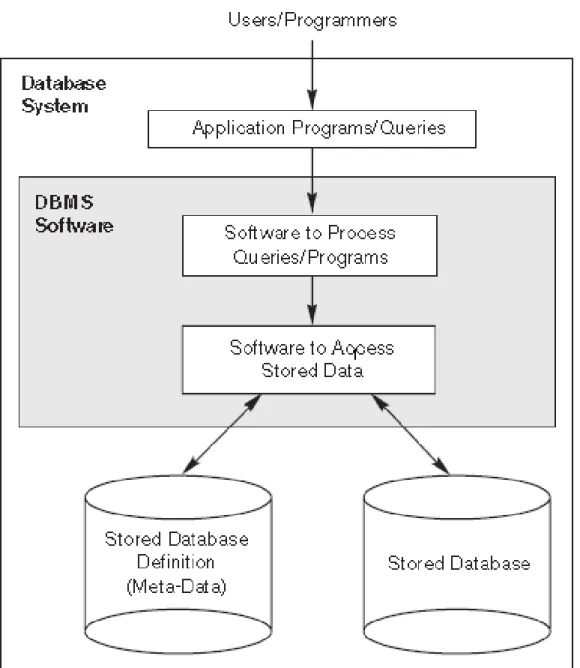
• Database Management System (DBMS):
– is a collection of programs that enables users to create and maintain a database.
•
meta-data
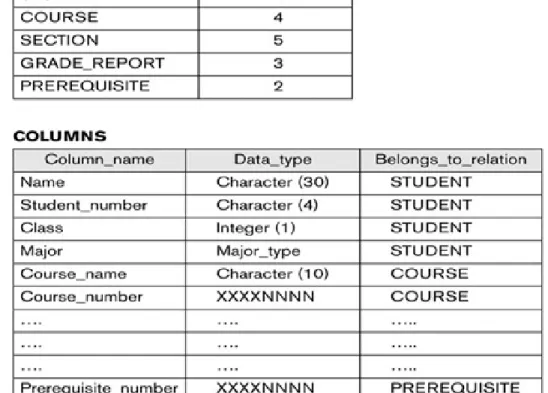
– The database definition or descriptive information is
also stored by the DBMS in the form of a database catalog or dictionary; it is called meta-data
•
Data manipulaton
– Manipulating a database includes functions such
as querying the database to retrieve specific data, updating the database to reflect changes in the miniworld, and generating reports from the data.
•
Data sharing
– Sharing a database allows multiple users and
•
An
application program
– accesses the database by sending queries or
requests for data to the DBMS.
•
Query
– typically causes some data to be retrieved;
•
Transaction
– may cause some data to be read and some data to
be written into the database.
•
Protection
•
maintenance:
– the DBMS must be able to maintain the database
• An Example Database (University Database)
• STUDENT record includes data to represent the student’s Name,
Student_number, Class (1 for freshman, 2 for sophomore, 3 for junior, 4 for senior, and 5 for graduate student.), and Major (such as mathematics or ‘MATH’ and computer science or ‘CS’)
– COURSE record includes data to represent the Course_name,
– the SECTION file stores data on each section of a course
– the GRADE_REPORT file stores the grades that students receive in the various sections they have completed
Typical DBMS Functionality
• Define a particular database in terms of its data types,
structures, and constraints
• Construct or Load the initial database contents on a secondary
storage medium
• Manipulating the database:
– Retrieval: Querying, generating reports
– Modification: Insertions, deletions and updates to its content – Accessing the database through Web applications
• Processing and Sharing by a set of concurrent users and
Example of a Database
(with a Conceptual Data Model)
• Some university relationships:– SECTIONs are of specific COURSEs – STUDENTs take SECTIONs
– COURSEs have prerequisite COURSEs – INSTRUCTORs teach SECTIONs
Main Characteristics of the Database
Approach
• Self-describing nature of a database system:
– A DBMS catalog stores the description of a particular database
(e.g. data structures and types)
– The description is called meta-data.
– This allows the DBMS software to work with different database
•
Insulation between programs and data:
– Called program-data independence.– Allows changing data structures and storage organization without having to
change the DBMS access programs.
•
Data Abstraction:
– A data model is used to hide storage details and present the users with a conceptual view of the database.
– Programs refer to the data model constructs rather than data storage details
•
Support of multiple views of the data:
•
Sharing of data and multi-user transaction
processing:
– Allowing a set of concurrent users to retrieve from
and to update the database
– Care is needed to avoid interferences
– Concurrency control within the DBMS guarantees
that each transaction is correctly executed or aborted
– Recovery subsystem ensures each completed
transaction has its effect permanently recorded in the database
Database Users
•
Users may be divided into
– Those who actually use and control the database
content, and those who design, develop and
maintain database applications (called “Actors on the Scene”), and
– Those who design and develop the DBMS software
Database Users
•
Actors on the scene
– Database Designers:
• Responsible to define the content, the structure, the
constraints, and functions or transactions against the database. They must communicate with the end-users and understand their needs.
– Database administrators:
• Responsible for authorizing access to the database, for
Categories of End-users
•
Actors on the scene (continued)
– End-users: They use the data for queries, reports
and some of them update the database content. End-users can be categorized into:
• Casual: access database occasionally when needed
• Naïve or Parametric: they make up a large section of
the end-user population.
– They use previously well-defined functions against the database.
Categories of End-users (continued)
• Sophisticated:
– These include business analysts, scientists, engineers, others thoroughly familiar with the system capabilities.
– Many use tools in the form of software packages that work closely with the stored database.
• Stand-alone:
– Mostly maintain personal databases using ready-to-use packaged applications.
– An example is a scientists that creates a database for its own experiments.
– Another example is a user that maintains an address book
Advantages of Using the Database
Approach
•
Interacting easily with data using high-level
dedicated tools
•
Controlling redundancy in data storage and in
development and maintenance efforts.
– Sharing of data among multiple users.– Ensuring consistency of data.
•
Restricting unauthorized access to data.
•
Providing storage structures (e.g. indexes) for
Advantages of Using the Database
Approach (continued)
•
Providing backup and recovery services.
•
Providing multiple interfaces to different
classes of users.
•
Representing complex relationships among
data.
•
Enforcing integrity constraints on the
Additional Implications of Using the
Database Approach
•
Potential for enforcing standards:
– This is very crucial for the success of database
applications in large organizations. Standards refer to data item names, display formats, screens,
report structures, Web page layouts, etc.
•
Reduced application development time:
– Applications can exploit the high-level database
primitives.
– Incremental time to add each new application is
Additional Implications of Using the
Database Approach (continued)
•
Flexibility to change data structures:
– Database structure may evolve as new requirements
are defined.
•
Availability of current information:
– Extremely important for on-line transaction systems
such as airline, hotel, car reservations.
•
Economies of scale:
– Wasteful overlap of resources and personnel can be
Historical Development of Database
Technology
• Early Database Applications:
– The Hierarchical and Network Models were introduced in mid 1960s and dominated during the seventies.
– A bulk of the worldwide database processing still occurs using
these models, particularly, the hierarchical model.
• Relational Model based Systems:
– Relational model was originally introduced in 1970, was heavily researched and experimented within IBM Research and several universities.
– Relational DBMS Products emerged in the early 1980s.
– Most of the systems used today are based on it (Microsoft
Historical Development of Database
Technology (continued)
• Object-oriented and emerging applications:
– Object-Oriented Database Management Systems (OODBMSs)
were introduced in late 1980s and early 1990s to cater to the need of complex data processing in CAD and other applications.
• Their use has not taken off much.
– Many relational DBMSs have incorporated object database
concepts, leading to a new category called object-relational DBMSs (ORDBMSs)
– Extended relational systems add further capabilities (e.g. for
Historical Development of Database
Technology (continued)
•
Data on the Web and E-commerce
Applications:
– Web contains data in HTML (Hypertext markup
language) with links among pages.
– This has given rise to a new set of applications and
E-commerce is using new standards like XML (eXtended Markup Language).
– Script programming languages such as PHP and
JavaScript allow generation of dynamic Web pages that are partially generated from a database.
Extending Database Capabilities
• New functionality is being added to DBMSs in the following areas:
– Scientific Applications
– XML (eXtensible Markup Language)
– Image Storage and Management
– Audio and Video Data Management
– Data Warehousing and Data Mining
– Spatial Data Management
– Time Series and Historical Data Management
When not to use a DBMS
• Main inhibitors (costs) of using a DBMS:
– High initial investment and possible need for additional
hardware.
– Overhead for providing generality, security, concurrency control,
recovery, and integrity functions.
• When a DBMS may be unnecessary:
– If the database and applications are simple, well defined, and
not expected to change.
– If there are stringent real-time requirements that may not be
met because of DBMS overhead.
When not to use a DBMS
•
When no DBMS may suffice:
– If the database system is not able to handle the
complexity of data because of modeling limitations
– If the database users need special operations not
Types of Databases and Database
Applications
•
Traditional Applications:
– Numeric and Textual Databases
•
More Recent Applications:
– Multimedia Databases
– Geographic Information Systems (GIS) – Data Warehouses
– Real-time and Active Databases – Many other applications