OSGi In Practice
Neil Bartlett
Contents
Preface xi
I.
Nuts and Bolts
1
1. Introduction 3
1.1. What is a Module? . . . 4
1.2. The Problem(s) with JARs . . . 5
1.2.1. Class Loading and the Global Classpath . . . 6
1.2.2. Conflicting Classes . . . 8
1.2.3. Lack of Explicit Dependencies. . . 9
1.2.4. Lack of Version Information . . . 10
1.2.5. Lack of Information Hiding Across JARs. . . 12
1.2.6. Recap: JARs Are Not Modules . . . 12
1.3. J2EE Class Loading . . . 13
1.4. OSGi: A Simple Idea. . . 15
1.4.1. From Trees to Graphs . . . 16
1.4.2. Information Hiding in OSGi Bundles . . . 18
1.4.3. Versioning and Side-by-Side Versions . . . 19
1.5. Dynamic Modules . . . 19
1.6. The OSGi Alliance and Standards . . . 20
1.7. OSGi Implementations . . . 21
1.8. Alternatives to OSGi . . . 21
1.8.1. Build Tools: Maven and Ivy . . . 22
1.8.2. Eclipse Plug-in System. . . 22
1.8.3. JSR 277 . . . 23
2. First Steps in OSGi 25 2.1. Bundle Construction . . . 25
2.2. OSGi Development Tools . . . 26
2.2.1. Eclipse Plug-in Development Environment. . . 26
2.2.2. Bnd . . . 27
2.3. Installing a Framework. . . 28
2.4. Setting up Eclipse . . . 29
2.5. Running Equinox . . . 32
2.6. Installing bnd . . . 33
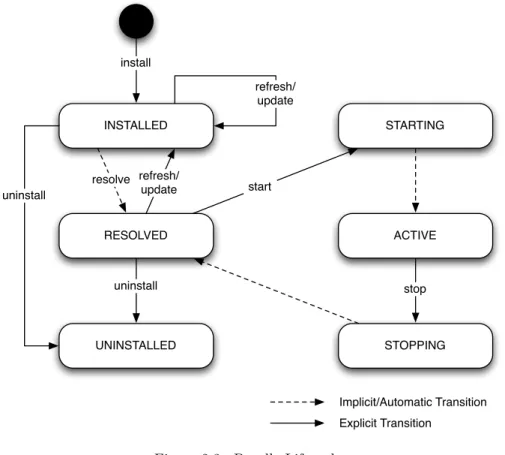
2.8. Bundle Lifecycle . . . 36
2.9. Incremental Development . . . 38
2.10. Interacting with the Framework . . . 39
2.11. Starting and Stopping Threads . . . 42
2.12. Manipulating Bundles . . . 42
2.13. Exercises . . . 43
3. Bundle Dependencies 45 3.1. Introducing the Example Application. . . 46
3.2. Defining an API . . . 46
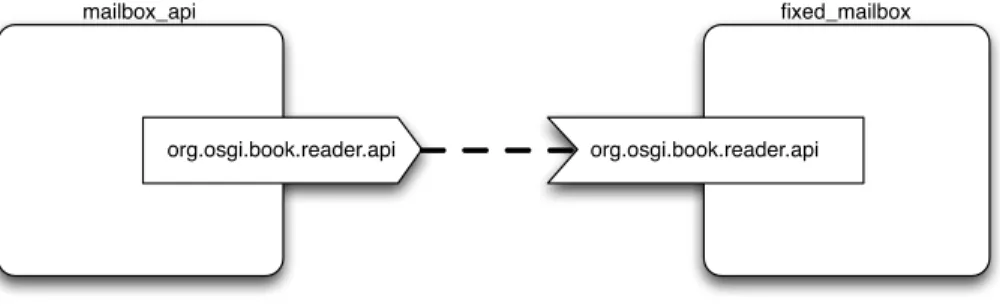
3.3. Exporting the API . . . 49
3.4. Importing the API . . . 51
3.5. Interlude: How Bnd Works . . . 55
3.6. Requiring a Bundle . . . 57
3.7. Version Numbers and Ranges . . . 61
3.7.1. Version Numbers . . . 61
3.7.2. Versioning Bundles . . . 63
3.7.3. Versioning Packages . . . 63
3.7.4. Version Ranges . . . 63
3.7.5. VersioningImport-PackageandRequire-Bundle . . . 65
3.8. Class Loading in OSGi . . . 65
3.9. JRE Packages . . . 67
3.10. Execution Environments . . . 69
3.11. Fragment Bundles . . . 72
3.12. Class Space Consistency and “Uses” Constraints . . . 73
4. Services 75 4.1. Late Binding in Java . . . 75
4.1.1. Dependency Injection Frameworks . . . 76
4.1.2. Dynamic Services. . . 77
4.2. Registering a Service . . . 79
4.3. Unregistering a Service. . . 81
4.4. Looking up a Service . . . 84
4.5. Service Properties . . . 86
4.6. Introduction to Service Trackers . . . 88
4.7. Listening to Services . . . 90
4.8. Tracking Services . . . 92
4.9. Filtering on Properties . . . 95
4.10. Cardinality and Selection Rules . . . 97
4.10.1. Optional, Unary . . . 98
4.10.2. Optional, Multiple . . . 98
4.10.3. Mandatory, Unary . . . 102
4.10.4. Mandatory, Multiple . . . 102
Contents v
5. Example: Mailbox Reader GUI 105
5.1. The Mailbox Table Model and Panel . . . 105
5.2. The Mailbox Tracker . . . 105
5.3. The Main Window . . . 108
5.4. The Bundle Activator . . . 111
5.5. Putting it Together. . . 113
6. Concurrency and OSGi 117 6.1. The Price of Freedom . . . 117
6.2. Shared Mutable State . . . 119
6.3. Safe Publication . . . 121
6.3.1. Safe Publication in Services . . . 123
6.3.2. Safe Publication in Framework Callbacks . . . 126
6.4. Don’t Hold Locks when Calling Foreign Code . . . 128
6.5. GUI Development . . . 131
6.6. Using Executors . . . 133
6.7. Interrupting Threads . . . 140
6.8. Exercises . . . 143
7. The Whiteboard Pattern and Event Admin 145 7.1. The Classic Observer Pattern . . . 145
7.2. Problems with the Observer Pattern . . . 146
7.3. Fixing the Observer Pattern. . . 147
7.4. Using the Whiteboard Pattern . . . 148
7.4.1. Registering the Listener . . . 151
7.4.2. Sending Events . . . 153
7.5. Event Admin . . . 156
7.5.1. Sending Events . . . 156
7.5.2. The Event Object . . . 157
7.5.3. Receiving Events . . . 160
7.5.4. Running the Example . . . 161
7.5.5. Synchronous versus Asynchronous Delivery . . . 163
7.5.6. Ordered Delivery . . . 164
7.5.7. Reliable Delivery . . . 164
7.6. Exercises . . . 165
8. The Extender Model 167 8.1. Looking for Bundle Entries . . . 168
8.2. Inspecting Headers . . . 170
8.3. Bundle States . . . 171
8.4. Using a Bundle Tracker . . . 174
8.4.1. Testing the Help Extender. . . 176
8.5. Bundle Events and Asynchronous Listeners . . . 177
8.6. The Eclipse Extension Registry . . . 180
8.8. Conclusion . . . 186
9. Configuration and Metadata 187 9.1. Configuration Admin . . . 187
9.1.1. Audiences . . . 189
9.2. Building Configurable Objects. . . 190
9.2.1. Configured Singletons . . . 190
9.2.2. Running the Example with FileInstall . . . 190
9.2.3. Configured Singleton Services . . . 194
9.2.4. Multiple Configured Objects . . . 197
9.2.5. Multiple Configured Objects with FileInstall . . . 200
9.2.6. A Common Mistake . . . 202
9.2.7. Multiple Configured Service Objects . . . 203
9.2.8. Configuration Binding . . . 203
9.3. Describing Configuration Data . . . 204
9.3.1. Metatype Concepts. . . 206
9.3.2. Creating a Metadata File . . . 207
9.4. Building a Configuration Management Agent . . . 207
9.4.1. Listing and Viewing Configurations . . . 208
9.4.2. Creating and Updating Configurations . . . 211
9.4.3. Creating Bound and Unbound Configurations . . . 212
9.5. Creating a Simple Configuration Entry. . . 213
II. Component Oriented Development
215
10. Introduction to Component Oriented Development 217 10.1. What is a Software Component? . . . 21811. Declarative Services 219 11.1. The Goal: Declarative Living . . . 219
11.2. Introduction. . . 220
11.2.1. Summary of Declarative Services Features . . . 220
11.2.2. A Note on Terminology and Versions. . . 221
11.3. Declaring a Minimal Component . . . 222
11.4. Running the Example . . . 223
11.5. Providing a Service . . . 224
11.5.1. Lazy Service Creation . . . 226
11.5.2. Forcing Immediate Service Creation . . . 228
11.5.3. Providing Service Properties . . . 228
11.6. References to Services . . . 230
11.6.1. Optional vs Mandatory References . . . 234
11.6.2. Static vs Dynamic References . . . 236
11.6.3. Minimising Churn . . . 238
Contents vii
11.6.5. Service Replacement . . . 241
11.6.6. Running the Example . . . 244
11.6.7. Minimising Churn with Dynamic References. . . 245
11.6.8. Recap of Dynamic Reference Implementation . . . 246
11.7. Component Lifecycle . . . 246
11.7.1. Lifecycle and Service Binding/Unbinding . . . 249
11.7.2. Handling Errors in Component Lifecycle Methods . . . 249
11.8. Unary vs Multiple References . . . 250
11.8.1. Static Policy with Multiple References . . . 251
11.8.2. Implementing Multiple References . . . 251
11.9. Discussion: Are These True POJOs? . . . 252
11.10.Using Bnd to Generate XML Descriptors . . . 254
11.10.1.Bnd Headers for XML Generation . . . 254
11.10.2.XML Generation from Java Source Annotations . . . . 256
11.10.3.Automatic Service Publication . . . 259
11.11.Configured Components . . . 259
11.11.1.Sources of Configuration Data . . . 261
11.11.2.Testing with FileInstall . . . 262
11.11.3.Dealing with Bad Configuration Data . . . 262
11.11.4.Dynamically Changing Configuration. . . 263
11.11.5.Configuration Policies . . . 265
11.11.6.Example Usage of Required Configuration . . . 266
11.12.Singletons, Factories and Adapters . . . 267
III. Practical OSGi
269
12. Using Third-Party Libraries 271 12.1. Step Zero: Don’t Use That Library! . . . 27112.2. Augmenting the Bundle Classpath . . . 273
12.2.1. Embedding JARs inside a Bundle . . . 273
12.2.2. Problems with Augmenting the Bundle Classpath. . . . 274
12.3. Finding OSGi Bundles for Common Libraries . . . 274
12.4. Transforming JARs into Bundles, Part I . . . 275
12.4.1. Step 1: Obtain and Analyse Library . . . 276
12.4.2. Step 2: Generate and Check. . . 276
12.5. Transforming JARS into Bundles, Part II . . . 277
12.5.1. Step 3: Correcting Imports . . . 278
12.5.2. Step 4: Submit to Repository . . . 281
12.6. Runtime Issues . . . 282
12.6.1. Reflection-Based Dependencies . . . 282
12.6.2. Hidden Static Dependencies . . . 283
12.6.3. Dynamic Dependencies . . . 283
13. Testing OSGi Bundles 285
14. Building Web Applications 287
IV. Appendices
289
List of Figures
1.1. The standard Java class loader hierarchy. . . 7
1.2. Example of an internal JAR dependency. . . 9
1.3. A broken internal JAR dependency. . . 10
1.4. Clashing Version Requirements . . . 11
1.5. A typical J2EE class loader hierarchy. . . 14
1.6. The OSGi class loader graph. . . 17
1.7. Different Versions of the Same Bundle. . . 20
2.1. Adding Equinox as a User Library in Eclipse . . . 30
2.2. Creating a new Java project in Eclipse: adding the Equinox library . . . 31
2.3. Bundle Lifecycle . . . 36
3.1. The runtime resolution of matching import and export. . . 55
3.2. The runtime resolution of a Required Bundle . . . 58
3.3. Refactoring withImport-Package: (Before) . . . 59
3.4. Refactoring withImport-Package: (After) . . . 59
3.5. Refactoring withRequire-Bundle: (Before) . . . 60
3.6. Refactoring withRequire-Bundle: (After) . . . 60
3.7. Simplified OSGi Class Search Order . . . 66
3.8. Full OSGi Search Order . . . 68
4.1. Service Oriented Architecture . . . 78
4.2. Updating a Service Registration in Response to Another Service 91 5.1. The Mailbox GUI (Windows XP and Mac OS X) . . . 114
5.2. The Mailbox GUI with a Mailbox Selected. . . 115
6.1. Framework Calls and Callbacks in OSGi . . . 118
6.2. The Dining Philosophers Problem, Simplified . . . 130
7.1. The Classic Observer Pattern . . . 146
7.2. An Event Broker . . . 148
7.3. A Listener Directory . . . 149
7.4. The Event Admin Service . . . 157
8.2. Synchronous Event Delivery when Starting a Bundle . . . 179
8.3. Asynchronous Event Delivery after Starting a Bundle . . . 180
8.4. Editing an Extension Point in Eclipse PDE . . . 182
8.5. Editing an Extension in Eclipse PDE . . . 182
9.1. Overview of the Configuration Admin Service . . . 189
11.1. Service Replacement, Before and After . . . 243
11.2. Unary and Multiple Cardinalities in DS . . . 268
11.3. One Component Per Service – Not Supported by DS . . . 268
List of Tables
List of Code Listings
2.1. A Typical OSGi MANIFEST.MF File . . . 25
2.2. A Typical Bnd Descriptor File . . . 27
2.3. Hello World Activator . . . 34
2.4. Bnd Descriptor for the Hello World Activator . . . 34
2.5. Bundle Counter Activator . . . 41
2.6. Bnd Descriptor for the Bundle Counter . . . 41
2.7. Heartbeat Activator . . . 42
2.8. Hello Updater Activator . . . 44
3.1. The Message Interface . . . 47
3.2. The Mailbox Interface . . . 48
3.3. Mailbox API Exceptions . . . 49
3.4. Bnd Descriptor for the Mailbox API . . . 50
3.5. String Message . . . 52
3.6. Fixed Mailbox . . . 53
3.7. MANIFEST.MFgenerated from fixed_mailbox.bnd . . . 54
3.8. Bnd Sample: Controlling Bundle Contents. . . 56
3.9. Bnd Sample: Controlling Imports. . . 56
4.1. Naïve Solution to Instantiating an Interface . . . 76
4.2. Welcome Mailbox Activator . . . 79
4.3. Bnd Descriptor for the Welcome Mailbox Bundle . . . 80
4.4. File Mailbox Activator . . . 82
4.5. File Mailbox (Stub Implementation) . . . 83
4.6. Bnd Descriptor for File Mailbox Bundle . . . 83
4.7. Message Count Activator . . . 85
4.8. Bnd Descriptor for the Message Counter Bundle . . . 86
4.9. Adding Service Properties to the Welcome Mailbox . . . 87
4.10. Message Count Activator —ServiceTrackerversion . . . 88
4.11. Waiting for a Service . . . 89
4.12. Database Mailbox Activator . . . 93
4.13. Building Filter Strings usingString.format . . . 96
4.14. Log Tracker . . . 99
4.15. Sample Usage of Log Tracker . . . 100
4.16. Multi Log Tracker . . . 101
4.17. Summary of theServiceFactoryinterface . . . 103
5.1. The Mailbox Table Model . . . 106
5.2. Mailbox Panel . . . 107
5.3. The Mailbox Tracker, Step One: Constructor . . . 107
5.4. The Mailbox Tracker, Step Two: addingServicemethod . . . 109
5.5. The Mailbox Tracker, Step Three: removedServicemethod . . 109
5.6. The Mailbox Reader Main Window. . . 110
5.7. Conventional Java Approach to Launching a Swing Application 111 5.8. Using Bundle Lifecycle to Launch a Swing Application . . . 112
5.9. Bnd Descriptor for the Mailbox Scanner . . . 113
6.1. Thread Safety using Synchronized Blocks . . . 120
6.2. Thread Safety using Read/Write Locks. . . 122
6.3. Unsafe Publication . . . 123
6.4. Dictionary Service interface . . . 123
6.5. Unsafe Publication in a Service . . . 123
6.6. Safe Publication in a Service . . . 124
6.7. Connection Cache interface . . . 125
6.8. Unsafe Connection Cache . . . 125
6.9. Is This Bundle Activator Thread-safe? . . . 126
6.10. Mailbox Registration Service Interface . . . 129
6.11. Holding a lock while calling OSGi APIs . . . 129
6.12. Avoiding holding a lock while calling OSGi APIs . . . 132
6.13. Updating a Swing Control in Response to a Service Event . . . 134
6.14. A Scala Utility to Execute a Closure in the Event Thread . . . 135
6.15. Updating a Swing Control — Scala Version . . . 135
6.16. Single-threaded execution . . . 136
6.17. TheSerialExecutorclass. . . 138
6.18. The Mailbox registration service usingSerialExecutor . . . . 139
6.19. Registering a Thread Pool as an Executor Service. . . 140
6.20. Server Activator . . . 142
6.21. Exercise 2: Thread Pool Manager Interface . . . 143
7.1. Mailbox Listener and Observable Mailbox Interfaces . . . 146
7.2. Registering a Mailbox Listener . . . 149
7.3. Mailbox Listener Tracker . . . 150
7.4. Visitor Interface and Whiteboard Helper Class . . . 151
7.5. Adding the MailboxListenerInterface toMailboxTableModel 152 7.6. Mailbox Panel, withMailboxListenerRegistration . . . 153
7.7. Growable Mailbox Activator and Timer Thread . . . 154
7.8. Growable Mailbox . . . 155
7.9. Random Price Generator . . . 158
7.10. Event Admin Tracker . . . 159
7.11. Bundle Activator for the Random Price Generator . . . 159
7.12. Stock Ticker Activator . . . 162
List of Code Listings xv
8.1. Help Provider Service Interface . . . 167
8.2. Scanning a Bundle for Help Documents . . . 168
8.3. A Help Index File,index.properties . . . 169
8.4. Scanning a Bundle for Help Documents with Titles (1) . . . 169
8.5. ThePairClass . . . 170
8.6. MANIFEST.MFfor a Help Provider . . . 171
8.7. Scanning a Bundle for Help Documents with Titles (2) . . . 172
8.8. TheHelpExtenderClass . . . 175
8.9. Shell Command for Testing the Help Extender . . . 177
8.10. Activator & Bnd Descriptor for the Help Extender Bundle . . . 178
8.11. Bnd Descriptor for a Sample Help Provider . . . 178
8.12. An Eclipseplugin.xmlFile . . . 181
8.13. Mailbox Service Extender . . . 184
8.14. Activator and Bnd Descriptor for the Mailbox Service Extender 185 8.15. Minimal Mailbox Class and Bnd Descriptor . . . 186
9.1. Configured Server Connection Singleton . . . 191
9.2. Registering the Server Connection Singleton . . . 192
9.3. A Configured Service . . . 194
9.4. Activator for the Configured Service . . . 195
9.5. A Simplified Configured Mailbox Service . . . 196
9.6. Activator and Manager for the Simplified Configured Service . 198 9.7. TheManagedServiceFactoryinterface. . . 199
9.8. AManagedServiceFactoryfor HTTP Port Listeners. . . 201
9.9. Activator for Multiple Configured Services . . . 204
9.10. Factory for Multiple Configured Services . . . 205
9.11. Activator for the JSON Configuration Bundle . . . 209
9.12. Utility Methods for Viewing Configurations . . . 210
9.13. Listing Configurations . . . 210
9.14. Loading JSON Data . . . 212
9.15. Loading Configuration Data from a File . . . 214
11.1. Java Code for the Minimal DS Component . . . 222
11.2. Minimal DS Component Declaration . . . 222
11.3. Bnd Descriptor for the Minimal DS Component. . . 223
11.4. A Simplistic Log Service Interface and Bnd descriptor. . . 225
11.5. The Console Log Class . . . 225
11.6. DS Declaration & Bnd Descriptor for the Console Logger . . . 226
11.7. Declaration for the Console Logger as an “Immediate” Service. 228 11.8. Adding a Simple Service Property . . . 229
11.9. Additional Service Properties . . . 229
11.10.A Logging Mailbox Listener . . . 230
11.11.DS Component Declaration for the Logging Mailbox Listener . 231 11.12.Bnd Descriptor for the DS-Based Logging Mailbox Listener . . 231
11.14.Logging Mailbox Listener with Optional Log Field . . . 236
11.15.DS Declaration for a Database Mailbox . . . 237
11.16.The Database Mailbox Class (Excerpt). . . 237
11.17.DS Declaration for the Dynamic Logging Mailbox Listener. . . 240
11.18.Handling Dynamics by Copying a Field) . . . 241
11.19.Handling Dynamics with Atomic References (Excerpt) . . . 242
11.20.Incorrect Implementation of Unbind Methods . . . 243
11.21.Correct Implementation of Unbind Methods . . . 244
11.22.Template for Dynamic Service Usage with DS . . . 246
11.23.The Heartbeat Component . . . 247
11.24.The Heartbeat Component, XML Descriptor . . . 248
11.25.Implementing Multiple References . . . 252
11.26.XML Generation Header for the Logging Mailbox Listener. . . 254
11.27.Generated XML for the Logging Mailbox Listener . . . 255
11.28.XML Generation Header for the Optional Logging Mailbox Lis-tener . . . 255
11.29.Long Form Cardinality and Policy Attributes in Bnd . . . 255
11.30.LogMailboxListener with Bnd DS Annotations . . . 257
11.31.Heartbeat Component with Bnd DS Annotations . . . 258
11.32.Configured Component. . . 260
11.33.A Component with Modifiable Configuration . . . 264
11.34.A Component with Required Configuration . . . 267
12.1. Bnd Descriptor for Joda Time. . . 276
12.2. Bnd Descriptor for HSQLDB, First Pass . . . 278
12.3. Generated Imports and Exports for HSQLDB, First Pass . . . 279
12.4. Package Uses for HSQLDB, First Pass (Abridged) . . . 281
12.5. Bnd Descriptor for HSQLDB, Final Version . . . 281
A.1. build.properties . . . 291
Part I.
1. Introduction
Consider the following question. In any large engineering project, for example the design of a new bridge, skyscraper, or jet airliner, what is nearly always the most difficult challenge to overcome?
The answer is Complexity.
The Boeing 747-400 “Jumbo Jet” has six million parts[1], of which half are fasteners. It contains 171 miles (274 km) of wiring and 5 miles (8 km) of tubing. Seventy-five thousand engineering drawings were used to produce the original 747 design. It is a very, very complex machine, and because of this complexity, no single person can have a complete understand of how a Boeing 747 works. Yet, this is a machine first designed in the 1960s — modern aircraft have multiplied the level of complexity many times over. The only approach that will allow human beings to design such incredible machines is to break them down into smaller, more understandable modules.
Modularity enables several important benefits:
Division of Labour. We can assign separate individuals or groups to work on separate modules. The people working on a module will have a thorough understanding of their own module but not all the others. For example, the designer of the entertainment system does not need to know anything about how the landing gear works (andvice versa!) but can concentrate all her efforts on building the best possible entertainment system.
Abstraction. We can now think about the aircraft as an abstract whole, with-out needing a complete understanding of every part. For example, we grasp that a 747 is able to fly due to the lift provided by the wings and the forward thrust of the engines, even if we do not understand exactly how fuel is supplied to the engines or how many motors are required to move the flaps up and down.
Reuse. Given the amount of effort that goes into designing even some of the smaller components of an aircraft, it would be a shame to have to start from scratch when we need an identical or very similar component in another aircraft, or even in another part of the same aircraft. It would be helpful if we could reuse components with minimal alterations.
designs allow for failed modules to be removed and either repaired or replaced without affecting the rest of the machine.
It’s debatable whether the production of software can be characterised as an engineering discipline, but nevertheless the complexity of sofware rivals what is seen in other fields. Modern software is incredibly complex, and furthermore is accelerating in its complexity. For example, the onboard computers of the NASA Space Shuttle contained half a million lines of code, but today the DVD player in your living room contains around one million lines of code. Microsoft Windows XP is estimated to contain 40 million lines, and Windows Vista 50 million. A BMW 7-series car can contain up to 50 networked computers.
Just like aircraft engineers, software professionals are in the business of cre-ating large and complex machines, which we can only hope to understand by breaking them into modules.
The Java™ programming language is one of the most popular languages to-day for building both large, enterprise applications and also small but widely deployed mobile applications. However Java alone does not support modular-ity in any useful way. . . we will see in the next section why Java’s existing mechanisms fail to deliver all four of the above listed benefits of modularity. However, Java’s great strength is its flexibility, which has allowed a powerful module system to be built on top.
That module system is called OSGi. OSGi is nothing more nor less than the way to build modular applications in Java.
1.1. What is a Module?
So, what should a software module look like? It should have the following properties:
Self-Contained. A module is a logical whole: it can be moved around, installed and uninstalled as a single unit. It is not an atom — it consists of smaller parts — but those parts cannot stand alone, and the module may cease to function if any single part is removed.
Highly Cohesive. Cohesion is a measure of how strongly related or focussed the responsibilities of a module are. A module should not do many unrelated things, but stick to one logical purpose and fulfil that purpose well.
1.2 The Problem(s) with JARs 5
To support all three properties, it is vital for modules to have a well-defined interfacefor interaction with other modules. A stable interface enforces logical boundaries between modules and prevents access to internal implementation details. Ideally, the interface should be defined in terms of what each module offers to other modules, and what each module requires from other modules.
1.2. The Problem(s) with JARs
The standard unit of deployment in Java is the JAR file, as documented by the JAR File Specification[2]. JARs are archive files based on the ZIP file format, allowing many files to be aggregated into a single file. Typically the files contained in the archive are a mixture of compiled Java class files and resource files such as images and documents. Additionally the specification defines a standard location within a JAR archive for metadata — theMETA-INFfolder — and several standard file names and formats within that directly, most important of which is the MANIFEST.MFfile.
JAR files typically provide either a single library or a portion of the function-ality of an application. Rarely is an entire application delivered as a single JAR, unless it is very small. Therefore, constructing Java applications requires composing together many JAR files: large applications can have a JAR count in double or even triple figures. And yet the Java Development Kit (JDK) provides only very rudimentary tools and technologies for managing and com-posing JARs. In fact the tools available are so simplistic that the term “JAR Hell”1 has been coined for the problem of managing JARs, and the strange error messages that one encounters when things go wrong.
The three biggest problems with JAR files as a unit of deployment are as follows:
• There is no runtime concept that corresponds to a JAR; they are only meaningful at build-time and deploy-time. Once the Java Virtual Ma-chine is running, the contents of all the JARs are simply concatenated and treated as a single, global list: the so-called “Classpath”. This model scales very poorly.
• They contain no standard metadata to indicate their dependencies.
• They are not versioned, and multiple versions of JARs cannot be loaded simultaneous.
• There is no mechanism for information hiding between JARs.
1A reference to the termDLL Hell: a comparable problem with managing DLL files on the
1.2.1. Class Loading and the Global Classpath
The term “classpath” originates from the command-line parameter that is passed to the java command when running simple Java applications from the command shell (or the DOS prompt in Windows terms), or more usually from some kind of launcher script. It specifies a list of JAR files and directo-ries containing compiled Java class files. For example the following command launches a Java application with bothlog4j.jarand the classesdirectory on the classpath. First as it would be under UNIX (including Mac OS X):
java -classpath log4j.jar:classes org.example.HelloWorld
And then the DOS/Windows version:
java -classpath log4j.jar;classes org.example.HelloWorld
The final parameter is the name of the “main” class to execute, which we will assume has been compiled into the org/example/HelloWorld.class file in theclassesdirectory. Somehow the Java Virtual Machine (JVM) must load the bytes in that class file and transform them into a Classobject, on which it can then execute the staticmainmethod. Let’s look at how this works in a standard Java runtime environment (JRE).
The class in Java that loads classes is java.lang.ClassLoader, and it has two responsibilities:
1. Finding classes, i.e. the physical bytes on disk, given their logical class names.
2. Transforming those physical bytes into aClassobject in memory.
We can extend thejava.lang.ClassLoaderclass and provide our own imple-mentation of the first part, which allows us to extend the JRE to load code from a network or other non-file-based storage system. However the second part, i.e. transforming physical class bytes intoClassobjects, is implemented in java.lang.ClassLoaderby the defineClass method, which is both na-tiveand final. In other words, this functionality is built into the JRE and cannot be overridden.
When we run the command above, the JRE determines that it needs to load the classorg.example.HelloWorld. Because it is the “main” class, it consults a specialClassLoadernamed the application class loader. The first thing the application class loader does is ask its “parent” to load the class.
1.2 The Problem(s) with JARs 7
Application ClassLoader
rt.jar
a.jar
b.jar
c.jar
... Bootstrap
ClassLoader
Extension
ClassLoader ext.jar
Delegate
Delegate
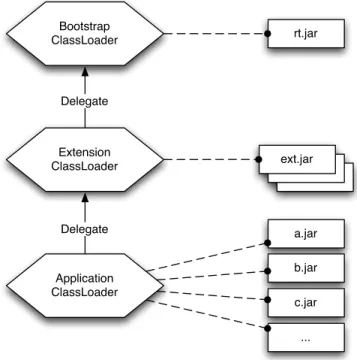
Figure 1.1.: The standard Java class loader hierarchy.
first ask their parent to load a class; only when the parent responds that it knows nothing about the specified class does the class loader attempt to find the class itself. Furthermore the parent will also delegate to its own parent, and so on until the top of the hierarchy is reached. Therefore classes will always be loaded at the highest possible level of the hierarchy.
Figure1.1shows the three standard class loaders found in a conventional Java application. The bootstrap class loader sits at the top of the tree, and it is responsible for loading all the classes in the base JRE library, for exam-ple everything with a package name beginning with java, javax, etc. Next down is the extension class loader, which loads from “extension” libraries, i.e. JARs which are not part of the base JRE library but have been installed into the libext directory of the JRE by an administrator. Finally there is the aforementioned application class loader, which loads from the “classpath”.
ClassNotFoundException.
TheHelloWorldclass is probably not insidelog4j.jar, but it will be found in theclassesdirectory, and loaded by the class loader. This will inevitably trigger the loading of several classes that HelloWorld depends on, such as its super-class (even if that is only java.lang.Object), any classes used in its method bodies and so on. For each of those classes, the whole procedure described above is repeated.
To recap:
1. The JRE asks the application class loader to load a class.
2. The application class loader asks the extension class loader to load the class.
3. The extension class loader asks the bootstrap class loader to load the class.
4. The bootstrap class loader fails to find the class, so the extension class loader tries to find it.
5. The extension class loader fails to find the class, so the application class loader tries to find it, looking first inlog4j.jar.
6. The class is not in log4j.jarso the class loader looks in the classes directory.
7. The class is found and loaded, which may trigger the loading of further classes — for each of these we go back to step 1.
1.2.2. Conflicting Classes
The process for loading classes in Java does at least work for much of the time. However, consider what would happen if we accidentally added a JAR file to our classpath containing an older version of HelloWorld. Let’s call that file obsolete.jar.
java -classpath obsolete.jar:log4j.jar:classes \ org.example.HelloWorld
1.2 The Problem(s) with JARs 9
foobar.jar
Foo.class
Bar.class Uses
Figure 1.2.: Example of an internal JAR dependency.
effect, simply because that class is being shadowed by another with the same name.
Perhaps this scenario does not seem very likely, and it’s true that in a triv-ial application like this, such a mistake is easily avoided. However, as we discussed, a large Java application can consist of tens or even hundreds of individual JAR files, all of which must be listed on the classpath. Also, JAR files frequently have obscure names which give little clue as to their contents. Faced with such problems it becomes much more likely — perhaps even in-evitable — that the classpath will contain conflicting names. For example, one of the commonest cause of conflicts is including two different versions of the same library.
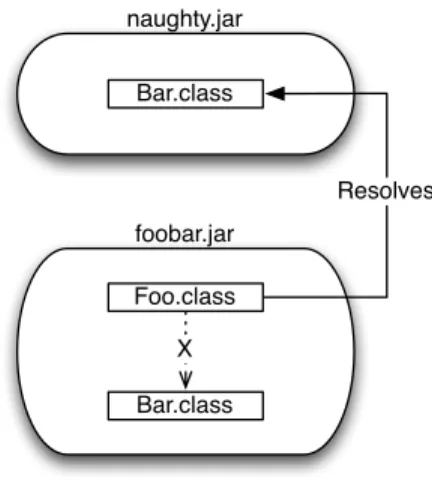
By simply searching classpath entries in order and stopping on the first match, the JRE reduces JARs to mere lists of class files, which are dumped into a single flat list. The boundaries of the “inner” lists — that is, the JARs themselves — are essentially forgotten. For example, suppose a JAR contains two internal classes,FooandBar, such thatFoousesBar. This is shown in Figure1.2.
Presumably,Fooexpects to resolve to the version ofBarthat is shipped along-side it. It has almost certainly been built and tested under that assumption. However at runtime the connection between the two classes is arbitrarily bro-ken because another JAR happens to contain a class called Bar, as shown in Figure 1.3
1.2.3. Lack of Explicit Dependencies
naughty.jar
Bar.class
foobar.jar
Foo.class
Bar.class X
Resolves
Figure 1.3.: A broken internal JAR dependency.
But how do we know that such a dependency exists? Fortunately HttpClient is well documented, and the dependency is explicitly noted on the project web site. But many libraries do not have such good documentation. Instead the dependency is implicit: lurking inside the class file in the JAR, ready to cause aClassNotFoundExceptionwhen we try to use it.
In fact, even the good documentation exemplified by HttpClient is not re-ally good enough. What we want is a standard way to declare dependencies, preferably right in the JAR file, such that the declarations can be analysed easily by tools.
There was an early attempt in Java to supply such information through the Class-Pathattribute, which can be specified inMANIFEST.MF. Unfortunately this mechanism is almost entirely useless, because it only allows one to list further JAR files to be added to the classpath using absolute file-system paths, or paths relative to the file-system location of the JAR in question.
1.2.4. Lack of Version Information
The world does not stand still, and neither do the libraries available to us as Java programmers. New libraries and new versions of existing libraries appear all the time.
1.2 The Problem(s) with JARs 11
latest version, since the JAR in question may not have been tested against it, and in the case of Log4J there is an experimental version 1.3.xthat almost nobody uses.
Again, documentation sometimes comes to the rescue (e.g., “this library re-quires version 1.2.10 of Log4J or greater”), but unfortunately this kind of information is very rare, and even when it does exist it is not in a format that can be used by tools. So we need a way to tag our explicitly declared dependencies with a version. . . ... in fact, we need to specify a version range
because depending on a single specific version of a library would make our system brittle.
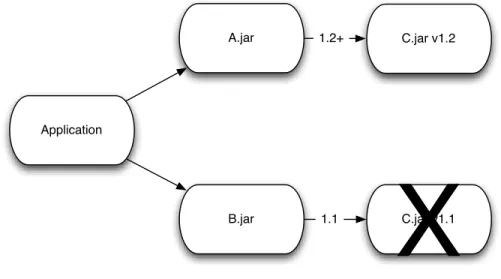
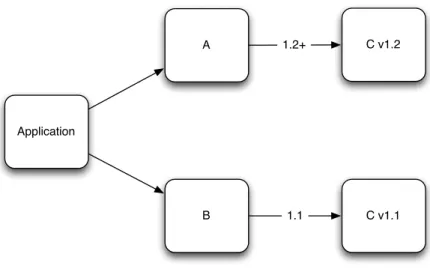
Versions cause other problems. Suppose our application requires two libraries, A andB, and both of these libraries depend in turn upon a third library,C. But they require different versions: libraryArequires version 1.2 or greater of C, but libraryB requires version 1.1 ofC, and will not work with version 1.2! Figure 1.4illustrates the problem.
A.jar
B.jar Application
C.jar v1.2 1.2+
1.1 C.jar v1.1
X
Figure 1.4.: Clashing Version RequirementsThis kind of problem simply cannot be solved in traditional Java without rewriting either A or B so that they both work with the same version ofC. The reason for this is simply the flat, global classpath: if we try to put both versions of C on the classpath, then only the first version listed will be used, so both A and B will have to use it. Note that version 1.2 in this example does not win because it is the higher version; it wins merely because it was placed first in the classpath.
names from the classes in 1.2! IfB manages to use one of those classes, then that class will probably attempt to use other classes that are shadowed by version 1.2, and it will get the 1.2 version of those classes rather than the 1.1 version that it has been compiled against. This is an example of the class loading conflict from Figure 1.2. The result is likely to be an error such as LinkageError, which few Java developers know how to deal with.
1.2.5. Lack of Information Hiding Across JARs
All Object Oriented Programming languages offer various ways of hiding in-formation across class and module boundaries. Hiding — orencapsulating — internal details of a class is essential in order to allow those internal details to change without affecting clients of the class. As such, Java provides four access levels for members of a class, which include both fields and methods:
• publicmembers are visible to everybody.
• protected members are visible to subclasses and other classes in the same package.
• privatemembers are visible only within the same class.
• Members not declared with any of the three previous access levels take the so-calleddefaultaccess level. They are visible to other classes within the same package, but not classes outside the package.
For classes themselves, only thepublicand default access levels are available. A public class is visible to every class in every other package; a default access class is only available to other classes within the same package.
There is something missing here. The above access modifiers relate to visibility across packages, but the unit of deployment in Java is not a package, it is a JAR file. Most JAR files offering non-trivial APIs contain more than one package (HttpClient has eight), and generally the classes within the JAR need to have access to the classes in other packages of the same JAR. Unfortunately that means we must make most of our classespublic, because that is the only access modifier which makes classes visible across package boundaries.
As a consequence, all those classes declared public are accessible to clients outside the JAR as well. Therefore the whole JAR is effectively public API, even the parts that we would prefer to keep hidden. This is another symptom of the lack of any runtime representation for JAR files.
1.2.6. Recap: JARs Are Not Modules
1.3 J2EE Class Loading 13
Simply, JAR files have almost none of the characteristics of a module as de-scribed in Section 1.1. Yes, they are a unit that can be physically moved around. . . but having moved a JAR we have no idea whether it will still work, because we do not know what dependencies might be missing or incorrect.
JARs are often tightly coupled: thanks to the lack of information hiding, clients can easily use internal implementation details of a JAR, and then break when those details change. And those are just the clients who break encapsu-lation intentionally; other clients may accidentally use the internals of a JAR thanks to a classpath conflict. Finally, JARs often have low cohesion: since a JAR does not really exist at runtime, we might as well throw any functionality into whichever JAR we like.
Of course, none of this implies that building modular systems in Java is im-possible2. It simply means that Java provides no assistance towards the goal of modularity. Therefore building modular systems is a matter ofprocess and
discipline. Sadly, it is rare to see large Java applications that are modular, because a disciplined modular approach is usually the first thing discarded when an important deadline looms. Therefore most such applications are a mountain of “spaghetti code”, and a maintenance nightmare.
1.3. J2EE Class Loading
The Java 2 Enterprise Edition (J2EE) specification defines a platform for dis-tributed, multi-tier computing. The central feature of the J2EE architecture is the so-called “application server” which hosts multiple application components and offers enterprise-class services to them such as transaction management, security and high availability. Application servers are also required to have a deployment system so that applications can be deployed and un-deployed without restarting the server and without interfering with each other.
These requirements meant that the simplistic class loading hierarchy of Figure
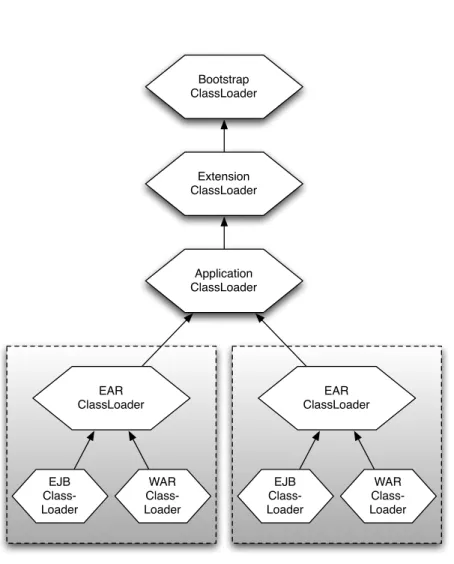
1.1, as used by standalone Java applications, was not sufficient. With a single flat classpath, the classes from one application could easily interfere with other applications. Therefore J2EE application servers use a more complex tree, with a branch for each deployed application. The precise layout of the tree depends on the individual application server, since it is not mandated by the specification, but Figure 1.5 shows the approximate layout used by most servers.
J2EE applications are deployed as “Enterprise ARchive” (EAR) files, which are ZIP files containing a metadata file — application.xml— plus one or more of each of the following kind of file:
2Although certain scenarios are practically impossible, such as the side-by-side usage of
Application ClassLoader Bootstrap ClassLoader
Extension ClassLoader
EAR ClassLoader
EJB Class-Loader
WAR Class-Loader EAR
ClassLoader
EJB Class-Loader
WAR Class-Loader
1.4 OSGi: A Simple Idea 15
• Plain Java library JAR files
• JAR files containing an EJB application (EJB-JARs)
• “Web ARchive” (WAR) files, containing classes implementing Web func-tionality, such as Servlets and JSPs.
The plain Java library JAR files contain classes that are supposed to be avail-able to all of the EJBs and Web artifact within the EAR. They are therefore loaded by the EAR Class Loader, at the top of the sub-tree for the deployed application.
Referring back to the class loading procedure described in section 1.2.1, it should be clear that, in a branching tree, an individual class loader can only load classes defined by itself or its ancestors; it cannot load classes sideways in the tree, i.e. from its siblings or cousins. Therefore classes that need to be shared across both the EJBs and Web artifacts must be pushed up the tree, into the EAR Class Loader. And if there are classes we wish to share across multiple deployed applications, we must push them up into the system application class loader. Usually this is done by configuring the way the application server itself is started, adding JARs to the global classpath.
Unfortunately, libraries pushed up to that level can no longer be deployed and un-deployed at will. Also, they become available to all deployed applications, even the ones that do not want or need to use them. They cause class conflicts: classes found higher in the tree always take precedence over the classes that are shipped with the application. In fact, every application in the server must now use thesame version of the library.
Because of these problems, J2EE developers tend to avoid sharing classes across multiple applications. When a library is needed by several applications, it is simply shipped multiple times as part of the EAR file for each one. The end result is a “silo” or “stovepipe” architecture: applications within the J2EE server are little more than standalone systems, completely vertically integrated from the client tier to the database, but unable to horizontally integrate with each other. This hinders collaboration amongst different business areas.
1.4. OSGi: A Simple Idea
OSGi is the module system for Java. It defines a way to create true modules and a way for those modules to interact at runtime.
all of the problems that were discussed, but of course we cannot simply stop there: modules do still need to work together, which means sharing classes. The key iscontrol over that sharing. OSGi has very specific and well-defined rules about how classes can be shared across modules, using a mechanism of explicit imports and exports.
So, what does an OSGi module look like? First, we don’t call it a module: in OSGi, we refer tobundles.
In fact a bundle is just a JAR file! We do not need to define a new standard for packaging together classes and resources: the JAR file standard works just fine for that. We just need to add a little metadata to promote a JAR file into a bundle. The metadata consists of:
• Thename of the bundle. We provide a “symbolic” name which is used by OSGi to determine the bundle’s unique identity, and optionally we can also provide a human-readable, descriptive name.
• Theversionof the bundle.
• The list ofimportsandexports. We will see shortly exactly what is being imported and exported.
• Optionally, information about the minimum Java version that the bundle needs to run on.
• Miscellaneous human-readable information such as the vendor of the bundle, copyright statement, contact address, etc.
These metadata are placed inside the JAR file in a special file called MANI-FEST.MF, which is part of all standard JAR files and is meant for exactly this purpose: it is a standard place to add arbitrary metadata.
The great advantage of using standard JAR files as OSGi bundles is that a bundle can also be used everywhere that a JAR file is expected. Not everybody uses OSGi (yet. . . ) but since bundles are just JAR files, they can be used outside of the OSGi runtime. The extra metadata inside MANIFEST.MF is simply ignored by any application that does not understand it.
1.4.1. From Trees to Graphs
What does it mean to provide a separate classpath for each bundle? Simply, we provide a class loader for each bundle, and that class loader can see the classes and resources inside the bundle’s JAR file. However in order for bundles to work together, there must be some way for class loading requests to be delegated from one bundle’s class loader to another.
1.4 OSGi: A Simple Idea 17
A
C
D
B
E
Figure 1.6.: The OSGi class loader graph.
upwards, to the parent of each class loader. Recall also that this arrangement does not allow for sharing of classes horizontally across the tree i.e., between siblings or cousins. To make a library available to multiple branches of the tree it must be pushed up into the common ancestor of those branches, but as soon as we do this we force everybody to use that version of that library, whether they like it or not.
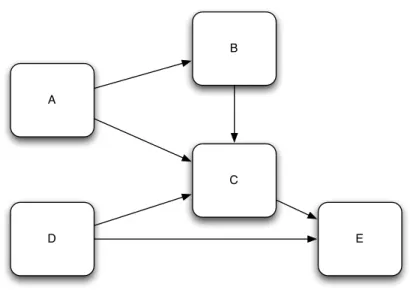
Trees are simply the wrong shape: what we really need is a graph. The de-pendency relationship between two modules is not a hierarchical one: there is no “parent” or “child”, only a network of providers and users. Class loading requests are delegated from one bundle’s class loader to another’s based on the dependency relationship between the bundles.
An example is shown in Figure1.6. Here we have five libraries with a complex set of interdependencies, and it should be clear that we cannot easily force this into a hierarchical tree shape.
The links between bundles are based on imported and exported packages. That is, Java packages such as javax.swingororg.apache.log4j.
we need to do, as developers of bundles, is write a few simple declarative statements.
Once an import is matched up with an export, the bundles involved are “wired” together for that specific package name. What this means is that when a class load request occurs in bundle A for any class in the org.foo package, that request will immediately be delegated to the class loader of bundleB. Other imports inAmay be wired to other bundles, for exampleAmay also import the package org.bar that is exported by bundle C, so any loading requests for classes in theorg.barpackage will be delegated toC’s class loader. This is extremely efficient: whereas in standard Java class load events invariably involve searching through a long list of classes, OSGi class loaders generally know immediately where to find a class, with little or no searching.
What happens when resolution fails? For example, what if we forget to include bundle B with our application, and no other bundle offers package org.foo to satisfy the import statement in bundle A? In that case, A will not re-solve, and cannot be used. We will also get a helpful error message telling us exactly whyA could not be resolved. Assuming our bundles are correctly constructed (i.e., their metadata is accurate) then we should never see errors likeClassNotFoundExceptionorNoClassDefFoundError3. In standard Java these errors can pop up at any time during the execution of an application, for example when a particular code path is followed for the first time. By contrast an OSGi-based application can tell us at start-up that something is wrong. In fact, using simple tools to inspect the bundle metadata, we can know about resolution errors in a set of bundlesbeforewe ever execute the application.
1.4.2. Information Hiding in OSGi Bundles
Note that we always talk about matching up an import with an export. But why are the export declarations even necessary? It should be possible simply to look at the contents of a bundle JAR to find out what packages are con-tained within it, so why duplicate this information in the exports section of theMANIFEST.MF?
The answer is, we don’t necessarily want to export all packages from a bundle for reasons of information hiding as discussed in Section1.2.5. In OSGi, only packages that are explicitly exported from a bundle can be imported and used in another bundle. Therefore all packages are “bundle private” by default, making it easy for us to hide the internal implementation details of our bundles from clients.
3An exception to this is where dynamic reflection is used to load arbitrary classes at
1.5 Dynamic Modules 19
1.4.3. Versioning and Side-by-Side Versions
OSGi does not merely offer dependencies based on package names: it also adds versioning of packages. This allows us to cope with changes in the released versions of libraries that we use.
Exports of packages are declared with a version attribute, but imports declare a versionrange. This allows us to have a bundle depend on, e.g., version 1.2.0 through to version 2.1.0 of a library. If no bundle is exporting a version of that package that falls within the specified range, then our bundle will fail to resolve, and again we get a helpful error message telling us what is wrong.
We can even have different versions of the same library side-by-side in the same application, so the scenario described in Section 1.2.4(wherein two libraries each need to use different versions of a third library) will work under OSGi.
Note that, because exports are declared on each exported package, there is no need for all exports from a bundle to be the same version. That is, a single bundle can export both version 1.2 of org.foo and version 3.5 of org.bar. Of course, it cannot export two versions of thesame package.
1.5. Dynamic Modules
OSGi is not just the module system for Java. It is thedynamicmodule system for Java. Bundles in OSGi can be installed, updated and uninstalled without taking down the entire application. This makes it possible to, for example, upgrade parts of a server application — either to include new features or to fix bugs found in production — without affecting the running of other parts. Also, desktop applications can download new versions without requiring a restart, so the user doesn’t even need to be interrupted.
To support dynamic modules, OSGi has a fully developed lifecycle layer, along with a programming model that allows “services” to be dynamically published and consumed across bundle boundaries. We will look at these facilities in depth in later osgi-in-practice.
X
Application
A C v1.2
B C v1.1
1.2+
1.1
Figure 1.7.: Different Versions of the Same Bundle.
1.6. The OSGi Alliance and Standards
OSGi is a standard defined by an Alliance of around forty companies. Its specifications are freely available and are comprehensive enough that a highly compliant implementation can be written using only the documents for refer-ence.
Two of the commonest questions about the name OSGi are: what does it stand for, and why is the “i” lower-case? Here is the definitive answer to both questions: officially OSGidoesn’t stand for anything! However, itusedto stand for “Open Service Gateway initiative”, and this is the source of the lower-case letter “i”, since “initiative” was not considered to be stylistically part of the brand name. But the long name is now deprecated, since OSGi has expanded far beyond its original role in home gateways. As a result, the OSGi name is rather odd, but it has the great advantage of being easily Google-able since it seems not to be a word (or even part of a word) in any language. In speech, the name is always spelt out (“Oh Ess Gee Eye”) rather than pronounced as a word (e.g., “Ozjee”).
1.7 OSGi Implementations 21
1.7. OSGi Implementations
Several independently implemented OSGi frameworks exist today, including four that are available as open source software.
Equinox [4] is the most widely deployed OSGi framework today owing to its use in the core runtime of Eclipse. It can also be found in many in-house custom applications as well as packaged products such as Lotus Notes and IBM WebSphere Application Server. Equinox implements Release 4.1 of the OSGi specifications and is licensed under the Eclipse Public License (EPL)[5].
Knopflerfish [6] is a popular and mature implementation of both OSGi Release 3 and Release 4.1 specifications. It is developed and maintained by Makewave AB, a company based in Sweden, and is licensed under a BSD-style license. Makewave also offers Knopflerfish Pro, a commercially supported version of Knopflerfish.
Felix [7] is a community implementation of the OSGi Release 4.x under the Apache Group umbrella. It is designed particularly for compactness and ease of embedding, and is the smallest (in terms of minimal JAR size) of the Release 4 implementations. It is licensed under the Apache License Version 2.0.
Concierge [8] is a very compact and highly optimized implementation of OSGi Release 3. This makes it particularly suited to resource-constrained plat-forms such as mobile phones. Concierge is licensed under a BSD-style license. However, OSGi Release 3 is not covered by this book4.
All of the example code and applications in this book should work on any of the three listed Release 4 implementations, except where explicitly noted. However, the way we work with each of these frameworks — for example the command line parameters, the built-in shell, the management of bundles — differs enough that it would be awkward to give full instructions for all three. Therefore it is necessary to pick a single implementation for pedagogical purposes, and for reasons explained later we will work with Equinox.
1.8. Alternatives to OSGi
At its core, OSGi is very simple and, as with all good and simple ideas, many people have independently invented their own versions at different times and places. None of these have achieved the maturity or widespread usage that
4Also note that Concierge has not been certified compliant with OSGi R3, since OSGi
OSGi now enjoys, but it is informative to review some of these alternatives. At the very least we may learn something about why OSGi has made the design choices it has made, but we may also find good ideas that can be brought into OSGi.
1.8.1. Build Tools: Maven and Ivy
Maven and Ivy are both popular tools that have some characteristics of a module system, but they are build-time tools rather than runtime frameworks. Thus they do not compete directly with OSGi, in fact they are complementary and many developers are using Maven or Ivy to build OSGi-based systems.
Maven is a complete, standalone build tool, whereas Ivy is a component that can be integrated into an ANT-based build. Both tools attempt to make JARs more manageable by adding modular features to them. Principally this means dependencies: both allow us to specify the versioned dependencies of a JAR using metadata in XML files. They use this information to download the correct set of JARs and construct a compile-time classpath.
However, as they do not have any runtime features neither Maven nor Ivy can solve the runtime problems with JARs, such as the flat global classpath, the lack of information hiding, and so on. Also the metadata formats used by these tools is unfortunately not compatible with the format used by OSGi, so if we use Maven or Ivy to build an OSGi-based system we typically have to specify the metadata twice: once for OSGi and once for the build tool. However, some efforts are currently being made to better integrate Maven with OSGi.
1.8.2. Eclipse Plug-in System
As already noted, the Eclipse IDE and platform are based on an implemen-tation of OSGi. However this was not always the case: prior to version 3.0, Eclipse used its own custom module system.
In Eclipse terminology, a module is a “plug-in”. In fact, Eclipse developers often still use the term plug-in as an alternative name for an OSGi bundle. In the old Eclipse system, a plug-in was a directory containing a file at the top level namedplugin.xml. This file contained metadata that was broadly similar to the metadata in an OSGi manifest: the name of the plug-in, vendor, version, exported packages and required plug-ins.
1.8 Alternatives to OSGi 23
whole-bundle dependencies also, but the use of this capability is frowned upon for reasons we will examine in Chapter3.
The biggest deficiency of the Eclipse plug-in system was its inability to install, update or uninstall plug-ins dynamically: whenever the plug-in graph changed, a full restart was required. In early 2004 the core Eclipse developers began a project, code-named Equinox, to support dynamic plug-ins. They intended to do this either by enhancing the existing system or selecting an existing module system and adapting it to Eclipse. In the end, OSGi was selected and Equinox became a leading implementation of it.
1.8.3. JSR 277
Java Specification Request (JSR) number 277 is titledJava Module System[9] and as such one would expect it to attempt to solve a similar set of problems to OSGi. However JSR 277 tackles them in a different way to OSGi.
The most important point to note is that, at the time of writing, JSR 277 is an incomplete specification with no implementation yet. It is scheduled to be included with Java 7 but it is unclear when (or even if!) Java 7 will be released. An Early Draft Review (EDR) of JSR 277 was released in October 2006, which is the best information currently available.
Like the old Eclipse plug-in system, JSR 277 does not support package-level dependencies, instead using whole-module dependencies. However JSR 277 differs further by using programmatic resolution “scripts” rather than declar-ative statements to resolve module dependencies. This allows for extreme flexibility, but it’s debatable whether such flexibility is ever necessary or desir-able. Programmatic code can return different results at different times, so for example we could write a module that resolves successfully only on Tuesday afternoons! Therefore we completely lose the ability to use static dependency analysis tools.
Furthermore, JSR 277 is not dynamic, it requires the Java Virtual Machine to be restarted in order to install, update or uninstall a module.
2. First Steps in OSGi
OSGi is a module system, but in OSGi we refer to modules as “bundles”. In this chapter we will look at the structure of a bundle, how it depends on other bundles, and how to create an OSGi project using standard Java tools.
2.1. Bundle Construction
As discussed in the Introduction, an OSGi bundle is simply a JAR file, and the only difference between a bundle JAR and a “plain” JAR is a small amount of metadata added by OSGi in the form of additional headers in the META-INF/MANIFEST.MF file. Bundles can be used outside of an OSGi framework, for example in a plain Java application, because applications are required to ignore any attributes in the manifest that they do not understand.
Listing 2.1 A Typical OSGi MANIFEST.MF File
1 Manifest-Version: 1.0
2 Created-By: 1.4.2_06-b03 (Sun Microsystems Inc.) 3 B u n d l e−M a n i f e s t V e r s i o n: 2
4 B u n d l e−N a m e: M y F i r s t O S G i B u n d l e 5 B u n d l e−S y m b o l i c N a m e: o r g.o s g i.e x a m p l e 1 6 B u n d l e−V e r s i o n: 1 . 0 . 0
7 B u n d l e−R e q u i r e d E x e c u t i o n E n v i r o n m e n t: J 2 S E−1.5 8 I m p o r t−P a c k a g e: j a v a x.s w i n g
Listing2.1shows an example of a manifest containing some of the most com-mon attributes used in OSGi. The lines initalic font are standard in all JAR file manifests, although only the Manifest-Versionattribute is mandatory and it must appear as the first entry in the file. The JAR File Specification[2] describes several other optional attributes which can appear, but applications and add-on frameworks (such as OSGi) are free to define additional headers.
2.2. OSGi Development Tools
In theory, one does not need any tools for building OSGi bundles beyond the standard Java tools: javac for Java source code compilation, jar for packaging, and a straightforward text editor for creating theMANIFEST.MF.
However very few Java programmers work with such basic tools because they require lots of effort to use, both in repeatedly typing long command lines and in remembering to execute all the steps in the right sequence. In practice we use build tools like Ant or Maven, and IDEs like Eclipse, NetBeans or IntelliJ. The same is true when developing for OSGi.
Likewise, directly editing theMANIFEST.MFfile and constructing bundles with thejarcommand is burdensome. In particular the format of theMANIFEST.MF file is designed primarily for efficient processing by the JVM rather than for manual editing, and therefore it has some unusual rules that make it hard to work with directly. For example, each line is limited to 72 bytes (not characters!) of UTF-8 encoded data1. Also OSGi’s syntax requires some strings to be repeated many times within the same file. Again, this is done for speed of automated processing rather than for convenient editing by humans2.
There are tools that can make the task of developing and building bundles easier and less error-prone, so in this section we will review some of the tools available.
2.2.1. Eclipse Plug-in Development Environment
Eclipse is built on OSGi. For the Eclipse platform and community to grow, it was (and still is) essential to make it easy to produce new plug-ins that extend the functionality of Eclipse. Therefore, Eclipse provides a rich set of tools for building plug-ins. Taken together these tools are called the Plug-in Development Environment, usually abbreviated to PDE, which works as a layer on top of the Java Development Tools (JDT). Both PDE and JDT are included with the “Classic” Eclipse SDK download package, but PDE is not
included with the “Eclipse IDE for Java Developers” download.
Since Eclipse plug-ins are just OSGi bundles3, the PDE can be used for OSGi
1A single UTF-8 character is represented by between one and six bytes of data.
2It is the author’s opinion that these goals — efficient processing by machines, and ease
of editing by humans — are fundamentally at odds. Formats convenient for humans to write are hard for machines to parse, andvice versa. XML attempts to be convenient for both, but manages to be difficult for humans to read and write while still being inefficient for machines to parse and generate.
3The term “plug-in” has always been used by Eclipse since its first version, which was not
based on OSGi. Today there is no difference at all between a “plug-in” and a bundle. More details about the relationship between Eclipse and OSGi can be found in Chapter
2.2 OSGi Development Tools 27
development. In fact it is one of the simplest ways to very quickly and easily create new bundles.
However, we will not use PDE for the examples in this book, for a number of reasons:
• Most importantly, using PDE would force you to use Eclipse to work through the examples. Eclipse is a great IDE and the author’s first choice for Java development, but OSGi should be accessible to users of other IDEs — such as NetBeans and IntelliJ — and even to those who prefer to use Emacs or Vim4!
• Second, PDE is a highly interactive and graphical tool. Unfortunately this is inconvenient for pedagogical purposes, since it is difficult to de-scribe the steps needed to complete a complex operation without filling up the book with numerous large screenshots.
• Finally, in the author’s opinion PDE encourages some “anti-patterns”, or practices which go against the recommended OSGi approach5.
2.2.2. Bnd
Bnd[?] is a command-line tool, developed by Peter Kriens, for building OSGi bundles. Compared to PDE it may seem primitive, because it offers no GUI, instead using plain text properties files and instructions issued on the command line. However the core of the tool is very elegant and powerful, and it combines well with standard and familiar build tools such as ANT.
Listing 2.2 A Typical Bnd Descriptor File
# s a m p l e.b n d
P r i v a t e−P a c k a g e: o r g.e x a m p l e
B u n d l e−A c t i v a t o r: o r g.e x a m p l e.M y A c t i v a t o r
Listing2.2shows an example of a typical Bnd descriptor file. This looks very similar to a bundle manifest file, so to avoid confusion we will prefix bnd files with a comment indicating the file name, e.g. #sample.bnd. These files are much easier to edit than a MANIFEST.MFthanks to the following differences:
• As an alternative to the colon+space separator for the name/value pairs, an equals sign (=) can be used with or without surrounding spaces.
• There is no line length limit.
4Though I draw the line at Notepad.
5Specifically I feel that PDE has very weak support for theImport-Packageform of
• Line continuations, i.e. long strings broken over several lines to make them more readable, are indicated with a backslash character (\) at the end of the continued line.
• Shortcuts and wildcards are available in the bnd syntax for entering data that, in the underlying MANIFEST.MF syntax, would need to be repeated.
This descriptor file is used bybndto generate not just theMANIFEST.MFbut the JAR itself. The descriptor tellsbndboth how to generate theMANIFEST.MFand also what the contents of the JAR should be. In this case thePrivate-Package instruction tells bnd that the JAR should contain the classes and resources found in theorg.example package. It will use its classpath — which can be supplied either on the command line, or through the properties of the Ant task — to source the contents of the specified package.
2.3. Installing a Framework
In the introduction were listed four open source implementations of the OSGi standard. As was mentioned, all the sample code in this book is intended to run on all of the OSGi Release 4 implementations — i.e. Equinox, Knopflerfish and Felix, but not Concierge which is a Release 3 implementation6— however each framework has its own idiosyncratic way to be launched and controlled. Sadly it would be impractical to show instructions for working with all three frameworks, so we must choose one, but fortunately the differences are slight enough that almost all the instructions can still be followed on another frame-work simply using the cross-reference of commands in Appendix??.
We will mainly work with Equinox. It has a few advantages: in particular it is the “Reference Implementation” and as such tends to support new OSGi features a little earlier. Also it is, at the time of writing, slightly faster and more scalable, although this may change as all of the frameworks are contin-ually improving in this area. Neither of these reasons is particularly strong and they are certainly not criticismsof the other frameworks. Nevertheless we must choose one and Equinox is it.
The main download page for Equinox is at:
http://download.eclipse.org/equinox
On opening this page, the first choice you are presented with is the desired version. For the purposes of following the advanced osgi-in-practice in the
6In fact many code sampleswill work on Concierge/OSGi R3, however in general R4 is
2.4 Setting up Eclipse 29
latter half of the book, it is best to choose the most recent released version, which at the time of writing is3.5.1. Next we are asked to choose how much or how little of the Equinox runtime we wish to download. The smallest useful download is 1.1Mb and it includesonlythe core Equinox runtime. However we will very soon need to use additional bundles from the Equinox distribution, and it is also useful to have source code because this enables our IDE to give us more information when we are calling or implementing APIs. Therefore the best download to choose is the “Eclipse Equinox SDK” file, which comes in at 24Mb.
Once you have downloaded this ZIP file, it can be extracted to a location of your choosing. It is a good idea to extract it to a directory named something likeEquinox-SDK-3.5.1as this helps to distinguish it from other versions and editions of Equinox which we may download in the future. We will refer to this top-level directory henceforth asEQUINOX_HOME. After decompressing we will have a directory named plugins. In that directory we will find all the JARs (and source JARs) that implement Equinox and its supporting bundles.
2.4. Setting up Eclipse
Section2.2.1discussed several problems with the Eclipse Plug-in Development Environment. However, in the examples we will still use the Eclipse IDE, because Java development is far easier and more productive in an IDE than in a plain text editor, and because Eclipse is by far the most popular IDE for Java. But rather than using PDE, a tool which is available only in Eclipse, we will use the basic Java Development Tooling (JDT), which has direct parallels in other Java IDEs. Therefore, although the instructions given are specific to Eclipse, they can be directly translated to those other IDEs. Please check the documentation for your preferred IDE: most include a section on how to translate from Eclipse concepts.
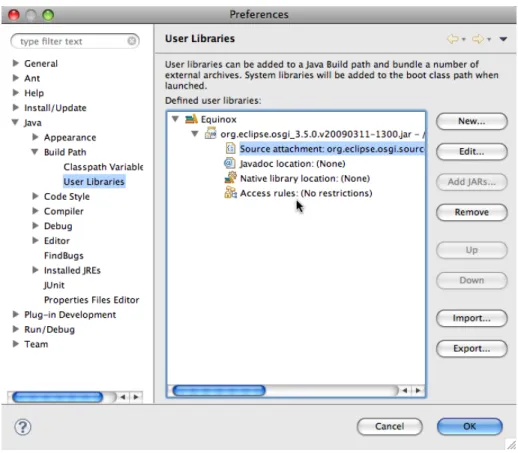
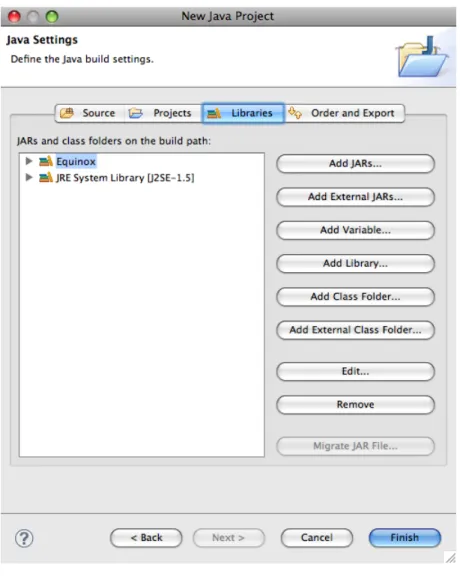
Before creating any projects, we will first define a “User Library” for the Equinox framework, which will help us to reference Equinox from many indi-vidual projects. To do this open the system preferences dialogue by selecting Window → Preferences (Mac users: Eclipse → Preferences) and navi-gating the tree on the left edge toJava → Build Path → User Libraries. Then click the Newbutton and type the library name “Equinox”. Next, with the Equinox library selected, clickAdd JARsand add plugins/org.eclipse.-osgi_version.jarfrom the Equinox directory (EQUINOX_HOME) (where ver-sion is the actual version tag attached to the JAR file, which depends on the version of Equinox that was downloaded).