P
RAISE FORL
INUXQ
UICKF
IXN
OTEBOOK“Where has this book been all my professional life? It is about time someone wrote this book. The author covers many basic, practical issues that other authors omit in a format that makes for a great troubleshooting reference and for casual perusing. There are a lot of books available that give a broad overview of system and network administration, and there are a lot of detailed books on each specific topic covered in this book, but I don’t know of any other place where I can get so much useful, practical information on such a wide range of topics in such a concise and readable form. I will highly recommend it to my friends and colleagues who are trying to manage their own systems. I am anxious to show it to our instructors who teach data communications and networks as a possible text or lab manual.”
—Ron McCarty, instructor and program chair, Computer Science, Penn State Erie
“This book takes a very unique approach and is very flexible. It offers a great deal to the home user, students, small businesses—all the way to any Linux sys admin that needs a handy reference. I found it very refreshing in terms of style, stated goals, presentation, ease of use, direction, and the “present and future” value of the content. In other words the author is very current and knowledgeable. I would recommend this book to every level from programmer to manager.”
—Joe Brazeal, Information Technician III, Southwest Power Pool
“This book is an excellent resource for new Linux administrators. I was impressed with the comprehensive set of 35 topic chapters, making this book a very useful reference. I know of no other work like this.”
—George Vish II, Linux curriculum program manager and senior education consultant, Hewlett-Packard Education
“I would recommend this book to novice Linux users and administrators. It covers a lot of topics, and makes it easy for readers to follow along.”
—Bret Strong, education consultant, Hewlett-Packard Company
“Linux Quick Fix Notebookis a well-written guide to designing, installing, and maintain-ing Linux servers. Many Linux reference texts are just simple rewrites of Linux ¨man¨ and ¨info¨ pages, but this book addresses the real issues that systems administrators encounter when working with Linux. The author provides a pedagogical guide to learn-ing Linux server administration. In addition, the book includes step-by-step information so that users can quickly take advantage of the best that open source software has to offer today. I would recommend this book to both beginning and intermediate users of Linux.”
Linux
®Quick Fix Notebook
B
RUCE
P
ERENS
’ O
PEN
S
OURCE
S
ERIES
http://www.phptr.com/perens◆ C++ GUI Programming with Qt 3
Jasmin Blanchette, Mark Summerfield
◆ Managing Linux Systems with Webmin: System Administration and Module Development
Jamie Cameron
◆ Understanding the Linux Virtual Memory Manager
Mel Gorman
◆ Implementing CIFS: The Common Internet File System
Christopher Hertel
◆ Embedded Software Development with eCos
Anthony Massa
◆ Rapid Application Development with Mozilla
Nigel McFarlane
◆ The Linux Development Platform: Configuring, Using, and Maintaining a Complete Programming Environment
Rafeeq Ur Rehman, Christopher Paul
◆ Intrusion Detection with SNORT: Advanced IDS Techniques Using SNORT, Apache, MySQL, PHP, and ACID
Rafeeq Ur Rehman
◆ The Official Samba-3 HOWTO and Reference Guide
John H. Terpstra, Jelmer R. Vernooij, Editors
◆ Samba-3 by Example: Practical Exercises to Successful Deployment
John H. Terpstra
Linux
®Quick Fix Notebook
Peter Harrison
Many of the designations used by manufacturers and sellers to distinguish their prod-ucts are claimed as trademarks. Where those designations appear in this book, and the publisher was aware of a trademark claim, the designations have been printed with initial capital letters or in all capitals.
The author and publisher have taken care in the preparation of this book, but make no expressed or implied warranty of any kind and assume no responsibility for errors or omissions. No liability is assumed for incidental or consequential damages in con-nection with or arising out of the use of the information or programs contained herein. The publisher offers excellent discounts on this book when ordered in quantity for bulk purchases or special sales, which may include electronic versions and/or custom covers and content particular to your business, training goals, marketing focus, and branding interests. For more information, please contact:
U. S. Corporate and Government Sales (800) 382-3419
For sales outside the U. S., please contact:
International Sales
Visit us on the Web: www.phptr.com
Library of Congress Number: 2004117224
Copyright © 2005 Pearson Education, Inc.
Printed in the United States of America.
This material may be distributed only subject to the terms and conditions set forth in the Open Publication License, v1.0 or later (the latest version is presently avail-able at http://www.opencontent.org/openpub/).
ISBN 0-13-186150-6
Text printed in the United States on recycled paper at R.R. Donnelley and Sons Company in Crawfordsville, Indiana.
First printing, March 2005
Dedicated to
Diana
“Turn off the light and come to bed.”
Blaze and Jade
“Daddy, can we stop being quiet now?”
Jack and Barbara
By my side every day.
Contents
Preface . . . .xxxi
Acknowledgments . . . .xl About the Author . . . .xli
Part 1
The Linux File Server Project
1 Why Host Your Own Site? . . . .3In This Chapter . . . .3
Our Network . . . .4
Alternatives to In-House Web Hosting . . . .4
Virtual Hosting . . . .5
Dedicated Hosting . . . .5
Factors to Consider Before Hosting Yourself . . . .6
Is In-House Hosting Preferred? . . . .6
How to Migrate From an External Provider . . . .8
In-House Server Considerations . . . .8
Conclusion . . . .10
2 Introduction to Networking . . . .11
In This Chapter . . . .11
The OSI Networking Model . . . .12
An Introduction to TCP/IP . . . .13
TCP Is a Connection-Oriented Protocol . . . .14
How TCP Establishes a Connection . . . .14
UDP, TCP’s “Connectionless” Cousin . . . .15
TCP and UDP Ports . . . .15
The TCP/IP Time to Live Feature . . . .16
The ICMP Protocol and Its Relationship to TCP/IP . . . .16
How IP Addresses Are Used to Access Network Devices . . . .17
Private IP Addresses . . . .17
The localhostIP Address . . . .18
Network Address Translation (NAT) Makes Private IPs Public . . . .18
Port Forwarding with NAT Facilitates Home-Based Web Sites . . . .19
DHCP . . . .19
How DNS Links Your IP Address to Your Web Domain . . . .20
IP Version 6 (IPv6) . . . .21
How Subnet Masks Group IP Addresses into Networks . . . .21
Calculating the Number of Addresses Assigned to a Subnet . . . .22
Calculating the Range of Addresses on Your Network . . . .22
Subnet Masks for the Typical Business DSL Line . . . .24
The Physical and Link Layers . . . .24
Networking Equipment Terminology . . . .25
Network Interface Cards . . . .25
The Two Broad Types of Networking Equipment . . . .27
Connectivity Using Hubs . . . .28
Using Switches as a Faster Alternative to Hubs . . . .29
Local Area Networks . . . .29
How Routers Interconnect LANs . . . .29
How Simple Routing Works . . . .30
Default Gateways, the Routers of Last Resort . . . .31
Firewalls Help Provide a Secure Routing Environment . . . .31
Additional Introductory Topics . . . .32
The File Transfer Protocol . . . .32
Linux Help . . . .32
Conclusion . . . .33
3 Linux Networking . . . .35
In This Chapter . . . .35
How to Configure Your NIC’s IP Address . . . .36
Determining Your IP Address . . . .36
Changing Your IP Address . . . .37
Multiple IP Addresses on a Single NIC . . . .39
IP Address Assignment for a Direct DSL Connection . . . .40
IP Address Assignment for a Cable Modem Connection . . . .45
How to Activate/Shut Down Your NIC . . . .45
How to View Your Current Routing Table . . . .45
How to Change Your Default Gateway . . . .46
How to Configure Two Gateways . . . .47
Adding Routes from the Command Line . . . .47
Adding Routes with /etc/sysconfig/network-scripts/Files . . . .48
How to Delete a Route . . . .49
Changing NIC Speed and Duplex . . . .49
Using mii-tool . . . .49
Using ethtool . . . .50
x Contents
How to Convert Your Linux Server into a Router . . . .52
Configuring IP Forwarding . . . .52
Configuring Proxy ARP . . . .53
Configuring Your /etc/hostsFile . . . .54
The loopbackInterface’s localhostEntry . . . .55
Conclusion . . . .56
4 Simple Network Troubleshooting . . . .57
In This Chapter . . . .57
Sources of Network Slowness . . . .58
Sources of a Lack of Connectivity . . . .58
Doing Basic Cable and Link Tests . . . .58
Testing Your NIC . . . .59
Viewing Your Activated Interfaces . . . .59
Viewing All Interfaces . . . .59
Testing Link Status from the Command Line . . . .60
Viewing NIC Errors . . . .61
How to See MAC Addresses . . . .62
Using pingto Test Network Connectivity . . . .64
Using telnetto Test Network Connectivity . . . .65
Linux telnet Troubleshooting . . . .66
Successful Connection . . . .66
Connection Refused Messages . . . .67
telnetTimeout or Hanging . . . .67
telnetTroubleshooting Using Windows . . . .67
Screen Goes Blank—Successful Connection . . . .68
Connect Failed Messages . . . .68
telnetTimeout or Hanging . . . .68
Testing Web Sites with the curland wgetUtilities . . . .68
Using curl . . . .68
Using wget . . . .69
The netstatCommand . . . .70
The Linux iptablesFirewall . . . .71
Determining Whether iptablesIs Running . . . .71
How to Stop iptables . . . .71
How to Configure iptablesRules . . . .71
Using tracerouteto Test Connectivity . . . .71
Sample tracerouteOutput . . . .72
Possible tracerouteMessages . . . .72
tracerouteTime Exceeded False Alarms . . . .73
tracerouteInternet Slowness False Alarm . . . .74
tracerouteDies at the Router Just Before the Server . . . .75
Always Get a Bidirectional traceroute . . . .75
pingand tracerouteTroubleshooting Example . . . .77
tracerouteWeb Sites . . . .77
Possible Reasons for a Failed traceroute . . . .78
Contents xi
Using MTR to Detect Network Congestion . . . .79
Viewing Packet Flows with tcpdump . . . .79
Analyzing tcpdumpfiles . . . .82
Common Problems with tcpdump . . . .82
Viewing Packet Flows with tethereal . . . .83
Basic DNS Troubleshooting . . . .85
Using nslookupto Test DNS . . . .85
Using the hostCommand to Test DNS . . . .86
Using nmap . . . .87
Determining the Source of an Attack . . . .88
Who Has Used My System? . . . .89
The lastCommand . . . .89
The whoCommand . . . .89
Conclusion . . . .90
5 Troubleshooting Linux with syslog . . . .91
In This Chapter . . . .91
syslog . . . .92
The /etc/syslog.confFile . . . .92
Activating Changes to the syslogConfiguration File . . . .93
How to View New Log Entries as They Happen . . . .93
Logging syslogMessages to a Remote Linux Server . . . .94
syslogConfiguration and Cisco Network Devices . . . .96
syslogand Firewalls . . . .96
logrotate . . . .96
The /etc/logrotate.confFile . . . .96
Sample Contents of /etc/logrotate.conf . . . .97
The /etc/logrotate.dDirectory . . . .97
Activating logrotate . . . .98
Compressing Your Log Files . . . .98
Conclusion . . . .99
6 Installing RPM Software . . . .101
In This Chapter . . . .101
Where to Get Commonly Used RPMs . . . .102
RPMs on Your Installation CDs . . . .102
RPMs Downloaded from Fedora . . . .102
RPMs Downloaded from rpmfind.net . . . .103
Getting RPMs Using Web-Based FTP . . . .103
Using the Fedora Web site . . . .103
Using the rpmfindWeb site . . . .103
Getting RPMs Using Command-Line Anonymous FTP . . . .104
Getting RPMs Using wget . . . .107
Automatic Updates with yum . . . .107
Configuring yum . . . .108
Creating Your Own yumServer . . . .109
xii Contents
Before You Start . . . .110
Keeping Your System Current with yum . . . .110
Example of a yumPackage Installation . . . .112
How to Install RPMs Manually . . . .113
Using Downloaded Files . . . .113
Using CD-ROMs . . . .113
How to Install Source RPMs . . . .114
RPM Installation Errors . . . .115
Failed Dependencies . . . .115
Signature Keys . . . .116
How to List Installed RPMs . . . .117
Listing Files Associated with RPMs . . . .117
Listing Files for Already Installed RPMs . . . .118
Listing Files in RPM Files . . . .118
Listing the RPM to Which a File Belongs . . . .119
Uninstalling RPMs . . . .119
Which RPMs Start at Boot Time? . . . .119
Installing Software Using tarFiles . . . .119
Conclusion . . . .120
7 The Linux Boot Process . . . .121
In This Chapter . . . .121
The Fedora Boot Sequence . . . .121
Determining the Default Boot runlevel . . . .123
Getting a GUI Console . . . .124
Get a Basic Text Terminal Without Exiting the GUI . . . .125
Using a GUI Terminal Window . . . .125
Using Virtual Consoles . . . .125
System Shutdown and Rebooting . . . .125
Halt/Shut Down the System . . . .125
Reboot the System . . . .126
Entering Single-user Mode . . . .127
How to Set Programs to Run at Each runlevel . . . .129
chkconfigExamples . . . .129
Using chkconfigto Improve Security . . . .130
Final Tips on chkconfig . . . .132
Conclusion . . . .133
8 Configuring the DHCP Server . . . .135
In This Chapter . . . .135
Download and Install the DHCP Package . . . .135
The /etc/dhcpd.confFile . . . .136
How to Get DHCP Started . . . .138
DHCP Servers with Multiple NICs . . . .138
Temporary Solution . . . .139
Permanent Solution . . . .139
Contents xiii
Configuring Linux Clients to Use DHCP . . . .139
Configuring Windows Clients to Use DHCP . . . .139
Simple DHCP Troubleshooting . . . .139
DHCP Clients Obtaining 169.254.0.0 Addresses . . . .140
Conclusion . . . .140
9 Linux Users and sudo . . . .141
In This Chapter . . . .141
Adding Users . . . .141
Who Is the Super User? . . . .141
How to Add Users . . . .142
How to Change Passwords . . . .142
How to Delete Users . . . .143
How to Tell the Groups to Which a User Belongs . . . .143
How to Change the Ownership of a File . . . .144
Using sudo . . . .144
Example of a User Using sudo . . . .144
Downloading and Installing the sudoPackage . . . .145
Simple /etc/sudoersExamples . . . .146
Conclusion . . . .148
10 Windows, Linux, and Samba . . . .149
In This Chapter . . . .149
Download and Install Packages . . . .150
How to Get Samba Started . . . .151
The Samba Configuration File . . . .151
How SWAT Makes Samba Simpler . . . .152
Basic SWAT Setup . . . .152
Controlling SWAT . . . .154
Encrypting SWAT . . . .154
How to Make SWAT Changes Immediate . . . .158
Creating a Starter Configuration . . . .158
The [global] Section . . . .158
The [homes] Section . . . .160
The [netlogon] and [profiles] Share Sections . . . .161
The [printers] Share Section . . . .161
Shares for Specific Groups of Users . . . .162
Samba Passwords . . . .162
How to Create a Samba PDC Administrator User . . . .162
Home Environment . . . .162
Corporate Environment . . . .163
How to Add Workstations to Your Samba Domain . . . .163
Create Samba Trust Accounts for Each Workstation . . . .163
Make Your PC Clients Aware of Your Samba PDC . . . .164
xiv Contents
How to Add Users to Your Samba Domain . . . .166
Adding the Users in Linux . . . .166
Mapping the Linux Users to an smbpassword . . . .166
Mapping a Private Windows Drive Share . . . .167
Domain Groups and Samba . . . .168
How to Delete Users from Your Samba Domain . . . .168
How to Modify Samba Passwords . . . .169
Conclusion . . . .169
11 Sharing Resources Using Samba . . . .171
In This Chapter . . . .171
Adding a Printer to a Samba PDC . . . .171
Adding the Printer to Linux . . . .171
Make Samba Aware of the Printer . . . .173
Configure the Printer Driver on the Workstations . . . .173
Creating Group Shares in Samba . . . .174
Create the Directory and User Group . . . .174
Configure the Share in SWAT . . . .174
Map the Directory Using My Computer . . . .175
Sharing Windows Drives Using a Linux Samba Client . . . .175
Windows Setup . . . .175
Test Your Windows Client Configuration . . . .176
Create a CD-ROM Drive Mount Point on Your Samba Server . . . .177
Automating Mounting with Linux Samba Clients . . . .178
Conclusion . . . .178
12 Samba Security and Troubleshooting . . . .179
In This Chapter . . . .179
Testing the smb.confFile . . . .179
Samba and Firewall Software . . . .180
Linux iptables . . . .180
Windows-based Zone Alarm . . . .181
The Windows XP Built-In Firewall . . . .181
Testing Basic Client/Server Network Connectivity . . . .181
Testing Samba Client/Server Network Connectivity . . . .182
Checking the Samba Logs . . . .186
Samba Network Troubleshooting . . . .186
Basic Samba Security . . . .186
Conclusion . . . .186
13 Linux Wireless Networking . . . .187
In This Chapter . . . .187
Wireless Linux-Compatible NICs . . . .188
Common Wireless Networking Terms . . . .188
Wireless Access Points . . . .188
Extended Service Set ID . . . .189
Encryption Keys . . . .189
Contents xv
Networking with Linux Wireless Tools . . . .189
Using iwconfigfor Wireless Tools Configuration . . . .189
Permanent Wireless Tools Configuration . . . .190
Wireless Tools Encryption . . . .191
Networking with Linux-WLAN . . . .191
Linux-WLAN Preparation . . . .192
Identifying the Correct RPMs . . . .192
Installing the RPMs . . . .193
Linux-WLAN Post Installation Steps . . . .194
Start Linux-WLAN . . . .196
Testing Linux-WLAN . . . .196
Linux-WLAN Encryption for Security . . . .197
Troubleshooting Your Wireless LAN . . . .199
Check the NIC Status . . . .200
Check for Interrupt Conflicts . . . .202
Kernel Log Errors . . . .203
Can’t Ping Default Gateway . . . .203
Unknown Device Errors . . . .203
A Common Problem with Linux-WLAN and Fedora Core 1 . . . .204
Wireless Networks In Businesses . . . .205
Conclusion . . . .206
Part 2
The Linux Web Site Project
14 Linux Firewalls Using iptables . . . .209In This Chapter . . . .209
What Is iptables? . . . .210
Download and Install the iptablesPackage . . . .211
How to Start iptables . . . .211
Determining the Status of iptables . . . .211
Packet Processing in iptables . . . .211
Targets and Jumps . . . .215
Important iptablesCommand Switch Operations . . . .216
Using User-Defined Chains . . . .219
Saving Your iptablesScripts . . . .220
Fedora’s iptablesRule Generator . . . .220
Recovering from a Lost Script . . . .221
Loading Kernel Modules Needed by iptables . . . .222
Sample iptablesScripts . . . .222
Basic Operating System Defense . . . .223
Basic iptablesInitialization . . . .225
Advanced iptablesInitialization . . . .226
Allowing DNS Access to Your Firewall . . . .227
Allowing WWW and SSH Access to Your Firewall . . . .227
xvi Contents
Allowing Your Firewall to Access the Internet . . . .228
Allow Your Home Network to Access the Firewall . . . .229
Masquerading (Many to One NAT) . . . .229
Port Forwarding Type NAT (DHCP DSL) . . . .230
Static NAT . . . .232
Troubleshooting iptables . . . .234
Checking the Firewall Logs . . . .234
iptablesWon’t Start . . . .236
Conclusion . . . .236
15 Linux FTP Server Setup . . . .237
In This Chapter . . . .237
FTP Overview . . . .237
Types of FTP . . . .238
Problems with FTP and Firewalls . . . .240
Client Protected by a Firewall Problem . . . .240
Server Protected by a Firewall Problem . . . .241
How to Download and Install VSFTPD . . . .242
How to Get VSFTPD Started . . . .242
Testing the Status of VSFTPD . . . .243
The vsftpd.confFile . . . .243
Other vsftpd.confOptions . . . .245
FTP Security Issues . . . .245
The /etc/vsftpd.ftpusersFile . . . .245
Anonymous Upload . . . .245
FTP Greeting Banner . . . .246
Using SCP as Secure Alternative to FTP . . . .246
Troubleshooting FTP . . . .246
Tutorial . . . .246
FTP Users with Read-Only Access to a Shared Directory . . . .247
Sample Login Session to Test Functionality . . . .248
Conclusion . . . .249
16 Telnet, TFTP, and xinetd . . . .251
In This Chapter . . . .251
Managing xinetdPrograms . . . .251
Controlling xinetd . . . .251
Controlling xinetd-Managed Applications . . . .252
TELNET . . . .252
Using The TELNET Client . . . .252
Installing the TELNET Server Software . . . .253
Setting Up a TELNET Server . . . .254
Stopping a TELNET Server . . . .254
Basic TELNET Security . . . .254
Contents xvii
TFTP . . . .256
Installing the TFTP Server Software . . . .257
Configuring the TFTP Server . . . .257
Saving Cisco Configurations to the TFTP Server . . . .258
Uploading Cisco Configurations from the TFTP Server . . . .260
Using TFTP to Restore Your Router Configuration . . . .261
Conclusion . . . .262
17 Secure Remote Logins and File Copying . . . .263
In This Chapter . . . .263
A Quick Introduction to SSH Encryption . . . .263
Starting OpenSSH . . . .265
Testing the Status of SSH . . . .265
The /etc/ssh/sshd_configFile . . . .265
SSH Versions 1 and 2 . . . .266
Change the TCP Port on Which SSH Listens . . . .266
Using SSH to Log Into a Remote Machine . . . .267
What to Expect with Your First Login . . . .267
SSH Failures Due to Linux Reinstallations . . . .268
Deactivating TELNET After Installing SSH . . . .268
Executing Remote Commands on Demand with SSH . . . .269
SCP: A Secure Alternative to FTP . . . .269
Copying Files to the Local Linux Box . . . .270
Copying Files to the Remote Linux Box . . . .270
SFTP: Another Secure Alternative to FTP . . . .271
Using SSH and SCP Without a Password . . . .271
Configuration: Client Side . . . .272
Configuration: Server Side . . . .273
Conclusion . . . .273
18 Configuring DNS . . . .275
In This Chapter . . . .275
Introduction to DNS . . . .275
DNS Domains . . . .276
BIND . . . .276
DNS Clients . . . .276
Authoritative DNS Servers . . . .276
How DNS Servers Find Your Site Information . . . .276
When to Use a DNS Caching Name Server . . . .276
When to Use a Static DNS Server . . . .277
When To Use A Dynamic DNS Server . . . .277
How to Get Your Own Domain . . . .277
Basic DNS Testing of DNS Resolution . . . .278
Downloading and Installing the BIND Packages . . . .279
Starting BIND . . . .279
xviii Contents
The /etc/resolv.confFile . . . .279
Configuring a Caching Name Server . . . .280
Important File Locations . . . .281
Configuring a Regular Name Server . . . .282
Configuring resolv.conf . . . .282
Configuring named.conf . . . .282
Configuring the Zone Files . . . .284
Sample Forward Zone File . . . .287
Sample Reverse Zone File . . . .288
What You Need to Know About NAT and DNS . . . .289
Loading Your New Configuration Files . . . .292
Make Sure Your /etc/hostsFile is Correctly Updated . . . .292
Configure Your Firewall . . . .293
Fix Your Domain Registration . . . .293
Troubleshooting BIND . . . .294
General Troubleshooting Steps . . . .295
Migrating Your Web Site In-House . . . .298
DHCP Considerations for DNS . . . .299
Simple DNS Security . . . .300
Zone Transfer Protection . . . .300
Naming Convention Security . . . .301
Conclusion . . . .301
19 Dynamic DNS . . . .303
In This Chapter . . . .303
Dynamic DNS Preparation . . . .304
Testing ISP Connectivity for Your Web Site . . . .304
Registering DDNS . . . .305
Install a DDNS Client on Your Server . . . .306
Dynamic DNS and NAT Router/Firewalls . . . .307
DDNS Client Software: SOHO Router/Firewalls . . . .307
DDNS Client Software: Linux DDclient . . . .307
The /etc/ddclient.confFile . . . .308
How to Get DDclient Started . . . .309
Finding DDclient Help . . . .310
Testing Your Dynamic DNS . . . .310
Conclusion . . . .311
20 The Apache Web Server . . . .313
In This Chapter . . . .313
Downloading and Installing the Apache Package . . . .313
Starting Apache . . . .314
Configuring DNS for Apache . . . .314
DHCP and Apache . . . .314
Contents xix
General Configuration Steps . . . .315
Where to Put Your Web Pages . . . .315
Named Virtual Hosting . . . .320
IP-Based Virtual Hosting . . . .321
Virtual Hosting and SSL . . . .322
Configuration: Multiple Sites and IP Addresses . . . .323
Testing Your Web Site Before DNS Is Fixed . . . .325
Disabling Directory Listings . . . .326
Handling Missing Pages . . . .327
Using Data Compression on Web Pages . . . .327
Compression Configuration Example . . . .328
Apache Running on a Server Behind a NAT Firewall . . . .329
Step 1: Configure Virtual Hosting on Multiple IPs . . . .329
Step 2: Configure DNS Views . . . .329
Protecting Web Page Directories with Passwords . . . .330
The /etc/httpd/conf.dDirectory . . . .331
Troubleshooting Apache . . . .332
Testing Basic HTTP Connectivity . . . .332
Browser 403 Forbidden Messages . . . .332
Only the Default Apache Page Appears . . . .332
Incompatible /etc/httpd/conf/http.confFiles When Upgrading . . . .333
Server Name Errors . . . .333
The Apache Status Log Files . . . .333
The Apache Error Log Files . . . .335
Conclusion . . . .335
21 Configuring Linux Mail Servers . . . .337
In This Chapter . . . .337
Configuring sendmail . . . .337
How sendmailWorks . . . .337
Installing sendmail . . . .340
Starting sendmail . . . .340
How to Restart sendmailAfter Editing Your Configuration Files . . . .340
The /etc/mail/sendmail.mcFile . . . .341
Configuring DNS for sendmail . . . .342
How to Configure Linux sendmailClients . . . .343
Converting From a Mail Client to a Mail Server . . . .343
The /etc/mail/relay-domainsFile . . . .345
The /etc/mail/accessFile . . . .346
The /etc/mail/local-host-namesFile . . . .347
Which User Should Really Receive the Mail? . . . .347
sendmailMasquerading Explained . . . .350
Using sendmailto Change the Sender’s E-mail Address . . . .352
Troubleshooting sendmail . . . .353
xx Contents
Fighting Spam . . . .358
Using Public Spam Blacklists with sendmail . . . .358
spamassassin . . . .359
A Simple PERL Script to Help Stop Spam . . . .361
Configuring Your POP Mail Server . . . .362
Installing Your POP Mail Server . . . .362
Starting Your POP Mail Server . . . .362
How to Configure Your Windows Mail Programs . . . .363
Configuring Secure POP Mail . . . .363
How to Handle Overlapping E-mail Addresses . . . .363
Troubleshooting POP Mail . . . .363
Conclusion . . . .364
22 Monitoring Server Performance . . . .365
In This Chapter . . . .365
SNMP . . . .365
OIDs and MIBs . . . .365
SNMP Community Strings . . . .368
SNMP Versions . . . .368
Doing SNMP Queries . . . .369
Basic SNMP Security . . . .371
Simple SNMP Troubleshooting . . . .373
MRTG . . . .373
MRTG Download and Installation . . . .374
Configuring MRTG . . . .375
Getting MRTG to Poll Multiple Devices . . . .377
Configuring Apache to Work with MRTG . . . .377
How to View the MRTG Graphs in Your Web Browser . . . .378
Using MRTG to Monitor Other Subsystems . . . .378
Troubleshooting MRTG . . . .379
Webalizer . . . .380
How to View Your Webalizer Statistics . . . .381
The Webalizer Configuration File . . . .381
The topCommand . . . .381
The vmstatCommand . . . .382
The freeUtility . . . .382
Conclusion . . . .383
23 Advanced MRTG for Linux . . . .385
In This Chapter . . . .385
Locating and Viewing the Contents of Linux MIBs . . . .385
Testing Your MIB Value . . . .387
Differences in MIB and MRTG Terminology . . . .387
The CPU and the Memory Monitoring MIB . . . .388
The TCP/IP Monitoring MIB . . . .388
Manually Configuring Your MRTG File . . . .389
Contents xxi
Parameter Formats . . . .389 Legend Parameters . . . .390 Options Parameters . . . .390 Title Parameters . . . .391 Scaling Parameters . . . .391 Defining The MIB Target Parameters . . . .391 Defining Global Variables . . . .395 Implementing Advanced Server Monitoring . . . .395 A Complete Sample Configuration . . . .395 Testing the Configuration . . . .397 Creating a New MRTG Index Page to Include this File . . . .398 Configuring CRON to Use the New MRTG File . . . .398 Monitoring Non-Linux MIB Values . . . .398 Scenario . . . .398 Find the OIDs . . . .399 Testing The OIDs . . . .399 Troubleshooting . . . .400 Conclusion . . . .400
24 The NTP Server . . . .401
In This Chapter . . . .401 Download and Install the NTP Package . . . .402 The /etc/ntp.confFile . . . .402
How to Get NTP Started . . . .403 Testing and Troubleshooting NTP . . . .403 Verifying NTP is Running . . . .403 Doing an Initial Synchronization . . . .403 Determining If NTP Is Synchronized Properly . . . .404 Your Linux NTP Clients Cannot Synchronize Properly . . . .405 Fedora Core 2 File Permissions . . . .406 Configuring Cisco Devices to Use an NTP Server . . . .406 Cisco IOS . . . .406 CAT OS . . . .407 Firewalls and NTP . . . .407 Configuring a Windows NTP Client . . . .407 Conclusion . . . .408
Part 3
Advanced Topics
25 Network-Based Linux Installation . . . .411
In This Chapter . . . .411 Setting Up the Installation Server . . . .412 Basic Preparation . . . .412 Set Up Your Web Server . . . .414 Set Up Your FTP Server . . . .414 Create a Special FTP User . . . .415
xxii Contents
Set Up Your NFS Server . . . .415 Configure Your DHCP Server . . . .416 Creating a Boot CD . . . .416 The Network Installation . . . .416 Troubleshooting the Network Installation . . . .417 Differences Between Fedora and Red Hat Installation . . . .417 Automating Installation with Kickstart . . . .417 How to Create New Kickstart Configuration Files . . . .418 How to Run a Kickstart Installation . . . .419 Booting With Your Kickstart Files . . . .419 Conclusion . . . .420
26 Linux Software RAID . . . .421
In This Chapter . . . .421 RAID Types . . . .421 Linear Mode RAID . . . .421 RAID 0 . . . .422 RAID 1 . . . .423 RAID 4 . . . .423 RAID 5 . . . .423 Before You Start . . . .424 IDE Drives . . . .424 Serial ATA Drives . . . .425 SCSI Drives . . . .425 Should I Use Software RAID Partitions or Entire Disks? . . . .426 Back up Your System First . . . .426 Configure RAID in Single-User Mode . . . .426 Configuring Software RAID . . . .427 RAID Partitioning . . . .427 Edit the RAID Configuration File . . . .430 Create the RAID Set . . . .431 Confirm RAID Is Correctly Initialized . . . .431 Format the New RAID Set . . . .431 Load the RAID Driver for the New RAID Set . . . .432 Create a Mount Point for the RAID Set . . . .432 Edit the /etc/fstabFile . . . .432
Start the New RAID Set’s Driver . . . .433 Mount the New RAID Set . . . .433 Check the Status of the New RAID . . . .434 Conclusion . . . .434
27 Expanding Disk Capacity . . . .435
In This Chapter . . . .435 Adding Disks to Linux . . . .435 Scenario . . . .435 Determining the Disk Types . . . .436
Contents xxiii
Preparing Partitions on New Disks . . . .437 Verifying Your New Partition . . . .439 Putting a Directory Structure on Your New Partition . . . .439 Migrating Data to Your New Partition . . . .440 Expanding Partitions with LVM . . . .442 LVM Terms . . . .442 Configuring LVM Devices . . . .443 Conclusion . . . .449
28 Managing Disk Usage with Quotas . . . .451
In This Chapter . . . .451 Setting Up Quotas . . . .451 Enter Single-User Mode . . . .451 Edit Your /etc/fstabFile . . . .452
Remount the Filesystem . . . .452 Get Out of Single-User Mode . . . .452 Create the Partition Quota Configuration Files . . . .453 Initialize the Quota Table . . . .453 Edit the User’s Quota Information . . . .453 Testing . . . .454 Other Quota Topics . . . .454 Editing Grace Periods . . . .454 Editing Group Quotas . . . .455 Getting Quota Reports . . . .455 Conclusion . . . .455
29 Remote Disk Access With NFS . . . .457
In This Chapter . . . .457 NFS Operation Overview . . . .457 General NFS Rules . . . .458 Key NFS Concepts . . . .458 Important NFS Daemons . . . .460 Installing nfs . . . .461
Scenario . . . .462 Configuring NFS on the Server . . . .462 The /etc/exportsFile . . . .462
Starting NFS on the Server . . . .463 Configuring NFS on the Client . . . .463 Starting NFS on the Client . . . .464 NFS and DNS . . . .464 Making NFS Mounting Permanent . . . .465 Activating Modifications to the /etc/exportsFile . . . .467
New Exports File . . . .467 Adding a Shared Directory To An Existing Exports File . . . .467 Deleting, Moving, or Modifying a Share . . . .468
xxiv Contents
The NFS automounter . . . .468 automounterMap Files . . . .468
The Structure of Direct and Indirect Map Files . . . .469 Wildcards in Map Files . . . .471 Starting automounter . . . .471 automounterExamples . . . .472
Troubleshooting NFS . . . .472 The showmountCommand . . . .473
The dfCommand . . . .473
The nfsstatCommand . . . .473
Other NFS Considerations . . . .474 Security . . . .475 NFS Hanging . . . .475 File Locking . . . .476 Nesting Exports . . . .476 Limiting rootAccess . . . .476
Restricting Access to the NFS Server . . . .476 File Permissions . . . .476 Conclusion . . . .477
30 Centralized Logins Using NIS . . . .479
In This Chapter . . . .479 Scenario . . . .480 Configuring the NFS Server . . . .480 Configuring the NFS Client . . . .481 Configuring the NIS Server . . . .483 Edit Your /etc/sysconfig/networkFile . . . .483
Edit Your /etc/yp.confFile . . . .483
Start the Key NIS Server-Related Daemons . . . .484 Initialize Your NIS Domain . . . .485 Start the ypbindand ypxfrdDaemons . . . .486
Make Sure the Daemons Are Running . . . .486 Adding New NIS Users . . . .487 Configuring the NIS Client . . . .488 Run authconfig . . . .488
Start the NIS Client-Related Daemons . . . .488 Verify Name Resolution . . . .489 Test NIS Access to the NIS Server . . . .489 Test Logins via the NIS Server . . . .490 NIS Slave Servers . . . .491 Configuring NIS Slave Servers . . . .491 Configuring NIS Clients with Slaves . . . .495 Changing Your NIS Passwords . . . .495 When There Is Only an NIS Master . . . .495 When There Is a NIS Master and Slave Pair . . . .496 Possible Password Errors . . . .496
Contents xxv
Considerations for a Non-NFS Environment . . . .497 NIS Troubleshooting . . . .497 Conclusion . . . .498
31 Centralized Logins Using LDAP and RADIUS . . . .499
In This Chapter . . . .499 The LDAP Directory Structure . . . .500 Scenario . . . .500 Downloading and Installing the LDAP Packages . . . .501 Required LDAP Server RPMs . . . .501 Required LDAP Client RPMs . . . .501 Configuring the LDAP Server . . . .501 Create a Database Directory . . . .501 Create an LDAP Root Password . . . .502 Edit the slapd.confFile . . . .502
Start the ldapDaemon . . . .502
Convert the /etc/passwdFile to LDIF Format . . . .503
Modify the LDIF Files . . . .504 Import the LDIF Files into the Database . . . .505 Test the LDAP Database . . . .505 Configuring the LDAP Client . . . .505 Edit the ldap.confConfiguration File . . . .506
Edit the /etc/nsswitchFile . . . .506
Create Home Directories on the LDAP Client . . . .506 Testing . . . .507 Configuring Encrypted LDAP Communication . . . .508 Configuring the stunnelLDAP Client . . . .508
Configuring the stunnelLDAP Server . . . .509
Troubleshooting LDAP Logins . . . .511 Test Using ldapsearch . . . .511
Use SSH or the Linux Console . . . .512 Use the tcpdumpCommand . . . .512
Test Basic Connectivity . . . .513 LDAP Works But Is Not Using LDAPS . . . .513
stunnelDoesn’t Appear to Work . . . .513
LDAP bindErrors . . . .513
Possible stunnelErrors in Fedora Core 2 . . . .513
Common LDAP Administrative Tasks . . . .514 Starting and Stopping LDAP . . . .514 LDAP Users Changing Their Own Passwords . . . .514 Modifying LDAP Users by User root . . . .515
Adding New LDAP Users . . . .516 Deleting LDAP Users . . . .517 LDAP Web Management Tools . . . .517
xxvi Contents
Configuring RADIUS for LDAP . . . .517 Download and Install the FreeRADIUS Packages . . . .518 Starting and Stopping FreeRADIUS . . . .518 Configuring the /etc/raddb/radiusd.confFile . . . .518
Configuring the /etc/raddb/usersFile . . . .519
Configuring the /etc/raddb/clients.confFile . . . .520
Troubleshooting and Testing RADIUS . . . .520 Conclusion . . . .522
32 Controlling Web Access with Squid . . . .523
In This Chapter . . . .523 Download and Install the Squid Package . . . .524 Starting Squid . . . .524 The /etc/squid/squid.confFile . . . .524
The Visible Host Name . . . .524 Access Control Lists . . . .525 Restricting Web Access by Time . . . .525 Restricting Web Access by IP Address . . . .526 Password Authentication Using NCSA . . . .526 Forcing Users to Use Your Squid Server . . . .528 Making Your Squid Server Transparent to Users . . . .528 Manually Configuring Web Browsers to Use Your Squid Server . . . .529 Squid Disk Usage . . . .530 Troubleshooting Squid . . . .530 Conclusion . . . .531
33 Modifying the Linux Kernel to Improve Performance . . . .533
In This Chapter . . . .533 The Pros and Cons of Kernel Upgrades . . . .534 Download and Install the Kernel Sources Package . . . .534 Kernel Modules . . . .535 Reasons for Kernel Modules . . . .535 How Kernel Modules Load When Booting . . . .536 Loading Kernel Modules on Demand . . . .537 Creating a Custom Kernel . . . .539 Make Sure Your Source Files Are in Order . . . .539 The .config File . . . .539 Customizing the .config File . . . .540 Configure Dependencies . . . .542 Edit the Makefile to Give the Kernel a Unique Name . . . .542 Compile a New Kernel . . . .542 Build the Kernel’s Modules . . . .542 Install the Kernel Modules . . . .543 Copy the New Kernel to the /bootPartition . . . .543
Contents xxvii
Updating GRUB . . . .544 Kernel Crash Recovery . . . .544 How to Create a Boot CD . . . .544 Updating the Kernel Using RPMs . . . .545 Conclusion . . . .546
34 Basic MySQL Configuration . . . .547
In This Chapter . . . .547 Preparing MySQL for Applications . . . .548 Installing MySQL . . . .548 Starting MySQL . . . .549 The /etc/my.cnfFile . . . .549
The Location of MySQL Databases . . . .549 Creating a MySQL Root Account . . . .549 Accessing the MySQL Command Line . . . .550 Creating and Deleting MySQL Databases . . . .550 Granting Privileges to Users . . . .551 Running MySQL Scripts to Create Data Tables . . . .552 Viewing Your New MySQL Databases . . . .552 Listing the Data Tables in Your MySQL Database . . . .553 Viewing Your MySQL Database’s Table Structure . . . .553 Viewing the Contents of a Table . . . .554 Configuring Your Application . . . .554 Recovering and Changing Your MySQL Root Password . . . .554 MySQL Database Backup . . . .555 MySQL Database Restoration . . . .556 Very Basic MySQL Network Security . . . .556 Basic MySQL Troubleshooting . . . .557 Connectivity Testing . . . .557 Test Database Access . . . .557 A Common Fedora Core 1 MySQL Startup Error . . . .557 Conclusion . . . .558
35 Configuring Linux VPNs . . . .559
In This Chapter . . . .559 VPN Guidelines . . . .560 Scenario . . . .560 Download and Install the Openswan Package . . . .561 How to Get Openswan Started . . . .561 Get the Status of the Openswan Installation . . . .562 How to Fix Common Status Errors . . . .562 VPN Configuration Steps Using RSA Keys . . . .563 The /etc/ipsec.confFile . . . .563
Obtaining RSA Keys . . . .564 Edit the /etc/ipsec.confConfiguration File . . . .565
Restart Openswan . . . .566
xxviii Contents
Initialize the New Tunnel . . . .566 Testing the New Tunnel . . . .567 Possible Changes to IP Tables NAT/Masquerade Rules . . . .567 How to Ensure Openswan Starts When Rebooting . . . .568 Using Pre-Shared Keys (PSK) . . . .568 Troubleshooting Openswan . . . .569 Determine the Tunnel Status . . . .569 Testing VPN Connectivity . . . .570 Check the Routes . . . .571 Using tcpdump . . . .571
Check syslogError Messages . . . .572
Invalid Key Messages . . . .572 Conclusion . . . .573
Appendix I Miscellaneous Linux Topics . . . .575
Fedora Core 3 . . . .575 Linux Security with TCP Wrappers . . . .576 The TCP Wrappers File Format . . . .576 Determining the TCP Daemon’s Name . . . .577 Adjusting Kernel Parameters . . . .577 Running Linux Without a Monitor . . . .579 Preparing to Go Headless . . . .579 Configuration Steps . . . .580 Make Your Linux Box Emulate a VT100 Dumb Terminal . . . .581 Configuration Steps . . . .581 VPN Terms and Methods . . . .583 Authentication and Encryption Methods . . . .584 Internet Key Exchange (IKE) . . . .584 IKE’s Role in Creating Security Associations . . . .585 VPN Security and Firewalls . . . .586 VPN User Authentication Methods for Temporary Connections . . . .586 TCP/IP Packet Format . . . .587 ICMP Codes . . . .588
Appendix II Codes, Scripts, and Configurations . . . .591
Apache File Permissions Script . . . .591
sendmailSpam Filter Script . . . .592
The mail-filter.acceptFile . . . .593
The mail-filter.rejectFile . . . .593
The mail-filterScript . . . .593 iptablesScripts . . . .598
FTP Client Script . . . .598 FTP Server Script . . . .599 NTP Server Script . . . .600 Home/Small Office Protection Script . . . .600
Contents xxix
Sample DNS Zone Files: Using BIND Views . . . .609 The /etc/named.confFile . . . .609
Zone File for my-web-site.org(External View) . . . .611
Zone File for my-web-site.org(Internal View) . . . .611
Reverse Zone File for a Home Network Using NAT . . . .612
sendmailSamples . . . .613
Sample /etc/mail/accessFile . . . .613
Sample /etc/mail/local-host-namesFile . . . .613
Sample /etc/mail/sendmail.mcFile . . . .613
Sample /etc/mail/virtusertableFile . . . .615
Appendix III Fedora Version Differences . . . .617
FTP Differences . . . .617 DHCP Differences . . . .618 DNS Differences . . . .618 Routing Differences . . . .619
iptablesDifferences . . . .619
Software Installation Differences . . . .619 Wireless Networking Differences . . . .620 Linux-WLAN File Locations Using Red Hat 8.0 RPMs . . . .620 MRTG Differences . . . .621 File Locations . . . .621
indexmakerMRTG_LIB Errors with Red Hat 9 and 8.0 . . . .621
Precedence Bitwise Error with Red Hat 9 . . . .622 Webalizer Differences . . . .622
Appendix IV syslogConfiguration and Cisco Devices . . . .623
Cisco Routers . . . .623 Catalyst CAT Switches Running CATOS . . . .623 Cisco Local Director . . . .624 Cisco PIX Firewalls . . . .624 Cisco CSS11000 (Arrowpoints) . . . .625 The Sample Cisco syslog.confFile . . . .625
Index . . . .627
xxx Contents
Preface
Without question, Linux is rapidly becoming the operating system of choice in many core areas of business. It is transforming information technology in many exciting ways, from being used in products ranging from cell phones and PDAs to cars and mainframe computers.
Like its many uses, Linux has a variety of printed and electronic guides to show you what to do. The specialist guides are highly detailed, focusing on narrow areas of excellence. The encyclopedic guides for beginners focus on Linux fundamentals and only then introduce you to more specialized topics. Unfortunately, there are few practical texts in between that help you to make the transition from being a beginner to having the confidence of an expert.
W
HYI
ST
HISB
OOKN
ECESSARY?
Most Linux “encyclopedias” are split in three sections: an introductory section covering topics such as CD-based Linux installation, GUI interfaces, and text editors; an intermediate section covering Microsoft Office clone productivity suites; and an advanced section covering the topics most nondesktop-support IT professionals use on a day-to-day basis. Unfortunately the “advanced sections” in these guides cover the underlying theory reasonably well, but often are short on space to adequately cover detailed configuration instructions. IT profession-als frequently have to purchase additional specialist books on each topic.
Linux®
Quick Fix Notebooktakes these “advanced sections” and expands them sufficiently to provide a practical tutorial guide on how to do basic con-figuration of many popular Linux back-office applications with command-by-command instructions.
P
REREQUISITESThe book’s format is aimed at proficient beginners, students, and IT profes-sionals who often have to do advanced tasks in which the underlying theory is understood, but the commands to do it are forgotten or at the tips of their tongues. To maintain its appeal as a compact guide, only the essential support-ing theory is provided to help end users implement their projects under budget and ahead of schedule.
A great deal of attention has been paid to troubleshooting techniques that are often needed to remedy unexpected behavior, and every chapter has real-world practical examples in the form of tutorials.
Because the readers are assumed to be exposed to the theory of Linux, many of the introductory topics are not covered, which provides room for much more coverage of the steps needed to get the more difficult jobs done. Two to three months of hands-on Linux experience is an ideal prerequisite. Additionally, basic Windows exposure to the concept of sharing directories between servers is needed.
A
PPROACHWith this in mind, the persons most likely to be interested in this book would be IT professionals and consultants, power users, computer literate business owners, community college and trade school professors and students, and SOHO workers.
The book creates a typical departmental, small-office, or home network and shows you how to set up the Linux servers most businesses need. Three sections have been created to make this process easier. The first starts as an introduction to networking and extends into using Linux as a main departmen-tal server. The next section expands on this knowledge to show you how to cre-ate, manage, and monitor your own Linux-based Web site running on a simple DSL or cable modem line. Finally, the third section covers more advanced top-ics that will become invaluable as your Linux administration role expands
Explanations are given not as a lecturer, but as a trusted and experi-enced coworker. The chapters have a logical flow of information starting with concise backgrounders and ending with a troubleshooting section. They cover these essential topics:
Software installation
Networking setup and troubleshooting Samba for Windows files on Linux servers Linux-to-Linux file sharing with NFS Simple MySQL database administration LDAP and NIS for centralized logins FTP and SCP file transfers
Disk drive redundancy with software RAID Wireless Linux networks
xxxii Preface
MRTG server performance monitoring Linux firewalls and VPNs
Squid for Web access control Mail, Web, and DNS server setup Web sites on DHCP Internet links Time synchronization with NTP Error reporting with syslog
Restricting users’ disk space usage with quotas
Many of the topics are covered in Linux certification exams making the book a valuable study guide for those seeking new areas of professional development.
In summary, this book
☞ Shows how to expand inexpensively an existing IT investment in Windows using Linux as the anchor of a network and Web site
☞ Shows how to do this command by command
☞ Is highly focused on being task-oriented
☞ Illustrates how to create a simple network for small business, corporate departments, and homes
☞ Provides an excellent networking familiarization and troubleshooting guide
As the line between power users and administrators continues to blur, as com-puters move from the data center to the desktop, and as Linux and Windows gain equal footing in business, it becomes harder to remember and do it all. This is the guide that will give you enough time to eat lunch.
Preface xxxiii
B
REAKDOWN OFB
OOKPART 1 The Linux File Server Project
Chapter 1 Why Host Your Own Site?
A discussion on the pros and cons of hosting your own Web site. Also includes a discussion on how to simply migrate a Web site from a third-party provider to your office or home.
Chapter 2 Introduction to Networking
Covers the basic concepts needed to make the advanced user comfortable with many frequently encountered networking scenarios. Describes 30 of the most commonly used terms with simple one-paragraph discussions.
Chapter 3 Linux Networking
A practical guide to configuring a network interface and simple Internet rout-ing usrout-ing Linux.
Chapter 4 Simple Network Troubleshooting
Very detailed yet simply explained coverage of the various methods you can use to identify network trouble spots.
Chapter 5 Troubleshooting Linux with syslog
Explanations on how to view and use Linux system error messages as part of the troubleshooting process.
Chapter 6 Installing RPM Software
All you need to know on installing Linux software using popularly available RPM installation files.
Chapter 7 The Linux Boot Process
Explanations of how Linux starts up after turning on the power switch. Coverage of how to activate/deactivate the startup of various important sys-tem programs when the syssys-tem boots up.
Details on how to choose between using the graphical and regular text interfaces on the Linux VGA console.
Chapter 8 Configuring the DHCP Server
Essential topics on how to configure a DHCP server so that PCs are automati-cally assigned their Internet addresses when they boot up. Targets usage in the simple networks found in small offices and schools.
xxxiv Preface
Chapter 9 Linux Users and sudo
The basics on how to create Linux user accounts. Not all the features—just enough so that a user will be comfortable in creating one if software installa-tion requires it.
Also provides explanations, with examples, of how to grant regular trusted users with temporary system administrator privileges and track what they do. This makes it easier to determine precisely who did what on a system, which can be virtually impossible to determine if everyone shares the admin-istrator password.
Chapter 10 Windows, Linux, and Samba
How to make your Linux server act transparently as a Windows file server using the Samba package. Uses a sample network of a few PCs, which is the typical scenario in schools, corporate departments, and homes.
Chapter 11 Sharing Resources with Samba
Explains how to share a Linux attached printer or CD-ROM drive with other Windows users.
Chapter 12 Samba Security and Troubleshooting
Simple Samba problem resolution outlined in a logical step-by-step fashion.
Chapter 13 Linux Wireless Networking
Coverage of how to install, configure, and test a wireless network that includes Linux servers.
PART 2 The Linux Web Site Project
Chapter 14 Linux Firewalls Using iptables
Security is an essential part of Web life. This chapter gives an explanation of the most popular Linux-based firewall software with step-by-step examples of a script/program you can write to protect your network.
Chapter 15 Linux FTP Server Setup
Shows how to set up a Linux server to allow uploading and downloading of files from the Internet using the File Transfer Protocol (FTP) package. FTP can be tricky to configure with firewalls, and a sample iptables script is pro-vided. There is also a tutorial on how to set up an FTP server to allow people to download only, not upload, files for the sake of security.
Preface xxxv
Chapter 16 Telnet, TFTP, and xinetd
Coverage of how to log into a Linux server from a remote PC using the com-monly available Telnet program. Also offers an example of how to save the con-figuration files of various Cisco networking devices to a Linux server using TFTP. Both the Telnet and TFTP packages are governed by the xinetd pro-gram, which is also explained.
Chapter 17 Secure Remote Logins and File Copying
Telnet is very insecure as the data passing between the client and server is unencrypted. This chapter covers how to set up a secure shell (SSH) server for encrypted communications as an alternative to Telnet.
Also covers how to configure SSH to allow you to log in to a remote Linux server without a password and to execute commands on a remote Linux server on demand.
Chapter 18 Configuring DNS
How to configure the Domain Name Services (DNS) on a Linux server that will enable you to map an Internet address to a Web site name. Explains the different types of DNS servers and discusses simple methods of how to make them serve your departmental network.
Chapter 19 Dynamic DNS
In many cases you might want to host a Web site on a DSL line. Regular DNS relies on an Internet network whose Internet address doesn’t change. Many home and office networks get their Internet addresses dynamically assigned. This chapter covers how to track this constant change so that your Web site’s name (URL) always points to your new Internet address.
Chapter 20 The Apache Web Server
After DNS is configured you need to set up a server to handle your Web site’s pages. The Apache Web server package is the most commonly used Linux soft-ware for this task, but the configuration file can be difficult to understand. This chapter explains how to create a Web site simply by tacking on easy-to-understand customizations to the end of the configuration file. Full examples provided.
Chapter 21 Configuring Linux Mail Servers
Covers how to configure the sendmail mail server to manage mail for your Web site.sendmailcan be difficult to configure, but it can be easily simplified
using macros that are provided with it, which is all explained in this chapter. Methods on how to combat SPAM, one of the Internet’s greatest nuisances, are also explained, as are the steps needed to retrieve your mail from your send-mail server.
xxxvi Preface
Chapter 22 Monitoring Server Performance
Very detailed coverage on how to monitor your server’s performance, and even get Web-based Internet traffic graphs, using the SNMP, MRTG, Webalizer, TOP, VMSTAT, and FREE utilities.
Chapter 23 Advanced MRTG for Linux
Expanded coverage of MRTG, which explains how to get graphs of CPU, mem-ory, and disk usage statistics with examples.
Chapter 24 The NTP Server
Explanations on how to synchronize the time on your Linux server with well-known time servers on the Internet, as well as how to make your Linux server the primary time source for your network.
PART 3 Advanced Topics
Chapter 25 Network-Based Linux Installation
How to install Linux quickly over a network without the need for CDs. Also covers how to automate installation for large-scale deployments, with examples.
Chapter 26 Linux Software RAID
Coverage of how to configure Linux software to create redundant arrays of identical disk drives (RAID) to provide fail-safe data storage.
Chapter 27 Expanding Disk Capacity
Sometimes you run out of space on a Linux partition and need to expand it onto another hard disk. This chapter explains how to do it.
Chapter 28 Managing Disk Usage with Quotas
Examples of how to limit the amount of disk space individual Linux users can use on a filesystem.
Chapter 29 Remote Disk Access with NFS
A practical guide on how to use the network file system (NFS) to share files between Linux systems.
Chapter 30 Configuring NIS
A description of how to use name information services (NIS) to create a cen-tralized username/password database for all your Linux servers.
Preface xxxvii
Chapter 31 Centralized Logins Using LDAP and RADIUS
NIS has its limitations because it is geared toward Linux logins and does unen-crypted authentication. The lightweight directory access protocol (LDAP) can also be used to store username/password data in a rapid access database format over an encrypted network connection. When used in conjunction with RADIUS, it can be used to authenticate users logging into a variety of devices, such as net-working equipment, that don’t run Linux. This chapter explains how.
Chapter 32 Controlling Web Access with Squid
This chapter focuses on how to use Squid to limit the amount of time users can spend browsing the Internet using the Squid Linux package. Also covers how to provide password-only access to the Internet.
Chapter 33 Modifying the Kernel to Improve Performance
A brief explanation with examples on how to configure the Linux kernel to improve system performance.
Chapter 34 Basic MySQL Configuration
Many add-on Linux applications require interaction with a database of some sort; one of the most popular is MySQL. This chapter discusses basic MySQL configuration for the purposes of supporting the installation of third-party Linux applications, such as accounting packages and message boards.
Chapter 35 Configuring Linux VPNs
Details of how to create a permanent site-to-site VPN between two offices.
Appendix I Miscellaneous Linux Topics
Covers a variety of useful, yet often overlooked, topics for Linux servers, including additional security using TCP wrappers, a description of Security Enhanced Linux, adjusting dynamic kernel parameters, and how to manage your Linux server via a connection to the COM port.
Appendix II Codes, Scripts, and Configurations
Provides the library of useful sample configuration files and productivity enhancing scripts that are used as references in the main text.
Appendix III Differences Between The Fedora Versions
Describes many of the subtle differences in the functioning and configuration of the various versions of Fedora and Red Hat Linux. This is a handy brief reference when you are considering an upgrade of your operating system.
Appendix IV syslogConfiguration and Cisco Devices
Shows how to configure many popular Cisco network devices to send their sta-tus and error messages to a Linux server. This was included because many Linux administrators also have a networking and security management role as well.
xxxviii Preface
Acknowledgments
There have been numerous people who have provided me with the inspiration to write, too many to completely acknowledge on a single page.
I must first thank my family—Diana, Blaze, Jade, Jack, Barbara, Pauline, and Helene—who provided encouragement since the book was a sin-gle Web page on wireless Linux.
Ever since that simple start, visitors to the site have sent numerous e-mails of encouragement, suggesting new directions, correcting errors, and finding omissions. One of them, Keith Lofstrom, provided me with the extra push to seek publication. Without them all the cake would have no icing.
But the real dessert was reading the reviews of (alphabetically listed) Joseph Brazeal, Robert Husted, Ron McCarty, Joseph Naberhaus, Bret Strong, and George Vish, who challenged me to improve the technical content and readability of the book.
It would also be unthinkable not to mention Jill Harry of Prentice Hall, who had the vision to take a chance, with Brenda Mulligan, Nancy Albright, Christy Hackerd, and Linda Laflamme who always directed me along the right path. Also, without the combined knowledge of my coworkers the task would have been nearly impossible.
Thank you all.
About the Author
Peter Harrison has been fascinated by computers since the early 1980s. He was the founding president of PCJAM, Jamaica’s first computer user group, and was the principal systems engineer responsible for the computerization of the island’s tax collection and social security systems.
He then sought new opportunities as the western Caribbean representa-tive for a Fortune 500 pharmaceuticals firm and later became the interna-tional sales manager for a West Indian rum company. Before moving to Silicon Valley he ran Trinidad and Tobago’s first industrial trade office to Latin America.
Peter has since worked extensively in the Internet sector deploying large-scale data centers and Web sites. Extensive use of Linux in this environ-ment combined with his varied business background has helped him create this highly readable book for the newbie, the techie, and their bosses.
In his quieter moments, Peter enjoys the art and literature of the Caribbean and Latin America. Long rides on his bicycle provide another guilty pleasure. Peter likes to relax with his family on short weekend trips to the many attractions of the San Francisco Bay Area.
P A R T
I
The Linux File Server Project
1
C H A P T E R
1
Why Host Your Own Site?
I
NT
HISC
HAPTER☞ Our Network
☞ Alternatives to In-House Web Hosting
☞ Factors to Consider Before Hosting Yourself
☞ How to Migrate From an External Provider
☞ In-House Server Considerations
☞ Conclusion
Web sites have proliferated greatly over the years to become a part of every-day life for many people. People use them to create Web logs of their daily lives, provide family members with a place to store their memories, or tell peo-ple of their experiences in getting things to work. The following is a typical Web site address:www.linuxhomenetworking.com.
Businesses originally used Web sites primarily as a marketing tool, but later expanded them to become an important part of their operations. Many companies rely almost exclusively on their Web sites to sell their products and provide both customer and supplier support services.
The decision as to whether to host your own Web site can be difficult. You have to consider factors of cost and convenience as well as service and support. This chapter briefly addresses the most common issues and outlines the sim-ple network architecture for use in a small office or home on which the focus of the rest of the book will be based.
Not all businesses departments and homes require a Web site, but the process of establishing one touches many aspects of not only Linux, but infor-mation technology as well. This book is about setting up Linux servers to do the things that most businesses and homes need. It’s about getting the job done.
With this in mind, the book is divided into three sections of gradually increasing complexity to make this process easier. After this chapter, the first
3
section introduces you to networking, software installation, and troubleshoot-ing before the first major project of ustroubleshoot-ing Linux as a main departmental file server for Windows PCs. The next section expands upon this knowledge to show you how to create, manage, and monitor your own Linux-based Web site on this network using a simple DSL or cable modem Internet connection. Finally, the third section covers more advanced topics that will become invalu-able as your Linux administration role expands.
O
URN
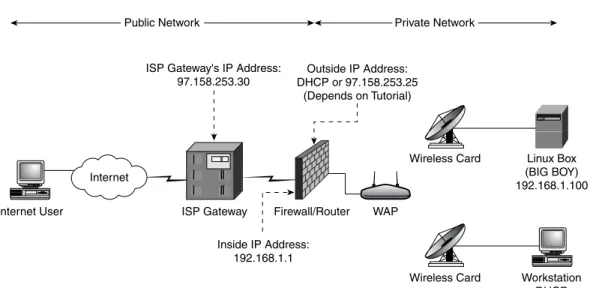
ETWORKThe typical small office or home network is usually quite simple, with a router/firewall connected to a broadband Internet connection protecting a sin-gle network on which all servers and PCs are connected, as seen in Figure 1.1. As stated before, the rest of the book shows how you can make a simple layout such as this become a functional low-volume Web site, but before you do it would be best to weigh the pros and cons of doing this.
4 Why Host Your Own Site? Chapter 1
Wireless Home Network Topology
Internet User
Internet
Firewall/Router
Wireless Card
Wireless Card
ISP Gateway WAP
Linux Box (BIG BOY) 192.168.1.100
Workstation DHCP ISP Gateway's IP Address:
97.158.253.30
Outside IP Address: DHCP or 97.158.253.25
(Depends on Tutorial)
Inside IP Address: 192.168.1.1
Public Network Private Network
Figure 1.1 Wireless home network topology.
A
LTERNATIVES TOI
N-H
OUSEW
EBH
OSTINGThere are two broad categories of hosting options for small Web sites. There are companies that host multiple Web sites on the same server and are called virtual hosting providers. There are also those that allow you to use servers completely dedicated to your site, these are called dedicated hosting