GAP-ANALYTICS (GEOLOCATION AND PLACES-ANALYTICS)
Yogesh R. Jadhav
1, Sunilkumar R.Yadav
2, Gautam J. Kale
3, Atul R. Barve
41,2,3,4
Student- Sanghavi College of Engineering, Nashik
Abstract
World is the full of interesting places and can be confusing and overwhelming at the same time. There can be instances where people might get lost or enter unsafe areas unknowingly. To address such issue, GAP-Analytics (Geolocation and Place-Analytics) is an android app and a Web application that helps its users to know their current location, search for places of their interest like hotels, police-station, hospitals etc. around them. Using android as its platform is beneficial looking at the market share of android OS as it can reach out many people. It will help data analysts to get statistics of activity of people around a geo-graphic location from online dash board by maintaining the privacy of the users. Smart phones are great devices which are intel-ligent and if used properly, it can save us from a lot of unpleasant situations. By using location services from android environ-ment, this app provides location features. This app uses Google location API V2, Google Places API and Google Maps api in its android client application. On the server side it uses windows ASP.NET Web Services to serve client requests.
Key Words:
LBS, Geolocation, Geofencing, GPS, API, WCF, REST.
---***---1. INTRODUCTION
Location Based Services (LBS) is an area of services which focuses on providing a custom regional experience to the users by providing them information and services according to their present location. GAP-Analytics is the location based application which includes an android app as its client and .NET Web service as its server component. Android app provides current location of the user and thus, provides location input to the system to provide various location based services like tracking, geofencing, finding points of interests, finding who is around you and many other features.Location based services have evolved over time and has become very vital in current digitized world. Internet is spreading in every nook and corner of the world at a very brisk pace. Along with internet, gadgets like smart phones have changed the way we live and work in today’s world. The reasons for location services to become a key player in general people’s life are:
1. High end processing power of smart phones
2. High speed internet connectivity
3. Cheap manufacturing cost of GPS hardware
4. General interest of the consumer in gadgets
Location based services (LBS) are on the rise with advance-ment in technology and low cost of integration of GPS on mo-bile phones. Users can enjoy regional services and get to know about their surroundings far more easily than ever before. Family safety and security and be made easy by sharing loca-tion among family members. World is digitizing, so it is neces-sary to get the maximum juice out of it and use it for simplify-ing and enhancsimplify-ing our lives. With technology as a part of our life, we have a bright future and can lead intelligent life by out-sourcing mundane tasks to technology. This project will try to provide travel and safety utility to its users. This project will try to deal with many aspects of LBS and will try to provide a good user experience and helpful features that will surely help the user and save his time.
2. ARCHITECTURE
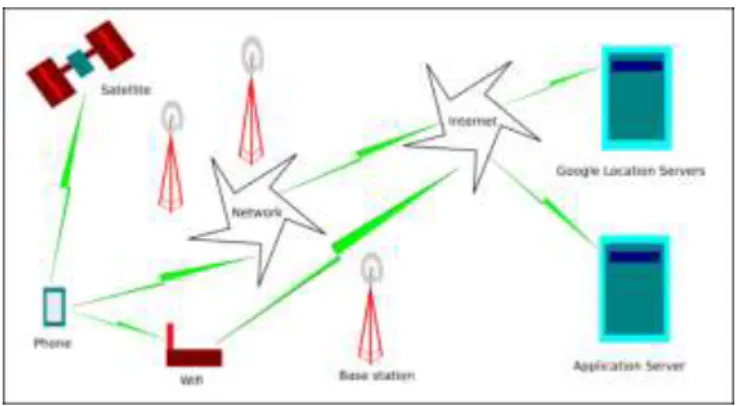
This app is based on client server model where android app is the client whereas ASP.Net web service serves client from the server. Server gets the requesting client the coordinates of the subject to be tracked through HTTP request and re-sponse method. We can use either SOAP or REST full ser-vice model for client-server communication implementation.
Fig. 1: Architecture
Our project works on the principle of distributed computing. In distributed computing, the system is divided into compo-nents which are physically remote to each other. But when user uses this system, he gets the illusion that the computer he is using has all its resources at one place.
In this project, the components of distributed system are: 1. Android Client: This is the app that is installed on end
user’s smart phone.
2. Web server: It provides back end for storing location related data.
Whenever client starts his app, he can use the data available on servers without knowing that such data is stored remotely and is being transferred through internet. Such distributed
nature is seen when a user tracks another user, searches for nearby places and checks if anyone is around him or not. Application specific server stores user location data on the cloud and acts as an interface between multiple android clients. Server performs different operations like computing distance between two locations, searching contacts, register-ing users, sendregister-ing alerts and geofencregister-ing. For all data relatregister-ing to nearby places and maps, it is handled by Google servers by the use of Location service APIs from Google. To get detailed information about your current location, wikipedia provides the information. We make use of GPS, Wifi, net-work signal and Proximity sensor for their respective opera-tions.
We use REST service framework to make calls to different servers from our client app.
Fig. 2: REST framework
REST is an architectural style for networked hypermedia
applications, it is primarily used to build Web services that are lightweight, maintainable, and scalable.
REST does not put a restriction on the format of a
repre-sentation.
It is platform independent, any applicatio can access
REST services.
It is the most widely accepted framework for recent
ap-plication development
2.1 Algorithm
Input: Current location, proximity sensor reading.
Output: Location aware service like profile automation, reminder, important places around you, weather, tracking other users, proximity alert.
Step 1: Install android client app.
Step 2: Register using email, name and mobile number. Step 3: Login Step
Step 4: From options menu select operation you want to perform:
My Location: Select this option to get your current loca-tion
Add Contact: Manually add contact to this app.
Contacts: View list of contacts with which you are shar-ing location.
Places: Find interesting and important places around you.
Geofences: Configure your geofences to automate tasks
or get alerts.
My Location Wiki: Opens a wikipedia link to your
cur-rent location and gives details.
Forecast: Get weather forecast. Step 5: Stop
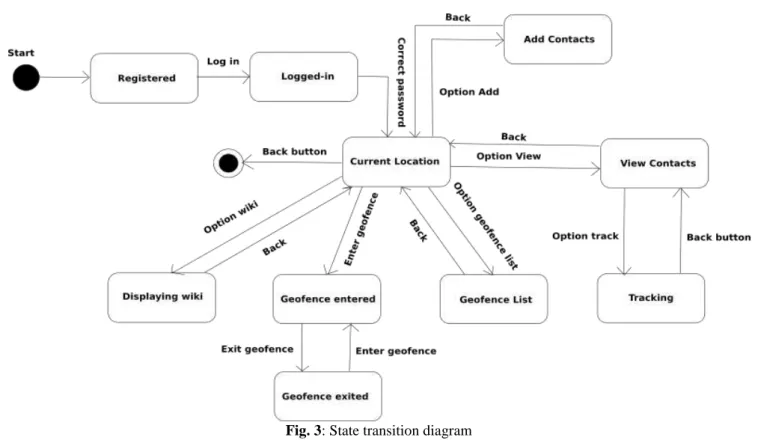
2.2 State Transition Diagram
State Transition example shows the state transition diagram of android app. The states are represented in ovals and state of system gets changed when certain events occur. The tran-sitions from one state to the other are represented by arrows. The Figure shows important states and events that occur while running the android app.
2.3 System Description
Let G represent from system as a set of tuples as follows: G = I, O,T,S,W
where, I= Input O= Output T= Time S= Sensors W= Web service
I = Input = L where, L = Location = (latitude, longitude) O = Output = L, W, P, F
where,
L=Location, W= Weather, P = Places F=Geofence alerts S = Sensors = GPS, Wifi, Proximity W = Web service = L1, S1, P1 where,
L1=Load operation S1=Store Operation P1=Processing data T = Time= R1 + R2
where, R1 = Request, R2 = Response
R1 = Gathering input (t1) + Transport on internet (t2) + Server (t3) + Weather (t4) + Google (t5)
R2= Google(t1) + Weather(t2) + Server (t3) + Transport (t4) + Formatting received output (t5)
R1 = ti = t1+t2+t3+t4+t5 R2 = tj = t1+t2+t3+t4+t5 T = R1 + R2
Thus, T denotes total time taken for processing of input and giving out the output.
Distance between two coordinates
Haversine formula:
a = sin2(4φ/2) + cosφ1·cosφ2·sin2(4λ/2) c = 2·atan2(a, (1a))
d = R · c
where φ is latitude, λ is longitude, R is earths radius (mean radius = 6,371km); note that angles need to be in radians to pass to trig functions!
Thus, working of our algorithm takes fixed linear time which is dependent on numbers of inputs given to our algo-rithm.
2.4
System Features
1. Tracking
Find your friends/family/colleagues on Google Map.
Find who around you within a specified range.
Find last known location.
Send distress message/alarm to your near ones.
2. Geofencing
It allows user of the system to draw zones around place of work, customer sites and secure areas these geofences when crossed by an equipped person can trigger a warning to the user via SMS or email.
Detect if you enter/exit an area of interest/danger.
Set alarm/reminder for a particular location.
Geofencing used with child location services, can notify
parent if a child leaves a designated area.
Change mobile profile depending on particular geofence
3. Places
Find police station around you.
Find the Bus stop/air-ports around you.
Find hotels near you.
Find hospitals around you.
Find ATMs near you.
Find the important landmarks near you.
4. Weather
Get current weather based on your current location.
Get current weather of your family/friends/colleagues
from their location.
5. Analytics
Get data about people’s location patterns over a period of
time.
Get danger zone areas from users who triggered SOS
messages.
Get report on frequently visited places by users.
2.5 Important Classes
Table: Important Classes
Class Description
Activity/ActionBarActivity Provides activity life-cycle methods to
manage activity operation.
LocationListener Provides facility to get
cur-rent location
from an android device.
GoogleApiClient Provides facility to connect
to Google
Play Services and get loca-tion updates.
GoogleMap Provides facility to integrate
and manipulate Google Map in our app.
Service Allows to create background
service
which is isolated from main app process.
BroadcastReceiver Provides facility to listen for
different
broadcasts (events) arising within Android OS.
2.6 APIs
Google’s Location API V2:
This is the API provided by Google to get access to location data from android system through API calls. These API calls interact with android OS and GPS hardware to get current location of the device. Users need Google Play Services installed to get service from this API. Developers also need to obtain API key from Google Developer Console. Depend-ing upon the usage, we need to get subscription from Google to use their location API. Google now provides FusedLoca-tion API which is energy efficient and intelligently chooses between available location providers such as network, Wifi and GPS to determine current location.
OpenWeatherMap API (weather):
OpenWeatherMap API is open source weather API based on Creative Commons 2 license which provides weather up-dates covering the whole world. It is simple to use and pro-vides with required weather data for the given location co-ordinates. This project aims to provides location based expe-rience by combining weather data to help users get to know more about a particular location. In order to use this API, we need to obtain API key which will identify our application requests to its servers.
3. LEGAL REQUIREMENTS
Need developer key to upload app to Play Store. Need to
obtain API key to use Google Location API V2.
To use Location API for enterprise level usage, we need
a legal license from Google which can be purchased on-line from their website.
User should allow location service and should not use
this app if user finds it is invading their privacy. Aim of this app is to provide location based experience with safety, thus you should choose carefully the people (trusted) with whom you want to share location.
It is illegal to use Google location data on maps other
than Google maps. You also cannot cache maps from Google maps without permission.
We need to obtain free API key from OpenWe therMap
to use their weather service.
Maintaining privacy is important requirement which can
be achieved through encryption.
4. USER PROFILES
4.1 Registered User: This is the user who installed our app and registered for using location based services. This user can perform following actions:
Tracking
Geofencing
Find who is around you
Get weather report of current location and location of
tracked users
Get detailed information about current location through
wiki page
4.2 New User: This is a user who has installed our app but
haven’t yet registered to use our app to avail location based services. This user can at his status can perform following actions:
Install our app
Register to use our app
4.3 Admin: This user can view all the registered users and can track registered users in the case of emergency and emergency requests from other registered users. He can per-form following actions:
Track any user in case of emergency
Delete accounts of any registered user
Sends emergency announcements to registered users.
4.4 Data Analyst: This is the user who deals with analysis of large amount of data. In our project, such analysts can study location patterns and identify danger zones based on user’s emergency message origins. His actions are as fol-lows:
Find location patterns for their interest
Get data about danger zones from user alerts
He can predict advertising strategy based on location of
users
5. OPERATIVE ENVIRONMENT
Android Operating System: Android is an open source
operating system maintained by Google and is quite popular among smart phone community. Developing in android re-quires knowledge about Java programming language. An-droid runs on embedded SoC which includes GPS, Wifi, Processor, RAM, USB interface etc.
Web Service: Web service runs on cloud environment with
shared hosting companies like Godaddy which charge you to use their resources to run your web service. As the hardware used is of hosting provider, developer do not need to invest in high cost hardware.
6. PROJECT RESOURCES
Hardware resources: Android smart phone, cloud web
server host
Software resources: Google Location API,
OpenWeather-Map API, Android Studio IDE, Visual Web Developer IDE, Project Management tool-Wrike, Wikipedia
Human Resources: Android developer, ASP.NET
develop-er, testdevelop-er, Documentation engineer
7. CONCLUSION
Users of this app can be sure about the movement of their near and dear ones. People can track and get valuable infor-mation about their surrounding environment through Google Places API. We can make proper use of smart phones as an intelligent device by using its features like wifi, mobile net-work data and GPS. Thus, city planners, analysts and securi-ty services can use this project to study location patterns and monitor people about their geo-points of interest.
ACKNOWLEDGMENT
The authors wish to thank Prof. Bajirao S. Shirole (Sanghavi
college of engineering, nashik) for providing guidance and proper direction in developing our project and necessary moti-vation and support.
REFERENCES
[1]J Schiller, A Voisard, Location-based services, Publisher:
Morgan Kaufman, Year: 2004, 500 Sansome Street, Suite 400, San Francisco, CA 94111
[2]Android Wireless Application Development by Shane
Condor and Lauren Darcy
[3]OpenWeatherMap API
http://www.openweathermap.org/api
[4]Google Location API
https://www.developers.google.com/maps/documentatio n/android-api/
[5]Geoawsomeness
http://www.geoawesomeness.com/knowledge-base/ loca-tion-based-services/location-based-services-chronology/
[6]Google Developer Console
https://console.developers.google.com/project
[7] Android tutorial