PLACING SYMANTEC CSP INTO THE VIRTUAL AND CLOUD ENVIRONMENT 1
The Virtualization Practice
White Paper:
Protect your Virtual and Cloud
Environment with Symantec Critical
System Protection
Edward L. Haletky
Analyst – Virtualization and Cloud Security
The Virtualization Practice
Sponsored by Symantec
Version 1.0 November 2012
© 2012 The Virtualization Practice, LLC. All Rights Reserved. All other marks are property of their respective owners.
Abstract
For the past few years I’ve researched security products in the Symantec booth at VMworld. What are they doing about virtualization and cloud security? Do they have two approaches to end point security? At the time I knew about two strategies, and Symantec had neither, but they all related to Anti-virus and Anti-malware. To my surprise Symantec had another product that was a form of Anti-virus but did not use blacklists, instead it used whitelists, Symantec Critical System
Protection (CSP). CSP is an agent-full approach to providing mandatory access controls within Windows and Linux physical and virtual systems. Mandatory access controls are a sought after mechanism to control not only who but what can access critical resources within an operating system while providing an audit log of who or what accessed those critical resources. When mandatory access controls are partnered with sandboxes we end up with a way to protect critical systems from faulty applications and unknown attacks.
2 PLACING SYMANTEC CSP INTO THE VIRTUAL AND CLOUD ENVIRONMENT
Table of Contents
I.
Introduction ... 3
Mandatory Access Control ... 3
Symantec Critical System Protection’s Approach ... 3
II.
Anatomy of an Attack and How to Protect Against Them ... 4
Anatomy of an Attack ... 4
Stops Attacks with Mandatory Access Controls and Sandboxes ... 6
III.
Placing Symantec Critical System Protection within Your Environment 6
Host Attestation ... 6
Manage Mandatory Access Controls with Symantec Critical System Protection
... 7
What to Protect ... 7
Recommended Placement of Symantec Critical System Protection ... 8
IV.
Closing Thoughts ... 10
V.
About The Virtualization Practice ... 11
VI.
About Symantec ... 11
PLACING SYMANTEC CSP INTO THE VIRTUAL AND CLOUD ENVIRONMENT 3
I.
Introduction
Symantec Critical System Protection (CSP) does not require any virus, malware, or attack signatures to work, as it is a mandatory access control system similar in nature to the United States National Security Agency’s Security Enhanced Linux or what is commonly known as SELinux today. Unlike SELinux, CSP has a well-designed and relatively easy to use management interface that spans hosts and operating systems. But what really is mandatory access control and why do we want it?
Mandatory Access Control
Mandatory Access Control is described on Wikipedia (http://en.wikipedia.org/wiki/ Mandatory_access_control) as:
“mandatory access control (MAC) refers to a type of access control by which the operating system constrains the ability of a subject or initiator to access or generally perform some sort of operation on an object or target. In practice, a subject is usually a process or thread; objects are constructs such as files, directories, TCP/UDP ports, shared memory segments, etc. Subjects and objects each have a set of security attributes.”
At the lowest level of a single operating system, MAC denies non-privileged subjects from accessing privileged resources. As an example, consider the case were a user runs Internet Explorer? The user is the first subject who access the file system to execute Internet Explorer which is a new subject that attempts to contact various resources: DNS, the file system (for caching), and ports on remote servers. In addition, DNS is a subject that attempts to access ports on your DNS server, the local file system for a local hosts file, and logs data to a logging server or the local host. At the very least we have 3 possible subjects and many resources to access. Each of these subjects has a set of roles associated with them (i.e. Domain User), and each resource has a set of access controls associated with them. MAC is a part of a robust role based access control (RBAC) mechanism.
In this one example, we have many subjects and many resources. For each subject there is a set of resources they are allowed to access and for each resource there is a set of authentication rules associated with them. If we take DNS we can set rules that limit communication to just outgoing from any port to port 53 using UDP or TCP on a specific server. Any attempt to change these rules would result in a defined failure mode: being clamped to the defined rule, rejecting the request, or allowing but logging the requested action. In all cases, the attempt by the subject to violate MAC policies would be logged for immediate (if it is egregious enough) or later analysis.
Symantec Critical System Protection’s Approach
Traditional MAC however still allows you direct access to a file system, while limiting what you can see and/or do. This is where CSP differs from standard MAC and the SELinux approach. Instead of allowing a subject direct access to a resource from a subject executable it builds a sandbox around the subject executable. The sandbox adds yet another layer of protection between the subject executable and the file system that it could be using. In this way, even if the subject was allowed to manipulate the file system, only accepted file system manipulations would be allowed but they would write to the sandbox. Only the true files placed in the sandbox for
4 PLACING SYMANTEC CSP INTO THE VIRTUAL AND CLOUD ENVIRONMENT
access by subject would be written to disk. Consider Microsoft Word, in general it has access to the entire Windows file system, but with CSP we could literally limit what Microsoft Word could access by only allowing it to see a specific directory. While an attack within a Microsoft Word document would attempt to write outside the specific directory and would succeed, it would instead write to the sandbox, which is thrown away when Microsoft Word exits. Meanwhile, you can write to allowed files at any time.
CSP not only has a sand box that surrounds the object with respect to file systems, it also has a similar sandbox that surrounds network ports. In this fashion both approaches that attackers commonly take are covered. There is a robust set of rules that can be applied using CSP that will enhance the security of your virtual and physical machines.
II.
Anatomy of an Attack and How to Protect Against
Them
Before we can decide how to use CSP we need to understand the anatomy of an attack. At this year’s VMworld 2012, CSP was demonstrated by attacking an unprotected system using a standard attack against Windows systems. Then CSP was enabled and the same attack was propagated and even though the attack previously succeeded, which generally means attackers have put on systems root kits, backdoors, and other tools, this time the attack failed outright. CSP protected the system even if previously attacked. So what is the anatomy of an attack?
Anatomy of an Attack
PLACING SYMANTEC CSP INTO THE VIRTUAL AND CLOUD ENVIRONMENT 5
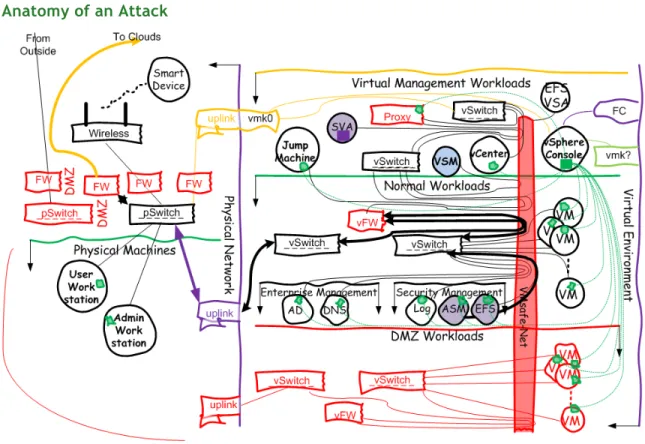
An attack can propagate through several means. In Figure 1, taken from The Virtualization Practices Secure Hybrid Cloud Reference Architecture
(http://www.virtualizationpractice.com/?file_id=380), we can see two immediate attacks points, From Outside and To Clouds (which is also From Clouds). While these could be attacked via brute force mechanisms, it is not the most obvious attack point. Let us instead consider a phishing attack which sends email to a group of administrators, something that interests them either as an advertisement on a website or an included email. So those users are sitting on their Admin Workstation and open up a seemingly innocent document or advertisement.
From there the attack is launched. The Admin Workstation is soon infected and the attack could propagate to anywhere that Administrator attempts to reach. Which is shown via the bolded lines within Figure 1. If the VM that is the end point of this path is a file server for example, the administrator, who has full privileges to modify the contents of that file server, could become an unwitting accomplice to the attack and help propagate the attack. Ask yourself:
What is the difference between an administrator and a very good electronic copy of an administrator?
Figure 2: What is Difference between a Real Admin and Electronic Copy?
Is it obvious in Figure 2, which is the original picture and which is not the original picture? One may assume the picture on the right is the copy, but is it? The same holds true for administrators and electronic copies of administrators as well as users and electronic copies of users. Users however should already be locked down to a certain extent, but even so, new virus, malware, and attacks show up every day. So if your system is not originally configured to remediate all known attacks, old attacks will still propagate. However, it is the unknown and new attacks for which we do not KNOW the footprints. Due to that, we need a better way to protect our environments. An administrator currently has unparalleled access, one we grant to them to do their daily work. Given this existing access, an administrator or electronic copy of an administrator can reach anything that administrator is allowed to reach, which on some systems is everything and anything. Because they have access to everything, new attacks can take advantage of that and follow all paths a normal administrator will take, even through existing security devices like physical and virtual edge firewalls, virtual introspective firewalls, virtual switch protections, and eventually the current protections that reside on a guest (such as anti-virus and anti-malware
6 PLACING SYMANTEC CSP INTO THE VIRTUAL AND CLOUD ENVIRONMENT
agents). Why because we already granted the administrator the rights to go down those paths. Yet the payload transferred over the network could contain new and more deadly attacks.
Stops Attacks with Mandatory Access Controls and Sandboxes
Mandatory Access Controls and Sandboxes protect your environment from such new and unknown attacks. Attacks will come over well known, well supported, and allowed paths such as port 80 or even port 443. We may limit traffic in a firewall to only allow port 80, but since we are allowing that traffic it is perfectly reasonable to continue to allow regardless of payload. However, we can also allow protocol analyzers or layer 3 firewalls, these see HTTP or encrypted HTTPS traffic and once more allow the payload to pass. In essence, security is setup to allow what is considered to be normal access as well as what is considered to be unknown traffic (as it may be encrypted), or may look like standard HTTP traffic.
While Administrators should be able to access tools to do their jobs, those tools are subjects that have their own access controls and will use their own sandboxes to protect the environment further.
III.
Placing Symantec Critical System Protection within
Your Environment
CSP is a tool that ends up being the final line of defense for such unknown attacks while granting a finer level of control of what aspects of critical systems an administrator and user can access. For example, normally an administrator is required to update an application package or even patch the system. With MAC we can create separate users who are allowed to update the
application and the system while removing the ability from the administrative user. In this way we also gain a better understanding of who did what when where and how, which is the goal of any audit logging software.
However, that is not all CSP does. CSP can add in attestation, or verification, that configuration options are as expected for a number of different systems. So not only do we have MAC that can be applied to several subjects, we also have attestation for hosts and critical systems. While, CSP does not read OVAL/CPE/XCCDF style checks it does have many of the same capabilities using a proprietary set of input data.
So the question becomes where to we place Symantec CSP within your virtual and cloud environments?
Host Attestation
Symantec CSP provides as part of its user interface a mechanism to verify that the virtualization host’s configuration is set per policy. Currently this functionality is only available for VMware vSphere. Host attestation is a fairly large security concern, as you cannot harden the hypervisor, just the surrounding management constructs. But wait all the security tools say they protect the hypervisor? Actually, they do not, they protect some aspect that surrounds a hypervisor such as the network, virtual machines, guest operating systems, or the management constructs. No security tool can reach into the virtualization host to directly protect the hypervisor; it is buried
PLACING SYMANTEC CSP INTO THE VIRTUAL AND CLOUD ENVIRONMENT 7
behind all the other constructs it creates. As such, we need to pay close attention to those constructs and the management construct is the most crucial of these.
But not only must we understand how each individual VMware vSphere host configured, we need to look at the entire cluster or data center of hosts (as defined by VMware vCenter). Which also implies we need to attest the hardening of VMware vCenter in addition to each host. But what about the database that VMware vCenter uses, auto deploy hosts, log aggregators, update manager, and other VMware management constructs that are used to manipulate our virtualization hosts?
All these need attestation around their configuration and adherence to security policy. We can look at just a single VMware vSphere host, but we will miss the bigger picture that is the virtual environment. Our scope cannot be limited in view as we are protecting the entire virtual environment that often layers management on top of management. This leads to use of delegate users are all levels, which make determining who did what, when, where, and how difficult at best. This also implies, that delegate users are often granted more access than they should be allowed.
So we need to provide attestation of more than just the vSphere hosts but also vCenter, and all other management constructs above vSphere. CSPs functionality to provide attestation to vSphere hosts and vCenter Windows based installations and provides two parts of the attestation puzzle. CSP therefore requires access to vCenter and vSphere hosts. Unfortunately, as of this writing, attestation is not provided for the appliance version of vCenter.
Such access provides a possible attack point, as does the layering of management and delegate users. What confounds the problem is that the security team will often be the team deploying CSP and not the virtualization team. So how do we grant this access without imposing impossible to use draconian security practices?
Manage Mandatory Access Controls with Symantec Critical System Protection
Symantec CSP’s management console provides a mechanism to also manage your mandatory access control policies. Since the security team will configure these policies we should place the management components in a place within our environment to which the security team has access. However, if the Mandatory Access Controls will be applied to Windows and Linux based virtualization management constructs, the management tool must also be able to access those constructs to impose policy.
What to Protect
The next issue about placing Symantec CSP within a virtual environment is what to protect with it. Should we protect everything? Or are we looking at protecting only the critical systems. There are several schools of thought on this, but the first thing we need to do with Symantec CSP is realize that its protection mechanism uses an agent within each guest OS or physical system to be protected, as such it will not protect the management construct that is built into any vSphere hypervisor. However, it could be installed on Windows running Hyper-V, Linux systems running KVM, Citrix XenServer, or even the Open Source Xen. Why all the others and not VMware vSphere? Because the others use standard operating systems (no matter how ‘just enough’ and small) as
8 PLACING SYMANTEC CSP INTO THE VIRTUAL AND CLOUD ENVIRONMENT
part of their management constructs and VMware vSphere ESXi is not, in addition, there needs to be a special build of the agent just for ESXi, which at this time does not exist. Could it work on older versions of VMware vSphere ESX? There is a possibility given that ESX has a full GNU/Linux environment that has its own kernel based on Red Hat Enterprise Linux.
Minimally, what needs to be protected within a data center is a fairly short list however, depending on your requirements, more could be required:
• Windows or Linux virtualization management consoles such as VMware vCenter installed
into a Windows operating system, Citrix XenConsole running upon Linux, Microsoft System Center running within Windows, as well as other management tools that directly touch any virtualization host
• Jump Machines used by administrators to access Windows or Linux virtualization
management consoles accounting for all the specialized tools used within these Jump Machines such as the VMware vSphere Client, Browsers to access other management tools, PowerShell and other virtualization software development kits (SDKs), third party tools that access the management constructs
• Active Directory (or any other form of Directory Server) • Domain Name Service (DNS) servers
• Agent Management Servers (ASM) for agent-less or agent-full anti-virus and anti-malware,
CSP itself
Recommended Placement of Symantec Critical System Protection
So CSP requires an agent to be installed on quite a few virtual machines or physical hosts per our list above, but also requires access to the virtual environment management constructs to provide attestation (at least for VMware vSphere). So how do these fit into the environment?
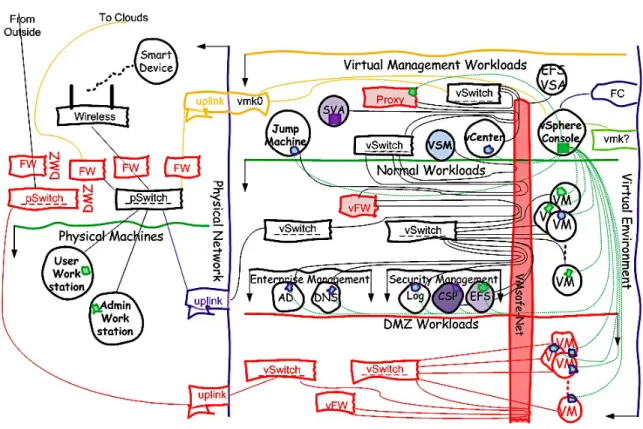
In Figure 3, we have augmented the reference architecture to include the CSP Management appliance (labeled CSP) in dark purple, and highlighted which systems should have the CSP agents installed (purple outlined green representing a collection of agents). Note we have installed CSP agents into every VM within our DMZ, all administrative Jump Machines, vCenter, and all
Enterprise Management and nearly all Security Management tools. Those not augmented with CSP agents for Mandatory Access Controls and Multi-layer Security are systems in these trust zones that are considered appliances and therefore black boxes. However, this still does not account for how the CSP management tool can provide attestation of the virtualization management
PLACING SYMANTEC CSP INTO THE VIRTUAL AND CLOUD ENVIRONMENT 9
constructs.
Figure 3: With CSP and CSP Agents
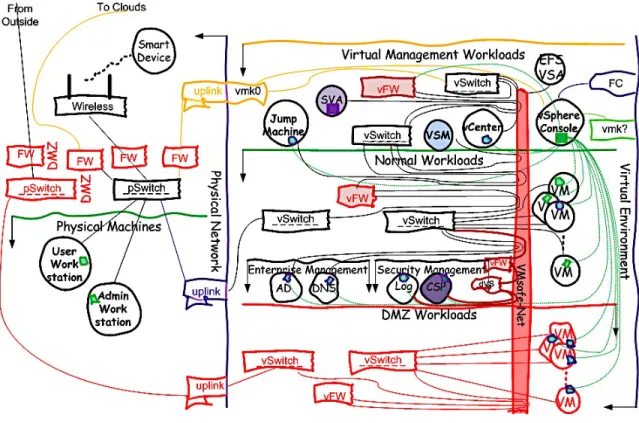
To do this, we need to manipulate to of our virtual environment defense in depth constructs that are highlighted with a lighter red within a red border and are named vFW and Proxy. The highlighted virtual firewall would need to allow CSP Management attestation commands to reach vCenter and the vSphere Consoles, which can only be done when passing through the highlighted proxy (which is currently only the HyTrust Appliance). These two subsystems would control the access to those all-important management constructs.
Ideally, such packets would also be encrypted which would require more security to be put into place. Which is what we have done in Figure 4.
By adding the items highlighted in a dark brick red we can create an encrypted tunnel from one vFW to another vFW. VMware vCloud Network and Security Edge Gateways support such encrypted tunnels between gateways, as do other virtual firewalls. In this fashion, the CSP management tool could send its attestation request to the vNetwork Distributed Switch which would forward it to the Edge Gateway which would contain one end of the tunnel over which this traffic would be sent to the other Edge Gateway which would decrypt it and allow CSP traffic to contact either vCenter or the vSphere hosts themselves. In this fashion, high value security data and connectivity would be managed, encrypted, and secure in motion from the rest of the network. This way, the security team could control its component, which is CSP, while the virtualization team would allow the necessary access.
10 PLACING SYMANTEC CSP INTO THE VIRTUAL AND CLOUD ENVIRONMENT
Figure 4: Additional Security, Encrypted Tunnels
Alternatively, we would need a proxy service from CSP that would live within the Virtualization Management trust zone, which would communicate back to the CSP manager within the security zone. While such a proxy is possible and depicted in Figure 3, such a proxy does not currently exist. Which limits how and where CSP can be deployed within your virtual environment if you wish for its attestation features.
If you do not require attestation, but wish to employ its mandatory access controls, then you will not need much more than the CSP manager to manage the agents within each of the critical systems. What that list of critical systems is however, depends on each organization, but the minimal set within a virtual environment will not change.
IV.
Closing Thoughts
Symantec CSP provides two clear benefits. The first is for compliance (attestation) and the second is what I would consider the last line of a defense-in-depth.
The attestation component is fairly easy to understand and demonstrate as the product runs a set of checks against a system and reports back on whether or not the system meets some compliance standard. The unfortunate aspect of CSP’s attestation is that it uses a proprietary format instead of a standard OVAL or XCCDF format. Regardless of standard, attestation is a major requirement for all compliance requiremens.
PLACING SYMANTEC CSP INTO THE VIRTUAL AND CLOUD ENVIRONMENT 1
1
The last line of a defense-in-depth is much harder to demonstrate, as you are required to understand the inner workings of an attack as well as the inner workings of the application to be protected. The last line of defense-in-depth is a mixture of application, user, and resource whitelisting provided by mandatory access controls and sandboxing technologies. In this way, the well-known trusted usage paths and patterns can be allowed while protecting from the unknown attacks that try to take a system, application, or resource outside the well-known trusted usage paths and patterns.
For critical systems, and this could be argued for all systems, this level of protection is required moving forward. It is ultimately required for anything that manages the complex virtual or cloud environments as well as for other critical systems these management tools touch. An equally much needed place for such protection, is a DMZ and the internal components those systems can touch. Therefore Symantec CSP becomes a new component of your existing defense-in-depth.
V.
About The Virtualization Practice
The Virtualization Practice is the leading online resource of objective and educational analysis focusing upon the virtualization and cloud computing industries.
Edward L. Haletky is the author of VMware vSphere(TM) and Virtual Infrastructure Security: Securing the Virtual Environment as well as VMware ESX and ESXi in the Enterprise: Planning Deployment of Virtualization Servers, 2nd Edition. Edward owns AstroArch Consulting, Inc., providing virtualization, security, network consulting and development and The Virtualization Practice where is also an Analyst. Edward is the Moderator and Host of the Virtualization Security Podcast as well as a guru and moderator for the VMware Communities Forums, providing answers to security and configuration questions. Edward is working on new books on Virtualization.
VI.
About Symantec
Symantec protects the world’s information, and is the global leader in security, backup and availability solutions. Our innovative products and services protect people and information in any environment – from the smallest mobile device, to the enterprise data center, to cloud-based systems. Our industry-leading expertise in protecting data, identities and interactions gives our customers confidence in a connected world. More information is available at
https://www.symantec.com/critical-system-protection.
VII.
References
Edward L. Haletky. VMware vSphere(TM) and Virtual Infrastructure Security: Securing the Virtual Environment, Prentice Hall PTR; 1 edition (June, 2009)
Edward L. Haletky. Secure Hybrid Cloud Reference Architecture, The Virtualization Practice, LLC (www.virtualizationpractice.com); Version 1.1 (September 2012)