Endpoint Security
E80.30
Security Target
Version 1.
0
January 22, 2014
Prepared by:
Prologue 1/22/2014
Copyright 2013-14, Check Point Software Technologies Ltd. All Rights Reserved.
© 2013-14 Check Point Software Technologies Ltd.
All rights reserved. This product and related documentation are protected by copyright and distributed under licensing restricting their use, copying, distribution, and decompilation. No part of this product or related documentation may be reproduced in any form or by any means without prior written authorization of Check Point. While every precaution has been taken in the preparation of this book, Check Point assumes no responsibility for errors or omissions. This publication and features described herein are subject to change without notice.
RESTRICTED RIGHTS LEGEND:
Use, duplication, or disclosure by the government is subject to restrictions as set forth in subparagraph (c)(1)(ii) of the Rights in Technical Data and Computer Software clause at DFARS 252.227-7013 and FAR 52.227-19.
TRADEMARKS:
Refer to the Copyright page (http://www.checkpoint.com/copyright.html) for a list of our trademarks. Refer to the Third Party copyright notices (http://www.checkpoint.com/3rd_party_copyright.html) for a list of relevant copyrights and third-party licenses.
Prologue 1/22/2014
Copyright 2013-14, Check Point Software Technologies Ltd. All Rights Reserved.
Table of Contents
1. ST Introduction ... 6
1.1. ST Reference ... 6
1.2. TOE Reference ... 6
1.3. TOE Overview ... 6
1.4. Document Organization ... 7
1.5. TOE Description ... 8
1.5.1. Physical Scope and Boundaries of the TOE ... 8
1.5.2. Logical Scope and Boundaries of the TOE... 11
2. Conformance Claims ... 17
2.1. CC Conformance Claim ... 17
2.2. Assurance Package Conformance ... 17
2.3. PP Conformance ... 17
3. Security Problem Definition ... 18
3.1. Introduction ... 18
3.2. Definitions ... 19
3.2.1. Assets ... 19
3.2.2. Threat Agents ... 19
3.3. Threats ... 19
3.4. Assumptions ... 21
4. Security Objectives ... 23
4.1. Security Objectives for the TOE ... 23
4.2. Security Objectives for the Operational Environment ... 24
4.3. Security Objectives Rationale ... 25
4.3.1. Security Objectives Countering Threats ... 25
4.3.2. Security Objectives Upholding Assumptions ... 28
5. Extended Components Definition ... 30
6. Security Requirements ... 31
6.1. Definitions ... 31
6.1.1. Objects ... 31
6.1.2. Users ... 31
6.1.3. Subjects ... 31
6.1.4. Operations ... 31
6.2. Security Functional Requirements ... 33
Prologue 1/22/2014
Copyright 2013-14, Check Point Software Technologies Ltd. All Rights Reserved.
6.2.2. Cryptographic support (FCS) ... 37
6.2.3. User data protection (FDP) ... 39
6.2.4. Identification and authentication (FIA) ... 44
6.2.5. Security Management (FMT) ... 46
6.2.6. Protection of the TSF (FPT) ... 49
6.2.7. Trusted path/channels (FTP) ... 49
6.3. Security Assurance Requirements ... 50
6.4. Security Requirements Rationale ... 52
6.4.1. Security Functional Requirements Rationale... 52
6.4.2. Security Assurance Requirements Rationale ... 56
6.4.3. Dependency Rationale ... 57
6.4.4. Identification of Standards ... 60
7. TOE Summary Specification ... 61
7.1. SFR Mapping ... 61
7.1.1. Security Audit (FAU) ... 61
7.1.2. Cryptographic support (FCS) ... 62
7.1.3. User data protection (FDP) ... 63
7.1.4. User identification and authentication (FIA) ... 65
7.1.5. Security Management (FMT) ... 65
7.1.6. Protection of the TSF (FPT) ... 66
7.1.7. Trusted path/channels (FTP) ... 66
7.2. Protection against Interference and Logical Tampering ... 67
7.3. Protection against Bypass ... 67
8. Supplemental Information ... 68
8.1. Conventions ... 68
8.1.1. Security Environment Considerations and Objectives ... 68
8.1.2. Security Functional Requirements ... 68
8.1.3. Other Notations ... 69
8.1.4. Highlighting Conventions ... 69
8.2. Terminology ... 70
8.2.1. Glossary ... 70
8.2.2. Abbreviations ... 73
8.3. References ... 75
Appendix A - Supported Antivirus Solutions ... 76
Prologue 1/22/2014
Copyright 2013-14, Check Point Software Technologies Ltd. All Rights Reserved.
Table 4-1- Tracing of security objectives to threats ... 25
Table 4-2- Tracing of security objectives to assumptions ... 29
Table 6-1 - Operations Mediated by the TOE ... 32
Table 6-2 – Security functional requirement components ... 33
Table 6-3 - Auditable Events ... 35
Table 6-4 - Cryptographic Operations ... 38
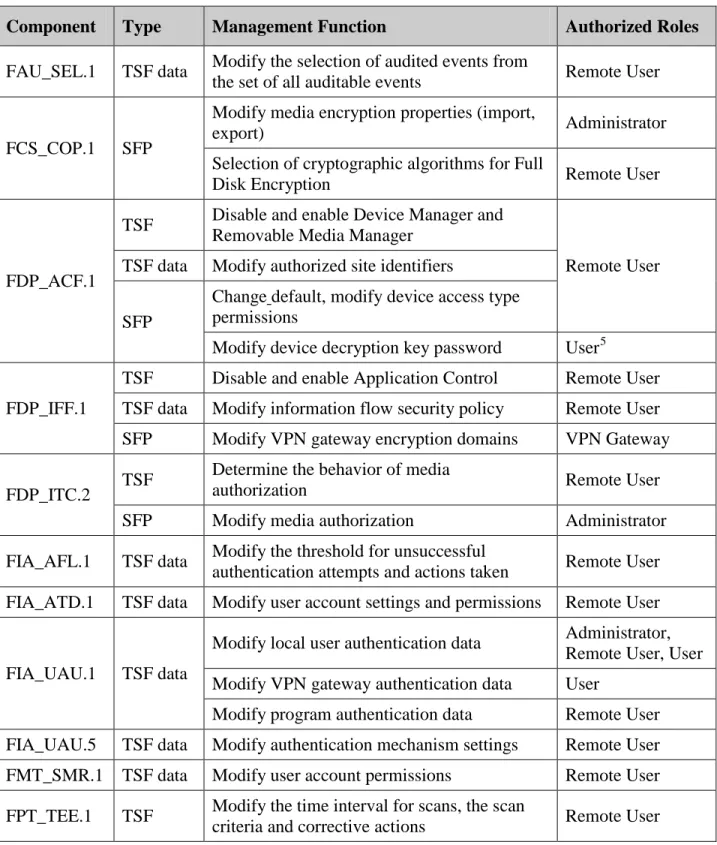
Table 6-5- Specification of Management Functions ... 47
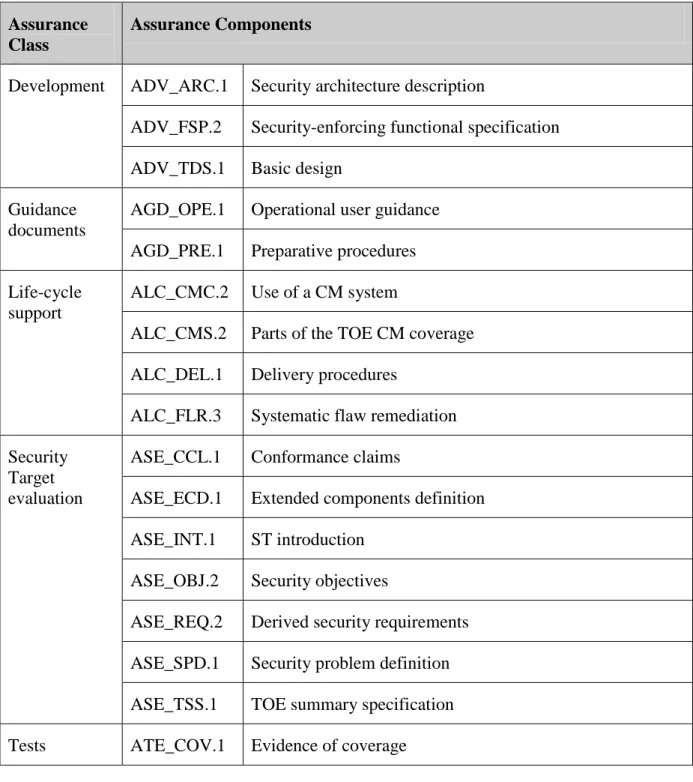
Table 6-6- TOE Security Assurance Requirements ... 50
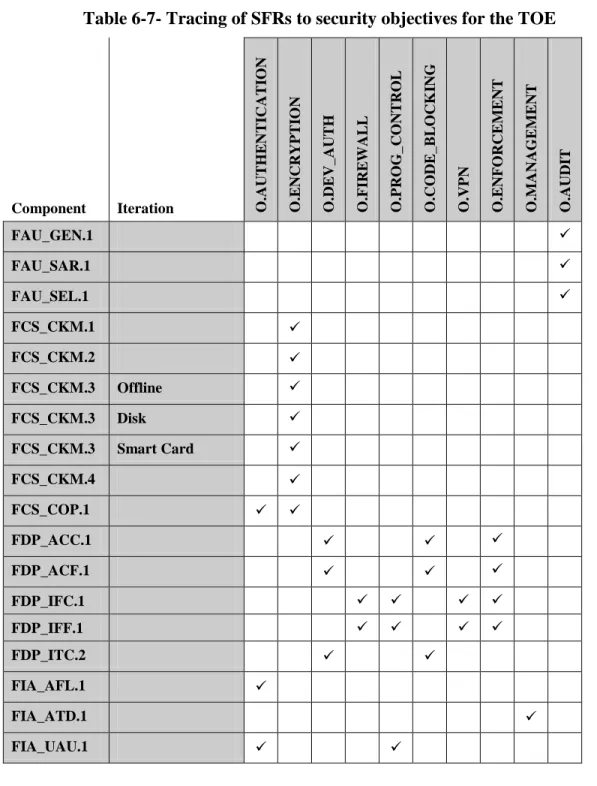
Table 6-7- Tracing of SFRs to security objectives for the TOE ... 52
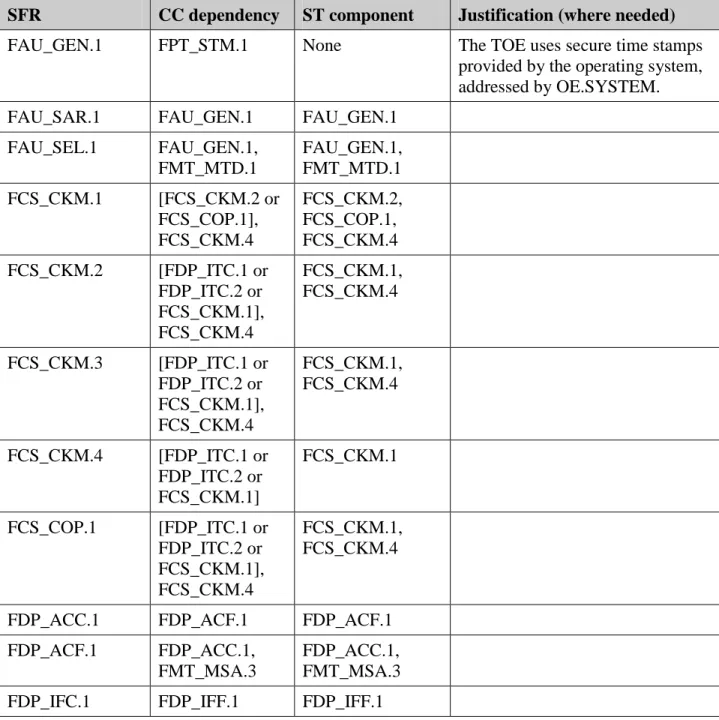
Table 6-8- Security Requirements Dependency Mapping ... 57
Table 6-9- Cryptographic Standards and Method of Determining Compliance ... 60
Table 7-1 - TOE Summary Specification SFR Mapping ... 61
Table 8-1- SFR Highlighting Conventions ... 69
List of Figures
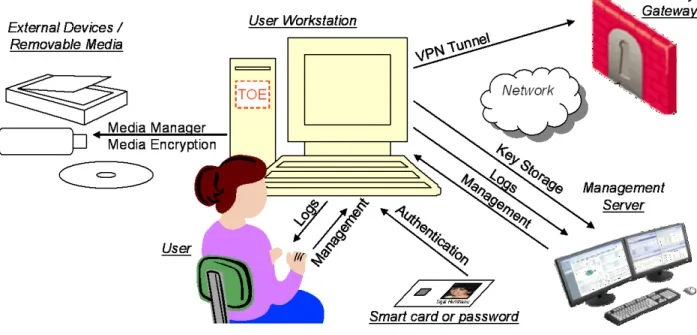
Figure 1-1 - TOE Operational Environment ... 8Chapter 1. ST Introduction 1/22/2014
Copyright 2013-14, Check Point Software Technologies Ltd. All Rights Reserved.
1. ST Introduction
1.1.
ST Reference
Title: Endpoint Security Security Target ST Version: 1.0
ST Date: January 22, 2014 Author: Nir Naaman
CC Version: Common Criteria for Information Technology Security Evaluation, Version 3.1 Revision 3, July 2009
Evaluation Assurance Level (EAL):
EAL 2, augmented with ALC_FLR.3 (systematic flaw remediation). Keywords: Personal firewall, VPN client, sensitive data protection, media encryption,
port protection, network access control, NAC, DLP
1.2.
TOE Reference
TOE Identification: Check Point Endpoint Security version E80.30 (build8.1.327) The TOE is comprised of the following Check Point software blades1:
• Full Disk Encryption Blade
• Media Encryption & Port Protection Blade • Firewall & Application Control Blades • Compliance Blade
• VPN Blade
These components are installed on a workstation running a Microsoft Windows operating system. The underlying hardware platform and operating system on which the TOE software is installed are considered to be outside the TOE. The TOE can be configured to invoke third-party virus engines. The anti-virus engines themselves are outside the TOE boundary.
While some basic management capabilities are provided in the client software, Check Point Endpoint Security clients are designed to be centrally managed. However, management server products are separate products that are not required to effectively use the client. In the context of this ST, the management server is treated as a ‘remote user’ that can be authorized to perform identified TOE man-agement operations.
1.3.
TOE Overview
Check Point Endpoint Security is a workstation security software product that is installed on user desktop and laptop hosts in an enterprise setting. Supported operating systems include: Windows 7 Enterprise, Professional, Ultimate editions (32 bit and 64 bit).
1
Chapter 1. ST Introduction 1/22/2014
Copyright 2013-14, Check Point Software Technologies Ltd. All Rights Reserved.
The product provides pre-boot user authentication, cryptographic protection for data stored on hard disks and removable media, enforces defined security policies on all host I/O interfaces (USB, serial, etc.), and provides information flow control for network traffic entering and departing the host. In addition, the product can be configured to invoke third-party components installed on the host that perform malware scanning and analysis (see Appendix A - Supported Antivirus Solutions).
Check Point Endpoint Security can be used to enforce corporate security compliance policies. The client analyzes the host’s compliance status (e.g. patch levels, anti-virus updates, etc.) and can be configured to prevent a non-compliant workstation from gaining access to network resources.
A remote access client virtual private networking (VPN) capability supports establish-ment of a secure channel between the Check Point Endpoint Security client and a Check Point Security gateway, using the IKE/IPSec security protocols.
Check Point Endpoint Security installations can be either managed locally on the workstation, or can be centrally managed from other Check Point security management products. . Audit logs can be sent to the management server (outside the TOE).
Check Point security gateways and management server products are outside the TOE boundary. Check Point Endpoint Security E80.30 supports the following Check Point products:
• Check Point Security Gateway R70 and higher
• Check Point Endpoint Security Management E80.30 and higher
1.4.
Document Organization
Section 1 provides the introductory material for the security target.
Section 2 identifies the Common Criteria conformance claims in this security target. Section 3 describes the security problem solved by the TOE, in terms of the expected
operational environment and the set of threats that are to be addressed by either the technical countermeasures implemented in the TOE or through additional environmental controls identified in the TOE documentation.
Section 4 defines the security objectives for both the TOE and the TOE environment. Section 5 is intended to be used to define any extended requirements claimed in this
security target that are not defined in the Common Criteria.
Section 6 gives the functional and assurance requirements derived from the Common Criteria, Parts 2 and 3, respectively that must be satisfied by the TOE.
Section 7 explains how the TOE meets the security requirements defined in section 6, and how it protects itself against bypass, interference and logical tampering.
Section 8 provides supplemental information that is intended to aid the reader, including highlighting conventions, terminology, and external references used in this se-curity target document.
Chapter 1. ST Introduction 1/22/2014
Copyright 2013-14, Check Point Software Technologies Ltd. All Rights Reserved.
1.5.
TOE Description
1.5.1. Physical Scope and Boundaries of the TOE 1.5.1.1. The TOE and its Operational Environment
The Target of Evaluation (TOE) is a software product that is installed on a single
workstation in an enterprise setting. Figure 1-1 below describes the scope of the TOE and its interactions with other entities in the workstation’s operational environment.
Check Point Endpoint Security protects the workstation from unauthorized access by physical, network-based, and external device-based threats. The workstation, its operating system, applications running on the workstation, external devices and media (including authentication tokens if used), and any network-based services (such as a Windows Domain Controller) are all outside of the TOE boundary.
The product is a part of the comprehensive Check Point unified security architecture, and as such is typically centrally-managed using other Check Point security management products. Management servers support remote management, log review, and can serve as a centralized key storage repository for removable media encryption. Local user
management is also available.
The product also interacts with Check Point security gateways for remote access VPN. In the context of this security target, the TOE includes only the Check Point Endpoint Security software installed on the workstation - other Check Point components are evaluated separately.
Chapter 1. ST Introduction 1/22/2014
Copyright 2013-14, Check Point Software Technologies Ltd. All Rights Reserved.
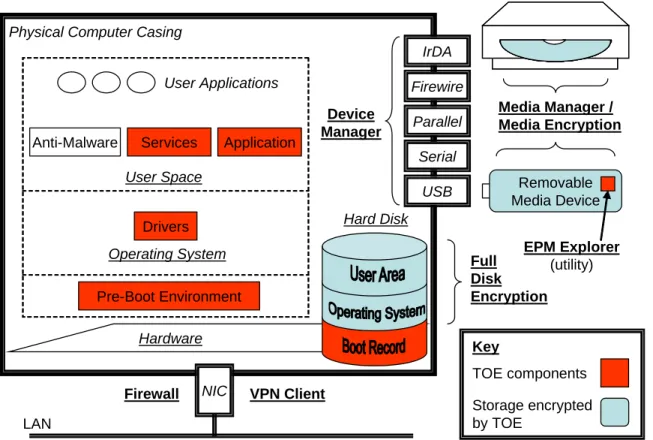
1.5.1.2. The Boundaries of the TOE in the Context of the User Workstation Check Point Endpoint Security is a software product produced by Check Point. The product is installed on a workstation hardware platform that is running a Microsoft Windows operating system (see section 1.3 for supported versions). Figure 1-2 below depicts the TOE in the context of the user workstation.
During its installation process, the product modifies the hard disk boot record so that the Check Point Endpoint Security Pre-Boot Environment (PBE) is started up before the hosting operating system. It applies Full Disk Encryption over the entire hard disk, on a sector by sector basis, so that both operating system and user area are protected from unauthorized access.
The PBE is a limited operating system in its own right, providing access to the disk, authentication devices, and the user interface. It authenticates the user, and retrieves the user’s access credentials needed for decrypting the hard disk.
Once the user is authenticated, PBE boots up the operating system (which is defined as outside the TOE boundary), installing Check Point Endpoint Security kernel-level drivers that control the operating system’s access to the hard disk, external I/O interfaces, and network interfaces. These drivers also provide control over user application behavior, allowing the product to provide containment and quarantine functionality for non-compliant, misbehaving, or malicious software that may be running on the workstation.
Figure 1-2 - TOE Scope and Physical Boundaries
In addition to kernel-level drivers, the product installs services that are responsible for communication with peer IT entities, management, logging, and compliance testing. A task bar application provides a Graphical User Interface (GUI) that allows the local user
Pre-Boot Environment
Physical Computer Casing
Hardware Hard Disk Full Disk Encryption USB Serial Parallel Firewire NIC IrDA Removable Media Device
Media Manager / Media Encryption Device Manager VPN Client Firewall EPM Explorer (utility) Operating System User Space Drivers Application Services LAN Key TOE components Storage encrypted by TOE Anti-Malware User Applications
Chapter 1. ST Introduction 1/22/2014
Copyright 2013-14, Check Point Software Technologies Ltd. All Rights Reserved.
to perform security management operations. A Media Import Wizard for encrypting removable optical media is integrated into the operating system’s optical media burn interaction, and can also be launched directly from the task bar application.
The different parts of the TOE are depicted in red in Figure 1-2. The TOE encrypts data stored on the workstation hard disk, and can be configured to encrypt storage on
removable media devices and removable media2 (outside the TOE).
As depicted, the TOE includes an EPM Explorer utility that can be written on encrypted removable media devices. When the encrypted removable media device is inserted into a trusted host outside of the TOE (that does not include an installation of Check Point Endpoint Security), the EPM Explorer utility can be used to provide access to the encrypted storage. The security of the data on the removable media device is derived from the fact that it was encrypted by the TOE, using an offline password bound to the TOE’s password selection constraints. The TOE assumes that the IT environment is benign with respect to the execution environment of the EPM Explorer utility, and any possible modification of the utility while stored on the device, to prevent compromise of the offline password used to protect the data.
Check Point Endpoint Security can be configured to invoke third-party anti-virus software installed on the user workstation. The evaluated configuration supports a wide array of such software products. The Check Point Endpoint Security product is bundled with one such third-party anti-virus component; however, installation of this component is optional, and the anti-virus software itself is not included in the boundaries of the TOE.
1.5.1.3. TOE Guidance
The following Check Point guidance is considered part of the TOE:
Title Date
Endpoint Security CC Evaluated Configuration Administrator Guide Version E80.30
January 2014
Endpoint Security CC Evaluated Configuration User Guide Version E80.30 September 2013
Endpoint Security Client E80.30 User Guide 2 November 2011
2
Note that ‘removable media device’ is a subset of ‘removable I/O device’, both of which are distinct from
‘removable media’. Removable I/O devices are any devices that can be attached and detached, in its entirety, from a host workstation. Removable media devices are those removable I/O devices capable of storing data (e.g., the contents can potentially be written). Removable media includes floppy disks, CDs, and DVDs where the media itself is removable from a device attached to a host workstation.
Chapter 1. ST Introduction 1/22/2014
Copyright 2013-14, Check Point Software Technologies Ltd. All Rights Reserved. 1.5.2. Logical Scope and Boundaries of the TOE 1.5.2.1. Overview
The Endpoint Security suite includes the following components3:
Full Disk Encryption Full Disk
Encryption
Controls access to the workstation though pre-boot authentication and user-transparent full disk encryption. This feature prevents unauthorized users with physical access from gaining access to any data on the disk.
Media Encryption & Port Protection
Port Protection Controls access to devices through all workstation ports. This feature prevents users from connecting unauthorized devices to client machine ports, providing On/Off/Read Only access control levels.
Removable Media Manager
Restricts the workstation to using only authorized removable media.
Removable Media Encryption
(EPM)
Encrypts and protects information stored on removable media devices such as USB disks and external disk drives, and on CDs, and DVDs. Access to data stored on the media is thus restricted to authorized users. Includes the EPM Explorer utility for offline access to the encrypted media.
Firewall & Application Control
Firewall Personal Firewall for network traffic flowing in and out of the workstation.
Application Control
Controls network information flow permissions on a per-application basis.
Compliance Enforcement Rules
Constrains network communication for workstations that do not comply with defined configuration rules, e.g. correct anti-virus version installed.
VPN
VPN Client Provides an encrypted and authenticated trusted channel for remote access users connecting through a VPN gateway to internal resources.
3 The following subsections provide additional details on each of the capabilities identified in this section. Note that
Chapter 1. ST Introduction 1/22/2014
Copyright 2013-14, Check Point Software Technologies Ltd. All Rights Reserved. 1.5.2.2. Full Disk Encryption
Check Point Endpoint Security encrypts the entire hard disk, including all operating system and user areas. Because encryption is performed on a sector by sector basis instead of on the basis of file and directory encryption, all disk contents are protected, including, in addition to normal data files, system files, swap files, temporary files, deleted files, and unused space. This ensures that an unauthorized user that gains physical access to the disk (e.g. in the case of a stolen laptop) cannot access or modify any
information.4
Users are authenticated by the Pre-Boot Environment, using fixed passwords or smart cards. In addition, a remote help feature allows the user to receive a one-time password that allows the user to login in the case of mislaid authentication credentials, as well as changing a fixed password that has been forgotten.
Once authenticated, Check Point Endpoint Security boots up the operating system
normally, installing a kernel driver that decrypts disk contents on the fly, transparently to the user, as well as transparently encrypting any updated disk sectors. Encryption is performed using encryption keys that are derived from user credentials. This ensures that Full Disk Encryption is maintained at all times, even when the workstation powers down unexpectedly. It also obviates the need to do a full disk overwrite on discarded disks – the data on the disk is unreadable without the user credentials.
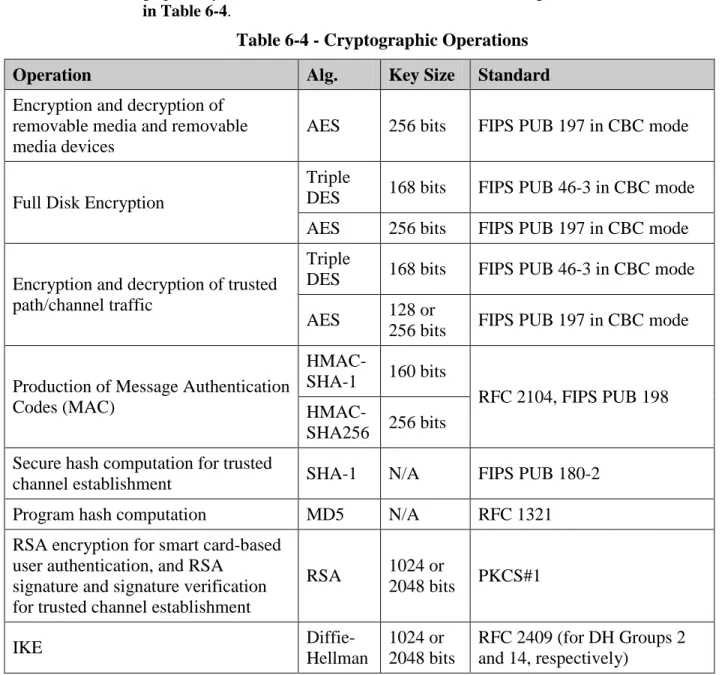
FIPS 140-2 validated cryptography (FIPS 140-2 certificate #770) is used for Full Disk Encryption, using either 256 bit AES or Triple DES as encryption algorithms.
1.5.2.3. Removable Media Encryption (EPM)
The Encryption Policy Manager (EPM) provides a configurable Removable Media Encryption capability that extends cryptographic protection to removable media devices. When a removable media device is inserted into a protected workstation, Check Point Endpoint Security can be configured to restrict access only to an encrypted storage area on the device, or conversely to allow only read-only access to prevent information from leaking onto an insecure device.
The Device Encryption Key (DEK) is generated randomly and stored in encrypted form, wrapped by a Key Encryption Key (KEK) that is generated and stored on the manage-ment server (outside the TOE), or stored on the media encrypted in a password-based encryption format with a user-entered password, for supporting offline access to the data when the management server is not available. Encryption and decryption are performed transparently when data is written to or read from the removable device. FIPS 140-2 validated 256 bit AES (FIPS 140-2 certificate #784) is used for data encryption.
Check Point Endpoint Security can also be configured to encrypt information written to CD and DVD removable media, when using the operating system’s built-in CD/DVD writing software.
4
Chapter 1. ST Introduction 1/22/2014
Copyright 2013-14, Check Point Software Technologies Ltd. All Rights Reserved. 1.5.2.4. Device Manager
Device Manager controls user access to devices connected to various ports on the
workstation, including USB, COM, LPT, PCMCIA, IrDA, Firewire and Bluetooth ports, as well as other devices such as modems, network adaptors, storage devices, etc.
The administrator can determine for each device whether access is enabled for full access (Read/Write), disabled or set to Read Only, and for removable media and removable media devices, whether the workstation may execute programs from the removable media.
1.5.2.5. Removable Media Manager
Unauthorized media inserted into a protected workstation may contain malware that might infect the workstation. Check Point Endpoint Security can be configured to reject access to unauthorized removable media devices and floppy disks, or to invoke a content scanner installed on the workstation (outside of the TOE, e.g. anti-virus software) to authorize the device.
Check Point Endpoint Security stores a computed permutational hash on the device that represents the data written to the device from authorized Check Point Endpoint Security workstations. When a removable media device or floppy disk is inserted into a protected workstation that does not contain a hash, the Removable Media Manager concludes that this is the first time that the media is imported into Check Point Endpoint Security. When the hash on the device does not match the media contents, it has been modified on an external workstation. In either case, the media requires re-authorization for access to be allowed.
1.5.2.6. Firewall
Check Point Endpoint Security implements information flow control rules representing a Personal Firewall Policy that mediates all inbound and outbound network traffic from the protected workstation. Traffic can be allowed or blocked based on source and destination addresses, protocols and ports.
1.5.2.7. Application Control
In addition to the information flow control defined by Firewall Rules, Check Point Endpoint Security implements network access control for programs on the workstation. Each program can be allowed or blocked from establishing network connections, on the basis of the presumed identity of the peer host (trusted or otherwise), on the basis of whether the program is initiating the connection or listening for one (acting as a server), and the requested protocols and ports. Programs that violate the Application Control rules may also be automatically terminated.
This feature can provide mitigation for Trojans and Spyware that attempt to connect to malicious servers. This feature provides fine-grained control of what user and
applications are allowed to connect to network resources. Additionally, the application control feature can prevent certain applications from being installed on the TOE. The TOE can invoke third-party AntiVirus scanners when unauthorized programs attempt to
Chapter 1. ST Introduction 1/22/2014
Copyright 2013-14, Check Point Software Technologies Ltd. All Rights Reserved.
modify programs on the workstation. Application Control will detect a new or modified program and will prevent it from accessing the network.
1.5.2.8. Program Advisor
Smart Defense Program Advisor is a Check Point service that provides recommendations for Application Control. It can be used to reduce administrative workload by incorporat-ing recommendations from Check Point security professionals about which permissions to assign to common programs.
Customers download Program Advisor recommendations from Check Point into the management server, and may choose to either accept these permission settings or override them with custom settings. This interaction is entirely outside the TOE boundary.
1.5.2.9. Enforcement Rules
Check Point Endpoint Security can be configured to monitor the protected workstation for compliance with policy restrictions defined as Enforcement Rules. Enforcement Rules may require a certain anti-virus application to be active, a minimum version of the Check Point Endpoint Security client itself, or the presence or absence of defined registry keys, files, or programs indicating the presence or absence, respectively of a security-relevant component on the workstation.
When an Enforcement Rule is found to be in non-compliance, the user or administrator may receive a notification, or the workstation may be restricted from accessing the network and/or other defined I/O devices, except for a defined “sandbox” area from which the user may download remediation resources.
1.5.2.10. VPN Client
Check Point Endpoint Security can be configured to establish VPN trusted channels to Check Point gateway products, using the IKE/IPSec protocols. The gateways’ Encryption Domain (the set of addresses located behind the gateways) is downloaded from the gateway after it is authenticated by its public key certificate. Once the trusted channel is connected, all traffic to and from the gateway’s Encryption Domain is protected from disclosure and modification while traversing the network. The client can also be
configured to route all traffic through the VPN tunnel to the gateway (Hub Mode), so that all traffic is filtered by the gateway.
1.5.2.11. Management
Check Point Endpoint Security provides a management application that allows the local user to access and modify product security settings for all Check Point Endpoint Security suite components.
In addition, Check Point Endpoint Security provides interfaces for remote users to perform management operations from remote management servers (outside of the TOE) after being identified and authenticated by Check Point Endpoint Security. Audit log records are sent to the remote host, and security policy settings downloaded from the management server update the locally-defined policy. When Check Point Endpoint
Chapter 1. ST Introduction 1/22/2014
Copyright 2013-14, Check Point Software Technologies Ltd. All Rights Reserved.
Security is configured to access a management server and the management server is not available, then Check Point Endpoint Security applies a predefined policy known as a disconnected policy when determining how to continue operating.
1.5.2.12. Audit Logs
Security-relevant events from all Check Point Endpoint Security suite components (except for VPN) are logged in the local audit trail. The TOE stores audit records locally (encrypted) until a connection is established with the Management Server. Once the connection to a management server is established, the TOE transfers all locally stored audit records to the remote management server. The connection to a management server occurs only after an authorized administrator logs into the TOE.
When the TOE stores audit records locally, every audit record contains a date, a timestamp, an indication of the type of event, a user identity, the outcome of the event and possibly additional event specific information.
When audit records are displayed locally, the user identity is obscured. Thus, while the capability exists for local users to review the audit trail as a set of auditable event messages, and sort it according to any of the viewed attributes, the local review of audit data was not evaluated and was not tested.
1.5.2.13. Functionality Excluded from the TOE Evaluated Configuration
All Check Point Endpoint Security product functionality not explicitly excluded in this section is included in the Target of Evaluation. However, only the functionality directly associated with a security functional requirement as defined by section 7 have been tested during the evaluation. Thus, features such as password complexity requirements,
password history and login banners have not been evaluated as to their correctness. The third-party anti-virus product bundled with the TOE is considered to be outside the boundaries of the TOE. However, the TOE supports a variety of anti-virus products that may be installed on the workstation by the user, independently of the TOE. Only two AntiVirus products were utilized during evaluation testing: McAfee VirusScan and Kaspersky Antivirus.
The TOE is comprised of several Check Point software blades (identified in section 1.2). However, the Check Point WebCheck Blade and Anti-malware blades have not been evaluated. Therefore, these blades are not permitted and must not be installed in an evaluated configuration.
Although authentication using smartcards was included in the evaluation, the capability of the smartcards and the smartcard readers themselves were not.
The TOE relies on the hardware and the operating system in the environment for reliable timestamps used in audit and cryptography.
The TOE protects audit logs when stored locally. Audit logs are stored on the encrypted part of the disk and thus the TOE requires user authentication prior to granting access to local audit logs. Also, the TOE does not provide interfaces to delete audit data. Since there are no SFRs related to local audit storage, the TOE behavior regarding the storage, integrity and overwriting of local audit storage has not be evaluated. Only the remote
Chapter 1. ST Introduction 1/22/2014
Copyright 2013-14, Check Point Software Technologies Ltd. All Rights Reserved.
transmission audit mechanism has been evaluated. Therefore, the local review of audit data was not evaluated and was not tested..
Some Check Point Endpoint Security functionality is specifically excluded and thus its use is NOT permitted in an evaluated configuration. The TOE includes the Endpoint Connect VPN, however, the command line option for endpoint connect is not permitted to be used in the evaluated configuration. Also, the use of the CheckPoint Legacy VPN is not permitted in the evaluated configuration.
The Virtual keyboard and character map function of the TOE are NOT permitted in the evaluated configuration.
Chapter 2. Conformance Claims 1/22/2014
Copyright 2013-14, Check Point Software Technologies Ltd. All Rights Reserved.
2. Conformance Claims
2.1.
CC Conformance Claim
The TOE is conformant with the following CC specifications:
• Common Criteria for Information Technology Security Evaluation Part 2: Security functional requirements, Version 3.1, Revision 3, July 2009, CCMB-2009-07-002, conformant (CC Part 2 Conformant)
• Common Criteria for Information Technology Security Evaluation Part 3: Security assurance requirements, Version 3.1 Revision 3, July 2009, CCMB-2009-07-003, conformant (CC Part 3 Conformant)
2.2.
Assurance Package Conformance
The TOE is conformant with the following assurance package:
• Evaluation Assurance Level (EAL) 2 - augmented with ALC_FLR.3.
2.3.
PP Conformance
Chapter 3. Security Problem Definition 1/22/2014
Copyright 2013-14, Check Point Software Technologies Ltd. All Rights Reserved.
3. Security Problem Definition
3.1.
Introduction
In an enterprise setting, users are typically assigned network-connected enterprise desktop workstations that are installed and maintained by an IT department. A corporate security policy defines what the workstations may be used for and in what manner. Such policies typically exclude personal use of workstation resources, and forbid unauthorized extraction of information out of the organization. In addition, users may be issued laptops that are used both within the organization and outside it, by teleworkers, salespeople, users on the road, etc.
Although located within the organization, desktop hosts are exposed to physical access by unauthorized personnel, such as cleaning staff in off-hours, users other than the assigned workstation owner, etc. Laptops, although typically more closely kept by the assigned owner, are subject to theft as they are typically taken outside the organization. Authorized users themselves are often tempted to circumvent corporate security policy, in order to install inappropriate software (such as games), installing unauthorized
components (e.g. modems or wireless network adapters), taking sensitive files outside the organization (e.g. to work on them at home), or even to disrupt security mechanisms that “get in the way of getting the job done”.
Workstations are also exposed to network-based threats. The internal network is usually protected by perimeter security devices that mitigate most external threats on the
workstation. However, perimeter defenses are sometimes insufficient, especially when dealing with services such as email and Web browsing, that by their nature must be allowed to traverse the perimeter and allow access to external entities. Internal network-based threats are also significant, both from other users on the network and from automated malware (e.g. worms) that may somehow penetrate the perimeter. Laptops taken outside the organization must typically connect to public networks unprotected by the organizational perimeter defenses. They are thus more vulnerable to attack over the network. In addition, data exchanged between these laptops and internal servers may be intercepted while in transit over the public network.
The following subsections define assets that need to be protected, threat agents in the TOE’s operational environment, and a set of threats that are to be countered by the TOE, as well as assumptions that must be upheld by the environment for the TOE’s security functions to be effective.
Chapter 3. Security Problem Definition 1/22/2014
Copyright 2013-14, Check Point Software Technologies Ltd. All Rights Reserved.
3.2.
Definitions
3.2.1. Assets
The TOE is a workstation security software product. As such, it is intended to protect software assets stored on or processed by the workstation. This relates primarily to the protection of any such information from disclosure to unauthorized entities, and to protection of the workstation from threats that seek to undermine its integrity in order to use it for unauthorized purposes.
D.FILES Information stored in workstation memory or in files written to media devices connected to the workstation.
D.NETWORK Information in transit between the workstation and remote host. D.SYSTEM Workstation operating system and user application resources.
3.2.2. Threat Agents
The TOE is designed to counter threats from the following threat agents:
TA.PHYSICAL An unauthorized user with physical access to the workstation. TA.USER A user with authorized access to the workstation.
TA.PROGRAM A user program installed on the workstation.
TA.MALWARE A malicious program installed on the workstation, unbeknownst to the authorized user.
TA.NETWORK An unauthorized entity with networked access to the workstation or to network traffic exchanged between the workstation and network peers.
3.3.
Threats
T.PHYSICAL_ACCESS An unauthorized user with physical access to the workstation may access information stored on the workstation’s disk drive.
Notes: The unauthorized user (TA.PHYSICAL) might attempt to impersonate an authorized user by entering spoofed authentication credentials, or remove the hard drive from the workstation to attempt to extract information stored on the drive (D.FILES).
T.MODIFY_DISK An unauthorized user with physical access to the workstation may subvert the workstation’s system software or normal boot process.
Notes: The unauthorized user (TA.PHYSICAL) might attempt to modify the boot record or boot up the workstation from a different device (e.g. floppy disk) in an attempt to subvert authentication mechanisms, or attempt to install Spyware by writing it directly to the drive, in order to compromise workstation system integri-ty (D.SYSTEM).
Chapter 3. Security Problem Definition 1/22/2014
Copyright 2013-14, Check Point Software Technologies Ltd. All Rights Reserved.
T.NON_COMPLIANCE An authorized user may circumvent security policy by installing inappropriate software, connecting unauthorized devices to the workstation, or disabling security mechanisms.
Notes: The user (TA.USER) might attempt to install inappropriate software (e.g. unlicensed software or recreational software), connect unauthorized devices (e.g. unencrypted media devices, modems, wireless LAN adapters), or attempt to disa-ble security mechanisms such as anti-virus software or cancel system security updates, thus modifying the system (D.SYSTEM) in an unauthorized manner.
T.LEAKY_APPS User and system applications may leak inappropriate information.
Notes: Non-malicious applications and services (TA.PROGRAM) might utilize network services that are not in-line with security policy, leaking inappropriate information (D.FILES) to unauthorized entities. For example, some applications connect to software vendor update servers, providing information on workstation configuration.
T.SPYWARE Spyware applications installed on the workstation may leak information to external entities.
Notes: Spyware (TA.MALWARE) is software that has a hidden, malicious intent to leak information (D.FILES) from the workstation to external entities, usually by connecting over the network to subverted servers. Spyware can infect the workstation via various vectors, e.g. in the guise of “freeware”, or even as part of purchased software packages. Spyware may sometimes remain undetected for long periods of time, because it tends not to have visible impact on system behav-ior.
T.VIRUS Malicious code may be injected into the workstation via workstation device ports, compromising system integrity.
Notes: This statement is intended to describe the threat of malicious software (TA.MALWARE) that attempts to inject itself into the workstation, modifying system or application files (D.SYSTEM) as a means of replicating itself and spreading to other hosts. Viral spread vectors may include removable media de-vices, removable media, or executable content downloaded over the network. Virii are often distinguished from Trojans which spread with the inadvertent help of the authorized user (see T.NON_COMPLIANCE), and from Worms that spread by exploiting network-exposed vulnerabilities or characteristics (see T.NETWORK and T.WORM).
Chapter 3. Security Problem Definition 1/22/2014
Copyright 2013-14, Check Point Software Technologies Ltd. All Rights Reserved.
T.WORM Malicious code may run on the workstation, attempting to spread to other hosts over the network.
Notes: The most common worm spread vector is email, a ubiquitous service that is available on most workstations and is allowed to traverse corporate networks and perimeter security devices, both because of the complexity of the common mail application (complexity breeding vulnerabilities), and because of the naivety of users that often inadvertently aid the worm in spreading to others. The worm (TA.MALWARE) typically impacts the system (D.SYSTEM) adversely in terms of increased network load and decreased availability.
T.NETWORK An unauthorized entity on a connected network may exploit network-exposed vulnerabilities to subvert the workstation.
Notes: Applications and services might expose vulnerabilities to the network by connecting to external servers over insecure connections, or by listening to net-work ports and processing netnet-work input in an insecure manner, thus allowing the attacker (TA.NETWORK) to exploit these vulnerabilities in order to compromise the integrity of the system (D.SYSTEM).
T.INTERCEPTION An unauthorized entity may intercept or modify information in transit between the workstation and remote IT entity.
Notes: The attacker (TA.NETWORK) gains access to the network path between the workstation and another host, and intercepts the information in transit between the two network peers (D.NETWORK), gaining unauthorized access to the infor-mation or maliciously modifying it.
T.MEDIA_LEAK A program may write information to a removable media device or removable media, and the media might later fall into the hands of an unauthorized user that gains access to the in-formation.
Notes: The threat agent here is defined as the program (TA.PROGRAM) that leaks the information (D.FILES), not the unauthorized user, because the latter does not take an active role in the information leakage.
3.4.
Assumptions
The following conditions are assumed to exist in the operational environment:
A.SYSTEM The workstation hardware and operating system will be installed and maintained in a manner that cooperates with the TOE and does not ac-tively seek to disable or otherwise impair or bypass any of the security functions of the TOE.
Notes: The TOE depends on the underlying platform to ensure that its security functions are protected from tampering, deactivation, interference and bypass.
Chapter 3. Security Problem Definition 1/22/2014
Copyright 2013-14, Check Point Software Technologies Ltd. All Rights Reserved.
TOE components hook into published operating system interfaces in order to in-tercept application requests, and TOE security functions depend on the correct-ness of implementation of these operating system interfaces.
While the TOE provides self-protection mechanisms intended to prevent users from tampering with its security functions or with overall system integrity, it is also expected that the operating system shall be installed and maintained such that users receive restricted permissions, in support of these security objectives. For example, it is expected that users cannot run kernel-level software that might by-pass operating system drivers and interacts directly with hardware devices. The TOE also relies on the operating system to provide reliable timestamps in support of audit and information flow control functionality.
System administrators are advised to follow operating system Common Criteria evaluated configuration guidance for operating system installation.
A.AUTH_CRED Authorized users will keep authentication credentials private.
Notes: Users must keep their passwords and PINs secret, and will not let others use their authentication tokens. When entering offline removable media device passwords into EPM Explorer in order to access encrypted data on a host outside of the TOE , the user should ensure that the host environment can be trusted not to compromise the password’s secrecy.
When a one-time Remote Help password is generated, the authorized help desk representative will first authenticate the presumed authorized user by means out-side of the TOE, and will communicate the password using secure delivery proce-dures.
The owners of the TOE must ensure that the private keys used by management servers or security gateways to communicate with the TOE are maintained in a manner that maintains adequate security. It is advised to follow Common Criteria evaluated configuration guidance for other Check Point product installations that interoperate with the TOE to ensure their secure operation.
Chapter 4. Security Objectives 1/22/2014
Copyright 2013-14, Check Point Software Technologies Ltd. All Rights Reserved.
4. Security Objectives
4.1.
Security Objectives for the TOE
This section describes the TOE security objectives:O.AUTHENTICATION The TOE shall require user identification and authentication before allowing access to protected assets.
O.ENCRYPTION The TOE shall apply cryptographic protection on protected assets such that they are protected from disclosure or unde-tected modification by an unauthorized user.
O.DEV_AUTH The TOE shall identify devices connected to the workstation and shall allow access only to authorized devices.
O.FIREWALL The TOE shall mediate network traffic into and out of the workstation, blocking unauthorized protocols and services. O.PROG_CONTROL The TOE shall identify running programs, verify program
integrity, and restrict program privileges for network access. O.CODE_BLOCKING The TOE shall be able to block execution of code injected
into the workstation via removable media and removable me-dia devices.
O.VPN The TOE shall be able to establish a secure channel with remote gateways that provides peer authentication and protec-tion of channel data from modificaprotec-tion or disclosure.
O.ENFORCEMENT The TOE shall verify that the workstation host configuration meets security policy requirements and shall be able to restrict network communications and access to I/O devices for a non-compliant host.
O.MANAGEMENT The TOE shall support local and remote administrator roles and provide adequate management interfaces and guidance, restricting management functions to authorized users. O.AUDIT The TOE shall create audit records for security-relevant
Chapter 4. Security Objectives 1/22/2014
Copyright 2013-14, Check Point Software Technologies Ltd. All Rights Reserved.
4.2.
Security Objectives for the Operational Environment
The assumptions made in chapter 3 must be upheld by corresponding security objectives for the environment:
OE.SYSTEM The workstation hardware and operating system shall be installed and maintained in a manner that cooperates with the TOE by providing an operating environment protected from unauthorized users, allowing it to control access to work-station devices, access to the network, and access to files and registry settings, by providing reliable timestamps, and does not actively seek to disable or otherwise impair or bypass any of the security functions of the TOE.
OE.AUTH_CRED Authorized users shall keep authentication credentials private.
In addition, the TOE relies on the cooperation of the operational environment to counter some threats, allocating the following security objectives to the operational environment:
OE.ANTI_VIRUS The operational environment of the TOE shall include up-to-date anti-virus software installed on the workstation, out of the list of supported anti-virus software identified in the TOE guidance documentation.
OE.VPN The operational environment of the TOE shall include VPN gateways that cooperate with the TOE in establishing secure channels that provide peer authentication and protection of channel data from modification or disclosure.
OE.SMART_CARD The operational environment of the TOE shall ensure that any smart cards used for user authentication shall authenticate the user to the TOE by successfully decrypting the user key.
OE.KEY_STORAGE The operational environment of the TOE shall support secure key storage for removable media encryption keys on a man-agement server.
Chapter 4. Security Objectives 1/22/2014
Copyright 2013-14, Check Point Software Technologies Ltd. All Rights Reserved.
4.3.
Security Objectives Rationale
4.3.1. Security Objectives Countering Threats
Table 4-1 maps security objectives to threats described in chapter 3. The table clearly demonstrates that each threat is countered by at least one security objective and that each objective counters at least one threat; this is then followed by explanatory text providing justification for each defined threat that if all security objectives that trace back to the threat are achieved, the threat is removed, sufficiently diminished, or that the effects of the threat are sufficiently mitigated.
Table 4-1- Tracing of security objectives to threats
T. P H Y S IC A L_ A C C ES S T. MO D IF Y _ D IS K T .NO N_ CO M P L IANC E T .L E AK Y_ AP P S T .S P YW A RE T. V IR U S T. W O R M T. N E TW O R K T. IN TER C EP TIO N T. M ED IA _ LE A K
O.AUTHENTICATION
O.ENCRYPTION
O.DEV_AUTH
O.FIREWALL
O.PROG_CONTROL
O.CODE_BLOCKING
O.VPN
O.ENFORCEMENT
O.MANAGEMENT
O.AUDIT
OE.ANTI_VIRUS
OE.VPN
OE.SMART_CARD
Chapter 4. Security Objectives 1/22/2014
Copyright 2013-14, Check Point Software Technologies Ltd. All Rights Reserved.
T.PHYSICAL_ACCESS An unauthorized user with physical access to the workstation may access information stored on the workstation’s disk drive.
All protected assets are encrypted in accordance with O.ENCRYPTION, includ-ing the workstation’s entire disk drive. This prevents an unauthorized user from accessing information stored on the drive.
O.AUTHENTICATION ensures that the TOE allows the user access to protected resources only after the user successfully authenticates.
When smart cards are used for user authentication, security objective for the oper-ational environment OE.SMART_CARD supports the O.AUTHENTICATION security objective for the TOE by ensuring that the smart card uniquely authenti-cates the user to the TOE.
T.MODIFY_DISK An unauthorized user with physical access to the workstation may subvert the workstation’s system software or normal boot process.
O.ENCRYPTION removes the ability of an unauthorized user to modify system software in a deliberate manner.
O.DEV_AUTH and O.CODE_BLOCKING prevent unauthorized users from at-taching virus-infected devices to the workstation as a means of bypassing post-boot authentication mechanisms and thereby subverting system software.
T.NON_COMPLIANCE An authorized user may circumvent security policy by installing inappropriate software, connecting unauthorized devices to the workstation, or disabling security mechanisms.
O.PROG_CONTROL mitigates the non-compliance threat by restricting default program privileges, so that inappropriate software (e.g. multi-user games) will be restricted from accessing network resources.
O.DEV_AUTH restricts users to accessing only authorized devices. Authorization can be configured to include scanning of removable media devices and floppy disks inserted into the workstation for the presence of executable code, and block-ing installation of software off of such media.
O.ENFORCEMENT requires the TOE to verify that the workstation host configu-ration meets security policy requirements. This includes a capability for verifying the existence of required security mechanisms, and the absence of forbidden soft-ware application. Violating users are warned and/or restricted from accessing the network and/or I/O devices.
This threat is further mitigated by the following security objectives: Users are associated with management roles in accordance with security objective O.MANAGEMENT; non-administrative users are restricted from performing TOE management functions that may disable defined TOE security enforcement functionality. O.AUDIT allows local and remote administrators to view audit in-formation for security-relevant events, including non-compliance event records.
Chapter 4. Security Objectives 1/22/2014
Copyright 2013-14, Check Point Software Technologies Ltd. All Rights Reserved.
T.LEAKY_APPS User and system applications may leak inappropriate information.
O.PROG_CONTROL requires that the TOE restrict program privileges for net-work access. This provides fine-grained control of what user and system applica-tions are allowed to connect to network resources. O.FIREWALL blocks all out-bound access to any protocols and services that are not authorized by the adminis-trator. Together, these two security objectives constrain the risk of user and sys-tem applications that connect to remote services without explicit authorization.
T.SPYWARE Spyware applications installed on the workstation may leak information to external entities.
The O.PROG_CONTROL security objective mitigates this threat with the same rationale as given for T.LEAKY_APPS (in contrast with leaky applications, Spy-ware will typically intentionally use approved protocols, so O.FIREWALL is less effective against it than per-program restrictions).
T.VIRUS Malicious code may be injected into the workstation via workstation device ports, compromising system integrity.
O.CODE_BLOCKING blocks execution of code injected into the workstation via removable media and removable media devices.
O.DEV_AUTH requires authorization for devices connected to the workstation. TOE-enforced device authorization can include scanning for executable content, or anti-virus scanning of the device, in conjunction with anti-virus software in-stalled on the workstation in accordance with OE.ANTI_VIRUS.
O.ENFORCEMENT supports correct implementation of this objective by verify-ing that a correct anti-virus version is installed on the workstation.
T.WORM Malicious code may run on the workstation, attempting to spread to other hosts over the network.
O.PROG_CONTROL restricts program privileges for network access, thus miti-gating uncontrolled spread of network worms.
T.NETWORK An unauthorized entity on a connected network may exploit network-exposed vulnerabilities to subvert the workstation. O.FIREWALL requires mediation of network traffic into the workstation, block-ing unauthorized protocols and services that may expose vulnerabilities.
O.PROG_CONTROL provides finer-grain control over which system and user applications are allowed to listen to network services.
O.ENFORCEMENT restricts network communication for workstations that are not compliant with security policy requirements and might therefore be more vul-nerable to T.NETWORK threats.
Chapter 4. Security Objectives 1/22/2014
Copyright 2013-14, Check Point Software Technologies Ltd. All Rights Reserved.
As a further mitigating countermeasure, the TOE can be configured to prevent any non-VPN network communication. In this configuration (Hub Mode), all communication is funneled over the secure channel established in accordance with O.VPN and OE.VPN, so that the workstation enjoys the further protections afforded by the gateway. Hub Mode reduces the visible footprint of the work-station so that it does not interact directly with any network peer apart from the trusted VPN gateway, even when connected to a network outside the organiza-tional perimeter security defenses.
T.INTERCEPTION An unauthorized entity may intercept or modify information in transit between the workstation and remote IT entity.
O.VPN requires the ability to establish a secure channel with remote gateways compatible with security objective for the operational environment OE.VPN. The secure channel provides peer authentication and protection of channel data from modification or disclosure. Establishment of the secure channel is based on cryp-tographic security functions in accordance with O.ENCRYPTION.
O.ENCRYPTION is also applied on all remote management traffic.
T.MEDIA_LEAK A program may write information to a removable media device or removable media, and the media might later fall in-to the hands of an unauthorized user that gains access in-to the information.
Removable media devices and removable media can be encrypted in accordance with security objective O.ENCRYPTION. O.DEV_AUTH can further mitigate this threat by supporting access control rules that deny use of unencrypted media. OE.KEY_STORAGE supports O.ENCRYPTION by a reliance on the IT envi-ronment to provide secure key storage for removable media and removable media device encryption. Although the TOE can also use user-entered passwords to de-rive media encryption keys, the optional reliance on OE.KEY_STORAGE allows the TOE to use a FIPS 140-2 validated random number generator for key genera-tion, and ensures that each device is encrypted with a different key.
4.3.2. Security Objectives Upholding Assumptions
Table 4-2 maps security objectives for the operational environment to assumptions described in chapter 3. The table demonstrates that each assumption is upheld by at least one security objective for the operational environment, and that each security objective for the operational environment upholds at least one assumption.
Chapter 4. Security Objectives 1/22/2014
Copyright 2013-14, Check Point Software Technologies Ltd. All Rights Reserved.
Table 4-2- Tracing of security objectives to assumptions
A
.SY
ST
E
M
A.
AUT
H
_
CRE
D
OE.SYSTEM OE.AUTH_CRED
Because each objective includes the wording of the corresponding assumption, it is obvious that for each assumption, if the security objective for the operational environ-ment that traces back to the assumption is achieved, then the operational environenviron-ment upholds the assumption.
Chapter 5. Extended Components Definition 1/22/2014
Copyright 2013-14, Check Point Software Technologies Ltd. All Rights Reserved.
5. Extended Components Definition
This ST does not define or use any extended components. All SFRs are based on components from CC Part 2. All SARs are based on components from CC Part 3.
Chapter 6. Security Requirements 1/22/2014
Copyright 2013-14, Check Point Software Technologies Ltd. All Rights Reserved.
6. Security Requirements
6.1.
Definitions
6.1.1. ObjectsThe objects defined in this ST correspond to the protected assets defined in section 3.2.1: D.FILES, D.NETWORK, and D.SYSTEM. Although these objects are not technically inside the TOE boundary, the TOE mediates access to these objects and they are therefore considered to be within the TOE’s scope of control.
6.1.2. Users
Users are external entities that may attempt to bind to subjects in order to access TOE-protected assets.
The TOE’s authorized users are humans with a user account with authorization to log on to the workstation (S.LOCAL_USER), as well as remote IT entities that bind to the TOE in order to perform remote management and log review operations (S.REMOTE_USER). Because programs installed on the workstation are defined outside the TOE boundary, they are also considered potential users (S.PROGRAM).
In addition, VPN gateways with which the TOE establishes a secure channel are considered authenticated users of the TOE (S.GATEWAY).
6.1.3. Subjects
Subjects are defined in the CC as active entities in the TOE that perform operations on objects, which themselves are passive entities in the TOE.
The subjects in the TOE correspond to the TOE’s active entities depicted in Figure 1-2: S.PRE_BOOT The pre-boot environment (including the boot record). Local human
users bind to this subject in order to receive access to the system. S.DRIVERS The TOE component installed in the operating system kernel.
Programs bind to this subject in order to receive access to file, system, and network resources.
S.SERVICES User-space TOE services; remote management IT entities bind to S.SERVICES in order to perform remote management of the TOE, or in order to establish a trusted VPN channel with the TOE.
S.UI The TOE’s local user interface application. Local human users bind to this subject in order to perform local management of the TOE.
S.EXPLORER The EPM Explorer utility, running on a host that does not include a TOE installation.
In order to improve readability, the SFRs presented in this ST identify users in place of subjects. For example, S.PROGRAM represents the S.DRIVERS subject when bound to a particular program or service running on the workstation.
6.1.4. Operations
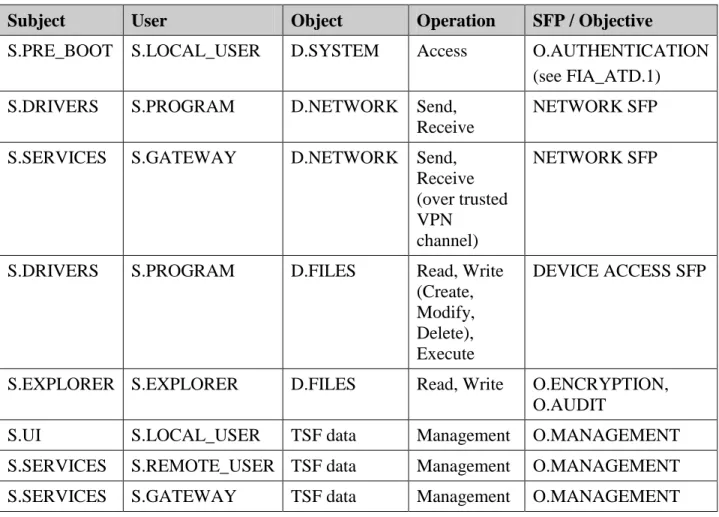
Table 6-1 lists the operations performed by subjects on objects, controlled by the TSF. Where a SFP is explicitly defined, it is referenced; otherwise the table references the
Chapter 6. Security Requirements 1/22/2014
Copyright 2013-14, Check Point Software Technologies Ltd. All Rights Reserved.
relevant control objective. Subject and object security attributes are defined in the referenced SFPs.
Table 6-1 - Operations Mediated by the TOE
Subject User Object Operation SFP / Objective
S.PRE_BOOT S.LOCAL_USER D.SYSTEM Access O.AUTHENTICATION
(see FIA_ATD.1)
S.DRIVERS S.PROGRAM D.NETWORK Send,
Receive
NETWORK SFP
S.SERVICES S.GATEWAY D.NETWORK Send,
Receive (over trusted VPN
channel)
NETWORK SFP
S.DRIVERS S.PROGRAM D.FILES Read, Write
(Create, Modify, Delete), Execute
DEVICE ACCESS SFP
S.EXPLORER S.EXPLORER D.FILES Read, Write O.ENCRYPTION,
O.AUDIT
S.UI S.LOCAL_USER TSF data Management O.MANAGEMENT
S.SERVICES S.REMOTE_USER TSF data Management O.MANAGEMENT
Chapter 6. Security Requirements 1/22/2014
Copyright 2013-14, Check Point Software Technologies Ltd. All Rights Reserved.
6.2.
Security Functional Requirements
The functional security requirements (SFRs) for this ST consist of the following components from CC Part 2, summarized in Table 6-2.
The CC defined operations of assignment, selection, and refinement were applied in relation to the requirements as described in column 3 of Table 6-2 below.
Table 6-2 – Security functional requirement components
Functional Component CC Operations
Applied FAU_GEN.1 Audit data generation Selection, Assignment
FAU_SAR.1 Audit review Assignment
FAU_SEL.1 Selective audit Selection, Assignment FCS_CKM.1 Cryptographic key generation Assignment FCS_CKM.2 Cryptographic key distribution Assignment FCS_CKM.3 Cryptographic key access Iteration, Assignment FCS_CKM.4 Cryptographic key destruction Assignment FCS_COP.1 Cryptographic operation Assignment FDP_ACC.1 Subset access control Assignment FDP_ACF.1 Security attribute based access control Assignment FDP_IFC.1 Subset information flow control Assignment FDP_IFF.1 Simple security attributes Assignment FDP_ITC.2 Import of user data with security
attributes
Refinement, Assignment FIA_AFL.1 Authentication failure handling Selection, Assignment FIA_ATD.1 User attribute definition Assignment FIA_UAU.1 Timing of authentication Assignment FIA_UAU.4 Single-use authentication mechanisms Assignment FIA_UAU.5 Multiple authentication mechanisms Assignment FIA_UID.1 Timing of identification Assignment FMT_MOF.1 Management of security functions
behaviour
Selection, Assignment FMT_MSA.1 Management of security attributes Assignment, Selection FMT_MSA.3 Static attribute initialization Iteration, Selection,
Chapter 6. Security Requirements 1/22/2014
Copyright 2013-14, Check Point Software Technologies Ltd. All Rights Reserved.
Functional Component CC Operations
Applied FMT_MTD.1 Management of TSF data Selection, Assignment FMT_SMF.1 Specification of management functions Assignment
FMT_SMR.1 Security roles Assignment
FPT_TEE.1 Testing of external entities Selection, Assignment FTP_ITC.1 Inter-TSF trusted channel Selection, Assignment
Chapter 6. Security Requirements 1/22/2014
Copyright 2013-14, Check Point Software Technologies Ltd. All Rights Reserved. 6.2.1. Security Audit (FAU)
6.2.1.1. Audit data generation (FAU_GEN.1)
FAU_GEN.1.1 The TSF shall be able to generate an audit record of the following auditable events: a) Start-up and shutdown of the audit functions;
b) All auditable events for the not specified level of audit; and c) The events specified in Table 6-3 - Auditable Events.
Table 6-3 - Auditable Events Functional
Component
Auditable Event Details
FDP_ACF.1 Access control decision for new device
arrival Object/device
FDP_ACF.1 Successful and unsuccessful write operations on removable media devices and removable media.
Requested operation, program name, object/device
FDP_IFF.1 All decisions on requests for information flow
except program termination Subject and information security attributes
FDP_ITC.2 Arrival of unauthorized media Media label FDP_ITC.2 Successful and unsuccessful media
authorization
None
FDP_ITC.2 Successful and unsuccessful content scanning None
FDP_ITC.2 Encryption of removable media None
FIA_AFL.1 The reaching of the threshold for the unsuccessful authentication attempts
None
FIA_UAU.1 All local user authentication attempts User identity, reason FIA_UAU.4 Attempts to perform Remote Help Location
FPT_TEE.1 Execution of the tests of the external entities and the results of the tests.
Test results
FAU_GEN.1.2 The TSF shall record within each audit record at least the following information: a) Date and time of the event, type of event, subject identity (if applicable), and
the outcome (success or failure) of the event; and
b) For each audit event type, based on the auditable event definitions of the functional components included in the PP/ST, the additional information specified in the Details column of Table 6-3.
Chapter 6. Security Requirements 1/22/2014
Copyright 2013-14, Check Point Software Technologies Ltd. All Rights Reserved. 6.2.1.2. Audit review (FAU_SAR.1)
FAU_SAR.1.1 The TSF shall provide the Remote User with the capability to read all data from the audit records.
FAU_SAR.1.2 The TSF shall provide the audit records in a manner suitable for the user to interpret the information.
6.2.1.3. Selective audit (FAU_SEL.1)
FAU_SEL.1.1 The TSF shall be able to select the set of audited events from the set of all auditable events based on the following attributes:
a) event type