A File is Not a File: Understanding the I/O Behavior
of Apple Desktop Applications
Tyler Harter, Chris Dragga, Michael Vaughn,
Andrea C. Arpaci-Dusseau, Remzi H. Arpaci-Dusseau
Department of Computer Sciences University of Wisconsin, Madison
{
harter, dragga, vaughn, dusseau, remzi
}@cs.wisc.edu
ABSTRACT
We analyze the I/O behavior of iBench, a new collection of produc-tivity and multimedia application workloads. Our analysis reveals a number of differences between iBench and typical file-system workload studies, including the complex organization of modern files, the lack of pure sequential access, the influence of underlying frameworks on I/O patterns, the widespread use of file synchro-nization and atomic operations, and the prevalence of threads. Our results have strong ramifications for the design of next generation local and cloud-based storage systems.
1.
INTRODUCTION
The design and implementation of file and storage systems has long been at the forefront of computer systems research. Inno-vations such as namespace-based locality [21], crash consistency via journaling [15, 29] and copy-on-write [7, 34], checksums and redundancy for reliability [5, 7, 26, 30], scalable on-disk struc-tures [37], distributed file systems [16, 35], and scalable cluster-based storage systems [9, 14, 18] have greatly influenced how data is managed and stored within modern computer systems.
Much of this work in file systems over the past three decades has been shaped by measurement: the deep and detailed analysis of workloads [4, 10, 11, 16, 19, 25, 33, 36, 39]. One excellent example is found in work on the Andrew File System [16]; de-tailed analysis of an early AFS prototype led to the next-generation protocol, including the key innovation of callbacks. Measurement helps us understand the systems of today so we can build improved systems for tomorrow.
Whereas most studies of file systems focus on the corporate or academic intranet, most file-system users work in the more mun-dane environment of the home, accessing data via desktop PCs, laptops, and compact devices such as tablet computers and mo-bile phones. Despite the large number of previous studies, little is known about home-user applications and their I/O patterns.
Home-user applications are important today, and their impor-tance will increase as more users store data not only on local de-vices but also in the cloud. Users expect to run similar applications across desktops, laptops, and phones; therefore, the behavior of these applications will affect virtually every system with which a
Permission to make digital or hard copies of all or part of this work for personal or classroom use is granted without fee provided that copies are not made or distributed for profit or commercial advantage and that copies bear this notice and the full citation on the first page. To copy otherwise, to republish, to post on servers or to redistribute to lists, requires prior specific permission and/or a fee.
Copyright 2011 ACM 978-1-59593-591-5/07/0010 ...$5.00.
user interacts. I/O behavior is especially important to understand since it greatly impacts how users perceive overall system latency and application performance [12].
While a study of how users typically exercise these applications would be interesting, the first step is to perform a detailed study of I/O behavior under typical but controlled workload tasks. This style of application study, common in the field of computer archi-tecture [40], is different from the workload study found in systems research, and can yield deeper insight into how the applications are constructed and how file and storage systems need to be designed in response.
Home-user applications are fundamentally large and complex, containing millions of lines of code [20]. In contrast, traditional UNIX-based applications are designed to be simple, to perform one task well, and to be strung together to perform more complex tasks [32]. This modular approach of UNIXapplications has not prevailed [17]: modern applications are standalone monoliths, pro-viding a rich and continuously evolving set of features to demand-ing users. Thus, it is beneficial to study each application individu-ally to ascertain its behavior.
In this paper, we present the first in-depth analysis of the I/O behavior of modern home-user applications; we focus on produc-tivity applications (for word processing, spreadsheet manipulation, and presentation creation) and multimedia software (for digital mu-sic, movie editing, and photo management). Our analysis centers on two Apple software suites: iWork, consisting of Pages, Num-bers, and Keynote; and iLife, which contains iPhoto, iTunes, and iMovie. As Apple’s market share grows [38], these applications form the core of an increasingly popular set of workloads; as de-vice convergence continues, similar forms of these applications are likely to access user files from both stationary machines and mov-ing cellular devices. We call our collection the iBench task suite.
To investigate the I/O behavior of the iBench suite, we build an instrumentation framework on top of the powerful DTrace tracing system found inside Mac OS X [8]. DTrace allows us not only to monitor system calls made by each traced application, but also to examine stack traces, in-kernel functions such as page-ins and page-outs, and other details required to ensure accuracy and com-pleteness. We also develop an application harness based on Apple-Script [3] to drive each application in the repeatable and automated fashion that is key to any study of GUI-based applications [12].
Our careful study of the tasks in the iBench suite has enabled us to make a number of interesting observations about how applica-tions access and manipulate stored data. In addition to confirming standard past findings (e.g., most files are small; most bytes ac-cessed are from large files [4]), we find the following new results.
A file is not a file. Modern applications manage large databases
of information organized into complex directory trees. Even simple word-processing documents, which appear to users as a “file”, are
in actuality small file systems containing many sub-files (e.g., a Microsoft .doc file is actually a FAT file system containing pieces of the document). File systems should be cognizant of such hidden structure in order to lay out and access data in these complex files more effectively.
Sequential access is not sequential. Building on the trend
no-ticed by Vogels for Windows NT [39], we observe that even for streaming media workloads, “pure” sequential access is increas-ingly rare. Since file formats often include metadata in headers, applications often read and re-read the first portion of a file before streaming through its contents. Prefetching and other optimizations might benefit from a deeper knowledge of these file formats.
Auxiliary files dominate. Applications help users create,
mod-ify, and organize content, but user files represent a small fraction of the files touched by modern applications. Most files are helper files that applications use to provide a rich graphical experience, support multiple languages, and record history and other metadata. File-system placement strategies might reduce seeks by grouping the hundreds of helper files used by an individual application.
Writes are often forced. As the importance of home data
in-creases (e.g., family photos), applications are less willing to simply write data and hope it is eventually flushed to disk. We find that most written data is explicitly forced to disk by the application; for example, iPhoto callsfsyncthousands of times in even the sim-plest of tasks. For file systems and storage, the days of delayed writes [22] may be over; new ideas are needed to support applica-tions that desire durability.
Renaming is popular. Home-user applications commonly use
atomic operations, in particularrename, to present a consistent view of files to users. For file systems, this may mean that trans-actional capabilities [23] are needed. It may also necessitate a re-thinking of traditional means of file locality; for example, placing a file on disk based on its parent directory [21] does not work as expected when the file is first created in a temporary location and then renamed.
Multiple threads perform I/O. Virtually all of the applications
we study issue I/O requests from a number of threads; a few ap-plications launch I/Os from hundreds of threads. Part of this us-age stems from the GUI-based nature of these applications; it is well known that threads are required to perform long-latency oper-ations in the background to keep the GUI responsive [24]. Thus, file and storage systems should be thread-aware so they can better allocate bandwidth.
Frameworks influence I/O. Modern applications are often
de-veloped in sophisticated IDEs and leverage powerful libraries, such as Cocoa and Carbon. WhereasUNIX-style applications often di-rectly invoke system calls to read and write files, modern libraries put more code between applications and the underlying file system; for example, including"cocoa.h"in a Mac application imports 112,047 lines of code from 689 different files [28]. Thus, the be-havior of the framework, and not just the application, determines I/O patterns. We find that the default behavior of some Cocoa APIs induces extra I/O and possibly unnecessary (and costly) synchro-nizations to disk. In addition, use of different libraries for similar tasks within an application can lead to inconsistent behavior be-tween those tasks. Future storage design should take these libraries and frameworks into account.
This paper contains four major contributions. First, we describe a general tracing framework for creating benchmarks based on in-teractive tasks that home users may perform (e.g., importing songs, exporting video clips, saving documents). Second, we deconstruct the I/O behavior of the tasks in iBench; we quantify the I/O behav-ior of each task in numerous ways, including the types of files
ac-cessed (e.g., counts and sizes), the access patterns (e.g., read/write, sequentiality, and preallocation), transactional properties (e.g., dura-bility and atomicity), and threading. Third, we describe how these qualitative changes in I/O behavior may impact the design of future systems. Finally, we present the 34 traces from the iBench task suite; by making these traces publicly available and easy to use, we hope to improve the design, implementation, and evaluation of the next generation of local and cloud storage systems:
http://www.cs.wisc.edu/adsl/Traces/ibench
The remainder of this paper is organized as follows. We begin by presenting a detailed timeline of the I/O operations performed by one task in the iBench suite; this motivates the need for a systematic study of home-user applications. We next describe our methodol-ogy for creating the iBench task suite. We then spend the majority of the paper quantitatively analyzing the I/O characteristics of the full iBench suite. Finally, we summarize the implications of our findings on file-system design.
2.
CASE STUDY
The I/O characteristics of modern home-user applications are distinct from those of UNIXapplications studied in the past. To motivate the need for a new study, we investigate the complex I/O behavior of a single representative task. Specifically, we report in detail the I/O performed over time by the Pages (4.0.3) application, a word processor, running on Mac OS X Snow Leopard (10.6.2) as it creates a blank document, inserts 15 JPEG images each of size 2.5MB, and saves the document as a Microsoft .doc file.
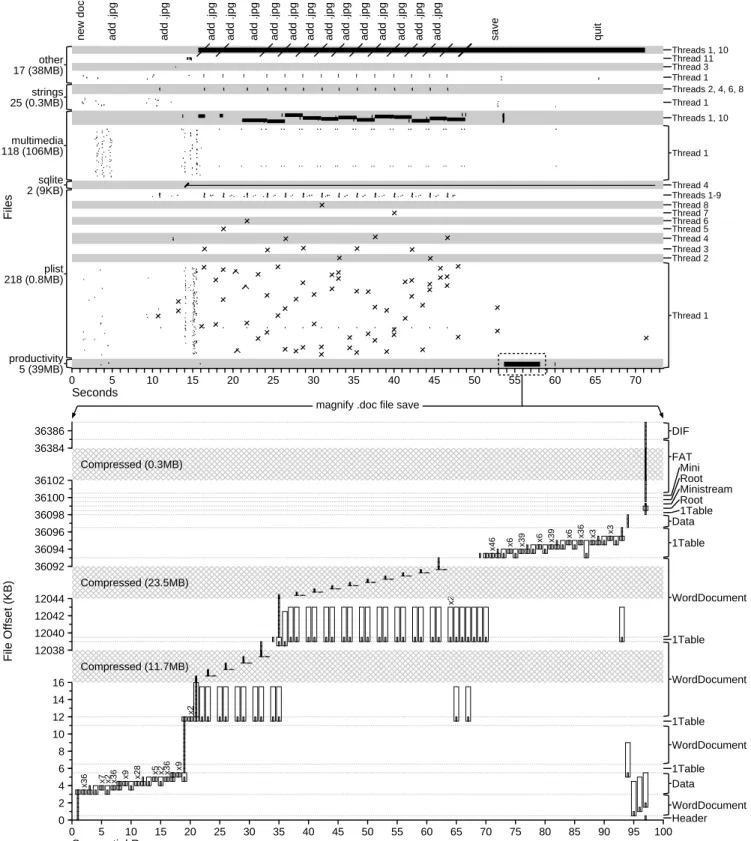
Figure 1 shows the I/O this task performs (see the caption for a description of the symbols used). The top portion of the figure il-lustrates the accesses performed over the full lifetime of the task: at a high level, it shows that more than 385 files spanning six different categories are accessed by eleven different threads, with many in-tervening calls tofsyncandrename. The bottom portion of the figure magnifies a short time interval, showing the reads and writes performed by a single thread accessing the primary .doc productiv-ity file. From this one experiment, we illustrate each finding de-scribed in the introduction. We first focus on the single access that saves the user’s document (bottom), and then consider the broader context surrounding this file save, where we observe a flurry of ac-cesses to hundreds of helper files (top).
A file is not a file. Focusing on the magnified timeline of reads
and writes to the productivity .doc file, we see that the file format comprises more than just a simple file. Microsoft .doc files are based on the FAT file system and allow bundling of multiple files in the single .doc file. This .doc file contains a directory (Root), three streams for large data (WordDocument, Data, and 1Table), and a stream for small data (Ministream). Space is allocated in the file with three sections: a file allocation table (FAT), a double-indirect FAT (DIF) region, and a ministream allocation region (Mini).
Sequential access is not sequential. The complex FAT-based
file format causes random access patterns in several ways: first, the header is updated at the beginning and end of the magnified access; second, data from individual streams is fragmented throughout the file; and third, the 1Table stream is updated before and after each image is appended to the WordDocument stream.
Auxiliary files dominate. Although saving the single .doc we
have been considering is the sole purpose of this task, we now turn our attention to the top timeline and see that 385 different files are accessed. There are several reasons for this multitude of files. First, Pages provides a rich graphical experience involving many images and other forms of multimedia; together with the 15 in-serted JPEGs, this requires 118 multimedia files. Second, users
0 5 10 15 20 25 30 35 40 45 50 55 60 65 70 75 80 85 90 95 100 0
2 4 6 8 10 12 14 16
x36 x7 x2 x36
x9 x28 x5 x2 x36
x9
x2
Compressed (11.7MB) 12038
12040 12042
12044 x2
Compressed (23.5MB) 36092
36094 36096 36098 36100 36102
x46 x6 x39
x6 x39 x6 x36 x3 x3
Compressed (0.3MB) 36384
36386
Header WordDocument Data
1Table WordDocument 1Table WordDocument 1Table WordDocument 1Table Data
1Table Root Ministream Root Mini FAT DIF Thread 1 Thread 2 Thread 3 Thread 4 Thread 5 Thread 6 Thread 7 Thread 8 Threads 1-9 Thread 4 Thread 1 Threads 1, 10 Thread 1 Threads 2, 4, 6, 8 Thread 1 Thread 3 Thread 11 Threads 1, 10
productivity 5 (39MB) plist 218 (0.8MB) sqlite 2 (9KB) multimedia 118 (106MB) strings 25 (0.3MB) other 17 (38MB)
new doc add .jpg add .jpg add .jpg add .jpg add .jpg add .jpg add .jpg add .jpg add .jpg add .jpg add .jpg add .jpg add .jpg add .jpg add .jpg save quit
0 5 10 15 20 25 30 35 40 45 50 55 60 65 70
magnify .doc file save
Seconds
Files
Sequential Runs
File Offset (KB)
Figure 1: Pages Saving A Word Document. The top graph shows the 75-second timeline of the entire run, while the bottom graph is a magnified view of seconds 54 to 58. In the top graph, annotations on the left categorize files by type and indicate file count and amount of I/O; annotations on the right show threads. Black bars are file accesses (reads and writes), with thickness logarithmically proportional to bytes of I/O./is anfsync;\is arename;Xis both. In the bottom graph, individual reads and writes to the .doc file are shown. Vertical bar position and bar length represent the offset within the file and number of bytes touched. Thick white bars are reads; thin gray bars are writes. Repeated runs are marked with the number of repetitions. Annotations on the right indicate the name of each file section.
want to use Pages in their native language, so application text is not hard-coded into the executable but is instead stored in 25 different .strings files. Third, to save user preferences and other metadata, Pages uses a SQLite database (2 files) and a number of key-value stores (218 .plist files).
Writes are often forced; renaming is popular. Pages uses
both of these actions to enforce basic transactional guarantees. It usesfsyncto flush write data to disk, making it durable; it uses
renameto atomically replace old files with new files so that a file never contains inconsistent data. The timeline shows these invo-cations numerous times. First, Pages regularly uses fsyncand
renamewhen updating the key-value store of a .plist file. Second,
fsyncis used on the SQLite database. Third, for each of the 15 image insertions, Pages callsfsyncon a file named “tempData” (classified as “other”) to update its automatic backup.
Multiple threads perform I/O. Pages is a multi-threaded
appli-cation and issues I/O requests from many different threads during the experiment. Using multiple threads for I/O allows Pages to avoid blocking while I/O requests are outstanding. Examining the I/O behavior across threads, we see that Thread 1 performs the most significant portion of I/O, but ten other threads are also involved. In most cases, a single thread exclusively accesses a file, but it is not uncommon for multiple threads to share a file.
Frameworks influence I/O. Pages was developed in a rich
pro-gramming environment where frameworks such as Cocoa or Car-bon are used for I/O; these libraries impact I/O patterns in ways the developer might not expect. For example, although the appli-cation developers did not bother to usefsyncorrenamewhen saving the user’s work in the .doc file, the Cocoa library regularly uses these calls to atomically and durably update relatively unim-portant metadata, such as “recently opened” lists stored in .plist files. As another example, when Pages tries to read data in 512-byte chunks from the .doc, each read goes through theSTDIOlibrary, which only reads in 4 KB chunks. Thus, when Pages attempts to read one chunk from the 1Table stream, seven unrequested chunks from the WordDocument stream are also incidentally read (off-set 12039 KB). In other cases, regions of the .doc file are repeat-edly accessed unnecessarily. For example, around the 3KB off-set, read/write pairs occur dozens of times. Pages uses a library to write 2-byte words; each time a word is written, the library reads, updates, and writes back an entire 512-byte chunk. Finally, we see evidence of redundancy between libraries: even though Pages has a backing SQLite database for some of its properties, it also uses .plist files, which function across Apple applications as generic property stores.
This one detailed experiment has shed light on a number of in-teresting I/O behaviors that indicate that home-user applications are indeed different than traditional workloads. A new workload suite is needed that more accurately reflects these applications.
3.
IBENCH TASK SUITE
Our goal in constructing the iBench task suite is two-fold. First, we would like iBench to be representative of the tasks performed by home users. For this reason, iBench contains popular applications from the iLife and iWork suites for entertainment and productivity. Second, we would like iBench to be relatively simple for others to use for file and storage system analysis. For this reason, we auto-mate the interactions of a home user and collect the resulting traces of I/O system calls. The traces are available online at this site:
http://www.cs.wisc.edu/adsl/Traces/ibench. We
now describe in more detail how we met these two goals.
3.1
Representative
To capture the I/O behavior of home users, iBench models the ac-tions of a “reasonable” user interacting with iPhoto, iTunes, iMovie, Pages, Numbers, and Keynote. Since the research community does not yet have data on the exact distribution of tasks that home users perform, iBench contains tasks that we believe are common and uses files with sizes that can be justified for a reasonable user. iBench contains 34 different tasks, each representing a home user performing one distinct operation. If desired, these tasks could be combined to create more complex workflows and I/O workloads. The six applications and corresponding tasks are as follows.
iLife iPhoto 8.1.1 (419): digital photo album and photo
manip-ulation software. iPhoto stores photos in a library that contains the data for the photos (which can be in a variety of formats, including JPG, TIFF, and PNG), a directory of modified files, a directory of scaled down images, and two files of thumbnail images. The library stores metadata in a SQLite database. iBench contains six tasks ex-ercising user actions typical for iPhoto: starting the application and importing, duplicating, editing, viewing, and deleting photos in the library. These tasks modify both the image files and the underlying database. Each of the iPhoto tasks operates on 400 2.5 MB photos, representing a user who has imported 12 megapixel photos (2.5 MB each) from a full 1 GB flash card on his or her camera.
iLife iTunes 9.0.3 (15): a media player capable of both audio and
video playback. iTunes organizes its files in a private library and supports most common music formats (e.g., MP3, AIFF, WAVE, AAC, and MPEG-4). iTunes does not employ a database, keeping media metadata and playlists in both a binary and an XML file. iBench contains five tasks for iTunes: starting iTunes, importing and playing an album of MP3 songs, and importing and playing an MPEG-4 movie. Importing requires copying files into the library directory and, for music, analyzing each song file for gapless play-back. The music tasks operate over an album (or playlist) of ten songs while the movie tasks use a single 3-minute movie.
iLife iMovie 8.0.5 (820): video editing software. iMovie stores
its data in a library that contains directories for raw footage and projects, and files containing video footage thumbnails. iMovie supports both MPEG-4 and Quicktime files. iBench contains four tasks for iMovie: starting iMovie, importing an MPEG-4 movie, adding a clip from this movie into a project, and exporting a project to MPEG-4. The tasks all use a 3-minute movie because this is a typical length found from home users on video-sharing websites.
iWork Pages 4.0.3 (766): a word processor. Pages uses a
ZIP-based file format and can export to DOC, PDF, RTF, and basic text. iBench includes eight tasks for Pages: starting up, creating and saving, opening, and exporting documents with and without images and with different formats. The tasks use 15 page documents.
iWork Numbers 2.0.3 (332): a spreadsheet application.
Num-bers organizes its files with a ZIP-based format and exports to XLS and PDF. The four iBench tasks for Numbers include starting Num-bers, generating a spreadsheet and saving it, opening the spread-sheet, and exporting that spreadsheet to XLS. To model a possible home user working on a budget, the tasks utilize a five page spread-sheet with one column graph per spread-sheet.
iWork Keynote 5.0.3 (791): a presentation and slideshow
appli-cation. Keynote saves to a .key ZIP-based format and exports to Microsoft’s PPT format. The seven iBench tasks for Keynote in-clude starting Keynote, creating slides with and without images, opening and playing presentations, and exporting to PPT. Each Keynote task uses a 20-slide presentation.
Accesses I/O MB
Name Description Files (MB) Accesses (MB) RD% WR% / CPU Sec / CPU Sec
iL
if
e
iP
h
o
to
Start Open iPhoto with library of 400 photos 779 (336.7) 828 (25.4) 78.8 21.2 151.1 4.6 Imp Import 400 photos into empty library 5900 (1966.9) 8709 (3940.3) 74.4 25.6 26.7 12.1 Dup Duplicate 400 photos from library 2928 (1963.9) 5736 (2076.2) 52.4 47.6 237.9 86.1 Edit Sequentially edit 400 photos from library 12119 (4646.7) 18927 (12182.9) 69.8 30.2 19.6 12.6 Del Sequentially delete 400 photos; empty trash 15246 (23.0) 15247 (25.0) 21.8 78.2 280.9 0.5 View Sequentially view 400 photos 2929 (1006.4) 3347 (1005.0) 98.1 1.9 24.1 7.2
iT
u
n
es
Start Open iTunes with 10 song album 143 (184.4) 195 (9.3) 54.7 45.3 72.4 3.4 ImpS Import 10 song album to library 68 (204.9) 139 (264.5) 66.3 33.7 75.2 143.1 ImpM Import 3 minute movie to library 41 (67.4) 57 (42.9) 48.0 52.0 152.4 114.6
PlayS Play album of 10 songs 61 (103.6) 80 (90.9) 96.9 3.1 0.4 0.5
PlayM Play 3 minute movie 56 (77.9) 69 (32.0) 92.3 7.7 2.2 1.0
iM
o
v
ie Start Open iMovie with 3 minute clip in project 433 (223.3) 786 (29.4) 99.9 0.1 134.8 5.0 Imp Import 3 minute .m4v (20MB) to “Events” 184 (440.1) 383 (122.3) 55.6 44.4 29.3 9.3 Add Paste 3 minute clip from “Events” to project 210 (58.3) 547 (2.2) 47.8 52.2 357.8 1.4
Exp Export 3 minute video clip 70 (157.9) 546 (229.9) 55.1 44.9 2.3 1.0
iW
o
rk
P
ag
es
Start Open Pages 218 (183.7) 228 (2.3) 99.9 0.1 97.7 1.0
New Create 15 text page document; save as .pages 135 (1.6) 157 (1.0) 73.3 26.7 50.8 0.3 NewP Create 15 JPG document; save as .pages 408 (112.0) 997 (180.9) 60.7 39.3 54.6 9.9
Open Open 15 text page document 103 (0.8) 109 (0.6) 99.5 0.5 57.6 0.3
PDF Export 15 page document as .pdf 107 (1.5) 115 (0.9) 91.0 9.0 41.3 0.3
PDFP Export 15 JPG document as .pdf 404 (77.4) 965 (110.9) 67.4 32.6 49.7 5.7
DOC Export 15 page document as .doc 112 (1.0) 121 (1.0) 87.9 12.1 44.4 0.4
DOCP Export 15 JPG document as .doc 385 (111.3) 952 (183.8) 61.1 38.9 46.3 8.9
N
u
mb
er
s Start Open Numbers 283 (179.9) 360 (2.6) 99.6 0.4 115.5 0.8
New Save 5 sheets/column graphs as .numbers 269 (4.9) 313 (2.8) 90.7 9.3 9.6 0.1
Open Open 5 sheet spreadsheet 119 (1.3) 137 (1.3) 99.8 0.2 48.7 0.5
XLS Export 5 sheets/column graphs as .xls 236 (4.6) 272 (2.7) 94.9 5.1 8.5 0.1
K
ey
n
o
te
Start Open Keynote 517 (183.0) 681 (1.1) 99.8 0.2 229.8 0.4
New Create 20 text slides; save as .key 637 (12.1) 863 (5.4) 92.4 7.6 129.1 0.8 NewP Create 20 JPG slides; save as .key 654 (92.9) 901 (103.3) 66.8 33.2 70.8 8.1 Play Open and play presentation of 20 text slides 318 (11.5) 385 (4.9) 99.8 0.2 95.0 1.2 PlayP Open and play presentation of 20 JPG slides 321 (45.4) 388 (55.7) 69.6 30.4 72.4 10.4
PPT Export 20 text slides as .ppt 685 (12.8) 918 (10.1) 78.8 21.2 115.2 1.3
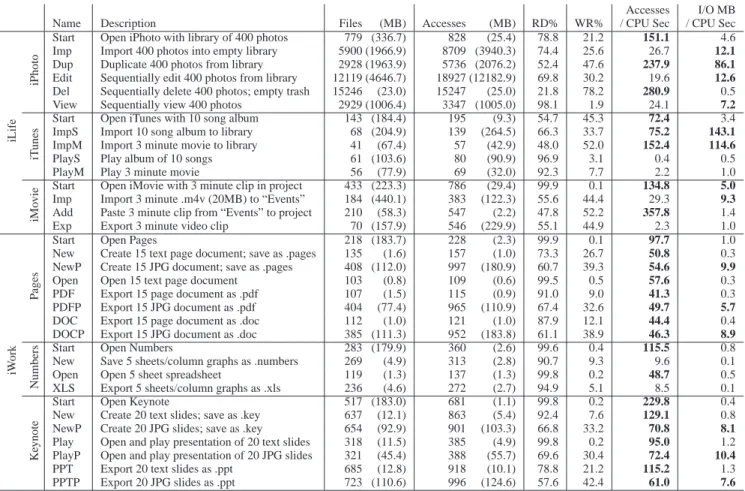
PPTP Export 20 JPG slides as .ppt 723 (110.6) 996 (124.6) 57.6 42.4 61.0 7.6 Table 1: 34 Tasks of the iBench Suite. The table summarizes the 34 tasks of iBench, specifying the application, a short name for the task, and a longer description of the actions modeled. The I/O is characterized according to the number of files read or written, the sum of the maximum sizes of all accessed files, the number of file accesses that read or write data, the number of bytes read or written, the percentage of I/O bytes that are part of a read (or write), and the rate of I/O per CPU-second in terms of both file accesses and bytes. Each core is counted individually, so at most 2 CPU-seconds can be counted per second on our dual-core test machine. CPU utilization is measured with the UNIXtoputility, which in rare cases produces anomalous CPU utilization snapshots; those values are ignored.
Table 1 contains a brief description of each of the 34 iBench tasks as well as the basic I/O characteristics of each task when running on Mac OS X Snow Leopard 10.6.2. The table illustrates that the iBench tasks perform a significant amount of I/O. Most tasks access hundreds of files, which in aggregate contain tens or hundreds of megabytes of data. The tasks typically access files hundreds of times. The tasks perform widely differing amounts of I/O, from less than a megabyte to more than a gigabyte. Most of the tasks perform many more reads than writes. Finally, the tasks exhibit high I/O throughput, often transferring tens of megabytes of data for every second of computation.
3.2
Easy to Use
To enable other system evaluators to easily use these tasks, the iBench suite is packaged as a set of 34 system call traces. To ensure reproducible results, the 34 user tasks were first automated with AppleScript, a general-purpose GUI scripting language. Apple-Script provides generic commands to emulate mouse clicks through menus and application-specific commands to capture higher-level operations. Application-specific commands bypass a small amount of I/O by skipping dialog boxes; however, we use them whenever possible for expediency.
The system call traces were gathered using DTrace [8], a kernel and user level dynamic instrumentation tool. DTrace is used to
instrument the entry and exit points of all system calls dealing with the file system; it also records the current state of the system and the parameters passed to and returned from each call.
While tracing with DTrace was generally straightforward, we ad-dressed four challenges in collecting the iBench traces. First, file sizes are not always available to DTrace; thus, we record every file’s initial size and compute subsequent file size changes caused by system calls such aswriteorftruncate. Second, iTunes uses theptracesystem call to disable tracing; we circumvent this block by using gdbto insert a breakpoint that automatically re-turns without callingptrace. Third, thevolfspseudo-file sys-tem in HFS+ (Hierarchical File Syssys-tem) allows files to be opened via their inode number instead of a file name; to include path-names in the trace, we instrument thebuild path function to obtain the full path when the task is run. Fourth, tracing system calls misses I/O resulting from memory-mapped files; therefore, we purged memory and instrumented kernel page-in functions to measure the amount of memory-mapped file activity. We found that the amount of memory-mapped I/O is negligible in most tasks; we thus do not include this I/O in the iBench traces or analysis.
To provide reproducible results, the traces must be run on a sin-gle file-system image. Therefore, the iBench suite also contains snapshots of the initial directories to be restored before each run; initial state is critical in file-system benchmarking [1].
4.
ANALYSIS OF IBENCH TASKS
The iBench task suite enables us to study the I/O behavior of a large set of home-user actions. As shown from the timeline of I/O behavior for one particular task in Section 2, these tasks are likely to access files in complex ways. To characterize this complex behavior in a quantitative manner across the entire suite of 34 tasks, we focus on answering four categories of questions.
• What different types of files are accessed and what are the sizes of these files?
• How are files accessed for reads and writes? Are files ac-cessed sequentially? Is space preallocated?
• What are the transactional properties? Are writes flushed withfsyncor performed atomically?
• How do multi-threaded applications distribute I/O across dif-ferent threads?
Answering these questions has two benefits. First, the answers can guide file and storage system developers to target their systems better to home-user applications. Second, the characterization will help users of iBench to select the most appropriate traces for eval-uation and to understand their resulting behavior.
All measurements were performed on a Mac Mini running Mac OS X Snow Leopard version 10.6.2 and the HFS+ file system. The machine has 2 GB of memory and a 2.26 GHz Intel Core Duo processor.
4.1
Nature of Files
Our analysis begins by characterizing the high-level behavior of the iBench tasks. In particular, we study the different types of files opened by each iBench task as well as the sizes of those files.
4.1.1
File Types
The iLife and iWork applications store data across a variety of files in a number of different formats; for example, iLife applica-tions tend to store their data in libraries (or data directories) unique to each user, while iWork applications organize their documents in proprietary ZIP-based files. The extent to which tasks access dif-ferent types of files greatly influences their I/O behavior.
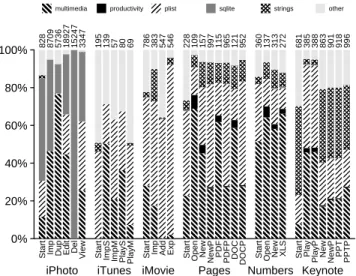
To understand accesses to different file types, we place each file into one of six categories, based on file name extensions and us-age. Multimedia files contain images (e.g., JPEG), songs (e.g., MP3, AIFF), and movies (e.g., MPEG-4). Productivity files are documents (e.g., .pages, DOC, PDF), spreadsheets (e.g., .numbers, XLS), and presentations (e.g., .key, PPT). SQLite files are database files. Plist files are property-list files in XML containing key-value pairs for user preferences and application properties. Strings files contain strings for localization of application text. Finally, Other contains miscellaneous files such as plain text, logs, files without extensions, and binary files.
Figure 2 shows the frequencies with which tasks open and cess files of each type; most tasks perform hundreds of these ac-cesses. Multimedia file opens are common in all workloads, though they seldom predominate, even in the multimedia-heavy iLife ap-plications. Conversely, opens of productivity files are rare, even in iWork applications that use them; this is likely because most iWork tasks create or view a single productivity file. Because .plist files act as generic helper files, they are relatively common. SQLite files only have a noticeable presence in iPhoto, where they account for a substantial portion of the observed opens. Strings files occupy a significant minority of most workloads (except iPhoto and iTunes). Finally, between 5% and 20% of files are of type “Other” (except for iTunes, where they are more prevalent).
Figure 3 displays the percentage of I/O bytes accessed for each file type. In bytes, multimedia I/O dominates most of the iLife tasks, while productivity I/O has a significant presence in the iWork tasks; file descriptors on multimedia and productivity files tend to receive large amounts of I/O. SQLite, Plist, and Strings files have a smaller share of the total I/O in bytes relative to the number of opened files; this implies that tasks access only a small quantity of data for each of these files opened (e.g., several key-value pairs in a .plist). In most tasks, files classified as “Other” receive a more significant portion of the I/O (the exception is iTunes).
Summary: Home applications access a wide variety of file types,
generally opening multimedia files the most frequently. iLife tasks tend to access bytes primarily from multimedia or files classified as “Other”; iWork tasks access bytes from a broader range of file types, with some emphasis on productivity files.
4.1.2
File Sizes
Large and small files present distinct challenges to the file sys-tem. For large files, finding contiguous space can be difficult, while for small files, minimizing initial seek time is more important. We investigate two different questions regarding file size. First, what is the distribution of file sizes accessed by each task? Second, what portion of accessed bytes resides in files of various sizes?
To answer these questions, we record file sizes when each unique file descriptor is closed. We categorize sizes as very small (<4KB), small (<64KB), medium (<1MB), large (<10MB), or very large (≥10MB). We track how many accesses are to files in each cate-gory and how many of the bytes belong to files in each catecate-gory.
Figure 4 shows the number of accesses to files of each size. Ac-cesses to very small files are extremely common, especially for iWork, accounting for over half of all the accesses in every iWork task. Small file accesses have a significant presence in the iLife tasks. The large quantity of very small and small files is due to frequent use of .plist files that store preferences, settings, and other application data; these files often fill just one or two 4 KB pages.
Figure 5 shows the proportion of the files in which the bytes of accessed files reside. Large and very large files dominate every startup workload and nearly every task that processes multimedia files. Small files account for few bytes and very small files are essentially negligible.
Summary: Agreeing with many previous studies (e.g., [4]), we
find that while applications tend to open many very small files (<4KB), most of the bytes accessed are in large files (>1MB).
4.2
Access Patterns
We next examine how the nature of file accesses has changed, studying the read and write patterns of home applications. These patterns include whether files are used for reading, writing, or both; whether files are accessed sequentially or randomly; and finally, whether or not blocks are preallocated via hints to the file system.
4.2.1
File Accesses
One basic characteristic of our workloads is the division between reading and writing on open file descriptors. If an application uses an open file only for reading (or only for writing) or performs more activity on file descriptors of a certain type, then the file system may be able to make more intelligent memory and disk allocations. To determine these characteristics, we classify each opened file descriptor based on the types of accesses–read, write, or both read and write–performed during its lifetime. We also ignore the ac-tual flags used when opening the file since we found they do not accurately reflect behavior; in all workloads, almost all write-only file descriptors were opened with O RDWR. We measure both the
0% 20% 40% 60% 80% 100%
iPhoto iTunes iMovie Pages Numbers Keynote
Start Imp Dup Edit Del
View Start ImpS ImpM PlayS PlayM Start Imp Add Exp Start
Open New NewP PDF PDFP DOC DOCP Start Open New XLS Start Play
PlayP New NewP PPT PPTP 828 8709 5736 18927 15247 3347 195 139 57 80 69 786 383 547 546 228 109 157 997 115 965 121 952 360 137 313 272 681 385 388 863 901 918 996
multimedia productivity plist sqlite strings other
Figure 2: Types of Files Accessed By Number of Opens. This plot shows the relative frequency with which file descriptors are opened upon different file types. The number at the end of each bar indicates the total number of unique file descriptors opened on files.
0% 20% 40% 60% 80% 100%
iPhoto iTunes iMovie Pages Numbers Keynote
Start Imp Dup Edit Del
View Start ImpS ImpM PlayS PlayM Start Imp Add Exp Start
Open New NewP PDF PDFP DOC DOCP Start Open New XLS Start Play
PlayP New NewP PPT PPTP 25MB 4GB 2GB 12GB 25MB 1005MB 9MB 265MB 43MB 91MB 32MB 29MB 122MB 2MB 230MB 2MB 598KB 1MB 181MB 941KB 111MB 1021KB 184MB 3MB 1MB 3MB 3MB 1MB 5MB 56MB 5MB 103MB 10MB 125MB
multimedia productivity plist sqlite strings other
Figure 3: Types of Files Opened By I/O Size. This plot shows the relative frequency with which each task performs I/O upon dif-ferent file types. The number at the end of each bar indicates the total bytes of I/O accessed.
0% 20% 40% 60% 80% 100%
iPhoto iTunes iMovie Pages Numbers Keynote
Start Imp Dup Edit Del
View Start ImpS ImpM PlayS PlayM Start Imp Add Exp Start
Open New NewP PDF PDFP DOC DOCP Start Open New XLS Start Play
PlayP New NewP PPT PPTP 828 8709 5736 18927 15247 3347 195 139 57 80 69 786 383 547 546 228 109 157 997 115 965 121 952 360 137 313 272 681 385 388 863 901 918 996
<4KB <64KB <1MB <10MB >=10MB
Figure 4: File Sizes, Weighted by Number of Accesses. This graph shows the number of accessed files in each file size range upon access ends. The total number of file accesses appears at the end of the bars. Note that repeatedly-accessed files are counted multiple times, and entire file sizes are counted even upon partial file accesses.
0% 20% 40% 60% 80% 100%
iPhoto iTunes iMovie Pages Numbers Keynote
Start Imp Dup Edit Del
View Start ImpS ImpM PlayS PlayM Start Imp Add Exp Start
Open New NewP PDF PDFP DOC DOCP Start Open New XLS Start Play
PlayP New NewP PPT PPTP 346MB 7GB 4GB 19GB 23MB 2GB 222MB 642MB 269MB 269MB 161MB 373MB 2GB 60MB 296MB 184MB 2MB 2MB 293MB 2MB 187MB 1MB 256MB 180MB 2MB 6MB 6MB 184MB 16MB 118MB 16MB 178MB 16MB 178MB
<4KB <64KB <1MB <10MB >=10MB
Figure 5: File Sizes, Weighted by the Bytes in Accessed Files. This graph shows the portion of bytes in accessed files of each size range upon access ends. The sum of the file sizes appears at the end of the bars. This number differs from total file footprint since files change size over time and repeatedly accessed file are counted multiple times.
proportional usage of each type of file descriptor and the relative amount of I/O performed on each.
Figure 6 shows how many file descriptors are used for each type of access. The overwhelming majority of file descriptors are used exclusively for reading or writing; read-write file descriptors are quite uncommon. Overall, read-only file descriptors are the most common across a majority of workloads; write-only file descriptors are popular in some iLife tasks, but are rarely used in iWork.
We observe different patterns when analyzing the amount of I/O performed on each type of file descriptor, as shown in Figure 7. First, even though iWork tasks have very few write-only file scriptors, they often write significant amounts of I/O to those de-scriptors. Second, even though read-write file descriptors are rare, when present, they account for relatively large portions of total I/O (particularly when exporting to .doc, .xls, and .ppt).
Summary: While many files are opened with theO RDWRflag, most of them are subsequently accessed write-only; thus, file open flags cannot be used to predict how a file will be accessed. How-ever, when an open file is both read and written by a task, the amount of traffic to that file occupies a significant portion of the to-tal I/O. Finally, the rarity of read-write file descriptors may derive in part from the tendency of applications to write to a temporary file which they then rename as the target file, instead of overwriting the target file; we explore this tendency more in§4.3.2.
4.2.2
Sequentiality
Historically, files have usually been read or written entirely se-quentially [4]. We next determine whether sequential accesses are dominant in iBench. We measure this by examining all reads and writes performed on each file descriptor and noting the percentage
0% 20% 40% 60% 80% 100%
iPhoto iTunes iMovie Pages Numbers Keynote
Start Imp Dup Edit Del
View Start ImpS ImpM PlayS PlayM Start Imp Add Exp Start
Open New NewP PDF PDFP DOC DOCP Start Open New XLS Start Play
PlayP New NewP PPT PPTP 828 8709 5736 18927 15247 3347 195 139 57 80 69 786 383 547 546 228 109 157 997 115 965 121 952 360 137 313 272 681 385 388 863 901 918 996
Read Only Both Write Only
Figure 6: Read/Write Distribution By File Descriptor. File de-scriptors can be used only for reads, only for writes, or for both operations. This plot shows the percentage of file descriptors in each category. This is based on usage, notopenflags. Any dupli-cate file descriptors (e.g., created bydup) are treated as one and file descriptors on which the program does not perform any subsequent action are ignored.
0% 20% 40% 60% 80% 100%
iPhoto iTunes iMovie Pages Numbers Keynote
Start Imp Dup Edit Del
View Start ImpS ImpM PlayS PlayM Start Imp Add Exp Start
Open New NewP PDF PDFP DOC DOCP Start Open New XLS Start Play
PlayP New NewP PPT PPTP 25MB 4GB 2GB 12GB 25MB 1005MB 9MB 265MB 43MB 91MB 32MB 29MB 122MB 2MB 230MB 2MB 598KB 1MB 181MB 941KB 111MB 1021KB 184MB 3MB 1MB 3MB 3MB 1MB 5MB 56MB 5MB 103MB 10MB 125MB
Read Only Both (Reads) Both (Writes) Write Only
Figure 7: Read/Write Distribution By Bytes. The graph shows how I/O bytes are distributed among the three access categories. The unshaded dark gray indicates bytes read as a part of read-only accesses. Similarly, unshaded light gray indicates bytes written in write-only accesses. The shaded regions represent bytes touched in read-write accesses, and are divided between bytes read and bytes written.
0% 20% 40% 60% 80% 100%
iPhoto iTunes iMovie Pages Numbers Keynote
Start Imp Dup Edit Del
View Start ImpS ImpM PlayS PlayM Start Imp Add Exp Start
Open New NewP PDF PDFP DOC DOCP Start Open New XLS Start Play
PlayP New NewP PPT PPTP 20MB 3GB 1GB 8GB 5MB 986MB 5MB 175MB 21MB 88MB 29MB 29MB 68MB 1MB 127MB 2MB 595KB 782KB 110MB 857KB 75MB 898KB 112MB 3MB 1MB 3MB 3MB 1MB 5MB 39MB 5MB 69MB 8MB 72MB
Sequential Nearly Sequential Non-sequential
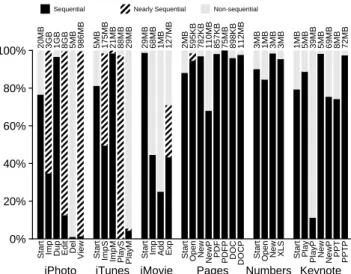
Figure 8: Read Sequentiality. This plot shows the portion of file read accesses (weighted by bytes) that are sequentially accessed.
0% 20% 40% 60% 80% 100%
iPhoto iTunes iMovie Pages Numbers Keynote
Start Imp Dup Edit Del
View Start ImpS ImpM PlayS PlayM Start Imp Add Exp Start
Open New NewP PDF PDFP DOC DOCP Start Open New XLS Start Play
PlayP New NewP PPT PPTP 5MB 1010MB 988MB 4GB 20MB 19MB 4MB 89MB 22MB 3MB 2MB 24KB 54MB 1MB 103MB 3KB 3KB 286KB 71MB 84KB 36MB 123KB 71MB 10KB 3KB 264KB 143KB 2KB 9KB 17MB 424KB 34MB 2MB 53MB
Sequential Nearly Sequential Non-sequential
Figure 9: Write Sequentiality. This plot shows the portion of file write accesses (weighted by bytes) that are sequentially accessed. of files accessed in strict sequential order (weighted by bytes).
We display our measurements for read and write sequentiality in Figures 8 and 9, respectively. The portions of the bars in black indicate the percent of file accesses that exhibit pure sequentiality. We observe high read sequentiality in iWork, but little in iLife (with the exception of the Start tasks and iTunes Import). The inverse is true for writes: most iLife tasks exhibit high sequentiality; iWork accesses are largely non-sequential.
Investigating the access patterns to multimedia files more closely, we note that many iLife applications first touch a small header fore accessing the entire file sequentially. To better reflect this be-havior, we define an access to a file as “nearly sequential” when at least 95% of the bytes read or written to a file form a sequential run. We found that a large number of accesses fall into the “nearly se-quential” category given a 95% threshold; the results do not change much with lower thresholds.
The slashed portions of the bars in Figures 8 and 9 show ob-served sequentiality with a 95% threshold. Tasks with heavy use of multimedia files exhibit greater sequentiality with the 95% thresh-old for both reading and writing. In several workloads (mainly iPhoto and iTunes), the I/O classified almost entirely as non-sequential with a 100% threshold is classified as nearly sequential. The dif-ference for iWork applications is much less striking, indicating that accesses are more random.
Summary: A substantial number of tasks contain purely
sequen-tial accesses. When the definition of a sequensequen-tial access is loosened such that only 95% of bytes must be consecutive, then even more tasks contain primarily sequential accesses. These “nearly sequen-tial” accesses result from metadata stored at the beginning of com-plex multimedia files: tasks frequently touch bytes near the begin-ning of multimedia files before sequentially reading or writing the bulk of the file.
0% 20% 40% 60% 80% 100%
iPhoto iTunes iMovie Pages Numbers Keynote
Start Imp Dup Edit Del
View Start ImpS ImpM PlayS PlayM Start Imp Add Exp Start
Open New NewP PDF PDFP DOC DOCP Start Open New XLS Start Play
PlayP New NewP PPT PPTP 992B 198KB
966MB
943MB
174KB 1KB
34MB
192B 192B 192B 384B 384B
Useful Unnecessary
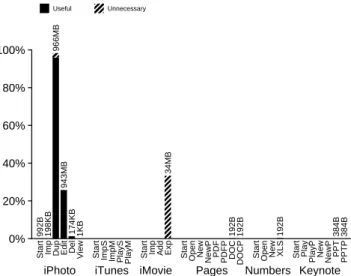
Figure 10: Preallocation Hints. The sizes of the bars indicate which portion of file extensions are preallocations; unnecessary preallocations are diagonally striped. The number atop each bar indicates the absolute amount preallocated.
4.2.3
Preallocation
One of the difficulties file systems face when allocating contigu-ous space for files is not knowing how much data will be written to those files. Applications can communicate this information by providing hints [27] to the file system to preallocate an appropriate amount of space. In this section, we quantify how often applica-tions use preallocation hints and how often these hints are useful.
We instrument two calls usable for preallocation: pwriteand
ftruncate.pwritewrites a single byte at an offset beyond the end of the file to indicate the future end of the file;ftruncate
directly sets the file size. Sometimes a preallocation does not com-municate anything useful to the file system because it is immedi-ately followed by a single write call with all the data; we flag these preallocations as unnecessary.
Figure 10 shows the portion of file growth that is the result of pre-allocation. In all cases, preallocation was due to calls topwrite; we never observedftruncatepreallocation. Overall, applica-tions rarely preallocate space and preallocaapplica-tions are often useless.
The three tasks with significant preallocation are iPhoto Dup, iPhoto Edit, and iMovie Exp. iPhoto Dup and Edit both call a
copyPathfunction in the Cocoa library that preallocates a large amount of space and then copies data by reading and writing it in 1 MB chunks. iPhoto Dup sometimes usescopyPathto copy scaled-down images of size 50-100 KB; since these smaller files are copied with a single write, the preallocation does not communicate anything useful. iMovie Exp calls a Quicktime append function that preallocates space before writing the actual data; however, the data is appended in small 128 KB increments. Thus, the append is not split into multiplewritecalls; the preallocation is useless.
Summary: Although preallocation has the potential to be
use-ful, few tasks use it to provide hints, and a significant number of the hints that are provided are useless. The hints are provided inconsis-tently: although iPhoto and iMovie both use preallocation for some tasks, neither application uses preallocation during import.
4.3
Transactional Properties
In this section, we explore the degree to which the iBench tasks require transactional properties from the underlying file and stor-age system. In particular, we investigate the extent to which
ap-plications require writes to be durable; that is, how frequently they invoke calls tofsyncand which APIs perform these calls. We also investigate the atomicity requirements of the applications, whether from renaming files or exchanging inodes.
4.3.1
Durability
Writes typically involve a trade-off between performance and durability. Applications that require write operations to complete quickly can write data to the file system’s main memory buffers, which are lazily copied to the underlying storage system at a sub-sequent convenient time. Buffering writes in main memory has a wide range of performance advantages: writes to the same block may be coalesced, writes to files that are later deleted need not be performed, and random writes can be more efficiently scheduled.
On the other hand, applications that rely on durable writes can flush written data to the underlying storage layer with thefsync
system call. The frequency offsynccalls and the number of bytes they synchronize directly affect performance: if fsync appears often and flushes only several bytes, then performance will suffer. Therefore, we investigate how modern applications usefsync.
Figure 11 shows the percentage of written data each task syn-chronizes withfsync. The graph further subdivides the source of thefsyncactivity into six categories. SQLite indicates that the SQLite database engine is responsible for callingfsync;
Archiv-ing indicates an archivArchiv-ing library frequently used when
access-ing ZIP formats; Pref Sync is thePreferencesSynchronize
function call from the Cocoa library; writeToFile is the Cocoa call
writeToFilewith theatomicallyflag set; and finally,
Flush-Fork is the CarbonFSFlushForkroutine.
At the highest level, the figure indicates that half the tasks syn-chronize close to 100% of their written data while approximately two-thirds synchronize more than 60%. iLife tasks tend to syn-chronize many megabytes of data, while iWork tasks usually only synchronize tens of kilobytes (excluding tasks that handle images). To delve into the APIs responsible for thefsynccalls, we ex-amine how each bar is subdivided. In iLife, the sources offsync
calls are quite varied: every category of API except for Archiving is represented in one of the tasks, and many of the tasks call mul-tiple APIs which invokefsync. In iWork, the sources are more consistent; the only sources are Pref Sync, SQLite, and Archiving (for manipulating compressed data).
Given that these tasks require durability for a significant per-centage of their write traffic, we next investigate the frequency of
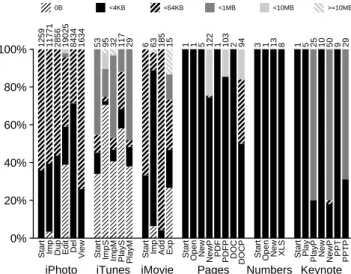
fsynccalls and how much data each individual call pushes to disk. Figure 12 groups fsync calls based on the amount of I/O per-formed on each file descriptor whenfsyncis called, and displays the relative percentage each category comprises of the total I/O.
These results show that iLife tasks callfsyncfrequently (from tens to thousands of times), while iWork tasks callfsync infre-quently except when dealing with images. From these observa-tions, we infer that calls tofsyncare mostly associated with me-dia. The majority of calls tofsyncsynchronize small amounts of data; only a few iLife tasks synchronize more than a megabyte of data in a singlefsynccall.
Summary: Developers want to ensure that data enters stable
storage durably, and thus, these tasks synchronize a significant frac-tion of their data. Based on our analysis of the source offsync
calls, some calls may be incidental and an unintentional side-effect of the API (e.g., those from SQLite or Pref Sync), but most are performed intentionally by the programmer. Furthermore, some of the tasks synchronize small amounts of data frequently, presenting a challenge for file systems.
0% 20% 40% 60% 80% 100%
iPhoto iTunes iMovie Pages Numbers Keynote
Start Imp Dup Edit Del
View Start ImpS ImpM PlayS PlayM Start Imp Add Exp Start
Open New NewP PDF PDFP DOC DOCP Start Open New XLS Start Play
PlayP New NewP PPT PPTP 5MB 57MB 12MB 3GB 15MB 18MB 4MB 89MB 22MB 3MB 2MB 24KB 34MB 1MB 69MB 3KB 3KB 12KB 71MB 3KB 35MB 7KB 35MB 10KB 3KB 32KB 21KB 2KB 9KB 17MB 16KB 34MB 14KB 17MB
SQLite Pref Sync Archiving writeToFile FlushFork Other No fsync
Figure 11: Percentage of Fsync Bytes. The percentage of
fsync’d bytes written to file descriptors is shown, broken down by cause. The value atop each bar shows total bytes synchronized.
0% 20% 40% 60% 80% 100%
iPhoto iTunes iMovie Pages Numbers Keynote
Start Imp Dup Edit Del
View Start ImpS ImpM PlayS PlayM Start Imp Add Exp Start
Open New NewP PDF PDFP DOC DOCP Start Open New XLS Start Play
PlayP New NewP PPT PPTP 1259 11771 2856 19025 8434 1634 53 95 32 117 29 6 63 185 15 1 1 5 122 1 103 2 94 3 1 13 8 1 5 25 10 50 9 29
0B <4KB <64KB <1MB <10MB >=10MB
Figure 12: Fsync Sizes. This plot shows a distribution offsync
sizes. The total number of fsync calls appears at the end of the bars.
0% 20% 40% 60% 80% 100%
iPhoto iTunes iMovie Pages Numbers Keynote
Start Imp Dup Edit Del
View Start ImpS ImpM PlayS PlayM Start Imp Add Exp Start
Open New NewP PDF PDFP DOC DOCP Start Open New XLS Start Play
PlayP New NewP PPT PPTP 27 1618 414 5211 13 1216 29 27 17 48 17 6 26 185 8 1 1 7 91 2 86 2 76 3 1 11 5 1 2 2 8 8 6 6
Rename (same dir) Rename (diff dir) Exchange Not atomic
Figure 13: Atomic Writes. The portion of written bytes written atomically is shown, divided into groups: (1)renameleaving a file in the same directory; (2)rename causing a file to change directories; (3)exchangedatawhich never causes a directory change. The atomic file-write count appears atop each bar.
0% 20% 40% 60% 80% 100%
iPhoto iTunes iMovie Pages Numbers Keynote
Start Imp Dup Edit Del
View Start ImpS ImpM PlayS PlayM Start Imp Add Exp Start
Open New NewP PDF PDFP DOC DOCP Start Open New XLS Start Play
PlayP New NewP PPT PPTP 27 1618 414 5211 13 1216 26 25 15 25 15 6 26 185 8 1 1 7 91 2 86 2 76 3 1 11 5 1 2 2 8 8 6 6
Pref Sync writeToFile movePath FSRenameUnicode Other
Figure 14: Rename Causes. This plot shows the portion of
rename calls caused by each of the top four higher level func-tions used for atomic writes. The number ofrenamecalls appears at the end of the bars.
4.3.2
Atomic Writes
Applications often require file changes to be atomic. In this sec-tion, we quantify how frequently applications use different tech-niques to achieve atomicity. We also identify cases where perform-ing writes atomically can interfere with directory locality optimiza-tions by moving files from their original directories. Finally, we identify the causes of atomic writes.
Applications can atomically update a file by first writing the de-sired contents to a temporary file and then using either therename
orexchangedatacall to atomically replace the old file with the new file. Withrename, the new file is given the same name as the old, deleting the original and replacing it. Withexchangedata, the inode numbers assigned to the old file and the temporary file are swapped, causing the old path to point to the new data; this allows the file path to remain associated with the original inode number, which is necessary for some applications.
Figure 13 shows how much write I/O is performed atomically withrenameorexchangedata;renamecalls are further sub-divided into those which keep the file in the same directory and those which do not. The results show that atomic writes are quite popular and that, in many workloads, all the writes are atomic. The breakdown of each bar shows thatrenameis frequent; a signifi-cant minority of therenamecalls move files between directories.
exchangedatais rare and used only by iTunes for a small frac-tion of file updates.
We find that most of therenamecalls causing directory changes occur when a file (e.g., a document or spreadsheet) is saved at the user’s request. We suspect different directories are used so that users are not confused by seeing temporary files in their personal directories. Interestingly, atomic writes are performed when files are saved to Apple formats, but not when exporting to Microsoft formats. We suspect that the interface between applications and the Microsoft libraries does not specify atomic operations well.
0% 20% 40% 60% 80% 100%
iPhoto iTunes iMovie Pages Numbers Keynote
Start Imp Dup Edit Del
View Start ImpS ImpM PlayS PlayM Start Imp Add Exp Start
Open New NewP PDF PDFP DOC DOCP Start Open New XLS Start Play
PlayP New NewP PPT PPTP
2GB
98MB
7GB
981MB
416KB
28MB
323KB
45MB
32KB
92MB
AIO Reads / All Reads
Figure 15: Asynchronous Reads. This plot shows the percent-age of read bytes read asynchronously viaaio read. The total amount of asynchronous I/O is provided at the end of the bars.
Figure 14 identifies the APIs responsible for atomic writes via
rename. Pref Sync, from the Cocoa library, allows applications to save user and system wide settings in .plist files. WriteToFile and movePath are Cocoa routines and FSRenameUnicode is a Car-bon routine. A solid majority of the atomic writes are caused by Pref Sync; this is an example of I/O behavior caused by the API rather than explicit programmer intention. The second most com-mon atomic writer is writeToFile; in this case, the programmer is requesting atomicity but leaving the technique up to the library. Finally, in a small minority of cases, programmers perform atomic writes themselves by calling movePath or FSRenameUnicode, both of which are essentiallyrenamewrappers.
Summary: Many of our tasks write data atomically, generally
doing so by callingrename. The bulk of atomic writes result from API calls; while some of these hide the underlying nature of the write, others make it clear that they act atomically. Thus, developers desire atomicity for many operations, and file systems will need to either address the ensuing renames that accompany it or provide an alternative mechanism for it. In addition, the absence of atomic writes when writing to Microsoft formats highlights the inconsistencies that can result from the use of high level libraries.
4.4
Threads and Asynchronicity
Home-user applications are interactive and need to avoid block-ing when I/O is performed. Asynchronous I/O and threads are of-ten used to hide the laof-tency of slow operations from users. For our final experiments, we investigate how often applications use asyn-chronous I/O libraries or multiple threads to avoid blocking.
Figure 15 shows the portion of read operations performed asyn-chronously withaio read; none of the tasks useaio write. We find that asynchronous I/O is used rarely and only by iLife applications. However, in those cases where asynchronous I/O is performed, it is used quite heavily.
Figure 16 investigates how threads are used by these tasks: specif-ically, the portion of I/O performed by each of the threads. The numbers at the tops of the bars report the number of threads per-forming I/O. iPhoto and iTunes leverage a significant number of threads for I/O, since many of their tasks are readily subdivided (e.g., importing 400 different photos). Only a handful of tasks per-form all their I/O from a single thread. For most tasks, a small
0% 20% 40% 60% 80% 100%
iPhoto iTunes iMovie Pages Numbers Keynote
Start Imp Dup Edit Del
View Start ImpS ImpM PlayS PlayM Start Imp Add Exp Start
Open New NewP PDF PDFP DOC DOCP Start Open New XLS Start Play
PlayP New NewP PPT PPTP 417 472 407 371 334 7 8 58 12 64 9 5 8 3 6 4 1 4 12 1 12 1 11 3 1 6 3 2 4 5 7 7 6 6
Primary Secondary Others
Figure 16: I/O Distribution Among Threads. The stacked bars indicate the percentage of total I/O performed by each thread. The I/O from the threads that do the most and second most I/O are dark and medium gray respectively, and the other threads are light gray. Black lines divide the I/O across the latter group; black areas appear when numerous threads do small amounts of I/O. The total number of threads that perform I/O is indicated next to the bars.
0% 20% 40% 60% 80% 100%
iPhoto iTunes iMovie Pages Numbers Keynote
Start Imp Dup Edit Del View Start ImpS ImpM PlayS PlayM Start Imp Add Exp Start
Open New NewP PDF PDFP DOC DOCP Start Open New XLS Start Play PlayP New NewP PPT PPTP 417 472 407 371 334 7 8 58 12 64 9 5 8 3 6 4 1 4 12 1 12 1 11 3 1 6 3 2 4 5 7 7 6 6
Read Only Both Write Only
Figure 17: Thread Type Distribution. The plot categorizes threads that do I/O into three groups: threads that read, threads that write, or threads that both read and write. The total number of threads that perform I/O is indicated next to the bars.
number of threads are responsible for the majority of I/O. Figure 17 shows the responsibilities of each thread that performs I/O, where a thread can be responsible for reading, writing, or both. The measurements show that significantly more threads are devoted to reading than to writing, with a fair number of threads responsi-ble for both. These results indicate that threads are the preferred technique to avoiding blocking and that applications may be partic-ularly concerned with avoiding blocking due to reads.
Summary: Our results indicate that iBench tasks are concerned
with hiding long-latency operations from interactive users and that threads are the preferred method for doing so. Virtually all of the applications we study issue I/O requests from multiple threads, and some launch I/Os from hundreds of different threads.
5.
RELATED WORK
Although our study is unique in its focus on the I/O behavior of individual applications, a body of similar work exists both in the field of file systems and in application studies. As mentioned earlier, our work builds upon that of Baker [4], Ousterhout [25], Vogels [39], and others who have conducted similar studies, pro-viding an updated perspective on many of their findings. However, the majority of these focus on academic and engineering environ-ments, which are likely to have noticeably different application pro-files from the home environment. Some studies, like those by Ra-makrishnan [31] and by Vogels, have included office workloads on personal computers; these are likely to feature applications simi-lar to those in iWork, but are still unlikely to contain analogues to iLife products. None of these studies, however, look at the charac-teristics of individual application behaviors; instead, they analyze trends seen in prolonged usage. Thus, our study complements the breadth of this research with a more focused examination, provid-ing specific information on the causes of the behaviors we observe, and is one of the first to address the interaction of multimedia ap-plications with the file system.
In addition to these studies of dynamic workloads, a variety of papers have examined the static characteristics of file systems, start-ing with Satyanarayanan’s analysis of files at Carnegie-Mellon Uni-versity [36]. One of the most recent of these examined metadata characteristics on desktops at Microsoft over a five year time span, providing insight into file-system usage characteristics in a setting similar to the home [2]. This type of analysis provides insight into long term characteristics of files that ours cannot; a similar study for home systems would, in conjunction with our paper, provide a more complete image of how home applications interact with the file system.
While most file-system studies deal with aggregate workloads, our examination of application-specific behaviors has precedent in a number of hardware studies. In particular, Flautner et al.’s [13] and Blake et al.’s [6] studies of parallelism in desktop applications bear strong similarities to ours in the variety of applications they examine. In general, they use a broader set of applications, a dif-ference that derives from the subjects studied. In particular, we select applications likely to produce interesting I/O behavior; many of the programs they use, like the video game Quake, are more likely to exercise threading than the file system. Finally it is worth noting that Blake et al. analyze Windows software using event trac-ing, which may prove a useful tool to conduct a similar application file-system study to ours in Windows.
6.
DISCUSSION AND CONCLUSIONS
We have presented a detailed study of the I/O behavior of com-plex, modern applications. Through our measurements, we have discovered distinct differences between the tasks in the iBench suite and traditional workload studies. To conclude, we consider the pos-sible effects of our findings on future file and storage systems.
We observed that many of the tasks in the iBench suite frequently force data to disk by invokingfsync, which has strong impli-cations for file systems. Delayed writing has long been the basis of increasing file-system performance [34], but it is of greatly de-creased utility given small synchronous writes. Thus, more study is required to understand why the developers of these applications and frameworks are calling these routines so frequently. For ex-ample, is data being flushed to disk to ensure ordering between writes, safety in the face of power loss, or safety in the face of application crashes? Finding appropriate solutions depends upon the answers to these questions. One possibility is for file systems
to expose new interfaces to enable applications to better express their exact needs and desires for durability, consistency, and atom-icity. Another possibility is that new technologies, such as flash and other solid-state devices, will be a key solution, allowing writes to be buffered quickly, perhaps before being staged to disk or even the cloud.
The iBench tasks also illustrate that file systems are now being treated as repositories of highly-structured “databases” managed by the applications themselves. In some cases, data is stored in a lit-eral database (e.g., iPhoto uses SQLite), but in most cases, data is organized in complex directory hierarchies or within a single file (e.g., a .doc file is basically a mini-FAT file system). One option is that the file system could become more application-aware, tuned to understand important structures and to better allocate and access these structures on disk. For example, a smarter file system could improve its allocation and prefetching of “files” within a .doc file: seemingly non-sequential patterns in a complex file are easily de-constructed into accesses to metadata followed by streaming se-quential access to data.
Our analysis also revealed the strong impact that frameworks and libraries have on I/O behavior. Traditionally, file systems have been designed at the level of the VFS interface, not breaking into the libraries themselves. However, it appears that file systems now need to take a more “vertical” approach and incorporate some of the functionality of modern libraries. This vertical approach hear-kens back to the earliest days of file-system development when the developers of FFS modified standard libraries to buffer writes in block-sized chunks to avoid costly sub-block overheads [21]. Fu-ture storage systems should further integrate with higher-level in-terfaces to gain deeper understanding of application desires.
Finally, modern applications are highly complex, containing mil-lions of lines of code, divided over hundreds of source files and libraries, and written by many different programmers. As a re-sult, their own behavior is increasingly inconsistent: along sim-ilar, but distinct code paths, different libraries are invoked with different transactional semantics. To simplify these applications, file systems could add higher-level interfaces, easing construction and unifying data representations. While the systems community has developed influential file-system concepts, little has been done to transition this class of improvements into the applications them-selves. Database technology does support a certain class of appli-cations quite well but is generally too heavyweight. Future storage systems should consider how to bridge the gap between the needs of current applications and the features low-level systems provide.
Our evaluation may raise more questions than it answers. To build better systems for the future, we believe that the research community must study applications that are important to real users. We believe the iBench task suite takes a first step in this direction and hope others in the community will continue along this path.
Acknowledgments
We thank the anonymous reviewers and Rebecca Isaacs (our shep-herd) for their tremendous feedback, as well as members of our research group for their thoughts and comments on this work at various stages.
This material is based upon work supported by the National Sci-ence Foundation under CSR-1017518 as well as by generous dona-tions from Network Appliance and Google. Tyler Harter and Chris Dragga are supported by the Guri Sohi Fellowship and the David DeWitt Fellowship, respectively.
Any opinions, findings, and conclusions or recommendations ex-pressed in this material are those of the authors and do not neces-sarily reflect the views of NSF or other institutions.