Abstract— This paper proposes the utilization of Kinect for pronunciation tutoring. Kinect is used as a sensor to detect the user’s mouth and for comparing user and native’s mouth shapes when pronouncing the same word. This system is expected to increase the pronunciation level of the user by training the muscles around the mouth and informing the user about the similarity between the user’s mouth gesture and the native’s mouth gesture.
Index Terms— Kinect, Pronunciation, Face Tracking, Mouth Gesture
I. INTRODUCTION
A. Good pronunciation acquisition
When a student is trying to learn a new language, the most difficult part is to get the correct pronunciation. Furthermore, one of the essential communication skills is also a good pronunciation [1]. Even if the student has good grammar knowledge, without a good pronunciation, the listener won’t be able to understand what the student is saying, or even worse, it can cause a misunderstanding.
To achieve a good pronunciation, practice copying native speakers is one of the solutions [2]. The aim of this paper is to propose pronunciation tutoring using Kinect. Kinect will become a “home tutor” to assist in the student’s pronunciation tutoring.
B. Kinect
Formerly known as Project Natal, Kinect is Microsoft’s motion sensor add-on for the Xbox 360 gaming console. The device provides a natural user interface (NUI) that allows users to interact intuitively and without any intermediary device, such as a controller.
Released November 4, 2010, Kinect had sold 80 million units by January 3, 2011, achieving the Guinness World Record for the fastest-selling consumer electronics device [3].
II. PRONUNCIATION
"Pronunciation" refers to the way in which we make the sound of words.
To pronounce words, we push air from our lungs up through our throat and vocal chords, through our mouth, past our tongue and out between our teeth and lips. (Sometimes air also travels through our nose.)
Manuscript received Dec 09, 2013; revised Jan 28, 2014.
Farah binti Dinbandali is with the Computer Science Department, Tokyo University of Technology, Hachioji, Tokyo, Japan (e-mail: [email protected]).
Satoshi Ichimura is with the Computer Science Department, Tokyo University of Technology, Hachioji, Tokyo, Japan (e-mail: [email protected]).
To change the sound that we are making, we mainly use the muscles of our mouth, tongue and lips to control the shape of our mouth and the flow of air. If we can control the shape of our mouth and the flow of air correctly, then our pronunciation is clearer and other people understand us more easily.
Speakers of different languages tend to develop different muscles of the mouth for pronunciation. When we speak a foreign language, our muscles may not be well developed for that language, and we will find pronunciation more difficult. By practicing the foreign language pronunciation, our muscles develop and pronunciation improves [4].
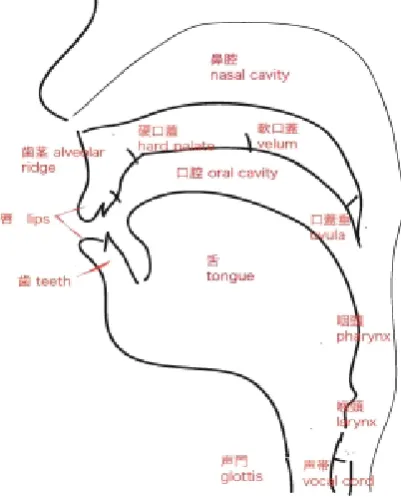
[image:1.595.329.530.326.575.2]Articulatory organs are needed in order to speak. Fig. 1 shows the human articulatory organs.
Fig. 1 Speech (articulatory) organs
III. KINECT
Kinect sensor is made up of 3-D depth sensors to track the users’ body, RGB camera, multiple microphones and motorized tilt [5].
Microsoft released Kinect software development kit for Windows 7 on June 16, 2011. This SDK was meant to allow developers to write Kinect-based apps in C++/CLI, C#, or Visual Basic .NET.
Pronunciation Tutoring using Kinect
Fig. 2 Kinect for Windows
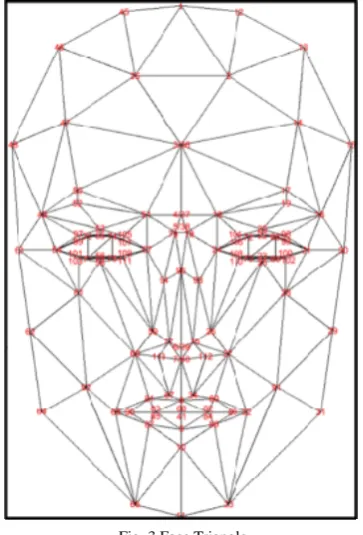
[image:2.595.82.264.216.484.2]In the Kinect SDK (Software Development Kit), there is another SDK called Face Tracking SDK. Using this SDK, one can track up to 2 faces at a time and obtain the tracked face points in 2D or 3D points. There are a total of 121 points tracked on a face [6]. Fig. 3 shows the tracked face points.
Fig. 3 Face Triangle
IV. RELATED RESEARCH
A. A Talking Head for Speech Tutoring [7]
Fig. 4 Pronunciation Assistant
This software was created by Priva Dey from Sheffield University. Her aim was to show the benefits of visual speech in language learning.
Her work uses animation in order to visualize the position of the tongue and mouth shape when pronouncing the word. This software also includes recording and replaying
pronunciation and determine whether it was similar or not to the animation’s pronunciation.
Figure 4 shows the talking head, Tara (Talking Articulation Assistant), the animation used to visualize the pronunciation. The result proves that there were consistent improvements in the subjects’ listening and speaking skills after using the software.
V. METHODOLOGY
In order for a non-native speaker to achieve a good pronunciation is by training the muscles around the mouth. Thus, this research aims to act as a personal pronunciation tutor for the user. This can be achieved by using a database of a native person speaking words and comparing their mouth shapes with the user’s mouth shape when pronouncing the same words and telling the user the percentage of similarity between the user and the native. Kinect sensor is used for detecting and comparing the mouth shapes.
Using Kinect Face Tracking SDK, the system will track the mouth points of the user, to determine the shape of the user’s mouth, and record the user’s video. The system will then compare the mouth shape data of a native person saying the same word with the user’s mouth shape data. The system would then inform the user whether the mouth shape was similar or not with the native’s mouth shape.
A. Kinect Face Tracking SDK
Out of the 121 tracked points, only 4 points are used for this system. Points 88 and 41 are used for the height, while points 65 and 32 are used for the width of the mouth.
B. Kinect Toolbox
Kinect Toolbox is a set of useful tools for developing with Kinect for Windows SDK (1.7).
It includes helpers for gestures, postures, replay and drawing [8].
Kinect toolbox is used for recording and replaying the frames from Kinect sensor RGB camera.
Since the Kinect toolbox only allow frame recording, voice recording had to be included. A few changes also had to be made as the toolbox doesn’t include face tracking.
C. Mouth Gesture
This is a class which utilizes the data obtained from the face tracking and recognizing the mouth gesture made by the user in real time.
For the time being, this class can detect 6 basic mouth shapes, such as closed mouth, open mouth, stretched mouth etc. This mouth gestures can also be augmented according to the needs and characteristics of the language.
[image:2.595.65.281.530.682.2] [image:2.595.310.548.644.763.2]D. Interface
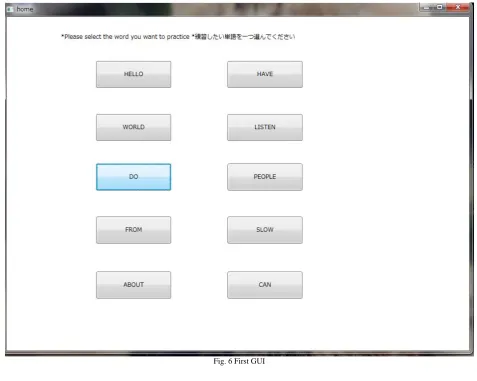
This system mainly comprises of 3 GUIs presented in 3 different windows. The first GUI (Fig. 6), which comprises of word inscribed buttons, allows the user to select the word they want to learn.
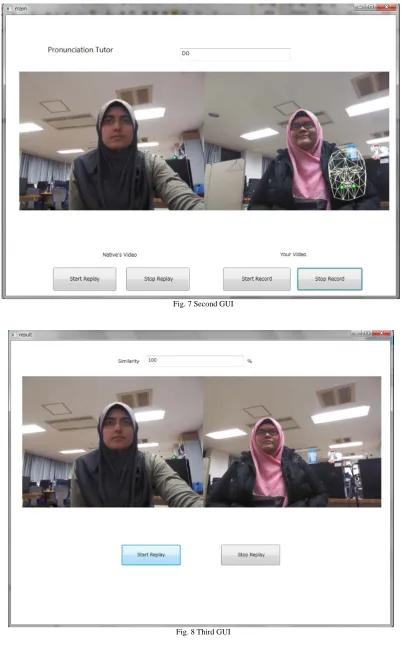
In the second GUI (Fig. 7), on the left side would be the native’s video which can be played and controlled by the user at will. On the right side of the GUI is the user’s live video from Kinect camera. The ‘Start Record’ button below the live
video will be valid only after face tracking is successful. The ‘Stop Record’ button, if clicked, would open the third GUI (Fig. 8).
[image:3.595.63.541.189.570.2]The third GUI (Fig. 8) displays 2 videos side by side with 2 buttons below it. The left video is the same native video used in the second GUI, while the video on the right side is the video recorded by the user during the second GUI. The buttons allows the user to start and stop the replay at will.
Fig. 7 Second GUI
E. Overall flow of the system
The user launches the program and the first window is displayed. The user then selects the word he/she wants to learn by clicking on the desired button inscribed with the word. Upon clicking the button, the second window bearing the second GUI will be displayed.
The user can start the replaying of the native’s video by clicking the ‘Start Replay’ button and stopping the replay by clicking the ‘Stop Replay’ button. Once Kinect detected the user’s face, the user can start the recording by clicking on the ‘Start Record’ button and after finished, stop the recording by clicking on the ‘Stop Record’ button. After clicking the ‘Stop Button’, the third window will be displayed.
On the third GUI, upon clicking the ‘Start Replay’ button, two videos will be replayed at the same time. The video on the left is the native’s video while the video on the right side is the user’s video which was recorded earlier. On the top side is a text box displaying the similarity percentage between the user and the native’s mouth gestures.
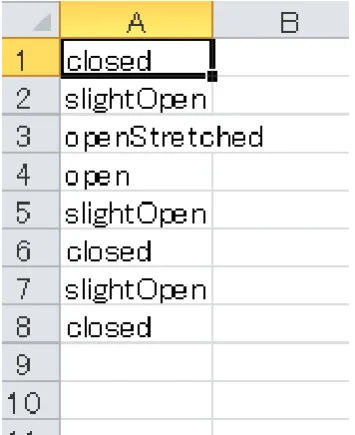
The similarity percentage is calculated by counting the number of same value data between the native’s mouth gesture data and user’s mouth gesture data. For example, in Fig. 10, the first data is ‘closed’, which is the same as in the native’s first data (Fig. 9). This will be counted as true, and the counting process goes on until the end of native’s data. For this case, the similarity percentage is 37.5% as only data 1, 2, and 8 are similar to the native’s data. The calculation is shown in (1).
[image:5.595.314.492.50.268.2]Percentage % 100% 37.5 (1)
Fig. 9 Native’s mouth gesture data example
Fig. 10 User’s mouth gesture data example
VI. EVALUATION
A. Test 1(Japanese students)
This evaluation was done by 5 Japanese students who are not very familiar with the English pronunciation. This test aims to prove that audiovisual pronunciation tutoring is more effective than audio training alone.
B. Test 2(International Students)
This test was carried out by having 5 non-native international students who have experience with the English pronunciation to use the system. This test aims to show the system’s accuracy in acquiring the mouth gesture.
C. Questionnaire
Each subject from test 1 and 2 was asked to answer a set of questions in a questionnaire after using the system.
The questions were asked in Japanese language as all the subjects understand the language. There are a total of 9 questions which are separated into 2 parts. The first part of the questionnaire with a total of 5 questions was about the subject themselves. The second part with the remaining 4 questions was about the system.
VII. RESULTS
A. Test 1
There were noticeable improvements in the subjects’ pronunciation after undergoing audio training and the system.
After the audio training, the subjects were able to mimic the sound of the word, but the subjects were not confident about their pronunciation and their mouth shapes were not natural.
[image:5.595.56.240.414.695.2]B. Test 2
For some reason, Kinect couldn’t accurately detect some people’s faces correctly. Even though the subject closed his/her mouth, Kinect detected it as “slightOpen”, “smallOpenStretched”, or even “stretched” instead of “closed”.
The results are shown in the tables I and II.
TABLEI TEST 2 RESULT(PART 1) Native's(original)
data
Subject
1 2 3 closed closed closed closed slightOpen open open openStretc
hed open openStretc
hed
openStretc
hed bigO
openStretched bigO open smallO open slightOpen bigO closed bigO closed smallO stretched smallO closed
closed
Percentage(%) 12.5 12.5 12.5 TABLEII
TEST 2 RESULT(PART 2) Native's(original)
data
Subject
4 5 closed slightOpen closed slightOpen smallO slightOpen
open bigO open openStretched open openStretched open bigO bigO bigO smallO smallO smallO slightOpen closed
closed closed
Percentage(%) 12.5 50
C. Questionnaire
The respondents’ answer for the second part of the questionnaire is as follows.
1) Respondents gave an overall rating average of 4.2 out of 5 for the user interface.
2) All respondents thought that the system was easy to use.
3) All respondents said that their pronunciation improved after using the system
4) All respondents voted that audio visual training is the best way to learn pronunciation.
VIII. DISCUSSION
According to Test 1 and questionnaire results, there wasn’t any major problem regarding the user experience of the system.
About the system accuracy and stability, a few problems were observed as stated below.
1) Kinect Face Tracking is not stable enough. With a slight change in the angle or position of the head, the value changes drastically.
2) Kinect face tracking was not able to correctly detect the mouth shape of certain people. This problem is maybe because of facial characteristics of certain people. E.g. Subject 4 even pursed his lips but couldn’t get “closed” mouth value.
3) The CPU was not fast enough. The system sometimes skips a few frames during the test. As a result, the system cannot track all of the mouth gestures completely.
IX. CONCLUSION
With this paper, it is proved that the system can actually work to improve one’s pronunciation, given that the hardware and software are upgraded to achieve required accuracy and stability. It can also be concluded based on the questionnaire results, that there is a need for this type of system.
ACKNOWLEDGMENT
The success of any project depends largely on the encouragement and guidelines of many others. I take this opportunity to express my gratitude to the people who have been instrumental in the successful completion of this project. I would like to show my greatest appreciation to Prof. Satoshi Ichimura. I can’t say thank you enough for his tremendous support and help. Without his encouragement and guidance this project would not have materialized. The guidance and support received from all the members of the Ichimura Laboratory who contributed and who are contributing to this project, was vital for the success of the project. I am grateful for their constant support and help.
REFERENCES
[1] Vajiram. (n.d.).Essential verbal communication skills. [Online]. Available:
http://www.vajiram.com/essential-verbal-communication-skills.html [2] David James. (n.d.). What Difficulties Do Second Language
Learners Face With Learning to Read? (n.d.) [Online]. Available: http://www.ehow.com/info_7883338_difficulties-learners-face-learni ng-read.html
[3] Margaret Rouse. (March 2011). Kinect (n.d.) [Online]. Available from: http://searchhealthit.techtarget.com/definition/Kinect
[4] EnglishClub. (n.d.). What is Pronunciation? (n.d.) [Online]. Available: http://www.englishclub.com/pronunciation/what.htm [5] www.xbox.com. (2013). Kinect Components (n.d.) [Online].
Available:
http://support.xbox.com/en-US/xbox-360/kinect/kinect-sensor-comp onents
[6] MSDN-the Microsoft Developer Network. (2013). Face Tracking
(n.d.) [Online]. Available: http://msdn.microsoft.com/en-us/library/jj130970.aspx
[7] Priya Dey, Steve Maddock, Rod Nicolson. (21st October 2010). A Talking Head for Speech Tutoring (n.d.) [Online]. Available: http://staffwww.dcs.shef.ac.uk/people/S.Maddock/research/dey/Dey_ etal_FAA_2010.pdf
[8] CodePlex. (31st July 2012). Kinect Toolbox (n.d.) [Online]. Available: