PREFACE
1. INTRODUCTION l. 1 1.2 1.3 1.4
Bac k ground. Forth at OVRO.
Forth Development History. Scope oT this Manual.
2. FORTH OVERVIEW 2.1
2.2 2.3 2.4 2. 5 2.6 2.7 2.8 2.9
Words and the Dictionary. The Stac k.
Block Storage.
Defining
new
Words.Storing and retrieving data in memory. Controlling Forth -- The Text Interpreter. Typewriter output.
Conditional Branches. The Ed i tor.
3. THE STRUCTURE OF FORTH 3. 1 General Remarks. 3.2 the Stacks.
3.3 The Dictionary.
3.3.1 Branch Structure. 3.3.2 Header Section.
3.3.3 Code and Parameter Sections.
3.3.4 Expanding and Contracting the Dictionary. 3.4 Program Control -- The Address Interpreter. 3. 5 The Text Interpreter.
3.6 Error Messages -- ABORT. 3.7 Block Input/Output. 3.8 Forth Assemblers.
3.9 Compilation of : Words. 3.10 Defining Words -- iCODE. 3.11 Branches in : Words.
3.11.1 An Unconditional Branch. 3.11.2 Conditional Branches.
3.12 Interfacing with an Operating System.
3. 12. 1 To Stand Alone or Not to Stand Alone. 3.12.2
as
Interfacing Techniques.3. 13 Mul t i programming and Real-Time App I i cat ions. 3.13.1 Priority Scheduling.
3. 13.2 Round-Rob in 5ch edu ling.
3. 13.3 Schedul ing through Operating Systems.
4.2 Notation.
4.3 Standard Vocabula~y List. 4.4 Special vocabularies.
4.4.1 Standard Editor.
4.4.2 Cha~acter Strings.
4.4.3 The Extended Editor.
4.4.4 Deferred Operations.
4.4.5 Double Precision Math. 4.4.5.1 Data Types.
4.4.5.2 Basic Operations.
4.4.5.3 Comparison Operations. 4.4.5.4 Shift Operations.
4.4.5.5 .Multiplication, Division.
4.4.5.6 4.4.5.7 4.4.5.8
and Normalization Mixed-mode Operations. Number output.
Functions.
4.4.6 File
4.4.6.1 4.4.6.2
System.
Standard File System Vocabulary. File Maintenance Vocabulary.
A P
PENDIe E S
A.
PDP-11 Implementation.B.
PDP-I0 Implementation.C. 5DS-920 Implementation.
D. OED - Guick Edito~.
E. Forth Bibliography.
4-1 4-3 4-22 4-22 4-23 4-25 4-26 4-27 4-27 4-28 4-28 4-29
Manual. It reflects numerous changes that have occurred in the 3 1/2 years since the original publication. Chief among these has been the shift at OVRO toward diverse Forth applications based on PDP-II systems, many running
DEC
operating systems.
Both the PDP-II and PDP-I0 systems have been revised to take advantage of a Caltech-developed innovation in the interpreter system. SUbstantial time and core savings result from using an address interpreter requiring only one machine instruction. The PDP-II system has been further refined so that only two memory words are required for header information in Forth dictionary entries.
Another development reflected in this Manual is the emergence of a Forth standard vocabulary. Although the AST.Ol and AST.Ol~ docum~nts adopted by the Astronomy Forth Users Group in the U.S. are not fully mature language specifications, they do provide useful guidelines for new Forth systems. 'They help to reduce the chronic problem of Forth installations at various institutions that all have originated from mainstream Forth, but which have diverged under the assault of numerous clever, but non-communicating programmers.
I tIIOU I d Ii keto than k H. W. Hammond and D. H.
Rogstad who have been responsible for many of the developments to the PDP-II Forth at Caltech. I thank D. Dewey, H. W. Hammond, R. B. Leighton, and D. H. Rogstad for reviewing this manuscript. Work at the Owens Valley Radio Observatory is supported in part by the National Science Foundation. This work was also supported
in part by the Caltech Jet PropulSion Laboratory.
Martin S. Ewing 3 ~une 1978
1. 1
BACKGROUND.
Rapid acceptance of minicomputers for interactive data acquisition and system control has created a need for matching software systems. High level languages like Fortran, Algol, or PL/l are not normallv effective in environments with limited memory and peripheral devices. Even when these languages can be used, they are designed for batch processing and usually lack features needed for direct interaction with the operator. By default many progTammeTs have been forced to use assembly language. This is efficient for small programsi but there can be great practical difficulties in writing and maintaining larger assembly programs.
The Forth system meets the problem described above; i t provides a flexible programming system for minicomputers of moderate size. A machine with
BK
16-bit words and at least one mass storage device can make effective use of Forth. Most new laboratorv computers will have at least this size; programming difficulties with smaller machines increasingly outweigh the falling cost of memory and peripherals.Forth also has important capabilities for the designer of microcomputer systems. Microcomputer development systems typically have some sort o~ floppy disk storage and so may run the full, minicomputer style Forth. Systems
incorporating microcomputers, however, often have minimal peripheral dev~ces. Forth techni~ues are useful in these cases as a means of writing memory-efficient code and of
A list of the salient features of Forth will include the following:
1. Incremental compilation and assembly,
2. Push-down stack for parameters and data, re-entrancy,
3. Simple language extensibilitYI
4. On-line editing, rapid compilation, 5. Structured programming encouraged,
6. Typewriter driven system, minimal prompting,
natural
7. Easy trade-off between compact interpretive code and fast machine-language code, and
8. Machine independence for high level programs.
1.2 FORTH AT OVRO.
The Forth system has been adopted for numerous applications by the California Institute of Technology Owens Valley Radio Observatory. These include control of the 3 OVRO telescope syst~ms: the 27 m interferometer, the 40 m telescope, and the new 10 m millimeter telescopes. These systems require Forth's capabilities for real-time control of antenna servos, data acquisition, user interactive control, and easy program maintenance.
Other OVRO applications include more specialized instruments: the Caltech-JPL Mark II VLBI Processor, and a 1024 channel autocorrelation spectrometer. In the former case a heavy real-time control requirement was combined with the need for geometriC model calculations of very high (64 bit) accuracy. In all cases, Forth has been used as an intimate and highly flexible hardware debugging tool.
1.3 FORTH DEVELOPMENT HISTORY.
The guiding spirit in the development of Forth has been C. H. Moore, who with E. R. Rather constructed the first Forth systems at the National Radio Astronomy Observatory. Since that time (ca. 1973), they and others have continued as a private company (Forth, Inc., Manhattan Beach, Ca.) to develop the Forth system for a wide variety of applications, both scientific and commercial. The name UForthll is claimed as a reg i stered trademark by Forth, Inc.
Many other individuals and organizations have adapted Forth to their re~uirements. Most non-commercial user activity is still in the area of astronomy; astronomy users groups have been established both in Europe* and the U.S.**
Work by the
U.S.
users group has led to the adoption of a Forth language standard, AST-01, and an extension, AST-01X. The Caltech-OVRO Forth systems vary from that standard to some degree. In cases where there is disagreement, botn usages will be given. It is the intention of the Caltech-OVRO group gradually to move to the standard.NOTE
AST-01 and AST-01X are
standards adopted only by the
U.S. Forth Astronomv Users
Group and have no relationship to products offered by Forth, Inc.
*Contact Dr. Pater W. Andrew. Fife,
U.K.
1.4 SCOPE OF THIS MANUAL.
Chapter 2 is intended as an introduction for the
new
user of Forth. That Chapter and the vocabulary lists of Chapter 4 should provide you with enough information to begin programming at a Forth terminal.
Chapter 3 provides more detailed descriptions of the internal mechanisms of Forth; the presentation assumes some practical knowledge of Forth. This Chapter should help you if you develop or maintain Forth systems.
2. 1
WORDS AND THE DICTIONARY.
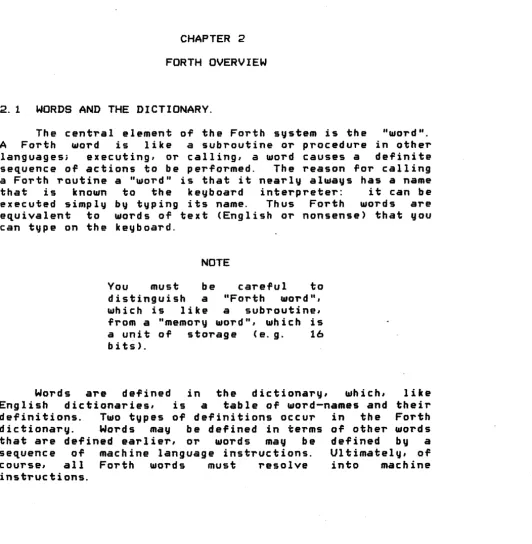
The central element of the Forth system is the "~ord".
A
Forth word is like a subroutine or procedure in other languagesi executing, 01" calling, a ~ord causes a definitesequence of actions to be performed. The reason for calling a Forth rQutine a "word" is that it nearly always has a name
that is known to the keyboard interpreter: it can be
executed simply by typing its name. Thus Forth words are
equivalent to words of text (English or nonsense) that ~ou
can type on the keyboard.
NOTE
You must be careful to
distinguish a "Forth word", which is like a subroutine, from a "memory word", which is
a unit of storage (e.g. 16
bits>.
Words are defined in the dictionary, which, like
English dictionaries, is a table of word-names and their definitions. Two types of definitions occur in the Forth dictionary. Words may be defined in terms of other words that are defined earlier, 01" words may be defined by a
sequence of machine language instructions. Ultimately, of
course, all Forth words must resolve into machine
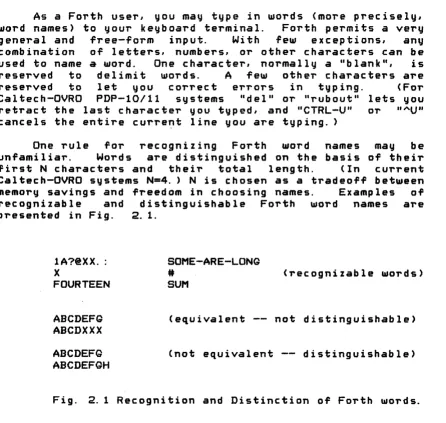
[image:8.620.35.568.200.744.2]As a Forth user, you may type in words (more precisely, word names) to your keyboard terminal. Forth permits a very general and free-form input. With few exceptions, any combination of letters, numbers, or other characters can be used to name a word. One character, normally a "blank", is reserved to delimit words. A few other characters are reserved to let you correct errors in typing. (For Caltech-OVRO PDP-I0/l1 systems "del" or "rubout" lets you retract the last character you typed, and "CTRL-U" or ""U" cancels the entire curre~t line you are typing. )
One rule for recognizing Forth word names may be unfamiliar. Words are distinguished on the basis of their first N characters and their total length. (In current Caltech-OVRO systems N=4. ) N is chosen as a tradeoff between memory savings and freedom in choosing names. Examples of recognizable and distinguishable Forth word names are presented in Fig. 2. 1.
lA?@XX. : X
FOURTEEN
ABCDEFG ABCDXXX ABCDEFG ABCDEFGH
SOME-ARE-LONG
#
SUM
(recognizable word5)
(equivalent -- not distinguishable)
(not equivalent -- distinguishable)
Fig. 2.1 Recognition and Distinction of Forth words.
[image:9.613.66.512.115.538.2]2. 2 THE STACK.
Numbers and other data are normally handled through the Forth "stack". This is a so-called "push-dollln" stack. Such a stack is a way to store data such that the most recently stored items are immediately accessible. Nelli data "pushes dotllnll older items. When an item is no longer required, it
is IIpoppedll off the top of the stack, making older items
available again. (The push-down stack is a last-in
first-out queue. )
The purpose of the stack is to provide you with an efficient means of handling data and intermediate results in the course of a calculation. (~ust as do the HP II RPN"
calculators HP-25, HP-67, etc.) La'belled variables to
hold intermediate data are not required in most cases.
Since the space used by the stack is shared by nearly all Forth words, there is a considerable saving in memory.
Most Forth words operate on data you supply on the stack, pop their input data, and push the results onto the
stack. For simplicity, the Forth convention is that you
must type the arguments of a function (Forth word) before you type the word i tsel f; i. e. you must give commands in IIreverse Polish notation". An example
( 1 + 2 )
* (
3 + 4 )may be written
1 2 + 3 4 +
*
2.3 BLOCK
STORAGE.In most practical applications Forth requires an
auxiliary mass-storage device. IBM-style magnetic tape,
DECtape, cassette tapes, and floppy disks are all usable for this purpose, although a high-speed disk unit is preferable. In any case, a random-access technique is required.
*
*IBM-compatible magnetic tape is conventionally used for
The storage device is divided into fixed-length "blocks", normally 512 words = 1024 characters long. These blocks may be used as a sort of "virtual memory", i. e. you may store data in blocks when you don't have enough room in main memory. Blocks are suitable for holding large amounts of experimental data, for example. They are also used for the Forth system itself: the Forth binary obJect program
and the Forth source (text) for loading the standard system and for users' applications.
Forth handles its transactions with the block storage device in a simple and device-independent way. Blocks are
simply numbered sequentially from 0 to some high number. Two buffers in main memory hold the last two blocks you have used. In order to retrieve a new block, you type BLOCK, which takes the number you've put on the top of the stack as
a block number, r~ads the block into a buffer, and returns
the address of that buffer on top of the stack.
Iof you want to change the data in a bloc k, you type UPDATE after BLOCK. Then, before the buffer holding your block is released for a new BLOCK command, i t will be rewritten to block storage. You can type FLUSH to rewrite updated blocks explicitly_
2.4 DEFINING NEW WORDS.
The "standardll Forth system has around 200 words
defined in its dictionary. These provide the functions most commonly need in useful application programs. "Writing" a
Forth program actually consists of defining new Forth words, which draw on the old vocabulary, and which in turn may be used to define even more complex applications.
Forth provides a number of ways of defining new words. The language even gives you ways of defining words that define words. (It is an extensible language.)
The word CODE permits you to define words whose actions
are expressed directly in machine- or assembly-language
maximum execution speed. If the tightest loops of your program are in CODE words, you may find that your Forth program is as fast as a pure assembler program.
A sample CODE definition follows:
CODE + Q §.
l:t
MOV, §.1
Q. ADD, NEXT,Here the Forth word + is defined as three PDP-I! instructions. Their action is to sum the top two stack values and leave the result instead. For further information consult Section 3.8 and the assembler description of your particular machine.
With the word ~ (colon) you can define Forth words in terms of other Forth words. Colon definitions are fairly machine independent. They do not have the full speed of a CODE word, but they are much easier to write. Colon words often use less memory than CODE words.
Each func t i on i nvok ed ( i . e. word referenc ed ) i n a .:.... definition takes one memory word (one byte in some microcomputer versions>. This memory word holds a pointer (address) to the Forth word that is to be invoked. The computer operates in an interpretive mode while a ~ word is being executed: a se~uence of pointers controls the computer. The interpreter overhead is quite tolerable in most cases ranging from 2 to 8 microseconds in the Caltech-OVRO PDP-11/40 version. These figures are
comparable to and often somewhat better than equivalent subroutine calls in assembler language.
This is an example of a Forth ~ definition: .:.... .:.... CONVERT COUNT TYPE L
Here the word .:.... (period) is defined as the sequence CONVERT, COUNT, TYPE, where these words are assumed present
in the dictionary when you type in the example. Semicolon
(L) is a word with the special meaning: "end_ definition".
There are other, more specialized, ways to define Forth
words. Numeric constants can be defined wi th the word
CONSTANT. For example,
defines the Forth word
PI-TIMES-IOOOO.
Whenever vou type this word, the constant 31415 will be pushed on the stack.Often you find that i t is
awkward
to have all your data on the stac k at once. You can store data in single named memory words. The Forth word VARIABLE(INTEGER
on older systems) lets you reserve and name such locations. Type13 VARIABLE ~
to define the Forth word~. When you type ~I the address of the storage location corresponding to ~ is pushed on the stack. The number you typed (13) sets the initial contents of the storage location.
If you need to reserve a multiword block of memory for data, you can use ARRAY:
25 ARRAY DATA
Th i s e xamp I e reserves 25 memory words named uDATA". When you t y p eliDA T A" , you get b a c k the add res S 0 f the of irs t memory word. You can add an index to the first address if you want the address of a later .word.
,
Very often the only way you want to access data in an array is through an indexl e. g. the .!.-th word in an array. The preferred way to define such an array is with the ()DIM
word:
16 ()DIM FDa
Like ARRAY, ()DIM reserves the indicated number of memory words under the name FOD. When you wish to access any of the data in FOO, however, you must supply an index. For examp I el
Here you are specifying the 3rd item in array FDD. get back is the memory address of the 3rd word.
2. 5
STORING AND RETRIEVING DATA IN MEMORY.
The word
l
is provided so you can "read out" data from any address. You type<address>
!
where
<address> is any valid memory address to retrieve the data stored there. (The data replaces <address> on the stack. ) Thus typeto get the integer in variable ~ (initially 13).
To "write" data from the stack into a location in memory you type
<value> <address>
l
Here <value> is stored in location concretely,
<address:>. More
stores a new value (148) in variable~. (Note that both "148" and ~ push numbers on the stack. The "store" word [1]
stores the data away and then pops both input data from the stack. )
Another little program might run
1.
VARIABLE
ABC ABC!
MINUS
ABC
I2.6 CONTROLLING FORTH -- THE TEXT INTERPRETER.
You normally control a Forth computer from your terminal. The system is idle and listening for anything from the keyboard until you type in a complete line. When Forth gets a full line (ended with "return"), i t attempts to execute the words (or numbers) you have typed.
Many times you will want to avoid typing long, standard, or repetitive sequences of words. For example, once you have debugged a new word, you don't want to have to type i t in again. 'The Forth text editor (see below) lets you store away the program (in source text form) in a block. To define the word, or collection of words, in the future all you need to do is type
LOAD is a word that temporarily redirects Forth's text interpreter away from your terminal to the block number you specify. Almost any user commands (Forth words) you could type directly can be executed from a block via LOAD.
Each block to be loaded must end with the special word
is,
which restores the text interpreter to the source previously in effect. Note that LOADs may be nested; a block to be loaded may contain LOADs itself.A block might contain the following text:
2.7 TYPEWRITER
OUTPUT.Output from Forth normally comes to your terminal (typewriter or CRT). A few basic words will suffice for many applications. You can type a number from the stack with the word ~ <period). Question mark
1
uses an address on the stack and types the number that lies at that address.The base used for numeric input and output is determined by the variable BASE. BASE may have any value from 2 through 10 (decimal>. Some implementations allow base 16 as well. The special words OCTAL and
DECIMAL
let you set BASE automatically. The default number base should be decimal, but you should check this on your system.For typing arbitrary strings of data you may use ~.
TYPE
takes two numbers on the stack:<pointer> <character count> TYPE
The nature of the pointer depends on the system. In the PDP-ll, i t is simply a byte address that indicates the first character to be typed. For the PDP-10, i t is a byte-pointer with the same errect. Beginning with the specified character, TYPE puts out se~uential characters until the count is satisfied.
Terminal input and output save space by using the same buffer in main memory. To avoid problems you should use only one output word on a command linei you should place an output word at the end of the command. For example
typed in as one line will give you only "123" on your terminal. This is because "456 . II is wiped out when "123"
is typed.
2.8 CONDITIONAL BRANCHES.
Forth gives you several means to direct the flow of execution. The methods described here work only within ~
The simplest conditional branch is specified by the words
BEGIN
andEND.
Consider the following example:~
EXAMPLE
1
BEGIN
1
=
DUP ~ ~ LBEGIN
signals the beginning of a loop. When gets to the END (during execution ofEXAMPLE),
return to the BEGIN if and only if the current is zero. The value is popped after testing Forth words pop their input arguments.
the program control will stack value Just as most
This is what happens when you execute EXAMPLE: The value 1 is pushed on the stack and the program enters the loop. Again, 1 is pushed; then subtracted from 1 to leave O. The 0 value is duplicated (DUP) and tested by END; then the duplicated value is popped from the stack. Since END found a 0, control returns to BEGIN; 1 is again subtracted, leaving -1. END finds -1 and control passes through to DROP
where the remaining -1 value is popped. Control returns to the calling word, e. g. to the interpreter if you we~e typing.
The
BEGIN -
END construction is useful for program loops where the loop termination condition can conveniently be expressed by leaving a zero or non-zero value on the stac k.A looping facility more like the Fortran DO-LOOP is provided through the words DO, LOOP, and +LOOP. Another examp Ie:
When you execute
EX2,
the constants 5 and 0 are pushed on the stack. DO takes these numbers to be the limit and initial index for the loop, respectively. The limit and index disappear from the stack and are placed on a hidden internal stack (the return stack)*. Control passes into the loop. The word ~ retrieves the current loop index value and pushes i t on the stack. The value is typed (and popped) by _ LOOP increments the index value by 1, then tests i t agains the limit. If the new index value is s t i l l less than the 1 i mit I con tr 0 I r e t urn s t o t h e DO (i. e. t o t h e poi n toff the internal stack and control passes out of the loop. Thus when you execute EX2, you get
o
1 2 3 4 typed on your terminal.NOTE
The index of a DO stops one short of the limit. The limit gives the number of times the loop is executed if the initial index is O. The range of a loop is always executed at least once.
Words ~ and ~ are defined like
1
to let you retrieve indices in nested ~ loops. In the word EX3, defined as1
retrieves the innermost index, ~ the next outer, and ~ the outermost; CR causes a carriage return. EX3 should give you the following output. (Again, each index stops one short of its 1 imi t. )-1 1 3 0 1 3
-1 2 3 0 2 3 -1 1 4
0 1 4 -1 2 4
0 2 4
If you need an increment other than +1 in your loop, you can use +LOOP. Here is an example:
,;.. EX4
Q.
2.
DO1.
~ -1 +LOOP Lcurrent stack value to be the loop increment. (+LOOP tests the index in a way that depends on the sign of the increment. For a positive increment the test is the same as for LOOP; when the increment is negative, the loop will run once with the index eq,ual to the limit. Thus the output of
~ is
5 4 3 2 1 0 . )
Variable increments are also possible with +LOOP: whatever wo r d i s 1 eft 0 n t h e s ta c k t*l en +LOOP i sex e cut e d will be
used for the increment. •
The general conditional branch in Forth will be familiar to users of Algol or PL/1: an IF - THEN - ELSE construction. Assume that TRUE-CLAUSE and FALSE-CLAUSE are words that have previously been defined; then define EX5 as follows:
_ EX5 IF TRUE-CLAUSE ELSE FALSE-CLAUSE ~
L
When you run EX5, IF tests <and pops) the current stack value; if it is non-zero, TRUE-CLAUSE runs, otherwise FALSE-CLAUSE runs. In general, control flows as shoUln in the following line
-if <value>. eq.O
1---:
v
<value> IF <t~ue-code> ELSE <false-code> THEN :---~---:
In some cases you only need to test for a "true" condition, e. g.
~ EX6 IF TRUE-CLAUSE THEN L
Here TRUE-CLAUSE is run if and onl~ if the current stack value is non-zero ("truel l
if <value:>. eq.O
:---~---~-~---: v <value> IF <true-code> THEN
A more realistic example of a program using conditional branches might look like this:
,;". FUNCTION DUP Q. ~
IE
MINUSELSE
DROP Q. THEN DUP PUP*
!:L
FUNCTION takes the current stack value (say ~) as input and , retUT'ns
o
if.!. . GE. 0, ando.
(Fortran notation)Let us briefly explain what happens in FUNCTION. The word ~ is a binaT'Y function that returns 1 if the next-to-current stack value is less than the current value; otherwise i t returns O. MINUS replaces the current stack value with its negative, and ~ returns the product of the top two values.
When you executed FUNCTION, the input value (~) is dup 1 i cated CDUP) and tested agai nst 0
(2.
S>' I f ~ < 0,S.
returns 1, and IF will transfer control to the true-clause (MINUS>' The current stack value at this time will be 1.' since both ~ and IF will have popped the stack. MINUS then negates 1.' and control bypasses the ELSE clause (the false-clause) and resumes following THEN. The current stack value (-1.) is then cubed COUP DUP !: ~), and FUNCTION is done.
On the other hand, if x
were
.GE. 0, IF would transfer to the false-clause <DROP Q). Here!. is popped and replaced with O. Control then passes overTHEN,
0 is cubed, leaving... DO N.L.=1
IF 2
IF 3
THEN
3
ELSE
2
THEN
2
LOOP
1 is a valid ordering. (Note the indication of nesting levels.) The following is invalid:
... DO ... IF
LOOP . .. THEN
In this case the range if the
IF-THEN
does not lie within the range of theDO-LOOP.
Unlike Fortran, Forth does not let you "GO TO" an arb i trary 1 ocat i on wi th a statement labe 1 (numb er >. In general, IF is the only way you have to make a forward Jump. The loss is not serious if you take care to "structure" your programs it turns out that most "GO TOs" are unnecessary.
2.9
THEEDITOR.
In preceding sections, the Forth block storage scheme was introduced.
A
maJor use for block storage is to hold text data, Forth source code for example. The way you can enter and modify text in Forth blocks is with the Forth text ed i tor.In the Caltech-OVRO versions of Forth, at least two editors are available. The basic editor (EDIT) is very compact but gives you everything you need to modify text a line at a time. The extended editor (XED) includes flexible str ing man i pulat ions and lets you search for, insert, or delete text strings anywhere in a block.
For the PDP-11 systems containing a VT-11 vector graphics system (the Cal~ech-JPL VLBI Processor's GT44 and the OVRO 1024-channel autocorrelator's GT40) there is a special editor called QED. This editor uses the refreshed display to show a block being edited and a cursor within the block. Flexible cursor controls and text manipulations are
available. <Refer to Appendix D. )
The standard block length for Forth systems is 512 16-bit words
=
1024 8-bit characters. This is conventionally divided into 16 lines of 64 characters. * (The64th character of a line ~s logicall~ Just before the first character of the next line. )
The variable BLK is used to'hold the Forth block to be edited, thus to edit block 35, we type
If you want to list the entire block 35, you type
~s a side effect LIST sets BLK to equal the specified block. To list blocks 35 through 40 at once, you type
To list Just one line (say the 5th) of the current ,block, you type
You can delete the second line by typing
R
deletes the line by moving up all the lines following the one you delete. The last line (16) should be filled with blanks.To enter new text into a block you first need the special words ~ or
L
to put a line of text into an internal buffer. Guote (") enters all text up to the next quote into the buffer. Left parenthesis (1) does the same except that the text line must be terminated with a right parenthesis<1.>.
Thusand
i
THIS IS6
I&!l
STRING)bot h p I ace II TH I SIS A TEXT STR I NG" in t o t he b u f fer. I f
following in the input. The text string to go into the buffer begins after this necessar~ blank. The: or
L
that terminates the text is Just a "delimiter"i i t needs no preceding blank.On~e ~ou have got the new text entered in the buffer with : or
1,
you may use i t to replace(R)
an existing line or to insert (~) following an existing line. To replace line 3 of block 10 with "Faa BAR", you could typeTo insert 'THIS IS A aUOTE: 10 you can type
"' after line 12 of block
10 BLK
1. 1.
THIS IS ~ GUOTE:.:1.
121..
(Here you must use the
1. -
L
construction to enter a string containing a q,uote.)1.
inserts the line following line 12 by first moving lines 13 through 15 down one. The old line 16 is lost.After a
I
orQ
operation the line that was typed or deleted is automatically copied into the internal buffer, ready for a possibleR
or~. For examplehas the effect of moving line 14 to line 3, with lines 4 13 moving down one.
This Chapter provides a more thorough description of the Forth system. The reader is assumed to be familiar with the preceding Chapters and to have had a significant amount of· "hands-on" experience with a Forth computer. The presentation is intended for implementers and systems programmers, but it should be useful to more casual programmers who want to know how to make the most efficient use of Forth.
3. 1 GENERAL REMARKS.
It is important to stress that Forth is a complete programming system, not merely a language. In some versions, Forth provides all the software functions of the computer on which it is run. This includes preparation of programs (text editing), compilation (or assembly) of programs, debugging and input/output operations through direct-access or typewriter devices. In other versions of Forth, including several Caltech-OVRO systems, Forth runs as a Job or task under a standard operating system. The operating system provides standard interfaces for liD,
scheduling, and memory management.
Such features do not really define a language. There is a Forth language, however: one that we can call "standard" Forth (SF). In this language concrete words are
defined, such as ~,
BLOCK,
andDO.
SF
may be compared with other programming languages like Fortran, Basic, or Algol~SF
could in principle be implement~d with a compiler like a Fortran compiler, and run like Fortran in a batch processor.*
But Forth's distinctive incremental compile/debug approach is much more productive and is well suited to the way real minicomputers are used.3. 2 THE STACKS.
Modern minicomputers generally have very flexible addressing methods; these are heavily used in Forth systems. An important example is the use of push-down stacks. Most Forth systams use two stacks extensively: a parameter stack and a return stack.
The parameter stack, often simply called "the stack", is the one most visible to the applications programmer. It is used as the primary vehicle for input and output data for Forth words. Usually data types such as integer, double precision integer, and floating point are intermixed freely on the stack. Context usually suffices to distinguish types.
The push-down stack accounts for the "unnatural" reverse Polish notation of Forth. That is, all parameters must be placed on the stack before they are operated upon. Thus the algebraic expression
could be written in Forth as
reentrant code for real-time systems. Against such advantages must be counted the inconvenience. especially for new Forth programmers, of placing all the arguments before the operators.
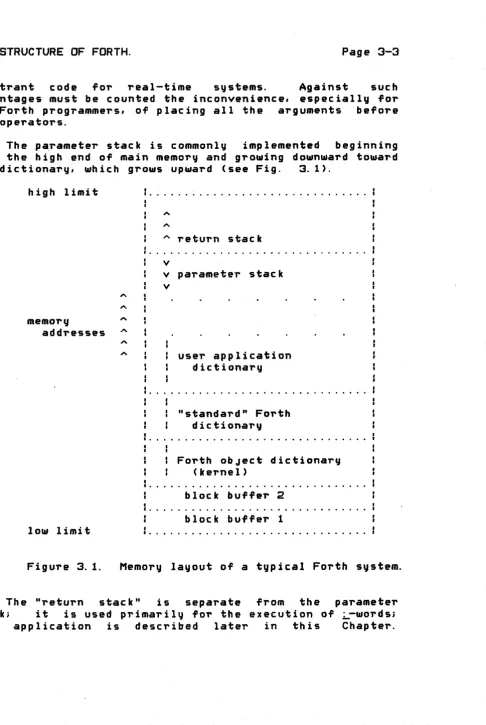
The pa,rameter stack is commonly implemented beginning near the high end of main memory and growing downward toward the dictionary, which grows upward (see Fig. 3.1>'
high limit
memory
addresses
10111 limit
Figure 3. 1.
....
[image:26.615.59.546.49.775.2]•
...
" ... " .. " .. " ... " " ... ..,
" return stack v
v parameter stack v
user application dictionary
: "standard" Forth dictionary
, , , .. .. .. " " .. • .. .. .. " " .. .. . . ~ .. .. I) • . . .. • " 0 I) . . .. . . ..
I Forth obJect dictionary (kernel)
block buffer 2 block buffer 1
Memory layout of a typical Forth system.
The "return stack" is separate from the parameter stack; it is used primarily for the execution of ~-words;
this application is described later in this Chapter .
Various other information may be placed on the return stack. This stack is normally used to hold indices and limits for
DO
loops. Using the return stack Tor this purpose, the implementer avoids having the loop information on the parameter stack where i t might lie in the way of data for other calculations.In the same vein, the word
>R
is deTined to take one word from the parameter stack and save i t on the return stack. ~ has the reverse effect.3.3 THE DICTIONARY.
The Forth dictionary is the heart of the system. All programs written in Forth appear as ~ords or collections of words in the dictionary. The organization of the dictionary and the details of dictionary entries differ between various Forth implementations. In this Section we will principally describe the Caltech-OVRO Forth for
PDP-II.
3.3.
I
Branch Structure.Forth dictionaries are organized as threaded lists each of whose elements is the definition of a word. The simplest list structure would have a single linear thread connecting the Forth words in the sequence of their definition. Fe~
Forth systems use this simpl~ method, since efficiency in search time and memory space can be gained rather easily.
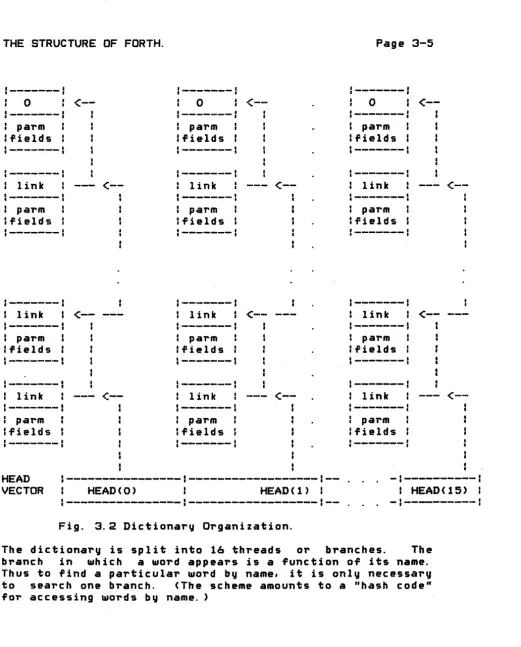
The dictionary list structure developed Caltech-OVRO PDP-II systems is sketched in Fig.
for 3.2.
:---:
a.. _ _ _ _ _ _ _ _-~---•
0<--
0<--
0<--•
:---:
---
---•
parm•
parm parm•
•
:fields
•
• fields fields1---1
---
---1---1
...
---:
:---I
link
<--
link<--
•
link<--I
•
1---1
---1
1---I parm parm
,
parm,
IIfields
,
,
fields,
I Ifields:---1
---:
1....-1---
....
_---
:---1
•
t link<--
link<--
•
•
link<--l---
c-. _ _ _ _ _ _I 1---1
•
parm parm•
parm•
•
:fields fields :fields
•
•1---
---_
...
_-
,---~-I1---1
1---
I--aa.----•
link---
<--
•
link<--
•
link<--I
•
I1---1
1---
1---I
parm « I parm f
parm
•
•
•
,
Ifields
•
t Ifields Ifields:---1
J---
:---HEAD ,---: --- : - - . . . - :.---: VECTOR I H E A D ( O ) : HEAD ( 1) I : HEAD ( 15) :
I---I---~---I--
. .
-:---:
Fig. 3.2 Dictionary Organization.
[image:28.618.27.548.60.706.2]The head, or growing end, of the list is defined by a 16-element vector of painters. These painters aim at the most recently defined word in each branch. A field in each word definition in turn points to the previous word in the same branch. (The exact target of the link may not be the link of the previous work; some versions have the link pointi ng to th e previ ous link plus one, for instance.) Each branch terminates with a word having zero link field. Definitions in different branches may be interleaved arbitrarily in memory.
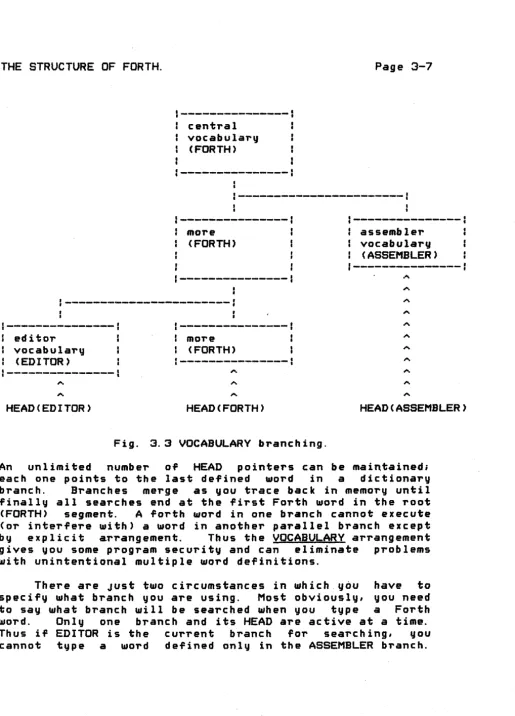
central vocabularv
(FORTH)
:---~~~---:
1---more (FORTH)
:---I---~~---~-:•
•
I---~---I
editor
I vocabulary : (EDITOR)
1---1
HEAD(EDITOR)
:---:
I more
I (FORTH)
:--~---~---:
HEAD(FORTH)
Fig. 3.3 VOCABULARY branching.
:----~---:
assembler I vocabularv
I ( ASSEMBLER)
:---:
.'"
HEAD(ASSEMBLER)
An unlimited number of HEAD pointers can be maintained;
each one points to the last defined word in a dictionary branch. Branches merge as you trace back in memory until finally all searches end at the first Forth word in the root (FORTH) segment. A forth word in one branch cannot execute (01" interfere with) a word in another parallel branch except
by explicit arrangement. Thus the VOCABULARY arrangement
gives you some program security and can eliminate problems with unintentional multiple word definitions.
[image:30.620.35.551.37.754.2]The other circumstance is when you
are
definining new words: what branch should they be compiled into?The branches in effect for word look-ups and for compiling do not have to be the same. For example, you may wish to use the ASSEMBLER vocabulary when you are compiling a CODE word in some other branch.
We briefly describe the action of VOCABULARY and DEFINITIONS. If you type
VOCABULARY FOO
a new branch of the dictionary is formed. The branch leaves the current dictionary branch (FORTH or the last one specified by DEFINITIONS) at its current head. A new Forth
word EQQ is created. When you type
EQQ,
the dictionary branch to be used for further dictionary searches is switched to the FOO branch, i.e. the one you've Just created. Similarly, any time you type FORTH, ASSEMBLER, etc .• you switch to the corresponding branch.If you type DEFINITIONS, the dictionary branch to be used for compiling is switched to the current branch used for searching.
3.3.2 Header Section.
The detailed format of a word in the dictionary varies between Forth implementations. This section describes the format used in the Caltech-OVRO PDP-11 Forth. This format is notable in its very efficient use of memory. Only two memory words of header are re~uired in most cases, even when
we use 4 characters plus count for a word name. *
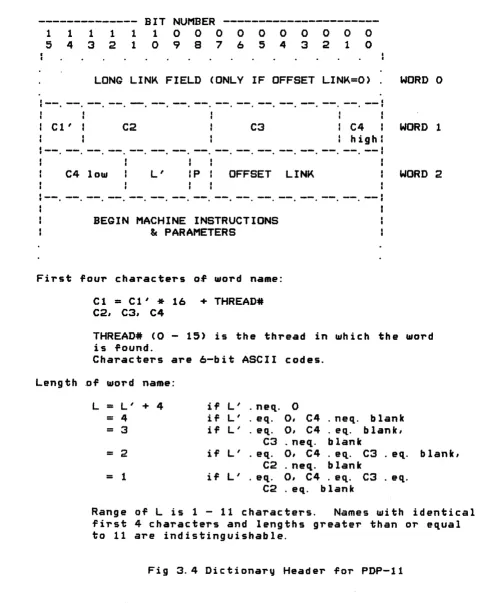
Each word definition in the 16-way PDP-11 dictionary contains a "header" which defines the word name (first 4 characters and count), precedence, and the link to the previous word in the same dictionary branch. These data are
--- BIT
NUMBER
---1 ---1 ---1 ---1 1 1 0 0 0 0 0 0 0 0 0 0
5 4 3 2 1 0 9 8 7 6 5 4 3 2 1 0
LONG LINK FIELD (ONLY IF OFFSET LINK=O). WORD 0
1--.
--
•--
•--
•--
• ~-•--
•-- --
• lit-- --
• •--
•--
•--
•--C l ' : C2 C3 : C4 WORD 1
I
I
: high
C4 low
L'
IP: OFFSET LINK WORD 2--
.
-- --
.
.
--
.
--
.
--
.
--
.
--
.
-- --
-- --
--
--BEGIN MACHINE INSTRUCTIONS
&
PARAMETERSFirst four characters of word name:
Length
Cl = Cl'
*
16 + THREAD# C2, C3, C4THREAD# (0 - 15) is the thread in which the word is found.
Characters are 6-bit ASCII codes.
.of word name:
L = L' + 4 if L' · nect· 0
= 4 if L' · eq. Q, C4 · neq. blank
= 3 if L' · eq. 0, C4 · eq. blank,
C3 · neq. blank
= 2 if
L'
· ect· 0, C4 · eQ.. C3 . ect· blank,C2 · neq. blank
= 1 if L' · ect· 0, C4 · ect· C3 . eq.
C2 · eq. blank
Ran g e 0 f Lis 1 - 11 c h a r act e r s . Name s wit hid en tic a I first 4 characters and lengths greater than or equal to 11 are indistinguishable.
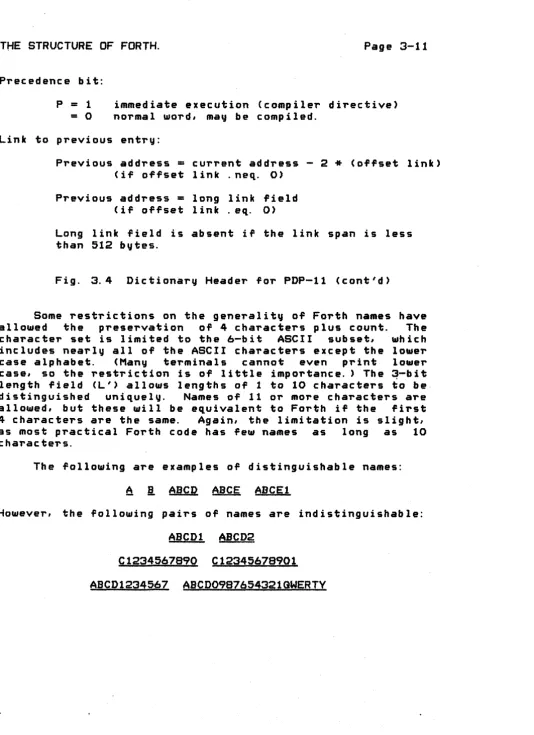
[image:33.613.60.541.129.732.2]Precedence bit: P
=
1=
0immediate execution (compiler directive> normal ~ord, may be compiled.
Link to previous entry:
Previous address
=
current address - 2*
(offset link) (if offset link .neq. 0)Previous address
=
long link field (if offset link. eq. 0)Long link field is absent if the link span is less than
512
bytes.Fig.
3.4
Dictionary Header for PDP-l1 (cont'd)Some restrictions on the generality of Forth names have allowed the preservation of 4 characters plus count. The character set is limited to the 6-bit ASCII subset, which includes nearly all of the ASCII characters except the lo~er
case alphabet. (Many terminals cannot even print lo~er case, so the restriction is of little importance. ) The ~-bit length field (L') allows lengths of 1 to 10 characters to be distinguished uniquely. Names of 11 or more characters are allowed, but these will be equivalent to Forth if the first 4 characters are the same. Again, the limitation is slightl as most practical Forth code has few names as long as 10 c harac tel's.
The following are examples of distinguishable names:
~
i
ABCD
ABCE
ABCEl
However, the following pairs of names are indistinguishable:
ABCDl
ABCD2
Cl234567890 Cl2345678901
[image:34.615.31.565.57.792.2]Even with the 6-bit coding and the restricted length field, a further savings in bits is required to fit all the header data into two words. This is accomplished easily since a natural "key" for choosing a dictionary branch for a Forth word is one of the characters of the name. In
particular the 4 low-order bits of the first character are distributed fairly randomly and are suited for the purpose. We define the following function:
THREAD#
=
HASHC NAME )where the hashing function "HASH" is Just e~ual to the number ex~ressed by the 4 low-order bits of the first character of the "NAME" string.
If the HASH function is used to select a branch for the word entry, the Forth word header does not need to contain those bits selected by HASH; they would be redundant. Thus the field C1' in Fig. 3.4 contains only the two highest order bits of the first character; the low-order bits are implied from context, i. e. from the thread number.
One bit of the Forth word "precedence". Normally this
II immed iate" talords the bit is one.
importance for compilation; i t Section 3.9.
header is reserved for bit is
zero,
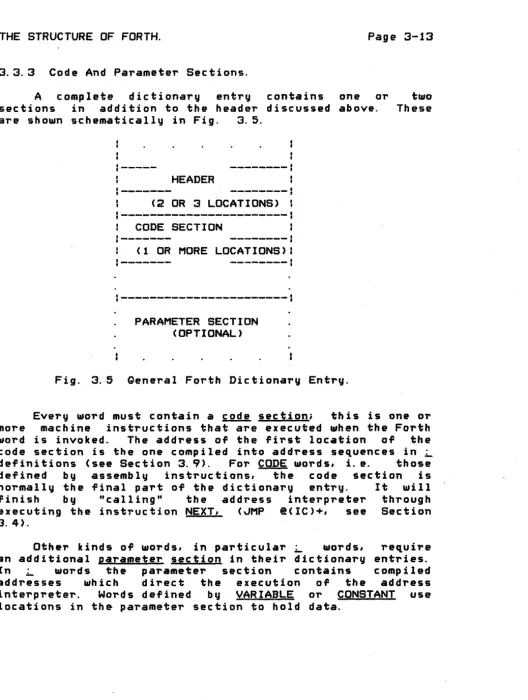
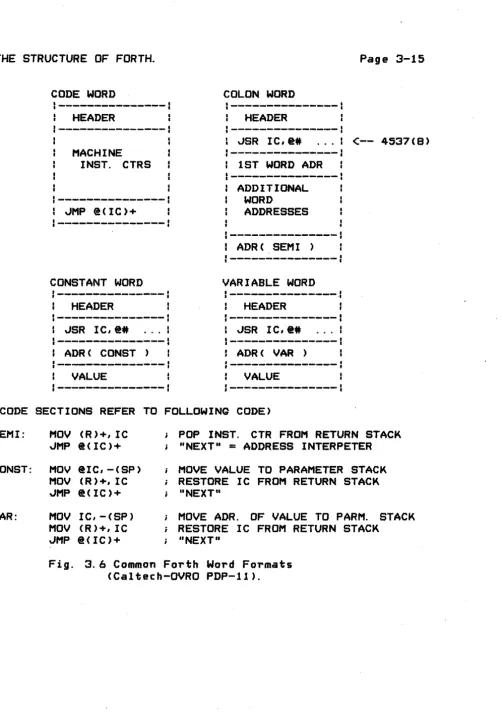
but for This bit has special is discussed below in3.3.3 Code And Parameter Sections.
A
complete dictionary entry contains oneor
sections in addition to the header discussed above.
are sho~n schematically in Fig. 3.5.
•
•
---_.
HEADER
(2 OR 3 LOCATIONS) CODE SECTION
(lOR MORE LOCATIONS)
:----~---:
PARAMETER SECTION (OPTIONAL)
Fig. 3.5 General Forth Dictionary Entry.
two These
Every ~ord must contai.n a code section; this is one or more machine instructions that are executed when the Forth
word is invoked. The address of the first location of the
code section is the one compiled into address sequences in ~
definitions (see Section 3.9>' For CODE ~ords, i. e. those defined by assembly instructions, the code .ection is normally the final part of the dictionary entry. It ~ill
finish by "calling" the address interpreter through executing the instruction NEXT, (~MP @(IC)+, see Section 3.4).
Other kinds of words, in particular _ words, require an additional parameter section in their dictionary entries.
[image:36.623.35.563.66.766.2]CODE WORD
,--...
_---HEADER
MACHINE
INST. CTRS
:---I
JMP (!(IC)+
1---:
CONSTANT WORD
HEADER
,",SR IC,@4t
ADR( CONST )
VALUE
COLON WORD
:---~---~-.
HEADER
:---I
JSR lC,@4t
1---I 1 ST WORD ADR
:---~---.
ADDITIONAL
WORD
ADDRESSES
I---~I t
ADR( SEMI )
«t
:---:
VARIABLE WORD
---_.
HEADER
ADR( VAR )
VALUE
<--
4537(8)(CODE SECTIONS REFER TO FOLLOWING CODE)
SEMI:
MOV (R)+,IC
JMP @(IC)+
CONST:
MOV @IC,-(SP)
MOV (R)+,IC
JMP
@(IC)+
VAR:
MOV IC,-(SP)
MOV (R)+,IC
JMP @(IC)+
POP INST. CTR FROM RETURN STACK
"NEXT"
= ADDRESS INTERPETER
MOVE VALUE TO PARAMETER STACK
RESTORE IC FROM RETURN STACK
"NEXT"
MOVE ADR. OF VALUE TO PARM. STACK
RESTORE IC FROM RETURN STACK
"NEXT"
[image:38.617.39.542.44.762.2]Note a littl~ scam in the _ ~ord: the code section instruction (~SR IC,@#address) is a double-word instruction, but the second location is really Just the first location of the parameter field as far as the Forth compiler is concerned. This address and those follo~ing comprise the
se~uence that directs the address interpreter. It turns out that the PDP-11 instruction ~SR IC,@#address has precisely the right action to start the address interpreter; it saves the instruction counter on the return stack and directs execution to the code located by the first address of the address sequence.
*
3.3.4 Expanding And Contracting The Dictionary.
The Forth dictionary is initially set up ~hen the program is loaded from disk, e. g. ~hen you type
.R FORTH
under the RT-11 opera~ing system. This initial dictionary and its associated code is called the "obJect program"
or
'U kernel". For Cal tech-OVRO systems the kerne l i s defined in
Macro-11 assembly language. Other systems sometimes use so-called "Metaforth", which is a Forth program " that cross-compiles code from one Forth computer to generate a
ne~ kernel for another (or possibly the same) computer.
You extend the dictionary by executing "defining wards" words that define new dictionary entries. You can do this directly from a terminal (typing ~, CODE, "etc.) or
indirectly by LOADing blocks that contain defining words. Th,e defining wards have the logic required to compute the proper thread number and to enter a new element in the corresponding dictionary branch.
At times you need to truncate the dictionary and free up memory areas. You do this with FORGET. Type
FORGET BAR
beg inning of BAR.
Thus BAR and all words defined after BAR (in time
se~uence) are deleted. Judicious use of FORGET gives you a simple overlay capability in Forth.
3.4 PROGRAM CONTROL -- THE ADDRESS INTERPRETER.
Another central element of the Forth system is the function of the address interpreter (AI>' This code directs the ex~cution of Forth words from address sequences in memory. The normal termination of every CODE ~ord is an invocation of the address interpreter.
The interpreter operates on a se~uence of memo~y
:---:
---:
: HEADER "ABC" HEADER "Aft
:---1
---1
I ~SR IC, @4t ••• 1---> ~SR IC,@# ...
'---:
---1
ADDRESS ( A) 1 _ _ _ _ _ _ _ 1 ADDRESS ( AA ) I
---1
(IC)---> ADDRESS ( B )
---1
ADDRESS ( AS ) :
---:
ADDRESS (
C )ADDRESS ( SEM I) :
---:
ADDRESS(SEMI)
1---_ .... -
I~---: HEADER
US",--->
~SR IC,@ • . . .Forth definitions:
---A ---A---A
AS
S BA C CAABC ABC
ADDRESS (
BA )---,
ADDRESS ( SEM
I) :---f
---J
HEADER "C"
--->
~SR IC,@# ...ADDRESS ( CA )
ADDRESS(SEMI)
Fig. 3.7 Compiled address sequences.
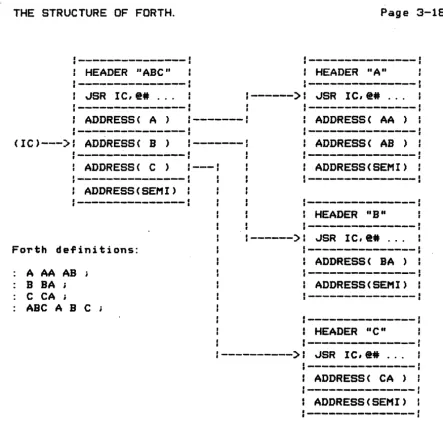
In each _ definition an address sequence specifies the Forth words to be run when the ~ word itself is executed. I. e. if ABC is defined.;",. ABC ~
!!
~ L' the addresses of words ~, ~.k'
and L are found in the parameter field of ABC. These addresses define what actions occur when ABC is executed. [image:41.620.90.533.101.529.2]instruction counters, IC points to the next (Forth) instruction to be executed. "Instructions" to the AI are Just the addresses of Forth words.
The Forth interpreter must pick up the address that IC points to, increment IC to point to the next address in sequence, and finally Jump to the code specified by the first address. In terms of Fig. 3.7, the next invocation of the interpreter will pick up the address of the word ~,
IC will be incremented to point to the next address (address of ~), and control passes to the ~SR instruction in the code section of B.*
Several computers are so appropriately designed that the entire AI function can be achieved in a single instruction. The DEC PDP-l1 and PDP-10 are of this type. Fig. 3.8 displays the AIs (NEXT instructions) for 3 types of computer.
(PDP-l1) NEXT:
JMP
@( IC)+ IC is a register . (PDP-lO)NEXT:
AOJA
IC, @O( Ie) ditto(8080) NEXT: LHLD IC
IC
is a 16-bitMOV E,M i double-word
INX H MOV D,M INX H SHLD IC XCHQ PCHL
Fig. 3.8 Address Interpreters for 3 Computers
[image:42.617.42.539.58.736.2]ways. The simplest would be to alter IC directly in a
CODE-de~ined ~ord, and then to invoke the interpreter. A more subtle, but more
instruction Tlo~ is performed executed from a ~ ward. This is above in Fig. 3.7.
useful redirection of every time a _ word is the situation presented
A good way to accomplish the diversion of the AI is to store away the contents of IC on a' stack (the return stack), and to set IC so that it points to the first word of the parameter section of the new ~ord to be interpreted. (Done this way, the AI algorithm is ~ecursive. )
In general, what is the appropriate instruction to put in the code section so that the AI is redirected? We need an instruction .that lets us push a register on a stack and somehow "remembers" where i t is when executed. Usually some kind of subroutine call instruction is appropriate.
(PDP-l1)
Appearance of code section~
JSR IC,@*
address1 address2
No subroutine required.
(PDP-10)
Appearance of code section: PUSH'" RP,COLON address1
address2
Required subroutine:
(8080)
COLON: EXCH IC,O(RP) AO~A IC,@O(IC)
Appearance of code section: CALL
COLON*
address1 address2
Required subroutine:
COLON:
LHLD IC
XCHG
CALL
RPUSH POP. H SHLDIC
"'MP
NEXT*II really one :: instruction
(NEXT)
two bytes tlilO bytes
. ( DE ) --:>RSTK FROM CALL INST.
*The CALL COLON and JMP NEXT instructions can be replaced' by hardware reset (RST) instructions, with a savings
of 2 bytes per use. You must have appropriate code at the corresponding low-memory locations.
Fig. 3.9 The COLON Function for 3 Computers.
You end a normal ~ definition with j . The semicolon
(L) compiles an address called "SEMI" into the dictionary as the last entry in the parameter section o~ the word you're
currently defining. (L also resets the compile state. )
[image:44.612.32.549.42.744.2]the effect of the COLON function. It must restore the old contents of IC from the return stack. The SEMI routines for the same 3 computers are given in Fig. 3. 10.
(PDP-II) SEMI: MOV (RP)+,IC
~MP @(IC)+ (NEXT) (PDP-10) SEMI: POP
RP,
ICAOJA
IC,@O(IC) (NEXT)(8080) SEMI: CALL RPOP
XCHG SHLD IC '-'HP NEXT
Fig. 3. 10 The SEMI Function fo~ 3 Computers.
The discussion and figures above indicate that the address interpreter may be nested very deeply, limited only by stack space. In other words, Forth ~ words can refer to earlier ~ wards, which can refer to yet earlier blords, etc. The time overhead for the AI recursion (or the "calling" of one ~ blord by anoth.r) is seen to be very nominal -- about
e~uivalent to a conventional subroutine call.
In summary we can say that the address interpreter is the engine that makes _ words go. The technique is not new} it is also used in DEC's "threaded code" in PDP-l1 Fortran. But in combination with the text interpreter (see below) it is responsible for the unique power of the Forth system.
3.5 THE TEXT INTERPRETER.
[image:45.618.68.530.107.792.2]than addresses.
The TI is really a Forth program in its own right. In fact it is the basic program that executes in normal Forth systems. When you type in a word ("command") to Forth, i t is the TI that interprets your command and actually begins execution.
A structured program (in pseudo-English) for a typical T I foil OW5 in Fig. 3. 11.
GO: IF( Input is from typewriter )
THEN IF( Text buffer is empty )
THEN Wait for next full input line from tvpe-..riteri
IF( Input is from typewriter )
THEN Prepare to read type-..riter buffer ELSE Prepare to read selected block buffer; Collect a text string (word) from buffer;
IF( Word exists in dictionary ) THEN IF( In compile state )
THEN Compile a pointer to dictionary word;
ELSE Execute the dictionary word ELSE IF( Input string converts to a number
in current radix )
GO TO GO;
THEN IF( In compile state)
THEN Compile a pointe,.. to "LITERAL"
follo~ed by number value ELSE Push numbe,.. value on stack ELSE Abort;
Fig. 3.11 A Structured Pseudo-English Text Interprete,...
[image:46.615.35.552.46.783.2]until
is
is encountered. <AndL§
had better be there!)"Collecting a text string" means scanning the input source ,until a complete word-name-candidate is found. That is, scanning begins from the current position of an input text pointer until the first non-blank character is found. Then all the non-blank characters up to the next blank (or other specified delimiter) are moved to a special place*.
Using the appropriate rules for identifying word names with dictionary entries (e. g. first 4 characters plus length), the TI attempts to find a match with an existing entry in the dictionary. If a match exists, the TI will normally simply execute that word. There is one case where, if you type a word, you don't want i t executed: this is when you are defining a ~ word. If you are defining a _ word, the TI will store a pointer to the word in the next available dictionary location.
If there is no matching entry, the TI will try to see if its collected string will convert properly as a number. If the string does make sense as a number, that number is normally Just pushed on the stack. If you happen to be compiling a ~ word, the TI compiles a call to a special word "LITERAL" followed by the value, so that the number you've typed will be pushed on the stack when you execute your new word.
If the "word" you've typed can't be found in the dictionary or converted as a legal number, the TI gives up and ABORTs. All the stacks are reset, the compile state is reset. the word itself is typed again followed by a question mark, and F~rth starts the TI allover again.
3.6 ERROR MESSAQES -- ABORT.
The only "standard" error routine in Forth is called ABORT. ABORT simply resets nearly everything in the Forth system: the parameter and return stacks, the compilelexecute state (to execute). the terminal buffer. etc. Only the dictionary and the current state <block contents and update flags) of the block 1/0 system are not *Actually to the next several available dictionary locations
affected.
In addition to the res~t function, ABORT tvp~s a very simple
error
message on the terminal: the name of the last word processed bV the text interpreter followed bV a question mark.The action of ABORT in a real time Forth system is not standardized. In most situations with Caltech-OVRO Forth, an ABORT caused by an
error
in a background (user-terminal) task will not affect a foreground, real-time task. This is simply because the background task only runs when the foreground task is finished, i. e. when the foreground task has nothing to keep on the stacks.3.7 BLOCK INPUT/OUTPUT.
Forth normally maintains a single direct-access file on secondary storage (such as disk), This storage is not logically re~uired to run Forth; micro-computers, for example, may use a Forth system permanently "blasted" into read-only memory. But in general purpose minicomputer systems. much of Forth's versatility depends on ade~uate
block storage.
The conventional record size for block storage is 1024 a-bit bytes,
or
512 16-bit words. Blocks are simply numbered se~uentially from 0; thousands are typically available.Typical systems have two block buffers in main memory. When you type
!l!!!!. BLOCK
Forth chooses the less recently used buffer, writes its contents back to disk if necessary (i. e. if that block has been UPDATEd), and then finally reads in block nnn from disk. The buffer address is returned on the stack.