Research of Web Real-Time Communication
Based on Web Socket
Qigang Liu, Xiangyang Sun
Sydney Institute of Language & Commerce, Shanghai University, Shanghai, China Email: [email protected]
Received September 4, 2012; revised October 15, 2012; accepted October 26,2012
ABSTRACT
Regarding the limitations of traditional web real-time communication solutions such as polling, long-polling, flash plug-in, propose that using new coming Web Socket technology in the web real-time communication field, introduce the features of Web Socket technology, analysis the difference between Web Socket protocol and HTTP protocol, offer an approach to implement the Web Socket both in client and server side, prove Web Socket can decrease network traf-fic and latency greatly by an experiment, made the prospect of future application of Web Socket in web real-time com-munication.
Keywords: Web Socket; Full-Duplex; HTTP Streaming; Long-Polling; Latency
1. Introduction
The Internet has been an indispensable part of people’s life in the fast growing information age. People’s re- quirements for the Internet have changed from informa- tion accessibility in the Web 1.0 era to information in- teraction in the Web 2.0 era, and to current instant inter- action observed in an increasing number of pricing sys- tems, e-commerce systems, and news announce systems.
Currently, the communication between client browser and server is based on Hypertext Transfer Protocol (HTTP), an Application Layer protocol which is request-response based and stateless. An HTTP client initiates a request. It establishes a Transmission Control Protocol (TCP) con-nection. After receiving the client’s request message, a server sends back a message as a response and terminates the connection. Under this model, servers can not send real-time data to clients. Therefore, technologies, such as Flash, Comet, and Ajax long polling, have been applied to implement real-time communication between client and server. However, these technologies cannot accom-plish real-time communications, because some of them need install plug-ins on browsers, some of them cause heavy load for server. The emergence of HTML5 and the Web Socket protocol realize the real-time data transmis-sion in web-based system, so far, they are considered as the best solution to resolve this issue.
2. Traditional Web Real-Time
Communication Solutions
Polling, long polling and HTTP streaming were the pri-
mary solutions used by Web developers to accomplish the real-time communication between browser and server in the past.
Polling an approach manually refreshing page is re- placed by auto running program is the earliest solution for real-time communication applied in browser. Easy implementation and no additional requirement for client and server are the big advantage of this solution. How- ever, there are some obvious shortcomings in this solu- tion, it is very hard to figure out the frequency of data updating, so browser can’t get the latest data in time. Additionally, in the case of no data updating occurring during a period of time, browser’s frequent request will generate unnecessary network traffic and cause unneces- sary burden for server.
For making server communicate with browser at any time, Web developers design a new visit mechanism called long-polling or Comet, through which server will save the new request from browser for a period instead of sending respond right away. If data updating occurs in this period, server will response to browser with the new coming data, and browser will make another request when receives the response [1]. By this mechanism, browser can get the latest data of server side in time. However, if a large number of concurrency happens, server memory and computing capacity will be con- sumed greatly by maintaining those live HTTP connec- tions.
connection for sending message at any time. In this case, since server won’t signal the completion of the connec- tion, response from server will be probably buffered by firewalls and proxy servers in the network, cause some errors happened during browser receiving data.
3. The Introduction of Web Socket
Web Socket, as a new feature of HTML5, is defined as a technology that enables web pages to use the Web Socket protocol for full-duplex communication with a remote host. It introduces the Web Socket interface and defines a full-duplex communication channel that operates through a single socket over the Web [2]. HTML5 Web Socket efficiently provides a socket connection to internet with minimal overhead. It delivers an enormous reduction in network traffic and latency compared to Ajax polling and Comet solutions that are often used to transmit real-time date to simulate full-duplex communication by main- taining two HTTP connections. Therefore, it is the ideal technology for building scalable, real-time web commu- nication system.
To use HTML5 Web Socket to connect one web client with another remote end-point, a new Web Socket in- stance should be initialized with a valid URL that repre- sents the remote end-point to be connected. Web Socket defines ws:// and wss:// scheme as Web Socket and se- cure Web Socket connection separately. A Web Socket connection is established when updating a HTTP proto- col to Web Socket protocol during the initial handshake between client and server.
Web Socket connections use standard HTTP ports (80 and 443), therefore, it is called “proxy server and fire- wall-friendly protocol” [3]. So, HTML5 Web Socket does not require any new hard-ware to be installed. With- out any intermediate server (proxy or reverse proxy server, firewall, load-balance router and so on), a new Web Socket connection can be established successfully, as long as both client and server support Web Socket protocol.
4. Comparison between Web Socket
Connections and HTTP Connections
Communication between client and server is usually based on HTTP connections which require headers at- tached to the request of client and response of server, according HTTP protocol definition, these headers con- tain some transmission control information such as pro- tocol type, protocol version, browser type, transmission language, encoding type, out of time, Cookie and Session. Under the help of software like Firebug and Turning on Live HTTP Headers, headers of request and response can be observed clearly. An example of one request and re- sponse’s headers are defined as follows:
From client (browser) to server: GET /long-polling HTTP/1.1 Host: www.kaazing.com
User-Agent: Mozilla/5.0 (X11; U; Linux x86_64; en-US; rv:1.9) Gecko/2008061017 Firefox/3.0
Accept:
text/html,application/xhtml+xml,application/xml;q = 0.9, */*; q = 0.8
Accept-Language: en-us,en;q = 0.5 Accept-Encoding: gzip,deflate
Accept-Charset: ISO-8859-1,utf-8;q = 0.7,*;q = 0.7 Keep-Alive: 300
Connection: keep-alive Cache-Control: max-age = 0 Referer: http://www.example.com/
From server to client (browser): Date: Tue, 16 Aug 2008 00:00:00 GMT Server: Apache/2.2.9 (Unix)
Content-Type: text/plain Content-Length: 12
Hello world
Shown by the above two headers, apart from the data “Hello World”, most of the data in these headers are useless for end user during this interaction between client and server, let along the Cookie and Session (information contained in these two items is usually more than control information in headers in most websites). Furthermore, these types of headers will be included in each interac- tion. So, it must wastes lots of bandwidth, produces a great number of network traffic if resort to polling and Comet solutions. Additionally, constructing and analyz- ing the headers will take up some of the time that used to process request and response, and lead to some degree of latency. These shortcomings of polling and Comet have indicated that these two techniques must be replaced by other real-time communication technologies in the future. Let’s turn to the Web Socket connections.
Web Socket use the HTTP Upgrade mechanism up- grade to Web Socket protocol [4]. Web Socket’s hand- shake mechanism is compatible with HTTP. Therefore, HTTP servers can share the default HTTP and HTTPS ports (80 and 443) with Web Socket servers. To establish a new Web Socket connection, HTTP protocol will be upgraded to Web Socket protocol during the initial hand- shake between client and server. Once the connection is established, Web Socket will be transmitted back and forth between client and server based on full-duplex model. The header of initial handshake is given as below:
From client (browser) to server: GET /text HTTP/1.1
Host: www.websocket.org
From server to client (browser):
HTTP/1.1 101 WebSocket Protocol Handshake Upgrade: WebSocket
Connection: Upgrade
Hello world
It is clearly shown that the control information includ- ed in headers of Web Socket connections is much less than that in the headers of HTTP connections. On the other hand, Cookie and Session are not allowed in header of Web Socket connection according the specifications of Web Socket protocol, and the first and foremost, once the connection is established successfully, client can com- municate with server freely, and only two bits of control information are attached to end user required data which is encoded by UTF-8, one bit is “\x00” locating at the beginning, the other bit is “\xFF” locating at the end. This definition of Web Socket makes a great decrease on bandwidth and time consumed by processing headers in Web Socket connections, then lead to less network traffic and lower latency. These are the exact reasons why Web Socket is more suitable than polling and Comet for web- based real-time communication.
From the security point of view, both Web Socket pro- tocol and HTTP protocol can realize secure transmission. Wss and https are their separate secure transmission pro- tocols. So, Web Socket is considered as the ideal tech- nology for real-time communication on the aspect of network traffic, latency and security.
5. The Implementation of Web Socket
Technology
A. The implementation of Web Socket on client side The implementation on client side is relatively simple. Below is the definition of Web Socket interface given by W3C work group [5]:
[Constructor(in DOMString url, in optional DOM- String protocol)]
interface WebSocket {
readonly attribute DOMString URL; // ready state
const unsigned short CONNECTING = 0; const unsigned short OPEN = 1;
const unsigned short CLOSED = 2;
readonly attribute unsigned short readyState; readonly attribute unsigned long bufferedAmount; // networking
attribute Function onopen; attribute Function onmessage; attribute Function onclose; oolean send(in DOMString data);
void close(); };
According the definition of interface and construct function, a new Web Socket instance can be initialized by two parameters, one necessary parameter is a valid net work address, and the other optional parameter is proto- col type. In browsers, Web Socket object is operated by JavaScript. A new Web Socket instance can be created by a piece of simple code:
var myWebSocket = new WebSocket (“ws://www.websocket.org”);
The prefix “ws” represents Web Socket connection, something related to this is “wss”, it represents secure Web Socket connection. Before the initialization, it is necessary to check whether the client browsers support Web Socket technology:
if (“WebSocket” in window) {var ws = new WebSocket (“ws://example.com/service”);}
else
{alert(“WebSockets NOT supported here”);}
Before sending messages, several functions should be registered for handling a serials event of Web Socket connecting process, such as successfully establishing connection, receiving messages, closing message.
myWebSocket.onopen = function(evt) {alert(“Connection open ...”); };
myWebSocket.onmessage = function(evt) {alert( “Re- ceived Message: “+ evt.data);};
myWebSocket.onclose = function(evt) {alert(“Connection closed.”);};
To send messages, just call post message method fol- lowed by message content as its default parameter. After messages have been sent, call disconnect method to ter- minate the connection.
myWebSocket.postMessage(“Hello Web Socket! “); myWebSocket. disconnect(); stockTickerWebSocket. disconnect();
B. Implementation of Web Socket on server side Comparing to the implementation on client side, server side is much complicated, most operations on client side like generating headers, analysis headers, extracting use- ful data are all done by browsers automatically, but these are not implemented on servers, and should be done manually by developers. Server side Web Socket imple- mentation is mainly depend on Socket programming which is common for C#, Java, and C++. In this paper, author uses C# to implement server side Web Socket function.
First, a listener should be created for monitoring the new request in net work.
public void SendMessage(MessageEntity me) The accept function is responsible for listening the
new coming request, therefore, it should be put in a loop which runs all the time for getting the client request at any time.
{
ClientSocket.Send(new byte[] {0x00});
ClientSocket. Send(Encoding. UTF8. GetBytes (Json- Convert.SerializeObject(me)));
while (true)
ClientSocket.Send(new byte[] { 0xff }); {
} Socket sc = serverListener.Accept();
Finally, call DisConnection methd to close the connec- tion when communication is over.
//get a new connection
if (sc != null) { … }//process the request }
6. The Analysis of Web Socket Performance
When receive a new connection request, similarly, se- veral server functions need to be registered for handling events like receiving message, sending message, closing connection that occur during communication.
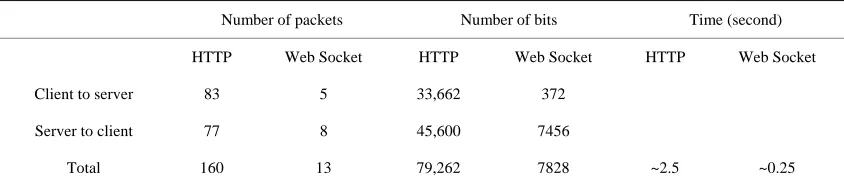
The efficiency is the key issue of real-time data trans- mission; it’s also the important standard for evaluating whether a protocol is suitable for real-time data transmis- sion. A test has been conducted to monitor Web Socket performance in asynchronous transmission. The test is divided into two parts, the first part is to sort a table which contains five columns and three rows data in phpMyAdmin page based on HTTP request, and the other part is to sort a same size table in separate page based on Web Socket communication. During the whole test process, use Google Chrome 5 as a client browser, and software Wireshark Network Protocol Analyzer as a monitor tool to watch the changes of data package and bit stream. Finally, get following results (Figure 1): ci.ReceiveData += new ClientSocketEvent (Ci_Re-
ceiveData);
ci.BroadcastMessage += new BroadcastEvent (ci. SendMessage);
ci.DisConnection += new ClientSocketEvent (Ci_Dis- Connection)
Then call BeginReceive method to receive client re- quest message, and try to handshake with client browser, if the handshake successes, then full-duplex communica- tion can be started.
ci.ClientSocket.BeginReceive(ci.receivedDataBuffer, 0, ci.receivedDataBuffer.Length, 0, new AsyncCallback
(ci.StartHandshake), ci.ClientSocket.Available); Shown by the above data (Table 1), Socket connec- tions are ten times efficient than HTTP connections. On the other hand, refer to Peter Lubbers and Frank Greco’s test about the efficiency comparison between Ajax poll- ing and Web Socket [7], it can be concluded that Web Socket’s performance is much better than HTTP in terms of network traffic and delay, especially in large number concurrency case.
In above code, StartHandshake method is responsible for generating handshake information based on client request. In this method, values of two key “Sec-Web- Socket-Key1” and “Sec-WebSocket-Key2” will be fetch- ed from request headers, and MD5 computation defined in the Web Socket protocol will be done based on these two values, and return the result at the end, the MD5 re- sult is a means to protect the data during the handshake process [6]. If the handshake successes, new connection will be put into the connection poll for reuse next time.
listConnection.Add(ci);
[image:4.595.307.537.502.584.2]What should be paid attention here is putting the char- acter “\x00” at the beginning of messages and “\xFF” at the end of the message when sending messages, and re- moving these two character when reading messages. Ad- ditionally, message should be encoded or decode by UTF-8 before using.
Figure 1. Comparison between HTTP connections and soc- ket connections on traffic and time.
Table 1. Data table used in test.
Number of packets Number of bits Time (second)
HTTP Web Socket HTTP Web Socket HTTP Web Socket
Client to server 83 5 33,662 372
Server to client 77 8 45,600 7456
Total 160 13 79,262 7828 ~2.5 ~0.25
[image:4.595.87.509.641.734.2]7. Summary
Real-time data transmission will be an inevitable trend for web-based information system. Web Socket consid- ered as the next generation of Ajax will be widely used in the Internet. Currently, the most popular browser IE8 and its lower versions still not support Web Socket. However, Kaazing Company has been developing an intelligent gateway which can convert Ajax polling and Comet used in lower version browser to Web Socket instant commu- nication. Web Socket protocol and Web Socket API are still being updated. Probably, Web Socket will become the perfect solution for the “C10K” issue in the near fu- ture.
REFERENCES
[1] D. G. Synodinos, “HTML 5 Web Sockets vs. Comet and Ajax,” 2008.
http://www.infoq.com/news/2008/12/websockets-vs-com et-ajax
[2] Wikipedia, “WebSockets,” 2010. http://en.wikipedia.org/wiki/WebSockets
[3] Peter Lubbers, “Pro HTML 5 Programming,” Apress, Victoria, 2010.
[4] W3C, “The Web Sockets API,” 2009.
http://www.w3.org/TR/2009/WD-websockets-20091222 [5] D. Sheiko, “Persistent Full Duplex Client-Server
Connec-tion via Web Socket,” 2010.
http://dsheiko.com/weblog/persistent-full-duplex-client-ser-ver-connection-via-web-socket
[6] Makoto, “Living on the Edge of the WebSocket Proto-col,” 2010.
http://blog.new-bamboo.co.uk/2010/6/7/living-on-the-edge of-the-websocket-protocol
[7] P. Lubbers and F. Greco, “HTML5 Web Sockets: A Quan- tum Leap in Scalability for the Web,” 2010.