http://www.scirp.org/journal/jcc ISSN Online: 2327-5227 ISSN Print: 2327-5219
DOI: 10.4236/jcc.2018.61001 Dec. 29, 2017 1 Journal of Computer and Communications
Development of a Platform to Explore
Network Intrusion Detection System
(NIDS) for Cybersecurity
Chee Keong Chan, Alexander Weil Tine Yeoh
School of Electrical and Electronic Engineering, Nanyang Technological University, Singapore
Abstract
Cybersecurity is increasing its significance in recent years due to the over-whelming use of devices which require the use of internet. This raises the im-portance of having cybersecurity training for the upcoming generations as hackers continue to upgrade their methodologies and techniques to obtain important information such as personal identification, credit card numbers etcetera. This paper describes the development of a platform for students to learn how to setup and use a Network Intrusion Detection System in a virtual environment. In this environment, the administrator of a specific system can monitor and detect their network for any malicious activity. We will discuss in this paper the network configuration setup via virtualization technology followed by having a Network Intrusion Detection System installed in one of the virtual machines port mirrored to monitor the whole network. In the vir-tual network, a virvir-tual machine will be assigned as an attacker to simulate cy-ber-attacks allowing the Network Intrusion Detection System to detect the Internet Protocol (IP) address from the source of malicious activity provider. In addition, students will have the opportunity to learn how to write basic rules for the Network Intrusion Detection System which are algorithms used to detect cyber malicious movements.
Keywords
Network Intrusion Detection System, Cybersecurity
1. Introduction
Cyber security plays a vital role in protecting hardware, software and informa-tion which are important in our current century. Malicious acinforma-tions such as How to cite this paper: Chan, C.K. and
Yeoh, A.W.T. (2018) Development of a Platform to Explore Network Intrusion Detection System (NIDS) for Cybersecuri-ty. Journal of Computer and Communica-tions, 6, 1-11.
https://doi.org/10.4236/jcc.2018.61001
DOI: 10.4236/jcc.2018.61001 2 Journal of Computer and Communications hacking, stealing of information, damaging cyber components and disruption of services will have vast impact on our current society, which is heavily reliant on computer systems and the internet. Any such form of malicious actions will also have major repercussions on the world economy, which is very much interlinked through the internet. Hence, cybersecurity has a vital role to play to ensure the security and advancement of the global network.
Intrusion Detection System (IDS) is one of the counter measures against ma-licious activities in cyber security. The IDS is an equipment or software which checks a system or network for any harmful intention or violation of policies. The administrator of the system or network will be notified by the IDS in times of any suspected malicious activity found.
Intrusion Detection Systems are generally grouped into two main categories, the Host-based Intrusion Detection System (HIDS) and the Network Intrusion Detection System (NIDS). A HIDS monitors the operating system files such as the antivirus software whereby a NIDS monitors the incoming network traffic for any malicious activity [1].
The detection approaches are usually by signature-based detection and ano-maly-based detection. Signature-based detection is a methodology where the software can identify intentions with harmful patterns such as malware. Ano-maly-based detection monitors the offset of traffic from its ideal route, where it often depends on machine learning.
2. Hyper-V Virtual Network Setup
To start off students will learn to create a network for the Network Intrusion Detection System (NIDS) to monitor a specific network. In this case, Hyper-V which is a virtualization platform introduced by Microsoft [2] is utilized to create the virtual network. Having a virtual network over a physical network provides numerous advantages, such as cost reduction and less time needed to modify components on a computer. Hence a virtual network is a great compli-ment for learning NIDS. Next, the NIDS used in this environcompli-ment is Snort, which is an open source IDS that can accomplish real time analysis and sniffing of network packets [3]. It will be installed into one of the virtual machines.
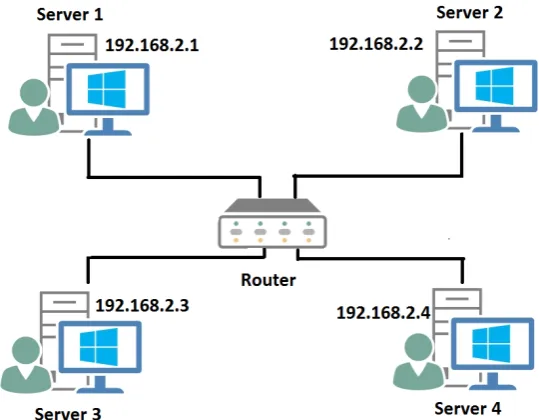
With the aid from Hyper-V, four virtual machines will be created and they are termed as Server 1 to 4 respectively. These servers are connected internally via a virtual network interface controller (NIC). It simulates a network of four com-puters, eachconnected to a router with Ethernet cables. The four virtual ma-chines will have their individual local static IP address setup for detection and verification. Server 1 to 4 will be assigned to the IP addresses of “192.168.2.1” to “192.168.2.4” respectively as shown in Figure 1.
DOI: 10.4236/jcc.2018.61001 3 Journal of Computer and Communications Figure 1. Virtual Network Diagram.
used to troubleshoot, test connectivity and identify response time between two IP addresses [4]. An example of Server 4 (192.168.2.4) issue a ping request to-wards Server 2 (192.168.2.2) with succession is shown in Figure 2 by command prompt where students will verify the virtual machine’s IP address by the com-mand:
“ipconfig” and followed by: “ping 192.168.2.2”
to issue the ping command towards Server 2 from Server 4.
3. Set up of SNORT and Writing Rule Basics
After establishing the virtual network, the next step is to set up the Network In-trusion Detection System (NIDS) by using Snort in which for this instance Serv-er 3 will be acting as the NIDS. Thus, SServ-ervServ-er 3 will no longServ-er have its static IP address but rather it will be set to port mirror the other Servers to monitor the whole virtual network. Port Mirroring is a method whereby it duplicates all in-coming and outgoing traffic to a configured destination [5] which is used to monitor the whole network. An overview of the updated virtual network is as shown in Figure 3.
DOI: 10.4236/jcc.2018.61001 4 Journal of Computer and Communications Figure 2. Server 4 ping to Server 2.
Figure 3. Virtual Network Diagram with NIDS.
With proper configuration, Snort should be tested first to rectify any compil-ing errors by uscompil-ing command prompt to first call the bin directory in Server 3 with “cd C:\Snort\bin” then executing the command:
“snort-i 1-c c:\Snort\etc\snort.conf-T”
whereby “-i” displays which virtual interface card is used, “-c” calls the specif-ic configuration file and “-T” starts Snort in self-test mode. If no compiling er-rors are discovered, Snort is then ready to be used as a NIDS.
Students will then be required to write the first rule to verify if the NIDS is in working condition. An example of writing Snort’s rule will be as follow:
“alert icmp $EXTERNAL_NET any -> $HOME_NET any (msg: “ICMP TEST”; sid: 100001;)”
• “alert”–The rule header whereby the “alert” command will generate an alert
followed by logging the packet.
• “icmp”–The protocol defined for ping. Other available protocols such as tcp
and udp are available as well.
• “$EXTERNAL_NET”–The IP address assigned in the configuration file to
[image:4.595.209.537.64.236.2]DOI: 10.4236/jcc.2018.61001 5 Journal of Computer and Communications
• “any”–The port variable for $EXTERNAL_NET whereby for this case it will
be any port as we are trying to verify the workability of the NIDS.
• “->“–The arrow which indicates the traffic for the rule to verify. Whereby
this case we are verifying for pings from variable $EXTERNAL_NET towards $HOME_NET.
• “$HOME_NET”–The IP address assigned in the configuration file to protect.
• “any”–Similarly the port variable defined for the $HOME_NET
• “msg”–A message to generate in the alert console when the NIDS has
de-tected a similar pattern as defined by the specified rule. In this case, it will show a message of “ICMP TEST” when the rule is activated.
• “sid”–A simple ID to keep track of the number of rules which works similarly
as serial number. The change of “sid” will not affect how to rule detects its pattern in the network traffic.
In a nutshell, the general form of a Snort rule is as follow:
(Rule Header) (Protocol) (IP Address 1) (Port Variable for IP Address 1) -> (IP Address 2) (Port Variable 2) (Methodologies defined to a specific pattern with message and SID)
The methodologies section may contain several algorithms to detect certain malicious such as having a threshold to track the number of incoming traffic re-ceived in a specific time set or detecting incoming traffic with different variants of Flags for instance “flags:S;” to detect SYN packet requests. There are numer-ous ways to define the rule and it is entirely up to the programmer to decide how the NIDS detects malicious traffic.
Once Snort is ready, the command:
“snort-i 1-c c:\Snort\etc\snort.conf -A console”
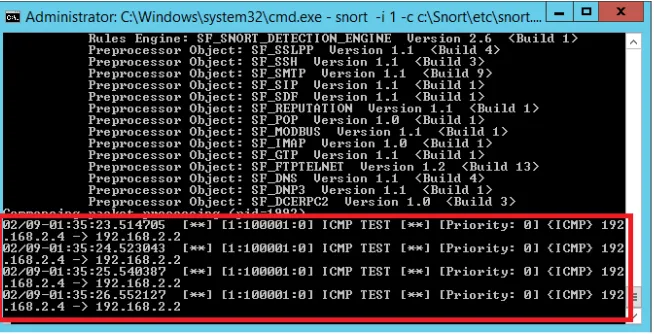
is executed to activate Snort to monitor the network where “-A” is used to set Snort into Alert Mode and “console” allows snort to run in console mode. Fig-ure 4 shows an example of ICMP ping alert from Server 4 to Server 2 using
Snort’s console (IP address 192.168.2.4 192.168.2.2) when executing the same
[image:5.595.212.539.540.707.2]command in Figure 3 and defining $HOME_NET as Server 2 (192.168.2.2) and $EXTERNAL_NET as Server 4 (192.168.2.4).
DOI: 10.4236/jcc.2018.61001 6 Journal of Computer and Communications
The line “192.168.2.4 192.168.2.2” shows the network traffic flows from
Server 4 towards Server2. In addition, the ICMP Ping alert will trigger as well when Server 1 pings Server 2 due to the rule’s algorithm and how the IP address variables are defined. Once verified, the student has successful set up a Network Intrusion Detection System in a virtual network environment.
4. Detecting Denial of Service Attacks
Students will learn how to detect a Denial of Service (DOS) cyber-attack where attackers will flood the victim’s server or network till it is too overwhelmed for the victim’s resources and hence crashes its server. When the attacker uses mul-tiple servers to attack a victim at once, it becomes a Distributed Denial of Service (DDOS).
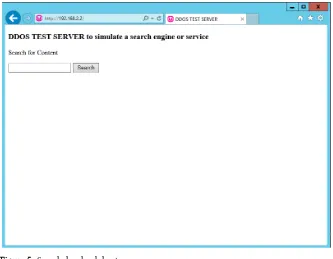
WampServer will be installed on the protected Server which is Server 2 as ini-tialised in Snort’s configuration file. WampServer is a program which allows web hosting and development. Thus, Server 2 will be simulated as the victim of on an attack directly a web host. Using a web browser and calling Server 2 IP address will result a simple home page such as shown in Figure 5 below.
To simulate a DDOS attack Low Orbit Ion Cannon (LOIC) and the “old school” method Ping of Death (POD) will be used for learning purposes.
1) Low Orbit Ion Cannon (LOIC)
[image:6.595.207.540.457.716.2]LOIC is a tool that performs DOS attack by sending large amounts of either Hypertext Transfer Protocol (HTTP), User Datagram Protocol (UDP) or Transmission Control Protocol (TCP) requests to a target destination [5]. LOIC was abused by a group of hackers who launched attack towards Paypal, Visa and Mastercard [6]. Hence the danger of this tool cannot be underestimated.
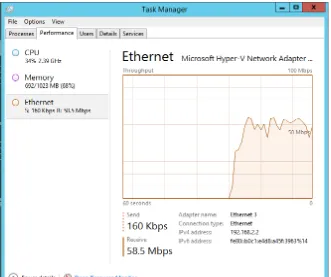
DOI: 10.4236/jcc.2018.61001 7 Journal of Computer and Communications The tool can simply be used by script kiddies to launch an attack by simply inputting the target’s IP address and choosing the methodology of attack fol-lowed by clicking the “IMMA CHARGIN MAH LAZER” button to launch the attack. The effects of the attack will cause a heavy network traffic flow as shown on the victim’s Ethernet network in Figure 6.
Snort rule used to detect TCP and HTTP attack method:
“alert tcp $EXTERNAL_NET any -> $HOME_NET any (msg: “LOIC DDOS TOOL ATTACK DETECTED”; threshold: type threshold, track by_src, count 100, seconds 5; sid:100002;)”
Threshold is a predefined algorithm that tracks from number of request sent from the host in counts of 100 within 5 seconds as LOIC works by sending sev-eral requests in a short amount of time.
Snort rule used to detect UDP attack method:
“alert udp $EXTERNAL_NET any -> $HOME_NET any (msg:”LOIC DDOS TOOL ATTACK DETECTED”; threshold: type threshold, track by_src, count 100 , seconds 5;sid:100003;)”
Like the TCP and HTTP attack method only a change in the Protocol from TCP to UDP.
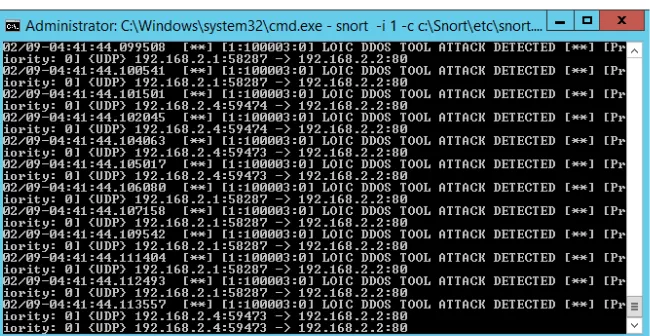
[image:7.595.209.540.413.690.2]During the attack, Snort’s console should be able to detect the source of the attacker’s IP address. In this simulation, Server 1 and 4 will be the attackers while Server 2 will be the victim. Figure 7 shows an example of the NIDS being able to capture LOIC’s UDP attack from Server 1 and 4.
DOI: 10.4236/jcc.2018.61001 8 Journal of Computer and Communications Figure 7. Snort detecting LOIC attacks.
2) Ping of Death (POD)
POD is a Denial of Service attack similar to sending an ICMP echo request (ping) except in large packet size and several occurrences at an instance.
The attack can be accomplished simply by using command prompt and using the command:
“ping 192.168.2.2 -t -l 65500”
“-t” instructs continuous echo requests until a stop command is issued while “-l” is used to define the size of the ping packet. Running this command in mul-tiple instances will cause a similar result as shown previously in Figure 6 to the victim’s server. Hence it is a form of Denial of Service attack.
Snort rule used to detect Ping of Death is as follow:
“alert icmp $EXTERNAL_NET any -> $HOME_NET any (msg: “PING OF DEATH DETECTED”; dsize:>1000; itype:8; icode:0; detection_filter:track by_src, count 30, seconds 1; sid:100004;)”
“dsize” is a keyword used to test the payload size, “itype” to check for an ICMP type value and “icode” to check for an ICMP code value. “detec-tion_filter” works similarly to the threshold predefined algorithm in Snort.
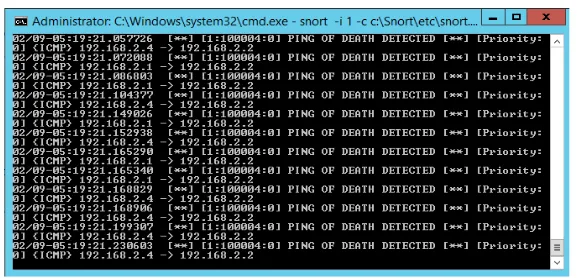
In this simulation, Snort will be able to detect the attacks from both Server 1 and Server 4 while Server 2 will be the victim. Figure 8 shows an example of the results from Snort detecting Ping of Death attacks.
5. Detecting Word and Word Content
Cyber-attacks are usually from external sources. However there may be instances where employees unintentionally expose the company’s network to unautho-rised infiltration through careless use of the internal network. For instance, a seemingly harmless search for some information may open the door for some spyware to enter the company’s network.
A Snort rule used to overcome this problem is as follow:
DOI: 10.4236/jcc.2018.61001 9 Journal of Computer and Communications Figure 8. Snort detecting POD attacks.
Where “content” is a keyword the NIDS uses to check the data packet to mon-itor if any word “virus” is in the data packet while “nocase” basically supports the “content” keyword that the alphabetical case does not matter in detection.
In this simulation, Server 1 will be defined as “$HOME_NET”. Thus Server 2(Web Server) will be considered as “$EXTERNAL_NET” reason being the con-figuration file, “$EXTERNAL_NET” is defined as “!$HOME_NET”. An example of Snort detecting Server 1 attempt to search for the keyword “virus” at Server 2 is shown in Figure 9.
6. Detecting FTP Connectivity
File Transfer Protocol (FTP) is a TCP network protocol service used to transfer files between a server and a client. Hackers may try to use this protocol to place malicious files into a server and cause harm. Hence it may be essential to identify who has access to the FTP Server.
In this simulation, Server 2 will be initialised as the FTP Server, while Server 1 will establish connection and place files into Server 2. From Server 1, by using command prompt and input the command:
“ftp 192.168.2.2”
Server 1 will try to establish a connection with the FTP Server. Once logged in, the next command:
“put (File name)”
Transfers the specified file from Server 1 to the FTP Server’s database. To detect FTP connectivity, the Snort rule used:
“alert tcp $EXTERNAL_NET any -> $HOME_NET 21 (msg: “INCOMING FTP DETECTED”; sid:100006;)”
DOI: 10.4236/jcc.2018.61001 10 Journal of Computer and Communications Figure 9. Snort detecting POD attacks.
Figure 10. Snort detecting FTP connectivity.
7. Conclusions
With the setup of the Network Intrusion Detection System and examples of cy-ber-attacks, students will be able to gain more knowledge on virtualisation technology set ups and writing their own Snort rules base on the nature of the cyber-attacks. Students may now test their own NIDS over virtual labs, reaping a big reduction in cost and time and overcoming issues of purchasing and config-uring hardware to conduct tests.
DOI: 10.4236/jcc.2018.61001 11 Journal of Computer and Communications
References
[1] Rouse, M. and Jaeger, R. (2008) HIDS/NIDS (Host Intrusion Detection Systems and Network Intrusion Detection Systems. Network Security.
[2] Zhelezko, A. (2014) What Is Hyper-V technology? Hyper-V Blog. [3] Rouse, M. (2005) Snort. Network Security.
[4] Rouse, M. (2009) Ping. Internet Acronyms and Lingo.
[5] PRas, A., Sperotto, A., Moura, G.C.M., Drago, I., Barbosa, R., Sadre, R., Schmidt, R. and Hofstede, R. (2010) Attacks by “Anonymous” WikiLeaks Proponents Not Anonymous. Design and Analysis of Communication Systems Group (DACS) Uni-versity of Twente, Enschede.