by Gail A. Perry, CPA
Quicken
®
A L L - I N - O N E D E S K R E F E R E N C E
FOR
by Gail A. Perry, CPA
Quicken
®
A L L - I N - O N E D E S K R E F E R E N C E
FOR
Quicken®All-in-One Desk Reference For Dummies®
Published by
Wiley Publishing, Inc.
111 River Street Hoboken, NJ 07030-5774
www.wiley.com
Copyright © 2006 by Wiley Publishing, Inc., Indianapolis, Indiana Published by Wiley Publishing, Inc., Indianapolis, Indiana Published simultaneously in Canada
No part of this publication may be reproduced, stored in a retrieval system or transmitted in any form or by any means, electronic, mechanical, photocopying, recording, scanning or otherwise, except as permit-ted under Sections 107 or 108 of the 1976 Unipermit-ted States Copyright Act, without either the prior written permission of the Publisher, or authorization through payment of the appropriate per-copy fee to the Copyright Clearance Center, 222 Rosewood Drive, Danvers, MA 01923, (978) 750-8400, fax (978) 646-8600. Requests to the Publisher for permission should be addressed to the Legal Department, Wiley Publishing, Inc., 10475 Crosspoint Blvd., Indianapolis, IN 46256, (317) 572-3447, fax (317) 572-4355, or online at
http://www.wiley.com/go/permissions.
Trademarks:Wiley, the Wiley Publishing logo, For Dummies, the Dummies Man logo, A Reference for the Rest of Us!, The Dummies Way, Dummies Daily, The Fun and Easy Way, Dummies.com, and related trade dress are trademarks or registered trademarks of John Wiley & Sons, Inc. and/or its affiliates in the United States and other countries, and may not be used without written permission. Quicken is a registered trademark of Intuit Inc.. All other trademarks are the property of their respective owners. Wiley Publishing, Inc., is not associated with any product or vendor mentioned in this book.
LIMIT OF LIABILITY/DISCLAIMER OF WARRANTY: THE PUBLISHER AND THE AUTHOR MAKE NO REPRESENTATIONS OR WARRANTIES WITH RESPECT TO THE ACCURACY OR COMPLETENESS OF THE CONTENTS OF THIS WORK AND SPECIFICALLY DISCLAIM ALL WARRANTIES, INCLUDING WITHOUT LIMITATION WARRANTIES OF FITNESS FOR A PARTICULAR PURPOSE. NO WARRANTY MAY BE CREATED OR EXTENDED BY SALES OR PROMOTIONAL MATERIALS. THE ADVICE AND STRATEGIES CONTAINED HEREIN MAY NOT BE SUITABLE FOR EVERY SITUATION. THIS WORK IS SOLD WITH THE UNDERSTANDING THAT THE PUBLISHER IS NOT ENGAGED IN RENDERING LEGAL, ACCOUNTING, OR OTHER PROFESSIONAL SERVICES. IF PROFESSIONAL ASSISTANCE IS REQUIRED, THE SERVICES OF A COMPE-TENT PROFESSIONAL PERSON SHOULD BE SOUGHT. NEITHER THE PUBLISHER NOR THE AUTHOR SHALL BE LIABLE FOR DAMAGES ARISING HEREFROM. THE FACT THAT AN ORGANIZATION OR WEBSITE IS REFERRED TO IN THIS WORK AS A CITATION AND/OR A POTENTIAL SOURCE OF FURTHER INFORMATION DOES NOT MEAN THAT THE AUTHOR OR THE PUBLISHER ENDORSES THE INFORMATION THE ORGANIZATION OR WEBSITE MAY PROVIDE OR RECOMMENDATIONS IT MAY MAKE. FURTHER, READERS SHOULD BE AWARE THAT INTERNET WEBSITES LISTED IN THIS WORK MAY HAVE CHANGED OR DISAPPEARED BETWEEN WHEN THIS WORK WAS WRITTEN AND WHEN IT IS READ.
For general information on our other products and services, please contact our Customer Care Department within the U.S. at 800-762-2974, outside the U.S. at 317-572-3993, or fax 317-572-4002. For technical support, please visit www.wiley.com/techsupport.
Wiley also publishes its books in a variety of electronic formats. Some content that appears in print may not be available in electronic books.
Library of Congress Control Number: 2005931147 ISBN-13: 978-0-471-75466-4
ISBN-10: 0-471-75466-8
Manufactured in the United States of America 10 9 8 7 6 5 4 3 2 1
About the Author
Gail A. Perry is a licensed CPA, financial journalist, author, speaker, and instructor. Gail prides herself on her ability to present technical subjects in plain English and often with a touch of humor. Gail is a contributing editor at Accounting Today magazine, the premiere business newspaper for the tax and accounting community. Gail is a former senior tax account-ant with the Big Four accounting firm, Deloitte, where she provided tax planning services and financial advice to individuals and small busi-nesses. She continues to maintain a tax and financial consulting practice for about 50 clients.
An accomplished freelance writer, Gail is the author of 18 books and coauthor of several more on various aspects of personal finance, taxa-tion, and financial software. Some of her titles include Surviving Financial Downsizing: A Practical Guide to Living Well on Less Income, Show Me QuickBooks, TurboTax: The Official Guide, and TurboTax For Dummies. She has also written hundreds of articles for newspapers, magazines, and financial Web sites, and was a weekly tax columnist for five years for the Indianapolis Starand Indianapolis Newsdaily newspapers.
Dedication
This book is dedicated to Katherine and Georgia, with all my love.
Author’s Acknowledgments
Publisher’s Acknowledgments
We’re proud of this book; please send us your comments through our online registration form located at www.dummies.com/register/.
Some of the people who helped bring this book to market include the following:
A
Accqquuiissiittiioonnss,, EEddiittoorriiaall,, aanndd M
Meeddiiaa DDeevveellooppmmeenntt
Project Editor:Linda Morris
Acquisitions Editor:Bob Woerner
Copy Editor:Linda Morris
Technical Editor:David Ringstrom
Editorial Manager:Jodi Jensen
Media Development Supervisor:
Richard Graves
Editorial Assistant:Amanda Foxworth
Cartoons:Rich Tennant (www.the5thwave.com)
C
Coommppoossiittiioonn SSeerrvviicceess
Project Coordinator: Maridee Ennis
Layout and Graphics: Andrea Dahl, Denny Hager, Joyce Haughey, Lynsey Osborn, Heather Ryan, Erin Zeltner
Proofreaders: David Faust, Carl Pierce, Linda Quigley
Indexer: Steve Rath
Publishing and Editorial for Technology Dummies
Richard Swadley,Vice President and Executive Group Publisher
Andy Cummings,Vice President and Publisher
Mary Bednarek,Executive Acquisitions Director
Mary C. Corder,Editorial Director
Publishing for Consumer Dummies
Diane Graves Steele,Vice President and Publisher
Joyce Pepple,Acquisitions Director
Composition Services
Gerry Fahey,Vice President of Production Services
Contents at a Glance
Introduction ...1
Book I: Personal Finance Basics ...7
Chapter 1: Earning Income and Investing ...9
Chapter 2: Paying Bills...33
Chapter 3: Budgeting ...51
Chapter 4: Protecting Yourself...69
Chapter 5: Planning for the Future...81
Book II: Quicken Basics ...95
Chapter 1: Setting Up Quicken...97
Chapter 2: Using the Register ...123
Chapter 3: Managing Your Accounts...153
Chapter 4: Reconciling an Account...175
Chapter 5: Introducing Online Banking Services...189
Book III: Investments...201
Chapter 1: Quicken and Investments...203
Chapter 2: Your Portfolio ...213
Chapter 3: Monitoring Your Tax-Deferred Retirement Accounts ...223
Chapter 4: Watch Lists and News You Can Use ...243
Book IV: Household Finances...255
Chapter 1: Borrowing Money ...257
Chapter 2: Using a Credit Card Account...277
Chapter 3: Your Home...297
Chapter 4: Quicken Billminder and Bill Pay...317
Chapter 5: Budgeting in Quicken...339
Book V: Taxes ...357
Chapter 1: The Quicken Tax Center ...359
Chapter 2: Entering Tax-Friendly Information ...375
Chapter 3: Tax Reports You Can Use ...391
Chapter 4: Interfacing with TurboTax...413
Book VI: Retirement Planning and Other Saving ...455
Chapter 1: The Quicken Financial Planner...457
Chapter 2: Tracking Your Retirement Savings in Quicken ...485
Chapter 3: Savings Goals ...507
Chapter 4: Saving for College...525
Chapter 5: Automating Your Savings Program ...547
Book VII: Quicken Reports...565
Chapter 1: Creating QuickReports ...567
Chapter 2: Quicken’s Standard Reports ...589
Chapter 3: Customizing Reports ...621
Chapter 4: Printing and Saving Reports ...643
Book VIII: Small Business Finances...663
Chapter 1: Quicken Premier Home & Business ...665
Chapter 2: Tracking Accounts Payable and Accounts Receivable...683
Chapter 3: Tracking Jobs and Payroll ...713
Chapter 4: Recording Fixed Assets ...737
Chapter 5: Business Forms and Reports ...751
Table of Contents
Introduction...1
About This Book...2
Foolish Assumptions ...2
How This Book Is Organized...3
Book I: Personal Finance Basics ...3
Book II: Quicken Basics ...3
Book III: Investments...3
Book IV: Household Finances ...4
Book V: Taxes...4
Book VI: Retirement Planning and Other Saving ...4
Book VII: Quicken Reports ...4
Book VIII: Small Business Finances ...4
Appendixes...5
Icons Used in This Book...5
Where to Go from Here...6
Book I: Personal Finance Basics ...7
Chapter 1: Earning Income and Investing . . . .9
Making Money at Your Job...9
Filling out the W-4 form ...10
Your paycheck ...13
Benefits you get at work ...14
Bonus time ...15
The W-2 form...16
You’re Self-Employed: You’ve Created Your Own Job! ...17
Getting paid...17
Issuing 1099 forms...18
Offsetting income with expenses ...19
Estimating taxes ...20
Keeping Track of Earnings from Your Investments ...22
Earning interest on your savings account...22
Money markets and mutual funds...23
Playing the stock market ...26
Bonds and treasury bills ...27
Chapter 2: Paying Bills . . . .33
Spending Money on Required Expenses ...33
The Big Three: food, shelter, and clothing ...34
Spending money on utilities...36
The doctor is in ...37
Planes, trains, and automobiles (and buses, taxis, and trolleys . . .)...39
Children, pets, parents, and other important people...40
Borrowing Money...41
Calculating loan interest...42
Credit card companies get sneaky with interest ...42
There’s interest, and then there’s interest . . . ...42
Using Credit Cards ...43
Comparing rates ...43
Making minimum payments ...44
Refinancing credit cards...45
Mastering Good Credit ...46
The credit agencies and their reports ...46
Your FICO score ...48
Correcting errors on credit reports ...49
Chapter 3: Budgeting . . . .51
Setting Goals ...51
Budgeting, Family-Style ...52
Prioritizing your goals ...53
Pricing your goals...53
Determining the length of time for achieving goals ...54
Creating Your Budget...54
Your budget starting point ...55
Balancing your budget...59
Using your budget ...59
Living within your means ...61
Increasing your earnings ...63
When budgeting fails ...64
Changing your budget ...66
Chapter 4: Protecting Yourself . . . .69
Creating an Emergency Fund ...69
Envisioning the emergency scenario ...69
Determining how much to save...70
Finding a place to park your emergency fund ...70
Distinguishing real versus made-up emergencies...71
Dealing with emergency expenses you might not anticipate ...72
Purchasing Insurance ...72
Insuring your car ...73
Insuring your home and other possessions ...74
Insuring your life ...75
Insuring your health...77
Insuring your future ...78
Chapter 5: Planning for the Future . . . .81
Planning for College ...81
Saving the 529 way ...81
Prepaid tuition plans...83
Coverdell Education Savings Accounts ...84
Borrowing for college...85
Using your assets to fund a college education ...86
Planning for Retirement ...87
Investing in 401(k) plans ...87
Investing in tax-deferred annuities...88
Investing in Individual Retirement Accounts...89
Investing in retirement funds designed for the self-employed ...90
Participating in company pension plans...91
Planning for Other Big Expenses...92
Setting realistic goals ...93
Paying yourself ...94
Book II: Quicken Basics ...95
Chapter 1: Setting Up Quicken . . . .97
Getting Quicken Set Up on Your Computer ...97
Using Quicken for the very first time...98
Converting from earlier Quicken versions ...102
Switching between data files ...102
Finding Your Way Around in Quicken...103
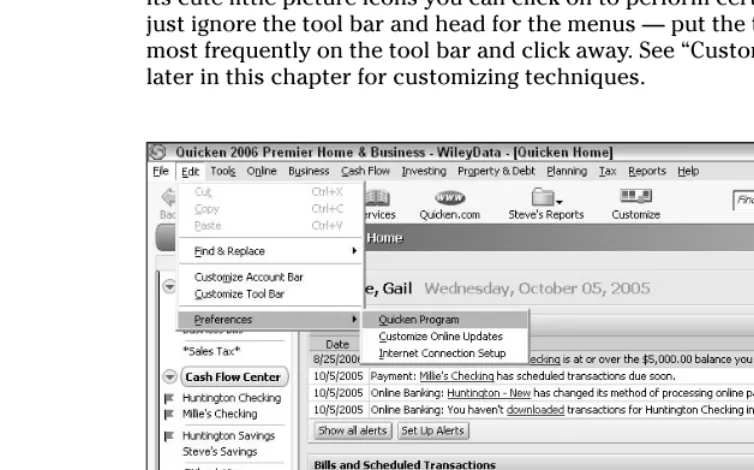
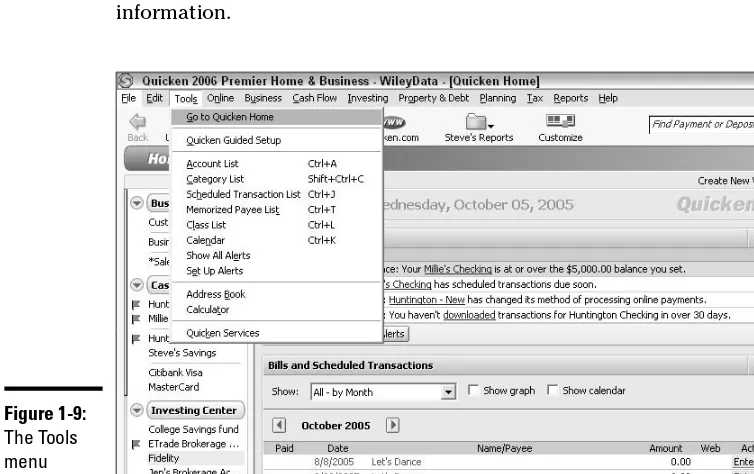
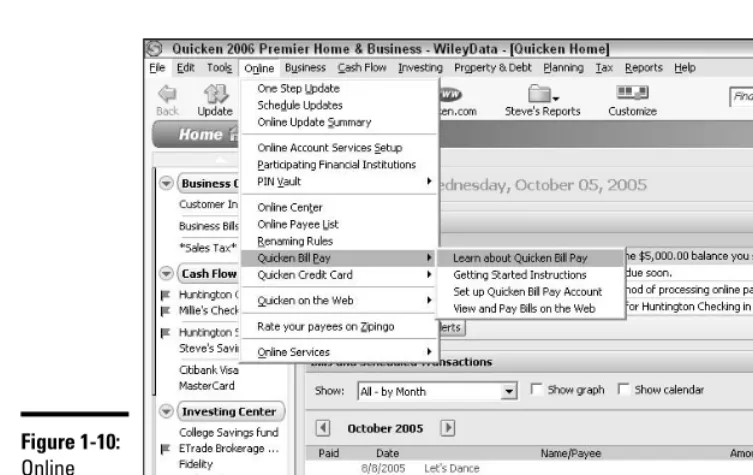
Navigating Quicken’s menus ...103
Keyboard shortcuts ...117
Opening and Closing Quicken ...121
Chapter 2: Using the Register . . . .123
Working with Categories ...123
Categories already in place ...123
Removing unwanted categories ...124
Adding new categories ...125
Add new categories on-the-fly ...125
Setting Up Your Bank Account ...127
Entering Checks...129
Voiding checks ...131
Splitting categories ...131
Entering your paycheck...132
Issuing checks right from Quicken...135
Printing in Quicken...138
Finding Transactions ...145
Scheduling Recurring Transactions...147
Setting Cash Balance Alerts ...149
Chapter 3: Managing Your Accounts . . . .153
Setting Up a Variety of Accounts in Quicken ...153
Setting up a savings account ...153
Setting up a 401(k) or similar tax-deferred retirement account ...155
Setting up a mutual fund ...158
Setting up a credit card account ...161
Setting up your house in Quicken ...163
Using the Financial Activity Centers...168
Using Quicken’s Calendar ...170
Clicking around in the Transactions window ...171
Setting up payments with drag-and-drop ...172
Check your balances...173
Remember best friend’s birthday ...173
Chapter 4: Reconciling an Account . . . .175
What Is Reconciliation, Anyway? ...175
Knowing the Best Time to Reconcile...176
Working Through the Reconciliation Process ...177
Matching the checks you wrote ...177
Matching your deposits...181
Reaching the moment of reconciliation ...183
Reconciliation reports: Who needs them? ...185
What are these crazy c and R codes? ...186
Chapter 5: Introducing Online Banking Services . . . .189
What’s Good (and Bad) about Online Banking? ...189
Online Banking and Security Issues...191
Protecting Quicken data with a password ...192
Choosing a bank ...194
Setting up your online banking...195
Paying Bills with Your Online Account...196
Transferring Funds...198
Book III: Investments ...201
Chapter 1: Quicken and Investments . . . .203
Navigating the Ins and Outs of the Investing Center ...203
Tracking Investments in Quicken...204
Hey Quicken! I Bought Some Shares of Stock! ...204
Entering your investment in Quicken ...205
Tracking investment performance ...208
Recording Dividends and Other Earnings...208
Entering a Sale ...210
Chapter 2: Your Portfolio . . . .213
What You See in the Quicken Portfolio ...213
What you want to see: Changing your portfolio view ...215
Changing the portfolio date ...215
Cash transactions in your security account ...216
Marginally interesting: How to record margin interest ...217
Realized versus Unrealized Gains and Losses...218
What’s in a Date? ...219
Staying in Touch with Your Portfolio on Quicken.com ...220
Ten Things You Didn’t Know You Could Do on Quicken.com ...220
Chapter 3: Monitoring Your Tax-Deferred Retirement Accounts . . . . .223
How Tax-Deferred Retirement Plans Work...223
How 401(k)s work...224
How traditional IRAs work ...225
How Roth IRAs work ...226
Hey Quicken! How About Keeping Track of My 401(k) Contributions? ...226
Updating 401(k) the hard way: Manual updates ...227
Updating 401(k) the easy way: Entering the statement summary ...229
Manipulating Your Traditional IRA in Quicken...231
Look, Mom: I’m saving for my retirement! ...231
IRA contributions are easier when you don’t have to think about them ...235
Wait: I can’t spare the money for this month’s transfer! ...238
Having Your IRA the Roth Way ...239
From Traditional to Roth: Transferring retirement funds...241
Diversification: The Great Investment Elixir...242
Chapter 4: Watch Lists and News You Can Use . . . .243
Start by Reading the News...243
What to look for when you read the investment news...244
Hey, Don’t Forget This Important Investment News!...245
Quicken Watch Lists ...248
Creating your Watch List is easy ...249
So you’ve got a Watch List: Now What?...251
Tired of watching? Remove an item from the Watch List ...252
News Alerts and More at Quicken.com ...253
Getting the Most from Your News Alerts and Other Information ...254
Book IV: Household Finances ...255
Chapter 1: Borrowing Money . . . .257
It Costs HOW MUCH to Borrow That Money? ...257
Shopping around for the best loan deal ...257
There’s interest, and then there’s interest ...258
Borrowing money on the Internet ...259
Using Quicken to Track Your Loans...260
Meet the Quicken Property & Debt Center...260
Adding a loan ...260
Setting up your loan payments in Quicken ...265
Making changes in your loan ...268
The last payment: Removing a loan from Quicken ...269
More loan fun: Refinancing your loan...270
Using Quicken’s Loan Calculator ...273
Chapter 2: Using a Credit Card Account . . . .277
Setting Up Your Credit Card...277
Tracking Your Credit Card Charges in Quicken...278
Balancing Your Credit Card Account ...282
Borrowing money from your credit card...286
Changing your credit limit...286
Quicken Can Help You Put a Leash on Your Spending ...288
Quicken’s Debt Reduction Planner ...290
Chapter 3: Your Home . . . .297
Quicken’s Home Purchase Planner: Don’t Buy a Home Without It! ...297
Mortgage Basics ...299
Recording a mortgage...300
Associating your home asset with your mortgage ...305
Home Improvements ...308
What qualifies as home improvement ...309
Recording home improvements in Quicken...309
Working with the Quicken Home Inventory ...311
Chapter 4: Quicken Billminder and Bill Pay . . . .317
What’s the Difference? Billminder versus Bill Pay ...317
How do these services work? ...318
So, do I really need all this bill-related stuff? ...318
Getting Friendly with Billminder ...319
OK, I’ve got an alert that needs action: Now what? ...321
Bye-bye, Billminder ...322
Let’s Sign Up to Pay Bills Online!...322
Setting up accounts in Bill Pay ...325
Setting up payees in Bill Pay ...327
Time to pay your bills...330
Getting fan mail from Intuit ...333
Scheduling (and Unscheduling) Recurring Payments in Bill Pay ...334
Transferring Funds...336
Chapter 5: Budgeting in Quicken . . . .339
Creating an Automatic Budget with Quicken ...339
Choosing your date range ...341
Choose a budget method ...342
Pick some budget options ...342
Choose categories for your budget...343
Fine-tuning your budget ...345
Using the Manual Method for Creating Your Budget...348
How to Use a Budget in Everyday Life ...351
Producing budget reports ...351
Customizing your budget report ...352
Viewing the Monthly Budget Report...353
Thinking About Different Types of Budgets ...354
Seven Ways Not to Use a Budget...355
Book V: Taxes...357
Chapter 1: The Quicken Tax Center . . . .359
Poking Around in the Quicken Tax Center...359
What’s Taxable, What’s Not ...361
Sharing the fruits of your labors with your dear old Uncle Sam ...361
I spent it, so it must be deductible, right? ...362
OK, So What’s the Bottom Line?...364
Good news or bad news ...365
Taking a peek at the Tax Planner...366
Tax Due Dates and Other Dates Worth Noting ...367
Tax Tools You Can Use ...370
Quicken’s rotating (and redundant) tips...372
TurboTax links ...372
Tax tools that live beyond the walls of Quicken ...372
Chapter 2: Entering Tax-Friendly Information . . . .375
What’s a Tax Line?...375
When to assign tax lines ...375
How to assign tax lines ...376
Tax Form Cross-Reference Key...378
Tax Forms That Quicken Recognizes ...382
Determining Which Categories Don’t Need Tax Lines...384
Changing Your Tax Lines ...387
Removing tax lines ...387
Picking a new tax line...388
Working with an Accountant or Tax Professional...389
Chapter 3: Tax Reports You Can Use . . . .391
The Tax Summary Report: Your Starting Point for Tax Return Preparation...391
Working with the Tax Summary report ...392
Using the Tax Schedule report ...393
When to use the tax reports ...394
Analyzing Your Income...396
Agreeing your income to your information return...396
Reporting your W-2 income ...399
Tax-deferred income ...399
Analyzing Your Deductions...399
Itemized deductions...399
Tax deductions and credits relating to children and education ...409
Chapter 4: Interfacing with TurboTax . . . .413
Telling TurboTax about Your Quicken Information ...413
Getting started in TurboTax...415
Importing information from your tax lines ...420
Sending Your Information to TurboTax on the Web ...422
Chapter 5: Tax Planning with Quicken . . . .431
Understanding Estimated Taxes ...431
Calculating Estimated Taxes...433
Estimated taxes Method #1: Using last year’s tax return ...433
Estimated taxes Method #2: Using this year’s tax return...435
Estimating Taxes with Quicken’s Tax Planner ...437
Using the Tax Planner’s default method of calculating tax...437
Incorporating tax information from TurboTax into the Tax Planner ...440
Estimating Capital Gains Taxes ...445
Putting the two together ...446
Entering capital gain and loss information in the Tax Planner...448
Exploring New Deduction Frontiers...448
Paying Estimated Payments...450
What happens if I miscalculate or, heaven forbid, miss a payment?...452
Using a last-minute alternative to paying estimates...453
Book VI: Retirement Planning and Other Saving ...455
Chapter 1: The Quicken Financial Planner . . . .457
Getting Familiar with Quicken’s Planning Center ...457
Using the planning alerts...459
Peering at the plan results ...459
Our plan is based on assumptions...459
The planners have arrived ...460
Tools you can use...461
Calculators for every occasion...462
Li’l tips from your friends at Quicken ...463
Gettin’ jiggy with Quicken’s business plan ...464
Creating Your Own Financial Plan...465
Getting started with the financial plan ...465
It’s all about you ...466
Your salary information...467
Entering retirement benefits including Social Security ...469
Enter miscellaneous income that doesn’t fit anywhere else ...470
Enter your estimated average tax rate ...471
More guesses: This time, inflation ...472
Mary, Mary, quite contrary, how will your savings grow? ...472
It’s time for investments: How do you plan to use this money? ...473
Estimating your rate of return ...473
Asset time...474
Loan time...475
Don’t forget your debt reduction plan...476
Planning on borrowing some money?...477
Onward to living expenses ...478
Planning for life adjustments ...479
Special expenses: Last but not least ...481
The plan, unveiled...481
Living with your plan ...483
Chapter 2: Tracking Your Retirement Savings in Quicken . . . .485
Watching Over Your 401(k) ...485
Basic rules for 401(k) plans ...486
401(k) and the IRS ...487
Taking money out of your 401(k) before retirement...488
Borrowing from your 401(k): Danger, Will Robinson! Danger! ...489
Leaving your job ...491
Keeping track of your 401(k) ...492
Updating your 401(k) information ...494
Individual Retirement Accounts...498
How to get an IRA ...498
Setting up your IRA in Quicken...499
Making IRA contributions...501
Timing your IRA contributions ...501
Taking money out of your IRA before you retire ...501
Taking money out of your IRA after you retire ...502
Social Security ...504
Chapter 3: Savings Goals . . . .507
Savings Goals and Why You Want Them ...507
Setting Up a Savings Goal...508
Making Payments to Your Savings Goal ...510
Changing Savings Goals...512
Checking Out Your Progress ...513
Making a Withdrawal from a Savings Goal...516
Removing a Savings Goal ...517
Using the Special Purchase Planner ...518
Chapter 4: Saving for College . . . .525
How Much Does College Cost? ...525
Estimating tuition ...526
Estimating room and board ...527
Estimating transportation costs...527
Estimating the cost of books and supplies ...527
Using the College Planner ...529
Step-by-step through the College Planner...529
Saving (and finding) your projections ...534
Incorporating your college plan into your budget...535
Sources of Capital ...537
Cashing out your IRA/401(k)...538
Paying for a College Education with a 529 Plan ...538
Setting up 529 in Quicken ...540
Making contributions to a 529 plan ...542
Monitoring your 529 plan ...543
Taking money out of the 529 plan ...543
Setting Up a Coverdell Education Savings Account in Quicken ...544
Chapter 5: Automating Your Savings Program . . . .547
Setting Up Scheduled Savings Transactions...547
Adding the scheduled transaction ...548
Following through with the transaction ...550
Using Reminders to Increase Your Savings...554
Scheduled transactions and Quicken’s Calendar...554
Alerts to alert you!...557
Adjusting Your Scheduled Transactions ...559
Setting Up Investment Transaction Groups...560
Book VII: Quicken Reports ...565
Chapter 1: Creating QuickReports . . . .567
Displaying Activity for a Category or Payee...567
Viewing a category minireport ...568
Viewing a payee minireport ...569
Viewing an expanded minireport in its own window...569
Using QuickReports Available in the Registers...570
Using QuickReports from the Write Checks Window ...572
Customizing QuickReports ...573
Changing the QuickReport date range ...574
Adding QuickReport subtotals ...578
Sorting QuickReport data...578
Checking Out Graphs from the Register ...579
Viewing data amounts...583
Customizing a graph ...585
Printing a graph ...586
Chapter 2: Quicken’s Standard Reports . . . .589
Familiarizing Yourself with the Reports & Graphs Center...589
Displaying Reports...592
Methods for displaying a report...599
Changing report contents ...600
Working with Report Transactions ...603
Searching for information in a report ...603
Jumping to a transaction in the register ...606
Modifying transactions from a report...608 Resolving a placeholder transaction ...611 Using the History and Report List...616 Setting Defaults: Report Preferences ...617 Checking Out an EasyAnswer Report...619
Chapter 3: Customizing Reports . . . .621
Opening the Customize Dialog Box ...621 Changing a Report Title...623 Changing the Reporting Time Frame...624 Sorting Report Information...625 Controlling Subtotal Options...627 Selecting Specific Columns ...632 Selecting and resetting columns ...632 Changing column width...634 Selecting Specific Accounts ...636 Choosing Report Categories or Payees...637 Other Customization Settings...639 Using Advanced Settings...641Chapter 4: Printing and Saving Reports . . . .643
Saving and Organizing Reports ...643 Creating a report folder ...644 Saving a report...646 Opening a custom report ...648 Managing saved reports ...650 Adding Reports to the Tool Bar ...652 Adding the report ...652 Viewing the report from the tool bar...653 Exporting Report Data...654 Printing Your Report...658 Customizing print features...658 Getting a preview...660 Print, baby, print!...662Book VIII: Small Business Finances ...663
Chapter 2: Tracking Accounts Payable and
Accounts Receivable . . . .683
Welcome to the World of Accrual Basis Bookkeeping...683 Using Quicken’s Accounts Receivable and Invoicing Features ...685 Setting Up Accounts Receivable ...686 Accounts Receivable and Your Reports...689 Setting up invoices ...689 Receiving a payment ...695 Dealing with bad debts ...699 Using Quicken’s Accounts Payable Feature...704 Receiving a bill...705 Paying your bills ...708 Producing a payables report...712Chapter 3: Tracking Jobs and Payroll . . . .713
Keeping Track of Your Projects...713 Setting up your Project/Job list ...714 Working with jobs...717 Creating job estimates ...720 Tracking Payroll in Quicken...725 Setting up payroll in Quicken...726 More payroll setup stuff ...730 Paying your employees ...731 Entering a paycheck in Quicken ...733Chapter 4: Recording Fixed Assets . . . .737
Recording Your Business’s Fixed Assets...737 Looks like we need some more categories ...739 Time to go computer shopping! ...740 Recording Depreciation...742 Automating Depreciation ...745 Selling, Losing, Throwing Away, or Otherwise Getting Rid ofYour Asset ...748
Book IX: Appendixes ...On the Web
Appendix A: Backing Up Data . . . .On the Web
Appendix B: Aggravating Things About Quicken . . . .On the Web
Appendix C: Resources for Personal Finance . . . .On the Web
Appendix D: Getting Help with Quicken . . . .On the Web
Introduction
I
have a few paragraphs here to tell you what makes this book different from other Quicken books and to encourage you to add this book to your library. I’ve been a devoted Quicken user since the 1980s. Sometimes I wonder how I managed to keep track of my finances at all before Quicken came along. I can’t think of a better way to remain totally aware of all aspects of my personal finances than by using this program.Not only does Quicken provide you with an electronic storage area for all of your bank account transactions — and trust me, saving more than 10 years worth of financial data in one place, with easy access to comparative reports and charts is not something you can re-create out of the boxes of cancelled checks gathering dust in your closet — but the program is so much more than that.
Quicken is an investment tracker, a retirement planner, a home budget minder, a bill payer, a monitor for credit cards, a business organizer, a tax saver, and, oh yeah, a bank account supervisor — all rolled into one neat little package. And using Quicken, you feel like you have a firm grip on all of the numbers that flow through your accounts.
But there’s another side to Quicken: financial savvy. Not only do you want to know how much money you have in the bank and in your investment accounts, but you also want to know how you’re going to plan for the use of that money 10, 20, or 30 years from now. Maybe you want to send your kids to college, save for your retirement, buy a house, or experiment with the stock market. Or you want to raise your credit rating, take a trip every now and then, keep your bills under control, and still pay your taxes.
With the help of this book, you can look at the big picture. You can stop tracking results of past financial activities and start planning for the results you want to see in your financial future. “A personal finance manifesto” is how my editor and I described this book when we first discussed the vision we had: a book that would transcend the “how-to” and delve into the “why” of financial record-keeping.
About This Book
The Quicken All-in-One Desk Reference For Dummies is a reference book, not meant to be read in any particular order. Just as you would pick up a gar-dening book and look to the Table of Contents and the Index for the particu-lar flowers or shrubs about which you want to know more, I envision you picking up this book and seeking a path to the financial topics you want to study.
You’ll notice that, unlike many other Quicken books on the market, this book does not refer to a specific version of the Quicken program. Although I’ve used the most up-to-date version of the program for my illustrations and examples, I’ve tried to make the book all-encompassing and useful to owners of any version of Quicken. After all, the rules for basic data entry in Quicken programs over the years have changed very little. I’ve tried to encompass that continuity and produce a book that can be read by more than the small group who happened to purchase the current model.
When it comes to finding your way around, I hope you’ll refer to the Table of Contents and the Index extensively, as they have been constructed with logic and significance in mind. They should lead you directly to the parts of the book that provide you with the information you need.
I strived to avoid redundancy in this book, and yet there are certainly times when one topic requires material from another topic to make an explanation understandable. In these cases, I included cross-references to other parts of the book where you can flip to if you want related or, in some cases, more in-depth information.
Foolish Assumptions
I made only a handful of assumptions about the readers of this book (that means you). I don’t make any assumptions at all about the state of your per-sonal finances. And I don’t expect you to be financial experts, CPAs, CFOs, AARPs, PETAs, Republicans, Army veterans, or members of any other group. I doexpect the following:
✦ You have a PC with enough memory to run Quicken. An Internet connec-tion is handy but not an absolute necessity.
✦ You own or are about to acquire a version, any version, of Quicken, and you plan to use that program to keep track of your finances.
That’s it.
How This Book Is Organized
The Quicken All-in-One Desk Reference For Dummies is a compendium of eight separate books, each covering a completely different aspect of Quicken and personal finances. The minibooks all get along together and freely talk about each other behind their respective backs, but you might find that some books are more to your liking than others, and nobody’s going to mind if that hap-pens. Here’s a rundown of what you can expect in each of the books.
Book I: Personal Finance Basics
I take back everything I said about your needing to have Quicken. You don’t even need Quicken for Book I: This is all about finances and nothing about computers. The idea behind Book I is to get you up to speed on a variety of basic areas of personal finance — areas that can then be translated into Quicken in later books. This personal finance minibook provides you with essential information about earning and spending your money, borrowing money, improving your credit score, budgeting, shopping for insurance, and saving for college and retirement.
Book II: Quicken Basics
It doesn’t matter if you’ve never used Quicken before. Book II provides all the basic how-to information necessary for setting up your finances in Quicken and learning the ropes. You discover how to install Quicken, set up your bank accounts, enter transactions, and reconcile your bank account. You also find out about the world of online banking and how to get your own accounts set up for online services, if that interests you.
Book III: Investments
Book IV: Household Finances
Discover how you can use Quicken to help keep your debt to a minimum, stay on top of your credit card spending, reconcile your credit card accounts, save money on your mortgage, and keep track of your personal belongings for insurance purposes. Find out about Quicken’s online bill pay-ment services, and see how you can create a budget that really works.
Book V: Taxes
You’re going to love owning Quicken when it comes time to prepare your tax return. Book V shows you how to enter information in Quicken that can be readily transferable to your tax return. No more burning the midnight oil in mid-April. Your tax return can be completed in January if you take advantage of the tax features offered in Quicken. See how to produce reports that pro-vide the information you need for your tax return, and, if you like, find out how you can transfer your Quicken data right over to TurboTax to produce your tax return right on your own computer. Tax-planning tips round out this book that is all about individual income taxes.
Book VI: Retirement Planning and Other Saving
In Book VI, you see how to monitor your retirement saving in Quicken and receive some basic planning tools to help determine how much money you need for retirement, and how long it’s going to take you to acquire that money. You also get familiar with the rules for withdrawing money from your tax-deferred retirement accounts and find out about receiving Social Security benefits and other joys of retirement. Book VI also presents infor-mation about saving for college, including 529 plans and other long-term savings opportunities.
Book VII: Quicken Reports
One of the primary reasons for using Quicken is to assemble all of your financial information in such a way that it can be easily accessed. When you produce reports in Quicken, you provide the tools for real financial planning and analysis. Find out about the standard reports that come with Quicken and how those reports can be useful to you. Then discover how you can cus-tomize Quicken’s reports so that you get the exact information you need to make informed decisions about your finances.
Book VIII: Small Business Finances
record fixed assets, and produce reports that show you how your business is doing.
Appendixes
These tips and tools really relate to all of your Quicken use, so I decided to create a series of appendixes on the Web for this information. The Web site for Quicken All-in-One Desk Reference For Dummies, which is located at
www.dummies.com/go/quickenaio, includes the following appendixes:
✦ Backing Up Data:Find out how to back up data on-site and off-site, and about online storage of your backed-up data files.
✦ Aggravating Things About Quicken:I love the program, but that doesn’t mean Quicken is perfect. Here are a few of my pet peeves, and an opportunity for you to submit your own.
✦ Resources for Personal Finance:The Internet is full of outstanding resources for personal financial information. Here are a few noteworthy and useful sites.
✦ Getting Help with Quicken: If you’re looking for answers to sticky questions, and can’t find them here, try the variety of support sources offered by Intuit, the folks who brought you Quicken.
Icons Used in This Book
Watch for these little pictures; they point the way to important information as you go along.
Tips can help you work smarter and faster. Look for the Tip icon to tell you short cuts and easy ways to make your Quicken experience more fun and more productive.
This icon saves you the trouble of digging out your yellow highlighter. The Remember points are important little tidbits that I want to make sure you don’t overlook.
If you neglect to pay attention to these bits of important information, I get to say, “I told you so!” when things go wrong!
Where to Go from Here
Book I
Chapter 1: Earning Income and Investing ...9
Chapter 2: Paying Bills ...33
Chapter 3: Budgeting ...51
Chapter 4: Protecting Yourself ...69
Chapter 1: Earning Income
and Investing
In This Chapter
⻬Earning income from your job
⻬Getting income from a job you invented
⻬Collecting earnings from your savings and investments
F
anny Price, the protagonist of Jane Austen’s novel Mansfield Park, knew a thing or two about income: She said, “A large income is the best recipe for happiness I ever heard of.” The information presented in this chapter may not guarantee you happiness or a large income, but you figure out the ins and outs of where income comes from and how to keep track of it all. And that, at least, is a good first step in a recipe for managing your personal finances.Making Money at Your Job
Work. We spend our childhood merrily going to school, playing in the yards of our youth, practicing scales and etudes, pitching balls on sandlots, making and losing friends, collecting our allowance money, getting tucked in at night, and doing it all over again, day after endless day. When we’re really little, the concept of workis limited to something our parents do when we’re not look-ing. Later, work gets thrown in our face as an empty threat: “Someday you’ll have to work for a living, and then you’ll understand . . . .”
Then comes the day when the allowance ends, there are no more exams, the yards all need mowing, the piano keys are dusty, the sandlots have been turned into parking garages, and our friends have moved on. Seemingly overnight, that idyllic youth is replaced with the need to go out and earn a living, whatever that is. So we choose a path, master some skills, and get a job, taking our place in a society of worker-bees. We collect our paychecks, and do our jobs all over again, day after endless day, with the goal of amass-ing enough green stuff so we can enjoy our time off, buy thamass-ings that make us happy, have a cool place to live, and with luck, have enough left over so we don’t starve in our old age.
like a daunting task, but trust me, the task is even more daunting if you leave it to chance. Fortunately, you can follow the paper trail explained in this chapter to keep track of all the money you earn from various sources, and then use the nifty Quicken program, explained throughout the rest of this book, to keep up-to-date financial information only a few clicks away.
Filling out the W-4 form
One of the first tasks you perform whenever you start a new job is the chore of filling out the W-4 form, shown in Figure 1-1. W-4 is another name for Employee’s Withholding Allowance Certificate. You use this form to advise your employer, and more particularly the person who writes the checks at your place of employment, of useful details such as
✦ The correct spelling of your name
✦ Your real address
✦ Your date of birth, so they can schedule the appropriate office party (just kidding)
✦ Your unique Social Security number, so that your paychecks made out to Dolores Schnazeldorf won’t get mixed up with the checks for that other Dolores Schnazeldorf down the hall
✦ Your marital status, so people know whether to invite you to the singles parties
✦ The number of allowances you are claiming
✦ Any extra amount above and beyond the regular tax amount that you want your employer to send to Uncle Sam on your behalf
Back up to that one about the allowances because that’s the item that usu-ally throws people for a loop. You can use one of four methods to decide what number to put on this line:
✦ Pick a number that sounds reasonable.
✦ Calculate the number using the Personal Allowances Worksheet that comes with the W-4 form.
✦ If you don’t like the result you get on the Personal Allowances Worksheet, you can use the Deductions and Adjustments Worksheet.
✦ If all else fails and you’re not yet hopelessly confused, you can use the Two-Earner/Two-Job Worksheet.
Book I Chapter 1
Earning Income
and
Investing
Choosing a reasonable number of allowances
If you’ve “been there, done that” for a few jobs already, this W-4 form is noth-ing new to you, so just fill out the number of allowances you always claim, and turn in your form so you can start collecting your paychecks.
Using the Personal Allowances Worksheet
The Personal Allowances Worksheet is an easy fill-in-the-blank worksheet where you answer some simple questions about whether you have children and a spouse, and which options you plan to choose on your tax return this year. Based on your answers in this worksheet and your responses to a quick Rorschach test, you find out if you get the corner office or a damp room in the basement. All kidding aside, you add up the numbers on the right side of this worksheet, and the total is the maximum number of allowances you are supposed to claim on your W-4.
[image:35.639.75.460.89.330.2]Keep in mind that this is a maximum number. You don’t have to claim all those allowances. If you would rather have more tax withheld, you can go with a smaller number of allowances. Some people like to get a fat refund when they file their tax return in the spring, and, in the spirit of Fanny Price, that’s not necessarily a bad thing. So if your worksheet tells you to claim six allowances and you only want to claim three, claim three. The IRS will be happy because they get more of your money to play with during the year. Figure 1-1:
Using the Deductions and Adjustments Worksheet
The Deductions and Adjustments Worksheet gives a different approach to increasing the number of allowances you can claim on your W-4 form. This is designed for
✦ People who take advantage of the tax laws to itemize their deductions
✦ People who reduce their income on their tax return with adjustments or credits
✦ People who actually know what everything I just said means
Math is required for this worksheet — you have to add, subtract, and divide to figure out the form. And you’re supposed to enter information from the Personal Allowances Worksheet, so go back and fill out that worksheet, and then come back here.
Follow along in the Deductions and Adjustments Worksheet, noting these key issues:
✦ Step 1 may be a deal-breaker: You have to estimate how much your total itemized deductions are going to be on the tax return you prepare next spring. So, if you’re filling out the W-4 form in January 2006, you have to guess what your itemized deductions will be on the tax return that you’re going to prepare in April 2007. Go ahead; take a stab. Use an old tax return and round the numbers up or down, depending on what seems right. You only need a ballpark figure here.
✦ Do some math, and then you get to step 4, where you have to estimate the adjustments that will be on that tax return you file a year from now. Adjustments include alimony you have to pay, deductible contributions you make to an Individual Retirement Account (see Book VI for more on this), deductible moving expenses (more on this in Book V), health insurance costs, and one-half of your employment tax if you’re self-employed, interest paid on student loans, and tuition and school fees you may be deducting. The best way to estimate all of this is to repeat what you reported for adjustments on last year’s tax return.
✦ For step 6, you need to estimate any taxable income you expect to earn this year that is not from your job. This includes the boring income like dividends and interest, as well as the edgier sorts of income such as jury duty fees, fees for sitting on some company’s board of directors, income you earn (or amounts you lose) from second guessing (or not) the stock market, income from illegal activities that you plan to report on your tax return, and so on.
Book I Chapter 1
Earning Income
and
Investing
Using the Two-Earner/Two-Job Worksheet
You’ve made it this far, and you’re still trying to figure out what number of allowances to put on that pesky W-4. You’re probably rethinking the whole job idea at this point, but hang on — you’re nearly finished. Soon you’ll start collecting paychecks and amassing great wealth.
Even greater math skills are required to fill out this worksheet because now you get to subtract, divide, andmultiply, and you get to compare numbers and take the lowest, or the highest, depending on which way the wind is blowing, and you’re no doubt thanking your parents for pushing you to take those higher math courses in high school.
If you haven’t figured it out yet, the various worksheets that accompany the W-4 form are designed to
(a) confuse the living daylights out of you
(b) persuade you to go to court and change your name to something other than Dolores Schnazeldorf
and
(c) provide a rough estimate of how your tax withholding should be computed in order to come pretty close to the actual amount of tax you will owe for the year.
So do the best you can, and don’t fret if your calculation isn’t perfect. If you’re worried about owing tax on your tax return, do the worksheets, and then subtract 1 from your final number, just to have a little extra withheld so you’ll be safe.
If you start getting paychecks and your personal situation changes in such a way that your answers on those worksheets might be different, ask your employer for another W-4 form and start all over again. You can change your withholding at any time during the year.
Your paycheck
The pay stub that comes with your check breaks down all of the various amounts that have been taken from your earnings. The key elements to notice are as follows:
✦ Gross pay(or Total Wages, or Salary, or some similar description — usually the top line on your pay stub): This is the amount you earned from all of your hard work. It’s nowhere near the amount you see on your check, but this is what you started with before your employer withheld money to pay for all the other stuff.
✦ Federal income tax:This is the amount that goes to Uncle Sam.
✦ Social Security (or FICA):This is the other amount that goes to Uncle Sam.
✦ Medicare:This is yet another amount that goes to Uncle Sam.
✦ State income tax:This is the amount that goes to Uncle Sam’s little helper.
✦ Deductions: This area can include amounts for union dues, health insurance, life insurance, contributions to a flex plan, or pretty much anything else your employer offers that you are allowed to pay for from your paycheck.
Usually your pay stub provides information about your current paycheck and also year-to-date totals, so you can see at a glance how much you’ve given to the government so far this year and how much you’ve been allowed to keep.
Benefits you get at work
A job comes with all sorts of benefits. Not only do you get paid real money (after taxes) to do what you love, but, depending on the type of job you have, you may get a fancy uniform to wear, special tools to play with, built-in friends to share coffee and gossip with every day, a free place to park, a big truck to drive, free food, a cubicle to decorate with pictures of your pets, or the occasional trip to faraway places like Des Moines or Pittsburgh to attend free training.
Some benefits are called benefits even though you pay for them. This type of benefit is often billed as a tax-free benefit, which means that you get to pay for the benefit, but the amount you pay gets deducted from your gross pay when it comes to figuring out how much income tax you owe.
Here are some important things to keep in mind regarding the tax-free bene-fits you get at work:
Book I Chapter 1
Earning Income
and
Investing
✦ You probably can’t take a deduction for the cost of the benefits on your tax return. If you have a certain amount withheld from your paycheck for health insurance, for example, chances are excellent that no tax is being withheld on this amount. When you prepare your tax return next year, you can’t deduct the amount you paid for health insurance because the income you report on your tax return (see the section entitled “The W-2 form” later in this chapter) has already been reduced by the amount you paid for health insurance. In effect, you’ve already deducted the health insurance, and deducting it on your tax return would amount to deducting the health insurance twice.
✦ On the other hand, some deductions from your pay are not taken out before taxes and do indeed generate a tax deduction. Contributions to organizations such as United Way are a good example of amounts that appear on your pay stub that you can also deduct on your tax return. Union dues are another.
✦ The benefits you see on your pay stub may not appear on your W-2 form at the end of the year. The pay stub may be the only place where you see how much you’ve spent on the various goodies offered at work. So don’t just toss the pay stub in the trash. Use this stub to record and keep track of how much money you have paid for the various benefits. In particular, hang on to the last stub of the year because it shows you the year-end totals of all of your payments.
Bonus time
Some businesses pay bonuses to their employees in addition to the regular pay. The IRS expects you to keep track of the bonus you receive and, of course, share a little bit of it with the federal government.
To make this whole sharing process easier, many employers simply withhold tax on the bonuses they give. It’s common for employers to withhold a flat 25 percent income tax from the bonus amount. Trust me, it’s kind of a let-down to have the boss tell you your hard work was worth an extra $500 bonus but here’s a check for only $375.
Some bonuses are small enough that the IRS is actually willing to let you keep the entire bonus without sharing anything. These bonuses fall under the general heading of, “Turkeys, Hams, and Other Items that are Difficult to Tax.” The IRS rules specifically state that employees whose excellent service to their employer resulted in a bonus of a turkey or ham or “other item of small or nominal value” do not have to report the value of such gifts on their tax returns, nor does the employer have to withhold a portion of the gift to send to the government.
decides to give you cash, or worse yet, a gift certificate or some tickets to an athletic event that you might be able to easily convert to cash, it’s your responsibility to report the value of such a gift on your tax return, “regardless of the amount involved.”
The W-2 form
Each January, every employer you worked for in the previous year is required to send you a W-2 form. The W-2, or Wage and Tax Statement, summarizes all of the money you earned from that job in the year that just ended, along with all of the taxes you paid and sometimes other information.
Every job, no matter how minimal the pay, is a catalyst for a W-2 form at the end of the year. Even if your entire job consisted of one midnight to 6 a.m. shift as the night waitress at the Hour House Café, and your total wages for the night were only $8.00 (not counting the $.36 in tips you received and not taking into account the cost of the shoes you had to replace when a drunken customer threw up on your feet), you still should expect a W-2 form from the employer. If you move during the year, be sure to contact employers you worked for earlier in the year, even if you never want to speak to them again because they wouldn’t pay to replace your shoes, and let them know your new address.
The W-2 form should include the same information that appeared on your last pay stub for the year, so there shouldn’t be any surprises.
What to do if the dog eats your W-2 form
You can try your best to hang on to that W-2 form, but sometimes uncontrollable forces are at work, like vacuum cleaners, overzealous housekeepers, children who need to apply their artistic skills, and yes, underfed or drooling dogs. Fortunately, you can easily circumvent many of life’s little mishaps, and in the case of W-2 forms, it’s a snap. First of all, if you’re only miss-ing one copy of the W-2 form, just photocopy one of the remaining pages. For example, if you lose Copy B of the W-2, the page that’s sup-posed to go with your federal tax return, photo-copy Copy C or Copy 2, and attach that to your tax return instead.
Book I Chapter 1
Earning Income
and
Investing
The information on your W-2 is used when you prepare your income tax return. In fact, as you probably know if you’ve ever filed an income tax return, the IRS asks that you attach the W-2 form to your tax return, so don’t throw this form away when it comes in the mail.
You’re Self-Employed: You’ve Created Your Own Job!
Just because you don’t work as an employee for someone else, doesn’t mean for a minute that you don’t have to keep track of your income and the amounts you spend for your job. In fact, the record-keeping chore can be rather overwhelming if your work entails getting income from lots of places and buying lots of things for your job.The advantages of working for yourself and basically creating your own job can sometimes be overshadowed by the paperwork, the sporadic nature of your income, and the sheer personal responsibility for making the job a suc-cess. If you’ve got the bug to work for yourself, here are some points to keep in mind when it comes to tracking your finances.
Getting paid
When you are self-employed, it’s up to you to stay on top of how much you earn, where that money is coming from, and how quickly you receive your payments. A record-keeping system is imperative so that you don’t lose track of money owed to you. If your business involves customers who don’t always pay in a timely fashion, you should develop some sort of collection system so that you not only know who owes you and how late they are, but so that you can successfully recover the money that’s owed to you.
You find out more about using Quicken to account for your business receiv-ables in Book VIII. For now, here are some pointers for keeping track of and collecting the money you’ve earned. (If your business is a cash business where you get paid immediately, you can ignore this list.)
✦ Use paper or electronic invoices to send to your customers, and keep a copy of each invoice yourself.
✦ Keep a list of your receivables, either on your computer or even on paper. Don’t rely only on your memory. Record the receivables, along with the date on which the invoices were issued, so none of them slip by unnoticed.
✦ Consider assessing finance charges for hard-to-collect amounts. If you have customers who regularly pay late, the mere threat of a finance charge may be just what it takes to get those customers on a better schedule.
✦ Be aggressive. It’s your money, so don’t be afraid to ask for it. You wouldn’t expect to receive the goods or services you offer and not pay for them promptly, and you have the right to receive the same respect from your customers.
✦ Have a serious collection plan in place. For those times when conven-tional methods just don’t work, you should have a relationship with a collection agency or an attorney to pull out the big guns and go after customers who simply won’t pay.
Issuing 1099 forms
Because you are a responsible businessperson, you probably already know the rules for issuing 1099 forms. But if you’re new to business, or if this is the first time you made payments that require a 1099 form, you may not be on top of the rules.
Here’s the breakdown of who needs to receive a 1099 form from you. Oh, and by the way, don’t send a 1099 form whenever you hit the threshold for required forms. Wait until the end of the year and send out your 1099 forms all at once. The IRS requires that the 1099 forms be mailed by January 31 of the year after the payments are made. See the “Sending 1099 forms to your workers” sidebar for the complete rules for preparing and mailing 1099 forms.
✦ 1099-MISC: You are required to send a 1099-MISC to any person or part-nership to whom your business paid $600 or more for service or for rent (not for stuff you buy) during the entire year. Included in the definition of person or partnership is any attorney, even if the attorney is incorpo-rated. If you paid $599 or less, no form is necessary.
✦ 1099-INT:Send a 1099-INT to anyone to whom your business paid $10 or more in interest during the year.
✦ 1099-DIV:If your business pays dividends, you must send a 1099-DIV to anyone to whom you paid $10 or more in dividends during the year.
✦ 1096: Form 1096 is the cover sheet that needs to accompany all of your various 1099 forms when you send them to the government.
Book I Chapter 1
Earning Income
and
Investing
If your business sends out a lot of 1099 forms, you may already have a system in place for processing these forms and may be doing so electronically. If you only need to send out a few forms, poke around the Internet — you can find some great online services that take care of all of this paperwork for a really small fee.
Offsetting income with expenses
In addition to keeping track of how much money your business rakes in, you’ve got to keep track of how much you spend. There are several reasons why you might want to have this information.
✦ Taxes:The more you spend on your business, the more you can write off on your tax return, thus lowering the income on which your tax is calcu-lated (and possibly encouraging a personal visit from the friendly auditors at the IRS). There’s really nothing to worry about when it comes to IRS examinations as long as you can (a) justify the expenses you deduct on your tax return as legitimate business expenses, or (b) schedule a lengthy trip out of the country when it’s time for your examination. When you start taking deductions for dog food, toys for the kids, and that business (wink, wink) trip to see your old high school buddies at a posh resort, the IRS inevitably starts taking a closer look at your expense deductions.
Sending 1099 forms to your workers
If you have a service take care of preparing and sending your 1099 forms, you’ve succeeded in avoiding a major headache each January. If you prepare and send the 1099 forms yourself, follow these steps in order to avoid raising the ire of the IRS.
1. Acquire blank 1099 forms.
If you don’t have any blank forms, contact the IRS at 1-800-TAX-FORM (give them about two weeks’ notice) and ask for the blanks, or visit your local IRS office and pick up the forms yourself. Be sure to get a 1096 form while you’re at it.
Although most IRS forms can be down-loaded from www.irs.gov, forms 1096 and 1099 are exceptions. You must submit
scanable versions of these documents, so be sure to get these forms directly from the IRS or from an office supply store; other-wise, you might be fined by the IRS.
2. Prepare the 1099 forms and the 1096 sum-mary form.
3. Mail the recipient copies of the 1099 forms to the people whose names appear on the forms by January 31 of the year after the payments were made.
4. Send the 1096 and the government copies of the 1099 forms to the IRS by February 28th.
✦ Knowledge: When you’re operating a business, no matter what kind of business it is, you need to know how much money you have. Keeping track of what you earn is one part of the picture. Keeping track of what you spend is another. If you don’t monitor your spending (see Book I, Chapter 3 on budgeting for more on how to monitor your spending) and just hope there’s money in the bank every morning, you’ll probably learn soon enough that you have a lot more to worry about than whether or not the IRS is going to disallow your dog food deductions.
✦ Investors and lenders:At some point, you may want to expand your empire and bring some outside investors into the mix. In order to encourage people to invest in or loan money to your business, you need to show them how well your business is doing, and this means you need to provide detailed and accurate reports (see Book VII for more on reports) of how much you make and how much you spend.
✦ Future planning:Crystal balls may not really exist, but you can get a pretty good prediction of how your business is going to do in the future by looking at how much you earned and how much you spent in the past.
To keep track of your expenses, you should keep a paper trail of what you spent by writing checks or using a charge card instead of paying cash. You’ll get bank statements and charge card statements each month itemizing all of your transactions, and then you can have the fun of reconciling those state-ments to make sure everything was recorded properly.
Fortunately, the days of bank statement reconciliation headaches are a thing of the past thanks to the wonders of Quicken. You’ll see in Book II that recon-ciling bank and credit card statements can actually be fun!
Estimating taxes
Somewhere between the days when you are an employee and the days when you are so wealthy that you can hire someone else to take care of paying your taxes for you, you’re going to have to pay your own taxes on your self-employment income. Employees have it easy because their bosses pay the taxes for them. When you’re self-employed, you not only have the chore of making the tax payments yourself, but you also get to pay way more tax than employees do thanks to the wonders of our federal stealth tax system.
Book I Chapter 1
Earning Income
and
Investing
Self-employed people don’t have those employers hanging around to pick up the slack, so they have to pay double the Social Security and Medicare taxes themselves. These Social Security and Medicare taxes, which are called s elf-employment taxeswhen you’re self-employed, get combined with your federal income tax and paid to the government in the form of estimated taxes.
You should pay one-fourth of your estimated tax for the year with each pay-ment. The estimated taxes for self-employed individuals are supposed to be paid quarterly, based on following schedule:
✦ First quarter payment:Due April 15
✦ Second quarter payment: Due June 15
✦ Third quarter payment:Due September 15
✦ Fourth quarter payment:Due January 15 after the year ends
For our purposes, due means postmarked by, and if the 15th falls on a Saturday or Sunday or federal holiday, you get until the next business day to get the postmark.
Note that the rules for making estimated payments are different for corpora-tions. The January payment is due on December 15th.
Consider making monthly payments. The IRS won’t object if you want to make your payments early. Sometimes it’s easier to budget tax payments if you pay 1⁄
12th of your estimated tax each month instead of paying 1⁄4th of the
tax four times a year.
The amount you’re supposed to pay for estimated taxes is calculated with one of the following formulas:
✦ Your estimated payments should add up to at least 90 percent of your current year’s income tax, or
✦ Your estimated payments should add up to at least 100 percent of your previous year’s income tax, keeping in mind that,
✦ If your taxable income is more than $150,000 ($75,000 if you’re single or married filing separately), your estimated payments should add up to at least 110 percent of your previous year’s income tax.
Keeping Track of Earnings from Your Investments
When you think of investments, you probably think of things like bank savings accounts, money market funds, brokerage accounts, shares of stock, savings bonds, retirement funds, Swiss bank accounts, that stash of cash hidden in your parents’ freezer, and so on. These are all called cash investmentsbecause the only thing you can do with them is turn them into cash (or in the case of Enron stock certificates, make a nice campfire). Other types of investments include stamp and coin collections, artwork, antiques, jewelry, rare books, classic cars, vintage Mr. Potato Head kits, and just about any kind of tangible object you might own that is worth more today than what you paid for it.
It’s important to know how much money you are making off of your invest-ments, or by how much your investments are increasing in value, so you can make decisions about whether you want to keep your money tied up in those investments or change your investing strategy.
Besides knowing how much your investments earn, it’s useful to know how much your investments are worth. Although the financial institution holding the money usually insures cash investments, the insurance on tangible objects is your responsibility. Make a list of all of your valuable stuff and how much it’s worth, and then pay a visit to your insurance agent. Find out what is covered by your homeowner’s or renter’s insurance and decide what other type of insurance coverage you might need.
For cash investments, the banks, stockbrokers, and other companies that process and hold your investments send you regular statements showing how your investments are doing. Be sure to hang on to these statements — especially the one you get at the end of the year — so you’ll have a record of your progress. If your cash investments aren’t making particularly stellar progress, at least you can use the statements for packaging material around your precious (and much more valuable) collection of Monkeesmemorabilia.
In addition to statements, each of these organizations will send a 1099 form to you in January showing your earnings for the previous year. The informa-tion on your 1099 forms must be included on your tax return.
The IRS gets a copy of your 1099 forms, and they check to make sure there are like amounts on your tax return, so no cheating!
You don’t have to attach the 1099 forms to your tax return — they are for your records. The exception to this rule is that if there is a record of taxes withheld on your 1099 form, you should attach the form to your tax return.
Earning interest on your savings account
Book I Chapter 1
Earning Income
and
Investing
exchange for the letting the bank have the use of the money. The bank can lend out the money at a higher rate of interest, and thus make a profit on the use of your savings money. Meanwhil