FRONT PANEL DESCRIPTION (See page 12)
LCD DISPLAY DESCRIPTION (See page 14)
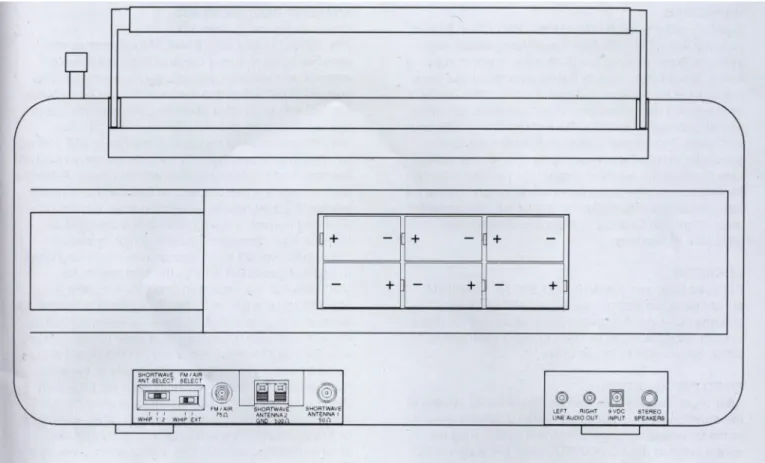
REAR PANEL DESCRIPTION (See Paee 15)
SPECIFICATIONS
Frequency Range: 100 to 30.000 kHz (0.1 to 30 MHz). Line Audio Outputs: Stereo left and right.
87 to 108 MHz, 118 to 137 MHz. 300 mV. 4.7K Ohms for each output.
Sensitivity - SSB
AM. USB. LSB modes (0.1 to 30 MHz).
AM mode only for 118 to 137 MHz.
FM mode only for 87 to 108 MHz. Headphone Jack:
DC Power Requirements:
1/8 inch (3.175mm) stereo/mono type.
Input: 7-10 VDC 0 1 Amp. supplied from AC ADAPTER, external DC Power
(10 dB S+N/N): Less than 0.5 uV, 0.1 to 30 MHz. Supply or 5.7 to 9.0 VDC supplied by (6)
Sensitivity - AM internally mounted "D" cell (1.5V)
batteries (not supplied).
(10 dB S+N/N):
(1000 Hz. 30% Mod): Less than 2.0 uV. 0.1 to 30 MHz.
Less than 4.0 pV, 118 to 137 MHz. Current requirements
Sensitivity - FM
(approximate) from 9.0 VDC Supply or (20 dB S/N) (monaural):
Frequency Stability
Less than 4 uV, 87 to 108 MHz.
10 ppm, 0C to 50C
Batteries with 1/4 W
average Audio Output: Mode Dependent:
510 mA minimum with lamp off,
Frequency Accuracy: Better than 100 Hz. c 25' C
Operating Temperature:
830 mA maximum with lamp on.
0C to +50C Selectivity - SSB. AM: 6 kHz c -6 dB, less than 12 kHz 0 -60 dB.
4 kHz c -6 dB. less than 9 kHz c -60 dB.
2.3 kHz c -6 dB, less than 5 kHz c -60 dB. Weight: 14.55 lbs. (6.6 kg). including
AC ADAPTER, (batteries NOT included).
IF Frequency - SSB. AM: 1st IF. 55.845 MHz. Size - Width: 20 -7/8" (53.575 cm).
FM:
Image Rejection:
IF Rejection.
IP3 - Intercept Point
2nd IF, 455 kHz.
1st IF. 10.7 MHz (Single Conversion).
Greater than 60 dB. 0.1 to 30 MHz Greater than 60 dB, 118 to 137 MHz.
Greater than 50 dB. 87 to 108 MHz
Greater than 80 dB. 55.845 MHz.
Greater than 80 dB. 455 kHz.
Height:
Depth:
Supplied AC ADAPTER Input:
Output:
9-1/4" (23.495 cm) with handle retracted.
8 1/2" (21.59 cm) including front handles.
120-230 VAC auto switchable. 50/60 Hz with dual switchable plug wires.
9 VDC @ 1500 mA maximum.
Center conductor of connector is positive.
(@± 50 Ohm Ant. Input) (Attenuator Off):
AGC Performance
Internal Antenna
External Antenna Inputs
External Speaker Output
Power to Internal Speaker:
Greater than +10 dBm @ 100 kHz spacing.
Greater than -20 dBm Q 5 kHz spacing.
Threshold: 1 0 uV Attack Time. 1 mSec.
Release Time: SLOW. 3 sec FAST. 300 mSec Less than 6 dB change in audio output for 90 dB RF input change (referenced from the AGC threshold point plus 3 dB).
56 3/4" (1.414 meters) telescoping whip (for use on all bands).
Ferrite rod antenna
(For use from 100 kHz through 1800 kHz)
0 1 to 30 MHz. 50 Ohm SO-239 connector or 2 terminal compression connector for 500 Ohm input with ground
87 to 108 MHz and 118 to 137 MHz 75 Ohm "F" type connector
1 Watt each nominal into two 4 Ohm speakers with 9 VDC supply voltage External jack is 1/4" (6.35 mm) and two-way for stereo output
2 Watts nominal when neither headphones nor external speakers are plugged in
4'(10 16 cm), 4 Ohms.
An appliance and cart combination should be moved with care. Quick stops, excessive force and uneven surfaces may cause the appliance and cart combination to overturn.
The lightning flash with arrow head symbol, within an equilateral triangle,is intended to alert the user to the presence of uninsulated "dangerous voltage"
within the product's enclosure that may be of sufficient magnitude to constitute a risk of electric shock to persons.
The exclamation point within an equilateral triangle is intended to alert the user to the presence of important operating and maintenance (servicing) instructions in the literature accompanying the appliance.
WARNING: TO REDUCE THE RISK OF FIRE OR ELECTRIC SHOCK, DO NOT EXPOSE THIS PRODUCT'S AC ADAPTER TO RAIN OR MOISTURE. DO NOT OPEN THE CABINET, REFER SERVICING TO QUALIFIED PERSONNEL ONLY
CAUTION: TO PREVENT ELECTRIC SHOCK, DO NOT USE THE AC ADAPTER WITH AN EXTENSION CORD RECEPTACLE OR OTHER OUTLET UNLESS THE BLADES OF THE AC ADAPTER CAN BE FULLY INSERTED TO PREVENT BLADE EXPOSURE.
ATTENTION: POUR PREVENIR LES CHOCS ELECTRIQUES, NE PAS UTILISER CETTE FICHE POLARISEE AVEC UN PROLONGATEUR, UNE PRISE DE COURANT OU UNE AUTRE SORTIE DE COURANT, SAUF SI LES LAMES PEUVENT ETRE INSEREES A FOND SANS EN LAISSER AUCUNE PARTIE A DECOUVERT.
1. Read Instructions-All the safety and operating instructions should be read before the appliance is operated.
2. Retain Instructions-The safety and operating instructions should be retained for future reference.
3. Heed Warnings-All warnings on the appliance should be adhered to.
4. Follow Instructions-All operating and use instructions should be followed.
5. Cleaning-Unplug this appliance from the wall outlet before cleaning. Do not use liquid cleaners or aerosol cleansers.
Use a damp cloth for cleaning.
6. Attachments-Do not use attachments that are not recommended by the manufacturer or they may cause hazards.
7. Water and Moisture-Do not use this product near water-for example, near a bathtub, wash bowl, kitchen sink, laundry tub, in a wet basement, or near a swimming pool- and the like.
8. Accessories-Do not place this product on an unstable cart, stand, tripod, bracket, or table. The product may fall, causing serious injury to a child or adult, and serious damage to the appliance.
9. Ventilation-This product should never be placed near or over a radiator or heat register. This product should not be placed in a built-in installation such as a bookcase or rack unless proper ventilation is provided or the manufacturer's instructions have been adhered to. Any slots or openings in the,cabinet are provided for ventilation. To ensure reliable operation of the product and to protect it from overheating, these openings must not be blocked or covered. The openings should never be blocked by placing the product on a bed, sofa, rug, or other similar surface. KEEP CURTAINS AND OTHER FLAMMABLE MATERIALS OUT OF DIRECT
CONTACT WITH THE AC ADAPTER.
WARNING. TO PREVENT FIRE OR ELECTRICAL SHOCK DO NOT EXPOSE THIS PRODUCT'S AC ADAPTER TO RAIN OR MOISTURE
10. Power Sources-This product should be operated only from the type of power source indicated on the marking label of the supplied AC Adapter. If you are not sure of the type of power supplied to your home, consult your appliance dealer or local power company.
11. Lightning-For added protection for this product during a lightning storm, or when it is left unattended and unused for long periods of time, unplug the AC adapter from the wall outlet.
12. Power Lines-An outside antenna system should not be located in the vicinity of overhead power lines, other electric light or power circuits, where it can fall into such power lines or circuits.
When installing an outside antenna system, extreme care should be taken to keep from touching such power lines or circuits as contact with them may be fatal.
13. Overloading-Do not overload wall outlets and extension cords as this can result in a risk of fire or electric shock.
14. Servicing-Do not attempt to service this product yourself as opening or removing covers may expose you to dangerous voltage or other hazards. Refer all servicing to qualified service personnel.
15. Damage Requiring Service-Unplug this product from the wall outlet and refer servicing to qualified service personnel under the following conditions:
a. When the AC adapter cord or plug is damaged.
b. If the AC adapter has been exposed to rain or water.
c. It the product does not operate normally by following the operating instructions. Adjust only those controls that are covered by the operating instructions. An improper adjustment may result in damage and will often require extensive work by a qualified technician to restore the product to its normal operation.
d. If the product has been dropped or the cabinet has been damaged.
e. When the product exhibits a distinct change in performance-this indicates a need for service.
16. Replacement Parts-When replacement parts are required, be sure the service technician has used replacement parts specified by the manufacturer or have the same characteristics as the original parts. Unauthorized substitutes may result in fire, electric shock or other hazards.
17. Safety Check-Upon completion of any service or repairs to this product, ask the service technician to perform safety checks to determine that the product is in proper operating condition.
18. Outdoor Antenna Grounding-Before attempting to install this product, be sure the antenna or cable system is grounded so as to provide some protection against voltage surges and built-up static charges.
a. Use No.10 AWG (5.3mm
2) copper, No.8 AWG (8.4mm
2) aluminum, No.17 AWG (1.Omm
2) copper-clad steel or bronze wire or larger, as ground wire.
b. Secure antenna lead-in and ground wires to house with stand-off insulators spaced from 4 feet (1.22m) to 6 feet (1.83m) apart.
c. Mount antenna discharge unit as close as possible to where lead-in enters house.
d. A driven rod may be used as the grounding electrode where othertypes of electrode systems do not exist. Refer to the National Electrical Code, ANSI/NFPA 70-1990 for information.
e. Use jumper wire not smaller than No.6 AWG 13.3mm
2) copper or equivalent, when a separate antenna grounding electrode is used.
EXAMPLE OF ANTENNA GROUNDING
TABLE OF CONTENTS
Thank you for purchasing the GRUNDIG SATELLIT 800 MILLENNIUM Shortwave Receiver. This receiver has been designed and manufactured to high quality standards, and will provide reliable operation for many
years.
Please carefully read the Owner's Manual in order to take advantage of the many interesting features that will provide enjoyable listening to radio broadcasts around tha world
SPECIFICATIONS 4
MEMORY DESCRIPTION 19
IMPORTANT SAFEGUARDS 5 STORING A MEMORY CHANNEL 19
RECALLING A MEMORY LOCATION 19
TABLE OF CONTENTS 6 DELETING A MEMORY LOCATION 19
GENERAL DESCRIPTION 7 SCAN FUNCTIONS 20
SCAN DESCRIPTION 20
POWER SUPPLY 8 MEMORY CHANNEL SKIP 20
AC ADAPTER 8
BATTERY OPERATION CLOCK AND TIMER FUNCTIONS 21
AND INSTALLATION 8 TIME DISPLAY 21
SETTING THE 24 HOUR CLOCKS 21
INSTALLATION 10 TIMER OPERATION 21
UNPACKING 10 SETTING TIMER ON/OFF TIMES 22
LOCATION 10 ENABLING/DISABLING
FIXED INSTALLATION 10 TIMER OPERATION 22
PORTABLE OPERATION 10
ANTENNA REQUIREMENTS 10 SPECIAL USE FEATURES AND FUNCTIONS 25
LOCK ALL ENTRY TO KEYPAD 25
FRONT PANEL DESCRIPTION 12 BROADCAST BAND TUNING STEP SIZE 25
DELETE ALL MEMORY CHANNELS 25
LCD DISPLAY DESCRIPTION 14 AUTOMATIC BANDWIDTH SETTING
REAR PANEL DESCRIPTION 15
WITH MODE SELECTION
DISABLE (ENABLE) 25
GETTING STARTED 16 QUICK REFERENCE GUIDE 26
GENERAL OPERATING
INFORMATION 16 GLOSSARY OF TERMS 29
MICROPROCESSOR RESET 16
BEEP TONES 16 TROUBLESHOOTING 30
FIRST STEPS 16
DIRECT FREQUENCY ENTRY 16 SUGGESTED REFERENCES 30
SHORTWAVE 'METER' BAND
DESIGNATOR ENTRY 17 SERVICE INFORMATION 31
FREQUENCY RESOLUTION 17
FRONT PANEL LOCK (UNLOCK) 17 ONE YEAR LIMITED WARRANTY 31
AM SYNCRONOUS OPERATION 17
SSB OPERATION 18 MEMORY CHANNEL LOG 32
FM OPERATION 18
AGC OPERATION 18
GENERAL DESCRIPTION
The SATELLIT 800 MILLENNIUM is a microprocessor controlled, synthesized, world band receiver with con- tinuous coverage capability from 100 kHz through 30 MHz which includes the AM broadcast and shorwave bands.
Reception also includes FM broadcast (87 - 108 MHz) and Aircraft (118 -137 MHz) bands. The SATELLIT 800 MILLENNIUM offers excellent sensitivity, selectivity, dynamic range, and features that permit easy tuning of desired stations. Conveniently located front panel controls allow for rapid operator programming and ease of use. The unit can be operated from either the supplied AC
ADAPTER or from six "D" cell batteries (not supplied) for portable operation. A low battery voltage indication is displayed when that condition exists.
Three electronically switched IF filters are provided.
The front panel liquid crystal display provides feedback of the current status of the receiver. The seven digit frequency display provides resolution to 100 Hz accuracy in the AM broadcast, Aircraft and Shortwave bands.
Resolution to 20 kHz is displayed in the FM broadcast band mode. Backlighting of the display is selectable by a front panel button. To prolong battery life with internal battery operation, the backlighting automatically turns off after a short delay following a function change or retuning of the receiver.
Reception modes include Lower/Upper Sideband (LSB),
(USB), and AM in the Shortwave, and AM broadcast bands. For the Shortwave and AM broadcast bands, a selectable sideband synchronous detector (SYNC) allows for enhanced reception by eliminating or reducing distortion due to fading signals. During FM broadcast use, stereo reception is available through the use of headphones.
Other built-in reception aids include selectable slow or fast AGC, RF attenuator for use in strong signal handling conditions, as well as treble and bass controls.
Two independent, real time clocks provide a local and alternative time selection. Also provided is a two event timer.
A programmable memory area allows for 70 independent
receiver set up memories. These memories do not require
battery backup and are thus unaffected by power
interruptions. All parameters associated with a particular
memory channel are stored including the frequency, mode,
bandwidth, fast or slow AGC, RF attenuator and
synchronous detector. These memory channels may be
accessed manually or through a time scan with each
channel monitored for a 5 second period.
POWER SUPPLY
AC ADAPTER Keep curtains and other flammable materials out of
The SATELLIT 800 MILLENNIUM receiver is supplied direct contact with the AC ADAPTER to avoid overheat with an auto-switchable AC ADAPTER to power it ing.
indoors. The AC ADAPTER is designed to be plugged
into a wall outlet that supplies nominal 120 VAC, 60 Hz GRUNDIG assumes no responsibility for damage or nominal 230 VAC 50 Hz power. due to operation with an AC adapter other than the The AC adapter is supplied with a North American type
connector. To use the unit in countries using a European
one supplied with this unit.
BATTERY OPERATION AND INSTALLATION type connector, plug the North American connector into The SATELLIT 800 MILLENNIUM receiver is designed the US to Europlug adapter that is provided. to operate from either the supplied AC ADAPTER or Connect the output connector of the AC adapter to the
from six "D" cell batteries (not supplied). NOTE: Check the batteries periodically for leakage. IF UNIT IS TO 9 VDC, 1 amp connector on the back of the receiver. BE STORED OR OTHERWISE NOT USED FOR AN Inserted batteries are automatically disconnected as EXTENDED PERIOD OF TIME, REMOVE THE BAT soon as the AC adapter is plugged in to this connector. TERIES TO PREVENT CORROSION AND POSSIBLE
DAMAGE TO THE RECEIVER.
Battery Installation
(1) Position receiver with the back panel towards you.
(2) Remove battery access cover by pressing on the corrugated area in the center of the cover and sliding it to your left as far as it will go. Then gently pull it straight out from the rear panel.
(3) Place 6 "D" cell alkaline type batteries into holder.
Make sure the batteries are in the proper polarity posi tion as illustrated in Figure 1.
(4) Replace access cover by placing it over the left side of the opening and then sliding it to the right.
NOTE:
The SATELLIT 800 MILLENNIUM does not rely on the
batteries for retention of memory channels. To ensure
that clocks and timers are maintained following the loss
of AC power or battery removal, the receiver must first
be connected to a source of AC power or have batteries
installed for a minimum of 10 minutes. If power is lost
after this minimum 'charge' time, clocks and timer
settings are maintained for a time period of approxi
mately 30 minutes.
POWER SUPPLY, cont'd.
FIGURE 1: BATTERY INSTALLATION AND REMOVAL
BATTERY SUPPLY: 9 VDC
6 X IEC-LR20 OR "D" CELLS
DO NOT LEAVE BATTERIES IN UNIT FOR EXTENDED PERIODS.
CHECK BATTERIES OFTEN.
INSTALLATION
UNPACKING
Carefully remove the SATELLIT 800 MILLENNIUM and included AC ADAPTER from the shipping carton and examine them for evidence of damage. If any damage is noted, immediately contact the transportation company responsible for delivery or return the unit to the dealer from whom it was purchased. Keep the shipping carton and all packing material for the transportation company to inspect.
The original carton and packing material should be retained for repackaging should it be necessary to return the receiver.
Inspect the packing material for any accessories or printed material before storing the box. Locate the registration card, fill it out. and immediately return it to Grundig to ensure registration and validation of warranty.
LOCATION
For fixed locations, the SATELLIT 800 MILLENNIUM should be operated from the AC ADAPTER. Keep curtains and other flammable material away from direct contact with the AC ADAPTER to avoid overheating which could result in failure or fire.
FIXED INSTALLATION
After unpacking the unit, connect the antenna system to the appropriate antenna input. Connect system ground to the compression terminal marked 'GND'. Plug the output cable of the AC ADAPTER into the 'External DC Input' connector on the rear panel of the SATELLIT 800 MILLENNIUM receiver. Plug the AC ADAPTER into a source of 120 VAC, 60 Hz or 230 VAC, 50 Hz power. Refer to the Figure 2 on page 11 for the diagram of a typical fixed installation
PORTABLE OPERATION
For use in a portable environment, the SATELLIT 800 MILLENNIUM is operated from six (6) internally mounted "D"
cell batteries. These batteries are not supplied and must be installed prior to portable operation of the receiver. See BATTERY INSTALLATION section on page 9, Figure 1 of this manual. For longest battery life, alkaline batteries are recommended for this product. NOTE: REMOVE THE BATTERIES IF THE RECEIVER IS TO BE STORED OR OTHERWISE NOT OPERATED FOR AN EXTENDED PERIOD OF TIME TO AVOID DAMAGE TO THE SATELLIT 800 MILLENNIUM DUE TO POSSIBLE BATTERY LEAKAGE OR CORROSION EFFECTS. The SATELLIT 800 MILLENNIUM does not rely on the batteries for retention of memory channels. To ensure that the clocks and timers are maintainea following a loss of AC power or battery removal, the receiver must first be connected to an AC power source or have batteries installed for a minimum of 10 minutes. If power is lost after this minimum 'charge' time, clocks and event timer settings are maintained for a period of approximately 30 minutes.
ANTENNA REQUIREMENTS (Refer to Figure 2, page 11)
The SATELLIT 800 MILLENNIUM incorporates rear panel switches to select between the internal whip antenna and various types of external antennas. The built-in 'WHIP' antenna is available for use on all bands. For 100 kHz to 30 MHz operation, two antenna connectors are also provided.
'ANTENNA 1' is a 50 Ohm, SO-239 coaxial input requiring a mating PL-259 connector. This input would typically be used as the primary AM broadcast and shortwave band antenna input. Antennas such as dipoles, trap dipoles, verticals and beams will provide the best results, depending upon the desired receiving frequency. 'ANTENNA 2' is a compression terminal type connection, providing high-impedance (500 Ohms typical) input. Antennas such as long wires or end- fed Zepps will provide the best results for 'ANTENNA 2'. For reception in the 87-108 MHz and 118-137 MHz range, the 'FM/AIR' 75 Ohm "F" connector terminal is also provided.
Outside TV antennas, folded dipoles or coaxial antennas will provide the best results with this input for reception of the FM broadcast and Aircraft bands. The best antenna for any of the previously mentioned inputs will depend on the frequency range and time of day for the particular signal in question. Refer to publications such as the ARRL Handbook or ARRL Antenna Manual (available in most public libraries) for help on selection and/or construction of the antennas mentioned above.
If you have questions about antennas, contact Grundig
Technical Support at, 1(800) 872-2228 in the U. S. A., or 1
(800) 637-1648 in Canada.
FRONT PANEL DESCRIPTION
1. Power - Press this button to turn the unit on or off.
2. Headphone Jack - This connector accepts a 1/8"
stereo/mono headphone connector. Stereo reception is possible only in the FM mode. All speaker outputs are automatically switched off when using the headphones.
3. Volume - With the receiver on, adjust this control clockwise to increase the audio level from the receiver's speaker, external speaker, or from headphones. Be certain to set the volume setting at the desired level for TIMER use.
4. Bass - This control adjusts the audio frequency response at the low end of the audio spectrum. Adjust clockwise for more bass response.
5. Treble - This control adjusts the audio frequency response at the high end of the audio spectrum. Adjust clockwise for more treble response.
6. Air Band Squelch - This control is operational only for the Aircraft band. The control allows muting of the receiver's audio when no signals are present. Adjust the control until background noise just disappears when no signal is being received.
7. Attenuator - Press to turn on the built in 20 dB attenuator to reduce the received signal strength in the AM broadcast and Shortwave bands as required. The attenuator is not active in the FM and Aircraft bands. Successive
depressions of the button toggle the attenuator on and off.
8. AGC - Press to select either the Slow or Fast AGC setting for the AM broadcast, Shortwave and Aircraft bands. The AGC is not selectable in the FM mode.
9. Bandwidth - Press to select the desired bandwidth: 2.3 kHz, 4.0 kHz or 6.0 kHz. The bandwidth setting can be programmed to be automatic with mode selection, or manual. The default setting is for automatic selection. This function has no action in the FM mode. The 6.0 kHz bandwidth is automatically selected in the AM mode. The 2.3 kHz bandwidth is the default for the SSB modes. All three bandwidths are selectable by successive depressions of this button for the AM broadcast, Shortwave and Aircraft bands. To disable the automatic bandwidth selection with mode, start in the POWER 'OFF' mode and press and hold the BANDWIDTH button while pressing the POWER button to put the receiver in the POWER 'ON' mode. To enable the automatic bandwidth selection with mode operation, repeat the same procedure.
10. AM Sync - Press to select the AM mode of operation.
Successive depressions toggle the synchronous detector on and off. Press to turn the synchronous detector off before selecting SSB modes. The 'AM' and 'AM SYNC' modes are not accessible in the FM band. The 'AM SYNC' mode is not accessible in the Aircraft band.
11. SSB USB-LSB- Press to select the SSB mode of operation ('SYNC' must be turned off). Successive depressions alternately select the 'LSB' or 'USB' modes as displayed. The SSB mode of operation is not accessed in either the FM or Aircraft band modes. Pressing the 'SSB USB-LSB' button while 'AM SYNC' mode is engaged will alternately select the upper or lower sideband portions of the AM signal being received.
12. Band - Repeatedly pressing this button will cycle through the Air (Aircraft), FM (FM Broadcast), SW (Shortwave) and AM (AM broadcast) bands.
13. LCD Display - The backlit, liquid crystal display provides the current status of the SATELLIT 800 MILLENNIUM such as frequency, mode, bandwidth, etc.
Refer to LCD DISPLAY DESCRIPTION on page 14 of this manual for a full description.
14. Tuning - The 'TUNING' knob and the and buttons are the primary tuning controls of the SATELLIT 800 MILLENNIUM. Clockwise rotation of the dial increases frequency and counterclockwise rotation decreases frequency. The dial also incorporates variable speed tuning. The faster the dial is rotated, the faster the tuning
speed. The button increases and the button decreases the frequency by fixed steps (10 kHz or 9 kHz selectable in the AM broadcast band, 5 kHz on the Shortwave band, 100 kHz on the FM broadcast band and 25 kHz on the Aircraft band) with each depression.
Pressing and holding either button will allow continuous stepping up or down as long as the button is depressed.
15. FUNCTION KEYS
STORE - This button is used to store the desired frequency, mode, attenuator, synchronous detector, AGC bandwidth, etc. as one of 70 memory channels. When pressed, the 'MEMORY' symbol will flash in the display.
Enter a two digit number between '00' and '69' for the desired memory channel. An audible beep will indicate that the memory channel has been stored with the newly entered settings.
MEMO - To recall a memory channel at any time, press the 'MEMO' button and within three seconds of the button depression, enter a two-digit number between '00' and '69'.
With 'MEMORY' displayed, other adjacent memory
channels can be recalled by use of the and
buttons. The 'Tuning' knob may be used totune from the
recalled frequency of the selected memory channel. Please
note that numerical entries are interpreted as frequency
entries if the 'MEMORY' channel number is not flashing.
FRONT PANEL DESCRIPTION, cont'd.
BEEP - The 'beep' tone is provided to indicate that entries have been accepted or to notify of error. Press this button to enable or disable the 'beep'.
VFO - Press to place the receiver in the normal variable frequency tuning mode (VFO). Select desired fre- quency, mode, attenuator, synchronous detector, AGC, Bandwidth, etc.
SKIP - In the memory mode, press to skip the current memory channel for a Scan operation. An 'S' will be displayed to the right of the selected memory channel number. When an 'S' is displayed next to a selected memory channel number, press this button to restore the memory channel for scan operation.
SW BAND - Pressing the SW BAND button when SWW has been selected with the BAND button (see 12) will cause the '= portion of the SW - METER display on the LCD to flash for approximately 2 seconds. During this 2 second interval, entering the meter designator for the desired meter band will cause the receiver to go to the low end of the frequency range for the desired meter band. The frequency ranges for the defined meter shortwave bands are as shown in the 'Shortwave Band Designators' table which follows.
S h o r t w a v e B a n d D e s i g n a t o r s
Band Low Freq High Freq
120 Meter 2300 kHz 2500 kHz 90 Meter 3200 kHz 3400 kHz 75 Meter 3900 kHz 4000 kHz 60 Meter 4750 kHz 5060 kHz 49 Meter 5950 kHz 6200 kHz 41 Meter 7100 kHz 7600 kHz 31 Meter 9500 kHz 9900 kHz 25 Meter 11,600 kHz 12,100 kHz 22 Meter 13,570 kHz 13,870 kHz 19 Meter 15,100 kHz 15,800 kHz 16 Meter 17,480 kHz 17,900 kHz 13 Meter 21,450 kHz 21,850 kHz 11 Meter 25,600 kHz 26,100 kHz DEL - Press and hold for three seconds to delete a selected memory channel. An audible beep indicates that the selected memory channel has been deleted.
SCAN - Pressing this button starts scanning of the current block of 10 channels. The receiver will stop at each programmed memory channel for 5 seconds, then increment to the next memory channel. Channels programmed for SKIP will not be scanned. Press this button again to stop the scan operation.
16. Direct- Key-Input
Numeric Keys - Keys 0 thru 9 plus the'.' key are used to make direct numeric entries of frequencies, memory channel numbers and meter band designators.
CLR LOCK - Press this key to clear an incorrectly entered frequency or other value. Pressing and holding this button for three seconds will cause the receiver to be locked in its present configuration. All front panel push button controls (except for the power button) as well as the tuning knob will be ineffective, and "LOCKED" will appear on the LCD display. To return to normal operating mode, once again press the CLR LOCK key for three seconds.
17. Signal Strength Meter - This meter indicates the relative received signal level in S-units, and dB above S9.
Each S-unit between S1 and S9 equals an approximate 5 dB change in received signal strength. Each dB number above S9 represents a 10 dB increase in received signal strength.
18. SET Keys
CLOCK - Pressing this button will display the current time of the current clock. After three seconds, the display will revert to the current frequency. Pressing and releasing this button while the time is displayed will toggle the time display between the two clocks (local or alternate). The timer will operate according to the last displayed clock time. See section on 'SETTING THE 24 HOUR CLOCKS' on page 21.
TIMER - Pressing this button will activate the timer mode. If the Timer has been activated, the 'TIMER' symbol will be displayed even after the receiver is turned off. The receiver will automatically turn on and off as programmed. See section on 'SETTING TIMER ON/ OFF TIMES' on page 22.
LAMP - Press to turn the display backlighting on or off. With internal battery operation, the backlighting automatically turns off after a short delay following a function change or retuning of the receiver in order to prolong battery life. Also, the receiver senses Battery or AC operation, and allows the lamp to remain lit if on AC.
19. Speaker - This is the opening for the internal
speaker for the SATELLIT 800 MILLENNIUM
RECEIVER.
LCD DISPLAY DESCRIPTION
1. TIMER - This annunciator indicates the state of the Timer as either Active or Inactive. Refer to the 'CLOCK AND TIMER FUNCTIONS' section on page 21.
2. LOCK - When illuminated, this annunciator indicates that the Main 'TUNING' knob and all front panel keypads (except for the POWER button) are not active.
3. MEMORY 00 - This annunciator indicates current memory location from 00 to 69. MEMORY will light when the receiver enters the memory mode. Refer to
'MEMORY FUNCTIONS' on page 19.
4. BATT - When operating on internal batteries, 'BATT' blinks to indicate a low charge on batteries. 'ATT' Indicates that the built-in attenuator is activated.
5. AGC FAST/SLOW - indicates the AGC setting, Slow or Fast.
6. AM SYNC - Indicates that the AM mode of reception is on. If SYNC is also illuminated, then the synchronous AM mode of detection is on.
7. USB - Indicates that the upper sideband mode of detection is on.
LSB - Indicates that the Lower sideband mode of detection is on.
8. FM - Indicates that the FM mode of detection is on.
This mode is available only on the FM broadcast band (87 - 108 MHz).
9. SW 120 METER - Indicates the shortwave band designators that define a range of frequencies for each band as follows:
S h o r t w a v e B a n d D e s i g n a t o r s
Band Low Freq High Freq
120 Meter 2300 kHz 2500 kHz
90 Meter 3200 kHz 3400 kHz
75 Meter 3900 kHz 4000 kHz 60 Meter 4750 kHz 5060 kHz 49 Meter 5950 kHz 6200 kHz 41 Meter 7100 kHz 7600 kHz 31 Meter 9500 kHz 9900 kHz 25 Meter 11,600 kHz 12,100 kHz 22 Meter 13,570 kHz 13,870 kHz 19 Meter 15,100 kHz 15,800 kHz 16 Meter 17,480 kHz 17,900 kHz 13 Meter 21,450 kHz 21,850 kHz 11 Meter 25,600 kHz 26,100 kHz
10. AIR - indicates that the Aircraft band (118-137 MHz) has been selected.
11. 7-Digit Readout - This display indicates the operating frequency of the receiver. The frequency is displayed in 'kHz' for the AM broadcast and Shortwave bands. The FM and Aircraft band frequencies are displayed in 'MHz'.
12. SCAN 00 S - Indicates that the receiver is in the memory channel SCAN mode and displays the number of the currently scanned channel, from 00 to 69. In the MEMORY mode, the 'S' illuminates to indicate that a particular memory channel will be skipped over when the SCAN operation is activated.
13. 6.0 4.0 2.3 - Indicates which IF filter is selected.
There is no indication in the FM mode.
14. - Indicates that a stereo FM broadcast station is
tuned in.
REAR PANEL DESCRIPTION
1. ANTENNA 1 - This connector is used when attaching receiving antennas with coaxial feed lines of 50 Ohm nominal impedance. It accepts a standard PL-259 plug. If selected by the 'Shortwave Antenna Select' switch (item 2), this input operates for the AM Broadcast and Shortwave bands only (100 kHz to 30 MHz).
2. SHORTWAVE ANTENNA SELECT - This switch selects one of three possible antenna systems to be used for the 100 kHz to 30 MHz antenna input. Positions 1 and 2 select ANTENNA 1 and ANTENNA 2 respectively, which are described in items 1 and 5 on this section. When WHIP is selected, the built in whip antenna, located at the rear right- hand corner of the receiver's top, is connected. Also built into the receiver is a ferrite rod antenna which also operates when this switch is in the WHIP position, AND the receiver is tuned between 100 kHz and 1800 kHz.
3. FM/AIR ANTENNA SELECT - This switch allows selection of either the built-in WHIP antenna, or an external 75 Ohm antenna connected at the FM/AIR terminal (item 4) for the 87 - 108 MHz and 118 - 137 MHz frequency ranges.
4. FM/AIR Antenna - This "F" type input is designed for an unbalanced 75 Ohm input connection that is encountered with coaxial feeds. Connect to the FM connection of a TV/FM outdoor antenna feed (splitter), if available. Folded dipoles or coaxial antennas will also provide good results with this input for reception of the FM broadcast and Aircraft Bands. If selected by the 'FM/AIR Antenna Select' switch (Item 3), this input operates for the FM Broadcast (87 - 108 MHz) and Aircraft (118 kHz to 137 MHz) bands only.
5. ANTENNA 2 -This connector can be used to attach a high impedance (500 Ohm nominal) antenna. Use the 'GND' (black) and '500 Ohm' (red) terminals for a 500 Ohm antenna. If selected by the 'Shortwave Antenna Select' switch (Item 2), this input operates for the AM Broadcast and Shortwave (100 kHz to 30 MHz) bands only.
6. LINE AUDIO OUT -These RCA connectors provide constant low level left and right audio sources that are independent of the front panel VOLUME, TREBLE and BASS control settings. They are designed to interface to a tape recorder, CW/RTTY demodulators, stereo amplifiers, etc.
7. Battery Compartment - This compartment houses 6 IEC- LR20 or IEC R20 or 'D' cells to provide 9 VDC to the receiver for portable operation. To gain access to the battery compartment, press the corrugated area of the battery compartment panel and slide it to the left. Then gently pull the panel from the receiver. To replace the cover, simply reverse this process.
8. EXT DC INPUT - Connect the AC ADAPTER output cable to this connector. The receiver requires 9 VDC power at approximately 1 Amp current. With external DC power applied, the internal batteries are not used.
9. EXTERNAL SPEAKER - This connector accepts a standard 1/4" diameter, 3 circuit, (stereo) phone plug for connection of external 4 to 8 Ohm speakers.
10. WHIP ANTENNA - The receiver has a built-in telescoping antenna that can be used on all bands.
Note that the pivot point section of the antenna must be
exposed out of its nesting tube to permit moving the
antenna from its vertical orientation. Extend the
telescoping sections and position the antenna for best signal
reception. Be sure the corresponding rear panel antenna
select switch is set to the 'WHIP' position for WHIP antenna
reception.
GETTING STARTED
GENERAL OPERATING INFORMATION
The SATELLIT 800 MILLENNIUM receiver has been designed for ease of use. Please take a few moments to read through this section and familiarize yourself with general operating information.
MICROPROCESSOR RESET
A power-up reset routine will be activated anytime after the receiver COMPLETELY loses power, either from internal batteries or external DC input. This will be observed by the front panel display illuminating all annunciators for 3 seconds, followed by the clock display. However, short term power failures of up to 30 minutes are masked by an internal back-up capacitor. This will allow ample time for battery replacement without loss of the internal clock. Note:
Any programmed memory locations will NOT be lost under a power-up reset due to the memory design of the
SATELLIT 800 MILLENNIUM.
BEEP TONES
The SATELLIT 800 MILLENNIUM responds to all key depressions with an audible beep unless the beep has been disabled by the BEEP button. No beep is generated under any condition for depressions of the TUNING keys when in VFO mode. Beep tones indicate the following:
One short tone for a key depression.
One long, high tone when storing a memory channel.
One long, low tone for any illegal key depression.
FIRST STEPS
Please refer to the front panel illustration and set the controls as described below.
(1) Install 6 "D" batteries or connect AC ADAPTER.
(2) Fully extend the whip antenna and adjust to a vertical position, or connect an external antenna to appropriate rear panel terminals. Set rear panel 'ANTENNA SELECT' switch(es) to appropriate position(s).
(3) Press 'POWER' and adjust 'VOLUME' to a comfortable level.
(4) Select the desired band by pressing the 'BAND' button until the desired band is displayed on the front panel display.
(5) Enter the desired frequency by using one of several methods covered below.
DIRECT FREQUENCY ENTRY
Direct entry of a desired frequency is possible using the 'Direct-Key-Input' keys. While entering a frequency, if an incorrect frequency is entered, pressing the ' ' button will clear the entry in progress and return the receiver to its previous settings. The second depression
of the decimal button acts as an 'ENTER' and causes immediate response to the entered frequency. If you do not press the decimal button a second time at the end, the receiver will automatically enter the frequency after a slight delay.
Enter frequency as follows:
(A) The Shortwave and AM broadcast bands enter in kHz (Kilohertz). A maximum of 6 digits may he entered.
Examples:
700 KHz Press 29,660 kHz Press 14,258.1 kHz Press
OR Press
* When the maximum number of allowed digits is entered, the decimal point will be automatically placed between the 1 kHz and .1 kHz digits and need not be entered.
** The second depression of the '.' button acts as an 'ENTER' and causes immediate response to the entered frequency. If you do not press the decimal '.'a second time at the end, the receiver will automatically enter the frequency after a slight delay.
(B) Aircraft and FM broadcast bands enter in MHz (megahertz). A maximum of 5 digits may be entered for FM, and a maximum of 7 digits may be entered for Aircraft band entries.
Examples:
97.7 MHz
Press .
121.9 MHz Press
Attempting to enter a frequency outside the tuning range of
the SATELLIT 800 MILLENNIUM receiver will cause the
ERROR annunciator to flash along with the error beep to be
heard. The receiver will then return to its previous settings.
GETTING STARTED, cont'd.
SHORTWAVE 'METER' BAND DESIGNATOR ENTRY To facilitate tuning to particular sections of the shortwave band that contain many worldwide broadcasts of news, information and music, the SATELLIT 800 MILLENNIUM permits entry of the 'METER' band designator. In some cases, the worldwide broadcast station may not announce its exact operating frequency, but will announce the 'METER' band in which it is operating or to which band it will move to improve worldwide reception at a particular time of day. By entering this 'METER' band number, the receiver automatically tunes to the low frequency end of the corresponding 'METER' band. The search for the new station location is thus limited to a particular smaller section of the entire shortwave band spectrum. The Shortwave Band Designators and corresponding frequency ranges are as follows:
S h o r t wa v e B a n d D e s i g n a t o r s
Band Low Freq High Freq
120 Meter 2300 kHz 2500 kHz 90 Meter 3200 kHz 3400 kHz 75 Meter 3900 kHz 4000 kHz 60 Meter 4750 kHz 5060 kHz 49 Meter 5950 kHz 6200 kHz 41 Meter 7100 kHz 7600 kHz 31 Meter 9500 kHz 9900 kHz 25 Meter 11,600 kHz 12,100 kHz 22 Meter 13,570 kHz 13,870 kHz 19 Meter 15,100 kHz 15,800 kHz 16 Meter 17,480 kHz 17,900 kHz 13 Meter 21,450 kHz 21,850 kHz 11 Meter 25,600 kHz 26,100 kHz
Press the 'BAND' button as required to enter the shortwave band tuning mode. At this point, you can enter a frequency with the 'Direct-Key-Input' buttons, or use the TUNING knob
and/or the and buttons to change frequency.
To enter a shortwave band 'METER' designator, press the 'SW BAND' button to display a flashing 'METER' number entry prompt. The prompt will flash for approximately 3 seconds after the SW BAND button is pressed. While it is still flashing, enter one of the listed two or three digit Band numbers corresponding to the desired 'METER' band designator using the 'Direct-Key-Input' buttons. While the 'METER'
annunciator is flashing, the and buttons can also be used to step quickly from band to band. After selection of
the 'METER' band, use the TUNING knob or and buttons to change the frequency, or press the 'Direct-Key- Input' keys to make a direct frequency entry.
FREQUENCY RESOLUTION
The SATELLIT 800 MILLENNIUM tunes in the following steps:
FRONT PANEL LOCK (UNLOCK)
All keyboard entries, display settings, and entries from the tuning knob can be locked if desired. First, be sure the SATELLIT 800 MILLENNIUM is not in SCAN mode.
Press and hold the button which is one of the 'Direct- Key-Input' keys. The LOCK annunciator will light indicating the front panel controls are LOCKED out. POWER on/off will still function as well as VOLUME, BASS, TREBLE, and AIR BAND SQUELCH. Press and
hold the button to unlock. The LOCK annunciator will extinguish, indicating the front panel controls are once again active.
AM SYNCRONOUS OPERATION
For general tuning and listening, normal AM is best. If, however, the received signal sounds distorted, or interference from adjacent stations is present, AM
synchronous should be engaged. The synchronous detector in your receiver can greatly reduce the severe audio distortion that can occur due to signal fading. The detector also permits selectable tuning to either the upper or lower sideband portion of an AM signal. Since most all AM (LW, MW and SW) broadcasting generally uses double-sideband transmission, detection of either of the two sidebands results in full reception of the transmitted information. The
selectable sideband tuning and detection not only aids
reception by permitting tuning to the stronger or less
distorted sideband, but also permits rejection of the
sideband nearer to the interfering signal(s). For Example:
GETTING STARTED, cont'd.
The synchronous detector will lock to the strongest signal that is within the IF passband when it is activated. Most of the time, the strongest signal will be the carrier of the desired signal. First, be sure the main tuning is set to within 1 kHz of the desired station's transmitting frequency. Press the 'AM SYNC' button to activate synchronous operation. If adjacent channel interference or any other undesired signal is sufficiently strong, the synchronous detector may lock to it instead. In that case, press the 'AM SYNC' button again to turn the synchronous detector off, and repeat the tuning process. For severe cases of fading, set the audio bandwidth to 4 kHz. If interference is present, press the SSB USBLSB button to select the sideband with the least interference once 'AM SYNC' has been selected. If the interference is sufficiently severe to prevent reception, select a narrower IF bandwidth and retune to the desired signal. After reception is obtained, select a wider bandwidth and/or alternate sideband if desired. When 'AM SYNC' has been activated, moving the TUNING knob will cause the SYNC circuit to momentarily disengage (indicated by 'SYNC' flashing), then back on again when tuning has stopped. AM SYNC does not function on the AIR band, and will not operate properly on intermittent transmissions such as those encountered on CB radio, and AIR bands. For those types of transmissions, use the AM mode. Press the AM SYNC button to turn the synchronous detector off before selecting LSB or USB modes.
SSB OPERATION
Tuning in a single sideband (SSB) signal can be somewhat frustrating for the first time listener. In either of the SATELLIT 800 MILLENNIUM's SSB modes, LSB (lower sideband), or USB (upper sideband), the receiver will select the 2.3 kHz bandwidth automatically (the receiver may be programmed to NOT automatically select a bandwidth. Refer to 'Automatic Bandwidth Setting With Mode Selection DISABLE (ENABLE)' in , the 'Special Use Features and Functions' section of this manual). Generally, LSB is used below 10 MHz and USB is used above 10 MHz. When initially tuning in the desired station, tune slowly. If the station is
unintelligible, try the other sideband, again tuning slowly. A station tuned in on the wrong sideband is totally
unreadable but a station mistuned on the correct sideband may sound like 'Donald Duck'. Further tuning will result in a more normal voice pitch.
FM OPERATION
FM reception is perhaps the easiest mode to use on the SATELLIT 800 MILLENNIUM. The AGC and BANDWIDTH settings are not used in FM. In fact, attempting to activate these buttons will result in an 'ERROR' beep. All FM stations in the U.S. end in an odd 100 kHz, i.e. 97.7 MHz, and are spaced 200 kHz apart. The SATELLIT 800 MILLENNIUM has the ability to tune in 20 kHz steps to allow tuning in between stations to help eliminate interference to weaker stations that could be covered up by stronger adjacent stations. Additionally, when headphones or external speakers are used, true stereo reception is possible. The front panel stereo
indicator will light when a stereo station is tuned in.
The receiver will automatically switch to stereo and provide left and right audio from the headphone jack, line output jacks, or external speaker jack. If the headphones or external speakers are removed while listening to a stereo broadcast, the receiver will provide monaural audio from the internal speaker, and the front panel stereo indicator will disappear.
AGC OPERATION
The SATELLIT 800 MILLENNIUM provides the ability to select a Slow or Fast AGC setting. Either of the two settings will permit automatic control of the receiver's gain thereby producing a constant audio output free of distortion.
Generally, the Slow AGC setting is preferred for reception of
AM and SSB signals. The Fast AGC setting allows more
rapid automatic receiver gain adjustment to quickly fading
signal levels. The AGC does not function in the FM mode.
MEMORY FUNCTIONS
MEMORY DESCRIPTION
The SATELLIT 800 MILLENNIUM contains 70 memory locations that can be used to store and recall commonly monitored frequencies. These 70 locations are divided into blocks of 10, ie. 00-09, 10-19 20-29, etc. This allows convenient grouping of frequencies. As an example, 00- 09 could be AM broadcast stations, 10-19 could be FM broadcast stations, 20-29 could be various time stations such as CHU and WWV, etc. With memory locations programmed, you can use the SCAN function to automatically monitor desired memory frequencies. The following operating parameters may be stored in any memory location:
(I) Frequency, (2) Mode, (3) Bandwidth, (4) AGC setting, (5) Attenuator, (6) Synchronous detector.
STORING A MEMORY CHANNEL
First, be sure that the SATELLIT 800 MILLENNIUM is in the VFO mode (MEMORY or SCAN not displayed). If required, press the button to place unit in the VFO mode.
(A) Select the desired frequency, mode, bandwidth, etc.
(B) Press the button. 'MEMORY' will light and the memory channel number will flash for approximately 3 seconds. While it is still flashing, enter a two-digit number from 00 to 69. A confirmation beep will be heard. (C) The receiver will return to the VFO mode and the last used memory location will be displayed in the 'MEMORY' portion of the display.
RECALLING A MEMORY LOCATION
To select a specific memory channel, press the
button. This will cause 'MEMORY' to light on the front panel display, and the MEMORY channel number will flash for approximately 3 seconds. While it is still flashing, enter a two digit number of the desired memory channel to be received. Make certain that the successive button depressions are made within 3 seconds of each other. Other memory channels may be selected by pressing the button and entering two digit
numbers. If a channel number is selected that is empty, 'Error' will flash.
The large 'TUNING' knob may be used to tune from the frequency that was stored in the selected memory channel.
The 'MEMORY' symbol turns off, but the last memory channel number still shows. Pressing the button will cause the receiver to return to the last selected memory channel number and the 'MEMORY' symbol will turn on.
DELETING A MEMORY LOCATION
Select the memory channel to be deleted as described in 'RECALLING A MEMORY LOCATION'. Press and hold the
button for 3 seconds. A beep will be heard to
indicate that the contents stored in the selected memory
channel number have been deleted.
SCAN FUNCTIONS
SCAN DESCRIPTION
The SATELLIT 800 MILLENNIUM provides a time scan function of programmed memory channels using the
button. Scan will begin and end within a 10 channel block of programmed memory channels as indicated by the most significant digit of the selected memory channel number.
The receiver will stop at each programmed memory channel within the block for 5 seconds and then increment to the next memory channel. Memory channels that are programmed to be skipped will not
be scanned. The 'SCAN' symbol will be displayed for the duration of the scan action. Scanning will continue until the 'SCAN' button is pressed again.
Example for SCAN:
Suppose that memory channels 30 through 39 are programmed and it is desired to scan these channels. To initiate the scan action, press the button
followed by the two-digit channel number entry (can enter 30 through 39 for this example).
Press the button. The receiver will begin scanning from the selected memory channel and continue scanning in sequence: '30'- '31' -'32' - etc.
Press the button again to stop the scanning action.
Note that if channels 29 and 40 were stored, they would not be included in a scan of the channels starting with a '3' as the most significant digit of the channel number.
MEMORY CHANNEL SKIP
A memory channel can be skipped for scan operations.
While in the MEMORY mode, press the'(
SKIPI' button.
The display will indicate that the 'SKIP' function has been stored for that particular memory channel number. An 'S' will be displayed to the right of the memory channel number on the display. Repeat the same sequence as described to remove the 'SKIP' function from a memory channel number.
Example for MEMORY CHANNEL 'SKIP':
Refer to the previous example on this page. Suppose it is desired to skip the memory channel number '34' from the scan action:
From the normal variable frequency tuning and reception mode (VFO) or from the Memory mode, press the button followed by the two-digit number '34'.
Press the button. An 'S' will illuminate to the right of the displayed '34'. When the scan action is initiated, all channel numbers 30 through 39, except 34, will be scanned. Note that the memory contents of channel 34 still remain. It is skipped over only in the scan sequence.
To allow channel 34 to again be included in the scan sequence, press the button followed by the two- digit number '34'.
Press the button to remove the 'SKIP' function from
channel 34 for this example. The 'S' indicator in the display
will turn off.
CLOCK AND TIMER FUNCTIONS
TIME DISPLAY
The SATELLIT 800 MILLENNIUM incorporates a dual time clock allowing two 24 hour clocks to be set and maintained. During loss of AC power, or during battery changing, clock operation is maintained for a period of approximately 30 minutes, if the receiver has been connected to an AC power source or had the batteries installed for a minimum time of 10 minutes. The two-event timer functions are also derived from the last displayed clock, therefore the clocks must be set first for proper TIMER operation.
TIMER Settings are also maintained through a power loss for a period of approximately 30 minutes.
Pressing the button once will display the current time of the current clock. After approximately 3 seconds, the display will revert to the current frequency. Pressing and releasing the button while time is being displayed will toggle the time display between the two clocks. Normally the clock accompanied by the 'L' on the display will be set with the local time, while the alternate clock will be set to display GMT (UTC) time. The SATELLIT 800 MILLENNIUM will display the selected clock when the POWER switch is turned off.
SETTING THE 24 HOUR CLOCKS
Select local ('L) or alternate time clock by pressing the button.
Press and hold the button for three seconds until the colon begins flashing rapidly. If the 'L' is illuminated, you are setting the local clock. With no 'L' displayed, you are setting the alternate clock. Either clock can be set first.
Time is entered in a 24 hour format. Enter the time in 'HH:MM', with the 'colon' understood.
The button can be pressed to erase erroneous entries. Press the I button to start the clock when the actual time value agrees with the entered time. The colon will flash at one second intervals when the clock is running.
Example for Local Clock Set:
With frequency displayed, suppose it is desired to set '13:01';
Press and hold the button until the colon flashes rapidly.
Press the following sequence of numeric buttons:
When the actual time is 13:01, Press the button.
The clock is now started.
TIMER OPERATION
The SATELLIT 800 MILLENNIUM includes two program- mable event timers allowing the receiver to turn ON or OFF at preset times. The timers may be used separately or together and may recall a currently displayed frequency, memory channel or a combination of both. In addition, programming only an OFF time provides a Sleep timer, and programming only an ON time provides a Wake timer. Note that the timers, when activated, respond to the last displayed clock. Programming the timers is a two step process. Step one is to set the ON and OFF times. Step two is to assign a frequency or memory channel to a timer.
This assignment occurs when the desired timer is actually
enabled.
CLOCK AND TIMER FUNCTIONS,
SETTING TIMER ON/OFF TIMES
Press and hold the button for approximately 2 seconds until the 'TIMER' annunciator turns on, and 'ON' flashes. The 'ON' Time will also be indicated in the
frequency portion of the display (same readout format as the clock) as well as the number '1' or '2' displayed to the right of the time. The number '1' or '2' indicates which one of the two event timers you are programming.
Press the desired 'Direct-Key-Input' buttons to enter a new 'ON' time. Enter the time in 'HH:MM' and in 24 hour format.
Press the button to remove the 'ON' time, to use the timer as a Sleep timer. For a Wake timer, program an 'ON' time and remove the 'OFF' time.
To set the 'OFF' time, press the button again to display 'OFF' time.
Press the desired 'Direct-Key-Input' buttons to enter a new 'OFF' time. Enter the time in 'HH:MM' and in 24 hour format.
Press the '' button to remove the 'OFF' time, if desired.
Press the button again to enter TIMER 2 'ON' time.
Press the button again to enter TIMER 2 'OFF' time.
Finally, press the button to save the settings and switch the display to normal readout values.
1)Example for Setting Timer '1'
With frequency displayed, suppose it is desired to set Timer '1' for a local ON Time of '16:59' and an OFF Time of ' 18:01'.
Action:
Press and hold the button for 2 seconds.
Press the button sequence
Press
Press the button sequence
Press
If it is desired to set 'Timer 2', use the same procedure as that for 'Timer 1'. Otherwise,
Press , to exit the 'Setting Timer' operation and return to normal frequency display.
ENABLING/DISABLING TIMER OPERATION Press the button.
The 'TIMER' symbol will light in addition to either or both the timer '1' or timer '2' indication. After 2 seconds with no entry, the display reverts back to frequency readout. Timer '1' can be disabled/enabled by pressing the '1' numeric digit on the 'Direct-Key-Input' keypad while the timer enable display is showing. Timer '2' can be
disabled/enabled by pressing the numeric digit '2' on the 'Direct-Key-Input' keypad while the timer enable display is showing.
Prior to enabling either or both timers, consider one of two possible cases for each timer:
eg.) -To Enable TIMER '1' –
(1) '-' is displayed: Press the button to display '1'.
(2) '1' is displayed: Press the button twice to again display '1'.
It is important to note that the timer is enabled only when the timer is deliberately changed from a '-' to a '11', or to a '2'.
Even if the '1' or '2' is already displayed, the timer is not enabled unless the '-' to '1' or '2' transition occurs.
Setting a '-' for either timer DISABLES the respective timer.
CLOCK AND TIMER FUNCTIONS, cont'd.
Press
Press 'CLR/LOCK' (enters no OFF Time for timer '1') Timers '1' and '2' Enabled
Timer '1' Enabled: Timer '2' Disabled
If either one or both the timer '1' or timer '2' are enabled, the
TIMER symbol will continue to be displayed after the receiver is turned off. Be certain to leave the volume setting at the desired level. The receiver will automatically turn on and off as programmed. If both timers are disabled ('-' '-' is
displayed), the timer programming in either or both timers is retained, but no TIMER action will take place until one or both are enabled.
Press
Press the button sequence .
FM