Abstract— Text-to-speech (TTS) converters are the key
components of various types of auditory displays. Such converters are extremely useful for visually impaired computer users who depend on synthesized speech read from the computer screen or directly from the web. In this paper we propose an enhancement of a Java FreeTTS speech synthesizer by adding the function of spatial positioning of both the speaker and the listener. With our module, an arbitrary text from a file or the web can be read to the user through the headphones from a fixed or changing position in space. In our solution, we combine the following modules: FreeTTS speech synthesizer, a custom made speech processing unit, MIT Media Lab HRTF library, JOAL positioning library and Creative X-Fi sound card. Although the main focus of the paper is on the design of the “Spatial Speaker”, three different applications are proposed and some results of preliminary evaluation studies and user feedback are given. The entire system is developed as a single Java class which can be used in any auditory interface developed in Java.
Index Terms—HRTF, Java, signal processing, spatial sound,
TTS.
I. INTRODUCTION
The basic idea of text-to-speech (TTS) technology is to convert written input to spoken output by generating synthetic speech. There are several ways of performing speech synthesis [1]:
• simple voice recording and playing on demand;
• splitting of speech into 30-50 phonemes (basic linguistic units) and their recombination in a fluent speech pattern;
• the use of approximately 400 diphones (splitting of phrases at the center of the phonemes and not at the transition).
The most important qualities of modern speech synthesis systems are its naturalness and intelligibility. By naturalness we mean how closely the synthesized speech resembles real human speech. Intelligibility, on the other hand, describes the ease with which the speech is understood. The maximization of these two criteria is the main research and development Manuscript received July 24, 2009. This work has been supported by the Slovenian Research Agency within the research project: “Assisting visually impaired people in using the computer with the aid of spatial sound” and by the Ministry of Education, Science and Sport of Slovenia, within the program: “Algorithms and Optimisation Methods in Telecommunications”.
J. Sodnik is with the Faculty of Electrical Engineering, University of Ljubljana, Slovenia, Europe; (phone: +386 1 4768 494; fax: +386 1 4768 266; e-mail: [email protected]).
S. Tomažič is with the Faculty of Electrical Engineering, University of Ljubljana, Slovenia, Europe (e-mail: [email protected]).
goal in the TTS field.
At the moment, numerous examples of TTS software can be found on the market, for example stand-alone speech programs that convert all types of text inserted through an input interface into high quality realistic speech output (TextAloud [2], VoiceMX STUDIO [3], etc.). Many of them can save the readings to a media file that can later be played on demand. On the other hand, there are also several speech synthesis libraries that can be included and used in various program languages. FreeTTS is an example of such a TTS library written in Java programming language [4].
In this paper, we propose an extension to the FreeTTS software that enables the text to speech conversion in a 3D audio environment. Our solution enables the positioning of the voice (i.e. the text reader) to any arbitrary spatial position in relation to the listener. The relative spatial positions of the speaker and the listener can be updated dynamically in real time while performing text-to-speech conversion. For example, the text can be read from a specific spatial position in relation to the listener or the position can be dynamically changed and updated.
We believe there are numerous potential applications of such technology, from screen readers for visually impaired computer users to advanced auditory interfaces for desktop and mobile devices. In the next chapter we summarize some related work in this area which uses both spatial audio and TTS.
II. RELATED WORK
In the past, spatial auditory interfaces have mostly been used to enrich audio-only applications for visually impaired computer users.
Mynatt proposed a general methodology for transforming the graphical interfaces into non-visual interfaces [5] by using 3D audio output techniques. Various salient components of graphical interfaces were transformed into auditory components by using the so-called auditory icons. The final goal was to present object hierarchies with sound.
The transformation of MS-Windows interface to spatial audio has been proposed by Crispien [6] and Sodnik [7], both transforming the hierarchical navigation scheme into a “ring” metaphor. Sodnik used speech output for explaining various commands to the user.
Nowadays, one of the most commonly used computer applications is a web browser. Web browsers are used to represent extensive and complex web content which comprises of text, pictures, movies, animations, etc. Visually impaired computer users use web browsers combined with screen readers which process pages sequentially and read the
Spatial Speaker: 3D Java Text-to-Speech
Converter
content. Several researchers proposed different and more advanced auditory versions of web browsers.
The HearSay solution, for example, enables flexible navigation and form-filling and also context-directed browsing through extensible VoiceXML dialog interface [8]. The Csurf application is intended to help with the identification of relevant information on web pages [9]. When the user follows a web link, CSurf captures the content and preprocesses it in order to identify the relevant information based on statistical machine-learning models. The content of the web page is then read to the user from the most to the least relevant section.
Roth et al. proposed AB-Web, an audio-haptic internet browser for visually impaired users [10]. It creates an immersive 3D sound environment, into which HTML objects are mapped. Web elements such as text, link or image are represented by corresponding auditory elements whose simulated 3D locations depend on their original locations displayed on the web browser. However, according to our understanding, only non-speech items were positioned in space, while TTS mechanisms were used without spatial positioning. The audio rendering was based on Intel library RSX using HRTF technology.
Goose and Moller proposed a 3D audio-only interactive web browser with a new conceptual model of the HTML document and its mapping to 3D audio space [11]. The audio rendering techniques include the use of various non-speech auditory elements as well as a TTS synthesizer with multiple voices, intonation, etc. The rendering was preformed by regular PC audio hardware and commercially available 3D audio software toolkit (MS DirectSound, Intel RSX and Aureal). The authors’ initial idea was to simulate the act of reading down a physical page, from top to bottom. Due to very poor localization of up-down direction (elevation) with the audio equipment selected, the authors decided to project the moving source to the left-right direction (azimuth). The HTML document was therefore read sequentially from left to right. Different synthesized voices were used to indicate different portions of the document: header, content and links.
Synthesized speech seems extremely suitable also for various interfaces of mobile devices, as these are often used in situations when the visual interaction is limited or even impossible: when walking down the street, riding a bicycle, driving a car, etc.
An example of an auditory interface for a communication device in a vehicle was proposed and evaluated by Sodnik et al. [12]. The interface was based on speech commands positioned in space and manipulated through a custom interaction device. The audio rendering was preformed locally on the mobile device itself by commercially available hardware and software (Creative X-Fi and OpenAL).
A server-based 3D audio rendering for mobile devices was proposed by Goose et al. [13]. In this case, a server receives a request and dynamically creates multiple simultaneous audio objects. It spatializes the audio objects in 3D space, multiplexes them into a single stereo audio and sends over an audio stream to a mobile device. A high quality 3D audio can therefore be played and experienced on various mobile devices. The same authors also proposed a system called Conferencing3, which offers virtual conferencing based on
3D sound on commercially available wireless devices [14].
A. Our Research Contribution
The aim of our research was the development of a spatial speaker (i.e. synthesized voice) that can be positioned in arbitrary positions in space and manipulated in real time. The solution can be used in any of the abovementioned applications. Since the majority of auditory interfaces is designed to be used by a large group of users (e.g. visually impaired computer users or users of various mobile devices), generally available hardware and software should preferably be used for audio rendering. Our solution is based on Java platform, standard Creative X-Fi soundcard [15] and some additional components which are also available off the shelf or even for free. The major drawback of all general spatial audio rendering equipment is its poor localization accuracy due to the use of simplified HRTF libraries. In our experiment, we tried to improve the localization accuracy with some additional preprocessing of the sound signals.
Our work is different from previous audio rendering techniques in a number of ways:
• it combines software and hardware spatial audio rendering techniques,
• it improves the accuracy of elevation localization by adding additional HRTF processing,
• due to its simplicity, the system can be used in various desktop or mobile platforms (hardware processing is optional and can be ignored if 3D sound hardware is not available),
• we propose some innovative ideas for the practical use of such a system and we already give some preliminary results and user feedback.
In the following chapter, we describe the system design. All major components of the system are listed here along with the most important design problems and solutions. We also propose some future work and additional improvements in this field.
III. SYSTEM DESIGN AND ARCHITECTURE
The system architecture consists of five major modules: four pieces of software (libraries and Java classes) and a standard sound card with hardware support for 3D sound. The software part is based on Java programming language with some additional external plug-ins. The five modules are:
• FreeTTS: speech synthesis system written entirely in Java;
• JOAL: Implementation of the Java bindings for OpenAL API [16][17];
• HRTF library from MIT Media Lab (measurements of KEMAR dummy head) [18];
• a custom made signal processing module and
• Creative Sound Blaster X-Fi ExtremeGamer sound card.
The FreeTTS module reads an arbitrary text from the file and synthesizes the samples of the spoken sound signal. The samples are then reformatted and convoluted with samples of external HRTF function in order to add the elevation information to the signal. The correct HRTF function has to be determined according to the relative positions of the sound source and the listener. The result of convolution is then reformatted again to fit to JOAL input buffer. JOAL is a positioning library which determines the positions of the source and the listener and adds the information on the azimuth of the source. The output of JOAL library is then sent directly to the sound card which contains the hardware support for 3D sound. The final positioning is done by the hardware and the sound signal is then played through normal stereo headphones.
In the following subchapters we describe the individual modules and present the development necessary for the entire system to function.
A. FreeTTS
FreeTTS is a speech synthesis program written in Java. It is based on Flite, a speech synthesis engine developed at Carnegie Mellon University. Flite is further based on two additional systems: Festival (University of Edinburgh) and FestVox (also Carnegie Mellon University). FreeTTS comes with extensive API documentation. The system includes three basic voices and some additional voices can be imported from FestVox or MBROLA systems. In our application, we used kevin16, 16 kHz diphone male US voice.
With FreeTTS included in any Java application, one has to define the instance of the class voice. The selected voice is determined through the class called voiceManager. The speech synthesis can then be done simply by calling a method speak (a method of voice class) with the text to be spoken as parameter. By default Java uses its default audio player for playback which then sends the synthesized sound directly to the default sound card. In our case, we wanted the output to be a buffer of sound samples for further processing. We had to develop a custom audio player by implementing Java class AudioPlayer. Our audio player named BufferPlayer outputs synthesized speech as an array of bytes. The output is an array of 16-bit samples with little endian byte order. Each sound sample is presented as signed integer with two’s complement binary form (amplitude value between 215 and -215).
B. MIT Media Lab HRTF library
HRTFs (Head Related Transfer Functions) are transfer functions of head-related impulse responses (HRIRs) that describe how a sound wave is filtered by diffraction and reflection of torso, head and pinna when it travels from the sound source to the human eardrum. These impulse responses are usually measured by inserting microphones in human ears or by using dummy heads. The measurements for different spatial positions are gathered in various databases or libraries and can be used as filters for creating and playing spatial sounds through the headphones. A separate function has to be used for each individual ear and each spatial position.
[image:3.595.381.487.161.329.2]MIT Media Lab library, which was used in our system, contains HRTF measurements for 710 spatial positions: azimuths from -1800 to 1800 and elevations from -400 to 900. The MIT library is available online in various formats and sizes and it contains individualized as well as generalized functions (measured with a dummy head). We used the library in order to improve the elevation positioning of the sound sources.
Fig. 2: Elevation area of the filters used from HRTF library
The elevation localization depends strongly on individualized human factors: torso, shoulder and pinna shape. Ideally, individualized HRTF should be used for each user, but this is virtually impossible when the system is intended to be used by a large number of users. We therefore used the generalized compact measurements in wav format. Only 14 functions were used in our application: elevations from -400 to 900 at azimuth 00. At azimuth 00, the same function can be used for both ears. The azimuth positioning was done by JOAL library.
C. Signal processing module
The MIT HRTF library contains functions in PCM format consisting of 16-bit samples at 44.1 kHz sampling frequency. In order to be used with the output of FreeTTS, the samples had to be down-sampled to 16 kHz. In Java, the HRTFs were defined as arrays of bytes.
The filtering of synthesized samples with HRTF was done by calculating the convolution between the two arrays. In order to calculate the correct convolution, both arrays had to be converted to arrays of float numbers. After convolution, the resulting array was converted to a 16-bit array of unsigned samples with big endian byte order, appropriate for input to JOAL library functions.
D. JOAL library
within the soundcard). At the beginning of the experiment, we expected we would be able to use JOAL for all the spatial positioning (i.e. azimuth and elevation), but the elevation perception proved to be to poor to be used in our application (similar findings were reported also by Goose et al. [9]). The addition of the before-mentioned MIT Media Lab HRTF library was an attempt to improve the elevation coding in the signals.
JOAL provides the functions for reading external wav files which are then positioned and played. The samples from wav files are then written to special buffers and the buffers are attached to the sources with specific spatial characteristics. In our case, the input to JOAL was an array of samples (FreeTTS’s output convoluted with HRTF), which was then written directly to buffers.
By using only JOAL library for spatial positioning, the spatial arrangement of the sources and the listener could be changed at any time. However, in our case only the changes of horizontal position can be preformed dynamically through JOAL. The vertical changes, on the other hand, require preprocessing with new HRTF.
E. Soundcard
Creative Sound Blaster X-Fi Extreme Gamer was used within the system. The soundcard has a special DSP unit called CMSS-3D, which offers hardware support for spatial sound generation. CMSS is another type of a generalized HRTF library used for filtering input sounds. In general, the soundcard can be configured for output to various speaker configurations (i.e. headphones, desktop speakers, 5.1 surround, etc.), but in our case the use of additional HRTF library required the playback through stereo headphones.
Creative Sound Card works well with JOAL (OpenAL) positioning library. However, if no hardware support can be found for spatial sound, the latter is performed by the library itself (with a certain degradation of quality).
IV. PROTOTYPE APPLICATIONS AND PRELIMINARY USER STUDIES
The “Spatial speaker” is meant to be a part of various auditory interfaces and systems which are used mostly by visually impaired users or the so called users-on-the-move: drivers, runners, bikers, etc. In this paper, we describe the prototypes of three different applications which are meant to be used primarily by visually impaired computer users:
• Spatial audio representation of a web page content,
• Spatial narrator and
• Multiple simultaneous files reader.
We preformed some preliminary user studies with the three applications. Ten users participated in the experiments. All of them reported normal sight and hearing. The tests were preformed in a semi-noise environment with Sennheiser HD 270 headphones. The headphones enable approximately 10 dB to 15 dB attenuation of ambient noise. Since the primary focus of this paper is the design of “Spatial speaker” system, only a short summary of the results and user comments is provided.
A. Spatial audio representation of a web page content
A classic screen reader, the most important tool for
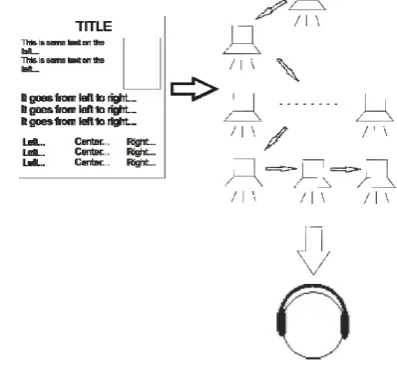
[image:4.595.328.527.256.439.2]visually impaired users to access and read web content, reads the content of the web sequentially from top left to bottom right corner. Some screen readers describe the positions of the elements of the page within the coordinate system. Our prototype application reads the content of the page as if coming from different spatial positions relative to the listener. The spatial positions are defined according to the original position of the element on the page. The reader starts reading the page at the left top corner and then it actually moves from left to right and follows the positions of the text on the page. It finishes at the bottom right corner of the page. For example, a text appearing on the left side of the page can actually be heard on the left, the text on the right can be heard on the right, etc. In this way, the application enables the perception of the actual physical structure of the web page.
Fig. 3: Basic concept of auditory representation of web page
Within the short experiment the users were asked to describe the approximate structure of the page by just listening to its content. The majority reported that the positions of the individual texts could be perceived clearly, but the perception of the entire structure remained blury, since no information on images, banners and other web page elements was given.
B. Spatial narrator
The speech synthesizer can also be used to read various messages and notes to mobile users or fiction to visually impaired people. The normal output of various speech synthesizers is usually very monotonous and dull. We developed a story reader which separates different characters in the story by assigning them a location in space. Each specific character in the story as well as the narrator speaks from a different spatial position according to the listener. The characters with their corresponding text can therefore be easily separated from one another. In addition, the pitch of synthesized speech is changed for each character, which makes the separation even better.
The users listened to five different stories. They were asked to subjectively evaluate the system without focusing on the content of the stories. The majority especially liked the additional separation of characters by pitch. Several users commented that the accompanying text, explaining which of the characters said something, was in some cases almost redundant, since the designated spatial positions and the corresponding pitch of the speech clearly identified the individual characters.
C. Multiple simultaneous files reader
A human listener is unable to perceive and understand more than one speech source at one time, unless the speeches are coming from different spatial positions [19]. General text-to-speech converters can therefore be used with just one text input and one spoken output. Our “Spatial speaker” can, however, produce multiple outputs that are separated by their locations in space. We developed a test application that reads an arbitrary number of text files and synthesizes speech flows at different spatial positions relatively to the speaker. We evaluated the intelligibility with two and three sources. The users were positioned at the origin of the coordinate system (i.e. 0,0,0) and the speech sources were positioned as follows:
• two sources: (-30,0,0) and (30,0,0) and
[image:5.595.93.246.362.546.2]• three sources: (-30,0,0), (0,0,0) and (30,0,0).
Fig. 4: Two simultaneous speech sources
The preliminary results show that a maximum of two simultaneous speech sources can be perceived and understood simultaneously. The users reported that with three sources it was still possible to concentrate on one individual source and understand the speech, but it was impossible to understand all of the speech sources simultaneously.
V. CONCLUSION AND FUTURE WORK
This paper describes the development and the system design of a 3D speech synthesizer. The system is based on Java platform and comprises of standard programming libraries, custom developed modules and a sound card which are reprogrammed and modified to fit together. An external MIT Media Lab HRTF library is used in order to improve the localization accuracy of the system. However, a personalized HRTF library can be measured and used for a specific user,
thus enabling an extremely accurate localization performance and spatial awareness if required. The current system is realized as a single Java class with some additional libraries and files and can therefore be imported and used in any Java application. The system works with any soundcard, since hardware support for 3D sound is optional and is automatically replaced by the software library if not present.
In addition to its use as a classical speech synthesizer or TTS converter, the “Spatial speaker” could also be used as a key component of various auditory interfaces. It can, for example, be used effectively by visually impaired people or mobile users-on-the-go. Three different prototype applications are provided in this paper along with some preliminary results of evaluation studies. Only users with normal sight participated in the preliminary experiments in order to get some feedback and ideas for improvements. All three prototypes proved to be interesting and innovative and potentially useful for visually impaired people. Our next step will be an extensive user study with visually impaired computer users. We intend to establish some major advantages of a 3D speech synthesizer over the normal non-spatial one.
REFERENCES
[1] R. A. Cole, “Survey of the State of the Art in Human Language Technology,” 1996.
[2] TextAloud , Available: http://www.nextuptech.com/ [3] VoiceMX STUDIO, Available:
http://www.tanseon.com/products/voicemx.htm
[4] FreeTTS, Available: http://freetts.sourceforge.net/docs/index.php. [5] E. D. Mynatt, “Transforming Graphical Interfaces into Auditory
Interfaces,” Doctoral dissertation, Georgia Institute of Technology, 1995.
[6] K. Crispien and K. Fellbaum, “A 3D-Auditory Environment for Hierarchical Navigation in Non-visual Interaction,” in Proc. of ICAD96, 1996,
[7] J. Sodnik, S. Tomažič, “Spatial auditory interface for word processing application,” in Proc. of IEEE ACHI09, 2009, pp. 271-276.
[8] Y. Borodin, J. Mahmud, I.V. Ramakrishnan, A. Stent, “The HearSay non-visual web browser,” in Proc. of int. cross-disciplinary conf. on Web accessibility, 2007, vol. 225, pp. 128-129.
[9] J. U. Mahmud, Y. Borodin, I.V. Ramakrishnan, “Csurf: a
context-driven non-visual web-browser,” In Proc. of 16th int. conf. on World Wide Web, 2007, pp. 31-40.
[10] P. Roth, L.S. Petrucci, A. Assimacopoulos and T. Pun, “Audio-Haptic Internet Browser and Associated Tools for Blind and Visually Impaired Computer Users,” Workshop on Friendly Exchanging Through the Net, 2000, pp. 57-62.
[11] S. Goose, C. Moller, “A 3D audio only interactive Web browser: using spatialization to convey hypermedia document structure,” in Proc. of seventh ACM int. conf. on Multimedia, 1999, pp. 363-371.
[12] J. Sodnik, C. Dicke, S. Tomažič and M. Billinghurst, “A user study of auditory versus visual interfaces for use while driving,” Int. Journal of Human-Comput. Stud., vol. 66, no. 5, pp. 318-332, 2008.
[13] S. Goose, S. Kodlahalli, W. Pechter, R. Hjelsvold, “Streaming speech3: a framework for generating and streaming 3D text-to-speech and audio presentations to wireless PDAs as specified using extensions to SMIL,” in Proc. of int. conf. on World Wide Web, 2002, pp. 37-44.
[14] S. Goose, J. Riedlinger, S. Kodlahalli, “Conferencing3: 3D audio conferencing and archiving services for handheld wireless devices,” in Int. Journal of Wireless and Mobile Computing, vol. 1, no. 1, pp. 5-13, 2005.
[15] Creative, Available: http://www.soundblaster.com/ [16] JOAL, Available: https://joal.dev.java.net/
[17] OpenAL, http://connect.creativelabs.com/openal/default.aspx [18] HRTF Measurements of a KEMAR Dummy-Head Microphone,
Available: http://sound.media.mit.edu/resources/KEMAR.html [19] B. Arons, “A review of the cocktail party effect,” in Journal of the