Live Forensics Method for Analysis Denial of Service
(DOS) Attack on Routerboard
Muhammad Alim Zulkifli
Department of Informatics,
Universitas Islam Indonesia
Yogyakarta of Indonesia
Imam Riadi
Department of Information
System,
Universitas Ahmad Dahlan,
Yogyakarta of Indonesia
Yudi Prayudi
Department of Informatics,
Universitas Islam Indonesia
Yogyakarta of Indonesia
ABSTRACT
Denial of Service (DoS) attacks are structured network attacks that originate from multiple sources and converge to form large packet currents. A DoS attack aims to disrupt the services available on the target network by flooding the bandwidth or processing capacity system making the target server network become overloaded. Wireshark is a tool that can be used to detect DoS attacks on a Router network and perform network traffic analysis that has functions that are useful for network professionals, network administrators, researchers, and network software development, requiring the detection of DoS attacks on the Router and multiplying information as well as attracting forensics data as a digital evidence of DoS attacks on the Router through the Live Forensics method. This research succeeded in pulling data information of DoS attack on Router form activity log data and attacker IP address list.
Keywords
Analysis of DoS (Denial of Service) Attack, Router, Live Forensics
1.
INTRODUCTION
The use of network-based computer technology had given much convenience for its users to do online activities in order to send data or just access online media. However, behind this sophistication of computer network technology, there were arisen problems regarding to network forensics. The main cause of network forensic problem was technology misuse acted by some irresponsible parties who aimed to utilize others’ network facilities for their personal or group interest. The DoS (Denial of Service) attack as the most frequently occurred attack in internet was the type of Router network attack to which could not serve user’s demand, and it eventually caused computer network to be down.[1]
Router was Base Linux operation system Router particularly as Network Router. It was designed to give the convenience for its users. Its administration and setting could be done through WinBox menu.[2]
Live Forensics Method was situation or Forensic analysis process which was conducted when Computer network system was operating. It was caused by digital proof information which could only be obtained when system was functioning and the information might be lost if the network system was off. [3]
Based on introduction above, the DoS attack problem in Router network kept developing in society environment. Particularly, the DoS attack was done by certain individuals and addressed to other people’s Router network to get valid right of access, so that we needed DoS attack on Router analysis and dug up information, as well as interesting forensic data as digital proof with Live Forensic method.
1.1
LITERATURE REVIEW
1.1.1
Network Protocol Analyzer
Analysis protocol network was process for a program or device to break up code of network protocol header and trailer to comprehend data and information inside encapsulated package by protocol.[4]
To do the protocol analysis, the package must have been captured at real time to analyze the speed line or later analysis. The program or device were named as protocol analyzer.[5]
Network protocol analyzer could be used for valid network management. Operation network and maintenance personnel used network protocol analyzer to monitor network traffic, analyze package, watch network resource utilization, do forensic analysis from network security violation and solve network problem. Invalid protocol analysis might be very dangerous for network security because they were almost impossible to detect and could be inserted almost in everywhere.[6]
1.1.2
Network Attack
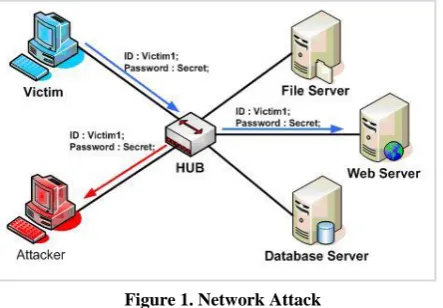
[image:1.595.317.539.520.674.2]Network attacks was categorized according to its location and could be divided into two, namely network attack which was from inside of the network itself and network attack from outside of the network. Meanwhile, network attack form might be originated from a host and could also be a device or hardware that related to target, for instance wiretapping case that became target by an attack either host or network.[7] (Figure 1).
Figure 1. Network Attack
1.1.3
Security Attack Models
Interruption was damaged or unavailable system device. The attack was addressed to availability of the system.[9] The example of the attack was “Denial of Service attack.” If interception from unauthorized party and was successful to access the asset or network information.[10] The example of this attack was wiretapping. Modification was unauthorized party not only successful in accessing, but also able to tamper the asset.[1] Example of this attack was tampering website content with harmful messages for website owner. Fabrication was unauthorized party interpolated fake object into system. The example of this attack was inserting fake messages like fake e-mail into computer network.[11]
1.1.4
Process Attack
Based on[12] attack at a network sometimes had process or step or phase which must have been through. E.g. the first phase was preparation. In the preparation phase, the attacker would collect information as much as possible regarding to their target. Second phase was execution phase; this phase was the real attack where the attacker performed the attack toward a system. Between first phase and second phase sometimes there was case where the first phase was occurring as well as the second phase. E.g. scanning to get information toward a host was same as attack on network which involved it.[13] The third phase was last phase which was named as post-attack phase. The third phase was cause phase of the first phase and the second phase. The damage of a network, or the control of a network system was re-used by attacker to attack on other network system.[14] Example of this attack type was DoS (Denial of Service).
1.1.5
Network Forensics
Network forensic was an attempt to find attacker’s information, search for potential proofs after some attacks or incidents on a network occurred. These attacks, inter alia, Probing, DoS, User to Root (U2R) and Remote to Local/ Network forensic was a process to capture, note, and analyze network activities to find out digital proof of an attack or crime that was done by using computer network so that the criminal could be prosecuted in accordance with applicable law.[15], [16]
1.1.6
Live Forensics
Live Forensics was a condition or analysis process which was done when the process was undergoing. The conducted method and its approach philosophy were same as available traditional forensic process, but if the system was off, the process would be stopped and continued to use common traditional forensic process.[2]
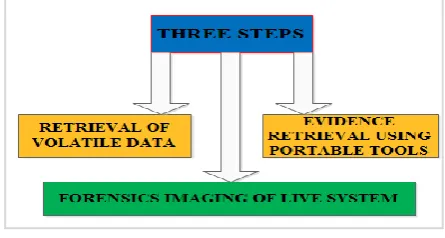
[image:2.595.316.537.375.497.2]According to every method or conducted way there must have been shortcomings or advantages respectively, including toward the Live Forensics method, the weaknesses of Live Forensics, namely, (Figure 2):
Figure 2. Live Forensics
1.Different installation of every computer, limitation of knowledge or skill owned by a Forensic analysis would be an obstacle because environment of each computer was different from its operation system and hardware device. 2.Data might be possible to be modified n affecting data
acquisition which was for being presented at trial case for network attack.
3.Related to picture files which would experience compression when it’s taken or moved, affected quality of the picture and was difficult to be identified when doing the analyze or when be presented in trial.
4.The taken proof of a network would be unreliable evidence due to the possibility of anti-forensic technique presence which could deceive an investigator,
5.The taken data in a network would be a corrupted data thus it would lessen the evidence.[17]
1.1.7
MikroTik Router
[image:2.595.54.277.629.748.2]MikroTik Router was a Linux Base operation system which was for as Network Router. It was designed to give convenience for its users.[18] The administration could be done from WinBox. Besides, the installation could be conducted in PC (Personal Computer) computer standard. The PC which would be the Router didn’t need a big enough resource for the standard use, e.g. only as Gateway. For a big load requirement (complex network, complicated routing) was suggested to consider the adequate PC resource choice, (Figure 3.).[2]
Figure 3. Topology Configuration RouterBoard
Router had ability to pass the IP Address package from a network to other network which was possible to have many lines between both. The connected routers in internet network also joint in a distributed routing Algorithm to determine the best lane to which IP Address package passed from one system to other system.[19]
1.1.8
DNS Flood Master
or in other word, the DNS was used for computer name resolution.[3].
1.1.9
Denial of Service
DoS attack could be done with low skill level without any access to system.[1] The attacker would send data continuously or use system weakness by forcing processor capacity that caused the system was not able to work normally. TCP SYN Flood was the easiest attack and the most general in internet, the way of TCP SYN Flood worked was by utilizing a number of provided resources by system to do Three-Way Handshake operation, the attacker tempted to flood the system with many connection requests until it couldn’t be handled requests from valid user.[18]
1.1.10
Wireshark
Wireshark was one of many analyzer network tools which mostly used by network administrators including protocols within it. Wireshark was most liked because its interface used Graphical User Interface (GUI) or graphic display. Wireshark could capture data packages or information which went through network. All kind of information packages in any protocol formats would be easily captured and analyze. That’s why these tools could also be used for sniffing (obtaining important information like e-mail or other account password) by capturing packages that passed network and analyzed it.[22]
2.
RESEARCH METHOD
2.1
Research Milestone
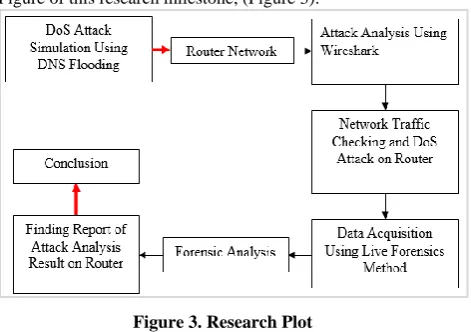
[image:3.595.329.553.72.219.2]Below is the step of this research solving, you can see at the Figure of this research milestone, (Figure 3):
Figure 3. Research Plot
This research used hardware and software as research tools: 1.Hardwareconsisted of:
a) Router RB951Ui Version 6
b) Laptop Corei3, RAM 4 GB for data withdrawal and analysis
c) Laptop as network client
2.Software consisted of: WinBox, Linux, Ubuntu, and Tools DNS Flood Master, and Wireshark.
2.2
Design of DoS Attack Simulation on
Router
[image:3.595.55.291.413.579.2]Design of DoS attack simulation on Router used DNS Flooding, and attack on Router analysis used Wireshark application, (Figure 4).
Figure 4. Design of DoS Attack on Router analysis
Below is the explanation of DoS attack analysis design which was applied in this research.
1.Internet, used for capturing internet network through Signal Bolt.
2.Router was used for sharing internet network to attacker’s and target’s computers.
3.Server was used as detection spot and DoS attack on Router analysis.
4.Attacker was used for necessity of simulation on Router.
2.3
Analysis Plot of DoS Attack on Router
[image:3.595.316.550.422.564.2]The steps of attack simulation above aimed to test whether the Wireshark application was able to display some activities of DoS attack attempts on Router. The following is the plot scheme of DoS attack on Router analysis based on Live Forensics method, (Figure 5).
Figure 5. Analysis Plot of DoS Attack on Router
This is the explanation of DoS attack on Router analysis plot which was applied in this research.
1.First process was system which would capture and note every exited or entered data communication from every network.
2.Every obtained information would be seen on applied list regarding to whether there had been any attack or not. 3.If “there was DoS attack”, detection analysis would be
Access DNS Flooding successfully executed
2.4
Design Steps of Forensic Data
Acquisition
[image:4.595.54.288.125.292.2]The following is the steps of forensic data acquisition design in this research, (Figure 6):
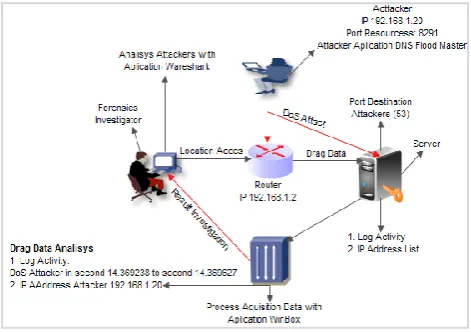
Figure 6.Design of DoS Attack Simulation and Forensic Data Acquisition using Live Forensics Method.
Main condition which must have been fulfilled in Live Forensics method was the condition where system is operating or running because some attack information on Router network would be lost if the system was turned off or reboot, so that to take data on Computer Router, the investigators needed to join with network as client.
Next, admin login was needed in order that it could get admin access right to read the whole information about DoS attack on Router, later data withdrawal process would be conducted and analyzed to acquire DoS attack on Router report as final result of forensic investigator’s investigation.
Only in this research, the data withdrawal was focused on Log Activity component and IP Address List. The explanations of each components as follows:
1.Log Activity contained activity information of what were noted on Router related to configuration change.
2.IP Address List contained information about the attacker. Live Forensics process had consequence over a number of activities, where this caused data changing or data addition toward evidences. This was associated with connection process of investigator’s computer to network as well as data request activity which was done through service WinBox on Router.
Last step of forensic process was reporting. In this step, every datum and analysis result finding of DoS attack on Router were presented according to analysis data which had been conducted. Those finding data would be attached with research analysis.
3.
RESULT AND DISCUSSION
This part contained explanation research process that researcher had conducted based on problem statements and the objectives of this research, namely: 1) Analysis of DoS attack on Router, 2) forensic data acquisition process on Router using Live Forensic method approach, 3) Digital proof characteristic on Router could be as report or research finding result related to DoS attack on Router analysis.
3.1
DoS Attack On Router analysis
The first process for analysis whether Router was still in normal condition or there was DoS attack, could be done through checking on WinBox menu that was through Torch Running menu. After the checking was done, it was known that there was no entering DoS attack yet, this could be seen at Destination traffic, Tx Rate and Rx Rate, (Figure 7).
Figure 7. Torch Display before the DoS Attack on Router
The beginning process of checking based on figure above, it was concluded that there was no attack yet that entered and disturbed the network traffic on Router. This case could be seen on Source and Destination row, there was IP from each computer in doing communication between one and other normally.
The next step was that started to do DoS attack simulation using DNS Flood Master (DNS Flooding) to know whether issued DoS attack was succesful to enter Router network. In this condition, DoS attack on Router analysis was also conducted using Wireshark application to find out whether Wireshark was able to detect attack on Router so that attack analysis could be done to withdraw data as digital proof thorugh Live Forensics method.
3.2 DoS Attack Testing Using Application
After beginning checking test toward Router network traffic, thus, later the test was conducted using application. At this process, DNS Flood Master application was run through Linux Ubuntu to launch the DoS attack using DNS Flooding directly to the attacked Router network target, like the display on the figure below, (Figure 8).
Figure 8. Scanning Port DNS Flooding Attack
Based on the figure above, the DNS application was succesfully run and ready to atack the Router network as the target of the attack. After this attack, the next process was checking the entering attack on Router through Wireshark application.
After checking, it was found out that attack simulation attempt was successfully enter, so that the Monitoring Flooding Connection could be done to send package to Protocol UDP using Port DNS to IP Address list which was used to attack on Router.
In this test, the monitoring using Wireshark application was also conducted by capturing the network traffic result in normal condition or just showed the general traffic activities
[image:4.595.316.551.153.261.2]or in this case only did Ping between both computers. As in the figure below, (Figure 9):
Figure 9. Ping Traffic Condition
The figure display above had showed the existence of DoS attack activity which was run by attacker through Ping sending process to Router network target. It could be seen in Source row where IP 19.168.1 kept doing requests or sent Ping to the Destination target with IP 192.168.1.20. The next step was checking entering attack on Router using Wireshark application, (Figure 10).
Figure 10. Wireshark Analyzed DoS Attack on Protocol DNS Router
The figure below, there was unusual traffic that showed the occuring Port Scanning attack activity, from Source Row there was IP of attacker’s computer namely 192.168.1.20 doing the attact, and at Destination Row was IP 192.168.1.2 which was target computer. The used protocol was DNS and at Info Row stated that attacker’s Port was scanning toward all target Computer Ports. There we could see at Port Protocol (attacker) was 8291 ahead to Port 49167 or Prot (53) as (target). Meaning that Port 49167 (53) in state of opened by sending feedback to attacker’s computer and was ready to accept connection from outside.
If an attack to Router network done continuously could cause MikroTik Router doing Restart by its own as the consequence of over load. Researcher also succesfully
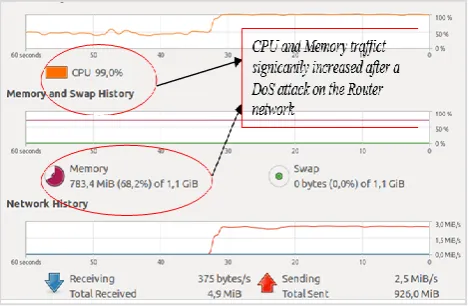
analyzed about Load (beban) of CPU and memory use on Router network before and after the DoS attack.
[image:5.595.318.547.199.346.2]According to analysis result on Traffic Monitor Syster before the DoS attack, Traffic System state before the attack showed CPU presentage (memory and swap history) was 47.5% and memory was 782.6 MiB didn’t moved yet significantly because there was no transaction of DoS attack yet which could influence performance or Load at Router network. But, after DoS attack, CPU and Memory had the access increased significantly and caused the performance or Load of data package on Router went down.
Figure 11. CPU and Memory Condition before the DoS Attack on Router
The figure above shows that CPU and Memory traffic of Router network device was still in normal state. But after the DoS attack entered the Router network, CPU and Memory Load increased. Based on the System Monitor Traffic result, after the DoS attack, the Data Package Monitor System Traffic of Load CPU increased to 99.0% and Memory 783.4 MiB increased significantly. This caused down state on Network Traffic as the consequence of DoS attack on Router. The following is the display of traffic monitoring system of CPU and Memory after the DoS attack on Router network, (Figure 12).
Figure 12. Traffic Monitor System after the DoS Attack on Router
Based on the analysis result above, started from the first checking process of attack at monitoring traffic system on attacked Router network. Wireshark successfully detected the existence of DoS attack by the attackers using DNS Flooding application and had made it to enter the Router network system as the target.
Process ping from attackers
[image:5.595.54.284.357.557.2] [image:5.595.317.552.501.654.2]The explanation of attack on Router analysis result, was in line with research result conclusion which had been done could cause at the depreciation of work performance of Router network because the computer Load in the network kept increasing and couldn’t serve other users. The result of this research also explained that Wireshark was able to detect the entering attack and acknowledging attacker’s IP.
According to research result which was done[23] that the attack on Router could be known by when the attack happened, who did that and what port the attack entered in, that’s why saved information in MikroTik Router could be acquired by developing an application that could communicate remotely by utilizing Ports on Router network system. The built application could be solution for solution to ease acquisition process in network forensic activity toward RouterOS-based Router
3.3
Forensic Data Acquisition
Main condition had to be fulfilled in Live Forensics method was the condition where the system was in operating or running state because some network information on Router would be lost if the system was turned off or reboot, so that for data taking on computer Router, investigator needed to join with network as client. Next, Admin Login was needed in order to be able to get admin access right to read the whole information on attacked Router, later data withdrawal process was conducted and analyzed to acquire report as final result of forensic investigation.[15]
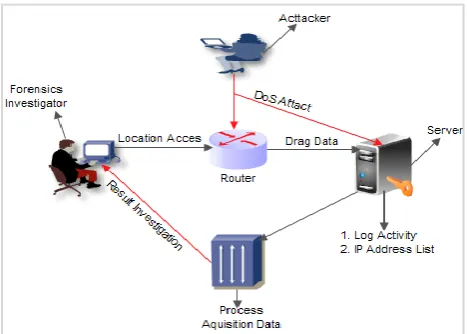
Below is the plot figure of analysis data acquisition process of DoS attack on Router.
[image:6.595.54.290.436.602.2]According to figure above, the investigation mechanism plot of DoS attack on Router analysis using Live Forensics method, as follows,” (Figure 13).
Figure 13. Forensic Data Acquisition Mechanism Using Live Forensic Method
3.3.1
Forensic Investigation
Some investigator’s ways to analyzed attack on Router:
1.Wireshark, was used by forensic investigator to analyze the DoS attack on Router.
2.Local Access, forensic investigator obtain permission to network admin to access Router network for the need of the entering attack on Router analysis. After the forensic investigator entered and access the network successfully as one of the clients, the Port Protocol DNS was attacked a couple of times until the Router network was successfully attacked.
3.Withdrew data, forensic investigator learnt, comprehended, and analyzed the attack information data on router. From this process, the forensic investigator had found out that the entering attack process was DoS attack using DNS Flooding application and attacked Port (53) successfully. 4.Data acquisition process, at this process the forensic
investigator did the Router of attacked component mapping as well as determined what component would be taken as the digital proof over DoS attack action on Router.
5.The withdrawn data, at this process the forensic investigator had acquired digital proof data namely attacker’s Log Activity of attack on Router in the 14.369238 seconds until 14.369627 seconds, with attacker’s IP Address List namely 192.168.1.20. The Forensic investigator also successfully analyzed the CPU and Memory condition increasing after the DoS attack, namely from CPU condition (47.5%) increased to (99.0%), and Memory condition from (782.6 MiB) increased to (783.4 MiB).
6.Data Acquisition Result Report, on this process the forensic investigator had obtained data information of DoS attack according to Router component that could be forensic digital proof, namely attacker’s Log Activity and IP Address.
3.3.2
Attacker
Some activities which were done by the attacker to attack the Router:
1.DNS Flood Master (DNS Flooding), used attacker to launch DoS attack on Router with IP 92.168.1.2, and used Port Protocol 8291 to attack DNS protocol.
2. Attack type, namely DoS attack (Denial of Service). At this process, the attacker insistently sent Ping request on Router with IP 192.168.1.2. The attack was done at 14.369238 seconds until 14.369627.
3.Port was attacked, at this process the attacker used port 8291 and successfully attacked Port (53).
After doing the DoS attack on Router analysis process, the next step was doing the data acquisition process to find out the digital roof as the forensic checking report. The Forensic checking process became the main focus in the research was analyzing the DoS attack on Router through the information data of attacker’s Activity Log and IP Address List over the network attack on Router using method Live Forensic.
3.4
Log Activity
Gambar 14. Log Activity Data of DoS Attack on Router
Log Activity condition that is displayed above showed that there had been DoS attack activity on MikroTik Router. This could be known from Time, Topic and Message from IP Address 192.168.1.20 repeatedly attacked Protocol Port Router. There was quite many login failures in time span from 14.369238 seconds to 14.369627 seconds. This activity was suspected as unreasonable activity that did data communication on Protocol DNS with IP 192.168.1.20 on Router with IP 192.168.1.2.
This thing was ever proved through research result done by[14] about Forensic On Router analysis OS using Live Forensics Method. The result of this research showed that the resulted output was information related to Log Activity, IP Address List, ARP, DHCP Leases, DNS Cache, and Router Board Info which was used to analyze for a disclosure of an attack activity which happened on Router.
3.5
IP Address List
The shown IP Address List was the configuration result through the Network Segmentation row which was usually ended with number 0. Meanwhile, the Interface row could show the Interface name or physical Ether LAN Port from Router Board.
IP Address on a Port Router could also be Gateway on Network Segment. IP Gateway was usually as the target of an attack activity on network. According to information tab of IP Address List, (Figure 15):
Figure 15. The Display of Attacker’s IP Address List
The result discussion above was in line with statement that the sent packages passed each Link data by encapsulating packages into Frame using Link data identity in order that the Frame could be sent from source to destination within lower Protocol Link Network.
3.6
The Analysis Testing Result of DoS
Attack on Router
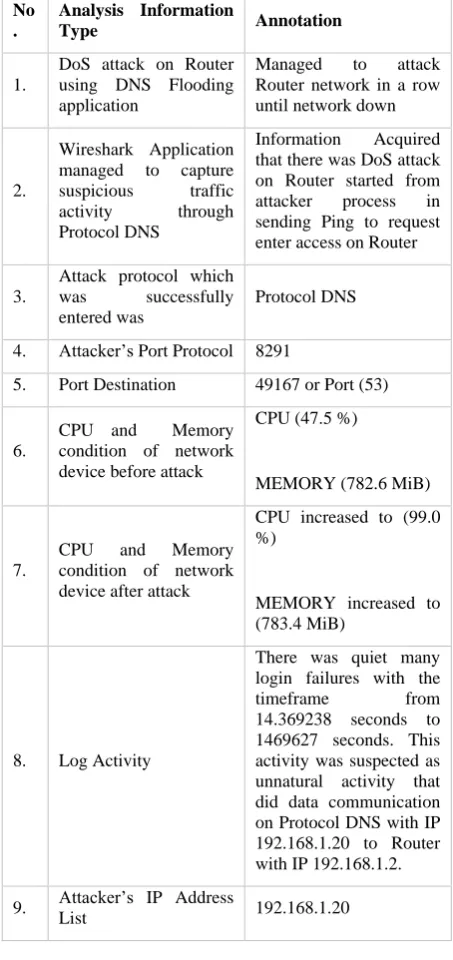
According to analysis testing result of DoS attack on Router, the research result was presented as Network Forensic report based on analysis process of DoS attack on Router which research had done above.
[image:7.595.315.542.116.597.2]The result of DoS attack on Router is explained on Table of analysis result of DoS attack on Router below.
Table 1. Analysis Result of DoS Attack on Router
No .
Analysis Information
Type Annotation
1.
DoS attack on Router using DNS Flooding application
Managed to attack Router network in a row until network down
2.
Wireshark Application managed to capture suspicious traffic activity through Protocol DNS
Information Acquired that there was DoS attack on Router started from attacker process in sending Ping to request enter access on Router
3.
Attack protocol which was successfully entered was
Protocol DNS
4. Attacker’s Port Protocol 8291
5. Port Destination 49167 or Port (53)
6.
CPU and Memory condition of network device before attack
CPU (47.5 %)
MEMORY (782.6 MiB)
7.
CPU and Memory condition of network device after attack
CPU increased to (99.0 %)
MEMORY increased to (783.4 MiB)
8. Log Activity
There was quiet many login failures with the timeframe from 14.369238 seconds to 1469627 seconds. This activity was suspected as unnatural activity that did data communication on Protocol DNS with IP 192.168.1.20 to Router with IP 192.168.1.2.
9. Attacker’s IP Address
List 192.168.1.20
4.
CONCLUSION
After doing the simulation of DoS attack on Router, the DoS attack on Router analysis, and withdrawing forensic data as digital proof as research result, the research finding was found out as conclusion. The conclusion of this research as follows:
a)Attack on Router analysis, from conducted attack process could be gotten information that DoS attack used DNS Flooding application having characteristics that could do Ping or send messages repeatedly and be able to make Router network down as the consequence of the over entering load. The research result proved that the forensic investigator successfully used Wireshark application to analyze DoS attack on Router
[image:7.595.52.274.568.624.2]b)Acquisition Process of Forensic data on Router used Live Forensic method approach, after acquisition data was conducted, the conclusion was that the unreasonable activity doing data communication on Protocol DNS with IP 192.168.1.20 toward Router with IP 192.168.1.2 with time span from 14.369238 until 14.369627. The result of this research also managed to identify attacker’s IP Address List, namely IP 192.168.1.20.
c)Digital proof characteristic on Router could also be as report of research finding result in relation to analysis of DoS attack on Router, involving type of entering attack, attacker’s Port Protocol, Destination Port of attacked Router network target, and for analysis process of attack history was known from Attack Log Activity and IP Address List
5.
REFERENCES
[1]Fadil A, Riadi I, Aji S. Review of detection DDOS attack detection using naive bayes classifier for network forensics. Bull Electr Eng Informatics. 2017;6(2):140-148. doi:10.11591/eei.v6i2.605
[2]Mazdadi MI, Riadi I, Luthfi A. Live Forensics on RouterOS using API Services to Investigate Network Attacks. Int J Comput Sci Inf Secur. 2017;15(2):406-410.
[3]Riadi I, Sunardi;, Firdonsyah A. Forensic Investigation Technique on Android’s Blackberry Messenger using NIST Framework. Int J Cyber-Security Digit Forensics. 2017;16(4):198-205.
[4]Riadi I, Muhammad AW, Sunardi. Neural network-based ddos detection regarding hidden layer variation. J Theor Appl Inf Technol. 2017;95(15):3684-3691.
[5]Riadi I, Muhammad AW, Sunardi. Network Packet Classification Using Neural Network Based on Training Function and Hidden Layer Neuron Number Variation. Int J Adv Comput Sci Appl. 2017;8(6):1-4.
[6]Hermaduanti N, Riadi I. Automation framework for rogue access point mitigation in ieee 802.1X-based WLAN. J Theor Appl Inf Technol. 2016;93(2):287-296. [7]Prayogo A, Riadi I, Luthfi A. Mobile Forensics
Development of Mobile Banking Application using Static Forensic. Int J Comput Appl. 2017;160(1):5-10. doi:10.5120/ijca2017912925
[8] Usman L, Prayudi Y, Riadi I. Ransomware analysis based on the surface, runtime and static code method. J Theor Appl Inf Technol. 2017;95(11):2426-2433.
[9] Symantec T. Internet Security Threat Report. 2016;21(April).
[10]Ali. A and Hudaid Z. DNS Advanced Attacks and Analysis. 2014;8.1:63-74.
[11]Arasteh MD. Analyzing Multiple Logs For Forensics Evidence. Digit Investig. 2007;5(82):91.
[12]Dimaio VJ. Forensics Pathology. 2nd Ed. London: CRC Press; 2001.
[13]Medyawati H, Christiyanti M, Yunanto M. The Influence of Computer Self Efficacy , Computer Experience and Interface Design to Acceptance of Electronic Banking. Int J Education, Business, Management
e-Learning. 2011;1(Empirical Study of Bank Costomers in Bekasi City):305-310.
[14]Mualfah D, Riadi I. Network Forensics For Detecting Flooding Attack On Web Server. IJCSIS) Int J Comput Sci Inf Secur. 2017;15(2):326-331.
[15]Luthfi A, Prastya SE, Luthfi A. Forensic Analysis of Unmanned Aerial Vehicle to Obtain GPS Log Data as Digital Evidence Forensic Analysis of Unmanned Aerial Vehicle to Obtain GPS Log Data as Digital Evidence. 2017;15(April):280-285.
[16]Riadi I, Eko J, Ashari A, - S. Internet Forensics Framework Based-on Clustering. Int J Adv Comput Sci Appl. 2013;4(12). doi:10.14569/IJACSA.2013.041217. [17]Artformatics. Live Forensics.; 2013.
[18]L. Volonino and R A. Computer Forensics For Dummies. (Indianapolis, ed.). Wiley; 2008. [19]Casey E. Handbook of Digital Forensics and
Investigation. London: Elsevier Inc; 2010.
[20]Ardiantoro D. Pengantar DSN (Domain Name System). 2003:19-38.
[21]Sarsono W. Pemantauan Jaringan Komputer dengan DNS Server Berbasis Routing Statis Menggunakan Wireshark. 2012.
[22]Syahputra MJ, Faisal I, Kom M, et al. Deteksi Serangan Pada Jaringan Komputer Dengan Wireshark.