application
JALIL, Abdurrahman, BEER, Martin <http://orcid.org/0000-0001-5368-6550>
and CROWTHER, Paul
Available from Sheffield Hallam University Research Archive (SHURA) at:
http://shura.shu.ac.uk/12273/
This document is the author deposited version. You are advised to consult the
publisher's version if you wish to cite from it.
Published version
JALIL, Abdurrahman, BEER, Martin and CROWTHER, Paul (2016). Mobile learning
in a seminar or workshop : a case study for evaluating MOBIlearn2 basic
components and their application. Bulletin of the technical committee on learning
technology, 17 (4), 30-33.
Copyright and re-use policy
See
http://shura.shu.ac.uk/information.html
Sheffield Hallam University Research Archive
Abstract—Mobile devices are getting more powerful and affordable with a variety of useful tools to support students in their learning. With these advantages, many researchers have considered it very important to integrate the pedagogical and technological strengths of mobile devices into learning especially for higher education. However, the challenge for academic institutions is to understand which applications are suitable to support their learning activities and how best they might use them in and beyond formal classroom. This case study focuses on the evaluation of basic components that make up the MOBIlearn2 application for supporting students attending a one hour seminar or workshop of their choice. We conclude that the application is highly suitable for the students to collect data for their learning and it is essential to include them in the design stage in effort to reveal hidden errors unknown to developer.
Index Terms—Mobile learning, seminar attendance, learning application, techno-pedagogical tool
I. INTRODUCTION
IGHER educational institutions have recently become increasingly interested in mobile learning as many lecturers and students have recognized its positive impacts for their learning. Research has reported that students are performing a wide variety of formal and non-formal educational tasks on their mobile devices both inside and outside their classroom [1]. With today's capability to embed a wide variety of applications, students start to see it as an alternative to a PC or laptop. They believe that using it as a learning tool could be beneficial for their learning experience and they seem ready to adopt it. Researchers have considered the importance of integrating the pedagogical and technological strengths of mobile devices [2]. The challenge for academic institutions is to understand which applications are suitable for students to support their learning activities and
Manuscript submitted November 20, 2015.
A. Jalil is a PhD student in Cultural, Communication and Computing Research Institute, Sheffield Hallam University, U.K (phone: +447440036724; e-mail: b2040844@ my.shu.ac.uk).
M. D. Beer, is with Computing Department, Sheffield Hallam University, Sheffield S1 1WB, Sheffield, UK (e-mail: [email protected]).
P. Crowther is with Computing Department, Sheffield Hallam University, Sheffield S1 1WB, Sheffield, UK (e-mail: [email protected]).
how best they might use these applications [3]-[4].
Recently, research [5] has proposed a techno-pedagogical tool called MOBIlearn2 to support students learning in mobile environment. Despite having many components, it has not yet been evaluated in a real situation. In this paper therefore, we are going to evaluate MOBIlearn2 basic components in a case study conducted to a group of students who attended a one-hour seminar or workshop of their choice. The paper is structured as follows: section 2 presents background of MOBIlearn2 application and objectives of this case study, followed by methods in section 3. Section 4 presents results of this study and then the results will be discussed in section 5. Finally, section 6 presents conclusion and future works.
II. BACKGROUND
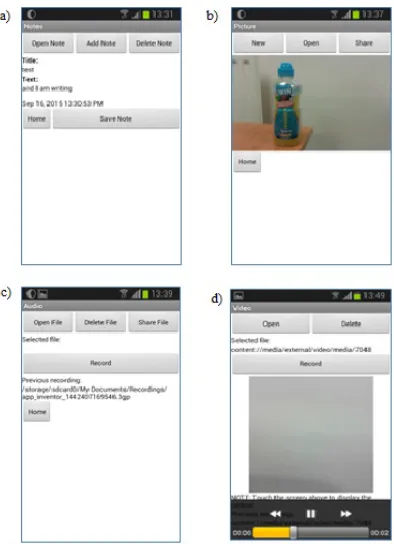
MOBIlearn2 techno-pedagogical tool has been designed based on a systematic analysis on MOBIlearn task model in order to understand pedagogical requirements for mobile learning. The name of MOBIlearn2 has been given to the application in conjunction with MOBIlearn task model and project. More details of the task model and the development of the tool based on the analysis are provided in [5]. Due to time constraints, we tested and evaluated only four basic components (Note, Picture, Audio, Video) that we believe can support students to learn in a one-hour seminar or workshop (Fig. 1). Fig. 2 illustrates main screens of the components.
III. METHODS
All levels of students across Sheffield Hallam University (undergraduate, postgraduate and research degree) were included as research subjects. A total of 10 students volunteered to take part in this study. They were enrolled on a diverse range of courses (film study, material science, design, culture, communication and media, pharmacology and biotechnology, finance and investment, international business management, nursing and business studies). Each of them used their own mobile device, thus potentially representing a variety of mobile device models such as Nokia and Samsung with the latest Android versions of platform, all incorporating MOBIlearn2 app.
Mobile Learning in a Seminar or Workshop: A
Case Study for Evaluating MOBIlearn2 Basic
Components and Their Application
Abdurrahman Jalil, Martin Beer, and Paul Crowther,
Cultural, Communication and Computing
Research Institute, Sheffield Hallam University
Fig. 2. Main screens for each of the basic components in MOBIlearn2.
The participants were briefed on how to use the app and the pilot study objectives were explained. They were free to use any component in the app they needed in order to support their learning activities while attending one-hour seminar or workshop of their choice. During the seminar or workshop, they were also encouraged to take notes and pictures as well as record audio and video using the tools to capture their learning moments and data which they believe were useful for reflection and revision. At the end of the study, each participant was given a questionnaire to get their feedback on using the app in that learning event. In addition to
to get deeper understanding of their learning experiences. The qualitative data gathered from the instruments were analyzed based on thematic approach that begins with identifying key points then marking with separate codes for categorization [6]. Each code was generated based on each component in the MOBIlearn2 pedagogical tool. All the codes were examined to find meaning from the emerged themes.
IV. RESULTS
All the participants completed a seminar or workshop of their choice successfully. The general demographic picture shows:
a) Gender: 7 (70%) are female and 3 (30%) are male b) Age: 5 (50%) are aged 18-30 and 5 (50%) are aged 31-40 c) Study level: 2 Undergraduates, 3 Master students and 5
PhD students
d) Device used: 1 Sony Experia J; 3 Samsung Galaxy Mini S3; 1 Samsung Galaxy S3; 1 Samsung Galaxy S4; 1 Samsung Galaxy S4 Mini; 1 Samsung Galaxy Note 10 and 1 Galaxy Tab 2, 1 Motorola Moto E 2
A. Data from Questionnaires
From the results, it is found that half of the participants used more than one component as shown in Table 1.
This finding shows that the learners prefer a variety of tools that they can choose from depends on what they perceive useful at a certain time in learning environment.
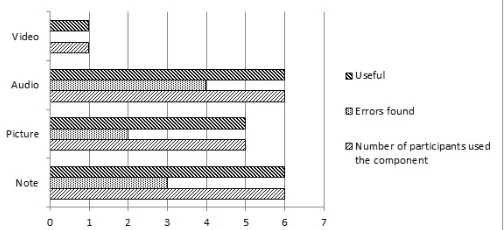
Figure 3 presents the questionnaire results for each component. It is evident from the results that many participants have used Note and Audio components as well as Picture. 6 (60%) participants took notes and recorded audio when collecting data or information and 5 (50%) took picture when attending the event. Only 1 (10%) participant recorded video using the app. The use of the tools has demonstrated the suitability of the application to support learning activities in the event. Any errors identified are specifically presented in Table 2.
When asked about their perception of the usefulness of each component for their learning, they are all agreed (100%) that the components that they have used are very useful especially
TABLEI
COMPONENTS USED WHEN ATTENDING ASEMINAR OR WORKSHOP
Components in MOBIlearn2 No. Of Participants Note Picture Audio Video
√ √ 2
√ √ 1
√ √ √ 1
√ √ √ √ 1
√ 2
√ 2
√ 1
[image:3.612.96.259.56.268.2]Total 10 Fig. 1. The components of MOBIlearn2 which are being investigated in this
[image:3.612.81.278.307.579.2] [image:3.612.311.554.402.527.2]Fig. 3. Numbers of participants, errors, usefulness perception on each of component of MOBIlearn2.
TABLE2
LIST OF ERRORS OR PROBLEMS FOUND BY PARTICIPANTS ON EACH
COMPONENT
Components Errors Note 1. hard to type note on a small keyboard
2. typing note sometimes could not catch up with lecture speed
3. might lead to misspelling Picture 1. could not zoom in/out
2. could not add simple note to image
Audio 1. need to show time of current recording process 2. could not rename file
3. could not view list of recorded audio files 4. add functions to play, pause and stop audio files
to collect data and information during the activity. This perception is supported by the reasons that they have given on each of the component. For example, one of the participants stated that the Picture component is very useful because of it can be used to take picture of presentation slides given by instructor and thus could save her a lot of times as she does not have to write. The Audio component is perceived in the same way. Two of the participants believed that the component is very useful to recall data and facts provided by their instructors during the seminar. Additionally, one participant stated that she could go out for a while (to washroom) without any worry of information loss as she could leave her mobile to record when she were not there. She added that she could play the recorded audio file when she gets back to her room to catch up on the lesson.
The last part of questionnaire was an open ended question where the participants could leave their overall comments or suggestions. Generally, most of the participants were very positive in their feedback on using the MOBIlearn2 tool. They pointed out that it was very efficient when using the tool for data or information gathering as it combines many useful features and provides more learning sources and data for revision and reflection. Furthermore, they could switch between features and tasks easily if needed. In spite of having such advantages, they also commented on several problems as outlined in the Table 2. Equally important, one of them suggested providing text-to-speech and speech recognition functions to support note taking activity.
B. Data from Semi-structured Interviews
Three participants were selected for semi-structured interviews in order to get more insight about the use of the MOBIlearn2 tool and how to refine it. First question was about how they used the tool in the event. Two participants said that before the seminar started, they asked permission from the instructors first to use their mobile devices to collect data and information and got their consent verbally. Once it was allowed, they put their devices on table and launched the application. The third participant said that she did not mention about using the tool to her instructor. However, her instructor did not mind when she was about to take an image of the slides presented in the seminar room. During the seminar, two participants have reported that they used more than one component of their choice.
The second question was intended to detect errors with the tool. Two of the interviewees reported that they had problems with the Note component. They have added that it is difficult to write and type using the small virtual keyboard provided by their devices.
Student A: "It's hard for me to catch up with the speed of lecturer's speech when using the small virtual keypad provided by my device. So, sometimes I took pictures instead of writing…but I believe I don't have problem if I use it in my
field work as there is no time constraint".
Student C: "I think that I am not fast enough to use the keyboard in my phone…but if the keyboard is quite big like in an iPad…I think it's ok".
For Picture component, one of the interviewee reported that she could not find a way to insert note on the images taken and the other interviewee said that he could not zoom in the picture taken in order to read notes on it.
Student B: "When I stretched the saved image, I could not read the texts on slide as it became a blur…so, I think this feature needs to have zoom in and out functions…if possible".
Regarding the Audio, most of the interviewees claimed that there is no problem on that component but one interviewee stated that she could not ensure the recording process was successful as she could not view the list of recorded files. On the Video component, one of the interviewees reported that the video captured during on the seminar is not clear enough. Therefore he proposed that those who want to use it need to adjust the brightness in the setting in order to match the lighting conditions in the environment.
Third question was "What features or functions that you think are very helpful for your learning in the event?" All of the interviewees indicated that features of taking notes (Note), taking pictures (Picture) and recording audio notes (Audio) are very helpful for them to do revision on the lesson during their free time. Only one of them added that recording video (Video) was also useful as he could capture the entire details of the situation in the learning place and store it as his personal record.
interviewee has pointed out that by using the tool it was easy to switch multiple tasks as the design has integrated all required components and thus learners do not need to use different app for different tasks.
Student A: "I think this tool is good for brainstorming or take notes of idea emerged when I am on the move…anytime. So, I think it is better if you include a mind map application."
In addition to mind map application, she also suggested finding a way to transfer all files to a computer when storage card in the device is full. This suggestion is similar to that proposed by the second interviewee who has suggested finding a way to do backup properly (could automatically export data in phone to PC). The last interviewee pointed out that the tool is very useful to all research students as it could assist them in their study.
Student B: "I recommend this tool to research students in my area…ethnography...as all the features I have found such as taking pictures, videos and notes are suitable for our research works…"
V. DISCUSSION
This research uses a non-probability sampling procedure that has resulted in the subjective judgment of researchers in selecting the respondents. Even though the researchers attempt to cover all different level of study of the participants in the university, this sample and demographic profile are not representative of student population in general. The results therefore primarily indicate diverse behaviour and interest. Whilst this is appropriate for a qualitative study seeking feedbacks on a phenomenon as mentioned by [7], it is not suggested that the quantitative data would be replicated in a similar study.
Comparatively, we have found that most of the qualitative data from questionnaire and interviews are supporting each other. Even so, the data from interviews are quite richer and provides deeper insight on each problem found or suggestion made. For example, one of the participants has come out with a positive suggestion to include a mind map application as a brainstorming tool in the interview. This finding hence shows that it is essential to take into account the context of use which can have important influence on the design and use of the product in future.
From the findings, we have confirmed that most of the features in the basic components of MOBIlearn2 application have been very useful for the students to support their learning activities. Although the learning setting is quite formal, they are efficiently and effectively use their mobile devices to collect data and information as their learning resources. Nevertheless, this usage of the mobile in formal learning setting should get permission or consent from the instructors first.
In testing the functions of several basic components of MOBIlearn2 application, this study has successfully revealed several errors and problems by getting comments and feedback from the student participants who have used it to support their learning in a seminar or workshop. As a result of this learner-centered design approach, the learners by themselves have explored and tested the tool in the real world context, reported the findings and suggested some improvements to researchers. All the errors have been noted by researchers and presented in this paper so that it will be addressed when refining it in future development. This study has therefore demonstrated the advantages received when involving real learners in design stage for developing new technologies or innovations in real life environment especially for educational purposes [8].
Evidence from this study has been demonstrated in authentic student voices that may prompt the educators to revise infrastructural support, policies as well as data privacy concerns to allow the use of mobile devices in a seminar or workshop and encourage students to use them for learning purposes. This study also encourages the practice of 'bring your own device' (BYOD) that academic institutions could employ to embed mobile learning into mainstream education. By leveraging what students have and do, educators could combine formal, non-formal and informal learning activities to provide more effective and creative pedagogical approach in mobile environment.
For future work, our study will continue to evaluate the MOBIlearn2 application in an informal learning setting such as visiting a museum gallery. All the basic components of the tool which have been proven useful in this study will be retained and integrated with several new components.
REFERENCES
[1] P. Pollara, “Mobile learning in Higher Education: A glimpse and a comparison of student and faculty readiness, attitudes and perceptions,” Ph.D. dissertation, Duquesne Univ., 2011.
[2] Y-L. Jeng, T-T. Wu, Y-M. Huang, Q. Tan and S. J. H. Yang, “The add-on impact of mobile applicatiadd-ons in learning strategies: A review study,”
Educational Technology & Society, vol. 13, no. 3, pp. 3–11, 2010. [3] L. Naismith, P. Lonsdale, G. Vavoula, and M. Sharples, “Literature
review in mobile technologies and learning,” University of Birmingham. Futurelab, 2004. Available at:
http://www2.futurelab.org.uk/resources/documents/lit_reviews/Mobile_ Review.pdf
[4] S. Baharom, “Designing mobile learning activities in the Malaysian HE context: A social constructive approach,” Ph.D. dissertation, Salford Business School, Univ. of Salford, Salford, UK, 2013.
[5] A. Jalil, M. Beer and P. Crowther, “Pedagogical requirements for mobile learning: A review on MOBIlearn task model,” Journal of Interactive
Media in Education, 2015(1): 12, pp. 1–17, Aug. 2015.
[6] V. Braun and V. Clarke, “Using thematic analysis in psychology,”
Qualitative Research in Psychology, vol. 3, no. 2, pp. 77–101, Apr.
2006.
[7] A. Bryman, “Social research methods,” 4th ed., Oxford: Oxford University Press, 2012.