Application of Use Case for Identification of Root Cause
of the Dependencies and Mutual Understanding and
Cooperation Difficulties in Software Systems
Imran Ali Siddiqui
Research Scholar, JJTU Rajasthan
Manuj Darbari,
Phd. BBD University,Lucknow
ABSTRACT
In this paper we have identified the various relationships among various stakeholders and dependencies on various factors involves during execution of an application.
A large enterprise level software development indeed required more cohesiveness among different teams with diversified Roles and Responsibilities. To match up same there was a huge intensive cooperation with in team. The complete development process encompasses different time space, different locators like internal or external and between specific as well as specialized workgroups. Hence it was must to answer questions pertaining to questions related to division of labor, to communication, and to coordination and cooperation in the planning, development and maintenance of software systems. Development environments that explicitly support group work are an important prerequisite for the production of high-quality software systems.
Keywords
Software Dependencies, Application Monitoring,
co-operation difficulties. Project Management.
1. INTRODUCTION
This paper presents the Use Case for identification of root cause of the dependencies and mutual understanding and co-operation difficulties in on software systems and to find a new understanding of the dependencies that exist in software systems. This would equally help to answer the question of Software developers that ―How to use practices and technologies to manage them.‖ and provide deep insight of the root cause of the dependencies, since all software systems have dependencies because software modules interact with each other, with documentation, with libraries, and with test suites. J. Michael Moore, Frank M. rightly analyses that the Software development includes gathering information about tasks, work practices and design options from users [10]. Software engineers recognize that these dependencies exist, as technical relationships between the components of the system, and have tried to model them as part of their formal methods and process descriptions. For this study we have opted most successful Application Monitoring Tool ―CA WILY‖ provided by the internationally acclaimed OEM Computer Associates (CA). The software module was implemented by the OEM implementation partner ALCEL Networks Pvt. Ltd. for the customer is Technocraft Consultancy Sales and Services (TCSS).
1.1 A Brief Overview of USE CASE
Executive Summary
To assure critical revenue and optimal performance of Central Board of Excise and Customs (CBEC) applications, TCSS requires an application management solution that can monitor 100% of user transactions, provide unique data on the business impact of failed transactions, and deliver essential data for resolving problems quickly – all with negligible overhead. With such a solution in place, everyone in the organization — Line of Business managers, application administrators, architects, DBAs, IT app owners, etc. can work together to ensure customer satisfaction, SLA compliance, and business success.
CA Wily provides deep visibility into the application environment and helps enterprises keep their mission-critical applications high-performing and available 24x7. This ability to proactively monitor end-to-end transactions of all users in real time and provide deep visibility into the application – all with negligible impact on application performance - separates Wily from all other vendors in the industry.
CA Wily seeks to enhance the functioning efficiency amongst TCSS, its SI vendors, and government IT providers, in order to help evolve into an efficient IT Center of Excellence.
Understanding the Requirements
As per understanding, currently Customs has 4 critical applications out of which the current scope is limited to implement an integrated end to end Application Performance Management solution for comprehensive ACES application deployment. Within the ACES application, following modules have been included:
- CEDEPT
- STASE
- REGASE
- STDEPT
To date our knowledge of requirements and the driving forces behind this initiative are based on the following:
Deployment of Wily into ACES production
Analytical review of performance bottlenecks during peak periods Experience discussing with ACES on various IT initiatives.
To monitor and manage the following ACES
module consisting of
CEDEPT
STASE
REGASE
STDEPT
All of the above on 42 cores (21 CPUs) across 2 clustered instances
Application Performance/ Web
Management
CA Wily is an application management solution that can monitor 100% of end-user transactions happening in a TCSS, provide unique data on the impact of failed transactions, and deliver essential data for resolving problems quickly – all with negligible overhead. With such a solution in place, everyone in TCSS —application owners, network owners, departments, etc. can work together to ensure SLA compliance and end-user satisfaction.
CA Wily provides deep visibility into the application environment and helps TCSS keep their mission-critical applications high-performing and available 24x7. This ability to proactively monitor end-to-end transactions of all users in real time and provide deep visibility into the application – all with negligible impact on application performance - separates Wily from all other vendors in the industry.
CA‘s Wily Technology offers the only comprehensive software and services solution specifically designed to ensure effective Customer Success Management (CSM) by offering unparalleled visibility into customer transactions and web infrastructure performance.
CA Wily Customer Experience Manager (CEM) provides real-time views and proactive alerts that enable you to immediately respond to the online experience of each application end user, detect transaction problems as they happen, and ensure transaction integrity.
CEM monitors every transaction in real time, analyzing the performance and quality of web-enabled business processes. When problems with real or synthetic transactions occur, CEM provides detailed analysis on the scope, severity, and impact of the transaction defects. CEM enables you to identify, prioritize and resolve defective transactions — often before they impact users — through real-time visibility into transactions. By measuring performance from the
business process level to the transaction Component level for each individual user, it enables you to calculate the impact of performance incidents and prioritize responses
CA Wily CEM is a hardware appliance and as such has no requirement for an underlying operating system, database, or other 3rd party software. The only client software required is web browser. The appliance ships with sufficient storage to maintain historical data. The data gathered can be exported to any relational database you choose, but there are no requirements for database licensing to support the CA Wily solution.
TIM (Transaction Impact Monitor): The TIM is non-intrusive appliance that resides in the data centre, connected to a mirrored switch port or a network tap. The TIM passively listens to all network traffic and analyzes only the traffic of interest. Using patent-pending software, it assembles data packets into unique business transactions. TIM applies business rules to detect customer-impacting defects and anomalies, and reports real time and historical information about customers and transactions to a central repository.
The TIM‘s primary functions are to:
Observe a packet stream. CEM uses a copy of the network traffic using a span or mirror port resulting in zero network utilization.
Identify transactions and users
Monitor transactions for defects and interval statistics regarding behavioral characteristics like time, size and throughput.
Upload the defects and interval statistics to the (TESS)
Transaction Event and Statistics Server (TESS): The TESS runs the Wily CEM Software Modules. The TESS communicates with one or more TIMs and is accessed through any browser. It receives real time alerts (events) and performance and quality statistics from one or more TIMs, allowing IT personnel to collect metrics centrally from various applications. The TESS is what allows IT teams to analyze, aggregate, and present real time and historical data, creating views, reports, and scorecards for incident resolution, continuous improvement, and executive reporting. The TESS is a combination of background processes, application logic, an SQL database and a Web server
Table 1: Summary Features of CA Wily
CA Wily Introscope is an application management solution that helps TCSS to keep the mission-critical web-based J2EE and .NET applications high performing and available 24x7. It combines proven technology, scalability and ease-of-use to offer the very best means for monitoring and managing complex, composite applications. It ensures that applications are successfully achieving required SLAs and other performance goals. Introscope is the cornerstone of a
comprehensive collaborative application management
solution that helps TCSS increase application resiliency, minimize the impact of application performance issues and improve total cost of ownership.
Introscope agents collect performance metrics from the various components inside the running Java / J2EE application, the application server and performance and
availability data from the surrounding computing
environment. The agents then report these metrics to the Enterprise Manager. No change to your source code is
required. Out of the box (i.e. no configuration), Introscope agent will monitor
EJBs: (Entity, Session, and Message-driven as applicable)
JSPs
Servlets
JDBC
JNDI
Network Sockets
RMI
XML
JTA
JMS
CORBA
UDP
File I/O
Socket I/O
CPU
Threads
In addition, GC Heap Bytes in Use, GC Heap Bytes Total, Java Version, Launch Timestamp, VM Vendor, IP Address, Operating System, and Wall clock Time are all monitored ―outside‖ the Java VM.
The Introscope Enterprise Manager acts as the central repository of all Introscope performance metrics. It receives performance metrics from one or more Introscope Agents, allowing users to collect metrics centrally from many applications, application servers and supporting systems. Introscope includes out-of-the-box reports for application performance analysis, capacity planning and Service Level Agreement administration, which make it easier to track application performance over time and plan for future growth.
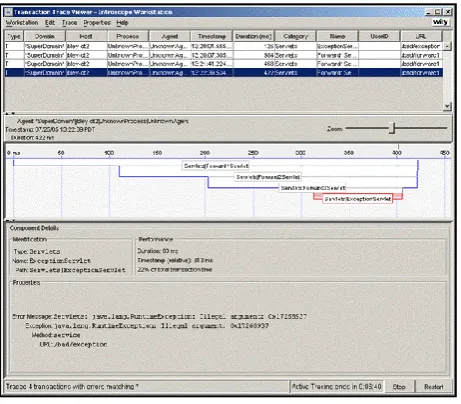
Introscope provides the breakdown of individual user transactions displaying precisely what exception was thrown and where the exception was thrown from (essentially the call stack). When viewing a faulty transaction in Transaction Tracer, one can easily identify precisely where the exception is being generated from.
DEPLOYMENT ARCHITECTURE
Fig 1: Deployment Architecture 24x7 Application
Monitoring
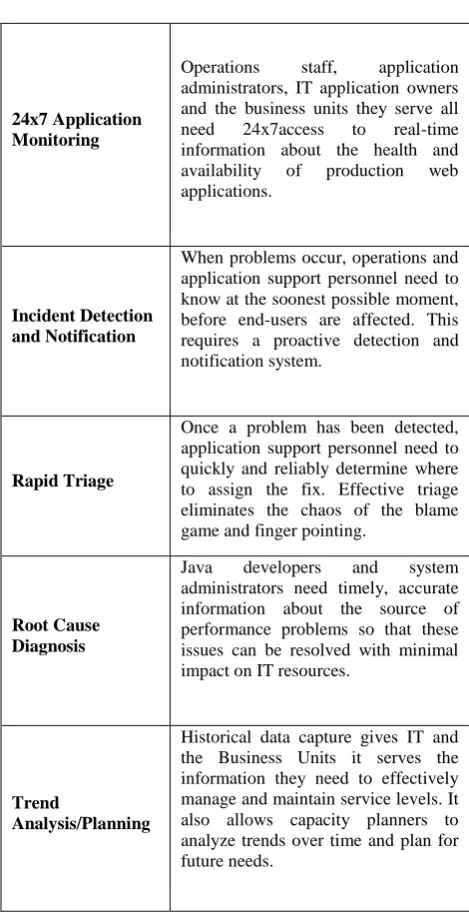
Operations staff, application
administrators, IT application owners and the business units they serve all
need 24x7access to real-time
information about the health and
availability of production web
applications.
Incident Detection and Notification
When problems occur, operations and application support personnel need to know at the soonest possible moment, before end-users are affected. This requires a proactive detection and notification system.
Rapid Triage
Once a problem has been detected, application support personnel need to quickly and reliably determine where to assign the fix. Effective triage eliminates the chaos of the blame game and finger pointing.
Root Cause Diagnosis
Java developers and system
administrators need timely, accurate information about the source of performance problems so that these issues can be resolved with minimal impact on IT resources.
Trend
Analysis/Planning
Fig 2: Transaction Tracer functionality
Introscope‘s built-in Transaction Tracer functionality
provides an excellent facility for just this purpose. The following screenshots fig01, fig02 and fig03 show a view of the transaction. This view can be used to determine if the application is making excessive calls to particular methods in the code. (a.k.a. ‗Death by a thousand paper cuts‘). By integrating with the system management procedures, Introscope empowers your IT organization to create an effective, and necessary, process for detecting and resolving web application performance issues. With hyper-linking and customizable graphical displays, Introscope‘s easy-to-use dashboards can be tailored for individual users to offer deep, intuitive views of the application infrastructure. These dashboards integrate seamlessly with pre-defined operations procedures allowing operations personnel to identify and triage application performance issues regardless of their level of Java expertise. Additionally, Introscope Console Lens decreases the time-to-value of Introscope by giving you the option of using an existing dashboard configuration to monitor multiple applications.
Fig 3:SMCS
Some key benefits for TCSS
o Provide visibility into the integrity of
transactions, as they happen.
o Provide the ability to visualize performance at both granular and abstracted levels.
o Detect performance threats and alert staff as performance metrics approach thresholds—not after they violate them.
o Offer highly customizable reports and dashboards to meet the needs of diverse users—from operators to application owners, database administrators, and the Departments Heads.
o Provide low-level diagnostics that help pinpoint the source of performance glitches.
o Record and provide historical performance data for analysis and continuous improvement.
Fig 4 : Investigator
2. USE CASE SCOPE OF WORK (SOW)
AND THE END DELIVERABLES
2.1 Overview
The CA Wily APM Rapid Implementation methodology is designed to deploy CA Wily Introscope and CA Wily CEM in the TCSS environment to provide 24 x 7 monitoring of web applications to help detect various performance issues and provide an opportunity for the TCSS and its Application SI, TCSS to resolve these issues before they affect end-user customers (the ―Solution‖).
2.2 Responsibilities of the parties
The team performing this Project will consist of (i) ALCEL Networks personnel and (ii) Customer personnel (collectively, the "Project Team"). TCSS and ALCEL Networks are each responsible for the performance of their respective independent contractors. Each party agrees to provide qualified personnel to perform their responsibilities under this SOW and to use practical and diligent efforts to maintain the continuity of their respective personnel assigned to the Project and perform the tasks identified as their responsibility in the Project schedule.
TCSS and ALCEL Networks will mutually agree upon the tasks to be completed by both parties prior to each Project Stage and, upon validation of planning, schedule, tasks, specifications and test criteria; any such decisions will not be unreasonably withheld or delayed.
Customer acknowledges and agrees to execute the Milestone Acceptance Form attached as Exhibit 1 upon completion of the Project set forth herein.
2.3 Project management services
ALCEL Networks will designate a principal point-of-contact to act as the ALCEL Networks project manager for the Project to provide the services below. TCSS agrees to designate a point-of-contact as the TCSS project manager to assist the ALCEL Networks point-of-contact to fulfill the responsibilities as set out below.
a. Verify expectations, requirements and acceptance criteria with Customer sponsor and key stakeholders
b. Select and schedule TCSS and ALCEL Networks
personnel to complete the Project tasks
c. Follow ALCEL Networks risk management procedure to
identify, review, manage and escalate as appropriate. d. Obtain TCSS sign-off on the Milestone Acceptance
Form attached as Exhibit 1. Deliverables will be deemed to be accepted upon TCSS execution of this Form.
2.4 Project approach
This Project will be performed in accordance with ALCEL Networks‘s implementation methodology identified in the stages below (each a ―Stage‖; collectively the ―Stages‖). Each Stage has a predetermined set of tasks and goals.
The work from the prior Stage will form the basis of the work for the next Stage. If work from a prior Stage is revisited at a later Stage, this will result in a change to the Project fee and schedule.
Project Plan A detailed project plan with timelines will be compiled during the first week of the engagement and submitted for acknowledgement.
In performance of this SOW, ALCEL Networks will work with TCSS to complete the following:
Stage 1 – Project Setup and Initiation (Week 1)
During this Stage, to be conducted remotely, the TCSS and ALCEL Networks project managers will:
a. Validate those prerequisites as identified in the Assumptions and TCSS. Responsibilities sections are accurate and complete.
b. Conduct a kickoff meeting call to introduce the Project Team and stakeholders, communicate the Project scope and requirements, discuss Project task list and assign ALCEL Networks or TCSS personnel as applicable to the designated tasks.
c. Finalize Project plan with detailed activities and timelines Stage 1 Deliverable: Project task list and plan
Stage 2 – Solution Requirements Definition (Week 2)
During Stage 2 the Project Team will verify the business and information technology (―IT‖) requirements of the Solution. A previously completed High Level Design (―HLD‖) document or
appropriate completed questionnaire(s) in which such
requirements were defined will be used as the basis for this review.
ALCEL Networks and TCSS will:
a. Review and verify the previously completed HLD or questionnaire(s) which collectively identify:
i. Target application(s)
ii. Network, server and system infrastructure components
iii. IT and business drivers for the Solution
For CA Wily Introscope:
iv. Application components (e.g., transaction groups, users, application server resources, operation type--e.g., create, delete) to be monitored by CA Wily Introscope and displayed by CA Wily Introscope dashboards
v. Application performance metrics to be used by CA
Wily Introscope to monitor the in-scope
application
vi. Transaction issues currently experienced (e.g., performance problems related to time of day and system load)
For CA Wily CEM:
iv. Business processes (e.g., the high level functions in the application, such as login, search, report) to be monitored for the in-scope application
v. Transaction performance issues currently
experienced
vi. Business process reporting requirements
b. Update or produce the HLD as applicable to reflect the results of the Solution requirements review and agree to proceed to Stage 3.
Stage 2 Deliverable: Verified and documented Solution requirements
Stage 3 - Solution Architecture and Design (Week 3)
During this Stage, ALCEL Networks will work with TCSS to validate the architecture of the selected CA Wily software to be deployed for the in-scope application (s), and to define the rollout process and Solution test plan.
The Project Team will:
a. Review
For CA Wily Introscope:
i. CA Wily Introscope configurations and
architecture
ii. Additional CA Wily Introscope core product modules to be implemented as applicable unless expressly excluded in Section B
For CA Wily CEM:
i. Application service level agreement (―SLA‖) requirements for the in-scope applications and how to convert them into Customer experience metrics and thresholds
ii. Default integration procedure of CA Wily CEM with CA Wily Introscope as applicable
iii. Feasibility of migrating a previously completed Proof of Concept installation of CA Wily CEM, if applicable
b. Review and update as applicable the Solution test plan
c. Update the HLD as applicable, and agree to proceed to Stage 4.
Stage 3 Deliverables: Documented Solution design and Solution test plan
Stage 4 - Solution Integration and Configuration (Weeks 4,5,6)
During this Stage, the Project Team will install and configure:
Installation of OS on the Wily Introscope Enterprise Manager Server.
CA Wily Introscope Enterprise Manager and Introscope Workstation.
CA Wily Introscope Agent on the defined application servers.
CA Wily CEM Solution in the production environment.
Specifically, for CA Wily Introscope, the Project Team will:
a. Prepare the environment:
i. Verify systems and applications are accessible, operational and patched to agreed upon requirements
ii. Verify hardware and network are accessible and operational
b. Install CA Wily Introscope Enterprise Manager (―EM‖) and Introscope Work Station into the Live Environment:
i. Install and Tune Enterprise Manager ii. Install Workstations
iii. Install Webview Servers
iv. Install license file for CA Wily Introscope.
v. Configure Enterprise Manager in order to detect all the agent deployed in the network and perform installation testing
vi. Configure and correlate performance data from HTTP Server's (end users requests) with internal application performance.
vii. Configure Introscope in order to produce application components, J2EE services and JVM resources from within the Java application with negligible overhead. viii. Configure Introscope to report the GC Heaps in order to ensure if the Garbage Collection is done properly within the Java Applications.
ix. Configure Introscope in order to take all SQL statement measurements from inside the Java applications.
x. Configure Introscope in order to give a presentation of slowest ‗n‘ calls in the call stack or blame stack. xi. Configure Introscope to determine and isolate the
problems related to database and report them to the database administrators for quick resolution.
xii. Configure Introscope to provide detailed
performance metrics of individual SQL statements within problem transactions.
xiii. Configure Introscope in order to measure the performance of Java applications in production environment.
xiv. Configure Introscope in order to have different level of dashboards for operations personals and business managers.
xv. Configure Introscope to work with JVM's & JDK's from the specified vendor.
xvi. Configure Introscope to monitor multiple
applications with one dashboard.
xvii. The dashboards are configured in order to share critical application information across the enterprise enabling instant 24x7 monitoring for authorized users anytime, anywhere.
xviii. Configure Introscope to view instantly the current value of any metric of any component providing instant real-time performance view.
xix. Configure Introscope to provide the facility of viewing of all historical data for solution of problems, trend analysis and capacity planning. xx. Configure Introscope to allow role based access to
the data.
xxi. Configure Introscope to provide an advanced reporting facility with the ability to schedule reports (out of the box and customizable) for any Java application.
xxii. Introscope is configured to measure CPU utilization of identified JVM's.
100%. It should provide an easy way to understand the each interaction of the components for e.g. which JSP calls which Servlet or EJB and backend component.
Specifically, for CA Wily CEM, the Project Team will:
a. Prepare the environment. The following tasks will be performed by the Customer:
i. Set up cable configurations
ii. Set up network - check for the port spanning from where the application traffic can be monitored. iii. Verify systems and applications are accessible,
operational and patched to agreed upon requirements iv. Verify hardware is accessible and operational
v. Install license file for CA Wily CEM
b. Install CA Wily CEM
i. Establish communication between Transaction Events and Statistics Server (―TESS‖) and the Transaction Impact Monitor (―TIM‖)
ii. Verify traffic between TESS and TIM iii. Perform installation testing
c. Configure CA Wily CEM
i. Out-of-the-box (―OOTB‖) Configurations
1. Set up Administrators, Operators and Analysts
2. Change CA Wily CEM Admin Account
Parameters
3. Set Defaults/Define Domain Settings 4. Perform as applicable:
a. CA Wily CEM HTTPS Setup for Web
servers
b. CA Wily CEM HTTPS TIM Setup
ii. Business Process Definition for in-scope application 1. Configure parameters (e.g., session timeout,
authentication type) for the in-scope application(s) to be monitored by CA Wily CEM
2. Define session ID
3. Define the business processes
4. Record HTTP-based transaction signature(s) 5. Promote HTTP-based transaction signature(s) 6. Define HTTP-based transactions
a. Define HTTP-based transaction
components
b. Enable HTTP-based transaction
components
c. Configure CEM to monitor all user
transactions for any web-application hosted in a J2EE-compliant application server; detect failed transactions; gather evidence necessary for triage and diagnosis of problems that affect user experiences and prevent completion of critical business processes proactively.
d. Configure CEM to provide deep end-to-end transaction visibility by monitoring at a transactional level.
e. Configure CEM in order to trace the web transaction components and provide visual representation of an actual transaction.
f. Configure CEM in order to give visibility into user experience without installing any agents on user desktops.
g. Configure CEM in order to detect the user impacts due to the slow response time, fast response time, low throughput, partial response, missing components within transactions etc and report them in real time.
h. Configure CEM in order to determine exactly which real users were impacted by transaction defects, their location and status pro-actively.
i. Configure CEM in order to provide user usage analysis and show how user's success rate, average time and transaction count has changed over a specific period of time such as current week versus previous week. j. Configure CEM in order to provide
root-cause probability graphs for performance problems showing the most probable root-cause area within application infrastructure. k. Configure CEM for SLA monitoring not only at transactional level, business process level but at User and user group level. l. Configure CEM in order to correlate
performance data from HTTP Servers (external requests) with internal application performance data.
iii. User Setup
1. Set up User Group definitions and Group identifiers
2. Import Lightweight Directory Access Protocol (―LDAP‖)/Flat File Attributes for Customer Profile Lookup and Set up Cron Job if applicable
iv. Defect Settings
1. Review transaction data
2. Configure CA Wily CEM threshold settings for monitoring application transaction defects 3. Set up incident settings
4. Examine data and modify settings for Defects 5. Set up and test Email Notification for Alerts
v. Reporting Configuration
1. Configure one (1) pre-defined Report
2. Configure Email setup for Reports if applicable vi. OOTB Integrations
1. Configure Integration with CA Wily Introscope if applicable
Stage 4 Deliverables:
CA Wily Introscope Enterprise Server installed and configured in production environment and the CA Wily Introscope Agents installed and configured in production environment
Stage 5 – Configuration Documentation and Backup (Ongoing for all stages)
During this Stage, ALCEL Networks will verify that the installation and configuration are documented in the Solution Run Book.
ALCEL Networks will, as applicable:
For CA Wily Introscope,
a. Document changes to default Agent settings
b. Document procedures to back up performance data
repositories and management configurations
c. Document final architecture and configurations in the Solution Run Book
In addition, Customer Project Team members, supervised by the ALCEL Networks Project Team, will perform a backup of the agent configurations, other configuration settings and the management modules, if explicitly requested by Customer.
For CA Wily CEM,
a. Document final architecture and configurations in the Solution Run Book
In addition, Customer Project Team members, supervised by the ALCEL Networks Project Team, will perform a Solution backup to verify that CA Wily CEM‘s backup procedure is operational, if explicitly requested by Customer.
Stage 5 Deliverables: Solution Run Book completed; Backup performed by Customer Project Team
Stage 6 – Knowledge Transfer (Ongoing for all stages)
During the course of the Project, Customer Project Team personnel receive knowledge transfer from ALCEL Networks Project Team personnel. In addition, in this Stage the ALCEL Networks Project team will summarize implemented Solution functionality for designated Customer IT administrators and end users, consisting of:
For CA Wily Introscope
One session up to 1 hour in length for CA Wily Introscope administrators to review administrative tasks and walk through configuration and backup processes. One session up to 1 hour in length for CA Wily
Introscope end users to review topics such as metric analysis, alerts and reporting.
For CA Wily CEM
One session up to 2 hours in length for CA Wily CEM to review topics such as metric analysis, alerts and reporting.
Knowledge transfer is not a substitute for formal education courses. ALCEL Networks will review education needs related to CA Wily Introscope and, ALCEL Networks may offer suggestions for future education prior to Project completion.
Stage 6 Deliverable: Completed Knowledge Transfer sessions
Stage 7: Application Performance characterization and fine tuning (Weeks 8-9-10)
In this Stage, ALCEL Networks will assist the Customer Project Team to analyze application performance and pin point any performance issues to be addressed by the application teams. Additionally ALCEL Networks will:
a. Adjust configurations (Agent and Enterprise Manager) for optimal monitoring
i. CA Wily Introscope adds up to a maximum of 5% additional CPU overhead on the monitored application. The fine tuning activity will ensure that this is not breeched. The impact on memory is negligible.
ii. CA Wily CEM has no impact on Application or Network as it is passive monitoring via port spanning, hence no fine tuning required for CEM
b. Define/adjust alerts and reports as per customer requirements
c. Present a summary of the Solution to Customer Project sponsor and key IT and business stakeholders:
d. Conduct an implementation wrap-up meeting with Customer to provide final Project documentation (the ―Solution Documents‖) to Customer consisting of:
i. HLD
ii. Solution test plan and documented test results iii. Solution Run Book
iv. Solution summary presentation
Within eight weeks following the implementation wrap up-meeting, ALCEL Networks and Customer will conduct a checkup session to be performed remotely by ALCEL Networks, up to two (2) hours in duration for each CA Wily product deployed, to review performance of the Solution and respond to any related questions or issues.
Please note (i): Any subsequent requests for further agent deployments or assistance in application analysis and fine tuning beyond the ALCEL Networks services time period will be performed as separate service and will be subject to additional costs that will be borne by the customer.
Stage 7 Deliverables: Production deployment completed; Solution summary presentation delivered; Final Solution Documents provided to Customer; Post-implementation checkup session
Stage 8: Project Handoff and Closure
During this Stage, the ALCEL Networks project manager will conduct a Project closure meeting or call.
3. CONFIGURATION PARAMETERS
The following specific parameters and constraints, as well as those defined within the Stages above were used in determining the scope of Services of this SOW. Any changes to these specifications may result in a change to the Project fee or schedule and will be handled using the Change procedure above.
Specifically, for CA Wily Introscope:
a. Configure CA Wily Introscope to monitor the 4 defined modules of ACES application:
i. STASE
ii. REGASE
iii. CEDEPT
iv. STDEPT
b. Deploy CA Wily Introscope Agents on the JVMs for the above in-scope modules.
c. Install up to three workstations.
Specifically, for CA Wily CEM:
a. Configure CA Wily CEM to monitor the REGSAE and STASE application(s).
b. Management of up to twenty-five (25)HTTP
Transactions for each in-scope application will be configured in CA Wily CEM
c. SLA review limited to number of targeted TCSS application as specified.
d. Configure one (1) pre-defined report. No custom reports will be created.
e. Configure integration with CA Wily Introscope for REGASE and STASE
3.1 Section C: Out of scope, Assumptions
Customer Responsibilities
The following are out of scope:
General
a. Deployment of the following CA Wily product modules:
i. Change Detector
ii. CICS Powerpack
iii. SNMP Adapter
iv. EPAgent
v. eTrust Site Minder Manager
vi. PowerPack for SiteMinder
vii. Oracle Powerpack
viii. MQ Powerpack
ix. Wily Transaction Generator (―WTG‖)
b. Deployment of any CA Services Add-on Services Components or Accelerators
c. Gap analysis or Application Performance Management Maturity Model analysis/assessment
d. Advanced performance analysis
e. Any party product installation, installation of third-party product interfaces, exit coding or interfaces to Customer systems and applications
f. Integration with other CA or third-party software unless expressly specified otherwise herein.
g. Implementation on non-supported platforms
h. Implementation of any proposed next steps presented in the Solution summary in Stage 8
i. Any additions, modifications or changes to the activities expressly stated herein are outside the scope of this SOW and shall be handled via a separate agreement or a mutually agreed upon and executed Change Request.
Specifically, for CA Wily Introscope:
a. Customer-specific EPAgent scripts.
b. Custom Instrumentation
c. LDAP integration
d. Enterprise Manager failover configuration
e. Customer-specific alerts, dashboards, and reports other than the one mentioned in the detailed task list
f. Customer-specific management elements except if expressly specified in the detailed task list
g. Detailed analysis on critical situation
h. Application performance audit
i. Customization of CA Wily Introscope using API
j. Integration of CA Wily Introscope with CA NSM
Specifically, for CA Wily CEM:
a. Development of HTTP Analyzer Plugin(s)
b. LDAP integration
c. Tasks related to receiving and decoding SNMP Traps by the Customer‘s Network Monitoring Service
d. Configuration of reports identified in Stage 2
e. Development of custom code or custom reporting
f. Integration of CA Wily CEM with CA NSM
3.1.1 Assumptions
a. In the event of any conflicts or inconsistencies between the Solution Documents or this SOW, this SOW shall control. The Solution Documents shall not be interpreted
to impose any additional tasks, obligations,
responsibilities or liability upon ALCEL Networks.
and/or discovery of previously unidentified considerations during review or validation are subject to a Change Request and will result in a change to the Fixed Price of this SOW.
c. All onsite work is to be done at one (1) TCSS location in INDIA (the ―central site‖) unless otherwise agreed to in writing by ALCEL Networks and TCSS.
d. Access to information and documentation concerning TCSS systems and applications including relevant business and technical documentation will be provided. This includes, without limitation, any current and planned for configuration schematics, network topology schematics, and capacity planning documents, where appropriate.
e. Security access levels available to ALCEL Networks personnel will be identified prior to the start of the implementation. As much security access as possible according to company policies will be set up and identified.
f. TCSS personnel will be available at installation time to assist with administrator access to servers and systems and to resolve any network issues including firewall configuration and any other access issues that require access other than that supplied to ALCEL Networks personnel.
g. Network connectivity to all users will be available 24/7.
h. ALCEL Networks has the right to utilize independent contractors to support the delivery of the Services set forth herein notwithstanding anything to the contrary.
4. CONCLUSION
The outcome of the USE CASE presents
[1] CA Wily gives business management, customer service, application support, and IT operations a new level of real-time visibility into customers‘ (internal and external) transactions. This visibility enables TCSS to deliver high quality customer transactions at superior levels of operating efficiency.
[2] Wily CEM monitors and analyses Web (HTTP and HTTPS-based) transactions. CEM provides a broad range of benefits, including identifying and prioritizing customer impacting problems, alerting IT staff to potential problems before they occur, communicating status to business users.
[3] Wily monitors customer transactions to isolate the causes of problems in the data center. Wily measures the performance and quality of customer transactions, identifies defects and variance, and quantifies the impact on customers and the business. By proactively detecting trends in degraded transaction response times and providing a variety of actionable reports, Wily enables you to take action before a problem occurs or Service Level Agreements (SLAs) are out of compliance.
[4] CA Wily Introscope provides real-time visibility into the performance and availability of critical Web applications and backend systems to help our customers triage, diagnose and locate the root cause performance anomalies in a timely manner. Its
patented technology provides visibility into application responsiveness and helps customers to proactively manage web applications to ensure they are available and performing at highest capacity. Wily provides a view into critical components such as the J2EE components, .NET platform, and back-end systems such as Oracle. Its unique view from the inside out of the application platform helps customers
triage web application problems, understand
application performance and scalability, assist in capacity planning, and alarm before customers are impacted by Application issues. This feature of product inspired us by the work published by Gutwin C Penner, R. Schneider, ―Group awareness in distributed software development‖ [3].
[5] Utilizing Wily‘s Blame Technology feature, users can quickly analyse and isolate production problems to the root cause, whether in the application, application server, or back-end system/database. A Transaction Tracer facility can help customers quickly identify long running or ‗rogue‘ transactions based on response time thresholds. Several other features offer a comprehensive set of metrics, including ChangeDetector which identifies changes to the application environment and correlate them to performance regressions; LeakHunter which can help resolve Java and .NET related memory issues in production systems; and ErrorDetector can pinpoint how application errors and exceptions impact the application‘s health and performance profile. Various customized modules provide deep visibility into relevant portions of your web application‘s architecture, such as portals, messaging queue infrastructure, CICS, SiteMinder, web servers, etc., in order to assist in the triage and diagnosis of performance issues. In past huge work was done to define Communication and coordination practices. The tool assist the work of
I
an R. Mechesney et al, in defining best practices in software engineering projects [4][6] Wily customizable dashboards allow users in different roles to create views that assist with every group in the application organization including: administrators, database administrators, QA and development engineers, capacity planners, executives and managers. The dashboard system provides for easy reporting of application performance which can be used by App and non-App personnel. Lastly, the historical data repository and reports provide out-of-the-box viewing of application performance and service levels.
customers. With Wily you can ensure customer success.
[8] Measures end user SLAs by user group. TCSS can tailor user groups for critical users and hence mark specific SLA violations as more critical. For errors or defects that occur for individual users, Wily can provide a detailed breakdown of the defective transaction.
[9] Wily provides the management/administration required to prioritize your application issues (defects) in order to focus your resources on your most critical business issues. Date retention is for very long periods of history (typically 12-24 months for most customers). By maintaining this detail and provide easy access to it, customers will be able to quickly identify patterns of behaviour and compare and contrast various metrics across applications, servers and even user and geographies. Performance reports (available out of the box) compare one time period to another from not only a performance point of view, but also from a customer experience point of view. [10] Root Cause Diagnostics: In addition to seeing
performance for the end user, Wily provides the breakdown of individual user transactions displaying precisely what exception was thrown and where the exception was thrown from (essentially the call stack).[5] When viewing a faulty transaction in Transaction Tracer (shown below), one can easily identify precisely where the exception is being generated from.
5. REFERENCES
[1] Abdeslam Jakimi, Laheen Elbermi, ―Software
Development of UML Scenerios: Design Fusion and Code Generation‖; International Review on computers and software IRECOS, Vol. 6, No. 5, 2011.
[2] C.Floyd, ―Theory and Practice of software
development‖, Proceedings of six International Conference on Theory and Practice of Software Development, Springer, New Yor, 1995, pp 25-41
[3] Gutwin C Penner, R. Schneider, ―Group awareness in distributed software development‖ Proceedings of 2004 ACM conference of computer supported cooperative work.
[4] Ian R. Mechesney et al, ―Communication and
coordination practices in software engineering projects‖, Information and software technology Elsevier, 2003.
[5] Joseph Altmann and Gustan Pomberger, ―Cooperative software development: Concepts, Models and Tools‖.
Proceedings of Technology of Object Oriented Languages and Systems, 1999.
[6] Mike Holcombe, ―Running an Agile Software
Development Project‖, John Wiley, New Jersey, 2008.
[7] Sommerville, ―Software Engineering‖, 5th
Edition – Wesley, Harlow, 1996.
[8] Tim Blackwell, Jurgen Branke et al, ―Particle Swarms
for Dynamic Optimization Problems‖, Swarm
Intelligence: Introduction and Applications, Natural Computing Series, Sprinter – Verlag Berlin, Heidelberg, 2009.
[9] Bendifallah, S., and Scacchi, W. (1987). Understanding Software Maintenance Work. IEEE Transactions on Software Engineering, vol. 13, no. 3, 311-323.
[10] Dowson, M. (1993). Software Process Themes and Issues. In Proceedings of the Proceedings of 2nd International Conference on the Software Process, IEEE Computer Society Press. Fischer, G., Grudin, J., Lemke, A., McCall, R., Ostwald, J., Reeves, B., and Shipman, F. (1992).
6. AUTHOR’S PROFILE
Mr. Imran Ali Siddiqui is currently working as Senior Project Manager at Velocis Technology, Noida. He has an experience of 11 years in IT industry out of which he had 5 years of core experience in Project Management. Prior to his current assignment He had worked as Software Developer, Network Admin and Senior Consultant in Ramee Solutions, Lucknow, BBDNITM(Babu Banarasi Das National Institute of Technology and Management,) Lucknow and LNT infotech, Delhi. He is a Research Scholar in JJT University, Jhunjhunu, Rajasthan. His areas of interest include Software Project Management and Database Management Systems. He has published 3 international journals.
Dr. Manuj Darbari is currently working as an Associate Professor in the Dept. of Information technology at B.B.D.N.I.T.M (Babu Banarasi Das National Institute of Technology And Management), Lucknow. He holds a Ph. D. from Birla Institute of Technology Mesra Ranchi, India and having a teaching experience of more than thirteen years. Prior to his current assignment, he has taught for one year in M.N.R.E.C Allahabad as lecturer and twelve years in B.B.D.N.I.T.M. Lucknow in different positions. He has published thirty papers in referred international and national journals.