Themed Section : Engineering and Technology
VoiceXML - A Digital Document Standard for Voice Dialog
Rahul Kotawadekar*1, Prathamesh Mahakal2, Harshad Salvi3
*1Assistant Professor, Department of MCA, Finolex Academy of Management and Technology, Ratnagiri, Maharashtra, India
2-3 Student, Department of MCA, Finolex Academy of Management and Technology, Ratnagiri, Maharashtra,
India ABSTRACT
Today, VoiceXML is the standard scripting language for rendering web pages over the telephone. VoiceXML builds on the basic concept and rules set by XML. VXML is W3C and IEEE standard. VXML is portable to any VXML platform. It is much stable, mature and reliable language. Interactive applications contain prerecorded audio, grammars defining words that could be recognized, and DTMF key input. Also, by saying something or by pressing the keypad on the phone the user moves to different pages. This paper describes how VoiceXML is defined and how it works. This paper includes information about IVR & its structure. It also describes about TTS. This paper also describes difference between ASR & Transcription. Our conclusion is that VXML is a nice way to make voice-enabled applications.
Keywords: VXML, VXML Elements, IVR, TTS, ASR, Transcription, DTMF
I.
INTRODUCTIONVXML is a markup language for specifying interactive voice dialogues between a Human and Computer. Analogous to HTML i.e. First one is VoiceXML browser interprets (.vxml) pages and second one is VXML can be dynamically generated by server-side scripts (Perl, CGI, JSP & ASP). VoiceXML stands as the current industry standard programming language for voice applications. VXML is a markup language used to develop speech applications. It is published as a W3C recommendation and is currently at version 3.0. In VXML, user input is restricted to voice and DTMF formats. The technology brings the advantages of Web-based development and content delivery to IVR applications. VoiceXML provides the following:
Text-to-speech(TTS)
Speech input recognition and recording Audio file output
DTMF input recognition Dialog flow control
Telephony features such as call transfer, hold and disconnect the call
II.
HOW HTML AND VXML DIFFERFollowing is a code sample from a simple HTML page and a VXML page:
Sample HTML Code: <html>
<body>
<img src="Nature.jpg"/> </body>
</html>
Sample VXML Code: <vxml version="2.0"> <form>
<block>
<prompt>IVR</prompt> </block>
Figure 1: HTML Vs VXML
In the above example of HTML, a page is set up where visitors can view a picture of a nature. However, in the VXML example, a document has been set up where callers can hear a prompt stating "IVR". [1]
III.
HISTORY OF VXMLIn March 1999, AT&T Corporation, IBM, Lucent Tech-nology and Motorola formed the VoiceXML Forum. In March 2000, VoiceXML v1.0 was released. In March 2004, VoiceXML v2.0 was introduced but reached W3C Recommendation status in June, 2007. In 2005, VoiceXML v2.1 is a W3C recommendation was invented. Now the Latest version of VoiceXML v3.0 is used.It in-cludes a new XML State-Chart Description Language called SCXML. [2], [3].
IV.
ARCHITECHTURE OF VXML
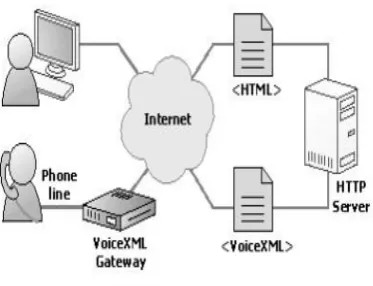
Creating voice applications is similar to creating web pages. The web uses HTML and a web browser to send and receive text and images over the internet. Likewise, VXML defines applications that function as a voice browser to input and output audio over the PSTN or VoIP. While one accesses a web browser on a computer,
Figure 2: Architecture of VXML
a voice browser is accessed using a telephone. IVR and other voice applications, connect to the internet in the same way as a web browser, the difference is that IVR communicates with web servers using VoiceXML instead of HTML. Modern IVR applications possess powerful, robust features that enable dynamic communications. [4].
V.
VXML ELEMENTSA single VoiceXML document, or a set of documents, called an application, forms a conversational finite state machine. The user can only be in one state, or dialog, at a time. Some of the basic elements of VXML include the following:
1) Prompt: Queues recorded audio and synthesized text to speech in an interactive dialog.
2) Audio: Plays an audio file or converts text to speech within a prompt.
3) Form: Set of fields to be filled through interaction with the user.
4) Field: Formulates an interactive dialog between the user and the system.
5) Grammar: Specify a speech recognition or DTMF grammar.
6) Filled: What to do if user input is recognized. 7) Value: Returns the field's value.
8) Goto: Jumps to the specified URI.
9) Submit: Obtains a new document via an HTTP GET or POST request. [2], [5]
Interactive Voice Response abbreviated, as IVR, is an important development in the field of interactive communication which makes use of the most modern technology available today.
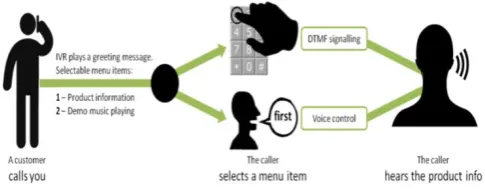
Figure 3: Basic Structure of IVR
This technology allows a computer to interact with humans through the use of voice and DTMF tones input via key-pad. IVR is an electronic device through which information is available related to any topic about a particular organization with the help of telephone lines anywhere in the world. IVR reduces the cost of servicing customers. IVR technology is also being introduced into automobile systems for hands free operation. IVR is also known as a telephone menu or voice response unit. An IVR application provides pre recorded voice responses for appropriate situations, keypad signal logic, access to relevant data and potentially, the ability to record voice input for later use. By using (CTI) Computer Telephony Integration, an IVR system enables computers to interact with telephones. The computer uses a telephony keypad to under- stand DTMF signals. IVR System plays recorded voice on a telephone when a caller calls in. So, it is obvious that instead of playing recorded voice, IVR can play text file using TTS engine. Many of today’s most advanced IVR systems are based on a special programming language called voice extensible markup language (VXML).
Here are the basic components of a VXML-based IVR system:
Telephone network — Incoming and outgoing phone calls are routed through the regular Public Switched Tele-phone Network (PSTN) or over a VoIP network.
TCP/IP network—A standard Inter network, like the ones that provide Internet and intranet connectivity in an office.
VXML telephony server - This special server acts between the phone network and the Internet network. It serves as an interpreter, or gateway, so that callers can interface with the IVR software and access information on databases. The several so contains the software that controls functions like text-to-speech, voice recognition and DTMF recognition.
Web/application server — This is where the IVR soft-ware applications live. There might be several different applications on the same server: one for customer service, one for outgoing sales calls, one for voice-to-text transcription. All of these applications are written in VXML. The Web/application server is connected to the VXML telephony server over the TCP/IP network.
Databases — Databases contain real-time information that can be accessed by the IVR applications. If you call your credit card company and want to know your current balance, the IVR application retrieves the current balance total from a database. [6], [7]
A. Benefits of IVR
Saves time and money: IVR technology can replace humans to answer frequently asked questions or to provide commonly requested information – such as directions, hours of operation, etc.
Greater customer satisfaction: IVR technology eliminates wait times by responding to a caller immediately.
VII.
TEXT-TO-SPEECH RECOGNITIONText-To-Speech, abbreviated as TTS, is a technology that converts digital text into spoken voice output. One of the goals of TTS is to provide textual information to people via voice messages. TTS or Text To Speech is a process where text is converted to WAV file and played back. So it is a system or often called ―engine‖ that converts text to voice. If someone types a sentence in a notepad, TTS software would convert it to voice ad play it through speaker attached to computer or laptop.
A. TTS Engines
Many TTS engines are available in the market. For Microsoft, SAPI 5.1 is built-in TTS engine available for Windows Operating System. For Mac OS, Voiceover is built-in TTS engine for Mac OS Leopard. [3]
B. TTS Companies
There are various companies which make TTS engines such as:
Nuance, AT&T, SVOX, Google TTS, Verbio, Ivona, Voxygen, Acapela, Speech, LumenVox, Loquendo, etc. [8], [2].
VIII.
AUTOMATIC SPEECH RECOGNITIONAutomatic Speech Recognition, abbreviated as ASR, ASR makes speech a valid type of data input. That means what an end user says directly influences the call-flow and re-directs the caller based on what they’ve said. In other words, when it comes to IVR, ASR moves the call-flow forward in some capacity. ASR is programmable and based on keywords or expected responses. You can program ASR to recognize the answer to a yes/no question. ASR is commonly used when you need capture alpha-numeric data, like a person’s name or address. It is also useful for hands free calling. So, if a lot of your end users tend to call while on the go it might make sense to look into enabling ASR. ASR is based on
Grammar. ASR functions on navigation. Data input is needed in ASR. [4]
IX.
TRANSCRIPTIONTranscription, on the other hand, is different because capturing audio information in this context is akin to leaving a voicemail message. There are no predetermined grammars, keywords, or expected responses. What a caller says does not direct the call flow in any way. A transcription application simply records an audio file and then attempts to interpret the audio in the recording into written text. Transcriptions tend to fall into one of three categories, based on the confidence of the engine in processing the audio file, high, medium, or low. A clear, well-recorded file tends to fall into the high confidence bucket, while a recording with poor sound quality tends to fall in the lower confidence bucket. Obviously, the medium confidence is somewhere in between. Transcription is typically used for open-ended questions, like with surveys or for customer feedback, e.g. voice of the customer programs. Transcription functions on recording. Data input is not needed in Transcription. Transcription is based on Grammar. [4]
X.
DUAL-TONE MULTIFREQUENCYDTMF. DTMF can also be used to gather input to form together with voice. This example shows how a variable, PIN, is assigned a value by either using voice or pressing the keypad. [9], [10]
Sample Example of DTMF code: <form id="get_id">
<field name="ID" type="digits">
<prompt>Say or key in your personal identification number.
</prompt> </field>
<filled><assign name="PIN" expr="ID"/></filled> </form>
XI.
CONCLUSIONAll-in-one solutions available with VXML which can reduces dialogue system development time and language generation capabilities with additional functions can be easily implemented develop your own dialogue system with free VoiceXML browsers. VoiceXML is a great tool to create voice enabled applications that are going to be used over the phone. The language is relatively easy to learn and to understand. Many of the traditional voice services will probably be replaced in the near future.
XII.
REFERENCES[1] S. K. Singh, ―Xml based interactive voice response system,‖ XML based Interactive Voice
Response System, vol.74, no.14, pp.1–5, 2013.
[2] F. Mairesse, ―An introduction to voicexml,‖ An
Introduction to VoiceXML.
[3] ―Wikipedia,‖ Wikipedia. [Online]. Available: https://en.wikipedia.org/ wiki/VoiceXML
[4] ―Plum voice blog,‖ Plum Voice Blog. [Online].
Available: https://www.
plumvoice.com/resources/blog/transcription-vs-speech-recognition/
[5] ―Voice extensible markup language (voicexml) version 2.0,‖ Voice Extensible Markup Language
(VoiceXML) Version 2.0. [Online]. Available:
https.w3.org/TR/2004/REC-voicexml20-20040316/
[6] ―How interactive voice response (ivr) works,‖
How Interactive Voice Response (IVR) Works.
[Online]. Available: https://electronics.
howstuffworks.com/interactive-voice-response1.htm
[7] ―Interactive voice response system,‖ Interactive
Voice Response System. [Online]. Available:
http://www.123seminarsonly.com/CS/Interactiv e-Voice-Response-System.html
[8] ―Wikipedia,‖ Wikipedia. [Online]. Available: https://en.wikipedia.org/ wiki/VoiceXML
[9] ―Text-to-speech,
―Text-to-Speech.[Online].Available: https://www.ivona.
com/us/about-us/text-to-speech/
[10] ―Voice vision,‖ Voice Vision. [Online].
Available: http://www.