RESEARCH
Ransomware deployment methods
and analysis: views from a predictive model
and human responses
Gavin Hull
1, Henna John
2and Budi Arief
3*Abstract
Ransomware incidents have increased dramatically in the past few years. The number of ransomware variants is also increasing, which means signature and heuristic-based detection techniques are becoming harder to achieve, due to the ever changing pattern of ransomware attack vectors. Therefore, in order to combat ransomware, we need a better understanding on how ransomware is being deployed, its characteristics, as well as how potential victims may react to ransomware incidents. This paper aims to address this challenge by carrying out an investigation on 18 families of ransomware, leading to a model for categorising ransomware behavioural characteristics, which can then be used to improve detection and handling of ransomware incidents. The categorisation was done in respect to the stages of ransomware deployment methods with a predictive model we developed called Randep. The stages are fingerprint, propagate, communicate, map, encrypt, lock, delete and threaten. Analysing the samples gathered for the predictive model provided an insight into the stages and timeline of ransomware execution. Furthermore, we carried out a study on how potential victims (individuals, as well as IT support staff at universities and SMEs) detect that ransomware was being deployed on their machine, what steps they took to investigate the incident, and how they responded to the attack. Both quantitative and qualitative data were collected through questionnaires and in-depth interviews. The results shed an interesting light into the most common attack methods, the most targeted operating systems and the infection symptoms, as well as recommended defence mechanisms. This information can be used in the future to create behavioural patterns for improved ransomware detection and response.
Keywords: Ransomware, Cybercrime, Predictive model, Classification, Victim study
© The Author(s) 2019. This article is distributed under the terms of the Creative Commons Attribution 4.0 International License (http://creat iveco mmons .org/licen ses/by/4.0/), which permits unrestricted use, distribution, and reproduction in any medium, provided you give appropriate credit to the original author(s) and the source, provide a link to the Creative Commons license, and indicate if changes were made.
Introduction
Ransomware is a form of malware that blackmails its victim. The name “ransomware” comes from the ran-som note asking its victim to pay ran-some money (ranran-som) in return for gaining back access to their data or device, or for the attacker not to divulge the victim’s embar-rassing or compromising information. It usually spreads through malicious e-mail attachments, infected software apps, infected external storage devices or compromised websites. Unlike other types of malware (which typically try to remain undetected), ransomware exposes itself at some stage of its execution in order to deliver the ransom
demand to its victim. This demand is usually presented with a note that appears on the screen before or after the encryption occurs, outlining the threat and accompanied by a detailed set of instructions for making the payment, typically through a cryptocurrency.
Ransomware has had a rapid year-on-year growth of new families since 2013, costing an estimated more than 5 billion USD globally and growing over an expected rate of 350% in 2017 (Morgan 2017; Clay 2016). The major-ity of ransomware strains target Windows operating systems (Mansfield-Devine 2016) and are of the crypto-ransomware type (Savage et al. 2015). Crypto-ransom-ware attacks have a greater threat than any other type of ransomware, as they can lock out a user from valuable assets, affecting productivity and availability of services.
Open Access
*Correspondence: [email protected]
3 University of Kent, Canterbury, UK
The attacks mainly affect small and medium sized enter-prises (SMEs) (Savage et al. 2015) and critical infrastruc-ture including educational institutions and healthcare trusts (Barker 2017; Dunn 2017; Heather 2017), which are more likely to fall victim or flounder under the pres-sure and pay to release the encrypted contents. The num-ber of attacks has grown partly because malware authors have adopted an easy-to-use modular design of the ran-somware. Furthermore, Ransomware-as-a-Service (RaaS)
products (Conner 2017; Cimpanu 2017) have become more readily available, which assist the attacker through simplistic distribution with phishing and exploitation kits and a trustworthy business model.
The attacks are often achieved through leveraging social engineering tactics to get a victim to download and activate the binary, which evades the anti-virus scan-ner’s signature-based detection through oligomorphic or polymorphic decryptors, metamorphic code (Szor 2005) or the generation of a new variant. According to Syman-tec’s reports (Savage et al. 2015; O’Brien et al. 2016), phishing attacks are the prime cause of ransomware being activated on a victim’s computer. A likely scenario of the vectors toward activation could be from an email with a payload or a link to a website that triggers a drive-by-download. The downloaded binary could initiate the process of carrying out the ransom, or in cases of more sophisticated attacks, it will first fingerprint the victim’s environment prior to dropping the malicious binary or process (Lindorfer et al. 2011).
Researchers have analysed ransomware variants, but are yet to propose a predictive model of ransomware deployment methods. It is vital to have a deep under-standing of the deployment methods of ransomware to effectively fight against them.
The main contribution of this paper is a predictive model of ransomware stages, which came out from a study of 18 ransomware families by looking into Win-dows Application Programming Interface (API) func-tion calls during each ransomware execufunc-tion. Another contribution of this research focuses on querying and interviewing ransomware victims to find common factors between attacks, in order to be able to generate a more high-level understanding of ransomware deployment methods.
The rest of the paper is organised as follows. The " Ran-somware overview" section provides a more in-depth look into ransomware, including its attack vectors, the way it may target user files, as well as an outline of related work, both in understanding ransomware and in combatting it. The "Methodology" section outlines the two-pronged methodology used in our research, namely the development of a predictive model of ran-somware deployment, and the user study to gain better
understanding on ransomware deployment. The "Results, analysis and discussion" section presents the results of our research, in particular the predictive model of ran-somware deployment involving the stages of ranran-somware deployment, leading to ideas for preventive action to deal with ransomware deployment threat effectively. The results from the user study are also summarised, analysed and discussed, shedding light into the ransomware vic-tims’ perception and behaviour in the aftermath of a ran-somware incident. All of these may contribute towards better techniques in combatting ransomware. " Conclu-sion" section concludes our paper and presents some ideas for future work.
Ransomware overview
In 1996, Young and Yung introduced the idea of cryp-tovirology (Young and Yung 1996), which shows that cryptography can be used for offensive purposes, such as extortion. Since then, this idea had evolved into ransom-ware, and ransomware has become a growing cyber secu-rity threat, with an increased number of infections and many variants being created daily. According to a Syman-tec report, 98 new ransomware families were found in 2016, more than tripling the figure for the previous year (Symantec: Internet Security Threat Report 2017).
The main types of ransomware are scare, lock, crypto, and wipe, where the latter was first seen with the 2017 PetrWrap attack that encrypted the Master File Table (MFT) of victims, but did not unlock it after payment. Encrypting the MFT renders the content of a hard drive unusable, and is rarely used among ransomware fami-lies. Other examples of crypto-ransomware targeting the MFT include Seftad (Kharraz et al. 2015), Petya (Mans-field-Devine 2016), and Satana (Villanueva 2016). The latter two (as well as PetrWrap) start by corrupting the MFT and forcing the operating system (OS) to reboot. Like computer worms (Szor 2005; Yang et al. 2008), ran-somware can self-propagate such as when TeslaCrypt infected a laptop integral to a gambling website and led to spreading itself to over 15 servers and 80 other con-nected computers through the use of shared folders (Spring 2016). Perhaps the most infamous ransomware is the WannaCry cryptoworm, which hit the headline in May 2017, and affected more than 200,000 computers in 150 countries, including the UK National Health Service (National Audit Office 2017).
Attack vectors for distributing ransomware
tactics, and traffic distribution systems (Sgandurra et al.
2016). Despite phishing still prevailing as the preferred choice for deployment (Savage et al. 2015), in 2015–2016 there was a noticeable increase in the use of exploit kits, such as Angler, which was used to spread CryptoWall and TeslaCrypt in 2015 (Abrams 2016a). Angler had a very high activity in the malware distribution world until the arrest of its developers in 2016 (Cisco 2017).
Due to the nature of the attacks, ransomware can be seen as having a business model (Hernandez-Castro et al. 2017), where victims are the attackers’ custom-ers who purchase decryptors or keys to regain access to assets. Hence, attackers should be in the mindset of tak-ing advantage of the victim without them notictak-ing until presented with the ransom note. The note should deliver a clear message that provokes or threatens the victim to pay, and should have user-friendly and reliable methods for the victims to follow in order to pay and regain access (Andronio et al. 2015). Moreover, due to the international scale of the ransomware market, ransom notes need flex-ibility in language based on the target’s locale.
The business model breaks when either the integrity of the crypto-virus’ encryption is broken, payment transac-tions are denied or unsuccessful, or the encrypted files become unavailable to the decryptor. For the sake of maintaining ransomware’s reputation of returning access after payment, ransomware authors develop their code in a modular fashion to enable simple generation of variants by less-skilled coders or even script-kiddies (Mansfield-Devine 2016; Sinitsyn 2015). Moreover, the develop-ment of Ransomware-as-a-Service (Cimpanu 2017), has further simplified the process for aspiring ransomware attackers, while maintaining the quality of attacks.
Since 2013, ransomware has increasingly integrated fin-gerprinting measures to get the time, date, language, and geolocation (Savage et al. 2015) to facilitate social engi-neering on a global scale with ransom notes presented in the victim’s language. For instance, some ransomware identifies the locality and language of the targeted com-puter and hence displays the note in that language. The least costly ransom note is text-based, however, other delivery mechanisms have been used including recorded voice. Examples of language-sensitive ransomware include Reveton, with 10 translations of a text-based ran-som note and the March 2016 version of Cerber, which has 12 recorded voice ransom notes in the 12 most com-mon languages (Clay 2016).
How ransomware targets user files
The signature characteristics of how ransomware targets user files is through mapping the user environment. Tar-geted files need to be recent and of some value or impor-tance, therefore ransomware may look at the recent files
history and usually maps important folders, such as My Documents, Pictures, and other generic folders, as well as the Recycle Bin (Abrams 2016a, b; Lee et al. 2017). Whilst mapping, a process counts the number of mapped files, based on the extension and their location, and reports the results to the Command & Control (C&C) server (Hasherezade 2016). To determine the impor-tance of the files, the last accessed date is observed, and a difference is calculated between the creation and last modified date, both of these indicate the amount of work carried out on a file, as well as the user’s level of interest (Kharraz et al. 2015). To ensure the files are genuine, the ransomware calculates the entropy, which is the informa-tion density, of the file names and their contents (Kharraz et al. 2016). If the entropy is too high or low, resembling random content or just padding respectively, the ransom-ware will interpret the file as auto-generated, and discard it from its map. After mapping, it will either request from the C&C to start encryption along with the number of files targeted, or instantly start encrypting (Hasherezade
2016; Kharraz et al. 2016).
The ransom message may take the form of an appli-cation, Blue Screen of Death, a text file on the desktop, screen-saver or other means of gaining the user’s atten-tion. The encryption phase has varying levels of robust-ness, from the trivial coding of base64 to Advanced Encryption Standard (AES), where the most common form is AES-256 for symmetric encryption (Savage et al.
2015; Mansfield-Devine 2016). Additionally, the names of the files will frequently be changed to signify locking, often adding an extension related to the ransomware family name.
Related work
Many researchers (Andronio et al. 2015; Lee et al.
2016; Kharraz et al. 2016; Sgandurra et al. 2016; Zscaler
2016) agree that crypto-ransomware’s typical behav-iour involves the manipulation of files and displaying a threatening message, which can be identified through the ransomware’s use of Windows API function calls. It is possible to monitor read, encrypt, and delete operations called at the user-level, which are then passed onto the kernel to the input/output (I/O) scheduler (Kharraz et al.
2016). According to (Kharraz et al. 2016) there are three ways ransomware encrypts files: (i) overwriting originals with the encrypted versions, (ii) encryption then unlink-ing of the originals, and (iii) encryption and secure dele-tion of the originals.
would exhibit ransomware-like behaviour). Therefore, it is important to complement the behavioural heuristic approach with techniques based on deployment charac-teristics of ransomware, including possible classification to ransomware families. This will enable more subtle and more accurate behavioural analysis—such as a typical sequence of actions and timing of Windows API func-tion calls, as well as other behavioural patterns – to be considered before deciding whether a particular set of activities have a high probability of indicating a ransom-ware attack, or even, it represents known behaviour of a particular ransomware family. As ransomware families may evolve (e.g. by changing the function calls used), it is important to still be able to detect potentially mali-cious behaviour of the new variants. Our contribution is through modelling the higher-level behaviour of the sam-ple and analysing them to determine if they represent a potential ransomware deployment taking place.
Tools and strategies for analysing ransomware
The development and use of sandboxes in the security industry has enabled a secure environment for the acti-vation and analysis of malicious samples. Monitoring tools are integrated into sandboxes to observe and report on the sample’s behaviour at the user and kernel-level. Malware analysis is available online at VirusTotal. com, hybrid-analysis.com and Malwr.com, as a bare-metal sandbox such as Barecloud and BareBox (Yokoyama et al. 2016), and as a package such as Ran-Sim (KnowBe4 2017), REMnux (Zeltser 2014), Cisco (Umbrella 2016; Zscaler 2016; SonicWall 2016) and the well-known Cuckoo Sandbox (Ferrand 2015; Yokoyama et al. 2016; Kharraz et al. 2016). Cuckoo Sandbox allows the submission of Dynamic Linked Libraries (DDLs), Java files, binary executables, URLs, MS Office documents, and PDFs as samples (Ferrand 2015). Several researchers have developed analysis systems for the detection and classifica-tion of ransomware threats including Unveil (Kharraz et al.
2016), HelDroid (Andronio et al. 2015), EldeRan (Sgan-durra et al. 2016), and CloudRPS (Lee et al. 2016).
Kharraz et al. (2016) developed a ransomware detec-tion and classificadetec-tion system called Unveil that identifies ransomware based on its behavioural constructs. Unveil is fully automated, and works with Cuckoo Sandbox, where they submitted hundreds of thousands of malware sam-ples into Windows XP SP3 virtual machines. The analy-sis returned a high percentage of successful detections of samples of known ransomware. The author’s approach is through monitoring access patterns of the sandbox’s filesystem at the kernel-level, as well as pattern matching of text in the ransom note for threatening phrases.
Sgandurra et al. (2016) developed an automated pro-gram for the dynamic analysis of ransomware, called
EldeRan, which uses machine learning to classify mali-cious samples based on their early behaviour. They have mapped key behavioural features to enable the detec-tion of new variants and families. The program needs a few behavioural characteristics for training, for which they used Regularised Logistic Regression classifiers. The outcome is a detection system that has less than 6% error-rate, and above an average of 93% at detecting new ransomware families.
EldeRan (Sgandurra et al. 2016) works with Cuckoo Sandbox, machine learning and negative feedback to determine a set of key features for ransomware. Train-ing data, consistTrain-ing of benign software and malware, are dynamically analysed based on five attributes: API invocations, use of registry keys, file or directory opera-tions, Internet download activity, and hardcoded strings. EldeRan was trained in Windows XP SP3 32-bit, which is more vulnerable than later editions of the Windows OS suite. However, since the OS has been deprecated since 2014, it would have been beneficial to test or train a ver-sion on Windows 7 or later. This would have given a good comparison of how well the system works over different generations.
Identification of ransomware families is indeed a valu-able research angle, as demonstrated by several other papers. Homayoun et al. (2017) used Sequential Pattern Mining to detect best features that can be used to distin-guish ransomware applications from benign applications. They focussed on three ransomware families (Locky, Cer-ber and TeslaCrypt) and were able to identify a given ran-somware family with a 96.5% accuracy within 10 s of the ransomware’s execution.
CloudRPS (Lee et al. 2016) is a cloud-based ransom-ware analysis system, which supervises an organisation’s activity over the internet. Based on behavioural analytics, it quarantines and classifies suspicious downloads, which are analysed dynamically in a sandbox.
Andronio et al. (2015) developed HelDroid, which analyses and detects ransomware on Android devices, where the system monitors actions involving locking, encryption, or displaying a ransom note. The detection of threatening text uses optical character recognition and natural language processing to facilitate detection in potentially any language. Like Unveil, HelDroid moni-tors the ransomware’s access to system APIs for locking, encryption, network activity, file renaming and deletion.
(2017) demonstrated the feasibility of this energy con-sumption monitoring approach for detecting potential ransomware apps on Android devices. They managed to achieve a detection rate of 95.65% and a precision rate of 89.19%, which point to the feasibility of this approach.
Tools for combatting ransomware
There are also tools that can be used to protect against ransomware, for example by early detection of ransom-ware attacks in progress and/or through recovery meas-ures to neutralise the need to pay the demand. These tools are valuable and complementary to the work we present in this paper. Several of these tools are described below for completeness but they are not discussed fur-ther in this paper.
PayBreak (Kolodenker et al. 2017) took a proactive approach in combatting ransomware by implementing a key escrow mechanism in which hooks are inserted into known cryptographic functions such that the relevant encryption information (the symmetric keys) can be extracted. This approach came about from an insight that efficient ransomware encryption needs a hybrid encryp-tion in which symmetric session keys are stored on the victim’s computer (in particular, their key vault, which is secured with asymmetric encryption allowing the vic-tim to unlock the vault using their private key). After the victim’s computer is infected with ransomware, they can access their vault and PayBreak attempts to decrypt the encrypted files using the symmetric session keys stored in the vault, therefore saving the victim from paying the ransom.
Another approach to recover from a ransomware attack without needing to pay a ransom is by copying a file when it is being modified, storing the copy in a protected area and allowing any changes to be made to the original file. This approach is used by ShieldFS (Continella et al. 2016), which keeps track of changes made to files. When a new process requests to write or delete a file, a copy is created and stored in a protected (i.e. read-only) area. If ShieldFS decides later that this process is benign, the copied file can be removed from the protected area as the assump-tion here is that the original file has not been encrypted by ransomware. However, if ShieldFS determines that a process is malicious, the offending process will be sus-pended and the copies can be restored, replacing the modified (encrypted) versions.
Redemption (Kharraz and Kirda 2017) uses a similar approach to ShieldFS, but in Redemption, file operations are being redirected to a dummy copy. This technique creates a copy of each of the files targeted by the ran-somware, and then redirects the filesystem operations (invoked by the ransomware to encrypt the target files) to the copies, hence leaving the original files intact.
Redemption uses the Windows Kernel Development framework to redirect (“reflect”) the write requests from the target files to the copied files in a transparent data buffer.
Methodology
We developed a predictive model of ransomware, in our attempt to characterise all variants of each family of ransomware into one model. The process included the development of a classifier (to parse, classify and output graphs detailing the behavioural constructs of a ransom-ware), as well as creating a safe environment to analyse the ransomware samples.
In conjunction to this model, we carried out a user study to get a picture of ransomware deployment process.
Ransomware deployment predictive model
Designing a model to predict deployment characteristics of all ransomware families is not a trivial task, because different malware authors are likely to develop their code base differently. Furthermore, there is a high chance of code evolution and adaptation over time, as some ran-somware source code may be made available and shared among malware authors. However, there are likely some similarities among ransomware families in the flow between the stages of execution.
The 18 ransomware families investigated in this research are Cerber, Chimera, CTB-Locker, Donald Trump, Jigsaw, Petya, Reveton, Satana, TeslaCrypt, Tor-rentLocker, WannaCry, CryptoLocker, Odin, Shade, Locky, Spora, CryptorBit, and CryptoWall. These were chosen based on their threat-level, amount of infections, originality and media coverage. The details about three influential ransomware samples (TeslaCrypt, Cerber and WannaCry) are provided in "Mapping ransomware vari-ants to the Randep model" section.
contains eight stages that pair with matching function calls.
Development of Randep classifier
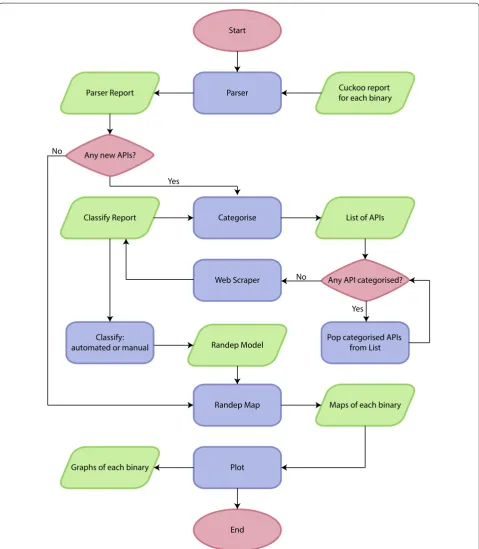
Cuckoo generates JSON reports for each sample ana-lysed, detailing Windows API function calls, network traffic, loaded libraries, registration keys, and file I/O operations. Figure 1 shows a flow chart of the Randep classifier, which classifies Cuckoo reports into Randep graphs. Five of the six main processes (parser, catego-rise, classify, Randep map, and plot) are handled by the Randep classifier, which calls the remaining process (web scraper), as a subprocess. Since the size of a typical Cuckoo report sits in hundreds of MBs, processing each one on every invocation of the classifier would be costly. Hence, the results are permanently stored as JSON files at the end of each process to decrease RAM cost, and to extract key information about the binary. The Randep classifier is available online with examples from https :// githu b.com/Hullg j/repor t-parse r.
Classification of Windows API functions into the Randep model
The Randep classifier’s parser maps Windows API func-tions, signatures, registration keys, and network calls into categories of the eight states defined by the probabilistic Randep model. The classification of functions into the states of the Randep model can be carried out manu-ally or with the use of machine learning. We considered the use of machine learning as future work, but it is out of the scope of this paper. The work of manual classifi-cation has been reduced through the categorisation of functions and the API scraper’s gathering of descriptions and Microsoft API web page links. The results were com-bined using a Python script called class_compare. py, which outputs any conflicts of functions in different states. Those that had a conflict were discussed between the team members until an agreement was reached on the appropriate class for a particular function.
The classification of the Windows API functions into the Randep model serves as a template or skeleton for the Randep classifier to map a ransomware sample’s function calls into states. However, further adjustments to the model should be made in cases where a particular function fails to sufficiently define its state within to the Randep model.
Sandbox hardening
Sandbox hardening involves denying any malicious activ-ity from leaking between privilege rings, or out from the virtual machine (VM) container, as well as ensuring the analysis system is not detected, and that the sample will activate. As a simple precautionary measure, stealth
malware is known to sleep or use stalling code to prevent detection while under surveillance in a sandbox (Sikorski and Honig 2012). However, most malware authors intend to promptly unleash the payload to avoid failure through a user restarting the machine or being detected by anti-virus software (Kharraz et al. 2016). Developments of hypervisors including VMware and Oracle’s Virtual-Box have been tested and improved for flaws where an attacker can escape into the physical machine or affect the bare metal (Balazs 2016; Duckett 2017). A well-known and secure sandbox, Cuckoo Sandbox1 has been developed with security in mind, however; some malware is known to detect the analysis environment, and security analysts should take actions to defend against such vul-nerabilities (Ferrand 2015).
It is crucial to harden the system to prevent leakage from guest to host. We used a tool called Pafish (Para-noid Fish2), which allows security researchers to develop VMs with anti-fingerprinting strategies. To decrease the number of flags generated by Pafish and harden the sandbox VM, we copied the system information from a bare-metal machine into the VM’s configuration, allo-cated 2-CPUs, 4 GB RAM, 256 GB HDD in VirtualBox, and used antivmdetection.py from github.com/ nsmfoo/antivmdetection.
The user environment was populated with programs, files and folders automatically using VMCloak and the antivmdetection script. The antivmdetection script required a list of filenames, which can be automati-cally generated using a random word generator at ran-domwordgenerator.com, as well as a range of size for the files. Injecting the script to run on each submission of a sample will avoid the VM from being fingerprinted based on information of the files and folders. Using VMCloak we installed programs including Adobe Reader 9.0, Google Chrome, MS Office 2007, and Java 7 (some of these are old or legacy software, but they are still often found in potential target machines, hence their inclusion in the VM configuration).
User study methodology
As part of our research, we also wanted to ask the general public about their experiences with ransomware attacks to get a picture of how ransomware gets deployed. To get this information, we developed questionnaires, with the main target groups being students, SMEs in the UK, as well as universities in the UK and in the US.
1 https ://cucko osand box.org/.
We wanted a clear, manageable scope, but also aimed to find a high number of victims for the best possible result. Being hit by ransomware can be a sensitive subject
to many organisations, hence the scope had to be decided carefully. Being part of a university research project, we wanted to learn from other students and universities. Start
End Parser
Categorise
Plot
Cuckoo report for each binary Parser Report
Classify Report
Web Scraper
List of APIs
Any API categorised? No
Randep Map
Randep Model Pop categorised APIs from List
Maps of each binary Classify:
automated or manual Any new APIs?
Yes No
Graphs of each binary
Yes
Students are typically active online, with limited knowl-edge of the threats. While getting information from them, we also wanted to spread awareness of ransomware attacks. The expectation was that universities and stu-dents would be more open to participate in a study con-ducted by other students, while at the same time, being the likely targets.
To widen the scope for more hits, we decided to include SMEs. SMEs are also potential targets for ransomware attacks, and they are often seen as an easy target by the attacker, due to the likelihood that they do not have a dedicated security team, or the relaxed atmosphere in their operation (NCSC and NCA 2018).
We gave questionnaire respondents an opportunity to participate in a follow-up interview to gain further insight into the attack, as well as a better understanding of the respondents’ views on ransomware.
Questionnaire generation
Three separate questionnaires were created, one for each target group (students, SMEs and universities). The questions were mostly the same, but small alterations were made considering the technical orientation of the respondent group. Forming the questions, the assump-tion was made that all participants for the student ques-tionnaire were in higher education in the UK or in the US, and meeting the minimum university-level English language requirements. Additionally, the student ques-tionnaire questions assumed that the respondents were not technically oriented. The university and SME ques-tionnaires were formed with the assumption that the respondents were working in the IT sector with a higher level of technical understanding. Notwithstanding, this limitation was taken into consideration that respondents may perceive questions in different manners and have different backgrounds.
Respondents were asked to give their consent before proceeding. If the respondent indicated that they had not been previously infected by ransomware, the question-naire would end, otherwise questions related to when and how the infection happened and what operating systems were involved would be asked. Based on their answers, further questions were presented and some sec-tions skipped. The final part was always the same, and included further details about the attack, such as how many devices were infected and whether data could be recovered.
Questionnaire distribution
We carried out the initial student questionnaire at our University. To reach the students, the communication officers at each School were contacted, asking them to help by posting the questionnaire in different newsletters
and blogs around the University. The questionnaire was also posted on several social media sites. The student questionnaire was sent out in March 2017.
The strategy with the Universities was to gather con-tact details for the IT department of each University and contact them asking whether they would be willing to participate in our research. Only if they agreed, the link to the online questionnaire was provided. This strategy was used because an email coming from an unknown source can be seen even more suspicious if it includes a link. Universities in the UK were contacted in April–May 2017, and universities in the US in June–July 2017.
SME contact details were gathered from company web-sites. A similar strategy to the one with the Universities was used, where first their willingness to participate was enquired. The SMEs were contacted in June–July 2017.
Interviews
The questionnaire was kept completely anonymous. However, at the end of the questionnaire, the respond-ents were given an opportunity to provide their email address and volunteer for an additional interview. Eight respondents volunteered to proceed to the in-depth interview.
The interviews were conducted via Skype, phone or email, depending on the respondent’s preference. The questions mainly focused on getting further details of the most recent attack they talked about in the questionnaire, but also on getting information about their planned and/ or implemented defence measures against ransomware attacks. The interview questions were similar in each interview, but were altered based on the responses the participants had given in the questionnaire. During each interview, the discussion was audio-recorded with the permission of the interviewee. Afterwards, the audio data were typed for record keeping and qualitative analysis.
Results, analysis and discussion
This section presents the results and analysis of applying the Randep model on 18 families of ransomware, along with the results and analysis of the user study. Each part is accompanied by relevant discussion to explain the findings and insights gained from the research.
Model of predictive nature of ransomware
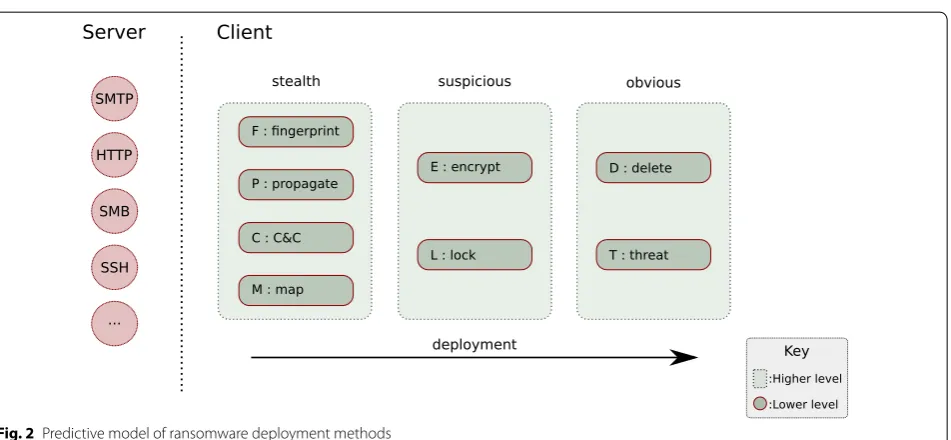
If we look at the higher level, ransomware (in particular, crypto-ransomware) will likely have three stages: stealth
(in which its main priority is to remain undetected while it prepares the groundwork for the ransomware attack),
a threatening message, and by deleting the victim’s files). The transition at the higher level is pretty straightfor-ward: stealth, followed by suspicious and then finally obvious.
Looking deeper, there are several lower level stages that ransomware may exhibit. These are probabilistic in nature, in a sense that not all ransomware strains will have all of these stages and/or the transition sequence between stages may differ. The lower level stages are:
• Fingerprint creating signatures of the OS’s features and determining suitability for payload deployment. • Propagate exploring the possibility of lateral
move-ment within a network or connected devices.
• Communicate sending and receiving data from the attacker’s C&C server.
• Map reading the contents of suitable files in the
vic-tim’s environment.
• Encrypt encrypting potentially valuable data on the victim’s computer.
• Lock reducing or disabling the availability of the OS
to the victim.
• Delete overwriting or unlinking the contents of the victim’s data.
• Threaten presenting a threatening message to force the victim to pay up.
Figure 2 depicts our Randep predictive deployment model of ransomware. We have also developed a Randep classifier, which maps the Window API function calls, signatures, registration keys, and network calls into cat-egories of the eight stages outlined above.
Lock-type ransomware would at least employ lock and threat stages. The majority of new ransomware families (> 95% in 2016) are of the crypto variety, therefore it is worth to focus on the actions of this type of ransomware. Crypto-ransomware has at least three stages: generating a map of files to encrypt, encrypting them, and display-ing a threat. We consider the mappdisplay-ing activities to be a stealthy operation, since it would not alter the user expe-rience, whereas the encryption activities are suspicious, as they will involve a “write” operation to create a new file, and the threat is obvious to the user, as it should spawn a window to cover the majority of the desktop to draw the user’s attention.
Each analysed ransomware sample behaved differently in terms of Windows API function calls. Some started encrypting immediately after entering the device and oth-ers spent more time on communicating, mapping, finger-printing and/or propagating. However, there were some function calls that appeared in multiple results. SetF-ilePointer could be seen as a part of many encryp-tion processes, as well as CryptEncrypt. Most samples did some mapping or fingerprinting by enquiring system info by calling functions such as GetSystemTimeAs-FileTime. Functions NtTerminateProcess and LoadStringW were also called by many samples, the former can be seen to represent the locking stage and the latter the threatening stage (displaying the ransom note).
The first functions called by the samples (prior to encryption) are the ones that could be used for ran-somware detection. For example, in the case of Cerber, the main encryption phase starts only after 330 s. Also types like WannaCry and TeslaCrypt spend more time
fingerprinting and profiling their target. During this time, there is a chance to stop the execution before the real damage is done. Ransomware types that begin encryp-tion immediately (e.g. CryptoLocker and Satana) are more challenging to stop. Possibly, if the plug is pulled immediately after the device is infected, at least some files could be saved. In other cases, such as Jigsaw, the ransom note is displayed before encryption starts, mean-ing the encryption phase could possibly be stopped by shutting down the device as soon as the ransom message is seen. The function calls can be used for ransomware detection in automated future solutions.
Randep model case distinction
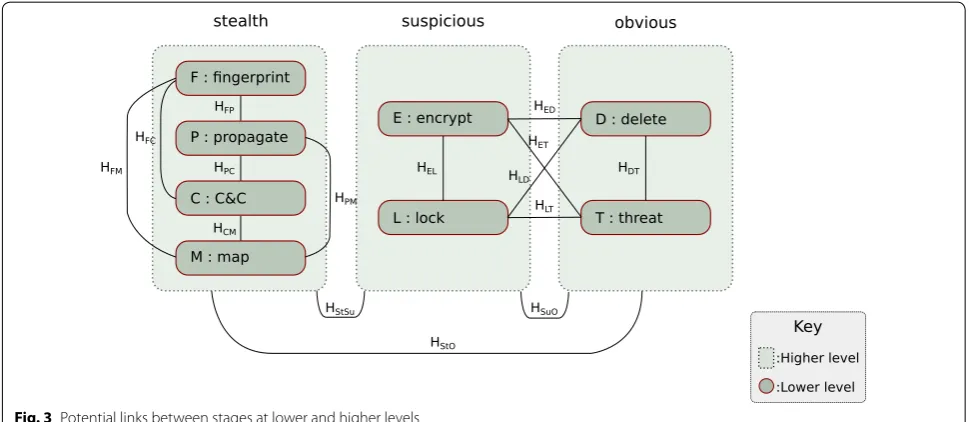
The Randep model has two levels of stages: the higher level denotes stealth, suspicious, and obvious, and each contain other finite stages at a lower level. Since each lower level stage can be processed in parallel, it is not straightforward to determine which process starts and ends first. So instead, we look at any edges between stages measured in terms of a control flow diagram, propagation time, mutual parameters, CPU threads, call-backs, and other processes. Our research has developed potential links for each stage at both higher and lower levels, as shown in Fig. 3. The links between stages repre-sent two hypotheses between the two connected entities, where the direction is indicated by the order of letters in the subscript, e.g. HFC is a hypothesis that F (Fingerprint
stage) is followed by C (Communicate to C&C stage), as opposed to HCF , in which C is followed by F.
At the higher level of the Randep predictive model, we hypothesise a flow from stealth to suspicious to
obvious; HStSu⇒HSuO . Stealth is first due to ransom-ware needing to scope out a suitable environment for deployment, to avoid detection by anti-virus vendors, and to appear as normal to the victim. Suspicious activ-ity acts second, as the ransomware needs to hook its process and access the required privilege level to carry out malicious behaviour, which might seem suspicious to some vigilant users. The final stage is obvious, as ransomware’s trait is to threaten the user into paying the attacker’s demands as well as blocking the user’s access to their important files.
At the lower level, we hypothesise potential flows either within the same high level grouping, or across different high level groups. For example, in the stealth high level group, the process is expected to flow as fol-lows: HFP⇒HPC⇒HCM . In other words, the typical
start to end process from fingerprinting to mapping will go through propagation and communication stages in between. However, we may consider P and C as optional, which means that it is possible to have HFM
or HFC ⇒HCM or HFP ⇒HPM without going through
P and/or C. In the transition between suspicious to obvious groups, the process would typically flow from HEL⇒HLD ⇒HDT , as ransomware would start encrypting files in the background. When finished, the ransomware would lock the user out, and then delete traces of the original files and any processes, before finally delivering the threatening message. Neverthe-less, it is possible that some ransomware variants may start showing the threatening message before encryp-tion takes place (e.g. Donald Trump and Jigsaw ran-somware), or while carrying out the encryption process at the same time (e.g. Cerber and Satana).
Preventative action hypothesis
Usually the threatening message indicates that it is oblig-atory to refrain from shutting down the computer, and proceed with the demands, otherwise the decryption key, user files or decryption mechanism will be lost, or pay-ment will go up. Alternatively, ransomware that corrupts the Master Boot Record and encrypts the MFT, such as Petya instigates a reboot into the ransom note, block-ing access to the operatblock-ing system. Damage to the user’s environment occurs after the stealth group of stages have been deployed. We assume that all crypto-ransomware maps their target to find the files that need encryption, or to read files as part and parcel to the encrypt stage. Hence, preventative action may be more effective if it took place during the map stage.
Stopping ransomware in its tracks is fairly simple if you consider every unauthorised read or write operation on your files. However, this would entail a heavy bias toward false-positive detections of applications such as archiv-ing tools, and hence decrease user experience and per-formance. There needs to be a good balance, preferably with a lower false acceptance rate for computer users. Since allowing the sample to continue past the map stage would lead to potential damage, it would be unreasonable to take action on the end-point machine.
Mapping ransomware variants to the Randep model
The Randep classifier produces graphs of timestamps of Windows API function calls per sample, as well as graphs that have been classified according to the Randep model. We analysed 18 different ransomware families, three of them (TeslaCrypt, Cerber and WannaCry) were analysed in depth, due to their high infection rate and date of dis-covery being around a year apart from 2015 to 2017.
TeslaCrypt
Three variants of TeslaCrypt were analysed. The key identifiers include deploying techniques to evade analysis environment, fingerprinting, communicating to known malicious IP addresses and domain names, connecting to a hidden service through TOR, injecting binaries, adding itself to the list of start-up programs, modifying the desk-top wallpaper, dropping known ransom notes, replacing over 500 files, and deleting the shadow copy of user files.
Key identifiers of TeslaCrypt The Randep classifier processed the reports generated from Cuckoo Sand-box and gathered 28 signatures, which mainly involved fingerprinting, file handling, and network activity. The malware reportedly encrypted 2290 files, which was indicated through a successful call to MoveFileWith-ProgressW, which took place in folders including the user’s root, Desktop, Documents, Downloads, Pictures, Public, Videos, Recycle Bin, AppData, MSOCache,
Program Files, and Python27. All encrypted files kept the filenames and extensions, but the .ecc extension was appended to them.
TeslaCrypt attempts to fingerprint and evade detec-tion through various strategies including scanning reg-istry keys and executables for the presence of anti-virus vendors and sandbox analysis systems including Cuckoo Sandbox, as well as other standard fingerprint tech-niques. The samples delayed the analysis for at least 4 mins 20 s, through the use of a call to NtDelayExecu-tion, which issues a sleep command on one or more of its processes or threads.
Suspicious network activity was detected as the sam-ples attempted to connect through a TOR gateway ser-vice at epmhyca5ol6plmx3.tor2web.fi, a tor2web domain name. A tor2web URL enables users to connect to a TOR service, however; without the use of an active TOR router or browser it does not anonymise the session.
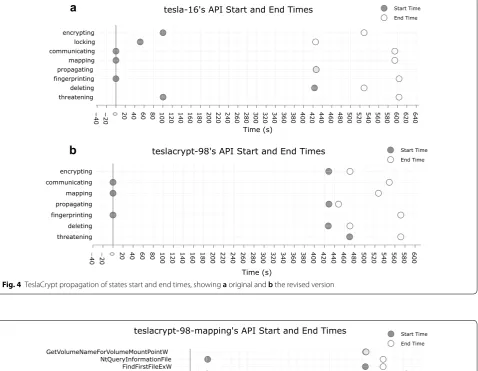
Control flow of TeslaCrypt As shown in Fig. 4a, within 1 s, TeslaCrypt deploys fingerprinting, communicating, and mapping states. This enables the initial setup of the malware to determine whether it is in a suitable environ-ment, to establish a channel with the C&C and start the preliminary stages of the attack. Following is the lock-ing state, in which after further inspection we notice that the malware has called NtTerminateProcess. How-ever, it is clear this is not restricting the use of the desk-top, and has been removed from the flow control graph. At 41.89 s the encrypting state follows locking, however; looking at the function calls we see an early call to Get-FileInformationByHandleEx, while the rest of the functions in that state start after 428 s. Since Get-FileInformationByHandleEx is a borderline func-tion call and could also be classed in the mapping state, we have removed it from TeslaCrypt’s flow model, which amends the start of encrypting to 428.48 s. Another adjustment is to the threatening state, which started writing to the console with SendNotifyMessageW at 42.21 s, but did not draw the graphical user interface (GUI) with the ransom note until 470 s. The revised state flow model is shown in Fig. 4b with a flow in the order as follows: fingerprinting, communicating, mapping, delet-ing, encryptdelet-ing, propagating and threatening.
function, which resumes a previously delayed thread, is called for the first time at 472.43 s. Shortly after, a call to DeleteFileW starts the deleting state, followed by states of encrypting and propagating. At 429.28 s, TeslaCrypt deletes the shadow copy of Window’s back-ups through a silent execution of the
CreateProcess-InternalW function with the following command line: “ C: \Windows\System32\vssadmin.exe”deleteshadows/ all/Quiet . The encrypting state shows the malware’s call
to CryptAcquireContextW to get the handle to the cryptographic key shortly followed by MoveFileWith-ProgressW, which signifies the replacement of original
−
40 −20 0 20 40 60 80 100 120 140 160 180 200 220 240 260 280 300 320 340 360 380 400 420 440 460 480 500 520 540 560 580 600 620 640
threatening deleting fingerprinting propagating mapping communicating locking encrypting
tesla-16's API Start and End Times Start Time
End Time
Time (s)
−
40 −20 0 20 40 60 80 100 120 140 160 180 200 220 240 260 280 300 320 340 360 380 400 420 440 460 480 500 520 540 560 580 600 threatening
deleting fingerprinting propagating mapping communicating encrypting
Start Time End Time
teslacrypt-98's API Start and End Times
Time (s)
a
b
Fig. 4 TeslaCrypt propagation of states start and end times, showing a original and b the revised version
−
20 0 20 40 60 80 100 120 140 160 180 200 220 240 260 280 300 320 340 360 380 400 420 440 460 480 500 520 540 560
GetVolumePathNamesForVolumeNameWGetFileAttributesExW DeviceIoControl NtCreateSectionNtOpenFile GetFileSizeEx GetShortPathNameWGetFileSize WriteProcessMemoryLoadResource NtQueryDirectoryFileSHGetFolderPathW NtCreateFileGetFileType NtReadFile GetFileAttributesWFindFirstFileExW NtQueryInformationFile GetVolumeNameForVolumeMountPointW
teslacrypt-98-mapping's API Start and End Times Start Time
End Time
Time (s)
files with ones that are encrypted. The replacement of 2290 files takes 41.27 s, i.e. approximately 55 files/s.
Cerber
Key indicators of Cerber’s maliciousness include finger-printing, self-decryption, mapping the user environ-ment, creating files, attempting to access network shares, injecting itself into other processes, and attaching to a modified DLL. The sandbox detected a network trojan going from the sandbox to 178.33.158.4 and 178.33.158.9 on port 6893. The malware attempted to connect to a server with an IP range 178.33.158.0–178.33.163.255. Files were deleted, the background was changed showing the ransom note, and a notepad showed the threatening message as well as instructions how to pay and release the documents.
Key identifiers of cerber The parser gathered 22 signa-tures from the analysis, which mainly involved evasion, fingerprinting, networking and file handling function-ality. Cerber tries to detect an analysis system through checks for the presence of Cuckoo Sandbox’s Python
scripts agent.py and analyzer.py, whether
there is any human activity, as well as the name, disk size, memory size, and other qualifying attributes of the machine. The file handling functionality involved
Cerber modifying 87 files located in directories includ-ing root, AppData, Desktop, Documents and custom ones spanning from root. The modified files involved the use of function calls to MoveFileWithPro-gressW, where the names are scrambled and the extensions are changed to .85f0.
Control flow of cerber Looking at Fig. 6a, b, we see the flow of Cerber between states that start in order of fin-gerprinting, mapping, propagating, communicating, encrypting, threatening, locking, and deleting. The first six states occur over 310 s sooner than locking and delet-ing. Figure 6b shows a zoomed-in section of the start of the process, and clearly shows the ordering of the first six states.
This sequence of events contradicts the hypothesis of the Randep model, shown in "Randep model case distinc-tion" section. Despite encryption activating after map-ping, it appears significantly close to the other states in the stealth class of the Randep model. Threatening state also appears unusually close to the stealth class, and out-of-order by coming before locking, which is in the suspi-cious class of the model. Further analysis of the function calls related to encryption and threatening should reveal this discrepancy with the hypothesis of the Randep model, and Cerber’s expected behaviour.
−2
0
0 20 40 60 80 10
0 120 140 160 180 200 220 240 260 280 030 320 340 360 380 040 420 440 460 480 500
threatening deleting fingerprinting propagating mapping communicating locking encrypting
cerber-27's API Start and End Times Start Time
End Time
Time (s)
0 0.05 0.
1 0.15 0.2 0.25 0.3 0.35 0.4 0.45 0.5 0.55 0.6 0.65 0.7 0.75 0.8 0.85 0.9 0.95 1 1.05 1.1 1.15 1.2 1.25 1.3 1.35 1.4 1.45 1.5 1.55 1.6 1.65 1.7 1.75 1.8 1.85 1.9 1.95 2 2.05 2.1 2.15 2.2 2.25 2.3 2.35 2.4
threatening deleting fingerprinting propagating mapping communicating locking encrypting
cerber-27's API Start and End Times Start Time
End Time
Time (s)
a
b
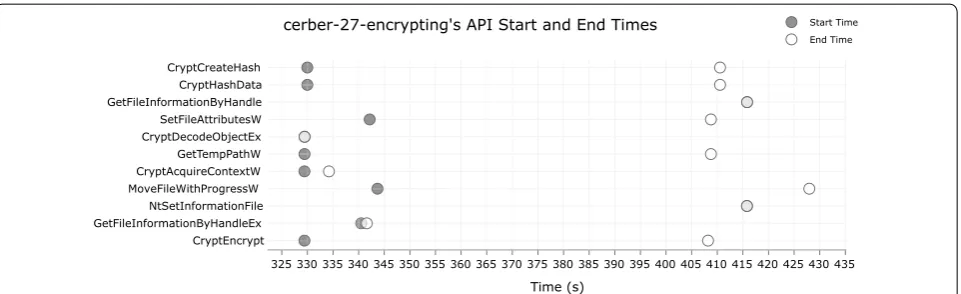
The encryption of files begins with CryptEncrypt and CryptAcquireContextW at 329 s and ends with a call to MoveFileWithProgressW, which is called from 343 s to 427 s. This means the encryption of 87 files took around 98 s, or 0.88 files/s.
The function calls of the threatening state are spread out from just after the start and almost at the end of the sample’s behaviour analysis. Most of the function calls start within 40 s after the activation of the binary, where the ones closest include LoadStringW, DrawTex-tExW and SendNotifyMessageW. Cerber uses Load-StringW to read parts of the accompanying JSON file that stores the configuration settings of the attack vec-tors. It also uses the function to feed strings into message windows, such as for social engineering a response from the victim, one example includes the following:
“No action needed. Windows found issues requiring your attention. Windows is actively checking your system for maintenance problems”.
Cerber then sends the message to the user via SendNo-tifyMessageW as a pop-up notification.
The DrawTextExW is called 53 times, 10 times at under 17 s and 43 times at 471 s, being only 3 s before the end of the sample’s activity. For the initial 10 calls, Cerber gets the date and time information and writes it to a report for communicating with the C&C. The final 43 calls are used to write the file names of the dropped ransom notes,
including
“R_E_A_D___T_H_I_S___6MZZ6GL_-Notepad”. Some function calls exhibited behaviour that might not fit well with the Randep model’s predic-tion, including CreateDirectoryW, LoadStringW and SendNotifyMessageW, and some earlier calls to DrawTextExW.
As shown in Fig. 7, the majority of the function calls for encryption are clustered from 329 s to 430 s, with the exception of CreateDirectoryW, which is not shown
and is active from 1.6 s to 340.5 s. The function typically creates directories in the Windows user environment, and is not solely tied to the encryption process. Omission of this function from the Randep model would put the threatening state before encryption.
This analysis has discovered that Cerber uses function calls of LoadStringW and SendNotifyMessageW to trigger a response from the user to activate a pro-cess, which explains their early activation at 2 s and 29 s, respectively. Despite generating a warning to the user, and being obvious, they are not part of the ransom note. These two could have been placed in a new state called social engineering.
The DrawTextExW function is part of the threatening class and generates the ransom note, but also wrote to Cerber’s JSON log. This happened in two stages; feeding the log at 16 s and writing the ransom notes from 415 to 471 s.
WannaCry
Two samples of WannaCry were analysed. The main sig-natures to identify the malware’s maliciousness include its ability to unpack itself, anti-sandbox strategies, fin-gerprinting, manipulation of files and folders, and setup of the TOR router. Over 500 files were encrypted, the desktop background was changed to the message of the ransom, and a graphical user interface popped-up in the foreground of the user’s screen.
Another variant of WannaCry, called mssecsvc.exe was also analysed. It carries out checks on the kill-switch domain name, and scans for open RDP connections. The sandbox was setup without modifying the hosts file to make the HTTP GET request to the kill-switch time-out, and without any open RDP connections. The sample scored 3.6 out of 10, and carried out four DNS lookups on: www.iuqerfsodp9ifjaposdfjhgosurijfae-wrwergwea.com which is the domain name used for
325 330 335 340 345 350 355 360 365 370 375 380 385 390 395 400 405 410 415 420 425 430 435 CryptEncrypt
GetFileInformationByHandleEx NtSetInformationFile MoveFileWithProgressW
CryptAcquireContextW GetTempPathW CryptDecodeObjectEx SetFileAttributesW GetFileInformationByHandle CryptHashData CryptCreateHash
Start Time End Time
cerber-27-encrypting's API Start and End Times
Time (s)
the kill-switch. Since the address is still registered, the sample died.
The process mssecsvc.exe sends datagrams over UDP to the subnet mask of its IP block on ports 137 and 138. These ports are some of the default ones for Net-BIOS, where 137 is used for the name resolution services and 138 for the datagram services. For Windows oper-ating systems on Windows 2000 or later those ports act as a backup for the SMB service and should be blocked. Nevertheless, the malware attempts to establish a con-nection with another computer using NetBIOS, which is known for file and printer service sharing over an Inter-net connection.
Key identifiers of WannaCry WannaCry has similar attributes to most ransomware, with the exception of its propagation ability across local networks and the Inter-net. The report parser gathered 23 signatures, most of which are similar to those found with Cerber, with the addition of an anti-sandbox sleep mechanism, getting the network adapter’s name, installing TOR, and bind-ing the machine’s localhost network address to listen and accept connections. The malware enforced a sleep of an average 18 min 47 s, which delayed the analysis until that time had lapsed. Afterwards, WannaCry encrypted the user’s files by mapping generic user account fold-ers, the recycle bin, AppData and the root folder. It used RSA-AES encryption on 3129 files, appending a .WNCRY to every locked file, where the function used to replace the encrypted with originals was MoveFileWithPro-gressW. The malware also used WMIC.exe to get and delete the shadow copy of the user’s files.
Control flow of WannaCry Due to the modular
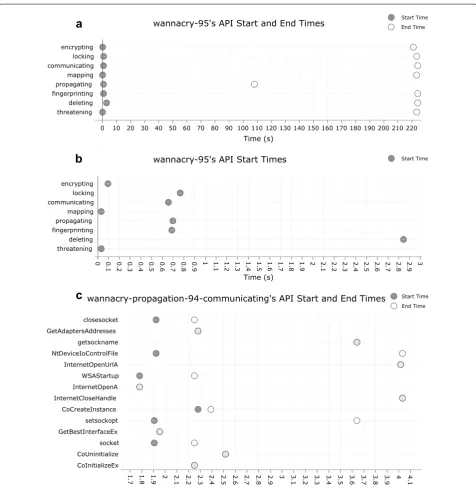
approach of WannaCry’s implementation, and the use of threads to carry out processes, we see all states apart from deleting starting before a second has passed. Look-ing at the flow of states, mappLook-ing and threatenLook-ing are the first to start; both begin at 32 ms, shortly followed by encryption at 94 ms. Thereafter it follows: communicat-ing, fingerprintcommunicat-ing, propagatcommunicat-ing, and lockcommunicat-ing, finishing with deleting at 2.84 s.
Fingerprinting starts much later than predicted by the hypothesis, which said it would start first. The ini-tial part of fingerprinting would be the check to the
kill-switch domain, however; the function calls involved with that process are considered communication states. Accordingly, communication passes the domain name as a parameter and calls InternetOpenA and WSAS-tartup as the first function call in the mssecsvc. exe’s analysis; see the graph in Fig. 8c. Prior to starting encryption, WannaCry fingerprints the system infor-mation with calls to GetNativeSystemInfo, it also gets the system time, and memory status. The memory check could be a requirements check for starting the encryption process, or just to detect the presence of a sandboxed environment.
The communication state creates a server and binds it to 127.0.0.1 after 87 s, which WannaCry uses to send and receive packets over the TOR network. The mal-ware uses TOR in an attempt to anonymize its network data, and to avoid detection. At 106.59 s, the malware makes a call to LookupPrivilegeValueW, which gets the privilege value and name of the logged-on user’s locally unique identifier (LUID). In the propa-gation state we see the use of OpenSCManager after 107 s, which opens a connection and the service control manager database on a given computer. Then after 17 s the local server is shutdown.
WannaCry starts encryption early with a call to SetFileTime, it then sets up a new handle for the Cryptographic API functions, and decrypts a 16-byte string. The encryption of files begins at 2.84 s with
a call to CryptGenKey, CryptExportKey and
CryptEncrypt (see Fig. 9). CryptEncrypt car-ries out the encryption of the files from 2.84 to 60.83 s. The encrypted contents are temporarily stored in the system’s default temporary folder, and the encrypted files replace the originals with a call to MoveFile-WithProgressW at 3.68 s. The encryption ends when the original file has been replaced, which is noted by the end of MoveFileWithProgressW at 143.88 s. Hence the 3129 files encrypted took around 141 s, i.e. 22 files/s.
The malware spawns a cmd.exe process with-out showing the window to quietly delete the shadow copy of the file system, as follows:
cmd.exe /c vssadmin delete shadows /all /quiet & wmic shadowcopy delete &
bcdedit /set {default} bootstatuspolicy ignoreallfailures & bcdedit /set {default} recoveryenabled no &
The command is executed at 104.69 s, but the process is created later at 116.55 s.
The first time that the user becomes aware of the threat is when the malware makes a call to DrawTex-tExW 86.87 s, with a buffer containing Wana Decryp-tor 2.0, which is the window title of the GUI shown to the victim. Later calls show that the left hand side of
the GUI is populated first with two countdown timers and call to actions including “Time Left” and “Payment will be raised on”. This technique attempts to create a sense of urgency in the victim meeting the attacker’s demands.
0 10 20 30 40 50 60 70 80 90 100 110 120 130 140 150 160 170 180 190 200 210 220
threatening deleting fingerprinting propagating mapping communicating locking encrypting
Start Time End Time
wannacry-95's API Start and End Times
Time (s)
0 0.1 0.2 0.3 0.4 0.5 0.6 0.7 0.8 0.9 1 1.1 1.2 1.3 1.4 1.5 1.6 1.7 1.8 1.9 2 2.1 2.2 2.3 2.4 2.5 2.6 2.7 2.8 2.9 3
threatening deleting fingerprinting propagating mapping communicating locking encrypting
Start Time
wannacry-95's API Start Times
Time (s)
1.
7 1.8 1.9 2 2.1 2.2 32. 2.4 2.5 2.6 2.7 2.8 92. 3 3.1 3.2 3.3 3.4 53. 3.6 3.7 3.8 3.9 4 4.1
CoInitializeEx CoUninitialize socket GetBestInterfaceEx
setsockopt CoCreateInstance InternetCloseHandle InternetOpenA WSAStartup InternetOpenUrlA NtDeviceIoControlFile getsockname GetAdaptersAddresses
closesocket
wannacry-propagation-94-communicating's API Start and End Times Start Time End Time
Time (s)
a
b
c
Comparing the three ransomware samples in the Randep model
To compare the behaviour of these three ransomware strains (TeslaCrypt, Cerber and WannaCry), we pro-duce a graph mapping a sequence of events (from 0 to 7) for these strains according to the Randep model. Figure 10 shows that out of the eight states, none of the three ransomware strains match completely, six have pairings, and two have no matches across the board, which backs up the Case Distinction discussed in "Randep model case distinction" section. TeslaCrypt and Cerber both put fingerprinting at stage 0 and encrypting at stage 4, which fits with the null hypothe-sis. All three put communicating and mapping between stage 0 and 3, which fits with the hypothesis of the higher level of the Randep model. All that showed signs of locking put it between stage 6 and 7, fitting in the obvious class of the Randep model. Additionally, all carried out mapping prior to encryption. Therefore,
early warning signs of crypto-ransomware is through the use of mapping API functions.
Results and analysis from the user study
Out of 1090 potential respondents contacted, 147 acknowledged our request, 72 agreed to participate, although only 46 gave a response in the questionnaire in the end. Out of these 46 respondents, 28 said that they had experienced at least one ransomware attack.
From the respondents, eight volunteered to participate in an interview; four universities, three SME compa-nies and one student. In the following sub-sections, the results from the questionnaire are presented in the form of graphs, and the highlights from the interviews are summarised.
Analysis of the data from the user study
The first questions in the questionnaire were to do with the approximate date of the attack, the operating sys-tem of the infected device and the way ransomware was 0 5 10 15 20 25 30 35 40 45 50 55 60 65 70 75 80 85 90 95 100 105 110 115 120 125 130 135 140 145 150 155 160 165 170 175 180 185 190 195 200 205 210 215 220
GetTempPathW GetFileInformationByHandleExGetFileInformationByHandle CryptGenKey CryptExportKeyCryptEncrypt CryptDecrypt CryptAcquireContextWCryptAcquireContextA CreateDirectoryW
SetFileTime SetFileInformationByHandleSetFileAttributesW NtSetInformationFile MoveFileWithProgressW
wannacry-95-encrypting's API Start and End Times Start Time End Time
Time (s)
Fig. 9 Encryption states of WannaCry Ransomware
0 1 2 3 4 5 6 7
fingerprinting propagating communicating
mapping encrypting locking deleting threatening
TeslaCrypt Cerber WannaCry
Deployment stages of states for ransomware samples
Stage
suspected to have entered the network. In 27 out of 48 cases, a device with Windows 7 operating system was involved (Fig. 11). Some responses included more than one operating system, hence the number of answers in this graph exceed the number of total responses (those attacked) for the questionnaire.
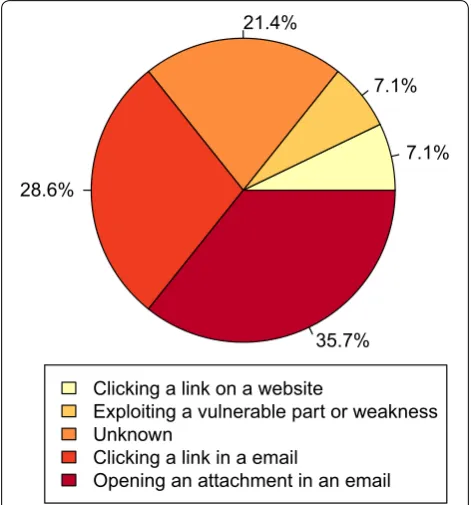
The ransomware entry method was enquired only in the questionnaires for universities and companies. A total of 28 responses were received for this question (compul-sory question), of which 6 chose unknown. As Fig. 12
presents, the majority (64.3%) stated that the ransom-ware entered from a malicious email message; malicious
attachment (35.7%) being more common than a mali-cious link (28.6%).
In 63% of the cases reported in our study, the ransom-ware did not propagate; infection was limited to only one device within the organisations (Table 1). Nearly 77% of respondents could access their files after the attack. In 69.7% of the cases, the means to recover files was from backup, only one respondent having paid the ransom (Fig. 13).
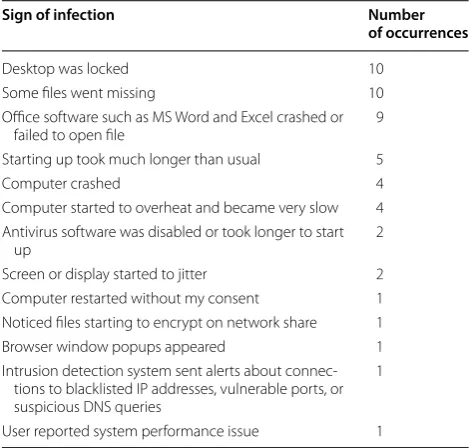
The most common first signs of infection reported were the desktop being locked, files going missing and Microsoft Office software crashing or failing to open files (see Table 2 for the full list of infection signs).
Students were asked an additional question on whether the term “ransomware” was familiar to them. Out of 50 respondents, 28 (56%) answered “no”.
Interviews
We had the chance to interview four security experts from universities and three from SMEs. Also, one stu-dent agreed to give an interview. In the stustu-dent interview, the questions focused on gaining a deeper understand-ing of how the attack occurred and what, if any, were the Table 1 Number of infected devices
Number of devices Number of occurrences
0 1
1 17
2 3
3 2
5 1
10+ 3
Linux Android IOS MacOS Windows XP Windows 10 Windows 8 Windows 7 Operating Systems
0 5 10 15 20 25 30
1 1 1 3 3
6 6
27
Fig. 11 Breakdown of operating systems affected by ransomware
7.1% 7.1% 21.4%
28.6%
35.7%
Clicking a link on a website
Exploiting a vulnerable part or weakness Unknown
Clicking a link in a email
Opening an attachment in an email
lessons learned. The questions for the experts were more technical (e.g. also querying the organisations’ defences against malicious attacks), given the level of experience they had.
The student’s ransomware incident was a case where the device got locked after attempting to watch
videos online. The ransom message included a loud noise demanding attention, stating that device has been locked, accompanied by a phone number for technical support to unlock the device. The “technical support” posed as a Microsoft team and demanded a payment for their ser-vices. The person on the phone got remote access on the device and seemingly unlocked it. The victim felt the loud noise made the situation more threatening and caused a panic reaction making them call the number immedi-ately. The message did not include a demand for a ran-som payment, the money was only asked on the phone. At the time, the victim did not have an external backup, but as a lesson learned, they are now more aware of the importance of basic security hygiene, including having a regular external backup.
Based on the interviews, universities seem more likely to be targeted by ransomware than companies. Univer-sity staff contact details, including email addresses, are commonly available online, making targeted attacks eas-ier. An IT expert from one university stated that emails represent approximately three quarters of the attack vectors. They mentioned that some attackers even used email address spoofing in their attack.
Among the interviewed organisations, a pattern could be observed. In most cases, the organisations had had only basic defences in place prior to them being infected by ransomware. These defences include a firewall and anti-virus software. Most had implemented or were in the process of implementing more advanced systems. A new tool that was brought up in the interviews was Sophos InterceptX, including CryptoGuard capabilities. Also, in addition to systems and software, the organisa-tions were putting emphasis on enhancing processes and user education on security issues.
In respect of technical solutions, the common opin-ion among experts was that endpoint security should be prioritised. Many attacks are successfully stopped at the network level. With current tools, malicious attachments are mostly captured before they reach the end user. Due to this, when it comes to phishing, attackers are focus-ing increasfocus-ingly on email links rather than attachments. This trend also highlights the importance of user educa-tion to prevent clicking of malicious links. It was also said that global headlines on ransomware attacks have helped bring awareness and raise interest in the topic among users. The majority of the contacted organisations were planning to improve staff/student training further.
During one interview, an important viewpoint was brought to our attention regarding admin policies. Run-ning everyday operations with admin privileges gives ransomware more capabilities to operate on the device if infected. Lower privileges can limit, if not stop, the damage a ransomware attack can cause. Many of the
3%
6.1%
6.1%
15.2%
69.7%
Paid Ransom
Reverse engineered
Contacted relevant authorities
Other
Recovered data from backup
Fig. 13 Recovery after ransomware incident
Table 2 First signs of ransomware infection
Sign of infection Number of occurrences
Desktop was locked 10
Some files went missing 10 Office software such as MS Word and Excel crashed or
failed to open file 9
Starting up took much longer than usual 5
Computer crashed 4
Computer started to overheat and became very slow 4 Antivirus software was disabled or took longer to start
up 2
Screen or display started to jitter 2 Computer restarted without my consent 1 Noticed files starting to encrypt on network share 1 Browser window popups appeared 1 Intrusion detection system sent alerts about
connec-tions to blacklisted IP addresses, vulnerable ports, or suspicious DNS queries
1