OPTIMIZED ANOMALY FOR LAYERED
DECEPTION IN ONLINE
TRANSACTIONS USING
COMBINATORIAL TECHNIQUES
MR.S.RAJKUMAR
Research Scholar Assistant Professor / CSE
Nehru Institute of Engineering & Technology Coimbatore, Tamilnadu, India.
MRS.V.NARAYANI
Research Scholar Department of Computer Science
St.Xavier’s College Tirunelveli, Tamilnadu, India.
DR.S.P.VICTOR
Associate Professor and Head Department of Computer Science
St.Xavier’s College Tirunelveli, Tamilnadu, India. Abstract
In the last few years the transaction processing industry has faced troubling events that have threatened revenues and the ultimate viability and longevity of businesses. While the industry is technology driven, its roots and most common dominator exists in the highly regulated online industry. The unique challenge is maintaining the independence, creativity and flexibility of innovative and entrepreneurial service providers while instilling some of the process, audit, legal and regulatory requirements of the business. Even today, organizations are still experiencing a rapid increase in the incidence of online identity attacks. Typical attacks to perpetrate these crimes include phishing, man-in-the-middle and malware, and result in the rapid increase of online user identities being stolen at an alarming rate. This paper deals with online risks and steps taken to avoid those malfunctions using a proposed architecture with a proposed mixture technology.
Keywords: Deception, Malware, Authentication, Encryption, transmission, Anomaly
I Introduction
A Need for Security
Keep outsiders from entering the organization and gaining access to sensitive or private information. Access can be gained physically or virtually. Prevent unauthorized information from leaving the premises. Monitor and control internal employees’ access to information and systems.
B Protection Components
1. Data: Stored online, archived off-line, backups, audit logs, databases, in transit over a communication media, during execution, and during delivery (physical or otherwise). This can include cardholder data, merchant specific data, ACH files, contract information, rate information, contact information, etc.
2. Supplies: Paper, forms ribbons, magnetic media.
but also the hardware used to view data and access the data. This might also include hardware systems used for access to the facilities and systems (tokens or smart cards).
4. Software: Often includes source programs, utilities, backup operating systems, communication programs, object programs, source code itself, web content and e-mail systems.
5. People: Users of the systems, people needed to run systems, contract personnel for hardware and software. The U.S. Department of Commerce lists insiders as the number one threat to information.
6. Documentation: Documentation often is overlooked, but should include documentation of programs, hardware, systems, local and remote administrative procedures.
C Online Threat (i) Category
Disclose information Unauthorized access Denial of service
(ii) Types of Online Fraud
1) User Identity Theft: the user information required to obtain access to the online systems is stolen through means that include:
o Phishing attacks which trick the user into providing access information. o Key-loggers and “spyware” which transparently capture access information.
2) User Session Hijacking - an attack in which a user’s activities are monitored or falsified using malicious software (“malware”). Session hijacking malware can operate on a user’s local computer, or remotely as part of a “man-in-the-middle” attack.
(iii) Sophisticated online threats
Identity-related online attacks such as account hijacking are amongst the world’s fastest-growing crimes. Phishing attacks are accomplished by counterfeiting the trusted brands of well-known banks, online
retailers and credit card companies in e-mails to potential victims. These e-mail messages prompt users to go to fraudulent Web sites where the user is tricked into submitting a valid username and password into what appears to be a legitimate log-in page. Attackers are typically able to convince significant numbers of recipients to respond — subsequently giving up identity information that can be used to access personal information at the real bank, retailer or credit company. Attackers are thus “fishing” — or phishing — for online identities.
Malware attacks use several mechanisms to install malicious code on the victim’s computer. Typical methods include e-mail messages or Web sites where the user is tricked into running attached or downloaded code, as well as attacks that exploit known weaknesses in the operating system or browser to install the malware. Once installed, common attacks include recording keystrokes (commonly referred to as a keyboard logger) and mouse movements that lead to the capture of user names and passwords. These are transmitted surreptitiously to the attacker who then uses it for account hijacking. More sophisticated attacks even perform fraudulent transactions during the user’s online session.
II Materials and Methods
X
X
X
X
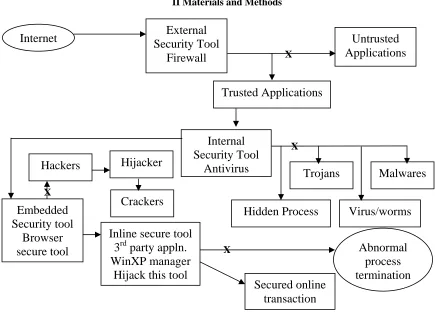
Fig. 1: Architecture: Proposed Methodology/Technique
A Security Methodology
1. Security Policy
Develop a security policy. This will limit liability exposure and is the basis for applying appropriate security to the enterprise telecommunications infrastructure.
2. Security Awareness
Implement a strong security awareness, training and education program. 3. Monitor Access
Know who, when, why and how users are accessing your systems. 4. Routine Backups
Routinely back up all systems, store backups off-site and test the backups. 5. Integrity Checks
Run system integrity checks and compare using off-line encrypted checksums. 6. Check Reusable Passwords
Routinely scan for bad passwords, or better force the use of good passwords. Consider using one-time passwords or handheld tokens for authentication, especially over the Internet.
7. Audit
Don’t just audit, but use the audit data for intrusion detection by audit reduction and analysis. 8. Secure Mobility
Encrypt all data on laptops leaving the premises. 9. Physical Security
Physically secure all laptops, desktops, servers and peripherals after business hours. 10. Limit Access
Limit Internet access to those with a real need.
External
Security Tool
Firewall
Untrusted
Applications
Internet
Trusted Applications
Internal
Security Tool
Antivirus
Crackers
Hackers
Hijacker
Trojans
Malwares
Hidden Process
Virus/worms
Embedded
Security tool
Browser
secure tool
Inline secure tool
3
rdparty appln.
WinXP manager
Hijack this tool
Secured online
transaction
B Security Tools
Firewall
A firewall on a network performs the same type of functionality for a computer system. There are three main types of firewalls: 1) a packet filter, 2) a hybrid or 3) a proxy. A packet filter firewall examines each IP packet crossing the network, and based upon a set of rules, either lets the packet through, or denies access. A proxy firewall actually acts as a secure gateway between networks. The proxy authenticates data and allows only specific information to enter or leave the secure side of the proxy. The third type of a firewall actually is a hybrid between the two, providing the functionality of the packet filter with an increased security level found in a proxy comes in to the network.
Management of system passwords:
Systems and applications can assign, log and track an employee’s access to the network or facility by use of passwords and system identification numbers. Each employee, contractor, or vendor accessing an organizations system should have a unique user ID and a private password.
Some common guidelines for password management include: 1. Avoid dictionary words.
2. Use both numbers and letters.
3. Difficult passwords that cannot be remembered.
4. Easily guessed names, such as a street address or product name.
5. Change passwords every few weeks — don’t allow users to re-select previous passwords.
6. If a user has multiple attempts to sign on with an incorrect password, block all access after a certain number of tries.
Encryption:
Encryption is an important tool in that even if other controls such as passwords or firewalls are compromised, the data is still is unusable. Data Encryption Standard (DES) is perhaps the most widely used data encryption mechanism. In a nutshell, DES uses an algorithm and a key value to take plain text and encrypt the data. Another encryption method is Secure Sockets Layer (SSL) that often is used to transmit data in a secure method over the Internet.
1. Random Key Generation
Any keys that are generated are generated on a random basis to ensure it is not possible to predict the outcome of a certain key set. Additionally, keys should be unique between entities.
2. Access to keys
Available on a need-to-know basis. A limited number of key custodians in as few of locations as possible. 3. Key Forms
Cleartext, cleartext within a cryptographic device, cleartext with separate components and custodians using split knowledge, and cleartext asymmetric public keys.
4. Dual Control
A single custodian should not have the ability to utilize or see more than one cleartext key component. Two or more entities should operate together to protect sensitive information.
5. Audit Trails
Audit trails should exist for the life of a key or key component. These should include enough data to enable a complete reconstruction of all key management activities including when, where, why and by whom.
6. Documentation
All processes and procedures for key management and exchange should be documented. 7. PIN Pad Injection
PIN pads should be stored and injected according to the guidelines of the associations/ brands for which the PIN pads will be processing transactions. PIN injection and storage processes should be part of an annual audit.
System Audits
drills, it is recommended that as part of the ongoing security policy, organizations perform random testing of mission critical components.
Physical Security
Many organizations processing card information have physical security controls in place for entry into the operations building where information is kept. It includes Usage of Badges, E-Id cards, Biometric authentications for providing the external security features.
C Authentication and Detection
1) Authentication
Authentication factors are independent ways to establish identity and privileges. Factors simply ask and answer, “How do we know you are who you say you are?” Existing authentication methods can involve up to three factors: • Knowledge something the user knows (username & password, PIN)
• Possession something the user has (ATM card, smart card, OTP card/token) • Attribute something the user is (biometric such as fingerprint, retinal scan) Authentication Methods
There are many diverse authentication methods that may be included in a versatile authentication platform, ranging from simple single-factor authentication in the form of user names and passwords to sophisticated mechanisms. In addition, mutual authentication options (identifying the site back to the end-user) are key components of authenticating each party in an online transaction. Each method delivers a different balance point between increased security and user complexity.
Authentication Options
a) Authentication & IP-Geolocation
Non-invasive way of strengthening user authentication
Store and validate the location or IP address of a registered machine
Ability to assess speed of login (velocity) from known locations can help to address risk of fraud b) Knowledge-Based Authentication/Shared Secrets
Intuitive way of enhancing authentication without deploying anything physical to the end-user May be used to bootstrap enrollment for other methods
c) Out-of-Band, One-Time Passcode (OTP)
Delivers out-of-band, two-factor authentication via one-time passcode Can help to address some forms of man-in-the-middle attacks
d) Non-Hardware-Based, One-Time Passcode Delivers strong second-factor security Inexpensive to produce and deploy Grid cards easy to use and support
Software-based applications ideal for controlled enterprise deployments e) Hardware-based One-Time Passcode Tokens
High security Convenient, portable
Typically costly; new cost-effective alternatives now available
Traditionally proprietary algorithms, new generations focused on standards like OATH f) Smart Card/USB Token
Convenient, portable, multipurpose (physical/logical access)
EMV support with OTP for Point-of-Sale security can be combined for online use with the deployment of a reader that must be used
g) Biometrics
Costly & potentially inconvenient
Can be viewed as personally intrusive or invasive
Examples like voice biometrics can be effective security options for enrollment & recovery operations h) Picture & Caption Replay
Personalized for the user
Resistant to phishing and brute-force attacks i) Extended Validation (EV) SSL Digital Certificates
Easy-to-use mechanisms for customers to recognize they are on the correct site (e.g., green address bar, padlock, etc.)
Industry-standard vetting process Requires user decision-making
2) Detection
Online criminals repeatedly attempt to circumvent traditional authentication safeguards through sophisticated attacks including phishing, man-in-the-middle and man-in-the-browser attacks. Fraud detection can add a much-needed layer of security for organizations and is an important element in any online user protection strategy focused on thwarting online attacks today and into the future.
With an online fraud network, participating organizations should be able to seamlessly share fraud behaviors around the world in order to uncover fraud more rapidly. This anonymous collaboration through information-sharing can help quickly identify emerging fraud tactics and help block their successful deployment on a global, rather than individual, basis.
3) Types of Authentication
a) Single Factor Authentication – Basic username/password authentication
b) Multi Factor Authentication – Could be software based where a device id is installed using a cookie or an plug-in, hardware based approaches with smartcards
c) Mutual Authentication - gives the user a simple way to verify that they are really connected to the intended online institution before providing sensitive information.
III Experiment and Results
An experiment result of various attacks can be verified over net with a sample usage of 6 Hrs/day consumes the following analysis.
Slno Components Detection & Removal
rate
1 H/w Firewall
Eg: Juniper Netscreen H/w Firewall
20%
2 S/w Firewall
Eg: Zone Alarm/Prisma/Eset S/wFire wall
30%
3 Internet Security/Antivirus
Eg: Kaspersky/Nortan/Mcafee
35%
4 Embedded Components
Eg:WOT-web of Trust embedded forefox Browser security
12%
5 External 3rd party applications
Eg: TuneUp-utilities/WinXp manager
2%
TOTAL 99 %
The remaining 1% level of significance can be rectified through manual low level elimination of a. process terminations
b. using Recuva Root process killer c. File shredder
Experiment screenshots
Screen shot 1: Firewall function
Screen Shot 2: Internet security/Antivirus Function
Screen Shot 3: WOT-Embedded Firefox addon function
Screen Shot 4: Inline 3rd party application Function
IV Discussions
The security for an efficient data Transmission can be done through several schema of our proposed analysis which retains the ideal transmission techniques with a fewer level of significance. The Hardware and software firewall consumes the 50% level of security from external attacks explicitly and it covers the internal attacks also. An Antivirus is a separate entity which will safeguard the data transmission from external and internal drives together with open network connections. Finally the twinkle component schema of add-ons provide the additional security from implicit attacks which are all sometimes creating the heavy damage towards the secured communication. The concentrated circular ring of security schemas are the essentials modules for our Day-today communication.
V Conclusion
In this paper we look at many tools and options available for security, there are a lot of similarities between a security policy and security tool. The services used in security are the firewalls; biometrics, passwords, access controls and documentation all are combined to cover the assets of the concern. For a security program, the border consists of common sense, a return on the security investment and diligence in implementing and operating the security program. Programs that are bound too tight or are created in a convoluted manner actually might end up being a detriment to the concern. Security plans should be reviewed regularly, easy to use and enforceable throughout the concern. The mixture of security tools finally provides the maximum efficiency in terms of security.
VI References
[1] Alexander Moshchuk, Tanya Bragin, Steven D. Gribble, and Henry M. Levy. A Crawler-based Study of Spyware on the Web. In Proceedings of the 2006 Network and Distributed System Security Symposium, pages 17– 33, February 2006.
[2] R. Clayton, Anonymity and Traceability in Cyberspace,Univ. of Cambridge Computer Lab, tech. report 653, Nov. 2005.
[3] W. Diffie and S. Landau, Privacy on the Line: The Politics of Wiretapping and Encryption, updated and expanded edition, MIT Press, 2007, pp. 280–285.
[4] Tront, J.G.; Marchany, R.C.,Internet Security: Intrusion Detection and Prevention in Mobile Systems System Sciences Jan. 2007 Page(s):162 – 162
[5] Tront, J.G.; Marchany, R.C., Introduction to internet security System Sciences 6-9 Jan 2003 Page(s):203 – 203
[6] Mihai Christodorescu, Johannes Kinder, Somesh Jha, Stefan Katzenbeisser, and Helmut Veith. Malware normalization. Technical Report 1539, University of Wisconsin, Madison, Wisconsin, USA, November 2005.
[7] Martin Casado and Michael Freedman. Peering Through the Shroud: The Effect of Edge Opacity on IP-Based Client Identification. In Proceedings of the 4th Networked Systems Design and Implementation, April 2007.