54
MOONLIGHT APPLICATIONS TEST AUTOMATION
APPASAMI.G
Assistant Professor, Dept of CSE, Dr. Pauls Engineering College, Anna University of Technology, Chennai Pauls Nagar, Villupuram, Tamilnadu, India
SURESH JOSEPH. K
Assistant Professor Department of computer science
Pondicherry University Pondicherry, India
ABSTRACT
Now-a-days web applications are developed by new technologies like Moonlight, Silverlight, JAVAFX, FLEX, etc. Silverlight is Microsoft's cross platform runtime and development technology for running Web-based multimedia applications in windows platform. Moonlight is an open-source implementation of the Silverlight development platform for Linux and other Unix/X11-based operating systems. It is a new technology in .Net 4.0 to develop rich interactive and attractive platform independent web applications. User Interface Test Automation is very essential for Software industries to reduce test time, cost and man power. Moonlight is new .NET technology to develop rich interactive Internet applications with the collaboration of Novel Corporation. Testing these kinds of applications are not so easy to test, especially the User interface test automation is very difficult. Software test automation has the capability to decrease the overall cost of testing and improve software quality, but most testing organizations have not been able to achieve the full potential of test automation. Many groups that implement test automation programs run into a number of common pitfalls. These problems can lead to test automation plans being completely scrapped, with the tools purchased for test automation becoming expensive. Often teams continue their automation effort, burdened with huge costs in maintaining large suites of automated test scripts. This paper will first discuss some of the key benefits of software test automation, and then examine the most common techniques used to implement software test automation of Moonlight Applications Test Automation. It will then discuss test automation and their potential. Finally, it will do test automation.
Index Terms - User Interface, Test Automation, Moonlight, Mono Project.
I. INTRODUCTION
A. MOONLIGHT
Moonlight is an open source implementation of Silverlight, primarily for Linux and other Unix/X11 based operating systems. In September of 2007, Microsoft and Novell announced a technical collaboration that includes access to Microsoft's test suites for Silverlight and the distribution of a Media Pack for Linux users that will contain licensed media codec for video and audio [1] [2] [3].
The goals of moonlight are:
• To run Silverlight applications on Linux.
• To provide a Linux SDK to build Silverlight applications.
• To reuse the Silverlight engine we have built for desktop applications.
Developing Moonlight
We should only attempt to build Moonlight from source directly. Otherwise it is recommended that to use the packaged versions [28] [29].
External Dependencies
Moonlight has several external dependencies, such as:
• Gtk+ 2.0 development package
• XULRunner development package
ofor ex.: mozilla-xulrunner190-devel for firefox3, mozilla-xulrunner181-devel for firefox2
• Alsa and/or PulseAudio development packages
Optionally if we would like to play media without the Microsoft codecs we will need ffmpeg [29] [30].
• ffmpeg from SVN:
oUse: svn co -r 20911 svn://svn.mplayerhq.hu/ ffmpeg/trunk && cd trunk/libswscale && svn up -r 30099
55
Compiling Moonlight
By default these instructions will compile mono and moonlight using the standard prefix (usually /usr). If we have installed mono through wer package manager, it might already exist in this prefix. If so, this will result in wer system mono being overwritten. This can cause instabilities running mono based applications. It can also cause issues if we try to update/remove mono using wer package manager. To prevent this from happening, we should compile and install mono to a parallel prefix as described here Parallel Mono Environments These steps mostly apply to both the tarball and SVN scenarios. If we use 2.0 or 3.0 tarballs released before March 4th 2010, we first need to build and install mono and mcs (for SVN or 3.0 tarballs released after March 4th 2010 this step is done automatically). This is handled entirely by compiling in the mono/ directory:
cd mono; ./autogen.sh $options && make && make install; cd ..
Then build and install in moonlight:
cd moon; ./autogen.sh $options && make && make install; cd ..
(note, in the tarball case replace "./autogen.sh" above with "./configure")
Moonlight supports many configure options, of which some are listed below. The default case will build we both desktop and browser support (if we have the dependencies installed).
Once we've installed, the desktop case will work without any problem, but one further step is required to get the plugin working. Run "make test-plugin" from the toplevel moon/ directory. This installs our special libmoonloader.so (which mozilla sees as the actual plugin) into wer ~/.mozilla/plugins directory.
Creating the XPI is done from the toplevel moon/ directory by running "make user-plugin"[30].
Mono Accessibility
Mono Accessibility enables all types of users to access System.Windows.Forms and Silverlight applications from Linux using Orca and other ATK-based Assistive Technologies (ATs), as well as access Linux applications from UI Automation (UIA) based ATs.
The Mono Accessibility project enables Winforms and Silverlight applications to be fully accessible on Linux, and allows Assistive Technologies (ATs) like screen readers and test automation tools that depend on UI Automation APIs to work on Linux.
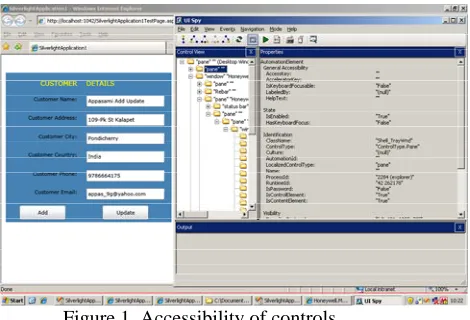
Figure 1. Accessibility of controls
Mono Accessibility is available for a variety of Linux distributions, including OpenSUSE 11.2, Ubuntu Karmic Koala 11, Fedora 12, etc. The Figure 1.shows Accessibility of Silverlight controls in a tree structure using UISPY [4] [5].
B. SILVERLIGHT
Silverlight is Microsoft's new cross browser or delivering richer interactive applications to users over the web. Silverlight 2.0 is Microsoft's second release of the Silverlight platform. Silverlight 2's biggest change from Silverlight 1.0 is the inclusion of a compact version of the .NET Framework, complete with the .NET Framework 3.0 Common Language Runtime. By adding .NET to Silverlight, Microsoft makes it easy for .NET developers to reuse their existing programming skills, collaborate with designers, and quickly create rich applications for the Web. One of the key benefits of Silverlight 2 is that it can execute any .NET language, including C# and VB.NET.
56 Testing these kinds of new applications with existing old testing methods are ridicules. We have to test new applications developed by new technology and also reduce test time and cost, Microsoft is developed Silverlight and provides accessibility classes. AutomationID is one of the properties to Silverlight controls, using this AutomationID property we can pass a value to particular controls and execute events. This AutomationID approach is best to do test automation for Silverlight applications.
II. THE BENEFITS OF SOFTWARE TEST AUTOMATION
Test Automation has a lot of benefits like cost, time and reducing man power etc. Most software development and testing organizations are well aware of the benefits of test automation. A quick glance at the Web sites of any test automation tool vendor will point out a number of the key benefits of test automation. Some of these benefits include:
A. Reduced test execution time and cost: Automated tests take less time to execute than manual tests, and can generally execute unattended. A tester must simply start the test, and then analyze the results when the test is completed [8] [9].
B. Increased test coverage on each testing cycle:
Automated tests can allow testing teams to execute large volumes of tests against each build of their application, achieving a level of coverage that would not be possible with manual testing. This increased coverage can help teams uncover bugs in existing functionality much more quickly than through manual testing [10] [11]. Test automation can allow teams to test more features in each cycle (breadth), and also to test features using more permutations of inputs (depth). But test coverage will take more time.
C. Increased value of manual testing effort: So long as applications are meant for human end users, test automation will never entirely replace the need for human testers. No matter how sophisticated test automation tools become, they will never be as good as human testers at finding bugs in an application. Human testers will instantly notice subtle bugs that are almost never detected by test automation, particularly usability bugs. Automated test tools
cannot ‘follow their instincts’ to uncover bugs using exploratory and ad hoc testing techniques. By freeing manual testers from having to execute repetitive, mundane tests, test automation enables them to focus on using their creativity, knowledge, and instincts to discover important bugs [12] [13] [14].
D. Reduced manual work:
Human beings get tired by doing repeated works more times. But commuters will not tired by doing repeated works more times. User Interface test automation always reduce the manual testing time by automating test process [24] [25] [26] [27].
III. DRAWBACKS OF EXISTING SOFTWARE TEST AUTOMATION
Despite the clear benefits of test automation, many organizations are not able to build effective test automation programs. Test automation becomes a costly effort that finds few bugs and is of questionable value to the organization. There are a number of reasons why test automation efforts are unproductive. Some of the most common include:
A. Poor quality of tests being automated
Mark Fewster explains this problem very well: “It doesn’t matter how clever we are at automating a test or how well we do it, if the test itself achieves nothing then all we end up with is a test that achieves nothing faster.” [Fewster, Software Test Automation, I.1, (Addison Wesley, 1999)] Many organizations simply focus on taking existing test cases and converting them into automated tests. There is a sense that if 100% of the manual test cases can be automated, then the test automation effort will be a success. In trying to achieve this goal, many organizations find that they may have automated many of their manual tests, but it has come at a huge investment of time and money, and produces few bugs found. This can be due the fact that a poor test is a poor test, whether it is executed manually or automatically [15] [16] [17].
B. Lack of good test automation framework and process:
57 consideration is given to managing the test scripts and test results, creating reusable functions, separating data from tests, and other key issues which allow a test automation effort to grow successfully. After some time, the team realizes that they have hundreds or thousands of test scripts, thousands of separate test result files, and the combined work of maintaining the existing scripts while continuing to automate new ones requires a larger and larger test automation team with higher and higher costs and no additional benefit [15] [16] [17].
C. Inability to adapt to changes in the system under test:
As teams drive towards their goal of automating as many existing test cases as possible, they often don’t consider what will happen to the automated tests when the application under test (AUT) under goes a significant change. Lacking a well conceived test automation framework that considers how to handle changes to the system under test, these teams often find that the majority of their test scripts need maintenance. The outdated scripts will usually result in skyrocketing numbers of false negatives, since the scripts are no longer finding the behavior they are programmed to expect. As the team hurriedly works to update the test scripts to account for the changes, project stakeholders begin to lose faith in the results of the test automation. Often times the lack of perceived value in the test automation will result in a decision to scrap the existing test automation effort and start from scratch, using a more intelligent approach that will produce incrementally better results [15] [16] [17].
IV. GENERATIONS OF TEST AUTOMATION
Software test automation has evolved through several generations of tools and techniques. Test Automation is started from Character user Interface to till now. It can be classified based on Testing strategy. They are:
A. Capture/playback tools record the actions of a tester in a manual test, and allow tests to be run unattended for many hours each day, greatly increasing test productivity and eliminating the mind-numbing repetition of manual testing. However, even small changes to the software under test require that the test be recorded
manually again. Therefore this first generation of tools is not efficient or scalable [18][19].
B. Scripting is a form of programming in computer languages specifically developed for software test automation, alleviates many issues with capture/ playback tools. However, the developers of these scripts must be highly technical and specialized programmers who work in isolation from the testers actually performing the tests. In addition, scripts are best suited for GUI testing and don’t lend themselves to embedded, batch, or other forms of systems. Finally, as changes to the software under test require complex changes to the associated automation scripts, maintenance of ever-larger libraries of automation scripts becomes an overwhelming challenge [20][21].
C. Data-driven testing is often considered separately as an important development in test automation. This approach simply but powerfully separates the automation script from the data to be input and expected back from the software under test. This allows the data to be prepared by testers without relying on automation engineers, and vastly increases the possible variations and amounts of data that can be used in software testing. This breaking down of the problem into two pieces is very powerful. While this approach greatly extends the usefulness of scripted test automation, the huge maintenance chores required of the automation programming staff remain [22][23].
58 The cost-benefits of the keyword method become even more apparent as the testing process continues. When the software under test undergoes changes, revisions to the test and to the automation scripts are necessary. Organizing test design and test automation with the keyword framework eliminates time previously allocated to maintaining large libraries of scripts and rewriting entire scripts anew after major changes to the software under test. With the keyword method, the necessary changes are far fewer. Many changes do not require new automation at all, and can be completed by non-technical testers or business analysts. When required, changes to automated keywords can be completed by automation engineers without affecting the rest of the test [1][2][24] .
V. UI TEST AUTOMATION FOR MOONLIGHT AND SILVERLIGHT APPLICATIONS
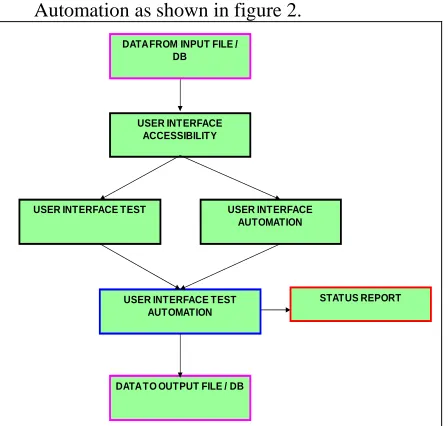
UI Test Automation of Moonlight and Silverlight Application Controls can be done by the following way. The flow of data from an input file to output file is done by UI Test and Automation as shown in figure 2.
USER INTERFACE ACCESSIBILITY
USER INTERFACE TEST
USER INTERFACE TEST AUTOMATION
DATA TO OUTPUT FILE / DB DATA FROM INPUT FILE /
DB
STATUS REPORT USER INTERFACE
AUTOMATION
Figure 2. Flow of data in UI Test Automation
We plan to test all Functionalities of WinForms controls those have been mentioned
in Provider_ Functional_Specification (http://monouia.wik.is/
Provider_ Functional_Specification) and Bridge_Functional_ Specification (http://mono-project.com/ Accessibility).
According to quarter two of 2008 of the Accessibility#Roadmap roadmap, testing contents need relate with below info:
• The WinForms sheet in WinForms Controls list (http://www.mono-project.com/Accessibility:_Test_Plan_ WinForms_Controls) defines which WinForms controls will be implemented and therefore need to be tested.
• Create WinForms application samples to test against. These application samples should be written in IronPython. Our sample applications can be found at
svn://anonsvn.mono-project.com/source/trunk/uia2atk
/test/samples. Some C# samples (that can be translated) can be checked out via svn from http://anonsvn.mono-project.com/viewvc/trunk/winforms.
• Test WinForms applications samples using Accerciser to ensure that the samples are accessible.
• Test WinForms applications samples using Orca to ensure that the samples are accessible.
• Write automated scripts using Strongwind to verify accessibility of all WinForms controls.
Stuffs for WinForms test:
• Define what WinForms controls will be tested
• Define what WinForms application samples will be used
• Create custom WinForms applications in IronPython
• Test WinForms application samples with Accerciser to ensure accessibility
• Test WinForms application samples with Orca to ensure accessibility
• Create automated test suite in Python with StrongWind framework to ensure accessibility of all WinForms controls
• Review automated test suites with each
other by using Review_Board
(http://reviews.mono-a11y.org/), Please read UsersGuide
(http://www.review-board.org/docs/manual/dev/users/#users guide) before we use it.
Moonlight
According to Silverlight doc
59 so we should test 32 controls whether they are accessible [27] [28]. (there might be some differences between silverlight and moonlight, it's not sure yet)
• The Moonlight sheet in Moonlight Controls
List (http://spreadsheets.google.com/ccc ?key=0AkMHBvpvUyGOcHd5ZHk3U zNYUFRCVFJTOW5fb0JqSkE&hl=E N) defines what Moonlight controls should be tested.
• Moonlight test sample will be written in C# and xaml
• Moonlight test script will be written in Python with Strongwind framework Testing for Moonlight test:
• Define what Moonlight elements will be tested
• Define what Moonlight application samples will be used
• Create or reuse Moonlight applications
• Test Moonlight application samples with Accerciser(against Firefox web browser?)
• Create automated test suite to ensure the accessibility of all Moonlight elements
• Test Moonlight application samples with Orca
UIA Provider
• Define what functional should be test for each control according to Provider_Functional_Specification (http ://monouia.wik.is/Provider_Functional_ Specification)
• Test each controls to ensure provider interface is implemented in UIA/ATK Bridge
• Define what functional should be test for each control according to Bridge_Functional_Specification (http:/
/mono-project.com/Accessibility:_Bridge_Fun ctional_Specification)
• Test each controls to ensure ATK interface is showing correct information in UIA/AT-SPI Bridge
• Test each controls to ensure AT-SPI is showing correct information in UIA Client API
UIA verify is an open source test tool like UISpy running on Windows, developer can use it to watch controls properties and patterns, it will be posted running on Linux, so we will need
to make sure the behavior of UIA verify on Linux is match to Windows [29][30].
White is a thin wrapper of UIAutomationClient that is like Strongwind wrap pyatspi, developer will post it running on Linux, so we will use White framework to write tests for Client API to against Winforms, Moonlight, Gtk+ applications. The work path of using White to test application is: C# -> White -> UIAutomationClient -> DBus -> UIA -> applications(Winforms/Moonlight/GTK+) Testing for UIAutomation Client API test:
1. Winforms
• Design UserCases of the real application(We will use KeePass), analyze the coverage of each ControlPattern's properties and methods
• Write tests using White in C# for the real application
• Run the tests on Linux to make sure they do the same behavior as on Windows
2. Moonlight
• Design UserCases of the real application, analyze the coverage of each ControlPattern's properties and methods
• Write tests using White in C# for Moonlight apps on Windows
• Run the tests on Linux to make sure they do the same behavior as on Windows
• Test UIA verify on Linux to make sure the behavior is match with on Windows. UIA verify have provided automation tests, we can run all the applications on Linux and Windows, then to verify we get the same result of how many tests pass or fail
3. GTK+
• Design UserCases of the real application(gedit?), analyze the coverage of each ControlPattern's properties and methods
• Write tests using White for GTK+ apps
• Run the tests on Linux to make sure Client API is worked for GTK+ app
VI. IMPLEMENTATION
Set of Team setup tasks necessary to prepare for and perform testing and Automation is done as shown in table 1.
Task Finished
60 (openSUSE, Ubuntu, Fedora)
Setup test environment on VMs X Obtain testable build X Build DashBoard for Test Summary
Report P
Table 1. Team setup. X = Done P = In Progress Individual Preparation:
• Enable assistive technologies on the GNOME desktop. This is done from "Assistive Technology Preferences" from the GNOME Control Center.
• Create Novell Bugzilla account
• Install Accerciser on OS
• Install most recent Mono
• Install most recent Orca
• Install most recent Strongwind
• Install Python >=2.5
• Install Iron Python (IPCE) >=1.1
• Setup Windows os(Vista) with UISpy on VM if necessary
Environmental needs
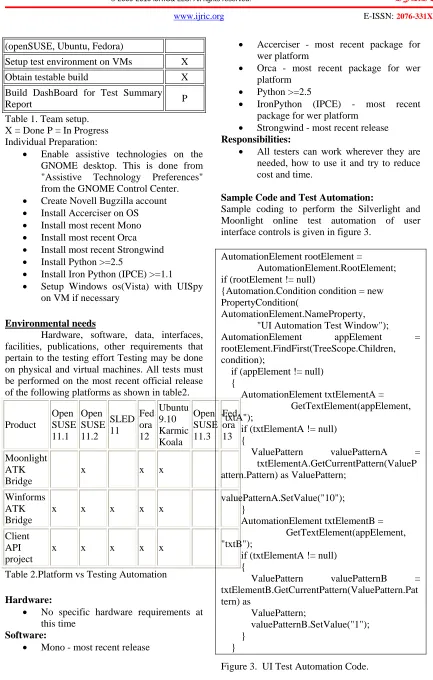
Hardware, software, data, interfaces, facilities, publications, other requirements that pertain to the testing effort Testing may be done on physical and virtual machines. All tests must be performed on the most recent official release of the following platforms as shown in table2.
Product
Open SUSE 11.1
Open SUSE 11.2
SLED 11
Fed ora 12
Ubuntu 9.10 Karmic Koala
Open SUSE 11.3
Fed ora 13
Moonlight ATK Bridge
x x x
Winforms ATK Bridge
x x x x x
Client API project
x x x x x
Table 2.Platform vs Testing Automation
Hardware:
• No specific hardware requirements at this time
Software:
• Mono - most recent release
• Accerciser - most recent package for wer platform
• Orca - most recent package for wer platform
• Python >=2.5
• IronPython (IPCE) - most recent package for wer platform
• Strongwind - most recent release
Responsibilities:
• All testers can work wherever they are needed, how to use it and try to reduce cost and time.
Sample Code and Test Automation:
Sample coding to perform the Silverlight and Moonlight online test automation of user interface controls is given in figure 3.
AutomationElement rootElement =
AutomationElement.RootElement; if (rootElement != null)
{Automation.Condition condition = new PropertyCondition(
AutomationElement.NameProperty, "UI Automation Test Window");
AutomationElement appElement = rootElement.FindFirst(TreeScope.Children,
condition);
if (appElement != null) {
AutomationElement txtElementA = GetTextElement(appElement, "txtA");
if (txtElementA != null) {
ValuePattern valuePatternA = txtElementA.GetCurrentPattern(ValueP attern.Pattern) as ValuePattern;
valuePatternA.SetValue("10"); }
AutomationElement txtElementB = GetTextElement(appElement, "txtB");
if (txtElementA != null) {
ValuePattern valuePatternB = txtElementB.GetCurrentPattern(ValuePattern.Pat tern) as
ValuePattern;
valuePatternB.SetValue("1"); }
}
61 Sample online UI Test Automation with Silverlight and Moonlight controls of combo box, grid and tree controls is shown as in figure 4.
Figure 4. Online UI Test Automated web form.
Initially Our Test Automation selects one option from a combo box , then it will selects from tree controls one by one, finally it displays tables in a grid consol. All set of possibilities are made in our UI Test Automation. The process of passing values from excel sheet to a online page is done automatically by our UI Test Automation Program.
VIII. CONCLUSION
Silverlight and Moonlight controls provide more security than other web controls. Then obviously accessing, Testing and automating these controls are not so easy. Even though Online UI Test Automation for Silverlight and Moonlight is very difficult, it can be done by getting information from AutomationElement rootElement with the help of AutomationCondition, PropertyCondition and valuepatern of the Silverlight and Moonlight controls. So it surely reduces testing time, cost and man power for new generation web applications.
VIII. FUTURE WORK
A single new UI Test Automation may perform all kinds of test automation for new generation web applications in all operating systems. In future this Testing and Automation can be used for all web Applications like JAVAFX and FLEX.
REFERENCES
[1] Appasami.G, Suresh Joseph.K, Nakkeeran.R and Selvaraj.A, “Agent Based Test Automation for New Generation Web Applications”, CIIT International Journal of Software Engineering and Technology, ISSN (Online): 0974-9632; ISSN (Print): 0794-9748, Vol. 3, No. 3, May 2010.
[2] Appasami.G and Suresh Joseph.K, “User Interface Accessibility and Test Automation for Silverlight Applications”, International Journal of Computational Intelligence Research, Research India Publications, ISSN: 0973 – 1873 Volume 5, Number 2, pp.127 – 147, 2009.
[3] Appasami.G and Suresh Joseph.K, “User Interface Accessibility and Test Automation for Silverlight Applications”, International Journal of Computational Intelligence Research, Research India Publications, ISSN: 0973 – 1873 Volume 5, Number 2, pp.127 – 147, 2009.
[4] Appasami.G and Suresh Joseph.K, “Comparative Analysis of Security and Accessibility of Silverlight XAML with Other User Interface Languages”, International Journal of Computer Science and Electrical Engineering, IACSIT Press, ISSN (Online): 1793-8198; ISSN (Print): 1793-8163, Vol. 1, No.4, pp. 473 – 478, Oct 2009.
[5] Appasami.G and Suresh Joseph.K, “Performance analysis of various User Interface Test Automation for Silverlight applications”, International Journal of Computer Science and Electrical Engineering, IACSIT Press, ISSN (Online): 8198; ISSN (Print): 1793-8163, Vol. 1, No.4, pp. 458 – 463, Oct 2009.
[6] Q. Xie and A. M. Memon, “Designing and comparing automated test oracles for GUI-based software applications,” ACM Transactions on Software Engineering and Methodology, Vol. 16, No. 1, pp. 4-es, February 2007.
62 [8] Zhu Xiaochun, Zhou Bo, Li Juefeng and
Gao Qiu, “A test automation solution on GUI functional test”, IEEE Conference on Software Maintenance , 6(2): pp: 1413-1418, july 2008.
[9] White L, Almezen H, Alzeidi N. “User-based testing of GUI sequences and their interaction”, Proceedings on Software Reliability Engineering. IEEE Computer Society Press: Piscataway, NJ, 2001; 54– 63. 8–11 November 2001.
[10] Memon A, Nagarajan A, Xie Q. “Automating regression testing for evolving GUI software”. Journal of Software Maintenance and Evolution: Research and Practice; 17(1):27–64. 2005. [11] Anna Derezinska and Tomasz Malek,
“Experiences in Testing Automation of a Family of Functional- and GUI-similar Programs”, International Journal of Computer Science & Applications, Technomathematics Research Foundation, Vol. 4, No. 1, pp. 13 – 26, June 2007. [12] A. M. Memon and Q. Xie. “Studying the
fault-detection e.ectiveness of GUI test cases for rapidly evolving software”. IEEE Transactions on Software Engineering, 31(10):884–896, 2005.
[13] Q. Xie and A. M. Memon. “Designing and comparing automated test oracles for GUI-based software Applications”. ACM Transactions on Software Engineering and Methodology, 16(1):4, 2007.
[14] X. Yuan and A. M. Memon. “Using GUI run-time state as feedback to generate test cases”. In ICSE’07, Proceedings of the 29th International Conference on Software Engineering, pages 396–405, Minneapolis, MN, USA, May 23–25, 2007.
[15] Fewster, “Software Test Automation”, Addison Wesley, 1999.
[16] Kanglin Li and Mengqi Wu, “Effective GUI Test Automation: Developing an Automated GUI Testing Tool ”, SYBEX Inc., 2005.
[17] Tom Arnold, Dominic Hopton, Andy Leonard and Mike Frost, “Professional Software Testing with Visual Studio® 2005 Team System”, Wiley Publishing, Inc. 2007
[18] Elfriede Dustin,“Effective Software testing”, Pearson Education Inc., 2003.
[19] Brad Dayley and Lisa DaNae Dayley, “Silverlight 2 Bible”, Wiley Publishing, Inc., 2008.
[20] Matthew MacDonald, “Silverlight 2 Visual Essentials”, Firstpress, 2008
[21] http://www.silverlight.net
[22] http://code.msdn.microsoft.com/silverlight ut
[23] http://silverlight.net/learn/tutorials/control s.aspx
[24] http://www.jeff.wilcox.name/2008/03/silv erlight2-unit-testing/
[25] http://msdn.microsoft.com/en-us/library/cc645045(VS.95).aspx [26] http://weblogs.asp.net/scottgu/archive/200
8/04/02/unit-testing-with-silverlight.aspx
[27] http://dotnetslackers.com/Patterns_and_Pr actices/UI_Automation_Testing_with_U IA_Veify.aspx
[28] http://www.mono-project.com [29]
http://www.eweek.com/c/a/Linux-and-Open-Source/ Mono-Project-Delivers-Moonlight-30-Preview-2509/
63
BIOGRAPHY:
Mr. G. Appasami was born in Pondicherry, India in 1980. He received his Master of Science degree in Mathematics, Master of Computer Applications degree and Master of Technology degree in Computer Science and Engineering from Pondicherry University, Pondicherry, India.
Currently he is working as Assistant professor in the Department of Computer Science and Engineering, Dr. Pauls Engineering College, Villupuram, Tamil Nadu, India. Affiliated to Anna University of Technology, Chennai, His Area of interests includes image processing and web technology.
.
Mr. K. Suresh Joseph was born in Tamil Nadu, India in 1978 received his Bachelor of Engineering degree from Bharathiyar University and Master of Engineering (Computer Science and Engineering), from University of Madras, Chennai, India, in 2002.