Abstract—This paper presents an InfoStation-based multi-agent system, which provides mobile services (mServices) across a University Campus. A description of some of the mServices along with sample interactions among entities is provided. Technologies for delivering of these services are discussed and approaches for the system implementation and structuring are considered.
Index TermsInfoStations, mobile services (mServices), intelligent agents, multi-agent system, DAML-S (OWL-S), J2ME, JADE, FIPA ACL.
I. INTRODUCTION
In a few short years, traditional face-to-face learning has been revolutionized by the cheaper, easier and very accessible eLearning paradigm. eLearning is a most useful and powerful supplemental aid to the traditional teaching approach. With the immense development of eLearning technologies and platforms, and the growth and deployment of a great variety of wideband telecommunication delivery technologies, eLearning is becoming a real viable alternative educational approach.
Among these wideband telecommunication delivery technologies, the InfoStations paradigm is a infrastructural system concept proposed to provide “many-time, many-where” [1] wireless data services. The InfoStation-based system proposed in this paper operates across a University Campus area. It allows mobile devices (cellular phones, laptops, personal digital assistants–PDAs) to communicate to each other and to a number of servers. This infrastructural system provides an ideal opportunity to enhance the mobile eLearning (mLearning) experience as well as to serve as a platform for other supplementary communication services.
Ideas pertaining to the concept of InfoStation-based systems have been discussed at length [2-6], but in this paper, we consider the application of such systems to mLearning, the technologies for delivery of mobile
services (mServices), and the approaches to actual system implementation and structuring.
The rest of the paper is organized as follows. Section II presents the InfoStation-based network architecture. Section III illustrates some examples of mServices along with sample interaction between the entities involved in their provision. Section IV details the multi-agent system structure, while section V outlines the main aspects of the system implementation. Finally section VI concludes the paper and considers future R&D directions.
II. INFOSTATION-BASED NETWORK ARCHITECTURE
The proposed InfoStation-based network architecture provides access to wireless mServices, for users equipped with mobile wireless devices, via a set of InfoStations deployed in key points around a University Campus. This architecture is built upon a number of wireless communication standards -such as IEEE 802.11 WLAN (WiFi), IEEE 802.15 WPAN (Bluetooth), and IEEE802.16 WMAN (WiMAX) – that are utilized to deliver these services to registered users.
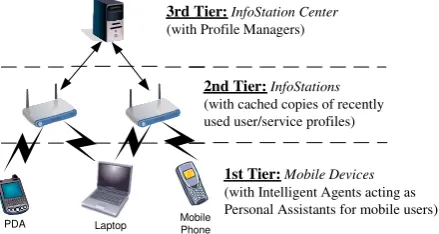
The 3-tier network architecture consists of the basic building entities depicted in Figures 1 and 2: user mobile devices, InfoStations and an InfoStation Center. The users request mServices (via their mobile devices) from the nearest InfoStation using available Bluetooth, WiFi, or WiMAX connection. The InfoStation-based system is organized in such a way that if the InfoStation cannot fully satisfy the user service request, the request is forwarded to the InfoStation Center. Each mService is delivered in the most appropriate, quickest and cheapest way to each user according to his/her current individual location and mobile device’s capabilities (specified in the user profile).
The First Tier encompasses user mobile devices, equipped with intelligent agents that act as Personal Assistants (PAs) for the users.
The Second Tier consists of InfoStations, deployed around a University Campus, facilitating the users with
Ivan Ganchev
*, Stanimir Stojanov
**, Máirtín O’Droma
*, Damien Meere
**
Telecommunications Research Center, Department of Electronic and Computer Engineering, University of Limerick, Limerick, Ireland
Email: {Ivan.Ganchev, Mairtin.ODroma, Damien.Meere}@ul.ie **
Department of Computer Systems, Plovdiv University “Paisij Hilendarski”, Plovdiv, Bulgaria Email: [email protected]
An InfoStation-Based Multi-Agent System
Supporting Intelligent Mobile Services
Across a University Campus
mobile access to the mServices through high-speed, geographically intermittent connections. The InfoStations are equipped to support multiple protocols (Figure 2) in order to provide access for a range of mobile devices.
3rd Tier:InfoStation Center (with Profile Managers)
Mobile Phone PDA Laptop
2nd Tier:InfoStations (with cached copies of recently used user/service profiles)
1st Tier:Mobile Devices (with Intelligent Agents acting as Personal Assistants for mobile users)
Figure 1. The three tiers of the InfoStation-based network architecture.
The Third Tier is the InfoStation Center – the core of the architecture. Its main function is to control the InfoStations, update and synchronize information across the system. It also manages the profiles containing information pertaining to the specific user or the specific service. User profiles allow the educators to monitor the progress of students through the material, to direct the students’ learning ensuring they are covering the correct material, to keep track of students’ test scores, and monitor any possible problem areas. The user profiles also contain information about the users’ location and the devices they are currently using. This allows for more efficient and flexible delivery of the mServices. Service profiles provide information about service capabilities. User service profiles maintain the status of the use of each service by a particular user, for instance the point reached by a user in reading a lecture or in taking a test.
InfoStation Center
WiMAX / WiFi InfoStation
WiFi / Bluetooth InfoStation
WiFi InfoStation
Bluetooth InfoStation
Wired Connections
Bluetooth InfoStation
WiFi InfoStation
Figure 2. The InfoStation-based network architecture.
Figure 3 illustrates some of the main components within each entity of the architecture. The InfoStation Center is concerned with the storage of eLearning content and service creation, deployment, operation, maintenance, control and execution. In addition there are some common support functions that each service requires when initially created, for example device management, profile management, service catalogue etc. The InfoStation Center houses a repository of up-to-date copies of all master profiles relating to both users and services. Any changes made by the individual user to his/her own user profile and/or user service profile are forwarded on from the mobile device, through the
InfoStation to the InfoStation Center, where the repository is updated. The InfoStation Center also houses the Business Support Domain with a number of components relating to the charging and billing of users, User Relationship Management (URM), Resource Planning (RP) and User Authentication, Authorization and Accounting (AAA). The URM covers all aspects of the interactions that a service has with users, whereas the RP is a business management system that integrates all facets of the business side of this service provision, taking into account various details.
Mobile Device
Personal Assistant
InfoStationCachedProfiles
Services
Discovery Presentation and
Rendering Self-Service
Content and Service Domain
Content & Content
Creation Service Deployment& Service Creation
Content Delivery Support Functions
Content Management, Media, DB, Transcoding
Partner Support Functions
Common Support Functions
Provisioning Data Access Device Management Service Catalogue Charging Operations and Maintenance Profile Management
Discovery Presentation and
Rendering Self-Service
Service Control and
Execution
Services
Charging & Billing URM RP
Operation and Maintenance
InfoStation Center
Master Profile Repository Service
Catalogue
AAA
Business Support Domain
Figure 3. The InfoStation-based system architecture.
When a mobile user enters within the range of an InfoStation, the intelligent agent (PA) installed in the mobile device and the InfoStation mutually discover each other. This process is facilitated through the Discovery, Presentation and Rendering Self-Service module within the InfoStation. The PA sends a request to the InfoStation for user Authorization, Authentication and Accounting (AAA). This request also includes a description of the mobile device currently being used and any updates of user profile and user service profile. The InfoStation forwards this AAA request to the InfoStation Center along with the profile updates. If the user is successfully authenticated and authorized to utilize the services by the AAA module within the InfoStation Center, a new account record is created for the user and a positive acknowledgment is sent back to the InfoStation. The user profile is analyzed by the InfoStation for current user preferences (e.g. applicable classes and services) and device capabilities (utilizing the Composite Capabilities/Preference Profile – User Agent Profile, UAProf). Then the InfoStation compiles a list of applicable services from its Service Catalogue and sends this to the PA along with the acknowledgment. The PA displays the information regarding these services to the user who makes a choice and selects (makes a request for) the service s/he wishes to use. The PA forwards the user service request to the InfoStation, which instantiates the service. If the InfoStation is unable to satisfy fully the user service request it is forwarded to the InfoStation Center, which is better equipped to deal with it.
On the user mobile device, the PA facilitates the user to utilize the service. This is due to the agent-oriented approach in the implementation of the system, which is discussed in Section IV. With the service migrated onto the user mobile device, the user may utilize the service
even when out of range of the InfoStation. The PA will continue to work autonomously, adopting the functionality of the service until the user has completed his/her task. Once the mobile device comes within range of another InfoStation, the PA updates and synchronizes the user service profile to reflect any (mLearning) work completed by the user while out of range.
In the following section we describe the provision of the main mServices in more detail.
III. MOBILE SERVICES
Our first goal was to develop formal models of the functionality of the proposed system to be used for the actual service implementation. Formalization is done in two levels by using UML [7]:
•
Abstract functional level – at this level the models represent the business functionality delivered by each service independently of the adjoining architecture, development tools, the type of service access, the way of service activation etc. UML use case diagrams are used for modelling the abstract functionality.•
Mapping level – at the second level the models represent mainly the service execution and control, along with service deployment at a particular architectural tier (i.e. mapping the business functionality onto the architecture). UML sequencing and state diagrams are used for modelling.In parallel with model elaboration, we have developed a service classification for finding the most suitable (format of) service during the system operation. In the current version of this classification the services are categorized according to their content/nature (i.e. mLearning, communication, administration, management), type of invocation (i.e. local, remote), mobility features (i.e. mobile, stationary), conformance to a standard (and to what extent), e.g. SCORM [8], AICC [9], ARIADNE [10], IMS [11], IEEE LTSC [12], and CEN/ISSS [13], basic (i.e. AAA) or composed service, and the architectural tier at which the service is deployed/executed (i.e. one tier, two adjacent tiers, or all three tiers).
Some examples of mLearning services used in our system are considered in subsection A. There are also supplementary communications services aimed at facilitating the entire mLearning process. These are considered in subsection B.
A. mLearning Services
A.1. mLecture
As will be described in section IV a multi-agent structure is adopted as the most suitable for our system. In order to facilitate a flexible and adaptable service provision, the intelligent agents, which reside within each of the three tiers of the system architecture, must interact so as to optimally satisfy any user requests. The mLecture
service provision allows students to gain access to lecture material through their mobile devices. The students can request material relevant to a specific lecture, which is first adapted and customized according to the capabilities of the user devices and the user own preferences (specified within user profiles) and then delivered to their mobile device. The user device may be limited to the utilization of text and audio only, in which case if there are video components available they will be omitted. The user may choose to fully access the service later, when using a device with greater capabilities (e.g. a laptop). This adaptation of the services is one way of addressing the shortcomings of some mobile devices while still delivering the service.
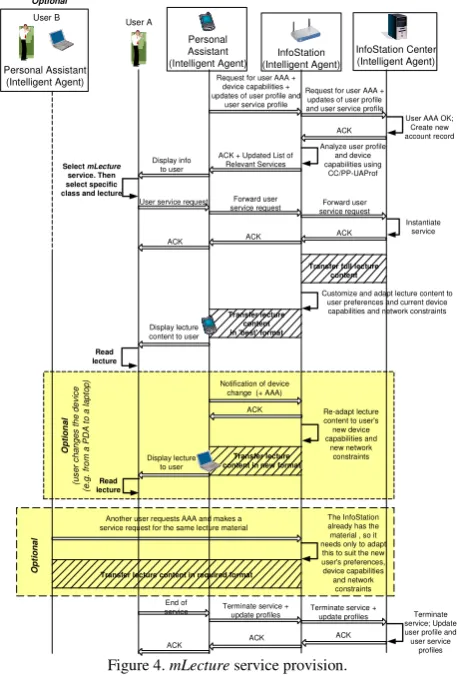
Figure 3 depicts a sample interaction between entities involved in the mLecture service provision. As outlined previously, when a mobile user enters within the range of an InfoStation, s/he goes through the normal AAA procedure and selects the relevant service, in this case the mLecture service. The PA forwards this user service request to the InfoStation. If the InfoStation does not have an up-to-date cached copy of the required mLecture, it forwards the request onto the InfoStation Center, which instantiates the service and sends back to the InfoStation a full copy of the requested lecture. The InfoStation customizes the service according to the user service profile, e.g. it will start visualizing the lecture from the last point reached by the user. However, given the current user device capabilities and access network constraints, the lecture content may not be accessible in its full format. Thus the InfoStation chooses the format of the lecture content that best suits the user, transforms the content to the ‘best’ format and transfers it to the user’s PA, which displays it. The user starts reading the lecture material and may terminate the service at any time.
As mentioned earlier, while using the mLecture service the user may change the mobile device (e.g. switch to a device with greater capabilities) or enter an access network with better QoS support. The first marked section in Figure 3 depicts the case where the user switches from a PDA to a desktop while using the mLecture service. In this case, the user’s PA sends a notification of device change to the InfoStation (along with a new AAA request if this is a new InfoStation). The InfoStation then re-adjusts and re-adapts the lecture content to suit the capabilities of the new user device (and the new network constraints if there is also a change in access network). The change of device could allow the user access to the full capabilities of the service, as opposed to the constrained usage previously. Indeed this is only one of a number of service scenarios that could take place during service execution. Due to user mobility (e.g. moving between geographically intermittent InfoStation cells) and device mobility (e.g. switching between devices) the following four main scenarios are possible:
• No change;
• Change of InfoStation;
• Change of user mobile device;
• Change of InfoStation and user mobile device.
The second marked section in Figure 3 depicts another user requesting the same mLecture material as the first. This user’s PA completes the AAA dialogue with the InfoStation and makes its request. As the InfoStation already has the most up-to-date copy of this lecture (this could be verified by a quick exchange of the lecture’s version with the InfoStation Center) it needs only to adapt the material to the format that ‘best’ suits this user’s device capabilities and network constraints before transferring the information..
When finished with the service, the PA terminates the service by sending a termination request to the InfoStation. The user profile and the user service profile are updated within the InfoStation so as to reflect the work done by that particular user. The changes in profiles along with the request for service termination are then sent to the InfoStation Center. The Charging & Billing Module (within the Business Support Domain of the InfoStation Center) will also monitor which format is utilized to access the content, as each format may have minor differences in costs associated with it (this interaction is not shown in Figure 4).
Another user requests AAA and makes a service request for the same lecture material
The InfoStation already has the material , so it needs only to adapt
this to suit the new user's preferences, device capabilities and network constraints Transfer lecture content in required format
O pt io na l Personal Assistant (Intelligent Agent) User A InfoStation (Intelligent Agent)
Request for user AAA + device capabilities + updates of user profile and
user service profile
User AAA OK; Create new account record
Display info to user Select mLecture
service. Then select specific class and lecture
User service request Forward user service request Instantiate service ACK InfoStation Center (Intelligent Agent)
ACK + Updated List of Relevant Services
ACK
Forward user service request
ACK Request for user AAA + updates of user profile and user service profile
ACK
Transfer full lecture content
Customize and adapt lecture content to user preferences and current device capabilities and network constraints Transfer lecture
content in 'best' format
Terminate service + update profiles Display lecture
content to user
ACK
Terminate service; Update user profile and user service
profiles Read
lecture
End of
service Terminate service +update profiles
ACK ACK Optional Personal Assistant (Intelligent Agent) User B Transfer lecture content in new format Notification of device
change (+ AAA)
ACK Re-adapt lecture content to user's new device capabilities and new network constraints Display lecture to user Read lecture O pt io na l (u se r c ha ng es th e de vi ce (e .g . f ro m a P D A to a la pt op )
Analyze user profile and device capabilities using
CC/PP-UAProf
Figure 4. mLecture service provision.
A.2. mTutorial
This service would be utilized to increase the student’s knowledge of a particular, more important subject area. This service is a combination of the mLecture service and the mTest service, outlined in the following section. The students gain access to the tutorial material in the same way as they would the mLecture content. After they have
analysed and assimilated the information they will be presented with a self-assessment test, similar to the format used in the mTest service. After a certain period of time and once the students have attempted each of the questions within the self-assessment, the correct answers are provided back to them.
A.3. mTest
This service is crucial to the complete eLearning process. mTest provides a means of evaluating the students’ acquired knowledge and provides valuable feedback to students concerning their progress. mTest also allows the educator to shape the learning experience of the students, ensuring they cover the correct material. However, for this service to be successful, synchronization of the off-line eLearning process with the on-line mLearning process is imperative. Synchronization is especially important in an InfoStation scenario due to this paradigm’s geographically intermittent connection.
Figure 5 shows a sample interaction between the entities involved in this service. As outlined previously, when a mobile user enters within the range of an InfoStation, s/he goes through the normal AAA procedure, and selects the relevant service, in this case the mTest service. Once the student is allowed access to the service, s/he may begin the test. As the student progresses through the test, his/her user service profile is maintained to reflect this progress. Furthermore, we consider the possibility of the student doing the test whilst on the move and out of range of an InfoStation. Due to the geographically intermittent nature of an InfoStation connection, the student’s mobile device may lose contact with the initial InfoStation (InfoStation 1). However, the PA, installed on the user mobile device allows the user to continue the test while at the same time maintaining the user service profile. Thus the student may complete the test while outside the contact range of any InfoStation, with the user service profile reflecting the student’s progression.
Once the PA comes within range of another InfoStation (InfoStation 2), this InfoStation will authenticate, authorize and account the user. The PA analyses the user mTest service profile, and sends the updates to the InfoStation (this is basically the delivery of the completed test for grading purposes). The InfoStation forwards this updated user service profile to the InfoStation Center in order for the student’s assessment to be graded and the mTest service profile to be updated. The control information included in this profile update allows the educator to monitor the students test scores and their progress through the assignments (i.e. time spent for each question + total time). Once this grading is complete, the InfoStation Center sends the assessment results back to the InfoStation, which then forwards the results to the PA and the student, so that s/he can review them and gain valuable feedback about his/her own performance. The student is then free to continue onto other tests, assessments or assignments, or to choose another service.
Display info to user Select
mTest
service User servicerequest service requestForward user
ACK
Begin Test
Control info after completing each test
question
Test completed
User mTest service profile update
(i.e. delivery of completed test for grading) User mTest service profile update (i.e.
delivery of completed test for
grading)
Test results
Test grading, taking into account
the time required for completion Test results
Test results
Maintain user service profile status Personal
Assistant (Intelligent Agent) User
InfoStation Center (Intelligent Agent)
ACK
Instantiate service
Out of Service Range
Analyse user service profile
InfoStation 1 (Intelligent Agent)
Forward user service request ACK ACK
User AAA OK ACK
AAA Request for user AAA +
device capabilities + updates of user profile
and user service profile Request for user AAA + updates of user profile and user service profile
User AAA OK; Create new account record Analyze user profile and
device capabilities using CC/ PP-UAProf ACK + Updated List of
Relevant Services
Transfer full test content
Customize and adapt test content to user preferences and current device capabilities and network constraints
Transfer test content in 'best' format
Display test content to user
Request for user AAA Request for user AAA InfoStation 2 (Intelligent Agent)
Figure 5. mTest service provision.
B. Communications services
Other supplementary communications such as chat rooms, notifications and personal phone calls are available to students to discuss and solve problems amongst themselves, and as such, aid each other’s learning experience.
B1. Private Chat acrossan InfoStation
This is a compositional service, deployed at two tiers - mobile devices and an InfoStation. This service uses the basic AMS service (Agent Management System), which is used by agents to register/de-register to/from an InfoStation. The idea is two (or more) users within the range of the same InfoStation would be able to chat to each other privately (i.e. without their communication being exposed to other users). The service operates in the following manner:
• Upon arrival within the range of an InfoStation, a user mobile device (actually the PA deployed on it) registers itself with the InfoStation;
• The InfoStation updates the list of all registered PAs (agents) within its range and forwards a copy of this to each registered assistant;
• Each assistant displays this list to the user. From this list the user may choose to chat with another user(s);
• This chat is ‘private’, i.e. it is hidden from users not currently participating in it.
The implementation of this service is presented in section V.
B2. Intelligent Message Notification
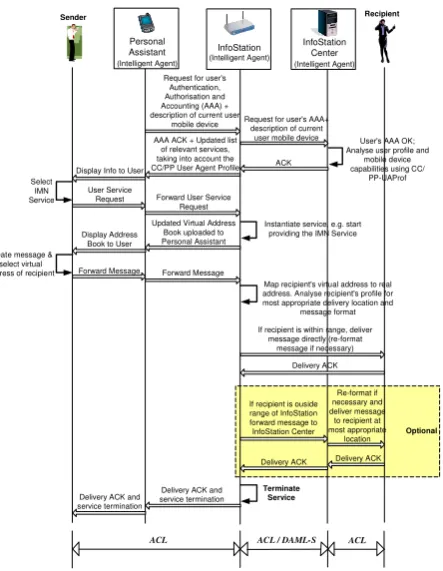
Figure 6 illustrates sample interactions between entities involved in this service. When a mobile user comes within range of an InfoStation, s/he goes through the normal AAA procedure and selects a service for use, in this case the Intelligent Message Notification service.
Sender
Display Info to User Select
IMN Service
User Service
Request Forward User Service Request
Create message & select virtual
address of recipient Forward Message Forward Message
Map recipient's virtual address to real address. Analyse recipient's profile for most appropriate delivery location and
message format
If recipient is ouside range of InfoStation forward message to InfoStation Center
Delivery ACK
Terminate Service Delivery ACK and
service termination Delivery ACK and
service termination
If recipient is within range, deliver message directly (re-format
message if necessary)
Re-format if necessary and deliver message to recipient at most appropriate
location Recipient
Delivery ACK
Delivery ACK Optional
ACL ACL / DAML-S ACL
Personal Assistant
(Intelligent Agent)
InfoStation
(Intelligent Agent)
Request for user's Authentication, Authorisation and Accounting (AAA) + description of current user
mobile device
User's AAA OK; Analyse user profile and
mobile device capabilities using CC/
PP-UAProf
InfoStation Center
(Intelligent Agent)
AAA ACK + Updated list of relevant services, taking into account the CC/PP User Agent Profile
Request for user's AAA+ description of current
user mobile device
ACK
Instantiate service, e.g. start providing the IMN Service Updated Virtual Address
Book uploaded to Personal Assistant Display Address
Book to User
Figure 6. Intelligent Message Notification service provision.
The PA forwards this user service request to the InfoStation, which instantiates the service. The InfoStation also updates the Virtual Address Book on the user mobile device. This virtual address book lists all registered users and is constantly updated and maintained by the system. From the virtual address book, the user selects the desired destination of the message and creates it in the form of SMS, MMS, email etc., which is then forwarded by the PA to the nearest InfoStation. The InfoStation analyses the recipients’ profiles and makes an intelligent decision on the most reliable, appropriate, quickest and cheapest way of delivering the message to each of the recipients. This decision takes into account factors such as current recipient’s location, mobile device, and other most recent information contained within his/her profile.
If the recipient is within range of the InfoStation, the InfoStation forwards the message directly to him/her (and optionally reformats the message beforehand if necessary
e.g. when an SMS/MMS is to be delivered to an e-mail address and vice versa). If however the message recipient is outside the range, the InfoStation forwards the message onto the InfoStation Center, which in turn delivers the message to its destination (i.e. most appropriate recipient’s location). Once the message has been delivered to the relevant user(s), the InfoStation Center forwards a delivery acknowledgment to the InfoStation, which then forwards it to the PA installed on the user mobile device, and terminates the service. The assistant in turn displays this confirmation to the user.
B3. Intelligent Phone Calls
This service allows registered users to make phone calls to each other throughout the University network, by employing “Voice over IP” (VoIP) [14] technology. As with other services, this service greatly utilizes user profiles to forward calls in the cheapest and most convenient manner, depending on the current location of the callee. The user profiles maintained by the system are regularly updated to reflect the changing location of the users within the University Campus, and as such aid the efficient delivery of the service. The Session Initiation Protocol (SIP) [15] is used to establish, maintain and terminate calls.
As with the other services, the opening dialogues between the entities are much the same. Once the mobile user comes in range of an InfoStation, s/he is first Authenticated, Authorized and Accounted for. After this, the user chooses a service for use, in this case the Intelligent Phone Call service. The PA forwards this user service request to the InfoStation. On receiving this request, the InfoStation instantiates the service and in turn updates (if required) a virtual address book to the PA. From the virtual address book, the caller selects the callee’s virtual address. According to the SIP protocol, the InfoStation may either act as a SIP Proxy Server or a SIP Redirect Server. The following are the call initiation procedures according to each.
B3.1 Using a SIP Proxy Server
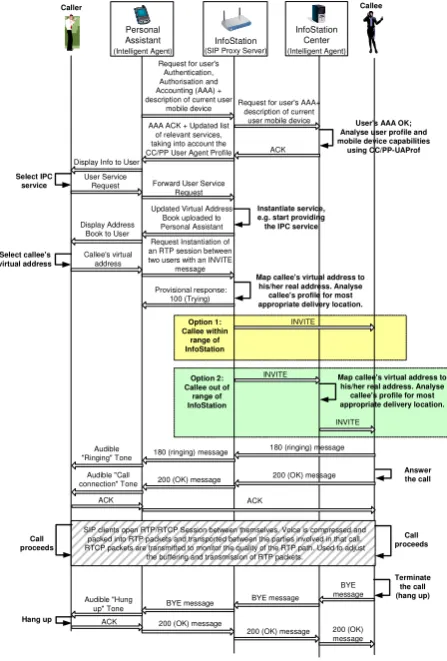
Once the caller selects the callee’s address for the call, his/her PA sends an INVITE request to the InfoStation, as illustrated in Figure 7. The InfoStation (acting as a SIP Proxy Server) receives this request and immediately responds with a 100 (Trying) provisional response. The InfoStation then retrieves the current location of the callee from his/her profile (this may involve additional interaction with the InfoStation Center). If s/he is within range of the same InfoStation, an INVITE message is forwarded on directly (Option 1). If the callee is outside the range of the InfoStation, the INVITE is forwarded onto the InfoStation Center, which will in turn locate the callee and forward on the INVITE message. The callee’s device responds with a 180 (ringing) message, which the InfoStation (Proxy) forwards onto the caller. When the callee accepts the call, a 200 (OK) message is forwarded
onto the InfoStation and in turn forwarded onto the caller. The caller sends an ACK back to the callee and an RTP/RTCP session is established between the parties. Voice signals are compressed and packaged into Real-time Transport protocol (RTP) packets and transported between the parties involved in the call. Real-time Control protocol (RTCP) packets are also transmitted to monitor the quality of the RTP path. These are used to adjust the buffering and transmission of RTP packets so as to ensure best possible QoS as the call proceeds. To terminate the call, one of the users hangs up, which results in the sending of a BYE message. On receipt of this, the other user device responds with a 200 (OK) message and the call session is terminated.
Display Info to User Select IPC
service User ServiceRequest Forward User Service Request
INVITE Updated Virtual Address
Book uploaded to Personal Assistant Display Address
Book to User
Select callee's
virtual address Callee's virtualaddress
Request Instantiation of an RTP session between two users with an INVITE
message
Map callee's virtual address to his/her real address. Analyse callee's profile for most appropriate delivery location.
Terminate the call (hang up) Provisional response:
100 (Trying)
180 (ringing) message
BYE message BYE message BYE message
200 (OK) message
200 (OK) message 200 (OK) message
Caller Callee
Personal Assistant
(Intelligent Agent) (SIP Proxy Server)InfoStation Request for user's
Authentication, Authorisation and Accounting (AAA) + description of current user
mobile device
User's AAA OK; Analyse user profile and mobile device capabilities
using CC/PP-UAProf
InfoStation Center
(Intelligent Agent)
AAA ACK + Updated list of relevant services, taking into account the CC/PP User Agent Profile
Request for user's AAA+ description of current
user mobile device
ACK
Instantiate service, e.g. start providing the IPC service
Audible "Hung up" Tone
INVITE
INVITE
Answer the call
SIP clients open RTP/RTCP Session between themselves. Voice is compressed and packed into RTP packets and transported between the parties involved in that call. RTCP packets are transmitted to monitor the quality of the RTP path. Used to adjust
the buffering and transmission of RTP packets. 180 (ringing) message
200 (OK) message 200 (OK) message
ACK Option 1: Callee within
range of InfoStation
Audible "Ringing" Tone
Audible "Call connection" Tone
Call proceeds Call
proceeds ACK
Option 2: Callee out of
range of InfoStation
Map callee's virtual address to his/her real address. Analyse callee's profile for most appropriate delivery location.
ACK Hang up
Figure 7. Intelligent Phone Call service provision: proxy mode.
B3.2 Using a SIP Redirect Server
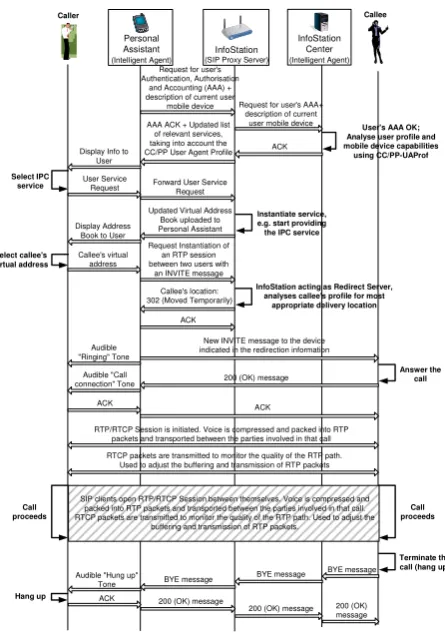
The caller’s PA again discovers the InfoStation, which in this case is a redirect server (Figure 8). The caller selects the callee’s virtual address from the book and his/her PA sends an INVITE request to the InfoStation (acting as a SIP Redirect Server). The InfoStation analyzes the callee’s profile to identify his/her location and to determine a path between the users. The Redirect Server responds to the caller with a 302 (Moved Temporarily) response, which contains information on the callee’s location. The caller responds with an ACK message to acknowledge the receipt. The caller then
sends a new INVITE message to the device indicated in the redirection information, whether that’s the callee’s device, or through another server or InfoStation. Once this INVITE message is received by the PA of the callee and the callee “picks up”, it responds with a 200 (OK) message. The caller’s PA responds with an ACK message and an RTP/RTCP session is established between the parties. The termination of the call proceeds in the same way as the proxy server example,
New INVITE message to the device indicated in the redirection information
InfoStation acting as Redirect Server, analyses callee's profile for most
appropriate delivery location
Answer the call
RTP/RTCP Session is initiated. Voice is compressed and packed into RTP packets and transported between the parties involved in that call
RTCP packets are transmitted to monitor the quality of the RTP path. Used to adjust the buffering and transmission of RTP packets
Callee's location: 302 (Moved Temporarily)
200 (OK) message
ACK ACK
Audible "Ringing" Tone
Audible "Call connection" Tone
Display Info to User Select IPC
service User ServiceRequest Forward User ServiceRequest
Updated Virtual Address Book uploaded to Personal Assistant Display Address
Book to User
Select callee's
virtual address Callee's virtualaddress
Request Instantiation of an RTP session between two users with
an INVITE message
Caller Callee
Personal Assistant
(Intelligent Agent)
InfoStation
(SIP Proxy Server) Request for user's Authentication, Authorisation
and Accounting (AAA) + description of current user
mobile device
User's AAA OK; Analyse user profile and mobile device capabilities using CC/PP-UAProf
InfoStation Center
(Intelligent Agent)
AAA ACK + Updated list of relevant services, taking into account the CC/PP User Agent Profile
Request for user's AAA+ description of current
user mobile device
ACK
Instantiate service, e.g. start providing the IPC service
ACK
Terminate the call (hang up) BYE message
BYE message BYE message
200 (OK) message
200 (OK) message 200 (OK) message Audible "Hung up"
Tone
SIP clients open RTP/RTCP Session between themselves. Voice is compressed and packed into RTP packets and transported between the parties involved in that call. RTCP packets are transmitted to monitor the quality of the RTP path. Used to adjust the
buffering and transmission of RTP packets.
Call proceeds Call
proceeds
ACK Hang up
Figure 8. Intelligent Phone Call service provision: redirection mode.
IV. AGENT-BASED & SERVICE-ORIENTED SYSTEM STRUCTURE
One major problem related to the development of our proposed InfoStation-based system, is how to enhance its flexibility and adaptability in order to solve many critical problems related to the wireless nature of the service delivery. Three main challenges are identified.
The first challenge relates to the nature of the InfoStation architecture and concerns the provision of effective control/management operations in mobile circumstances, including possibilities for a change in the mobile device and/or the serving InfoStation.
In recent times, most networks were organized in accordance with either the centralized paradigm (one central network management system controls the entire network) or the platform-based paradigm (the network management applications are built across management platform). But as the demands on these networks grew, these paradigms proved themselves to be far too rigid,
unreliable and un-scalable to support the requirements of their users. The distribution or de-centralizing of the network management functions across a number of management entities (agents) would overcome the problems posed to the older network management paradigms [16-19]. The agents coordinate themselves and work together in order to complete the network management tasks. They can also work autonomously in their own environments to complete their own objectives. Furthermore the agents can be launched from mobile user devices into a community and continue to work on behalf of the users while the mobile devices are disconnected (e.g. out of range of an InfoStation).
This multi-agent approach is ideal for the implementation of the InfoStation-based system described here. Due to the geographically intermittent connection of the InfoStations, it is necessary for intelligent agents to work also on the user mobile devices [18, 19]. Acting as “PAs”, these agents are able to function autonomously to satisfy the user service requests, whether in or out of contact with other agents (installed on the InfoStations and/or InfoStation Center). This agent autonomy allows the most efficient utilization of the InfoStation’s high-rate intermittent coverage. As illustrated in section III, the PA may make a service request while within the range of an InfoStation, and then pass out of the coverage area. The PA will continue to work autonomously, adopting the functionality of the service until the user has completed the task. Once the mobile device comes within range of another InfoStation, the user service profile will be updated and synchronized to reflect any work completed by the user while out of range.
The second challenge relates to the control and management of the functionality integrated in the architecture. The system must offer and control a large set of functions that might not be all effectively implemented as agents. Besides this, for their efficient communication the agents need an environment that includes a variety of passive components. Such an environment could be the business-functionality of the applied area (in our case the eLearning). Our choice is for this functionality to be presented as a set of electronic services (eServices). One of the main reasons for this choice is because it allows an open service-oriented architecture (i.e. with possibilities for easily adding and/or deleting functionality, alternative choices etc). At the same time, however, the nature of eServices is such that alone they cannot provide the necessary service flexibility and adaptability. For instance, the eServices have knowledge only about themselves; they know nothing about the actual user, his/her background, mobile device, educational goal, and other information needed for service personalization and adaptation. Active and pro-active software modules (e.g. agents) are needed to process this supplementary information available from the service environment. Hence, we consider a combined agent-based and services-oriented approach as the most suitable for our InfoStation-based architecture.
The third challenge relates to the system bottlenecks
presented by the limited processing capabilities of mobile devices (i.e. processing time, limited power supply etc). The problem is to use these critical resources more effectively so as to achieve the desired functionality of the architecture. For that we have defined two models: thin-agent and thick-agent.
In the thin-agent model an agent working on the user mobile device as a PA could take the initiative to activate particular services. The top tiers (i.e. InfoStations and the InfoStation Center) then instantiate the chosen service, personalize it according to its environmental context (user type, current mobile device and access network, educational goal, etc), invoke and execute the service, and finally return the result of the service execution to the PA. In this process the PA provides all additional information needed for user AAA and in some cases also for service identification and/or parameterization. The interoperation between mobile devices, InfoStations and the InfoStation Center in this model is ‘agent-to-agent’.
In the thick-agent model the InfoStations and the InfoStation Center are regarded as passive elements of the architecture. The entire control over user request processing is performed by the PAs, located in the mobile devices. The InfoStation Center and the InfoStations act only as storage of eServices (in some cases these could support service execution but cannot take part in the control of service processing). The agents working as PAs on the mobile devices are loaded with many tasks for the purposes of control (thick agents). As a result the interoperation between the mobile devices and the InfoStations is ‘agent-to-eService’ (e.g. based on the OWL-S protocol [20]).
The thin-agent model is less demanding on computing resources and hence is more suitable for devices with limited capabilities such as mobile phones and PDAs. The reduced coordination between the mobile devices and the InfoStations and the preservation of autonomy of the PAs are the main advantages of this model. The substantial load of control tasks on mobile devices, however, is its main disadvantage. With the continuous improvement of capabilities of mobile devices it would be possible to give more rights/permissions and responsibilities to the PAs (agents) and to increase their autonomy.
Independently of the model chosen for the actual system implementation (thin-agent or thick-agent), another problem to be considered is the communication between the agents themselves on one hand, and between the agents and eServices on the other. This type of communication could be realized by: (i) using the existing communication standards/protocols; (ii) choosing (and mixing) suitable subsets of given communication standards/protocols, or (iii) developing a private communication protocol.
Communication between the intelligent agents is facilitated through the use of the Agent Communication Language (ACL) [21], which was developed as part of the FIPA (Foundation for Intelligent Physical Agents) specifications [22]. ACL messages contain parameters that specify the type of communication the message will
perform (e.g. Inform, Propose, Query If, Agree, Disagree etc), the participants in a communication (i.e. sender, receiver), as well as parameters that specify the format of the content itself.
We intend to implement the communication between the intelligent agents and the eServices by means of: (i) our own developed communications mechanisms (as explained in the example); and (ii) the standard Ontology Web Language (OWL-S) protocol [20]. OWL-S provides ontologies (i.e. specifications of concepts and relationships of the agent), which are computer understandable descriptions of the service.
Using OWL-S, the ontology structure is divided into three separate sections:
• Service Profile: this advertises the abilities of the service (i.e. what it can do).
• Process Model: this gives a detailed description of the operation of the service and tells a service user how and when to interact with a service (read/write messages).
• Grounding: this provides details of how the agent can interoperate with a service, e.g. message formatting, transport mechanisms, protocols etc. When combined with the process model, it gives everything required for using a service.
Agents utilize the information contained within the Service Profile to ascertain whether or not a service meets its requirements, and adheres to certain constraints such as security, and quality etc. The Process Model allows the agent to perform a more in-depth analysis of the service and its capabilities, and determine if it can be utilized. The Service/Process Model also allows agents to monitor the execution of tasks performed by a service (or a set of services), and to coordinate the entities involved in the service execution. The Service Grounding details how agents can communicate with, interoperate with, and invoke a service.
When these three separate parts are combined, they create an ontology/description that allows intelligent agents to discover, invoke, compose and monitor eServices. The OWL-S protocol offers a good opportunity to realize a flexible software architecture and offers a suitable environment for the support of the intelligent mobile services we have discussed. We treat the OWL-S specification in a distributed fashion, where the exact scheme of distribution depends on the chosen model – thick-agent or thin-agent. At the same time, however, the efficient support of this standard presumes more powerful hardware support. Hence the choice between the two options depends on the actual computing capabilities of the particular devices in use.
V. IMPLEMENTATION
The development environment of the agent-oriented software for the proposed architecture must allow easy integration of eServices and (server) agents deployed on InfoStation Centers and InfoStations on one hand, and of agents deployed as PAs on mobile devices on the other.
In our project the services are implemented in the J2EE environment, which allows creation of an open architecture facilitating easy addition, removal, and modification of services. Our choice of J2EE [23] is further supported by the possibilities for unimpeded integration in J2EE, along with its compliance to the requirements of the FIPA standard as regards additional possibilities for interaction with external agent-oriented applications. Besides this, the chosen environment must be compatible with the development environment of the PAs (agents) on mobile devices. The environment that best satisfies these requirements is the Java Agent DEvelopment (JADE), which provides specialized containers for agent control (in accordance to the J2EE philosophy). For the actual implementation of the personal agents we have chosen JADE-LEAP – an embedded platform for mobile devices [24] that is suitable for the support of different configurations facilitating both models: thin-agent and thick-agent.
In the modern mobile environment, there are many diverse device types characterized by different form factors/screen sizes, different inputs (keyboard, touch, keypad) etc. A standard, platform-independent architecture is required for the creation of mobile applications across these diverse devices. The standard architecture we are using for the development, deployment and execution of the intelligent mobile services is the Java 2 Micro Edition (J2ME) [26]. J2ME provides a modular, scalable architecture that allows for the flexible deployment of Java Technology on a multitude of different devices with different features and functions. J2ME is basically a collection of building blocks and frameworks that can be combined to suit particular devices sharing similar characteristics. J2ME’s device independence stems from its use of profiles, configurations and other optional packages. A J2ME “configuration” targets devices with a specific range of capabilities and defines the minimum elements required by those devices (i.e. a given JVM specification, a core API). A J2ME “profile” selects a configuration, and then defines a specific set of APIs aimed towards a specific set of services/abilities that support a certain category of devices, within the framework of that configuration. By selecting the appropriate configurations and profiles, applications can be developed and deployed regardless of the device onto which they are to be deployed.
The Connected Limited Device Configuration (CLDC) [27] is a fundamental part of the J2ME architecture. It provides the most basic core set of libraries and virtual machine features that must be present within each implementation of a J2ME environment, i.e. it provides a reduced JVM implementation. This ensures low memory and CPU consumption, which are especially important factors when developing applications for mobile devices with limited resources.
The Mobile Information Device Profile (MIDP) [28] defines a platform for dynamically and securely deploying applications and services on mobile devices. It provides support for a graphical interface, networking and storage of persistent data for Mobile Information
Device applications called MIDlets (similar to applets). When these profiles and configurations are combined, they provide a complete Java application environment for a specific device class.
J2ME provides a number of optional packages; one of the most useful is the Wireless Messaging API (WMA) [29]. This API provides platform-independent access to wireless communication resources such as the Short Messaging Service (SMS). The WMA is used on top of CLDC and MIDP, which provide the core functionality required by mobile applications.
Our system is implemented as an agent-oriented one by using the JADE framework developed by TILAB [30-34]. This allows flexible development of multi-agent systems and applications for management of network resources in compliance with the FIPA specifications. JADE provides a set of APIs completely independent of the underlying network and Java version (the same APIs are provided for each different edition of JAVA - J2EE, J2SE, J2ME). This illustrates JADE’s extreme versatility for being able to be integrated into complex structures such as J2EE. This versatility also allows us to re-use the application code, whether it is deployed on a PC, a PDA, or a Java-enabled phone. JADE can also be tailored to fit the constraints of environments with much greater limitations on resources. Each instance of the JADE run-time is called a container, which may contain a number of agents. A group of active containers together is called a platform. A single main container must always be active on every platform. The first container to become active on a platform assumes this role, and all other “normal” containers must register with this main container as soon as they start on the platform. JADE simplifies the development and compliance of the agent-based applications through the provision of a predefined set of services and management tools. The following are some of the most useful management tools (packaged as agents themselves) within JADE that we utilize:
• Agent Management System (within the Main Container) - manages the naming service, ensuring that each agent is unique. It is also a central point from where other agents can be created or destroyed.
• Directory Facilitator (within the Main Container) offers a “Yellow Pages” service to other agents. It allows agents to advertise the service(s) they provide, which in turn enables other agents to locate and exploit these services.
• Remote Monitoring Agent allows developers to control the life cycle of the agent platform as well as any contained agents.
• Dummy Agent allows users to interact with agents in a very customized manner. It is used also as a monitoring and debugging tool. Users can compose and send ACL messages through this agent, as well as monitor and catalogue all messages sent and received. Users can then examine each message in detail.
• Sniffer Agent - utilized by users to sniff an agent or a group of agents. Every message directed to/from
the agent/group of agents is tracked and displayed, allowing the user to view and analyse every message. This is useful for debugging agent societies by observing how they exchange ACL messages.
The JADE architecture is completely modular. By utilizing specific modules, JADE can be configured to adapt to the requirements of a number of different deployment environments. This adaptation is especially important in the mobile environment, where criteria such as processing power, memory and connectivity have a much greater bearing on JADE execution. JADE in its entirety cannot be supported on mobile devices as its memory footprint exceeds the limitations of most mobile devices. Also there is the issue of the connectivity. Wireless links, especially in the case of InfoStations, are geographically intermittent and as such dynamic IP addressing must be taken into account.
For our implementation of JADE, one of the most important modules or add-ons is the Lightweight Extensible Agent Platform (LEAP) module [36]. This module replaces some parts of the JADE kernel providing a modified run-time environment for enabling FIPA agents to execute on a wide range of Java-enabled devices. It allows for the optimization of communication mechanisms when dealing with devices with limited resources, connected through wireless networks. There are four different versions of JADE-LEAP (JADE “powered by” LEAP), which - while different internally - all provide the same set of APIs to developers. This creates a common layer across a multitude of different devices, which is one of the important aspects of our InfoStation-based system. Each version illustrated in Figure 9, accommodates a different Java environment:
• J2SE: this runs on PCs and servers which utilize JDK1.4 or later.
• .Net: runs on PCs and servers that utilize Microsoft .Net Version 1.1 or later.
• J2ME CDC: runs on mobile devices supporting
J2ME CDC, this being most of today’s PDAs.
• MIDP: runs on MIDP-enabled mobile phones.
InfoStation
J2SE/.Net
J2SE/.Net J2ME CDC CLDC MIDP
Fixed Network Wireless Network JADE LEAP
JADE-LEAP J2SE Container JADE-LEAP J2SE
Main Container CDC ContainerJADE-LEAP MIDP ContainerJADE-LEAP
Distributed Agents
A1 A2
A4
A3 A5 A6
InfoStation Center
End User Terminals
Figure 9. JADE (powered by) LEAP environment.
The multi-agent system depicted in Figure 9 shows six agents (A1 - A6) operating in a distributed environment. A3 & A4 are running on the JADE-LEAP J2SE main container, which in our case is housed on the InfoStation Center. Connected through a fixed network to this main container, is a container on an InfoStation, which itself houses a further two distributed agents (A1 & A2). These four agents can communicate, through an InfoStation-based wireless link, with a further two agents (A5 & A6) running on user mobile devices (i.e. PDA and mobile phone respectively). These mobile devices require alternative JADE-LEAP containers, in this case a CDC container on the PDA and the MIDP container on the mobile phone.
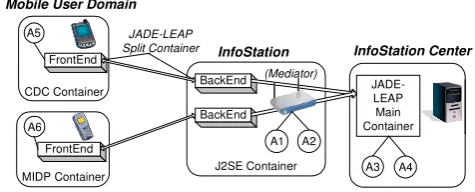
For implementation of JADE-LEAP runtime environments on mobile devices with limited resources, it is possible to split the container into two separate sections, a FrontEnd (running on the mobile device itself), and the BackEnd (running from a fixed network entity - a mediator), as illustrated in Figure 10. This mediator is charged with instantiating and maintaining the BackEnds. In our system, the InfoStations deployed throughout the campus take on this mediator role. Each FrontEnd is connected to each BackEnd through a bi-directional connection. The splitting of the container into two separate, yet connected entities is particularly useful in the realm of resource constrained devices, as the FrontEnd of the container is far more lightweighted in terms of the required memory and processing power than the entire container. Due to the geographically intermittent nature of the InfoStation connection, the FrontEnd and the BackEnd may undergo a loss of connection; however the FrontEnd can detect this and re-establish the connection as soon as possible. Any messages not transmitted due to this temporary disconnection can be buffered and delivered when the connection is re-established. This store and forward mechanism is implemented in both the FrontEnd and BackEnd, and is vitally important within our InfoStations system. Figure 10 depicts the split-container execution of the JADE-LEAP runtime environment, showing the separation of the FrontEnd and BackEnd, between the users’ mobile devices and the InfoStation. The respective agents housed within each container are also shown. The agents A5 & A6, running within the containers on the mobile devices, also act as PAs.
FrontEnd
FrontEnd
BackEnd
BackEnd
InfoStation Mobile User Domain
JADE-LEAP Split Container
JADE-LEAP Main Container
InfoStation Center
J2SE Container MIDP Container
CDC Container
A1 A2
A4 A3 A5
A6
(Mediator)
Figure 10. JADE-LEAP split-container execution.
This splitting of the container does not matter as the same functionality and set of APIs is available to an
agent, whether it is contained within a full container or the FrontEnd of a split container. The JADE framework also serves to shield us from the complexity of the distributed environment, allowing us to concentrate our efforts on developing the application logic, rather then worrying about middleware issues such as discovery and communication of entities within the system.
Below we describe briefly the implementation of the service “Private chat across an InfoStation” by using both the thin-agent approach (Figure 11) and the
thick-agent approach (Figure 12). For the thin-agent
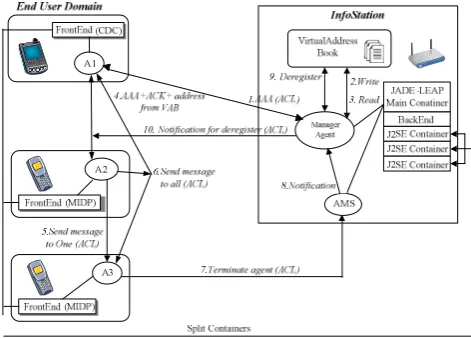
implementation, we use the “split execution mode” of JADE-LEAP. In the scenario depicted in Figure 11 we assume that three users with different mobile devices (one PDA and two mobile phones) are within the range of an InfoStation. The respective PAs (agents A1–A3) operate in the corresponding split containers. The communication with the InfoStation is realized by means of the deployed on the InfoStation main container, in which a manager agent and ASM agent operate.
Figure 11. Private chat across an InfoStation: thin-agent approach.
During the procedure a PA sends a request (in the form of an ACL message) for inclusion in the VirtualAddressBook (1) to the InfoStation’s manager agent. If the AAA procedure is completed successfully the manager agent registers the new PA in the VirtualAddressBook (2) and returns positive acknowledgment along with the addresses of all other (registered and active) PAs currently within the range of this InfoStation. In addition, the manager agent notifies all the other assistants about the arrival of this new assistant. The new assistant may then establish a new private chat session with one or more other assistants (directly without the manager agent’s mediation) or participate in some of the existing chat sessions (after receiving an invitation from other participants), (5, 6). The manager agent’s mediation is needed only for chat sessions established via the InfoStation Center, i.e. chat between users in range of different InfoStations. To de-register an assistant sends a request to the AMS agent (7), which informs the manager agent about this assistant
leaving the range of the InfoStation (8). The manager agent deletes the corresponding entry in the VirtualAddressBook (9) and informs all other assistants about this event (10).
Figure 12 depicts the implementation of the same service (i.e. “Private chat across an InfoStation”) based on the thick-agentapproach.
Figure 12. Private chat across an InfoStation: thick-agent approach.
In this implementation a PA prepares a request for registration, which is sent in a HTTP format to the Servlet deployed on the InfoStation (AAA procedure). The Servlet invokes the WebService1 (by using a SOAP request), which serves the VirtualAddressBook. The WebService1 registers the assistant and returns the list of all currently registered assistants. The Servlet returns a positive acknowledgment to the assistant in a form of HTTP, which is further processed by the assistant. Then messages (part of a chat session) are sent via the Servlet, which in this case invokes the WebService2 to write each message in the MessageQueue, which stores all sent messages. Each assistant periodically checks the queue for any messages left for it (if any) and retrieves them from the queue. The de-registration of assistants is performed by the WebService1. All assistants periodically check the VirtualAddressBook for the presence of the others (prior to sending a message).
As can be seen, the thick-agent approach is not acceptable for this particular service implementation due to the large number of requests sent to the InfoStation for periodic checking of the VirtualAddressBook and the MessageQueue. This may overload the InfoStation and produce a significant communication overhead. This is a direct consequence of the InfoStation’s functionality being implemented in passive software modules, i.e. Web Services.
Currently, we are developing prototypes of other described eServices based on these two approaches. Future work will cover their testing and evaluation in order to choose the optimal model for the final implementation of each particular eService.
As discussed previously, one of the main issues concerning the service implementation is that of the