CRUD On The Web – Pedagogical Modules
For Web-Based Data Access
Kelly Fadel, Utah State University, USA David Olsen, Utah State University, USA Karina Hauser, Utah State University, USA
ABSTRACT
The growing popularity of Internet-enabled commerce has produced increased demand for Information Technology (IT) professionals who are skilled in the development and management of data-driven, Web-based business applications. Many academic programs in information systems offer courses on relational database design and management, as well as courses on Web development using technologies such as PHP or Microsoft’s ASP.NET. However, such courses typically contain independent content, which tends to leave students with a fragmented understanding of how these technologies (i.e. the Web and relational databases) interact. In this paper, we present integrated instructional modules for teaching best practices in connecting advanced Web applications with a relational database backend. The objective of these modules is to provide students with a seamless context for developing both a relational database and a Web interface supporting database transactions.
INTRODUCTION
he growing popularity of Internet-enabled commerce has produced increased demand for Information Technology (IT) professionals who are skilled in the development and management of data-driven, Web-based business applications. A 2005 study investigating highly sought-after IT skills reported that “not only has Web programming jumped into a commanding lead in the total number of jobs requiring programming skills, it is now mentioned in an impressive 42.6% of job ads” [8, p. 91] More, recently, Litecky, et al. [5], report that Web programming topped the list of the most frequently demanded skills by employers, appearing in 26.5% of the reviewed job postings. Not far behind is the market for database programming and management skills: both studies ranked SQL programming within the top 10 most demanded skills in the IT job market.
The obvious popularity of Web and SQL programming skills highlights the need for academic IS programs to enable emerging IT professionals to meet this demand. Many academic programs in information systems offer courses on relational database design and management, as well as courses on Web development using technologies such as PHP or Microsoft’s ASP.NET [4]. However, such courses typically contain independent content, which tends to leave students with a fragmented understanding of how these technologies (i.e. the Web and relational databases) interact. Because today’s Web applications rely increasingly on dynamically updated data from a data source such as a relational database, Web application developers must have a working knowledge of both the back-end database and the front-back-end Web interface. Consequently, there is a need for comprehensive pedagogical material that provides an integrated context for teaching these skills.
course. The objective of these integrated modules is to provide students with a seamless context for developing both a relational database and a Web interface supporting database transactions.
The next section presents the learning modules we developed. Database modules are first presented, followed by the Web Modules. The technology used in teaching these modules is Microsoft SQL Server 2005 and ASP.NET 2.0. However, implementation of the concepts presented can be modified to suit any similar technological platform.
CONTEXT DESCRIPTION
The context for this case is a United States-based foreign currency exchange service. The database contains account and contact information about each customer of the service. Customers can be individual persons or corporations, and each can execute transactions in which they exchange US Dollars for other currencies. The database also contains utility/lookup tables for information such as US States and a calendar identifying business days, holidays, and weekends.
DATABASE MODULES
This section first describes the conceptual data model followed by the Data Definition Language (DDL) required to create the database structure.
Conceptual Data Model
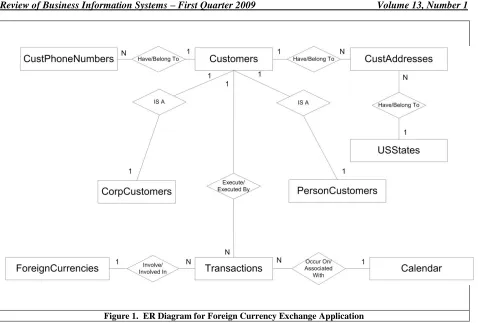
Since the introduction of Codd’s [3] relational model, conceptual data modeling has become an integral part of database development. The purpose of conceptual data models is to gather and describe the information involve in the business process at a high-level independent of the DBMS used later in the implementation. It is an important step in the requirements analysis phase and helps to facilitate communication between end-users, database administrators and developers. Conceptual data modeling should be an integral part of any database class, but an analysis of textbooks [6] shows that even textbook authors have problems creating integrated and consistent examples for instructors and students to follow. The entity-relationship (ER) diagram developed by Chen [2] is the most widely used diagram used to represent data. The ER Diagram for the current case is shown in Figure 1 below12:
1
Attributes for each entity are omitted from the ER Diagram for the sake of clarity. Attributes are identified in the data definition language presented in the following section.
2
Figure 1. ER Diagram for Foreign Currency Exchange Application
Data Definition Language For Creating And Populating Database
We now present the DDL for creating the database structures (tables, constraints, triggers, etc.) that implement the conceptual data model. This example is written for the Microsoft SQL Server 2005 DBMS; however, the SQL code is ANSI-compliant and should therefore work in any DBMS environment.
Listing 1. DDL for creating Database Tables and Constraints
CREATE TABLE Calendar (
ActualDate DATETIME NOT NULL PRIMARY KEY,
MonthName CHAR(15) NULL,
DayNumber INT NULL,
YearNumber INT NULL,
DayOfWeek CHAR(15) NULL
CHECK (DayOfWeek IN ('Sunday','Monday','Tuesday', 'Wednesday', 'Thursday', 'Friday', 'Saturday')),
DayType CHAR(15) NULL
CHECK (DayType IN ('Business','Weekend', 'Holiday')), )
CREATE TABLE USStates (
Abbreviation char (2) NOT NULL PRIMARY KEY,
StateName char (25) NOT NULL
Listing 1. DDL for creating Database Tables and Constraints CREATE TABLE Customers
(
CustomerID int NOT NULL PRIMARY KEY,
CreditRating int NULL ,
AccountType char (10) NULL
CHECK (AccountType = 'Unlimited' or AccountType = 'Margin' or AccountType = 'Basic'),
EmailAddress char (25) NULL ,
CreditLimit decimal(21, 13) NULL , CashBalance decimal(21, 13) NULL )
CREATE TABLE CorpCustomers (
CustomerID int NOT NULL PRIMARY KEY,
CorpName char (20) NULL ,
ContactName char (20) NULL ,
StateOfIncorporation char (2) NULL ,
FOREIGN KEY (CustomerID) REFERENCES Customers (CustomerID) )
CREATE TABLE PersonCustomers (
CustomerID int NOT NULL PRIMARY KEY,
FirstName char (20) NULL ,
LastName char (20) NULL ,
FOREIGN KEY (CustomerID) REFERENCES Customers (CustomerID) )
CREATE TABLE CustAddresses (
CustomerID int NOT NULL,
Address char (30) NOT NULL
PRIMARY KEY (CustomerID,Address),
City char (25) NULL ,
State char (2) NULL ,
ZipCode char (10) NULL ,
DateMovedIn datetime NULL ,
DateMovedOut datetime NULL ,
PrimaryOrSecondary char (1) NULL ,
FOREIGN KEY (DateMovedIn) REFERENCES Calendar (ActualDate), FOREIGN KEY (DateMovedOut) REFERENCES Calendar (ActualDate), FOREIGN KEY (CustomerID) REFERENCES Customers (CustomerID), FOREIGN KEY (State) REFERENCES USStates (Abbreviation) )
CREATE TABLE CustPhoneNumbers (
EmployeeID INT NOT NULL, PhoneNumber CHAR(25) NOT NULL
PRIMARY KEY (EmployeeID,PhoneNumber)
CHECK (phonenumber LIKE '([0-9][0-9][0-9]) [0-9][0-9][0-9]-[0-9][0-9][0-9][0-9]'), PhoneType CHAR (10) NULL
CHECK (PhoneType IN ('Home','Cell','Work','Fax')),
FOREIGN KEY (EmployeeID) REFERENCES Employees(EmployeeID)
Listing 1. DDL for creating Database Tables and Constraints CREATE TABLE ForeignCurrencies
(
ForeignCurrencyID int NOT NULL PRIMARY KEY,
CurrencyName char (30) NULL ,
ExchangeRateUSDollar decimal(18, 11) NULL )
CREATE TABLE Transactions (
TransactionID int NOT NULL PRIMARY KEY,
TransDate datetime NULL ,
TransType char (5) NULL
CHECK (TransType IN ('Sell','Buy')),
AmountUSDollars decimal(18,10) NULL ,
Fee AS (AmountUSDollars * 0.02) ,
TotalAmount AS (AmountUSDollars * 1.02) ,
ForeignCurrencyID int NULL ,
FCAmount decimal(30, 14) NULL ,
CustomerID int NULL
FOREIGN KEY(ForeignCurrencyID) REFERENCES ForeignCurrencies (ForeignCurrencyID),
FOREIGN KEY(CustomerID) REFERENCES Customers(CustomerID) )
The Calendar table in the code listing above is a utility table used to identify weekdays/weekends, holidays, and days of the week. Although this information can be obtained using built-in SQL Server Date functions in queries, utilizing the Calendar table simplifies many of these operations, particularly for SQL beginners. The following listing provides the code for populating the calendar table with dates and associated information from January 1, 1900 to December 31, 20193.
Listing 2. SQL Code for populating the Calendar table
SET NOCOUNT ON
DECLARE @Counter INT
DECLARE @ActualDate DATETIME DECLARE @FirstDate DATETIME SET @Counter = 1
SET @FirstDate = '1/1/1900' SET @ActualDate = @FirstDate
WHILE @Counter < 43830 BEGIN
INSERT INTO Calendar(ActualDate) values(@ActualDate)
SET @ActualDate = DATEADD(day, @Counter, @FirstDate) SET @Counter = @Counter + 1
END
GO
UPDATE Calendar
SET DayOfWeek = DateName(DW, ActualDate)
GO
UPDATE Calendar
3
Listing 2. SQL Code for populating the Calendar table SET DayNumber = DateName(DD, ActualDate)
GO
UPDATE Calendar
SET MonthName = DateName(MM, ActualDate)
GO
UPDATE Calendar
SET YearNumber = DateName(YY, ActualDate)
GO
UPDATE Calendar SET DayType = 'Business'
WHERE DayOfWeek <> 'Saturday' AND DayOfWeek <> 'Sunday'
GO
UPDATE Calendar SET DayType = 'Weekend'
WHERE DayOfWeek ='Saturday' OR DayOfWeek = 'Sunday'
GO
UPDATE Calendar SET DayType = 'Holiday'
WHERE (MonthName ='January' AND DayNumber = 1) OR (MonthName ='July' AND DayNumber = 4) OR (MonthName ='December' AND DayNumber = 25)
GO
When a new foreign currency transaction is inserted in the database or an existing transaction is modified, the foreign currency amount associated with the transaction can be calculated from the AmountUSDollars field of the Transactions table and the ExchangeRateUSDollar field of the ForeignCurrencies table. This is accomplished using a database trigger, the DDL for which is shown below in Listing 3. INSERTED is an SQL Server-proprietary pointer to the currently inserted tuple.
Listing 3. DDL for the Foreign Currency Amount Trigger
CREATE TRIGGER FCAmountCalc ON dbo.Transactions FOR INSERT, UPDATE
AS
UPDATE Transactions
SET FCAmount = t.AmountUSDollars * ExchangeRateUSDollar FROM INSERTED AS i JOIN ForeignCurrencies AS FC ON
WEB MODULES
In this section, we outline the development of a Web application that interfaces with the foreign currency database. The application provides functionality supporting each of the CRUD operations for customers, addresses, phone numbers, and foreign currency transactions. The technology used in these examples is ASP.NET 3.5, with C# as the programming language. All code was developed in Microsoft Visual Studio 2005. We begin by discussing the advantages of a tiered application architecture and describing how such an architecture is applied to the foreign currency application. We then present code samples that illustrate the functionality of each tier.
Tiered Application Architecture
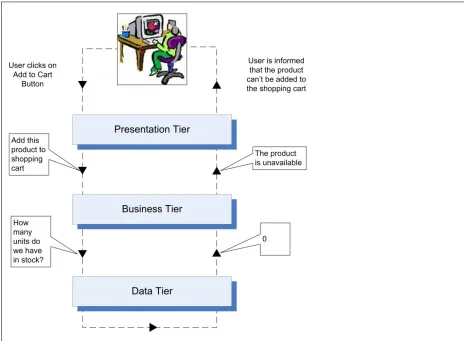
The growing complexity of today’s software applications has prompted a movement toward software architectures that support component modularity and reusability. A well-known approach to promoting this objective is to develop a software application as a series of logical tiers, producing what is referred to as an n-tier architecture. Each tier encapsulates a logical set of functions within the application, and communicates with one or more other tiers through a well-defined interface. A tiered architecture provides enhanced flexibility and maintainability, since code within each tier can be modified independently of the other tiers within the application. A common version of the n-tier architecture employs three distinct application tiers: the data tier, the business tier, and the presentation tier. The data tier is responsible for managing connection to the data source and handling all data source interactions. The business tier interacts with the data tier and performs logical operations on the data retrieved. The business tier then passes the data on to the presentation tier, which is responsible for managing the user interface and displaying the appropriate data to the end user. Figure 2 provides an example of a user interacting with a tiered architecture in an e-commerce application.
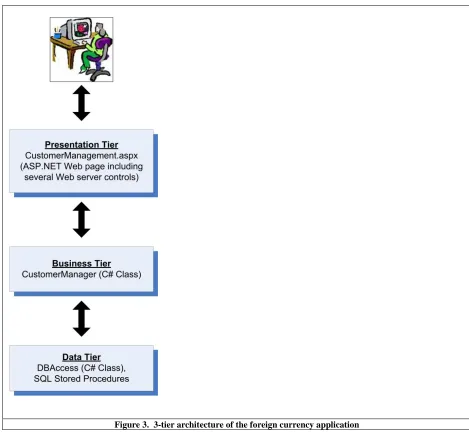
An overview of the 3-tier architecture used in the foreign currency application is shown in Figure 3. Each tier of this architecture is then described below.
Figure 3. 3-tier architecture of the foreign currency application
Data Tier
As shown in Figure 3, the data tier of the foreign currency application consists of SQL stored procedures and a single C# class called DBAccess. The purpose of the DBAccess class is to: (1) receive database requests from the business tier, (2) connect to the database and invoke the required operations through stored procedure calls, and (3) return data to the business tier. The code for this class is shown in Listing 4. (Descriptive code comments within this and subsequent listings are enclosed in /* */.)
Listing 4. DBAccess C# Class
using System;
using System.Data;
using System.Configuration;
using System.Web;
using System.Web.Security;
using System.Web.UI;
using System.Web.UI.WebControls;
using System.Web.UI.WebControls.WebParts;
using System.Web.UI.HtmlControls;
using System.Data.SqlClient; //Contains Sql Server ADO.NET classes
///<summary>
/// Data tier class for interfacing with a SQL Server Database
///</summary>
publicstaticclassDBAccess {
/* Creates and prepares a new SqlCommand object on a new connection */ publicstaticSqlCommand CreateCommand(string procedureName) {
/* Obtain the database connection string */
string connectionString = "Data Source=johnson.usu.edu;Initial Catalog=foreigncurrency;User ID=*****;Password=*****";
/* Obtain a new SqlConnection object for connecting to the database */ SqlConnection conn = newSqlConnection(connectionString);
/* Obtain a new SqlCommand object with the name of the stored procedure to be executed and the connection object */ SqlCommand comm = newSqlCommand(procedureName, conn);
/* Set the command type to stored procedure */
comm.CommandType = CommandType.StoredProcedure;
/* Return the initialized command object */ return comm;
}
/* execute a select command and return the results as a DataTable object */ publicstaticDataTable ExecuteSelectCommand(SqlCommand command) {
/* The DataTable to be returned */ DataTable table;
/* Execute the command making sure the connection gets closed in the end */ try
{
/* Open the data connection */ command.Connection.Open();
/* Execute the command and save the results in a DataTable */ SqlDataReader reader = command.ExecuteReader();
Listing 4. DBAccess C# Class reader.Close();
}
catch (Exception ex) {
throw ex; }
finally
{
/* Close the connection */ command.Connection.Close(); }
return table; }
/* execute an update, delete, or insert command and return the number of affected rows */ publicstaticint ExecuteNonQuery(SqlCommand command)
{
/* The number of affected rows */ int affectedRows = -1;
/* Execute the command making sure the connection gets closed in the end */ try
{
/* Open the connection of the command */ command.Connection.Open();
/* Execute the command and get the number of affected rows */ affectedRows = command.ExecuteNonQuery();
}
catch (Exception ex) {
throw ex; }
finally
{
/* Close the connection */ command.Connection.Close(); }
/* return the number of affected rows */ return affectedRows;
} }
Business Tier
The function of the business tier is to serve as an interface with the data tier and the presentation tier and implement any required business logic in processing the data. The business tier of a moderately-sized application may consist of several application classes that manage these functions. For the foreign currency applicatoin, the business tier is implemented using a single static C# class named CustomerManager. This class contains methods needed to select, insert, update, and delete all customer information, including transactions. In the interest of brevity, the entire CustomerManager class will not be presented here. Instead, sample methods from this class will be shown in the Application Examples section below.
Presentation Tier
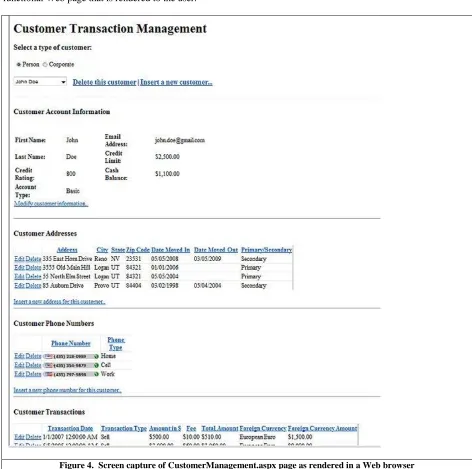
consists of a single ASP.NET Web page named CustomerManagement.aspx. Consistent with the recent ASP.NET code-behind development model4, this page is logically divided into two files. The first, CustomerManagement.aspx, contains all declarative HTML and ASP.NET markup that is rendered to the browser as HTML. This file is referred to as the content file. The second, CustomerManagement.aspx.cs, contains all of the programming logic required to respond to various events associated with the application. This file is called the code-behind file, since it sits “behind” the content file and responds to events that occur on the page. When the user requests an .aspx page from the Web server, the content and code-behind files are combined to create a fully functional Web page that is rendered to the user.
Figure 4. Screen capture of CustomerManagement.aspx page as rendered in a Web browser
4
For a more detailed discussion of the code-behind model, see
A screen capture of the CustomerManager.aspx page is shown in Figure 45. As with the business tier class, the code for this page will not be presented here in its entirety; however, relevant components of the page will be shown in the next section, where we present sample code for performing CRUD operations in the foreign currency application.
Application Examples
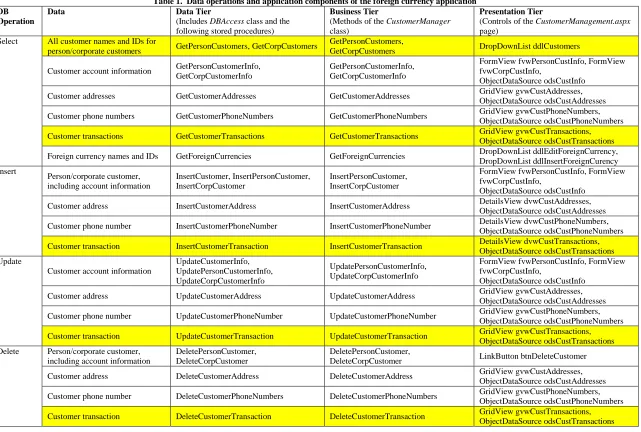
As noted above, the foreign currency application enables select, insert, update, and delete operations for customer information, including customer account details, addresses, phone numbers, and transactions. Table 1 summarizes each of the operations supported and identifies the relevant components of each tier. In the interest of parsimony, only components in shaded rows of Table 1 are described further below. These components include:
1. Selecting person/corporate customer names and IDs from the database, and
2. Performing each of the CRUD operations for customer foreign currency transactions.
These operations were chosen because they are illustrative of the other data operations supported by the application6.
5
Table 1. Data operations and application components of the foreign currency application DB
Operation
Data Data Tier
(Includes DBAccess class and the following stored procedures)
Business Tier
(Methods of the CustomerManager class)
Presentation Tier
(Controls of the CustomerManagement.aspx page)
Select All customer names and IDs for
person/corporate customers GetPersonCustomers, GetCorpCustomers
GetPersonCustomers,
GetCorpCustomers DropDownList ddlCustomers
Customer account information GetPersonCustomerInfo, GetCorpCustomerInfo
GetPersonCustomerInfo, GetCorpCustomerInfo
FormView fvwPersonCustInfo, FormView fvwCorpCustInfo,
ObjectDataSource odsCustInfo
Customer addresses GetCustomerAddresses GetCustomerAddresses GridView gvwCustAddresses, ObjectDataSource odsCustAddresses
Customer phone numbers GetCustomerPhoneNumbers GetCustomerPhoneNumbers GridView gvwCustPhoneNumbers, ObjectDataSource odsCustPhoneNumbers
Customer transactions GetCustomerTransactions GetCustomerTransactions GridView gvwCustTransactions, ObjectDataSource odsCustTransactions
Foreign currency names and IDs GetForeignCurrencies GetForeignCurrencies DropDownList ddlEditForeignCurrency, DropDownList ddlInsertForeignCurency Insert
Person/corporate customer, including account information
InsertCustomer, InsertPersonCustomer, InsertCorpCustomer
InsertPersonCustomer, InsertCorpCustomer
FormView fvwPersonCustInfo, FormView fvwCorpCustInfo,
ObjectDataSource odsCustInfo
Customer address InsertCustomerAddress InsertCustomerAddress DetailsView dvwCustAddresses, ObjectDataSource odsCustAddresses
Customer phone number InsertCustomerPhoneNumber InsertCustomerPhoneNumber DetailsView dvwCustPhoneNumbers, ObjectDataSource odsCustPhoneNumbers
Customer transaction InsertCustomerTransaction InsertCustomerTransaction DetailsView dvwCustTransactions, ObjectDataSource odsCustTransactions Update
Customer account information
UpdateCustomerInfo, UpdatePersonCustomerInfo, UpdateCorpCustomerInfo
UpdatePersonCustomerInfo, UpdateCorpCustomerInfo
FormView fvwPersonCustInfo, FormView fvwCorpCustInfo,
ObjectDataSource odsCustInfo
Customer address UpdateCustomerAddress UpdateCustomerAddress GridView gvwCustAddresses, ObjectDataSource odsCustAddresses
Customer phone number UpdateCustomerPhoneNumber UpdateCustomerPhoneNumber GridView gvwCustPhoneNumbers, ObjectDataSource odsCustPhoneNumbers
Customer transaction UpdateCustomerTransaction UpdateCustomerTransaction GridView gvwCustTransactions, ObjectDataSource odsCustTransactions Delete Person/corporate customer,
including account information
DeletePersonCustomer, DeleteCorpCustomer
DeletePersonCustomer,
DeleteCorpCustomer LinkButton btnDeleteCustomer
Customer address DeleteCustomerAddress DeleteCustomerAddress GridView gvwCustAddresses, ObjectDataSource odsCustAddresses
Customer phone number DeleteCustomerPhoneNumbers DeleteCustomerPhoneNumbers GridView gvwCustPhoneNumbers, ObjectDataSource odsCustPhoneNumbers
Selecting Customer IDs and Names for Person/Corporate Customers
In order to view or modify customer information, the application user must first select a customer type (person or corporate), and then a specific customer (see Figure 4). This is accomplished with two ASP.NET server controls: a RadioButtonList named rblCustType and a DropDownList named ddlCustomer. The user first selects a customer type (person or corporate) from the rblCustType control. When a selection is made, the ddlCustomer control is populated with a list of person or corporate customers according to the selected type in rblCustType. The ddlCustomer control shows a list of customer names (for person customers) or corporation names (for corporate customers). The Value property of each item in the DropDownList contains the CustomerID of the customer.
The data tier for supporting this functionality consists of two stored procedures in addition to the DBAccess class presented earlier. These stored procedures, shown in Listing 5, provide parallel functionality for person and corporate customers, respectively.
Listing 5. Data Tier - DDL for GetPersonCustomers and GetCorpCustomers Stored Procedures
CREATE PROCEDURE GetPersonCustomers AS
SELECT CustomerID, FirstName + ' ' + LastName AS FullName FROM PersonCustomers
ORDER BY LastName;
CREATE PROCEDURE GetCorpCustomers AS
SELECT CustomerID, CorpName FROM CorpCustomers ORDER BY CorpName;
The business tier components for supporting this operation include two methods of the CustomerManager class: GetPersonCustomers and GetCorpCustomers. These methods, shown in Listing 6, utilize the DBAccess data tier class to call the stored procedures listed above. They then pass the resulting DataTable object back to the presentation tier.
Listing 6. Business Tier - GetPersonCustomers and GetCorpCustomers Methods
/* Gets CustomerIDs and Names for all person customers */ publicstaticDataTable GetPersonCustomers()
{
/* Invoke the data tier class to create a new SqlCommand object */
SqlCommand comm = DBAccess.CreateCommand("GetPersonCustomers");
/* Invoke the data tier to execute the stored procedure and return the data set in a DataTable object */ DataTable resultsTable = DBAccess.ExecuteSelectCommand(comm);
return resultsTable; }
/* Gets CustomerIDs and Names for all corporate customers */ publicstaticDataTable GetCorpCustomers()
{
/* Invoke the data tier class to create a new SqlCommand object */ SqlCommand comm = DBAccess.CreateCommand("GetCorpCustomers");
/* Invoke the data tier to execute the stored procedure and return the data set in a DataTable object */ DataTable resultsTable = DBAccess.ExecuteSelectCommand(comm);
As described above, the presentation tier involves two ASP.NET server controls: a RadioButtonList named rblCustType and a DropDownList named ddlCustomer. The content file code for these controls is shown in Listing 7. Note that the DataValueField property of ddlCustomer is set to CustomerID. This causes the value of each item in the DropDownList control to be set to the value stored in the CustomerID column of the control’s data source.
Listing 7. Presentation Tier – ddlCustomers DropDownList Content File Code
<asp:RadioButtonList ID="rblCustType" runat="server" AutoPostBack="true"
OnSelectedIndexChanged="rblCustType_SelectedIndexChanged"
RepeatDirection="Horizontal">
<asp:ListItem Value="0">Person</asp:ListItem>
<asp:ListItem Value="1">Corporate</asp:ListItem> </asp:RadioButtonList>
<asp:DropDownList ID="ddlCustomer" runat="server" DataValueField="CustomerID"
OnSelectedIndexChanged="ddlCustomer_SelectedIndexChanged" AutoPostBack="True" AppendDataBoundItems="True">
</asp:DropDownList>
The data source of ddlCustomer is not set declaratively in the content file. Instead, the data source is set dynamically in the code-behind file depending on whether the application user has selected person or corporate customers in rblCustType. As shown in Listing 8, a private method, initializeCustomerddl, is called to initialize the DropDownList whenever the selected customer type in rblCustType is changed. Note that this method sets the data source of ddlCustomer by calling the appropriate business tier method, depending on the type of customer selected. The visibility of several panels is also set in this method; this is simply to ensure that only certain components of the page are made visible before the user has selected a specific customer.
Listing 8. Presentation Tier – ddlCustomers DropDownList Code-Behind Code
/* Event fired when a customer type is selected from rblCustType RadioButtonList */ protectedvoid rblCustType_SelectedIndexChanged(object sender, EventArgs e) {
/* Set panel visibility */
pnlModifyExistingCustomer.Visible = false; pnlCustInfo.Visible = false;
/* Initialize Customer DropDownList for person or corporate customers */ if (rblCustType.SelectedValue == "0")
{
this.initializeCustomerddl(CustomerManager.GetPersonCustomers(), "FullName"); }
elseif (rblCustType.SelectedValue == "1") {
this.initializeCustomerddl(CustomerManager.GetCorpCustomers(), "CorpName"); }
}
/* Initializes the ddlCustomer DropDownList for person or corporate customers and sets panel visibility */ privatevoid initializeCustomerddl(object dsource, string dataTextField)
{
ddlCustomer.Items.Clear();
ddlCustomer.DataTextField = dataTextField;
ddlCustomer.Items.Add(newListItem("Select a customer", "-1")); ddlCustomer.DataSource = dsource;
ddlCustomer.DataBind();
pnlCustomer.Visible = true; btnDeleteCustomer.Visible = false; pnlCustInfo.Visible = false;
Selecting, Inserting, Updating, and Deleting Customer Transaction Data
After selecting a customer type from rblCustType and a specific customer from ddlCustomer, the application user can then view, insert, update, and delete customer account information, addresses, phone numbers, and transactions. We present here the code for viewing and manipulating customer transactions, as it is exemplary of the code for viewing and manipulating the other types of customer data.
The data tier supporting customer transactions consists of four stored procedures for performing each of the CRUD operations. DDL for these stored procedures is shown in Listing 9. We point out that the InsertCustomerTransaction procedure creates a new primary key value for the record to be inserted by selecting the maximum key value of the table and incrementing it by one. Although this can be accomplished using an IDENTITY field in SQL Server, IDENTITY implementations differ across DBMSs and can cause portability issues when the database is migrated[1]. We therefore chose the approach below to maximize portability across DBMSs.
In addition to the four stored procedures described above, an additional stored procedure is utilized to select all foreign currency names and IDs from the ForeignCurrencies lookup table. The data returned by this procedure will be utilized to support updating and inserting transactions, as will be shown below.
Listing 9. Data Tier - DDL for GetCustomerTransactions, InsertCustomerTransaction, UpdateCustomerTransaction, and DeleteCustomerTransaction Stored Procedures
CREATE PROCEDURE GetCustomerTransactions @CustomerID INT
AS SELECT
TransactionID, TransDate, TransType, AmountUSDollars, Fee,
TotalAmount, t.ForeignCurrencyID, FCAmount,
CurrencyName FROM Transactions t JOIN
ForeignCurrencies f ON
t.ForeignCurrencyID = f.ForeignCurrencyID WHERE CustomerID = @CustomerID;
CREATE Procedure InsertCustomerTransaction @TransDate DATETIME,
@TransType CHAR(5),
@AmountUSDollars DECIMAL(18,10), @ForeignCurrencyID INT,
@CustomerID INT
AS
DECLARE @NewTransactionID INT
SELECT @NewTransactionID = MAX(TransactionID)+1 FROM Transactions
Listing 9. Data Tier - DDL for GetCustomerTransactions, InsertCustomerTransaction, UpdateCustomerTransaction, and DeleteCustomerTransaction Stored Procedures
ForeignCurrencyID, CustomerID) VALUES (
@NewTransactionID, @TransDate, @TransType, @AmountUSDollars, @ForeignCurrencyID, @CustomerID);
CREATE PROCEDURE UpdateCustomerTransaction @TransactionID INT,
@TransDate DATETIME, @TransType CHAR(5),
@AmountUSDollars DECIMAL(18,10), @ForeignCurrencyID INT
AS
UPDATE Transactions SET TransDate = @TransDate,
TransType = @TransType,
AmountUSDollars = @AmountUSDollars, ForeignCurrencyID = @ForeignCurrencyID WHERE TransactionID = @TransactionID;
CREATE PROCEDURE DeleteCustomerTransaction @TransactionID INT
AS
DELETE FROM Transactions WHERE TransactionID = @TransactionID;
CREATE PROCEDURE GetForeignCurrencies AS
SELECT ForeignCurrencyID, CurrencyName FROM ForeignCurrencies;
As in the previous example, the business tier supporting transaction management consists of methods of the CustomerManager class that invoke the data tier and pass data on to the presentation tier. These methods, one corresponding to each of the stored procedures above, are shown in Listing 10.
Listing 10. Business Tier - GetCustomerTransactions, InsertCustomerTransaction, UpdateCustomerTransaction, and DeleteCustomerTransaction Methods
/* Gets transaction information for a given customer */
publicstaticDataTable GetCustomerTransactions(int CustomerID) {
/* Invoke the data tier class to create a new SqlCommand object */
SqlCommand comm = DBAccess.CreateCommand("GetCustomerTransactions");
/* Initialize SqlParameter objects for each of the necessary parameters and add to the SqlCommand parameter collection */
SqlParameter param = newSqlParameter("@CustomerID", CustomerID); param.SqlDbType = SqlDbType.Int;
Listing 10. Business Tier - GetCustomerTransactions, InsertCustomerTransaction, UpdateCustomerTransaction, and DeleteCustomerTransaction Methods
/* Invoke the data tier to execute the stored procedure and return the data set in a DataTable object */ DataTable resultsTable = DBAccess.ExecuteSelectCommand(comm);
return resultsTable; }
/* Inserts a transaction */
public static int InsertCustomerTransaction(string TransDate, string TransType, decimal AmountUSDollars, int
ForeignCurrencyID, int CustomerID) {
/* Invoke the data tier class to create a new SqlCommand object */
SqlCommand comm = DBAccess.CreateCommand("InsertCustomerTransaction");
/* Initialize SqlParameter objects for each of the necessary parameters and add to the SqlCommand parameter collection */
SqlParameter param = newSqlParameter("@TransDate", TransDate); param.SqlDbType = SqlDbType.DateTime;
comm.Parameters.Add(param);
param = newSqlParameter("@TransType", TransType); param.SqlDbType = SqlDbType.Char;
param.Size = 5;
comm.Parameters.Add(param);
param = newSqlParameter("@AmountUSDollars", AmountUSDollars); param.SqlDbType = SqlDbType.Decimal;
param.Precision = Convert.ToByte(18); param.Scale = Convert.ToByte(10); comm.Parameters.Add(param);
param = newSqlParameter("@ForeignCurrencyID", ForeignCurrencyID); param.SqlDbType = SqlDbType.Int;
comm.Parameters.Add(param);
param = newSqlParameter("@CustomerID", CustomerID); param.SqlDbType = SqlDbType.Int;
comm.Parameters.Add(param);
/* Invoke the data tier to execute the stored procedure and return the number of affected rows */ int numRowsAffected = DBAccess.ExecuteNonQuery(comm);
return numRowsAffected; }
/* Updates a transaction */
public static int UpdateCustomerTransaction(int TransactionID, string TransDate, string TransType, decimal
AmountUSDollars, int ForeignCurrencyID) {
/* Invoke the data tier class to create a new SqlCommand object */
SqlCommand comm = DBAccess.CreateCommand("UpdateCustomerTransaction");
/* Initialize SqlParameter objects for each of the necessary parameters and add to the SqlCommand parameter collection */
SqlParameter param = newSqlParameter("@TransactionID", TransactionID); param.SqlDbType = SqlDbType.Int;
Listing 10. Business Tier - GetCustomerTransactions, InsertCustomerTransaction, UpdateCustomerTransaction, and DeleteCustomerTransaction Methods
param = newSqlParameter("@TransDate", TransDate); param.SqlDbType = SqlDbType.DateTime;
comm.Parameters.Add(param);
param = newSqlParameter("@TransType", TransType); param.SqlDbType = SqlDbType.Char;
param.Size = 5;
comm.Parameters.Add(param);
param = newSqlParameter("@AmountUSDollars", AmountUSDollars); param.SqlDbType = SqlDbType.Decimal;
param.Precision = Convert.ToByte(18); param.Scale = Convert.ToByte(10); comm.Parameters.Add(param);
param = newSqlParameter("@ForeignCurrencyID", ForeignCurrencyID); param.SqlDbType = SqlDbType.Int;
comm.Parameters.Add(param);
/* Invoke the data tier to execute the stored procedure and return the number of affected rows */ int numRowsAffected = DBAccess.ExecuteNonQuery(comm);
return numRowsAffected;
}
/* Deletes a transaction */
publicstaticint DeleteCustomerTransaction(int TransactionID) {
/* Invoke the data tier class to create a new SqlCommand object */
SqlCommand comm = DBAccess.CreateCommand("DeleteCustomerTransaction");
/* Initialize SqlParameter objects for each of the necessary parameters and add to the SqlCommand parameter collection */
SqlParameter param = newSqlParameter("@TransactionID", TransactionID); param.SqlDbType = SqlDbType.Int;
comm.Parameters.Add(param);
/* Invoke the data tier to execute the stored procedure and return the number of affected rows */ int numRowsAffected = DBAccess.ExecuteNonQuery(comm);
return numRowsAffected;
}
/* Gets foreign currency names and ids from the database */ publicstaticDataTable GetForeignCurrencies()
{
/* Invoke the data tier class to create a new SqlCommand object */
SqlCommand comm = DBAccess.CreateCommand("GetForeignCurrencies");
/* Invoke the data tier to execute the stored procedure and return the data set in a DataTable object */ DataTable resultsTable = DBAccess.ExecuteSelectCommand(comm);
return resultsTable; }
ObjectDataSource control provides means for interfacing with a business object such as the CustomerManager object in the present example. The ObjectDataSource is connected to a business tier object by setting its TypeName and Method properties, the former indicating the business tier class to be used and the latter indicating a method for performing each of the four CRUD operations. Additionally, parameters required by each of these methods can be specified.
The content file code for the odsCustTransactions ObjectDataSource is provided in Listing 11. The TypeName property indicates the CustomerManager business object, and the SelectMethod, InsertMethod, UpdateMethod, and DeleteMethod properties are set to the appropriate respective methods of this object. Parameters required by each of these methods are also specified. Note that the customerID parameter is implemented using a ControlParameter object that references the ddlCustomer DropDownList shown earlier. This specifies that the value of this parameter is retrieved from the selected value (i.e. the selected CustomerID) of the ddlCustomer DropDownList.
Listing 11. Presentation Tier – odsCustTransactions ObjectDataSource Content File Code
<asp:ObjectDataSource ID="odsCustTransactions" runat="server" DeleteMethod="DeleteCustomerTransaction"
InsertMethod="InsertCustomerTransaction" SelectMethod="GetCustomerTransactions" TypeName="CustomerManager"
UpdateMethod="UpdateCustomerTransaction">
<DeleteParameters>
<asp:Parameter Name="TransactionID" Type="Int32"/>
</DeleteParameters>
<UpdateParameters>
<asp:Parameter Name="TransactionID" Type="Int32"/>
<asp:Parameter Name="TransDate" Type="String"/>
<asp:Parameter Name="TransType" Type="String"/>
<asp:Parameter Name="AmountUSDollars" Type="Decimal"/>
<asp:Parameter Name="ForeignCurrencyID" Type="Int32"/>
</UpdateParameters>
<SelectParameters>
<asp:ControlParameter ControlID="ddlCustomer" Name="customerID" PropertyName="SelectedValue"
Type="Int32"/>
</SelectParameters>
<InsertParameters>
<asp:Parameter Name="TransDate" Type="String"/>
<asp:Parameter Name="TransType" Type="String"/>
<asp:Parameter Name="AmountUSDollars" Type="Decimal"/>
<asp:Parameter Name="ForeignCurrencyID" Type="Int32"/>
<asp:ControlParameter ControlID="ddlCustomer" Name="customerID" PropertyName="SelectedValue"
Type="Int32"/>
</InsertParameters> </asp:ObjectDataSource>
The ObjectDataSource provides an interface for interacting with the business tier, but it does not display the data to the application’s user. For this, two ASP.NET data display controls are used. The first is a GridView control named gvwCustTransactions. The GridView control is useful for displaying data in tabular format, where the columns represent fields and the rows represent records in the data source. The GridView can be linked directly to a data source control such as the ObjectDataSource, and can provide “out of the box” select, update, and delete capabilities, significantly streamlining the code required to implement this functionality.
denoted by the DataField property (for BoundFields), and the Bind() method (for TemplateFields). Finally, note that the DataSource property of the ddlEditForeignCurrency DropDownList (contained within the foreign currency TemplateField) is set with a direct call to the business tier method GetForeignCurrencies, which returns a DataTable object to which the DropDownList can be bound.
Listing 12. Presentation Tier – gvwCustTransactions GridView Content File Code
<asp:GridView ID="gvwCustTransactions" runat="server" DataKeyNames="TransactionID" AllowPaging="True"
AutoGenerateColumns="False" DataSourceID="odsCustTransactions" AllowSorting="True" EmptyDataText="No transactions
found for this customer">
<Columns>
<asp:CommandField ShowDeleteButton="True" ShowEditButton="True"/>
<asp:BoundField DataField="TransDate" HeaderText="Transaction Date" SortExpression="TransDate"/>
<asp:TemplateField HeaderText="Transaction Type" SortExpression="TransType">
<EditItemTemplate>
<asp:DropDownList ID="ddlUpdateTransType" runat="server" SelectedValue='<%# Bind("TransType") %>'>
<asp:ListItem Value="Buy ">Buy</asp:ListItem>
<asp:ListItem Value="Sell ">Sell</asp:ListItem>
</asp:DropDownList>
</EditItemTemplate>
<ItemTemplate>
<asp:Label ID="lblUpdateTransType" runat="server" Text='<%# Bind("TransType") %>'></asp:Label>
</ItemTemplate>
</asp:TemplateField>
<asp:BoundField DataField="AmountUSDollars" HeaderText="Amount in $" DataFormatString="{0:c}"
SortExpression="AmountUSDollars"/>
<asp:BoundField DataField="Fee" HeaderText="Fee" ReadOnly="True" DataFormatString="{0:c}"
SortExpression="Fee"/>
<asp:BoundField DataField="TotalAmount" HeaderText="Total Amount" ReadOnly="True"
DataFormatString="{0:c}" SortExpression="TotalAmount"/>
<asp:TemplateField HeaderText="Foreign Currency" SortExpression="ForeignCurrencyID">
<EditItemTemplate>
<asp:DropDownList ID="ddlEditForeignCurrency" runat="server" DataSource="<%# CustomerManager.GetForeignCurrencies() %>" SelectedValue='<%# Bind("ForeignCurrencyID") %>'
DataTextField="CurrencyName" DataValueField="ForeignCurrencyID">
</asp:DropDownList>
</EditItemTemplate>
<ItemTemplate>
<asp:Label ID="Label1" runat="server" Text='<%# Bind("CurrencyName") %>'></asp:Label>
</ItemTemplate>
</asp:TemplateField>
<asp:BoundField DataField="FCAmount" HeaderText="Foreign Currency Amount" ReadOnly="True"
SortExpression="FCAmount" DataFormatString="{0:c}"/>
</Columns>
</asp:GridView>
While the GridView control is extremely useful for selecting, updating, and deleting data records, it is not well suited for inserting new records. For this, a DetailsView control is used. A DetailsView is similar to a GridView in that it can be linked to an ObjectDataSource control and it displays data in a structured format. However, unlike the GridView, the DetailsView displays only one data record at a time and provides “out of the box” functionality for inserting a new record.
only as a mechanism for inserting a new transaction, while the GridView is used to select, update, and delete existing transactions.
Listing 13. Presentation Tier – dvwCustTransactions DetailsView Content File Code
<asp:DetailsView ID="dvwCustTransactions" runat="server" Height="50px" Width="285px"
AutoGenerateInsertButton="True" DataSourceID="odsCustTransactions" DefaultMode="Insert" AutoGenerateRows="False"
HeaderText="<b>Enter new transaction info:</b> " OnItemCommand="dvwCustTransactions_ItemCommand">
<Fields>
<asp:BoundField DataField="TransDate" HeaderText="Transaction Date"/>
<asp:TemplateField HeaderText="Transaction Type">
<EditItemTemplate>
<asp:DropDownList ID="ddlInsertTransType"
runat="server" SelectedValue='<%# Bind("TransType") %>'>
<asp:ListItem>Buy</asp:ListItem>
<asp:ListItem>Sell</asp:ListItem>
</asp:DropDownList>
</EditItemTemplate>
<ItemTemplate>
<asp:Label ID="lblInsertTransType" runat="server" Text='<%# Bind("TransType") %>'></asp:Label>
</ItemTemplate>
</asp:TemplateField>
<asp:BoundField DataField="AmountUSDollars" HeaderText="Amount in $"/>
<asp:TemplateField HeaderText="Foreign Currency">
<EditItemTemplate>
<asp:TextBox ID="TextBox1" runat="server" Text='<%# Bind("ForeignCurrencyID") %>'></asp:TextBox>
</EditItemTemplate>
<InsertItemTemplate>
<asp:DropDownList ID="ddlInsertForeignCurrency" runat="server" DataSource="<%# CustomerManager.GetForeignCurrencies() %>" SelectedValue='<%# Bind("ForeignCurrencyID") %>'
DataTextField="CurrencyName" DataValueField="ForeignCurrencyID">
</asp:DropDownList>
</InsertItemTemplate>
<ItemTemplate>
<asp:Label ID="Label1" runat="server" Text='<%# Bind("ForeignCurrencyID") %>'></asp:Label>
</ItemTemplate>
</asp:TemplateField>
</Fields>
</asp:DetailsView>
CONCLUSION
The growing popularity of data-driven Web applications has spurred the need for more integrated curricular materials that help instructors teach database and Web development concepts in a holistic manner. In this paper, we have presented application modules that help to fill this need. We encourage database and Web development instructors to adopt and extend the modules we have developed in an effort to better train the next generation of IS professionals.
REFERENCES
1. Celko, J., Joe Celko's SQL For Smarties: Advanced SQL Programming. Third Edition ed: Morgan Kaufmann.
2. Chen, P.P.-S., The Entity-Relationship Model - Toward a Unified View of Data. ACM Transactions on Database Systems, 1976. 1(1): p. 9-36. 1976
4. Kung, M., Yang, S.C., and Zhang Y., The Changing Information Systems (IS) Curriculum: A Survey of Undergraduate Programs in the United States. Journal of Education for Business, 2006. 81(6): p. 291-300. 2006
5. Litecky, C., B. Prabhakar, and K. Arnett. The IT/IS Job Market: A Longitudinal Perspective. in SIGMIS Computer Personnel Research Conference. 2006. Claremont, CA: ACM.
6. Morien, R.I., A Critical Evaluation Database Textbooks, Curriculum and Educational Outcomes. Information Systems Education Journal, 2006. 4(44): p. 2-14. 2006
7. Patton, T. Determine when to use stored procedures vs. SQL in the code. 2005 [cited 2008 May, 28]; Available from: http://articles.techrepublic.com.com/5100-10878_11-5766837.html.
8. Prabhakar, B., C. Litecky, R., and K. Arnett, IT Skills in a Tough Job Market. Communications of the ACM, 2005. 48(10): p. 91-94. 2005