and the Graduate School of the University of Oregon
in partial fulfillment of the requirement for the degree of Master of Science CAPSTONE REPORT University of Oregon Applied Information Management Program 722 SW Second Avenue Suite 230 Portland, OR 97204 (800) 824-2714
Implementing Enterprise
Content Management
Using Microsoft
SharePoint
TM
Dana Fowler
Programmer/Database Admin
Key Knife, Inc.
Approved By
______________________________ Dr. Linda F. Ettinger
Implementing Enterprise Content Management Using Microsoft SharePointTM
Dana Fowler Key Knife, Inc.
Abstract
forImplementing Enterprise Content Management Using Microsoft SharePointTM
Enterprise Content Management (ECM) refers to technologies used to capture, manage, store, preserve, and deliver content and documents related to organizational processes (Duhon, 2005a). Microsoft SharePointTM provides the ability to create, publish, and manage content (Microsoft, 2007a). Through analysis of 25 sources published between 2002 and 2007, this literature review provides an introduction to SharePoint and describes its role as a specific selected ECM in order to assist information managers in the implementation of ECM.
Table of Contents
Abstract ...3
Table of Contents...5
List of Figures...7
List of Tables ...7
Introduction to the Literature Review...9
Topic and Research Problem ...9
Audience and Significance ...10
Research Limitations...10
Time frame...10
Databases, sources, and authors. ...11
Audience. ...12
Writing Plan Introduction...12
Definitions ...14
Research Parameters ...18
Search Strategy Report...18
Best searches. ...18
Literature availability...19
Key search terms and controlled vocabularies...19
Documentation Approach...22 Evaluation Criteria ...23 Literature collection...23 Literature selection. ...24 Writing Plan...26 Conceptual analysis. ...26
Writing plan outline...29
Review of the Literature Bibliography...31
Category 1: Literature that Examines the Phenomenon of ECM (the What)...31
The purpose, description and definition of ECM...31
Examination of key ECM processes and uses...33
Category 2: Literature that Presents Reasons to Implement ECM (the Why)...34
Reasons to implement ECM. ...34
Using ECM for an enterprise content strategy...35
Category 3: Literature that Examines the Role of SharePoint as a Specific Selected ECM Implementation Product (the How)...41
What is SharePoint as an ECM product...41
Implementing SharePoint 2007™. ...44
Review of the Literature...46
Theme 1 - The Phenomenon of ECM ...46
Purpose of ECM. ...46
Description and definition of ECM. ...47
Key processes and uses of managing ECM. ...48
Theme 2 - Reasons and Steps to Implement ECM as an Enterprise Content Strategy...50
Increased competitive advantage...50
Productivity savings...51
Reduced customer service costs. ...51
Improved content quality. ...52
Increased social networking. ...52
Reduced cost of compliance...52
Steps to implement ECM as an enterprise content strategy...53
Step 1: Cost/Benefit analysis...53
Step 2: Planning an ECM strategy...55
Step 3: Reviewing recommended practices ...57
Step 4: Preparing a Requirements Guideline ...59
Theme 3 - SharePoint™ as a Specific Selected ECM Implementation Product ...61
Describe and define SharePoint. ...61
List SharePoint key features, processes and uses...62
Document Management ...62
Collaboration ...62
Records Management...63
Web Content Management...63
Workflow and Business Process Management ...64
Enterprise Search and Retrieval ...65
Business Forms...65
Business Intelligence ...66
Security ...66
Administration...66
Microsoft Office integration...67
Conclusions ...68 References ...73 Appendix A...79 Appendix B...83 Appendix C...85 Appendix D...97 Appendix E...101
List of Figures
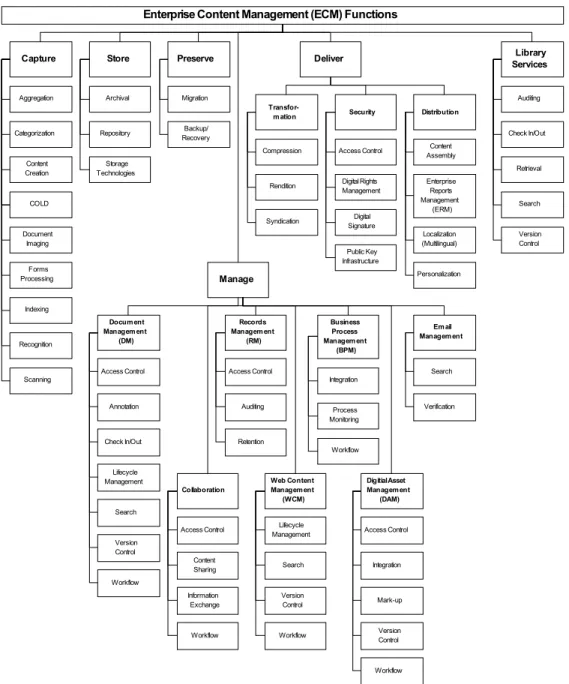
Figure 1 – Enterprise Content Management Functions...83
List of Tables
Table 1 - Search Criteria ...21Table 2 - EbscoHost Combined Databases statistics on search term “Enterprise Content Management”...22
Table 3 - EbscoHost Combined Databases statistics on search term “SharePoint” ...22
Table 4 – Potential ECM Cost Savings...54
Table 5 - Implementation Factors...59
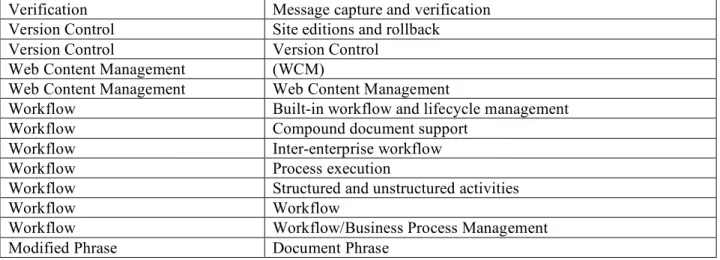
Table 6 – Code Phrases ...100
Introduction to the Literature Review
Topic and Research Problem
According to EMC Corporation, “It is estimated that unstructured content is growing at anywhere between 65 percent and 200 percent per annum depending on the industry sector (EMC Corporation, 2006a p. 5).” Unstructured content refers to free-form information that exists outside the confines of databases or systems with fixed routines and pathways, such as enterprise resource planning systems and workflow applications (Blair, 2004). According to Blair (2004), this type of information needs to be accessible and usable to a business in order to improve efficiency and contribute strategically.
“Enterprise Content Management (ECM) is a concept that refers to the technologies used to capture, manage, store, preserve, and deliver content and documents related to organizational processes. ECM tools and strategies allow the management of an organization's unstructured information, wherever that information exists (Duhon, 2005a).” Microsoft Office SharePoint Server 2007 and Windows SharePoint Services 3.0 (further referred to as “SharePoint”) is an example of an ECM technology, designed to integrate Microsoft Office products with the goal to help simplify information management, collaboration, and business process automation (Bates and Smith, 2007).
This inquiry is a review of selected ECM and SharePoint literature, designed to provide information necessary to conduct an ECM implementation using SharePoint. The majority of the selected literature, published between 2002 and 2007, is obtained from EbscoHost
(http://ebscohost.com), AIIM (http://www.aiim.org) and the Microsoft Developer Network (http://msdn2.microsoft.com).
Audience and Significance
The intended audience for this literature review is information managers (IT managers, IT support, DBA’s, etc.) who work in small to medium, private sector, global manufacturing companies and who are responsible for achieving information related strategic goals, such as improving communication and focusing on profitability through increased operating efficiencies. According to the EMC Corporation (2006a), in order to successfully implement an ECM system it is helpful that information managers understand what ECM is, why ECM is necessary, where to start with ECM, and who benefits from ECM. The purpose of this literature review is to provide information managers with an introduction to these concepts and to provide a rationale for the use of SharePoint, as a selected example of an ECM tool, designed to support
achievement of information related strategic goals as these are defined in this document.
Research Limitations
Time frame.
While the precursor to ECM, Enterprise Document Management (EDM), was first released during the late 1980s (Kemp, 2007), the majority of resources collected to support this literature review are published between 2002 and 2007. This time frame is selected in order to focus on literature published after the emergence of Microsoft within the content management arena in 2001, with the introduction of Microsoft SharePoint Portal Server 2001 (Bishop, 2007), and the coining of ECM as a buzzword, around the middle of 2002 (West, Foust, and Klima, 2002).
Databases, sources, and authors.
The research strategies selected for use in this literature review are suitable to the development of a formal literature review, based on the guidelines in Practical Research
Planning and Design (Leedy and Ormrod, 2005). The initial search for relevant literature, using the online database EbscoHost, returns a significant number of full-text articles on ECM and SharePoint. Additional searches are made on professional sites that specifically address ECM (AIIM) and SharePoint (MSDN). AIIM is “the international authority” on ECM (AIIM, 2006) and includes articles with industry recommended practices (AIIM, 2007) and user guides, which are intended to educate and inform users about document and content systems (Strategy Partners International, 2003a). MSDN is the Microsoft Developer Network (MSDN, 2007) and includes articles such as evaluation guides containing SharePoint information and guidelines.
Textbooks are also selected for additional supporting information. How Organizations Work: Taking a Holistic Approach to Enterprise Health (Brache, 2002), contains a section in which the topics of information and knowledge management align with many of the aspects of implementing a content management system. SharePoint 2007 User’s Guide: Learning
Microsoft’s Collaboration and Productivity Platform (Bates and Smith, 2007) and Microsoft Windows SharePoint Services 3.0 Step by Step (Londer, Bleeker, and Conventry, 2007) are selected to provide an overview of SharePoint.
Criteria used to evaluate the credibility of authors and publications are provided in the Research Parameters section of this document.
Audience.
“In February 2007, with the release of Microsoft Office SharePoint Server 2007 (MOSS), Windows SharePoint Services 3.0 (WSS 3.0) and the Microsoft Office 2007 suite, Microsoft officially entered the Enterprise Content Management (ECM) arena (Bishop, 2007 p. 2).”
It is the intent that this literature review can be used by information managers to support implementation of the latest SharePoint / Microsoft Office integration. The underlying
assumption is that implementing SharePoint, as an ECM product will help information managers to achieve information related strategic goals.
Writing Plan Introduction
The writing plan for the review of the literature is based on a thematic approach, in which ideas are organized around a topic or issue, as described by the University of North Carolina (UNC, N.D). The goal in this approach is for the writer to identify common themes in the selected literature and organize the literature into relevant categories. This review is structured around three larger themes, identified initially to meet the goals of the study, and categorized as follows:
• Literature that examines the purpose of, description and definition of ECM, including
examination of key processes and uses;
• Literature that provides reasons to implement ECM, including an analysis of using
ECM for an enterprise content strategy; and
• Literature that explores SharePoint as one selected ECM product, including
A full description of the Writing Plan is provided in the Research Parameters section of this document.
Definitions
The following definitions show that ECM and SharePoint fit within a selected and well-described category (Lester and Lester, 2005). To reflect the meaning of the definitions pertaining to ECM and SharePoint as they are used in this study, each definition is quoted directly from its listed source. Additional definitions (such as [Contextual] Translation Rules) clarify concepts related to conducting a literature review.
Business Process Management (BPM). Automation of business processes, in whole or in part, where documents, information, or tasks are passed from one participant to another for action, according to a set of rules. A business process is a logically related set of workflows, worksteps, and tasks that provide a product or service to customers. BPM is a mix of Process Management/Workflow with Application Integration technology (AIIM, 2004).
Collaboration. Tools (collaborative authoring, video conferencing, shared whiteboards, etc.) that allow multiple users to work on the same content in a common environment (AIIM, 2004).
Content Management System (CMS). The capability to manage and track the location of, and relationships among, content within a repository (AIIM, 2004).
[Contextual] Translation Rules. … to generalize concepts during coding [a researcher] must develop a set of rules by which less general concepts will be translated into more general ones. The researcher must make [a] distinction, i.e. make [an] implicit concept explicit, and then code for the frequency of its occurrence. This decision results in the construction of a translation rule, which instructs the researcher to code for the concept … in a certain way (Busch et al., 2005).
Digital Asset Management (DAM). Designed specifically to manage digital assets, DAM software applications have innovative and specialized methods of storing, organizing,
distributing, and tracking digital media across multiple delivery channels. They give businesses the ability to leverage digital content efficiently along the supply chain through production, post-production, and distribution processes (EMC Corporation, 2006b p. 7).
Document Management. Software that controls and organizes documents throughout an enterprise. Incorporates document and content capture, workflow, document repositories, COLD/ERM and output systems, and information retrieval systems (AIIM, 2004).
E-business. E-business is the use of computer technology – hardware, software, and external and internal networks – to facilitate business transactions (Brache, 2002 p. 151).
Electronic [Enterprise] Document Management (EDM). The set of technologies for electronically managing documents - incorporating document and content capture, workflow, document repositories, COLD/ERM and output systems, and information retrieval systems (Strategy Partners International Ltd., 2003b p. 12).
Enterprise Content Management (ECM). … the technologies used to capture, manage, store, preserve, and deliver content and documents related to organizational processes. ECM tools and strategies allow the management of an organization's unstructured information, wherever that information exists (AIIM, 2006).
eXtensible Mark-up Language (XML). An established standard, based on the Standard Generalized Mark-up Language designed to facilitate document construction from standard data items. Now being used as a generic data exchange mechanism (Strategy Partners International Ltd., 2003b p. 14).
Implement[ation]. 1: carry out, accomplish; especially: to give practical effect to and ensure of actual fulfillment by concrete measures. 2: to provide instruments or means of expression for (http://www.merriam-webster.com/dictionary/implementation)
Information inventory. … the types of content available across the enterprise as related to the spectrum of business processes and users that require digital information (Cap Ventures, 2003 p. 2).
Information Lifecycle Management (ILM). … the strategy for ensuring information management costs are contained and that the most important information assets – those that contribute to growth and innovation – are identified, cared for and exploited to maximum effect (ECM Corporation, 2005 p. 4).
Knowledge management (KM). Much of KM is getting what is in the heads of a small number of people (”tacit knowledge”) available to all who can use it (“explicit knowledge”) (Brache, 2002 p. 144).
Library Services. … the collective name for a set of basic, but mandatory, capabilities that ensure integrity and security of … content (ECM Corporation, 2006b p. 24).
Metadata. Data associated with a document that is used to index and/or identify it in the context of a business process or repository application (Strategy Partners International Ltd., 2003b p. 13).
Microsoft Office SharePoint Server 2007. … an integrated suite of server capabilities that can help improve organizational effectiveness by providing comprehensive content management and Enterprise Search, accelerating shared business processes, and facilitating information sharing across boundaries for better business insight (Microsoft, 2007a p. 3).
Microsoft SharePoint. … the central information sharing and collaboration platform for the Microsoft Office system. SharePoint 2007 is made up of two main products: Windows SharePoint Services 3.0 and SharePoint Server 2007 (Bates and Smith, 2007 p. 2).
Records Management. Enables an enterprise to assign a specific life cycle to individual pieces of corporate information from creation, receipt, maintenance, and use to the ultimate disposition of records. A record is not necessarily the same as a document. All documents are potential records, but not vice versa. A record is essential for the business; documents are containers of "working information." (AIIM, 2004).
Unstructured content. ECM focuses on unstructured information, that is, the free-form content that exists outside the confines of databases or systems with fixed routines and pathways, such as enterprise resource planning systems and workflow applications (Blair, 2004 p. 65).
Web Content Management (WCM). A technology that addresses the content creation, review, approval, and publishing processes of Web-based content (AIIM, 2004).
Windows SharePoint services 3.0. … provides the solution platform for SharePoint Products and Technologies, delivering a wide range of functional capabilities that are exploited and extended by other SharePoint Products and Technologies (Microsoft, 2007a p. 3).
Workflow. … the automation of a business process, in whole or in part, during which documents, information, or tasks are passed from one participant to another for action, according to a set of procedural rules (Strategy Partners International Ltd, 2003a p. 1).
Research Parameters
The Research Parameters provides an overview of the methods used to develop this literature review, and is divided into four sections: the Search Strategy Report, the
Documentation Approach, the Evaluation Criteria, and the Writing Plan. The Search Strategy Report contains sections on Best Searches, Literature Availability, and Key Search Terms and Controlled Vocabularies, which includes detailed tables on search criteria, search information on the term ECM, and search information on the term SharePoint. The Documentation Approach describes the steps taken to review articles. The Evaluation Criteria contains sections on Literature Collection and Literature Selection. The Writing Plan provides a roadmap to the process of conducting a conceptual analysis of the literature as presented in the Review of the Literature section of this document, followed by an outline of the primary themes that are applied.
Search Strategy Report
Best searches.
EbscoHost databases Academic Search Premier; Business Source Premier; Library, Information Science & Technology Abstracts; and Regional Business contain many relevant articles on ECM and SharePoint. EbscoHost publications AIIM E-DOC, Econtent, Information World Review, Portals and KM, and Windows IT Pro also contain many relevant articles on ECM and SharePoint.
AIIM: The ECM Association (http://www.aiim.org) contains many definitions, recommended practice documents, articles, and reports on ECM and SharePoint. AIIM also
includes User Guides, which “are a series of papers on a variety of industry topics, authored by subject matter experts (http://www.aiim.org/user-guides.asp).”
ECM Connection (http://www.ecmconnection.com) contains many articles on ECM and on SharePoint. The more relevant articles are found by sorting the Downloads column. For example, “A 15- Minute Guide to Enterprise Content Management (EMC Corporation, 2006a)” is at the top of the list of downloads using the search term “ECM,” as of the writing of this paper.
MSDN (http://msdn2.microsoft.com) contains a vast amount of information on ECM and SharePoint. The “Evaluation Guides (Microsoft, 2007a; Microsoft, 2007b)” and the “Planning and architecture (Microsoft, 2007c)” guide are beneficial in that they contain an overview of the solutions and benefits provided by the software.
Literature availability.
By accessing full text articles from the Internet, information management books, and SharePoint books, there is more than enough literature available on the topics of ECM and SharePoint. The challenge is in finding literature pertinent to the intended audience, goals, and focus of this paper. Selection criteria and limitations are described in the following section.
Key search terms and controlled vocabularies.
The following key search terms and controlled vocabularies are used to collect articles and other research material for use in this literature review:
ECM / SharePoint based on strategic goals:
• Profitability • Communication
ECM / SharePoint larger area of context:
• Collaboration
• Records Management (RM)
• Web Content Management (WCM) • Business Process Management (BPM) • Email Management
• Digital Asset Management (DAM)
ECM / SharePoint sub-topics:
• The purpose of, description and definition of ECM • Key processes and uses of ECM
• Reasons to implement ECM
• Using ECM for an enterprise content strategy • SharePoint as an ECM product
• SharePoint implementation
SharePoint:
• Microsoft Office SharePoint Server 2007 • Windows SharePoint Services 3.0
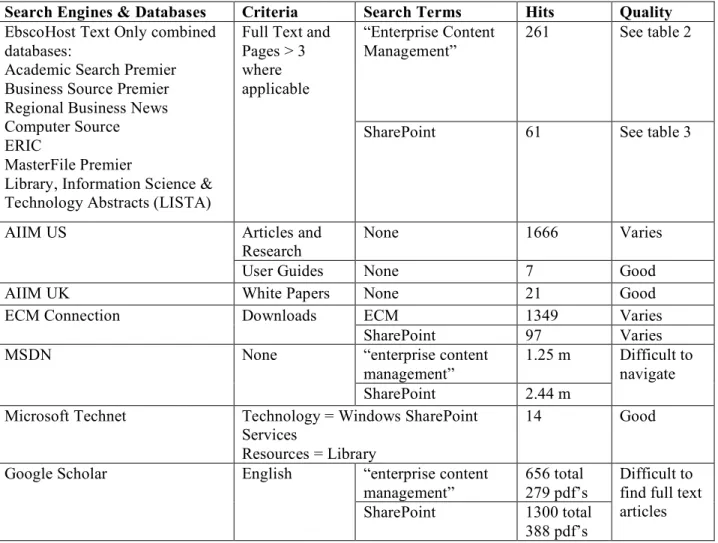
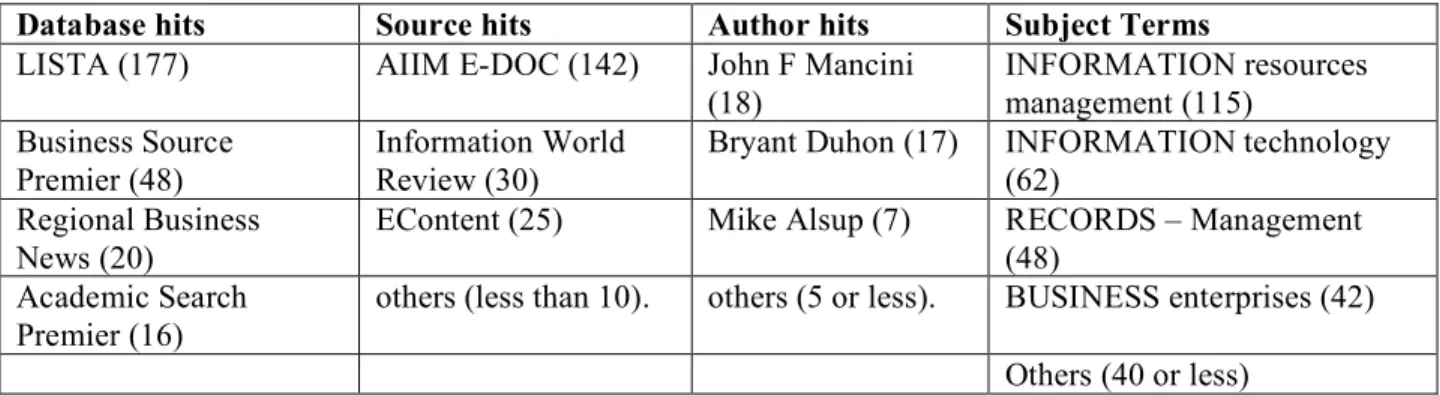
Detailed search criteria are listed below, in Table 1: Search Criteria, Table 2: Search Term - ECM, and Table 3: Search Term – SharePoint.
Search Engines & Databases Criteria Search Terms Hits Quality
“Enterprise Content Management”
261 See table 2 EbscoHost Text Only combined
databases:
Academic Search Premier Business Source Premier Regional Business News Computer Source ERIC
MasterFile Premier
Library, Information Science & Technology Abstracts (LISTA)
Full Text and Pages > 3 where applicable
SharePoint 61 See table 3
Articles and
Research None 1666 Varies AIIM US
User Guides None 7 Good AIIM UK White Papers None 21 Good ECM 1349 Varies ECM Connection Downloads
SharePoint 97 Varies “enterprise content management” 1.25 m MSDN None SharePoint 2.44 m Difficult to navigate Microsoft Technet Technology = Windows SharePoint
Services Resources = Library 14 Good “enterprise content management” 656 total 279 pdf’s Google Scholar English
SharePoint 1300 total 388 pdf’s
Difficult to find full text articles
Database hits Source hits Author hits Subject Terms
LISTA (177) AIIM E-DOC (142) John F Mancini (18) INFORMATION resources management (115) Business Source Premier (48) Information World Review (30)
Bryant Duhon (17) INFORMATION technology (62)
Regional Business News (20)
EContent (25) Mike Alsup (7) RECORDS – Management (48)
Academic Search Premier (16)
others (less than 10). others (5 or less). BUSINESS enterprises (42) Others (40 or less)
Table 2 - EbscoHost Combined Databases statistics on search term “Enterprise Content Management”
Database hits Source hits Author hits Subject Terms
Regional Business News (21)
Windows IT Pro (10) Dan Holme (5) MICROSOFT Corp. (26) Academic Search
Premier (13)
AIIM E-DOC (9) Russell Stalters (4) COMPUTER software (20) LISTA (11) Portals and KM (4) Bill Ives (4) NAICS/Industry Codes443120
Computer and Software Stores (15)
Computer Source (10) others (3 or less) Others (2 or less) INFORMATION resources management (8)
Business Source Premier (6)
Others (5 or less)
Table 3 - EbscoHost Combined Databases statistics on search term “SharePoint”
Documentation Approach
The section, “Organizing the Information You Have Collected (Leedy and Ormrod, 2005, p. 75)” is used as the basis for the documentation approach for this literature review. The
documentation approach during the review of literature is as follows:
1) Save a copy of each potentially useful electronic article and abstract when available. 2) Review each abstract.
3) Divide the articles into useful and not useful electronic “piles” based on the relevancy of the abstract.
4) Review the index, introduction, and conclusion of books from previous AIIM courses and from employers “library.”
5) Record the bibliography and abstract for each useful article and book in a Microsoft Word document.
6) Note the type (article, interview, publication, website, white paper, or book), content (key words and phrases), abstract (about, introduction, preface, or preview), and author for each article and book.
Evaluation Criteria
Literature collection.
Articles, interviews, publications, white papers, and books used in the literature
collection are identified in the Review of the Literature Bibliography section of this document. The electronic sources are obtained from EbscoHost databases Academic Search Premier and Computer Source, AIIM (http://www.aiim.org), ECM Connection
(http://www.ecmconnection.com), and MSDN (http://MSDN.microsoft.com). The books are obtained from Amazon.com (http://www.amazon.com).
The search engines and databases, criteria for search, and search terms are detailed in the Search Strategy Report section of this document. The search strategy, for the retrieval of relevant literature, is as follows:
1) Review the term “Enterprise Content management” on Wikipedia
(http://en.wikipedia.org/wiki/Main_Page) to get an idea of the purpose, history,
characteristics, and components of ECM. This review leads to the discovery of key terms and concepts related to ECM and an external link to AIIM (http://www.aiim.org).
2) Search on the terms “Enterprise Content Management” and “SharePoint” on EbscoHost databases Academic Search Premier and Computer Source.
3) Review the “Articles and Research” and “User Guide” sections on AIIM US (http://www.aiim.org).
4) Review the “White Papers” section on AIIM UK (http://www.aiim.org.uk).
5) Review Microsoft Technet (http://msdn2.microsoft.com) for SharePoint Services in the Windows Library.
In order to review only current and relevant material the following terms are not used:
• Consolidation, mergers, and alliances pre 2007 • Events pre 2007
• Trends and market development pre 2007 • Outsourcing and contracting
Literature selection.
The research results leads to an idea of the information available on ECM and SharePoint and to the identification to the larger area of context for these topics. Each of the resources is reviewed for relevance to the literature review. The following criteria are used to include or exclude material:
• The resources directly relate to the topic and sub-topics of the inquiry and key terms
and phrases.
• The resources are published between 2002 and 2007. • The resources are relevant for the intended audience.
Each article is then previewed using the methods suggested by Hewitt (2002 p. 22): Scan the abstract, the introduction, headings and subheadings, tables and figures, discussion and
conclusions, and the reference list. Look for any obvious omissions, lack of detail, errors in presentation and figures. Review the reference list for literature research. This preview of the articles leads to additional criteria, which is used in discarding resources based on the following:
• Instant messaging • SharePoint 2.0
• SharePoint Beta, security
The article Critical Evaluation of Information Sources (Bell, 2007), is used as a guideline to determine credibility of sources. Articles and books are reviewed for authority, objectivity, quality, coverage, currency, and relevance. While every article and book is reviewed for
publisher authority, all but the user guides and white papers are reviewed for author authority. In addition, each article follows Hewitt’s (2002) guidelines for critical appraisal:
• The purpose of the article is clear and well defined. • Methods are clearly described and appropriate.
• Results, where applicable, are presented in a clear and understandable format. • Interpretation of results is consistent with the presented results.
Writing Plan
Conceptual analysis, also known as thematic analysis, is a category of content analysis in which a concept is chosen and analyzed by quantifying and tallying its presence (Busch et al., 2005). The writing plan for this literature review is based on a conceptual analysis model in which ideas are organized around topics identified by coding text into manageable content categories using selective reduction. In order to limit subjectivity, increase reliability, and increase validity, the terms are based on “contextual translation rules (Busch et al., 2005).”
The preliminary conceptual analysis of the selected texts results in the formulation of three primary themes for this literature review: Literature that examines the purpose of,
description and definition of ECM, including examination of key processes and uses; Literature that provides reasons to implement ECM, including an analysis of using ECM for an enterprise content strategy; and Literature that explores SharePoint as one selected ECM product, including information that addresses aspects of SharePoint implementation.
Conceptual analysis.
The steps for conducting the conceptual analysis as the process for developing the themes of this literature review are part of the Colorado State University Writing Studio guides (Busch et al., 2005) and are outlined as follows:
1) Decide the level of analysis: Code for sets of words or phrases rather than single words. a) Identify documents with a significant amount of ECM functionality phrases, Enterprise
Content Management (ECM) Definitions (AIIM, 2004) and A Guide to Evaluating Enterprise Content Management Software (EMC Corporation, 2006b). Use these
documents to outline ECM functionality into categories based on headings and phrases based on sub-headings.
b) Identify documents with a visual representation of ECM functionality, ECM At Work – Wall Poster (Duhon, 2005a) and Enterprise Content Management (ECM) 101 (AIIM, 2003). Use these documents to outline ECM functionality concepts based on a visual representation.
2) Decide how many concepts to code: Develop an interactive set of categories and phrases during the coding process rather than using pre-defined concepts. The first review of the documents used to identify coding concepts includes 16 ECM functionality categories and 145 ECM functionality phrases.
3) Decide whether to code for existence or frequency of a concept: Code for the existence of a concept, and how the concept appears in the text, rather than for the frequency of a concept. 4) Decide on how to distinguish among concepts: Group concepts if they appear in some altered
or collapsed form (for example RM versus ERM) rather than exactly as they appear. Grouping similar terms narrows the coding concepts to 56 distinct ECM functionality phrases.
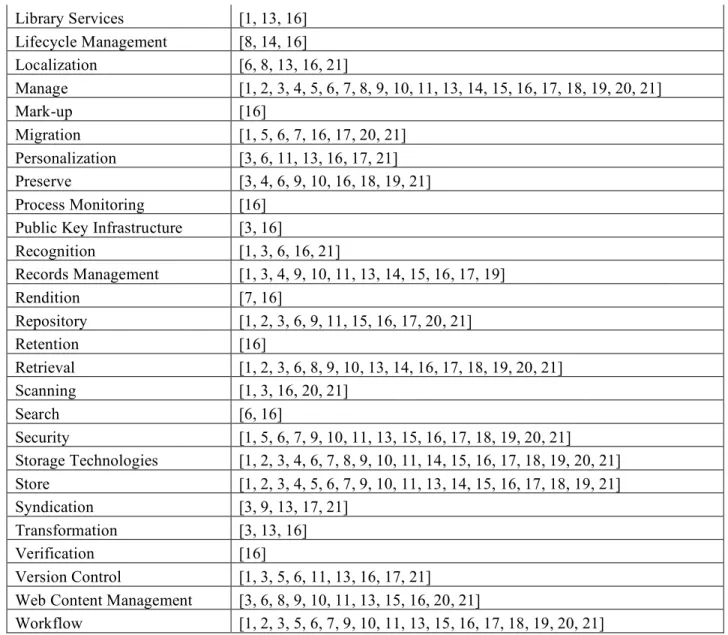
5) Develop rules for coding the text: Create contextual translation rules to translate in order to code consistently throughout the text and make distinctions between similar concepts. Results of the coding process are presented in five Appendices. Appendix A lists ECM functionality concepts, arranged by categories and phrases. Appendix B provides a visual representation of the lists of information in Appendix A. Appendix C provides descriptions of each of the ECM phrases in Appendix A and B. Appendix D provides a list of modified
ECM phrases. Appendix E lists the concepts and the corresponding documents in which the concepts are found.
Examples of coding rules are as follows:
a) Enterprise Content Management (ECM) Definitions (AIIM, 2004) includes preferred phrases. For example, “Check In/Out” is used in the place of “Check in / check out,” and “Check-in and check-out.”
b) All storage type concepts (i.e. “CD-ROM”) are grouped under the phrase “Storage Technologies.”
c) All recognition type concepts (i.e. HCR, ICR, etc.) are grouped under the concept “Recognition.”
6) Decide what to do with irrelevant information: Ignore irrelevant information rather than re-examining and altering the coding scheme.
7) Code the texts:
a) Prepare electronic files.
i) Scan ECM Documentum files to PDF.
ii) Use Adobe Acrobat Professional “OCR Text Recognition” on the ECM Documentum files to “Recognize Text.”
iii) Save PDF files and HTML files as text.
b) Search for the existence of concepts in the texts files. A list of phrases and the corresponding documents is included in Appendix E of this document.
8) Analyze the results: Examine the data and draw conclusions and generalizations in order to see trends (in this case described as ‘themes’) that are indicative of larger ideas.
Writing plan outline.
Upon completion of the conceptual analysis, the next step in the writing plan is to formulate and organize the concepts within the three primary themes as outlined below. The numbers following each concept correlate with the prefacing numbers of each reference listed in the Review of the Literature section of this document.
1) Literature that Examines the Phenomenon of ECM (the What) a) Examine the purpose of ECM [1, 4, 5, 7]
b) Describe and define ECM [1, 2, 4, 5, 7, 10] c) List key processes and uses of ECM [1]
2) Literature that Presents Reasons to Implement ECM (the Why) a) Describe reasons to implement ECM
i) Increased competitive advantage [2, 6] ii) Productivity savings [2, 4, 6, 11]
iii) Reduced customer service costs [2, 6, 11] iv) Improved content quality [2, 5, 11] v) Increased social networking [2, 5, 6] vi) Reduced cost of compliance [2, 5, 6]
b) List steps to implement ECM as an enterprise content strategy i) Cost/Benefit Analysis [8, 13, 14, 15, 16]
ii) Planning an ECM Strategy [2, 4, 5, 6, 7, 9, 11, 16] iii) Reviewing recommended practices [4, 7, 11] iv) Preparing a requirements guideline [12]
3) Literature that Examines the Role of SharePoint as a Specific Selected ECM Implementation Product (the How)
a) Describe and define SharePoint [17, 21] b) List SharePoint processes and uses [17, 21]
i) Document Management [19, 22, 25] ii) Collaboration [22, 25]
iii) Records Management and Information Management Policies [17, 21, 22] iv) Web Content Management [21]
v) Workflow and Business Process Management [17, 18, 20, 21, 22] vi) Enterprise Search and Retrieval [17, 21]
vii) Business Forms [21, 25] viii) Business Intelligence [21] ix) Security [17, 21, 22]
x) Administration [21]
xi) Microsoft Integration [17, 20, 22]
c) Conclusion: How to plan for SharePoint implementation [25] i) Determine User needs [25]
ii) Determine Number of users and user types [25] iii) Plan for Web site structure and publishing [23, 25] iv) Plan for content [23, 25]
Review of the Literature Bibliography
The following annotated bibliography of the 25 references selected for use in the Review of the Literature, is categorized by topic and sub-topics. As explained in the Writing Plan section of this document, the numbers prefacing each reference correlate with the numbers used in the Writing Plan Outline section of this document. In addition, the prefacing numbers are used in the list of categories and concepts of Enterprise Concept Management (Appendix A of this
document) and the Conceptual Analysis Concept table (Appendix E of this document). Annotations consist of the abstract published with each selected reference.
Category 1: Literature that Examines the Phenomenon of ECM (the What)
The purpose, description and definition of ECM.
1) Blair, B. (2004). An Enterprise Content Management Primer. Information Management Journal, Vol. 38 Issue 5, p. 64-66. Retrieved October 24, 2007, from EbscoHost: Academic Search Premier
Abstract: This article focuses on the significance of enterprise content management (ECM) in helping organizations manage and control content according to their business goals and legal needs. ECM, a term introduced in 2001 by AIIM International, has been widely adopted by vendors, analysts, and end users in the marketplace. ECM is the technologies, tools, and methods used to capture, manage, store, preserve, and deliver content across an enterprise. Clearly, this is a broad definition that covers a wide range of technology categories such as electronic document management and business process management. At its core, ECM acknowledges that not all information is created equal. Some of it has business, operational, legal, regulatory value and, as a result, must be identified and treated in a different way. ECM is
also concerned with information that would not normally be classified, retained, and managed as a record. ECM focuses on unstructured information, that is, the free-form content that exists outside the confines of databases or systems with fixed routines and pathways, such as enterprise resource planning systems and workflow applications. Unstructured information, including e-mail, word processing documents, digital images and Portable Document Format files.
2) Kemp, J. (2007). A Critical Analysis into the Use of Enterprise Content Management Systems in the IT Industry. Retrieved November 3, 2007, from
http://www.aiimhost.com/whitepapers/JamesKemp_ECMReport.pdf
Abstract: This report analyses the use of Enterprise Content Management Systems (ECMSs) in the Information Technology (IT) industry. An Enterprise Content Management System (ECMS) uses technologies, tools and methods to capture, manage, store, preserve and deliver content to support organisational processes. Recent studies estimate the ECMS market to be worth over $3 billion, with large vendors such as Open Text, EMC, Interwoven, Vignette and more recently Microsoft, IBM and Oracle entering the market.
This report details primary and secondary research into this topic conducted over a six month period. First it describes how the effective capturing, managing, storing, preserving and delivering of information, content and documents can help IT organisations innovate, adapt and maintain competitive advantage. Second it presents a number of unique models, including a categorisation of current ECMSs and a depiction of the likely evolution of this technology. Third it explores and critically analyses the key advantages and barriers that arise when using ECMSs in the IT industry. A prediction of how ECMSs and related technologies will be used in future is presented prior to the reports conclusion.
Examination of key ECM processes and uses.
ECM is generally considered an amalgamation of a number of distinct but interrelated applications (EMC Corporation, 2006a). The larger areas in the field of information management that provide context for the topic are ILM, Document & Content Management, and BPM & Workflow.
3) AIIM. (2004). Enterprise Content Management (ECM) Definitions. Retrieved November 4, 2007, from http://www.aiim.org/article-aiim.asp?ID=27664
Abstract: AIIM represents the Information Management community as the global association for both users and suppliers of Enterprise Content Management (ECM) solutions – the strategies, services and technologies which enable organizations to capture, manage, store, preserve and deliver information to support business processes (AIIM, 2006).
4) EMC Corporation. (2006b). A Guide to Evaluating Enterprise Content Management Software. Retrieved October 24, 2007, from
http://www.aiim.org.uk/publications/ecm_at_work/pdfs/ecm_evaluation_guide.pdf
Abstract: ECM facilitates the creation, management, distribution, and exchange of large volumes of rich, primarily unstructured content, within and beyond the enterprise - to customers, employees, partners, and suppliers. Certain basic features and functionality, identified in this guide, are necessary for an ECM solution to deliver tangible benefits to the organization.
These capabilities are required whether you are considering content management for digital assets, a portal, a customer website, or a document management initiative. They are also immediately or an enterprise-wide initiative. Not all ECM Solutions are created equal. It's important when evaluating solutions to compare them in the context of your individual requirements, but also against an industry benchmark of capabilities.
Category 2: Literature that Presents Reasons to Implement ECM (the Why)
Reasons to implement ECM.
5) EMC Corporation. (2006a). A 15 Minute Guide to Enterprise Content Management. Retrieved October 24, 2007, from
http://www.aiim.org.uk/publications/ecm_at_work/pdfs/Ecm_15min_guide.pdf
Abstract: As a professional knowledge worker, you know how valuable your time is. You need to distill concepts, evaluate options and execute complex transactions on a daily basis. So you need as much information as you can process as quickly as possible to be proficient. We understand that need and aim to communicate concepts and ideas as clearly as possible to aid your understanding of a particular subject. This 15-minute guide is the second in a series that began with the “15-Minute Guide to Enterprise Content Management.” The series is aptly named. In no more than 15 minutes we hope to provide a starting point for learning about a particular subject, and to make it an easy and entertaining read. This particular guide focuses on the importance of Information Lifecycle Management (ILM) for enterprise content management users. We aim to identify the key drivers for ILM, why organizations need to adopt an ILM strategy and the benefits of ILM for enterprise content management users.
6) EMC Corporation. (2006c). When Content Matters: Building the business case for enterprise content management. Retrieved October 21, 2007, from
http://www.aiim.org.uk/publications/ecm_at_work/pdfs/15_min_guide_when_content_matte rs.pdf
Abstract: This 15-minute guide is part of a series of guides that, in no more than 15 minutes, aims to provide a starting point for learning about a particular subject, in an easy and entertaining read. This particular guide describes the business benefits of using an enterprise content management system and how a variety of organizations are already using such a system today. It will explain how enterprise content management systems organize content and make it available to users. It will also discuss how organizations can gain user acceptance and build enthusiasm for such a system. Finally, this guide offers ideas for getting started with enterprise content management in your own organization.
Using ECM for an enterprise content strategy.
7) AIIM. (2007). Recommended Practice. Analysis, Selection, and Implementation of Electronic Document Management Systems (EDMS). Retrieved November 9, 2007, from
http://www.aiim.org/documents/standards/arp1-2007.pdf
Abstract: This industry recommended practice presents a set of procedures and activities that should be considered and/or performed during all aspects of analyzing, selecting, and implementing electronic document management systems. This document provides a
categorization of relevant national and international standards and reports, enabling users and organizations to quickly identify and locate required information for all aspects of the EDMS project.
8) Allen, D. (2007). Cost/Benefit Analysis for Implementing ECM, BPM Systems. Information Management Journal. Vol. 41 Issue 3, p. 34-41. Retrieved October 24, 2007, from
EbscoHost: Academic Source Premier
Abstract: The article provides a cost-benefit analysis on adopting either the enterprise (ECM) or the business process (BPM) systems. The ECM system focuses more on managing receptacles of data while the BPM system focuses first on the business process involved then makes use of the tools in those business processes. In evaluating their cost benefits, some factors to be considered include the company’s key statistical information, projected employee
productivity savings and hourly costs, and also, the time required to process any transaction that involves processing time that will be relevant in determining how the ECM or BPM system can help increase the company’s capacity to manage more transactions without adding manpower. 9) CAP Ventures, Inc. (2003). Developing an Enterprise Content Strategy: The Blueprint for
Universal Content Management. Retrieved October 24, 2007, from
http://www.ecmconnection.com/Downloads/Detail.aspx?docid=e5ca836a-d5ee-4d5b-9569-a299651069d5.
Abstract: This document explains why the development of an enterprise content strategy should be a precursor to the implementation or integration of content systems. This endeavor requires organizations to identify the types of content available across the enterprise as related to the spectrum of business processes and users that require digital information.
Taking this kind of "information inventory" provides a roadmap for applying the right mix of fundamental, asset-specific, and process-specific content capabilities to a broad range of content-driven business processes. Evaluating the ECM and content solutions market with this
kind of exercise completed will be invaluable to pinpointing products that can address line of business (LOB), enterprise, Federal, and industry-specific business requirements.
10) EMC Corporation. (2005). A 15 Minute Guide to Information Lifecycle Management for Enterprise Content Management Users. Retrieved November 9, 2007 from
http://www.aiim.org.uk/publications/ecm_at_work/pdfs/ecm_ilm_15min_guide.pdf
Abstract: As a professional knowledge worker, you know how valuable your time is. You need to distill concepts, evaluate options and execute complex transactions on a daily basis. So you need as much information as you can process as quickly as possible to be proficient. We understand that need and aim to communicate concepts and ideas as clearly as possible to aid your understanding of a particular subject. This 15-minute guide is the second in a series that began with the “15-Minute Guide to Enterprise Content Management.” The series is aptly named. In no more than 15 minutes we hope to provide a starting point for learning about a particular subject, and to make it an easy and entertaining read. This particular guide focuses on the importance of Information Lifecycle Management (ILM) for enterprise content management users. We aim to identify the key drivers for ILM, why organizations need to adopt an ILM strategy and the benefits of ILM for enterprise content management users.
11) Hodgson, C. (2004). Planning for an Enterprise Content Management System: AIIM User Guide. Retrieved November 2, 2007, from http://aiim.org/article-docrep.asp?ID=28314
Abstract: This paper explores the need for an Enterprise Content Management (ECM) strategy and the issues to address in developing such a strategy. Before jumping into technology solutions, non-technology issues around cultural behaviors, regionalization of content, metadata, retention requirements, and intellectual property have to be considered.
12) Porter-Roth, B. (2004). RFP Guidelines for an Enterprise Content Management System: AIIM User Guide. Retrieved November 2, 2007, from
http://aiim.org/article-docrep.asp?ID=28312
Abstract: This is a guide to writing a request for proposal (RFP) for an enterprise content management (ECM) system. An RFP is a document that expresses your project’s goals,
requirements, and other information that a supplier needs to write a proposal. Sent to many potential suppliers, the RFP seeks to establish a competitive environment that allows the buyer to select the best solution at the best price. The winning proposal becomes the foundation for the contract, which defines project tasks and performance goals. This guide provides you with the basic format, guidelines, examples, and suggestions for writing a successful ECM RFP. The advantages of using an RFP far outweigh the potential problems of dealing directly with suppliers and not have a formal set of requirements. An RFP promotes competitive thinking among suppliers and encourages them to provide unique solutions based on their products, services, and knowledge of an industry.
13) Strategy Partners International Ltd. (2003a). Business Process Management and Workflow: AIIM User Guide. Retrieved November 2, 2007, from
http://aiim.org/article-docrep.asp?ID=28316
Abstract: Business Process Management [BPM] is a new term that covers a portfolio of functions and approaches that includes techniques to integrate the processes within multiple applications, across companies, and between companies.
Workflow, as defined by the Workflow Management Coalition (WfMC), is the
automation of a business process, in whole or in part, during which document, information, or tasks are passed from one participant to another for action, according to a set of procedural rules.
This Guide sets out to explain in straightforward terms how Business Process
Management and Workflow works, where and how it delivers real benefit to organizations, and the key current and emerging applications and technologies that make it an investment for the future as well as for the present.
14) Strategy Partners International Ltd. (2003b). Document and Content Capture: AIIM User Guide. Retrieved November 2, 2007, from http://aiim.org/article-docrep.asp?ID=28318
Abstract: Document and content capture systems are fundamental to Information Technology. They provide a cost-effective, accurate, and operationally simple mechanism to feed content (e.g., news articles, pictures, and files) into Document and Content Management systems, as well as into key business applications such as Enterprise Resource Planning (ERP), Customer Relationship Management (CRM), eBusiness, and eGovernment.
This Guide sets out to explain in straightforward terms how document and content capture works, where and how it delivers real benefit to organizations, and the key current and emerging applications and technologies that make it an investment for the future as well as for the present.
15) Strategy Partners International Ltd. (2003c). Document and Content Output and
Presentation: AIIM User Guide. Retrieved November 2, 2007, from http://aiim.org/article-docrep.asp?ID=28315
Abstract: Document and Content Output and Presentation systems are fundamental to Information Technology. They provide a cost-effective, accurate, and operationally simple mechanism to deliver structured and unstructured documents from data processing and document and content repositories to people in the most appropriate format. They offer the capability to
improve the presentation of the content, format it for the particular viewing device, and present the brand image of the sender.
This User Guide sets out to explain in straightforward terms how Document and Content Output and Presentation works, where and how it delivers real benefit to organizations, and the key current and emerging applications and technologies that make it an investment for the future as well as for the present.
16) Strategy Partners International Ltd. (2003d). Document and Web Content Management: AIIM User Guide. Retrieved November 2, 2007, from
http://aiim.org/article-docrep.asp?ID=28317
Abstract: Document and Web Content Management (D&WCM) is a set of generic IT functionality that is used to create, manage, and exploit unstructured information. It is sold as a set of software and services for a broad spectrum of applications from archiving to personalized multi-channel electronic commerce. This guide sets out to explain in straightforward terms how Document and Web Content Management (D&WCM) works, where and how it delivers real benefit to organizations, and the key current and emerging applications and technologies that make it an investment for the future as well as for the present.
Category 3: Literature that Examines the Role of SharePoint as a Specific Selected ECM Implementation Product (the How)
What is SharePoint as an ECM product.
17) Bishop, D. (2007). Enterprise Content Management with Microsoft SharePoint. Retrieved November 9, 2007, from
http://www.ecmconnection.com/Downloads/Detail.aspx?docid=0f4b7d88-db08-45cf-9bb7-8fe7f7fd6c0e
Abstract: In February 2007, with the release of Microsoft Office SharePoint Server 2007 (MOSS, Windows SharePoint Services 3.0 (WSS 3.0) and Microsoft Office 2007 suite,
Microsoft officially entered the Enterprise Content Management (ECM) arena. Microsoft provides a robust, scalable ECM platform that rivals those of traditional ECM vendors. With the addition of mature SharePoint technology partners, Microsoft is a viable ECM contender today.
This paper reviews the capabilities of MOSS 2007 and WSS 3.0 for Enterprise Content Management, evaluating their ability to serve as an Enterprise Content Management solution today. The ability of Microsoft to meet the content management needs of customers relies on the solution requirements of each organization. Microsoft will continue to rely on its partners to enhance its ECM platform.
18) Gerhardt, D. (2007). SharePoint and InfoPath: A Powerful Duo. Windows IT Pro. Vol 13, Issue 4, p. 55-59. Retrieved October 24, 2007, from EbscoHost: Computer Source
Abstract: The article focuses on the use of the Microsoft Office InfoPath 2003 Service Pack 2 in creating the form library files to activate the document-sharing and collaboration capabilities of Microsoft Windows SharePoint Services 2.0. The InfoPath can be used in
designing and filling out electronic forms, which are stored as XML. It can also be used in validating data that users enter, as well as enable or disable controls in the form view. 19) Holme, D. (2007). The File Share Is Dead: Long Live SharePoint Document Libraries.
Windows IT Pro, Vol. 13 Issue 5, p. 69-73. Retrieved October 24, 2007, from EbscoHost: Computer Source
Abstract: The article discusses the things that can be done using the new Windows SharePoint document libraries. (Holme) explains that one can create a document library in Windows SharePoint Services 3.0. One can also set permissions on a document library and secure it automatically. He adds that after creating and securing the library, the user can add files to it. The system also allows the user to view and edit documents and monitor the changes and activities in a document library, among others.
20) McKenna, E. (2007). SharePoint & Office Pro: How SharePoint Matches Up to Public Folders. Windows IT Pro. Vol. 13 Issue 7, p. 61-65. Retrieved October 24, 2007, from EbscoHost: Computer Source
Abstract: The article reviews the computer software SharePoint from Microsoft.
21) Microsoft. (2007a). Microsoft Office SharePoint Server 2007 Evaluation Guide. Retrieved November 2, 2007, from http://go.microsoft.com/fwlink/?linkid=83060&cicid=0x409
Abstract: This evaluation guide is designed to give you a solid understanding of the design goals and feature set for Microsoft® Office SharePoint® Server 2007 and a familiarity with the product implementation. It provides an overview of the solutions and benefits provided by Office SharePoint Server 2007, along with descriptions of new and improved features in the areas of portal, search, content management, business forms and integration, and business
intelligence. It also provides a hands-on tour of the product’s main feature areas and concludes with useful information for administrators and developers.
The ultimate goal of this guide is to aid the reader in performing a thorough and effective evaluation of Office SharePoint Server 2007. This guide is intended for anyone who is interested in learning more about Office SharePoint Server 2007 and wants hands-on experience.
22) Microsoft. (2007b). Microsoft Windows SharePoint Services 3.0 Evaluation Guide. Retrieved November 2, 2007, from
http://technet.microsoft.com/en-us/windowsserver/SharePoint/bb400753.aspx
Abstract: This Evaluation Guide is designed to give you a solid understanding of the design goals and feature set for Microsoft Windows SharePoint Services 3.0 and a familiarity with the implementation of this technology in Windows Server 2003. It provides an overview of the solutions and benefits enabled by Windows SharePoint Services as well as descriptions of new and improved features in the areas of collaboration, storage and security, deployment and management, user interface, and platform extensibility. It also provides a hands-on tour of the main feature areas of Windows SharePoint Services and includes useful information for administrators and developers.
The ultimate goal of this guide is to aid the reader in performing a thorough and effective evaluation of Windows SharePoint Services. This guide is intended for anyone who is interested in learning more about Windows SharePoint Services and wants hands-on experience.
Implementing SharePoint 2007™.
23) Bates, S. and Smith, T. (2007). SharePoint 2007 User’s Guide: Learning Microsoft’s Collaboration and Productivity Platform. New York: Springer-Verlag, Inc.
Abstract: Microsoft Office SharePoint Server 2007 and Windows SharePoint Services 3.0 provide a collection of tools and services you can use to improve user and team productivity, make information sharing more effective, and facilitate business decision-making processes. In order to get the most out of SharePoint 2007, you need to understand how to best use the capabilities to support your information management, collaboration, and business process management needs.
In this book, we walk you through the components and capabilities that make up a SharePoint 2007 environment. We provide step-by-step instructions for using and managing these elements, as well as recommendations for how to best leverage them. We then take two common SharePoint uses, document management and project information management, and walk you through creating samples of these solutions. We describe the challenges these solutions are designed to address and the benefits you will receive.
24) Londer, O., English, B., Bleeker, T., and Coventry, P. (2007). Microsoft Windows SharePoint Services 3.0 Step by Step. Washington: Microsoft Press
Abstract: The smart way to learn Microsoft Windows SharePoint Services 3.0 – one step at a time! Experience learning made easy – and quickly teach yourself how to use Windows SharePoint Services to enable effective team collaboration. With Step by Step, you set the pace – building and practicing the skills you need, just when you need them!
25) Microsoft. (2007c). Planning and architecture for Windows SharePoint Services 3.0 technology. Retrieved November 2, 2007, from
http://technet2.microsoft.com/windowsserver/WSS/en/library/ab2bedd4-d12b-4825-9c10-1c5e4079e1c61033.mspx?mfr=true
Abstract: This book provides information and guidelines to lead a team through the steps of planning the deployment of a solution based on Microsoft Windows SharePoint Services 3.0. The audiences for this book are business application specialists, line-of-business specialists, information architects, IT generalists, program managers, and infrastructure specialists who are planning a solution based on Windows SharePoint Services 3.0. This book also includes links to planning worksheets for recording information related to your planning and deployment
Review of the Literature
The review of the literature examines the phenomenon of enterprise content management (ECM), reasons to implement ECM, and the role of SharePoint™ as a specific selected ECM product. The purpose of this literature review is to provide information managers with an introduction to ECM concepts, to provide a rationale for the use of SharePoint, as a selected example of an ECM tool designed to support achievement of information related strategic goals, and to provide information necessary to prepare for an ECM implementation using SharePoint. The review of the literature is structured around three larger themes: (1) literature that explains describes and defines ECM, including the purpose; (2) literature that presents reasons to implement ECM, including a list of implementation steps; and (3) literature that describes and defines SharePoint, which concludes with how to plan for a SharePoint implementation.
Theme 1 - The Phenomenon of ECM
Literature summarized in this component examines the purpose of, description and definition of ECM and includes examination of key processes and uses of ECM, in order to provide information managers with an introduction to ECM.
Purpose of ECM.
Organizations need to make information accessible and usable in order to improve efficiency (Blair, 2004) and “to leverage enterprise knowledge assets for competitive advantage (EMC Corporation, 2006a p. 4).” ECM “… provide[s] users with greater access to digital information from a common user interface through the utilization of industry standard Internet browser technology (AIIM, 2007 p. 3).”
According to Blair (2004), ECM captures, manages, and controls content according to business and legal needs. ECM helps create new content with common desktop applications, such as Microsoft Word. ECM manages content within the ECM and content from other applications such as Enterprise Resource Planning (ERP), Customer Relationship Management (CRM), and Web applications. And ECM adds intelligence to content through categorization, metadata, and tags, making it easier to search and faster to retrieve content (EMC Corporation, 2006b).
Blair (2004) also notes that organizations need to comply with laws, regulations, and other directives regarding the care and handling of information. ECM controls information through the review, revision, and approval process according to user defined business rules. In addition, ECM enables relationships between content, allows content to have multiple identities for various contexts and renditions, and allows users to reuse and repurpose information for distribution (EMC Corporation, 2006b).
Description and definition of ECM.
Enterprise Content Management Systems (ECMs) are fairly new compared to the
introduction of networks in 1969 (Kemp, 2007). Kemp (2007) states …“it is widely believed that ECMs are an advancement of Electronic Document Management Systems (EDMSs) which were first released during the late 1980’s (p. 5)” and had the ability to store scanned images. Since then, the term Document Management has been changed to Content Management (AIIM, 2007).
Stand alone ECM applications increased in popularity in the 1990’s with the introduction of software that enabled users to access documents from any desktop and offered intelligent storage. In 2000 and 2001 software companies began the production of ECMs, a culmination of development in the areas of Document Management (DM), Collaboration/Groupware, Records
Management (RM), Web Content Management (WCM), and Workflow/Business Process Management (BPM) (Kemp, 2007).
The term ECM was introduced in 2001 by AIIM International and is defined as the “technologies, tools, and methods used to capture, manage, store, preserve, and deliver content across an enterprise (Blair, 2004 p. 65).” ECM manages traditional content types as well as electronic objects throughout what is known as a contents lifecycle, including creation, management, deployment, and archiving or destruction of content (EMC Corporation, 2005).
Content can be unstructured or structured and it can be digital or physical information. Unstructured information is the “free-form content that exists outside the confines of databases or systems with fixed routines and pathways (Blair, 2004 p. 65).” Structured information comes from other applications such as ERP, CRM, and portals (EMC Corporation, 2006a). Digital information includes text documents, spreadsheets, still images, audio and video files, and e-mail (EMC Corporation, 2006b). Physical information resides on paper.
Key processes and uses of managing ECM.
ECM covers a wide range of technology categories described in the paragraph by Blair (2004), including capture, manage, store, preserve, and deliver. Capture is the process of “collecting, identifying, and classifying business content into the systems that will house and manage it (p. 65).” “Manage focuses on handling content with specific goals (p. 65).” Store and preserve include “the technologies and techniques that enable the efficient, accurate retention and storage of content that supports business and legal goals (p. 65).” Deliver provides “timely, secure access to business content to the systems and people who need it (p. 65).” The
ECM are shown in Appendix A, outlined in Appendix B, and described in Appendix C in this document.
Theme 2 - Reasons and Steps to Implement ECM as an Enterprise Content Strategy
Literature summarized in this component provides reasons to implement ECM and includes an analysis of implementing ECM as an enterprise content strategy in order to achieve information related strategic goals.
Reasons to implement ECM.
EMC Corporation (2006a, 2006b, and 2006c), Hodgson (2004), and Kemp (2007) suggest six reasons to implement an ECM as follows:
Increased competitive advantage.
Kemp (2007) notes that the effective capturing, storing, preserving, and delivering of information, content, and documents can deliver benefits by increasing competitive advantage. In addition, the ability to find existing content can help leverage organizational knowledge for competitive advantage via cost leadership or differentiation leading to above average performance (Kemp, 2007). The EMC Corporation (2006c) highlights obtaining increased competitive advantage through accelerating new product innovations and introductions, leading to faster product development by getting products to market faster than competitors.
Additionally, the EMC Corporation (2006c) cites the opportunity to improve operational efficiencies leading to a number of outcomes described below, including productivity savings, reduced customer service costs, improved content quality, increased social networking, and reduced cost of compliance.
Productivity savings.
“According to industry studies, knowledge workers spend as much as 40 percent of a typical business day just sorting through [locations inside and outside the company] to find specific content (EMC Corporation, 2006b p. 31),” often without success, resulting in inefficiencies and poor decision making. “ECM allows an organization to gain control of information, provide knowledge workers with access to all of the information they need and are allowed to see, and differentiate content based on its relevance (EMC Corporation, 2006c p. 4).” The ability to index content and use search capabilities allows users to find content, increase business productivity, and reduce the costs associated with finding content (Kemp, 2007). An ECMs can lower staffing costs by streamlining content creation, reducing time spent searching for or waiting for information, and reducing website administration (Hodgson, 2004). In addition, ECM can speed up business processes and automate repetitive processes through workflow and BPM to increase operational effectiveness and productivity (Kemp, 2007, EMC Corporation, 2006c).
Reduced customer service costs.
An ECMs can provide better customer service by giving workers all of the information they need and delivering that information while interacting with the customer (EMC
Corporation, 2006c). Real-time access to information can reduce duration of calls, eliminate callbacks, and increase call volume per person (Hodgson, 2004). Automating business processes through workflow and BPM can increase customer response time (Kemp, 2007). Improved client relationships and better customer retention rates lead to higher profits (EMC Corporation,