1
Prof. Dr. Halûk Gümü
ş
kaya
[email protected] http://www.gumuskaya.com
Computing Engineering Department
COM 444 Cloud Computing
Lec 2: Computer Clusters for
Scalable Parallel Computing
2
1. Clustering for Massive Parallelism
2. Computer Clusters and MPP Architectures 3. Design Principles of Computer Clusters 4. Cluster Job and Resource Management 5. Case Studies of Supercomputer Systems
Computer Clusters for Scalable Parallel Computing
3 4
What is a Computing Cluster?
A computing cluster consists of a collection of
interconnected stand-alone/complete computers, which can cooperatively working together as a single,
integrated computing resource.
Cluster explores parallelism at job level and distributed computing with higher availability.
A typical cluster:
Merging multiple system images to a SSI
(Single-System Image) at certain functional levels.
Low latency communication protocols applied
5
Multicomputer Clusters
Cluster:A network of computers supported by middleware and interacting by message passing. Examples
PC Cluster (Most Linux clusters)
Workstation Cluster
COW – Cluster of Workstations
NOW – Network of Workstations
Server Cluster or Server Farm
Cluster of SMPs or ccNUMA (cache coherent Non-Uniform Memory Architecture) systems
6
Clusters vs MPPs: Clusters
Clusters are often built with
commodity hardware
,
software, and network components
that are
commercially available
.
Cost-wise clusters
are affordable by allowing
modular growth with scaling capability
.
Cluster-based supercomputers
about 85% of the top-500 systems
Clusters vs MPPs: MPPs
MPPs are built with
custom-designed compute
nodes
, boards, modules, and cabinets that are
interconnected by
special packaging
.
MPPs demand
high bandwidth, low latency, better
power efficiency, and high reliability
.
The fact that MPPs appear in a much
smaller
quantity
is due to their high cost.
Typically, only a few MPP-based
supercomputers are installed in each country.
9
Cluster Classification using 6 attributes
Scalability:Adding servers to a cluster or adding more clusters to a network as the application need arises.
Packaging: Compact / Slack
Compact – packaged in racks in machine room
Slack – PC, workstations geographically distributed
Control: Centralized / De-centralized.
Homogenaity: Same vs. different platforms (e.g. CPUs, OSs)
Programmability:Ability to run a variety of applications.
Security: Exposure of intra-cluster communication.
10
Issues in Cluster Design
Size Scalability (physical & application)
Enhanced Availability (failure management)
Single System Image (Middleware, OS extensions)
Fast Communication (networks & protocols)
Load Balancing (CPU, Net, Memory, Disk)
Security and Encryption (clusters and Grids)
Distributed Environment (User friendly)
Manageability (Jobs and resources )
Programmability (simple API required)
Applicability (cluster- and grid-awareness)
11
Cluster Design Issues
12
Operational Benefits of Clustering
System Availability (HA):Cluster offers inherent high system availabilitydue to the redundancy of hardware, operating systems, and applications.
Hardware Fault Tolerance: Cluster has some degree of redundancy in most system components including both hardware and software modules.
OS and Application Reliability:Run multiple copies of the OS and applications, and through this redundancy
Scalability:Adding servers to a cluster or adding more clusters to a network as the application need arises.
High Performance:Running cluster enabled programs to yield higher throughput.
13
Analysis of the Top 500 Supercomputers
Figure 2.2. Architectural share of the Top-500 systems.
MPP:Massively Parallel Processor SMP:Symmetric Multiprocessing
Courtesy of http://www.top500.org
14
Analysis of the Top 500 Supercomputers
Figure 2.4. Country share of the Top-500 supercomputers over time.
Courtesy of http://www.top500.org
Country Share In the 2010 Top-500 List
274 supercomputing systems installed in the US.
41 systems in China
103 systems in Japan, France, UK, and Germany
82 systems: the remaining countries
Analysis of the Top 500 Supercomputers
17
Analysis of the Top 500 Supercomputers
The Top-500 supercomputer performance from 1993 to 2013
Courtesy of http://www.top500.org 18
The Top Five Supercomputers in 2010
19
Power and Performance of the top Five
20 1. Clustering for Massive Parallelism
2. Computer Clusters and MPP Architectures
3. Design Principles of Computer Clusters4. Cluster Job and Resource Management 5. Case Studies of Supercomputer Systems
21
A Basic Cluster Architecture
22
Resource Sharing in Cluster of Computers
Three ways to connect cluster nodes (P/C: Processor and Cache; M: Memory; D: Disk; NIC: Network Interface Circuitry; MIO: Memory-I/O Bridge.)
FIGURE 2.5
Node Architectures and MPP Packaging
In building large-scale clusters or MPP systems,
cluster nodes
are classified into 2 categories:
compute nodes
and
service nodes
.
Compute nodes
appear in larger quantities (we may
have 1,000 times more compute nodes than service
nodes in a single large clustered system) mainly
used for
large-scale searching or parallel
floating-point computations
.
Service nodes
could be built with different
processors mainly used to handle
I/O, file access,
and system monitoring
.
Compute Node Architectures
Two example compute node architectures:
25
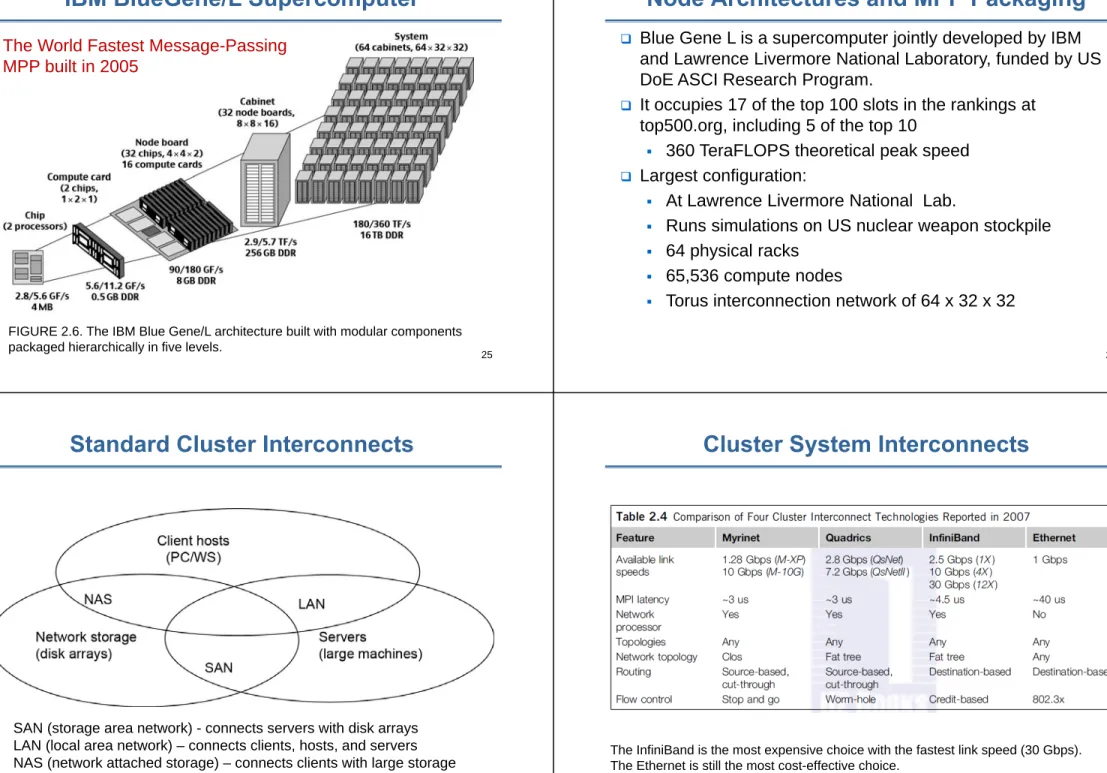
IBM BlueGene/L Supercomputer
The World Fastest Message-Passing MPP built in 2005
FIGURE 2.6. The IBM Blue Gene/L architecture built with modular components packaged hierarchically in five levels.
26
Node Architectures and MPP Packaging
Blue Gene L is a supercomputer jointly developed by IBM and Lawrence Livermore National Laboratory, funded by US DoE ASCI Research Program.
It occupies 17 of the top 100 slots in the rankings at top500.org, including 5 of the top 10
360 TeraFLOPS theoretical peak speed
Largest configuration:
At Lawrence Livermore National Lab.
Runs simulations on US nuclear weapon stockpile
64 physical racks
65,536 compute nodes
Torus interconnection network of 64 x 32 x 32
27
Standard Cluster Interconnects
• SAN (storage area network) - connects servers with disk arrays • LAN (local area network) – connects clients, hosts, and servers • NAS (network attached storage) – connects clients with large storage
systems
28
Cluster System Interconnects
The InfiniBand is the most expensive choice with the fastest link speed (30 Gbps). The Ethernet is still the most cost-effective choice.
29
Example 1: The Big Google Search Engine
A Supercluster built over
high-speed PCs
and
Gigabit LANs
for global web page searching
applications provided by Google.
Physically, the cluster is housed in 40 PC/switch
racks with 80 PCs per rack and 3200 PCs in total
Two racks to house two 128 x 128 Gigabit Ethernet
switches, the front hosts, and UPSs, etc.
All
commercially available hardware parts
with
Google designed software systems for supporting
parallel search, URL linking, page ranking, file and
database management, etc.
30
Google Search Engine Cluster
2 switches are used to enhance cluster availability. The cluster works fine even when one switch fails to provide the links among the PCs.
Example 2: InfiniBand (1)
Provides applications with an easy-to-use
messaging service.
Gives every application direct access to the
messaging service without need not rely on the
operating system to transfer messages.
Provides a messaging service by creating a
channel connecting an application to any other
application or service with which the application
needs to communicate.
Create these channels between virtual address
spaces.
Example 2: InfiniBand (2)
InfiniBand creates a channel directly connecting an
application in its virtual address space to an
application in another virtual address space.
The two applications can be in disjoint physical
address spaces – hosted by different servers.
33
InfiniBand Architecture
HCA – Host Channel Adapter.An HCA is the point at which an InfiniBand end node, such as a server or storage device, connects to the InfiniBand network.
TCA – Target Channel Adapter.This is a specialized version of a channel adapter intended for use in an embedded environment such as a storage appliance.
Switches –An InfiniBand Architecture switch is
conceptually similar to any other standard networking switch, but molded to meet InfiniBand’s performance and cost targets.
Routers –Although not currently in wide deployment, an InfiniBand router is intended to be used to segment a very large network into smaller subnets connected together by an InfiniBand router.
34
35
High-Bandwidth Interconnects in the Top 500
36
Hardware, Software, and Middleware Support
37
GPU Clustering for Massive Parallelism
How GPU Works
38 1. Clustering for Massive Parallelism
2. Computer Clusters and MPP Architectures
3. Design Principles of Computer Clusters
4. Cluster Job and Resource Management5. Case Studies of Supercomputer Systems
Computer Clusters for Scalable Parallel Computing
Design Principles of Clusters
Single System Image (SSI)
High Availability (HA)
Fault tolerance
Rollback recovery
What is Single System Image (SSI) ?
A single system image is the illusion, created by
software or hardware, that presents a collection
of resources as an integrated powerful resource.
SSI makes the
cluster appear like a single
machine
to the user, applications, and network.
A cluster with multiple system images is nothing
but a collection of independent computers
41
Single-System-Image Features
Single System: The entire cluster is viewed by the users as one system, which has multiple processors.
Single Control: Logically, an end user or system user utilizes services from one place with a single
interface.
Symmetry:A user can use a cluster service from any node. All cluster services and functionalities are symmetric to all nodes and all users, except those protected by access rights.
Location Transparent:The user is not aware of the where about of the physical device that eventually provides a service.
42
Basic SSI Services
Single Entry Point
telnet cluster.usc.edu
telnet node1.cluster.usc.edu
Single File Hierarchy:xFS, AFS, Solaris MC Proxy
Single I/O, Networking, and Memory Space
Other
Single Job Management: GlUnix, Codine, LSF, etc.
Single User Interface: Like CDE in Solaris/NT
Single process space
43
Example: Realizing a single entry point in a cluster of computers
1. Four nodes of a cluster are used as host nodes to receive users’ login requests. 2. To log into the cluster a standard Unix command such as “telnet
cluster.cs.hku.hk”, using the symbolic name of the cluster system is issued. 3. The symbolic name is translated by the DNS, which returns with the IP address
159.226.41.150 of the least-loaded node, which happens to be node Host1. 4. The user then logs in using this IP address.
5. The DNS periodically receives load information from the host nodes to make load-balancing translation decisions.
44
Single File Hierarchy
Single file hierarchy - the illusion of a single, huge file system image that transparently integrates local and global disks and other file devices (e.g., tapes).
Files can reside on 3 types of locations in a cluster:
Local storage - disk on the local node.
Remote storage - disks on remote nodes.
Stable storage
-• Persistent -data, once written to the stable storage,
will stay there at least for a period of time (e.g., a week), even after the cluster shuts down.
• Fault tolerant -to some degree, by using redundancy
45
Example: Stable Storage
Could be implemented as one centralized, large RAID disk or distributed using local disks of cluster nodes.
First approach uses a large disk, which is a single point of failure and a potential performance bottleneck.
Second approach is more difficult to implement, but potentially more economical, more efficient, and more
available. 46
Single I/O, Networking, and Memory Space
To achieve SSI, we need a:
single control point
single address space
single job management system
single user interface
single process control
Example: Distributed RAID - The RAID-x Architecture
Distributed RAID
architecture with a single I/O space over 12
distributed disks attached to 4 host machines (nodes) in a Linux cluster.
Di stands for disk I
Bj for disk block j
Bj’ an image (shaded plates) of block Bj.
P/M refers to processor /memory node
CDD is a cooperative
Single I/O, Networking, and Memory Space
Resides between OS and applications and offers in
infrastructure for supporting:
Single System Image (SSI)
System Availability (SA)
SSI makes collection appear as single machine
(globalised view of system resources).
Telnet cluster.myinstitute.edu
49
Middleware Support for SSI Clustering
Three levels of middleware: job management, programming and implementation
50
High Availability Through Redundancy
Three terms often go together: Reliability, Availability, and Serviceability (RAS).
Availability combines the concepts of reliability and serviceability as defined below:
Reliability measures how long a system can operate without a breakdown.
Availability indicates the percentage of time that a system is available to the user, that is, the
percentage of system uptime.
Serviceability refers to how easy it is to service the system, including hardware and software
maintenance, repair, upgrade, etc.
51
Availability and Failure Rate
Recent Find/SVP Survey of Fortune 1000 companies:
An average computer is down 9 times a year with an average downtime of 4 hours.
The average loss of revenue per hour downtime is $82,500.
Availability = MTTF / (MTTF + MTTR)
The operate-repair cycle of a computer system.
52
Single Points of Failure in SMP and Clusters
53
Fault Tolerant Cluster Configurations
Redundant components configured based on different cost, availability, and performance requirements.
The following three configurations are frequently used:
Hot Standby:A primary component provides service, while a redundant backup component stands by without doing any work, but is ready (hot) to take over as soon as the primary fails.
Mutual Takeover:All components are primary in that they all actively perform useful workload. When one fails, its workload is redistributed to other components. (more economical)
Fault-Tolerance: Most expensive configuration, as N components deliver performance of only one component, at more than N times the cost. The failure of N–1
components is masked (not visible to the user).
54
Failover
Probably the most important feature demanded in current clusters for commercial applications.
When a component fails, this technique allows the remaining system to take over the services originally provided by the failed component.
A failover mechanism must provide several functions: failure diagnosis, failure notification, and failure recovery.
Failure diagnosis -detection of a failure and the location of the failed component that causes the failure.
Commonly used technique - heartbeat, where the cluster nodes send out a stream of heartbeat messages to one another.
If the system does not receive the stream of heartbeat messages from a node, it can conclude that either the node or the network connection has failed.
Recovery Schemes: Backward Recovery
Failure recovery refers to the actions needed to take over the workload of a failed component.
Two types of recovery techniques:
Backward recovery -the processes running on a cluster periodically save a consistent state (called a
checkpoint) to a stable storage.
After a failure, the system is reconfigured to isolate the failed component, restores the previous checkpoint, and resumes normal operation. This is called rollback.
Backward recovery is easy to implement and is widely used.
Rollback implies wasted execution. If execution time is crucial, a forward recovery scheme should be used
Recovery Schemes: Forward Recovery
Forward recovery -
The system uses the failure
diagnosis information to reconstruct a valid system
state and continues execution.
Forward recovery is application-dependent and
may need extra hardware.
57
Checkpointing and Recovery Techniques
Kernel, Library, and Application Levels:Checkpointing at the operating system kernel level, where the OS transparently checkpoints and restarts processes.
Checkpoint Overheads:The time consumed and storage required for checkpointing.
Choosing an Optimal Checkpoint Interval:The time period between two checkpoints is called the checkpoint interval.
Incremental Checkpoint: Instead of saving the full state at each checkpoint, an incremental checkpoint scheme saves only the portion of the state that is changed from the
previous checkpoint.
User-Directed Checkpointing:User inserts code (e.g., library or system calls) to tell the system when to save, what to save, and what not to save.
58 1. Clustering for Massive Parallelism
2. Computer Clusters and MPP Architectures 3. Design Principles of Computer Clusters
4. Cluster Job and Resource Management
5. Case Studies of Supercomputer SystemsComputer Clusters for Scalable Parallel Computing
59
Cluster Job Scheduling and Management
A Job Management System (JMS) should have three parts:
A user server lets the user submit jobs to one or more queues, specify resource requirements for each job, delete a job from a queue, inquire about the status of a job or a queue.
A job scheduler that performs job scheduling and
queuing according to job types, resource requirements, resource availability, and scheduling policies.
A resource manager that allocates and monitors resources, enforces scheduling policies, and collects accounting information.
60
JMS Administration
JMS should be able to dynamically reconfigure the cluster with minimal impact on the running jobs.
The administrator’s prologue and epilogue scripts should be able to run before and after each job for security checking, accounting, and cleanup.
Users should be able to cleanly kill their own jobs.
The administrator or the JMS should be able to cleanly suspend or kill any job.
Clean means that when a job is suspended or killed, all its processes must be included.
Otherwise some “orphan” processes are left in the system, wasting cluster resources and may
61
Cluster Job Types
Several types of jobs execute on a cluster:
Serial jobs run on a single node.
Parallel jobs use multiple nodes.
Interactive jobsare those that require fast turnaround time, and their input/output is directed to a terminal.
These jobs do not need large resources, and the users expect them to execute immediately, not made to wait in a queue.
Batch jobs normally need more resources, such as large memory space and long CPU time.
But they do not need immediate response.
They are submitted to a job queue to be scheduled to run when the resource becomes available (e.g., during off hours).
62
Characteristics of Cluster Workload
Roughly half of parallel jobs are submitted during
regular working hours.
Almost 80% of parallel jobs run for 3 minutes or
less.
Parallel jobs running over 90 minutes account for
50% of the total time.
The sequential workload shows that 60% to 70% of
workstations are available to execute parallel jobs
at any time, even during peak daytime hours.
Characteristics of Cluster Workload
(cont.)
On a workstation, 53% of all idle periods are 3
minutes or less, but 95% of idle time is spent in
periods of time that are 10 minutes or longer.
A 2:1 rule applies, which states that a network of 64
workstations, with a proper JMS software, can
sustain a 32-node parallel workload in addition to
the original sequential workload.
In other words, clustering gives a supercomputer
half of the cluster size for free!
Characteristics of Cluster Workload
(cont.) Cluster jobs may be scheduled to run at a specific time(calendar scheduling) or when a particular event happens (event scheduling).
Jobs are scheduled according to priorities based on submission time, resource nodes, execution time, memory, disk, job type, and user identity.
With static priority, jobs are assigned priorities according to a predetermined, fixed scheme.
A simple scheme is to schedule jobs in a come, first-serve fashion.
Another scheme is to assign different priorities to users.
65
Job Scheduling Issues and Schemes for Cluster Nodes
66
Scheduling Modes (1)
Dedicated Mode:
Only one job runs in the cluster at a time, and at most one process of the job is assigned to a node at a time.
The single job runs until completion before it releases the cluster to run other jobs.
Space Sharing:
Multiple jobs can run on disjoint partitions (groups) of nodes simultaneously.
At most one process is assigned to a node at a time.
Although a partition of nodes is dedicated to a job, the interconnect and the I/O subsystem may be shared by all jobs.
67
Scheduling Modes (2)
Time sharing:
Multiple user processes are assigned to the same node.
Introduces the following parallel scheduling policies:
Independent Scheduling (Independent): Uses the operating system of each cluster node to schedule different processes as in a traditional workstation.
Gang Scheduling:Schedules all processes of a parallel job together. When one process is active, all processes are active.
Competition with Foreign (Local) Jobs:Scheduling becomes more complicated when both cluster jobs and local jobs are running. The local jobs should have priority over cluster jobs.
Dealing with Situation: Stay or Migrate job
68
Migration Scheme Issues
Node Availability:Can the job find another available node to migrate to?
Berkeley study : Even during peak hours, 60% of workstations in a cluster are available.
Migration Overhead:What is the effect of the migration overhead? The migration time can significantly slow down a parallel job.
Berkeley study : a slowdown as great as 2.4 times.
Slowdown is less if a parallel job is run on a cluster of twice the size.
e.g. a 32-node job on a 60-node cluster – migration slowdown no more than 20%, even when migration time of 3 minutes.
Recruitment Threshold:the amount of time a workstation stays unused before the cluster considers it an idle node. What should be the recruitment threshold?
69
Migration Scheme Issues
Most support heterogeneous Linux clusters.
All support parallel and batch jobs.
If enterprise cluster jobs are managed by a JMS, they will impact the owner of a workstation in running the local jobs.
All packages offer some kind of load-balancing
mechanism to efficiently utilize cluster resources. Some packages support checkpointing.
70
Migration Scheme Issues (cont.)
Most packages cannot support dynamic process migration.
They support static migration: a process can be dispatched to execute on a remote node when the process is first created.
However, once it starts execution, it stays in that node.
All packages allow dynamic suspension and resumption of a user job by the user or by the administrator.
All packages allow resources (e.g., nodes) to be dynamically added to or deleted.
Most packages provide both a command-line interface and a graphic user interface.
1. Clustering for Massive Parallelism
2. Computer Clusters and MPP Architectures 3. Design Principles of Computer Clusters 4. Cluster Job and Resource Management
5. Case Studies of Supercomputer Systems
Computer Clusters for Scalable Parallel Computing
Tianhe-1A: The World Fastest Supercomputer in 2010The Tianhe-1A system built by the National University of Defense Technology and installed at the National
73
Abstract Architecture of the Tianhe-1A system
74
Calculation of the Theoretical Peak Speed of Tianhe-1A System
75
High-bandwidth Switches of Tianhe-1A
The ARCH fat-tree interconnect in two stages of high-bandwidth switches
76
Software Architecture of the Tianhe-1A Supercomputer
77
Some Applications of Tianhe-1A
Most of them are specially tailored to satisfy China’s national needs
Parallel AMR (Adaptive Mesh Refinement) method
Parallel eigenvalue problems
Parallel fast multipole methods
Parallel computing models
Gridmol computational chemistry
ScGrid middleware, grid portal
PSEPS parallel symmetric eigenvalue package solvers
FMM-radar fast multipole methods on radar cross sections
Transplant many open source software programs
Sandstorm prediction, climate modeling, EM scattering, or cosmology
CAD/CAE for automotive industry
78
Cray XT5 Jaguar: The Top Supercomputer in 2009
The entire Jaguar system is built with 86 cabinets.
81
Some Architectural and Operational Features
Built with AMD 6-core Opteron processors running Linux at a 2.6 GHz clock rate
Has a total of 224,162 cores on more than 37,360 processors in 88 cabinets in four rows (there are 1,536 or 2,304 processor cores per cabinet)
Features 8,256 compute nodes and 96 service nodes interconnected by a 3D torus network, built with Cray SeaStar2+ chips
Attained a sustained speed, Rmax, from the Linpack Benchmark test of 1.759 Pflops
Largest Linpack matrix size tested recorded as Nmax = 5,474,272 unknowns
82
IBM Roadrunner: The Top Supercomputer in 2008
83
IBM Roadrunner: The Top Supercomputer in 2008
84
Acknowledgements
The slides have been based in-part upon original slides of a number of books and Profesors including:
Distributed and Cloud Computing: From Parallel Processing to The Internet of Things, K. Hwang, G. Fox and J. Dongarra, Morgan Kaufmann Publishers, 2012.