The New R Help System
by Duncan Murdoch and Simon UrbanekAbstract: Version 2.10.0 of R includes new code for processing ‘.Rd’ help files. There are some changes to what is allowed, and some new capa-bilities and opportunities.
One of the reasons for the success of R is that pack-age authors are required to write documentation in a structured format for all of the functions and datasets that they make visible in their packages. This means users can count on asking for help on a topic"foo" using either the function callhelp("foo"), or one of the shortcuts: entering?fooin the console, or finding help through the menu system in one of the graph-ical user interfaces. The quality of the help is im-proved by the structured format: the quality assur-ance tools such asR CMD checkcan report inconsis-tencies between the documentation and the code, un-documented objects, and other errors, and it is possi-ble to build indices automatically and do other com-putations on the text.
The original help system was motivated by the help system for S (Becker et al.,1988), and the look of the input files was loosely based on LATEX (Lamport,
1986). Perl (Wall et al.,2000) scripts transformed the input files into formatted text to display in the R con-sole, LATEX input files to be processed into Postscript or PDF documents, and HTML files to be viewed in a web browser.
These Perl scripts were hard to maintain, and in-consistencies crept into the system: different output formats could inadvertently contain different con-tent. Moreover, since the scripts could only look for fairly simple patterns, the quality control software had trouble detecting many errors which would slip through and result in rendering errors in the help pages, unknown to the author.
At the useR! 2008 meeting in Dortmund, one of us (Murdoch) was convinced to write a full-fledged parser for ‘.Rd’ files. This made it into the 2.9.0 re-lease in April, 2009, but only as part of the quality control system: and many package authors started receiving warning and error messages. Over the summer since then several members of the R Core team (including especially Brian Ripley and Kurt Hornik, as well as the authors of this article) have re-fined that parser, and written renderers to replace the Perl scripts, so that now all help processing is done in R code. We have also added an HTTP server to R to construct and deliver the help pages to a web browser on demand, rather than relying on static copies of the pages.
This article describes the components of the new help system.
The Parser
In the new help system, the transformation from an ‘.Rd’ file to a ‘.tex’, ‘.html’ or ‘.txt’ file is a two-step pro-cess. Theparse_Rd() function in thetoolspackage converts the ‘.Rd’ file to an R object with class"Rd" representing its structure, and the renderers convert that to the target form.
Rd Syntax
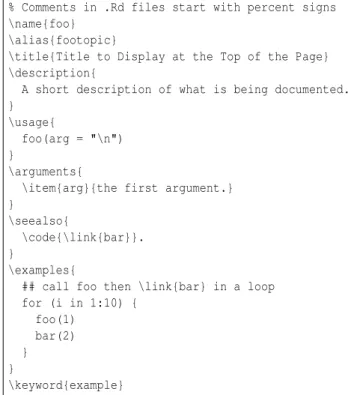
The syntax of ‘.Rd’ files handled by the parser is in some ways more complicated than the syntax of R it-self. It contains LATEX-like markup, R-like sections of code, and occasionally code from other languages as well. Figure1shows a near-minimal example.
% Comments in .Rd files start with percent signs \name{foo}
\alias{footopic}
\title{Title to Display at the Top of the Page} \description{
A short description of what is being documented. }
\usage{
foo(arg = "\n") }
\arguments{
\item{arg}{the first argument.} }
\seealso{
\code{\link{bar}}. }
\examples{
## call foo then \link{bar} in a loop for (i in 1:10) { foo(1) bar(2) } } \keyword{example}
Figure 1: The contents of a simplified ‘.Rd’ file. Like LATEX, a comment is introduced by a per-cent sign (%), and markup is prefixed with a back-slash (\). Braces ({}) are used to delimit the argu-ments to markup macros. However, notice that in the\examples{}section, we follow R syntax: braces are used to mark the body of theforloop.
In fact, there are three different modes that the parser uses when parsing the ‘.Rd’ file. It starts out in a LATEX-like mode, where backslashes and braces are used to indicate macros and their arguments. Some macros (e.g. \usage{}or\examples{}) switch into R-like mode: macros are still recognized, but braces are used in the code, and don’t necessarily in-dicate the arguments to macros. The third mode is mostly verbatim: it doesn’t recognize any macros at
all. It is used in a few macros like\alias{}, where we might want to set an alias involving backslashes, for instance. There are further complications in that strings in quotes in R-like mode (e.g. "\n") are han-dled slightly differently again, so the newline is not treated as a macro, and R comments in R-like mode have their own special rules.
A good question to ask is why the syntax is so complicated. Largely this is a legacy of the ear-lier versions of the help system. Because there was no parsing, just a single-step transformation to the output format, special characters were handled on a case-by-case basis, and not always consistently. When writing the new parser, we wanted to min-imize the number of previously correct ‘.Rd’ files which triggered errors or were rendered incorrectly. The three-mode syntax described above is the result. The syntax rules are fully described inMurdoch
(2009), but most users should not need to know all the details. In almost all cases, the syntax is designed so that typing what you mean will give the result you want. A quick summary is as follows:
• The characters\,%,{and}have special mean-ing almost everywhere in an ‘.Rd’ file.
• The backslash \ is used both to introduce macros and to escape the special meaning of the other characters.
• Unless escaped, the percent %character starts a comment. The comment is included in the parsed object, but the renderers will not dis-play it to the user.
• Unless escaped, the braces{and}delimit the arguments to macros. In R-like or verbatim text, they need not be escaped if they balance. • End of line (newline) characters mark the end
of pieces of text, even when following a% com-ment.
• Other whitespace (spaces, tabs, etc.) is in-cluded as part of the text, though the renderers may remove or change it.
• In R-like text, quoted strings follow R rules: the delimiters must balance, and braces within need not. Only a few macros are recognized in R strings:\varand those related to links. Other uses of a backslash, e.g. "\n"are taken to be part of the string.
• In R-like text, R comments using#are taken to be part of the text.
• The directives #ifdef ... #endif and #ifndef ... #endifare treated as markup, so other macros must be completely nested within them or completely contain them.
There are more than 60 macros recognized by the parser, from\acronymto\verb. Each of them takes from 0 to 3 arguments in braces, and some of them take optional arguments in brackets ([]). A complete list is given inMurdoch(2009), and their interpreta-tion is described in theWriting R Extensionsmanual (R Development Core Team,2009).
Rd Objects
The output of theparse_Rd()function is a list with class"Rd". Currently this is mostly intended for in-ternal use, and the only methods defined for that class are as.character.Rd() and print.Rd(). The elements of the list are the top level components of the ‘.Rd’ file. Each element has an"RdTag"attribute labelling it as one of the three kinds of text, or a com-ment, or as a macro. There is a (currently internal) function in the tools package to display all of the tags. For example, using the help file from Figure
1, we get the following results.
> library(tools) > parsed <- parse_Rd("foo.Rd") > tools:::RdTags(parsed) [1] "COMMENT" "TEXT" [3] "\\name" "TEXT" [5] "\\alias" "TEXT" [7] "\\title" "TEXT" [9] "\\description" "TEXT" [11] "\\usage" "TEXT" [13] "\\arguments" "TEXT" [15] "\\seealso" "TEXT" [17] "\\examples" "TEXT" [19] "\\keyword" "TEXT"
TheTEXTcomponents between each section are sim-ply the newlines that separate them, and can be ig-nored. The components labelled with macro names are themselves lists, with the same structure. For ex-ample, component 15 is the\seealsosection, and it has this structure
> tools:::RdTags(parsed[[15]])
[1] "TEXT" "TEXT" "\\code" "TEXT"
and the\codemacro within it is a list, etc. Most users will have no need to look at"Rd"objects at this level, but this is crucial for the internal quality assurance code, and for the renderers described in the next sec-tion. As R 2.10.0 is the first release where these ob-jects are being fully used, there have been a number of changes since they were introduced in R 2.9.0, and there may still be further changes in future releases: so users of the internal structure should pay close attention to changes taking place on the R develop-ment trunk.
Incompatibilities
One of the design goals in writing the new parser was to accept valid ‘.Rd’ files from previous versions. This was mostly achieved, but there are some incom-patibilities arising from the new syntax rules given above. A full description is included in Murdoch
(2009); here we point out some highlights.
In previous versions, the\code{}macro was used for both R code and code in other languages. How-ever, the R code needs R-like parsing rules, and other languages often need verbatim parsing. Since R code is more commonly used, it was decided to restrict \code{}to handle R code and introduce\verb{}for the rest. At present, this mainly affects text contain-ing quote marks, which must balance in a \code{} block as in R code. At some point in the future legal R syntax might be more strictly enforced.
The handling of#ifdef/#ifndefand the rules for escaping characters are now more regular.
Error Handling
One final feature of parse_Rd() is worth mention-ing. We make a great effort to report errors in ‘.Rd’ files at the point they occur, and because we now fully parse the file, we have detected a large num-ber of errors that previously went unnoticed. In most cases these errors resulted in help pages that were not being displayed as the author intended, but we don’t want to suddenly make hundreds of packages on CRAN unusable. The compromise we reached is as follows: when the parser detects an error in a ‘.Rd’ file, it reports an error or warning, and attempts to recover, possibly skipping some text. The package installation code will report these messages, but will not abort an installation because of them. Authors should not ignore these messages: in most cases, they indicate that something will not be displayed as intended.
The Renderers
As of version 2.10.0, R will present help in three dif-ferent formats: text, HTML, and PDF manuals. Pre-vious versions also included compiled HTML on the Windows platform; that format is no longer sup-ported, due partly to security concerns (Microsoft Support,2007), partly to the fact that it will not port dynamic help, and partly to reduce the sup-port load on the R Core team. The displayed type is now controlled by a single option rather than a collection of options: for example, to see HTML help, use options(help_type="html") rather than options(htmlhelp=TRUE).
The three formats are produced by the functions Rd2txt(), Rd2HTML() and Rd2latex() in the tools package. The main purpose of these functions is to
convert the parsed "Rd" objects to the output for-mat; they also accept ‘.Rd’ files as input, calling parse_Rd()if necessary.
There are two other related functions in tools. TheRd2ex()function extracts example code from a help page, and checkRd() performs checks on the contents of an"Rd"object. The latter checks for the presence of all necessary sections (at most once in some cases, e.g. for the\title{}). It is used to report errors and warnings duringR CMD checkprocessing of a package.
One big change from earlier versions of R is that these functions do their rendering on request. In ear-lier versions, all help processing was done when the package was installed, and the text files, HTML files, and PDF manuals were installed with the package. Now the"Rd" objects are produced at install time, but the human-readable displays are produced at the time the user asks to see them. As described be-low, this means that help pages can include informa-tion computed just before the page is displayed. Not much use is made of this feature in 2.10.0, but the ca-pability is there, and we expect to make more use of it in later releases of base R, and to see it being used in user-contributed packages even sooner.
Another advantage of “just-in-time” rendering is that cross-package links between help pages are han-dled better. In previous versions of R, the syntax \link[stats]{weighted.mean}
meant that the HTML renderer should link to the filenamed ‘weighted.mean.html’ in thestatspackage, whereas
\link{weighted.mean}
meant to link to whatever file corresponded to the aliasweighted.meanin the current package. This dif-ference was necessary because the installer needed to build links at install time, but it could not necessar-ily look up topics outside of the current package (the target package might not be installed yet). Unfortu-nately, the inconsistency was a frequent source of er-rors, even in the base packages. Now that calculation can be delayed until rendering time, R 2.10.0 sup-ports both kinds of linking. For back-compatibility, it gives priority to linking by filename, but if that fails, it will try to link by topic.
The HTTP server
In order to produce the help display in a web browser when the user requests, it was necessary to add an HTTP server to R.
At a high level the goal of the server is to accept connections from browsers, convert each HTTP re-quest on a TCP/IP port into a call to an R function and deliver the result back to the browser. Since the main use is to provide a dynamic help system based
on the current state of the R session (such as pack-ages loaded, methods defined, . . . ), it is important that the function is evaluated in the current R session. This makes the implementation more tricky as we could not use regular socket connections and write the server entirely in R.
Instead, a general asynchronous server infras-tructure had to be created which handles multiple simultaneous connections and is yet able to syn-chronize them into synchronous calls of the R eval-uator. The processing of each connection is dis-patched to an asynchronous worker which keeps track of the state of the connection, collects the en-tire HTTP request and issues a message to R to cess the request when complete. The request is pro-cessed by calling the httpd function with two ar-guments: path from the URL and query parame-ters. The query parameters are parsed from the query string into a named string vector and de-coded, so for example text=foo%3f&n=10 is passed asc(text="foo?", n="10").
Thehttpd()function is expected to produce out-put in the form of a list that is meaningful to the browser. The list’s elements are interpreted in se-quence as follows: payload,content-type,headersand status code. Only the payload is mandatory so the re-turned list can have one to four elements. The con-tent type specifies the MIME-type of the payload (de-fault is “text/html”), headers specify optional HTTP response headers as a named character vector (with-out CR/LF) and the error code is an integer speci-fying the HTTP status code. The payload must be either a string vector of length one or a raw vec-tor. If the payload element is a string vector named “file” then the string is interpreted as an absolute path to a file to be sent as the payload (useful for static content). Otherwise the payload is sent to the browser in verbatim. Thehttpdfunction is evaluated in atryCatchblock such that errors are returned as a string from the function, resulting in a 500 status code (internal server error). An example of a simple httpdfunction is listed below:
httpd <- function(path, query, ...) { if (is.null(query)) query <- character(0) pkg <- query['package']
if (is.na(pkg)) pkg <- 'base'
fn <- system.file(path, package = pkg) if (file.exists(fn)) return(list(file = fn)) list(paste("Cannot find", path),
"text/html", NULL, 404L) }
The signature of the httpd function should in-clude . . . for future extensions. The above function checks for the packagequery parameter (defaulting to “base”) then attempts to find a file given bypath in that package. If successful the content of the file is served (as default text/html), otherwise a simple er-ror page is created with a 404 HTTP status code “not
found”.
Although the HTTP server is quite general and could be used for many purposes, R 2.10.0 has the limitation of one server per R instance which makes it currently dedicated to the dynamic help. The user may setoptions("help.ports")to control which IP port is used by the server. If not set, the port is as-signed randomly to avoid collisions between differ-ent R instances.
New Features in ‘
.Rd
’
Files
R Expressions in Help
As mentioned previously, help output is now being produced just before display, and it is possible for the author to customize the display at that time. This is supported by the new macro \Sexpr{}, which is modelled after the macro of the same name in cur-rent versions of Sweave (Leisch,2002).
Unlike Sweave, in ‘.Rd’ files the\Sexpr{}macro takes optional arguments to control how it is dis-played, and when it is calculated. For example, \Sexpr[results=verbatim,echo=TRUE]{x<-10;x^2} will result in a display similar to
> x<-10;x^2 [1] 100
when the help page is displayed.
Some of the options are similar to Sweave, but not always with the same defaults. For example the options (with defaults) eval=TRUE,echo=FALSE, keep.source=TRUE, andstrip.white=TRUEdo more or less the same things as in Sweave. That is, they control whether the code is evaluated, echoed, refor-matted, and stripped of white space before display, respectively.
There are also options that are different from Sweave. Theresultsoption has the following pos-sible values:
results=text (the default) The result should be in-serted into the text at the current point.
results=verbatim Print the result as if it was exe-cuted at the console.
results=hide No result should be shown.
results=rd The result should be parsed as if it was ‘.Rd’ file code.
Thestageoption controls when the code is run. It has the following values:
stage=build The code should be run when building the package. This option is not currently im-plemented, but is allowed; the code will not be executed in R 2.10.0.
stage=install (the default) The code is run when installing the package from source, or when building a binary version of the package.
stage=render The code is run just before the page is rendered.
The \Sexpr{} macro enables a lot of improve-ments to the help system. It will allow help pages to include examples with results inline, so that they can be mixed with descriptions, making explana-tions clearer. The just-in-time rendering will also al-low help pages to produce information customized to a particular session: for example, it would be help-ful to link from a page about a class to methods which mention it in their signatures. It will also be possible to prototype new types of summary pages or indices for the whole help system, without requir-ing changes to base R.
Conditional markup
The help files have supported #ifdef/#ifndef con-ditionals for years, to allow selective inclusion of text depending on the computing platform where R is run. With version 2.10.0 more general condi-tional selection has been added: the \if{}{} and \ifelse{}{}{} macros. The first argument to these describes the condition, the second is code to be in-cluded at render time if that condition holds, and the third if it does not.
The most common use of the conditionals is fore-seen to be to select displays depending on the out-put format, to extend the idea of the\eqnand\deqn macros from previous versions. To support this use, the condition is expressed as a comma-separated list of formats, chosen fromexample,html,latex,text, TRUEandFALSE. If the current output format orTRUE is in the list, the condition is satisfied. The logi-cals would normally be the result of evaluating an \Sexpr{}expression, so general run-time conditions are possible.
Verbatim output
Two new macros have been added to support out-put of literal text. The \verb{}macro parses its ar-gument as verbatim text, and the renderers output it as parsed, inserting whatever escapes and conver-sions are necessary so that it renders the same in all formats. The \out{}macro works at a lower level. It also parses its argument as verbatim text, but the renderers output it in raw form, without any process-ing. It would almost certainly be used in combina-tion with \ifor\ifelse. For example, to output a Greek letter alpha, the markup
\ifelse{html}{\out{α}}{ \eqn{\alpha}{alpha}}
could be used: this will output α when pro-ducing HTML and \alpha when producing LATEX, both of which will render asα; it will outputalpha
when producing text.
The Future
One of the development guidelines for R is that we don’t introduce many new features in patch releases, so R 2.10.1 is not likely to differ much from what is described above. However, we would expect small changes to the rendering of help pages as the render-ers become more polished.
For version 2.11.0 or later, we would expect some of the following to be implemented. The order of pre-sentation is not necessarily the order in which they will appear, and some may never appear.
• The\Sexpr{}macro will likely develop in sev-eral ways:
– We will likely add in the processing of stage=build macros when the R CMD buildcode is rewritten in R.
– We will likely change the prompt(), package.skeleton() and related func-tions to make use of\Sexpr{}macros, e.g. to display the version of a package, or to list the classes supporting a method, etc. – We will make information about the
run-time environment available to the \Sexpr{}code, so that it can tailor its be-haviour to the context in which it is being run.
– We would expect users to develop con-tributed packages to provide convenient functions to use in \Sexpr{} macros. Some of these may need changes to base R.
– We would like to allow figures to be in-serted into help displays.
• The quality control checks will continue to evolve, as we notice common errors and add code tocheckRd()to detect them. There is al-ready support for spell checking of ‘.Rd’ files in theaspell()function.
• The ‘.Rd’ format is very idiosyncratic, and not many tools exist outside of R for working with it. There may be an advantage to switching to a different input format (e.g. one based on XML) in order to make use of more standard tools. Such a change would require conversion of the thousands of existing help pages already in ‘.Rd’ format; the new parser may enable au-tomatic translation if anyone wants to explore this possibility.
• The HTTP server used in the help system is quite general, but is currently limited to serv-ing R help pages. It may be extended to allow more general use in the future.
Changing to the new help system has already helped to diagnose hundreds of errors in help pages that slipped by in the previous version, and diagnos-tic messages are more informative than they were. As the\Sexpr{}macro is used in core R and by pack-age writers, we will see better help than ever before, and the HTTP server will open up many other possi-bilities for R developers.
Bibliography
R. A. Becker, J. M. Chambers, and A. R. Wilks. The New S Language. Wadsworth, Pacific Grove, Cali-fornia, 1988.
L. Lamport. LATEX: A Document Preparation System. Addison-Wesley, Reading, Massachusetts, 1986. F. Leisch. Sweave: Dynamic generation of statistical
reports using literate data analysis. In W. Härdle and B. Rönz, editors,Compstat 2002 — Proceedings in Computational Statistics, pages 575–580. Physica Verlag, Heidelberg, 2002. URLhttp://www.stat. uni-muenchen.de/~leisch/Sweave. ISBN 3-7908-1517-9.
Microsoft Support. Ms05-026: A vulnerability in html help could allow remote code execution, 2007. Retrieved fromhttp://support.microsoft. com/kb/896358on November 5, 2009.
D. Murdoch. Parsing Rd files. 2009. URL http: //developer.r-project.org/parseRd.pdf. R Development Core Team. Writing R Extensions,
2009. Manual included with R version 2.10.0. L. Wall, T. Christiansen, and J. Orwant.Programming
Perl. O’Reilly Media, third edition, 2000.
Duncan Murdoch
Dept. of Statistical and Actuarial Sciences University of Western Ontario
London, Ontario, Canada
Simon Urbanek
AT&T Labs – Statistics Research Florham Park, NJ, USA