Opportunities for Android Projects in a CS1 Course
Ivaylo Ilinkin
Gettysburg College Gettysburg, PA[email protected]
ABSTRACT
Mobile devices have become ubiquitous in our daily lives and are replacing the desktop for email, social networking, daily planner, and so on. A typical mobile device now integrates a wide range of accessories, such as camera, GPS receiver, accelerometer, and offers a touch-screen with gesture-based interaction. This makes mobile devices an exciting plat-form for software development and programming projects for mobile devices have great potential to provide engaging experiences for computer science majors.
This paper describes a pedagogical tool for introducing Android in a traditional CS1 course. The goal is not to teach Android programming, but to create a framework that integrates seamlessly with the CS1 course structure and sup-ports the introduction of the fundamental computer science concepts by creating an engaging learning environment. The framework enables the students to port their CS1 projects to an Android device with minimal effort.
Categories and Subject Descriptors
K.3.2 [Computers and Education]: Computers and In-formation Science Education—Curriculum
General Terms
Design, Experimentation, Human Factors
Keywords
Mobile devices, Java, Android, CS1
1.
INTRODUCTION
The capabilities of modern mobile phones have opened a rich area for creative applications. This has great poten-tial to enrich the computer science curriculum and will con-tinue to increase in relevance with each generation of new students. A typical mobile phone now integrates a cam-era, GPS receiver, accelerometer, and provides a convenient
Permission to make digital or hard copies of all or part of this work for personal or classroom use is granted without fee provided that copies are not made or distributed for profit or commercial advantage and that copies bear this notice and the full citation on the first page. Copyrights for components of this work owned by others than the author(s) must be honored. Abstracting with credit is permitted. To copy otherwise, or republish, to post on servers or to redistribute to lists, requires prior specific permission and/or a fee. Request permissions from [email protected].
SIGCSE’14,March 5–8, 2014, Atlanta, GA, USA.
Copyright is held by the owner/author(s). Publication rights licensed to ACM. ACM 978-1-4503-2605-6/14/03 ...$15.00.
http://dx.doi.org/10.1145/2538862.2538983.
way of interaction via a touch-screen interface. This allows for greater range of exploration and could lead to program-ming projects that have built-in motivation and the capacity to maintain student engagement. Furthermore, experience with developing applications for mobile devices could open new career opportunities for graduating CS majors. In fact, software development for mobile devices has received enor-mous recognition in recent years, particularly since the in-troduction of the iOS and Android operating systems, with Windows CE, Java ME, and Blackberry bringing the first wave of mobile technology in the curriculum [10, 12, 13, 14]. Of the modern platforms, Android, which is based on the Java programming language, has the potential for wide adoption due to the popularity of Java in the computer sci-ence curriculum.
Since these technologies have a fairly steep learning curve a lot of the effort has naturally focused on adopting them in the upper-level courses and in senior capstone projects [3, 7, 11, 15, 16]. There have also been successful efforts to inte-grate Android programming in CS2 [2, 8, 9], and in fact, it is easy to see the potential for using Android in a CS2 course without significant disruption to the course structure, par-ticularly for introducing event-driven GUI programming and the Model-View-Controller pattern. Finally, creative ideas have been reported for introducing mobile programming at the CS0 and high-school level [1, 19, 20, 21]. The latter ap-proaches rely on theApp Inventor framework which brings the strengths of the visual programming environments of ScratchandAliceto mobile application development.
While Android has been integrated to some extent at most levels of the curriculum, little has been reported of its adop-tion at the CS1 level. In a sense this is understandable — approaches that work at the CS0 level (e.g. App Inventor) aim for a gentler high-level introduction to programing with a focus on application design, and are therefore, less likely to enhance instruction in CS1. The fact that Android is based on Java makes it tempting to introduce it in CS1 directly, but the programming model is quite different and even a Hello Worldapplication is fairly involved, which is likely to detract from the main goals of CS1. Direct introduction of Android is feasible in CS2, where programming maturity is expected and the possibilities for creative projects that fit neatly with material are likely to enhance instruction. A promising approach targeting the CS1/CS2 level is de-scribed in recent work on the Sofia framework [6] using a micro-world library designed to fit within an objects-early CS1 curriculum. Positive results are reported with using
theALEgame development platform for Android for a final project at the end of a CS1 course [4].
The contribution of this paper is to suggest opportunities for introducing Android in CS1 through a pedagogical tool that is compatible with anobjects-lateapproach and can be introduced very early in the CS1 curriculum. The paper in-troduces a framework, calledCS1App, that fits seamlessly with the CS1 course structure and hides away all of the complexity of setting up an Android application. The stu-dents can deploy their projects on an Android device with straightforward modifications to their desktop applications. The main difficulty in integrating Android in CS1 is that the event-driven model and activity life-cycle in an Android application require fairly sophisticated programming back-ground. The Android requirement that applications should not block the main UI thread makes it difficult to obtain touch and keypad input and leads to a flow of control that is quite different from the straightforward sequential nature of early examples in a typical CS1 course. The advantage of the proposed framework is that it works around this limita-tion and provides blocking input, for both touch and keypad, so that from the student’s perspective input works similar to theScannerand the flow of control has the familiar na-ture. This makes it possible to port easily desktop applica-tions to Android without knowledge of object-oriented pro-gramming. By contrast, theSophiaframework, for example, still retains the event-driven model (disguised to some ex-tent) and requires some familiarity with classes and objects. While bothSophiaandALEoffer a wide range of capabili-ties, that brings a higher level of complexity. The proposed framework has a very low requirements threshold, yet it still affords opportunities for creative projects.
The design of the proposed framework was guided by the following objectives:
• require no knowledge of Android development • require no knowledge of object-oriented concepts
(in-heritance, polymorphism, classes, objects, etc.) • have minimal impact on the planned course schedule The need for the first goal is obvious if the framework is to be used in CS1. The second goal is motivated by the fact that we use theobjects-lateapproach and cannot expect familiarity with object-oriented concepts. We only expect knowledge, introduced as needed, at the level of using Scan-ner, Random, or String — i.e. an intuitive understanding that adotfollowed by a fairly obvious phrase, accomplishes what the phrase indicates, such as scanner.nextInt() or myName.length(). The fact that we target theobjects-late level means that students exposed to theobjects-early ap-proach will have no difficulty using the framework. Finally, our last goal acknowledges the fact that Android should be introduced only if it does not disrupt the instructor’s plan.
We remark that our goal is not to teach Android pro-gramming. In fact, students who use the framework will not learn anything about Android. Yet, they will be able to create with little effort applications that run on Android devices.
Source code for several examples of popular programming projects (Tic-Tac-Toe,Memory Tiles,Hangman, etc.), doc-umentation, and a compiled version of the library are avail-able athttp://www.cs.gettysburg.edu/~ilinkin/cs1app .
Our approach is inspired by the numerous graphics li-braries that have been developed to support teaching in CS1. A graphics library provides an intuitive interface to the stu-dents and helps the instructors create engaging assignments to achieve the learning goals. The concepts of drawing prim-itive shapes are so familiar to the students that a graphics library does not get in the way of learning, and instead, provides a fun and rewarding experience.
The proposed framework is essentially a graphics library for Android. It grew out of a Java graphics library for desk-top applications written to support our CS1 and since the Android version retained the same interface, the student projects that worked successfully in the past can now be deployed on an Android device. The framework requires little on the part of the instructor in terms of updating the assignment write-ups and it requires little work from the stu-dents to modify their projects, especially compared to the excitement factor of running a non-trivial CS1 application on an Android device and sharing it with friends.
In the rest of the paper Section 2 presents the framework and illustrates the differences between a desktop and an An-droid application (in particular, subsections 2.2, 2.3, and 2.5 show how to handle touch and keypad input); Section 3 of-fers ideas for programming projects; Section 4 discusses how to integrate the framework withDrJava; and Section 5 closes with concluding remarks.
2.
PROPOSED FRAMEWORK
The proposed framework grew out of a graphics library that we have used for teaching CS1 in Java for a number of years. The graphics library offers the standard capabilities for drawing primitive 2D shapes, text, and images on a can-vas, and provides an interface to read input from the user. The design and API is similar to that of the graphics library created by John Zelle [23] for introducing computer science through Python.
The graphics library provides an object-oriented interface and a procedural-style interface. Since our course is designed asobjects-latewe use the procedural-style interface, but ob-jects are supported as well. For example, here is how one might draw a red circle of radius 10 centered at (30,20):
(a) canvas.drawCircle(30, 20, 10, "red");
(b) Circle c = new Circle(new Point(30, 20), 10); c.setColor("red");
c.draw();
We use the first style and the students quickly guess how to draw other shapes, text, and images.
This simple interface is sufficient to design a number of engaging projects that enhance CS1 instruction, a notion that has been recognized for some time in the computer science education community [5, 17, 18, 22].
2.1
Android App Structure
One of the very first desktop applications that we typically develop in class is to draw a smiley face given its center and radius based on pre-defined face proportions. This has been an effective example for introducing methods, parameters, andvariablesin a context that is fun and easy to set up.
Figure 1 shows a comparison between a desktop and an Android application for drawing a smiley face. There are only two differences:
• the Android version does not have amainmethod • the Android version must includeextends AndroidApp The base classAndroidAppis the one that sets up the view and activity of the application and the process is completely transparent to the students – they don’t need to be familiar with the concept of inheritance to appreciate the need for theextendsclause, since they are building anAndroid app. No change is needed to the student code to build and run the application on an Android device:
class Smiley {
// draw a color smiley face of size r at (x, y) void drawSmiley(int x, int y, int r, String color) {
// code to draw the smiley face }
// run/test the application void run()
{
drawSmiley(30, 20, 10, "yellow"); }
// we ignore the main method and use run() instead public static void main(String[] args)
{
new Smiley().run(); }
}
class SmileyApp extends AndroidApp {
// draw a color smiley face of size r at (x, y) void drawSmiley(int x, int y, int r, String color) {
// code to draw the smiley face }
// run/test the application void run()
{
drawSmiley(30, 20, 10, "yellow"); }
}
Figure 1: Comparison between a desktop and an Android application for drawing a smiley face.
2.2
Handling Keypad Input
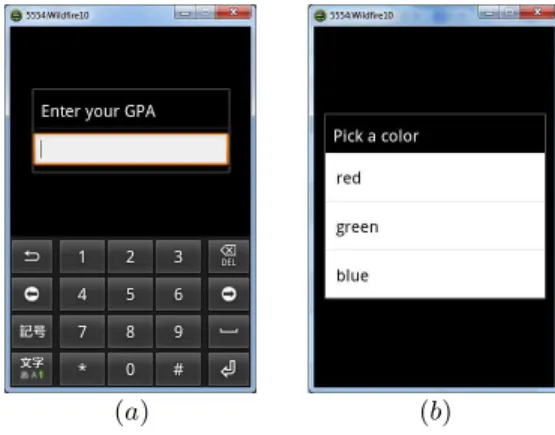
The framework offers functionality for obtaining user in-put through an API that is similar to the Scanner (Fig-ure 2 (a)). For example,
float gpa = canvas.readFloat("Enter your GPA");
Unlike theScannerthe framework also includes function-ality for user input via selection lists (Figure 2 (b)):
String color = canvas.readSelection("Pick a color", "red", "green", "blue");
It is important to note that the canvas.readXXXX calls are blocking, i.e. execution is suspended until the user has entered the data in the dialog box. One of the difficulties in using Android in CS1 is that the event-driven model of a standard Android application requires non-trivial under-standing of object-oriented concepts. The framework re-moves this obstacle by providing blocking calls that behave
exactly as theScanner nextXXXXcalls, so the flow of control remains the same as in a desktop application.
(a) (b)
Figure 2: Screenshots of input dialogs.
2.3
Handling Touch Input
Touch input has greatly enhanced the richness of user ex-perience on mobile devices. The framework makes it possible to detect and handle touch events by providing information about the location of the event, the number of taps (either 1 or 2), and the shape on which the event occurred (for students familiar with objects):
Touch touch = canvas.waitForTouch(); int x = touch.getX();
int y = touch.getY(); int taps = touch.getTaps();
Again, note that this is a blocking call, so the flow of control remains the same as in a desktop application. We can now combine keypad and touch input to enhance the example from Figure 1 by rewriting therun()method:
void run() {
// could wrap in a while (true) { ... } loop int radius = 40;
String color = canvas.readSelection("Pick a color", "red", "green", "blue"); Touch touch = canvas.waitForTouch();
if (touch.getTaps() == 2) radius = 2*radius;
drawSmiley(touch.getX(), touch.getY(), radius, color); }
2.4
Hangman App
In this section we discuss the conversion between a desk-top and an Android application in a more complicated ex-ample. We use theHangman game to illustrate how little is required to port a non-trivial assignment to an Android device.
The Hangman game is one of the popular CS1 assign-ments. It requires no lengthy introduction and provides an opportunity to exercise in a fun and engaging way a number of fundamental computer science concepts (e.g. methods, control structures,for loops, andlinear structures (strings)). Creating a desktop Hangman application provides a sense of accomplishment for the students, who are just starting to learn about programming; it is all the more rewarding to be able to run it on a personal device and share it with friends. This is a fairly substantial assignment (a typical submis-sion is about 200 lines of code), and yet it requires little
modification to convert it to an Android application. In fact, since the Android framework shares the same inter-face as the desktop graphics library, other than the changes illustrated in Figure 1 (removing the main() method and adding theextends clause), the only other modification is to replace:
System.out.print("Guess a character:"); char guess = (char) System.in.read();
with:
char guess = canvas.readChar("Guess a character:");
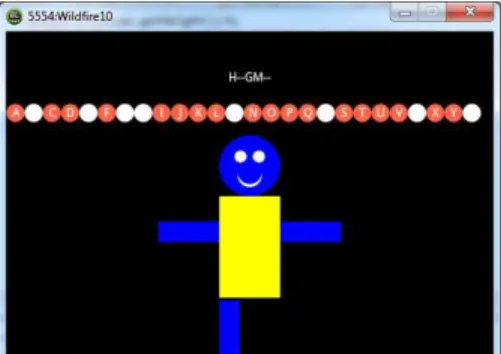
A more interesting variation is to enhance the user expe-rience via touch input. Tapping one of the letters in the al-phabet row (see Figure 3) can provide the user’s next guess.
Figure 3: Student submission forHangmanproject.
Students familiar with objects could usetouch.getShape() to find which letter was selected and can then interact with the shape object directly. Students who come from objects-late background can use the following strategy — in the Hangman app the alphabet spans the whole width of the canvas, and therefore, the index of the selected letter can be found with a simple divison. Thus, the keypad input can be replaced with:
Touch touch = canvas.waitForTouch(); int index = touch.getX() / letterDiam; char guess = alphabet.charAt(index);
(A careful student might also consider checking if the y coordinate of the touch is close to the alphabet baseline.)
While this may seem a contrived example, it actually gen-eralizes to a wide range of applications. In particular, it can be applied to many board games (e.g. Tic-Tac-Toe, Mem-ory Tiles,Minesweeper, etc.) which have a natural reference point from which one can derive therowandcolumnof a se-lected object in a grid:
Touch touch = canvas.waitForTouch();
int row = (touch.getY() - BOARD_ULY) / CELL_SIZE; int col = (touch.getX() - BOARD_ULX) / CELL_SIZE;
2.5
Handling Fling Input
The framework supports a variation of the touch input that is recognized as afling across the device screen. For fling events the framework provides information about the start and end points of the gesture, and its direction and velocity. The following example illustrates a possible appli-cation of this gesture — the goal is to fling the image in the top-left corner, so that it floats on top of the image in the bottom-right corner (see Figure 4):
void run() {
int birdX = 60, birdY = 60; int pigX = 420, pigY = 260;
// draw "background.png", "pig.png", "bird.png" Fling fling = canvas.waitForFling();
int dx = fling.getDx(); int dy = fling.getDy(); int speedX = 3, speedY = 6;
while (distance(birdX, birdY, pigX, pigY) > 15 && isVisible(birdX, birdY)) {
birdX = birdX + speedX*dx; birdY = birdY + speedY*dy; canvas.sleep(.01);
// clear canvas, redraw scene }
}
The two missing methods are straightforward to imple-ment, so this is essentially the complete code for the app. A simple modification can make this even more compelling by choosing a random startingxposition for the target image.
Figure 4: Example app for handling fling events.
3.
PROGRAMMING PROJECTS
This section introduces examples of programming projects that we have used for several years. With the introduction of the framework we created Android versions as well.
3.1
NimGame and MineSweeper
TheNimGameis an assignment that we use early in the semester to introduce methods, control structures, boolean expressions, andwhile loops. The students build a variation of a Nim game in which two players take turns removing coins from two piles with the restriction that a player must remove at least one, but no more than five, coins per turn from one of the rows (or the same number from both rows). Converting this project to an Android app is straightforward and follows the same pattern as outlined inHangman, Sec-tion 2.4. An interesting user-interface challenge posed in NimGame is how to distinguish whether to remove coins from a single row or from both rows. We find which coin has been selected (using the strategy as inHangmanto se-lect a letter) and remove from a single row onsingle tapand from both rows ondouble tap.
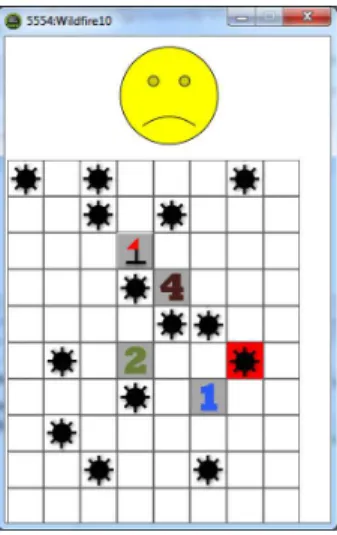
MineSweeperwas assigned as a final project just prior to the development of the framework. A student submission
was converted to an Android application as proof-of-concept. In fact, despite its greater complexity compared to the other projects it only required the inclusion of the code portion at the end of Section 2.4 for finding therowandcolumnof the selected cell. Had the framework been available at the time, it would have certainly been a nice way for the students to end the course with their own version of MineSweeper on their phones.
Representative images of the applications are shown in Figures 5 and 6.
4.
INTEGRATION WITH DRJAVA
In this section we discuss our experience with using the proposed framework withDrJava. The simple and intuitive interface ofDrJava has made it our choice of teaching en-vironment in CS1. In CS2 we transition to the significantly more complex, but also more powerful, Eclipse.
Integrating Android and the proposed framework with Eclipse is straightforward. Eclipse manages the required Android plug-ins and the framework only needs to be in-cluded as an external.jarfile to the project. Courses using Eclipse in CS1 will have no difficulty editing, building, and running the examples from the previous sections.
DrJavaprovides no integration Android, but the setup is quite manageable. The students can still edit and compile their Android applications, provided that they add to the class path the.jarfile from the Android distribution and the.jarfile of the framework via theEdit→Preferences→ Resource Locationsmenu. This step is done only once and detailed instructions are provided.
Running the application and setting up a project is cur-rently done outside ofDrJavavia a simple tool, which lets the students set up a new project, load an existing project, and run a loaded project. Since an Android application needs to have a particular directory structure, creating a project cannot be done in DrJava. Thus, before starting a new project the students need to run the setup tool and choose a location for the project. The tool automatically builds the required directory structure and creates a.java skeleton application file for the project. This file can then be opened and theEdit→Compilecycle can be carried out in DrJava. Running the project is done again via the external tool which loads the app on the emulator (the emulator is started automatically when the tool is started).
Using the external tool does not hinder development, since it is only used once to setup the project structure. Editing and compiling is still done inDrJavaand only after the com-pilation errors have been fixed and the project is ready to run the students need to hit theRunbutton in the external tool instead of theRunbutton inDrJava. We are exploring ways to integrate the setup tool functionality withDrJava via theLanguagemenu with Android as an option.
5.
CONCLUSION
This paper described a framework for Android application development and offered examples of programming projects that are feasible at the CS1 level. The goal is not to teach the intricacies of Android programming, but to provide a framework that seamlessly integrates with the course struc-ture and offers another vehicle of introducing the fundamen-tal concepts in a fun and engaging way. Just as graphical desktop application are a great source of motivation, so are
Figure 5: Student submission forNimGameproject.
Figure 6: Student desktop submission for
MineSweeper project converted to Android ap-plication as proof-of-concept.
applications that the students have built on their own that they can share with their peers through their own phones.
Testing and debugging can be a source of frustration, if the students attempt to build the Android version directly. Uploading to the emulator has a noticeable delay and the idle time may sap some of the energy that could be devoted to the project. (This can be mitigated by plugging in an Android device, so that the application is run on the device instead of the emulator, which is significantly faster.) Al-ternatively, the students can first build the desktop version and then work on the minor changes that are required to convert it to an Android app. Thus, they can build on the excitement of having a finished product and invest the extra effort to gain an even greater sense of accomplishment.
6.
REFERENCES
[1] K. Ahmad and P. Gestwicki. Studio-based learning and App Inventor for Android in an introductory CS course for non-majors. InProc. 44th SIGCSE, pages 287–292, New York, NY, USA, 2013. ACM.
[2] A. Allevato and S. Edwards. Robolift: Engaging CS2 students with testable, automatically evaluated Android applications. InProc. 43rd SIGCSE, pages 547–552, New York, NY, USA, 2012. ACM.
[3] J. Andrus and J. Nieh. Teaching operating systems using Android. InProc. 43rd SIGCSE, pages 613–618, New York, NY, USA, 2012. ACM.
[4] J. Bayzick, B. Askins, S. Kalafut, and M. Spear. Reading mobile games throughout the curriculum. In Proc. 44th SIGCSE, pages 209–214, New York, NY, USA, 2013. ACM.
[5] K. Bruce, A. Danyluk, and T. Murtagh. A library to support a graphics-based object-first approach to CS1. InProc. 32nd SIGCSE, pages 6–10, New York, NY, USA, 2001. ACM.
[6] S. Edwards. Re-imagining CS1/CS2 with Android using the Sofia framework. InProc. 44th SIGCSE, pages 759–759, New York, NY, USA, 2013. ACM. [7] J. Fenwick, Jr., B. Kurtz, and J. Hollingsworth.
Teaching mobile computing and developing software to support computer science education. InProc. 42nd SIGCSE, pages 589–594, New York, NY, USA, 2011. ACM.
[8] M. Goadrich, M. Jadud, and J. Jennings. Exploring the use of Android in CS2. InProc. 24th CSEE&T (SMACK ’11), Honolulu, HI, USA, 2011.
[9] S. Heckman, T. Horton, and M. Sherriff. Teaching second-level Java and software engineering with Android. InProc. 24th CSEE&T, pages 540–542, Washington, DC, USA, 2011. IEEE Computer Society. [10] S. Kurkovsky. Engaging students through mobile game
development. InProc. 40th SIGCSE, pages 44–48, New York, NY, USA, 2009. ACM.
[11] S. Loveland. Human-computer interaction that reaches beyond desktop applications. InProc. 42nd SIGCSE, pages 595–600, New York, NY, USA, 2011. ACM. [12] Q. Mahmoud and A. Dyer. Integrating BlackBerry
wireless devices into computer programming and literacy courses. InProc. 45th SE, pages 495–500, New York, NY, USA, 2007. ACM.
[13] Q. Mahmoud and A. Dyer. Mobile devices in an introductory programming course.Computer, 41(6):108–107, June 2008.
[14] Q. Mahmoud, T. Ngo, R. Niazi, P. Popowicz, R. Sydoryshyn, M. Wilks, and D. Dietz. An academic kit for integrating mobile devices into the CS
curriculum. InProc. 14th SIGCSE, pages 40–44, New York, NY, USA, 2009. ACM.
[15] J. Muppala. Teaching embedded software concepts using Android. InProc. 6th WESE, pages 32–37, New York, NY, USA, 2011. ACM.
[16] D. Riley. Using mobile phone programming to teach Java and advanced programming to computer scientists. InProc. 43rd SIGCSE, pages 541–546, New York, NY, USA, 2012. ACM.
[17] E. Roberts. A C-based graphics library for CS1. In Proc. 26th SIGCSE, pages 163–167, New York, NY, USA, 1995. ACM.
[18] E. Roberts and A. Picard. Designing a Java graphics library for CS1. InProc. 6th CTC and 3rd ITiCSE, pages 213–218, New York, NY, USA, 1998. ACM. [19] K. Roy. App Inventor for Android: report from a
summer camp. InProc. 43rd SIGCSE, pages 283–288, New York, NY, USA, 2012. ACM.
[20] E. Spertus, M. Chang, P. Gestwicki, and D. Wolber. Novel approaches to CS0 with App Inventor for Android. InProc. 41st SIGCSE, pages 325–326, New York, NY, USA, 2010. ACM.
[21] D. Wolber. App Inventor and real-world motivation. InProc. 42nd SIGCSE, pages 601–606, New York, NY, USA, 2011. ACM.
[22] U. Wolz and E. Koffman. simpleIO: A Java package for novice interactive and graphics programming. In Proc. 4th ITiCSE, pages 139–142, New York, NY, USA, 1999. ACM.
[23] J. Zelle.Python Programming: An Introduction to Computer Science 2nd Edition. Franklin, Beedle & Associates Inc., Wilsonville, OR, USA, 2010.