Scalable Architectures for Platform-as-a-Service Clouds:
Performance and Cost Analysis
Huanhuan Xiong1, Frank Fowley1, Claus Pahl1, and Niall Moran2 1
IC4 – the Irish Centre for Cloud Computing and Commerce, Dublin City University, Dublin 9, Ireland
{huanhuan.xiong, frank.fowley, claus.pahl}@dcu.ie 2
Microsoft Ireland, Dublin 18, Ireland
Abstract. Scalability is a significant feature of cloud computing, which ad-dresses to increase or decrease the capacities of allocated virtual resources at application, platform, database and infrastructure level on demand. We investi-gate scalable architecture solutions for cloud PaaS that allow services to utilize the resources dynamically and effectively without directly affecting users. We have implemented scalable architectures with different session state manage-ment solutions, deploying an online shopping cart application in a PaaS solu-tion, and measuring the performance and cost under three server-side session state providers: Caching, SQL database and NoSQL database. A commercial solution with its supporting state management components has been used. Par-ticularly when re-architecting software for the cloud, the trade-off between per-formance, scalability and cost implications needs to be discussed.
Keywords: Scalability, Platform-as-a-Service (PaaS), Session State Manage-ment, Windows Azure Platform
1
Introduction
Cloud computing has emerged as a technology which facilitates a movement to treat IT services as a commodity with the ability to dynamically increase or decrease ca-pacity to match usage needs on a pay-as-you-go basis. Customers can gain by moving their business to the cloud, such as saving costs, improving scalability and perfor-mance, benefitting from automatic updates and easy maintenance, etc.
In the cloud computing technology stack [1], infrastructure has matured more than platform or software service technologies with respect to languages and techniques used for architecting and managing respective applications [2]. Platform-as-a-Service (PaaS) emerges as a focus for the near future with the increased complexity, com-pared to more structured data for Software-as-a-Service (SaaS) or more standardized structures of VMs and manipulation for Infrastructure-as-a-Service (IaaS).
PaaS is designed to support the entire application development lifecycle, allowing organizations to quickly develop, design and deploy the live, scalable architectures. Thus, load-scalable architectures are largely handled by the PaaS providers, which increase or decrease the capacities of allocated virtual resources on demand. Howev-er, PaaS users often consider re-architecting their software to make it cloud aware-ness. Stateful architectures, however, often hinder scalability solutions has state is harder to transfer between virtual resources.
We present scalable architecture variants for PaaS that allow a service to allocate resources (i.e., virtual machines, networking) dynamically and temporarily without directly affecting users. These architectures are based on different configurations of server-side session state management that provide the mechanism for multiple server to process requests for the same session without losing the session state data, which implements loose coupling between state and application services.
We have implemented scalable solutions based on server-side session state man-agement, deploying an online shopping cart application in Windows Azure (PaaS provider), and measuring the performance, scalability and cost under three server-side session state providers: Caching (Azure Cache service), SQL database (SQL Azure) and NoSQL database (Azure Table and Azure Blob). We can demonstrate that con-sidering different architectural solutions while re-architecting for a PaaS cloud can have performance and scalability improvements as well as cost benefits, but often trade-offs between technical and cost factors are inevitable.
The remainder of this paper is organized as follows. Section 2 introduces scalabil-ity in cloud computing environments, including the scaling categories and metrics. Section 3 describes a scalable architecture for PaaS based on server-side session state management. Then, we set up an experiment and evaluate the performance and cost of three session state modes in a real cloud environment in Section 4, demonstrating and analysing the experimental results. We conclude and discuss future work in Section 5.
2
Scalability in cloud computing
Scalability is one of the significant features in cloud computing [4], which is about allocating resources for an application and managing those resources efficiently. Elas-ticity [5] refers to the ability to move resources across different infrastructure dynami-cally. Thus, elasticity could be used to describe capacity at IaaS level, while scalabil-ity is generally suitable for the architectural concerns at PaaS level. There are two primary approaches to scaling[6]: vertical scaling and horizontal scaling.
Vertical scaling is also known as scaling up, which means to increase the overall application capacity of individual nodes through hardware improvements, e.g., change to other nodes with higher memory, or increase the number of CPU cores. Horizontal scaling is also called scaling out, which means to increase the overall
application capacity by adding more nodes, each additional node typically has the equivalent capacity, such as the same amount of memory and the same CPU.
3
Scale up may be easy to implement, but it has more limitation, such as 1) there is no guarantees that sufficiently capable hardware exists or is affordable; 2) the hardware improvement is always expensive; 3) because of hardware changes involved, this approach usually involves downtime. On the other hand, horizontal scaling can take full advantage of cloud computing technologies, which means 1) we can use couple normal computers or devices to implement high-performance computing, 2) we can use the capacity on demand and automatically, and 3) can upgrade without downtime.
Most cloud providers offer both scaling up and scaling out solutions, such as Ama-zon EC2 and Windows Azure [8]. They both support scaling up by using larger (size of) instances and scaling out by adding additional instances. We only focus on scaling out since horizontal scaling is a more cloud-native style.
Scalability is a measure of the number of users a system can effectively support at the same time. Alternatively, if an application sustains consistent performance for individual users as the number of concurrent users grows, it is scaling. To evaluate application scalability, many scalability metrics have been proposed in distributed computing and parallel computing environments [9-12], such as 1) speedup (how the rate of doing workload increases with the number of processors compared to one pro-cessor), 2) efficiency (the workload rate per processor) or 3) resource usage. Here, we propose three metrics to evaluate the scalability in our case:
Workload / Concurrent users: number of users with activity within a time interval. Resource utilization: mainly includes memory usage and CPU usage—from a
sys-tem perspective.
Response time: the elapsed time between a user initiating a request and receiving the round-trip response—from a user experience perspective.
In addition, we add cost to measuring the performance of a scalable application run-ning in a real cloud environment. As scalability is not the only benefit of cloud com-puting, cost reduction and performance improvement are also significant cloud ad-vantages that we consider in this evaluate if state management architectures.
3
Re-architecting scalable architectures for state management
3.1 Session state management
Internet applications often rely on HTTP - a stateless protocol with servers that re-spond to each client request without relating it to previous or subsequent requests. Adding state is possible, but reduces scalability, but is necessary for many applica-tions, especially in e-commerce shopping sites or banking web services. In these ap-plications, clients and servers need to exchange state information to place HTTP re-quest and response into a larger context [14], which is called a session where the con-text could be maintained as users navigate from page to page or interact with a single-page application. Generally, there are two architectural solutions to maintain the state information [15]: client-side state management and server-side state management.
Client-side state management. There is no information maintained on the server between round trips. Information is stored in the page or on the client’s computer. Cookies: a small amount of data stored either in a text file on the client's file
sys-tem (persistent cookie) or in-memory in the browser session (session cookie). Hidden Field: the principle is to include an HTML form with a hidden field
con-taining a session ID in all HTML pages sent to the client.
URL Rewriting: the principle is to include a unique session ID in all URLs issued (HTTP-based) by the clients, which identifies the session.
Server-side state management. Information is stored on the server, which has higher security compared to client-side state management. There are two types of objects to maintain the state at the server side:
Session object: client-specific, which means different clients generate different session objects. The ideal data to store in session-state variables is short-lived, sen-sitive data that is specific to an individual session.
Application object: application-specific, providing a mechanism for storing data accessible to code running within the application. The ideal data to insert into an application state is data shared by multiple sessions and does not change often. Generally, the client-side state management approach is easy to use and does not need server resources, but has a number of security risks. However, if the state information must be shared across multiple clients, or we must allow a user to log into the system from different client machines, the state has to be stored on the server side. In fact, most on-premises web applications are based on stateful sessions that assign each user to a specific server when they first visit. Once assigned, that server satisfies all of that user’s requests for the duration of the visit – which however causes ‘session sticki-ness’ not allowing users to be transferred to other servers as part of a workload distri-bution or other scalability exercise easily.
Considering scalability, the cloud-native approach is to have session states without a stateful architecture [16]. The server can be kept stateless by avoiding storing the user state locally or using an in-process mode [17], but rather storing it externally, i.e., in a separate server or in an external database.
3.2 The scalable architecture for PaaS
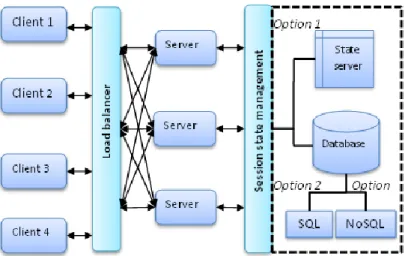
Software to be migrated into the cloud [2] can be re-architected to better benefit from cloud advantages, particularly scalability and performance can be enable through stateless or properly managed stateful architectures. Based on the out-of-process modes [17] in server-side session state management, we propose loosely coupled ar-chitectural options for state management and services, allowing multiple server ma-chines to share session state with each other, see Fig.1. In stateful architectures, the load balancer has to direct all requests from one client within the same user session to the same sever instance, which is called server affinity or stickiness, but in stateless architectures, the load balancer could redirect requests to any server or specific host
5
depending on a defined strategy (or algorithms for decision making). Additionally, the balancer keeps track of the servers or the applications running on the servers, which can add more servers when the current servers are congested or stop sending requests to a server after failure.
After load balancing, a server might receive a request as part of a session, regard-less who the client is or which server served the client before. This server fetches the session state from a state server or database before processing the request, and the session state information can be stored and shared across all services with high scala-bility. In this architecture, there are 3 session state management modes to consider: State server: the principle is extracting the session ID from the request, performing
a cache lookup for the state dictionary stored in a separate server (or process), and marking the session as accessed to prevent its expiration [16].
SQL database: the principle is extracting the session ID from the request and stor-ing the state in an external SQL server database. The clients can continually query the database by using the unique session ID, and the application servers can save it in the SQL database for use across multiple requests or multiple clients.
NoSQL database: the principle is extracting the session ID from the request and storing the state in an external NoSQL database. The clients can continually query the database by using the unique session ID, and the application servers can save it in the NoSQL database for use across multiple requests or multiple clients.
Fig. 1. The scalable architecture options for PaaS
All three modes can implement scalability in session state management, but are based on different scalability mechanisms:
Assuming an extension to multiple servers, a cache can grow in size and in transac-tional capacity. A distributed cache is an extension of the traditransac-tional concept of a cache used in a single location, which is mainly used to store application data re-siding in database and session state data.
An SQL database server is a much more scalable option than the local in-memory session mode. The multi-server architecture can easily access the session variables because they are stored in an independent SQL database.
NoSQL databases provide an effective solution for sharing session state across multiple servers. The simplistic architecture of NoSQL databases is a major benefit when it comes to scalability (i.e., adding additional nodes). When those nodes are added, the NoSQL engine adjusts the hash function to assign records to the new node in a balanced fashion.
In a cloud environment, we do not only target scalability among multiple application servers, we also need to achieve scalability among the session state providers them-selves – the technologies could include distributed cache, SQL state partitioning and NoSQL database sharding (automated data spreading). The reason is that a single state server or database could also become a bottleneck of the scalable architecture, but in this case, we only focus on application scalability when we deploy the applica-tion at PaaS level. Next, we will measure and compare performance and cost under these three session state management strategies.
4
Experimental evaluation
In this experiment, we deploy a shopping cart application as a typical service applica-tion in the Windows Azure platform, measuring and comparing the performance and cost under three session state provider architecture – all realise using Microsoft Azure technologies: Caching (Azure Cache service), SQL database (SQL Azure) and NoSQL database (Azure Table and Azure Blob).
4.1 Experimental platform
Azure session state providers. Windows Azure is Microsoft's cloud computing plat-form for IaaS (virtual machines), PaaS (cloud services) and applications [20]. At PaaS level, Azure offers different cloud services, such as caching, SQL database, storage (tables or blobs), which are the suitable solutions for the three session state modes. Azure Cache: is a distributed, in-memory, scalable solution that enables users to
build fast and responsive access to data. Window Azure Cache (WAC) is an alter-native to storing any shared state across multiple computer nodes. Thus, WAC supports the scalability in both application and session state provider.
SQL Azure: supports session state partitioning [19], an ASP.NET 2.0 scalability feature that enables session data and associated processing loads to be divided be-tween multiple out-of-process state stores, allowing session state loads to scale as the Web farm grows and the number of concurrent sessions increases. Thus, SQL Azure supports scalability in both application and session state providers.
Azure storage: is a scalable cloud storage system in the form of Blobs (user files), Tables (structured storage) and Queues (message delivery). A common usage pat-tern of Windows Azure Storage (WAS) for session state is incoming and outgoing
7
state data being shipped via Azure Blobs and intermediate service state (index) be-ing kept in Azure Tables. Like the other two modes, WAS also supports scalability in both application and session state provider.
Here, we focus on the application scalability from the end users’ perspective. In many situations, users are more interested in scalability of their applications than the session state providers themselves. In order to compare performance and cost of application under these three session state providers, we use CloudShop [19] as the testing appli-cation, a shopping cart application implemented with ASP.NET MVC4.
Suitability of selected Infrastructure and Application. While the state management infrastructure solutions used here for the experimental part are Microsoft technolo-gies, we have demonstrated their generic suitability for both scalability dimensions and have explained their ability as acting as state-of-the-art templates that can be transferred to other solution platforms.
The shopping card is built as a typical data-centric application using the CRUD (create, read, update, delete) data operations that needs to manage state. It is therefore an adequate prototypical application scenario.
Fig. 2. The CSF telemetry system
CSF telemetry. We use CSF telemetry [21] as a service for monitoring and collecting diagnostic information from the application for the different state management archi-tectures. CSF telemetry is used to measure and report the performances of the three session state providers. CSF provides a number of reusable components to instrument the application and build an effective telemetry system – the relationship between the components is shown in Fig. 2: 1) a data access layer for the retry logic and to provide retry policies for scaling; 2) a logging framework built on top of NLog for captur-ing diagnostic information; 3) a set of loggcaptur-ing wrappers and sample configurations
for Window Azure Diagnostic (WAD) to allow scaling; and 4) a data pipeline to col-lect and move the diagnostic information into a queryable telemetry system;
The baseline technology component for gathering diagnostic information in Te-lemetry is WAD, which collects data from individual instances in a central collection point (storage account), as well as a set of standard structures and conventions for storing and accessing data. Here, CSF uses NLog to implement bulk logging to local files. At the same time, CSF telemetry also does this with a data access layer for SQL or cache calls to provide consistency and appropriate retry policies for interacting with local data sources – which is called Dynamic Management Views (DMV). Then, the pipeline stores the information into a repository, which consists of three parts: A configurable scheduler to execute import and transformation tasks
An extensible set of tasks, which connects to two main families of diagnostic sources: WAD and WA SQL database internal states exposed through DMVs. A Windows Azure SQL database instance to store the telemetry data.
Experimental setting. Thus, the experimental setting is described as follows:
Cloud services (3 services): one for running the CloudShop App (2 small VMs scaled to 3VMs during scalability load test), one for running CSF telemetry (2 small VMs) and one for CSF scheduler (1 small VM).
SQL Azure (3 instances): one for the CloudShop App product database, one for session states for SQL session management and one as a telemetry repository. Azure storage (one storage account with 11 containers): five Table containers (four
for telemetry data, one for session data for storage session management), six Blob containers (four for telemetry data, one for session data for storage session man-agement and one for scheduling and sharding configuration data storage).
Based on these setting, we simulated real scenarios of customers browsing products, adding items to a shopping cart, removing items from the shopping cart, and checking out with the different session state management solutions. We ran 4100 tests; each test case started with 25 active clients sending requests, which gradually grew up to 200 clients. All the test cases had a duration of at least 10 minutes and simulated dif-ferent loads varying the request per second (rps) from 80 rps to 90 rps.
4.2 Performance analysis
Performance testing refers to the experience of an individual user. Here, we measured the performance from both client side and server side.
Client-side performance. At the client side, we measured the average page response time under the different session state providers with the following four operations: browsing products, adding items to cart, removing items from cart, and checking out.
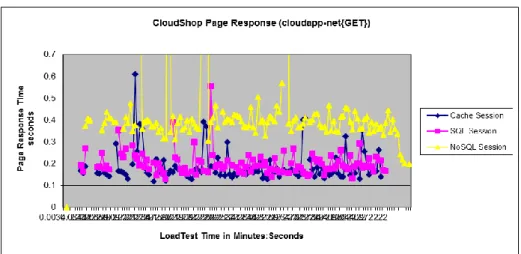
Fig. 3 to Fig. 6 demonstrate the average page response time for different operations under session state providers: Caching, SQL database and two NoSQL databases
9
(tables and blobs). The horizontal axis represents the test time in minutes:seconds and the vertical axis represents the page response time in seconds.
Fig. 3 shows the average page response time of the browsing products scenario, which shows caching has the best performance, and the NoSQL database is the slow-est solution that takes 2.5 times longer than the caching service.
Fig. 3. The average page response time of browsing products
Fig. 4 presents the average page response time of adding items to the shopping cart, which shows both Cache and SQL perform well; the NoSQL database is again the slowest solution, taking more than 3 times longer than the caching service. Further-more, we can note that the Cache and the SQL database run very smoothly.
Fig. 5 shows the average page response time for removing items from the cart, in which caching has the best performance for average response time, while the NoSQL database is the slowest solution. However, in this scenario, the performance of the Cache and SQL is very close.
Fig. 5. The average page response time of removing items from the shopping cart
Fig. 6 presents the average response time of the checking out scenario, which shows caching and SQL perform well and the NoSQL database is still the slowest solution.
Summary. Overall, caching is the fastest and SQL databases runs most smoothly.
Fig. 6. The average page response time of checking out
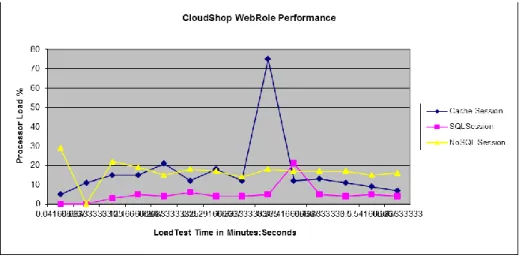
Server side performance. At the server side, we measured the CPU and memory usage under the different session state providers. Fig.7 demonstrates the processor load percentage under three session state providers: Cache (Azure Cache service),
11
SQL database (SQL Azure) and NoSQL database (Azure Table and Azure Blob). The horizontal axis represents the test time in minutes:seconds, and the vertical axis repre-sents the % processor load time, i.e., the percentage of time the processor was busy during the sampling interval.
Fig.7 shows that the SQL database consumes the least CPU (having the best CPU performance), while the Cache has the worst CPU performance.
Fig. 7. The CPU usage under three session state providers
Fig. 8 shows committed memory in MBytes under three session state providers: Cach-ing, SQL database and NoSQL database (table, blob). The horizontal axis represents test time in minutes:seconds and the vertical axis represents committed memory. Fig. 8 shows that the performance between caching and SQL Azure is similar, and that the NoSQL database is the slowest one.
4.3 Cost analysis
In real environments, we have to consider costs in addition to performance.
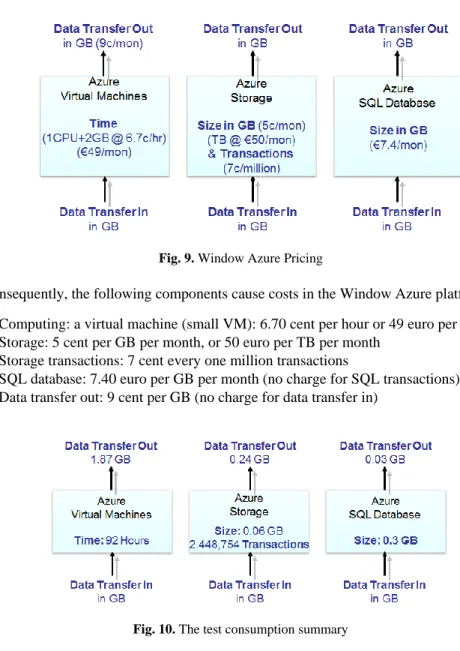
Pricing model. The Window Azure pricing shall serve here as a typical example. It is based on a consumption model (i.e., pay-as-you-go) – an example of a current pricing (based on actual pricing for December 2013) is shown in Fig. 9.
Fig. 9. Window Azure Pricing
Consequently, the following components cause costs in the Window Azure platform: Computing: a virtual machine (small VM): 6.70 cent per hour or 49 euro per month Storage: 5 cent per GB per month, or 50 euro per TB per month
Storage transactions: 7 cent every one million transactions
SQL database: 7.40 euro per GB per month (no charge for SQL transactions) Data transfer out: 9 cent per GB (no charge for data transfer in)
Fig. 10. The test consumption summary
Azure consumption results. Based on our experimental setting, we used 6 VMs running 92 hours in accumulative total (we switched off VMs whenever we finished
13
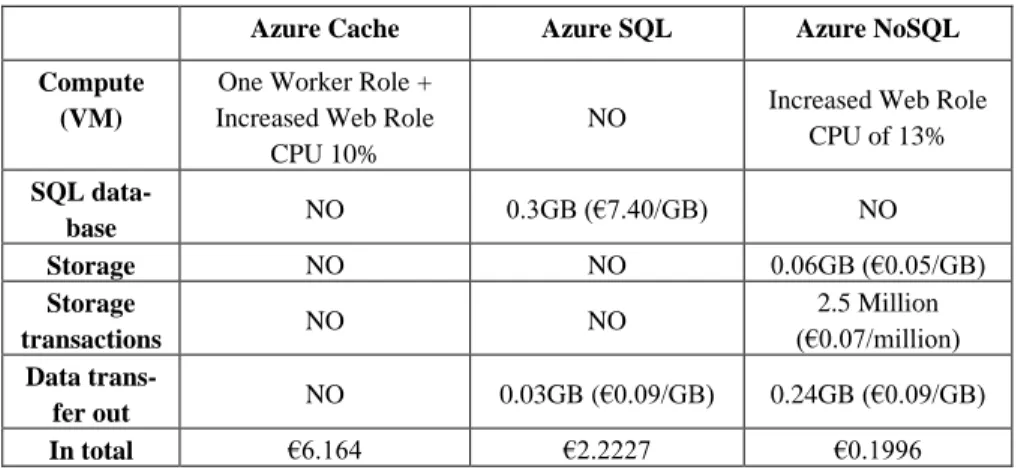
the testing, and calculated the time by hours rather than months to reducing costs). Three SQL database instances consumed 0.3 GB space, 11 storage containers utilized 0.06 GB storage space and consumed less than 2.5 million transactions, and the data transfer out consumed 2.14 GB in total. The detailed information is shown in Fig. 10.
Cost summary. The costs for the three session state scenarios, based on the individu-al components, are summarized in Table 1.
Table 1. Cost summary for the three session state providers
Azure Cache Azure SQL Azure NoSQL Compute
(VM)
One Worker Role + Increased Web Role
CPU 10%
NO Increased Web Role CPU of 13% SQL data-base NO 0.3GB (€7.40/GB) NO Storage NO NO 0.06GB (€0.05/GB) Storage transactions NO NO 2.5 Million (€0.07/million) Data trans-fer out NO 0.03GB (€0.09/GB) 0.24GB (€0.09/GB) In total €6.164 €2.2227 €0.1996
Overall, the Cache is the most expensive solution; the NoSQL solution is the cheap-est. One Worker Role means running a VM (we use a small size) as the worker role. Increased Web Role CPU means consuming part of the Web Role CPU that is origi-nally used for running the application. Thus, the probability to scale out anoth-er homogeneous VM increases. Thus, the accelanoth-eration of the cost increases.
4.4 Discussion
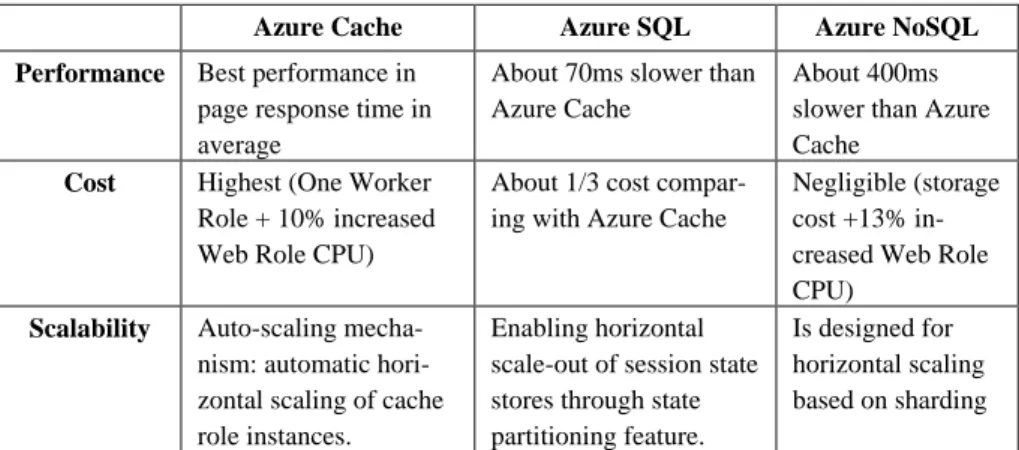
The details of a comparison of the scalability mechanisms and their performance and cost for the three session state providers are shown In Table 2. The results suggest mixed results, with some performance and scalability versus cost trade-offs:
Caching is the most expensive with the best performance solution.
Classical relational SQL data storage is relatively efficient and shows the smooth-est performance.
NoSQL storage does not perform well in session state management due to the inef-ficiency of the combination of Azure Blobs (for storage) and Azure Table (for in-dex and query).
Table 2. Comparison of scalability mechanisms, performance and cost for the three session state providers
Azure Cache Azure SQL Azure NoSQL Performance Best performance in
page response time in average
About 70ms slower than Azure Cache
About 400ms slower than Azure Cache
Cost Highest (One Worker Role + 10% increased Web Role CPU)
About 1/3 cost compar-ing with Azure Cache
Negligible (storage cost +13% in-creased Web Role CPU)
Scalability Auto-scaling mecha-nism: automatic hori-zontal scaling of cache role instances.
Enabling horizontal scale-out of session state stores through state partitioning feature.
Is designed for horizontal scaling based on sharding
Therefore, the results suggest mixed results, with some performance and scalability versus cost trade-offs:
Caching is the most expensive with the best performance solution.
Classical relational SQL data storage is relatively efficient and shows the smooth-est performance.
NoSQL storage does not perform well in state management due to the inefficient combination of Azure Blobs (for storage) and Azure Table (for index and query). However, even if the results are somewhat different from general expectations (which would include low performance of classical database solutions), this evaluation veri-fies the scalability and performance characteristics of the architecture options we identified and implemented.
Our results can provide input into an architectural re-engineering approach where legacy software is made more cloud-aware. The rules that are expressed in terms of the trade-offs between performance, cost and scalability in Table 2 can be formalised and used by a load balancer, as indicated in our proposed architecture in Fig. 1.
5
Related Work
The application of the results presented here lies in the context of re-engineering for the cloud. Through traditional virtualisation of resource, cloud benefits are not real-ised. In particular for the (PaaS) layer that is especially relevant from a software ar-chitecture perspective, so far the focus has been the migration process [2,3], but less performance and scalability-oriented re-architecting. In the EU FP7 project REMICS [18], significant advances in languages and model-driven technologies for cloud mi-gration have been explored, without specifically evaluating QoS and cost concerns.
Agrawal et al. [4] have investigated scalability from a database perspective, which slightly relates to our concerns. However, the problem is not approached from a
soft-15
ware architecture perspective. Tsai et al. [11] investigate scalability for SaaS applica-tions, which are less relevant from an architectural perspective. Ardagna et al. [6] go a step further in our direction and propose scalability patterns, also PaaS-specific. In this regard, our architectural options could be considered as patterns. The respective solutions, however, diverge. Ours takes costs into account and evaluates the trade-off, while theirs links scalability to security concerns. In a similar vein, [7] focusses on performance. These works consider earlier pre-cloud investigations as in [9] or [10].
The need for patterns, however, as in [6] or [16] seems to emerge from this discus-sion. Our contribution here would be three patterns specific to state management.
6
Conclusion
Scalability is a major feature as well as a challenge in cloud computing environments. We looked at scalable architectures for PaaS-based server-side session state modes, including state sever, SQL databases and NoSQL databases. We implemented a loose-ly coupled architecture between state and services and enabled multiple server ma-chines to share the session state with each other.
In order to evaluate scalability and performance, but also the cost of the three ses-sion state modes in real cloud environments, we deployed a CRUD-based shopping cart application in Window Azure public clouds to demonstrate valid re-engineering options for state management architectures. The experimental results have shown that 1) considering scalability, all of the three modes can implement application scalability in session state management; 2) considering performance, state service through cach-ing has the best page response for end users, but does need a lot of computcach-ing re-sources, while NoSQL databases unexpectedly had the worst performance; at the same time, SQL databases have the smoothest performance among these three session state providers; and 3) considering cost, caching was the most expensive solution and the NoSQL solution the cheapest. The results suggest that re-engineering software architectures for the cloud is beneficial, but
The analysis presented in this paper leaves out some architectural configurations. We plan to focus on more cloud database solutions, comparing the performance and scalability between SQL partitioning technology and NoSQL databases. Furthermore, the indicated link between the trade-off results and their formal representation as rules in a dynamic configuration and load balancing solution shall be investigated.
Acknowledgments. The research work described in this paper was supported by the Irish Centre for Cloud Computing and Commerce, an Irish national Technology Cen-tre funded by Enterprise Ireland and the Irish Industrial Development Authority.
References
1. Mell, P. and Grance, T.: The NIST Definition of Cloud Computing, Communications of the ACM, 53, 6 (2010), 50–50 (2010)
2. Pahl, C. and Xiong, H.: Migration to PaaS Clouds – Migration Process and Architectural Concerns, 7th IEEE International Symposium on the Maintenance and Evolution of Ser-vice-Oriented and Cloud-Based Systems (MESOCA 2013), pp.86-91 (2013)
3. Pahl, C., Xiong, H. and Walshe, R.: A Comparison of On-premise to Cloud Migration Ap-proaches. European Conference on Service-Oriented and Cloud Computing ESOCC 2013. Springer LNCS (2013).
4. Agrawal, D., El Abbadi, A., Das, S., Elmore, A. J.: Database scalability, elasticity, and au-tonomy in the cloud, Database Systems for Advanced Applications (DASFAA 2011), Hong Kong, China, April 22-25, pp. 2-15 (2011)
5. Herbst, N.R., Kounev, S. and Reussner, R.: Elasticity in Cloud Computing: What It Is, and What It Is Not, 10th International Conference on Autonomic Computing (2013)
6. Ardagna, C.A., Damiani, E., Frati, F., Rebeccani, D., Ughetti, M.: Scalability Patterns for Platform-as-a-Service, IEEE 5th International Conference on Cloud Computing, Honolulu, HI, June 24-29 (2012) http://ieeexplore.ieee.org/stamp/stamp.jsp?tp=&arnumber=6253571 7. Iosup, A., Yigitbasi, N. and Epema, D.: On the performance variability of production cloud
services. Proc. of IEEE/ACM CCGrid 2011. (2011)
8. Auto-scaling and Windows Azure, Microsoft pattern and practices, http://msdn.microsoft.com/en-us/library/hh680945(v=pandp.50).aspx
9. Jogalekar, P. and Woodside, M.: Evaluating the scalability of distributed systems, IEEE Transactions on Parallel and Distributed Systems, 11(6), pp. 589-603(2000)
10. Sun, X.: Scalability versus Execution Time in Scalable Systems, Journal of Parallel and Distributed Computing, 62(2), pp. 173-192 (2002)
11. Tsai, W., Huang, Y., and Shao, Q.: Testing the Scalability of SaaS Applications, IEEE In-ternational Conference on Service-Oriented Computing and Applications (SOCA 2011), Irvine, CA, December 12-14, pp. 1-4 (2011)
12. Intel White Paper, Two Tools Measure the Performance Scalability of Your Application, http://software.intel.com/sites/products/Whitepaper/MeasureApplicationPerformanceScala bility_013012.pdf
13. Caceres, J., Vaquero, L., Rodero-Merino, A. P. L. and Hierro, J.: Service scalability over the cloud. B. Furht and A. Escalante (Eds.) Handbook of Cloud Computing. (2010) 14. Kristol, D., Montulli, L.: HTTP State Management Mechanism, Network Working Group,
RFC 2965 (2000), http://www.ietf.org/rfc/rfc2965.txt
15. Patelis, A.: ASP.Net State Management Techniques, CODE Project (2007), http://www.codeproject.com/Articles/17191/ASP-Net-State-Management-Techniques 16. Wilder, B.: Cloud Architecture Patterns, O’Reilly, Sebastopol, CA 95472 (2012)
17. Volodarsky, M.: Fast, Scalable, and Secure Session State Management for Your Web Ap-plications, MSDN Magazine (2005), http://msdn.microsoft.com/en-us/magazine/cc163730.aspx#S7
18. Mohagheghi, P. and Sæther, T.: Software engineering challenges for migration to the ser-vice cloud paradigm: Ongoing work in the REMICS project. IEEE World Congress on Services (SERVICES) 2011, pp. 507-514. (2011)
19. Microsoft. Introducing Windows Azure (2014), http://www.windowsazure.com/en-us/documentation/articles/fundamentals-introduction-to-Windows-Azure/
20. Microsoft. Windows Azure Documentation, Building Windows Azure Cloud Services with Cache Service (2014), http://www.windowsazure.com/en-us/develop/training-kit/hol-buildingappswithcaching/
21. Fairweather, E.: Telemetry-Application Instrumentation, Azure CAT, Microsoft Wiki Ar-ticle (2013), http://social.technet.microsoft.com/wiki/contents/arAr-ticles/18468.telemetry- http://social.technet.microsoft.com/wiki/contents/articles/18468.telemetry-application-instrumentation.aspx