ii
Database Recovery Control
(DBRC) in Practice
by Peter Armstrong
Third Edition
Copyright © 1990 - 1998 BMC Software, Inc., as an unpublished work. All rights reserved.
BMC Software, the BMC Software logos, and all other BMC Software product or service names are registered trademarks or trademarks of BMC Software, Inc. IBM is a registered trademark of International Business Machines Corp. All other registered trademarks or trademarks belong to their respective companies.
All rights reserved. No part of this book may be reproduced or transmitted in any form or by any means, electronic or mechanical, including photocopying, recording, or by any information storage and retrieval system, without prior written permission from BMC Software, Inc.
The Author and Publisher make no warranty of any kind, expressed or implied, with regard to the information contained in this book. The Author and Publisher shall not be liable in any event for direct, indirect, incidental or consequential damages in connection with, or arising out of, the furnishing, performance, or use of the information in this book.
Restricted Rights Legend
U.S. GOVERNMENT RESTRICTED RIGHTS. UNPUBLISHED–RIGHTS RESERVED UNDER THE COPYRIGHT LAWS OF THE UNITED STATES. Use, duplication, or disclosure by the U.S. Government is subject to restrictions set forth in FAR Section 52.227-14 Alt. III (g)(3), FAR Section 52.227-19, DFARS 252.227-7014 (b), or DFARS 227.7202, as amended from time to time. Send any contract notices to Contractor/Manufacturer:
BMC Software, Inc.
2101 CityWest Blvd. Houston TX 77042-2827 USA
Contacting BMC Software
You can access the BMC Software Web site at http://www.bmc.com. From this Web site, you can obtain general information about the company, its products, special events, and career opportunities. For a complete list of all BMC Software offices and locations, go to http://www.bmc.com/corporate/offices.html.
USA and Canada Outside USA and Canada
Address BMC Software, Inc. 2101 CityWest Blvd. Houston TX 77042-2827 Telephone Fax (01) 713 918 8800 (01) 713 918 8000 Telephone 713 918 8800 or
BMC Software, Inc., Confidential and Proprietary Information
Contents iv
ix
Contents
Chapter 1 Database Recovery Control . . . 1
DBRC Background—Why do I need it? . . . 2
DBRC Levels . . . 4
Log Control . . . 4
Recovery Control . . . 5
Share Control . . . 6
Recommended Migration Path . . . 6
How It Works . . . 7 Exits/Hooks . . . 7 RECONs. . . 8 Skeletal JCL . . . 8 Commands . . . 10 GENJCL . . . 11
GENJCL and BMC Software . . . 12
Commands . . . 13
Chapter 2 RECON Setup . . . 15
Creating a RECON Data Set. . . 15
RECON Buffering . . . 17
Changing Versions—the UPGRADE command. . . 19
Version 6. . . 19
Chapter 3 RECON Care and Maintenance . . . 21
Monitoring Status of RECONs . . . 21
Methods of Monitoring . . . 21
Satisfactory Status of the RECONs . . . 22
Reorganization of RECONs . . . 23
The Easy Way. . . 23
A Safer Method . . . 24
/DIS OLDS . . . 25
Recovery Following a Discarded RECON . . . 26
Losing Two RECONs. . . 26
Losing All Three RECONs . . . 26
Chapter 4 Initializing RECONs . . . 29
INIT.RECON. . . 29
Entering Timestamps. . . 32
Version 6 . . . 33
The Time History Table (V6 only) . . . 34
Example of it Going Wrong . . . 39
Chapter 5 DBRC Registration . . . 41
Database Registration . . . 41
GENMAX Cycle—Log Cleanup in RECON . . . 45
Size of RECONs . . . 45
Change Accumulation Registration . . . 46
DSLOG . . . 48
Reordering DSGroups . . . 48
DBDS Groups and DB Groups . . . 48
Fast Path Considerations . . . 49
Registration . . . 50
Multiple Area Data Sets . . . 51
Flags and Counters . . . 53
High Speed Sequential Processing (HSSP) . . . 53
Chapter 6 DBRC Data Set Control . . . 55
Log Tape Management . . . 55
Generation Data Groups (GDGs) . . . 56
Log Information in RECON . . . 56
DELETE.LOG INACTIVE. . . 57
Continuous Operations . . . 58
Some DELETE.LOG Tests . . . 60
List of Logs Deleted from RECON . . . 60
Size of PRISLD/PRILOG Record . . . 61
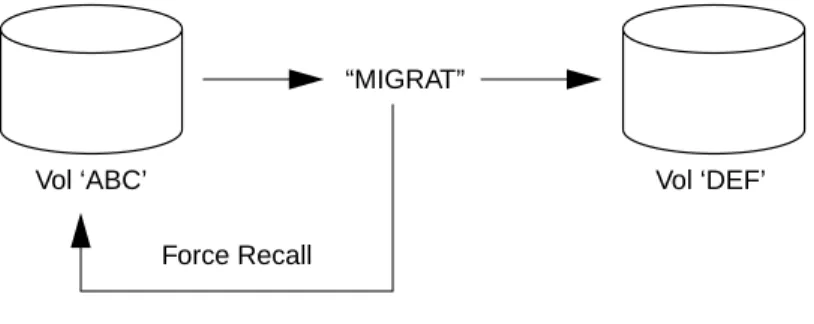
DBRC and Data Facility Hierarchical Storage Manager (DFHSM) . . . 62
Concatenated Tape and Disk. . . 62
Batch Logging . . . 65
Stacking Batch Logs . . . 65
Batch Disk Logging Considerations . . . 65
Checkpoint and Extended Restart. . . 66
Chapter 7 Bad Data Sets . . . 67
Bad Image Copy Data Set . . . 67
Bad Change Accumulation Data Set . . . 69
How to Use a SLDS in Place of a Bad RLDS . . . 69
A Clever Archiving Technique . . . 70
Chapter 8 Batch Backout, Signon, and Authorization . . . 71
Background . . . 72
Batch Backout Utility . . . 72
DBRC Processing Prior to Batch Backout . . . 73
BMC Software, Inc., Confidential and Proprietary Information
Contents vi
Record Structure in RECON . . . 79
Normal Termination . . . 80
Abnormal Termination . . . 80
Batch Backout and ERE Subsystem Signon . . . 84
Batch Backout Normal Termination. . . 84
Batch Backout Abnormal Termination. . . 85
Alternative to Backout . . . 85
First Method . . . 86
Second Method. . . 86
Backing Out a Normally Completed Job . . . 89
APAR Number: PN74495 . . . 89
Automating Batch Procedures . . . 90
Back Out of Multi-Step Batch Jobs . . . 90
Authorization Failure in the Middle of a Multi-Step Job . . . 90
CHANGE.DB UNAUTH . . . 91
Online Backout . . . 91
Batch Backout Utility . . . 91
Issues and Concerns . . . 92
IMS V4 Backout Support . . . 93
Some Examples of Despair and Misery . . . 95
IMS Scheduling . . . 96
Scheduling Transactions in the Old Days . . . 96
Scheduling Transactions Nowadays . . . 96
The INIT Call . . . 97
SERIAL . . . 97
/ERE Failure . . . 98
Unplanned Cold Start . . . 98
Fast Path Considerations . . . 99
Chapter 9 Image Copy . . . 101
Image Copy Options . . . 101
Offline (Batch) Image Copy . . . 101
Concurrent Image Copy (CIC) . . . 103
IMS Online Image Copy . . . 104
Incremental Image Copy . . . 105
Non-Standard Image Copy . . . 105
IBM 3990 DFSMS/MVS Concurrent Copy . . . 106
IBM IMS Image Copy 2—(available with IMS V6) . . . 107
IBM RAMAC SnapShot. . . 107
EMC Symmetrix (Timefinder) . . . 108
Snapshot Copy . . . 109
BMC Software’s SECONDARY INDEX UTILITY/EP . . . 109
MADS and Online Create . . . 110
DBRC Log Selection . . . 110
Batch Image Copy . . . 110
Chapter 10 Change Accumulation . . . 113
Change Accumulation Groups . . . 113
Why Should I Use CAGRPs? . . . 115
Group Rules (OK?) . . . 116
Change Accumulation Rules . . . 117
Change Accumulation Strategies . . . 118
Common Problems . . . 118 IMS V3 Changes . . . 119 Chapter 11 Recovery . . . 121 Recovery Basics . . . 121 Full Recovery . . . 122 Merge Needed . . . 123 Recovery Authorization . . . 123 Timestamp Recovery . . . 124
Using GENJCL.USER to Select Timestamps. . . 125
Example . . . 127
V5 Changes to Recovery Utility . . . 128
Non-Standard Recovery . . . 129
Alternatives to Recovery . . . 130
RECON Interaction on I/O Errors. . . 130
Fast Path . . . 130
DL/1 Database Write Error. . . 130
Chapter 12 BMC Software and DBRC . . . 133
UNLOAD PLUS/EP . . . 134
UNLOAD PLUS/EP API . . . 135
LOADPLUS/EP. . . 135
LOADPLUS/EP LPI . . . 136
Prefix Update—PREFIX RESOLUTION PLUS . . . 136
SECONDARY INDEX UTILITY/EP . . . 136
Registration Possibilities. . . 136
Implications of Registering — ALLOC Cleanup . . . 137
NONRECOV . . . 138
DBRC Interface . . . 138
FAST REORG FACILITY/EP . . . 139
CONCURRENT REORG . . . 140
BMPs . . . 141
Common Errors . . . 141
RECOVERY PLUS and SECONDARY INDEX UTILITY/EP . . . 142
IMAGE COPY PLUS AOI and DBRC . . . 143
IMAGE COPY PLUS Authorization Levels . . . 143
RECOVERY PLUS . . . 144
RECOVERY MANAGER for IMS (RMGR) . . . 144
Chapter 13 Fast Path Utilities . . . 147
TRIMAR FAST RECOVERY UTILITY . . . 147
BMC Software, Inc., Confidential and Proprietary Information
Contents viii
The Recovery Step . . . 148
TRIMAR RESTART CONTROL FACILITY . . . 148
FAST PATH/EP Series . . . 149
DBRC Function Used by FAST PATH/EP Series Products . . . 150
FAST PATH ANALYZER/EP (and Online). . . 151
FAST PATH REORG/EP (and Online) . . . 151
Image Copy Options. . . 152
Chapter 14 IBM Utilities . . . 155
Unload and Scan Utilities . . . 155
Reload Utilities . . . 155
Prefix Update without a Log . . . 156
Prefix Update with a Log . . . 156
Utility Failure . . . 156
Chapter 15 IMS and the TOD Clock . . . 159
IMS Use of Timestamps . . . 159
DSSN . . . 159
USID. . . 163
Merge Needed . . . 164
Image Copy . . . 165
Change Accumulation Purge Time . . . 165
Recovery . . . 166
Changing the Clock. . . 166
Forward. . . 166
Backward . . . 166
Chapter 16 Testing and Migration. . . 169
Database Names . . . 169
Test and Production . . . 170
Dynamic Allocation . . . 170
Migration. . . 171
DBCTL . . . 171
Chapter 17 N-Way Sharing . . . 173
General Observations . . . 173
Some Areas to Watch . . . 174
Recovery . . . 175
Chapter 18 Offsite Considerations . . . 177
The Fundamental Questions . . . 177
Basic Principles. . . 179
Recovery to Last Night’s Image Copies . . . 181
Recovery to the End of the Last Good Log . . . 182
Change Accumulation. . . 189
Shadow Databases . . . 189
N-Way Sharing/Multi-DBMS . . . 190
RECOVERY PLUS . . . 192
Summary . . . 192
Appendix A THT Problems APAR—PQ03038 . . . 193
PQ03038: 6.1—Pre-6.1 Coexistence Problems: . . . 193
Users Affected. . . 194
Problem Description . . . 194
How V6 Timestamps Are Downgraded To Pre-V6 Form & Vice Versa . . . 196
IMS/ESA V6 Messages and Codes. . . 199
IMS/ESA V6 DBRC Guide and Reference . . . 200
IMS/ESA V6 Customization Guide . . . 201
Appendix B The Real Rules of Archive . . . 203
DBRC Records . . . 203
SLDS. . . 205
Archive Output (For All Ways of Running) . . . 206
Archiving . . . 207
OLDS Switch . . . 208
A Recent Archive Hiccough . . . 213
What Does Archive Select? . . . 213
Parallel Archives . . . 213
Multi-Step Archives . . . 214
Auto Archive with MAXOLDS . . . 214
Appendix C DBRC GENJCL Enhancements . . . 215
PP21253 APAR Text . . . 215
Problem . . . 215
Conclusion . . . 216
Appendix D IMS Change Accumulation Utility . . . 219
Database Recovery Utility. . . 221
DBRC . . . 221
BMC Software, Inc., Confidential and Proprietary Information
Figures x
xi
Figures
Figure 1 Levels of DBRC . . . 4
Figure 2 Sample Archive Skeletal JCL Member . . . 9
Figure 3 Sample DBRC Job Step . . . 10
Figure 4 Output Showing Satisfactory RECONs . . . 23
Figure 5 A Safer Method of Reorganizing the RECONs . . . 24
Figure 6 Sample /DIS OLDS Output . . . 25
Figure 7 Output After Issuing LIST.RECON STATUS with Two Lost RECONs . . . 26
Figure 8 Example of %SET TIMEFMT . . . 39
Figure 9 Sample RECON Header Record and Time History Table . . . 40
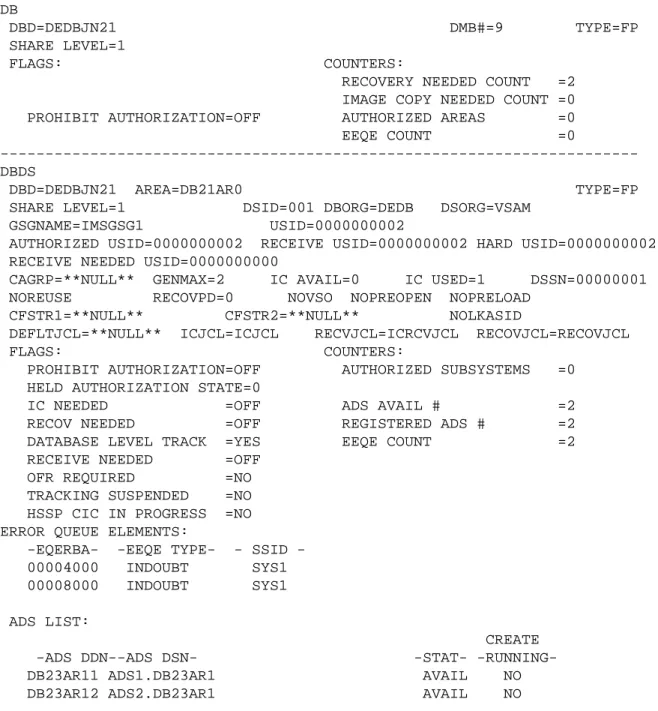
Figure 10 Sample DB Record . . . 42
Figure 11 Sample DBDS Record . . . 42
Figure 12 Image Copy Skeletal JCL with REUSE . . . 44
Figure 13 Image Copy Skeletal JCL with NOREUSE . . . 44
Figure 14 Log Cleanup in RECON . . . 45
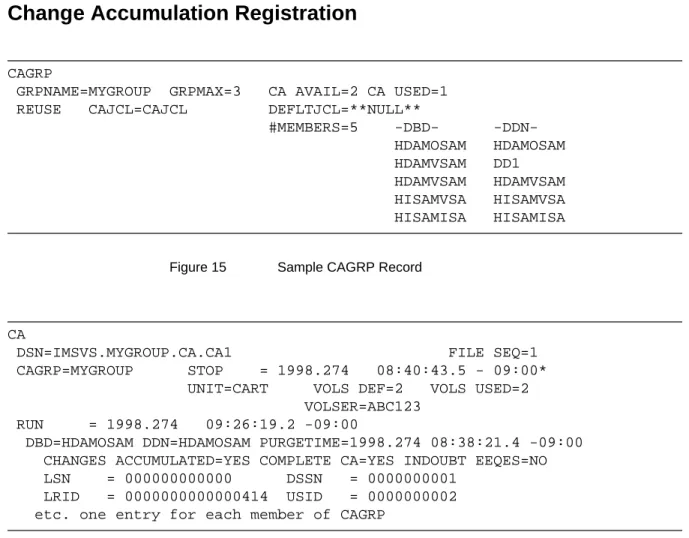
Figure 15 Sample CAGRP Record . . . 46
Figure 16 Sample CA Record . . . 46
Figure 17 Change Accumulation Skeletal JCL with REUSE . . . 47
Figure 18 Change Accumulation Skeletal JCL with NOREUSE . . . 47
Figure 19 Sample MADS Record . . . 52
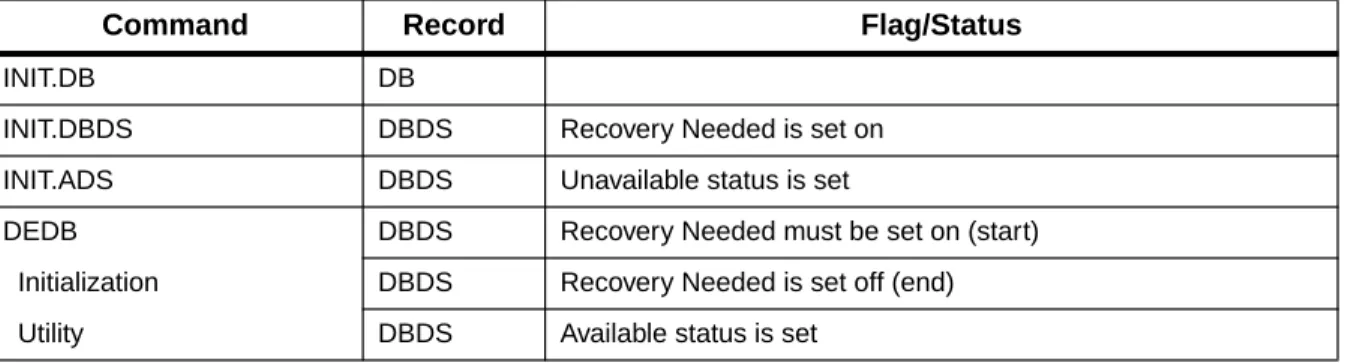
Figure 20 Interaction of Flags and Commands for Fast Path . . . 53
Figure 21 Interaction of Flags and Utilities for Fast Path . . . 53
Figure 22 Part of a COMPRESSED PRILOG Record . . . 59
Figure 23 DFHSM Flow . . . 62
Figure 24 Using DELETE Logic with LOGUNIT . . . 63
Figure 25 Sample JCL for Concatenated Tape and Disk . . . 64
Figure 26 Sample JCL for Concatenated Tape and Disk with CATDS . . . 64
Figure 27 DBRC and Unreadable Image Copies . . . 68
Figure 28 Sample SUBSYS Record . . . 74
Figure 29 Sample DB Record . . . 75
Figure 30 DUI Processing . . . 76
Figure 31 Sample PRILOG and LOGALL Records . . . 78
Figure 32 Sample ALLOC Record . . . 79
Figure 34 Automatic Cleanup of a Failed Batch Job . . . .88
Figure 35 Sample BACKOUT Record . . . .94
Figure 36 Sample Batch Image Copy Record . . . .103
Figure 37 Sample Concurrent Image Copy Record . . . .104
Figure 38 Sample Online Image Copy Record . . . .104
Figure 39 Change Accumulation/Recovery with Normal Operations . . . .111
Figure 40 Change Accumulation with Block-Level Sharing . . . .111
Figure 41 UNIT=AFF in CAJCL . . . .117
Figure 42 CATIME Flow . . . .119
Figure 43 Sample JCL to Generate an IDCAMS Step to Define a DBDS . . . .122
Figure 44 Valid Recovery Points . . . .122
Figure 45 Sample Full Recovery Record . . . .123
Figure 46 Sample Timestamp Recovery Record . . . .124
Figure 47 Selecting Timestamps for Recovery . . . .125
Figure 48 Sample Job to Generate IBM Recovery JCL from ICLAST . . . .126
Figure 49 Sample JCL Contained in Member ICLAST . . . .126
Figure 50 Sample JCL for Member ICLAST when Used with RECOVERY PLUS . . . .127
Figure 51 Selecting Timestamps for Recovery . . . .127
Figure 52 Sample NOTIFY.IC Command for Indexes . . . .142
Figure 53 FAST PATH/EP Products Replacing Trimar Products . . . .150
Figure 54 DSSN in N-Way Sharing . . . .160
Figure 55 Incrementing DSSN after /DBR NOFEOV . . . .161
Figure 56 Incrementing DSSN in a Non-Sharing Environment . . . .161
Figure 57 The Dangers of Different TOD Clocks . . . .163
Figure 58 Impossible Recovery with Standard Utilities . . . .175
Figure 59 Base Case Works! . . . .180
Figure 60 SWITCH without FIRSTREC Specified Doesn't Execute . . . .180
Figure 61 SWITCH without LASTREC Specified Assigns LASTREC = FIRSTREC - 1 . . . .181
Figure 62 CLOSE without LASTREC Doesn't Execute . . . .181
Figure 63 Offsite PRISLD/PRILOG Record . . . .184
Figure 64 Offsite RECONs with OPEN Logs . . . .185
Figure 65 Using GENJCL.USER to Close the Last OLDS . . . .186
Figure 66 Offsite RECON with “Closed” Logs . . . .187
Figure 67 Trying to Find a Recovery Point in a Multi-DBMS Environment . . . .191
Figure 68 DBRC Records for Archive . . . .203
Figure 69 Archive Input and Output . . . .205
Figure 70 Sample RECON Listing for the OLDS Switch . . . .208
Figure 71 Sample RECON Listing After a /DBR Command . . . .210
Figure 72 Sample RECON Listing After Archive Job AR161718 . . . .211
BMC Software, Inc., Confidential and Proprietary Information
Preface xii
xiii
Preface
Those who know me will know that I have spent the last few years advocating the fact that IMS is not dead. Fortunately, both customers and IBM* now agree with me! IMS is alive and kicking and not going away. Furthermore DBRC is a prerequisite to most of it—in fact, running a production IMS system without DBRC is equivalent to shooting yourself in both feet. The forced migration to DBCTL in the CICS environment and the move towards n-way sharing has also made many customers realize that they can no longer ignore my favorite piece of software!
Hence, people have been pestering me to update this document. For a long time I could not, as the source was in some strange piece of software running only on a Mac. Then, suddenly someone said that they could convert it all to a PC format for me—curses, my excuses fell away! So here is the updated version including the bits of IMS V6 I have played with. I have not included anything on RSR, as BMC Software has already produced a snappy little manual called RSR in Practice. One of the best things about V6 is that they have brought back the DBRC reference manual, rather than hiding it away in the depths of some other manual, where you can’t find it.
I have assumed that you are running IMS V4 or above—previous versions are only mentioned when it helps to make things clearer.
Because this document is printed in America, I have had to grudgingly submit to their strange way of spelling—lovely people, just can’t spell! This manual is supplied on an “as-is” basis. I have tested the information to the best of my ability and believe the contents to be true. If you find DBRC behaves differently in your shop to the way described in this book, it could be due to various reasons such as maintenance levels, etc. If you are unable to determine why, contact me and we’ll discuss it.
Finally, many thanks to all those people who have helped produce this, either through being friendly enough to call me with your problems, running tests for me, or being conned into proof-reading this set of ramblings.
Peter Armstrong—[email protected] BMC Software, Inc.
Conventions
Because most of the examples in this book come from my work with BMC Software customers, you will find occasional refers to customers, their problems, and their solutions.
The term IMS refers to all versions and releases of IMS/VS and IMS/ESA. The specific product name, version, and release numbers are noted only when this information is significant.
Several special visual conventions are used in this manual to make it easier to use. They are as follows:
Note: Notes alert you to aspects of a discussion or instructions that deserve special attention.
Warning! Warnings alert you to situations that could cause loss of data or serious damage to your system if you do not follow the
instructions carefully.
All syntax and example JCL is presented in this typeface. In the text of a paragraph, commands are presented inTHIS TYPEFACE.
BMC Software, Inc., Confidential and Proprietary Information
Chapter 1 Database Recovery Control 1
14
Chapter 1
Database Recovery
Control
Suffering from insomnia, I was once reduced to reading the Database Recovery Control (DBRC) reference manual from cover to cover. I discovered that while it is a good reference document, it certainly does not tell you how DBRC actually works.
The objective of this book, therefore, is to discuss how DBRC works in practice. Some of the topics discussed in this book include
• the principles of DBRC—why it was written • how to implement DBRC
• how to use it
• problem areas to avoid
DBRC Background—Why do I need it?
DBRC Background—Why do I need it?
DBRC was originally written to keep track of Information Management System (IMS) logs, change accumulations, and other log and tracking information. Armed with this information, DBRC can select the correct inputs and outputs for backing up and recovering databases, and for running change accumulation.
DBRC has been enhanced considerably since its early days. DBRC is now a prerequisite to many features including:
• Generating any IMS Transaction Manager (TM) or Database Control (DBCTL) system, or Customer Information Control System using Data Language 1 (CICS-DL/1) system.
You cannot generate a system running IMS TM, DBCTL, or CICS-DL/1 without DBRC. DBRC is also required for maintaining these systems. • IMS Disk Logging (online IMS)
Whereas use of DBRC is optional in CICS-DL/1 or batch DL/1, you cannot run an IMS TM or DBCTL system without it. IMS TM uses DBRC to control the disk logging process—i.e. selection of the next online log, automatic archiving, etc.
Note: As from IMS V3, DBRC is a prerequisite to the new database control (DBCTL) address space. This means that DBRC Log Control (next online log selection, archiving process, etc.) will be available to any system using DBCTL—for example, CICS. Note: IMS V4 is the last release to support CICS-DL/1. In the future,
you have to run with DBCTL.
In CICS-DL/1 systems and batch systems, DBRC can record logs. However, there is no automatic archiving and no control over the following items:
— Selecting logs
CICS selects journal A, B, or X as relevant. DBRC is just a recording mechanism here. For batch processing, log selection is dictated by your job control language (JCL).
DBRC Background—Why do I need it?
BMC Software, Inc., Confidential and Proprietary Information
Chapter 1 Database Recovery Control 3 — Reusing the same log prior to archiving it
Exits in CICS enable you to trigger archiving. IBM manual
GA19-5478 contains sample code for using them. Archiving is a user responsibility in batch systems. You must use generation data groups (GDGs), retention periods, etc., to control your batch logs.
CICS V3.1 provides a degree of automation for the archive process. A far more complete solution is provided by the BMC Software JOURNAL MANAGER PLUS product.
• Share Control
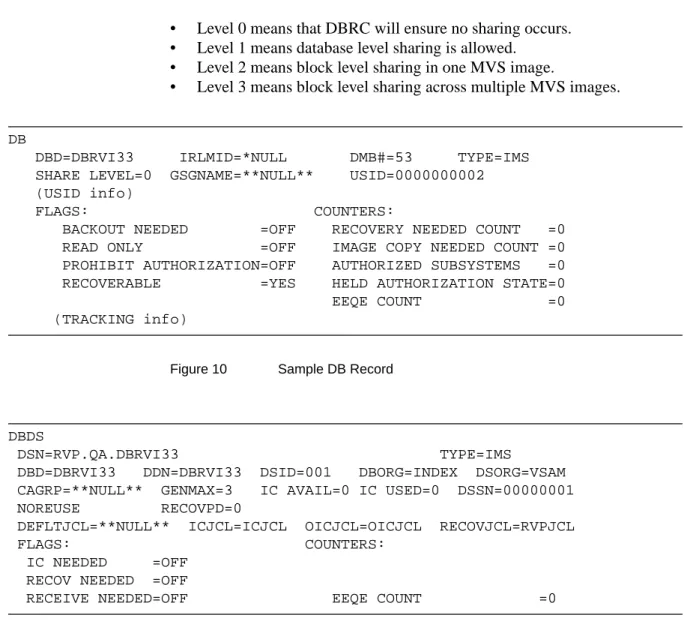
Sharing databases across one or two MVS images was introduced in IMS V1.2 for DL/I and in IMS V1.3 for Fast Path data entry databases (DEDBs). As from IMS V5, sharing has been extended to n-way sharing. This means that multiple IMS systems (up to 32) can now share data across multiple MVS images (up to 64). DBRC Share Control is required, and the following levels of sharing are allowed: — SHARELVL 0—enforced single user
— SHARELVL 1—multiple readers or one update plus read-only — SHARELVL 2—multiple updaters in one MVS image
— SHARELVL 3—multiple updaters across two or more MVS images Support for shared sequential dependents (SDEPs) and shared VSO DEDBs (see below) comes in IMS V6. General sequential access method (GSAM) and main storage databases (MSDBs) cannot be shared.
• Multiple Area Data Sets (MADS) in Fast Path
Fast Path DEDB users can choose to maintain multiple copies of the data sets making up their DEDBs. This is known as maintaining multiple area data sets. DBRC Recovery Control or Share Control is required.
• Extended Recovery Facility (XRF) DBRC Share Control is required. • IMS V3
DBRC is a prerequisite for several features in IMS V3: for example, High Speed Sequential Processing (HSSP) andNONRECOV
(non-recoverable databases). • Remote Site Recovery (RSR)
DBRC Levels
• Virtual Storage Option (VSO) DEDBs
IBM is gradually replacing main storage databases (MSDBs). The recommendation is to convert your existing MSDBs to VSO DEDBs (a VSO DEDB with only root segments is effectively the same as an MSDB, is supported by DBRC, can be block-level shared and also supports field calls). MSDBs are not supported by DBRC and neither is GSAM.
DBRC Levels
There are three levels to DBRC: Log Control, Recovery Control, and Share Control. In IMS V6, Recovery Control dies (about time too, frankly—if you’re still using Recovery Control, then you are a sad individual and you should get yourself onto proper DBRC Share Control as soon as possible). I have come across several scenarios that work fine with Share Control, but do not work properly with Recovery Control.
Figure 1 Levels of DBRC
Log Control
In Log Control, DBRC records information about logs. For CICS-DL/1, DBRC is optional. Turning on DBRC means that DBRC records the journals. If using DFSUARC0 (the recommended IMS archive utility) to archive the journals, the output is recorded in DBRC’s control data sets—the RECONs. For DBCTL and online IMS, DBRC is mandatory. It is installed as part of the IMS generation process (through theDBRC parameter on the IMSCTRL macro).
Share Control Recovery Control
Log Control
DBRC Levels
BMC Software, Inc., Confidential and Proprietary Information
Chapter 1 Database Recovery Control 5 Follow these steps to implement Log Control:
Step 1 Initialize the RECONs withRECOVCTL(SHARECTLif DBCTL or V6 user). Step 2 Do not register any databases with DBRC.
Recovery Control
In Recovery Control, DBRC provides all the Log Control functions and records information about image copies (IC), change accumulations (CA), recoveries, and reorganizations. To use Recovery Control, register your databases with DBRC.
Also, in Recovery Control DBRC generates and verifies JCL for image copy, change accumulation, and recovery. In addition, DBRC also records output from image copy, change accumulation, recovery, and backout. This means DBRC will avoid errors like missing logs, wrong image copy data set, recovery to an invalid point in time etc.
DSLOG is a DBRC unique utility that is not recommended, because support for it was discontinued in IMS V3.1. This book does not cover DSLOG.
Note: There is noGENJCL.BACKOUT. See Chapter 8, “Batch Backout, Signon, and Authorization” for a description of the backout process. Warning! Recovery Control does not enforce the correct utility to be run at
the correct time. For example, the user must control • image copy after reorganization
• recovery after database I/O error • backout after batch failure • /ERE after online failure
Follow these steps to implement Recovery Control: Step 1 Initialize RECONs withRECOVCTL.
Step 2 Ensure that DBRC is turned on in online systems, batch jobs, and utilities. Step 3 Register your databases.
Recommended Migration Path
Share Control
Share Control contains all of the features of Recovery Control, plus it guarantees the following:
• Only valid sharing combinations run concurrently.
• The correct job/utility is run at the right time (see examples above), ensuring database integrity.
Follow these steps to use Share Control:
Step 1 Initialize RECONs withSHARECTL.
(If you are changing from Recovery Control, wait for all jobs running against the RECONs to complete, and then useCHANGE.RECON SHARECTL).
Step 2 Ensure that DBRC is turned on in online systems, batch jobs, and utilities. Step 3 Register your databases.
Share Control is in fact required for DBCTL, but you do not have to register any of your databases. However, you are strongly recommended to do so—you should think of DBRC as a security mechanism like RACF. It should be turned on everywhere, you should not be able to turn it off, and everything should be under its control.
Recommended Migration Path
These are the recommended steps to follow for a new DBRC user:
Step 1 Play with all of this in a test environment and get familiar with it before you start in earnest.
Step 2 Implement DBRC Log Control.
Step 3 Turn on DBRC everywhere, and prove that all your jobs run with DBRC. You turn on DBRC via parameters in the IMSCTRL macro and/or overrides in your JCL. The most likely problems here are:
How It Works
BMC Software, Inc., Confidential and Proprietary Information
Chapter 1 Database Recovery Control 7 • No log—any job with a PROCOPT > G needs a log. Some customers run
batch jobs without logging, e.g. image copy, run a suite of batch jobs, image copy again. While this is operationally simple (just recover to last image copy and rerun the jobs if anything goes wrong), it is inefficient and not recognized as valid by DBRC. To run this scenario, you would have to turn on DBRC for the image copies and turn DBRC off for the batch jobs.
Warning! Any implementation which involves turning DBRC on and off is inherently dangerous.FORCEing DBRC to be turned on
(DBRC=FORCE on the IMSCTRL macro), andFORCEing registration of all your databases (FORCER parameter on
INIT.RECON / CHANGE.RECONcommands) should be your
ultimate objective, as this combined with Share Control provides the only safe environment.
The BMC Software BATCH CONTROL FACILITY product contains a feature called Exchange Log Device Type, which enables you to implement logging in batch jobs and run them under DBRC control with no JCL changes. It will also allow you to run batch jobs with no log under DBRC control. While I don’t recommend the latter as a long-term solution to your batch operations, it is a great migration and testing environment aid. • Wrong RECONs—this should not happen if you use dynamic allocation
(recommended) and everybody runs from the correct RESLIB
Step 4 Change toSHARECTL. Prove everything works—for example, backout, recovery from a central processing unit (CPU) or power failure, etc. Step 5 Register databases.
How It Works
The essential elements for operating DBRC are exits and hooks, RECONs, skeletal JCL, and commands.
Exits/Hooks
A log switch, job initialization, and other various parts of IMS code
automatically invoke DBRC. When invoked, DBRC records and checks the events against its control data sets—the RECONs.
How It Works
RECONs
DBRC keeps its information in a pair of virtual storage access method (VSAM) key-sequenced data sets (KSDSs). It is also recommended that you define an available empty RECON, which acts as a SPARE. See Chapter 2, “RECON Setup” for recommended options for setting up RECONs.
Skeletal JCL
DBRC generates JCL by taking a skeleton member from the JCLPDS DD library and replacing the DBRC keywords in the JCL with information from RECON. The installation process creates skeleton members that you can update to include buffering, accounting information, user IDs, passwords, etc. Full details of these members are given in the IBM manual DBRC Guide and Reference.
How It Works
BMC Software, Inc., Confidential and Proprietary Information
Chapter 1 Database Recovery Control 9 //AR%STPNO EXEC PGM=DFSUARC0,PARM='%SSID'
//* JCL FOR ARCHIVE UTILITY //STEPLIB DD DSN=IMSVS.RESLIB,DISP=SHR //SYSPRINT DD SYSOUT=A %DELETE (%RCNDSN1 EQ '') //RECON1 DD DSN=%RCNDSN1,DISP=SHR %ENDDEL %DELETE (%RCNDSN2 EQ '') //RECON2 DD DSN=%RCNDSN2,DISP=SHR %ENDDEL %DELETE (%RCNDSN3 EQ '') //RECON3 DD DSN=%RCNDSN3,DISP=SHR %ENDDEL %SELECT OLDS(%SSID,(%ddnames)) //%OLDSDDN DD DSN=%OLDSDSN,DISP=SHR %ENDSEL //DFSSLOGP DD DSN=IMS.SLDSP.%SSID.D%ARDATE.T%ARTIME.V%ARVERS, // UNIT=3400,VOL=(,,,99), // DISP=(NEW,KEEP),LABEL=(1,SL) //DFSSLOGS DD DSN=IMS.SLDSS.%SSID.D%ARDATE.T%ARTIME.V%ARVERS, // UNIT=3400,VOL=(,,,99), // DISP=(NEW,KEEP),LABEL=(1,SL) //RLDSDD1 DD DSN=IMS.RLDSP.%SSID.D%ARDATE.T%ARTIME.V%ARVERS, // UNIT=3400,VOL=(,,,99), // DISP=(NEW,KEEP),LABEL=(1,SL) //RLDSDD2 DD DSN=IMS.RLDSS.%SSID.D%ARDATE.T%ARTIME.V%ARVERS, // UNIT=3400,VOL=(,,,99), // DISP=(NEW,KEEP),LABEL=(1,SL) %ENDDEL //SYSIN DD * SLDS FEOV(08000)
COPY DDNOUT1(RLDSDD1) DDNOUT2(RLDSDD2) DBRECOV /*
Figure 2 Sample Archive Skeletal JCL Member
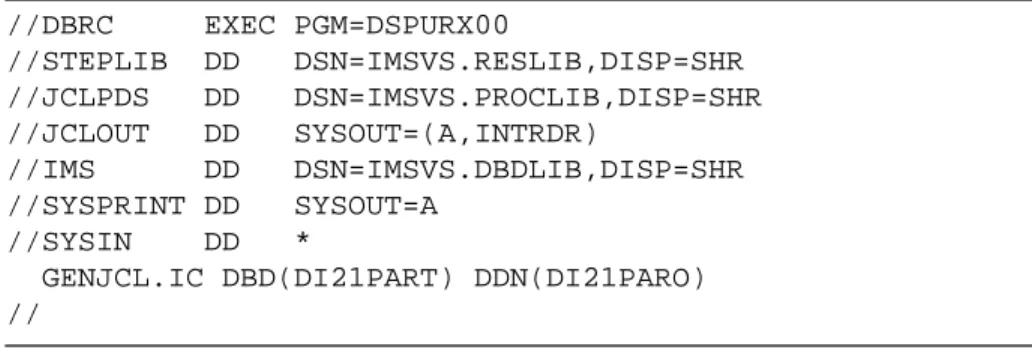
Use the JCLOUT data definition (DD) statement to route the generated JCL to an internal reader (recommended) or a data set for browsing, editing, etc. For example:
How It Works //DBRC EXEC PGM=DSPURX00 //STEPLIB DD DSN=IMSVS.RESLIB,DISP=SHR //JCLPDS DD DSN=IMSVS.PROCLIB,DISP=SHR //JCLOUT DD SYSOUT=(A,INTRDR) //IMS DD DSN=IMSVS.DBDLIB,DISP=SHR //SYSPRINT DD SYSOUT=A //SYSIN DD *
GENJCL.IC DBD(DI21PART) DDN(DI21PARO) //
Figure 3 Sample DBRC Job Step
DBRC writes its SYSPRINT data set with a block size of 133. This does not matter if the file is allocated to SYSOUT, but if you are writing it to DASD for perusal by a program, this is very bad. Adding DCB=BLKSIZE=23408 to the allocation for this data set at one customer site reduced EXCPs from 75,425 to 416, and reduced the run time of the step from five minutes to a few seconds.
Note: You have to include the appropriate%SELECT commands,%DELETE
commands, etc. in your skeletal JCL. These commands allow you to control under which conditions JCL is to be generated. Examples are given throughout this manual and IBM manual GG24-3333; they are explained in the DBRC Guide and Reference manual. There is also an excellent BMC Software publication I put together after some lengthy testing of this feature, which is rather boringly entitled GENJCL.USER Examples and Description—a riveting read designed to cure your insomnia problems.
Commands
You can enter DBRC commands in lots of different ways. Some customers use ISPF front-ends to make command entry easier—I personally think these are a waste of time as your objective in life should be to automate the
interface to DBRC and not spend your life entering commands with 12-digit timestamps.
Try to set up automated procedures, usingGENJCL.USER (see below), MVS procedures, IMS automated operator programs (available to DBCTL as from IMS V5), etc. Any production procedure that requires you to look in RECON or enter a DBRC command is a non-starter in my opinion. Do not use TSO foreground for DBRC, as the enqueues can cause other systems (e.g. online IMS) to hang waiting for your TSO session to finish.
How It Works
BMC Software, Inc., Confidential and Proprietary Information
Chapter 1 Database Recovery Control 11 It is not possible to execute the DBRC Recovery Control utility under the control of UCF (Utility Control Facility). No checking is done to prevent this, and the results are unpredictable (actually, they are totally
predictable—it doesn’t work properly!).
GENJCL
There are several useful parameters available on theGENJCL commands. • DEFAULTS(member)
is an optional parameter you use to specify the skeletal JCL default members to be used when generating JCL. Up to 10 members can be specified. Default members are searched to resolve keywords in the order in which the members are specified on this parameter.
If a keyword is assigned a value in both theDEFAULTS andUSERKEYS
parameters, the value specified inUSERKEYS is used. • JCLOUT(JCLOUT/ddname)
is an optional parameter you use to specify the output data set for the generated JCL. The data set is specified by ddname. A JCL DD statement with this ddname must be included in the job step containing theGENJCL
command. The specified data set can be a member of a partitioned data set (PDS) as long as it is not the same data set used for the default
JCLOUT.
JCLOUT(JCLOUT) is the default. • JCLPDS(ddname)
is an optional parameter you use to specify the skeletal JCL data set to be used for input when generating JCL. The data set is specified by ddname. A JCL DD statement with this ddname must be included in the job step containing theGENJCL command.JCLPDS(JCLPDS) is the default. • JOB/JOB(member)/NOJOB
are mutually exclusive, optional parameters you use to specify whether to produce the job statement in the generated JCL.
How It Works
JOB specifies that the job statement is produced. WhenJOB is specified without a member name, the IBM-supplied execution member JOBJCL produces the job statement, so if you are going to use this make sure that the JOBJCL member contains valid JCL for your environment. When
JOB(member) is specified, the specified execution member produces the job statement.NOJOB specifies that the job statement is not produced in the generated JCL.JOB is the default.
• LIST/NOLIST
are mutually exclusive, optional parameters you use to specify whether to print the generated JCL using the SYSPRINT data set.
LIST prints the generated JCL. NOLIST suppresses printing of the generated JCL.NOLIST is the default. I use this a lot for testing—I generate JCL and list it to check it. When I’ve got it sorted out, then I route it to an internal reader to execute.
• USERKEYS(%key1,'value'/%key2)
is an optional parameter you use to set the value of keywords you have defined. Up to 32 keywords can be specified.
%key1 is the user-defined keyword being assigned a value. The maximum length of the keyword is 8 characters, including the percent sign. The first character after the percent sign must be alphabetic (A-Z). The remaining characters must be alphanumeric (A-Z, 0-9).
value is the value assigned to the user-defined keyword when it is encountered. value can be any character string enclosed in quotes. The maximum length of value is 132 characters. If value contains a quote, use two single quotes. value can be a null string ('').
%key2 is any simple keyword previously assigned a value, including DBRC and user-defined keywords.
Have a look in my GENJCL.USER Examples and Description manual for some scintillating examples of how to use these.
GENJCL and BMC Software
When you useGENJCL with the normal IMS utilities, it goes to RECON to extract the information required, combines this with your skeletal JCL and produces a job to execute. When this job starts, the first thing it does is to check that the JCL is correct by reading the RECONs again.
How It Works
BMC Software, Inc., Confidential and Proprietary Information
Chapter 1 Database Recovery Control 13 If you are using BMC Software utilities—IMAGE COPY PLUS, CHANGE ACCUMULATION PLUS, and RECOVERY PLUS—then you are
recommended not to useGENJCL. Simply execute the BMC Software job for the appropriate group of DBDSs. The BMC Software job will then go to the RECONs, determine the relevant data sets, dynamically allocate these (if you have chosen that option—also recommended), and execute. This means only one read of the RECONs, instead of two.
Commands
The RECONs can be amended, interrogated, backed up, etc., using DBRC commands (such as LIST.RECON STATUS). These are all documented in the IMS manuals.
One common complaint is that there is no security mechanism for DBRC commands. Users are either allowed to do everything or nothing. What this means is that you have to give users Resource Access Control Facility (RACF) control authority, even if they only want to issueLIST commands. PGM(DSPURX00) always opens RECONs for update, even if you are producing a listing.
IBM has recently announced a product called the IMS DBRC Security Tool to address these areas—I’m afraid I have not had time to play with it yet.
BMC Software, Inc., Confidential and Proprietary Information
Chapter 2 RECON Setup 15
20
Chapter 2
RECON Setup
This chapter is a collection of pointers to various manuals about the best way to set up the RECON data sets.
The placement of the RECON data sets in the direct access storage device (DASD) configuration is very important. While the primary rule is to configure for availability, the performance implications should not be neglected. It is bad news to lose both of your active RECON data sets at the same time (to paraphrase Oscar Wilde, the loss of one RECON might be considered unfortunate, but the loss of both—or all three—is careless in the extreme).
See the DBRC Guide and Reference manual for further details on placement and a discussion of Global Resource Serialization (GRS) with DBRC.
Creating a RECON Data Set
A RECON data set is a VSAM KSDS. It is created by the use of aDEFINE CLUSTER command. The high-level identifier should be different for each RECON data set. This allows them to be cataloged in different catalogs (this restriction is lifted in DFP version 3). It is recommended the low-level identifier be RECON1, RECON2, or RECON3 respectively. However, anything that conforms to your company standards is acceptable. You should try to keep the RECONs small, as they can become a performance bottleneck (especially when shared amongst multiple MVS images). Each job step accessing the RECONs uses ENQ/DEQ to “hold” the RECONs while doing its updates, so don’t submit 500 image copy jobs (one for each DBDS) at the same time—you will cripple your performance. Set up your jobs to copy and recover groups of database data sets in one job step.
Creating a RECON Data Set
Here are some things to keep in mind:
• Keep the number of image copy generations down to a sensible number. DBRC retains all recovery related records (IC, CA, ALLOC, LOGALL, RECOV, REORG, PRILOG, etc.) back to the oldest image copy in RECON. If you image copy once a week and keep 10 generations of image copy, then your RECONs will be at least 10 weeks big. Ask yourself how often you have had to go back to a previous generation of image copy. Three or four generations should be quite sufficient for most users. See also “GENMAX Cycle—Log Cleanup in RECON” on page 45 for further details.
• Keep the number of change accumulation generations down to a sensible number.
• Delete the INACTIVE log records/entries from RECON regularly—see “DELETE.LOG INACTIVE” on page 57.
• Reorganize the RECONs regularly—see “Reorganization of RECONs” on page 23.
• Consider compressing them with software like the BMC Software DATA ACCELERATOR Compression product.
• Put them behind a cache.
Here are some guidelines that one customer provided for allocating a primary space allocation for the RECON data set:
• The RECON data set holds approximately 30 days’ worth of data. • Jobs causing the entries in the RECON data set are run constantly. • They use 8K control intervals with spanned records and a maximum
record size of 64K.
• They always use dual image copies.
The records contained in the RECON data set are as follows: • 2 change accumulation group (CAGRP) records
• 15 change accumulation records per CAGRP record • 286 database records
• 396 DBDS records
• 5 IC records per DBDS record with an average of one volume each • 30 ALLOC records per DBDS record
• 1970 primary recovery log (PRILOG) records—mainly with one volume each
• 1970 secondary recovery log (SECLOG) records—mainly with one volume each
RECON Buffering
BMC Software, Inc., Confidential and Proprietary Information
Chapter 2 RECON Setup 17 • 2 SUBSYS records
• approximately 100 RECOV/REORG records
This information utilizes eight cylinders of a 3380 disk. If your RECON starts growing beyond 20 cylinders, you are probably not cleaning it up properly.
TheRECORDSIZE(avg,max)average parameter for a RECON data set should set to be 128. The maximum record size should be large enough to contain the largest recovery or system log data set anticipated. Should this be larger than 32,760 bytes, which happens to be the largest CI size allowed in VSAM, then use theSPANNED parameter to spread the record over several CIs. (In fact, if yourRECORDSIZE for RECON is greater than 8K, you are recommended to use 8K CIs and specifySPANNED.)
There are several record types in the RECON, which can grow to larger than 32K. The most common problem is the PRILOG record—see “Size of PRISLD/PRILOG Record” on page 61 for further details. The other record that can grow if you have a large number of databases authorized to a subsystem is the SUBSYS record—the size of this is 72 + (number of authorized DBs x 32 bytes).
The key size changes from 24 bytes to 32 bytes when you go to V6—see below forUPGRADE procedures.
Use different sizes and differentFREESPACE specifications for each RECON, and make all three RECONs different sizes so they don’t all fill up at the same time. Don’t change any of the VSAM parameters while the RECONs are in use. Wait until the active subsystems have terminated, then go through a procedure of backup, change, check, backup, and start again.
Ensure that the smallest data CI size specified exceeds the largest index CI size specified by at least 2048 bytes. Failure to do so can seriously degrade your DBRC performance.
RECON Buffering
It is not easy to find this in the manuals, but it makes a big difference to your RECON performance. Use BookManager and search on DSPBUFFS—you will then find the details you require in the Customization Guide.
RECON Buffering
Use CSECT DSPBUFFS, which is link-edited into DSPCINT0, to specify the number of buffers you want to use. If you can’t find this CSECT in your source libraries, it is due to the fact that it is supplied as part of the optional source (SVOPTSRC), which you have to pay extra for. Do not panic, simply use BookManager to find it (or wait for this book to come out on CD-ROM) and then cut and paste it across; or, of course, you could just type it in anyway!
DSPBUFFS CSECT .... ....
LSRONLIN DC AL2(6,12) XA ENVIRON - IMS ONLINE DBRC LSRCICS DC AL2(6,12) XA ENVIRON - CICS USE OF DBRC LSRBATCH DC AL2(6,12) XA ENVIRON - OFFLINE/BATCH DBRC ....
NSRONLIN DC AL2(2,2) NONXA ENVIRON - IMS ONLINE DBRC NSRCICS DC AL2(2,2) NONXA ENVIRON - CICS USE OF DBRC NSRBATCH DC AL2(2,2) NONXA ENVIRON - OFFLINE/BATCH DBRC
IMS TM and DBCTL users should specify ten times the default number of buffers, as the buffers are allocated in the DBRC separate address space, where you have plenty of space. CICS-DL/1 (and batch) users should allocate as many buffers as their virtual storage permits.
At physical open time, the maximum buffers used are the LSRPOOL plus three times the NSR (i.e., 6 data + 6 index) = 168K (for 2K index and 8K data). In steady state, the maximum buffers used are the LSRPOOL plus two times the maximumRECORDSIZE.
Here are some further tips I picked up from a customer via the IMS list server:
Besides looking at the DSPBUFFS CSECT, you might want to try looking closely at a LISTCAT for the RECONS. If you're on 3390s, then the 16K CI size results in a 4K physical record size. Try going to 18K CI for the data component; you'll get an 18K physical record size resulting in just 3 records per track instead of 12. That's 1/4th the I/O for each block. Going to 18K also increases the DASD usage from 86.74% to 97.59%.
As far as recommendations for DSPBUFFS goes, try to keep an entire control area of data in memory. For the 18K CI, that's 45. If you let the index CI default, VSAM will pick 512K since there are less CIs/CA. Look at the LISTCAT to see how many index CIs exist, then pick a number that will keep a manageable amount in storage.
But don't forget that more buffers means more region is needed. If you increase the batch numbers too much, jobs will start running out of memory. The online numbers should be safe to increase since you control the region
Changing Versions—the UPGRADE command
BMC Software, Inc., Confidential and Proprietary Information
Chapter 2 RECON Setup 19
Changing Versions—the UPGRADE command
When you migrate from one IMS version to another, the RECONs change (new record types, new record formats etc.), and you must apply an SPE to your previous system andUPGRADE the RECONs to the new level. The
UPGRADE command comes as part of a Migration/Coexistence SPE for your current IMS version and uses a special DBRC utility—DSPURU00 (also part of the SPE), not the usual DSPURX00.
Prior to V6, thisUPGRADE followed the following steps: • Back up both RECON data sets.
• Install the Migration and Coexistence SPE. • Back up.
• Install the new IMS release. • Back up.
• UPGRADE.RECON—produces one good RECON. • Back up new COPY1 RECON.
• Define new RECON.
• LIST.RECON STATUS orCHANGE.RECON DUAL to reinstate duality. • Back up.
• Define SPARE RECON.
Note thatUPGRADE.RECON only accepts a RECON1 DD statement and assumes that it is pointing at a valid copy. UseLIST.RECON STATUS to ensure that RECON1 is either COPY1 or COPY2. If it is not, useCHANGE.RECON REPLACE as described in Chapter 3, “RECON Care and Maintenance” to copy one of the current RECONs to RECON1.
No jobs that access RECON may be run during theUPGRADE process.
Version 6
Just to keep you on your toes, they changed it all in IMS V6 because the key length of the RECON records changes to accommodate the new UTC (year 2000) timestamps.
The procedure for V6 is documented in the DBRC Guide and Reference. Study it carefully and follow it religiously. There is noDOWNGRADE
command—hence the recommendation to takeBACKUPs at each stage of the process in case anything goes wrong.
BMC Software, Inc., Confidential and Proprietary Information
Chapter 3 RECON Care and Maintenance 21
28
Chapter 3
RECON Care and
Maintenance
This chapter covers topics related to monitoring the status of your RECON data sets and what to do if something goes wrong with them.
Monitoring Status of RECONs
Loss or corruption of all RECON data sets is a major catastrophe, causing loss of service and probably jeopardizing system and data integrity. Adhering to the following guidelines will reduce the likelihood of RECON data sets being lost or corrupted.
1. Use the parameterSTARTNEW(NO) on theINIT.RECON orCHANGE.RECON
command.
2. Allocate a third spare RECON data set. 3. Use dynamic allocation.
4. Position all three data sets sensibly.
These precautions are important because only one RECON data set can be discarded without impacting availability.
Methods of Monitoring
Following are methods for monitoring RECON data sets in three different environments: online IMS system, batch, and CICS-DL/1.
Monitoring Status of RECONs
Online IMS System
The status of the RECONs can be determined from any online IMS system using those RECONs (depending on terminal security for the/RML
command) by entering the following:
/RML (LTERM xxxxxxxx) DBRC='RECON STATUS'
The optionalLTERM parameter permits you to route the output from the
RMLIST command to an alternative terminal (usually a printer). This method of monitoring the RECONs is only applicable while online IMS is running. You can also issue online DBRC commands from automated operator programs. Many users set up batch message processing (BMP) programs that monitor the status of the RECONs regularly.
Batch
You can monitor the status of the RECONs in batch mode through a two-step job. First, issue aLIST.RECON STATUS command and write the file
SYSPRINT to a data set. Second, analyze that output with a program. The advantage to this method is that it uses the standard dynamic allocation for RECONs.
CICS-DL/1
In CICS-DL/1, you can use the DBRC online transaction to issue the
LIST.RECON STATUS command. However, DBRC commands are infrequently used in CICS-DL/1 because they require 430K additional virtual storage in the CICS-DL/1 region.
Satisfactory Status of the RECONs
RECON1, RECON2, and RECON3 should be of unequal size. If RECON3 is the largest, then RECON1 and RECON2 should be COPY1 and COPY2 (either order), and RECON3 should be the SPARE. A SPARE RECON is an empty VSAM KSDS.
Reorganization of RECONs
BMC Software, Inc., Confidential and Proprietary Information
Chapter 3 RECON Care and Maintenance 23 IMS/ESA VERSION 6 RELEASE 1 DATA BASE RECOVERY CONTROL PAGE 001 LIST.RECON
98.237 12:20:05.6 LISTING OF RECON PAGE 002
RECON
RECOVERY CONTROL DATA SET, IMS/ESA V6R1
DMB#=20 INIT TOKEN=97274F1724077F
FORCER LOG DSN CHECK=CHECK44 STARTNEW=NO
TAPE UNIT=CART DASD UNIT=SYSALLDA TRACEOFF SSID=**NULL**
LIST DLOG=YES CA/IC/LOG DATA SETS CATALOGED=YES
LOG RETENTION PERIOD=00.001 00:00:00.0 TIMESTAMP INFO...
- DD -STATUS- -DATA SET RECON1 COPY1 IMS61A.RECON1 RECON2 COPY2 IMS61B.RECON2
RECON3 SPARE IMS61C.RECON3
Figure 4 Output Showing Satisfactory RECONs
Reorganization of RECONs
Periodically, reorganization is necessary because the RECONs are VSAM KSDSs. DBRC automatically deletes some records; the user must delete others. See “GENMAX Cycle—Log Cleanup in RECON” on page 45 for additional information. After this cleanup, the user should perform a reorganization to reclaim free space and eliminate any CI and CA splits.
The Easy Way
The easiest way to reorganize a VSAM KSDS with theNOREUSE attribute is toREPRO the data set to a sequential (if record size is less than 32K) or VSAM data set, delete and redefine the KSDS, andREPRO the data back. However, this is not the safest method. With this method there will only be one valid RECON. If RECON(s) have been discarded, there may not be any valid RECONs.
Reorganization of RECONs
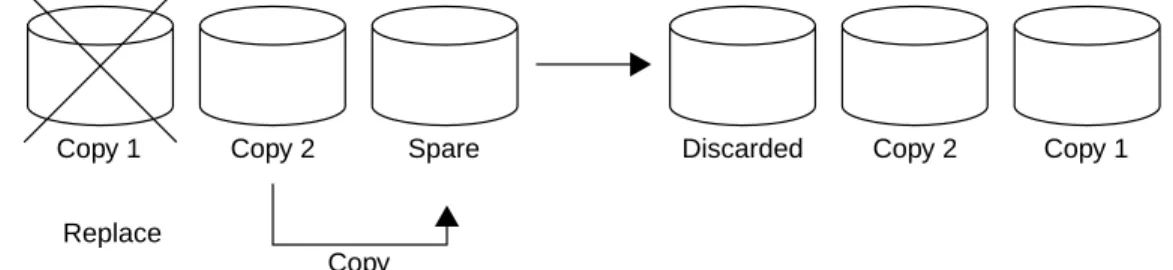
A Safer Method
A safer method of reorganizing a VSAM KSDS is to successively use the
CHANGE.RECON command with theREPLACE parameter, followed by the IDCAMS command to delete and define the discarded RECON.
You can write a program in a high-level language to determine the current status of the RECONs (see “Monitoring Status of RECONs” on page 21), invoke an Assembler routine that will link to DBRC (DSPURX00) and replace a RECON, and link to IDCAMS to delete and define the discarded RECON.
Note: It is not possible to delete a data set while it is allocated elsewhere. However, as far as I am aware (unless they have changed VSAM recently), you can delete a VSAM data set on one CPU while it is allocated on another CPU. This means that such a program cannot operate while any DBRC job is active.
An online IMS system will free a discarded RECON when it next accesses the RECONs. So you can write a BMP automated operator interface (AOI) program to check the STATUS of the three RECONs, issue the/RMCHANGE
command to discard the first RECON, issue a/DIS OLDS or/RML RECON STATUS command to force IMS to access the RECONs and force
deallocation of the now discarded RECON. Now run IDCAMS to delete and redefine the discarded RECON. You can repeat this procedure for the second RECON.
This procedure will work if this online IMS system is the only job currently using the RECONs. If other jobs are active, IDCAMS will have to wait until the other jobs have also discarded and deallocated the “bad” RECON. This can, for instance, be a problem when sharing the RECONs across CPUs.
Figure 5 A Safer Method of Reorganizing the RECONs
Copy 1 Copy 2 Spare Discarded Copy 2 Copy 1
Replace
Reorganization of RECONs
BMC Software, Inc., Confidential and Proprietary Information
Chapter 3 RECON Care and Maintenance 25 If you issue a write-to-operator with reply (WTOR) or programming
language one (PL/1) display after eachCHANGE.RECON, you can also operate the program in a multi-online IMS environment. A message instructing the master terminal operator (MTO) to issue a/DIS OLDS to each online system before replying to the program would be displayed on job entry subsystem (JES) consoles.
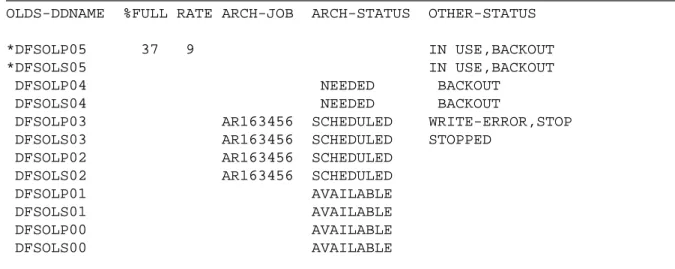
/DIS OLDS
The/DIS OLDS command gives the status of all the OLDS and WADS—it accesses the RECONs as part of this process and hence can be used as outlined above to trigger the deallocation of a “bad” RECON.
OLDS-DDNAME %FULL RATE ARCH-JOB ARCH-STATUS OTHER-STATUS
*DFSOLP05 37 9 IN USE,BACKOUT
*DFSOLS05 IN USE,BACKOUT
DFSOLP04 NEEDED BACKOUT
DFSOLS04 NEEDED BACKOUT
DFSOLP03 AR163456 SCHEDULED WRITE-ERROR,STOP
DFSOLS03 AR163456 SCHEDULED STOPPED
DFSOLP02 AR163456 SCHEDULED
DFSOLS02 AR163456 SCHEDULED
DFSOLP01 AVAILABLE
DFSOLS01 AVAILABLE
DFSOLP00 AVAILABLE
DFSOLS00 AVAILABLE
DUAL OLDS LOGGING, DUAL WADS LOGGING AUTOMATIC ARCHIVE = 02
WADS = *DFSWADS0 *DFSWADS1 DFSWADS2 DFSWADS3
Figure 6 Sample /DIS OLDS Output
Recovery Following a Discarded RECON
Recovery Following a Discarded RECON
An advantage to having a program that reorganizes the RECONs is that you can very easily design it to recover from a situation like a RECON being discarded. All you have to do is wait for the “bad” RECON to be discarded (= deallocated) by all the subsystems currently running and then use IDCAMS DELETE/DEFINE to create an empty VSAM KSDS. The next job step to access the RECONs will then find this data set and recognize it as a SPARE RECON. The trick is noticing that you have lost a RECON—either trap the RECON messages in an MVS exit or run aLIST.RECON STATUS on a regular basis to see if any of the RECONs is bad.
Losing Two RECONs
If you lose two RECONs and you haveNONEW specified, then no new jobs will start. If you now issueLIST.RECON STATUS you will get output similar to the following:
DSP0014I DYNAMIC ALLOCATION FAILED FOR RECON2
DSP0014I RETURN CODE=04 REASON CODE=1708
DSP0014I DYNAMIC ALLOCATION FAILED FOR RECON3
DSP0014I RETURN CODE=04 REASON CODE=1708
DSP0243I JOB TERMINATED DUE TO UNAVAILABLE SPARE RECON
DSP0243I THE ONLY AVAILABLE RECON IS
DSP0243I DSN=RCNBR.RVP.R61.RECON1
Figure 7 Output After Issuing LIST.RECON STATUS with Two Lost RECONs
Identify which is the correct valid RECON, delete/define the other two, and then issueCHANGE.RECON DUAL or LIST.RECON STATUS. This will reestablish dual RECONs with a SPARE.
Losing All Three RECONs
It is impossible to recreate all the information in the RECONs using
commands. Restoring RECON to an earlier point in time and adding missing log etc. data is not a correct method (in the Recovery Control and Share Control environments). With careful planning, you should never lose all three RECONs.
BACKUP.RECON
BMC Software, Inc., Confidential and Proprietary Information
Chapter 3 RECON Care and Maintenance 27 The quickest and only safe method of rebuilding and re-synchronizing the RECON data sets in these circumstances is to clean up the abended jobs, which will involve backout of in-flight work, take a fresh set of RECONs with all the databases, groups etc. registered (it is worth keeping a PDS member handy with all theseINITdefinitions stored in it—if I ever get time, I will try and write aGENJCL.USER to create all theINIT commands from an existing RECON) and then image copy everything.
I met the man in charge of the IBM Red Books the other day, and he pointed out to me that there is a sample procedure for building theINIT.DB and
INIT.DBDS commands from an existing RECON in SG24-2211—so that’s saved me some work!
BACKUP.RECON
Why do I useBACKUP.RECON then, if not to cater for loss of the RECONs?
BACKUP.RECON should still be used for several reasons:
1. Taking a copy of the RECONs offsite. Whenever you take data offsite (e.g. image copies and/or logs), you should take a copy of the RECONs at the same time—see Chapter 18, “Offsite Considerations” for further details.
2. Before applying maintenance—e.g. the Migration and Coexistence SPE—see “Changing Versions—the UPGRADE command” on page 19 for further details.
3. When something has gone wrong and you don’t know what to do—take a BACKUP of the RECONs and play with them. When you’ve sorted out what commands to issue, go back and use the production RECONs.
BACKUP.RECON uses IDCAMSREPRO internally, but it also does an enqueue on the RECONs to guarantee that no updates occur during theBACKUP—a fuzzy backup is useless—so you should always useBACKUP.RECON rather than pack dumps or other software.
BACKUP.RECON
However, your RECON record size may be greater than 32K (e.g. SUBSYS record—see “Creating a RECON Data Set” on page 15 or PRILOG/PRISLD record—see “Size of PRISLD/PRILOG Record” on page 61) andREPRO will not copy a VSAM KSDS to a non-VSAM data set when the maximum record size is greater than 32,760 bytes. You have to back up the RECON to VSAM KSDS (useBACKUP.RECON so that you still get the enqueue, but point the output to an empty VSAM KSDS). When using this method of backup (rather than to non-VSAM data sets), you must use empty—IDCAMS DELETE/DEFINEd—KSDS. Otherwise, your output will be merged with the previous backup copy. Once you have backed up your RECONs to VSAM KSDS, then use another piece of software like DFDSS or FDR to copy this data set to tape/cartridge.
BMC Software, Inc., Confidential and Proprietary Information
Chapter 4 Initializing RECONs 29
40
Chapter 4
Initializing RECONs
This chapter considers makes recommendations on some of the important parameters you have to set when initializing the RECONs.
INIT.RECON
To convert an empty VSAM KSDS into a RECON, you use theINIT.RECON
command, which writes the RECON header records. These records identify the data set and are read whenever a RECON data set is opened. The parameters have the following meaning:
• RECOVCTL
indicates that DBRC is to be used for database Recovery Control only—not recommended. Dies in V6.
• SHARECTL
indicates that, in addition to Recovery Control, full DBRC Share Control is to be provided.SHARECTL is the default and is required for DBCTL. • NONEW
will only allow a new subsystem to start if two RECONs are available. This option is the default and is strongly recommended. If a RECON I/O error does occur, the spare can be brought into service to restore the situation where new jobs can be run.
• STARTNEW
will allow a subsystem to start as long as there is one RECON available. This would lead to problems if that RECON also went down.
INIT.RECON
• FORCER
specifies that you wish DBRC to force registration of all databases processed in jobs under DBRC's control, which means that if you run a job with one or more unregistered databases it will abend. This is your ultimate goal. This parameter also means that DBRC will check the data set name of your DBDS against the name registered in RECON and abend if they don’t match.
• NOFORCER
means do not force registration of databases—default. In this case if the data set name does not match, you simply get a warning message—DB not registered. The typical case of this happening is when you have the same DBD names and ddnames for test and production but the data set names are different. You now run a test database against a production RECON by mistake—whoops!! Hence the recommendation to use
FORCER.
Warning! The black hole in DBRC is when you run your production database against the test RECONs by mistake. You are very unlikely to be runningFORCER on your test RECONs, so you would just get a message warning you that the database is not registered (and a message saying that you were running on the wrong set of RECONs—DFS487W) and the job would continue—you must make sure that you never run production databases against the wrong RECONs.
The DFS487W (and DFS485W, DFS486W) come from a fiendishly clever piece of DBRC code called DBRC Usage Indicator (DUI) checking, which is clever enough to tell if you are turning DBRC on and off, running on different RECONs etc. Unfortunately, it just gives you warning messages.
• CHECKxx
tells DBRC which type of log tape data set name comparisons to use during its JCL verification process.CHECK17 is the default, and is there for historical reasons—remember MVS tape labels? (In all cases, the volume serial number is checked.) UseCHECK44.
• SSID
Enter the name of the most frequently used online subsystem. This will save you having to enter theSSID on many commands during normal operation, since the default will be the one specified here.
INIT.RECON
BMC Software, Inc., Confidential and Proprietary Information
Chapter 4 Initializing RECONs 31 • CATDS|NOCATDS
are mutually exclusive, optional parameters you use to modify the status of whether image copy, change accumulation, and log data sets are catalog managed.
• CATDS
specifies that these data sets are catalog-managed. If the data set is allocated by the catalog and theCATDS option is used, DBRC bypasses volume serial and file sequence verification for the data set. See “DBRC and Data Facility Hierarchical Storage Manager (DFHSM)” on page 62 for an explanation of why this is useful.
Note: In order forCATDS option to be effective, the data set must be cataloged, and volume serial information for the data set must be omitted from the JCL. If the data set is cataloged,CATDSis specified, and volume serial information is included in the JCL, DBRC ignores
CATDS and allocates the data set by the JCL. Normal volume serial and file sequence checking occurs.
If the data set is not cataloged,CATDS is not effective, and DBRC allocates the data set by the JCL, with volume serial and file sequence checking.
• NOCATDS
specifies that these data sets, whether cataloged or not, are not to be treated as catalog-managed. DBRC verifies that the volume serial and file sequence numbers appearing in the job file control block are the same as the information recorded in the RECON data set.
• DASDUNIT/TAPEUNIT
specify default UNIT information for tape and DASD. DBRC identifies if a data set is on tape or DASD and stores that information in RECON. It does this for logs, image copy data sets, and change accumulation data sets. Every time you create one of these data sets, DBRC extracts a one-bit flag from MVS that indicates whether the data set is on tape or DASD. It then checks the RECON header record to see what you defined as the default tape and DASD units. So, if you have specified
TAPEUNIT(3480), all data sets that are on tape will be stored in RECON with a UNIT of 3480. See “Concatenated Tape and Disk” on page 62 for details of how to use these parameters.
Entering Timestamps
• LOGRET(time_interval)
is an optional parameter you use to specify the retention period for log data sets. The retention period is the minimum amount of time in which a log becomes inactive after it is opened. (It is then eligible to be deleted).
• LISTDL|NOLISTDL
are mutually exclusive, optional parameters you use to specify whether data set names deleted from the RECON (byDELETE.LOG command or by an archive job log compression) are listed in the job output. The setting specified on this command can be overridden by theDELETE.LOG
command. There is no way to override the setting for log compression (see “Continuous Operations” on page 58 for more information) during an archive job.
• UPGRADE
is an optional parameter you use to specify that the RECON is to be upgraded for IMS V6. It is required whenever a new V6 level RECON data set must be created for use by the Upgrade utility. This parameter sets a safety switch that makes the new RECON unusable until the Upgrade utility is run. Likewise, the upgrade utility requires that the switch has been set in the new RECON.
Entering Timestamps
Prior to V6, timestamps in RECON are 12 digits in the form yyydddhhmmsst
V1, 2, 3, and 4 will not run in the year 2000. V5 (with the correct PTFs—see BMC Software manual Year 2000 and IMS) will.
This is how you would enter a timestamp in a command:
GENJCL.RECOV DBD(...) DDN(...) RCVTIME(981231014169)
and when you print out the RECONs (or preferably just bits of them as
LIST.RECON tends to kill trees), DBRC will format these for you: 98.123 10:14:16.9
Entering Timestamps
BMC Software, Inc., Confidential and Proprietary Information
Chapter 4 Initializing RECONs 33 Some people have purchased or written ISPF front-ends to DBRC to enable them to enter commands and the timestamps more easily. I personally think this is a waste of time—my objective is to enter a “native” DBRC command as infrequently as possible. To me, the interface to DBRC should be
automated, and if I need to find a timestamp/build a DBRC command on a regular basis, then I buy a product and/or write aGENJCL.USER procedure to extract the information from RECON and build the commands/JCL for me automatically.
Version 6
V6 uses Coordinated Universal Time (UTC—I know the initials are in the wrong order, but this comes from the French). UTC is also commonly referred to as Greenwich Mean Time (GMT—correct order, it’s British!). Actually, they are wrong—GMT and UTC are not the same—the difference is leap seconds. Is this important? I have no idea.
In V6 you can enter timestamps in one of the following formats: • compressed: yydddhhmmsst [offset]
• punctuated: [yy]yy/ddd/hh/mm/ss/t [offset] where:
yyyy is the year (0000 to 9999) ddd is the day (000 to 365) hh is the hour (0 to 23) mm is the minute (0 to 59) ss is the second (0 to 59)
t is the tenth of a second (0 to 9)
/ can be any non-numeric character delimiter including blank except the apostrophe.
Offset can be one of the following: